The CMMC Countdown, Part 4

The CMMC Countdown, Part 4

The CMMC Final Rule became effective on December 16, 2024. We will finish reviewing the remaining five-pointers to ensure we can obtain a conditional CMMC certificate if we cannot achieve a 110 score.

CMMC Action Plan continued

PS.L2-3.9.2

Ensure that organizational systems containing CUI are protected during and after personnel actions such as terminations and transfers.

Determine if:

[a] a policy and/or process for terminating system access and any credentials coincident with personnel actions is established;
[b] system access and credentials are terminated consistent with personnel actions such as termination or transfer; and
[c] the system is protected during and after personnel transfer actions.

Consider creating onboarding, offboarding, and transfer procedures. These procedures should define how all access is revoked upon termination and how some access is granted and revoked during a transfer. For a transfer, personnel should gain access to CUI when they transfer into a role that requires it. Conversely, access to CUI should be revoked when they transfer to a role where CUI access is unnecessary.

PE.L2-3.10.1

Limit physical access to organizational systems, equipment, and the respective operating environments to authorized individuals.

Determine if:

[a] authorized individuals allowed physical access are identified;
[b] physical access to organizational systems is limited to authorized individuals;
[c] physical access to equipment is limited to authorized individuals; and
[d] physical access to operating environments is limited to authorized individuals

Consider having a separate CMMC environment, as mentioned in previous posts. You could show your access list if you have an access control system, like a badge reader. Consider writing a procedure that describes how the access list is reviewed and updated. Consider maintaining an inventory list of the CUI devices in your CMMC environment and writing a procedure for updating that list. You should be able to leverage your procedures from the AC domain to show how access is granted to these devices. The inventory list should also identify the networking equipment and security systems and how access to them is restricted to the personnel responsible for maintaining them, such as the IT team.

PE.L2-3.10.2

Protect and monitor the physical facility and support infrastructure for organizational systems.

Determine if:

[a] the physical facility where organizational systems reside is protected;
[b] the support infrastructure for organizational systems is protected;
[c] the physical facility where organizational systems reside is monitored; and
[d] the support infrastructure for organizational systems is monitored.

We can show the access logs generated by the access control system identified in PE.L2-3.10.1. If you rely on a physical key and a video system, like Ring, consider creating a key distribution log, filling out the log to check out the key, and collecting the video logs. That way, you can show who is authorized to lock and unlock the door and show video surveillance at the door.

CA.L2-3.12.1

Periodically assess the security controls in organizational systems to determine if the controls are effective in their application.

Determine if:
We can show the access logs generated by the access control system identified in PE.L2-3.10.1. If you rely on a physical key and a video system like Ring, consider creating a form where keys are checked in and out and showing the video logs.
[a] the frequency of security control assessments is defined; and
[b] security controls are assessed with the defined frequency to determine if the controls are effective in their application.

The CMMC controls must be certified by a C3PAO every three years. Within those three years, a yearly SPRS score must be submitted. Consider doing a quarterly self-assessment for one-fourth of the CMMC controls or a yearly one for one-third. You will have self-assessed each control after one year or three years, whichever frequency you choose. Consider defining the schedule in the SSP. Keep a formal record of each self-assessment and consider having them signed by your leadership. Document any findings in the POAM.

CA.L2-3.12.3

Monitor security controls on an ongoing basis to ensure the continued effectiveness of the controls.

Determine if:

[a] security controls are monitored on an ongoing basis to ensure the continued effectiveness of those controls.

Consider setting up monitoring tools that automatically assess your organization’s security posture. You can use tools like Microsoft Defender XDR, Microsoft Intune, Nessus, and Greenbone.

SC.L2-3.13.1

Monitor, control, and protect communications (i.e., information transmitted or received by organizational systems) at the external boundaries and key internal boundaries of organizational systems.

Determine if:

[a] the external system boundary is defined;
[b] key internal system boundaries are defined;
[c] communications are monitored at the external system boundary;
[d] communications are monitored at key internal boundaries;
[e] communications are controlled at the external system boundary;
[f] communications are controlled at key internal boundaries;
[g] communications are protected at the external system boundary; and
[h] communications are protected at key internal boundaries.

Consider creating a drawing that describes your organizational network. An external system boundary could be your on-site firewall and VPN connection for remote users. Your internal system boundaries could include any VLANs that segregate system resources. The monitoring could be syslog events sent to a SIEM. The controls could be your firewall rules and network ACLs. The protection could be SSL and VPN encryption. Consider implementing web content filtering as an additional layer.

SC.L2-3.13.2

Employ architectural designs, software development techniques, and systems engineering principles that promote effective information security within organizational systems.

Determine if:

[a] architectural designs that promote effective information security are identified;
[b] software development techniques that promote effective information security are identified;
[c] systems engineering principles that promote effective information security are identified;
[d] identified architectural designs that promote effective information security are employed;
[e] identified software development techniques that promote effective information security are employed; and
[f] identified systems engineering principles that promote effective information security are employed.

Consider defining the system architecture for your CMMC environment and a list of security principles and requirements. The principles should define how environmental changes will maintain its security posture. The requirements should be testable and verifiable. For example, a new cloud environment must have a valid FedRAMP or SOC 2 Type II certification, and a firewall and VPN must have valid FIPS 140-3 certification.

SI.L2-3.14.1

Identify, report, and correct system flaws in a timely manner.

Determine if:

[a] the time within which to identify system flaws is specified;
[b] system flaws are identified within the specified time frame;
[c] the time within which to report system flaws is specified;
[d] system flaws are reported within the specified time frame;
[e] the time within which to correct system flaws is specified; and
[f] system flaws are corrected within the specified time frame.

Consider defining a procedure with SLAs. For example, the IT team will:

  • Subscribe to the CISA Cybersecurity Alerts & Advisories.
  • Monitor the email inbox where the emails are sent at least twice a week
  • Create a remediation task for any relevant vulnerabilities.
    • Low CVE vulnerabilities will be due in six months
    • Whereas critical CVEs will be due in 30 days.

SI.L2-3.14.2

Provide protection from malicious code at designated locations within organizational systems.

Determine if:

[a] designated locations for malicious code protection are identified; and
[b] protection from malicious code at designated locations is provided.

Install antivirus software on every machine that contains CUI. Also, consider adding a security subscription to your cloud storage so it performs antivirus scans on your files stored in the cloud.

SI.L2-3.14.3

Monitor system security alerts and advisories and take action in response.

Determine if:

[a] response actions to system security alerts and advisories are identified;
[b] system security alerts and advisories are monitored; and
[c] actions in response to system security alerts and advisories are taken.

Consider subscribing to the CISA Cybersecurity Alerts & Advisories. Your security tools, like Microsoft Defender XDR, might have advisory alerts, but you must configure them. As mentioned, you will want to create remediation tasks to show you are responding to advisories.

AU.L2-3.3.5

Correlate audit record review, analysis, and reporting processes for investigation and response to indications of unlawful, unauthorized, suspicious, or unusual activity.

Determine if:

[a] audit record review, analysis, and reporting processes for investigation and response to indications of unlawful, unauthorized, suspicious, or unusual activity are defined; and
[b] defined audit record review, analysis, and reporting processes are correlated.

Consider setting up a SIEM and sending all your logs there. The SIEM should provide you with reports that can help detect unwanted activity. Review the reports periodically. Consider a monthly review since quarterly reviews may be too long, and weekly reviews might be too often and tiring.

CM.L2-3.4.5

Define, document, approve, and enforce physical and logical access restrictions associated with changes to organizational systems.

Determine if:

[a] physical access restrictions associated with changes to the system are defined;
[b] physical access restrictions associated with changes to the system are documented;
[c] physical access restrictions associated with changes to the system are approved;
[d] physical access restrictions associated with changes to the system are enforced;
[e] logical access restrictions associated with changes to the system are defined;
[f] logical access restrictions associated with changes to the system are documented;
[g] logical access restrictions associated with changes to the system are approved; and
[h] logical access restrictions associated with changes to the system are enforced.

Consider putting networking equipment in a locked networking room only accessible by authorized personnel like the IT team. Also, administrator accounts for the IT team should be created, and permission should only be given to those accounts to make configuration changes.

CM.L2-3.4.6

Employ the principle of least functionality by configuring organizational systems to provide only essential capabilities.

Determine if:

[a] essential system capabilities are defined based on the principle of least functionality; and
[b] the system is configured to provide only the defined essential capabilities.

There should be regular user accounts and administrator accounts. Everyone will have a regular user account with no privileges to modify the CMMC environment. Only the authorized personnel, like the IT team, will have administrator accounts. There should be a super administrator (who can make any change) and limited administrators (with limited privileges based on job role).

CM.L2-3.4.7

Restrict, disable, or prevent the use of nonessential programs, functions, ports, protocols, and services.

Determine if:

[a] essential programs are defined;
[b] the use of nonessential programs is defined;
[c] the use of nonessential programs is restricted, disabled, or prevented as defined;
[d] essential functions are defined;
[e] the use of nonessential functions is defined;
[f] the use of nonessential functions is restricted, disabled, or prevented as defined;
[g] essential ports are defined;
[h] the use of nonessential ports is defined;
[i] the use of nonessential ports is restricted, disabled, or prevented as defined;
[j] essential protocols are defined;
[k] the use of nonessential protocols is defined;
[l] the use of nonessential protocols is restricted, disabled, or prevented as defined;
[m] essential services are defined;
[n] the use of nonessential services is defined; and
[o] the use of nonessential services is restricted, disabled, or prevented as defined.

Consider having software that blocks blacklisted programs, functions, ports, protocols, and services. Another approach is configuring the computer with the bare minimum of programs, functions, ports, protocols, and services. Put restrictions that will require an administrator to approve any modifications.

CM.L2-3.4.8

Apply deny-by-exception (blacklisting) policy to prevent the use of unauthorized software or deny-all, permit-by-exception (whitelisting) policy to allow the execution of authorized software.

Determine if:

[a] a policy specifying whether whitelisting or blacklisting is to be implemented is specified;
[b] the software allowed to execute under whitelisting or denied use under blacklisting is specified; and
[c] whitelisting to allow the execution of authorized software or blacklisting to prevent the use of unauthorized software is implemented as specified.

Blacklisting is the easiest, while whitelisting is the more secure solution. Tools like Microsoft Defender XDR can prevent the execution of blacklisted software. You can use Software Restriction Policies in Windows to whitelist or blacklist too.

IA.L2-3.5.10

Store and transmit only cryptographically-protected passwords.

Determine if:

[a] passwords are cryptographically protected in storage; and
[b] passwords are cryptographically protected in transit

Consider using an identity provider (IdP), like Microsoft Entra ID, to perform the cryptography for you. Use SSO, SAML, or OpenID Connect to use your IdP to log into any third-party and custom applications.

MA.L2-3.7.5

Require multifactor authentication to establish nonlocal maintenance sessions via external network connections and terminate such connections when nonlocal maintenance is complete.

Determine if:

[a] multifactor authentication is used to establish nonlocal maintenance sessions via external network connections; and
[b] nonlocal maintenance sessions established via external network connections are terminated when nonlocal maintenance is complete.

Ensure that MFA is enabled for remote support solutions and remote desktop protocols. For connections that require SSH, consider limiting access from a machine that requires MFA to authenticate.

MP.L2-3.8.7

Control the use of removable media on system components.

Determine if:

[a] the use of removable media on system components is controlled.

The simplest solution is to block removable media. If removable media is necessary, limit mounting the media to an administrator account.

RA.L2-3.11.2

Scan for vulnerabilities in organizational systems and applications periodically and when new vulnerabilities affecting those systems and applications are identified.

Determine if:

[a] the frequency to scan for vulnerabilities in organizational systems and applications is defined;
[b] vulnerability scans are performed on organizational systems with the defined frequency;
[c] vulnerability scans are performed on applications with the defined frequency;
[d] vulnerability scans are performed on organizational systems when new vulnerabilities are identified; and
[e] vulnerability scans are performed on applications when new vulnerabilities are identified.

Consider using vulnerability scanning software, like Nessus, and perform vulnerability scans on the operating systems and installed applications. If you are developing CUI software, consider using a vulnerability scanner, such as Snyk, for application libraries, like npm and pip packages.

SC.L2-3.13.5

Implement subnetworks for publicly accessible system components that are physically or logically separated from internal networks.

Determine if:

[a] publicly accessible system components are identified; and
[b] subnetworks for publicly accessible system components are physically or logically separated from internal networks.

Create a separate VLAN and subnet for systems that can be accessed from the Internet. Ideally, this network should be separated by a DMZ and/or a firewall and cannot access internal, non-public networks.

SC.L2-3.13.6

Deny network communications traffic by default and allow network communications traffic by exception (i.e., deny all, permit by exception).

Determine if:

[a] network communications traffic is denied by default; and
[b] network communications traffic is allowed by exception.

The firewall rule set should have deny as the last rule. The preceding rules should allow specific traffic.

SC.L2-3.13.15

Protect the authenticity of communications sessions.

Determine if:

[a] the authenticity of communications sessions is protected.

All web traffic should be HTTPS with a valid TLS certificate. HTTP traffic should be blocked. SSL or a similar encryption technology should encrypt VPN traffic.

SI.L2-3.14.4

Update malicious code protection mechanisms when new releases are available.

Determine if:
[a] malicious code protection mechanisms are updated when new releases are available.

Your antivirus software should check for updates at least daily though hourly is best and automatically update.

SI.L2-3.14.6

Monitor organizational systems, including inbound and outbound communications traffic, to detect attacks and indicators of potential attacks.

Determine if:

[a] the system is monitored to detect attacks and indicators of potential attacks;
[b] inbound communications traffic is monitored to detect attacks and indicators of potential attacks; and
[c] outbound communications traffic is monitored to detect attacks and indicators of potential attacks.

Consider using a combination of SIEM, MDR, and XDR to analyze your logs and detect potential threats and attacks.

Before you go

Wishing you much success in your CMMC certification journey.

Sign up for my mailing list at https://miguelacallesmba.medium.com/subscribe

Secjuice – ​Read More
Infostealers: An Overview

What are Infostealers?

Infostealers: An Overview

An infostealer is malicious software designed to infiltrate computer systems and extract valuable information from compromised devices. These malware programs operate covertly (not like some malware that perhaps gives pop-ups or noticeably hamper system performance) to collect sensitive data.

For a shorter description, an infostealer is malware that covertly steals secret information from a computer.

 Our computers have tons of sensitive information tucked away – passwords in the browser, cookies with connection tokens, files with sensitive information saved (how many people do you think have a text file saved with a name like “passwords” or “private”?), PDFs with their recovery key codes, Word documents with their banking information – to name a few.

 And in every operating system, there are typical “hidden” places with loads of information about that computer (e.g., Windows registry, Linux /etc, /usr, /bin).

Those are the items that infostealers are after.

Typical Techniques

Infostealers use varied techniques for system infiltration and data extraction. These techniques include but aren’t limited to phishing, infected websites, malicious software downloads (e.g., video game mods, pirated software), and exploiting system vulns.

 Once installed, infostealers harvest data via methods like browser hooking, web injection scripts, form grabbing, keylogging, clipboard hijacking, screen capturing (ironically, this sounds like Microsoft’s recent Recall feature), and browser session hijacking.

Some more specific information

After infecting a computer, infostealers use various the following techniques (including, but not limited to) to acquire data. These include:

  1. Credentials: Credentials are a significant target, providing the quickest and easiest way for the criminal element to access computers. These stolen creds are used to collect login links, usernames, and even passwords stored in the browser.
  2. Cookies: Cookies enable malicious actors to access a logged-in session, bypassing security measures like MFA/2FA.
  3. Documents and text files: Infostealers discover and target high-risk files containing confidential information such as financial, intellectual property, server passwords, and crypto private keys.
  4. Machine-specific properties: These properties include computer name, operating system, IP address, date and pathway of infection, as well as existing antivirus and installed applications. It’s their way of doing recon!

Anatomy of an Infostealer

Bot Framework

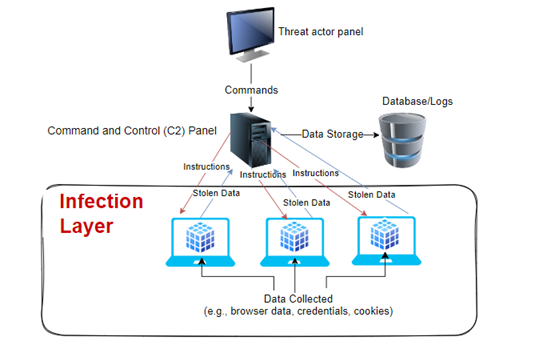
The bot framework is an essential component of many infostealers, designed to operate on many victim machines for infection distribution. Here are key aspects of the Bot Framework:

1.     Configurability: The framework includes a builder allowing attackers to customize the infostealer’s behavior on the target computer. This enables them to specify the data to collect and how the malware should operate.

2.     Data collection capabilities: Bot frameworks typically include modules for:

·                Harvesting browser data (passwords, cookies, autofill information)

·                Extracting credentials from various applications

·                Capturing keystrokes

·                Taking screenshots

·                Gathering system information

3. Stealth: Infostealers are designed to be lightweight and stealthy, leaving a minimal footprint on the infected system.

4. Exfiltration: The bot framework is responsible for sending the collected data back to the attacker’s command and control (C2) server.

5. Versioning: Some sophisticated bot frameworks, like the one used in the Jupyter infostealer, implement a versioning matrix to manage different malware versions.

6. More advanced Bot frameworks may include capabilities for:

·       Downloading and executing additional malware

·       Running PowerShell scripts and commands

·       Process hollowing (for injecting malicious code into apps)

7. Compatibility: Bot frameworks are often designed to work across multiple Windows versions and system architectures. For example, the Continental Stealer is compatible with systems from Windows 7 (x32) to Windows 11 (x64) and supports both ARM and x86-x64 architectures.

8. Anti-detection features: Some bot frameworks incorporate anti-VM capabilities to evade detection when running in virtual environments and self-destruct mechanisms to remove traces after execution.

Here’s a pictorial and general overview of a bot framework: 

Infostealers: An Overview

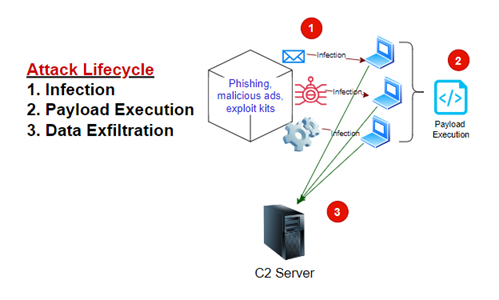
And of the attack lifecycle:


Infostealers: An Overview

All in the Family

Infostealers are technically malware, which we often think of as a product – like buying an office suite or photo editing program – and is, more technically, Malware-as-a-Service (MaaS) because one can pay $130-$750 for Vidar infostealer, for example – depending on the license – to get it from a vendor. But it’s often also referred to as if certain ones are their own entity, family, distributor, reseller, market, campaign, and threat actor. Here, I’ll talk about infostealers in both ways, not focusing on whether or not it’s the malware or threat actor.

Some of the most prevalent infostealer families include Raccoon, RedLine, AgentTesla, Vidar, and AZOrult.

One example of the sophistication of MaaS is the stealer  Rhadamanthys (here’s quick overview of it, with Yara rules at the bottom of the page if you need that to search for activity).

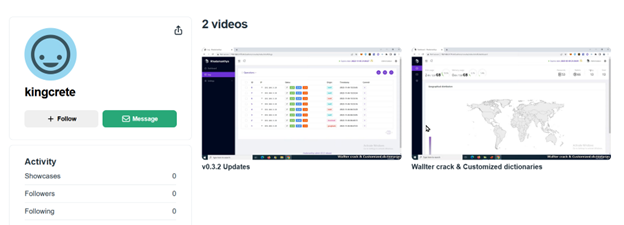
Rhadamanthys has instructional videos on Vimeo about how to use it. 

Infostealers: An Overview

The Top 3?

What are the main ones to be aware of and protect against? There’s no way to determine “Who’s or What’s the most dangerous?” It’s like asking, “What’s the best band?” or “What’s the worst company?” There are so many technical details and subjective experiences that calling something “worst” or best” is not quantifiable. For infostealers, some are spun up and then dismantled, others are used prominently for a while and then placed in the malware junk drawer; some are for mobile, some for specific industries, and others are OS-specfic.

But to focus a little, 3 of the top infostealers are:

1.     Raccoon

2.     Redline

3.     Vidar

Raccoon

Raccoon Infostealer, first observed in April 2019, is a popular and effective Malware-as-a-Service (MaaS). Raccoon targets a wide range of sensitive information – such as login credentials, credit card details, cookies, browser history, and autofill information. Written in C++, Raccoon employs a modular approach to infect both 32-bit and 64-bit Windows-based systems, using process injection techniques to hijack legitimate processes like explorer.exe and gain elevated privileges.

What makes Raccoon particularly dangerous is its comprehensive data collection capabilities. The malware gathers detailed system information, including operating system architecture, version, system language, hardware details, and installed applications. It can also capture screenshots if enabled by the attacker’s configuration. Raccoon follows a standard procedure for each targeted application: locating and copying cache files containing sensitive data, extracting and encrypting the information, and storing it in its main operating directory. After collecting data, Raccoon compresses all stolen information into a single zip file and exfiltrates it to its command-and-control (C2) server, typically using Telegraph or Discord for C2 operations.

Monitoring for Raccoon Stealer

To identify and mitigate the threat of Raccoon Infostealer, several indicators and behaviors can be monitored:

Raccoon Stealer v2 infections are characterized by unusual HTTP requests with empty Host headers and abnormal User Agent headers. The malware frequently changes its User Agent strings to evade detection, making anomaly-based detection methods crucial.

The malware contacts its command-and-control (C2) server using HTTP GET and POST requests, often to highly unusual IP addresses. These requests can include downloading DLL libraries and exfiltrating stolen data.

Upon infection, Raccoon Stealer fingerprints the target system, gathering information such as the operating system architecture, version, system language, hardware details, and installed applications. It uses functions like `RegQueryValueExW` and `GetUserNameW` to retrieve machine IDs and usernames.

The malware collects sensitive data, including browser autofill passwords, history, cookies, credit card details, usernames, passwords, and data from cryptocurrency wallets. It then compresses this data into a zip file (often named `Log.zip`) and sends it to the C2 server via an HTTP POST request.

Raccoon Stealer uses process injection techniques to hijack legitimate processes like `explorer.exe` and gain elevated privileges.

Raccoon Stealer was hampered in 2022 with the arrest of one of its main developers, who then pleaded guilty in 2024. But it’s still active.

Redline

RedLine Stealer, first discovered in 2020, has become one of the most notorious and widely used information-stealing malware in recent years. Operating on a Malware-as-a-Service (MaaS) model, RedLine allows cybercriminals to purchase a turnkey solution for stealing sensitive data from infected systems. This infostealer is capable of harvesting a wide range of information, including saved credentials, autocomplete data, and credit card details from web browsers, as well as data from cryptocurrency wallets, FTP clients, and popular messaging applications like Discord and Telegram.

What makes RedLine particularly dangerous is its ability to gather detailed system information, such as the victim’s IP address, operating system details, installed antivirus software, and hardware configuration. This comprehensive data collection allows attackers to build detailed profiles of their victims and potentially use the stolen information for further malicious activities, including identity theft, financial fraud, or as a stepping stone for more sophisticated attacks like ransomware. The effectiveness and relatively low cost of RedLine have contributed to its popularity among cybercriminals, making it a significant threat in the current cybersecurity landscape.

Redline TTPs

More details on these TTPs can be found at Infostealers.com https://www.infostealers.com/technique/redline-stealer/

T1087, T1071, T1020, T1059, T1555.003, T1132, T1005, T1140, T1573, T1041, T1083, T1562, T1105, T1056, T1095, T1571, T1003, T1120, T1566, T1057, T1055, T1012, T1113, T1518, T1528, T1539, T1082, T1614, T1007, T1124, T1552, T1204

Vidar

First noticed in 2018, Vidar infostealer is a versatile malware that gained prominence in the cybercriminal ecosystem due to its efficiency in harvesting sensitive data. Initially marketed on underground forums as a Malware-as-a-Service (MaaS), Vidar is favored for its ease of use and ability to target a wide range of information, including login credentials, financial data, cryptocurrency wallets, and autofill information from browsers. The malware typically spreads through phishing campaigns, malicious advertising, or exploit kits, making it a persistent threat across multiple industries. Once deployed, Vidar operates silently, exfiltrating data to its command-and-control (C2) server while leaving minimal traces on the infected system.

One of Vidar’s most troublesome attributes is its modular architecture, allowing customization of its functionality. This adaptability lets threat actors use Vidar for reconnaissance, credential theft, or even as a precursor to more devastating attacks like ransomware. The malware is also equipped with anti-analysis techniques, such as virtual machine detection and sandbox evasion, making it challenging for security researchers to dissect its operations. Over time, Vidar has been associated with various campaigns targeting organizations globally, highlighting the growing need for robust endpoint protection, phishing awareness training, and network monitoring to counteract its impact.

Related to Arkei trojan, Vidar can even receive updates!

For additional information, here’s an interview between g0njxa and Vidar staff: https://g0njxa.medium.com/approaching-stealers-devs-a-brief-interview-with-vidar-2c0a62a73087

For those looking to protect their network, here are some defanged IoCs (Indicators of Compromise) – IP Addresses, Domains, and Social Media. Plus some MITRE ATT&CK TTPs. This is just a sampling; much more can be found in the links in this section and the Resources at the end.

IP Addresses

162[.]241[.]225[.]237

– 5[.]79[.]66[.]145

– 104[.]21[.]45[.]70

– 193[.]29[.]187[.]162

– 104[.]18[.]5[.]149

– 45[.]151[.]144[.]128

– 18[.]205[.]93[.]2

Domains

– notepadplusplus[.]site

– download-notepad-plus-plus[.]duckdns[.]org

– download-obsstudio[.]duckdns[.]org

– dowbload-notepadd[.]duckdns[.]org

– dowbload-notepad1[.]duckdns[.]org

– download-davinci-resolve[.]duckdns[.]org

– download-davinci[.]duckdns[.]org

– download-sqlite[.]duckdns[.]org

Social Media

– hxxp://www[.]tiktok[.]com/@user6068972597711

– hxxps://t[.]me/mantarlars

– mas[.]to/@zara99

– ioc[.]exchange/@zebra54

– nerdculture[.]de/@yoxhyp

– hxxp://www[.]ultimate-guitar[.]com/u/smbfupkuhrgc1

– mas[.]to/@kyriazhs1975

– mastodon[.]online/@olegf9844g

– steamcommunity[.]com/profiles/76561199436777531

Vidar Malware MITRE ATT&CK Tactics, Techniques, & Procedures (TTPs)

Technique ID, Description

T1204 – User Execution

T1555 – Credentials from Password Stores

T1539 – Steal Web Session Cookie

T1614 – System Location Discovery

T1518 – Software Discovery

T1007 – System Service Discovery

T1095 – Non-Application Layer Protocol

T1566 – Phishing

T1552 – Unsecured Credentials

T1113 – Screen Capture

T1057 – Process Discovery

T1087 – Account Discovery

T1041 – Exfiltration Over C&C Channel

Protection

It’s never good to present all the things to be afraid of yet not show people how to protect against those fearful apparitions.

There’s a lot of information to sift through. How can we protect ourselves against all of these malicious actors? No report can provide all the ways – too many factors, and many are highly technical. But here are several ways that anybody can use, professional/technical or not.

1.     Multi-Factor Authentication (MFA/2FA): For infostealers, user credentials are a major target. Deploying MFA makes it more difficult for an attacker to use the stolen credentials.

2.     Use strong anti-malware software

a.     New to buying antimalware/antivirus? Search online for top antimalware or best antivirus suites or top 10 AV for 2025

3.     Keep systems and software up-to-date

a.    For home use and personal devices, select automatic download and then install when ready.

b.     For corporate users, automatic updates can cause big trouble for critical systems, so ensure proper testing, but update (or upgrade) when you can. I know…easier said than done.

4.     Use caution with attachments and downloads

a.     If you can slow down to think about what you’re sending or downloading, that’s a great start.

b.     Because many infostealer campaigns deliver malicious files via a phishing email, it’s great to have security solutions that can inspect email attachments for malicious content and provide the ability to rip them out before people can get to them.

5.     Implement strong password policies

a.     Typical home use of computers doesn’t require official policies, but at least keep in mind that the better your password, the better.

6.     Regularly monitor for suspicious activities

a.     Don’t click on those pop-ups on your computer, except to click on the X or Close. Even at that, those are simply buttons that could be tied to actions. So, if at all possible, close the entire browser (at least the tab) instead of clicking on the pop-up.

b.     Set a regular time to review your bank transactions. That doesn’t prevent crime, but at least a long time won’t pass without you knowing about it.

7.     Educate colleagues about social engineering

a.     Professionals – help people out. Non-professionals – ask for help. Security professionals love to help people (we might not fix things or give hour-long seminars for free, but an email now and then is possible). 

There are dangers out there, and with the right knowledge – which is readily available but often either hard to find or overabundant – you can stay safe. Go safely into and through 2025! 

Sources, Resources, and More Information

Raccoon

https://www.blackberry.com/us/en/solutions/endpoint-security/ransomware-protection/raccoon-infostealer

https://www.cyberark.com/resources/threat-research-blog/raccoon-the-story-of-a-typical-infostealer

https://darktrace.com/blog/the-resurgence-of-the-raccoon-steps-of-a-raccoon-stealer-v2-infection-part-2

https://cyberint.com/blog/financial-services/raccoon-stealer/

https://www.justice.gov/usao-wdtx/victim-assistance-raccoon-infostealer

https://www.linkedin.com/pulse/raccoon-stealer-announces-return-new-features-tools-mihir-bagwe

https://www.cyber.nj.gov/threat-landscape/malware/trojans/raccoon

https://www.cid.army.mil/Portals/118/Documents/Cyber-Flyers/Cyberflyer_MalwareAsAServiceRaccoonInfostealer_11-16-2022.pdf

https://www.infostealers.com/article/approaching-stealers-devs-a-brief-interview-with-recordbreaker/

https://www.kelacyber.com/wp-content/uploads/2023/05/KELA_Research_Infostealers_2023_full-report.pdf

https://www.bleepingcomputer.com/news/security/ukrainian-charged-for-operating-raccoon-stealer-malware-service/

Redline

Good and detailed summary: https://cyberflorida.org/redline-stealer-malware-analysis/

 2024 discruption: https://www.bankinfosecurity.com/dutch-police-fbi-infiltrate-info-stealer-infrastructure-a-26643

 https://www.welivesecurity.com/en/eset-research/life-crooked-redline-analyzing-infamous-infostealers-backend/

https://www.kroll.com/en/insights/publications/cyber/redlinestealer-malware

https://proton.me/blog/infostealers

https://www.threatspike.com/blogs/redline-part-1

https://nordvpn.com/blog/redline-stealer-malware/

https://www.linkedin.com/directory/articles/t-402

https://flare.io/learn/resources/blog/redline-stealer-malware/

https://www.csk.gov.in/alerts/RedLine_infostealer_malware.html

https://securityscorecard.com/research/detailed-analysis-redline-stealer/

https://www.cloudsek.com/blog/technical-analysis-of-the-redline-stealer

 https://www.infostealers.com/technique/redline-stealer/

 https://www.esentire.com/blog/esentire-threat-intelligence-malware-analysis-redline-stealer 

https://www.splunk.com/en_us/blog/security/do-not-cross-the-redline-stealer-detections-and-analysis.html 

https://malpedia.caad.fkie.fraunhofer.de/details/win.redline_stealer

https://flashpoint.io/blog/redline-meta-takedown-infostealer/

https://intel471.com/blog/redline-and-meta-the-story-of-two-disrupted-infostealers

Vidar

https://www.checkpoint.com/cyber-hub/threat-prevention/what-is-malware/what-is-vidar-malware/

https://www.hhs.gov/sites/default/files/vidar-malware-analyst-note-tlpclear.pdf

https://wazuh.com/blog/detecting-vidar-infostealer-with-wazuh/

https://www.cyfirma.com/research/vidar-stealer-an-in-depth-analysis-of-an-information-stealing-malware/

https://blog.eclecticiq.com/polish-healthcare-industry-targeted-by-vidar-infostealer-likely-linked-to-djvu-ransomware

https://darktrace.com/blog/a-surge-of-vidar-network-based-details-of-a-prolific-info-stealer

Bot Framework

https://en.wikipedia.org/wiki/Infostealer

https://blog.morphisec.com/jupyter-infostealer-backdoor-introduction

https://lumu.io/blog/infostealers-silent-threat-compromising-world/

https://cyberint.com/blog/research/the-new-infostealer-in-town-the-continental-stealer/

https://flashpoint.io/blog/protecting-against-infostealer-malware/

https://www.f5.com/labs/articles/threat-intelligence/blackguard-infostealer-malware-dissecting-the-state-of-exfiltrated-data

https://www.cyberark.com/resources/threat-research-blog/raccoon-the-story-of-a-typical-infostealer

 https://flashpoint.io/blog/understanding-seidr-infostealer-malware/

Secjuice – ​Read More
A 9th Telecoms Firm Has Been Hit by a Massive Chinese Espionage Campaign, the White House Says

A top White House official said at least eight U.S. telecom firms and dozens of nations have been impacted by a Chinese hacking campaign.

The post A 9th Telecoms Firm Has Been Hit by a Massive Chinese Espionage Campaign, the White House Says appeared first on SecurityWeek.

SecurityWeek – ​Read More
Secure Gaming During the Holidays

Secure Gaming during holidays is essential as cyberattacks rise by 50%. Protect accounts with 2FA, avoid fake promotions,…

Hackread – Latest Cybersecurity, Tech, Crypto & Hacking News – ​Read More
FICORA, CAPSAICIN Botnets Exploit Old D-Link Router Flaws for DDoS Attacks

Mirai and Keksec botnet variants are exploiting critical vulnerabilities in D-Link routers. Learn about the impact, affected devices, and how to protect yourself from these attacks.

Hackread – Latest Cybersecurity, Tech, Crypto & Hacking News – ​Read More
Wiping your Android phone? Here’s the easiest way to erase all personal data

Before you sell or trash your old Android phone, you should properly delete all sensitive information. Here’s the best (and simplest) way to do it.

Latest stories for ZDNET in Security – ​Read More
Malware Trends Report: Q4, 2024 

Can you believe 2024 has come to an end? As we prepare to step into 2025, we’re excited to share key updates on the cybersecurity front from Q4. The last three months were anything but quiet—new threats emerged, familiar ones evolved, and cybercriminals kept raising the stakes. 

At ANY.RUN, we’ve been monitoring these shifts every step of the way. This report pulls together the most significant trends, from the most active malware families to the tactics and techniques shaping cybersecurity. 

Let’s jump in and see what this quarter taught us about the intriguing world of malware. 

Summary 

The number of sandbox sessions has grown compared to Q3 2024

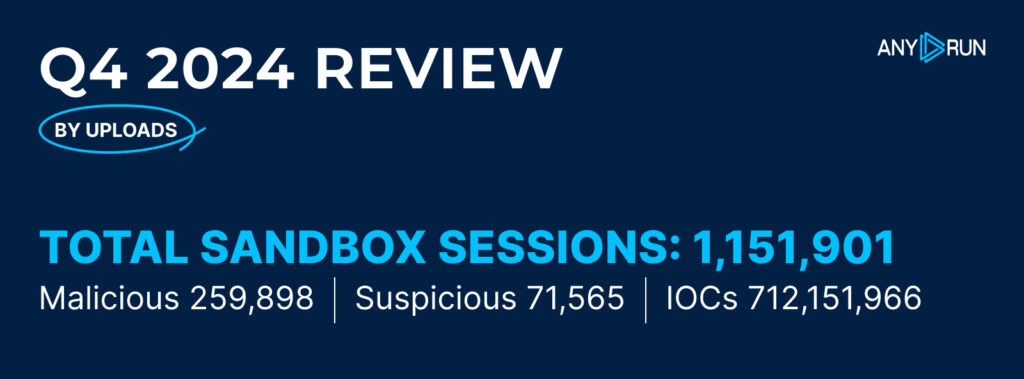
In Q4 2024, ANY.RUN users ran 1,151,901 public interactive analysis sessions, marking a 5.6% increase from Q3 2024. Out of these, 259,898 (22.6%) were flagged as malicious, and 71,565 (6.2%) as suspicious. 

Compared to the previous quarter, the percentage of malicious sandbox sessions rose from 19.4% in Q3 2024 to 22.6% in Q4 2024. At the same time, the share of suspicious sessions grew from 4.3% to 6.2%. 

Users collected an impressive 712,151,966 indicators of compromise (IOCs) during Q4, reflecting the heightened activity and complexity of the threats analyzed. 

Top Malware Types in Q4 2024 

Stealers beat Loaders as the top malware type in Q4 2024

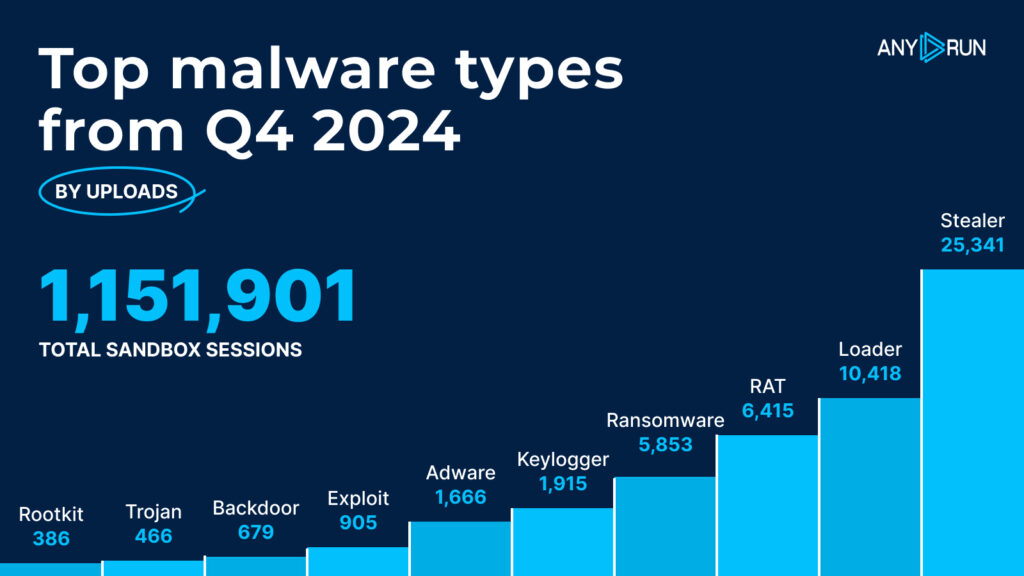
Let’s dive into the most common malware types identified by ANY.RUN’s sandbox in Q4 2024: 

# Type Detections
1 Stealer 25,341
2 Loader 10,418
3 RAT 6,415
4 Ransomware 5,853
5 Keylogger 1,915
6 Adware 1,666
7 Exploit 905
8 Backdoor 679
9 Trojan 466
10 Rootkit 386

Top Malware Types: Highlights 

Q4 2024 saw significant changes in the most detected malware types compared to previous quarters.

  • Stealers took the lead with 25,341 detections, continuing their dominance as the top malware threat. This marks a significant rise from 16,511 detections in Q3, reflecting an increase of 53.5% in Stealer activity. In Q2, Stealers had 3,640 detections, meaning their activity more than doubled from Q2 to Q4. 
  • Loaders also remained a prominent threat, holding steady in second place with 10,418 detections. This is an increase of 27% compared to Q3, where they were detected 8,197 times. In Q2, Loaders had 5,492 detections, so we’re seeing consistent growth in this malware type across the quarters. 
  • RATs continued to be a major concern in Q3 and Q4, although their position dropped to third place in both quarters. In Q4, RATs were detected 6,415 times, representing a 10.8% decrease from Q3 (7,191 detections).  
  • Ransomware saw a slight decrease in Q4, with 5,853 detections, down from 5,967 in Q3, marking a decrease of 1.9%. However, compared to Q2, where ransomware detections were at 2,946, there has still been a clear increase in ransomware activity over the last two quarters. 
  • Keylogger detections had a notable decrease in Q4, with 1,915 detections compared to 3,172 in Q3. This represents a 39.5% drop from Q3. In Q2, Keyloggers were also detected frequently, but the numbers were lower than what we saw in Q3 and Q4. 

A new threat category appeared in the top ten: Adware, which had 1,666 detections in Q4.  

Other notable malware types include Exploits (905 detections), Backdoors (679 detections), and Trojans (466 detections). These malware types had a relatively stable presence, with minor fluctuations in the number of detections compared to the previous quarter.

Rootkits, at the bottom of the list with 386 detections, are also showing up more frequently in analyses, though still less common than other types of malware.

Collect Fresh Intel on Emerging Cyber Threats

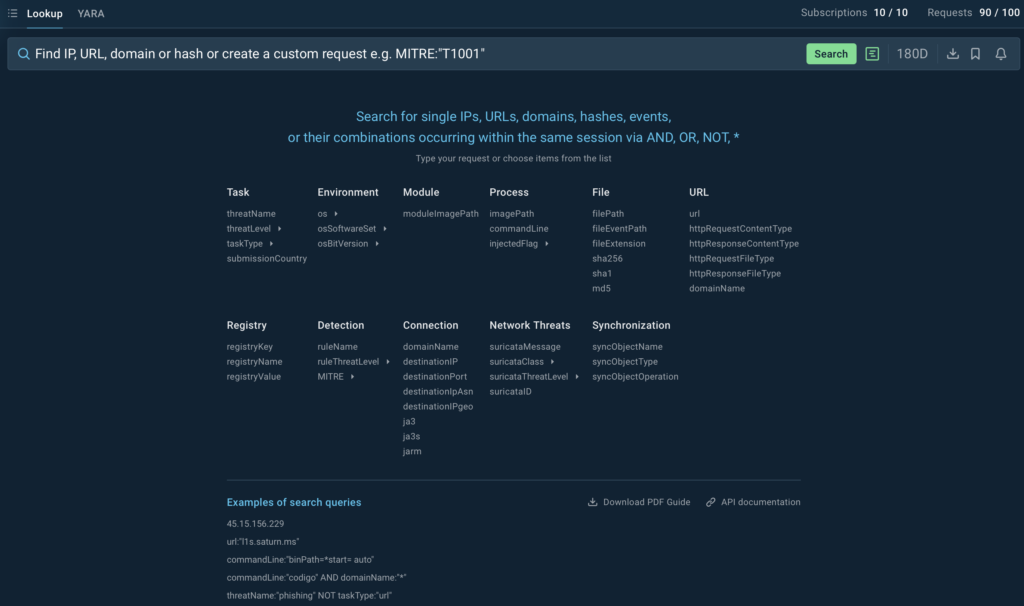
Make sure to use ANY.RUN’s TI Lookup to collect and enrich threat intelligence on the latest malware and phishing attacks.

The service provides access to a database of over 40 types of Indicators of Compromise (IOCs), Indicators of Attack (IOAs), and Indicators of Behavior (IOBs), from IP addresses to mutexes, extracted from the public samples analyzed in ANY.RUN’s Interactive Sandbox.

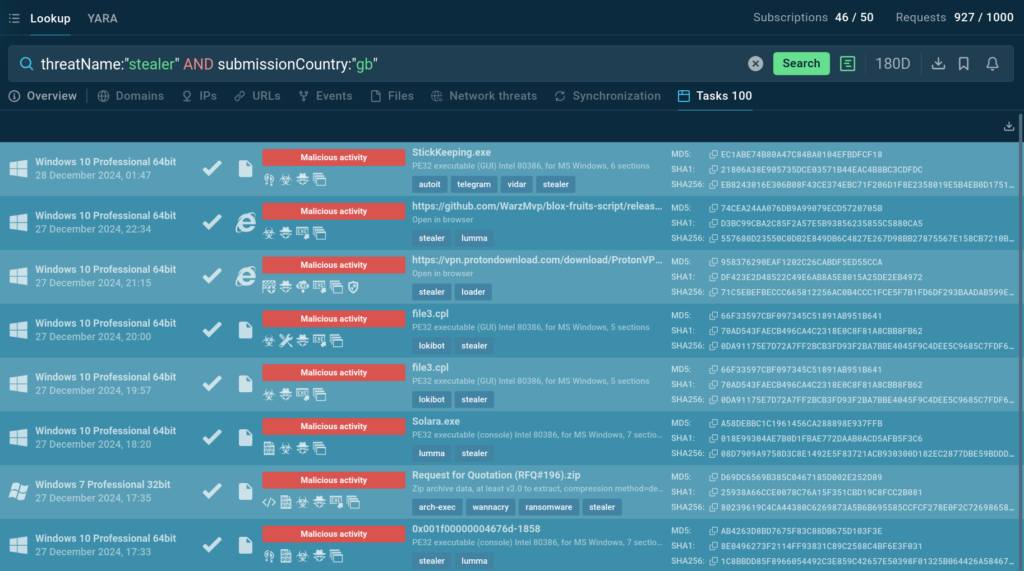
With the following query you can find recent samples of Stealer malware uploaded by users in the UK:

The service provides results that match the submitted query

TI Lookup returns dozens of sandbox analyses matching the query that you can explore in detail and gather intel on the current threat landscape.

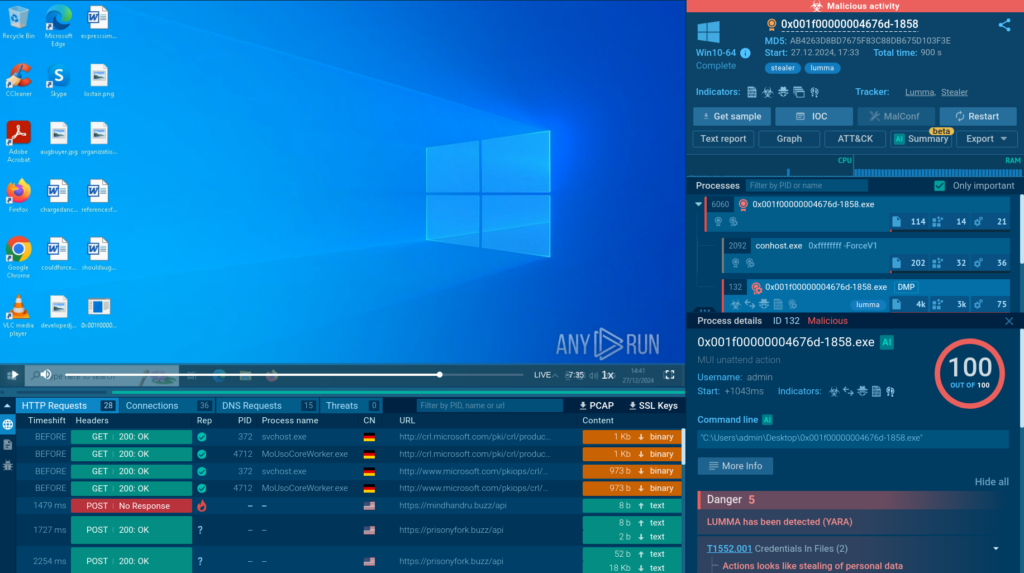
One of the analyses provided by TI Lookup

In this session, we can observe the execution process of a Lumma malware sample.

Get 50 free search requests to test TI Lookup 


Contact us


Top Malware Families in Q4 2024 

Lumma retained its position for the second quarter in a row
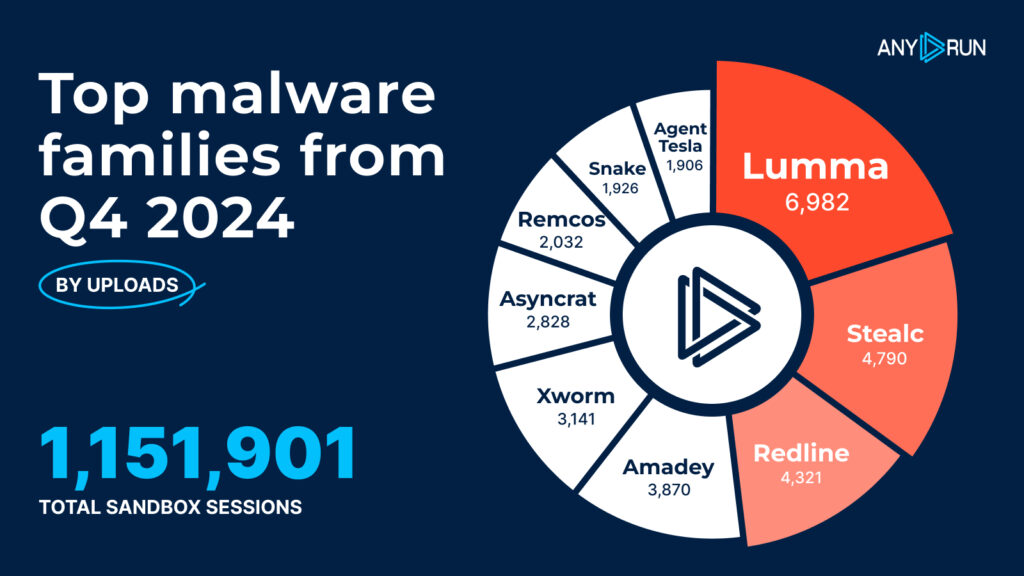
# Malware Family Detections 
1 Lumma 6,982
2 Stealc 4,790
3 Redline 4,321
4 Amadey 3,870
5 Xworm 3,141
6 Asyncrat 2,828
7 Remcos 2,032
8 Snake 1,926
9 AgentTesla 1,906
10 Sality 1,194

In Q4 2024, the malware landscape continued to evolve with several shifts in the prevalence of different malware families.

  • Lumma maintained its strong position, leading the list with 6,982 detections, showing a significant increase compared to Q3 (4,140 detections). 
  • Stealc made an impressive jump to second place, with 4,790 detections, up from 2,030 in Q3. This is a 136.3% increase and positions Stealc as a rising threat in the malware world. 
  • Redline followed with 4,321 detections, a 26.7% rise from Q3. 
  • AsyncRAT and Remcos showed some decrease in activity, indicating possible shifts in threat actor strategies. 
  • Xworm, another notable family, saw a substantial rise, reaching 3,141 detections in Q4, up from 2,188 in Q3. This is a 43.7% increase, making Xworm one of the most concerning threats of the quarter. 

Snake, which appeared on the list for the first time in Q3, continued its activity in Q4, with 1,926 detections, up from 1,782 in Q3, reflecting an 8.1% increase. 

AgentTesla showed a noticeable decrease in activity, dropping to 1,906 detections in Q4 from 2,316 in Q3, which is a 17.7% decline. 

Finally, Sality, which had previously been less active, saw a return to the list with 1,194 detections, making it the tenth most detected malware family in Q4. 

Phishing Activity in Q4 2024 

Tycoon2FA became the most common phishing kit in Q4 2024

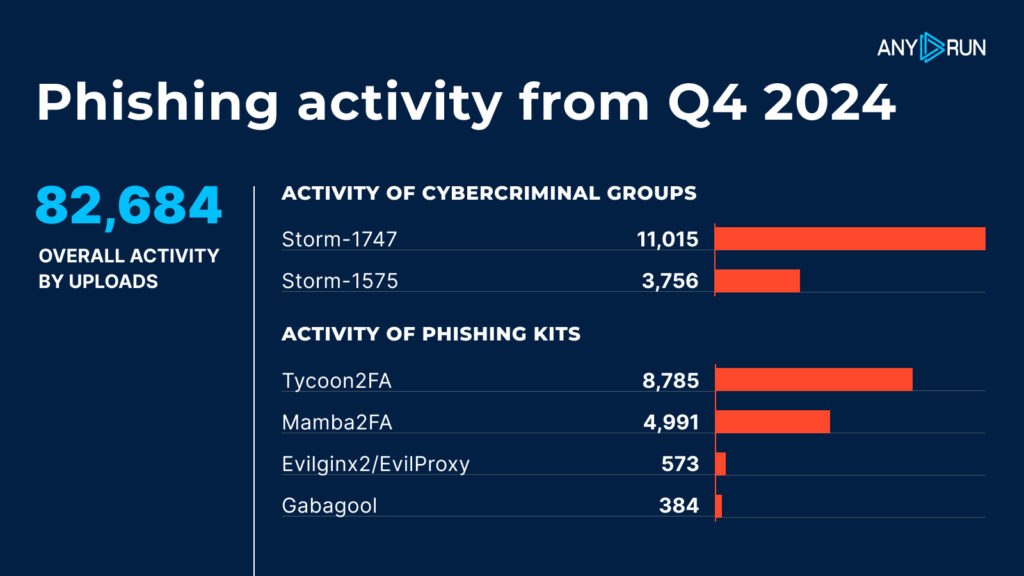
Phishing activity saw a significant uptick in Q4 2024, with a total of 82,684 phishing-related threats flagged across the ANY.RUN sandbox. This shows just how active cybercriminals were, using phishing tactics to target victims. 

Activity by cyber criminal groups: 

  • Storm1747 led the pack with 11,015 phishing-related uploads, making it the most active group. 
  • Storm1575 followed with 3,756 uploads, showing strong but more limited activity. 

Activity by phishing kits: 

  • The Tycoon2FA kit dominated the scene, with 8,785 instances of use. 
  • Mamba2FA came in second with 4,991 detections, reflecting notable activity. 
  • Evilginx2/EvilProxy made a smaller but significant impact with 573 detections. 
  • Gabagool had 384 detections, indicating a more niche but active presence. 

Top 5 Protectors and Packers from Q4 2024 

UPX is the most commonly used packer by threat actors

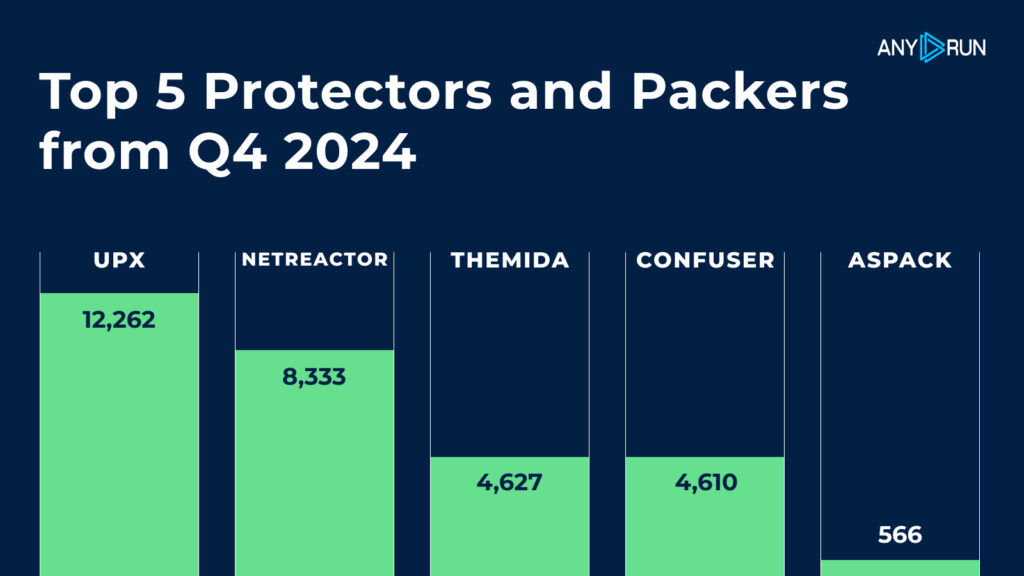
In Q4 2024, the top protectors and packers continued to play a significant role in obfuscating malware to evade detection. Here’s a look at the most common ones: 

  1. UPX: The clear leader with 12,262 detections, making it the most widely used protector/packer. 
  2. Netreactor: With 8,333 detections, it remains a popular choice for malware obfuscation. 
  3. Themida: Used in 4,627 detections, Themida was a key player in malware protection.
  4. Confuser: Close behind with 4,610 detections, Confuser also stood out for its effectiveness. 
  5. Aspack: The least common in the top 5, but still notable with 566 detections. 

These protectors and packers are integral to malware campaigns, helping cybercriminals hide their malicious code and avoid detection. 

See detailed guide on unpacking and decrypting malware

Top 20 MITRE ATT&CK Techniques in Q4 2024 

Threat actors continue to utilize Windows Command Shell in their attacks

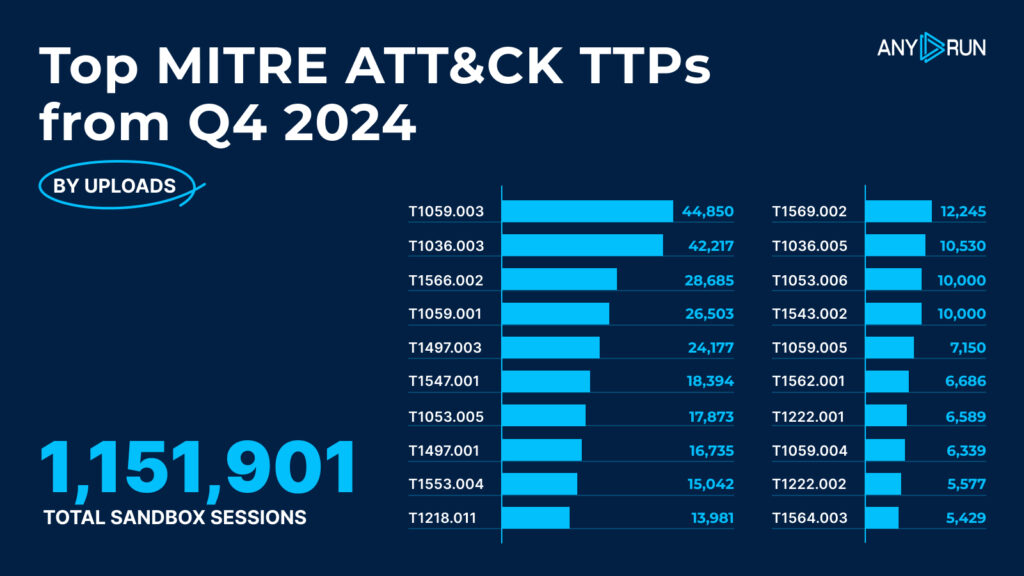
In Q4 2024, several adversary techniques saw a rise in activity, with PowerShell, Windows Command Shell, and phishing techniques dominating the list. Here’s a breakdown of the top 20 techniques observed: 

MITRE ATT&CK Technique  Detections 
Command and Scripting Interpreter: Windows Command Shell, T1059.003  44,850 
Masquerading: Rename System Utilities, T1036.003  42,217 
Phishing: Spearphishing Link, T1566.002  28,685 
Command and Scripting Interpreter: PowerShell, T1059.001  26,503 
Virtualization/Sandbox Evasion: Time Based Evasion, T1497.003  24,177 
Boot or Logon Autostart Execution: Registry Run Keys/Startup Folder, T1547.001  18,394 
Scheduled Task/Job: Scheduled Task, T1053.005  17,873 
Virtualization/Sandbox Evasion: System Checks, T1497.001  16,735 
Credentials from Password Stores: Credentials from Web Browsers, T1553.004  15,042 
10  System Binary Proxy Execution: Rundll32, T1218.011  13,981 
11  System Services: Service Execution, T1569.002  12,245  
12  Masquerading: Match Legitimate Name or Location, T1036.005  10,530 
13  Scheduled Task/Job: Systemd Timers, T1053.006  10,000 
14  Create or Modify System Process: Systemd Service, T1543.002  10,000 
15  Command and Scripting Interpreter: Visual Basic, T1059.005  7,150 
16  Impair Defenses: Disable or Modify Tools, T1562.001  6,686 
17  System Information Discovery: Application Layer Protocol, T1222.001  6,589 
18  Command and Scripting Interpreter: Unix Shell, T1059.004  6,339 
19  System Information Discovery: Remote System Discovery, T1222.002  5,577 
20  Impact: Data Destruction, T1564.003  5,429 

Top TTPs: Q4 2024 vs Q3 2024 

In Q4 2024, the landscape of detected techniques saw a few shifts compared to Q3. Here are the key highlights: 

The top three spots for Q4 were claimed by: 

  • T1059.003, Command and Scripting Interpreter: Windows Command Shell – claiming the top spot, up from the 3rd position in Q3, with a substantial rise in detections (41,384). 
  • T1036.003, Masquerading: Rename System Utilities – staying strong in 2nd place, though with a slight dip in detections compared to Q3 (41,254). 
  • T1566.002, Phishing: Spearphishing Link – a significant leap from its previous position, climbing to 3rd with 28,685 detections, marking an increase in phishing-related activities. 

Worthy mentions: 

  • T1059.001, Command and Scripting Interpreter: PowerShell – dropped to 4th place after holding the 2nd spot in Q3, now with 26,503 detections. 
  • T1497.003, Virtualization/Sandbox Evasion: Time-Based Evasion – although it slipped to 5th place from 4th in Q3, it still saw a notable number of detections (24,177). 
  • T1547.001, Boot or Logon Autostart Execution: Registry Run Keys/Startup Folder – entering the list in 6th place, showing a steady increase in activity (18,394).
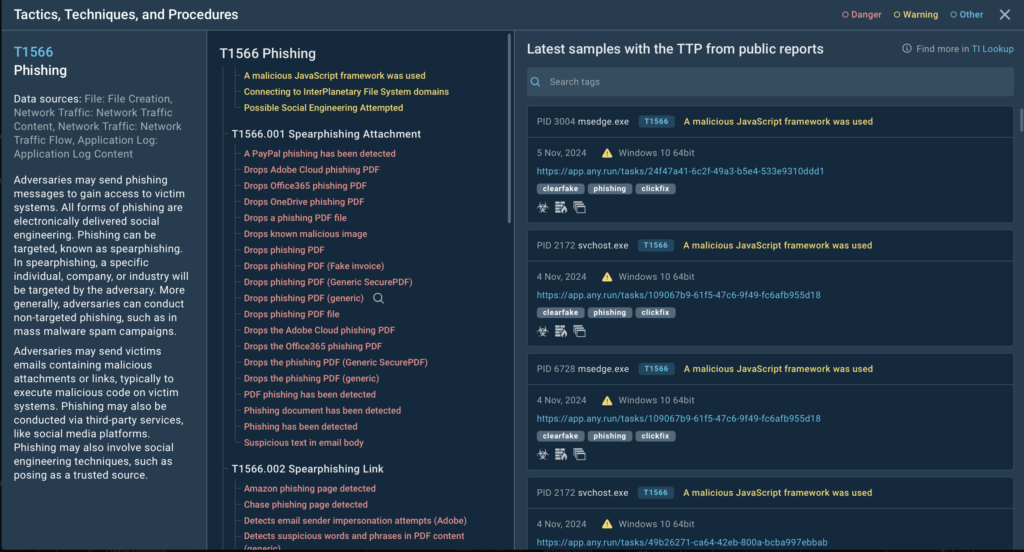
Tactics, techniques and procedures of phishing (T1566) 

Use TI Lookup’s interactive MITRE ATT&CK matrix which accompanies each TTP with real-world examples of cyber threat samples, analyzed in ANY.RUN’s Interactive Sandbox.

Report Methodology

For this report, we analyzed data from a total of 1,151,901 interactive analysis sessions. This data is drawn from researchers in our community who contributed by running public analysis sessions on ANY.RUN.  

These sessions provided valuable insights into the latest trends and activities in cybersecurity, helping us identify key threats and techniques that are currently on the rise. 

About ANY.RUN  

ANY.RUN helps more than 500,000 cybersecurity professionals worldwide. Our interactive sandbox simplifies malware analysis of threats that target both Windows and Linux systems. Our threat intelligence products, TI LookupYARA Search and Feeds, help you find IOCs or files to learn more about the threats and respond to incidents faster.  

Get a 14-day free trial of ANY.RUN’s products →

The post Malware Trends Report: Q4, 2024  appeared first on ANY.RUN’s Cybersecurity Blog.

ANY.RUN’s Cybersecurity Blog – ​Read More

2024 Wrapped: A Year of Growth, Innovation, and Community at ANY.RUN 

As we wrap up 2024, let’s take a moment to reflect on what an incredible year it’s been for ANY.RUN. Together, we’ve achieved so much: breaking barriers, improving tools, and working side by side with you, our amazing community of cybersecurity heroes. 

From big product launches to small tweaks that make a huge difference, everything we’ve done this year has been with one goal in mind: to make your fight against cyber threats easier, smarter, and faster. 

Let’s take a look back at some of the highlights that made this year unforgettable! 

Interactive Sandbox 

This year, we took significant strides to enhance your experience with the ANY.RUN sandbox, introducing new features and upgrades to help you combat cyber threats more effectively. 

Linux OS Support for In-Depth Malware Analysis 

For the first time, our sandbox extended its capabilities beyond Windows, making it possible for malware analysts, SOC teams, and DFIR experts to analyze Linux-based samples in a secure and interactive cloud environment. 

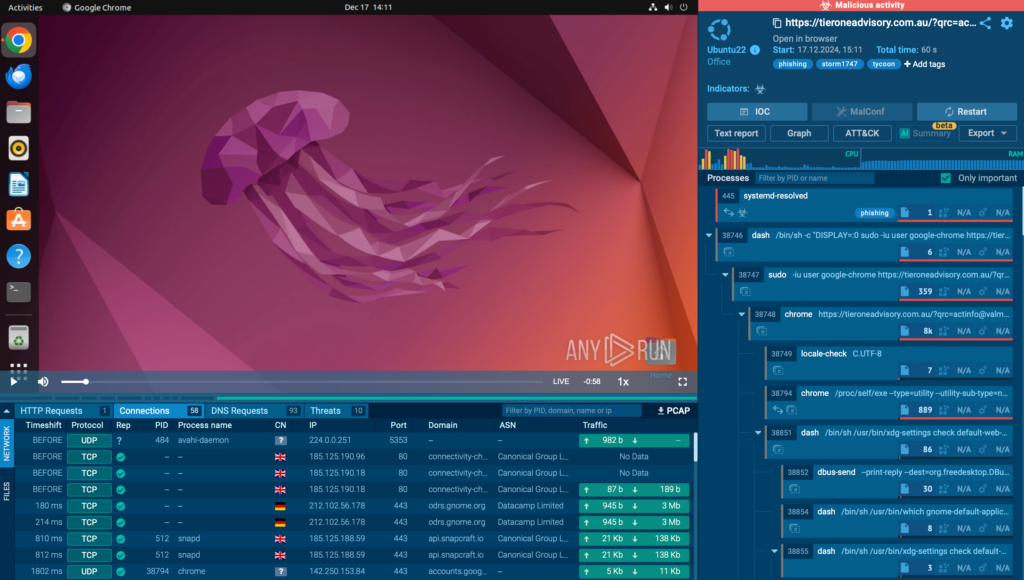
Analyzing malware inside secure Linux environment 

With real-time monitoring of suspicious activities, detailed reports featuring the MITRE ATT&CK Matrix, Process Graphs, and IOCs, you can now uncover threats on Linux systems with the same precision and speed you’ve come to expect from ANY.RUN. 

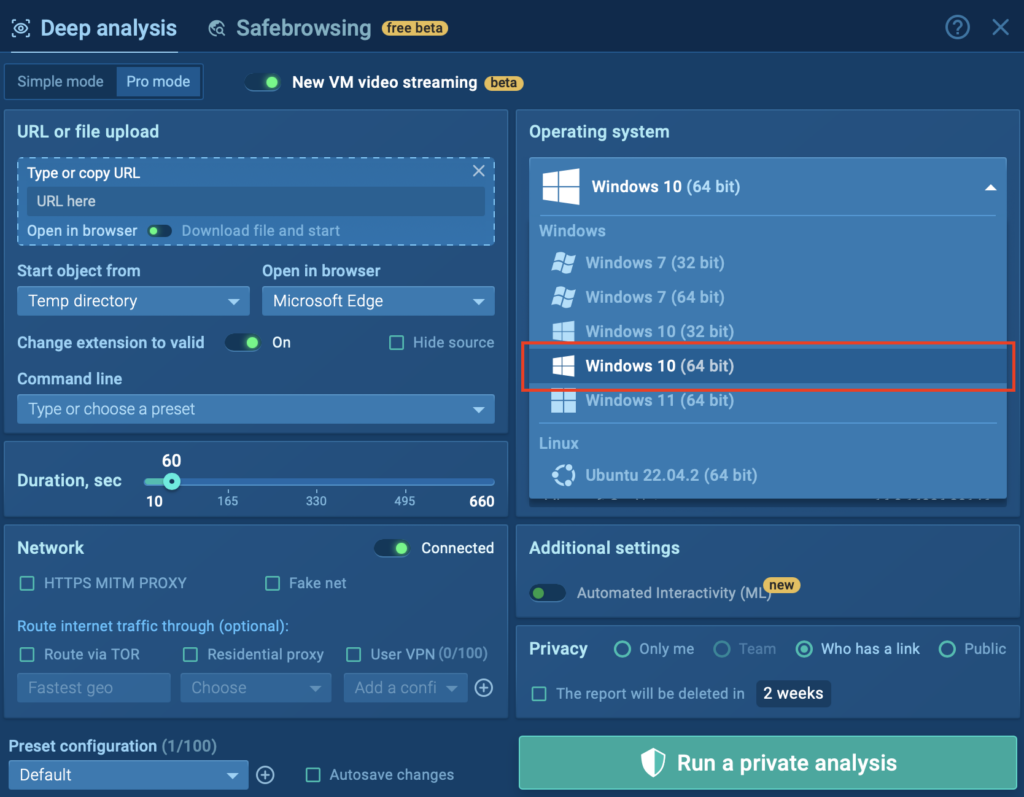
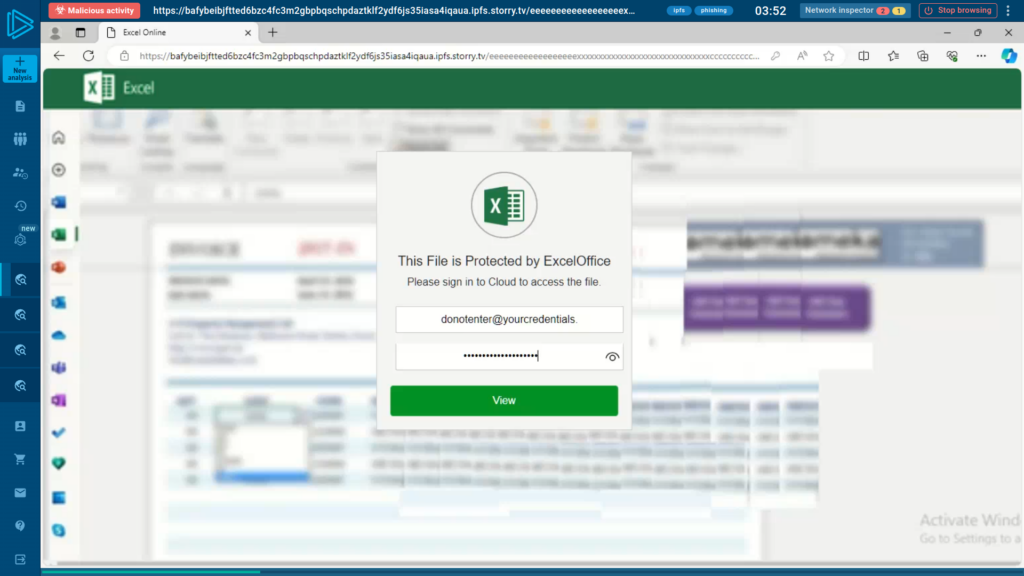
Universal Windows 10 x64 Access 

In 2024, we made Windows 10 (64-bit) VMs available to all users, including those on the Community plan! 

Everyone can analyze malware and phishing threats in a modern Windows environment, leveling the playing field for cybersecurity investigations. 

WIndows 10 (64 bit) available to everyone, including on free plan

This update ensures everyone can access powerful threat analysis tools and helps improve threat detection for the entire ANY.RUN community. 

Automated Interactivity: Smarter and Faster Malware Detonation 

With Stage 2 Automated Interactivity, ANY.RUN’s Interactive Sandbox now handles even more complex malware and phishing scenarios automatically. From extracting URLs in QR codes to detonating payloads in email attachments and navigating long redirect chains, it’s all done without user input. 

Automated Interactivity quickly identifies and detonates Formbook inside an archive attached to an email

Our analyst team continuously adds new attack scenarios, ensuring your sandbox stays one step ahead of evolving threats! 

Try Automated Interactivity and other PRO features
of the ANY.RUN Sandbox for free 


Request 14-day trial


A New Look at Network Threats: Redesigned Details Window 

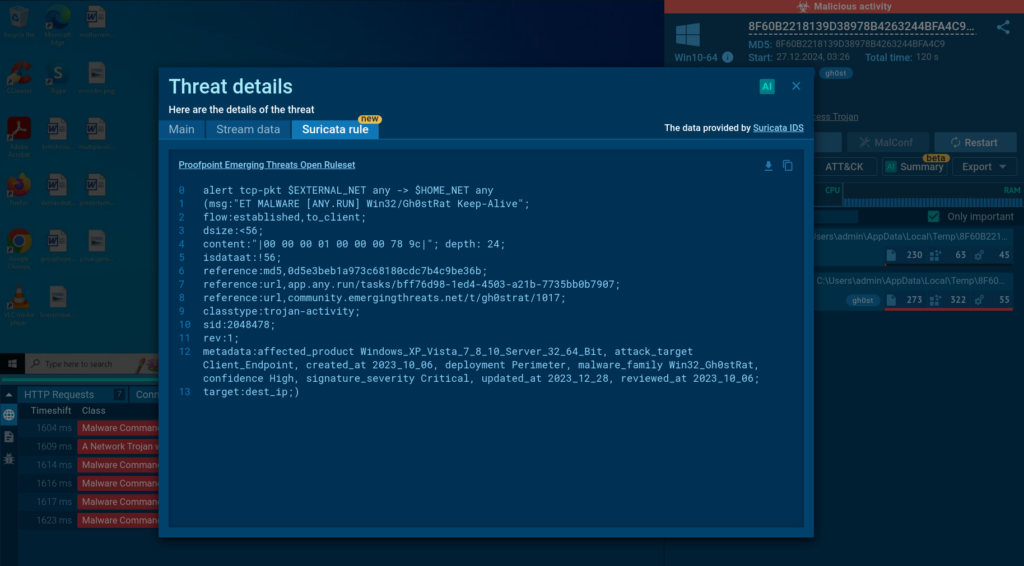
IIn 2024, we revamped the Threat details window to give you a clearer view of malware activity. Now, you can access all key intel, like source data, IP addresses, ports, and protocols, in one streamlined view. 

Hunter and Enterprise subscribers can look inside Suricata rules 

And for Hunter and Enterprise users, the new Suricata rule tab opens the door to the signatures behind the detections. 

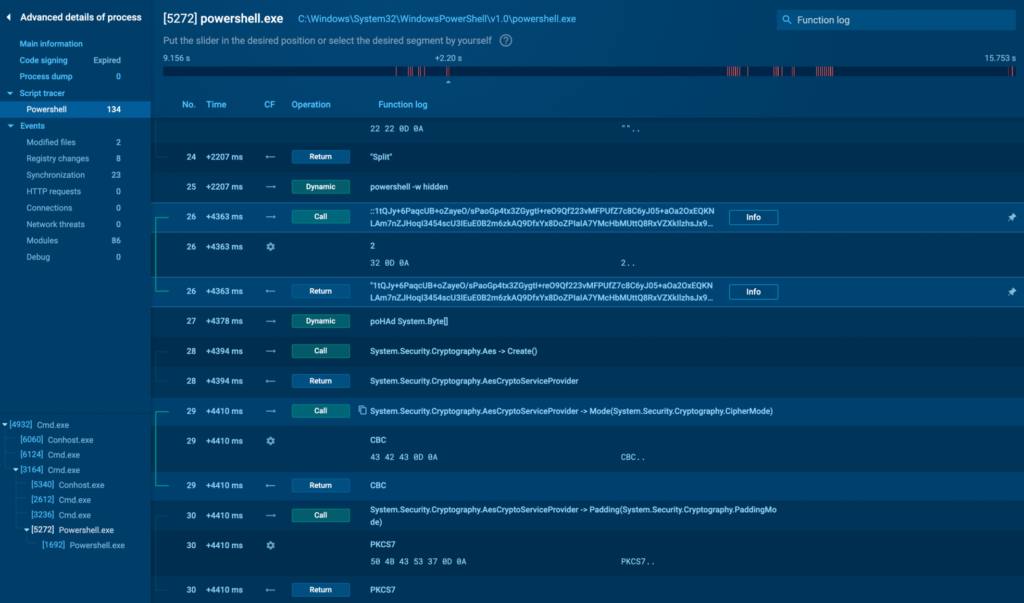
PowerShell Support in Script Tracer 

This year, we supercharged our Script Tracer by adding PowerShell support to its arsenal, alongside JScript, VB Script, VBA, and Macro 4.0. 

Example of PowerShell script in ANY.RUN’s Tracer 

Now, you can follow PowerShell scripts step by step, making it easier to analyze and counter malware leveraging persistence, lateral movement, or payload execution. 

Your Private AI Assistant: Smarter, Safer, and Always There to Help 

This year, we introduced a private AI model inside ANY.RUN’s sandbox, replacing ChatGPT.  

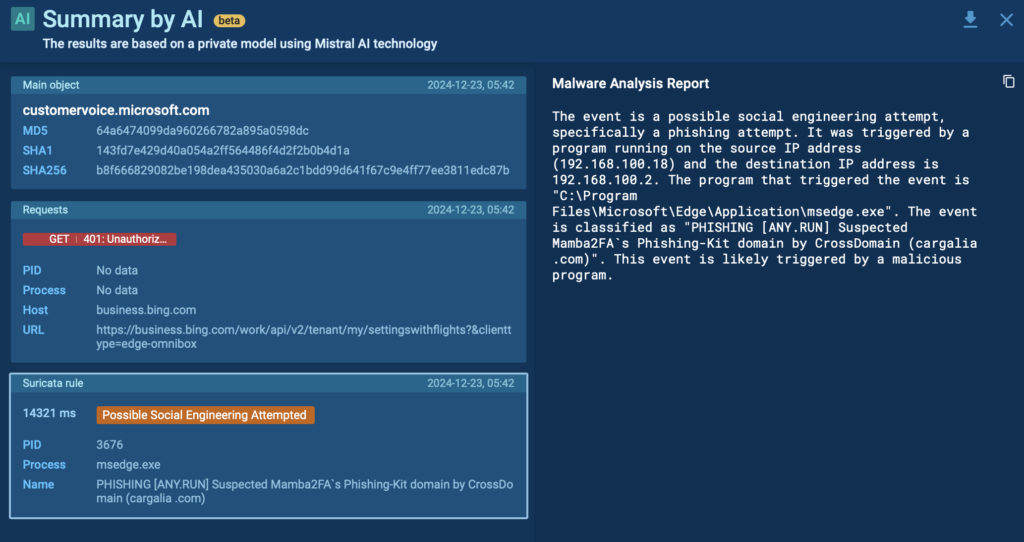
AI assistance inside ANY.RUN’s sandbox 

Now, you can get fast, AI-powered explanations in both public and private sessions, without worrying about data leaving your hands. 

Phishing Detection with Rspamd 

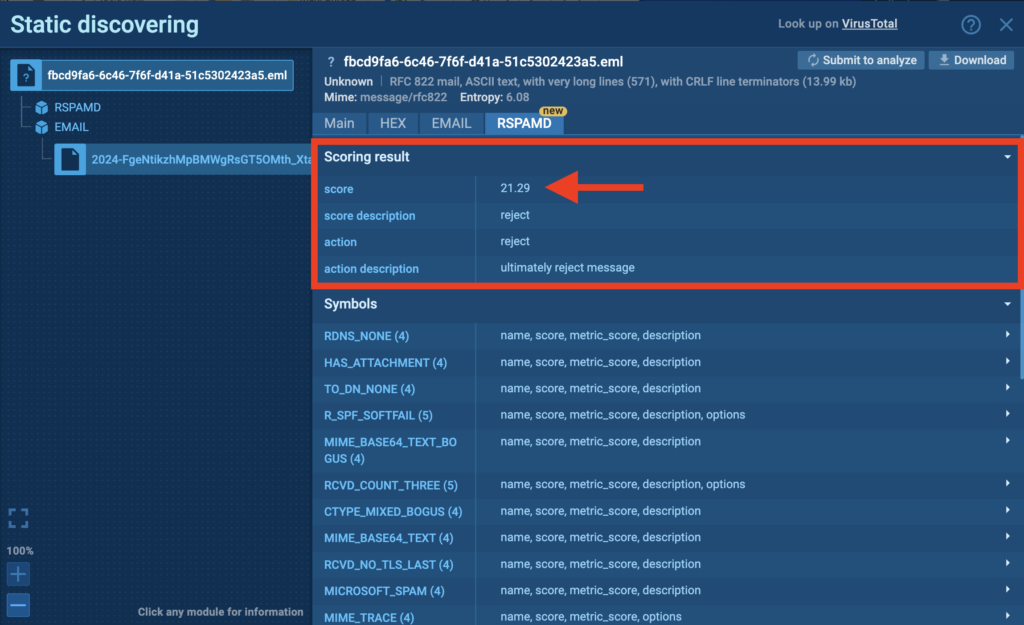
In 2024, we leveled up our phishing detection game with the integration of Rspamd, an open-source email filtering system, into ANY.RUN’s Static Discovering module.

Rspamd analysis inside the ANY.RUN sandbox

With features like Score, Content, and Header Descriptions, you can dive deep into email analysis. 

STIX Reports 

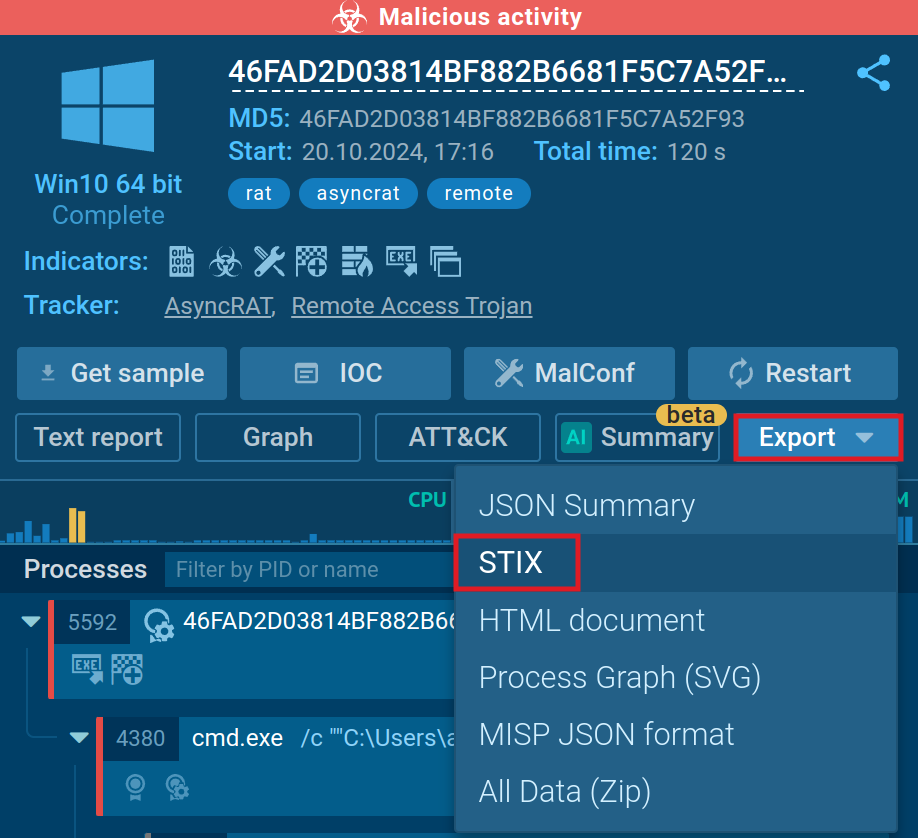
We added the ability to export threat data in the STIX format, a standardized language for sharing cyber threat intelligence. The report contains the link to the sandbox session, hashes, network traffic details, file system modifications, TTPs, and more. 

Click Export → STIX to download threat data 

A Fresh Look for Faster Analysis: Sandbox Home Screen Redesign 

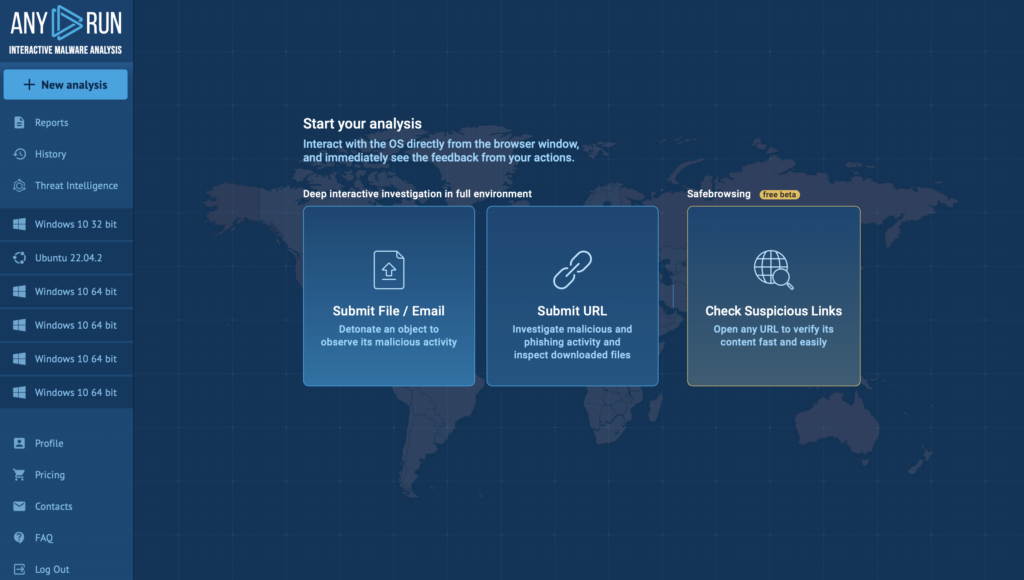
We gave the ANY.RUN Sandbox home screen a sleek makeover to make navigation easier and faster. 

ANY.RUN sandbox has a new home page 

New shortcut buttons let you launch analysis sessions in just a click 

Tag It Your Way: Custom Tags via API 

Now you can set custom tags to sandbox sessions directly through the API, adding to the flexibility of the web interface. Organize and categorize your analyses your way, with more control than ever before! 

Teamwork Upgrades 

This year, we made significant upgrades to the Teamwork functionality of the ANY.RUN sandbox. Some of the key changes include: 

  • Single Sign-On (SSO): We’ve tackled key issues like fixing the logout process and resolving setup problems. Plus, you now can log in not just through our authorization window but also using third-party services. 
  • Exporting team history: Enterprise users can now export structured lists of their team’s sandbox sessions in JSON format.  
  • Mutli-admin support: Team owners can now appoint multiple admins to manage their teams more effectively. Admins have the ability to enable and disable SSO, invite or remove team members, and manage licenses, including Threat Intelligence (TI) licenses. 

Threat Intelligence Lookup 

In 2024, we introduced Threat Intelligence Lookup, a tool designed to give you access to a centralized repository of millions of Indicators of Compromise (IOCs), Indicators of Attack (IOAs), and Indicators of Behavior (IOBs).

TI Lookup released in 2024 

This powerful service allows you to build precise queries, use them to search across threat data from public sandbox sessions, and enrich your threat intelligence with additional context, connecting isolated IOCs to broader malware campaigns, all in one place. 

Get 50 free requests to test TI Lookup 


Contact us


But we didn’t stop there! 

Throughout the year, we worked hard to refine TI Lookup, adding new features and capabilities to make it even better for security teams and professionals.  

Here’s how we’ve enhanced it: 

YARA Search: Your Custom Threat-Hunting Tool 

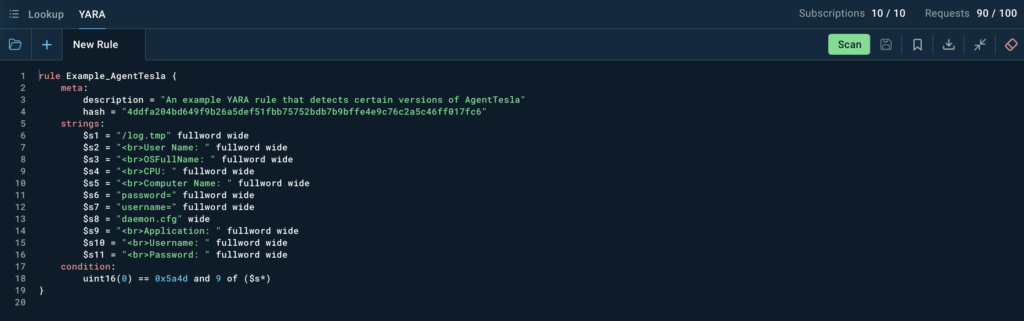
This year, we expanded our Threat Intelligence suite with YARA Search, giving users the power to scan ANY.RUN’s extensive database using custom YARA rules. 

YARA search inside TI Lookup 

With a built-in editor, you can easily write, edit, test, and manage your rules. Once matching malicious files are identified, dive deeper by analyzing their behavior directly in the sandbox. 

Mutex Search: Precision Meets Speed in TI Lookup 

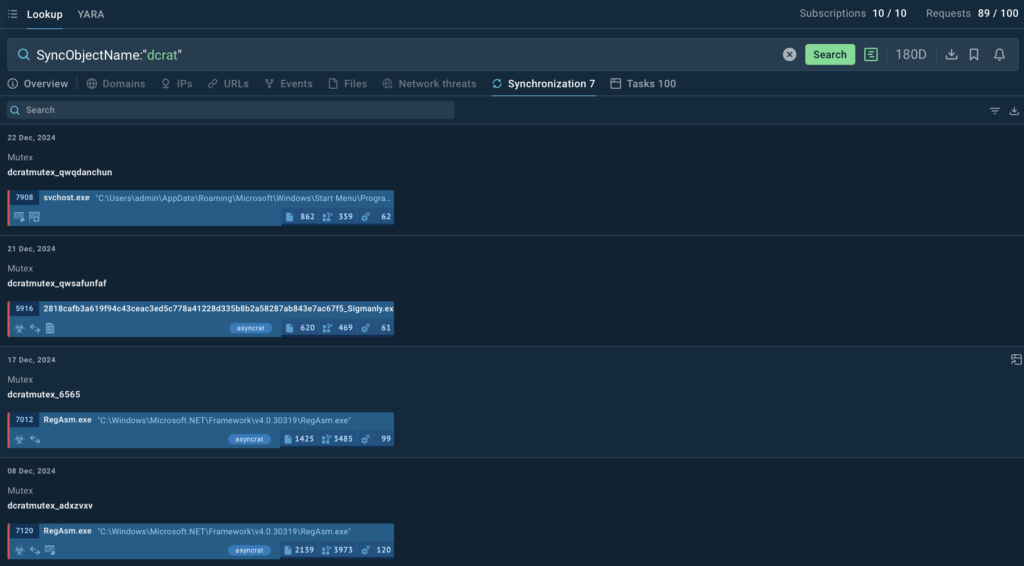
We’ve enhanced Threat Intelligence Lookup with a powerful Mutex Search feature, designed to make your investigations faster and more precise. 

List of DCRat mutexes 

Using queries like SyncObjectName:”[name of the malware]”, you can quickly locate relevant sandbox analysis sessions tied to specific mutexes. 

Suricata Search: Deeper Dive into Network Threats 

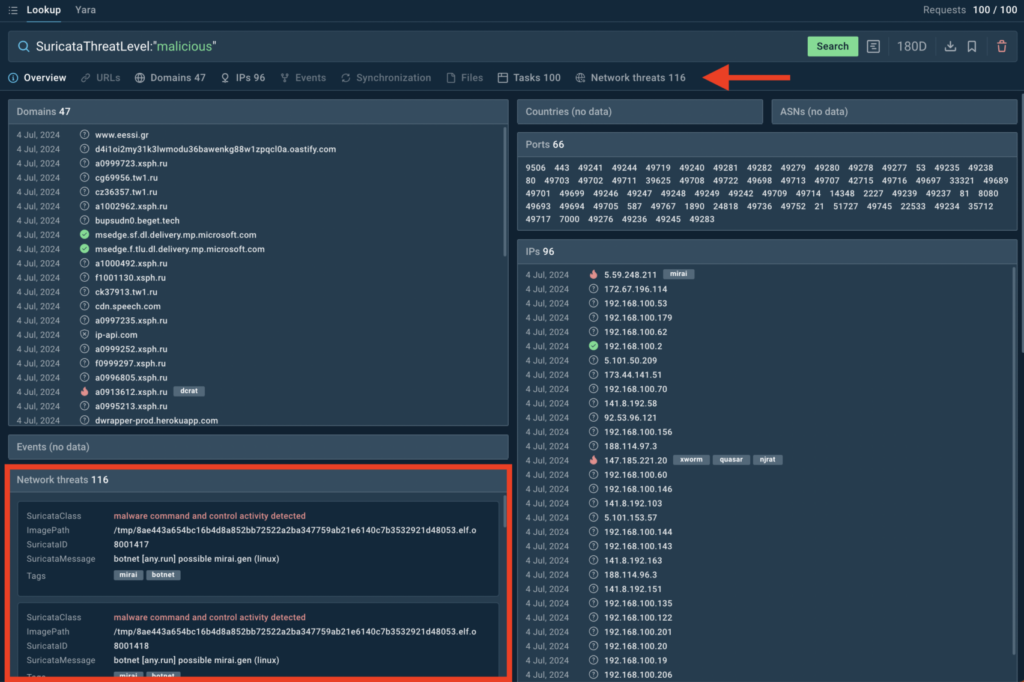
The Threat Intelligence Lookup now includes Suricata search fields, making it easier to pinpoint specific network threats. 

Suricata search inside TI Lookup 

Search using fields like SuricataClass, SuricataMessage, SuricataThreatLevel, and SuricataID to uncover detailed information about network activity.  

Malware Config Insights: Unlocking Hidden IOCs 

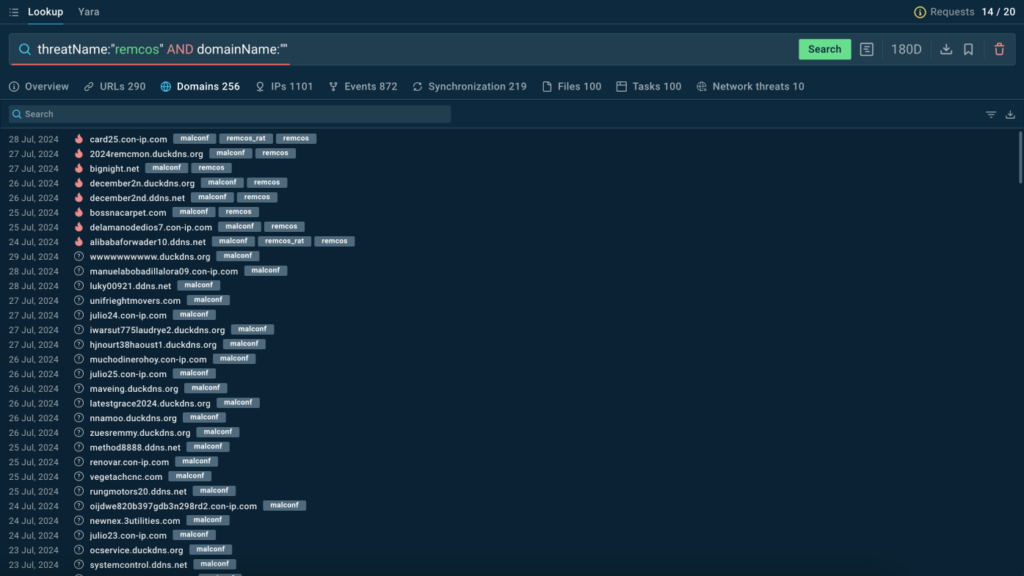
We’ve expanded Threat Intelligence Lookup to include IOCs from malware configurations, manually extracted from reverse-engineered samples. 

“malconf” domains in TI Lookup

Currently covering 79 malware families, these config-based IOCs are tagged with “malconf” for easy identification. This feature gives you a clearer understanding of malware behavior and helps you uncover actionable insights faster than ever. 

Notifications 

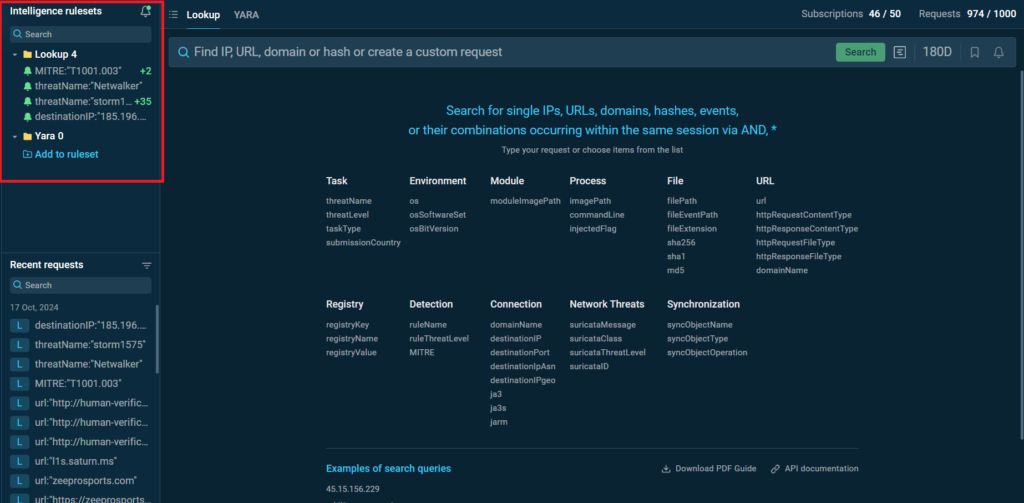
Threat Intelligence Lookup has also been upgraded with the new Notifications feature

Notifications in TI Lookup 

Subscribe to specific search queries and receive alerts on new IOCs, IOAs, and IOBs directly in your dashboard. New results are clearly highlighted, making it easier to stay on top of emerging threats and act quickly. 

Redesigned Home Screen with Interactive MITRE ATT&CK Matrix 

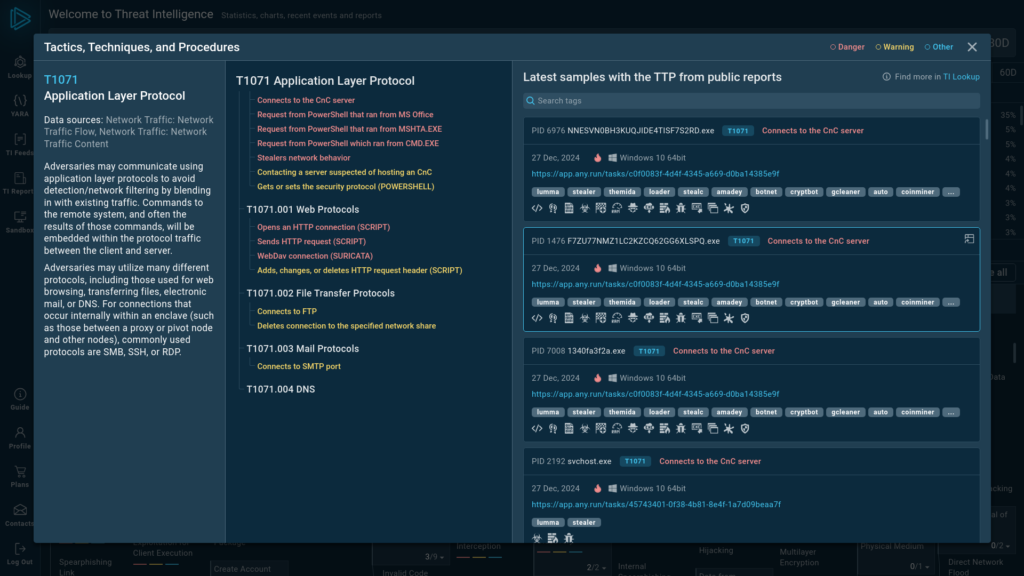
In 2024, we took the time to give the Threat Intelligence home screen a thoughtful upgrade, making it more user-friendly and packed with valuable features. 

Updated version of the Threat Intelligence home page lets you explore samples with specific TTPs

The new design offers a clearer, more intuitive view of the threat landscape. We’ve added a MITRE ATT&CK matrix with refined techniques and tactics, along with real-world examples of malware and phishing threats analyzed in the ANY.RUN sandbox. 

TI Feeds 

Our Threat Intelligence Feeds provide actionable data on malicious IPs, URLs, and domains, collected from analysis sessions created by over 500,000 researchers in the ANY.RUN sandbox. 

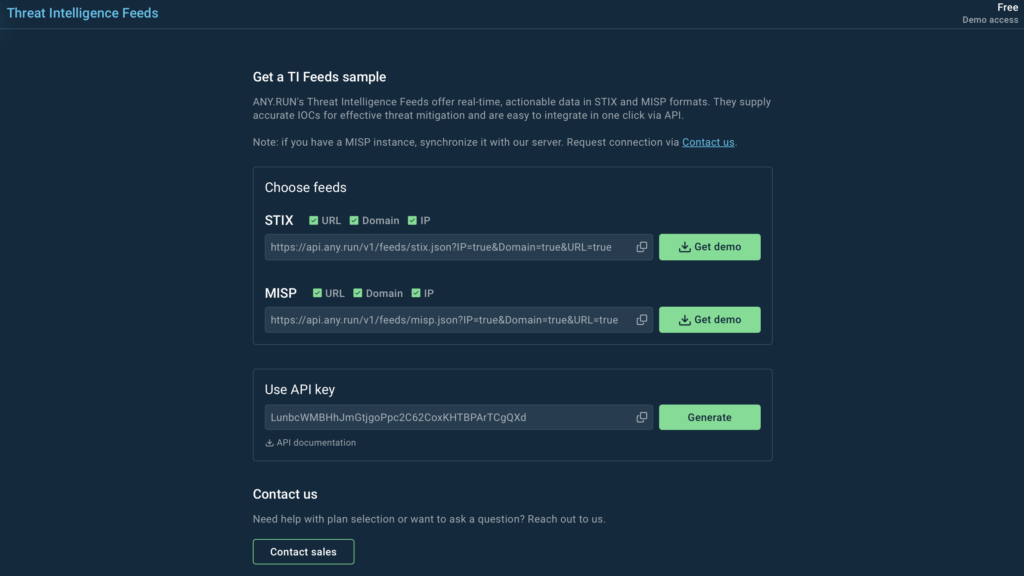
This year, we further improved TI Feeds by introducing STIX and MISP formats.

You can test demo TI Feeds for free 

We also introduced demo samples of our feeds that any user can try for free via API. 

Try TI Feeds demo sample via API 


Integrate now


Safebrowsing 

In 2024, we brought you Safebrowsing, a new tool designed for faster and simpler threat analysis. 

You are free to interact with websites just like in a standard browser

With Safebrowsing, you can safely analyze suspicious URLs in a fully interactive, isolated browser environment. It’s a quick and secure way to explore websites, verify malicious content, and protect your local system from risk. 

Browser Extension 

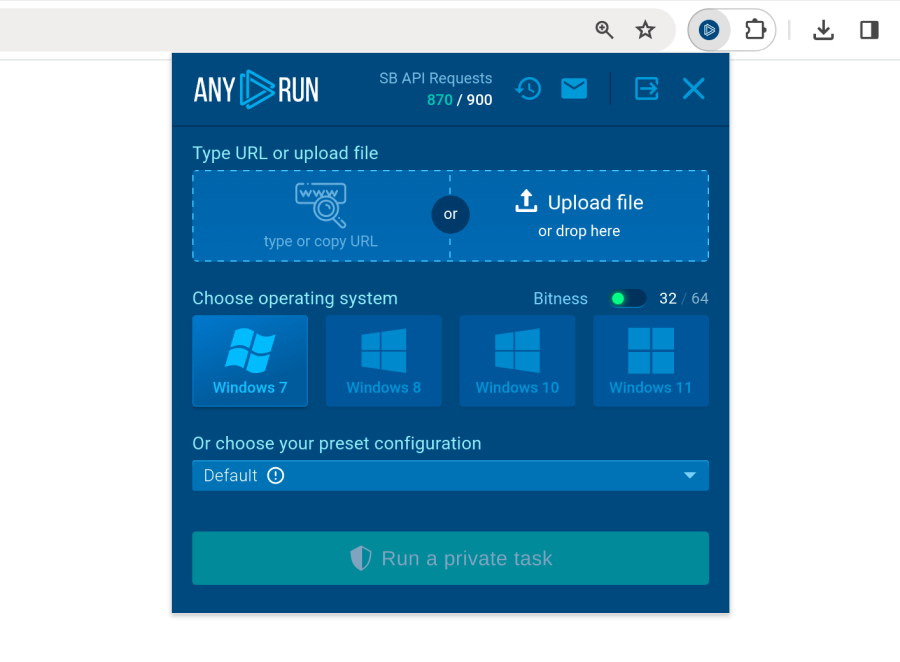
We made malware analysis even easier with the launch of the ANY.RUN Browser Extension for Chromium-based browsers. 

ANY.RUN’s browser extension can be used for streamlining threat analysis

With this extension, you can start analysis sessions directly from your browser and view results instantly, either in the extension or in the sandbox for deeper investigation. It’s fast, simple, and designed to save you valuable time. 

Integrations 

At ANY.RUN, we know how important integrations are for streamlining your threat analysis workflows.  

That’s why in 2024 we focused on expanding our connectivity with industry-leading platforms to make your investigations faster and more efficient. 

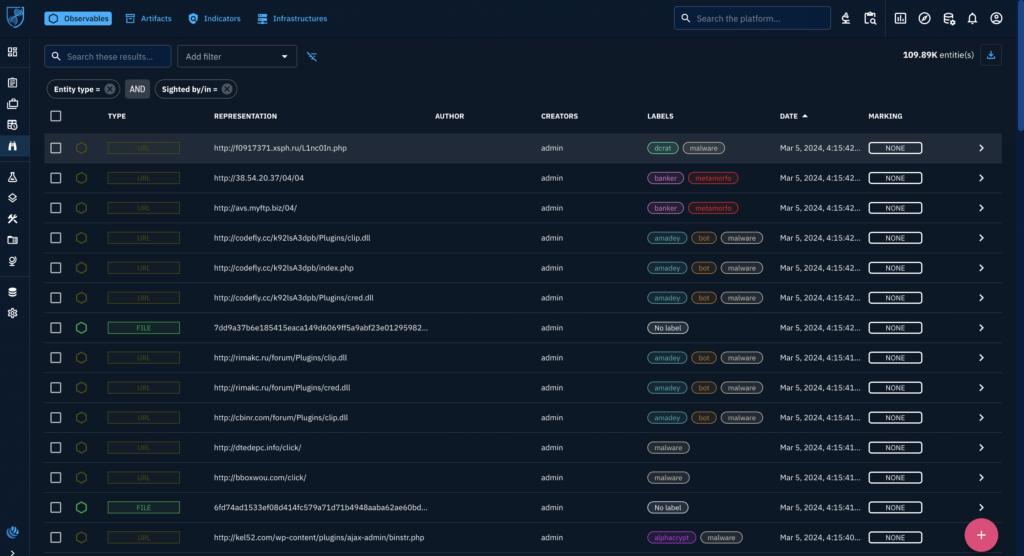
Integration with OpenCTI 

OpenCTI interface 

We integrated with OpenCTI, allowing users to enrich their threat intelligence with data from ANY.RUN. Malware labels, malicious scores, TTPs, file hashes, and IP addresses are now transferred into OpenCTI, eliminating manual work and centralizing your analysis. 

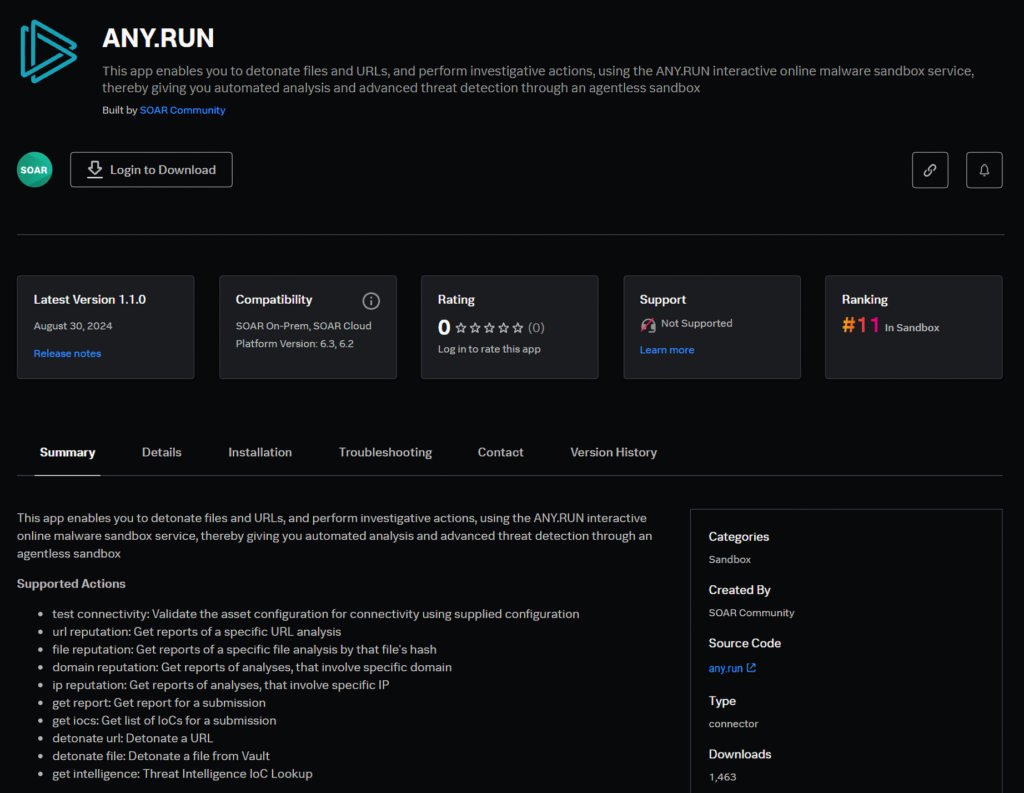
Integration with Splunk 

We also launched an integration with Splunk, bringing our Interactive Sandbox and Threat Intelligence Lookup directly into the Splunk SOAR environment. 

Official page of ANY.RUN’s connector for Splunk

It lets you analyze malicious files and URLs, and enrich your investigations with comprehensive threat intelligence, all without leaving your familiar Splunk environment.

Security Training Lab 

In 2024, we launched Security Training Lab, addressing a critical gap in cybersecurity education—bridging theory with hands-on practice. 

Universities often struggle to keep pace with evolving cyber threats. Our program empowers educators and students with tools like ANY.RUN’s sandbox, real-world threat simulations, and a practical curriculum designed to prepare future professionals for real challenges. 

Highlights of Security Training Lab 

  • 30+ hours of content: Comprehensive academic resources, tasks, and tests. 
  • Hands-on experience: Analyze real malware samples in a secure environment. 
  • Easy management: Track progress with our user-friendly platform. 
  • Community support: A private Discord group for students. 

With Security Training Lab, we’re shaping confident, skilled cybersecurity professionals ready to take on the future. 

Cyber Threat Research from ANY.RUN Team

In 2024, ANY.RUN’s team of malware analysts continued to share their research on new and emerging threats, helping the cybersecurity community stay informed. Take a look at some of the article published by our team throughout the year:

Make sure to subscribe to us on X and other social media to get quick rundowns on active malware and phishing campaigns.

ANY.RUN’s Top Awards in 2024 

Awards won by ANY.RUN in 2024

In 2024, ANY.RUN’s commitment to innovation and excellence in cybersecurity was recognized with prestigious industry awards. They reflect the hard work of our team and the impact of our tools on the global cybersecurity community: 

  • Cybersecurity excellence awards– Winner in the Threat Hunting category, highlighting our impact and commitment to excellence. 
  • Best security solution– Our platform was named the Best Threat Intelligence & Interactive Malware Analysis Platform, praised for its innovation and user-friendly design. 
  • Top 150 cybersecurity vendors– ANY.RUN earned a spot on IT-Harvest’s Top 150 Vendors, a global benchmark in the cybersecurity field. 
  • Best in behavior analytics– The CyberSecurity Breakthrough Awards recognized our behavior analytics and the advanced Automated Interactivity feature. 

We’re proud of these achievements and look forward to raising the bar even higher in 2025! 

Stronger Together: Collaboration with the ANY.RUN Community 

We were closer than ever with the incredible ANY.RUN community. Together, we uncovered new threats, presented cutting-edge technical analyses, and pushed the boundaries of what’s possible in malware research. 

Your active engagement has been at the heart of our success. We can’t thank you enough for your support and collaboration throughout the year. 

As we look ahead to 2025, we’re excited to bring even more opportunities for mutual collaboration.  

Let’s continue to grow, learn, and tackle cyber threats together! 

More to Come in 2025 

As we celebrate these milestones, we’re already looking ahead to 2025. With exciting projects on the horizon, new features in development, and your continued support, we’re confident that the best is yet to come. 

To every researcher, analyst, and team who trusted ANY.RUN this year: thank you. You are the reason we do what we do. Here’s to another year of fighting cybercrime—together. 

Happy New Year, 
The ANY.RUN Team

About ANY.RUN  

ANY.RUN helps more than 500,000 cybersecurity professionals worldwide. Our interactive sandbox simplifies malware analysis of threats that target both Windows and Linux systems. Our threat intelligence products, TI LookupYARA Search and Feeds, help you find IOCs or files to learn more about the threats and respond to incidents faster.  

Get a 14-day free trial of ANY.RUN’s Interactive Sandbox →

The post 2024 Wrapped: A Year of Growth, Innovation, and Community at ANY.RUN  appeared first on ANY.RUN’s Cybersecurity Blog.

ANY.RUN’s Cybersecurity Blog – ​Read More

Integrate ANY.RUN Threat Intelligence Feeds with Your Security Platform

Editor’s Note: This article was originally published on June 11, 2024, and updated on December 28, 2024.

The ANY.RUN Threat Intelligence Feeds provide data on the known indicators of compromise: malicious IPs, URLs, domains, files, and ports.   

The data is collected and pre-processed from public malware and phishing samples analyzed by our community of 500,000 researchers in the ANY.RUN sandbox environment.

How ANY.RUN’s TI Feeds Help Organizations

Cyber Threat Intelligence Feeds from ANY.RUN extend the threat coverage of your SIEM and TIP systems. They provide IOCs of recently seen cyber threats so you can proactively prepare to defend your infrastructure against them, as well as: 

  • Expand Threat Coverage: Improve system’s ability to detect emerging malware and phishing attacks.  
  • Improve Incident Response: Enrich incident response processes with contextual data, providing deeper insights into threats and their behaviors.  
  • Strengthen Security Posture: Ensure proactive defense against new and evolving threats.  
  • Optimize Threat Hunting: Streamline threat hunting activities, identifying and investigating potential threats more effectively. 

Feeds are easy to use. It’s practically a plug and play solution (as long as your team is already using a SIEM or TIP system).  

Contact us and we’ll help you integrate ANY.RUN TI Feeds
in your organization 


Contact Sales


Indicators Provided by ANY.RUN’s TI Feeds

The IOCs include information on malicious IP addresses, domain names, and URLs, enriched with contextual details such as related files and ports.   

IP addresses 

IP addresses are important for detecting and preventing malicious network activity. They serve as digital markers of cybercriminal operations, often linked to Command-and-Control (C2) servers or phishing campaigns. 

By analyzing IP addresses, cybersecurity teams can identify and block malicious sources, trace attack origins and monitor threat patterns. 

Domains 

Domains are often used as staging points for cyberattacks. They provide a higher-level view of malicious activity, often connecting multiple IPs or malware instances within a single campaign. 

ANY.RUN’s TI feeds provide comprehensive information about domains, including all the details available for IP addresses, such as threat names, types, detection timestamps, and related file hashes.  

URLs 

URL addresses serve as gateways to distribute malware, execute phishing campaigns, or redirect users to malicious content. Their flexibility and ease of use make them a preferred tool for attackers. 

By analyzing URLs, cybersecurity teams can uncover attack patterns, block harmful traffic, and prevent unauthorized access to systems and data. 

More information on TI Feeds’ structure and additional IOCs  — in our blog post.  

Key Features of ANY.RUN’s TI Feeds

  • Fresh Indicators: Mined from the latest public samples uploaded to our interactive sandbox by a global network of over 500,000 security professionals and updated every few hours.  
  • Contextual Information: Offer more than just IOCs by providing direct links to sandbox sessions that include memory dumps, network traffic, and events.  
  • Rigorous Pre-Processing: Advanced algorithms and proprietary technology used for data filtering and validation.  
  • STIX and MISP Formats: Deliver threat intelligence feeds in the STIX and MISP formats, making it easy for security teams to integrate our data into their existing infrastructure.  

Try Demo Sample of ANY.RUN’s TI Feeds 

We provide free samples of ANY.RUN’s Threat Intelligence Feeds with data from 6 months ago, so you can test them in your security setting.

Contact us to access the most up-to-date TI Feeds version or make a purchase.

For ANY.RUN  Have an account registered with a custom domain email 
For your SIEM/TIP system  Have an account with admin role 

Here are the steps to integrate the demo feeds: 

Setting up TI Feeds is simple

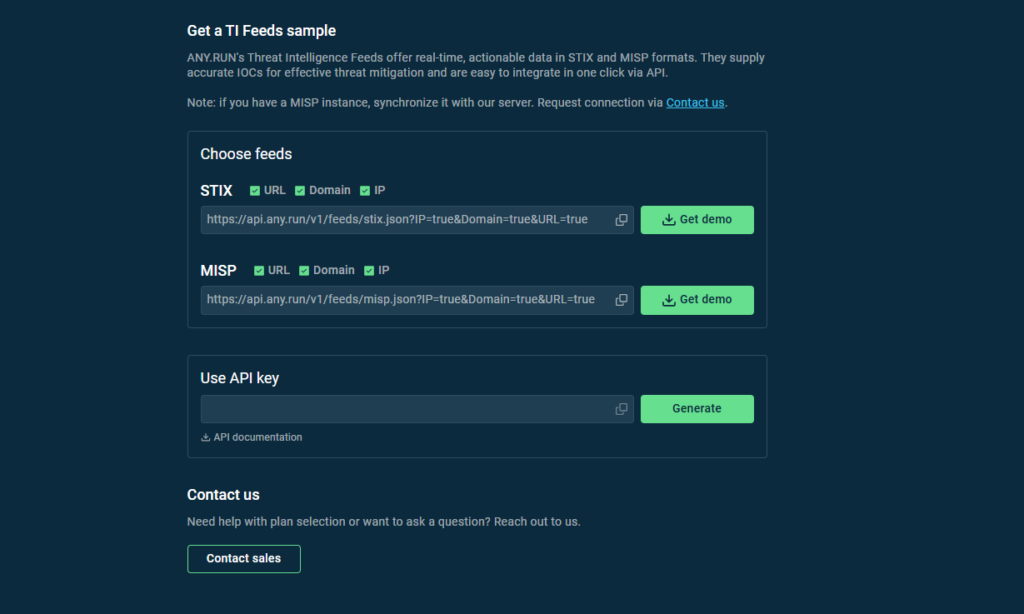
1. First, go to the feeds dashboard

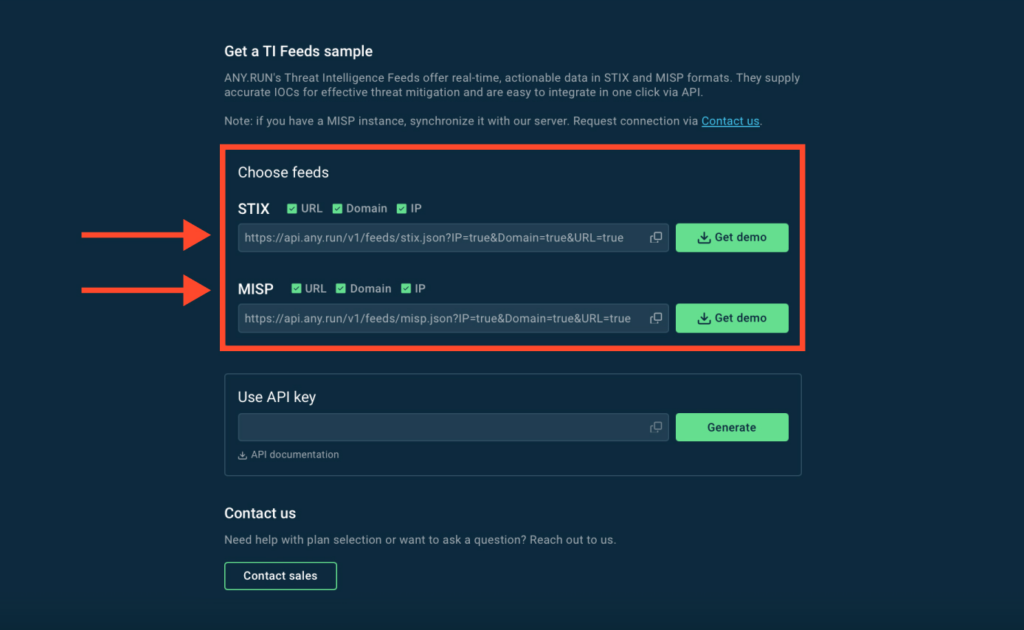
Select the types of feeds you want by checking the boxes

2. Choose which indicators to receive by checking the boxes — URLs, Domains, IPs or any combination of them. 

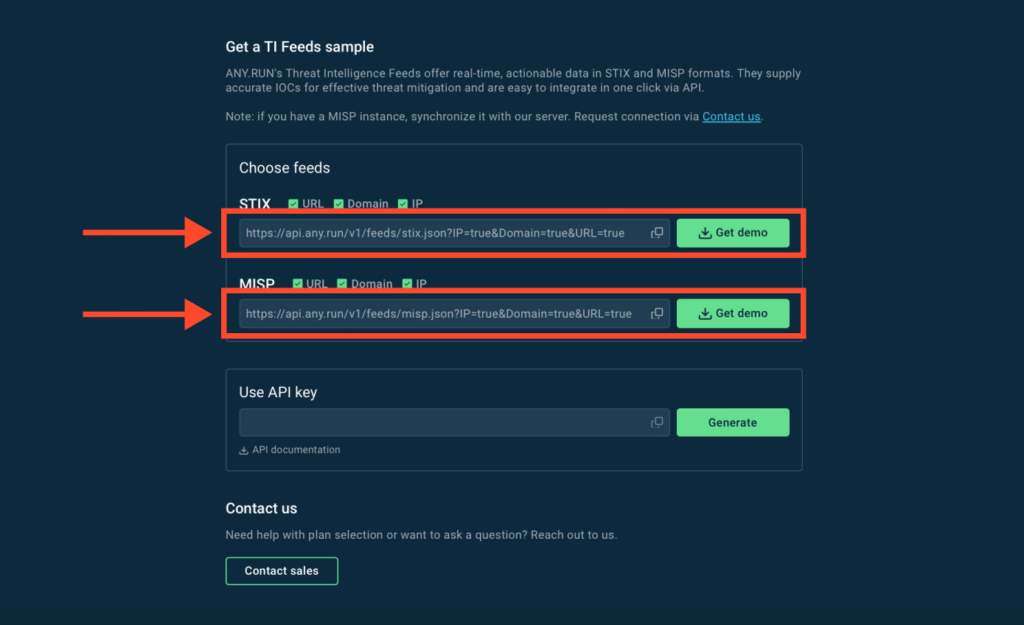
Copy the feeds URL and add it as a source in your SIEM or TIP system

3. Copy the URL and paste it into the threat intelligence feeds section of your SIEM or TIP system. This step depends on your vendor, but generally search for “threat intelligence feeds” and find an input for URL or source. 

You can also download a STIX or MISP feeds sample by clicking Get Demo button. 

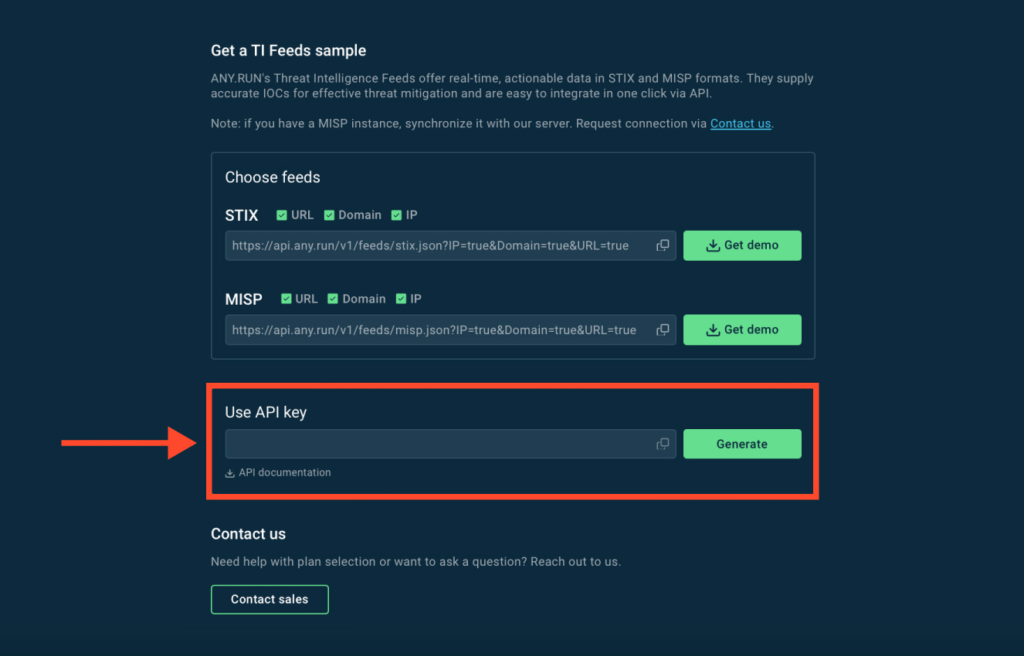
Get the API key from Threat Intelligence Feeds dashboard

4. Copy the API key and paste it into the API field in the same SIEM/TIP section where you provided the feeds URL. 

That’s it! You are now receiving demo threat data from ANY.RUN! 

Contact us to access the full version of ANY.RUN TI Feeds 


Contact Sales


Which vendors can integrate with ANY.RUN? 

Our threat intelligence feeds share data in the standardized STIX and MISP formats. This means that you can practically integrate ANY.RUN feeds with any vendor, including popular platforms like OpenCTI and ThreatConnect.

Contact us to get assistance with your integration.

How TI Feeds Support Business Performance 

Adding Threat Intelligence feeds to your cybersecurity framework significantly raises the sustainability of your organization.  

  • Cost reduction: Investing in TI feeds can lead to significant cost savings by preventing data breaches and minimizing the need for reactive security measures.  
  • Informed decision-making: Quality TI feeds provide critical insights, ensuring that security efforts are focused on the most pressing threats.  
  • Brand reputation: Early detection of threats reduces the likelihood of incidents that could damage a company’s name. 
  • Operational efficiency: Integrating CTI feeds with can contribute to better response process, improving mean time to resolution (MTTR). 
  • Compliance: TI feeds help document incidents, enrich security reports, and meet requirements for frameworks like GDPR, HIPAA, and PCI.  

For detailed information on the role of Cybersecurity Threat Intelligence Feeds in improving company’s operational performance, refer to this article.  

About ANY.RUN  

ANY.RUN helps more than 500,000 cybersecurity professionals worldwide. Our interactive sandbox simplifies malware analysis of threats that target both Windows and Linux systems. Our threat intelligence products, TI Lookup, YARA Search, and Feeds, help you find IOCs or files to learn more about the threats and respond to incidents faster.

Request free trial of ANY.RUN’s services → 

The post Integrate ANY.RUN Threat Intelligence Feeds with Your Security Platform appeared first on ANY.RUN’s Cybersecurity Blog.

ANY.RUN’s Cybersecurity Blog – ​Read More

15,000+ Four-Faith Routers Exposed to New Exploit Due to Default Credentials

A high-severity flaw impacting select Four-Faith routers has come under active exploitation in the wild, according to new findings from VulnCheck.
The vulnerability, tracked as CVE-2024-12856 (CVSS score: 7.2), has been described as an operating system (OS) command injection bug affecting router models F3x24 and F3x36.
The severity of the shortcoming is lower due to the fact that it only works

The Hacker News – ​Read More