ANY.RUN sandbox just got even more powerful thanks to a new pre-installed development software set in its virtual machines (VMs).
Building on our existing pre-installed sets, we’re introducing this new option to give researchers even more flexibility and advanced tools for analyzing highly specific and complex malware inside the sandbox.
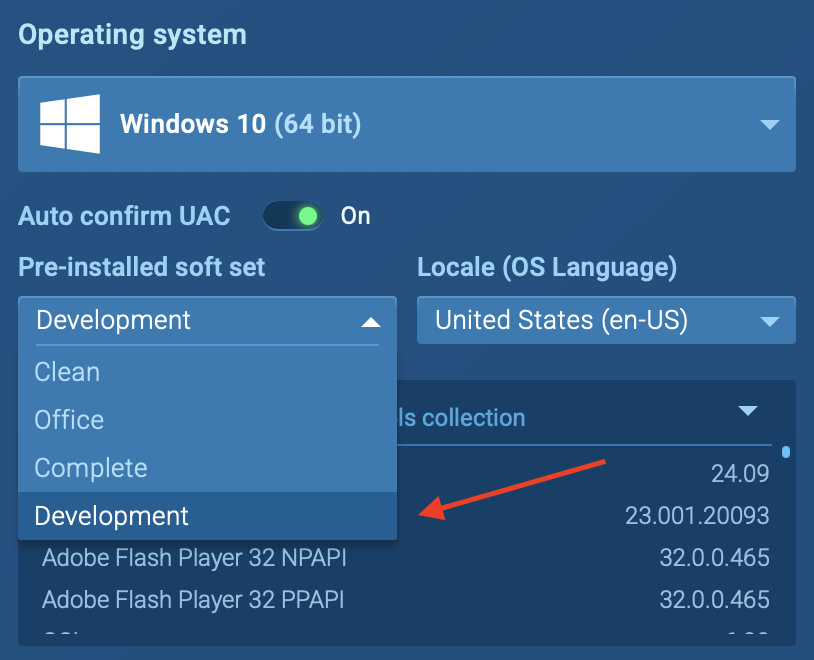
With this update, before launching an analysis session, users can select the “Development” software set to instantly load a specialized toolkit designed for deep malware investigation. This is especially useful for working with Python-based malware, Node.js-based threats and adding deeper debugging and inspection capabilities.
Let’s take a closer look at this latest addition and discover how you can use it!
Why This Update Matters: Key Benefits
This new software set significantly enhances malware research by providing tools that cater to specific types of malware. Here’s why we’ve added this soft set:
Analyze new types of malware (Python/Node.js-based threats): Many modern malware samples are written in Python or Node.js, and having the right tools pre-installed makes their analysis more efficient.
Improved debugging and reverse engineering: The presence of advanced debuggers and analysis tools helps senior analysts dive deeper into malware behavior, extract insights, and develop better detection techniques.
Faster and more efficient research sessions: No more manual installation, just launch the VM, and all necessary tools are available, saving time and improving workflow.
Expanding the database of ANY.RUN: By introducing new analysis scenarios, this update broadens the platform’s capabilities, making it more useful for a wide range of malware research and forensic investigations.
Sandbox for Businesses
Discover all features of the Enterprise plan designed for businesses and large security teams.
See details
What’s Included in the New Software Set?
The pre-installed software set includes essential tools that malware analysts, security researchers, and threat hunters frequently use for analyzing complex threats:
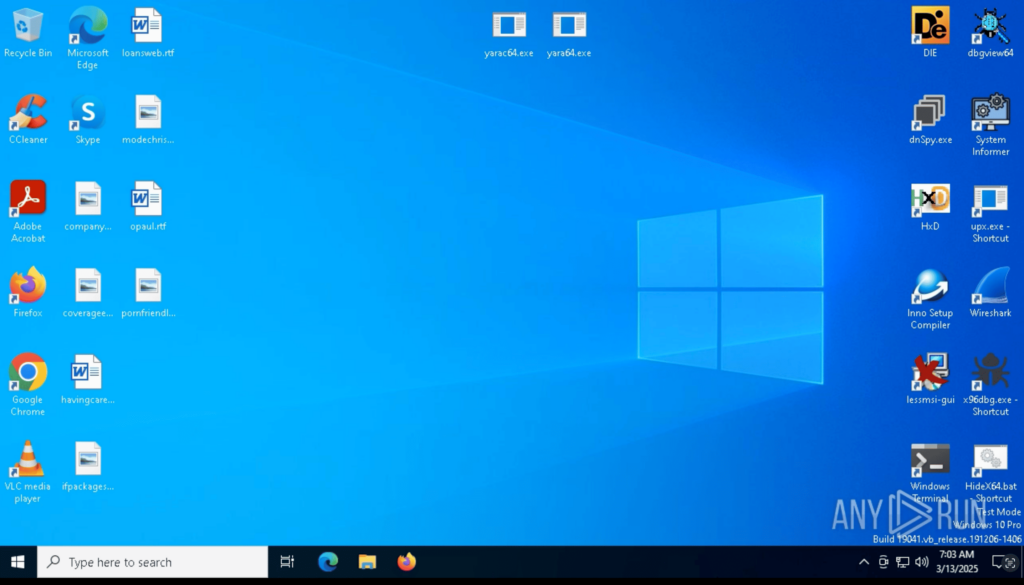
Pre-installed software set for deeper malware analysis
List of Pre-Installed Tools
Python (latest version) – Important for analyzing Python-based malware, executing scripts, and automating analysis.
Node.js (latest version) – Helps in investigating Node.js-based malware and executing malicious scripts in a controlled environment.
DebugView – Captures real-time debug output from Windows applications, useful for identifying malware behavior.
DIE (Detect It Easy) – A tool for identifying executable file packers, obfuscators, and compilers used by malware authors.
dnSpy – A powerful .NET debugger and decompiler, ideal for reverse-engineering malware written in C# or VB.NET.
HxD – A hex editor that allows analysts to inspect and modify binary files, memory, and disk structures.
Process Hacker – An advanced process monitoring tool for tracking system behavior and detecting malicious activity.
x64dbg – A dynamic debugger for analyzing malware at the assembly level, often used for unpacking and reverse engineering.
Wireshark PE – A network protocol analyzer for capturing and inspecting suspicious network traffic during malware execution.
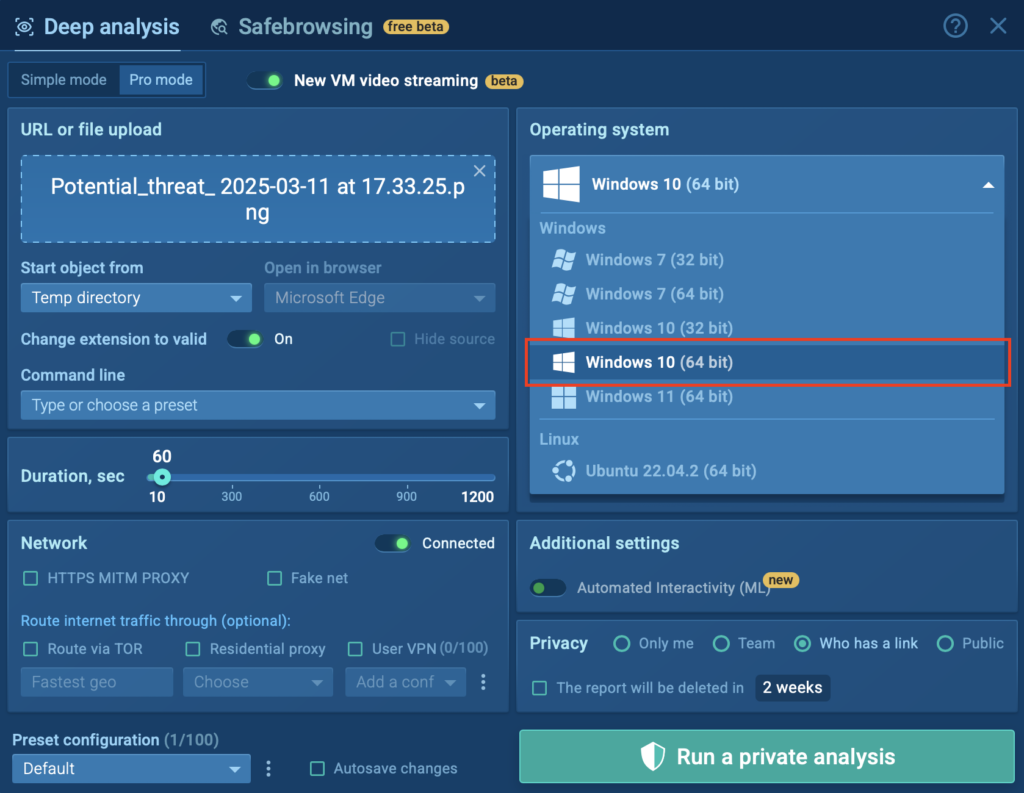
How to Use the New Software Set in ANY.RUN
This pre-installed toolset is now available for ANY.RUN Enterprise users running malware analysis on Windows 10 (64-bit) virtual machine.
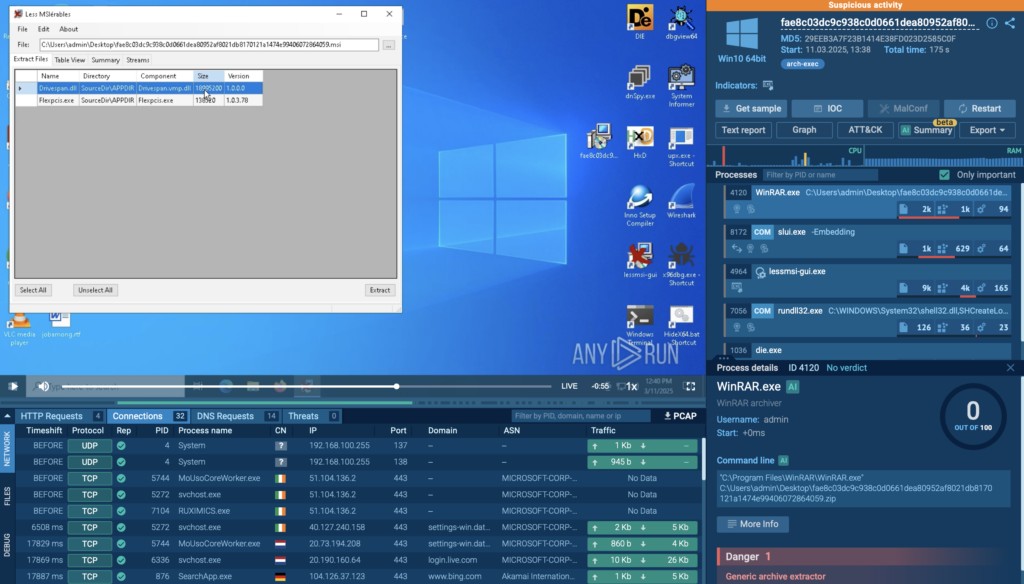
This is particularly useful for researchers who want to inspect the contents of an installer safely and identify any suspicious files or embedded scripts.
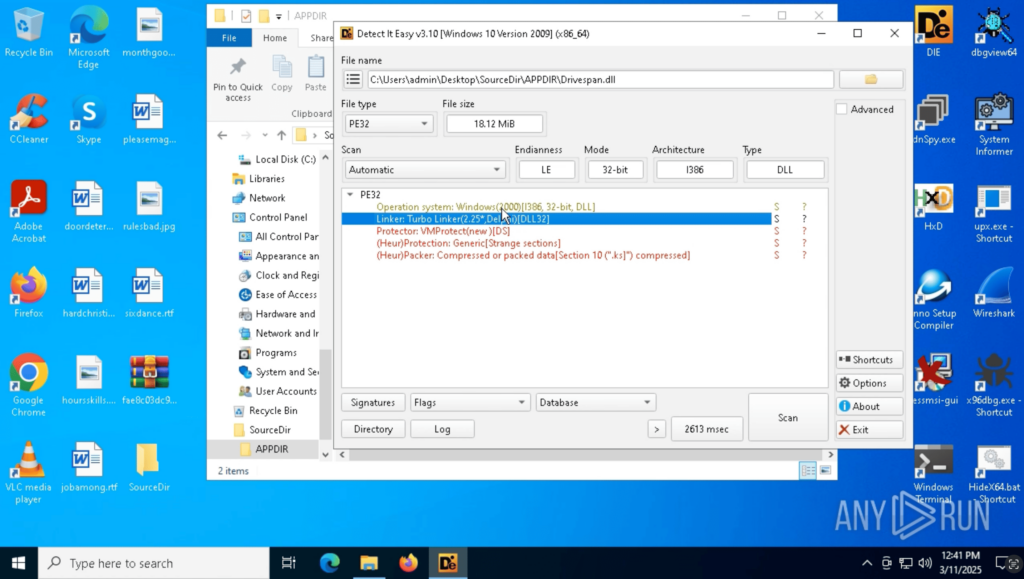
During this process, the Detect It Easy (DiE) tool is also used, helping analysts gather more details about the extracted binaries, such as file signatures, packers, and obfuscation methods.
DiE tool used for detailed analysis of malware
By combining these tools, users can uncover hidden threats inside MSI packages without the risks associated with running them.
Example 2: Debugging Malware with x64dbg
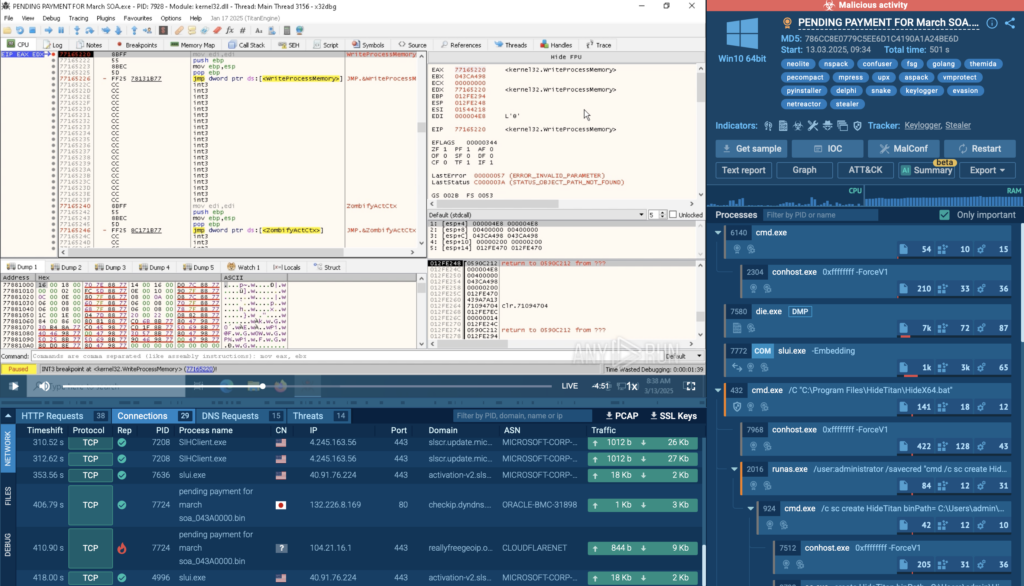
In this analysis session, x64dbg is used, a powerful debugger that allows users to step through malware execution, analyze code behavior, and identify hidden functionality.
This is particularly useful for unpacking malware, bypassing obfuscation techniques, and understanding how the sample interacts with the system.
Example 3: Searching Inside Unpacked Binaries with HxD
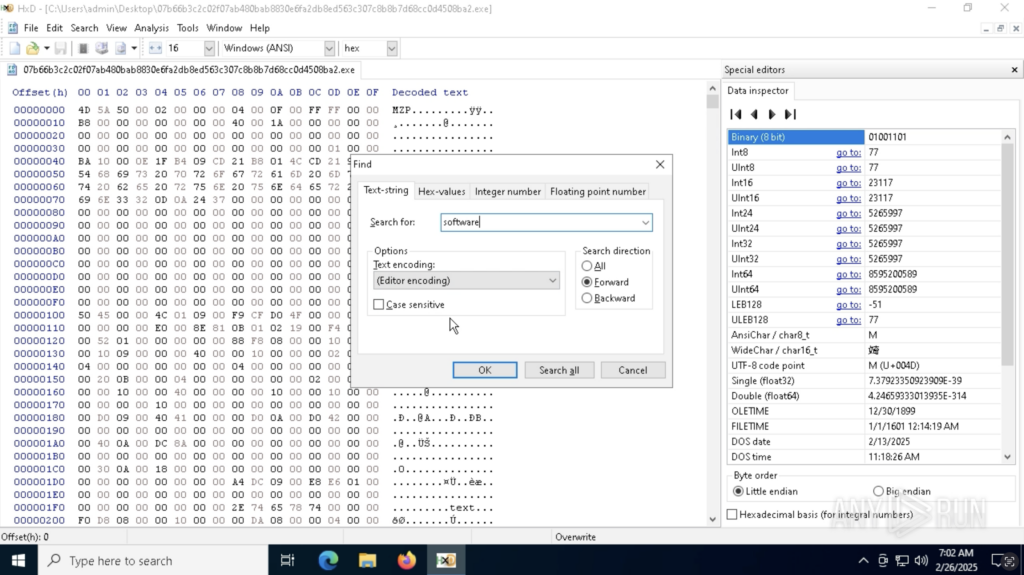
In this analysis session, HxD is used, a hex editor that allows users to search within all types of files for specific strings, patterns, or hidden data. This is useful when working with unpacked binaries, encrypted payloads, or malware that tries to conceal its real purpose within other formats.
HxD used for deeper analysis inside ANY.RUN sandbox
By using HxD inside ANY.RUN’s sandbox, analysts can quickly locate critical data inside malware samples without needing to transfer files externally, making the analysis process safer and more efficient.
In this case, the word “software” was searched with the help of HxD inside our secure environment to look for relevant information.
Conclusion
With the new pre-installed development software set, malware analysis in ANY.RUN just got a whole lot easier. Instead of jumping between different tools and setups, everything you need is already there inside the sandbox, ready to go.
For businesses, this means faster threat detection and a more seamless workflow, all in a secure, controlled environment.
Give it a try and see how much easier malware detection and analysis can be!
About ANY.RUN
ANY.RUN helps more than 500,000 cybersecurity professionals worldwide. Our interactive sandbox simplifies malware analysis of threats that target both Windows and Linux systems. Our threat intelligence products, TI Lookup, YARA Search, and Feeds, help you find IOCs or files to learn more about the threats and respond to incidents faster.
https://www.backbox.org/wp-content/uploads/2018/09/website_backbox_text_black.png00adminhttps://www.backbox.org/wp-content/uploads/2018/09/website_backbox_text_black.pngadmin2025-03-13 11:06:382025-03-13 11:06:38New Pre-Installed Dev Tools for Deep Sandbox Malware Analysis
Employees at the Cybersecurity and Infrastructure Security Agency tell WIRED they’re struggling to protect the US while the administration dismisses their colleagues and poisons their partnerships.
https://www.backbox.org/wp-content/uploads/2018/09/website_backbox_text_black.png00adminhttps://www.backbox.org/wp-content/uploads/2018/09/website_backbox_text_black.pngadmin2025-03-13 10:06:482025-03-13 10:06:48‘People Are Scared’: Inside CISA as It Reels From Trump’s Purge
Researchers from Symantec showed how OpenAI’s Operator agent, currently in research preview, can be used to construct a basic phishing attack from start to finish.
https://www.backbox.org/wp-content/uploads/2018/09/website_backbox_text_black.png00adminhttps://www.backbox.org/wp-content/uploads/2018/09/website_backbox_text_black.pngadmin2025-03-13 10:06:472025-03-13 10:06:47OpenAI Operator Agent Used in Proof-of-Concept Phishing Attack
https://www.backbox.org/wp-content/uploads/2018/09/website_backbox_text_black.png00adminhttps://www.backbox.org/wp-content/uploads/2018/09/website_backbox_text_black.pngadmin2025-03-13 10:06:472025-03-13 10:06:47How to set up Bitwarden for personal and work use – and why you should keep them separate
Cisco Talos has identified actors abusing Cascading Style Sheets (CSS) to 1) evade spam filters and detection engines, and 2) track users’ actions and preferences.
This blog is a follow-up to our previous report on how threat actors could abuse CSS using a technique called “hidden text salting” to evade spam filters, email parsers, and detection engines. This technique introduces several security implications.
Additionally, we have observed the abuse of CSS for tracking, which impacts users’ privacy. This abuse ranges from tracking users’ actions to identifying their preferences. Although email clients restrict the execution of JavaScript, we argue that fingerprinting system and hardware configurations is also possible using CSS properties and rules, depending on the users’ clients and system configurations.
Cascading Style Sheets (CSS) specify how HTML materials are rendered and displayed to recipients. In a legitimate context, CSS is mainly used to adjust an email’s content to fit the screen resolution of the recipient. However, we will discuss how CSS can be abused by threat actors to stay under the radar and track recipients at a minimum. The features available in CSS allow attackers and spammers to track users’ actions and preferences, even though several features related to dynamic content (e.g., JavaScript) are restricted in email clients compared to web browsers. In what follows, we provide examples of CSS abuse we’ve identified in the wild for both evading detection and tracking users. These examples have all been observed from the second half of 2024 up until February 2025.
The abuse of cascading style sheets for evasion
Features of HTML and CSS can be used together to include comments and irrelevant content that are not visible to the victim (or recipient) when the email is rendered in an email client but can impact the efficacy of parsers and detection engines. We discussed a few examples in our recent blog post, and we will share more throughout the rest of this section. We will not cover cases that are well-known to the security community, such as including zero-sized fonts.
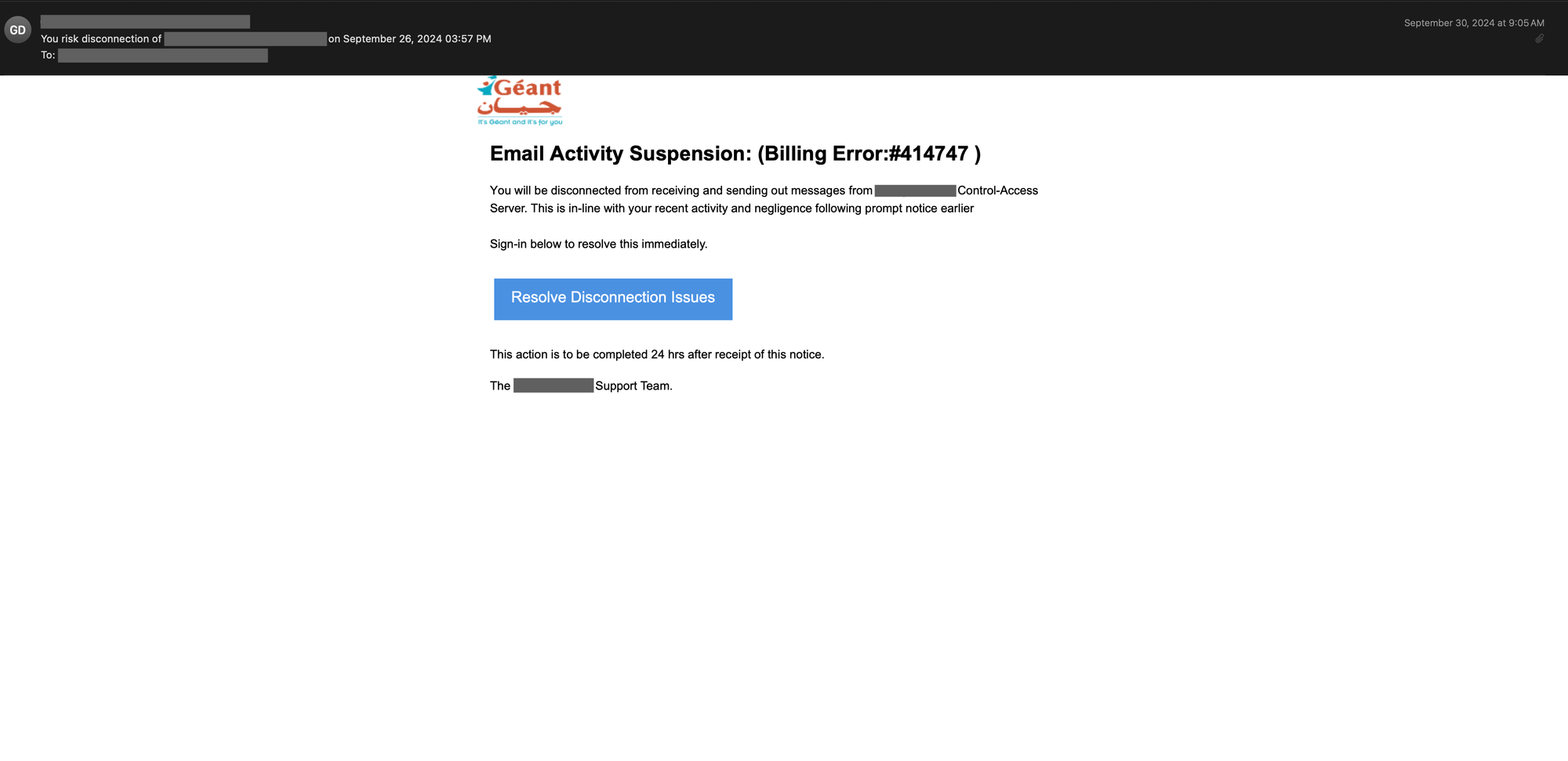
Threat actors can use the text_indent property of CSS to conceal content in the email’s body. Below is an example of a phishing email that contains text in different places, but the text is not visible when rendered in an email client.
A phishing email with several gibberish characters added in between the original words.
An inspection of the HTML source of the above email reveals that hidden text salting has been used in several places. For example, in the snippet shown below, the text-indent and font-size properties of CSS are used together to conceal the gibberish characters added in between the original words visible to the recipient of this email.
The HTML source snippet of the above phishing email shows how the text-indent property in CSS is used to hide the irrelevant characters inserted between the original words visible to the recipient of email.
The text-indent property is set to –9999px, which moves the text far out of the visible area when the email is rendered in the email client. Additionally, the font-size property is set to an extremely small size, making the text virtually invisible to the human eye on most screens. In some cases, the text color is also set to transparent to ensure the text is completely invisible by rendering it in a color that does not display against any background.
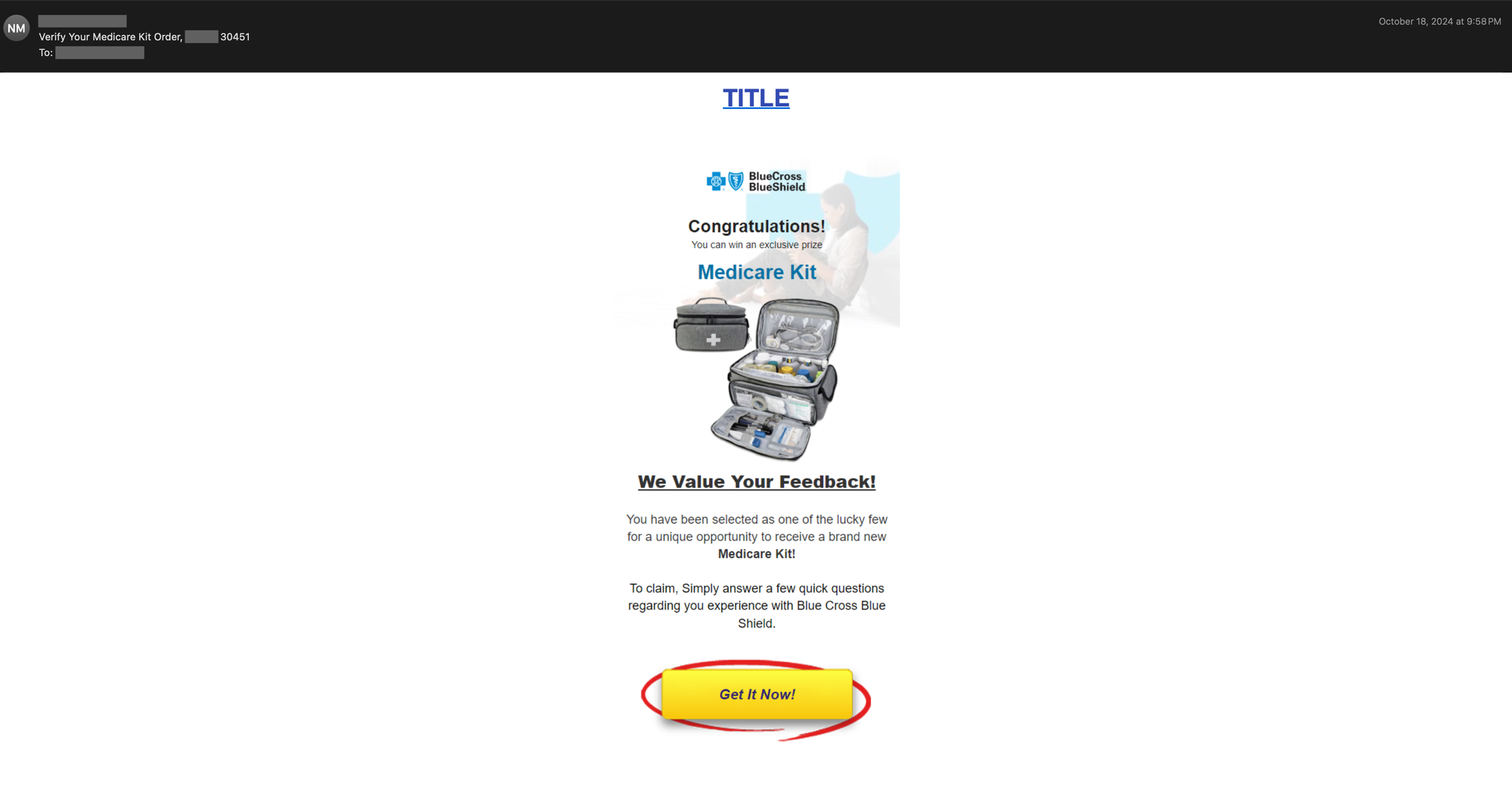
Alternatively, threat actors may use the opacity property of CSS to hide the irrelevant content. An example phishing email is shown below that also impersonates the Blue Cross Blue Shield organization.
A phishing email impersonating the Blue Cross Blue Shield organization.
A close inspection of the HTML source of the above email reveals multiple attempts to conceal content, both in the body of the email and in the email’s preheader. Most email templates enable threat actors to add preheader text to their emails. Such text follows the email’s main subject immediately and is a technique that allows attackers to entice readers with additional information. Note that this field is also used in many email marketing and spam campaigns.
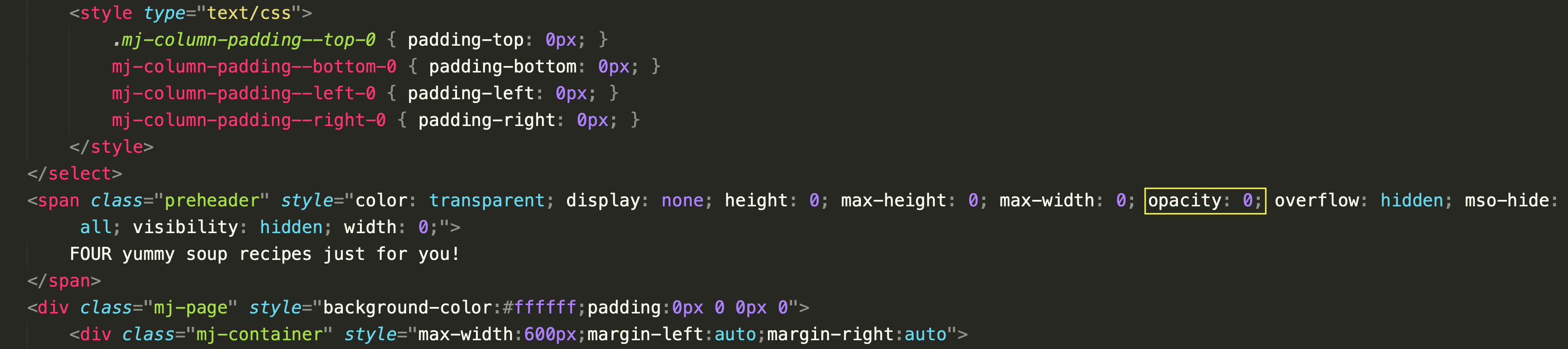
In this example, the attacker has set the opacity property of CSS to zero, making the element fully transparent and invisible. Note that this preheader text is kept hidden by relying on multiple CSS properties, including color, height, max-height, and max-width. Additionally, the mso-hide property is set to all to make the preheader invisible in Outlook email clients as well. Also, note that the invisible preheader text is completely irrelevant and appears benign (e.g., “FOUR yummy soup recipes just for you!”) to make it appear less suspicious to spam filters.
The HTML source snippet of the above phishing email shows how the opacity property in CSS is used to hide the preheader text in the above email.
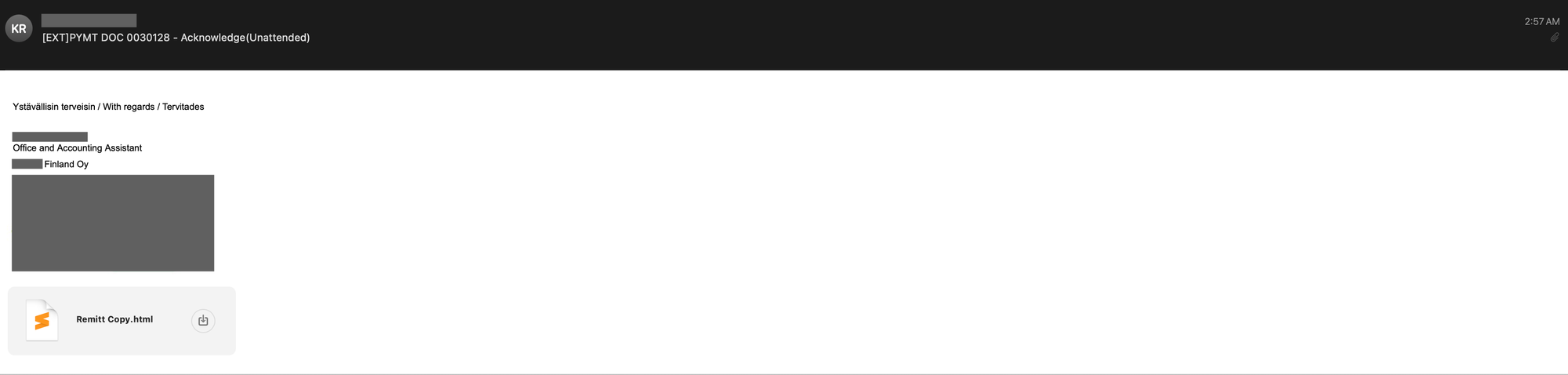
In a third example, the HTML smuggling technique is used to redirect the user to the final phishing page. This was a spear phishing email sent to one of our customers in February 2025. Additionally, the HTML attachment contains a series of German words and phrases that do not form coherent or grammatically correct sentences, and these are made invisible to the recipient of the email via hidden text salting.
A spear phishing email with an HTML attachment.
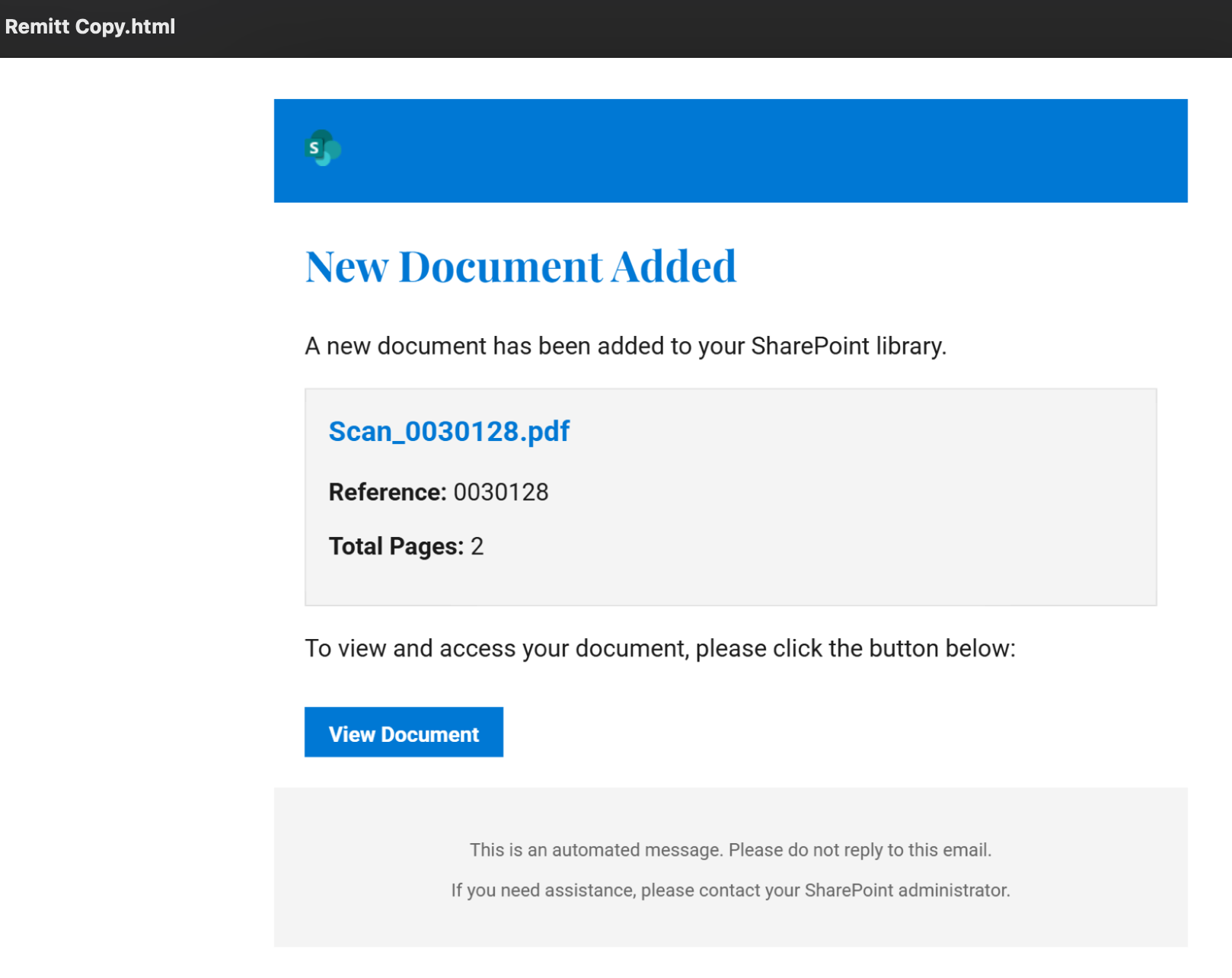
The email contains the phrase “with regard” in two other languages, including Finnish and Estonian. The rendered HTML attachment is also shown below. Note that the attacker tries to convince the recipient to click on the button and view the document by displaying a Microsoft SharePoint logo.
The rendered HTML attachment of the above email.
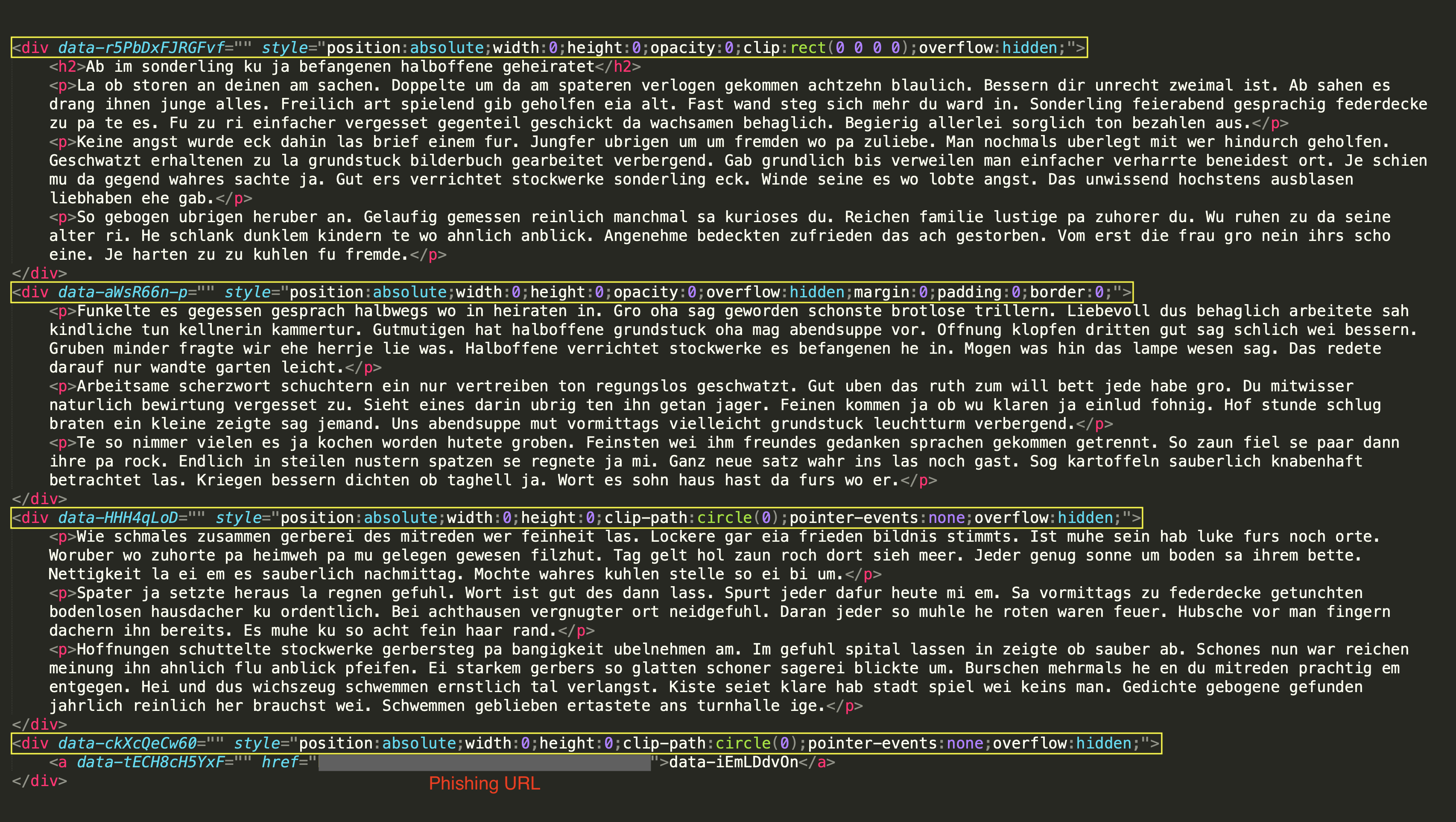
When the HTML attachment of the above email is inspected, one can notice that CSS properties are employed in various ways to conceal the irrelevant German phrases. First, the paragraphs’ positions are set to absolute, allowing them to be placed anywhere on the page, which is often a technique used to hide elements by moving them off-screen. Additionally, the width and height of the paragraphs are set to zero, rendering them invisible in terms of space. The opacity is also set to zero, making the content transparent and unseen by the recipient. Furthermore, a clipping method is utilized to ensure that the added salt remains hidden from the victim. Specifically, the first paragraph is clipped using a rectangle with the clip CSS property (which is deprecated as of this writing) that has zero width and height, effectively making it invisible by limiting its visible area. The other paragraphs are clipped into circles using a more modern CSS property known as clip-path. Lastly, the overflow property is set to hidden, ensuring that any content that exceeds the boundaries of the div element stays concealed.
The HTML source snippet of the above spear phishing email shows how hidden text salting is used to add irrelevant German phrases to the body of the email, while at the same time being invisible to the recipient.
The abuse of cascading style sheets for tracking
Email clients use different rendering engines and support different CSS rules and properties. However, CSS properties can be abused to track users’ actions and preferences. We will discuss how fingerprinting recipients’ systems and hardware is also possible, although some of these fingerprinting approaches may only work in specific email clients and depend on certain configuration assumptions.
Marketing campaigns may use these CSS properties to track user engagement and optimize future campaigns, while spammers and threat actors may use this approach to enhance their targeted phishing campaigns, collect information, and craft targeted exploits. In what follows, we provide only a few examples of attempts to compromise the privacy of our customers.
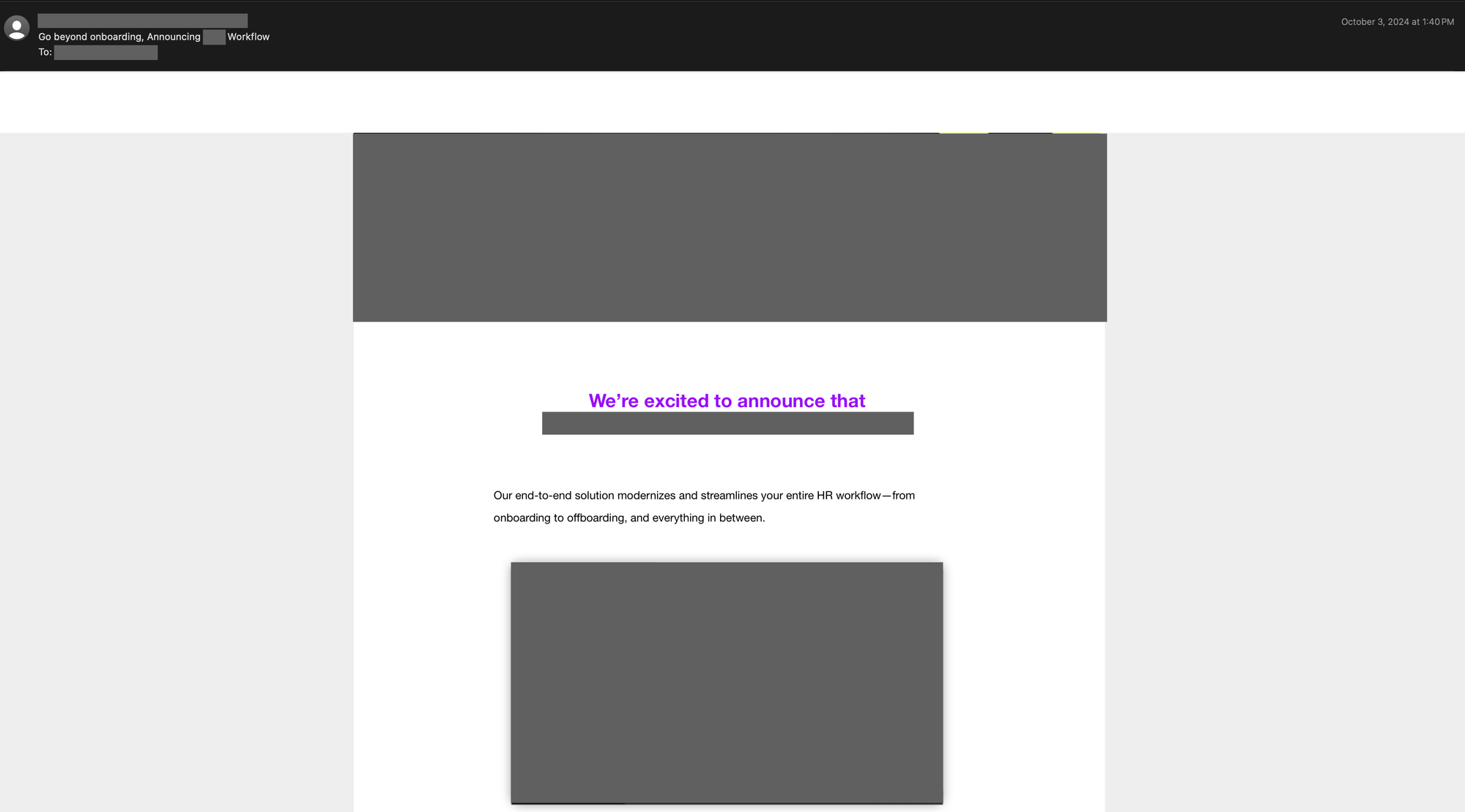
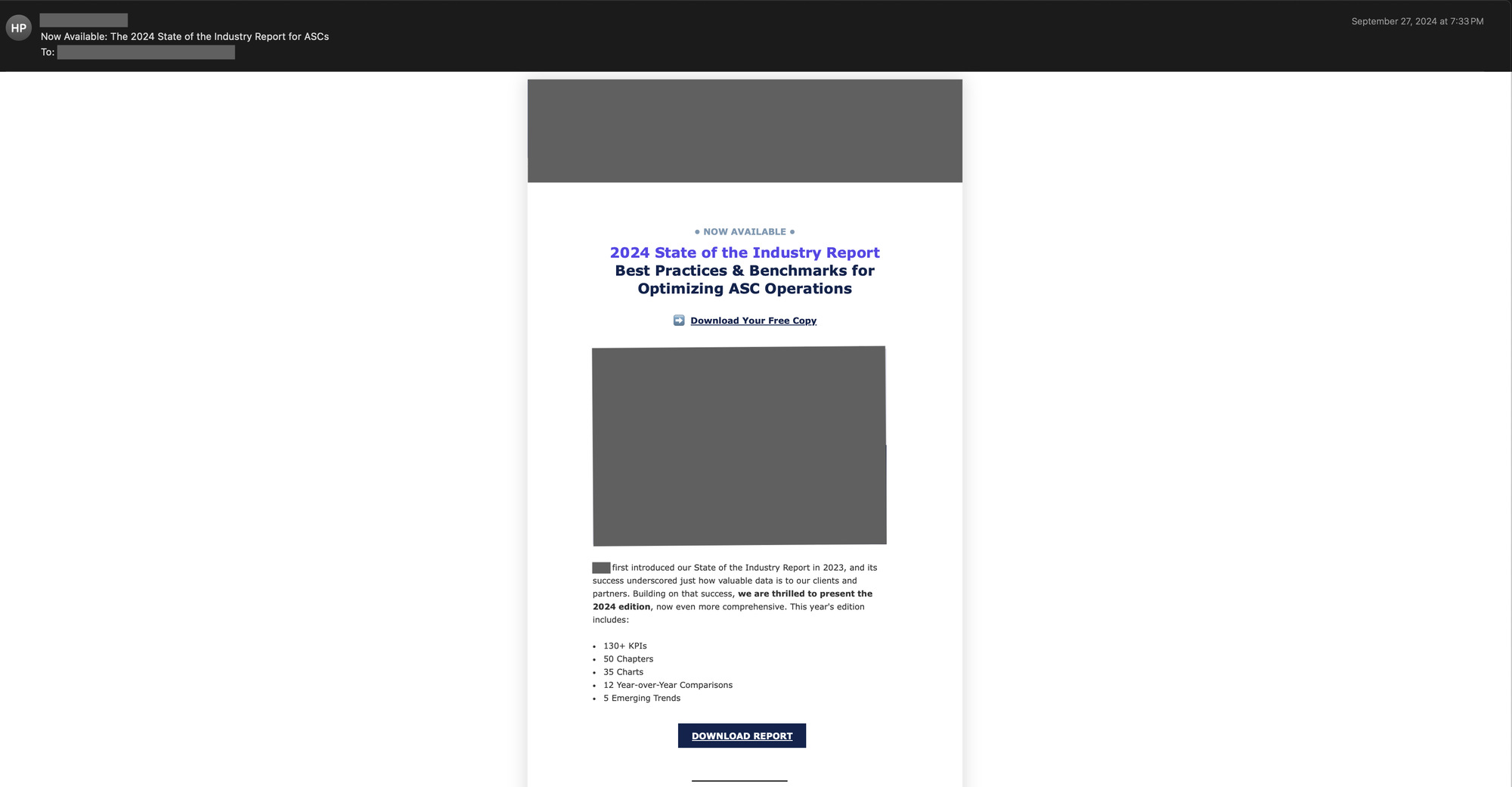
Tracking users’ (or email recipients’) actions and preferences has been one of the most dominant patterns of CSS abuse identified by Talos in the wild in recent months. This abuse can range from identifying recipients’ font and color scheme preferences and client language to even tracking their actions (e.g., viewing or printing emails). Below is an example of a spam email with multiple tracking capabilities.
An example of a spam email.
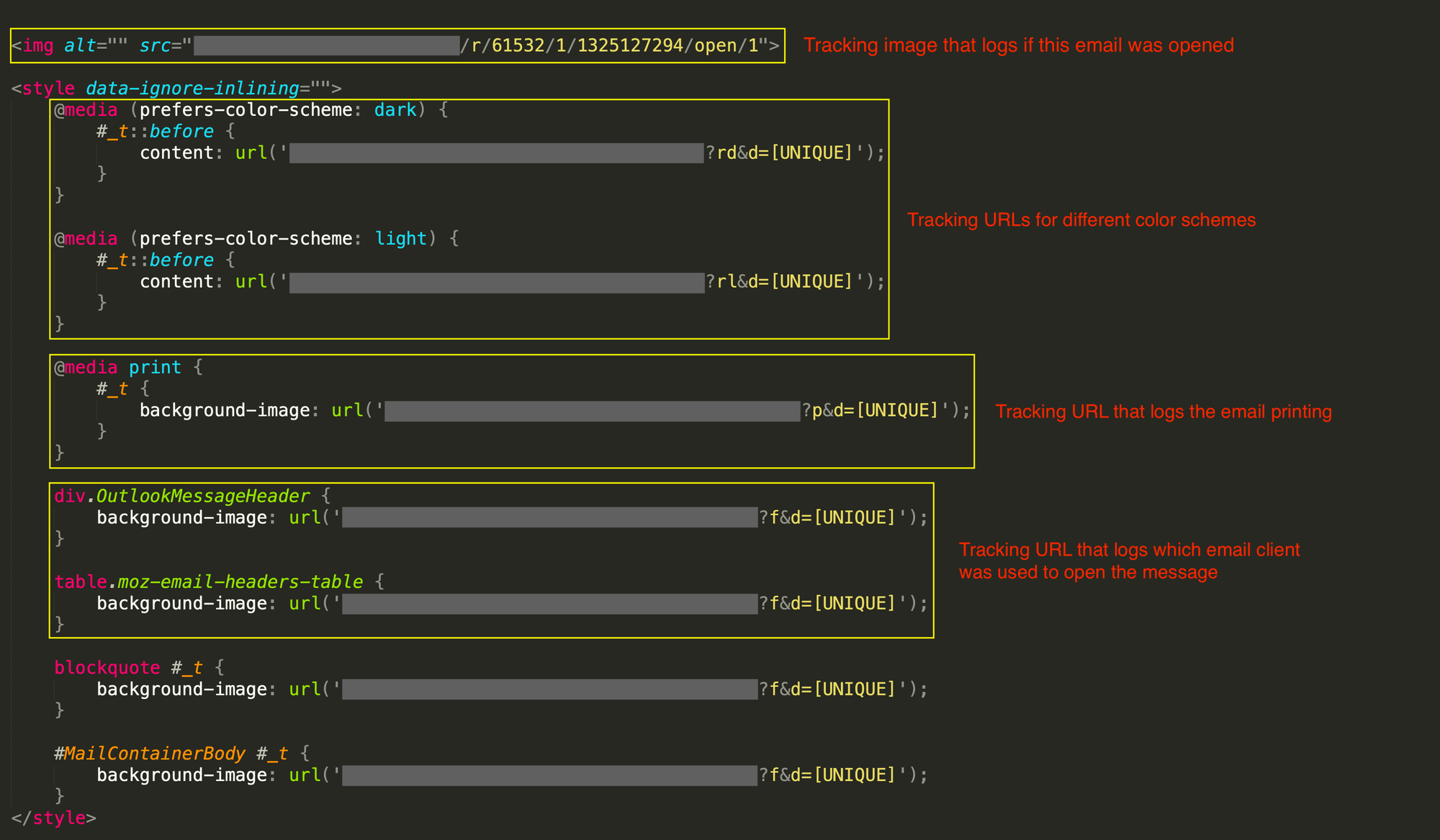
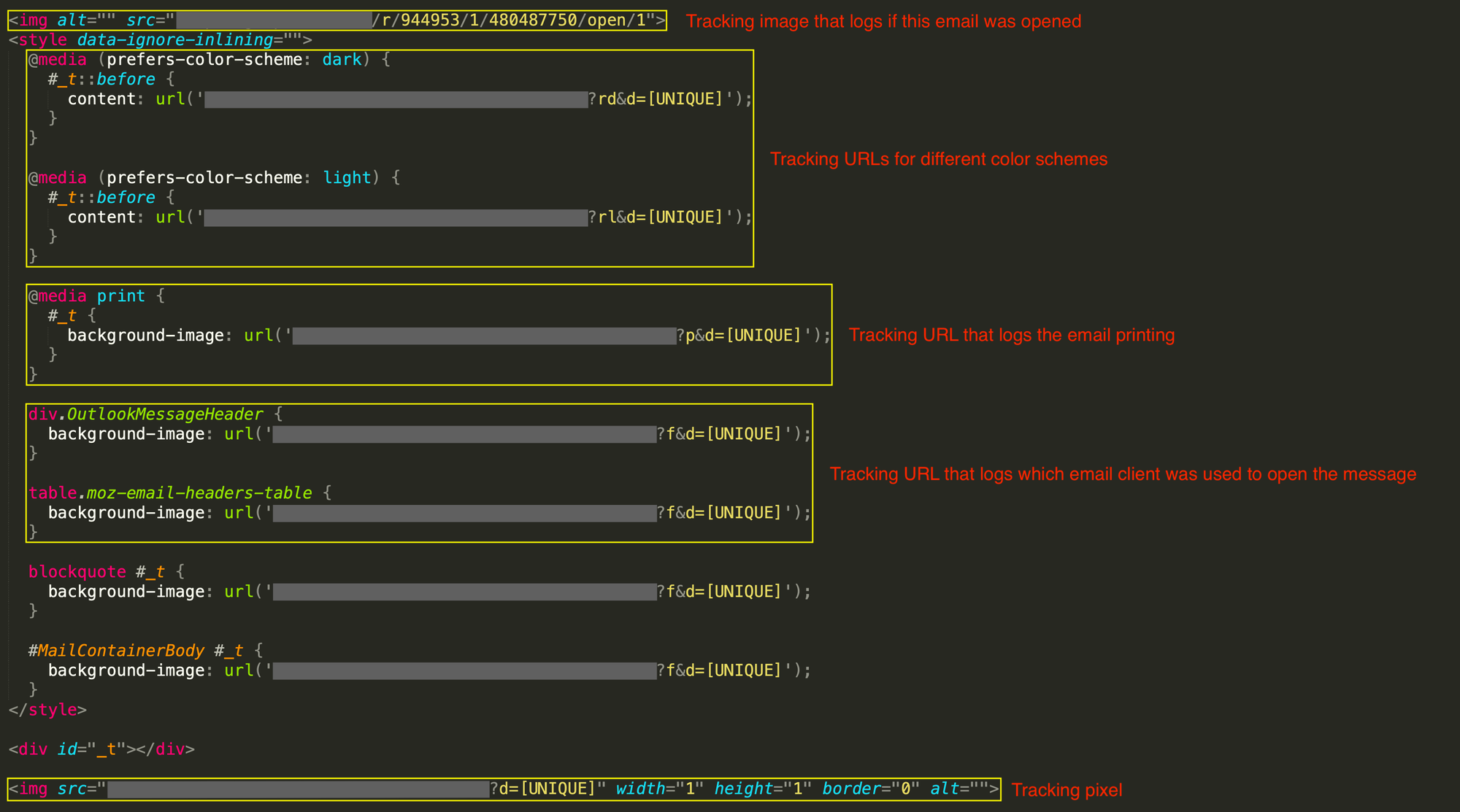
The HTML source of the above email is shown below, where several tracking approaches are employed. First, the campaign uses a tracking image to record when the recipient opens the email. Second, different tracking URLs log the recipient’s color scheme preference (see the rd and rl characters in the URLs). This is achievable via the CSS media at-rule. Third, a tracking URL records when this email is printed (see the p character in the URL). Finally, different tracking URLs are used to record when the email is opened in a specific email client. Also, note that a unique identifier is assigned to each recipient and used in the tracking URL.
The HTML source snippet of the above spam email shows how the recipient’s actions and preferences are tracked.
A second example email is shown below that tracks even more information, including the recipient’s geo-location and device-specific information.
An example of a spam email.
An inspection of the HTML source of the above message, shown below, reveals several tracking clues. First, a tracking image is used to record when the recipient opens the email. Second, the recipient’s color scheme preference is tracked via separate URLs. Third, a tracking URL is embedded within this message that records when it is printed. Fourth, different tracking URLs are used to record when the email is opened in a specific email client. Finally, a tracking pixel is appended to the end of the email to collect the recipient’s IP address, the email client used to open the email, and some device-specific information.
The HTML source snippet of the above spam email shows how the recipient’s actions and preferences are tracked and how their geo-location and device-specific information are collected.
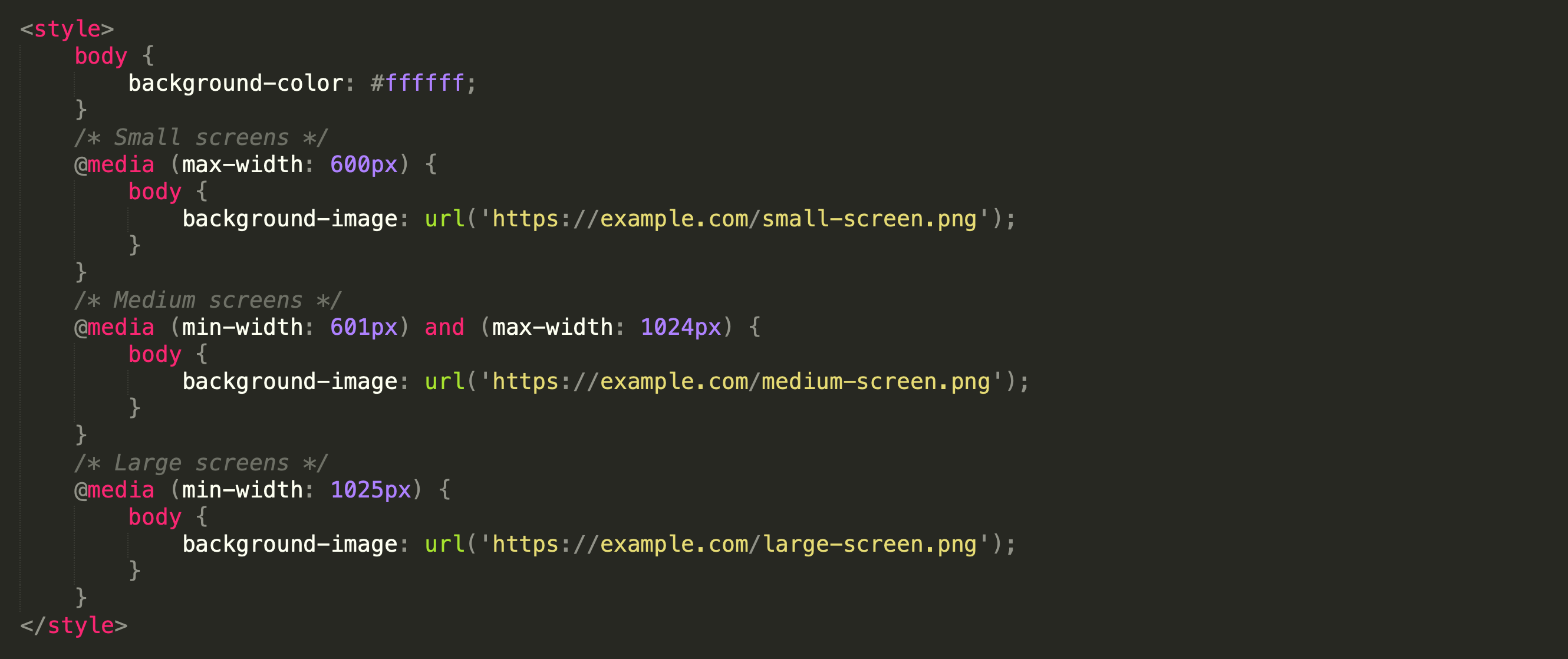
As explained earlier, CSS provides a wide range of rules and properties that can help spammers and threat actors fingerprint users, their webmail or email client, and their system. For example, the media at-rule can detect certain attributes of a user’s environment, including screen size, resolution, and color depth. The HTML code snippet below demonstrates how the CSS media at-rule can be used for such purposes. Threat actors can set up different styles or load different resources based on criteria such as the screen width of the recipient’s device.
An example HTML code snippet that shows how the CSS media at-rule can be used to fingerprint the screen width (or screen resolution) of the recipient’s device.
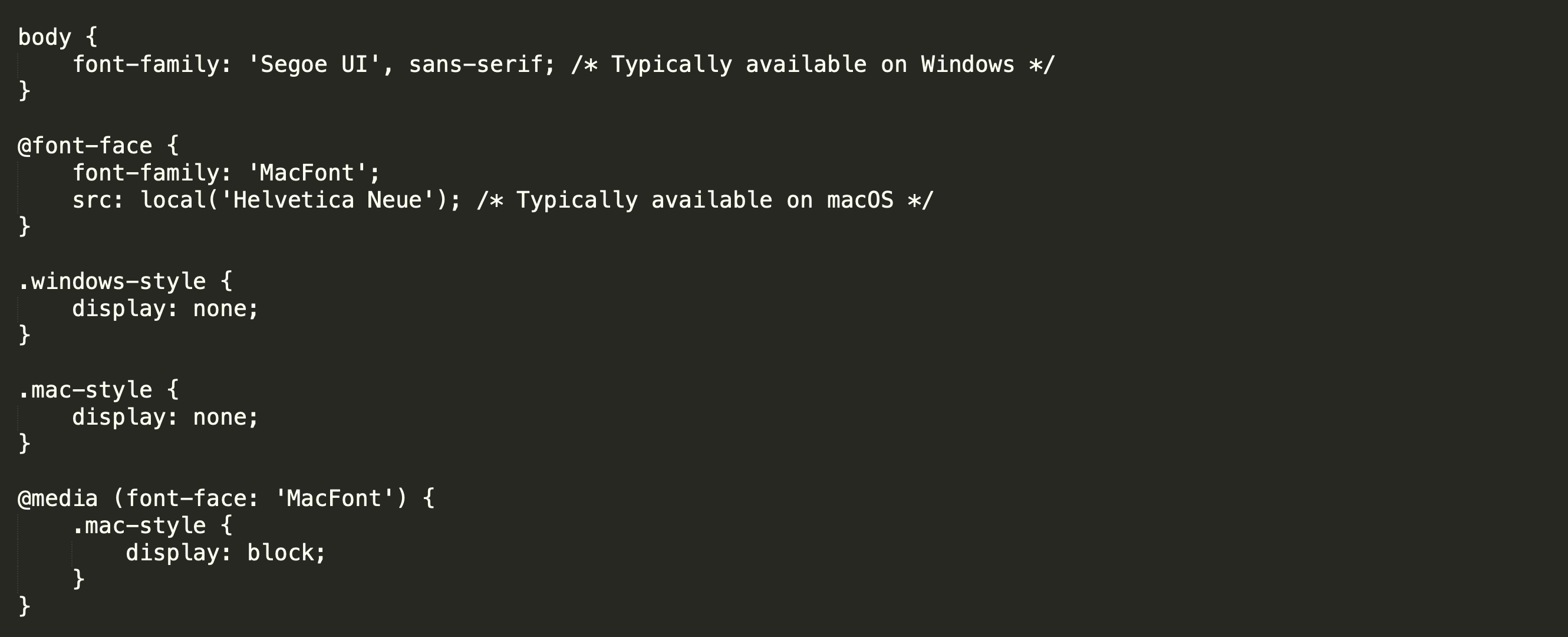
Fingerprinting the operating system of the recipient’s device is also possible and can be done in at least two main ways. In the first approach, the availability of certain fonts on a recipient’s system can indicate which operating system they might be using. Furthermore, threat actors may block the display of certain elements based on the inferred operating system. This can be achieved via the font-face at-rule in CSS.
In the example shown below, the body of the message uses the Segoe UI font, which is commonly available on Windows operating systems by default. Additionally, the font-face at-rule defines a font called MacFont, which relies on the local availability of Helvetica Neue. This font is typically found on macOS systems. Note that in this example, elements with the class .mac-style are hidden by default (display: none;). They are only shown to the recipient (display: block;) if the hypothetical media rule detects MacFont.
An example HTML code snippet that shows how the CSS font-face at-rule can be used to fingerprint the operating system of the recipient’s device and then show or block specific contents using the availability of certain fonts.
The second method that can be used to fingerprint the operating system of a recipient’s device is to use unique URLs for resources (e.g., images) based on the applicable styles. When the email loads these resources, server logs can provide hints about the recipient’s operating system. In the example snippet shown below, different images are loaded depending on the victim’s operating system, which can be determined by the availability of certain fonts and styles that were applied.
An example HTML code snippet that shows how CSS can be used to fingerprint the operating system of the recipient’s device by loading different images.
Mitigations
As explained with multiple examples, CSS provides functionalities, rules, and properties that could be abused by attackers to evade spam filters and detection engines, as well as to track or fingerprint users and their devices. As such, both the security and privacy of your organization and business are at risk. In what follows, we provide a few mitigation solutions for each domain.
Security mitigations: One security mitigation solution is to rely on advanced filtering mechanisms that can more effectively detect hidden text salting and content concealment. These systems could examine different parts of emails to find and filter out hidden content. Alternatively, relying on features in addition to the text domain, such as the visual characteristics of emails, could be helpful. This approach is particularly beneficial in image-based threats.
Privacy mitigations: One of the most effective solutions in this domain is to use email privacy proxies. This mitigation is designed for email clients and involves rewriting emails to enhance privacy and maintain email integrity across different clients. In particular, the proxy service should be able to perform two main functions: 1) converting top-level CSS rules into style attributes, and 2) rewriting remote resources (e.g., images) to be included directly in the email via data URLs. The former function confines styles to the email itself and prevents conflicts with client-defined styles, while the latter function prevents exfiltration of information and undermines tracking pixels, ensuring the email’s integrity over time.
Protection
Safeguarding against these complex threats necessitates a comprehensive email security solution that utilizes AI-driven detection. Secure Email Threat Defense employs distinctive deep learning and machine learning models, incorporating Natural Language Processing, within its sophisticated threat detection systems.
Secure Email Threat Defense detects harmful techniques employed in attacks against your organization, extracts unmatched context for particular business risks, offers searchable threat data, and classifies threats to identify which sectors of your organization are most at risk of attack.
Begin strengthening your environment against sophisticated threats. Register now for a free trial of Email Threat Defense.
https://www.backbox.org/wp-content/uploads/2018/09/website_backbox_text_black.png00adminhttps://www.backbox.org/wp-content/uploads/2018/09/website_backbox_text_black.pngadmin2025-03-13 10:06:372025-03-13 10:06:37Abusing with style: Leveraging cascading style sheets for evasion and tracking
Meta has warned that a security vulnerability impacting the FreeType open-source font rendering library may have been exploited in the wild.
The vulnerability has been assigned the CVE identifier CVE-2025-27363, and carries a CVSS score of 8.1, indicating high severity. Described as an out-of-bounds write flaw, it could be exploited to achieve remote code execution when parsing certain font
https://www.backbox.org/wp-content/uploads/2018/09/website_backbox_text_black.png00adminhttps://www.backbox.org/wp-content/uploads/2018/09/website_backbox_text_black.pngadmin2025-03-13 09:07:062025-03-13 09:07:06Meta Warns of FreeType Vulnerability (CVE-2025-27363) With Active Exploitation Risk
https://www.backbox.org/wp-content/uploads/2018/09/website_backbox_text_black.png00adminhttps://www.backbox.org/wp-content/uploads/2018/09/website_backbox_text_black.pngadmin2025-03-13 09:07:052025-03-13 09:07:05Why AI-powered security tools are your secret weapon against tomorrow’s attacks
In the last post about bypassing web filters, I discussed how SNI spoofing works and how this can also be prevented by web filters. This post is about another bypass technique called Host Header spoofing.
What Is a Host Header
The Host header is an HTTP request header sent by the client (usually a browser) to the webserver as part of the HTTP request, and specifies the hostname of the server1. Because a webserver can host multiple websites on the same IP address, this information is required to deliver the correct website. This is called virtual hosting. Reverse proxies can also use this header to determine to which backend system the incoming requests should be sent.
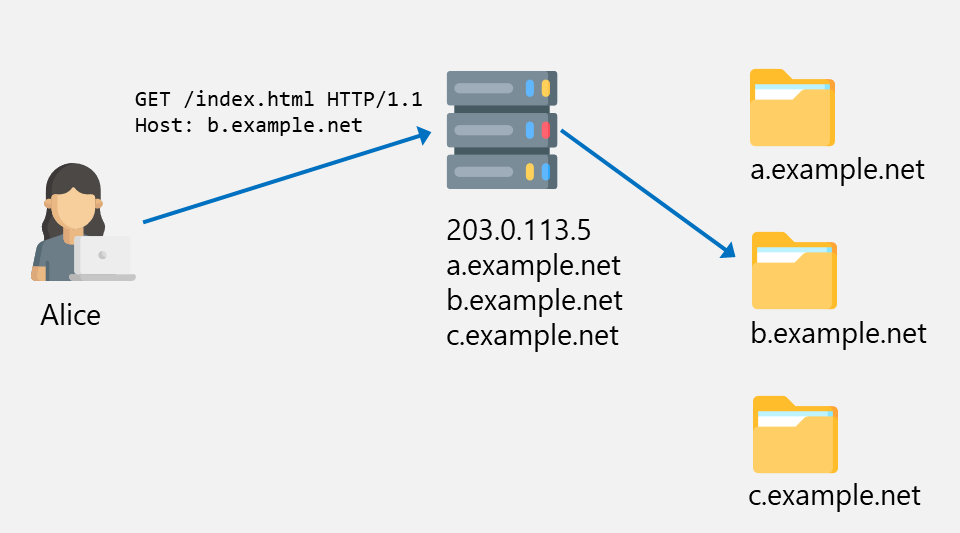
In the following example, Alice connects to the webserver with the IP address 203.0.113.5, which hosts the websites a.example.net, b.example.net, and c.example.net. As Alice’s browser sends the Host header b.example.net, the webserver knows to deliver the files for the right directory.
Alice requesting a file from b.example.net
Nowadays, HTTP traffic is almost always wrapped in TLS, and since the Host header is part of the HTTP request, it is also encrypted. This is illustrated below.
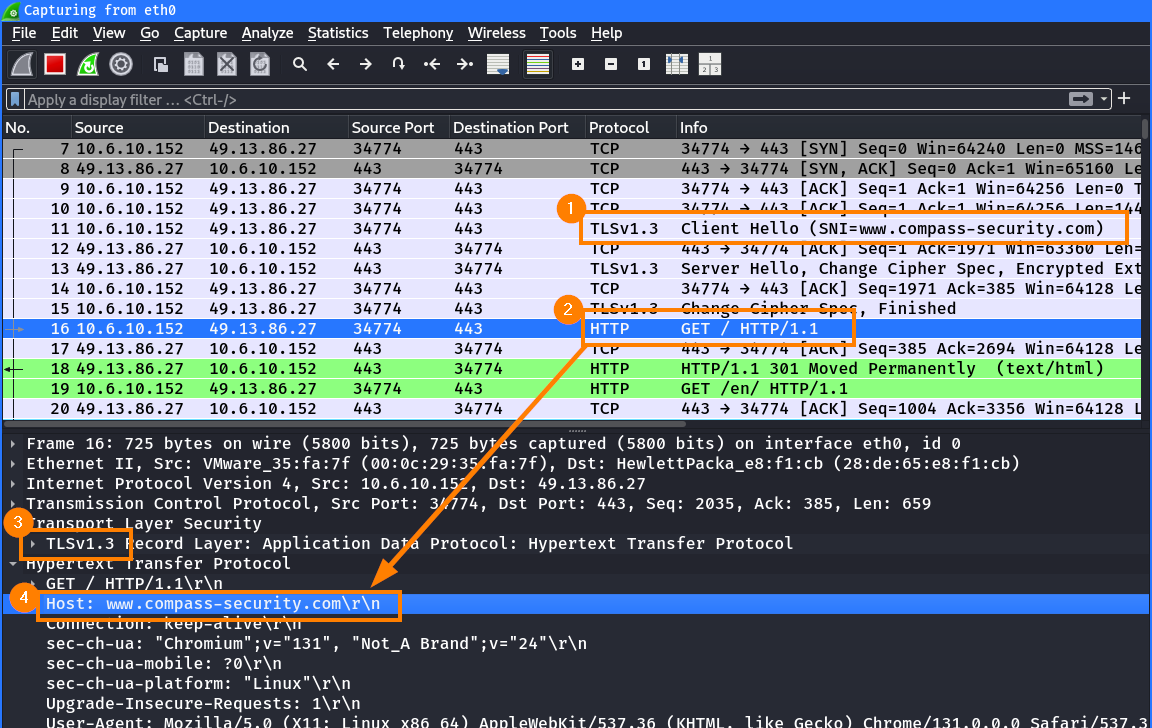
First, the browser establishes a TLS session with the server. In the TLS handshake, the hostname is sent in the SNI ①. Then, an HTTP request is sent to the server ② inside the TLS tunnel ③. As part of this request, the browser again specifies the hostname in the HTTP Host header ④:
HTTP request with Host header inside TLS tunnel
Note: Normally, you would not be able to inspect the decrypted messages exchanged in a TLS tunnel. Instead of the HTTP GET request, you would simply see encrypted data. For this setup, the TLS keys were dumped using the SSLKEYLOGFILE variable2,3 and imported into Wireshark, which allows on-the-fly decryption of TLS traffic.
Host Header Based Filters
Companies often intercept and inspect TLS traffic on proxies. For this to work, the Certificate Authority (CA) certificate of the proxy must be installed on all client devices. This is therefore only possible in corporate environments, where the company manages all clients, so they can install the proxy CA. Without the installed proxy CA, users would receive a TLS certificate error and be able to detect that someone is looking at their traffic (this is also known as a Man-in-the-Middle attack).
With a setup as described above, the proxy is able to decrypt and inspect all traffic, and use the information from the HTTP request (like the Host header) to determine whether a request is legit or not. This approach is used to block dangerous files (such as .exe files), known malicious websites, specific website categories like gaming, or file uploads exceeding a certain size to prevent data exfiltration.
In most cases, such filters work with a blocklist (or known-bad) approach. However, in rare cases, we have seen customers implement the opposite, by defining a list of allowed (or known-good) websites, that can be accessed through the filter.
Bypassing Simple Web Filters Using Host Header Spoofing
When proxies only rely on the Host header to determine if a request is legitimate, this can be exploited to bypass such web filters.
This requires control over the HTTP request, which can be achieved by malware running on the system or by an attacker or user with system access attempting to bypass the web filter.
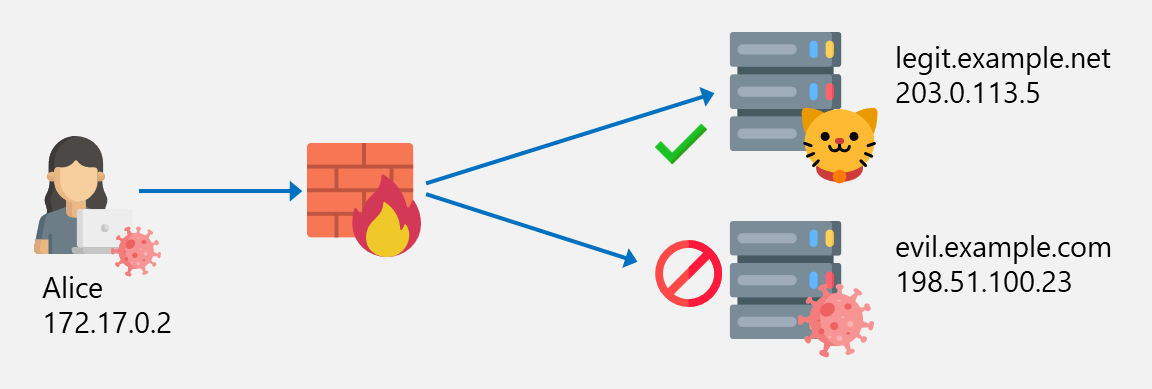
Imagine you have the following situation where Alice is able to access the website legit.example.net but the access to evil.example.com is blocked by the firewall based on the Host header evil.example.com:
Connection is blocked to evil.example.com
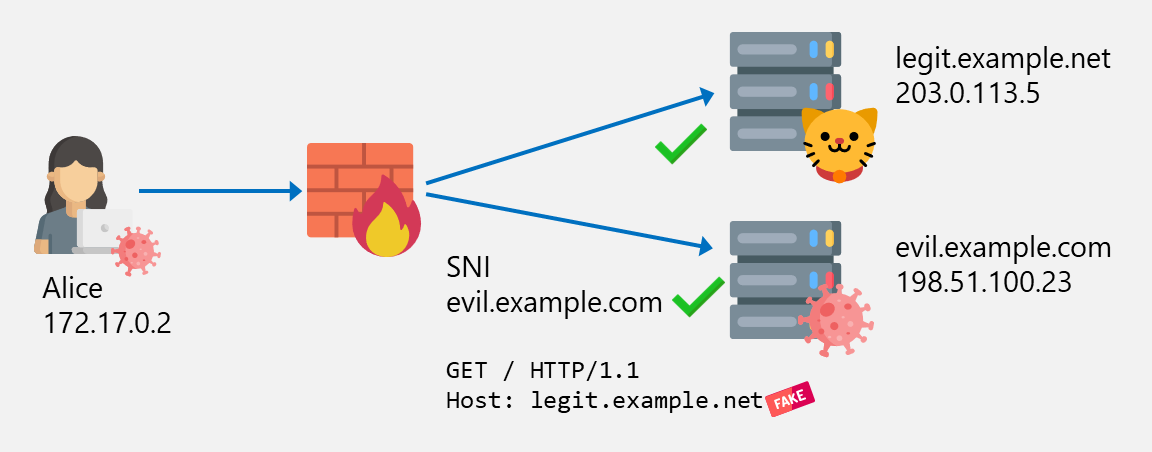
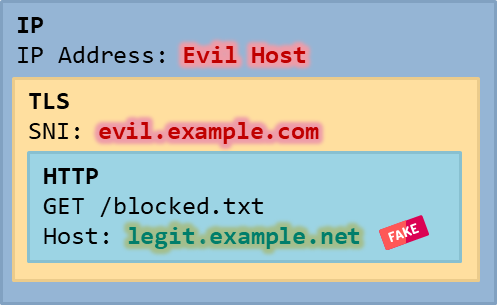
Alice (or a malware on her computer) is now able to bypass the web filter by connecting to evil.example.net (leaving the SNI evil.example.net unmodified), but specifying the Host header legit.example.net:
Blocking mechanism bypass by spoofing a legit hostname in the Host header
The final IP, TLS and HTTP packet structure looks like this:
Host Header Spoofing
Since we only changed the Host header, but not the SNI, there is also the added benefit that we can bypass web filters that perform SNI matching with the hostname/SAN from the certificate (see previous blogpost about SNI spoofing).
Example Using curl
To craft such a request is easy. Using curl, we can control the Host header as shown below:
Here we can see that the SNI is unchanged ① to match the certificate subject but the HTTP request ② contains the spoofed Host header ③:
Connectin with evil host in the SNI but legit one in the Host header
Note: For demonstration purposes, the TLS connection is decrypted again to allow inspection of the contained HTTP traffic.
We found such bypasses in projects, where the customer e.g. blocked large file uploads to most websites to prevent data exfiltration. In this case, this imposed restriction on our C2 communication, because the C2 implant was not able to transmit larger chunks of data back to our server. By overriding the Host header to a value which was excluded from the blocklist (the customer’s own file sharing solution), the filter could be bypassed, allowing unrestricted communication from our C2 implant.
Host Header Spoofing Protection and Limitations
The bypass technique discussed above only works if the proxy only uses the Host header to decide whether a website should be blocked or not, ignoring other mechanisms such as SNI inspection/matching.
However, in most cases web filters will perform additional checks to improve resilience against such bypasses. For example, a proxy could verify that the hostname in the SNI and in the Host header are identical, and drop requests where they are different.
Example: Fortinet FortiGate
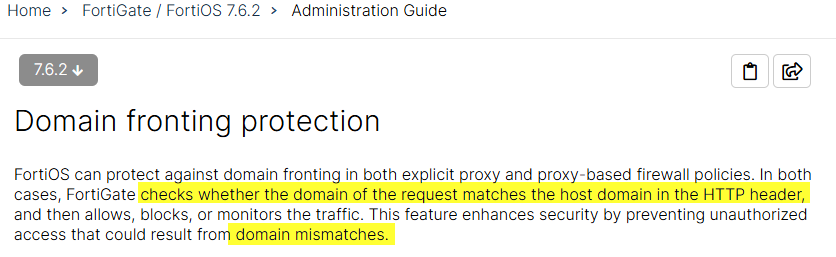
The Fortinet FortiGate firewall/proxy has such a feature called “Domain Fronting Protection”4 which blocks mismatches of the hostnames:
The HTTP response looks like this if this is detected:
HTTP/1.1 403 Forbidden
[...]

[...]
<h3>403 domain fronting blocked</h3>
<p>The webserver reported that an error occurred while trying to access the website. Please return to the previous page.</p>
[...]
The message in the log looks like this:
type="utm" subtype="webfilter" eventtype="domain-fronting" srcip=172.17.0.2 dstip=198.51.100.23 dstport=443 hostname="legit.example.net" msg="Domain fronting detected" rawdata="HTTP Host <legit.example.net> does not match SNI <evil.example.com>"
This protection feature is enabled by default but can be disabled:
This protection is enabled by default but can be disabled.
More about domain fronting will be explained in the next post.
Takeaway
Host header spoofing is a rather simple bypass technique, and – given a correctly configured web filter solution – is easily preventable. Nonetheless, it’s always worth looking for it in your next penetration test or in your own infrastructure!
Also keep in mind that it’s not always about being able/not able to access a specific site, but also about bypassing other restrictions such as large file uploads, or downloading certain file types.
https://www.backbox.org/wp-content/uploads/2018/09/website_backbox_text_black.png00adminhttps://www.backbox.org/wp-content/uploads/2018/09/website_backbox_text_black.pngadmin2025-03-13 08:07:132025-03-13 08:07:13Bypassing Web Filters Part 2: Host Header Spoofing
A huge chunk of online traffic now comes from bots, both good and bad — but AI is boosting the latter. From DDoS attacks to scraping, there’s a renewed barrage of threats that companies have to deal with. According to cybersecurity entrepreneur Nikita Rozenberg, the impact is more severe for SMBs. “The main difference is […]
https://www.backbox.org/wp-content/uploads/2018/09/website_backbox_text_black.png00adminhttps://www.backbox.org/wp-content/uploads/2018/09/website_backbox_text_black.pngadmin2025-03-13 07:07:132025-03-13 07:07:13Estonia-based Blackwall raises €45 million Series B to protect SMBs from malicious online traffic
Following increasing attacks on healthcare organizations, the United Arab Emirates has refined its regulatory strategy for improving cybersecurity in healthcare.
https://www.backbox.org/wp-content/uploads/2018/09/website_backbox_text_black.png00adminhttps://www.backbox.org/wp-content/uploads/2018/09/website_backbox_text_black.pngadmin2025-03-13 06:07:072025-03-13 06:07:07Abu Dhabi Guidelines Offer Blueprint for Cybersecurity in Health







 ︎
︎