Malware Bypasses Microsoft Defender and 2FA to Steal $24K in Crypto

Malware bypasses Microsoft Defender and 2FA, stealing $24K in cryptocurrency via a fake NFT game app. Learn how…

Hackread – Latest Cybersecurity, Tech, Crypto & Hacking News – ​Read More

Russian Cyberespionage Group Hit 60 Victims in Asia, Europe

Russia-linked TAG-110 has targeted over 60 government, human rights, and educational entities in Asia and Europe.

The post Russian Cyberespionage Group Hit 60 Victims in Asia, Europe appeared first on SecurityWeek.

SecurityWeek – ​Read More

How to protect yourself from someone tracking you with stalkerware or an AirTag | Kaspersky official blog

These days, it’s not just government agencies or private detectives who can spy on you. Tracking has become so easy and cheap that jealous spouses, car thieves, and even overly suspicious employers are doing it. They don’t have to peek around corners, hide in stores, or even get close to their target at all. A smartphone and a Bluetooth tracking beacon — like an Apple AirTag, Samsung Smart Tag or Chipolo — will do the job perfectly. According to one of the lawsuits filed against Apple, this method of spying is used in a variety of crimes —  from stalking ex-partners to planning murders.

Luckily for all of us, there’s protection! As part of Kaspersky’s anti-stalking campaign, we’ll explain how you could be tracked and what you can do about it.

Online and offline tracking

Surveillance of a victim is typically carried out in one of two ways.

Method one: purely software-based. A commercial tracking app is installed on the victim’s smartphone — we call this category of apps stalkerware or spouseware. Such apps are often marketed as “parental control apps”, but they differ from legitimate parental controls because the app’s activity is kept hidden after installation. Most often, the app is entirely invisible on the device, though sometimes it disguises itself as something innocuous, like a messenger, game or photo-gallery app. Stalker apps can repeatedly transmit the victim’s geolocation to a server, send messages and other confidential data from the device to an attacker, and even activate the microphone to record audio.

The main drawback of stalkerware for the attacker is the difficulty of installation — it requires gaining access to the victim’s unlocked smartphone for some time. That’s why, in many cases, especially when it’s an ex-partner or car thief doing the stalking, they use the other method.

Method two: a wireless beacon. A tracking device is planted on the victim. In a car, it might be hidden in an inconspicuous spot, such as behind the license plate; for a person, the tracker could be slipped into a bag or among other personal items.

Originally, Bluetooth trackers — small devices about the size of a coin — were invented to help locate lost belongings such as keys, wallets or luggage. However, if planted on a target, their movements can be tracked in near real-time using a special app. Incidentally, many of today’s Bluetooth headphones also have built-in tracking functionality to make them easier to find — and these too can be used for stalking. So, if you happen to find a pair of fancy headphones lying around, don’t start thinking it’s your lucky day — they may have been deliberately planted in order to track your movements, even after you pair them with your own smartphone.

Tracking technology works even if the beacon is well beyond the Bluetooth range of the stalker’s smartphone: other smartphones help locate the “lost” item. Many of the latest Android and iOS devices report the location of nearby visible beacons to the central servers of Google or Apple. As a result, these tech giants are able to locate any beacon if there’s any modern Bluetooth-enabled smartphone with internet access nearby.

The most popular beacon is still the Apple AirTag, and Apple has gone to a lot of trouble since the first product launch to protect users from malicious use of the tracker. The latest AirTags start beeping to attract attention if they remain away from their owner’s smartphone for too long. However, attackers can easily bypass this protection by damaging the speaker on the tracker. Such hacked tags with disabled speakers can even by bought — easily.

How to protect yourself from surveillance

To safeguard yourself from both online and offline tracking, we recommend using Kaspersky for Android. This tool now includes the “Who’s spying on me” feature, which allows you to quickly detect surveillance.

Protection against tracking beacons. Fortunately, by their very nature, trackers can never be completely invisible, as they’re constantly signaling their presence via Bluetooth. A smartphone equipped with reliable protection can alert the user if an unregistered Bluetooth device is frequently detected nearby or in various different locations. If such a device moves around with you or stays close for too long, Kaspersky for Android will notify you.

Upon discovering a tracker, it’s essential to examine it closely. Sometimes, the situation may be innocent, such as if a family member you spend a lot of time with has a tracker attached to their keys. Occasionally, there may be trackers on rental vehicles or laptops (although rental companies are required to notify users and include this in the contract).

Protection against stalkerware. Kaspersky Premium detects known stalkerware apps. Oh, and by the way — did you know that Kaspersky products won a stalkerware detection test? If such apps — or even their installation files, whether downloaded by you or someone else — are found on your device, Kaspersky for Android will alert you immediately.
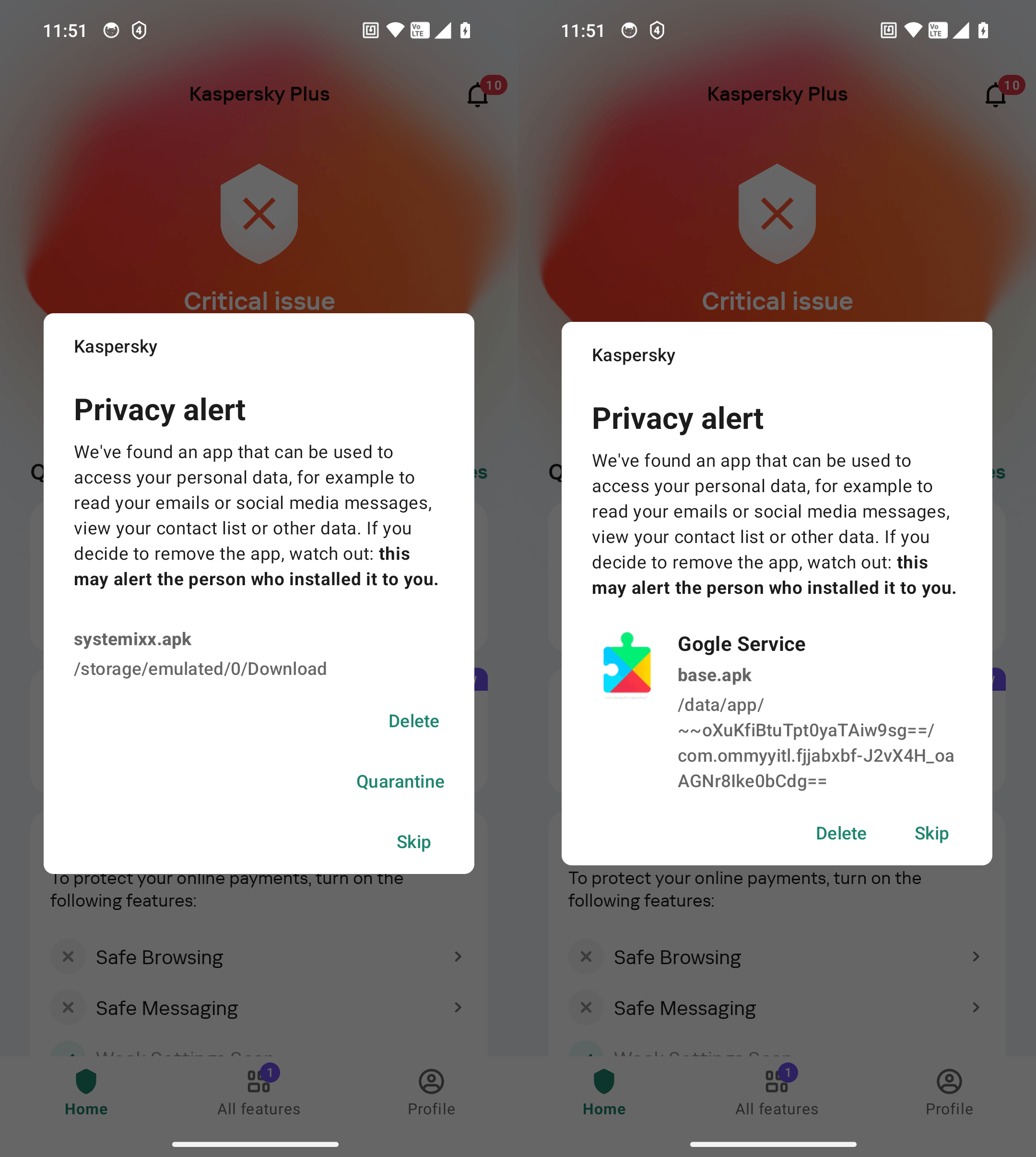
Kaspersky for Android detects both installed stalkerware apps (on the right) and their installation files (on the left)

Kaspersky for Android detects both installed stalkerware apps (on the right) and their installation files (on the left)

Even users of the free version of Kaspersky for Android can scan for stalkerware. The only difference in this case between Kaspersky Premium and the free version is that in Kaspersky Premium, scanning is done automatically and continuously. In the free version of Kaspersky for Android, users need to manually initiate each scan.

Suspicious beacons that appear frequently in your vicinity will be listed and labeled in the Device Scanner section.
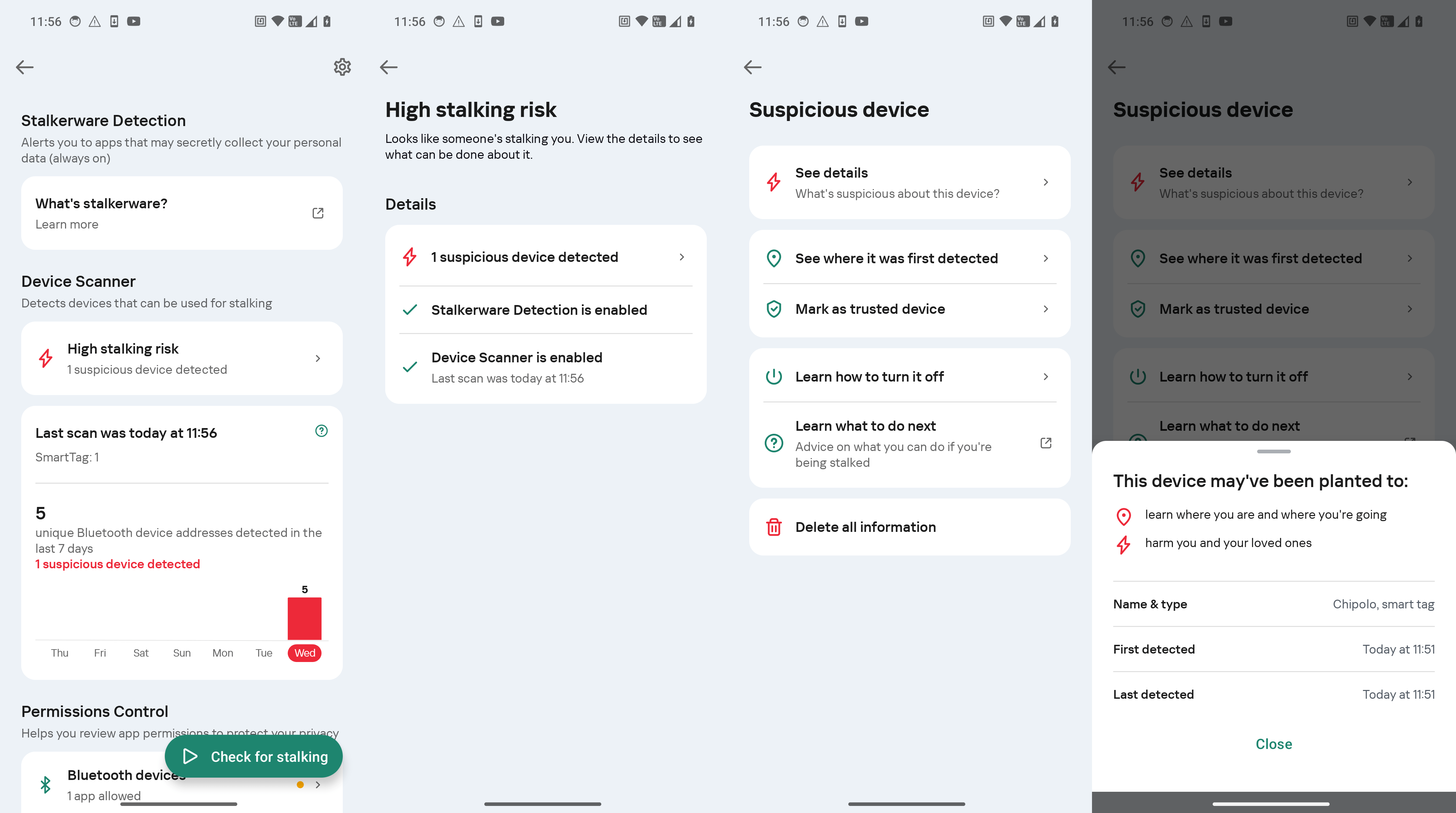
Kaspersky for Android warns you about spy trackers and provides guidance on what to do

Kaspersky for Android warns you about spy trackers and provides guidance on what to do

Meanwhile, the permission-control feature regularly checks the access of apps to your camera, microphone, location and Bluetooth, so you can quickly identify suspicious new apps.

Additional precautions Several general security and cyber-hygiene measures can make it harder for anyone to track you, and are recommended for all users:

  • Never leave personal items unattended. This applies especially to digital devices that are powered on.
  • Set up biometric authentication on your smartphone.
  • Set the auto-lock screen time to 30 seconds or less.
  • Set up biometrics or a strong password for logging into your laptop, and always lock the screen if you leave your desk.
  • Make a password necessary to install apps from the app store (you can do this on both iOS and Android).
  • Disable the installation of apps from unknown sources on Android.
  • Update all your apps at least once a month and delete any that you no longer use.
  • Never share your passwords with anyone. If you’ve ever shared them with anyone, or you suspect they may have been intercepted, seen or guessed — change them immediately.
  • Avoid logging into personal accounts on shared devices at home or at work, and certainly don’t do this in libraries, hotels or cafes. If you absolutely have to log in, make sure to log out afterwards.
  • Use a password manager, create a unique password for each account, and enable two-factor authentication.
  • Be careful with what you share on social media and in messengers — avoid disclosing details that reveal your location, daily routine, or social circle.

For individuals at higher risk of stalking (say, from an unwanted admirer, disaffected spouse or business partner), here is a more comprehensive list of precautions, including physical safety and legal protection measures.

What to do if you detect surveillance

If you’ve discovered a beacon or tracking app and ruled out any innocent explanations, consider the possible reasons for why you might be under surveillance.

For those involved in domestic violence or serious conflicts, physical safety is the priority. Therefore, in such cases, it’s important not to reveal that you’ve detected the surveillance, but instead contact the police or dedicated support organizations. Likewise, it’s essential that the smartphone or beacon doesn’t end up in a location that would indicate the discovery (for example, a police station). You can either leave the smartphone at home while you go to the police, or arrange to meet a support group in a safe place. For more detailed advice on such tricky cases, consult our anti-stalking awareness guide.

If the risk of violence is low, you should still contact the police. Hand over the spy tracker, and let law enforcement create a digital copy of your smartphone to gather evidence of infection (if present). After that, you can remove the stalkerware from your smartphone.

Kaspersky official blog – ​Read More

400,000 Systems Potentially Exposed to 2023’s Most Exploited Flaws

VulnCheck finds hundreds of thousands of internet-accessible hosts potentially vulnerable to 2023’s top frequently exploited flaws.

The post 400,000 Systems Potentially Exposed to 2023’s Most Exploited Flaws appeared first on SecurityWeek.

SecurityWeek – ​Read More

CISA and EPA Reports Find Concerning Critical Infrastructure Vulnerabilities

CISA

A pair of recent U.S. government reports offer a fresh reminder of how vulnerable critical infrastructure environments are.

The U.S. Cybersecurity and Infrastructure Security Agency (CISA) released a report this week detailing the ease with which a CISA red team was able to penetrate an unspecified critical infrastructure environment, while the EPA issued a report last week that showed that 27 million Americans are served by drinking water systems with high to critical-severity vulnerabilities.

Vulnerabilities in water and wastewater systems are particularly concerning because communities are generally unprepared for an extended outage to those systems. Cyble researchers recently observed two incidents where threat actors claimed to have accessed water system control infrastructures and changed water system settings – we detail those incidents below.

CISA Red Team Breaches Critical Infrastructure Organization

CISA was asked by the critical infrastructure organization to conduct a red team assessment. During the assessment open-source research and targeted spearphishing campaigns were unsuccessful, but external reconnaissance discovered a web shell left from a third party’s previous security assessment. The red team used the shell for initial access and immediately reported it to the organization’s trusted agents (TAs). The red team was then able to escalate privileges on the host, discover credential material on a misconfigured Network File System (NFS) share, and move from a DMZ to the internal network.

From there, the red team gained further access to several sensitive business systems (SBSs). The team discovered a certificate for client authentication on the NFS share and used it to compromise a system configured for Unconstrained Delegation. This allowed the red team to acquire a ticket granting ticket (TGT) for a domain controller, which was used to further compromise the domain. The red team leveraged this high-level access to exploit SBS targets that had been provided by the organization’s TAs.

CISA published a graphic detailing the exploits:

The targeted organization detected much of the red team’s activity in their Linux infrastructure after CISA alerted them to the vulnerability the red team used for initial access, but despite delaying the red team from accessing many SBSs, the red team was still able to access a subset of SBSs. “Eventually, the red team and TAs decided that the network defenders would stand down to allow the red team to continue its operations in a monitoring mode,” the CISA report said. “In monitoring mode, network defenders would report what they observed of the red team’s access, but not continue to block and terminate it.”

CISA Red Team Findings

The CISA red team detailed nine findings are all organizations should be aware of:

Inadequate Perimeter and DMZ Firewalls: The organization’s perimeter network was not adequately firewalled from its internal network, which allowed the red team a path through the DMZ to internal networks.

Network Protection Lacking: CISA said the organization was “too reliant on its host-based tools and lacked network layer protections, such as well-configured web proxies or intrusion prevention systems (IPS).” EDR solutions also failed to detect all of the red team’s payloads.

Insufficient Legacy Environment Protection: Hosts with a legacy operating system did not have a local EDR solution, “which allowed the red team to persist for several months on the hosts undetected.”

Security Alerts Unreviewed: The red team’s activities generated security alerts that network defenders did not review. “In many instances, the organization relied too heavily on known IOCs and their EDR solutions instead of conducting independent analysis of their network activity compared against baselines.”

Identity Management Lacking: The organization had not implemented a centralized identity management system in their Linux network, so defenders had to manually query every Linux host for artifacts related to the red team’s lateral movement through SSH. “Defenders also failed to detect anomalous activity in their organization’s Windows environment because of poor identity management,” CISA said.

Known Insecure and Outdated Software: The red team discovered outdated software on one of the organization’s web servers.

Unsecured Keys and Credentials: The organization stored many private keys that lacked password protection, allowing the red team to steal the keys and use them for authentication.

Email Address Verification: The active Microsoft Office 365 configuration allowed an unauthenticated external user to validate email addresses by observing error messages in the form of HTTP 302 versus HTTP 200 responses, a misconfiguration that helps threat actors verify email addresses before sending phishing emails.

EPA OIG Finds Alarming Drinking Water System Vulnerabilities

A report by the EPA’s Office of the Inspector General (OIG) found that nearly 27 million Americans are served by drinking water systems with high-risk or critical cybersecurity vulnerabilities, and an additional 83 million Americans are served by systems with medium or low-severity vulnerabilities.

The OIG investigation looked at drinking water systems serving 50,000 or more people, 1,062 systems in all, covering 193 million people, or about 56% of the U.S. population. The Oct. 8 vulnerability scans identified 97 high-risk water systems and 211 moderate-risk ones.

The vulnerability tests “consisted of a multilayered, passive assessment tool to scan the public-facing networks” of the drinking water systems, the report said.

“If malicious actors exploited the cybersecurity vulnerabilities we identified in our passive assessment, they could disrupt service or cause irreparable physical damage to drinking water infrastructure,” the OIG report said.

Two Recent Concerning Attacks on Water Systems

While several recent attacks on water utilities did not penetrate operational technology environments, Cyble dark web researchers noted two concerning claims made on Telegram by the Russian-linked People’s Cyber Army (PCA).

In late August, PCA released a video on their Telegram channel claiming responsibility for a cyberattack on a Texas water treatment plant. The threat actors posted a video claiming to show unauthorized access to the plant’s control panel, where the attackers altered water settings.

In September, they claimed unauthorized access to Delaware water towers, again posting a video that claims to show the attackers breaching the plant’s control panel, where they manipulated water system settings.

The CISA and EPA reports—and Cyble’s own observations—suggest that critical infrastructure security, and water system security in particular, are urgent problems requiring attention.

Cyble Recommendations

The CISA report, in particular, highlights security weaknesses that all critical infrastructure organizations should investigate. Beyond that, here are some general recommendations for improving the security of critical environments:

  1. Organizations should follow ICS/OT vulnerability announcements and apply patches as soon as they become available. Staying up to date with vendor updates and security advisories is critical to ensuring that vulnerabilities are addressed promptly.
  2. Segregating ICS/OT/SCADA networks from other parts of the IT infrastructure can help prevent lateral movement in case of a breach. Implementing a Zero-Trust Architecture is also advisable to limit the potential for exploitation.
  3. Regular cybersecurity training for all personnel, particularly those with access to Operational Technology (OT) systems, can help prevent human error and reduce the risk of social engineering attacks.
  4. Ongoing vulnerability scanning and penetration testing can help identify and address weaknesses before attackers exploit them. Engaging threat intelligence services and staying updated with vulnerability intelligence reports is essential for proactive defense.
  5. Developing a robust incident response plan and conducting regular security drills ensures that organizations are prepared for a quick and coordinated response to any security incidents that may arise.

The post CISA and EPA Reports Find Concerning Critical Infrastructure Vulnerabilities appeared first on Cyble.

Blog – Cyble – ​Read More

Microsoft, Meta, and DOJ Disrupt Global Cybercrime and Fraudulent Networks

Meta Platforms, Microsoft, and the U.S. Department of Justice (DoJ) have announced independent actions to tackle cybercrime and disrupt services that enable scams, fraud, and phishing attacks.
To that end, Microsoft’s Digital Crimes Unit (DCU) said it seized 240 fraudulent websites associated with an Egypt-based cybercrime facilitator named Abanoub Nady (aka MRxC0DER and mrxc0derii), who

The Hacker News – ​Read More

Microsoft Disrupts ONNX Phishing Service, Names Its Operator

Microsoft has seized 240 phishing-related websites and has disrupted the ONNX service, which the company says is run by an Egyptian man.

The post Microsoft Disrupts ONNX Phishing Service, Names Its Operator appeared first on SecurityWeek.

SecurityWeek – ​Read More

Backup Strategies for Home & Self-Hosted Solutions

After setting up your self-hosted environment, establishing a solid backup strategy is important. This guide applies to home backup solutions as well. While the traditional backup rule suggests having three copies on two different media types with one copy offsite, modern storage needs often require a more comprehensive approach. And the number we can debate is not that important.

Source

TechSplicer – ​Read More

Prompt Security Raises $18 Million for Gen-AI Security Platform

Gen-AI security startup Prompt Security has raised $18 million in a Series A funding round led by Jump Capital.

The post Prompt Security Raises $18 Million for Gen-AI Security Platform appeared first on SecurityWeek.

SecurityWeek – ​Read More

PyPI Attack: ChatGPT, Claude Impersonators Deliver JarkaStealer via Python Libraries

Cybersecurity researchers have discovered two malicious packages uploaded to the Python Package Index (PyPI) repository that impersonated popular artificial intelligence (AI) models like OpenAI ChatGPT and Anthropic Claude to deliver an information stealer called JarkaStealer.
The packages, named gptplus and claudeai-eng, were uploaded by a user named “Xeroline” in November 2023, attracting

The Hacker News – ​Read More