Outages are inevitable. Our focus should be on minimizing their scope, addressing underlying causes, and understanding that protecting systems is about keeping bad actors out while maintaining stability and reliability.
https://www.backbox.org/wp-content/uploads/2018/09/website_backbox_text_black.png00https://www.backbox.org/wp-content/uploads/2018/09/website_backbox_text_black.png2024-10-30 13:06:512024-10-30 13:06:51Colorado Accidentally Put Voting System Passwords Online, but Officials Say Election Is Secure
The FakeCall Android banking trojan now employs advanced evasion tactics and expanded surveillance capabilities, posing heightened risks for banks and enterprises.
https://www.backbox.org/wp-content/uploads/2018/09/website_backbox_text_black.png00https://www.backbox.org/wp-content/uploads/2018/09/website_backbox_text_black.png2024-10-30 13:06:512024-10-30 13:06:51FakeCall Android Trojan Evolves with New Evasion Tactics and Expanded Espionage Capabilities
In this article, we’ll explore the most common types of protectors—packers and crypters—along with simple ways to detect and remove them.
We’ll also introduce some useful tools to simplify the process and improve your malware analysis skills.
What Are Protectors and What Types Are There?
Protectors are tools designed to complicate code analysis, making it harder to detect and examine malware. Two of the most common types of protectors are packers and crypters.
1. Packers
Packers are utilities that package one or more files into a single executable, often adding compression. This process makes static and dynamic detection more difficult, a tactic many types of malware exploit.
Certain malware, like those written in scripting languages (e.g., Python or JavaScript) or relying on non-standard libraries, require packing to function properly by including interpreters and necessary libraries.
Classic examples of packers include installers like NSI and MSI, UPX, MPress, and self-extracting archives (SFX) made with tools like 7zip or WinRAR.
Packers generally don’t protect application data, making it relatively easy to extract them at runtime in a sandbox or remove the packer using static tools.
2. Crypters
Crypters take protection a step further by encrypting the executable’s contents, often adding layers of packing and obfuscation. Designed to obscure code, crypters make analysis more complex and time-consuming. Examples of crypters include NetReactor, Themida, and VmProtect.
Main Protection Methods of Crypters:
Dynamic unpacking in memory to avoid leaving any disk trace.
Encryption of files, data, and code, with decryption at runtime.
Code Obfuscation: Changes the structure and sequence of instructions, transforming (meta)data into unreadable or meaningless characters.
Virtualization: Transforms code into pseudo-instructions that are either regenerated or interpreted at runtime.
Note that without virtualization, code is usually weakly protected and can often be restored to its original or near-original state.
Identifying Packers: Simple Techniques and Useful Tools
Detecting packers can be simplified with a few straightforward techniques and specialized tools like DiE (Detect It Easy). DiE notifies users when a packer is detected, making it a quick solution for initial identification.
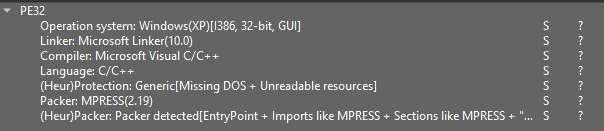
Let’s consider the following sample. When analyzing it with DiE v3.10, we can observe the presence of the MPRESS packer.
The results of DiE analysis, revealing the packer MPRESS
Opening the sample in DiE reveals section names that indicate packing.
Section demonstration in DiE with names MPRESS1 and MPRESS2
Packers like UPX and MPRESS often create sections with distinctive names, such as MPRESS1 and MPRESS2, which help analysts identify their usage.
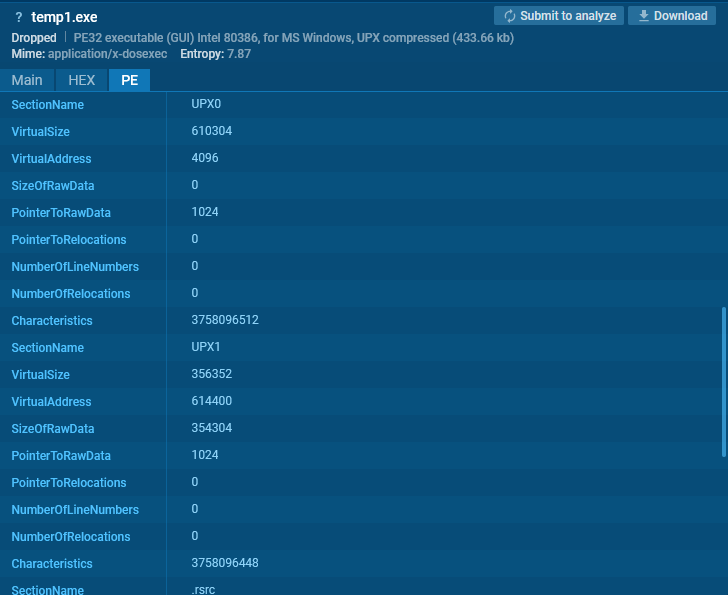
We can also examine PE (Portable Executable) information in the Static Discovering window inside ANY.RUN sandbox. This provides further details to help identify these packers and their specific characteristics.
Demonstration of UPX0 and UPX1 in Static Discovering section
We can identify UPX through section names. In certain cases, packers like VMProtect and Themida can also be identified by their distinct section names.
The .vmp0 section characteristic of VMProtect.
Sections, such as .vmp0, indicate VMProtect (see example).
The .themida section characteristic of Themida
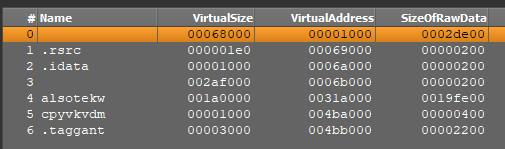
Sections, such as .themida or .taggant, signal the presence of Themida (see example).
Try advanced malware analysis with ANY.RUN for free
For instance, packers like Themida/Winlicense often have sections with random names or blank spaces as section names (example). The image below shows that Sections #4 and #5 have random names, while sections #0 and #3 contain blank spaces instead of names.
The presence of a .taggant section is a distinguishing feature
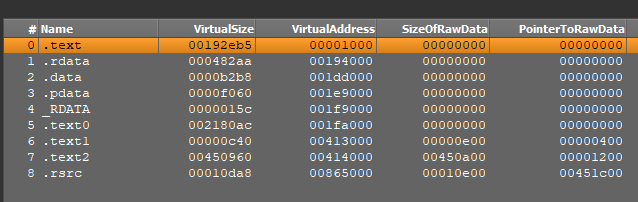
In VMProtect, the section addresses in the file (specifically the PointerToRawData field) are often set to zero (example).
PointerToRawData is set to zero in sections #0 through #5
In the image above, for sections #0 through #5, PointerToRawData is set to zero, which suggests that unpacking occurs dynamically at runtime.
Unusual Imports
The absence or minimal number of imports suggests that libraries are loaded, and their function addresses are acquired dynamically at runtime.
For .NET applications, a single import (mscoree.dll:: _CorExeMain) is typical. In some cases, a unique mix of functions can reveal the application’s intentions.
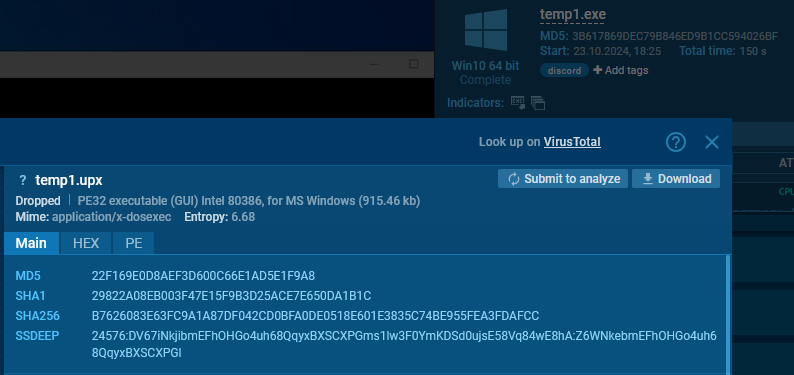
For instance, let’s open the Static Discovering window inside the ANY.RUN sandbox for this UPX sample and go to the Imports section.
Static discovering in the ANY.RUN sandbox
Then, let’s search for KERNEL32.DLL.
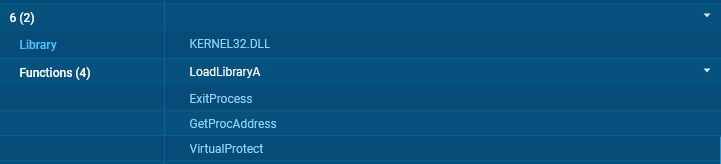
LoadLibraryA and GetProcAddress point to dynamic library loading
The combination of LoadLibraryA and GetProcAddress indicates dynamic library loading, while VirtualProtect may suggest an intention to change memory page protection to executable.
Since only four functions are present here, this combination is unlikely to be coincidental and can signal intentional manipulation for code execution.
High Entropy
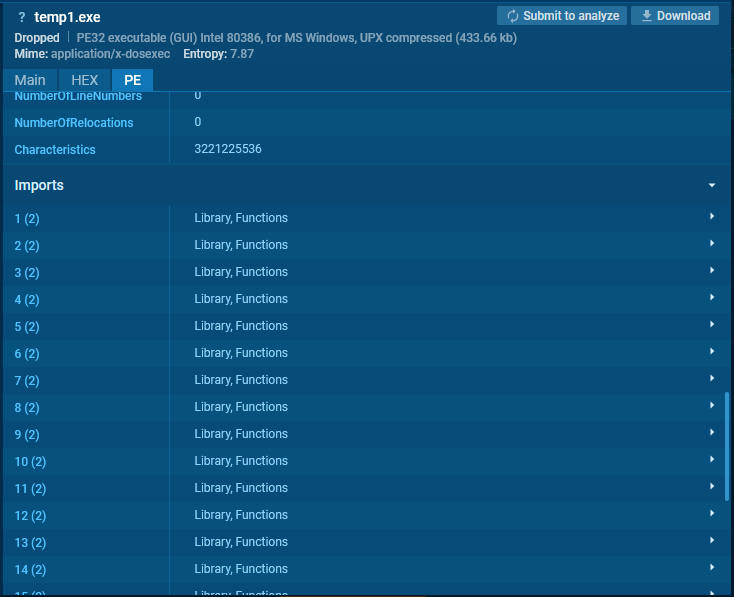
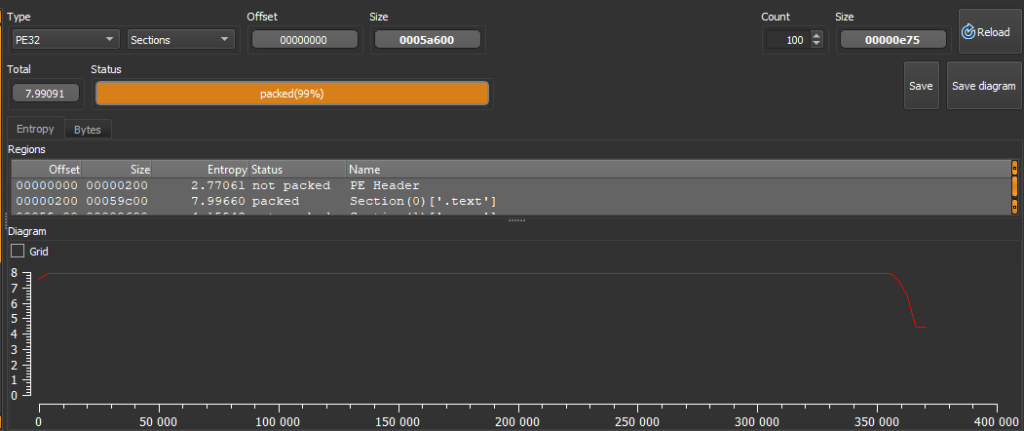
For unpacked files, the overall entropy typically ranges from 5 to 6.5. Packed files, however, often exhibit entropy levels above 7, approaching 8 (the maximum entropy for 8-bit data).
High entropy values can indicate packing or encryption, as they suggest a lack of readable patterns within the file.
Static unpacking: The code is processed by the unpacker but not executed. This method relies on analyzing the packed file without running it, allowing for a safer examination.
Dynamic unpacking: The code is executed and preserved by the unpacker in memory. This approach involves running the packed malware in a controlled environment, often in a sandbox, to observe the unpacked code in action.
Dynamic unpacking is the most challenging type of unpacking, as it often requires the use of a debugger and capturing memory dumps.
This approach allows analysts to observe how the code behaves at runtime, but it demands a controlled environment and more advanced tools to monitor and extract the unpacked code accurately.
To make the process of the analysis easier and faster, you can utilize ANY.RUN’s Interactive Sandbox. It provides memory dumps of unpacked and decrypted data, including the decrypted executable payload.
The sandbox generates memory dumps for various processes and makes them available for download, saving analysts significant time and simplifying the analysis process. You can download these memory dumps and analyze them locally.
There are two options for accessing memory dumps generated inside ANY.RUN’s sandbox.
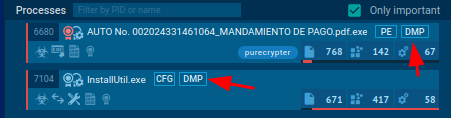
Click the DMP button to access dumps
You can access them by clicking on the DMP button in the process tree section.
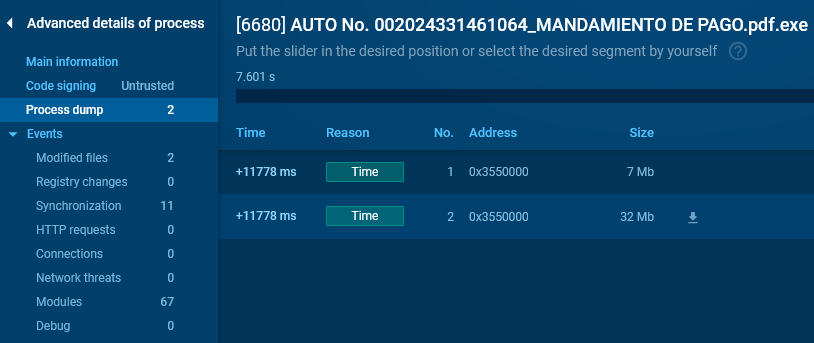
Alternatively, you can go to “Advanced Details” of a process that has the DMP icon next to it and navigate to the “Process dump” section, where you can download the dumps.
Let’s now see how you can address different types of packers.
SFX Installers
SFX (Self-Extracting Archives) is an archive format that, when executed, extracts files and can perform specific actions. In most cases, these archives can be unpacked statically with utilities like 7zip or WinRAR.
To see a typical SFX in action, let’s consider the following sample.
Such archives often have a distinctive icon, indicating they are self-extracting executables:
SFX file icon
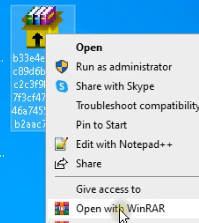
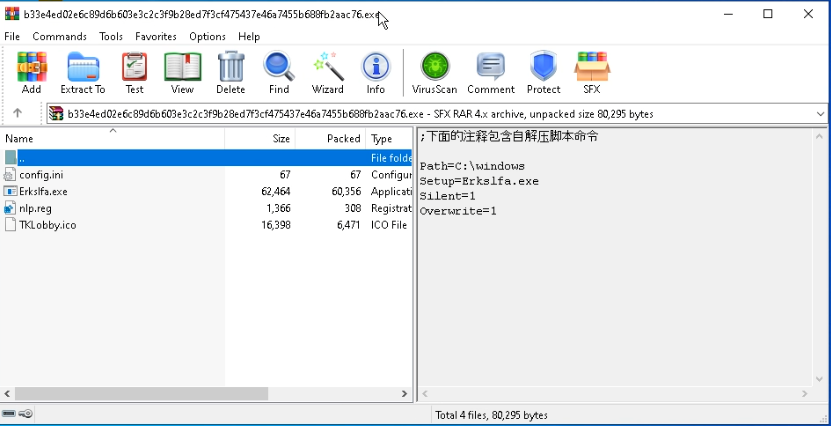
Use WinRAR to open the archive and view the extraction settings and packed files within the SFX.
Right-click on the file to access the “Open with WinRAR” option
After opening the file, on the right side, you’ll find extraction parameters, file paths, and the primary executable file. On the left, you can view all files packed within the archive.
Contents of SFX file
MSI Files
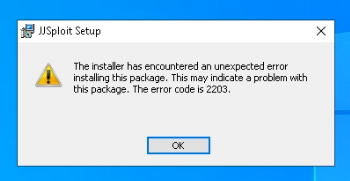
To unpack MSI files, a common method is using the command line with msiexec /a. However, this method may not work for every file and can sometimes result in errors.
For instance, with the following sample, attempting this command in a sandbox triggers an error (see sandbox example).
Error unpacking MSI
An alternative solution is LessMSI, a specialized tool for extracting files from MSI packages.
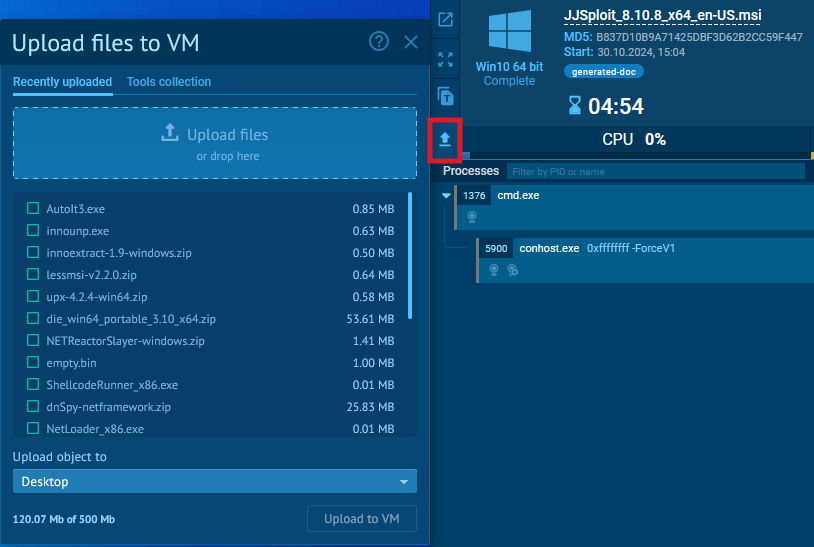
The upload button in ANY.RUN lets you add files to a running sandbox section in real time
Upload the LessMSI archive to a virtual machine in ANY.RUN via the upload button.
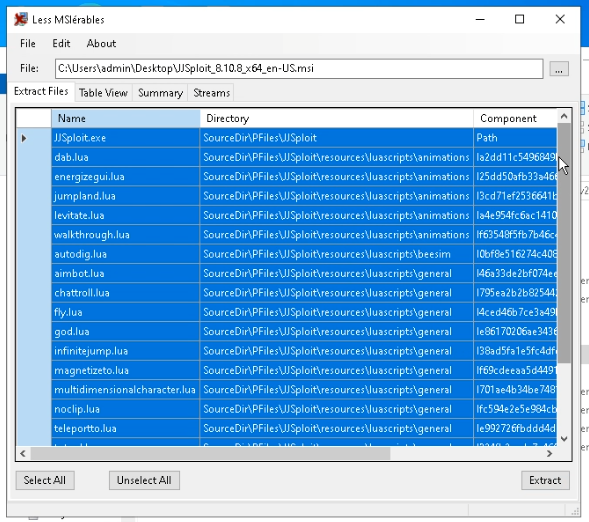
File demonstration in LessMSI for files packed in an MSI installer
Launch the GUI version of LessMSI and select the MSI file. Next, the program will display a list of files and their paths for extraction.
Nullsoft Installer
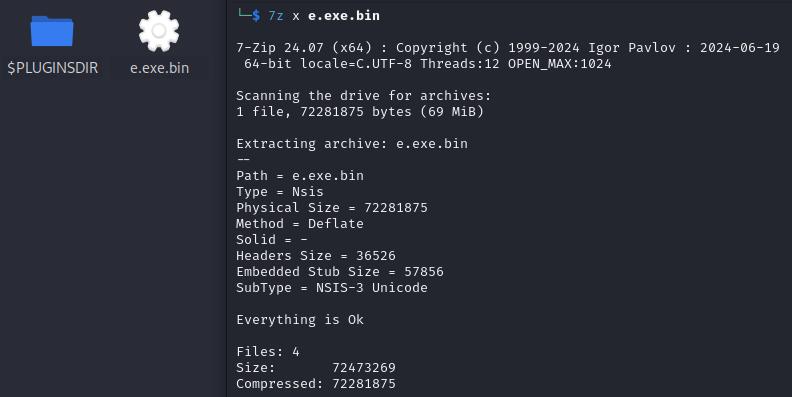
Nullsoft installers are often straightforward to unpack using 7zip. By opening these files with 7zip, you can directly access the contents of the installer.
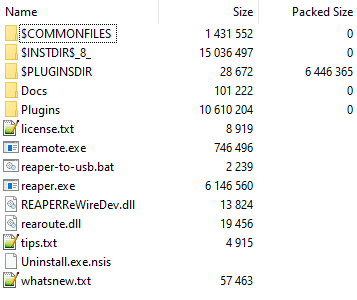
Demonstration of files packed in the installer, along with special directories that start with the $ symbol
Opening the archive in 7zip reveals the files packed within it, including special directories that typically start with the $ symbol.
This approach allows you to explore the installer’s files easily. However, a limitation is that it doesn’t reveal the initial installation parameters, which may be necessary for deeper analysis.
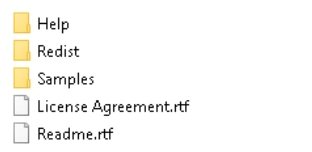
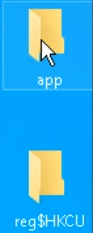
InnoSetup
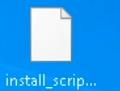
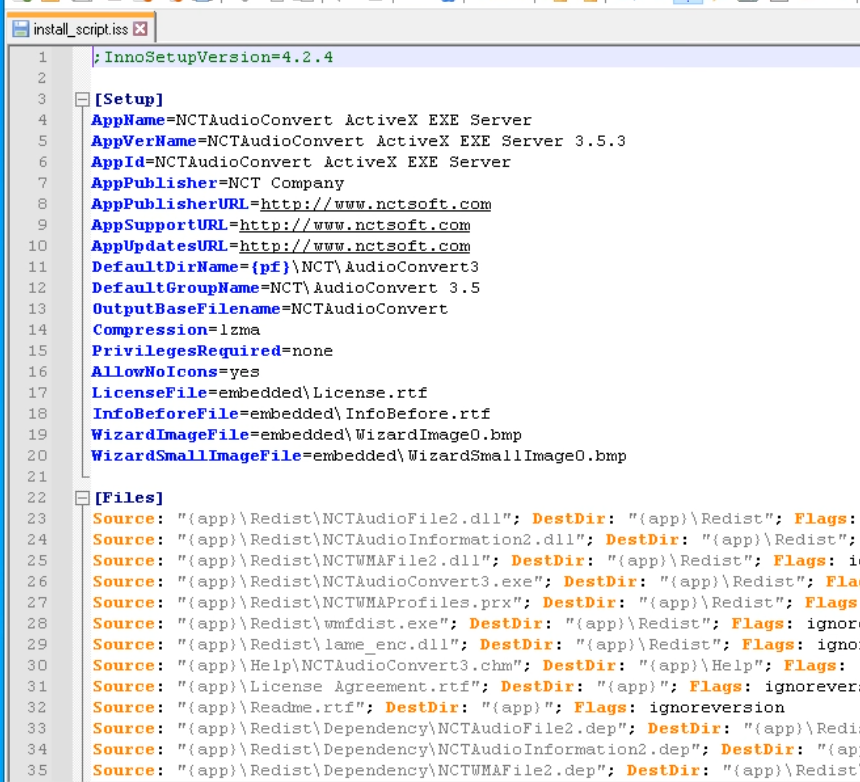
Unpacking InnoSetup installers requires specialized tools. The unpacking becomes more challenging because these files often contain embedded scripts that control the installation process.
In this case, 2 useful tools can be used:
innoextract: A command-line tool designed to extract files from InnoSetup packages.
innounp: Another tool that offers similar functionality, supporting various versions of InnoSetup.
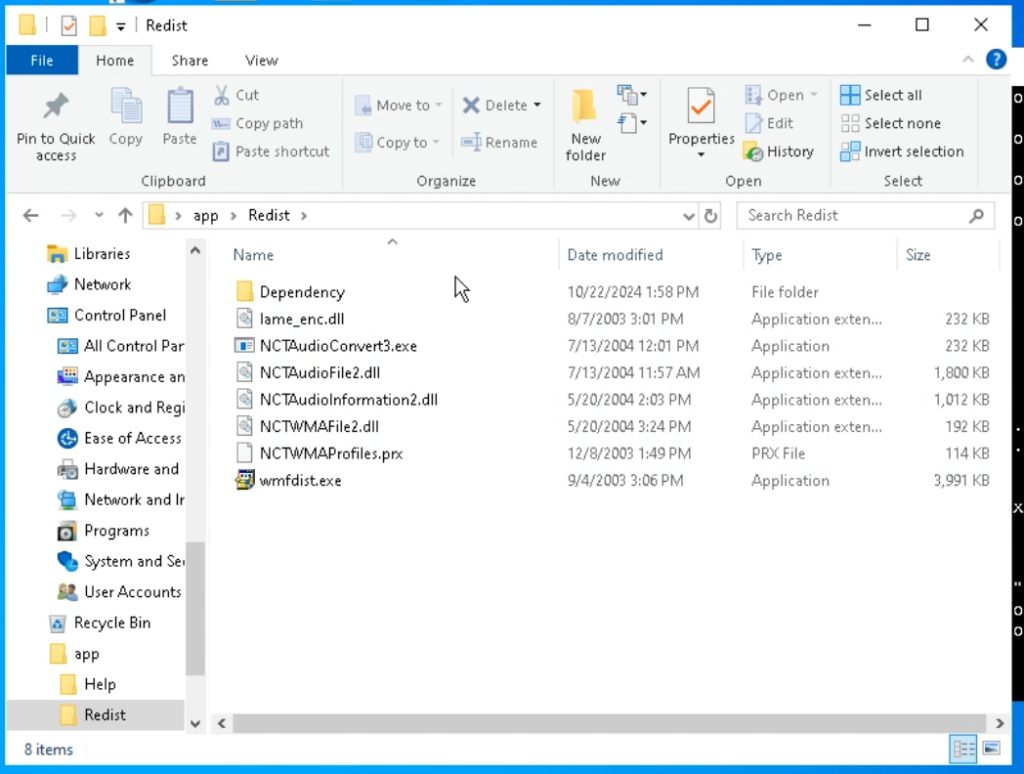
The archive contains a single directory, which is, in fact, the Nullsoft SFX
Download the EXE file and start the unpacking process.
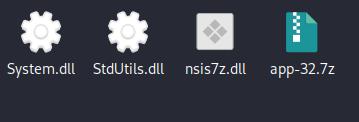
The $PLUGINSDIR directory with the app-32.7z, containing the application files
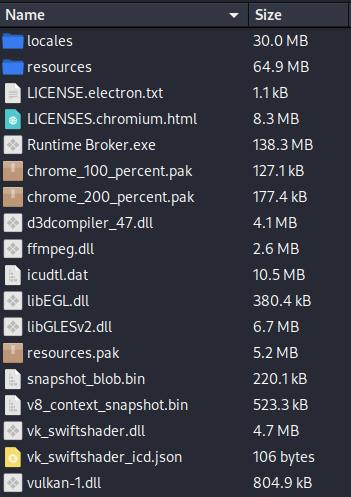
When extracting with 7zip, we obtain a folder containing various files, including an archive with a renamed Chromium executable (in this case, Runtime Broker.exe) and its libraries.
The application data in the app-32.7z archive consists mostly of files related to Chromium
The Electron.js application data is stored in the resources directory.
Files in the resources folder
The app.asar file is an archive containing the Electron.js application data.
To unpack it, you’ll need an npm module.
Install npm: sudo apt install npm
Run the following command to extract the archive: npx @electron/asar extract app.asar extracted
If the asar module isn’t already installed, npm will prompt you to install it.
As a result of running the command, the archive will be unpacked into the extracted folder.
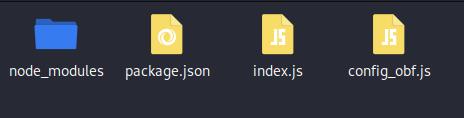
Files extracted from app.asar
The node_modules folder contains the Node.js packages, and index.js is the initial script of the application.
UPX
UPX (Ultimate Packer for eXecutables) is a packer for executable files.
Compatibility: It supports only native PE (Portable Executable) applications.
Unpacking: UPX-packed files are often easy to unpack statically using the same UPX utility.
To unpack a UPX-packed file, you only need to use a single command:
upx –d <file>
UPX can be identified by the presence of sections named UPX0 and UPX1 in the file.
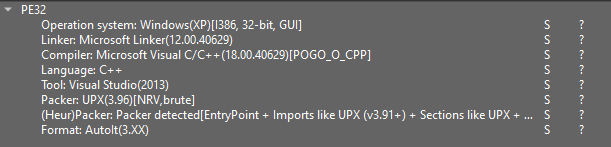
First, download the sample and open it in DiE (version 3.10). DiE will indicate the presence of UPX, listing specific indicators.
Some malware samples use older versions of UPX. In such cases, you’ll need the corresponding version to unpack them. DiE suggests the recommended version, which, in this example, is 3.96.
DiE reports the detection of Packer: UPX
To analyze a sample like this, it’s essential to remove the UPX compression; otherwise, the disassembler won’t be able to interpret the code correctly.
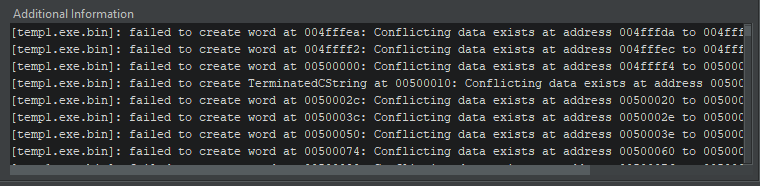
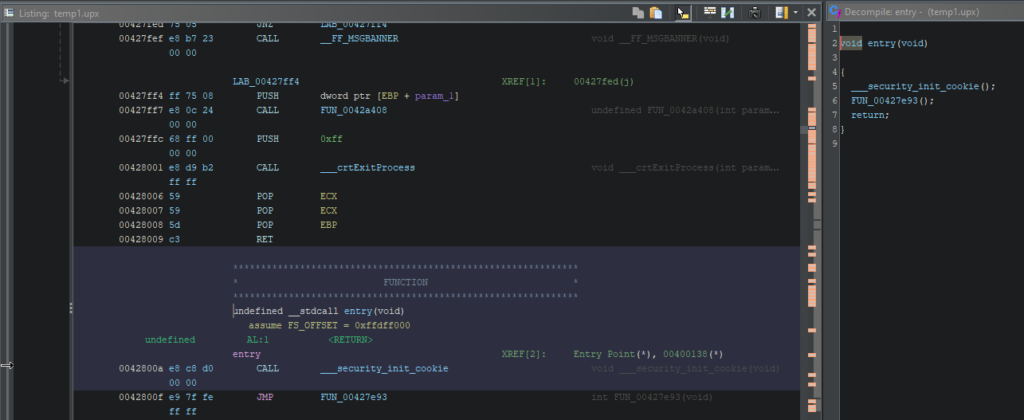
For instance, Ghidra—a free disassembler and decompiler—will display multiple errors when importing a compressed file.
During analysis, Ghidra will detect only a single function. The built-in decompiler will report the incorrect code.
In the image above, on the left side, there is a Listing displaying the single function, while on the right side, the Decompiler window shows an error message.
To conduct analysis, download the latest release of UPX from GitHub.
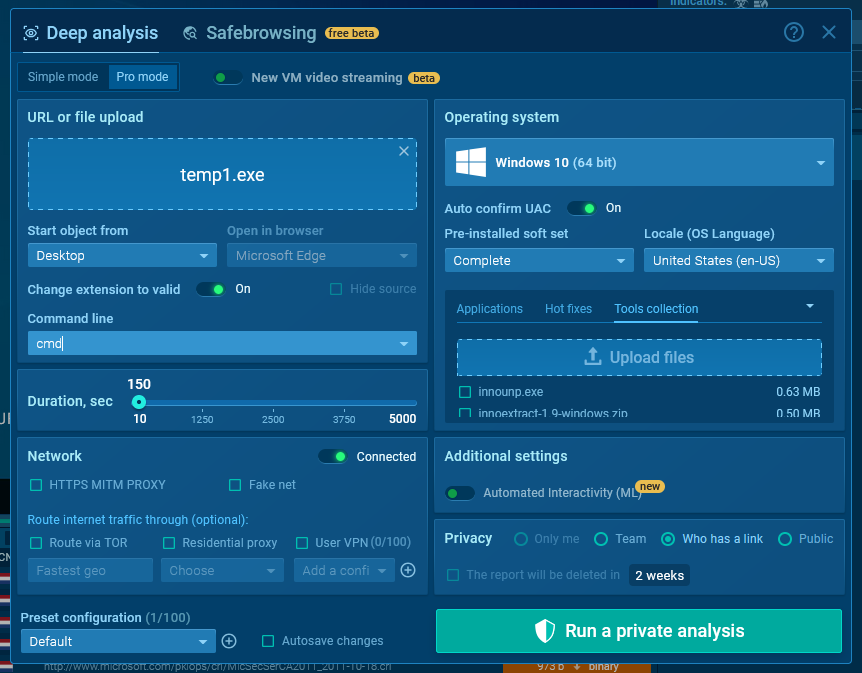
Next, upload the sample along with the upx.exe file (it’s not necessary to upload the entire archive) to the virtual machine.
In the Command line field, enter “cmd” and use Tools collection on the right.
To do this, switch to the Pro mode in the sandbox and select Tools collection. Here, you can either use previously uploaded tools or upload new ones.
Access all Pro features of ANY.RUN sandbox for free
Before starting the analysis, enter the “cmd” command in the Command line field. This will prevent the sample from running automatically and will open the console at the start of the session.
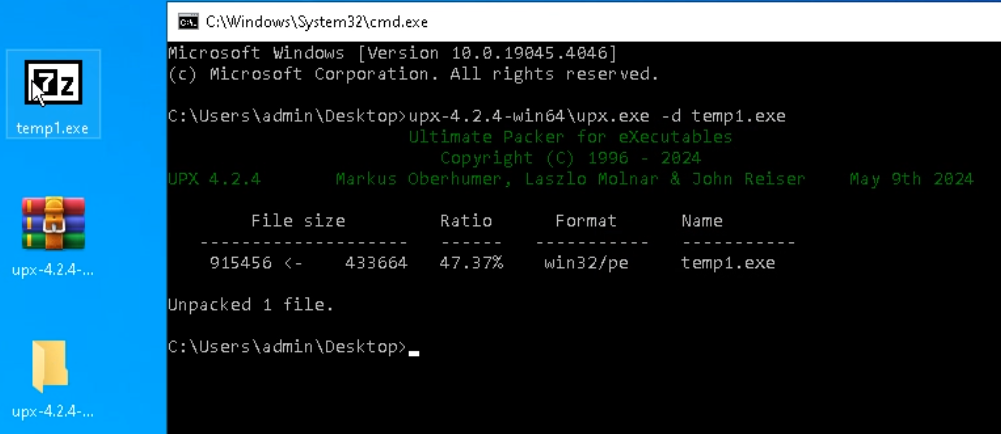
Unpack the UPX archive and enter the following command in the console:
<path_to_upx>upx.exe -d <filename>
As a result of the command execution, the file will be overwritten with the decompressed version.
UPX confirms a successful unpacking; the file has been overwritten
To ensure the unpacked sample is functioning correctly, let‘s run it in a sandbox.
The sample did not crash and is successfully sending network requests.
When clicking the PE button, the Static Discovering window opens, where we can observe a different hash.
Static analysis of the unpacked file
The Static Discovering window for the unpacked file, shows the name under which it was saved to disk. We can see a decrease in entropy, an increase in file size, and a different hash value.
Now, Ghidra can handle this file without any issues.
Ghidra successfully disassembled the file and identified the library functions
In the Listing section, we see numerous references and functions, and the Decompiler window displays the correct code.
The same process can be done on a physical machine, as UPX does not execute code during unpacking.
Learn to analyze cyber threats
See a detailed guide to using ANY.RUN’s Interactive Sandbox for malware and phishing analysis
Read full guide
AutoIt
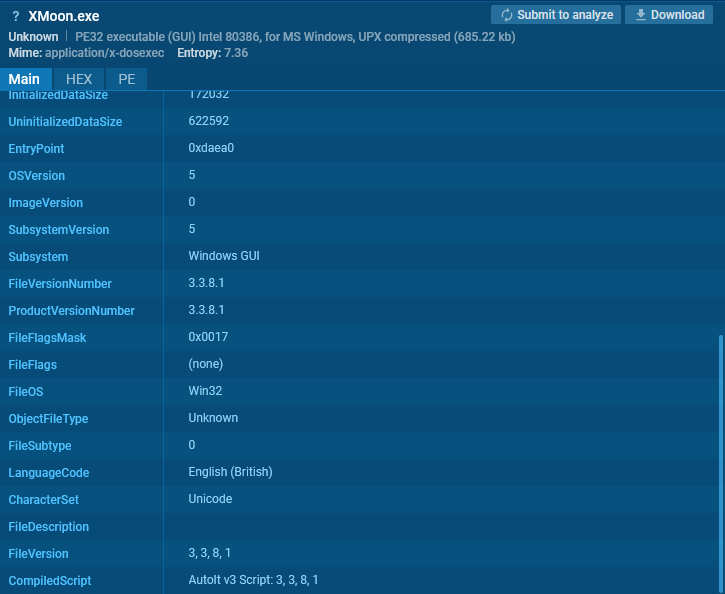
AutoIt is often used as a crypter. The simplest way to detect AutoIt is by checking the file description. To do this, go to the Main tab in the Static Discovering window inside ANY.RUN and scroll down.
You may find different mentions of AutoIt in the description.
Here is another example. Usually, such a file is an AutoIt interpreter bundled with a script.
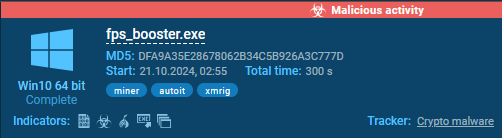
In some cases, a deeper examination is required. Let’s look at the following example.
ANY.RUN automatically add AutoIt tag to the session
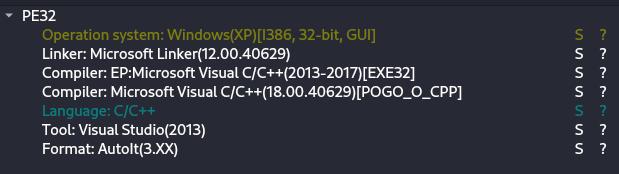
In this example, AutoIt was detected by ANY.RUN’s sandbox. Let’s confirm this in DiE.
DiE reports the detection of an AutoIt signature
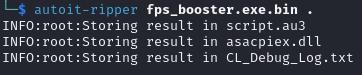
To extract and decompile the script, we can use AutoIt-Ripper.
Let’s install it using pip install autoit-ripper.
The latter is quite easy to use:
autoit-ripper <file> <output_dir>
As a result of running the command, the restored script is saved to a file named script.au3. Besides, all the associated files were detected and saved.
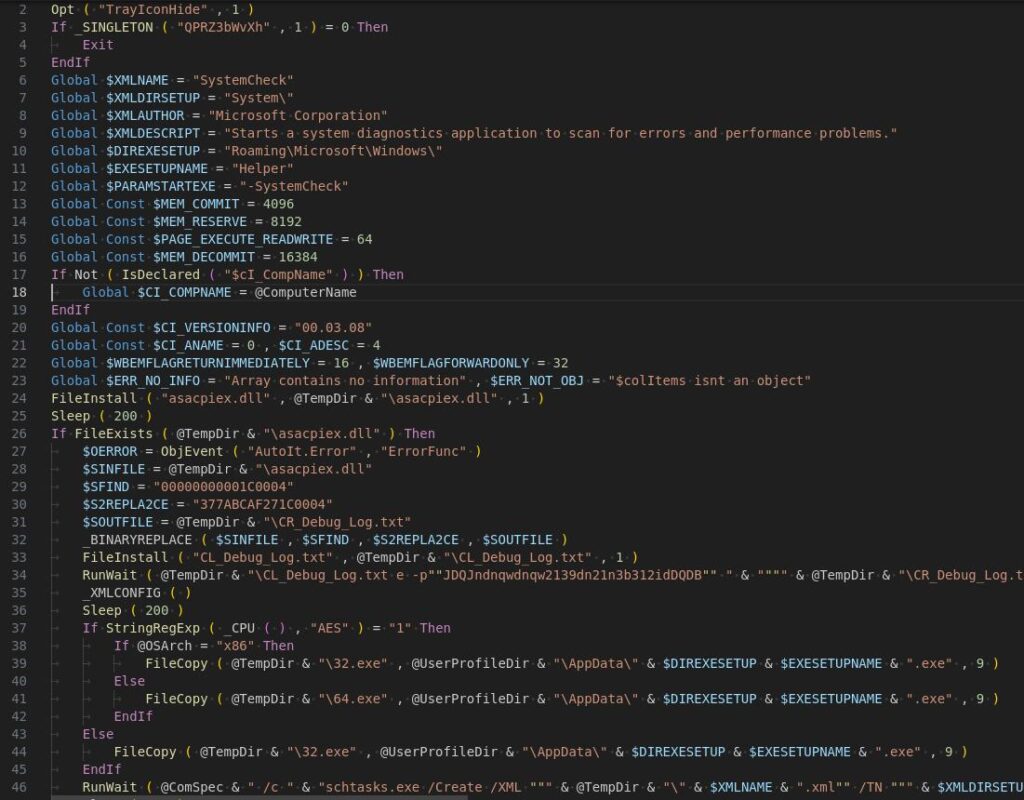
Now it’s possible to analyze the script’s actions by opening it in a text editor.
In most cases, the scripts are also obfuscated and will require more in-depth analysis
In this example, we see the execution of CL_Debug_Log.txt with specific parameters.
The script drops to disk and modifies asacpiex.dll, saves it as a separate file, and then unpacks it
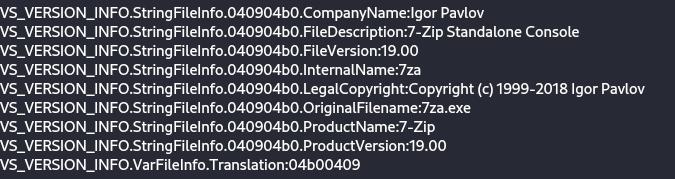
Opening CL_Debug_Log.txt in DiE reveals that it is a standalone version of 7zip.
The VS_VERSION_INFO can be spoofed, but in this case, all evidence suggests that this file is an archiver
In this way, the malware unpacks the files necessary for its operation. In addition, the script contains checks for execution in a virtual environment.
The script checks information about graphic adapters in the system
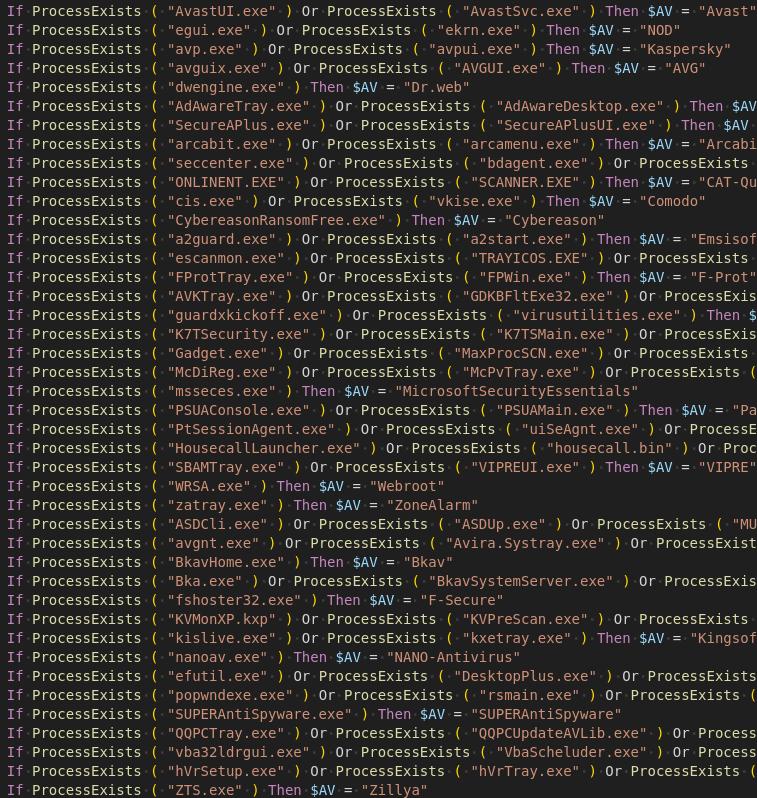
It also includes checks for the presence of antivirus software.
The script checks running processes for names that match popular antivirus solutions
NetReactor
NetReactor is a packer and obfuscator for applications written in .NET.
Supports code virtualization.
Files and libraries are not saved to disk but are loaded directly into memory.
Changes the structure of the code, making analysis more difficult.
Most files can be successfully unpacked using NetReactorSlayer, but for the best results, dynamic unpacking is recommended. This method executes the code within the operating system, allowing system functions to be called as needed for a more accurate unpacking process.
Let’s look at an example with the PureHVNC payload.
Next, run the analysis session using dnSpy and NetReactorSlayer.
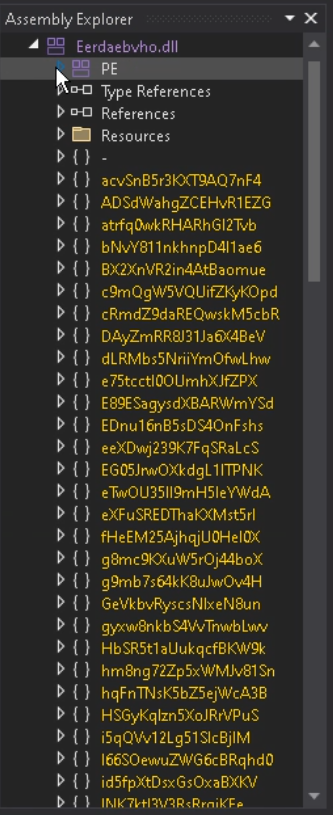
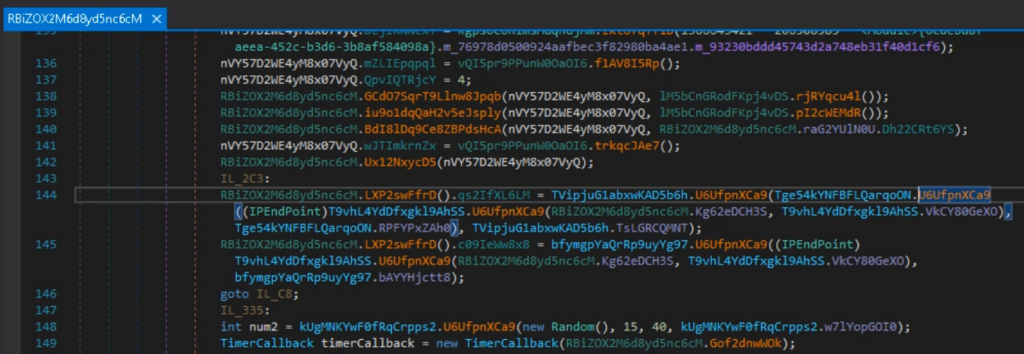
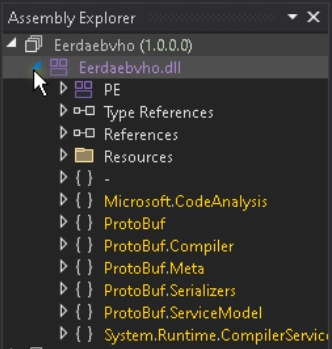
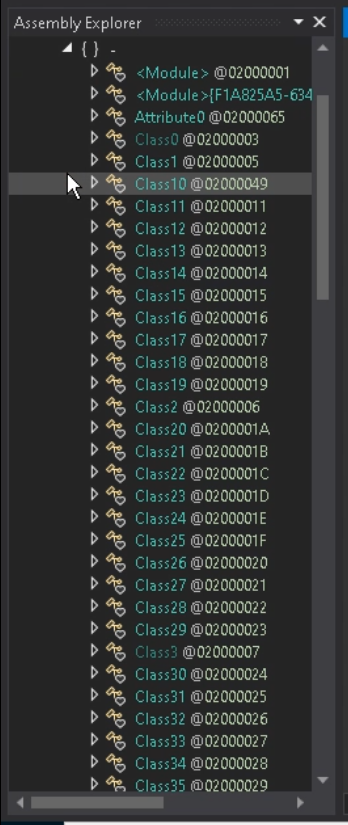
Before processing, you can see numerous namespaces.
Multiple namespaces are visible
Let’s locate the configuration class.
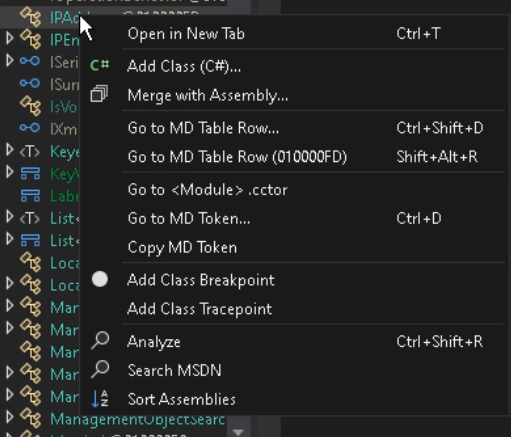
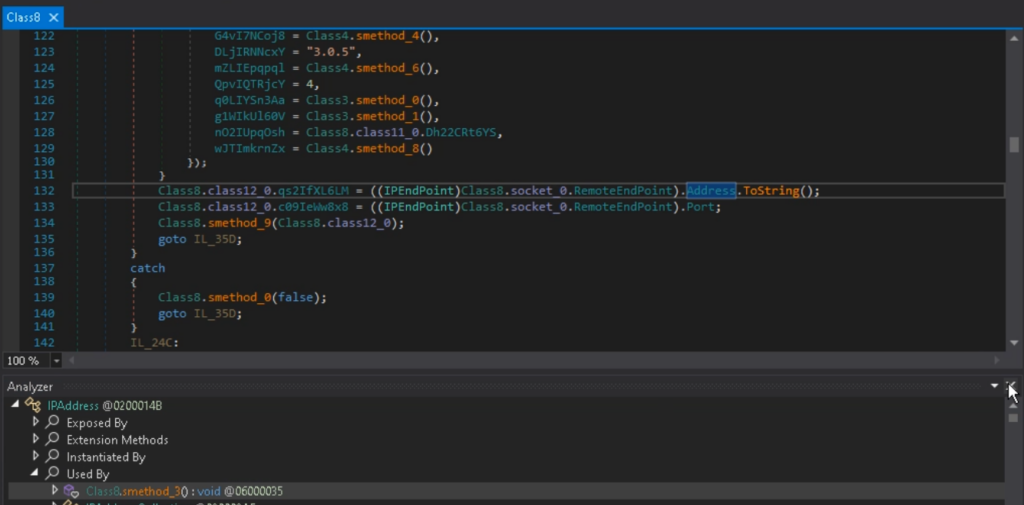
Open Type References and locate the IPAddress class.
Right-click on it and select Analyze.
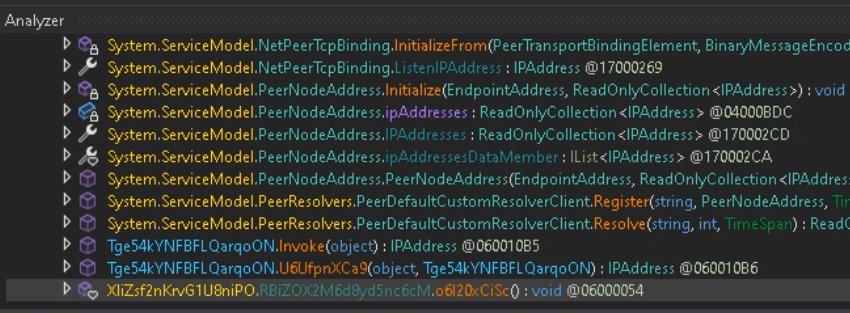
In the opened window, click on Used by to find the method where this class is used.
The obfuscated code
We see presence of goto and labels scattered throughout the code to confuse the execution flow
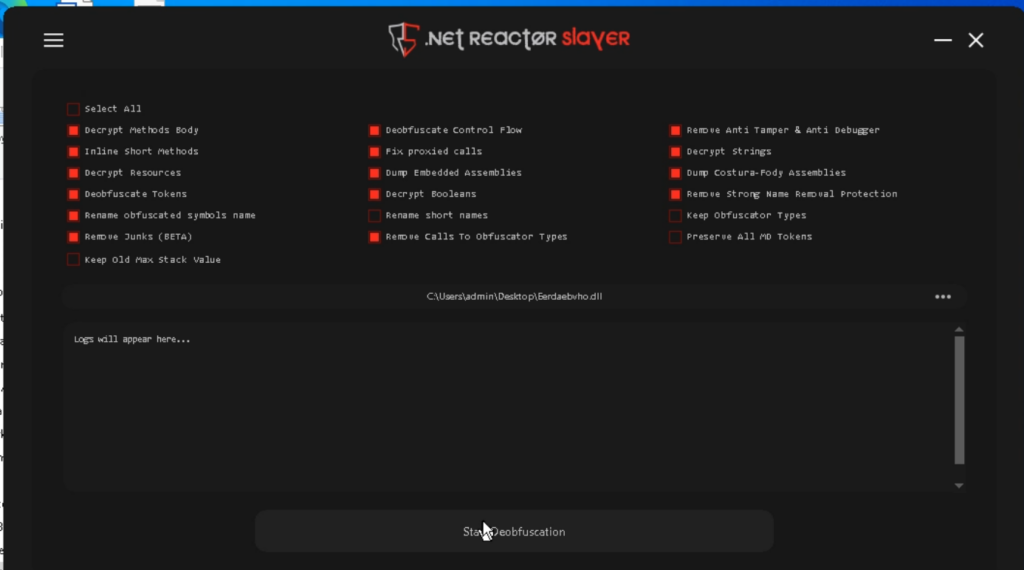
Now, open NetReactorSlayer and select the sample.
There are multiple settings available; the default settings work well for this purpose.
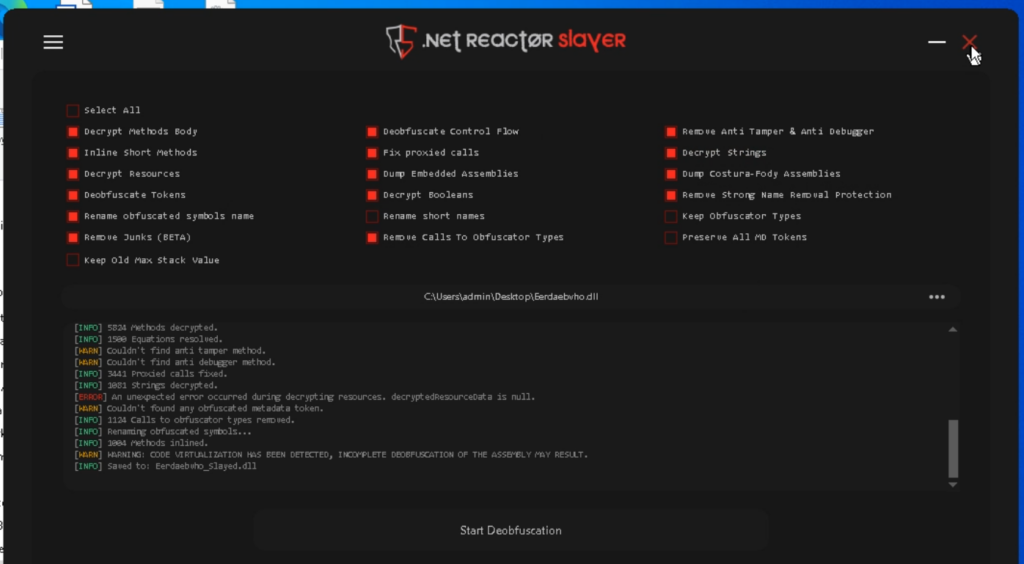
Click Start Deobfuscation and wait for the process to complete.
The program decrypts strings, simplifies the code, and even attempts to remove virtualization.
The file is saved with the suffix _Slayed.
Now, open the received file in dnSpy. As a result, the unnecessary namespaces have been removed.
No excessive namespaces
The classes have been renamed too.
Renamed classes
Next, let’s look for the usage of IPAddress as well.
Now, the goto statements are positioned appropriately, and the labels are no longer scattered
The lengthy class names have been shortened, and the fields have been renamed according to their respective values. The code has become easier to analyze, and string literals are now included.
Often, in addition to being packed, malware is stored in an encrypted form within a special loader (crypter).
This analysis demonstrates the process of extracting the payload using dnSpy.
After execution, the crypter decrypts the payload and performs an injection into the target process.
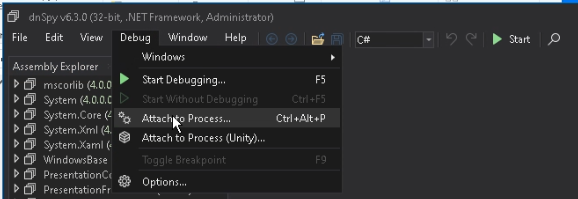
With the help of dnSpy, let’s attach the debugger to the process. To do this, go to the Debug tab and click on Attach to Process.
Click Attack to Process
Then, choose the process you want.
Pick the process of your interest
Note that to debug 32-bit processes, you should run dnSpy x86, and for 64-bit processes, use dnSpy x64.
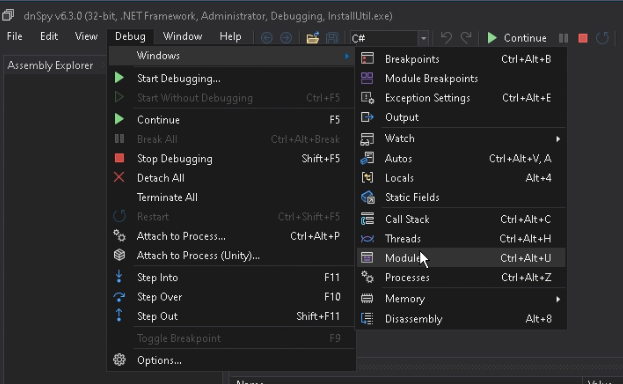
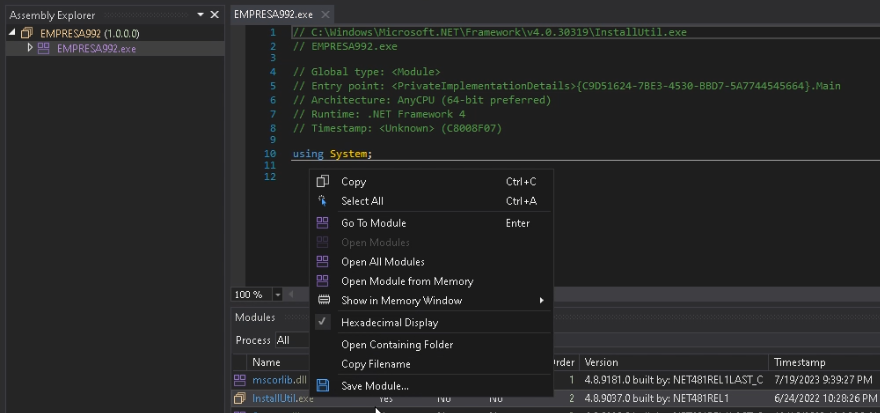
Pause the process and open the Modules window.
Click Modules
Right-click on the main module, then select Open Module from Memory.
We see that InstallUtil has been replaced with EMPRESA992
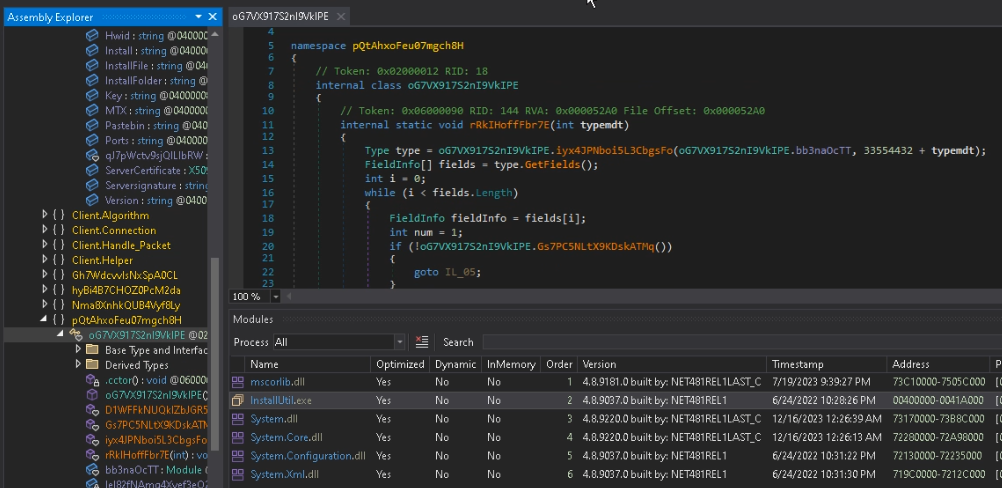
After opening the module, obfuscation can be observed.
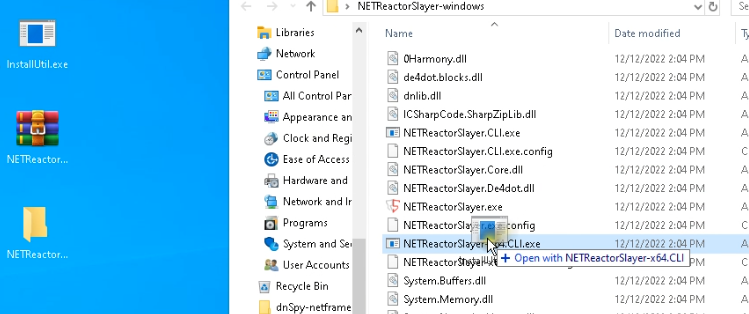
Click Save Module and transfer the saved file to the console version of NetReactorSlayer.
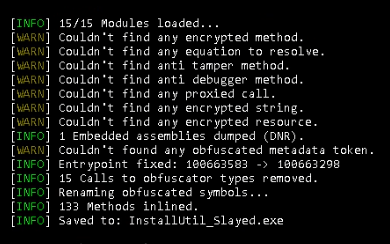
As a result, we get the following output.
NetReactorSlayer corrected the entry point, removed unnecessary code, and saved result to disk as InstallUtil_Slayed.exe.
The associated library MessagePack.dll has been saved as a separate file.
MessagePack.dll
Now, the payload InstallUtil_Slayed.exe can be run separately and analyzed through debugging (See sample analysis).
SmartAssembly and Other .NET Packers
Another popular packer for .NET applications is SmartAssembly.
Besides obfuscating the code (which makes the execution order unclear and renames identifiers to unreadable terms), SmartAssembly complicates analysis with a large number of delegates that are resolved at runtime, including those used for decrypting strings.
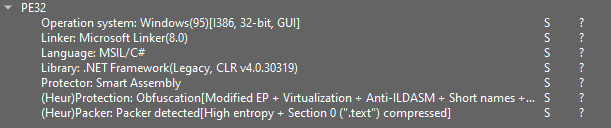
Let’s open the sample in DiE and confirm the presence of the protector.
We can see how DiE detects Protector Smart Assembly.
Smart Assembly detected by DiE
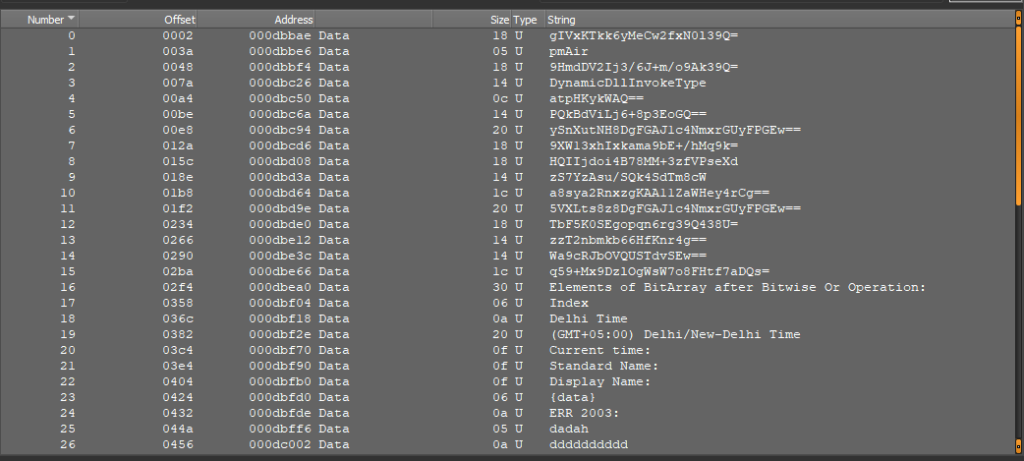
In the US (User Strings) tab, there is an abnormally small number of strings.
Let’s switch to dnSpy.
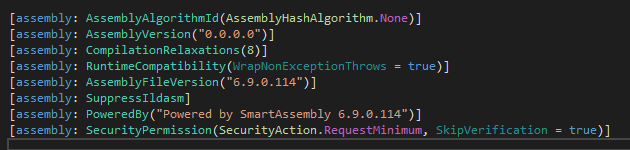
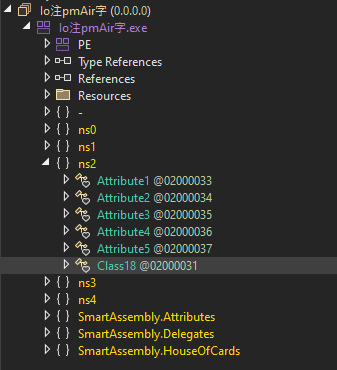
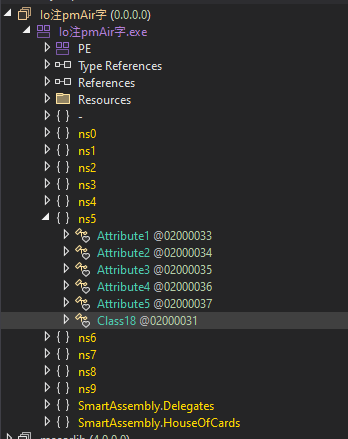
Upon opening the sample, you will immediately notice an attribute indicating the presence of the SmartAssembly protector.
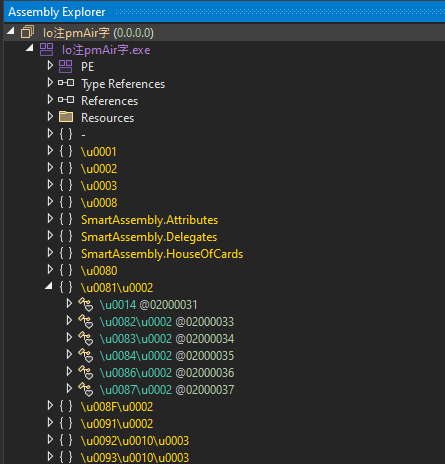
You will also notice the characteristic namespaces associated with SmartAssembly.
These artifacts are quite common among protectors, particularly in .NET applications.
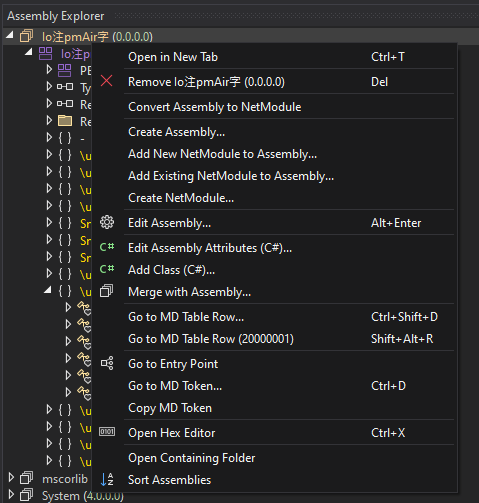
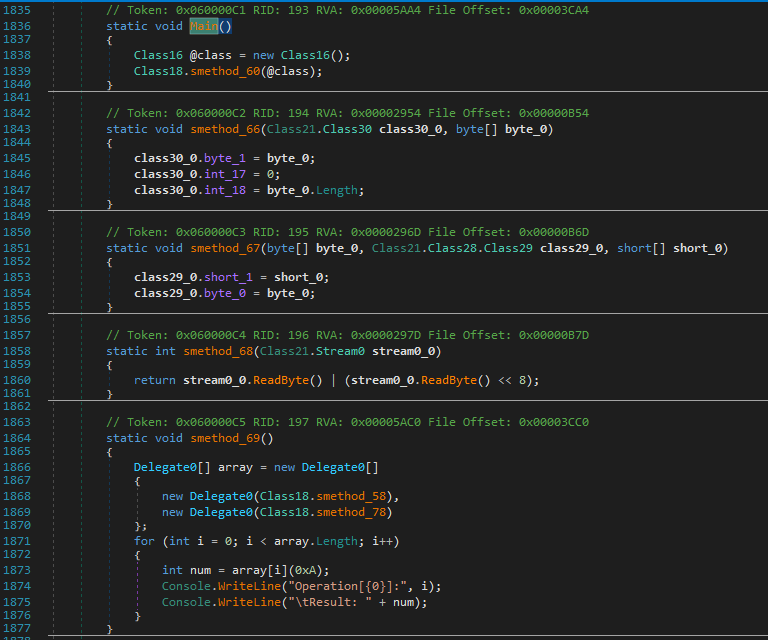
Next, click on Go to Entry Point.
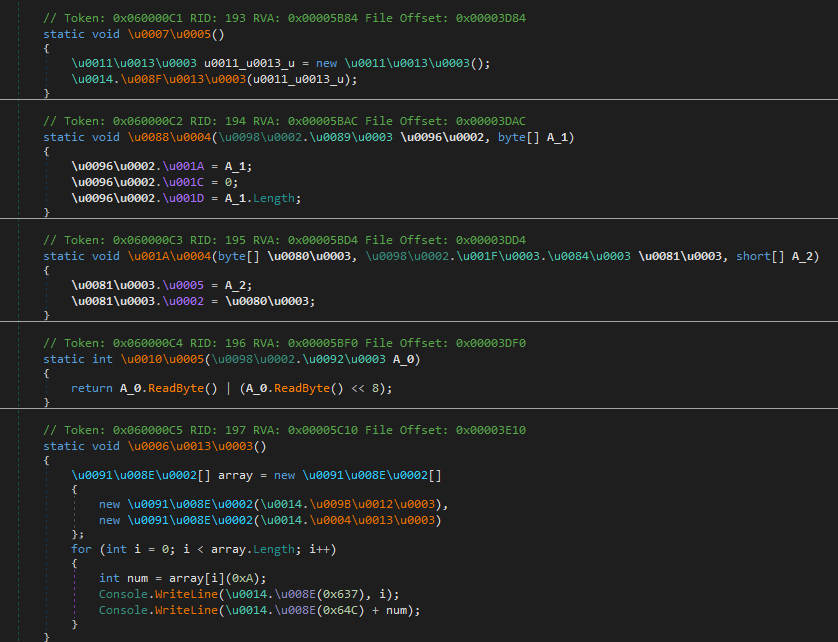
In this case, while the code (control flow) is not obfuscated, the strings are obtained through a delegate call with a numeric argument.
We see a call to Console.WriteLine that displays the result from a delegate using a numeric argument.
Earlier, we used NetReactorSlayer to remove the protector.
While it is a specialized tool, it can also be used for general purposes, such as simplifying code, though with some limitations.
Let’s try to simplify the code using NetReactorSlayer.
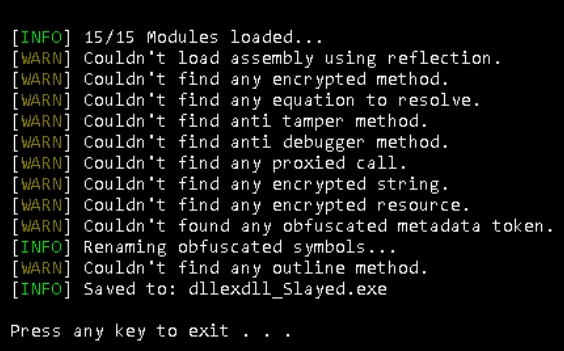
While this tool simplified the code readability, it was unable to decrypt the strings.
In the simplified code, the purpose of the delegates used in Console.WriteLine is clear
Now, let’s use another tool—de4dot—which is also part of what NetReactorSlayer uses for code simplification. You can also utilize de4dot-cex, which is the improved version of de4dot.
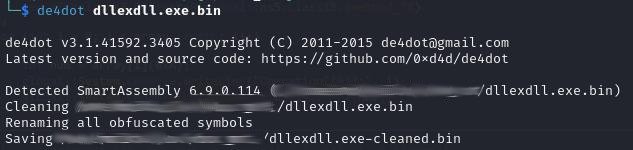
For this case, we will use de4dot to remove SmartAssembly.
As a result, the file is processed in a similar way.
de4dot and NetReactor simplify names in the same way
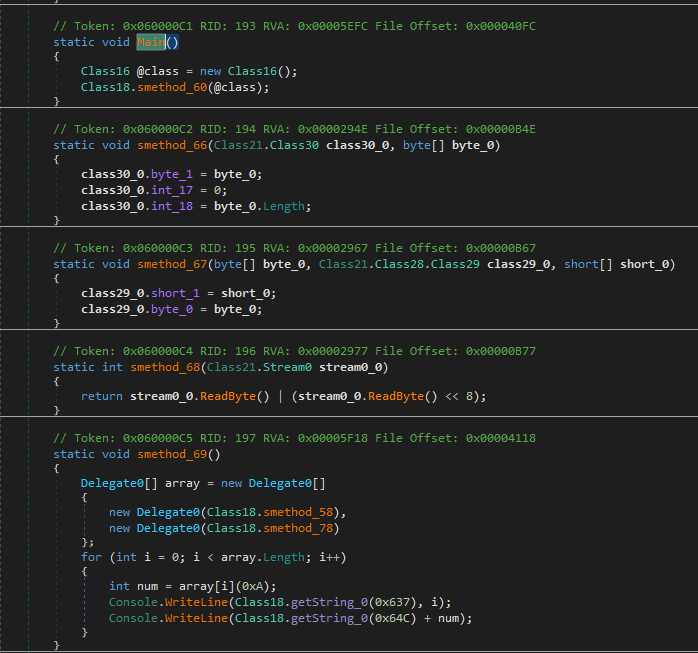
However, the string encryption has also been removed.
The GetString delegates have been replaced with string literals.
In DiE, you can view all the decrypted strings.
The processed file often retains functionality and can make runtime analysis easier.
de4dot works with many other protectors and can simplify code analysis.
If de4dot doesn’t succeed, try using NetReactorSlayer, which may be more effective at further simplifying complex code.
However, for older versions of NetReactor (below 6.0), de4dot remains the preferred option.
Themida, VMProtect
Themida and VMProtect are packers and obfuscators for applications that support virtualization and code mutation.
Virtualization: This feature protects the malware code at runtime, not just in static analysis.
Extracting Samples: In most cases, virtualization is not applied, allowing an unpacked sample to be extracted from memory, though it may be partially modified.
Static Unpacking: This is generally unlikely, as these commercial packers adapt quickly to new analysis methods.
ANY.RUN helps more than 500,000 cybersecurity professionals worldwide. Our interactive sandbox simplifies malware analysis of threats that target both Windows and Linux systems. Our threat intelligence products, TI Lookup, YARA Search and Feeds, help you find IOCs or files to learn more about the threats and respond to incidents faster.
With ANY.RUN you can:
Detect malware in seconds.
Interact with samples in real time.
Save time and money on sandbox setup and maintenance
https://www.backbox.org/wp-content/uploads/2018/09/website_backbox_text_black.png00https://www.backbox.org/wp-content/uploads/2018/09/website_backbox_text_black.png2024-10-30 13:06:402024-10-30 13:06:40Packers and Crypters in Malware and How to Remove Them
The recent Strela Stealer phishing campaign, uncovered by Cyble Research and Intelligence Labs (CRIL), poses as an invoice notification to trick users into engaging with it.
This campaign predominantly targets users in Central and Southwestern European regions, adjusting its focus based on locale settings to maximize its reach within specific demographics.
Phishing emails carry ZIP file attachments containing heavily obfuscated JavaScript (.js) files, which are designed to evade detection by security tools.
The JavaScript file conceals a base64-encoded PowerShell command that, when executed, launches a malicious payload directly from the WebDAV server without saving the file to disk.
The payload, Strela Stealer, is embedded within an obfuscated DLL file, specifically targeting systems in Germany and Spain.
Strela Stealer is programmed to steal sensitive email configuration details, such as server information, usernames, and passwords.
In addition to stealing credentials, Strela Stealer gathers detailed system information, enabling attackers to conduct reconnaissance and potentially launch further targeted actions on compromised systems.
Executive Summary
Strela Stealer, first identified by DCSO in late 2022, is a type of information-stealing malware primarily designed to exfiltrate email account credentials from widely used email clients, including Microsoft Outlook and Mozilla Thunderbird. This malware initially targeted Spanish-speaking users through spam email campaigns containing malicious ISO attachments, which included a .lnk file and a polyglot file. When executed, the .lnk file triggered the polyglot file, executing both the lure html and Strela stealer DLL using “rundll32.exe”.
The Threat Actors (TAs) then evolved their tactics by using spear-phishing emails with ZIP file attachments, as identified by Palo Alto. When users downloaded and extracted the archive, a JavaScript file was saved onto their system. Executing the JavaScript file dropped a Base64-encoded file and a batch file. The Base64 file was then decoded using the “certutil -f decode” command, creating a DLL that was executed using “rundll32.exe” with the exported function “hello.“
In their latest campaign, the TAs are using spear-phishing emails with ZIP file attachments containing obfuscated JavaScript code intended to run through WScript. This JavaScript code executes a base64-encoded PowerShell command, which executes the final malicious DLL from a WebDAV server using “rundll32.exe” via the exported function “Entry.” By using this method, the malicious DLL file is not saved on the disk, allowing it to evade detection by security products.
Technical Details:
The Strela Stealer campaign begins with a carefully crafted phishing email written in German, with a theme designed to resemble an invoice for a recent product purchase. The email aims to encourage recipients to open the attached ZIP file RG_175_133572_7063403.zip under the pretense of verifying or processing a transaction. The figure below shows one of the phishing emails.
Figure 1 – Phishing Email
Inside the ZIP file named “RG_175_133572_7063403.zip,” there is a highly obfuscated JavaScript file named “1819737872954318698.js.” This JavaScript file employs advanced obfuscation techniques, using string substitution to generate and execute its hidden code. When triggered, it runs through Windows Script Host (wscript), which then initiates a PowerShell command embedded within the script.
The PowerShell command further contains a base64-encoded payload. Once decoded and executed, this encoded command reaches out to a WebDAV server and executes a malicious DLL file named “96492217114973.dll” on the target system, allowing Strela Stealer to embed itself and begin its data-theft operations. The figure below shows the de-obfuscated JavaScript code.
Figure 2 – JavaScript File
The DLL file acts as a loader for the main payload and includes only a single export function named “Entry”. The DLL includes numerous conditional jump instructions, making analysis more challenging and potentially causing the disassembler to crash. Furthermore, several functionalities may not work properly in the debugger with default settings due to the extensive branching and conditions. The figure below shows the IDA graph view.
Figure 3 – IDA graph view
Upon execution, the DLL accesses a hardcoded key within its “.data” section, as shown in Figure 5. This key is used to decrypt additional data stored in the same section, ultimately extracting the main executable payload.
Figure 4 – Key present in DLL file
The code below demonstrates the use of XOR and other arithmetic operations for decryption.
Figure 5 – Decrypting the MZ header
The image below displays the decrypted MZ content.
Figure 6 – MZ Header
The resulting MZ file runs directly from the “rundll32.exe” process. For analysis, we extracted this payload and examined it separately, identifying it as Sterla Stealer, a malware active since April 2022.
Here we compared the previous version of Sterla Stealer with the new one.
Campaign Identified in 2022
Campaign Identified in March 2024
Latest Campaign
No code obfuscation
Employed control flow obfuscation
Employed control flow obfuscation
No decryption of PE file from DLL file
Decrypts a memory mapped PE file
Decrypts a memory mapped PE file
strela, server.php, key4.db, and login.json strings present in the decrypted PE file
strela, server.php, key4.db, and login.json strings present in the decrypted PE file
Strela string is removed
PDB path is present
No PDB path
No PDB path
Export function name: Strela
Export function name: hello
Export function name: Entry
Drops payload from ISO
Drops payload from ZIP
Executes payload from WebDAV Server
While the Strela stealer is running, it hides its window by calling the “ShowWindow” Win32 API with the “SW_HIDE” parameter for the current process. It then creates a thread to display a fake error message, as shown below.
Figure 7 – Fake error message
Next, the stealer obtains the locale settings from the victim’s machine by utilizing the GetKeyboardLayout API and comparing the results to the specific hardcoded Language identifiers mentioned below.
0407 – German (Germany)
0C0A – Spanish (Spain)
042D – Basque (Spain)
If any of these language identifiers match, the stealer continues its execution; if not, it stops. This behavior indicates that the malware specifically targets regions within Germany and Spain.
Figure 8 – Locale Check
Targeting Thunderbird
The malware scans for Thunderbird profiles and collects “logins.json” and “key4.db” files from all profiles found on the system. These files contain sensitive information, including usernames, passwords, and other email configuration details. Once obtained, the data within these files is encrypted using a custom encryption method with a hardcoded key, “96be98b2-8a00-410d-87da-2482cc8b7793”, and then sent to the TAs command and control (C&C) server at “94.159.113.48” via a POST request. Following the data transmission, the malware expects the response “ANTIROK” from the C&C server and continues to resend the encrypted data using the same encryption method until this response is received.
Figure 9 – Targeting Thunderbird profiles
Targeting Outlook
To steal Outlook information, the malware examines specific registry keys to retrieve IMAP server details, usernames, and passwords, which are typically stored in encrypted form. It accesses the following registry paths:
Using the “CryptUnprotectData” Win32 API, it decrypts these details into plain text. After decryption, the malware applies custom encryption using the same hardcoded key as in the Thunderbird case and an XOR operation before sending the encrypted data to the threat actor’s command-and-control (C&C) server.
Gathering System Information
Continuing its data gathering, the malware executes the “systeminfo” command, saving the output as a text file within the Temp directory. This file is then exfiltrated to the TA’s C&C server using the previously mentioned encryption technique.
Figure 10 – Gathering systeminfo
In some cases, if the response “ANTIROK” is not received from the C&C server, the stealer attempts to re-encrypt the existing encrypted content using the same method. This results in the transmission of the actual data without encryption, as illustrated in the figure below.
Figure 11 – Data Exfiltration
In its final steps, the malware utilizes a COM object to navigate through the system’s “SpecialFolders” paths, collecting filenames from each directory. This data is compiled into a single output and sent to the attacker’s C2 server. By gathering information on files stored in sensitive locations, the malware enables the TA to perform reconnaissance, potentially planning further data exfiltration or deploying additional malicious activities based on the obtained directory structure.
Conclusion
The recent iterations of the Strela Stealer campaign reveal a notable advancement in malware delivery techniques, highlighting increased sophistication and stealth. By employing spear-phishing emails that contain ZIP file attachments, the malware successfully circumvents conventional security defenses. The use of heavily obfuscated JavaScript, along with base64-encoded PowerShell commands, significantly complicates detection and response efforts. Additionally, executing the DLL file directly from the WebDAV server without saving it to disk effectively bypasses security mechanisms, enabling unauthorized access to sensitive information. This evolution underscores the importance of proactive cybersecurity measures to counter such advanced threats.
Cyble’s Threat Hunting Packages
At Cyble, we understand the evolving landscape of cyber threats and the need for robust security measures. Our Threat Hunting Packages are specifically designed to detect suspicious remote WebDAV share access and file execution activities, such as those employed by the Strela Stealer malware.
In addition to our sophisticated detection capabilities, our Threat Hunting Packages include custom YARA rules tailored to identify signatures associated with Strela Stealer. These rules enhance the Organization’s security posture by enabling quick detection of known threats, ensuring that systems remain protected against sophisticated malware tactics.
For further details on this threat and several others being constantly analyzed by Cyble Research and Intelligence Labs, schedule a demo today.
Recommendations
Conduct regular training sessions to educate employees about phishing tactics, including recognizing suspicious emails and attachments.
Deploy robust endpoint protection solutions that can detect and respond to malicious activity, including obfuscated scripts and unauthorized file executions.
Implement strict access controls on WebDAV servers, ensuring only authorized users have access. Disable WebDAV if it is not required for business operations to minimize potential attack vectors.
Limit the execution of PowerShell scripts and other scripting languages on endpoints unless necessary for business operations.
Develop and regularly update an incident response plan that includes specific procedures for handling phishing attacks and malware infections.
Implement multi-factor authentication for accessing sensitive systems and accounts, adding an additional layer of security against credential theft.
https://www.backbox.org/wp-content/uploads/2018/09/website_backbox_text_black.png00https://www.backbox.org/wp-content/uploads/2018/09/website_backbox_text_black.png2024-10-30 13:06:392024-10-30 13:06:39Strela Stealer targets Central and Southwestern Europe through Stealthy Execution via WebDAV
Version 2.5 of WhiteRabbitNeo is designed to think like a seasoned red team expert, capable of identifying and exploiting vulnerabilities with remarkable speed and precision.
https://www.backbox.org/wp-content/uploads/2018/09/website_backbox_text_black.png00https://www.backbox.org/wp-content/uploads/2018/09/website_backbox_text_black.png2024-10-30 12:07:042024-10-30 12:07:04WhiteRabbitNeo: High-Powered Potential of Uncensored AI Pentesting for Attackers and Defenders
https://www.backbox.org/wp-content/uploads/2018/09/website_backbox_text_black.png00https://www.backbox.org/wp-content/uploads/2018/09/website_backbox_text_black.png2024-10-30 12:07:032024-10-30 12:07:03Master IT Fundamentals With This CompTIA Certification Prep Bundle
One year later, Henry Schein has disclosed a databreach from that was claimed by by BlackCat Randsomware gang. BlackCat (ALPHV) claming they’ve aquired 35TB of sensitive data. In this breach more than 160000 people got their personal information stolen. Source Alon Leviev shared recently a research project…
https://www.backbox.org/wp-content/uploads/2018/09/website_backbox_text_black.png00https://www.backbox.org/wp-content/uploads/2018/09/website_backbox_text_black.png2024-10-30 12:07:032024-10-30 12:07:03CyberNews Digest: French ISP, Windows Vulnerability, Henry Schein Breach