Black Hat Europe 2025: Was that device designed to be on the internet at all?
Behind the polished exterior of many modern buildings sit outdated systems with vulnerabilities waiting to be found
WeLiveSecurity – Read More

Behind the polished exterior of many modern buildings sit outdated systems with vulnerabilities waiting to be found
WeLiveSecurity – Read More
Imagine: a user lands on a scam site, decides to make a purchase, and enters their bank card details, name, and address. Guess what happens next? If you think the attackers simply grab the cash and disappear — think again. Unfortunately, it’s much more complicated. In reality, the information enters a massive shadow-market pipeline, where victims’ data circulates for years, changing hands and being reused in new attacks.
At Kaspersky, we’ve studied the journey data takes after a phishing attack: who gets it, how it’s sorted, resold, and used on the shadow market. In this article, we map the route of stolen data, and explain how to protect yourself if you’ve already encountered phishing, or if you want to avoid it in the future. You can read the detailed report complete with technical insights on Securelist.
Phishing sites are carefully disguised to look legitimate — sometimes the visual design, user interface, and even the domain name are almost indistinguishable from the real thing. To steal data, attackers typically employ HTML forms prompting users to enter their login credentials, payment card details, or other sensitive information.
As soon as the user hits Sign In or Pay, the information is instantly dispatched to the cybercrooks. Some malicious campaigns don’t harvest data directly through a phishing site but instead abuse legitimate services like Google Forms to hide the final destination server.
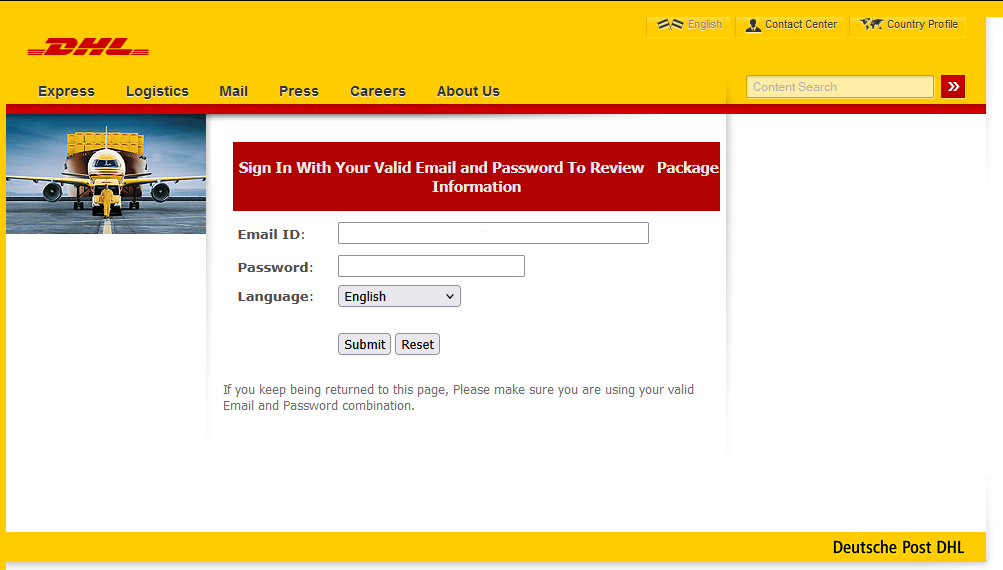
A fake DHL website. The user is asked to enter the login and password for their real DHL account
The stolen data is typically transmitted in one of three ways — or a combination of them:
The range of data sought by cybercriminals is quite extensive.
According to our research, the vast majority (88.5%) of phishing attacks conducted from January through September 2025 targeted online account credentials, and 9.5% were attempts to obtain users’ personal data, such as names, addresses, and dates. Finally, 2% of phishing attacks were focused on stealing bank card details.

Distribution of attacks by type of data being targeted, January–September 2025
Not all stolen data is directly used by the attackers to transfer money to their own accounts. In fact, the data is seldom used instantly; more commonly, it finds its way onto the shadow market, reaching analysts and data brokers. A typical journey looks something like this.
Raw data sets are bundled into massive archives and offered in bulk on dark web forums. These dumps often contain junk or outdated information, which is why they’re relatively cheap — starting at around US$50.
These archives are purchased by hackers who act as analysts. They categorize datasets and verify the validity of the data by checking if the login credentials work for the specified services, if they are reused on other sites, and if they match any data from past breaches. For targeted attacks, cybercriminals compile a digital dossier. It stores information gathered from both recent and older attacks — essentially a spreadsheet of data ready to be used in hacks.
The sorted datasets are offered for sale again, now at a higher price — and not only on the dark web but also on the more familiar Telegram.
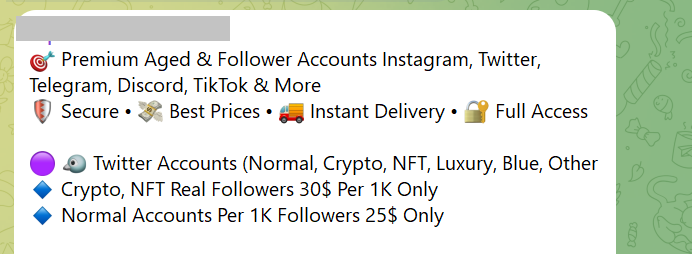
An ad for a Telegram sale of social media account credentials
According to Kaspersky Digital Footprint Intelligence, account prices are driven by a large number of factors: account age, 2FA authentication, linked bank cards, and service userbase. It’s no surprise that the most expensive and in-demand commodity on this market is access to bank accounts and crypto wallets.
| Category | Price, US$ | Average price, US$ |
| Crypto platforms | 60–400 | 105 |
| Banks | 70–2000 | 350 |
| E-government portals | 15–2000 | 82.5 |
| Social media | 0.4–279 | 3 |
| Messaging apps | 0.065–150 | 2.5 |
| Online stores | 10–50 | 20 |
| Games and gaming platforms | 1–50 | 6 |
| Global internet portals | 0.2–2 | 0.9 |
| Personal documents | 0.5–125 | 15 |
Average account prices in January–September 2025
Once a cybercriminal purchases a victim’s digital dossier, they can plan their next attack. They might use open-source intelligence to find out where the person works, and then craft a convincing email impersonating their boss. Alternatively, they could hack a social media profile, extract compromising photos, and demand a ransom for their return. However, rest assured that nearly all threatening or extortion emails are just a scare tactic by scammers.
Cybercriminals also use compromised accounts to send further phishing emails and malicious links to the victim’s contacts. So, if you receive a message asking you to vote for a niece in a contest, lend money, or click on a suspicious link, you have every reason to be wary.
More on phishing and scams:
Kaspersky official blog – Read More
Being seen as reliable is good for ‘business’ and ransomware groups care about ‘brand reputation’ just as much as their victims
WeLiveSecurity – Read More

Welcome to this week’s edition of the Threat Source newsletter.
“It’s a dangerous business, going out your door. You step onto the road, and if you don’t keep your feet, there’s no knowing where you might be swept off to.” — Bilbo Baggins
It’s almost the end of the year, which feels like the perfect time to start an epic quest.
So, Middle-earth. I’m walking across it. Not with the intention of destroying the One Ring, but to increase my daily step count in the nerdiest way possible.
As I suspect is the origin story for most quests these days, my journey began by downloading an app.

It’s called “The Conqueror.” There are many different distances you can choose from, but I chose Middle-earth because I’m that person who watched all the behind-the-scenes footage from Peter Jackson’s Lord of the Rings extended edition box set and physically shed tears because I wasn’t there.
Heeding Bilbo’s warnings about roads, I’m using a treadmill. After receiving my official race bib (#199574), I hopped on and muttered under my breath, “So it begins.”
So far, I’ve passed Bag End, South Farthing, Woody End, Maggot’s Farm, and I’m currently doing a stopover at Buckleberry Ferry. That’s 130km (55% of the Shire) done. Only 120km until Bree, where I can rest up with a pint at The Prancing Pony. And a mere 2,787km to go until I get to Mount Doom. If only Frodo hadn’t taken so many detours…
I’ve been rewarded at each milestone with postcards full of extremely nerdy facts about the landscape. And because of The Conqueror’s partnership with an ocean clean-up charity, I’ve also “saved” 20 plastic bottles from entering the sea, which feels very cool to have accomplished while never leaving the house.

It’s a strange, delightful journey: half fitness plan, half fantasy pilgrimage. And it got me thinking about the value of knowing your destination.
Oftentimes when I’m speaking to defenders, one of their main challenges is “I’m struggling to do all the things, all the time.” When everything gets a bit overwhelming, and threats either shift unpredictably or circle back to tactics we thought we’d left behind, it’s easy to lose your sense of direction and say, “What are we doing this for again?”
That’s what I’ve come to like about this quest across Middle-earth: there’s a destination, and there are milestones. Mount Doom is a f*****g long way from Buckleberry Ferry. But I like just knowing the next marker even if I can’t yet see the (Bag)end.
As you’re making plans for next year, it might be worth using that idea: Where are you heading? What are the things you’re doing right now are actually helping you get there? Which detours/madness will lead you into Fangorn Forest?
If in doubt, follow your nose.
While tracking ransomware activities, Cisco Talos uncovered new tactics, techniques, and procedures (TTPs) linked to a financially motivated threat actor targeting victims with DeadLock ransomware. The DeadLock ransomware targets Windows machines with a custom stream cipher encryption algorithm that uses time-based cryptographic keys to encrypt files.
There’s a few things that the threat actor does as part of this campaign to make recovery for victims more complicated. First, they use the Bring Your Own Vulnerable Driver (BYOVD) technique with a previously unknown loader to exploit the Baidu Antivirus driver vulnerability (CVE-2024-51324), enabling the termination of endpoint detection and response (EDR) processes. Also, the custom encryption method allows DeadLock ransomware to effectively encrypt different file types in enterprise environments while preventing system corruption through selective targeting and anti-forensics techniques.
The Talos blog has a full breakdown of the attack, including the new TTPs, attempts at lateral movement, the ways the actor attempts to impair defenses, and the encryption process. Snort SIDs for the threats are: 65576, 65575 and 301358. ClamAV detections are also available for this threat:
Chinese hackers are using “stealthy and resilient” Brickstorm malware to target VMware servers
The Cybersecurity and Infrastructure Security Agency (CISA) is warning that China-sponsored threat actors are using Brickstorm malware to achieve long-term persistence in critical infrastructure networks. (ITPro)
Critical Apache Tika vulnerability leads to XXE injection
A critical-severity vulnerability in the Apache Tika open source analysis toolkit could allow attackers to perform XML External Entity (XXE) injection attacks. (Security Week)
Zero-click agentic browser attack can delete entire Google Drive using crafted emails
A new agentic browser attack targeting Perplexity’s Comet browser that’s capable of turning a seemingly innocuous email into a destructive action that wipes a user’s entire Google Drive contents. (The Hacker News)
Spy vs. spy: How GenAI is powering defenders and attackers
Nick Biasini provides an update on how Talos is seeing threat actors currently use genAI, and how defenders can use it as a force multiplier.
Microsoft Patch Tuesday for December 2025
The Patch Tuesday for December of 2025 includes 57 vulnerabilities, including two that Microsoft marked as “critical.” The remaining vulnerabilities listed are classified as “important.”
SHA256: d933ec4aaf7cfe2f459d64ea4af346e69177e150df1cd23aad1904f5fd41f44a
MD5: 1f7e01a3355b52cbc92c908a61abf643
Talos Rep: https://talosintelligence.com/talos_file_reputation?s=d933ec4aaf7cfe2f459d64ea4af346e69177e150df1cd23aad1904f5fd41f44a
Example Filename: cleanup.bat
Detection Name: W32.D933EC4AAF-90.SBX.TG
SHA256: 9f1f11a708d393e0a4109ae189bc64f1f3e312653dcf317a2bd406f18ffcc507
MD5: 2915b3f8b703eb744fc54c81f4a9c67f
Talos Rep: https://talosintelligence.com/talos_file_reputation?s=9f1f11a708d393e0a4109ae189bc64f1f3e312653dcf317a2bd406f18ffcc507
Example Filename: 9f1f11a708d393e0a4109ae189bc64f1f3e312653dcf317a2bd406f18ffcc507.exe
Detection Name: Win.Worm.Coinminer::1201
SHA256: 1ec34305e593c27bb95d538d45b6a17433e71fa1c1877ce78bf2dbda6839f218
MD5: a1f4931992bf05e9bff4b173c15cab15
Talos Rep: https://talosintelligence.com/talos_file_reputation?s=1ec34305e593c27bb95d538d45b6a17433e71fa1c1877ce78bf2dbda6839f218
Example Filename: a1f4931992bf05e9bff4b173c15cab15.exe
Detection Name: Auto.1EC343.272247.in02
SHA256: 96fa6a7714670823c83099ea01d24d6d3ae8fef027f01a4ddac14f123b1c9974
MD5: aac3165ece2959f39ff98334618d10d9
Talos Rep: https://talosintelligence.com/talos_file_reputation?s=96fa6a7714670823c83099ea01d24d6d3ae8fef027f01a4ddac14f123b1c9974
Example Filename: 96fa6a7714670823c83099ea01d24d6d3ae8fef027f01a4ddac14f123b1c9974.exe
Detection Name: W32.Injector:Gen.21ie.1201
SHA256: 90b1456cdbe6bc2779ea0b4736ed9a998a71ae37390331b6ba87e389a49d3d59
MD5: c2efb2dcacba6d3ccc175b6ce1b7ed0a
Talos Rep: https://talosintelligence.com/talos_file_reputation?s=90b1456cdbe6bc2779ea0b4736ed9a998a71ae37390331b6ba87e389a49d3d59
Example Filename: ck8yh2og.dll
Detection Name: Auto.90B145.282358.in02
Cisco Talos Blog – Read More
South Korean law enforcement has arrested four suspects linked to the breach of approximately 120 000 IP cameras installed in private homes and commercial spaces — including karaoke lounges, pilates studios, and a gynecology clinic. Two of the hackers sold sexually explicit footage from the cameras through a foreign adult website. In this post, we explain what IP cameras are, and where their vulnerabilities lie. We also dive into the details of the South Korea incident and share practical advice on how to avoid becoming a target for attackers hunting for intimate video content.
An IP camera is a video camera connected to the internet via the Internet Protocol (IP), which lets you view its feed remotely on a smartphone or computer. Unlike traditional CCTV surveillance systems, these cameras don’t require a local surveillance hub — like you see in the movies — or even a dedicated computer to be plugged into. An IP camera streams video directly in real time to any device that connects to it over the internet. Most of today’s IP camera manufacturers also offer optional cloud storage plans, letting you access recorded footage from anywhere in the world.
In recent years, IP cameras have surged in popularity to become ubiquitous, serving a wide range of purposes — from monitoring kids and pets at home to securing warehouses, offices, short-term rental apartments (often illegally), and small businesses. Basic models can be picked up online for as little as US$25–40.
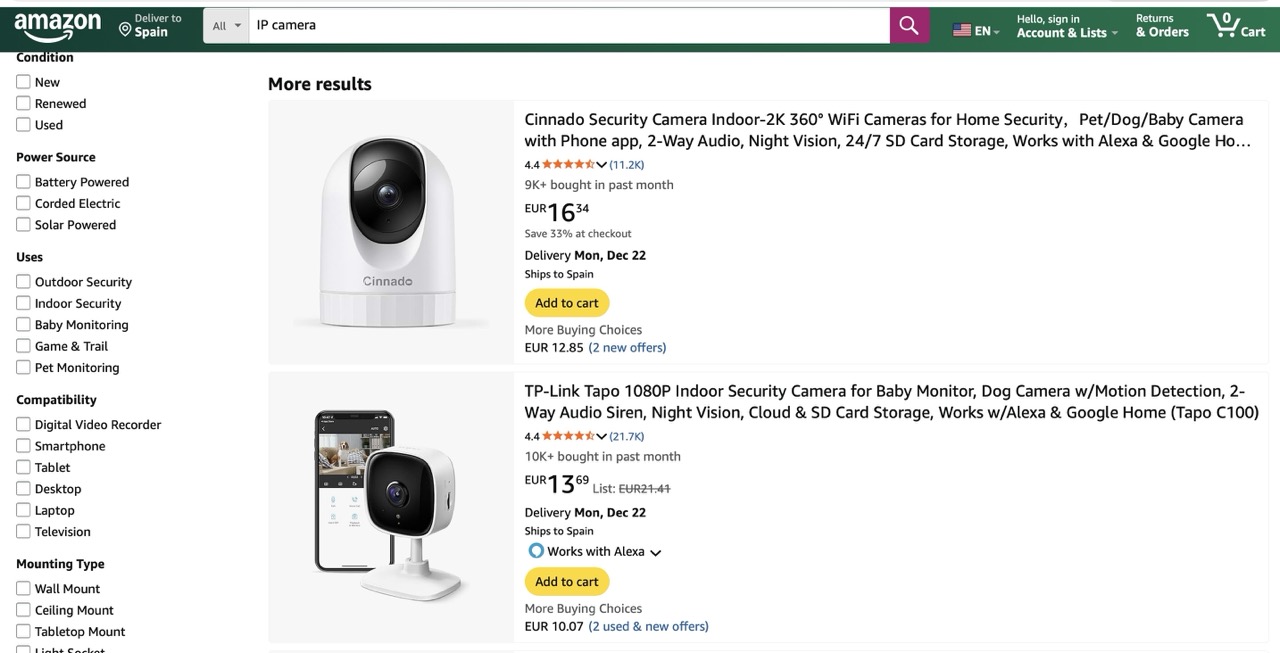
You can find a Full HD IP camera on an online marketplace for under US$25 — affordable prices have made them incredibly popular for both home and small business use
One of the defining features of IP cameras is that they’re originally designed for remote access. The camera connects to the internet and silently accepts incoming connections — ready to stream video to anyone who knows its address and has the password. And this leads to two common problems with these devices.
Let’s rewind to what unfolded this fall in South Korea. Law-enforcement authorities reported a breach of roughly 120 000 IP cameras, and the arrest of four suspects in connection with the attacks. Here’s what we know about each of them.
The astute reader may have noticed the numbers don’t quite add up — the figures above totaling well over 120 000. South Korean law enforcement hasn’t provided a clear explanation for this discrepancy. Journalists speculate that some of the devices may have been compromised by multiple attackers.
The investigation has revealed that only two of the accused actually sold the sexual content they’d stolen. However, the scale of their operation is staggering. Last year, the website hosting voyeurism and sexual exploitation content — which both perpetrators used to sell their videos — received 62% of its uploads from just these two individuals. In essence, this video enthusiast duo supplied the majority of the platform’s illegal content. It’s also been reported that three buyers of these videos were detained.
South Korean investigators were able to identify 58 specific locations of the hacked cameras. They’ve notified the victims and provided guidance on changing the passwords to secure their IP cameras. This suggests — although the investigators haven’t disclosed any details about the method of compromise — that the attackers used brute-forcing to crack the cameras’ simple passwords.
Another possibility is that the camera owners, as is often the case, simply never changed the default usernames and passwords. These default credentials are frequently widely known, so it’s entirely plausible that to gain access the attackers only needed to know the camera’s IP address and try a handful of common username and password combinations.
The takeaways from this whole South Korean dorama drama are straight from our playbook:
These rules are universal: they apply just as much to your social media and banking accounts as they do to your robot vacuums, IP cameras, and every other smart device in your home.
To keep all those unique passwords organized without losing your mind, we strongly recommend a reliable password manager. Kaspersky Password Manager can both store all your credentials securely and generate truly random, complex, and uncrackable passwords for you. With it, you can be confident that no one will guess the passwords to your accounts or devices. Plus, it helps you generate one-time codes for two-factor authentication, save and autofill passkeys, and sync your sensitive data — not just logins and passwords, but also bank card details, documents, and even private photos — in encrypted form across all your devices.
Wondering if a hidden camera is filming you? Read more in our posts:
Kaspersky official blog – Read More

Germany is taking decisive steps to strengthen its cybersecurity framework following the rise of digital threats. Last month, the Bundestag adopted the NIS-2 Implementation Act, translating the EU NIS-2 Directive (Directive (EU) 2022/2555) into national law. Published in the Federal Law Gazette on 5 December 2025 and in force since 6 December 2025, the Act modernizes the country’s IT security legislation and broadens the range of entities subject to regulatory oversight.
The Federal Office for Information Security (BSI) is tasked with supervision and enforcement under the Act, coordinating cybersecurity across federal agencies in its role as the CISO Bund. The law applies to industrial production, including electronics, machinery, vehicles, and other transport systems. Obligations generally target companies with at least 50 employees or that meet specific revenue and balance sheet thresholds.
Certain sensitive sectors, such as telecommunications and digital services, are covered regardless of size. As a result, the number of regulated entities in Germany rises dramatically, from around 4,500 under previous frameworks to roughly 30,000, including many mid-sized companies that were previously outside critical infrastructure regulations.
Entities within scope must register within three months with the BSI and the Federal Office for Civil Protection and Disaster Assistance (BBK). Registration requires providing company master data, designated contact points, and internal reporting structures.
The law establishes a three-step incident reporting process: an initial notification within 24 hours of becoming aware of a cybersecurity incident, an update within 72 hours, and a final report within 30 days, with additional interim reports if requested.
The NIS-2 Implementation Act sets binding, verifiable minimum requirements, including risk management, vulnerability and patch management, incident response planning, end-to-end logging, multi-factor authentication, and supply chain security. Industrial operators must secure control systems, manage distributed device fleets, and document supplier components.
Management is explicitly responsible for oversight, decision-making, and training, embedding cybersecurity accountability at the executive level.
Violations carry severe penalties. “Particularly important entities” can face fines of up to €10 million or 2% of global annual turnover, while “important entities” may incur fines up to €7 million or 1.4% of turnover. The BSI is empowered to issue binding orders, and management members may be held personally liable for failures to implement or supervise required measures.
Section 38 of the Act effectively obliges management to implement cybersecurity measures, not just approve them. Section 2(13) defines “members of management bodies” as executives appointed by law, articles of association, or partnership agreements, covering executive functions but excluding supervisory board roles in two-tier structures.
The NIS-2 Directive establishes EU-wide requirements for risk management, incident reporting, and operational resilience. It applies to essential entities and mandates an “all-hazards” approach to protect against cyberattacks, technical failures, sabotage, and natural disasters.
Germany’s NIS-2 Implementation Act integrates these obligations with sector-specific legislation, including the Digital Operational Resilience Act (DORA) for financial services, the Cyber Resilience Act for digital products, and the Critical Entities Resilience Directive (CER). Sector-specific laws generally take precedence where requirements overlap, ensuring legal clarity under the lex specialis principle.
The EU Cyber Solidarity Act complements NIS-2 by providing operational frameworks for cross-border emergency response, including the Cybersecurity Emergency Mechanism and the European Cybersecurity Alert System. Coordination through the NIS Cooperation Group and networks such as EU-CyCLONe supports strategic and operational collaboration for large-scale incidents.
With the NIS-2 Implementation Act now active, organizations have until April 2026 to register with the BSI and establish governance, risk-management, and reporting structures. The law raises accountability to both operational teams and executive leadership, creating a more unified, EU-aligned cybersecurity framework across Germany.
As regulatory expectations tighten, organizations will need faster threat visibility and stronger security operations. Cyble, ranked the #1 Cyber Threat Intelligence Technology by Gartner Peer Insights, offers AI-native tools that help companies identify vulnerabilities, monitor new cyber threats, and strengthen resilience, critical capabilities under NIS-2.
Organizations preparing for NIS-2 compliance can benefit from Cyble’s AI-powered security ecosystem and are encouraged to explore its free external threat assessment and personalized demo to understand how these capabilities support stronger, regulation-ready defenses.
The post New NIS-2 Law in Germany Expands Cybersecurity Oversight and Introduces Heavy Fines appeared first on Cyble.
Cyble – Read More
Security teams face thousands of alerts every single day. Many of them don’t clearly show whether there’s a true threat behind them. Investigation slows down, analysts lose time on low-value signals, and important findings are often buried in noise.
AI Sigma Rules change this routine. With this new capability in ANY.RUN’s Interactive Sandbox, SOC teams can not only see the source of malicious activity in the standard Sigma format but also use the generated rules across their entire environment. Every confirmed threat now actively improves how your SOC detects the next one and speeds up response.
Most SOCs struggle to turn threats they identify into reusable, scalable detection logic. The obstacles pile up quickly:
All of this results in the same issue: SOCs fix individual incidents, but the lessons don’t consistently carry over into stronger detection coverage.
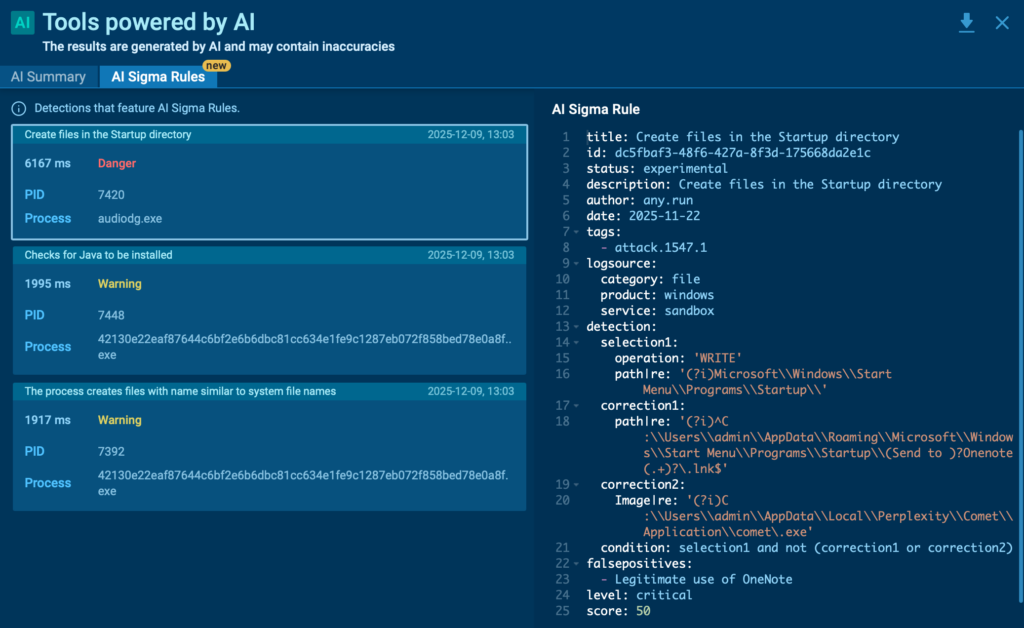
AI Sigma Rules automate one of the slowest and most error-prone parts of detection engineering: turning real attack behavior into usable detection logic.
Instead of manually translating sandbox findings into rules, teams receive a ready-to-review Sigma rule built directly from the recorded malicious activity.
Each rule is generated from what actually happened during execution; the same events, processes, and fields analysts already trust during investigation. As a result, the detection logic stays closely tied to real attacker behavior, not assumptions or static indicators.
With AI Sigma Rules, SOC teams can:
For security leaders, this changes the value of every investigation. A confirmed detection no longer ends with a closed alert but becomes a chance to strengthen the whole infrastructure.
Let’s take a closer look at how you can quickly get an actionable Sigma rule inside ANY.RUN’s Interactive Sandbox.
1. Submit a suspicious file or URL
Run the sample in ANY.RUN’s Interactive Sandbox to observe its behavior in real time.
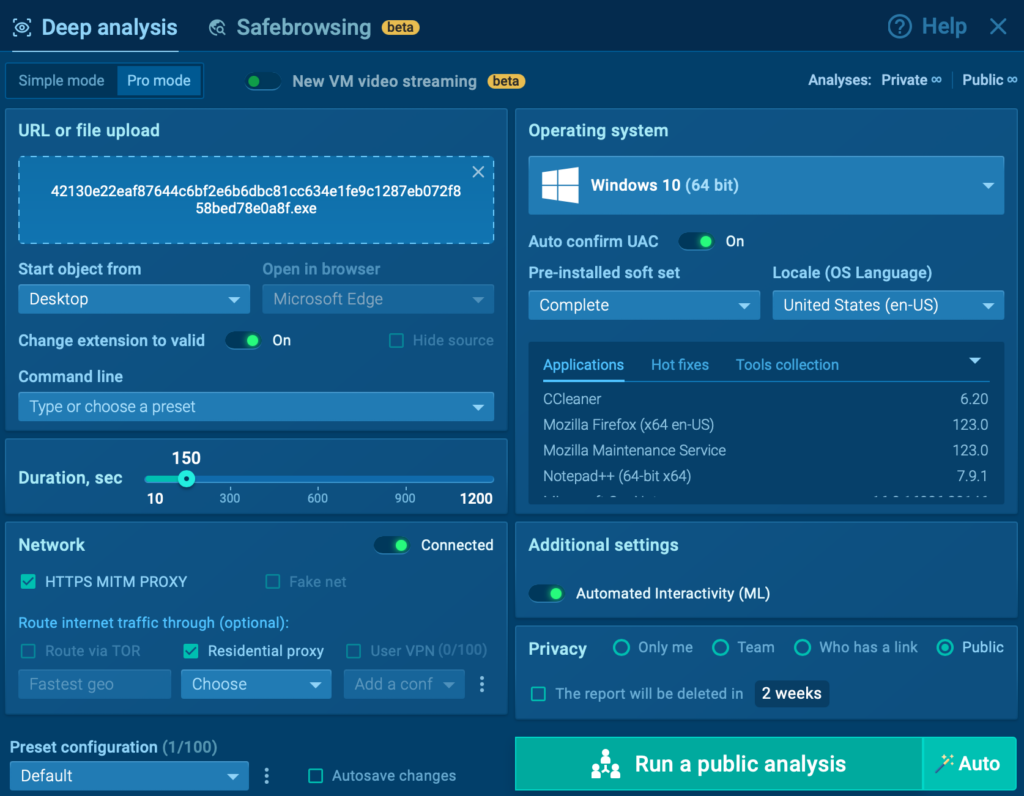
2. Wait for a detection to trigger
As soon as malicious activity is confirmed, the sandbox highlights the event and prepares the data behind it.
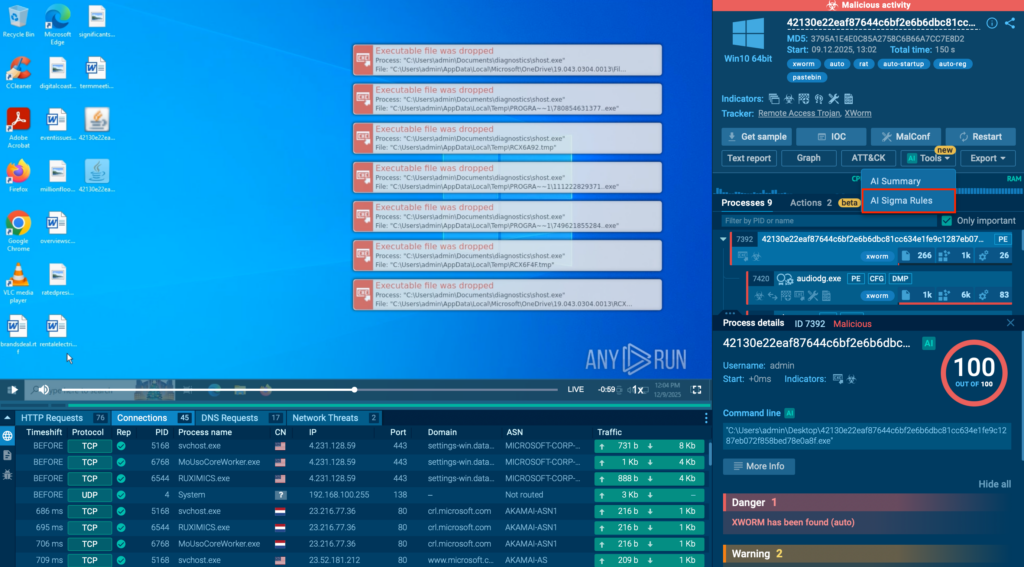
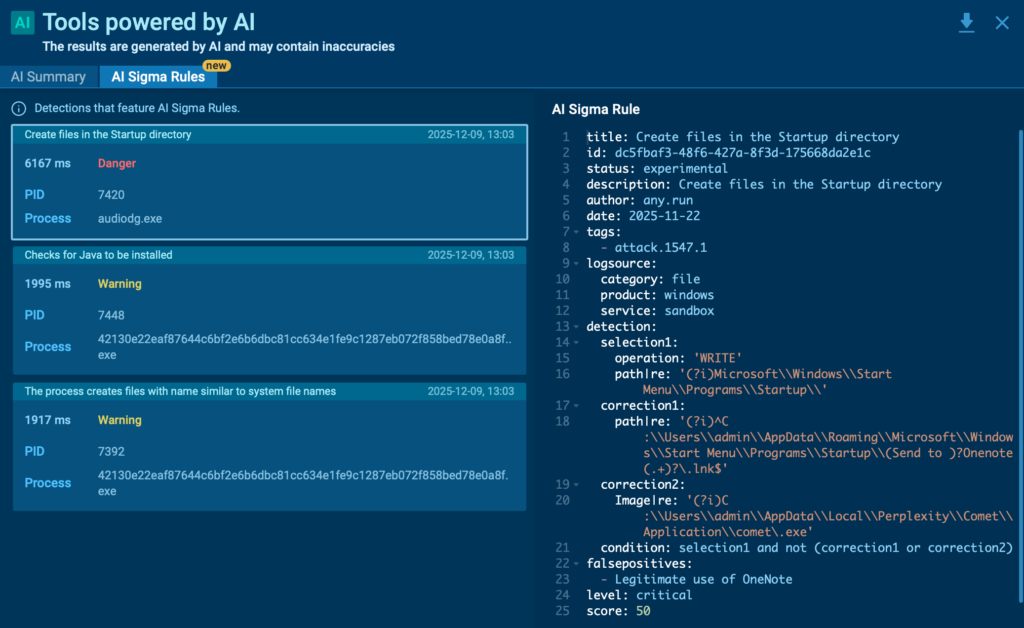
3. Open the AI Sigma Rules panel
Inside the detection view, you’ll see a generated Sigma rule that reflects the exact logic behind the alert, including key event fields and matching conditions.
4. Copy or export the rule for deployment
Use it as a correlation rule, hunting query, or alert in your SIEM, EDR, or other detection layers. From there, analysts can fine-tune and activate the rule in minutes.
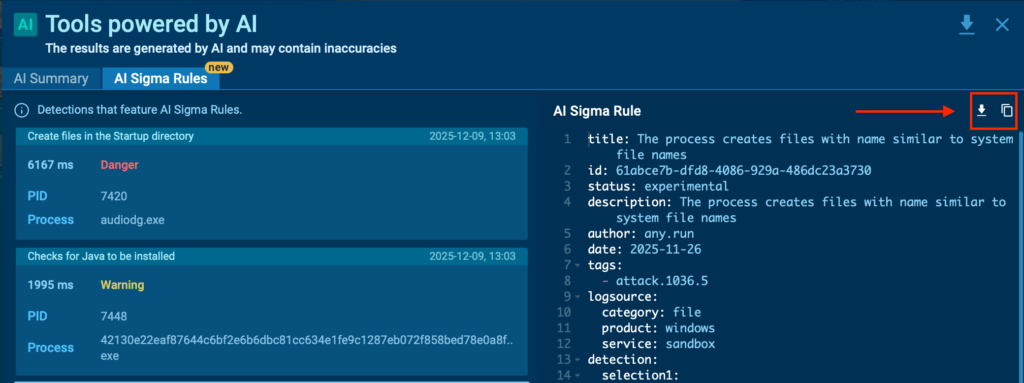
This creates a short, repeatable path that lets SOCs like yours detect this malicious pattern every time it pops up.
AI Sigma Rules change how SOC teams scale what they learn from real attacks. Here’s how that impact shows up in day-to-day operations:
AI Sigma Rules are now part of the ANY.RUN Sandbox Enterprise plan, giving teams a faster way to turn real threats into live detection logic.
Want to see how much time it can save your analysts?
Request a demo and walk through the workflow with our experts.
With AI Sigma Rules, SOCs no longer lose valuable insights to case notes or fragmented tooling. Every confirmed threat becomes an opportunity to strengthen the entire detection stack. As attackers evolve and environments grow more complex, this ability to turn daily investigations into continuous improvement becomes a real advantage. ANY.RUN brings that capability directly into the analyst workflow, making better detection not just possible, but repeatable.
ANY.RUN, a leading provider of interactive malware analysis and threat intelligence solutions, helps security teams investigate threats faster and make more confident decisions. Used by over 15,000 organizations and 500,000 analystsworldwide, the service combines real-time sandbox analysis with actionable threat intelligence to support daily SOC operations.
With features like interactive malware execution, automated detections, threat intelligence lookup, and now AI Sigma Rules, ANY.RUN enables teams to move from investigation to prevention with greater speed and clarity. It supports Windows, Linux, and Android environments and integrates seamlessly into modern security stacks.
The post AI Sigma Rules: Scale Threat Detection, Drive Down MTTR appeared first on ANY.RUN’s Cybersecurity Blog.
ANY.RUN’s Cybersecurity Blog – Read More
Interpreting the vast cybersecurity vendor landscape through the lens of industry analysts and testing authorities can immensely enhance your cyber-resilience.
WeLiveSecurity – Read More
News outlets recently reported that a threat actor was spreading an infostealer through free 3D model files for the Blender software. This is troubling enough on its own, but it highlights an even more serious problem: the business threat posed by free open source programs, uncontrolled by corporate infosec teams. And the danger comes not from vulnerabilities in the software, but from its very own standard features.
Blender is a 3D graphics and animation suite used by visualization professionals across various industries. The software is free and open-source, and offers extensive functionality. Among Blender’s capabilities is support for executing Python scripts, which are used to automate tasks and add new features.
The package allows users to import external files from specialized marketplaces like CGTrader or Sketchfab. These platforms host both paid and free 3D models by artists and studios. Any of these model files potentially contain Python scripts.
This creates a concerning scenario: marketplaces where files can be uploaded by any user and may not be scanned for malicious content, combined with software that has an Auto Run Python Scripts feature. It allows files to automatically execute embedded Python scripts immediately upon opening — essentially running arbitrary code on the user’s computer in unattended mode.
The attackers posted free 3D models with the .blend file name extension on the popular CGTrader platform. These files contained a malicious Python script. If the user had the Auto Run Python Scripts feature enabled, downloading and opening the file in Blender triggered the script. It then established a connection to a remote server and downloaded a malware loader from the Cloudflare Workers domain.
The loader executed a PowerShell script, which in turn downloaded additional malicious payloads from the attackers’ servers. Ultimately, the victim’s computer was infected with the StealC infostealer, enabling the attackers to:
The problem isn’t Blender itself — threat actors will inevitably try to exploit automation features in any popular software. Most end-users don’t consider the risks of enabling common automation features, nor do they typically dive deep into how these features work or how they could be exploited.
The core issue is that security teams aren’t always familiar with the capabilities of specialized tools used by various departments. They simply don’t account for this vector in their threat models.
If your company uses Blender, the first step is to disable the automatic execution of Python scripts (Auto Run Python Scripts feature). Here’s how to do it according to official documentation.
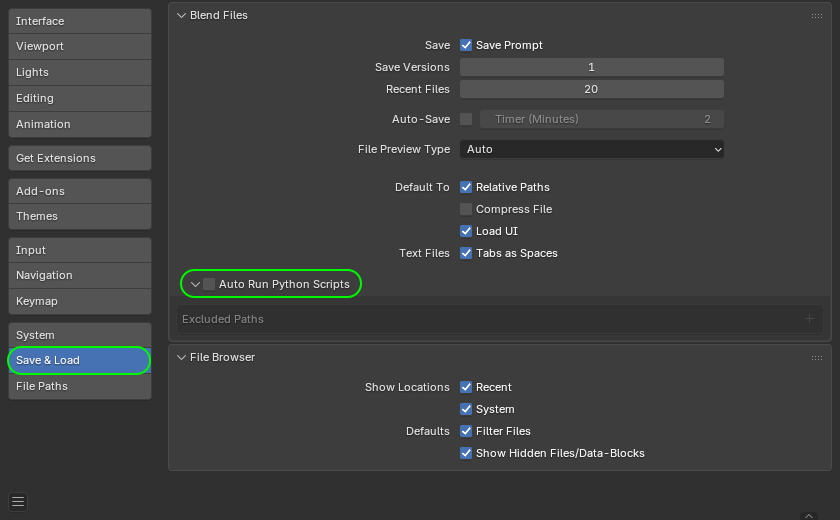
How to disable the automatic execution of Python scripts in Blender. Source
Furthermore, to prevent the sudden spread of threats via work tools, we recommend that corporate security teams:
Kaspersky official blog – Read More
Phishing used to be easy to spot. Now it looks clean, trusted, and almost perfect. Behind it are phishkits; ready-made attack platforms built to steal credentials, bypass MFA, and hijack live sessions in seconds.
For SOC teams, one click starts the countdown. What looks like a routine alert can already be a live account takeover.
Here’s how these attacks actually work, and how advanced SOC teams catch them before they spread.
A phishing kit, aka phishkit, is a ready-made toolkit that attackers use to launch phishing campaigns fast and at scale. Instead of building fake pages and infrastructure from scratch, they buy or rent a kit and deploy a full attack setup in minutes.
Most phishkits come with:
What makes phishkits especially dangerous is how little skill they now require. Even low-experience attackers can run advanced phishing operations using these packaged platforms; with the infrastructure, automation, and data collection already built in.
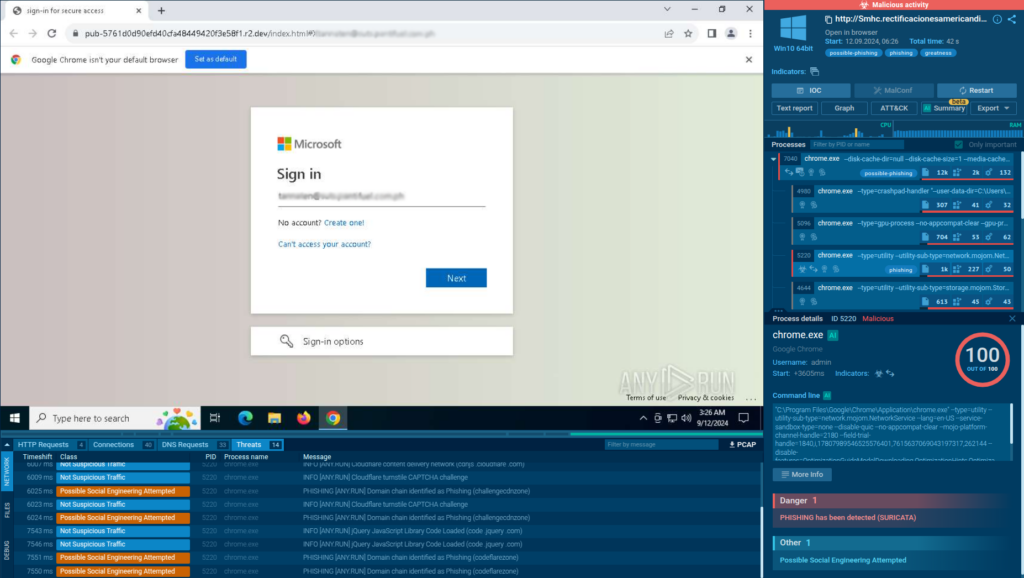
Detecting phishkits early comes down to understanding what happens after the click. With an interactive sandbox like ANY.RUN, analysts can safely open suspicious links, interact with phishing pages like a real user, and observe the full execution chain as it unfolds. This makes it possible to expose reverse proxy behavior, MFA capture, and credential theft in real time, often within seconds.
Phishkits quietly remove the barriers that businesses rely on for protection. By sitting between the employee and the real service, these tools capture logins, MFA codes, and active sessions in real time. The result is immediate, legitimate-looking access to corporate systems.
Once attackers get inside, the impact spreads fast. A single compromised account can open access to email threads, internal tools, cloud platforms, customer data, and even financial systems. From there, attackers blend in, send messages from trusted inboxes, reset passwords, and move deeper without triggering obvious alarms.
What makes phishkits especially dangerous is how clean the entry point often looks. There’s no malware dropped right away or a suspicious attachment. Just a normal login that isn’t normal at all. This makes early detection hard and gives attackers valuable time to act before security teams even realize something is wrong.
For businesses, phishkits often lead to:
| Challenge | What It Looks Like in Practice | Why It’s a Problem |
|---|---|---|
| Clean phishing emails | Messages pass basic filters and look legitimate | No early warning at the email layer |
| Reverse proxy behavior | Users log in through a live proxy | Logs show a “normal” successful login |
| Short-lived domains | Phishing domains disappear quickly | Blocklists don’t update in time |
| Valid credentials & sessions | Attackers use real usernames, passwords, and MFA | No brute-force or obvious abuse signals |
| No malware at first stage | No attachment, no payload, just a web login | File-based detection is bypassed |
| Rapid attacker response | Access is used seconds after credentials are stolen | SOC has almost no reaction window |
Speed matters with phishkits. The sooner a team can see the full phishing chain in action, the sooner they can contain access, block infrastructure, and stop the same kit from hitting more users. A fast investigation comes from combining interactive sandboxing with real-time threat intelligence.
Instead of only blocking the URL, run it in an isolated environment to see what actually happens after the click, redirects, proxy behavior, and the final phishing page.
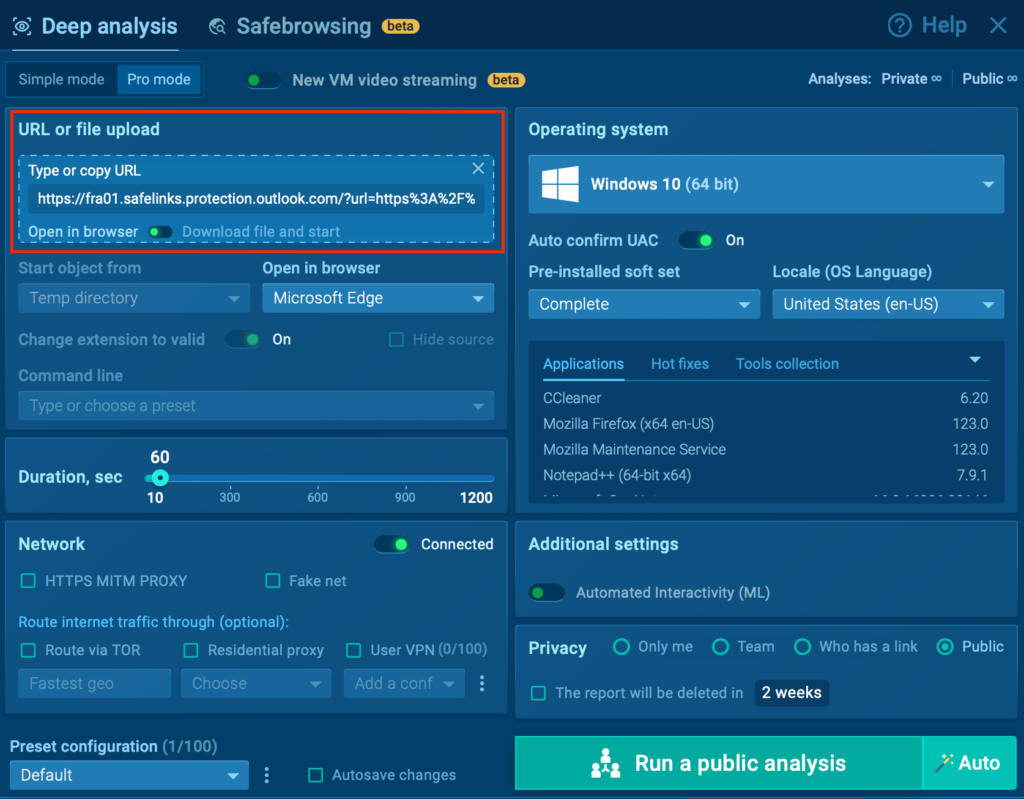
Phishkits stay quiet until someone behaves like a victim. Clicking buttons, entering test credentials, and moving through the flow helps trigger session theft, MFA capture, and hidden scripts.
A live sandbox session shows every redirect, outbound connection, script call, and credential capture attempt, not just the final page.
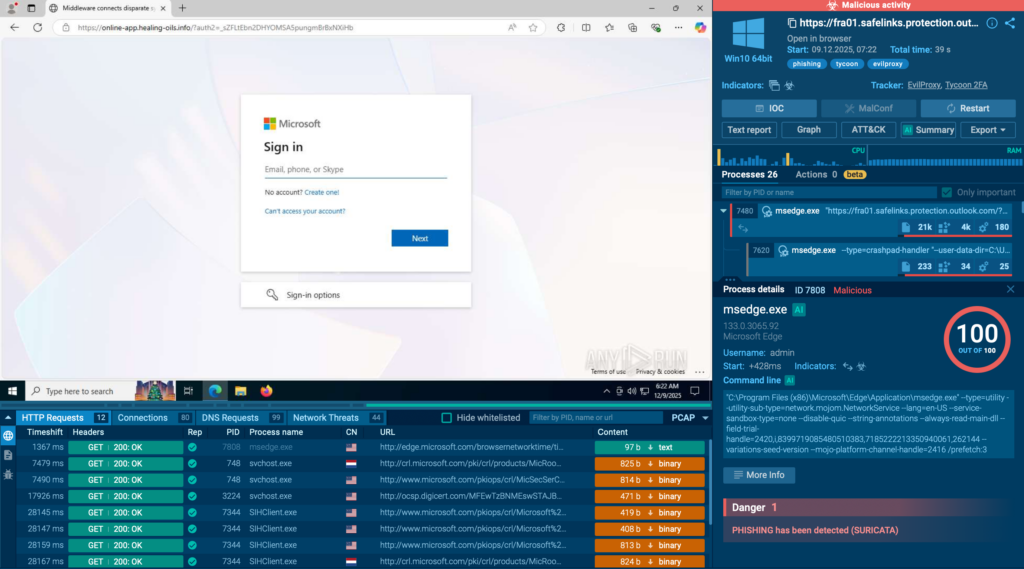
Domains, IPs, URLs, scripts, and proxy infrastructure can be extracted immediately and pushed into blocking rules and hunting queries.
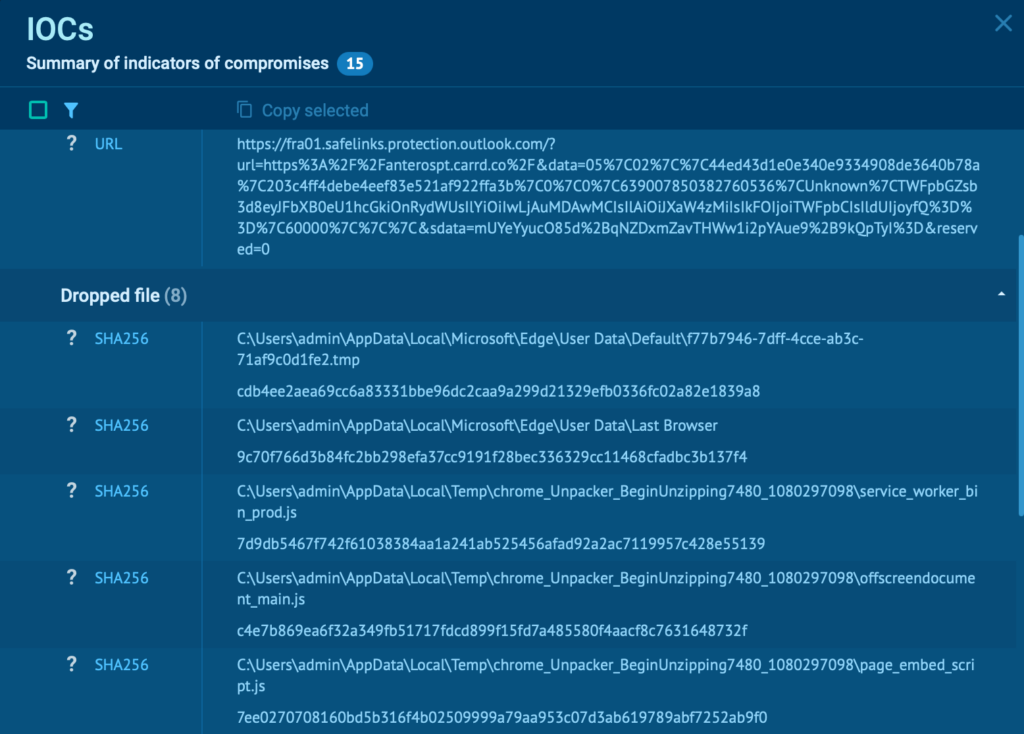
With ANY.RUN TI Lookup, analysts can instantly check whether the same domains, IPs, scripts, or redirect patterns were seen in past phishing or malware campaigns. This helps confirm phishkit families and link related activities.
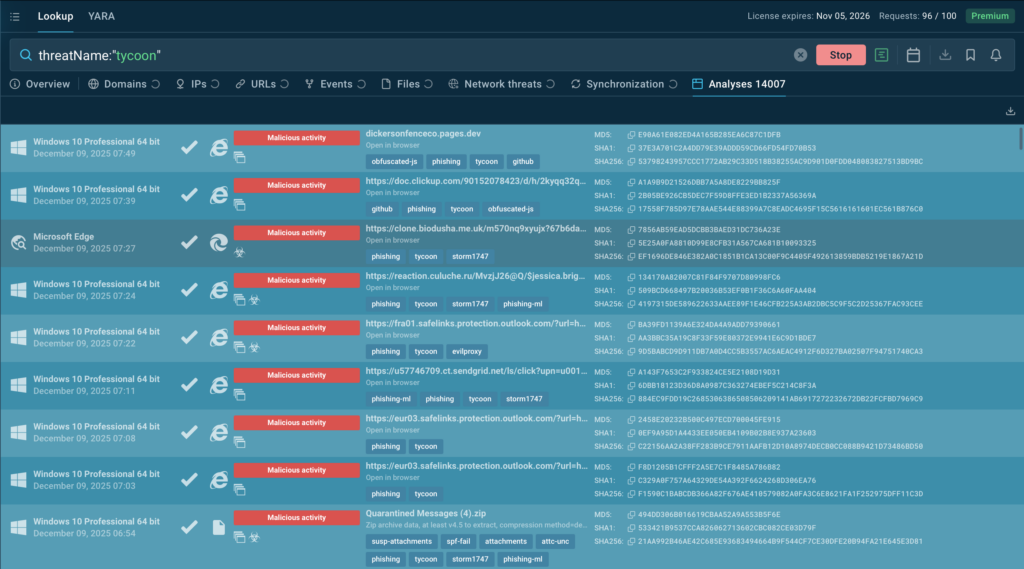
Using indicators from both the sandbox and TI Lookup, teams can quickly:
This workflow turns phishing from a slow, reactive task into a fast, repeatable investigation process, with confirmation in minutes.
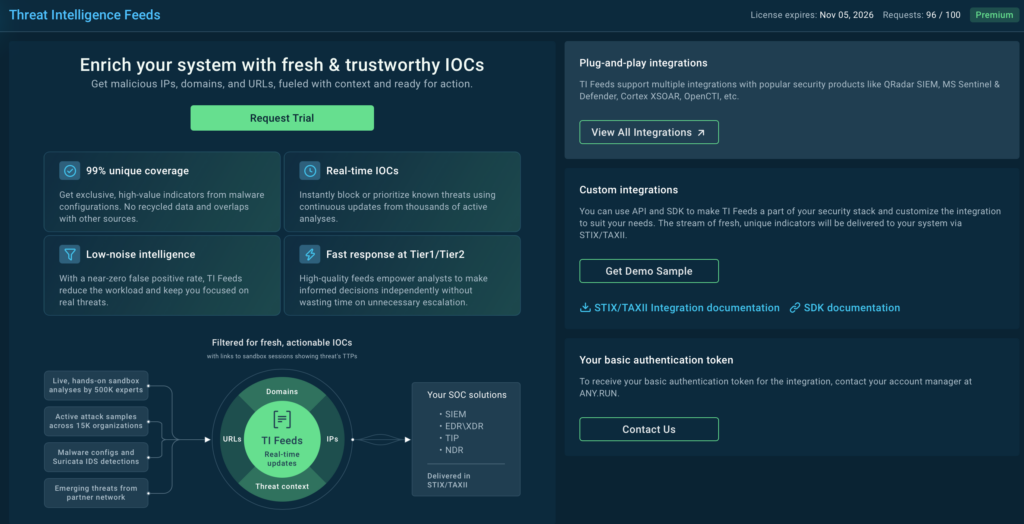
ANY.RUN’s Threat Intelligence Feeds deliver fresh, actionable indicators of compromise (IOCs) sourced directly from live attack data across 15,000 SOCs, ensuring your security infrastructure stays ahead of emerging threats.
With only 1% overlap with other sources, your team gains access to previously undiscovered threat intelligence that competitors miss. Every IOC comes enriched with detailed sandbox reports and contextual metadata, providing the forensic depth needed for rapid incident response and threat hunting. Real-time updates deliver a live view of the threat landscape as attacks unfold, enabling proactive defense before threats reach your perimeter.
Integration is seamless. TI Feeds connects directly to your existing SIEM, TIP, and SOAR platforms via popular standards (STIX/TAXII) or through dedicated API and SDK, minimizing implementation overhead while maximizing threat coverage across your entire security stack.
The following examples come from real attacks and show how different phishkits operate in live environments:
TyKit is a multi-stage phishing kit built to steal Microsoft 365 credentials at scale. It spreads through malicious SVG files that silently redirect victims to fake login pages protected by CAPTCHA and anti-bot checks. Once credentials are entered, they’re sent straight to the attackers through a structured C2 API.
View analysis session with Tykit
The kit has been active since at least mid-2025 and has targeted organizations across finance, IT, government, telecom, and professional services worldwide. Its strength is simplicity: clean delivery, fast credential theft, and infrastructure that’s easy to rotate.
TyKit shows how modern phishkits don’t need malware to succeed, just one clean login flow is enough.
Tycoon 2FA is a phishing-as-a-service platform designed to steal Microsoft 365 and Gmail accounts even when MFA is enabled. It works as an adversary-in-the-middle (AiTM) kit, using a reverse proxy to capture credentials, MFA codes, and active session cookies in real time.
View real attack exposed inside ANY.RUN sandbox
What sets Tycoon 2FA apart is its constant evasion upgrades. Over time, it has added:
Once access is captured, attackers log in using a fully valid session. From a SOC view, it often looks like a normal user login until damage is already unfolding.
Mamba2FA is a widely used phishkit built to steal corporate credentials, with repeated campaigns observed against organizations in the finance and manufacturing sectors. Like TyKit and Tycoon, it relies on clean phishing flows, fast infrastructure rotation, and live credential capture to move quickly before defenders can react.
What makes Mamba2FA especially useful as an example is how clearly it shows the value of tracking phishkits as ongoing campaigns, not one-off incidents. If your organization has already encountered a specific kit, the worst mistake is treating it as “closed.”
Using ANY.RUN’s Threat Intelligence Lookup, analysts can instantly surface:
To find recent Mamba2FA activity, teams can use a simple query like:
threatName:”mamba” AND domainName:””
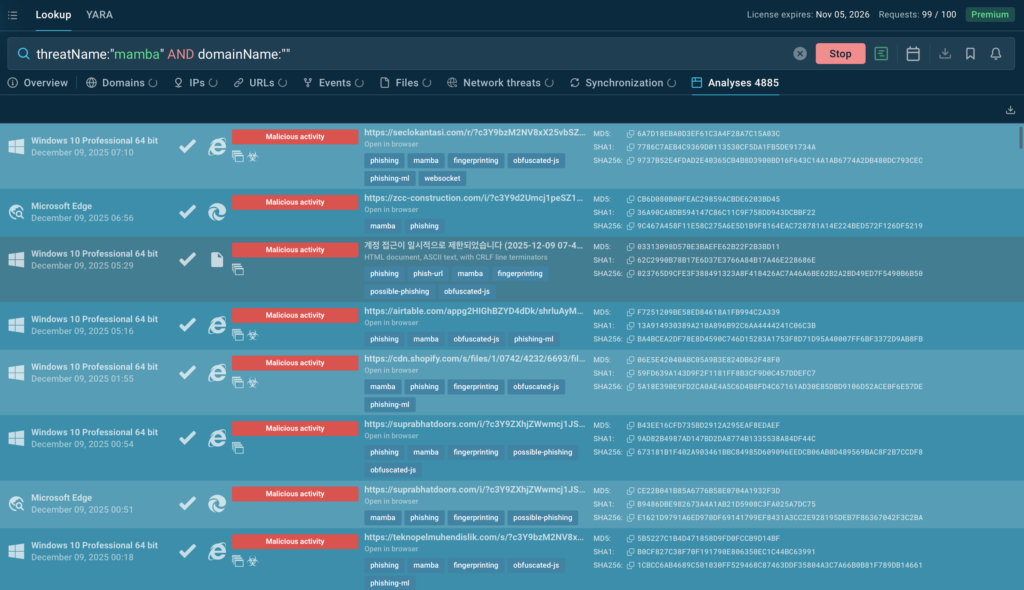
This immediately reveals both new attacks and network indicators observed during live sandbox analysis.
Instead of chasing isolated alerts, this approach turns phishkits like Mamba2FA into continuously monitored threats, making it much easier to spot repeat campaigns early and shut them down faster.
Phishkits are no longer operating in isolation. One of the most worrying shifts is the rise of hybrid phishing chains, where multiple kits are combined into a single attack. These blended campaigns mix different infrastructures, redirect logic, and credential-theft methods to make detection and attribution far more difficult.
In recent enterprise-focused attacks, analysts have observed Tycoon 2FA and Salty working together in the same chain. One kit handles the initial lure and proxying, while the other takes over at later stages for credential capture, session hijacking, or follow-up delivery. For SOC teams, this breaks many traditional assumptions about how a “single” phishing campaign should look.
Check real-world analysis with Tycoon and Salty
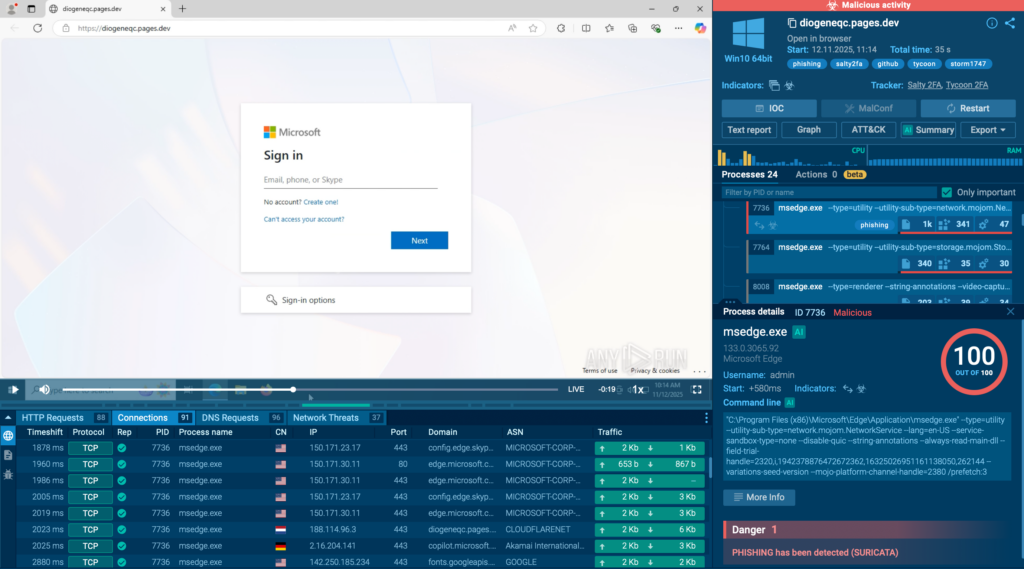
Hybrid chains create several challenges at once:
This evolution shows where phishing is heading: modular, flexible attack chains built from multiple commercial kits. For defenders, that means investigations must focus on behavior and execution flow, not just kit names or static indicators.
Phishkits now shape how real-world phishing attacks are built, delivered, and scaled against organizations.
Phishkits behave very differently from what logs alone can show. A live run-through exposes even the most complex phishing chains, from redirects and proxy logic to live credential theft, often within the first 60 seconds of analysis in over 90% of cases. That speed alone can cut investigation time dramatically and help teams act before access spreads.
Explore interactive phishkit analysis with ANY.RUN
ANY.RUN supports more than 15,000 organizations worldwide, including leaders in finance, healthcare, telecom, retail, and tech, helping them strengthen security operations and respond to threats with greater confidence.
Designed for speed and visibility, the solution blends interactive malware analysis with live threat intelligence, giving SOC teams instant insight into attack behavior and the context needed to act faster.
By integrating ANY.RUN’s Threat Intelligence suite into your existing workflows, you can accelerate investigations, minimize breach impact, and build lasting resilience against evolving threats.
Traditional phishing often just steals usernames and passwords. Phishkits go much further. They can:
– Intercept live sessions
– Bypass MFA in real time
– Rotate domains automatically
– Filter out bots and security scanners
This turns phishing into a full attack platform, not just a fake page.
Yes. Many modern phishkits use adversary-in-the-middle (AiTM) techniques through reverse proxies. They capture credentials, MFA codes, and session cookies at the same time. Attackers then reuse the stolen session to log in without triggering MFA again.
Often, no. Many phishkit campaigns start with no malware at all. The compromise happens entirely through web-based credential theft. Malware may appear later for persistence or lateral movement, but the initial access is usually “clean.”
Early warning signs may include unusual redirect chains before a login page appears, very short-lived phishing domains, CAPTCHA on unexpected login flows, new mailbox forwarding rules, or login activity from unfamiliar locations immediately after authentication.
No. Domain blocking alone is not enough because phishing domains rotate quickly, redirect chains change constantly, and infrastructure is reused across campaigns. Behavioral detection and live analysis are now essential.
Yes. Phishkits are becoming more automated, more modular, harder to attribute, and better at evading scanners and sandboxes. Hybrid chains that combine multiple phishkits in one attack are already becoming common.
A strong long-term defense combines phishing-resistant MFA such as FIDO2 or certificate-based authentication, live sandbox analysis, continuous IOC enrichment, threat intelligence feeds, and SOC playbooks built around behavioraldetection. Because phishkits evolve constantly, defense must be continuous; not one-time.
The post Phishing Kit Attacks 101: Everything SOC Analysts Should Know appeared first on ANY.RUN’s Cybersecurity Blog.
ANY.RUN’s Cybersecurity Blog – Read More