

How hackers use PowerShell scripts to steal Telegram accounts | Kaspersky official blog
There are dozens of ways to break into someone else’s Telegram account. We’ve frequently covered phishing in Telegram Mini Apps, scams with bots, gifts, and giveaways, and many other tactics. Today, we’re looking at yet another account hijacking method, one that relies on a PowerShell script.
The script, deceptively named “Windows Telemetry Update”, actually serves as a tool for hijacking Telegram sessions. It harvests data from completely defenseless user computers and forwards it to the attackers via a Telegram bot.
An evil script with a stealer inside
Cybercriminals frequently rely on PowerShell scripts to covertly download malware or harvest data. This time, researchers uncovered a script on Pastebin masquerading as a routine Windows update. In reality, it was an infostealer designed to hijack Telegram for Windows session data and allow hackers to take over accounts without a password or verification code.
What’s a PowerShell script anyway? Think of it as a text file packed with commands for a Windows computer. Instead of a human spending time clicking through tasks manually, the computer follows these quick instructions to get everything done automatically in a matter of seconds.
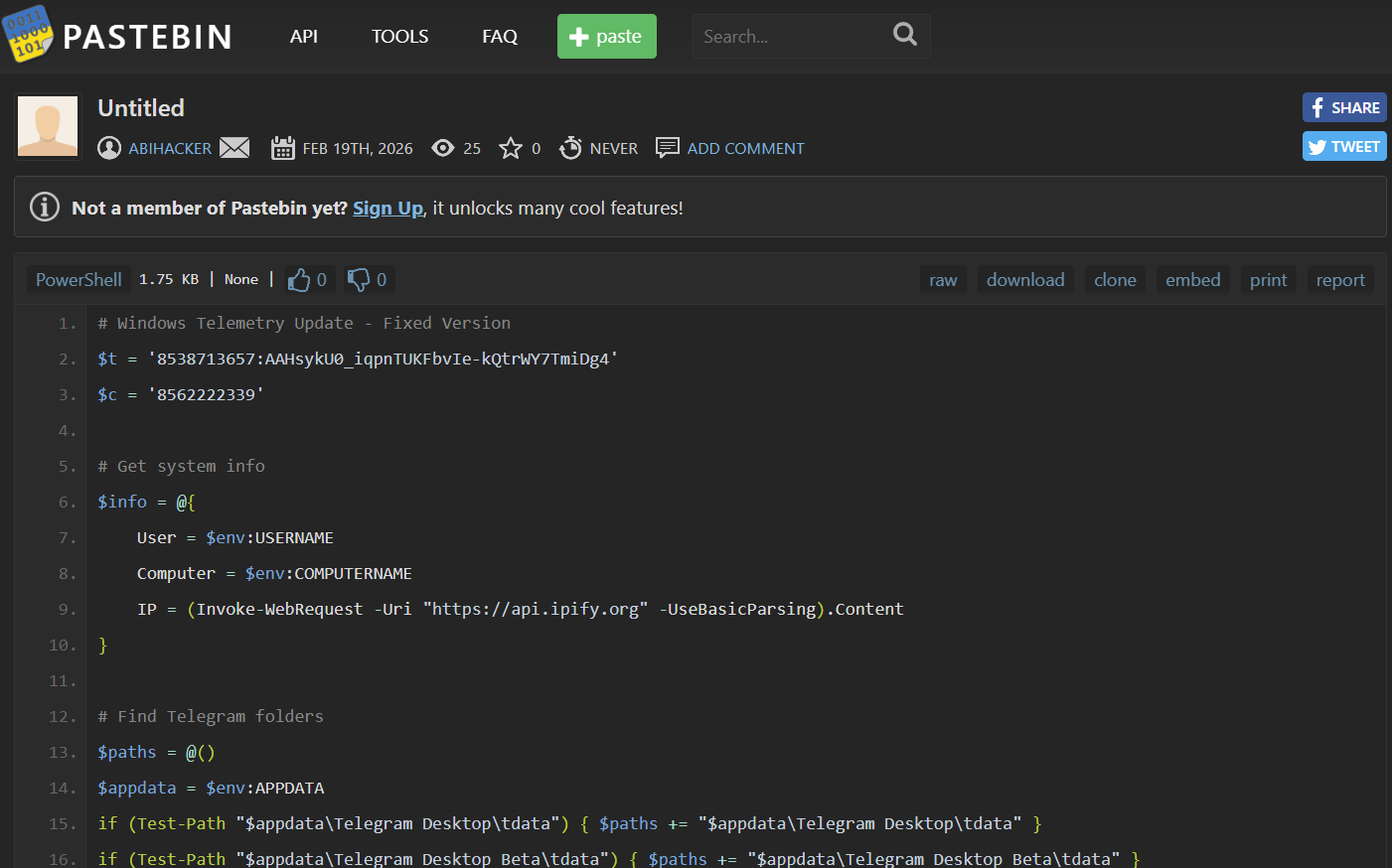
This PowerShell script steals Telegram for Windows session data, letting hackers hijack accounts without a password or verification codes
Right at the top of the script, researchers immediately spotted a Telegram bot token and a chat ID, alongside multiple references to the tdata folder. This specific folder is where Telegram for Windows keeps the authorization keys used to log users in to its servers. If attackers grab this data, they can access the victim’s Telegram account without a password or verification code. Once inside, they maintain access until the victim checks their active sessions in the app and manually terminates the suspicious ones.
How the stealer works
The malware lands on the victim’s computer disguised as a PowerShell script for a Windows telemetry update. As soon as it runs, it gathers basic system information: the username, hostname, and public IP address. It then checks if Telegram Desktop is installed. If it is, the script forces the app to close so it can unlock Telegram files for editing.
From there, the rest is simple: the script zips up the entire contents of the tdata folder into a temporary directory, forwards the archive straight to the attackers, and wipes the file from the computer to erase its tracks.
The good news is that the stealer likely hasn’t compromised any accounts yet, as experts found no evidence of actual data transfers. It appears researchers caught this malicious PowerShell script while it was still in the prototype testing phase.
Another giveaway is its surprisingly suspicious name. Cybercriminals typically use neutral names to hide their bots and apps. In this case, when researchers found it, the bot was running under the burner handle afhbhfsdvfh_bot with a dead-honest description: Telegram attacker. Researchers noted that while the bot had likely undergone functional testing, it hadn’t yet been deployed at scale, which explains the placeholder name.
How to defend against PowerShell scripts
Defending against this nameless stealer requires a layered approach to security. First, it helps to understand how a PowerShell script ends up on your PC in the first place. Usually, they slip in unnoticed through malicious email attachments, software vulnerabilities, infected apps, or social engineering tricks. That’s why we recommend installing a robust security suite on your device and staying highly cautious about the links you click and the files you download.
- Be careful what you download. Always double-check the websites you use to download files. Stick to trusted, official sources — and remember that Telegram and Discord channels, and sketchy, fly-by-night websites definitely don’t fit that description.
- Watch out for email links and attachments. Keep in mind that email remains a favorite delivery method for cybercriminals. They might drop a PowerShell script directly into your inbox as an attachment or bait you into clicking a link that triggers an automatic download.
- Keep your apps and OS updated. Software vulnerabilities pop up unexpectedly, but patches are usually released very quickly. We recommend installing updates as soon as they become available. To make life easier, just turn on automatic updates wherever possible.
Make sure to install Kaspersky Premium on every device where you run Telegram. Our security solution will block malware, malicious attachments, spam, phishing attempts, and sketchy websites. Kaspersky Premium subscription additionally includes a password manager. It’ll generate and securely store strong and unique passwords, stop you from entering your credentials on fake sites, and come in handy for tightening your Telegram security, which we’ll cover next.
How to secure your Telegram account
To protect your Telegram account from these types of hijacking schemes, make sure to:
- Regularly monitor your Telegram activity. Ultimately, hackers steal accounts to blast out spam and run scams. It’s a good idea to periodically check your chat history to ensure no new conversations or messages have appeared that you didn’t send yourself.
- Immediately terminate unrecognized sessions. If you suspect you’ve fallen victim to this infostealer or any other cyberattack, terminate all other Telegram sessions as soon as possible by going to Settings → Devices → Terminate all other sessions.
If your Telegram account has already been hijacked, you have a strict 24-hour window to kick the attackers out by terminating their sessions. We broke down exactly why this rule exists — and mapped out every possible way to reclaim your account — in our detailed guide: What to do if your Telegram account is hacked.
In the meantime, beefing up your account security is a must. First, set up a cloud password by heading to Settings → Privacy and Security → Two-Step Verification. Just any password won’t cut it — you need something unique and unhackable. We recommend reading our post on the subject: Creating an unforgettable password.
Better yet, make the switch to passkeys — a passwordless technology that offers top-tier protection against leaks and phishing. To set up that login method, go to Settings → Privacy and Security → Passkeys. The easiest way to manage your passkeys is with Kaspersky Password Manager. Our cross-platform app ensures you can seamlessly log in to Telegram using your saved passkeys whether you are on Windows, Android, iOS, or macOS.
To learn more about how cybercriminals can breach your Telegram account and how to lock it down, check out our other posts:
- Phishing in Telegram Mini Apps: what’s Habib’s papakha got to do with it?
- Telegram scams with bots, gifts, and crypto
- WhatsApp and Telegram account hijacking: How to protect yourself against scams
- You’ve been sent a “gift” — a Telegram Premium subscription
- What to do if your Telegram account is hacked
Kaspersky official blog – Read More