

Bubble’s role in phishing scams | Kaspersky official blog
A variety of AI-powered app builders promise to bring your ideas to life quickly and effortlessly. Unfortunately, we know exactly who’s always on the lookout for new ideas to bring to life — mostly because we’re rather good at spotting and blocking their old ones. We’re talking about phishers, of course. Recently, we discovered they’ve added a new trick to their arsenal: generating websites using the Bubble AI-powered web-app builder. It’s highly likely that this tactic is now available through one or more phishing-as-a-service platforms, which virtually guarantees these decoys will start appearing in a wide range of attacks. But let’s break this down step-by-step.
Why are phishers using Bubble?
Including a direct link to a phishing site in an email is a one-way ticket to failure. There’s a high probability the message won’t even reach its destination, as security filters will likely block it before a user ever sees it. Similarly, using automated redirects has long been a major red flag for modern security solutions. What about QR codes? While having a victim scan a code with their phone instead of clicking a link might work in theory, phishers inevitably lose traffic at that step — not everyone is willing to enter corporate credentials on a personal device. This is where automated code-generation services come to the rescue for the cybercriminals.
Bubble positions itself as a no-code platform for developing web and mobile applications. Essentially, a user describes what they need through a visual interface, and the platform generates a finished solution. Phishers have adopted this technology to create web apps whose addresses they then embed in their phishing emails. While the actual function of these apps boils down to the same old automated redirect to a malicious site, there are a couple of specific nuances at play.
First, the resulting web application is hosted directly on the platform’s servers. The URL ready for use in a phishing email looks something like https://%name%.bubble.io/. From the perspective of security solutions, this appears to be a legitimate, long-standing site.
Second, the code for this web application doesn’t look like a typical redirect. To be honest, it’s hard to say what it looks like. The code generated by this no-code platform is a massive jumble of JavaScript and isolated Shadow DOM (Document Object Model) structures. Even for an expert, it’s difficult to grasp what’s happening at first glance; you really have to dig through it to understand how it all works and what the purpose is. Automated web-code analysis algorithms are even more likely to get tripped up, frequently reaching the verdict that this is just a functional, useful site.
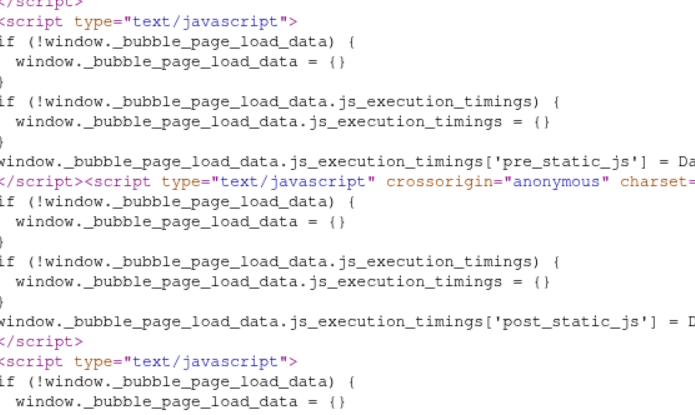
A code fragment of a web application hosted on the Bubble platform
What are these phishing platforms, and what is the end goal?
Today’s phishers rarely develop and implement new tricks from scratch. Most use phishing kits — essentially DIY builders for launching fraudulent schemes — or even full-scale phishing-as-a-service platforms.
These platforms provide attackers with a sophisticated (and highly frustrating) toolkit that’s constantly evolving to improve email delivery and bypass anti-phishing defenses. For example, these tools allow attackers, among many other things, to do the following: intercept session cookies; conduct phishing through Google Tasks (a tactic we covered in a previous post); execute adversary-in-the-middle (AiTM) attacks to validate two-factor authentication (2FA) and bypass it in real time; create phishing sites equipped with honeypots and geofencing to hide from security crawlers; and use AI assistants to generate unique phishing emails. To make matters worse, the infrastructure for these platforms is usually hosted on perfectly legitimate services like AWS, making their tactics even harder to spot.
The same platforms are used to make the final destination page that harvests credentials. In this specific case, the web app hosted on Bubble redirects victims to a site — complete with a Cloudflare verification check — that mimics a Microsoft sign-in window.
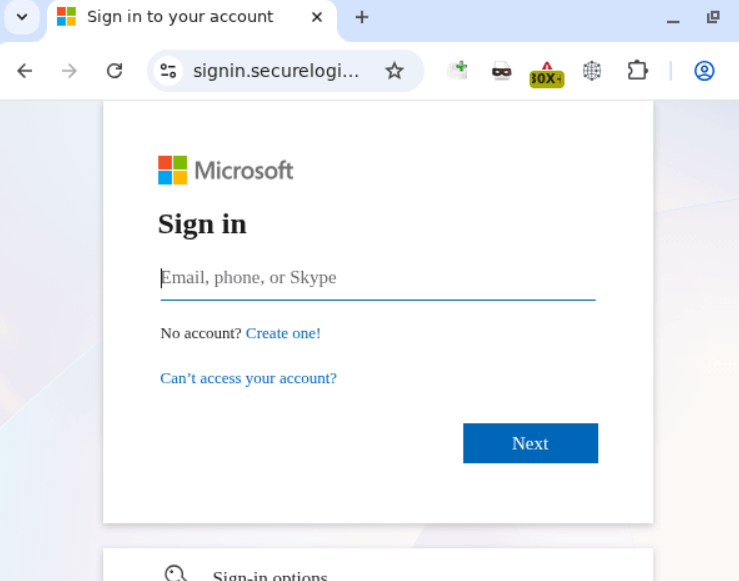
Phishing form designed to harvest corporate credentials
Apparently, in the attackers’ parallel universe, Skype is still a viable communication tool, but otherwise, the site looks remarkably convincing.
How to protect your company from sophisticated phishing attacks
In today’s digital landscape, employees need to clearly understand that corporate credentials should only be entered on services and websites that undeniably belong to the company. You can raise your team’s awareness of modern cyberthreats using Kaspersky Automated Security Awareness Platform for online training.
Of course, even the most cautious employee might occasionally take the bait. We recommend equipping all internet-connected workstations with robust security solutions that’ll simply block any attempt to visit a malicious site. Finally, to cut down on the number of dangerous emails cluttering up corporate inboxes in the first place, we suggest deploying a gateway security product with advanced anti-phishing technologies.
Kaspersky official blog – Read More
