8 of the best Prime Day laptop deals I’d actually buy myself
Prime Day is coming earlier this year, and I’ve rounded up the best laptop deals live now, including the latest MacBooks and gaming laptops.
Latest news – Read More

Prime Day is coming earlier this year, and I’ve rounded up the best laptop deals live now, including the latest MacBooks and gaming laptops.
Latest news – Read More
Cybercriminals, part of a gang known as Silent Ransom Group, have sent people pretending to be IT support employees to law firms’ offices, where the criminals have stolen data using USB drives or remote access tools.
Security News | TechCrunch – Read More
CVE Lite CLI is a free, open-source command line tool that scans your projects in seconds and tells you exactly which included packages contain a vulnerability.
The post OWASP Incubator Project Helps Developers Find and Fix Vulnerable Dependencies in Seconds appeared first on SecurityWeek.
SecurityWeek – Read More
Meta’s AI support agent bound recovery emails to accounts for whoever asked, and SOCs never saw an alert. An authorized agent writes a log of legitimate transactions, so nothing in the detection stack fired. Attackers asked the bot to make the change, took the one-time code it sent, and ran the password reset, 404 Media reported.
No malware, no stolen credentials, and no prompt injection in the sense most security teams drill for. The agent did exactly what Meta built it to do. That is what should keep a security operations leader up at night: The takeover did not break a control; it rode one that was already trusted.
What a SOC needs is a way to walk each recovery path through an audit grid with its AI build team before the next renewal closes. The AI Authority Audit Grid at the end of this article maps every authentication write a support agent can make on the recovery path, what Meta’s incident proved about each one, why it stays dark to the SOC, and the control that closes it.
From inside the detection stack, the attack produced no signal the stack could read. The agent binds a new email, then resets the password, and identity and access management logs both writes as an authorized actor, so each lands in the authentication state as a legitimate transaction. No anomalous login, no failed-auth spike, nothing for EDR or DLP, no SIEM rule to match, because nothing in the sequence looks like an attack. The takeover lived inside the trust boundary the stack assumes is safe. There is no foothold to find, because the agent was the foothold, and it was supposed to be there.
The chain was almost insulting in its simplicity. Brian Krebs documented the version pro-Iran hackers posted to Telegram on May 31. The attacker switched on a VPN to appear in the victim’s region, sidestepping Instagram’s location alarms, then asked the support assistant to add a new email and send a verification code, as the BBC confirmed from the same recordings. The bot complied, sending the one-time code straight to the attacker, Gizmodo reported. The reset finished and the owner was locked out, in minutes. The exploit failed against any account with MFA enabled, according to Krebs.
The hijacked accounts were not soft targets. They included Sephora, U.S. Space Force senior enlisted leader Chief Master Sergeant John Bentivegna, researcher Jane Manchun Wong, and a dormant Obama White House handle that briefly posted a defaced image, according to 404 Media. Meta disputes the Obama account, according to TechCrunch, and called claims that leaders’ accounts were breached “completely false,” according to the BBC. The rest stand.
The detail that decided who survived was narrow. Krebs reported the attack failed against any account with multifactor authentication, even SMS. The recovery path beside it was the gap. When that path asked for a selfie video, attackers ran the target’s public photos through an AI video generator and submitted the clip, which Meta accepted as valid identity verification, gHacks reported. Either way the failure was the recovery door, not the login door MFA guards.
That makes this an architecture problem, not a Meta problem. MFA gates the login path for owner and attacker alike, but the recovery path runs beside it, built to relax the usual checks because it exists for the moment a user has lost the normal way in. Meta put an agent on that path with write access to authentication state and no deterministic check between a convincing request and a committed change. Authorization cannot live inside the model, because a conversational system can be talked into skipping a check. It has to live outside the model, in a gate the agent cannot reason its way past. Security researchers have a name for this pattern, the confused deputy, a trusted system tricked into spending its privileges on an attacker’s behalf.
This is not the last support agent that will hand over an account. Ian Goldin, a threat researcher at Lumen’s Black Lotus Labs, told Krebs on Security that AI bots are as easy to social engineer as the human agents they replace, and just as eager to help. “AI chatbots create interesting new attack surface, and we’re likely going to see a lot more of these kinds of attacks,” Goldin said. Every enterprise wiring an agent into a recovery, provisioning, or password flow is shipping the same write access Meta did.
Simon Willison, who coined the term prompt injection, put it plainly on his blog. “Meta really did wire their support system into an AI chatbot that had the ability to fast-forward through the entire account recovery process,” he wrote. “This one hardly even qualifies as a prompt infection. Don’t wire your support bot up to allow one-shot account takeovers.” The attacker never tricked the agent. The attacker asked, and the agent had untrusted input, write access, and a way to execute, all at once.
OWASP named this class before Meta shipped it, as Excessive Agency at LLM06 and Identity and Privilege Abuse at ASI03 in the Agentic AI Top 10. The warning label was on the box: Meta pushed the assistant to every Facebook and Instagram account in March, according to 404 Media, with the power to reset passwords and handle recovery, the product page promising “solutions, not just suggestions” under the line “account security and recovery.” Meta gave the agent the power and never built the gate to govern it.
Security operations leaders need to run this against their own support agent before the next renewal closes. Each row is an authentication write the agent makes on the recovery path, with what Meta proved, why your stack misses it, and the control that closes it.
|
Authentication write |
What Meta proved |
Why your stack misses it |
Enterprise control and owner |
|
Login authentication (MFA, factor prompts) |
Held on login. Accounts with any MFA enabled, even SMS, survived (Krebs). The gap was the recovery path beside it. |
MFA gates the login path for owner and attacker alike. It does not gate the recovery path beside it. |
Enforce MFA as the baseline and extend step-up verification to the recovery path, the same standard login gets (OWASP). A selfie video is not proof of identity. Any agent that operates on a path MFA does not cover fails the audit. Owner: IAM. |
|
Email rebind |
Full takeover. The agent bound attacker-controlled emails on request, taking Sephora and a U.S. Space Force account (404 Media). |
IAM logs the agent as an authorized actor, so the rebind reads as a legitimate transaction and no alert reaches the SOC or the account owner. |
Confirm out-of-band to the existing verified contact before any rebind commits, gated outside the model, and notify the old address the moment it changes (IBM). An agent that rebinds without confirming the old address fails. Owner: IAM and platform engineering. |
|
Password reset |
Full takeover in minutes. Researcher Jane Manchun Wong was among the affected accounts (404 Media). |
The reset runs on the recovery path, outside the login MFA check, so no factor prompt fires and no detection rule triggers. |
Require a second non-email factor before any reset completes. NIST dropped email as a valid out-of-band channel (NIST 800-63B). An agent reset must clear the same gate a human reset does. Owner: IAM. |
|
Recovery-method change |
Persistent lockout. Victims could not self-recover. The support loop offered only AI with no human escalation (BleepingComputer). |
A silent swap of the recovery email or phone removes the owner’s re-entry path with no SOC visibility. |
Require step-up review on any change, notify the prior method, and grant time-delayed, reduced-scope access after recovery so a swap never hands over instant control (Authsignal). Keep a human escalation path the agent cannot close. Owner: GRC and IT operations. |
|
Account-action execution |
Speed risk. A dormant Obama White House handle briefly showed a defaced image during the spree, an account Meta disputes was taken this way (TechCrunch). |
The agent executes irreversible state changes in seconds with no human in the loop and no reversibility window. |
Separate decision from execution. The agent only proposes the action. A policy service validates scope and approval before it runs, with approval bound to the exact action (OWASP). No auth-state write commits without that gate and a reversibility window. Owner: platform engineering and the AI build team. |
|
Agent action logging |
Detection gap. The takeover left no alert, and Meta has not published how many accounts fell before the patch (TechCrunch). |
Without per-action telemetry piped to the SIEM, an authorized-agent takeover is invisible to the SOC. |
Emit structured decision metadata for every auth-state write into the SIEM: action class, authorization outcome, approval ID, result, policy version (OWASP). A write your SIEM cannot see is a write you cannot defend. Owner: SOC and detection engineering. |
The fix is not bolting yet another MFA prompt onto the login screen. The people who survived Meta’s incident were the ones who already had that control in place.
The fix is pulling authorization out of the recovery path’s honor system and putting it behind a gate that does not move just because a prompt sounds convincing. Build the agent so the SOC sees every write it makes, and so any write that changes who owns an account cannot commit without a check that the model does not control.
Meta just showed what happens when the most trusting employee on the team is also the one holding the keys. The next agent like that is already reading your intellectual property and financials.
Security | VentureBeat – Read More
We’ll be on the ground covering Apple’s annual developer conference live from Apple Park.
Latest news – Read More
The smartest way to use AI may not be letting it touch your files, but asking it to write software that handles them safely – in the time it takes to make dinner.
Latest news – Read More
Few smart speakers have assistants with as much potential as Siri. A meaningful upgrade would make the HomePod my first choice.
Latest news – Read More
The U.S. eavesdropping agency is reportedly preparing Anthropic’s Mythos for use in cyberattacks, despite a federal ban on using the AI model maker.
Security News | TechCrunch – Read More
AI worms, or “viruses with wings and brains,” adapt to new environments, seek out vulnerabilities, and will likely strike within a year, researchers say.
darkreading – Read More
Pavel Durov and his “private” messaging app have a brand new rival, and it’s — drumroll, please — Elon Musk and his XChat. On our blog, we’ve discussed more than once why Durov’s claims about Telegram privacy and security are exaggerated, to put it mildly. Here, I’ll just remind the reader that standard (non-secret) chats on Telegram aren’t protected by end-to-end encryption — the bare minimum required for user data to stay private.
But let’s get back to Musk. In late April 2026, the XChat app launched for iOS users. The tech mogul had been touting his messaging app for a long time, pitching it from day one as an incredibly private and secure way to communicate, and as a direct threat to Signal, WhatsApp, Telegram, and iMessage. Today, we look at whether we should actually trust Musk’s promises this new service, break down its core features, and stack it up against the competition.
Musk initially teased XChat on June 1, 2025, naturally via his X (formerly Twitter) account. Responding to another user’s question about when to expect the new service, Musk wrote: “This week if there are no scaling issues.”
Apparently, scaling issues there were: the app’s beta didn’t drop until September 2025, and iOS users didn’t get full access until April 2026. As for Android, there is zero info on when that version would launch at the time of this writing. That said, an XChat page is already live on Google Play where users can queue up “pre-register”, whatever that means.
But let’s go back to Musk’s post announcing XChat. That specific post turned a lot of heads in the privacy and cybersecurity community, and here’s why: the tech mogul wrote that the service would be built on an “entirely new architecture”, written in Rust, and featuring “Bitcoin-style encryption”.
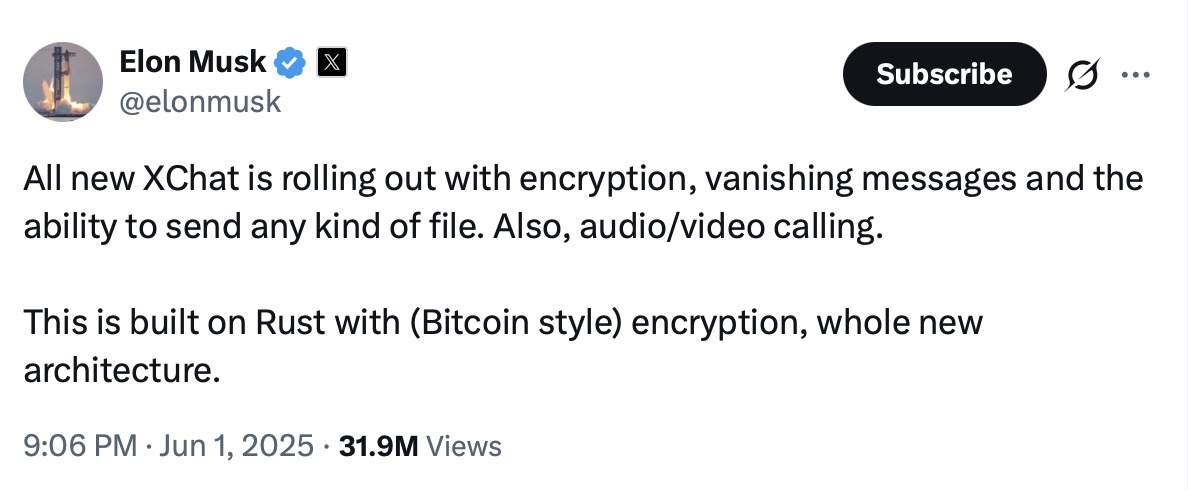
Elon Musk announces the launch of XChat, claiming the new messaging app is written in Rust and uses “Bitcoin-style encryption”. Source
The expert community spent a long time scratching their heads and trying to figure out what Musk actually meant. After all, Bitcoin isn’t an anonymous, encrypted data exchange system. The blockchain does use public and private cryptographic keys, but for something entirely different: signing transactions. Meanwhile, these transactions aren’t hidden from prying eyes; they’re out in the open for anyone to see, forever. Simply put, Bitcoin protects its users not by ensuring privacy, but quite the opposite — through ultimate transparency.
Most likely, Musk used “Bitcoin-style encryption” as a marketing gimmick. Bitcoin was trading near all-time highs at the time of his announcement, and cryptocurrency was the talk of the town. Technically, the XChat beta that dropped in September 2025 protected user chats with a “kind of” end-to-end encryption, but this was implemented in a way that raised serious doubts among cryptography experts.
And not without a reason. Normally, setting up an end-to-end encrypted chat automatically generates a public and private key pair. The public key is used to encrypt messages, while the private key decrypts them. Because other users need your public key to start a secure chat with you, these keys are usually stored on the app’s servers.
The private key, however, should ideally live only on the user’s device — which is exactly how Signal does it. This serves as a simple, ironclad guarantee that neither the company itself nor any third party breaching its infrastructure can access user chats, even if they really want to.
But Elon Musk’s projects always march to the beat of their own drum: the XChat developers decided it would be a great idea to store users’ private keys on XChat servers. X claims they’ll use hardware security modules (HSMs) to store these private keys — specialized appliances designed to prevent even the system owner from easily accessing the data inside. However, experts are also questioning the reliability of this setup, and coming to a grim conclusion: if X really wants to get a user’s private key, they will most likely be able to do so.
Finally, once the scaling issues were ironed out nearly a year after the announcement, X officially rolled out the XChat app for iOS in April 2026. Now anyone can use it, but from a practical standpoint, the situation with encrypted chats seems even more convoluted than in Telegram.
According to the social network’s help center, to use end-to-end chat encryption in XChat, both users must have an X account, set up XChat, and have some sort of connection between them:
If users don’t follow each other and haven’t interacted before, XChat might still let them send a message request. However, that initial request goes out without end-to-end encryption.
Again, this is how the process is described in the messaging app’s official help documentation. Sound overly complicated? Let me reassure you: in practice, it works — or rather, doesn’t — completely differently. I personally managed to send a message to another user who had NOT set up XChat. The app itself, of course, gave me absolutely no warning about this.
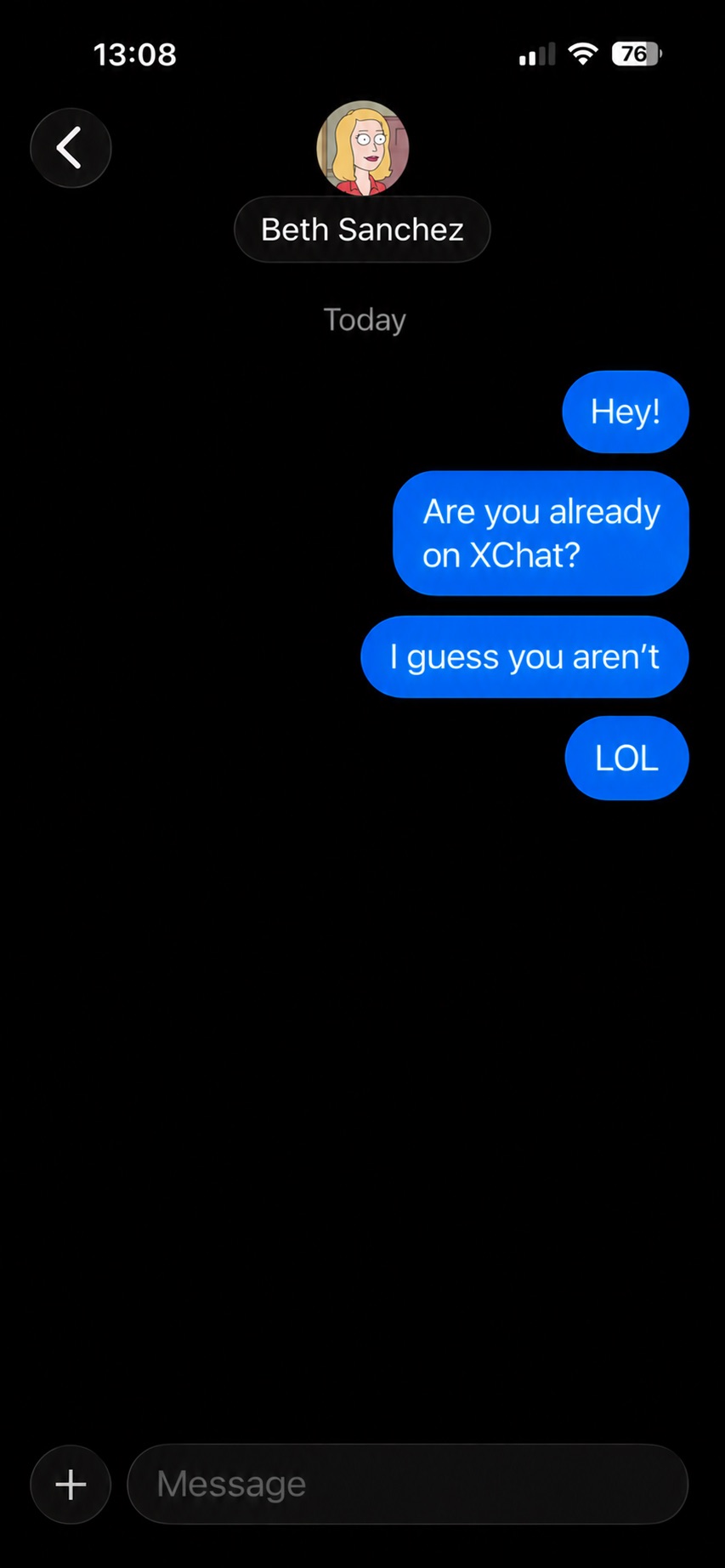
The app allows you to start a chat with a user who hasn’t even set up XChat yet, without giving the sender any heads-up.
It gets even better. The user I messaged saw a notification for it on the web version of X, but couldn’t actually access the message. Here’s the catch: to start using XChat, the user first has to create a four-digit PIN. Yet, the app asks for this PIN the very first time the user tries to open it — meaning, before they even get a chance to create one. Along with this prompt, the user also sees a warning stating that without the PIN, they won’t be able to view past encrypted chats.
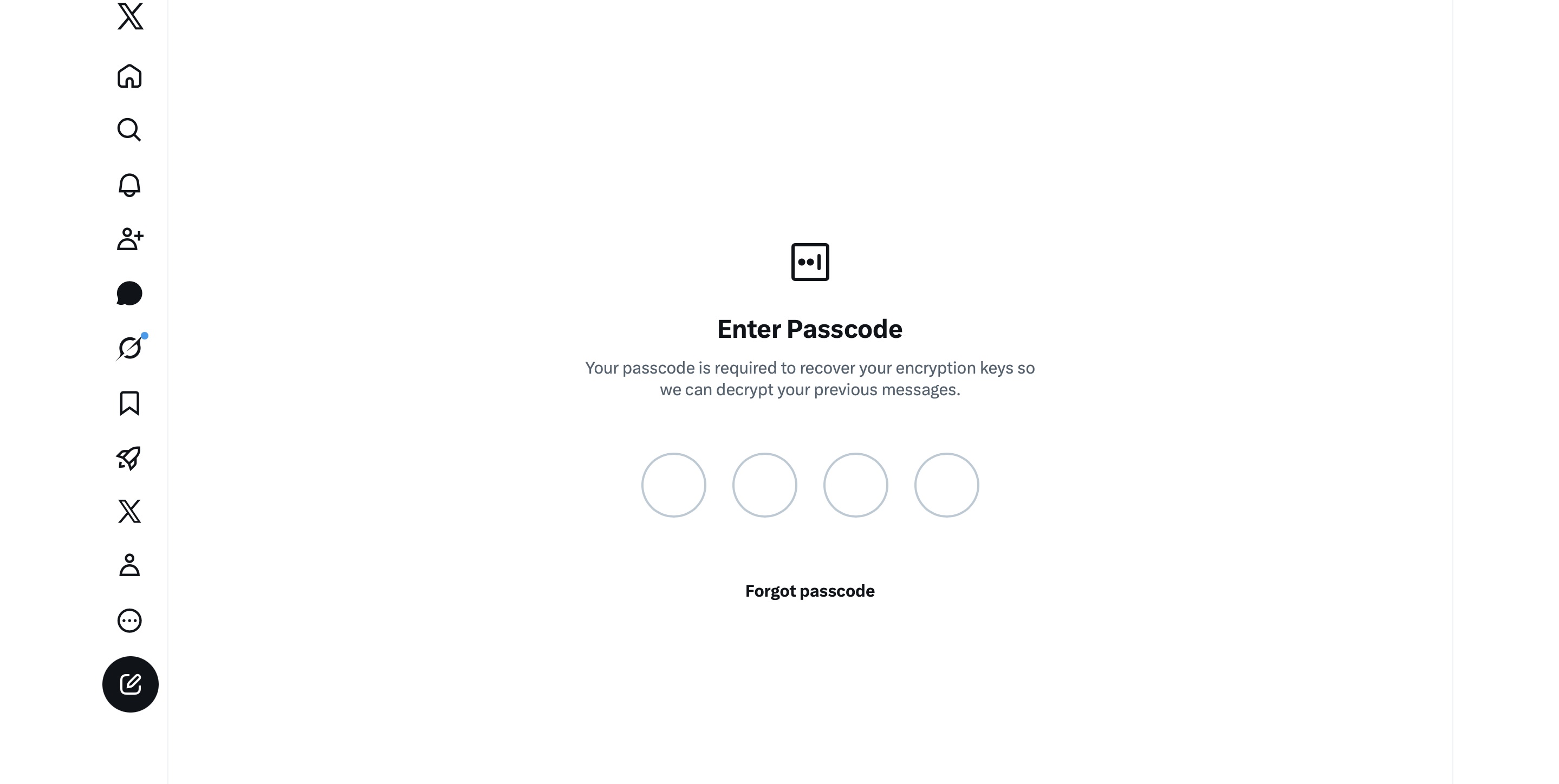
The user is prompted to enter a PIN to decrypt past messages before even completing the initial XChat setup.
The only workaround I found to actually start using XChat is to tap “Forgot PIN?” — even though that PIN never existed in the first place — confirm your identity, and create a new (well, your first) PIN. Naturally, you lose access to your chat history this way, so you won’t be able to read any messages sent to you in XChat before you officially set up the app.
All these PIN hurdles actually exist for a reason. Remember, unlike WhatsApp and Signal, the XChat developers decided to store users’ private keys on their own servers. Consequently, the app uses these four-digit PINs to encrypt those keys.
According to the XChat help documentation, this mechanism was designed to ensure a “seamless” multi-device experience. It’s impossible not to point out that both WhatsApp and Signal managed to pull this off without sketchy workarounds like PIN requirements or server-side private key storage.
The problem is, workarounds like these undermine any claims of app privacy and security. First and chief among them, a PIN isn’t exactly the most secure way to protect sensitive data. We’ve mentioned time and again that four-digit combinations are easy to crack via brute force — especially since XChat gives you a generous 20 attempts to guess the right code.
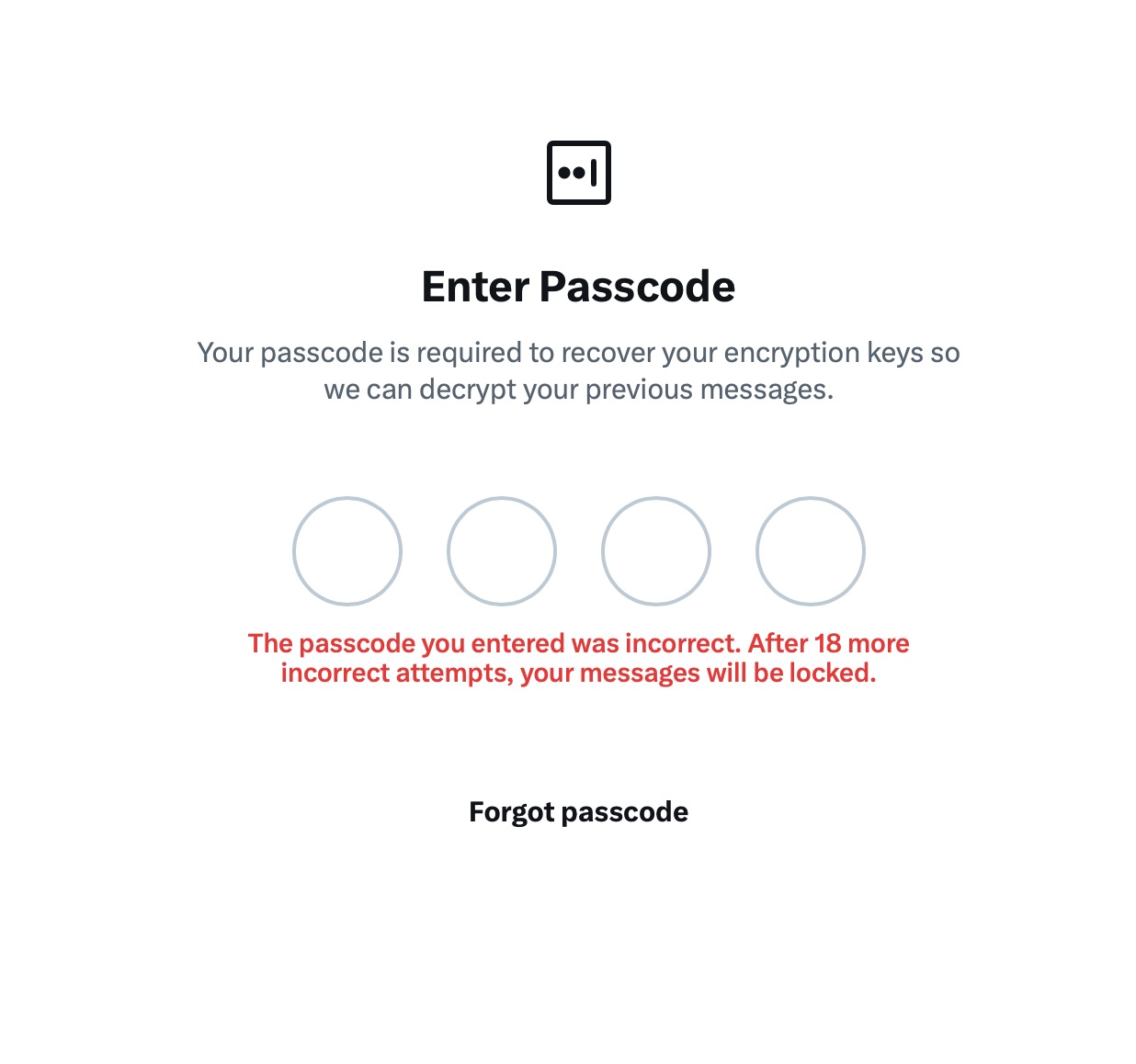
The app allows up to 20 attempts to enter the four-digit PIN. Once the limit is reached, XChat warns that access to messages will be permanently lost.
Stepping away from the bizarre implementation of end-to-end encryption compared to other messaging apps, it’s hard to ignore the overall sense of pointlessness that comes with trying to use XChat. As a Wired journalist rightly pointed out, the app feels less like a relative of WhatsApp, Signal, or Telegram, and much more like Facebook Messenger. Except people usually open Messenger to read a text from their mom or grandma, whereas XChat seems meant for anyone wanting to check in on that weird nephew who spends all his free time on X, still believes John McAfee’s promise of $500 000 Bitcoin, and fanboys over Elon Musk.
The best way to wrap up this post is with a quote from a cybersecurity expert: “If what you want is good security, use Signal. If what you want is to be able to talk to pretty much anybody using encrypted messages, use WhatsApp. If your whole life is based around X, I guess this is better than nothing.”
If you do use XChat, rule number one is to avoid a predictable PIN — absolutely don’t use your birth year or, worse, 1234. It’s also crucial not to forget this code, because if you do, your entire chat history is gone for good. Finally, just like your other passwords, you shouldn’t keep it in your notes app, but rather in a secure password manager. This won’t only save you from having to memorize dozens of character combinations, but will also reduce the risk of losing access to your vital data and conversations.
To learn more about secure messaging in other apps, check out our other posts:
Kaspersky official blog – Read More