https://www.backbox.org/wp-content/uploads/2018/09/website_backbox_text_black.png00adminhttps://www.backbox.org/wp-content/uploads/2018/09/website_backbox_text_black.pngadmin2026-02-26 13:06:482026-02-26 13:06:48Gambit Security Emerges From Stealth With $61 Million in Funding
https://www.backbox.org/wp-content/uploads/2018/09/website_backbox_text_black.png00adminhttps://www.backbox.org/wp-content/uploads/2018/09/website_backbox_text_black.pngadmin2026-02-26 12:06:432026-02-26 12:06:43Samsung Galaxy S26 Ultra vs. S26 Plus vs. S26: Which model should you buy? I compared
The European Union Agency for Cybersecurity (ENISA) released its updated cybersecurity exercise methodology, providing organizations and governments across Europe with a structured framework for planning, executing, and evaluating cybersecurity exercises. Designed to be both practical and theoretically robust, this methodology offers an end-to-end approach to enhancing preparedness against cyber threats while ensuring alignment with major European regulations, including NIS2 and the EU Cybersecurity Act.
The Purpose of a Cybersecurity Exercise Methodology
The ENISA methodology serves as a blueprint for organizations seeking to strengthen their cyber resilience. It is specifically crafted for cybersecurity professionals, organizational planners, and government entities aiming to:
Understand the intricacies of organizing and planning cybersecurity exercises.
Evaluate current cyberattack response capabilities.
Demonstrate the strategic importance of exercises to senior management.
Test operational skills, incident response procedures, and regulatory compliance.
By offering a combination of theoretical insights, lessons learned from past exercises, and industry best practices, ENISA equips planners with a framework that ensures the right stakeholders and expertise are involved at the appropriate stages. This framework is complemented by a practical support toolkit containing templates, checklists, and guiding materials to streamline the planning process.
Aligning with European Standards and Regulations
The methodology is intentionally designed to be flexible while maintaining compliance with established standards such as ISO 22398:2013 and ISO 22361:2022. Its alignment with European regulations, including NIS2, the EU Cybersecurity Act, the Cyber Resilience Act, the Digital Operational Resilience Act, and the GDPR, ensures that exercises do not simply simulate threats but also test an organization’s regulatory readiness. This dual focus on operational effectiveness and compliance is increasingly vital in a landscape where cyberattacks can have both technical and legal consequences.
Core Principles of the ENISA Methodology
The ENISA cybersecurity exercise methodology rests on several foundational principles:
Structured Planning: Exercises follow a systematic, user-friendly process covering all dimensions from compliance to operational execution.
Capacity Building: Organizations can identify skill gaps, procedural weaknesses, and technological vulnerabilities through clear, measurable objectives.
Flexibility: The methodology adapts to organizational maturity, exercise complexity, and scale, supporting both national-level and sector-specific simulations.
Resource Ecosystem: Planners gain access to templates, checklists, and guidance aligned with the European Cybersecurity Skills Framework (ECSF), which defines 12 standard professional cybersecurity roles across the EU.
Community Collaboration: ENISA maintains a network of workshops and expert forums, ensuring knowledge exchange and continual evolution of the methodology.
Phases and Practical Components
ENISA’s approach divides a cybersecurity exercise into six critical phases, guiding organizations from conceptualization to post-exercise evaluation. Each phase is supplemented by the support toolkit to ensure exercises are realistic, actionable, and aligned with organizational goals. Key components include:
Exercise Plan: Serves as the blueprint, detailing objectives, logistics, timelines, roles, and scope. This ensures that every participant understands their responsibilities and expected outcomes.
Evaluation Plan: Defines capability targets, evaluator roles, assessment tools, and timelines for before, during, and after the exercise.
Communications Plan: Establishes channels and protocols to ensure stakeholders remain informed and engaged throughout the exercise lifecycle.
Master Scenario Event List (MSEL): Provides a sequenced structure of events, incidents, and injects to simulate cyber crises in a controlled environment.
After-Action Report (AAR): Captures findings, lessons identified, recommendations, and performance metrics to inform continuous improvement.
Real-World Implications
Organizations that adopt the ENISA methodology gain measurable benefits. Structured planning reduces preparation time and prevents common oversights, while the evaluation framework helps translate exercise outcomes into actionable improvements. By integrating the methodology with NIS2 and the EU Cybersecurity Act, planners can also demonstrate compliance with regulators and build internal confidence in cyber readiness.
Furthermore, the methodology encourages a culture of continuous improvement. Lessons identified in one exercise feed directly into future scenarios, enhancing resilience over time. The support from ENISA’s workshops and expert community ensures that even complex national-level exercises can draw on shared expertise and practical insights.
The ENISA cybersecurity exercise methodology is more than a theoretical guide; it is a practical framework that empowers organizations to prepare and respond to cyber threats systematically. Its integration with the EU Cybersecurity Act, NIS2, and other EU directives ensures exercises serve both operational and regulatory objectives. By combining structured planning, flexible execution, and a supportive community ecosystem, ENISA enables organizations to strengthen cyber resilience, improve regulatory compliance, and continuously evolve their cybersecurity posture.
https://www.backbox.org/wp-content/uploads/2018/09/website_backbox_text_black.png00adminhttps://www.backbox.org/wp-content/uploads/2018/09/website_backbox_text_black.pngadmin2026-02-26 12:06:372026-02-26 12:06:37ENISA’s Updated Cybersecurity Methodology Aligns with NIS2 and EU Cybersecurity Act
Cisco Talos discovered an ongoing malicious campaign since at least as early as December 2025 by a threat actor we track as “UAT-10027,” delivering a previously undisclosed backdoor dubbed “Dohdoor.”
Dohdoor utilizes the DNS-over-HTTPS (DoH) technique for command-and-control (C2) communications and has the ability to download and execute other payload binaries reflectively.
UAT-10027 targeted victims in the education and health care sectors in the United States through a multi-stage attack chain.
Talos observed the actor misused various living-off-the-land executables (LOLBins) to sideload the Dohdoor and has set up the C2 infrastructure behind reputable cloud services, such as Cloudflare, to enable stealth C2 communication.
Multi-stage attack chain
Talos discovered a multi-stage attack campaign targeting the victims in education and health care sectors, predominantly in the United States.
The campaign involves a multi-stage attack chain, where initial access is likely achieved through social engineering phishing techniques. The infection chain executes a PowerShell script that downloads and runs a Windows batch script from a remote staging server through a URL. Subsequently, the batch script facilitates the download of a malicious Windows dynamic-link library (DLL), which is disguised as a legitimate Windows DLL file. The batch script then executes the malicious DLL dubbed as Dohdoor, by sideloading it to a legitimate Windows executable. Once activated, the Dohdoor employs the DNS-over-HTTPS (DoH) technique to resolve command-and-control (C2) domains within Cloudflare’s DNS service. Utilizing the resolved IP address, it establishes an HTTPS tunnel to communicate with the Cloudflare edge network, which effectively serves as a front for the concealed C2 infrastructure. Dohdoor subsequently creates backdoored access into the victim’s environment, enabling the threat actor to download the next-stage payload directly into the victim machine’s memory and execute the potential Cobalt Strike Beacon payload, reflectively within legitimate Windows processes.
In this campaign, the threat actor hides the C2 servers behind the Cloudflare infrastructure, ensuring that all outbound communication from the victim machine appears as legitimate HTTPS traffic to a trusted global IP address. This obfuscation is further reinforced by utilizing subdomain names such as “MswInSofTUpDloAd” and “DEEPinSPeCTioNsyStEM”, which mimic Microsoft Windows software updates or a security appliance check-in to evade automated detections. Additionally, employing irregular capitalization across non-traditional Top-Level Domains (TLD) like “.OnLiNe”, “.DeSigN”, and “.SoFTWARe” not only bypasses string matching filters but also aids in adversarial infrastructure redundancy by preventing a single blocklist entry from neutralizing their intrusion.
PowerShell downloader
Talos discovered suspicious download activity in our telemetry where the threat actor executed “curl.exe” with an encoded URL, downloading a malicious Windows batch file with the file extensions “.bat” or “.cmd”.
Figure 2. Snippet of the PowerShell downloader command.
While the initial infection vector remains unknown, we observed several PowerShell scripts in OSINT data containing embedded download URLs similar to those identified in the telemetry. The threat actor appeared to have executed the download command via a PowerShell script that was potentially delivered to the victim through a phishing email.
Figure 3. Sample of related PowerShell script. Figure 4. Sample of related PowerShell script.
Windows batch script and anti-forensics
The second stage component of the attack chain is a Windows batch script dropper that effectively orchestrates a DLL sideloading technique to execute the malicious DLL while simultaneously conducting anti-forensic cleanup.
This process initiates by creating a hidden workspace folder in either “C:ProgramData” or the “C:UsersPublic” folder. It then downloads a malicious DLL from the command-and-control server using the URL /111111?sub=d, placing it into the workspace, disguising it as legitimate Windows DLL file name, such as “propsys.dll” or “batmeter.dll”. The script subsequently copies legitimate Windows executables, such as “Fondue.exe”, “mblctr.exe”, and “ScreenClippingHost.exe”, into the working folder and executes these programs from the working folder, using the C2 URL /111111?sub=s as the argument parameter. The legitimate executable sideloads and runs the malicious DLL. Finally, the script performs anti-forensics by deleting the Run command history from the RunMRU registry key, clearing the clipboard data, and ultimately deleting itself.
Figure 5. Deobfuscated Windows batch loader script (C2 URLs defanged).
Dohdoor potentially runs the payload reflectively
UAT-10027 downloaded and executed a malicious DLL using the DLL sideloading technique. The malicious DLL operates as a loader, which we call “Dohdoor,” and it is designed to download, decrypt, and execute malicious payloads within legitimate Windows processes. It evades detection through API obfuscation and encrypted C2 communications, and bypasses endpoint detection and response (EDR) detections.
Dohdoor is a 64-bit DLL that was compiled on Nov. 25, 2025, containing the debug string “C:UsersdiabloDesktopSimpleDllTlsClient.hpp”. Dohdoor begins execution by dynamically resolving Windows API functions using hash-based lookups rather than using static imports, evading the signature-based detections from identifying the malware Import Address Table (IAT). Dohdoor then parses command line arguments that the actor has passed during the execution of the legitimate Windows executable which sideloads the Dohdoor. It extracts an HTTPS URL pointing to the C2 server, and a resource path specifying the type of payload to download.
Figure 6. Snippet of Dohdoor function, showing API hash resolving and command line argument parsing.
Dohdoor employs stealthy domain resolution utilizing the DNS-over-HTTPS technique to effectively resolve the C2 server IP address. Rather than generating plaintext DNS queries, it securely sends encrypted DNS requests to Cloudflare’s DNS server over HTTPS port 443. It constructs DNS queries for both IPv4 (A records) and IPv6 (AAAA records) and formats them using the template strings that include the HTTP header parameters such as User-Agent: insomnia/11.3.0 and Accept: applications/dns-json, producing a complete HTTP GET request.
The formatted HTTP request is sent through encrypted connections. After receiving the JSON response of the Cloudflare DNS servers, it parses them by searching for specific patterns rather than using a full JSON parser. It searches for the string “Answer” to locate the answer section of the response, and if found, it will search for the string “data” to locate the data field containing the IP address.
This technique bypasses DNS-based detection systems, DNS sinkholes, and network traffic analysis tools that monitor suspicious domain lookups, ensuring that the malware’s C2 communications remain stealth by traditional network security infrastructure.
Figure 7. Snippet of Dohdoor showing the DoH technique.
With the resolved IP address, Dohdoor establishes a secure connection to the C2 server by constructing the GET requests with the HTTP headers including “User-agent: curl/7.88” or “curl/7.83.1” and the URL /X111111?sub=s. It supports both standard HTTP responses with Content-length headers and chunked encoding.
Dohdoor receives an encrypted payload from the C2 server. The encrypted payload undergoes custom XOR-SUB decryption using a position-dependent cipher. The encrypted data maintains a 4:1 expansion ratio where the encrypted data is four times larger than the decrypted data. The decryption routine of Dohdoor operates in two ways. A vectorized (Single Instruction, Multiple Data) SIMD method for bulk processing and a simpler loop to handle the remaining encrypted data.
The main decryption routine processes 16-byte blocks of the encrypted data using the SIMD instructions. It calculates position-dependent indexes, retrieves encrypted data and applies XOR-SUB decryption using the 32-byte key. This decryption routine repeats four times per iteration until it reaches the end of a 16-byte block.
Figure 8. Dohdoor function snippet showing the single instruction, multiple data (SMID) instructions.
For the encrypted data that remains out of the 16-byte blocks, it applies to the decryption formula “decrypted[i] = encrypted[i*4] – i – 0x26”. Every fourth byte is sampled from the encryption data buffer; the position index is subtracted to create position-dependent decryption, and finally the constant 0x26 is subtracted.
Figure 9. Snippet of Dohdoor showing the position dependent decryption algorithm.
Once the payload is decrypted, Dohdoor injects the payload binary into a legitimate Windows process utilizing process hollowing technique. The actor targets legitimate Windows binaries by hardcoding the executable paths, ensuring that Dohdoor executes them in a suspended state. It then performs process hollowing, seamlessly injecting the decrypted payload before resuming the process, allowing the payload to run stealthily and effectively. In this campaign, the legitimate Windows binaries targeted for process hollowing are listed below:
Talos observed that the Dohdoor implements an EDR bypass technique by unhooking system calls (syscalls) to bypass EDR products that monitor Windows API calls through user mode hooks in ntdll.dll. Security products usually patch the beginning of ntdllfunctions to redirect execution through their monitoring code before allowing the original system call to execute.
Evasive malwares usually detect system call hooks by reading the first bytes of critical ntdll functions and comparing them against the expected syscall stub pattern that begins with “mov r10, rcx; mov eax, syscall_number”. If the bytes match the expected pattern indicating the function is not hooked, or if hooks are detected, the malware can write replacement code that either restores the original instructions or creates a direct syscall trampoline that bypasses the hooked function entirely.
Dohdoor achieves this by locating ntdll.dll with the hash “0x28cc” and finds NtProtectVirtualMemory with the hash “0xbc46c894”. Then it reads the first 32 bytes of the function using ReadProcessMemory that dynamically loads during the execution and compares them with the syscall stub pattern in hexadecimal “4C 8B D1 B8 FF 00 00 00” which corresponds to the assembly instructions “mov r10, rcx; mov eax, 0FFh”. If the byte pattern matches, it writes a 6-byte patch in hexadecimal “B8 BB 00 00 00 C3” which corresponds to assembly instruction “mov eax, 0BBh; ret”, resulting in creating a direct syscall stub that bypasses any user mode hooks.
Figure 10. Dohdoor function showing the syscall unhooking EDR bypass technique.
During our research, we were unable to find a payload that was downloaded and implanted by the Dohdoor. Still, we found that one of the C2 hosts associated with this campaign had a JA3S hash of “466556e923186364e82cbdb4cad8df2c” and the TLS certificate serial number “7FF31977972C224A76155D13B6D685E3” according to the OSINT data. The JA3S hash and the serial number found resembles the JA3S hash of the default Cobalt Strike server, indicating that the threat actor was potentially using the Cobalt Strike beacon as the payload to establish persistent connection to the victim network and execute further payloads.
Low confidence TTPs overlap with North Korean actors’ techniques
Talos assesses with lowconfidence that UAT-10027 is North Korea-nexus, based on the similarities in the tactics, techniques, and procedures (TTPs) with that of the other known North Korean APT actor Lazarus.
We observed similarities in the technical characteristics of Dohdoor with Lazarloader, a tool belonging to the North Korean APT Lazarus. The key similarity noted is the usage of a custom XOR-SUB with the position-dependent decryption technique and the specific constant in hexadecimal (0x26) for subtraction operation. Additionally, the NTDLL unhooking technique used to bypass EDR monitoring by identifying and restoring system call stubs aligns with features found in earlier Lazarloader variants.
The implementation of DNS-over-HTTPS (DoH) via Cloudflare’s DNS service to circumvent traditional DNS security, along with the process hollowing technique to reflectively execute the decrypted payload in targeted legitimate Windows binaries like ImagingDevices.exe, and the sideloading of malicious DLLs in disguised file name “propsys.dll”, were observed in the tradecraft of the North Korean APT actor Lazarus.
In addition to the observed technical characteristics similarities of the tools, the use of multiple top-level domains (TLDs) including “.design”, “. software”, and “. online”, with varying case patterns, also aligns with the operational preferences of Lazarus. While UAT-10027’s malware shares technical overlaps with the Lazarus Group, the campaign’s focus on the education and health care sectors deviates from Lazarus’ typical profile of cryptocurrency and defense targeting. However, Talos has historically seen that North Korean APT actors have targeted the healthcare sector using Maui ransomware, and another North Korean APT group, Kimsuky, has targeted the education sector, highlighting the overlaps in the victimology of UAT-10027 with that of other North Korean APTs.
Coverage
The following ClamAV signature detects and blocks this threat:
Win.Loader.Dohdoor-10059347-0
Win.Loader.Dohdoor-10059535-0
Ps1.Loader.Dohdoor-10059533-0
Ps1.Loader.Dohdoor-10059534-0
The following SNORT® Rules (SIDs) detect and block this threat:
Snort2 – 65950, 65951, 65949
Snort3 – 301407, 65949
Indicators of compromise (IOCs)
The IOCs for this threat are also available at our GitHub repository here.
https://www.backbox.org/wp-content/uploads/2018/09/website_backbox_text_black.png00adminhttps://www.backbox.org/wp-content/uploads/2018/09/website_backbox_text_black.pngadmin2026-02-26 11:06:342026-02-26 11:06:34New Dohdoor malware campaign targets education and health care
Security teams don’t lack alerts, they lack fast, reliable context for decision-making. When threat analysis and intelligence are not an integrated part of the SOC workflow, investigations slow down, MTTR grows, and the risk of missed incidents increases. Adding behavioral analysis and live intelligence directly into SIEM closes this gap, turning monitoring, triage, and response into faster, higher-ROI processes.
Instead of exporting reports or attaching external files, analysis results and intelligence data are ingested as structured Splunk events. This allows them to be searched, correlated, visualized, and used in alerts and dashboards using standard SIEM mechanisms.
The integration helps SOC teams:
Boost triage quality of suspicious URLs with sandbox analysis: Behavioral verdicts inside Splunk help analysts make faster, evidence-based decisions, reducing MTTR and lowering the risk of missed threats.
Accelerate alert validation with context enrichment: Instant IOC context speeds up prioritization, shortens investigation time per alert, and reduces operational overhead.
Expand threat coverage with actionable intel: Fresh, verified malicious IPs, domains, and URLs strengthen correlation rules, improve MTTD, and reduce blind spots in detection.
Improve SOC reporting & visibility: Dashboards built on sandbox submissions, verdict trends, enriched indicators, and campaign tags help SOC managers monitor workload, track investigation efficiency, and measure detection performance over time.
Meet SLAs and KPIs: For MSSP teams, the integration helps fix triage and response inefficiencies, manage a larger load of alerts without scaling the team, and deliver consistent results to more clients.
All components are designed to work inside existing SOC workflows. No separate consoles, no manual data transfer, no parallel processes.
As a result, malware analysis and threat enrichment become part of detection logic and investigation pipelines, not side tasks handled outside the SIEM.
Reduce MTTR by 21 minutes per case
Integrate ANY.RUN’s products in your Splunk workflows
ANY.RUN Sandbox: Improve Triage, Detect More Phishing Attacks
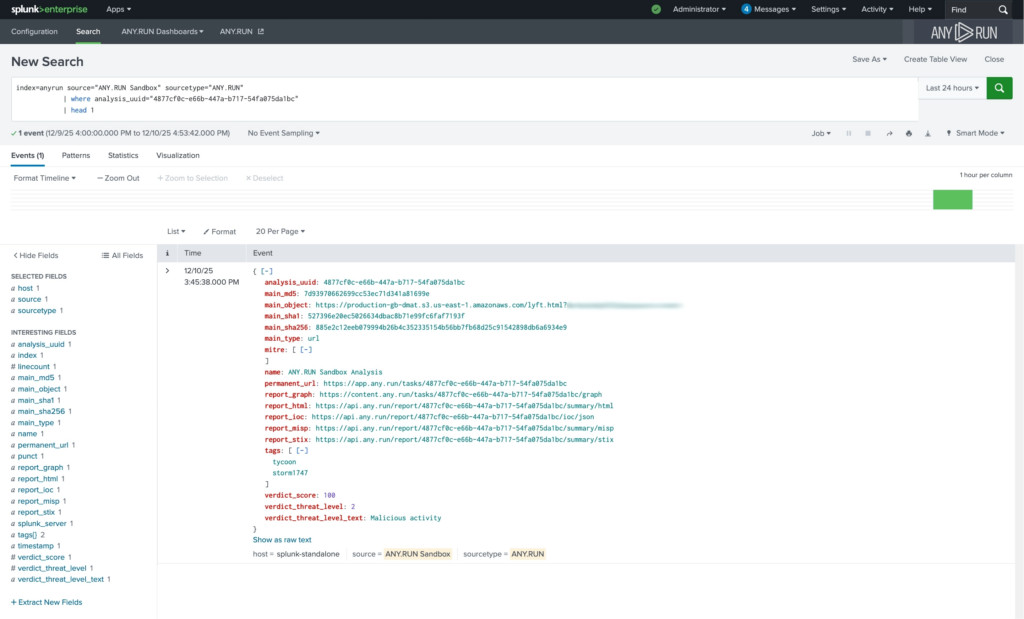
The sandbox analysis results are readily available inside Splunk Enterprise
The ANY.RUN Interactive Sandbox integration allows security teams to submit suspicious URLs directly from Splunk for analysis and receive structured results as native Splunk events.
Returned data includes verdict, risk score, extracted indicators, and a direct link to the full analysis session for deeper investigation. These results can immediately participate in correlation searches, alerts, dashboards, and response workflows inside the SIEM.
Faster MTTR: Sandbox verdicts appear directly in Splunk, helping teams move from alert to containment faster.
Higher detection rate of evasive attacks: Full behavioral execution increases the chance of catching threats that static checks miss.
More cases closed by Tier 1 analysts: Clear, evidence-based verdicts allow junior analysts to confidently resolve more alerts without waiting for higher tiers.
Lower false negative rate: Behavioral analysis reduces the risk of incorrectly closing alerts that later turn into confirmed incidents.
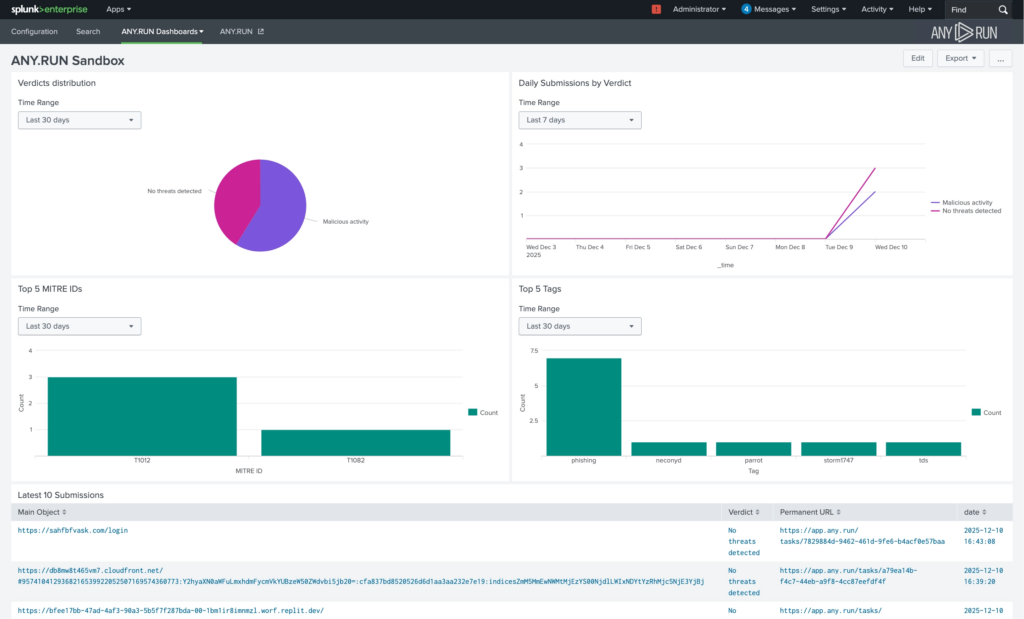
Splunk Enterprise provides stats on the sandbox analyses like top TTPs and threats
These improvements translate into lower investigation costs, fewer missed incidents, and more predictable incident response performance, with a 21-minute reduction in MTTR per case.
Practical Use Case: URL Analysis from SIEM Events
When a suspicious URL appears in a Splunk event, analysts can submit it directly to the ANY.RUN Sandbox. The analysis verdict returns as a native Splunk event and immediately participates in correlation, investigation, and response workflows.
Reduce business risk with full visibility into cyber attacks
With ANY.RUN, your SOC will make confident decisions faster
ANY.RUN TI Lookup: Identify and Prioritize Critical Risks Faster
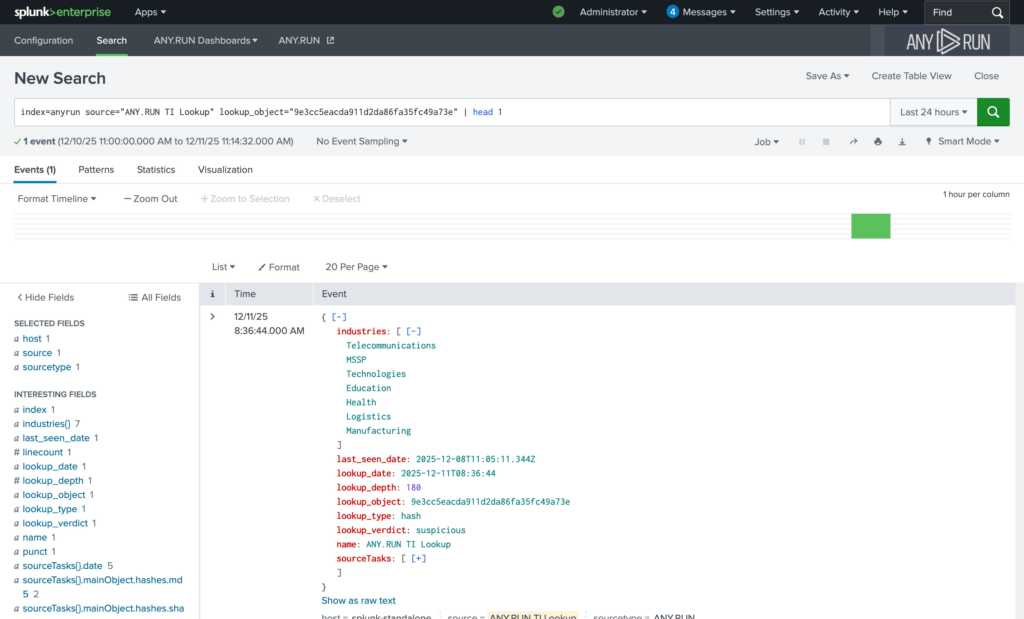
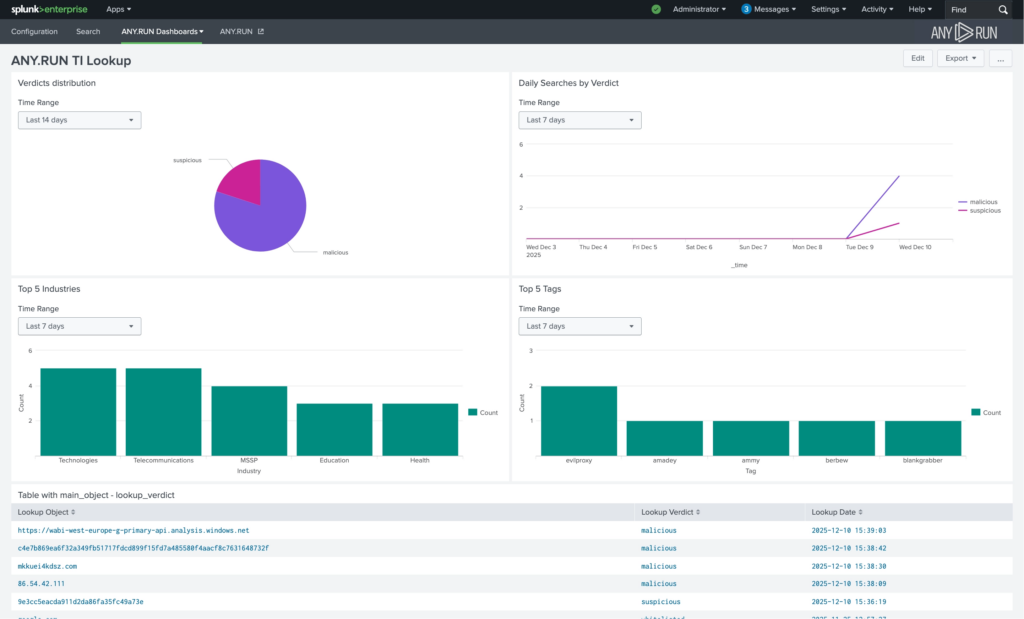
TI Lookup delivers an actionable context for alerts to Splunk Enterprise workspace
The ANY.RUN Threat Intelligence Lookup integration enables on-demand enrichment of IPs, domains, URLs, and file hashes directly inside Splunk. The intelligence is sourced from millions of malware & phishing investigations done manually by 15,000+ SOC teams and 600,000+ analysts inside ANY.RUN’s Interactive Sandbox.
Enrichment results are returned as structured Splunk events, including verdict, industry targeting, last seen data, tags, and a direct link to detailed intelligence in the ANY.RUN interface. This data can be searched, correlated, visualized, and incorporated into alerting logic using native SIEM capabilities.
Faster triage decisions: Near-instant access to past analyses confirms whether an IOC is linked to real malicious activity, significantly reducing triage time.
Smarter response actions: Behavioral context and mapped TTPs help teams choose more precise containment steps instead of reacting blindly.
Fewer Tier 2 escalations: Tier 1 analysts receive enough context to make confident decisions independently, reducing internal bottlenecks.
Stronger detection logic: Enrichment data becomes searchable and reusable in correlation rules, improving detection accuracy without adding new tools.
TI Lookup dashboard shows key threats and targeted industries for your queries
As a result, teams improve SLA adherence, reduce average investigation time per alert, and strengthen detection accuracy with 58% more threats identified overall.
This leads to faster response, better use of existing security investments, and lower exposure to sector-specific attacks.
Practical Use Case: IOC Enrichment During Investigation
While reviewing an incident, analysts can enrich IPs, domains, URLs, or file hashes using TI Lookup. The contextual result is stored as a Splunk event, reducing manual research and accelerating decision-making.
Boost DR and reduce triage & response time
Enrich alerts with actionable intel from 15K companies
ANY.RUN TI Feeds: Strengthen Defense Against Emerging Threats
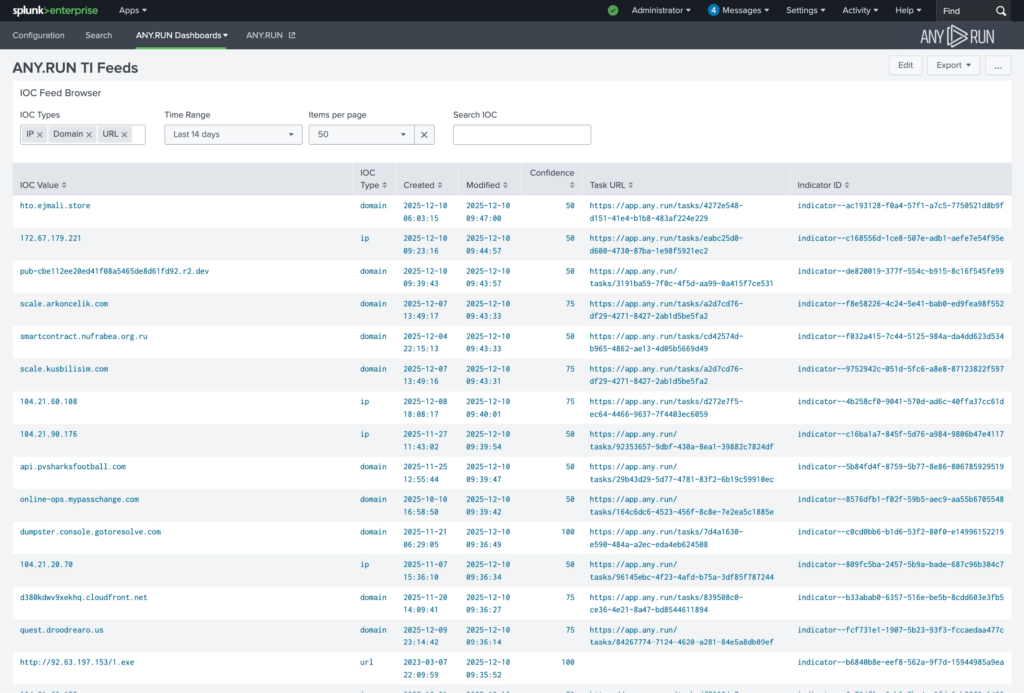
TI Feeds deliver fresh IOCs from the latest threats for stronger proactive defense
The ANY.RUN Threat Intelligence Feeds integration continuously streams verified malicious network indicators (IPs, domains, URLs) into Splunk, sourced from live sandbox analyses of real-world attacks across 15,000+ organizations.
Indicators delivered via ANY.RUN TI Feeds are stored in Splunk’s Key-Value Store (KV Store), making them searchable, filterable, and immediately usable in correlation rules, dashboards, and alerting workflows.
Earlier detection of emerging threats: Indicators are added to feeds as soon as they appear in live sandbox investigations, helping SOC teams identify new campaigns faster and reduce MTTD.
Wider threat coverage: A high share of globally observed, unique malicious infrastructure improves visibility into phishing and malware activity that traditional feeds often miss.
Reduced Tier 1 workload: Indicators are filtered for malicious activity, decreasing false positives and cutting investigation time spent on low-value alerts.
Detection that scales automatically: Continuous feed updates strengthen correlation rules over time without requiring manual tuning or additional staffing.
This improves MTTD, reduces false positive rates, and increases detection rate by 36% on average.
For the business, that means lower breach probability, reduced operational disruption, and better return on existing SIEM investments as the environment grows.
Prevent incidents with proactive threat detection
Keep your SIEM up-to-date with real-time IOCs
Practical Use Case: Threat Correlation with Fresh IOCs
ANY.RUN’s TI Feeds continuously supply verified malicious infrastructure into Splunk. Detection rules can automatically correlate incoming events against fresh indicators, increasing detection accuracy and reducing blind spots.
How to Integrate ANY.RUN in Splunk Enterprise
The ANY.RUN integrations are available for installation via Splunkbase. Security teams can find and deploy the add-ons directly from the Splunk app marketplace by searching for “ANY.RUN,” enabling fast deployment without complex configuration or custom development.
Conclusion
By embedding sandbox analysis, live enrichment, and verified malicious infrastructure directly into Splunk, ANY.RUN helps SOC teams triage faster, prioritize more accurately, and improve detection logic. The result is lower MTTR, fewer missed incidents, and stronger protection without increasing operational complexity.
About ANY.RUN
Trusted by 600,000+ cybersecurity professionals and 15,000+ organizations across critical industries, including 64% of Fortune 500 companies, ANY.RUN helps security teams detect and investigate threats faster.
Our Interactive Sandbox provides real-time behavioral analysis of suspicious files and URLs, enabling confident triage and response.
Threat Intelligence Lookup and Threat Intelligence Feeds deliver live, verified threat data that strengthens detection and improves prioritization.
By embedding analysis and intelligence into daily SOC workflows, ANY.RUN helps organizations reduce response time, lower operational costs, and minimize security risk.
How does this integration reduce overall business risk, not just improve analysis?
By embedding behavioral analysis and live threat intelligence directly into Splunk, threats are understood earlier in the attack chain. Earlier understanding leads to faster containment, lower incident impact, and reduced probability of breach-related downtime, fraud, or regulatory exposure.
What measurable security improvements should I expect?
SOC teams typically see reduced MTTR (up to 21 minutes per case), improved detection rate (up to 36%), and identification of up to 58% more threats through enriched intelligence. These improvements translate into fewer escalations, fewer missed incidents, and more predictable response performance.
How does this affect SOC efficiency and staffing pressure?
The integration enables Tier 1 analysts to close more alerts independently by providing behavioral verdicts and context directly in Splunk. This reduces escalation rates, prevents backlog growth during alert spikes, and helps manage higher alert volumes without increasing headcount.
Will this require changes to our existing security architecture?
No architectural overhaul is required. ANY.RUN integrates as native data sources inside Splunk Enterprise. Analysis results and intelligence are ingested as structured events and used within existing dashboards, correlation rules, and response workflows.
How does this improve SLA adherence for enterprise SOCs or MSSPs?
Faster alert validation and clearer risk prioritization reduce investigation time per case. This stabilizes response timelines, improves MTTR consistency, and allows MSSPs to support more clients without degrading service quality.
A newly disclosed maximum-severity security flaw in Cisco Catalyst SD-WAN Controller (formerly vSmart) and Catalyst SD-WAN Manager (formerly vManage) has come under active exploitation in the wild as part of malicious activity that dates back to 2023.
The vulnerability, tracked as CVE-2026-20127 (CVSS score: 10.0), allows an unauthenticated remote attacker to bypass authentication and obtain
https://www.backbox.org/wp-content/uploads/2018/09/website_backbox_text_black.png00adminhttps://www.backbox.org/wp-content/uploads/2018/09/website_backbox_text_black.pngadmin2026-02-26 03:06:432026-02-26 03:06:43GNOME 50 is a brilliant release – but I had to look twice to see why
https://www.backbox.org/wp-content/uploads/2018/09/website_backbox_text_black.png00adminhttps://www.backbox.org/wp-content/uploads/2018/09/website_backbox_text_black.pngadmin2026-02-26 03:06:432026-02-26 03:06:43Want your Linux looking more like Windows? KDE Plasma makes it easy – here’s how