The suspected India-linked threat group targets governments, telecom, and critical infrastructure using spear-phishing, old vulnerabilities, and rapidly rotating infrastructure to maintain persistent access.
https://www.backbox.org/wp-content/uploads/2018/09/website_backbox_text_black.png00adminhttps://www.backbox.org/wp-content/uploads/2018/09/website_backbox_text_black.pngadmin2026-03-18 13:06:562026-03-18 13:06:56SideWinder Espionage Campaign Expands Across Southeast Asia
It’s rare that I feature a power station not made by one of the big names, but the Oupes Mega 1 makes the cut, even receiving a ZDNET Lab Award for its efficiency.
https://www.backbox.org/wp-content/uploads/2018/09/website_backbox_text_black.png00adminhttps://www.backbox.org/wp-content/uploads/2018/09/website_backbox_text_black.pngadmin2026-03-18 12:08:472026-03-18 12:08:47Oupes Mega 1 review: I finally found a portable power station I can store in my truck
A few years ago, most cyberattacks still depended heavily on human effort—skilled operators manually probing systems, testing vulnerabilities, and executing campaigns step by step.
That model is quietly breaking down.
In conversations with security teams and analysts over the past year, one theme keeps coming up: attackers are no longer just using tools—they’re starting to deploy systems that can think, adapt, and act on their own. This is where AI-powered cyber warfare begins to shift from buzzword to reality.
At the center of this shift are autonomous attack agents, AI-driven systems that don’t just assist attackers but actively participate in decision-making. And that changes the threat landscape in a very real way.
What is AI-Powered Cyber Warfare?
At its simplest, AI-powered cyber warfare refers to the use of artificial intelligence and machine learning to enhance cyberattacks. But that definition doesn’t quite capture what’s happening on the ground.
What’s different now is how AI is being used.
Instead of just automating repetitive tasks, attackers are beginning to rely on AI to:
Continuously scan and map attack surfaces
Prioritize targets based on probability of success
Adjust tactics mid-attack
Learn from failures and retry with improved strategies
One security researcher recently described it as “moving from scripts to systems.” That distinction matters. Scripts execute instructions. Systems adapt.
This is why the AI threat landscape feels more unpredictable today—it’s no longer just about known techniques, but evolving behavior.
Understanding Autonomous Attack Agents
If there’s one concept security leaders are increasingly concerned about, it’s autonomous attack agents.
These aren’t hypothetical. Early versions are already being observed in the wild—particularly in automated reconnaissance and vulnerability scanning campaigns.
For example, researchers have documented AI-assisted tools that can:
Crawl entire infrastructures in minutes
Identify misconfigurations across cloud environments
Chain vulnerabilities together without manual input
In one recent case study discussed in security circles, an AI-assisted system was able to simulate multiple attack paths against a target environment and automatically select the most efficient route. That’s a level of decision-making that traditionally required experienced human operators.
This is what makes AI attack agents so significant—they compress both time and expertise. What once required a skilled team can increasingly be done by a single operator backed by intelligent systems.
How AI is Changing Cyberattacks
The shift toward AI-driven attacks is already visible across several fronts.
1. AI-Powered Malware
We’re seeing early signs of AI-powered malware that can alter its behavior to avoid detection. Instead of relying on fixed signatures, these threats experiment—adjusting execution patterns until they find a way through.
While still evolving, this approach is forcing defenders to rethink how detection works.
2. Smarter Phishing and Deepfakes
Perhaps the most visible impact of AI is in phishing.
Security teams report a noticeable increase in highly personalized phishing emails—messages that reflect tone, context, and even internal communication styles. With generative AI, attackers can now scale this level of personalization effortlessly.
Add deepfake audio or video into the mix, and AI-driven cyber attacks start to blur the line between technical compromise and social engineering.
3. Real-Time Decision Making
AI doesn’t wait.
Attack systems can process signals in real time—whether it’s detecting a defensive response or identifying a new entry point—and adjust instantly. This gives attackers a speed advantage that traditional defenses often struggle to match.
4. Scalable, Automated Attacks
Automation isn’t new in cybersecurity, but AI takes it further.
With automated penetration attacks, a single campaign can test thousands of variations simultaneously. Instead of guessing what might work, attackers can experiment at scale.
A Rapidly Evolving Threat Landscape
From an analyst’s perspective, the biggest shift isn’t just technical—it’s operational.
We’re moving from a world of occasional, targeted attacks to one of continuous, adaptive pressure.
That translates into:
Shorter detection and response windows
A constant stream of attack attempts
More sophisticated and evolving tactics
A growing presence of intelligent cyber threats
In discussions with CISOs, a common concern is fatigue—not just human fatigue, but system fatigue. Defenses designed for periodic threats are now dealing with persistent, automated adversaries.
Blaze AI and the Shift Toward AI-Driven Defense
If attackers are using AI to scale and adapt, defenders are being pushed in the same direction.
This is where platforms like Blaze AI become relevant—not as a silver bullet, but as part of a broader shift toward intelligent defense.
Instead of relying purely on predefined rules, Blaze AI focuses on:
Detecting patterns and anomalies in real time
Automating threat analysis and response
Providing visibility into emerging AI-driven cyber threats
From what we’re seeing across the industry, this reflects a larger trend: cybersecurity is becoming a contest of learning systems. In other words, AI vs cybersecurity defense is no longer a future concept—it’s already underway.
How to Defend Against AI-Powered Cyber Attacks
There’s no single solution to counter AI-powered cyber warfare, but there are clear priorities emerging across organizations:
1. Adopt AI-Driven Security Tools
Static defenses struggle against adaptive threats. AI-based systems help identify patterns that don’t match known attack signatures.
2. Strengthen Threat Intelligence
Understanding emerging AI security risks is critical. The faster teams can contextualize new threats, the better they can respond.
3. Implement Zero-Trust Architectures
Limiting access and continuously verifying users reduces the attack surface—especially important against automated systems.
4. Don’t Ignore the Human Layer
Even the most advanced attacks still exploit human behavior. Training employees to recognize sophisticated phishing and manipulation attempts remains essential.
The Future of Cyber Warfare
Looking ahead, the trajectory is fairly clear.
We’re entering a phase where artificial intelligence in cyber warfare becomes standard practice on both sides. Attackers will continue experimenting with autonomy, while defenders will invest in systems that can respond just as quickly.
The question isn’t whether AI will dominate cyber operations—it’s how quickly organizations can adapt to that reality.
Conclusion
From an analyst standpoint, this moment feels like an inflection point.
The rise of autonomous attack agents, AI-powered malware, and increasingly intelligent cyber threats signals a shift toward faster, more adaptive cyber conflict.
Organizations that treat this as a distant concern risk falling behind. Those that start integrating AI into their defense strategy today will be far better positioned for what’s coming next.
Don’t wait for threats to outpace your defenses. Experience how Cyble Blaze AI can transform your security operations with predictive intelligence and autonomous response. Request a personalized demo today and take the first step toward truly proactive cybersecurity.
Frequently Asked Questions (FAQs) about AI-powered cyber warfare
What are autonomous attack agents?
Autonomous attack agents are AI systems capable of independently identifying vulnerabilities and launching cyberattacks with minimal human intervention.
How is AI used in cyber warfare?
AI is used to automate attacks, improve targeting, evade detection, and scale operations more efficiently.
Is AI making cyberattacks more dangerous?
Yes. AI increases both the speed and sophistication of cyberattacks, making them harder to detect and respond to.
What is Blaze AI in cybersecurity?
Blaze AI is an artificial intelligence-powered cybersecurity solution that combines intelligence and automation to detect, analyze, and respond to modern cyber threats.
https://www.backbox.org/wp-content/uploads/2018/09/website_backbox_text_black.png00adminhttps://www.backbox.org/wp-content/uploads/2018/09/website_backbox_text_black.pngadmin2026-03-18 12:08:402026-03-18 12:08:40AI-Powered Cyber Warfare: How Autonomous Attack Agents Are Changing the Threat Landscape
https://www.backbox.org/wp-content/uploads/2018/09/website_backbox_text_black.png00adminhttps://www.backbox.org/wp-content/uploads/2018/09/website_backbox_text_black.pngadmin2026-03-18 11:06:292026-03-18 11:06:29Join Our Next Livestream: The War Machine
MTTR is where strategy meets reality. In security operations, it is the margin between a contained incident and a catastrophic breach.
You can have perfect detection coverage, cutting-edge telemetry, and a wall of dashboards glowing like a spaceship cockpit. But if your team takes too long to respond, the attacker still wins the clock.
Reducing Mean Time to Respond is not about shaving seconds for vanity metrics. It is about compressing the window in which damage happens. And the fastest way to do that is not more alerts, but better intelligence.
Key Takeaways
MTTR is not just an operational metric. It is a direct measure of how long your business is exposed during an active threat. Every minute counts in financial, reputational, and regulatory terms.
Lower MTTR is achievable only through systematic improvement across all SOC workflows: detection, triage, threat hunting, incident response, and vulnerability management.
Threat intelligence quality is the single highest-leverage variable in every stage of MTTR reduction; bad or slow intelligence creates bottlenecks that no amount of headcount can overcome.
For CISOs and security leaders, ANY.RUN Threat Intelligence translates into a defensible, budget-aligned story: measurable MTTR reduction, reduced analyst burnout, and tangible alignment with business risk reduction.
Beyond the Number: What MTTR Actually Measures
MTTR — Mean Time to Respond — captures the average elapsed time from threat detection to full incident remediation. It is a compound metric that absorbs the latency of every step in your response chain: detection, alert triage, investigation, containment, eradication, and recovery. A high MTTR does not merely indicate a slow team; it indicates structural friction somewhere in that chain.
For experienced security leaders, this distinction matters enormously. Chasing MTTR as a raw number is a management trap. Understanding MTTR as a diagnostic readout of your entire SOC’s operational health is a strategic advantage.
Why leadership cares about MTTR
Direct financial impact. Longer response times increase remediation costs, legal exposure, and downtime.
Operational continuity. Faster containment keeps business processes running.
Regulatory and compliance pressure. Many frameworks implicitly reward faster detection and response cycles;
Reputation protection. The difference between a minor incident and a headline breach is often measured in hours.
When presenting to the board, this framing transforms MTTR from a technical KPI into a business risk metric with direct financial and compliance implications.
Turn faster response into measurable business risk reduction
with ANY.RUN Threat Intelligence
A low MTTR signals something deeper: a SOC that understands what it sees and acts without hesitation. From an operational perspective, MTTR is the output of three interacting variables: the quality of your detections, the speed of your analyst workflows, and the fidelity of your threat intelligence. A team that receives high-fidelity, context-rich alerts and has instant access to deep threat intelligence will always outperform an equally staffed team working with noisy, low-context alerts and manual enrichment processes.
The cost of poor or slow threat intelligence is borne in analyst hours, extended dwell times, and the compounding risk of delayed containment.
The Board-Level Framing
When making the case for investment in MTTR reduction capabilities, security leaders should ground the conversation in three dimensions:
Financial exposure: quantify the average cost per hour of active incident dwell time, drawing on breach cost benchmarks relevant to your sector.
Regulatory risk: map MTTR gaps to breach notification obligations and the financial penalties associated with late disclosure.
Operational resilience: frame MTTR reduction as a measure of how quickly the business can return to normal operations after a security event (a direct input into business continuity metrics that boards track).
How SOC Workflows Shape MTTR
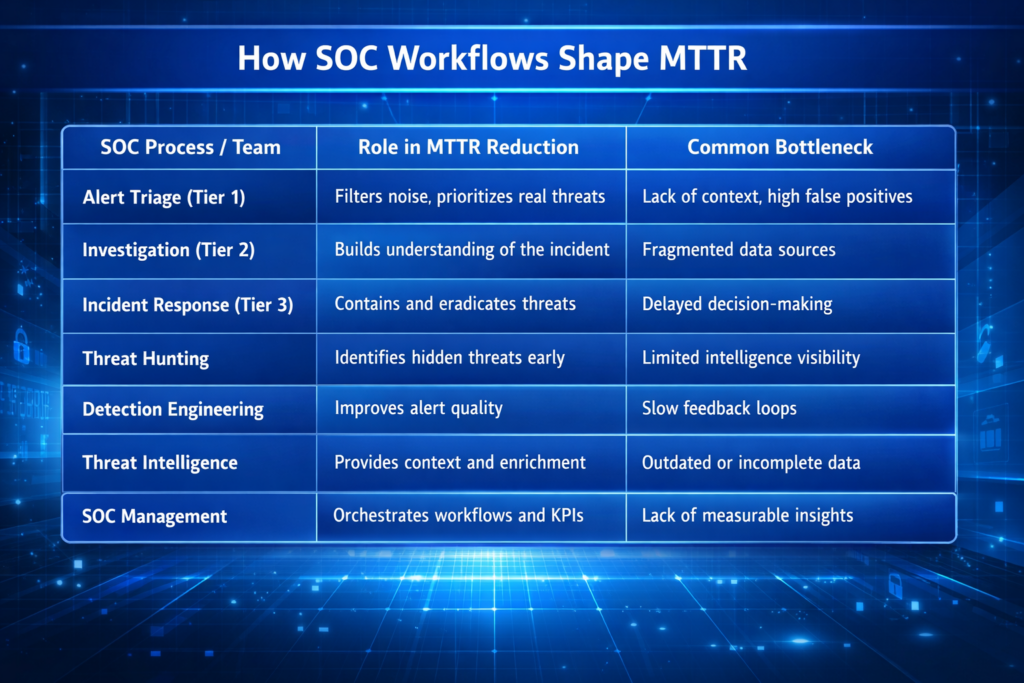
MTTR is not owned by one team. It is the emergent result of everything your SOC does. Here is how different workflows influence it:
SOC processes impacting responce time
Each of these workflows is, in effect, a constraint in a pipeline. MTTR optimization requires removing the binding constraint — and in the majority of SOC environments, that constraint is the quality, speed, and accessibility of threat intelligence.
How ANY.RUN Threat Intelligence Optimizes Every SOC Workflow
ANY.RUN Threat Intelligence is a set of capabilities designed to address the most persistent sources of MTTR inflation: intelligence latency, analyst enrichment overhead, and incomplete threat context. It is composed of three tightly integrated components: Threat Intelligence Feeds, Threat Intelligence Lookup, and the ANY.RUN Interactive Sandbox. Together, they form a comprehensive intelligence layer that accelerates every stage of the response chain described above.
Threat Intelligence Feeds: Eliminating Intelligence Latency at Scale
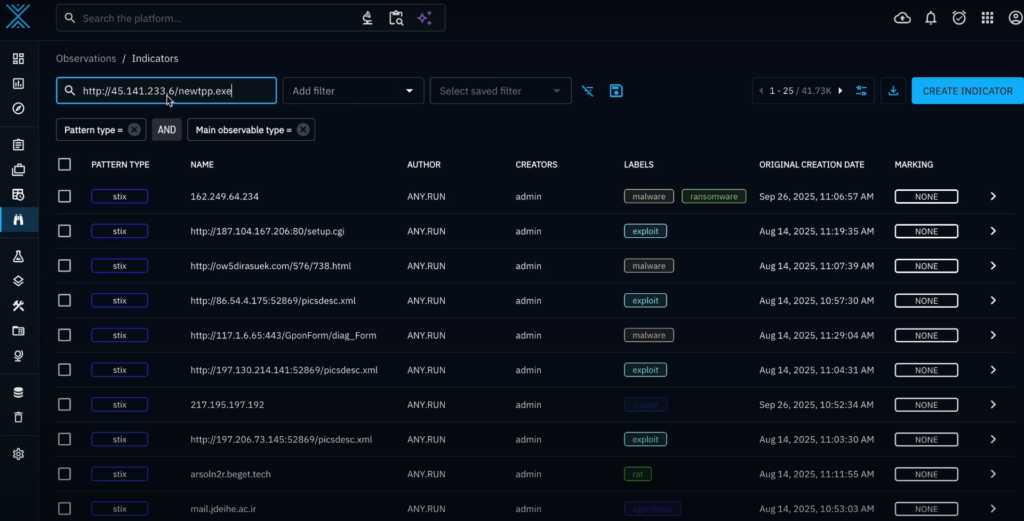
ANY.RUN’s Threat Intelligence Feeds deliver a continuous, real-time stream of high-confidence indicators of compromise (IP addresses, domains, URLs) extracted directly from live malware analysis sessions conducted in the ANY.RUN sandbox environment. Originating from first-hand dynamic analysis places them among the most timely and behaviorally validated IOC sources available.
Indicators in Threat Intelligence Feeds
For SOC teams, this distinction is critical. An IOC that has been validated through behavioral sandbox analysis carries far more operational confidence than one extracted from a static signature or passive aggregation. Analysts and automated playbooks can act on it immediately — without the validation overhead that depresses response speed and inflates MTTR.
What Feeds Deliver Across SOC Workflows
1. Alert Triage: Context-rich IOCs reduce the investigation burden on tier1/tier2 analysts. When an alert fires against a known, characterized IOC, analysts have immediate access to associated threat actor, malware family, and behavioral context, eliminating the manual lookup step that typically consumes 15-30 minutes per alert.
2. Automated Response: High-confidence IOCs from ANY.RUN TI Feeds can trigger automated blocking, quarantine, and notification playbooks with low risk of false-positive action.
3. Threat Hunting: Teams can use the feeds as fresh hypotheses for proactive hunts, immediately operationalizing newly observed IOCs from the broader threat landscape.
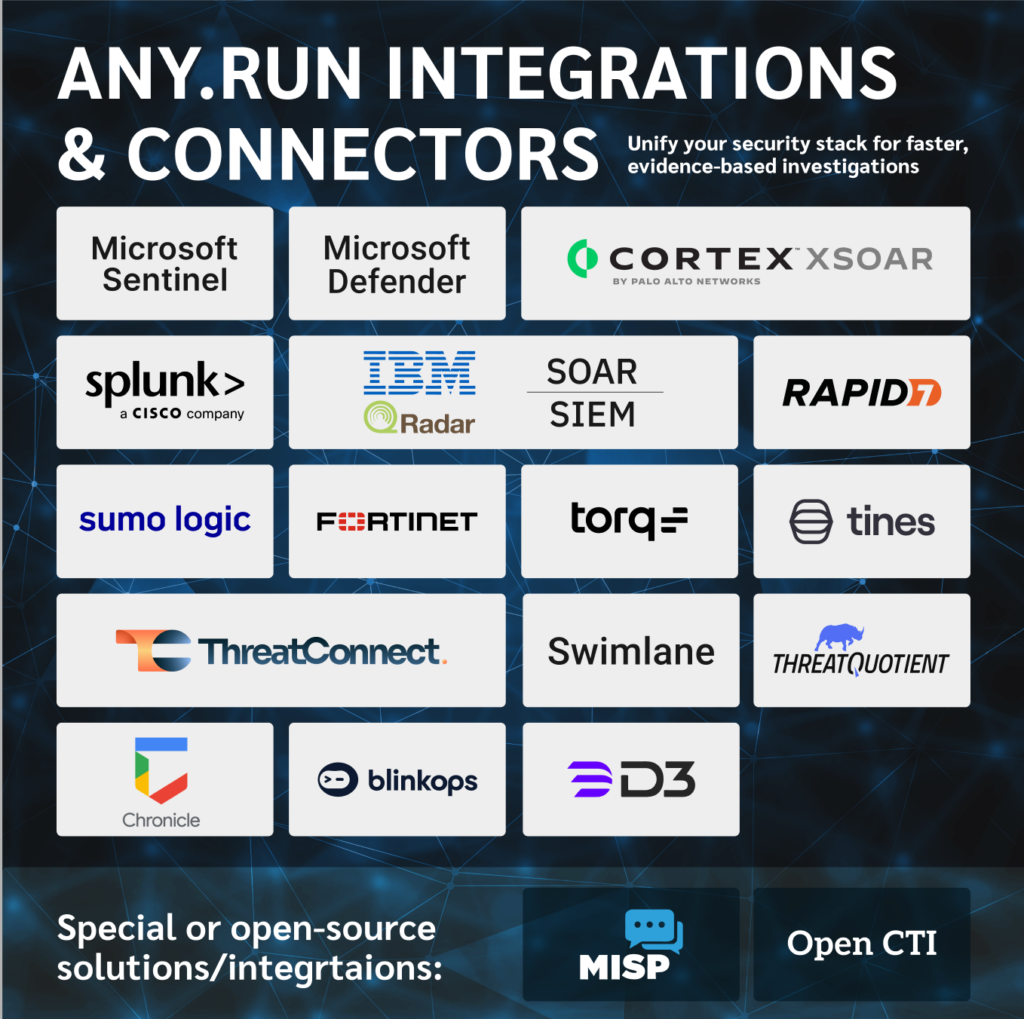
4. Detection Engineering & SIEM: Feeds integrate directly into SIEM and SOAR platforms via STIX/TAXII, CSV, and JSON formats, enabling continuous rule enrichment without manual input. Detection coverage stays current with the threat landscape automatically.
The solutions that TI Feeds work with
The net effect on MTTR is compounded across the SOC: faster detection, faster triage, faster automated response, and faster hunting cycles, all driven by the elimination of intelligence latency.
Threat Intelligence Lookup: Compressing Analyst Investigation Time
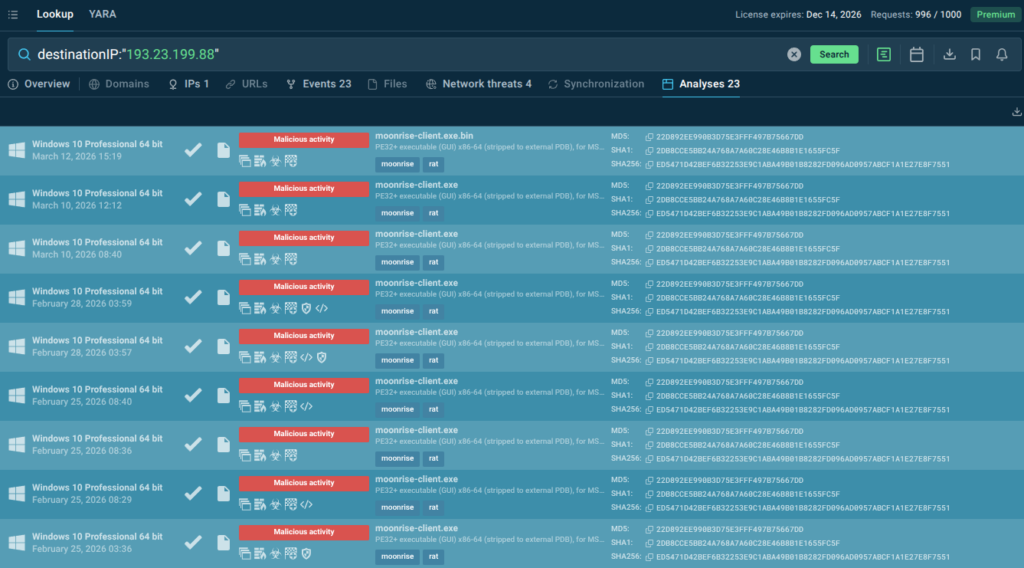
ANY.RUN Threat Intelligence Lookup provides analysts with instant, deep analysis of any artifact — file hash, IP address, domain, or URL — against a continuously updated database of analyzed threats. This is not a static reputation check. It surfaces detailed behavioral context: what a file does when executed, what network infrastructure it communicates with, what threat actor campaigns it is associated with, and what MITRE ATT&CK techniques it employs.
IP detected as Moonrise RAT infrastruscture with linked sandbox analyses for behavior data
What Lookup Delivers Across SOC Workflows
1. Tier 1/Tier 2 Triage: Analysts can validate any suspicious artifact in seconds, obtaining verdict, behavioral context, associated IOCs, and sandbox analysis links: enough to make an escalation or closure decision without further research.
2. Incident Response: During an active incident, IR teams need to rapidly characterize malware capabilities, map likely lateral movement paths, and determine containment scope. TI Lookup provides instant access to this context, allowing IR teams to act on complete information rather than conducting time-consuming analysis under pressure.
3. Threat Hunting: Hunters can validate hypotheses at scale by running bulk lookups against historical endpoint and network telemetry, rapidly separating genuine threat signals from environmental noise.
4. Management Reporting: Lookup data supports evidence-based MTTR reporting — analysts can demonstrate exactly what intelligence was available, when it was accessed, and how it informed decisions, providing an audit trail that supports both operational review and regulatory compliance.
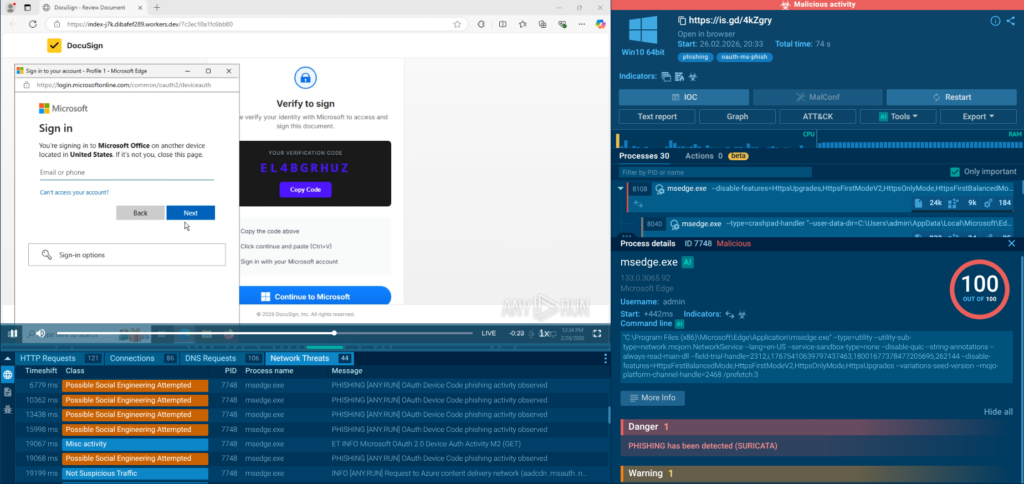
While TI Feeds and TI Lookup capabilities address the speed dimension of threat intelligence, ANY.RUN’s Interactive Sandbox addresses the depth dimension. It provides analysts with an interactive malware analysis environment that delivers full behavioral visibility — process trees, network traffic, registry changes, file system activity, and MITRE ATT&CK technique mapping — without requiring reverse engineering expertise.
For SOC teams, this means that complex malware analysis, which would previously require escalation to a specialist (adding hours or days to MTTR), can now be performed by any competent analyst. This has a direct and measurable impact on MTTR, particularly in the incident response and escalation phases where analysis bottlenecks most commonly occur.
Shrink incident response time and minimize breach impact
with real-time TI solutions
Security leaders face a persistent translation problem: the operational metrics that matter inside the SOC do not naturally map to the language of business risk, financial exposure, and strategic investment. ANY.RUN Threat Intelligence bridges this gap by delivering improvements that are simultaneously operationally meaningful and strategically defensible:
Risk Reduction: Faster MTTR directly reduces organizational exposure during active incidents. For every workflow improvement driven by ANY.RUN intelligence, the window of active risk narrows, translating into lower expected breach costs and reduced regulatory exposure.
Analyst Capacity: The manual enrichment and validation work that ANY.RUN Feeds and Lookup eliminate is not just slow, it is expensive. Reclaiming analyst hours from repetitive intelligence gathering and redirecting them toward higher-order investigation and hunting delivers measurable capacity gains without headcount increases.
Scalability Without Linear Cost Growth: As threat volumes increase, organizations that rely on manual intelligence processes face a linear scaling problem — more alerts require more analysts. ANY.RUN Threat Intelligence breaks this dependency by automating the intelligence layer, allowing SIEM/SOAR platforms to absorb greater alert volumes without proportional analyst overhead.
Compliance and Audit Readiness: Regulators and insurers increasingly scrutinize incident response timelines. ANY.RUN’s structured, documented intelligence data supports post-incident reporting and demonstrates a defensible security program, reducing regulatory risk and potentially influencing cyber insurance premiums.
Talent Retention: Analyst burnout is a leading cause of SOC attrition. The cognitive load of manual enrichment, alert fatigue, and tool-switching is a known driver of analyst dissatisfaction. ANY.RUN Threat Intelligence reduces this burden, contributing to the working environment improvements that retain experienced analysts.
Addressing Security Leaders’ Core Pains
The decision-makers most likely to evaluate ANY.RUN Threat Intelligence are managing a recognizable set of pressures: too many alerts, too few analysts, insufficient confidence in intelligence quality, difficulty demonstrating security ROI, and the constant risk of a major incident that would expose all three.
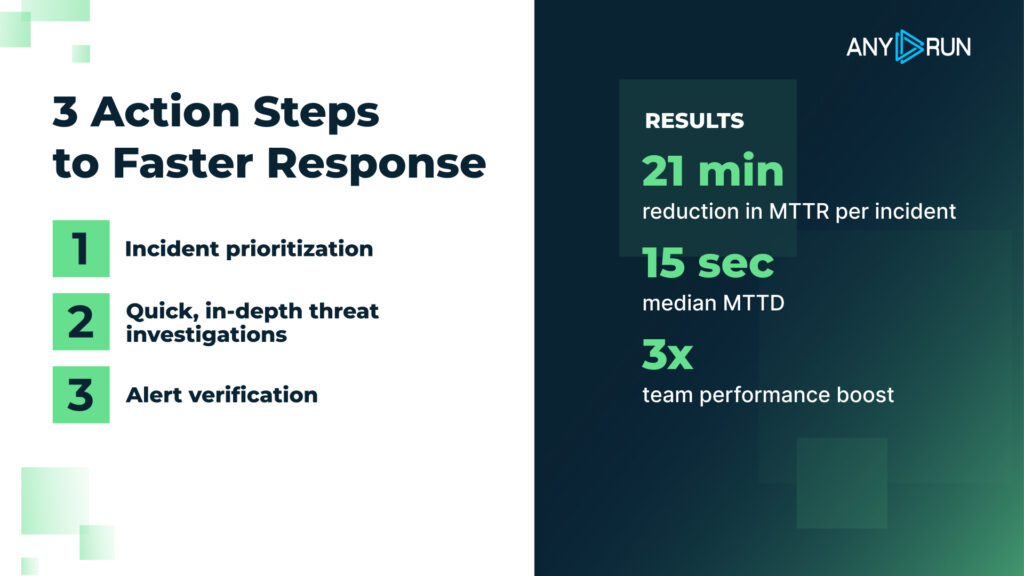
Key steps to cutting MTTR with real-time TI
ANY.RUN Threat Intelligence addresses each of these directly. It does not require a wholesale platform replacement. It integrates with existing SIEM, SOAR, and TIP infrastructure. It delivers immediate capability improvements from day one of deployment. And it provides a documented, measurable improvement in detection and response performance that security leaders need to defend budget allocations and demonstrate program maturity.
Conclusion
MTTR is the number that tells you whether your security program is actually working. Under pressure, against real threats. Every minute of MTTR that you cannot account for is a minute of active risk that your organization is absorbing.
The path to lower MTTR runs through better threat intelligence. Intelligence that is timely enough to act on immediately. Intelligence that is rich enough to eliminate investigation bottlenecks. Intelligence that integrates cleanly into your existing workflows so that improvement is structural, not dependent on individual analyst heroics.
ANY.RUN Threat Intelligence — through its Feeds, Lookup, and Sandbox capabilities — is built to deliver exactly this. It addresses the real operational problems that inflate MTTR in modern SOC environments: intelligence latency, enrichment overhead, analysis depth limitations, and the manual work that consumes analyst capacity that should be directed at threat response.
For SOC leaders looking to demonstrate measurable improvement in their teams’ performance, for CISOs making the case for sustained security investment, and for business leaders who understand that security outcomes have direct financial consequences, MTTR reduction through better threat intelligence is not a technical project — it is a strategic imperative.
About ANY.RUN
As a leading provider of interactive malware analysis and threat intelligence, ANY.RUN is trusted by over 600,000 analysts across 15,000 organizations worldwide. Its solutions enable teams to investigate threats in real time, trace full execution chains, and surface critical behaviors within seconds.
Safely detonate samples, interact with them as they run, and instantly pivot to network traces, file system changes, registry activity, and memory artifacts in ANY.RUN’s Interactive Sandbox. For threat intelligence insights, integrate TI Lookup and TI Feeds supplying enriched IOCs and automation-ready intelligence.
ANY.RUN meets enterprise security and compliance expectations. The company is SOC 2 Type II certified, reinforcing its commitment to protecting customer data and maintaining strong security controls.
FAQ
What is the fastest way to reduce MTTR?
Improve access to contextual threat intelligence to eliminate investigation delays.
Why does MTTR matter more than MTTD in some cases?
Because detecting a threat quickly does not help if response is slow or ineffective.
How does threat intelligence improve SOC workflows?
It enriches alerts, prioritizes threats, and accelerates investigation and response decisions.
Can MTTR be reduced without increasing SOC headcount?
Yes, by optimizing workflows and providing better intelligence to analysts.
What is the biggest bottleneck in MTTR today?
Lack of context and fragmented data across multiple systems.
How do Threat Intelligence Feeds help SOC teams?
They enable faster detection, reduce false positives, and support automation.
What role does Threat Intelligence Lookup play?
It provides deep, immediate context for indicators, speeding up investigations.
https://www.backbox.org/wp-content/uploads/2018/09/website_backbox_text_black.png00adminhttps://www.backbox.org/wp-content/uploads/2018/09/website_backbox_text_black.pngadmin2026-03-18 11:06:262026-03-18 11:06:26How to Reduce MTTR in Your SOC with Better Threat Intelligence
https://www.backbox.org/wp-content/uploads/2018/09/website_backbox_text_black.png00adminhttps://www.backbox.org/wp-content/uploads/2018/09/website_backbox_text_black.pngadmin2026-03-18 10:06:432026-03-18 10:06:43Best early Amazon Spring Sale laptop deals 2026
COM automation is a core Windows technology that allows code to access external functionality through well-defined interfaces. It is similar to traditionally loading a DLL, but is class-based rather than function-based. Many advanced Windows capabilities are exposed through COM, such as Windows Management Instrumentation (WMI).
Scripting and late-bound COM calls operate through the IDispatch interface. This creates a key analysis point that many types of malware leverage when interacting with Windows components.This analysis point is quite complex and hard to safely instrumentate at scale.
In this article, Cisco Talos presents DispatchLogger, a new open-source tool that closes this gap by delivering high visibility into late-bound IDispatch COM object interactions via transparent proxy interception.
This blog describes the architecture, implementation challenges, and practical applications of comprehensive COM automation logging for malware analysis. This technique can be utilized on multiple types of malware.
Malwaretype
Bindingtype
Est.coverage
Windows Script Host
Always Late
100%
PowerShell COM
Always Late
100%
AutoIT
Always Late
100%
VBA Macros
Mostly Late
95%
VB6 Malware
Mixed
65%
.NET COM Interop
Mixed
60%
C++ Malware
Rarely Late (WMI)
10%
The challenge
Modern script-based malware (e.g., VBScript, JScript, PowerShell) relies heavily on COM automation to perform malicious operations. Traditional dynamic analysis tools capture low-level API calls but miss the semantic meaning of high-level COM interactions. Consider this attack pattern:
Figure 1. Sample VBScript code to create a process with WMI as its parent.
Behavioral monitoring will detect process creation, but the analyst often loses critical context such as who launched the process. In this scenario WMI spawns new processes with wmic.exe or wmiprvse.exe as the parent.
Technical approach
Interception strategy
DispatchLogger starts with API hooking at the COM instantiation boundary. Every COM object creation in Windows flows through a small set of API functions. By intercepting these functions and returning transparent proxies deep visibility can be achieved without modifying malware behavior.
The core API hooking targets are:
CoCreateInstance: Primary COM object instantiation (CreateObject in scripts)
CoGetClassObject: Class factory retrieval
GetActiveObject: Attachment to running COM instances
Initial implementation attempts hooked only CoCreateInstance, filtering for direct IDispatch requests. However, testing revealed that most VBScript CreateObject calls were not being intercepted.
To diagnose this a minimal ActiveX library was created with a MsgBox in Class_Initialize to freeze the process. The VBScript was launched, and a debugger attached to examine the call stack. The following code flow was revealed:
Figure 2. Call stack showing how VBScript obtains a target IDispatch interface.
Disassembly of vbscript.dll!GetObjectFromProgID (see Figure 3) confirmed the pattern. VBScript’s internal implementation requests IUnknown first, then queries for IDispatch afterward:
Figure 3. Disassembly of vbscript.dll!GetObjectFromProgID.
The key line is CreateInstance(NULL, IID_IUnknown, &ppunk). Here, VBScript explicitly requests IUnknown, not IDispatch. This occurs because VBScript needs to perform additional safety checks and interface validation before accessing the IDispatch interface.
If we only wrap objects when IDispatch is directly requested in CoCreateInstance, we miss the majority of script instantiations. The solution is to also hook CoGetClassObject and wrap the returned IClassFactory:
Figure 4. Returning a Class Factory proxy from the CoGetClassObject API Hook.
The ClassFactoryProxy intercepts CreateInstance calls and handles both cases:
Figure 5. Returning an IDispatch Proxy from ClassFactoryProxy::CreateInstance if possible.
This ensures coverage regardless of which interface the script engine initially requests.
Architecture
Proxy implementation
The DispatchProxy class implements IDispatch by forwarding all calls to the wrapped object while logging parameters, return values, and method names. If the function call returns another object, we test for IDispatch and automatically wrap it.
Figure 6. Simplified flow of IDispatch::Invoke hook. Full hook is around 300 loc.
The proxy is transparent, meaning it implements the same interface, maintains proper reference counting, and handles QueryInterface correctly. Malware cannot detect the proxy through standard COM mechanisms.
Recursive object wrapping
The key capability is automatic recursive wrapping. Every IDispatch object returned from a method call is automatically wrapped before being returned to the malware. This creates a fully instrumented object graph.
GetObject("winmgmts:") triggers hook, returns wrapped WMI service object
Calling .ExecQuery() goes through proxy, logs call with SQL parameter
Returned query result object is wrapped automatically
Enumerating with For Each retrieves wrapped IEnumVARIANT
Each enumerated item is wrapped as it’s fetched
Calling .Terminate() on items logs through their respective proxies
Enumerator interception
VBScript/JScript For Each constructs use IEnumVARIANT for iteration. We proxy this interface to wrap objects as they’re enumerated:
Figure 8. Implementation of IEnumVariant.Next that wraps child objects in the IDispatch proxy.
Moniker support
VBScript’s GetObject() function uses monikers for binding to objects. We hook CoGetObject and MkParseDisplayName, then wrap returned moniker objects to intercept BindToObject() calls:
Figure 9. Implementation of IMoniker.BindToObject that wraps the returned object with an IDispatch Proxy.
This ensures coverage of WMI access and other moniker-based object retrieval.
Implementation details
Interface summary
While standard API hooks can be implemented on a function-by-function basis, COM proxies require implementing all functions of a given interface. The table below details the interfaces and function counts that had to be replicated for this technique to operate.
Interface
Total Methods
Logged
Hooked/Wrapped
Passthrough
IDispatch
7
4
1
2
IEnumVARIANT
7
1
1
5
IClassFactory
5
2
1
2
IMoniker
26
1
1
24
During execution, a script may create dozens or even hundreds of distinct COM objects. For this reason, interface implementations must be class-based and maintain a one-to-one relationship between each proxy instance and the underlying COM object it represents.
While generating this volume of boilerplate code by hand would be daunting, AI-assisted code generation significantly reduced the effort required to implement the complex interface scaffolding.
The real trick with COM interface hooking is object discovery. The initial static API entry points are only the beginning of the mission. Each additional object encountered must be probed, wrapping them recursively to maintain logging.
Thread safety
Multiple threads may create COM objects simultaneously. Proxy tracking uses a critical section to serialize access to the global proxy map:
Figure 10. Thread safety checks in the WrapDispatch function.
Reference counting
Proper COM lifetime management is critical. The proxy maintains separate reference counts and forwards QueryInterface calls appropriately:
Figure 11. The IDispatch proxy maintains proper reference counts.
Output analysis
When script code executes with DispatchLogger active, comprehensive logs are generated. Here are excerpts from an actual analysis session:
Object creation and factory interception:
[CLSIDFromProgID] 'Scripting.FileSystemObject' -> {0D43FE01-F093-11CF-8940-00A0C9054228}
[CoGetClassObject] FileSystemObject ({0D43FE01-F093-11CF-8940-00A0C9054228}) Context=0x00000015
[CoGetClassObject] Got IClassFactory for FileSystemObject – WRAPPING!
[FACTORY] Created factory proxy for FileSystemObject
[FACTORY] CreateInstance: FileSystemObject requesting Iunknown
[FACTORY] CreateInstance SUCCESS: Object at 0x03AD42D8
[FACTORY] Object supports IDispatch – WRAPPING!
[PROXY] Created proxy #1 for FileSystemObject (Original: 0x03AD42D8)
[FACTORY] !!! Replaced object with proxy!
Method invocation with recursive object wrapping
[PROXY #1] >>> Invoke: FileSystemObject.GetSpecialFolder (METHOD PROPGET) ArgCount=1
[PROXY #1] Arg[0]: 2
[PROXY #1] <<< Result: IDispatch:0x03AD6C14 (HRESULT=0x00000000)
[PROXY] Created proxy #2 for FileSystemObject.GetSpecialFolder (Original: 0x03AD6C14)
[PROXY #1] !!! Wrapped returned IDispatch as new proxy
[PROXY #2] >>> Invoke: FileSystemObject.GetSpecialFolder.Path (METHOD PROPGET) ArgCount=0
[PROXY #2] <<< Result: "C:UsershomeAppDataLocalTemp" (HRESULT=0x00000000)
Data exfiltration: Filesystem operations, network object usage, database access via ADODB
Obsfuscationbypass: Working at the COM layer, method names and arguments are already fully resolved
Performance considerations
Proxy overhead is minimal:
Each Invoke call adds one virtual function dispatch.
In the demo, logging I/O occurs via IPC.
Object wrapping is O(1) with hash map lookup.
There is no performance impact on non-COM operations.
In testing with real malware samples, execution time differences were negligible.
Limitations
Current implementation constraints:
IDispatchEx: Not currently implemented (not used by most malware)
IClassFactory2+: Not currently implemented (may impact browser/HTA/WinRT)
Out-of-process COM: DCOM calls require separate injection into server process
Multi-threaded race conditions: Rare edge cases in concurrent object creation
Type library dependencies: Method name resolution requires registered type libraries
Processfollowing: Sample code does not attempt to inject into child processes
64-bitsupport: 64-bit builds are working but have not been heavily tested
The sample code included with this article is a general purpose tool and proof of concept. It has not been tested at scale and does not attempt to prevent logging escapes.
Operational usage
Typical analysis workflow:
Prepare isolated analysis VM
Inject DispatchLogger into target process
Execute malware sample
Review comprehensive COM interaction log
Identify key objects, methods, and parameters
Extract IOCs and behavioral signatures
The tool has been tested against:
VBScript & Jscript using Windows Script Host (cscript/wscript)
PowerShell scripts
basic tests against .NET and Runtime Callable Wrappers (RCW)
VB6 executables with late bound calls and Get/CreateObject
Background and prior work
The techniques presented in this article emerged from earlier experimentation with IDispatch while developing a JavaScript engine capable of exposing dynamic JavaScript objects as late-bound COM objects. That work required deep control over name resolution, property creation, and IDispatch::Invoke handling. This framework allowed JavaScript objects to be accessed and modified transparently from COM clients.
The experience gained from that effort directly informed the transparent proxying and recursive object wrapping techniques used in DispatchLogger.
Conclusion
DispatchLogger addresses a significant gap in script-based malware analysis by providing deep, semantic-level visibility into COM automation operations. Through transparent proxy interception at the COM instantiation boundary, recursive object wrapping, and comprehensive logging, analysts gain great insight into malware behavior without modifying samples or introducing detection vectors.
The implementation demonstrates that decades-old COM architecture, when properly instrumented, provides powerful analysis capabilities for modern threats. By understanding COM internals and applying transparent proxying patterns, previously opaque script behavior becomes highly observable.
DispatchLogger is being released open source under the Apache license and can be downloaded from the Cisco Talos GitHub page.
https://www.backbox.org/wp-content/uploads/2018/09/website_backbox_text_black.png00adminhttps://www.backbox.org/wp-content/uploads/2018/09/website_backbox_text_black.pngadmin2026-03-18 10:06:382026-03-18 10:06:38Transparent COM instrumentation for malware analysis
A high-severity security flaw affecting default installations of Ubuntu Desktop versions 24.04 and later could be exploited to escalate privileges to the root level.
Tracked as CVE-2026-3888 (CVSS score: 7.8), the issue could allow an attacker to seize control of a susceptible system.
“This flaw (CVE-2026-3888) allows an unprivileged local attacker to escalate privileges to full root access
https://www.backbox.org/wp-content/uploads/2018/09/website_backbox_text_black.png00adminhttps://www.backbox.org/wp-content/uploads/2018/09/website_backbox_text_black.pngadmin2026-03-18 09:07:002026-03-18 09:07:00The best early Amazon Spring Sale deals: Save on streaming, Apple, Samsung, and more
https://www.backbox.org/wp-content/uploads/2018/09/website_backbox_text_black.png00adminhttps://www.backbox.org/wp-content/uploads/2018/09/website_backbox_text_black.pngadmin2026-03-18 09:07:002026-03-18 09:07:00Best early Amazon Spring Sale deals under $25