https://www.backbox.org/wp-content/uploads/2018/09/website_backbox_text_black.png00adminhttps://www.backbox.org/wp-content/uploads/2018/09/website_backbox_text_black.pngadmin2026-04-28 13:06:442026-04-28 13:06:44Sevii Launches Cyber Swarm Defense to Make Agentic AI Security Costs Predictable
https://www.backbox.org/wp-content/uploads/2018/09/website_backbox_text_black.png00adminhttps://www.backbox.org/wp-content/uploads/2018/09/website_backbox_text_black.pngadmin2026-04-28 13:06:432026-04-28 13:06:43How to turn on Data Saver mode on your Android phone – and why it’s critical to do so
https://www.backbox.org/wp-content/uploads/2018/09/website_backbox_text_black.png00adminhttps://www.backbox.org/wp-content/uploads/2018/09/website_backbox_text_black.pngadmin2026-04-28 13:06:432026-04-28 13:06:43Dozens of Open VSX Extension Clones Linked to GlassWorm Malware
AI agents may soon be buying your stuff for you. The FIDO Alliance has teamed up with Google and Mastercard to try to ensure that shopping in the near future isn’t a complete disaster.
https://www.backbox.org/wp-content/uploads/2018/09/website_backbox_text_black.png00adminhttps://www.backbox.org/wp-content/uploads/2018/09/website_backbox_text_black.pngadmin2026-04-28 13:06:422026-04-28 13:06:42The Race Is on to Keep AI Agents From Running Wild With Your Credit Cards
CISOs are under pressure to prove that their security programs can detect threats early, reduce business risk, and support fast, confident response. But that becomes harder when attackers stop relying on obviously malicious tools.
In recent phishing-to-RMM campaigns observed by ANY.RUN analysts, threat actors are using fake Microsoft, Adobe, and OneDrive pages to deliver legitimate remote management tools instead of traditional malware. Once installed, these tools can give attackers remote access to a victim’s device while blending into software categories many enterprises already use or allow.
For security leaders, this creates a difficult visibility problem. The payload may be legitimate. The infrastructure may be trusted. The user action may look like a routine download. Yet the outcome is the same: unauthorized remote access inside the environment.
Key Takeaways
Phishing-to-RMM attacks create a dangerous visibility gap for enterprise SOCs: Attackers can deliver legitimate remote management tools through phishing pages that impersonate trusted services like Microsoft, Adobe, and OneDrive.
The payload may not look malicious on its own: Tools such as ScreenConnect and LogMeIn Rescue can appear as legitimate remote administration software, especially in organizations where RMM usage is already allowed.
Domain reputation is not enough: These attacks may use legitimate platforms, vendor infrastructure, or compromised websites instead of obvious newly registered domains.
The real signal is in the full attack chain: SOC teams need to connect the phishing lure, download context, execution behavior, RMM installation, and outbound connections.
For CISOs, the risk is operational as much as technical: Missed phishing-to-RMM activity can lead to slower detection, longer attacker dwell time, delayed containment, and weaker confidence in approved remote access tools.
ANY.RUN helps turn gray-zone activity into evidence: With Interactive Sandbox and Threat Intelligence, teams can safely analyze suspicious URLs and files, trace RMM behavior, and investigate related phishing-to-RMM chains.
The Blind Spot: When “Allowed” Tools Become the Attack Path
Most enterprise security programs are built to separate malicious activity from normal operations. Phishing-to-RMM attacks blur that line.
An RMM installer can pass basic checks because it is not malware by design. But the risk is not in the tool alone. It is in the context around it: how it reached the user, whether the download was expected, which endpoint launched it, and what connection followed.
For CISOs, this is where the risk becomes critical. Unauthorized access can hide inside routine-looking activity, giving the business a false sense of control while the attacker is already inside.
The outcome can be serious:
Slower detection because the activity does not look like classic malware
Longer attacker dwell time inside the environment
Higher risk of lateral movement from the compromised endpoint
More pressure on SOC teams to investigate ambiguous alerts
Delayed containment because the initial access path is harder to prove
Weaker confidence in whether approved remote access tools are being used safely
Close the gap before it becomes business risk. Give your SOC full visibility into suspicious activity.
ANY.RUN data shows that phishing-to-RMM activity is primarily concentrated in the United States, followed by Canada, Europe, and Australia. The most affected industries include Education, Technology, Banking, Government, Manufacturing, and Finance.
These sectors often depend on remote administration for IT support, distributed workforce management, and endpoint maintenance. That reliance creates more room for abuse: when RMM tools are already part of normal operations, unauthorized access can take longer to recognize and contain.
How Legitimate RMM Tools Are Delivered Through Phishing
Since early April, the ANY.RUN team has observed a rise in phishing-to-RMM attacks, where threat actors use phishing to deliver legitimate remote management tools and gain remote access to victims’ devices.
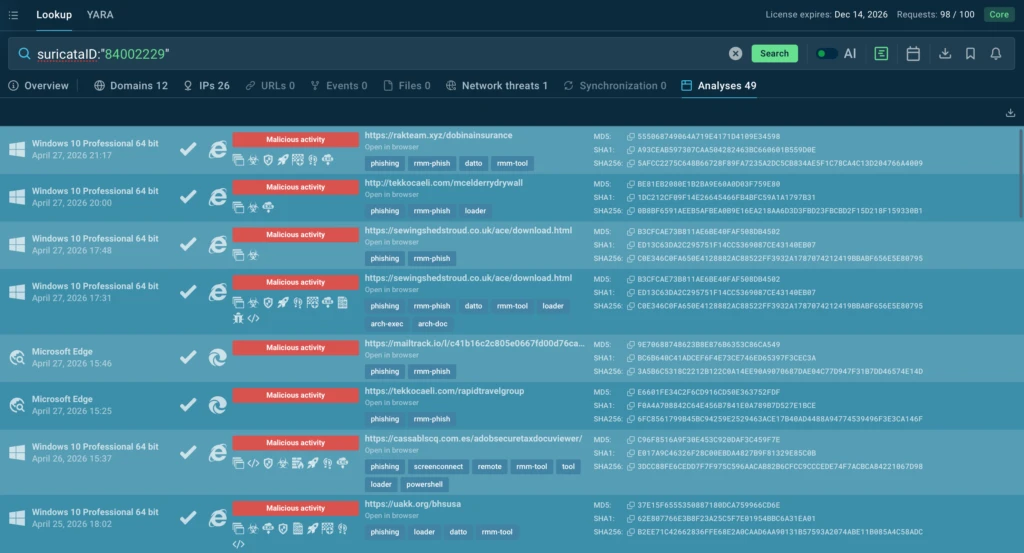
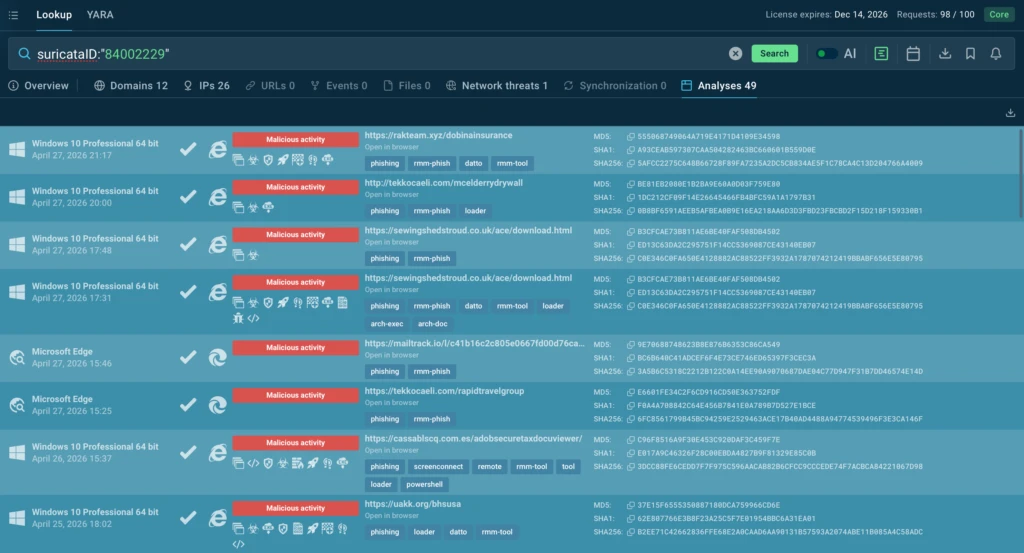
For just one of these campaigns, we are seeing more than 50 public analyses in ANY.RUN every week: suricataID:”84002229″
Public analyses related to phishing-to-RMM attacks demonstrated inside ANY.RUN’s TI Lookup
Phishing campaigns that deliver RMM tools are especially dangerous for SOC teams because these tools can appear to be legitimate remote administration software. If an organization already uses or allows RMM solutions, the launch of ScreenConnect may not immediately trigger security policies.
Close the RMM abuse gap in your SOC. Integrate ANY.RUN’s threat analysis and intelligence.
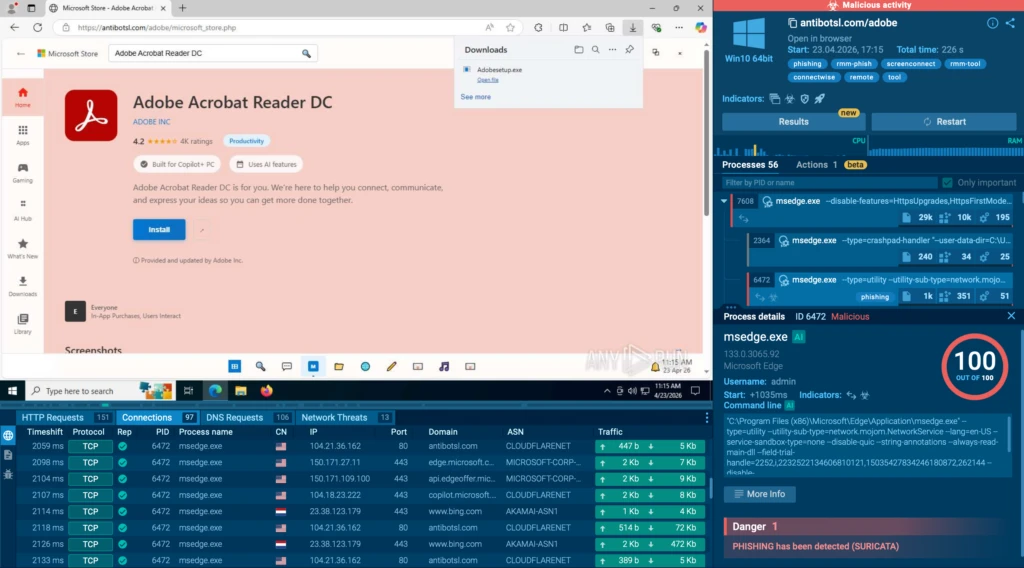
The screenshot below shows a phishing page impersonating Microsoft Store and Adobe Acrobat Reader DC. The user is prompted to download Adobesetup.exe, but behind that name is ScreenConnect; an RMM tool that attackers can use to establish remote access to the system.
A fake Microsoft Store page with an RMM installer disguised as Adobe
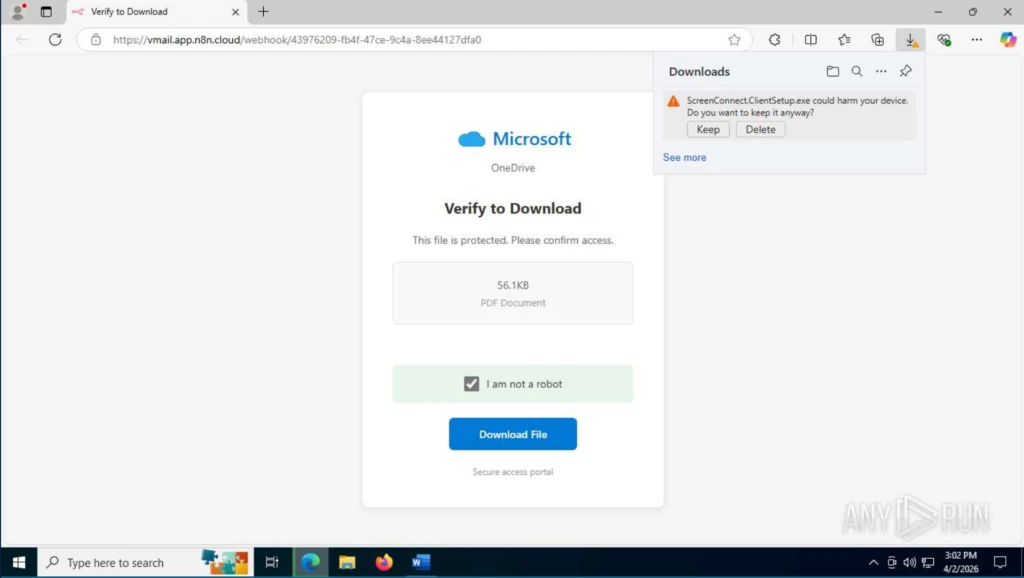
Another example shows the attack disguised as a protected Microsoft OneDrive download. The page at vmail.app.n8n.cloud displays a “Verify to Download” prompt for what appears to be a PDF document. Once the user clicks, they receive ScreenConnect.ClientSetup.exe:
Fake Microsoft OneDrive page with an RMM installer disguised as a PDF document
This chain makes SOC triage more difficult: the phishing landing page is hosted on the legitimate n8n.cloud platform, while the RMM agent download and subsequent connection occur through legitimate ScreenConnect infrastructure.
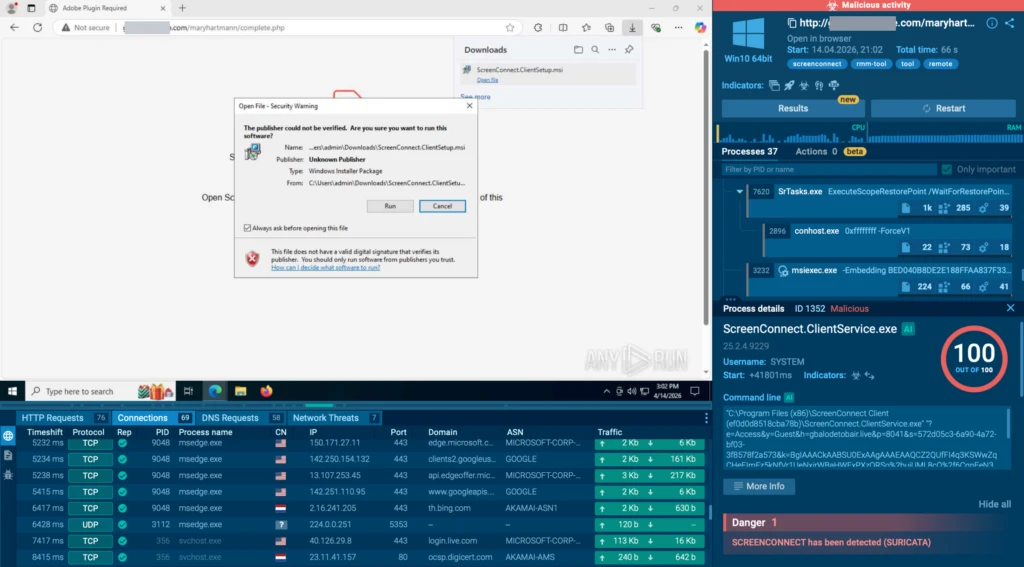
The attack does not rely on obvious newly registered domains, which are often an easy signal for blocking. As a result, detection needs to be based on behavior, download context, and anomalies around RMM execution, not domain reputation alone.
Traffic to ScreenConnect in ANY.RUN’s Connections tab
In addition to ScreenConnect, threat actors use other legitimate RMM and remote-access tools in these phishing chains, including Datto RMM, ITarian, LogMeIn Rescue, Action1 RMM, NetSupport, Syncro, MeshAgent, SimpleHelp, RustDesk, and Splashtop.
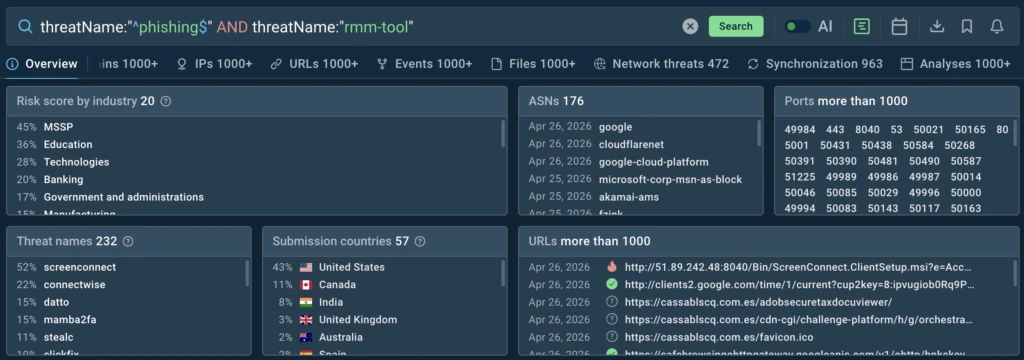
TI Lookup query for tracking phishing-to-RMM attack chains
To retrospectively track similar chains in ANY.RUN Threat Intelligence, teams can use the following query. As part of TI Lookup, every user has access to 20 full queries:
In addition to standard installers, threat actors are also using more sophisticated delivery methods, as shown in this public analysis:
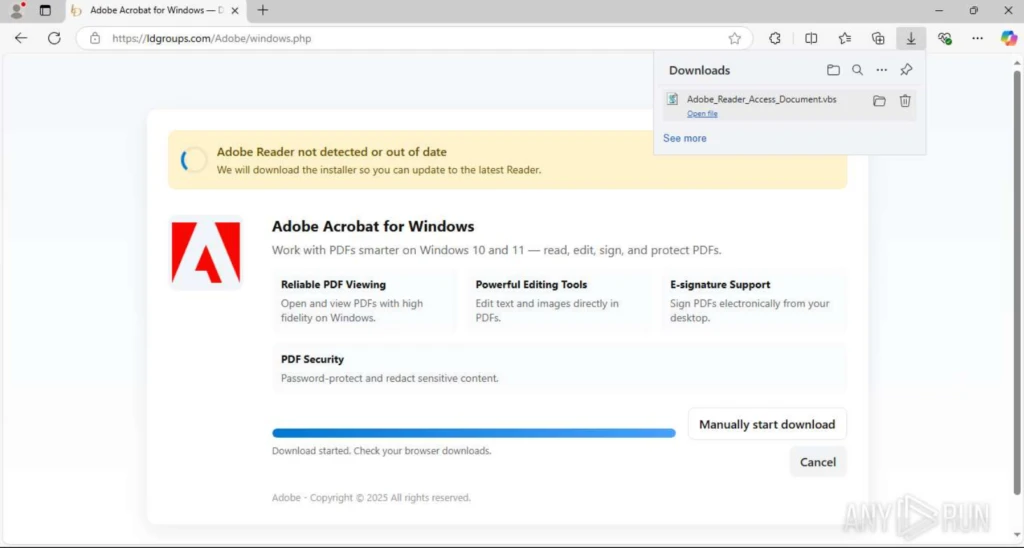
VBS document disguised as an Adobe Acrobat installer
In this example, the user is shown a phishing page with an Adobe document download lure. Instead of the expected file, the page delivers a VBS script.
Once executed, the script attempts to elevate privileges through UAC, disable SmartScreen, and weaken Microsoft Defender protections. It then silently downloads the LogMeIn Rescue installer, removes the Mark-of-the-Web, and runs a quiet installation via msiexec, turning the endpoint into a system with unattended RMM access.
Detect trusted-tool abuse before attackers gain access.
Bring ANY.RUN into your SOC for faster threat response.
It is also worth noting that in campaigns like this, threat actors try to minimize easily blocked, lower-level IoCs from the Pyramid of Pain, such as newly registered domains.
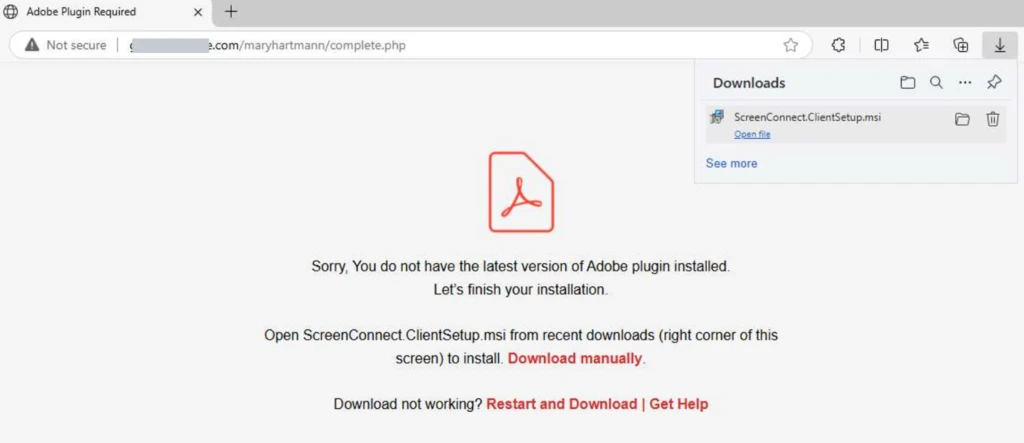
Instead, phishing pages may be hosted on already existing websites. The domain itself appears legitimate, while the suspicious activity is hidden deeper in the URL — in an unusual URI path that may indicate SEO injection or a compromised website.
SEO injection into a legitimate domain in a phishing-to-RMM attack chain
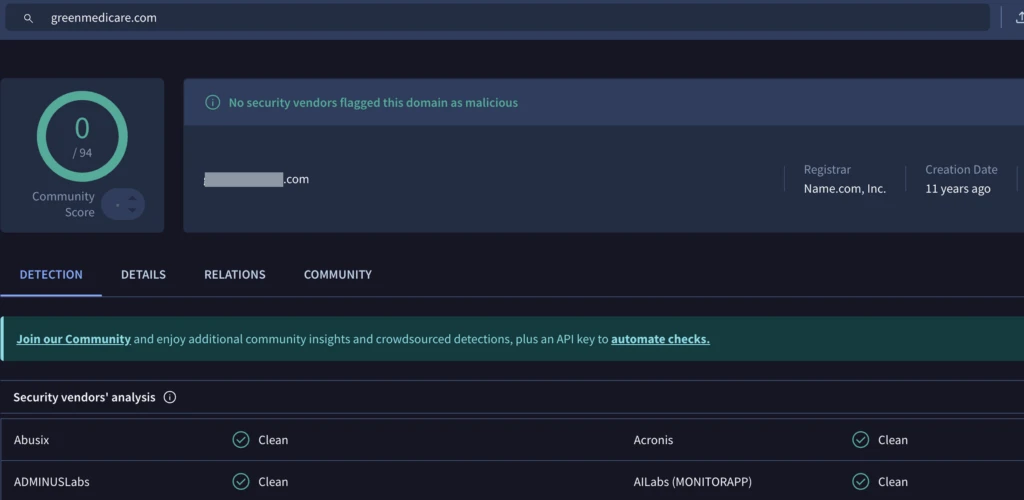
At the time of analysis, VirusTotal showed that no vendor had flagged this domain as malicious:
VirusTotal did not flag the domain as malicious at the time of analysis
Taken together, these cases reflect a broader shift from malware-first initial access to phishing-first initial access. Threat actors are increasingly gaining access not through an obviously malicious payload, but through social engineering and legitimate remote administration tools.
How SOC Teams Can Close the RMM Visibility Gap
Phishing-to-RMM attacks cannot be handled like ordinary malware delivery. The payload may be legitimate, the infrastructure may be trusted, and the domain may not have a malicious reputation at the time of analysis.
To detect this activity earlier, SOC teams need visibility into the full attack chain, not just the final file. That means connecting:
the phishing page that initiated the download
the file or script delivered to the user
the execution path on the endpoint
attempts to weaken security controls
RMM installation behavior
outbound connections to remote access infrastructure
This is where ANY.RUN helps teams close the gap. With the Interactive Sandbox, security teams can safely examine suspicious URLs, files, and scripts during triage.
They can observe the phishing lure, delivered payload, execution flow, attempts to weaken security controls, RMM installation, and outbound connections in one controlled environment.
ANY.RUN Threat Intelligence adds the retrospective layer. Teams can search across public analyses, track phishing-to-RMM chains, pivot from one indicator to related activity, and understand whether a single event is part of a wider campaign.
Sandbox analyses linked to phishing-to-RMM attacks displayed inside TI Lookup
For CISOs, this means more control over a risk that is usually hard to prove. The SOC can validate suspicious remote access activity faster, show how the access path started, and give leadership clearer evidence for containment and follow-up decisions.
Strengthen early threat detection across your SOC.
See suspicious activity clearly and act with confidence.
Instead of relying on reputation-based signals or waiting for a high-confidence malware alert, security teams can prove when trusted tools are being abused. That gives CISOs stronger confidence in detection coverage, faster response readiness, and better visibility into whether approved remote access software is creating hidden business risk.
About ANY.RUN
ANY.RUN, a leading provider of interactive malware analysis and threat intelligence solutions, helps security teams detect, investigate, and respond to threats faster.
ANY.RUN solutions include Interactive Sandbox, Threat Intelligence Lookup, Threat Intelligence Feeds, and integrations for SOC workflows across SIEM, SOAR, EDR, and other security tools. Together, they help teams analyze suspicious files and URLs, uncover attacker behavior, enrich investigations with real-world threat context, and operationalize intelligence across their environment.
Built for security-conscious organizations, ANY.RUN is SOC 2 Type II attested and supports enterprise-ready controls such as SSO, MFA, granular privacy settings, and AES-256-CBC encryption.
Trusted by more than 15,000 organizations and 600,000 security professionals worldwide, ANY.RUN gives SOC teams the visibility they need to move from uncertain alerts to evidence-based decisions.
Aggregated liquidity improves crypto trading by combining multiple sources, offering better rates, deeper markets, and more reliable execution across assets.
Hackread – Cybersecurity News, Data Breaches, AI and More – Read More
https://www.backbox.org/wp-content/uploads/2018/09/website_backbox_text_black.png00adminhttps://www.backbox.org/wp-content/uploads/2018/09/website_backbox_text_black.pngadmin2026-04-28 11:06:492026-04-28 11:06:49The Role of Aggregated Liquidity in Modern Crypto Markets
When patching isn’t fast enough, NDR helps contain the next era of threats.
If you’ve been tracking advancements in AI, you know the exploit window, the short buffer that organizations relied on to patch and protect after a vulnerability disclosure, is closing fast.
Anthropic’s new model, Claude Mythos, and its Project Glasswing, showed that finding exploitable vulnerabilities and subtle cracks
https://www.backbox.org/wp-content/uploads/2018/09/website_backbox_text_black.png00adminhttps://www.backbox.org/wp-content/uploads/2018/09/website_backbox_text_black.pngadmin2026-04-28 11:06:492026-04-28 11:06:49After Mythos: New Playbooks For a Zero-Window Era
https://www.backbox.org/wp-content/uploads/2018/09/website_backbox_text_black.png00adminhttps://www.backbox.org/wp-content/uploads/2018/09/website_backbox_text_black.pngadmin2026-04-28 11:06:482026-04-28 11:06:48Germany Suspects Russia Is Behind Signal Phishing That Targeted Top Officials
Security Risk in 2026: why unofficial download sources still put users at risk, and how to verify safe, official install paths before installing software.
Hackread – Cybersecurity News, Data Breaches, AI and More – Read More
https://www.backbox.org/wp-content/uploads/2018/09/website_backbox_text_black.png00adminhttps://www.backbox.org/wp-content/uploads/2018/09/website_backbox_text_black.pngadmin2026-04-28 11:06:482026-04-28 11:06:48Why Unofficial Download Sources Are Still a Security Risk in 2026
On paper, the vast majority of crisis plans look reasonable, actionable and complete. Once the rubber hits the road, however, chaos emerges quickly.
This is where tabletop simulations come into play. Tabletops Exercises (TTX) simulate real-world crises in a controlled environment. They introduce time pressure, incomplete information, and uncertainty, forcing teams to adapt and revealing whether plans hold up under stress.
Over the years we have facilitated many tabletop exercises, ranging from small teams of IT teams to full executive crisis staff. The scenarios vary, but the findings are remarkably consistent. Here are some of the most important learnings from the tabletop exercises and real incidents about what does and does not work.
Preparation Determines Survival
Will your warehouse sit empty because orders can’t be processed, or overflow because production is halted but shipments keep arriving? An incident is not the right time to define basic procedures or to fight over responsibilities and priorities. Having the most important parts prepared is key.
What we learned
Critical paths aren’t always obvious: The critical paths should be known and priorities aligned with management. Keep in mind that the critical path varies based on time. A system paying out wages might be critical towards the end of the month, but irrelevant in the beginning.
Offline documentation is non-negotiable: Having a plan is of no use if they are only on an IT system that is no longer available. Important documentation must remain accessible during an incident. This includes response plans, contact lists, emergency access information, external partner contacts, and preapproved communication templates.
An Incident Is a Business Problem, Not an Cyber Problem
Before one simulation, I overheard one participant remark that this will be easy, as ransomware is an IT problem. Once the TTX started, they quickly changed their mind. Incidents, and especially ransomware incidents, are mostly a business problem. IT is certainly involved, but it rarely is the sole solution.
What we learned
IT is only one part of the crisis: IT is most often one of the simpler problems. IT administrators can start working right away to get the systems up and running again. The rest of the company? There it is usually very fuzzy.
Every department needs a plan: It is not just IT that needs a plan. A major incident stretches all departments thin. Coordinating a response between everyone will make for an uncoordinated response.
Communication Is Harder Than Expected
When email, phones, websites, and chat fail, communication collapses. How to reach out to external stakeholders and partners? How to remind employees where to forward press inquiries? No news will not be good news… Communication is hard at the best of times. When all the IT systems are down, communication is downright painful.
What we learned
Backup channels are essential: Have alternate channels that still work, even during an incident. This might be a service that allows sending SMS to employees’ private mobiles. Or a group chat in an external chat application. Repurpose social media profiles to address external stakeholders.
Proactive communication is critical: With no information, information tends to just coalesce out of rumors. Proactive communication is crucial during an incident.
Without Structure, Response Grinds to a Halt
First time tabletop simulations often turn into reactive role play. Participants respond to each new development as it appears, driven by the moment rather than by a commonly agreed plan. One or two voices dominating the discussion. Other topics fall on the wayside. And when we ask them for a summary of the current state, participants often cannot even tell how long the incident has been ongoing. Structuring the information flow and the meetings is one of the key parts of a good incident response plan. A major incident will still leave enough room for chaos.
What we learned
Fixed status meetings prevent information overload: A regular status meeting should be a fixed part of any plan. Otherwise, information will flow everywhere, except where it is needed and key personnel will be bogged down by answering the same question to different stakeholders over and over again.
Assign a dedicated role to track decisions and tasks: Someone should be responsible for documenting the situation, open tasks, and decisions taken. They should have no other obligations. They will keep the chaos at bay.
Status meetings are for decisions, not debates: The status meetings are not discussion meetings; they are decision meetings. Once a discussion starts, stop the discussion. Instead, assign someone to prepare three options for the next meeting.
Crisis management is not a collaborative effort: Instead, crisis management is directive and decision driven, unlike the consensus driven day to day work most teams are used to. For many participants, this is arguably one of the hardest aspects to learn during a tabletop exercise.
Ambiguity Kills Momentum
One of the more dangerous dynamics we see during tabletop simulation is when no one seems to be in charge, and everyone wants to be heard. I am reminded of the time when the participants spent 10 minutes on the very “critical” question of “Is this a medium or a high incident?” Which is understandable, as humans we like to discuss things we can control. But we need to make progress on the parts we do not control, or do not know how to solve. A crisis is no time for participative leadership. A crisis needs quick, decisive decisions. Sometimes imperfect decisions, but an imperfect decision is still better than no decision at all.
What we learned
The CEO should be in charge but not be in the lead: Putting the CEO in charge is a good idea. However, the CEO should not lead the crisis staff. This is best delegated to a Chief of Staff that makes sure that the crisis group meets regularly, that the required information is delivered and to gatekeep access to the CEO. The CEO will still have more than enough on their plate.
Predefined roles eliminate ambiguity: The roles in the crisis group should be clear, and everyone should know what their role is. If someone has no role, they should not be part of the crisis group. The roles must cover all aspects of the business.
Human Factors Matter
Incidents don’t pause life. Employees still have families, obligations, and personal stress outside work. For many participants, this will be one of the most stressful days of their career.
What we learned
Direct communication replaces politeness: Crisis situations change how people communicate. There will be fewer polite exchanges such as “would you mind”, “if you have time”, or “thank you”. Communication becomes short, direct, and task focused. This is normal and should not be interpreted as disrespect.
Watch out for your colleagues: Leaders must remain aware of the human limits of their teams. Fatigue, stress, and imperfect decisions are unavoidable during a major incident. Plans should therefore allow for rest, handovers, and recovery.
Recognition comes later: Recognition rarely happens in the middle of a crisis. The priority is stabilizing the situation. Strong leadership acknowledges the effort afterwards, once the incident has been resolved and the organization can reflect on the response.
The Bottom Line
Tabletop simulations don’t just test your plan. They test your people, processes and challenge your hidden assumptions. The goal isn’t to succeed. It’s failing safely in a controlled environment.
Are you wondering how your organization really responds under pressure? A tabletop exercise is the safest place to discover uncomfortable truths before a real incident forces them into the open.
https://www.backbox.org/wp-content/uploads/2018/09/website_backbox_text_black.png00adminhttps://www.backbox.org/wp-content/uploads/2018/09/website_backbox_text_black.pngadmin2026-04-28 09:06:412026-04-28 09:06:41Tabletop Simulations: Where Theory Meets Reality