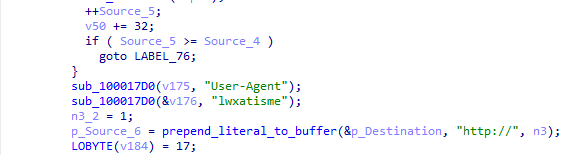
Top 5 Phishing-Driven Social Engineering Attacks on Companies in 2026
Your employees are not falling for “bad grammar” phishing anymore. They are being pulled into fake Microsoft logins, banking pages, AI tool instructions, real OAuth flows, and event invitations that look close enough to daily work to pass without alarm.
For CISOs, that is the real social engineering problem in 2026: attacks are no longer easy to separate from normal business activity. And when the SOC cannot quickly see what happened after the click, every investigation becomes a race against exposure.
The New CISO Problem: Social Engineering That Looks Like Business as Usual
Modern social engineering attacks are harder to stop because they no longer rely only on suspicious attachments or poorly written emails. They copy the workflows employees use every day.
For CISOs, this leads to difficult operational issues. The SOC may detect a suspicious link, page, or login attempt, but still lack the full context to understand whether the incident led to credential theft, token abuse, remote access, or exposure of business-critical systems.
That creates several problems at once:
- Too many gray-zone alerts that require manual validation
- Slow confidence during triage because the activity looks close to legitimate work
- Context gaps between Tier 1, Tier 2, and IR teams
- Delayed prioritization when the business impact is unclear
- Higher pressure on senior SOC resources due to unnecessary or poorly prepared escalations
- Limited executive visibility into whether the incident is a minor phishing attempt or a real access risk
This is why modern social engineering is a visibility, escalation, and decision-making problem for the entire security operation.
1. Fake Microsoft Login Pages Still Work Because They Abuse Daily Business Habits
Fake Microsoft login pages remain one of the most common social engineering tactics because they imitate a workflow employees already trust: opening a shared file, checking email, accessing OneDrive, or signing into Microsoft 365.
View analysis session with Microsoft page abuse
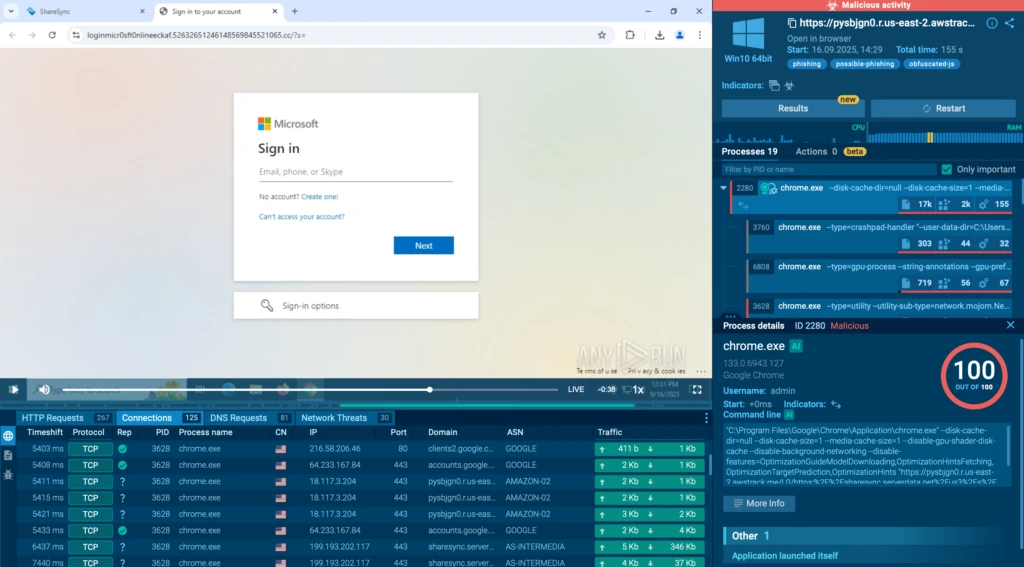
For security leaders, the concern is that this attack still hits one of the most valuable parts of the business: identity. Microsoft accounts often connect employees to email, files, SaaS tools, internal conversations, customer communication, and partner access. Once one account is compromised, the impact can quickly move beyond a single inbox.
CISO blind spot: The SOC may treat a fake login page as a simple phishing event, while the real business risk may be account takeover, email compromise, or lateral movement through connected cloud services.
2. Banking Phishing Turns Employee Trust into Financial Exposure
Banking-themed phishing attacks are especially risky because they target workflows employees may already treat as urgent: payment alerts, transaction issues, account notices, invoices, or financial document requests.
In the BlobPhish campaign observed by ANY.RUN, attackers impersonated major financial and cloud services, including Chase, Capital One, FDIC, E*TRADE, Schwab, Microsoft 365, OneDrive, and SharePoint. The campaign used phishing pages that appeared directly inside the browser, making them harder for traditional tools to detect through normal URL, file, or network visibility.
View the observed analysis session in ANY.RUN sandbox
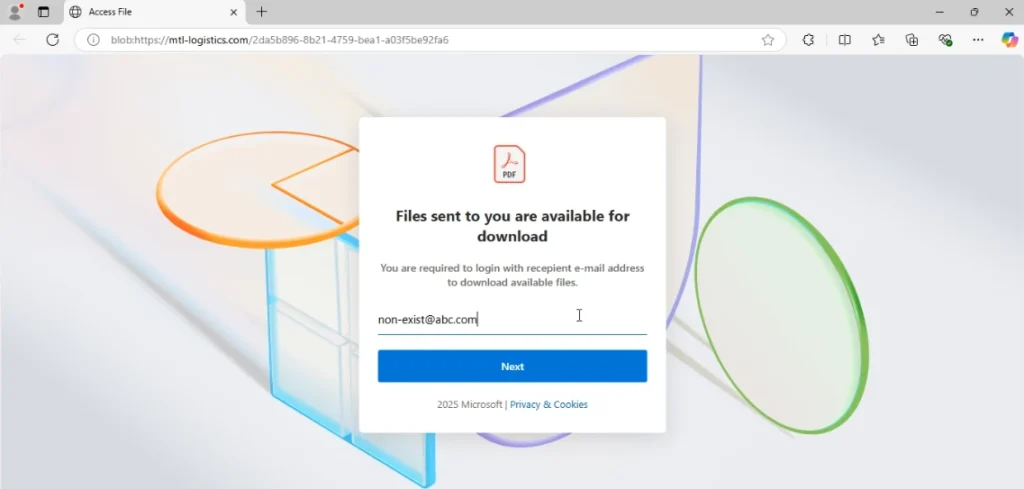
The danger is that these lures touch systems tied to money, approvals, vendors, customer data, and cloud access. A single captured credential can open the door to payment fraud, mailbox abuse, partner-facing scams, or sensitive data exposure.
CISO blind spot: A banking phishing lure may look like a narrow credential-theft attempt, but in a corporate environment, it can expose financial operations, cloud accounts, partner communication, and sensitive business data.
3. ClickFix Attacks Abuse Employee Trust in AI Tools
ClickFix attacks are becoming more dangerous as employees rely on AI tools for coding, research, automation, and daily productivity. Instead of sending a suspicious attachment, attackers imitate the tools people already use and guide them through actions that feel like normal setup or troubleshooting.
In one ANY.RUN case, attackers used fake documentation pages for popular AI tools, including Claude Code and Grok. The victim was prompted to run a command that appeared to be part of the installation or configuration process. In reality, that action launched a malware infection on macOS.
Observe the attack chain in a live sandbox session
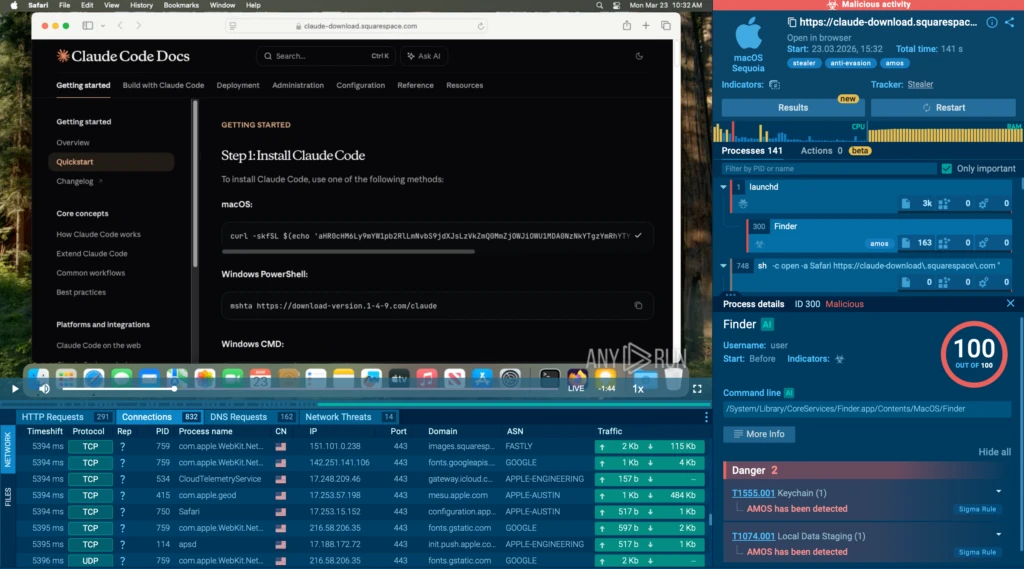
This tactic is especially risky because it targets high-value users. Developers, product teams, finance employees, and executives often use Macs and AI tools, and they may also have access to source code, cloud environments, financial systems, customer data, or internal documents.
CISO blind spot: ClickFix attacks may not look like a traditional phishing incident. The user is not opening a strange attachment. They are following instructions from what appears to be a trusted AI tool page. That makes the attack harder to catch early and easier to underestimate until credentials, session data, or endpoint access are already exposed.
4. OAuth Device Code Phishing Turns Legitimate Microsoft Login into an Access Risk
OAuth device code phishing is dangerous as it does not follow the usual fake-login-page pattern. The victim is sent to a real Microsoft verification page, enters a code, completes authentication, and may even pass MFA.
In the EvilTokens campaign observed by ANY.RUN, attackers abused Microsoft’s OAuth Device Code flow to get access tokens without directly stealing the user’s password. More than 180 phishing URLs were detected in one week, showing how quickly this technique can spread across Microsoft 365 environments.
View sample analysis in ANY.RUN Interactive Sandbox
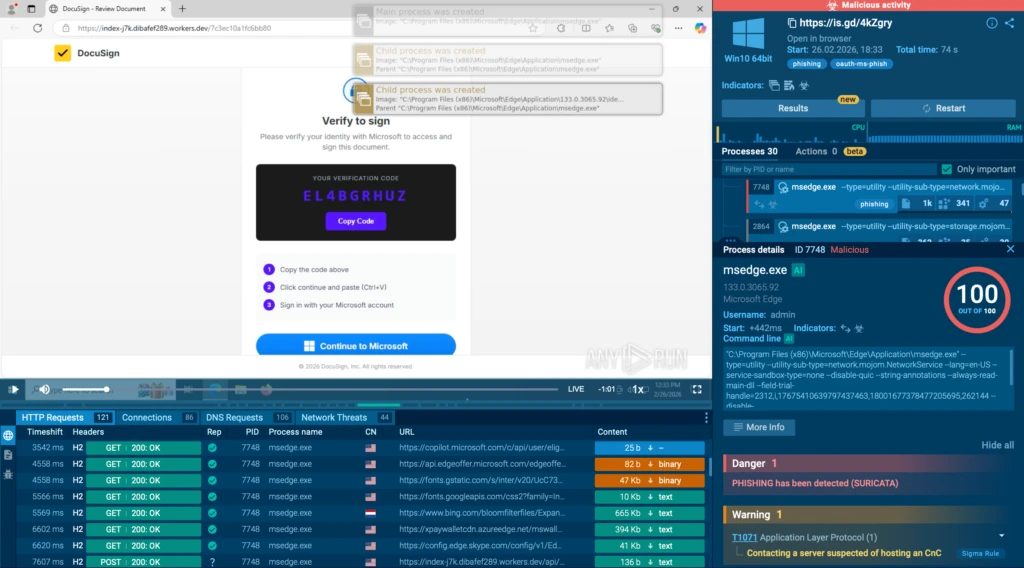
This makes the attack harder to recognize as phishing. From the user’s side, the process looks legitimate. From the security team’s side, the activity may blend into normal authentication traffic until the account is already exposed.
CISO blind spot: OAuth device code phishing may not trigger the same warning signs as a fake login page. The user authenticates through Microsoft, but the attacker receives the token. That can lead to Microsoft 365 account takeover, mailbox access, cloud data exposure, and delayed response because the compromise does not look like classic credential theft.
5. Fake Invitations Turn Simple Lures into Access Risk
Fake invitation phishing works because it feels harmless. An event invite, a CAPTCHA check, and a sign-in page can look like a normal online workflow, especially when employees are used to opening meeting links, webinars, vendor invitations, and shared business events.
In a U.S.-targeted campaign analyzed by ANY.RUN, attackers used fake event invitation pages to push victims toward credential theft, OTP interception, or remote management tool installation. Some pages collected email credentials and one-time codes, while others delivered legitimate RMM tools such as ScreenConnect, ITarian, Datto RMM, ConnectWise, and LogMeIn Rescue.
View analysis session in ANY.RUN Sandbox

That makes the campaign harder to judge quickly. The same type of lure can lead to different outcomes: stolen mailbox access, intercepted MFA codes, or remote access inside the environment. For the SOC, this creates a gray-zone investigation where several small signals need to be connected before the real risk becomes clear.
CISO blind spot: A fake invitation may look like a low-priority phishing page, but it can become an access problem fast. If the SOC cannot quickly see whether the page led to credential theft, OTP capture, or RMM installation, response may start only after exposure has already grown.
How CISOs Can Close These Social Engineering Blind Spots
The hardest part of modern social engineering response is often not spotting something suspicious. It is proving what happened next fast enough to make the right decision.
A suspicious email, link, page, or file may be detected, but the SOC still needs to answer the questions that determine the real risk: Did the user submit credentials? Was MFA or OAuth abused? Was remote access delivered? Did the activity reach an endpoint? Does this require escalation, containment, or leadership attention?
To close this gap, social engineering investigations need to move through a clearer workflow:
1. Validate the threat before it becomes a bigger incident
When a suspicious email, link, file, or phishing page reaches the SOC, the priority is not only to label it as malicious or benign. The team needs to understand what the object actually does and how far the activity could go if left unchecked.
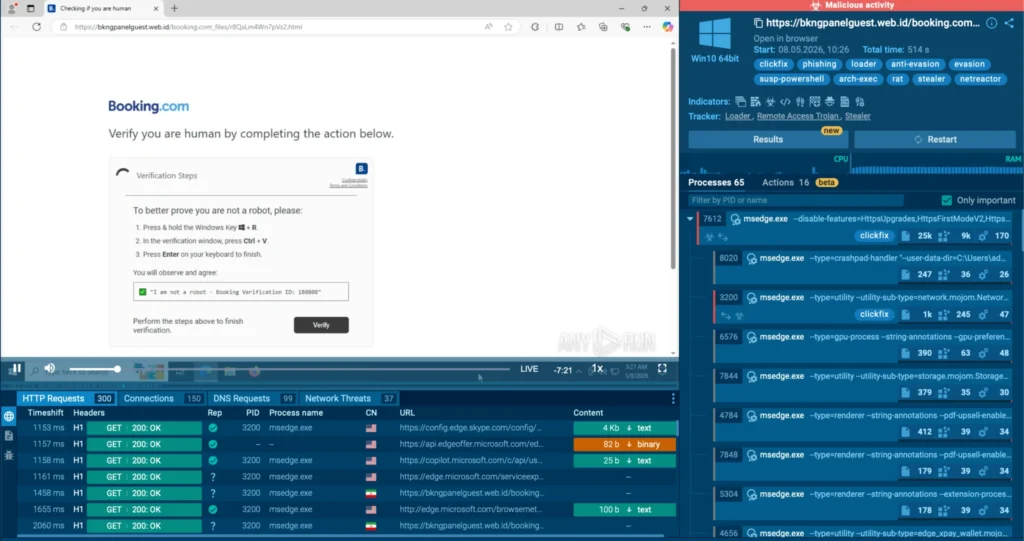
ANY.RUN’s Interactive Sandbox lets teams safely open the suspicious object and observe the full behavior in real time: redirects, fake login pages, OTP prompts, file downloads, remote access activity, and concealment attempts. Instead of guessing from isolated alerts, the SOC can see and interact whenever needed.
This gives teams earlier certainty during the most critical stage of triage. They can confirm the real risk faster, decide whether the case needs escalation, and reduce the chance that a “small” social engineering alert becomes a larger business incident.
2. Turn investigation results into evidence the whole SOC can use
Even when the attack is visible, teams still need to communicate the findings clearly. Raw telemetry can slow down handoffs, create context loss, and make it harder for managers to understand severity.
With Tier 1 Reports and AI Summary inside the sandbox, findings become structured, SOC-ready context: what happened, why it matters, what evidence supports escalation, and where the team should focus next.
This gives teams several practical benefits:
- Faster triage because Tier 1 gets a clear threat overview without manually rebuilding the attack story
- Cleaner escalations as Tier 2 and IR receive context, not just raw indicators
- Less context loss when the case moves between teams or shifts
- More consistent reporting across analysts and incidents
- Clearer management visibility into severity, exposure, and required next steps
- Better response decisions because teams can act on confirmed behavior, not assumptions
This way, social engineering investigations do not stop at “we found suspicious activity.” They become ready-to-use evidence for prioritization, escalation, containment, and leadership reporting.
3. Understand whether the case is isolated or part of a wider campaign
After the behavior is confirmed, the next question is scope. Is this one phishing attempt, or part of a broader campaign targeting similar companies, industries, or regions?
With ANY.RUN Threat Intelligence, teams can pivot from one case to related domains, IOCs, URL patterns, infrastructure, and similar sandbox sessions. This gives the SOC broader context for detection, hunting, and prioritization, so teams are not making decisions from one alert alone.
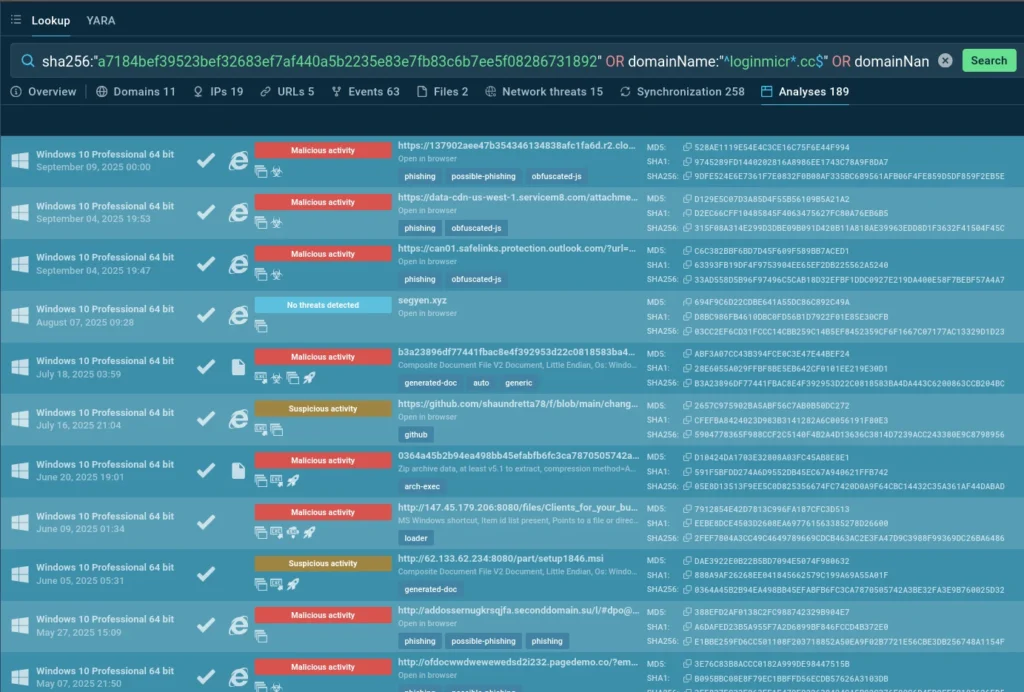
For security leaders, this creates a stronger operating model for social engineering response:
- Earlier risk confirmation before credential theft, token abuse, or remote access turns into a larger incident
- Better campaign awareness when one suspicious case is connected to related infrastructure and repeated attack patterns
- Stronger SOC consistency because investigations follow the same process instead of depending on individual experience
- Improved resource allocation as senior teams focus on cases with confirmed exposure, not unclear alerts
- More defensible incident decisions based on visible behavior, threat context, and structured reporting
- Clearer business-risk communication when leaders need to understand what happened, what is exposed, and what happens next
This turns social engineering response into a repeatable process: observe the attack, enrich the context, document the findings, and act before exposure spreads.
From Social Engineering Visibility to SOC Performance
Closing social engineering blind spots is about reducing the operational drag these attacks create across the SOC: unclear alerts, manual validation, repeated handoffs, and delayed decisions.
ANY.RUN helps security teams improve that process with interactive sandbox analysis and threat intelligence solutions working together in one investigation workflow.
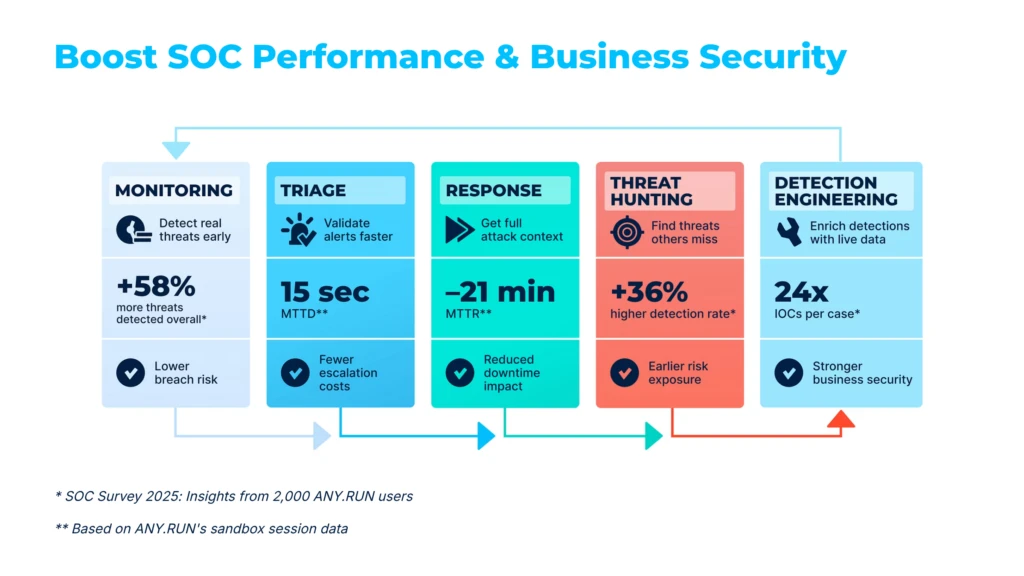
Organizations using ANY.RUN report:
- 21 minutes faster MTTR per case, helping reduce the time between detection and containment
- 94% faster triage reported by users during suspicious file, URL, and phishing investigations
- 30% fewer Tier 1 to Tier 2 escalations, helping protect senior team capacity
- Up to 20% lower Tier 1 workload by reducing manual investigation effort
- Up to 3x stronger SOC efficiency across validation, enrichment, escalation, and response workflows
These results show the practical value of closing social engineering blind spots: fewer delays, less wasted effort, and faster confidence when the business needs a clear answer.
About ANY.RUN
ANY.RUN delivers cybersecurity solutions built to support real-world SOC operations. Its platform helps security teams investigate threats faster, make informed decisions, and apply threat intelligence across detection, triage, response, and reporting workflows.
The company’s solutions include the Interactive Sandbox for enterprise-grade malware and phishing analysis, as well as ANY.RUN Threat Intelligence solutions, including TI Lookup, TI Feeds, TI Reports, and YARA Search. Together, they provide fresh, behavior-based intelligence built on live attack analysis.
ANY.RUN is SOC 2 Type II attested, reflecting strong security controls and a commitment to protecting customer data. For SOCs, MSSPs, and enterprise security teams, ANY.RUN helps reduce investigation uncertainty, improve triage speed, and turn complex threat activity into clear, actionable evidence.
The post Top 5 Phishing-Driven Social Engineering Attacks on Companies in 2026 appeared first on ANY.RUN’s Cybersecurity Blog.
ANY.RUN’s Cybersecurity Blog – Read More