Hacking Black Friday: using LLMs to save on the “sale of the year” | Kaspersky official blog

Black Friday is an annual bargain hunt that often spirals into chaotic impulse buying. Stores promise incredible discounts of 50–70%, but are those savings really as significant as they seem? In 2025, we’ve got a new ally on our side in the fight for smart spending: artificial intelligence. Here’s how you can use powerful LLMs like ChatGPT and Claude to save money and never fall for a shady seller’s tricks again.

Before we enlist AI to help you save, it’s crucial we understand the battlefield. Studies paint a grim picture: a significant portion of those Black Friday “super discounts” are nothing more than a marketing illusion.

The tactic is simple and effective: in early October, stores hike up their prices, sometimes by fifty to a hundred percent. Then, when Black Friday finally hits, they “slash” the price by that same 50% and proudly tout the impressive discount on the tag. In reality, you’re just buying the item at its regular price — or sometimes even paying a premium.

While the European Union’s Omnibus Directive mandates that retailers display the lowest price from the last 30 days, even this rule is easily skirted. Retailers just hike the price up 30 days before the event, which allows them to technically adhere to the directive while still duping consumers.

How LLMs can help you save

Artificial intelligence is changing the game. Analysts estimate that in 2024, AI tools helped consumers make a staggering $60 billion in transactions during Cyber Week, and that number is only projected to climb in 2025. Already, one in three U.S. shoppers plans to lean on AI for their shopping needs.

As you know, an LLM is immune to emotion; it won’t react to marketing triggers like “2 hours left!” or “only one left in stock!” Instead, the model analyzes huge volumes of data, compares prices, tracks price history, and helps you make rational decisions.

In seconds, AI can crawl hundreds of online stores, zeroing in not only on the product you want at the lowest price but also on cheaper alternatives with comparable specs. Modern LLMs can help you figure out if a discount is truly beneficial — or if you’re falling for a scam. Amazon, for example, has already integrated a price-tracking feature into its AI assistant, Rufus, though users have noted that the tool still has some kinks to work out. Using just a few prompts, the AI can factor in your preferences, budget, and past purchases to suggest exactly what you need, cutting through all the marketing noise. Instead of wasting hours poring over spec sheets, just ask the assistant, “What’s the difference between vacuum cleaner A and vacuum cleaner B?” And you get your answer — regardless of whether the seller’s website features a comparison tool. You can use the prompts below for ChatGPT, Claude, or Gemini.

Preparing for Black Friday with AI

Step 1. Create a wish list

Don’t wait for the sales to start; your goal is to gather all the baseline data upfront.

Help me create a shopping list for Black Friday. My budget is: [amount].
I'm interested in the following categories: [electronics/clothing/home goods].
Priorities: [performance/quality/brand/price].
Create a structured list with explanations of why each item is worth considering.

Step 2. Start tracking prices

This is a critical stage. You need to know the real price of an item before the Black Friday marketing hype machine starts rolling. On Amazon, tools like CamelCamelCamel and Keepa can help, and for AliExpress, look at AliPrice and AliTools.

Step 3. Analyze price dynamics

Collected the price data? Excellent. If you see a sharp price spike in October followed by a corresponding drop in November, you’re looking at the classic scam tactic. But if the data on the charts seems unclear, use the prompt below. The months we used are just examples, so feel free to use your own date ranges. The larger the intervals between the price checks, the higher your chances of catching an unjustified price hike.

I'm tracking [product name] on [platform]. Here's the price data:
- September: [price]
- Early October: [price]
- Late October: [price]
- Current price: [price]
- Advertised discount: [percentage]
- Analyze this data. Is this a genuine discount or is the store manipulating prices?
When is the best time to buy? Should I wait for Black Friday or buy now?

Step 4. Search for alternatives

Don’t get fixated on a single product. There may be more advantageous alternatives available.

I want to buy [product, model]. My goal is to [what it's needed for]. Budget: [amount].
Find 3–5 alternative products that solve the same problem but might be more cost-effective.
Compare them based on features, price, and reviews. Display the results in a table.

Experience shows that LLM models are particularly good at comparative analysis, highlighting key differences between similar products.

Step 5. Vet the seller and the website

Black Friday is an absolute field day for scammers. In the third quarter of 2025 we saw the number of fake online stores skyrocket by 20% compared to the monthly average. Let’s run through the immediate red flags that should raise your suspicions:

  • Domains like .shop, .store, .vip or .top — rarely used by major, established brands
  • Unbelievable discounts of 80–90% on popular items
  • Lack of a secure HTTPS connection, meaning no padlock icon next to the URL in your browser
  • Poorly translated text and/or grammatical errors

Finally, just in case, run the following prompt through the AI of your choice to check the store’s legitimacy:

I have found [product name] on [URL]. The price is very attractive: [price], which is [percentage]% below the average. How can I verify that this is not a scam?
What are the signs of a fake store? What should I pay attention to?

Step 6. Compile the all-in-one prompt

This is the all-in-one prompt containing all the data you gathered in the previous steps; it works in any LLM:

You are an expert in spotting retail price manipulation.
Product: [name]
Store: [name]
Current price: [price]
Advertised discount: [percentage]%
Stated old price [price]
Price history I tracked:
[state data for several months]
Tasks:
1. Is this a genuine discount or a manipulation?
2. What was the real average price before the alleged sale?
3. Should I buy now, or is the price likely to drop even further?
4. Your verdict: buy / wait / look for alternatives?

Note that neural networks’ cybersecurity is still far from perfect: vulnerabilities continue to be discovered within them. Therefore, to shield yourself from phishing and spam links you might accidentally follow, be sure to install a proven and reliable security solution, such as Kaspersky Premium. It’ll keep your Black Friday from turning into a financial Black Monday for both your assets and personal data.

Getting local results

One of the core issues with global AI models is that they often deliver information that’s not region-specific, or is relevant to a region other than yours. But you can adapt them to your needs with this prompt:

You are an AI shopping assistant for [country, city]. All your recommendations must factor in the local market, available stores, and regional platforms ([list of stores, if desired]). State prices in [currency]. Speak [language].
My task is to find [product] at the best price for Black Friday.
Which local platforms should I check? What kind of sales are common in [region]?

Specialized prompts for each LLM

Each LLM has its strengths (also weaknesses). With these in mind, we’ve created prompts that unlock the potential of each language model. For the highest quality results, we recommend utilizing models with a larger number of parameters (usually available via paid subscriptions), and activating deep thinking when submitting your requests.

ChatGPT excels at structuring information and generating lists. Here’s a prompt for budget planning:

Create a shopping strategy for Black Friday.
Budget: [amount]
Priority categories: [list]
For each category, specify:
1. Average price before discounts
2. Expected discounted price
3. Best time to buy (before/during/after Black Friday)
4. Alternatives
Format the results as a table.

And here’s a prompt for store comparison:

Product: [name and model]
Found in stores:
- [Store 1]: [price], shipping [terms]
- [Store 2]: [price], shipping [terms]
- [Store 3]: [price], shipping [terms]
Which option is more cost-effective considering the total cost? Analyze the reliability of the stores.

Claude is particularly good at analyzing large volumes of text and highlighting key points. Here’s a Claude prompt for analyzing reviews:

Here's a selection of reviews for [name] from various platforms: [insert reviews].
Analyze them and highlight:
1. Key advantages (top 3)
2. Key disadvantages (top 3)
3. Who is this product best suited for, and who should avoid it?
4. Are there any alarming issues mentioned?
5. Overall recommendation: is this worth buying?

Long-term planning prompt:

You're a financial consultant. I'm planning a major purchase: [product] for [price].
My monthly income: [amount]. My savings: [amount].
Should I buy this on Black Friday or should I wait?
What alternative saving and purchasing strategies can you offer?

Gemini offers seamless integration with the Google ecosystem and provides in-depth capabilities when working with images. Attach a screenshot of the banner or the offer on the website and write the prompt:

This is a Black Friday offer. Evaluate:
1. How attractive is this discount?
2. What information should I check additionally?
3. What should I pay attention to in the description?
4. Signs of a possible scam

Quick search prompt:

Find the best Black Friday 2025 offers in [category].
I'm looking for: [product characteristics]
Budget: [amount]
Region: [country/city]
Show the top-5 options and provide a justification for each choice.

Final checklist

  1. Use AI to create a wish list, and start tracking prices with tools like CamelCamelCamel, Keepa, or other similar services. Set up convenient price-drop notifications.
  2. Analyze the collected price data, find alternative products and stores, and simultaneously verify the sellers’ reliability.
  3. Set up a separate credit card for purchases with a spending limit. If possible, get a virtual card and prepare our prompts for quick retail-offer analysis.
  4. On the actual sale day, don’t fall for urgency tricks like “last item in stock!”, and make sure you check every “super deal” with your AI assistant and a critical eye. Cross-reference the price history, don’t open suspicious emails, and don’t follow dubious links. If you follow these steps, your Black Friday will result not only in zero losses, but also in genuinely advantageous purchases.

What else to read on the topic of AI:

Kaspersky official blog – ​Read More

Not enough people are talking about this Garmin competitor that wins in unique ways

With the latest Grit X2, Polar continues to optimize experiences for training, coaching, and performance improvement.

Latest news – ​Read More

The top 10 laptops our readers bought this year (no. 1 surprised us)

We review dozens of laptops each year at ZDNET. These are the most popular ones among our readers for 2025.

Latest news – ​Read More

The best 40-inch TVs of 2025: Expert tested for smaller spaces

We tested and reviewed the best 40-inch TVs you can buy from brands like Samsung, Sony, and TCL to help you find the right fit for your budget and home theater.

Latest news – ​Read More

Bill Largent: On epic reads, lifelong learning, and empathy

Bill Largent: On epic reads, lifelong learning, and empathy

Welcome to another episode of Humans of Talos! This week, Amy sits down with William (Bill) Largent from the Strategic Planning and Communications team. Bill’s role as Senior Security Researcher spans from threat research to communicating Talos’s critical work to internal teams, partners, and customers.

Join us as Bill shares what drew him to Talos, how his love of reading has shaped his cybersecurity ethos, and the key insights he shares for the next generation of cybersecurity professionals.

Amy Ciminnisi: Bill, it’s great to have you on. You’re part of my team in Strategic Planning and Communications. Can you tell us a little bit about what you do here at Talos?

Bill Largent: Generally speaking, most of my time is still spent on threat research and hunting. About 25 to 30% of the time, they have me talk to people. They let me out of the cage for a little while and put me in front of people. I get to talk to internal Cisco teams and to a lot of partners, which is really interesting. I discuss the state of things, help them understand what’s going on in the threat landscape, and explain what Talos is and how we do things. I also get to talk to customers, which is really fun. My background is in vendor-agnostic remote managed services, so I ran SOCs for years. Talking to people who are doing that now is really refreshing.

AC: You’ve been at Cisco for a while. What made you want to join Talos, and how did that career transition go for you?

BL: It’s really interesting. I’ve been here a long time. If you look me up in the directory, you’ll see my photo is about 24 years old. It was taken on a Saturday or Sunday night at 2 or 3 a.m. because I was working overnight shifts, so it looks exactly like you’d imagine. Getting to Talos was about seeking out smarter people. I believe if you’re the smartest person in the room, you’re in the wrong room, so I started tracking where the smarter people were and went there.

As a member of Talos, there’s never a smarter room than the Talos room. It’s insane, and I mean that for any topic you can think of — chaos theory, mathematics, planetary science, beer making… You name it, someone in Talos is an expert. It’s honestly great. That’s how I came to Talos: trying to find the smartest people in the room.

AC: Is working with people and especially people on Talos your favorite thing about your role, or are there other aspects you love?

BL: For me, the people are a massive differentiator from working anywhere else. I feel super supported and engaged all the time. Beyond the people, what’s interesting about cybersecurity is that it evolves so fast and changes so much that you’re never in a state of stasis. There’s always something new to learn, and even though it’s all cyclical and some things come back around, there’s a lot of difference day to day. It keeps my brain occupied. I also have the support of people who encourage me to go learn things that interest me.


Want to see more? Watch the full interview, and don’t forget to subscribe to our YouTube channel for future episodes of Humans of Talos.

Cisco Talos Blog – ​Read More

China-aligned threat actor is conducting widespread cyberespionage campaigns

The threat group PlushDaemon uses routers and other network device implants to redirect domain name system (DNS) queries to malicious external servers which take over updates to unleash tools used for cyberespionage.

The Record from Recorded Future News – ​Read More

Vaping Is ‘Everywhere’ in Schools—Sparking a Bathroom Surveillance Boom

Schools in the US are installing vape-detection tech in bathrooms to thwart student nicotine and cannabis use. A new investigation reveals the impact of using spying to solve a problem.

Security Latest – ​Read More

CredShields Joins Forces with Checkmarx to Bring Smart Contract Security to Enterprise AppSec Programs

Singapore, Singapore, 19th November 2025, CyberNewsWire

Hackread – Cybersecurity News, Data Breaches, Tech, AI, Crypto and More – ​Read More

LOLBin Attacks Explained with Examples: Everything SOC Teams Need to Know 

Some attacks smash the door open. LOLBins just borrow your keys and walk right in. 

They’re tricky because tools everyone trusts suddenly start doing things that don’t match their usual job; loading odd-looking modules, decoding files that shouldn’t need decoding, or quietly handing work off to hidden PowerShell scripts. At first glance it all feels normal, but a closer look shows a payload slowly being set up in the background. 

For analysts, the real challenge is noticing that shift before it grows into a full incident. 

Let’s take a closer look at what’s hiding behind LOLBin attacks, and how advanced SOC teams uncover them in minutes without much effort. 

What Are LOLBin Attacks? 

LOLBin attacks occur when threat actors repurpose legitimate Windows system binaries (rundll32, certutil, mshta, powershell, regsvr32, etc.) to carry out malicious actions. These tools are built into every system, signed by Microsoft, and widely used by normal applications, which is why attackers rely on them. 

Using LOLBins, adversaries can: 

  • Load disguised or renamed DLLs 
  • Decode or unpack payloads using built-in utilities 
  • Trigger PowerShell or script execution indirectly 
  • Execute code completely in memory 
  • Blend malicious steps into routine system activity 

This approach lets attackers avoid dropping obvious malware and makes early-stage execution appear clean and legitimate. 

Why LOLBin Attacks Are a Real Risk for Businesses? 

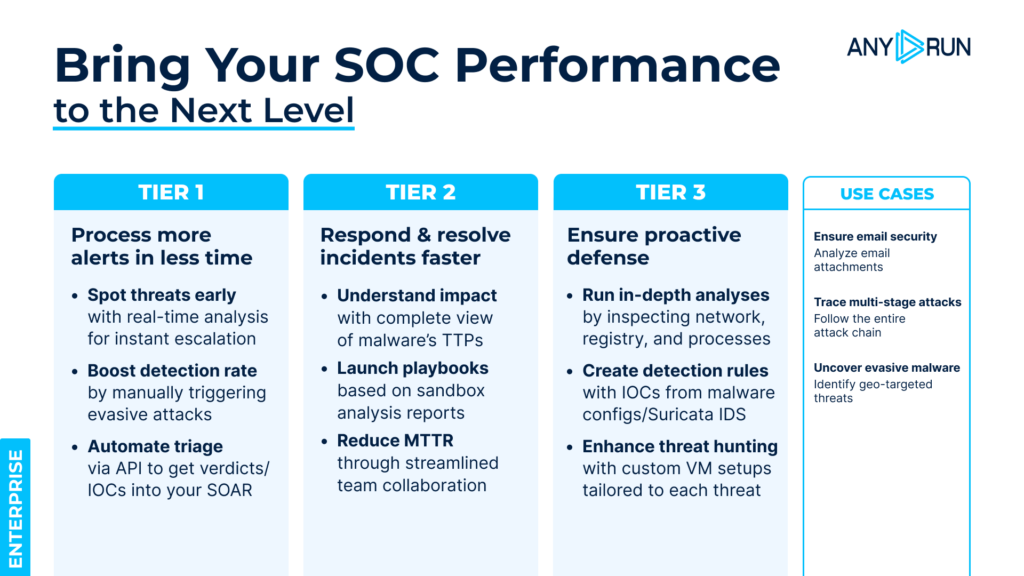
ANY.RUN’s Interactive Sandbox provides tangible results across every SOC tier

The real problem isn’t the binaries themselves but how much visibility your SOC loses when attackers hide behind them. When malicious activity runs inside trusted system tools, the early signs of an intrusion become dramatically harder to catch. 

Here’s what makes them dangerous: 

  • Normal on the surface: Activity is routed through tools the environment already trusts. 
  • Minimal forensic evidence: In-memory execution leaves few files to investigate. 
  • Weak signature coverage: Microsoft-signed binaries rarely trigger basic detection rules. 
  • Extended dwell time: Attackers gain more space for lateral movement and credential access. 
  • Harder investigations: Clean-looking events force analysts to dig deeper to find the real issue. 
  • Higher SOC workload: The team must identify subtle behavior shifts instead of relying on clear indicators. 

This means attackers can establish footholds, unpack payloads, or run loaders while the environment still appears clean, leading to late detection and higher incident impact. 

The Fastest Way to Reveal LOLBin Abuse: How ANY.RUN Makes It Obvious 

LOLBin attacks only work when no one can see what’s really happening behind those trusted Windows binaries. ANY.RUN removes that advantage by showing analysts the full behavior in real time; not just the file name or the process label, but the actual actions taking place underneath. 

With ANY.RUN’s sandbox, “normal-looking” activity turns into something you can spot immediately: 

  • Process behavior becomes clear at a glance: rundll32 loading a strange module, certutil decoding an unexpected file, mshta spawning hidden PowerShell… every unusual step is visible right away. 
  • Parent–child chains tell the full story: Instead of digging through logs, you see exactly who launched what, and whether it fits normal usage patterns. 
  • Command lines show the truth: Encoded strings, odd export calls, Temp-folder payloads, and hidden flags are exposed instantly. 
  • In-memory actions are no longer invisible: Even when attackers avoid dropping files, the sandbox reveals decoded scripts, loader behavior, and execution flow. 
  • Artifacts stay captured: Renamed DLLs, extracted archives, decrypted payloads, and cleanup attempts can all be reviewed without rushing or digging. 
  • Analysis becomes interactive: Analysts can click deeper, replay events, and confirm suspicions in minutes instead of piecing everything together manually. 

Instead of guessing whether a trusted binary is being misused, ANY.RUN shows the exact behavior clearly, quickly, and with the context you need to act confidently. 

Real-Time LOLBin Attacks Revealed Inside ANY.RUN in Minutes 

Here are a few real LOLBin attacks captured and analyzed inside ANY.RUN
Take a look at how these techniques unfold in real time, and see how easily your team can expose the same behavior using interactive analysis

1. LOLBin RUNDLL32.EXE 

ATT&CK® Technique: T1218.011 – Rundll32 

What this attack is: 
A trusted Windows utility used to load and run a disguised module, letting attackers execute their payload under a legitimate process. 

See this RUNDLL32 attack exposed live inside ANY.RUN: 
→ Gh0st RAT delivered through rundll32 

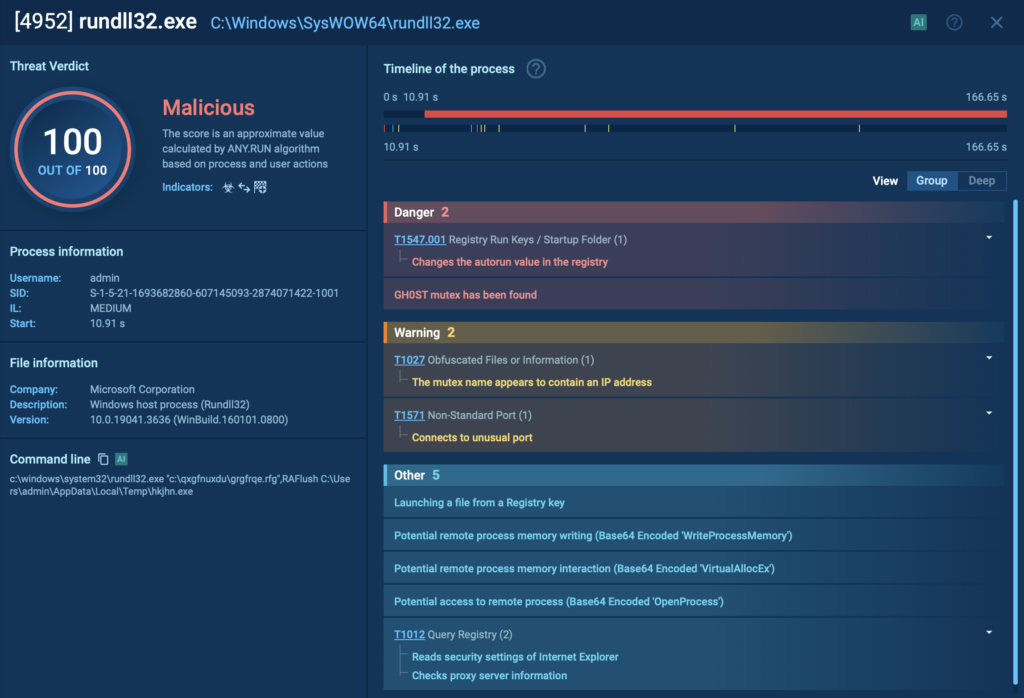
rundll32.exe runs the hidden module and shows clear malicious actions 

Gh0st RAT launches the legitimate rundll32.exe, which then loads a disguised module named grgfrqe.rfg from an unusual directory. The file isn’t a typical DLL at first glance; the strange extension is intentionally chosen to bypass simple “.dll” rules and blend into the system. 

Expose hidden threats with ANY.RUN’s Sandbox
Detect evasive malware and phishing in under 60 seconds


Sign up now


Once loaded, rundll32 calls an export named RAFlush and passes it a path to a temporary executable: C:UsersadminAppDataLocalTemphkjhn.exe

From there, the chain unfolds: 

  • Load: rundll32 loads the renamed DLL (grgfrqe.rfg) 
  • Invoke: The RAFlush export is executed 
  • Drop/execute: The module drops, unpacks, or runs hkjhn.exe inside %Temp% 
  • Cleanup: Temporary files are removed to reduce traces 

This is a typical LOLBin pattern: a trusted binary quietly executing hidden functionality while the malicious module stays disguised and difficult to catch without behavioral visibility. 

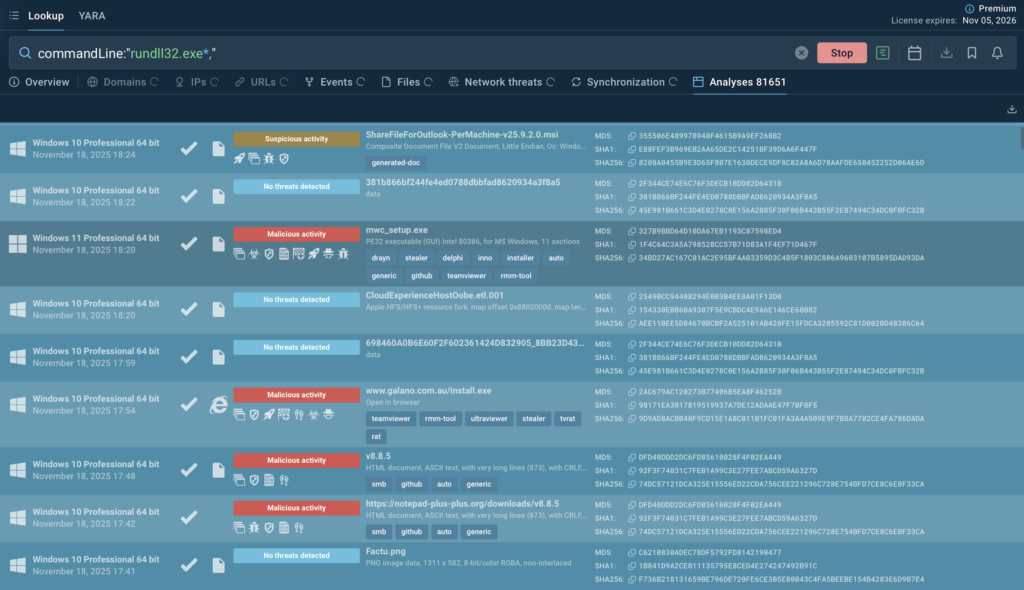
Use this ANY.RUN’s TI Lookup query to explore similar samples and collect IOCs: 

commandLine:”rundll32.exe*” 

Sandbox analyses showing widespread use of rundll32.exe across malicious and suspicious samples 

Equip your team with real-time intel 
from 15K SOCs and 500K analysts


Start now


2. LOLBin CERTUTIL.EXE 

ATT&CK® Technique: T1140 – Deobfuscate/Decode Files or Information 

What this attack is: 
A built-in Windows tool misused to decode, transform, or prepare hidden payloads before execution; all under the guise of a legitimate system operation. 

See this CERTUTIL attack exposed live inside ANY.RUN: 
→ PXAStealer decoding and unpacking files through certutil 

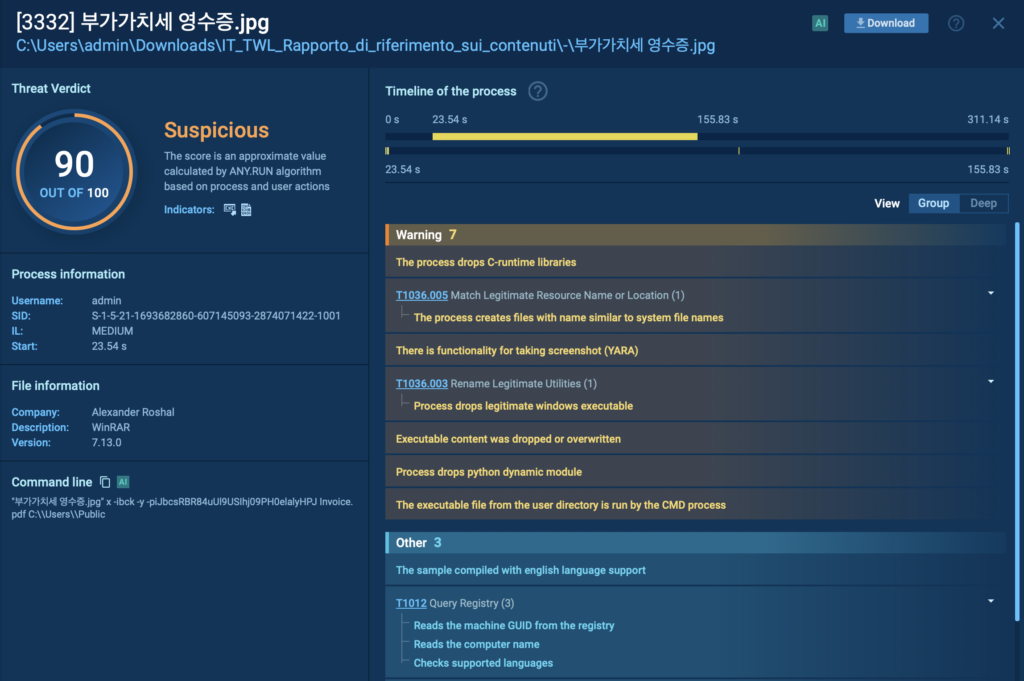
A JPG-named WinRAR binary extracts a protected archive and drops new components 

PXAStealer uses certutil.exe to quietly decode a disguised file named DA 성형외과 재무 보고서.pdf. Although it appears to be a harmless PDF, certutil converts it into Invoice.pdf, which is not a document at all but a RAR archive

The attack continues as a renamed instance of WinRAR, disguised as a JPEG image (부가가치세 영수증.jpg), unpacks the archive using the password 
iJbcsRBR84uUl9USIhj09PH0elalyHPJ

The execution flow looks like this: 

  • Decode: certutil transforms the fake PDF into an archive 
  • Extract: The disguised WinRAR instance unpacks it 
  • Execute: The payload inside the archive is launched 
  • Cleanup: Files are removed or hidden to minimize traces 

This combination, a trusted decoding tool + disguised content + hidden extraction, is a classic LOLBin chain designed to slip past basic detection and appear routine unless investigated behaviorally. 

Check out more sessions of this attack and gather related IOCs using this TI query

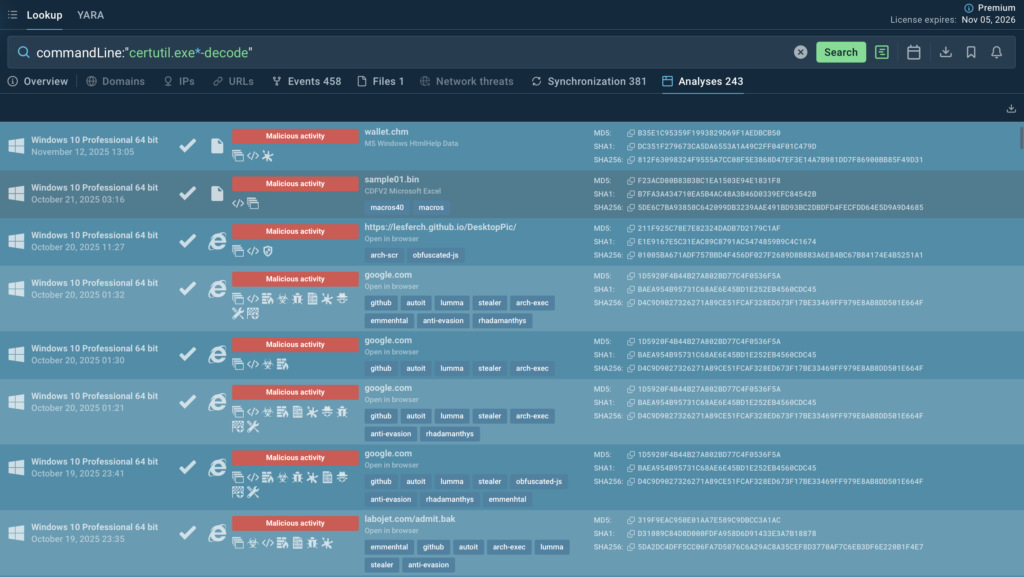
commandLine:”certutil.exe*-decode” 

Several sandbox sessions highlight certutil -decode as a common step in malware chains 

3. LOLBin MSHTA.EXE 

ATT&CK® Technique: T1218.005 – Mshta 

What this attack is: 
A trusted Windows utility used to execute HTA-based scripts that trigger hidden PowerShell activity, enabling in-memory execution without leaving clear artifacts. 

See this MSHTA attack exposed live inside ANY.RUN: 
→ ReverseLoader executed through mshta + hidden PowerShell 

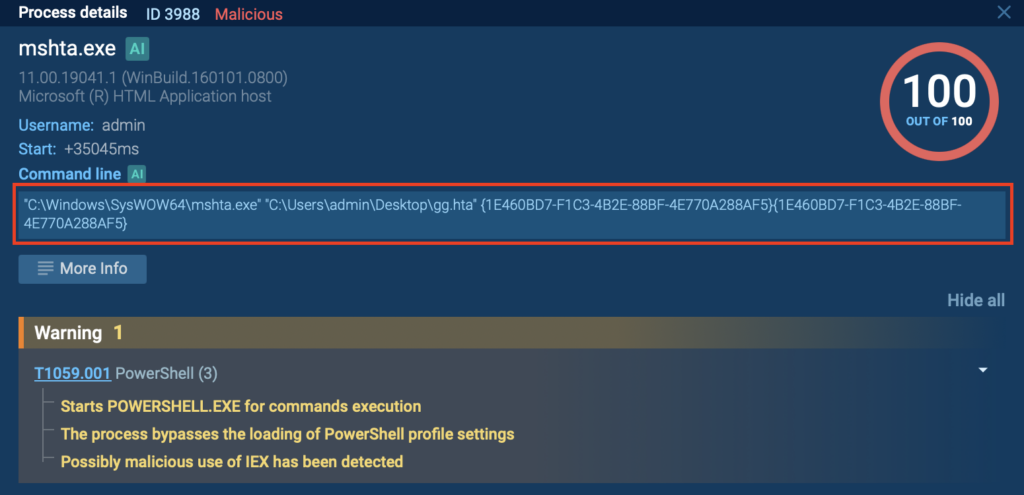
mshta.exe runs gg.hta, which triggers hidden PowerShell execution; a clear sign of an HTA-based loader 

In this attack chain, mshta.exe launches an HTA file named gg.hta from the user’s desktop. The HTA isn’t a simple script; it contains obfuscated logic that immediately spawns a PowerShell process configured to stay out of sight. 

PowerShell is executed with: 

  • -NoProfile 
  • -WindowStyle Hidden 
  • A Base64-encoded command decoded and passed into Invoke-Expression 

This allows the payload to run entirely in memory, without dropping a traditional file on disk. 

Here’s how the chain unfolds: 

  • Deliver: The HTA file is delivered locally or through a link 
  • Execute: mshta runs the HTA script as a trusted system tool 
  • Decode & run: PowerShell decodes the Base64 string and executes the logic 
  • Stealth: Hidden windows and in-memory execution conceal most traces 

This mshta + encoded PowerShell combination is a well-known method for quietly loading backdoors, RATs, and script-based loaders while appearing to use legitimate system components. 

Check out more sessions of similar attacks and gather relevant data using this TI query

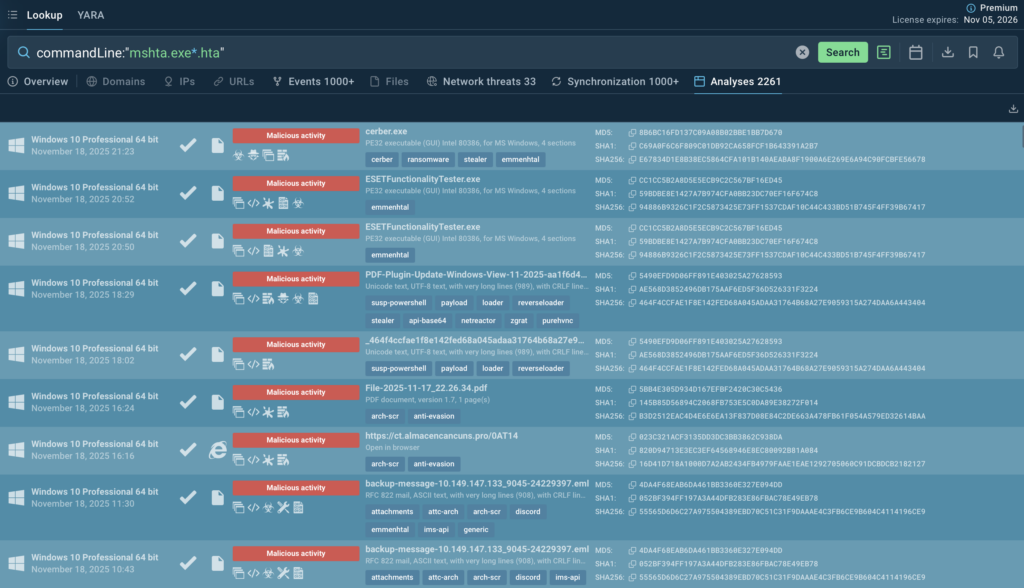
commandLine:”mshta.exe*.hta” 

Sandbox analyses showing widespread abuse of mshta.exe to run HTA-based loaders 

Ready to speed up investigations across your SOC? 


Talk to Experts


Strengthening Defenses Against LOLBin Techniques 

For SOC managers, stopping LOLBin abuse starts with improving how the team spots unusual behavior inside trusted system tools. These attacks don’t announce themselves, so the goal is to create clearer visibility and reduce the time analysts spend guessing what’s happening. 

Focus on behavior, not the binary: Even legitimate tools like rundll32, certutil, and mshta become suspicious when they load odd modules, decode files, or trigger hidden PowerShell. Building detections around these behaviors helps the team surface threats that signatures often miss. 

Give analysts a simple triage path: Most LOLBin alerts look harmless at first. A lightweight checklist, parent process, command line, execution path, and any decoding or script activity, keeps investigations consistent and prevents early-stage activity from slipping by. 

Use sandbox analysis to confirm suspicious cases quickly: Instead of piecing clues together from logs, ANY.RUN gives analysts the full picture in seconds: process chains, decoded content, dropped components, and in-memory activity. This cuts investigation time and helps the team act confidently. 

Add small policy controls where possible: Limiting execution from user-controlled folders or applying basic PowerShell restrictions reduces the surface attackers can exploit without disrupting normal operations. 

A few focused improvements like these help SOC managers turn LOLBin activity from a hidden risk into something the team can catch early and handle efficiently. 

About ANY.RUN 

ANY.RUN is a leading provider of interactive malware analysis and threat intelligence solutions, built to give SOC teams the visibility they need when traditional tools fall short.  

Today, 15,000+ organizations worldwide use ANY.RUN to speed up investigations, strengthen detection pipelines, and give their teams a clearer view of what’s really happening on their endpoints. 

SOC teams using ANY.RUN report measurable improvements, including: 

  • 3× boost in SOC efficiency 
  • 95% faster initial triage 
  • Up to 58% more threats identified 
  • 21-minute reduction in MTTR per incident 

Give your team the visibility they need: Try ANY.RUN now 

The post LOLBin Attacks Explained with Examples: Everything SOC Teams Need to Know  appeared first on ANY.RUN’s Cybersecurity Blog.

ANY.RUN’s Cybersecurity Blog – ​Read More

Microsoft Unveils Security Enhancements for Identity, Defense, Compliance

Microsoft announced new security capabilities for Defender, Sentinel, Copilot, Intune, Purview, and Entra. 

The post Microsoft Unveils Security Enhancements for Identity, Defense, Compliance appeared first on SecurityWeek.

SecurityWeek – ​Read More