The infostealer specifically targets Brazilian Portuguese speakers and combines malware designed to phish banking credentials and steal data, a worm, and some uniquely Brazilian quirks.
https://www.backbox.org/wp-content/uploads/2018/09/website_backbox_text_black.png00adminhttps://www.backbox.org/wp-content/uploads/2018/09/website_backbox_text_black.pngadmin2025-11-20 14:07:102025-11-20 14:07:10WhatsApp ‘Eternidade’ Trojan Self-Propagates Through Brazil
https://www.backbox.org/wp-content/uploads/2018/09/website_backbox_text_black.png00adminhttps://www.backbox.org/wp-content/uploads/2018/09/website_backbox_text_black.pngadmin2025-11-20 14:07:092025-11-20 14:07:09Doppel Raises $70 Million at $600 Million Valuation
https://www.backbox.org/wp-content/uploads/2018/09/website_backbox_text_black.png00adminhttps://www.backbox.org/wp-content/uploads/2018/09/website_backbox_text_black.pngadmin2025-11-20 13:06:352025-11-20 13:06:35Matter 1.5 may finally fix the biggest headache in buying security cameras – here’s how
CTM360 has identified a rapidly expanding WhatsApp account-hacking campaign targeting users worldwide via a network of deceptive authentication portals and impersonation pages. The campaign, internally dubbed HackOnChat, abuses WhatsApp’s familiar web interface, using social engineering tactics to trick users into compromising their accounts.
Investigators identified thousands of malicious URLs
https://www.backbox.org/wp-content/uploads/2018/09/website_backbox_text_black.png00adminhttps://www.backbox.org/wp-content/uploads/2018/09/website_backbox_text_black.pngadmin2025-11-20 12:06:542025-11-20 12:06:54CTM360 Exposes a Global WhatsApp Hijacking Campaign: HackOnChat
https://www.backbox.org/wp-content/uploads/2018/09/website_backbox_text_black.png00adminhttps://www.backbox.org/wp-content/uploads/2018/09/website_backbox_text_black.pngadmin2025-11-20 10:06:522025-11-20 10:06:52I’ve worked from home for six years, and these are the gadgets I’m buying for Black Friday
In many SOCs, phishing analysis still follows the same old pattern: manually pull apart URLs, inspect attachments by hand, take screenshots, collect indicators one by one… and hope nothing slips through in the process. It’s careful work, but slow.
Every step analysts normally handle themselves is condensed into a few seconds of automated detonation, real-time behavior tracking, and instant IOC extraction. That’s how a 15-minute job becomes a 60-second answer.
How Phishing Analysis Really Works: With vs. Without a Sandbox
Once the email is flagged as suspicious, analysts usually move through a predictable checklist: review the link or attachment, open it inside a safe environment, observe what happens, and extract indicators manually. Each phase takes time, and even small tasks, decoding a URL, grabbing a screenshot, checking a redirect; slow the investigation down.
When the same message is detonated inside ANY.RUN sandbox, the whole chain is captured automatically. The VM loads the content, follows redirects in real time, records every network request, and pulls out indicators as soon as the activity appears. Instead of digging piece by piece, analysts simply watch the behavior unfold and confirm the verdict.
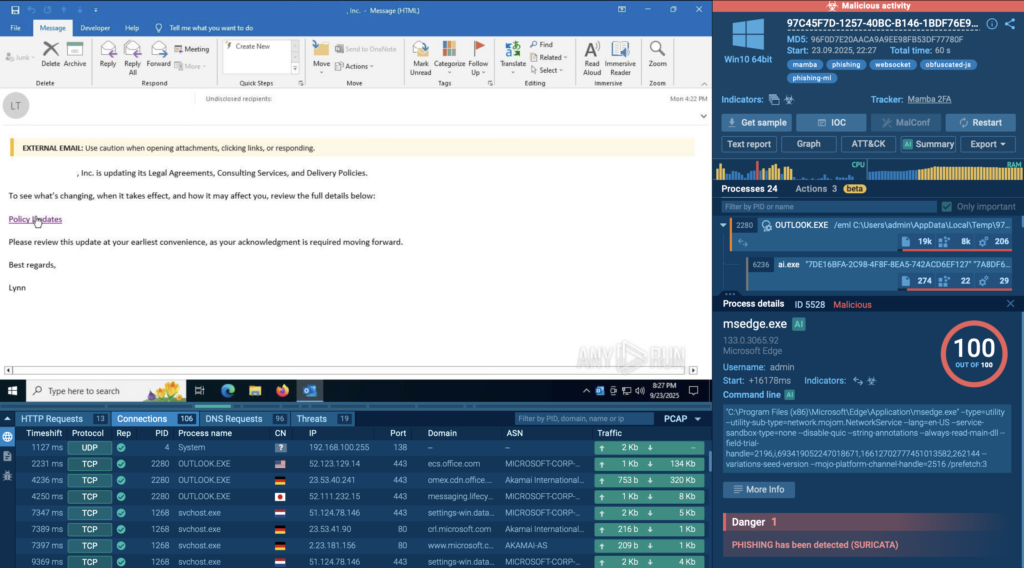
A good example of this speed is a recent phishing case where attackers used Figma pages to kick off a credential-harvesting chain. Inside the sandbox, the entire Figma → Microsoft microdomain → Azure Blob Storage flow becomes visible in under a minute.
Without a sandbox: Analysts usually begin by checking links manually, opening attachments in a VM environment, or trying to reproduce the user’s click path. Even simple emails take time to decode and verify, often adding up to 5–10 minutes before any real behavior is observed.
With a sandbox: Upload the email or attachment, and the sandbox detonates it instantly inside a controlled VM. Initial behavior, connections, redirects, script execution, appears in 20–40 seconds, giving analysts a fast idea of whether the file is benign or dangerous.
2. Behavior Observation
Without a sandbox: Once the link or attachment is opened in a controlled VM, analysts have to follow the behavior manually; redirects, process launches, hidden scripts, background network calls. None of it is being tracked in a custom VM deployed locally by default.
The workflow is slow because everything happens in small pieces that need to be captured one by one. Depending on the complexity of the email, this phase can take anywhere from several minutes to well over ten, especially if the chain includes multiple hops or short-lived activity.
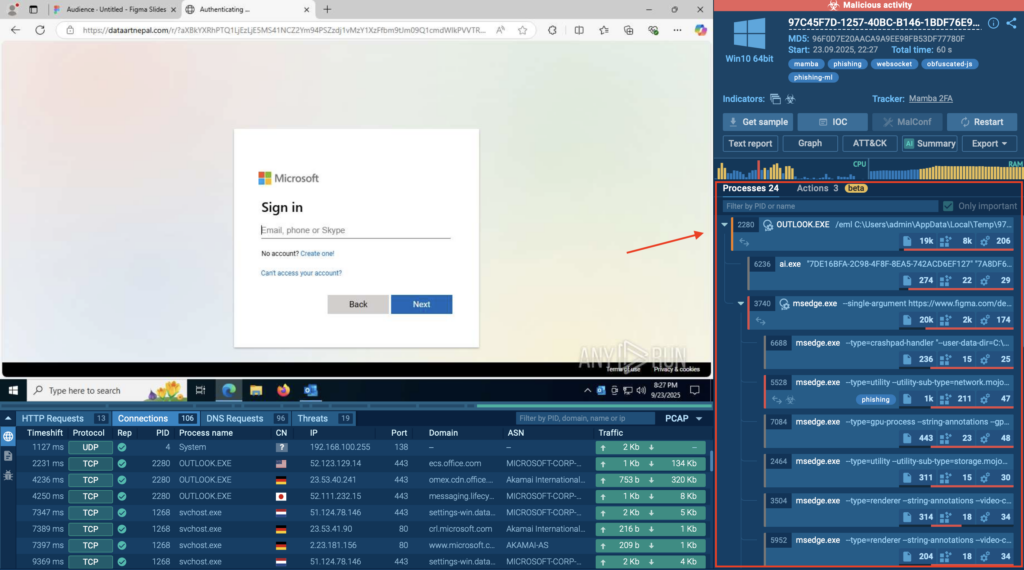
With a sandbox:
ANY.RUN’s process tree with a clear hierarchy showing every spawned process and its relationships
The moment the detonation starts, the sandbox records each action as it happens. Processes, redirects, and network requests appear live in the interface, so analysts see the full flow without chasing events across different tools. In most cases, the main behavior is already visible within 20–40 seconds, including activity that would be easy to miss during observation in a custom VM.
3. IOC Extraction
Without a sandbox: Collecting indicators is usually one of the most time-consuming parts of phishing analysis. Analysts have to pull out every domain, IP address, hash, and dropped file path manually, sometimes by repeating the execution to catch fast or hidden activity. Cross-checking each indicator across logs, browsers, and tools can stretch this phase to 5–10 minutes or more, especially when the redirect chain is long.
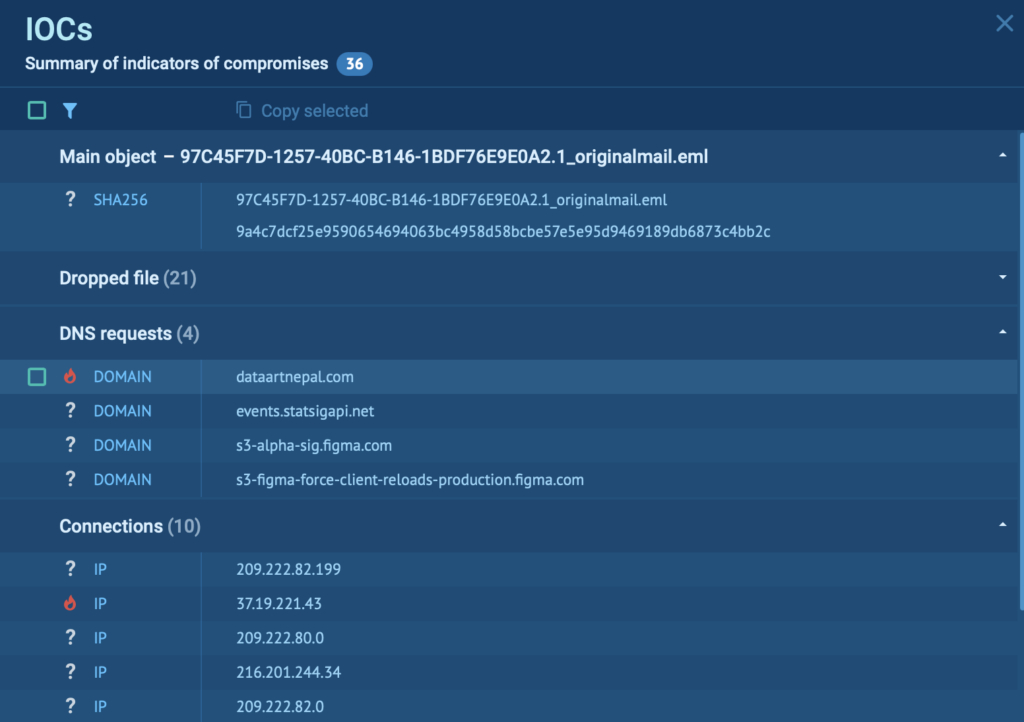
With a sandbox:
All IOCs extracted in one place for fast, focused analysis inside ANY.RUN
Indicators appear as soon as the activity occurs. Domains, IPs, file hashes, registry changes, and dropped objects are captured automatically and displayed in a single view. Instead of hunting for details, analysts simply review the list. This typically takes 10–20 seconds, even when multiple indicators are created during detonation.
4. Threat Matching
Without a sandbox: After gathering indicators, analysts typically check each domain, IP, and file hash in external reputation portals or TI sources. Moving between tools and validating each indicator one by one often adds 5–10 minutes, especially when the phishing chain produces several IOCs.
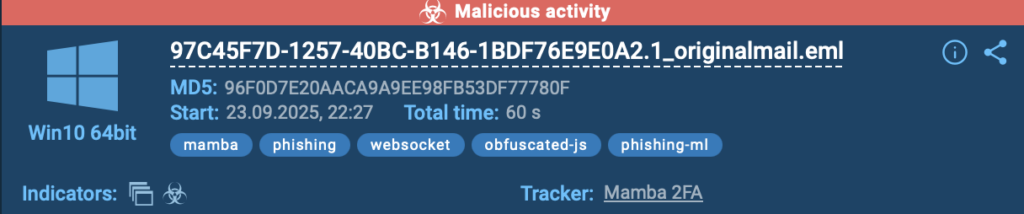
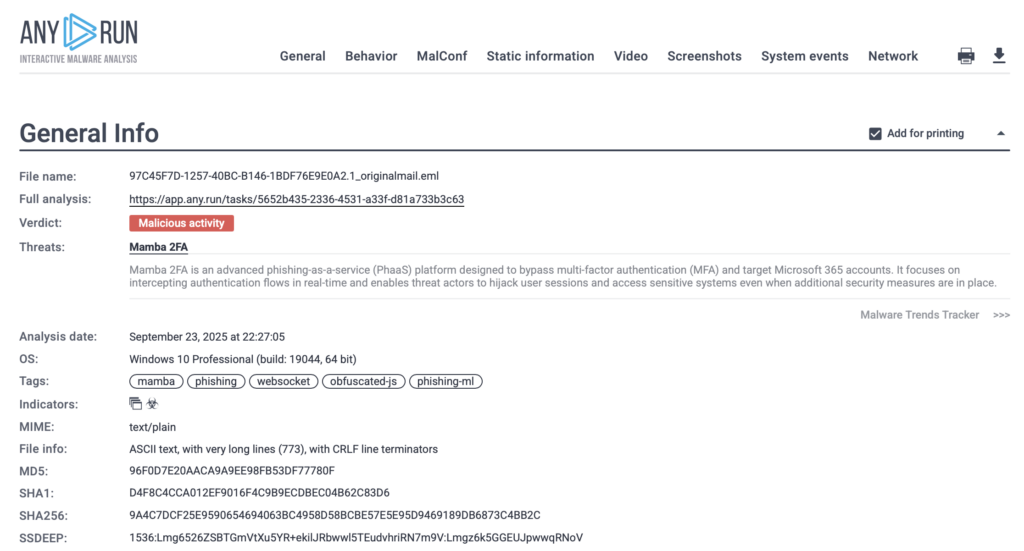
With a sandbox: Reputation details appear automatically as soon as indicators show up. The ANY.RUN sandbox displays the name of the threat, whether it is a malware family, a phishing kit, or even an APT. The threat coverage is continuously updated by ANY.RUN’s in-house team of threat hunters, researchers, and analysts.
Relevant clickable labels and Trends Tracker for deeper analysis of the threat
Suspicious findings are also labeled with clickable threat names, allowing analysts to jump directly to related public submissions for deeper comparison. Besides, a link to the Malware Trends Tracker provides broader context, showing how the threat behaves across other samples.
What normally requires several manual lookups takes 10–20 seconds, because the essential context is already available in the interface.
5. Incident Documentation
Without a sandbox: Documenting findings is one of the most tedious parts of phishing analysis. Analysts need to capture screenshots, save URLs, gather indicators, describe behavior, and assemble everything into a ticket or report by hand. Even when the case is simple, this often requires 5–10 minutes, and much longer when multiple steps or redirects are involved.
With a sandbox: A complete report is generated automatically as the detonation runs. Screenshots, network activity, redirects, process events, indicators, and threat labels are all captured and stored in a structured format.
Auot-generated report with gathered IOCs, TTPs, behavior details, screenshots, and more
Analysts can export the report instantly or link directly to it, so the case can move forward without manual writing or screenshot collection. This entire phase usually takes 10–20 seconds, since the documentation is created for you.
The Time Difference: 15 Minutes vs. 60 Seconds
When you put each step side by side, the gap becomes obvious. Manual phishing analysis breaks the workflow into several slow checks, while an interactive sandbox condenses everything into one fast detonation.
Step
Without a Sandbox
With a Sandbox
URL / Attachment Analysis
5–10 minutes
20–40 seconds
Behavior Observation
10–15 minutes
20–40 seconds
IOC Extraction
5–10 minutes
10–20 seconds
Threat Matching
5–10 minutes
10–20 seconds
Incident Documentation
5–10 minutes
10–20 seconds
Total Time
~15 minutes
~60 seconds
What’s usually a long, repetitive workflow turns into a one-minute verdict. When a phishing wave hits and dozens of suspicious emails land in the queue, those saved minutes quickly add up, often freeing hours across a single shift.
Why This Speed Counts: The Business Impact Behind the Numbers
Cutting phishing analysis from 15 minutes to 60 seconds drives measurable improvements across the entire SOC.
90% of malicious activity is exposed within the first 60 seconds of detonation → analysts see the real behavior before the attacker has time to hide it
94% of users report faster triage → fewer tasks stuck in the queue, fewer delays during active phishing waves
SOCs that adopt interactive sandboxing see up to a 3× boost in investigation throughput → more cases closed per shift, less pile-up when suspicious emails spike
False-positive noise drops significantly → threat analysts spend more time on real signals and less on dead ends
Teams report up to a 58% increase in threats identified overall, including attacks that bypass other controls → behavioral visibility picks up what static checks miss
This combination, fast verdicts, clear behavior visibility, and automated context, transforms phishing analysis from a slow manual chore into a fast, reliable, repeatable process.
Want to see how your SOC can speed up phishing investigations?
Discover how interactive analysis cuts investigation time and exposes phishing behavior in under a minute.
ANY.RUN helps security teams investigate threats faster and with far greater clarity. The Interactive Sandbox reveals full attack behavior in real time, from process execution and redirects to network activity and dropped files, giving analysts the visibility they need to make confident, evidence-based decisions.
Cloud-based and ready to use, ANY.RUN supports Windows, Linux, and Android environments, making it easy to analyze phishing emails, URLs, and malware without managing complex infrastructure.
Its Threat Intelligence Lookup and continuously updated TI Feeds provide automation-ready indicators that strengthen detection, enrichment, response, and reporting across security operations.
Together, these capabilities give analysts a fast, transparent, and reliable way to understand modern attacks and improve overall SOC performance.
https://www.backbox.org/wp-content/uploads/2018/09/website_backbox_text_black.png00adminhttps://www.backbox.org/wp-content/uploads/2018/09/website_backbox_text_black.pngadmin2025-11-20 10:06:432025-11-20 10:06:43Detected in 60 Seconds: How to Identify Phishing with a Malware Sandbox
The Oura Ring 4 has remained at the top of my list of best smart rings for several years. Ahead of Black Friday, it’s on sale for its lowest price yet.
https://www.backbox.org/wp-content/uploads/2018/09/website_backbox_text_black.png00adminhttps://www.backbox.org/wp-content/uploads/2018/09/website_backbox_text_black.pngadmin2025-11-20 08:06:402025-11-20 08:06:40I convinced my mom to buy an Oura Ring – my biggest regret is not buying at this price
Threat actors are leveraging bogus installers masquerading as popular software to trick users into installing malware as part of a global malvertising campaign dubbed TamperedChef.
The end goal of the attacks is to establish persistence and deliver JavaScript malware that facilitates remote access and control, per a new report from Acronis Threat Research Unit (TRU). The campaign, per the
https://www.backbox.org/wp-content/uploads/2018/09/website_backbox_text_black.png00adminhttps://www.backbox.org/wp-content/uploads/2018/09/website_backbox_text_black.pngadmin2025-11-20 06:07:082025-11-20 06:07:08TamperedChef Malware Spreads via Fake Software Installers in Ongoing Global Campaign