Malware Traffic Analysis in Linux: Hands-on Guide with Examples

Network traffic analysis is one of the most effective ways to detect and investigate malware infections. By analyzing communication patterns, researchers and security teams can uncover signs of malicious activity, such as command-and-control (C2) connections, data exfiltration, or DDoS attacks. 

In this guide, we’ll explore how traffic analysis helps detect malware, the key tools used for this purpose, and real-world examples of Linux malware analyzed in ANY.RUN’s Interactive Sandbox

How Traffic Analysis Helps Detect Malware 

Some types of malware rely on network communication to receive commands, exfiltrate stolen data, spread across systems, or launch attacks. That’s why network traffic analysis is one of the most effective ways to detect and investigate malware infections. 

By looking at how data flows in and out of a system, you can reveal a variety of malicious activities that might otherwise go unnoticed. 

1. Distributed Denial-of-Service (DDoS) Attacks 

Some malware turns infected devices into zombies within a botnet, instructing them to flood a target server with requests. This can cause service disruptions, slow down websites, or even take entire networks offline. 

☝ Signs in network traffic
  • Unusually high volumes of outgoing traffic
  • Sudden bursts of connections to multiple IPs
  • Large numbers of SYN packets

2. Command and Control (C2) Communication 

Many malware strains, from trojans to ransomware, rely on C2 servers to receive instructions from attackers. These communications can include downloading additional payloads, executing commands, or transmitting stolen data. 

☝ Signs in network traffic
  • Repeated communication with suspicious or newly registered domains
  • Encrypted traffic over unusual ports
  • Beaconing patterns

3. Data Exfiltration & Credential Theft 

Some malware is designed to steal sensitive data, such as login credentials, financial information, or intellectual property. This data is often encrypted and sent to an attacker-controlled server. 

☝ Signs in network traffic
  • Outbound traffic to unknown foreign IPs
  • Unusual spikes in file transfer protocols (FTP, SFTP) 
  • Large volumes of outbound DNS queries

4. Exploitation Attempts & Lateral Movement 

Advanced malware doesn’t just infect one machine. It looks for vulnerabilities to move laterally across a network, escalating privileges and compromising more devices. 

☝ Signs in network traffic
  • Repeated login attempts from a single source (brute-force attacks)
  • SMB traffic spikes
  • Use of internal IP scanning tools like Nmap

5. Malware Download & Dropper Activity 

Many infections start with a simple download: malware that acts as a dropper, pulling additional payloads from the internet. 

☝ Signs in network traffic
  • Downloads from unusual or newly registered domains
  • Traffic to known malware-hosting services
  • Execution of PowerShell or wget/curl commands from unknown sources

What Tools to Use for Traffic Analysis 

Various tools help security professionals inspect network traffic and identify suspicious activities. Here are some of the most widely used ones: 

Malware Sandboxes 

Real-time network analysis inside ANY.RUN Linux VM 

A dynamic analysis environment like ANY.RUN allows users to observe malware behavior, including network communications, in a controlled setting. The sandbox logs network requests, DNS queries, and protocol usage, making it easier to detect malicious patterns. 

Analyze Linux and Windows threats inside the safe and secure ANY.RUN Interactive Sandbox 


Sign up for free


Wireshark 

A powerful packet analysis tool that enables deep inspection of network activity. Analysts use it to capture live traffic or examine PCAP files for suspicious network behavior. 

tcpdump 

A command-line tool for packet capturing and analysis. It provides a lightweight method to monitor network traffic directly from Linux terminals. With tcpdump, analysts can capture packets that flow through a network interface, apply filters to focus on specific traffic, and save captures for later analysis. 

mitmproxy 

An interactive, SSL-capable proxy for analyzing and modifying HTTP/HTTPS traffic in real time. It’s useful for inspecting malicious web traffic generated by malware. 

Analyzing Linux Malware Traffic with a Sandbox 

ANY.RUN’s Interactive Sandbox provides a real-time, dynamic analysis environment that helps researchers and security teams uncover malicious network activities associated with Linux malware. 

Let’s discover how ANY.RUN can make Linux malware traffic analysis more effective: 

Real-time network monitoring: Observe malware’s network behavior live and view outbound HTTP, HTTPS, and DNS traffic, detect hardcoded C2 servers, and spot encrypted connections on unusual ports. 

Interactive analysis: Engage with the infected environment to trigger malware behaviors, bypassing sandbox evasion tactics and uncovering hidden threats. 

Packet capture (PCAP) export: Capture and export all network traffic for deeper analysis in Wireshark or other packet inspection tools. 
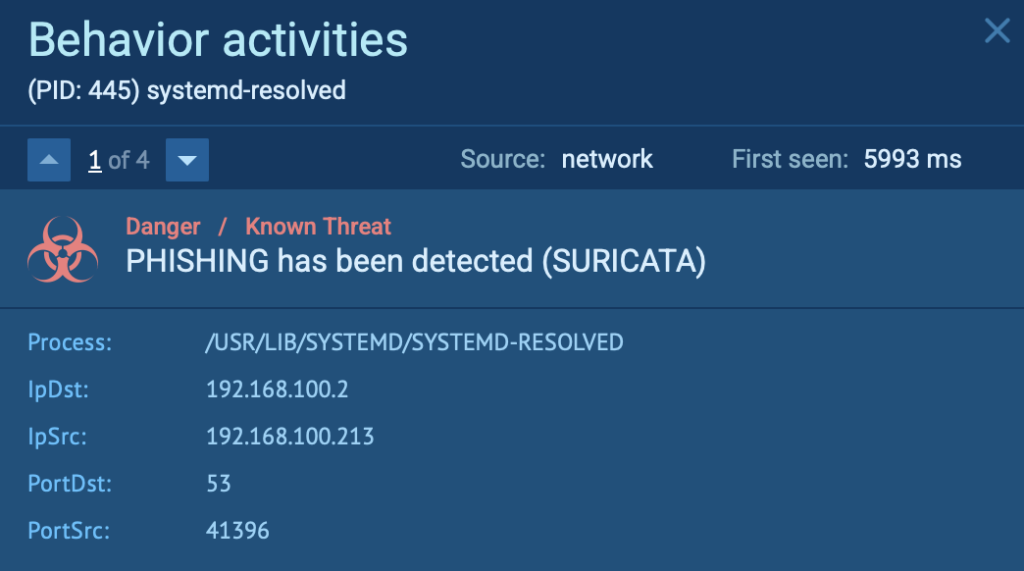
Suricata-driven threat detection inside ANY.RUN sandbox 

Suricata-driven threat detection: The sandbox automatically flags malicious network behavior, including botnet communications, exploit attempts, and data exfiltration. 
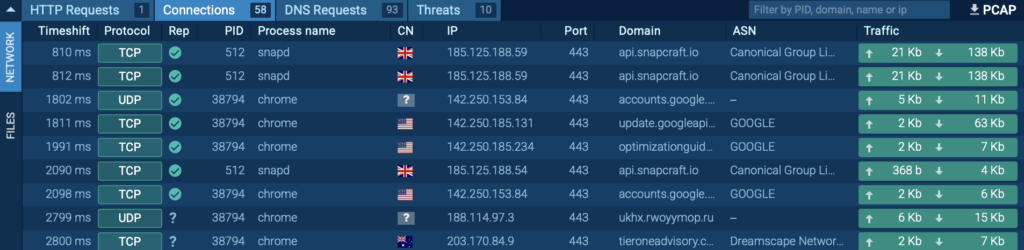
Network activity displayed inside ANY.RUN Linux sandbox 

Faster investigations: Reduce time spent on manual traffic analysis with live, actionable insights and automated reporting. 

Real-World Linux Malware Analyzed in ANY.RUN Sandbox 

To demonstrate the power of ANY.RUN’s Linux Sandbox for malware traffic analysis, let’s examine three real-world Linux malware cases: 

Case 1: Gafgyt (BASHLITE) – Massive DDoS Attack 

Gafgyt, also known as BASHLITE, is a notorious Linux botnet malware that infects IoT devices and servers to launch DDoS attacks.  

View analysis session with Gafgyt 
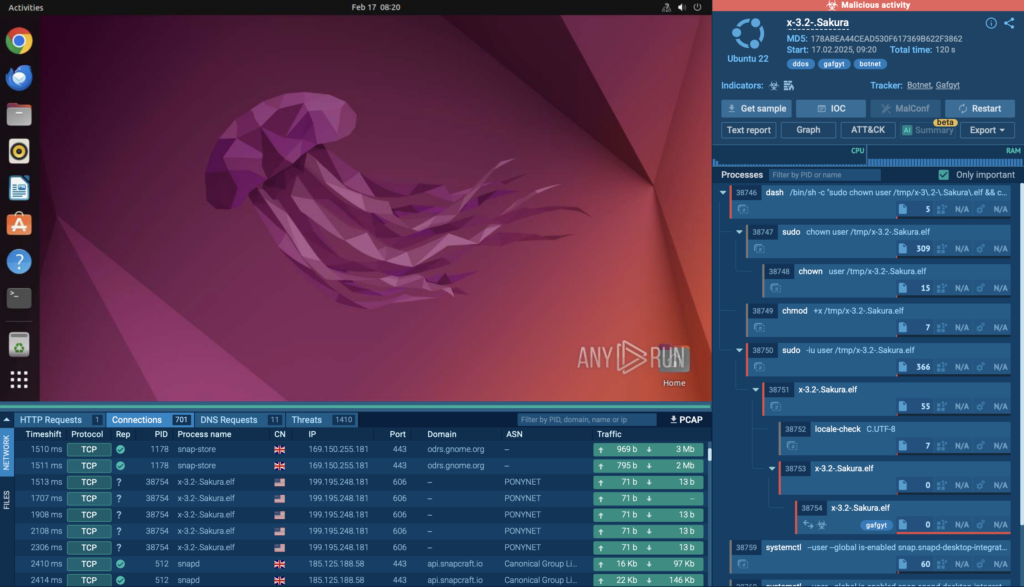
Gafgyt malware analyzed inside ANY.RUN 

After examining it inside ANY.RUN’s sandbox, we can see that the malware hijacked the VM, turning it into a botnet. It then attempted to establish connections with over 700 different IP addresses, flooding the network with malicious traffic. 
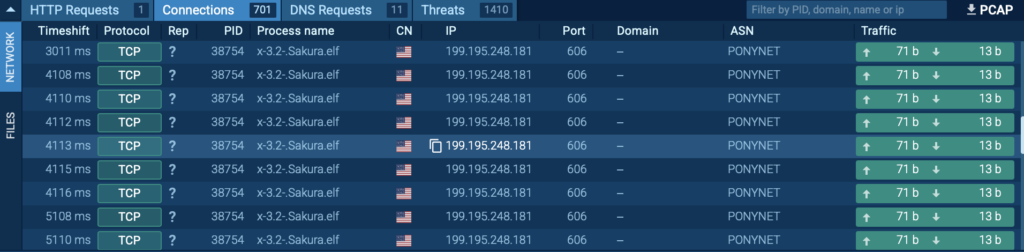
Network connections observed inside ANY.RUN Linux VM 

After examining it inside ANY.RUN’s sandbox, we can see that the malware hijacked the VM, turning it into a botnet. It then attempted to establish connections with over 700 different IP addresses, flooding the network with malicious traffic. 

Try advanced malware analysis firsthand with ANY.RUN’s Enterprise plan 


Access all features with free trial


The malware established connections with botnet C2 servers, triggering a Suricata alert due to suspicious network behavior.  

You can observe this detection in the “Threats” section under Network Activity Analysis in ANY.RUN: 
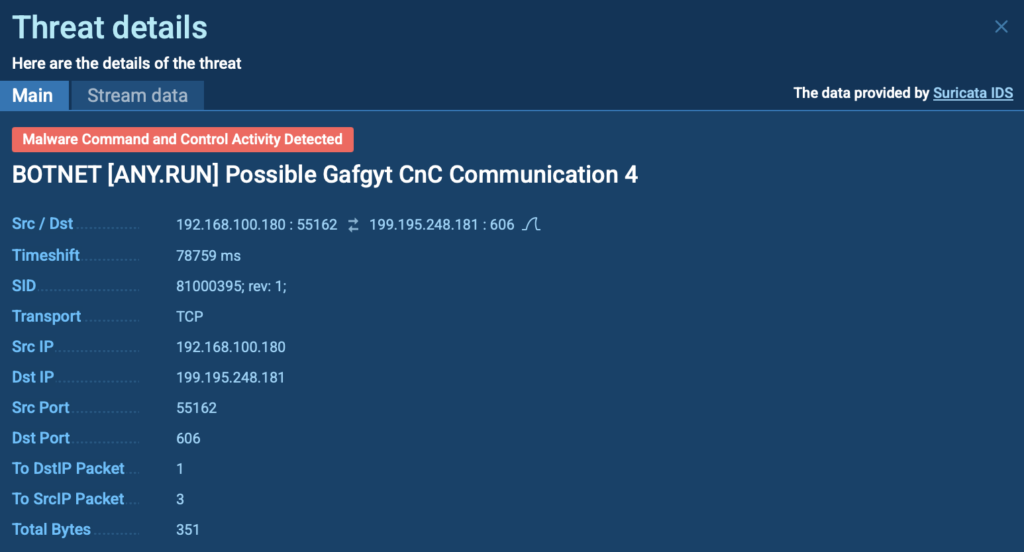
Suricata rule triggered by Gafgyt malware 

ANY.RUN provides a PCAP export feature, allowing you to analyze captured network traffic in Wireshark or other specialized tools by exporting the packet capture file for deeper inspection and threat analysis. 
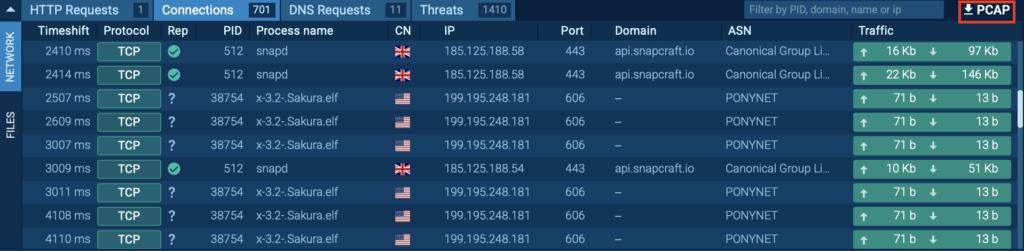
PCAP export feature for deeper analysis 

Case 2: Mirai – Detecting Malicious Network Behavior  

Mirai is a notorious Linux-based malware that primarily targets IoT devices, such as routers, cameras, and other connected systems. It infects devices by exploiting weak or default credentials, turning them into botnet nodes used for large-scale DDoS attacks. 

Once infected, these compromised devices begin scanning the internet for other vulnerable systems to expand the botnet. 

View analysis session with Mirai attack 
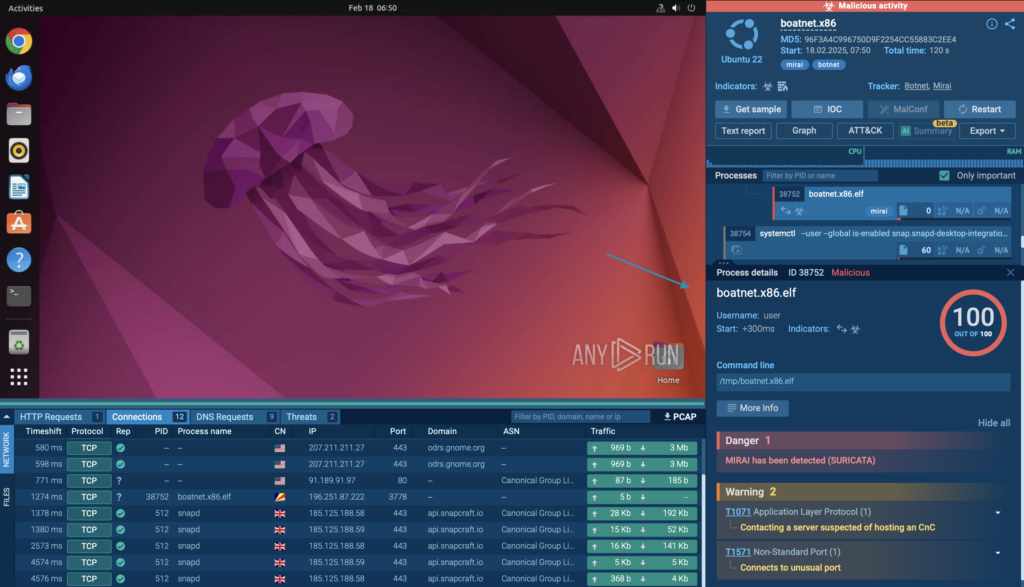
Mirai malware detected by ANY.RUN sandbox 

In this analysis session, we observe a Mirai attack within a controlled environment using ANY.RUN’s Interactive Sandbox.  

The malware’s behavior was automatically detected, as it triggered a Suricata rule, confirming its presence through network traffic analysis.  

The session shows how Mirai communicates, spreads, and attempts to establish connections with remote servers.  
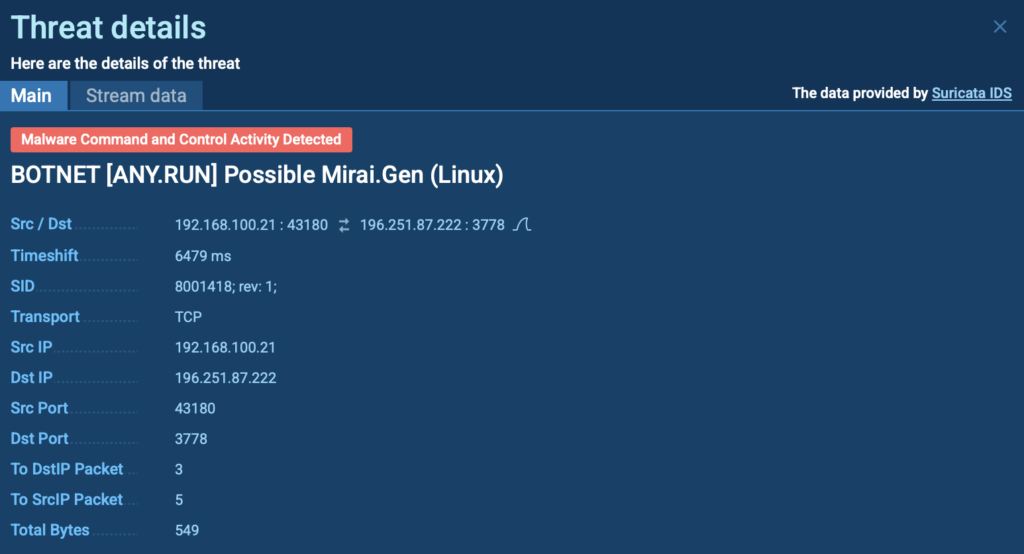
Suricata rule triggered by Mirai malware  

Case 3: Exploit – Behavioral Detection in Network Traffic 

Exploits are a common attack vector used by threat actors to gain initial access to Linux systems. These attacks take advantage of system vulnerabilities, often unpatched software or misconfigurations, to execute malicious payloads, escalate privileges, or establish persistence.  

Once inside, attackers can deploy additional malware, steal sensitive data, or take full control of the compromised machine. 

View analysis session with Exploit 
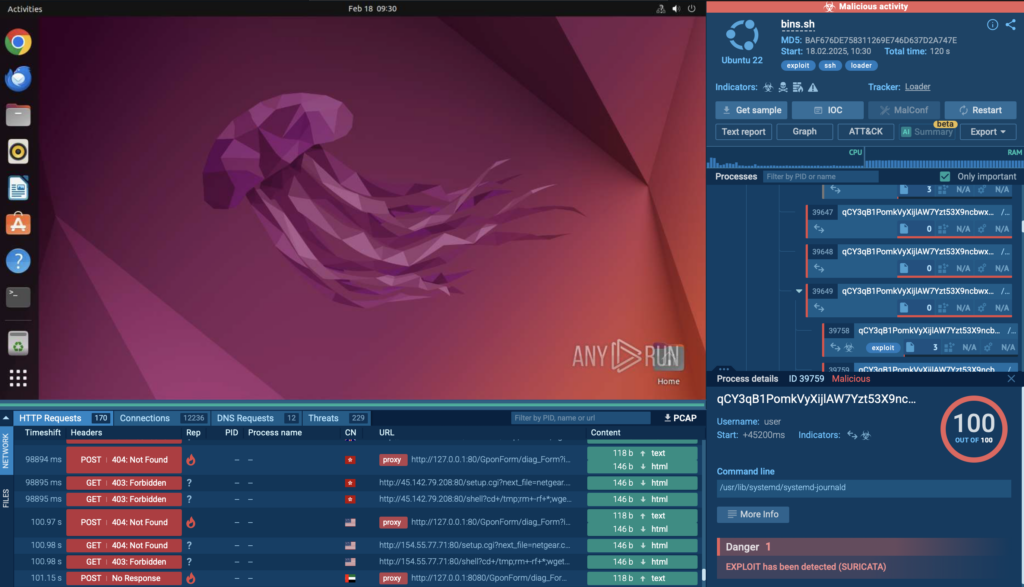
Exploit detected by ANY.RUN 

In this analysis session, you can observe the exploit in a controlled environment as it attempts to manipulate system processes. 


Learn to analyze malware in a sandbox

Learn to analyze cyber threats

See a detailed guide to using ANY.RUN’s Interactive Sandbox for malware and phishing analysis


As you can see, the exploit was automatically flagged by Suricata, providing clear evidence of an active attack. 
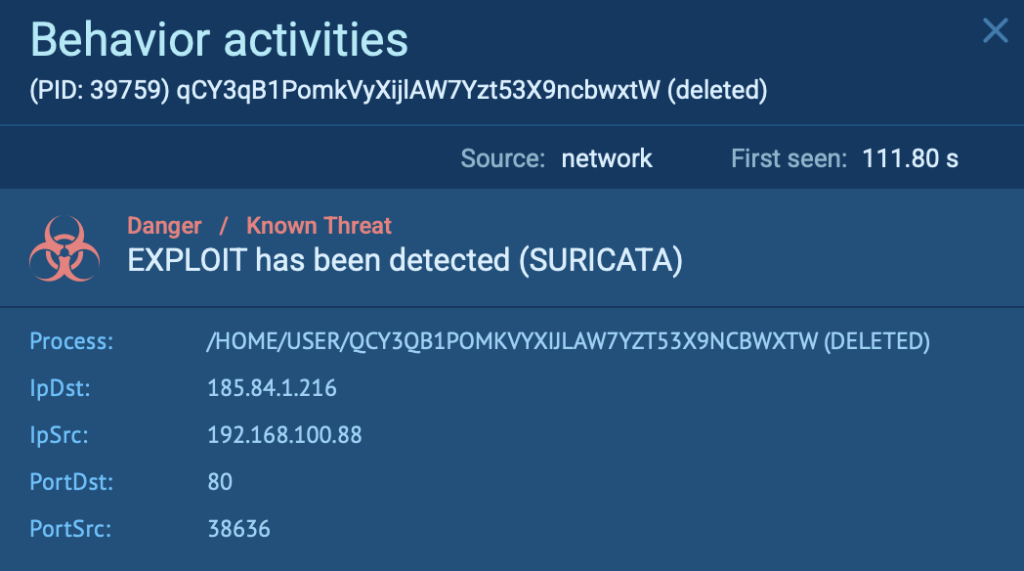
Suricata rule triggered by Exploit 

Why Businesses & Security Teams Should Use ANY.RUN for Linux Malware Detection 

By examining network traffic inside ANY.RUN’s Linux Sandbox, businesses and security teams can: 

  • Detect threats faster: Real-time analysis exposes malware behavior instantly. 
  • Reduce investigation time: Automated Suricata alerts streamline detection. 
  • Improve network security: Identify and block malicious traffic before it spreads. 
  • Get deeper insights: PCAP exports and interactive analysis allow teams to get deeper insights.

About ANY.RUN

ANY.RUN helps more than 500,000 cybersecurity professionals worldwide. Our interactive sandbox simplifies malware analysis of threats that target both Windows and Linux systems. Our threat intelligence products, TI Lookup, YARA Search, and Feeds, help you find IOCs or files to learn more about the threats and respond to incidents faster.

Request free trial of ANY.RUN’s services → 

The post Malware Traffic Analysis in Linux: Hands-on Guide with Examples appeared first on ANY.RUN’s Cybersecurity Blog.

ANY.RUN’s Cybersecurity Blog – ​Read More

Industrial System Cyberattacks Surge as OT Stays Vulnerable

Nearly a third of organizations have an operational system connected to the Internet with a known exploited vulnerability, as attacks by state and non-state actors increase.

darkreading – ​Read More

This Russian Tech Bro Helped Steal $93 Million and Landed in US Prison. Then Putin Called

In the epic US-Russian prisoner swap last summer, Vladimir Putin brought home an assassin, spies, and another prized ally: the man behind one of the biggest insider trading cases of all time.

Security Latest – ​Read More

INE Secures Spot in G2’s 2025 Top 50 Education Software Rankings

Cary, NC, 25th February 2025, CyberNewsWire

Hackread – Latest Cybersecurity, Tech, AI, Crypto & Hacking News – ​Read More

US employee screening giant DISA says hackers accessed data of more than 3M people

The Texas-based company said hackers accessed applicants’ SSNs and financial information

© 2024 TechCrunch. All rights reserved. For personal use only.

Security News | TechCrunch – ​Read More

Malicious code in fake GitHub repositories | Kaspersky official blog

Can you imagine a world where, every time you wanted to go somewhere, you had to reinvent the wheel and build a bicycle from scratch? We can’t either. Why reinvent something that already exists and works perfectly well? The same logic applies to programming: developers face routine tasks every day, and instead of inventing their own wheels and bicycles (which might even be not up to par), they simply grab ready-made bicycles code from open-source GitHub repositories.

This solution is available to anyone —  including criminals who use the world’s best free open-source code as bait for attacks. There’s plenty of evidence to back this up, and here’s the latest: our experts have uncovered an active malicious campaign, GitVenom, targeting GitHub users.

What is GitVenom?

GitVenom is what we named this malicious campaign, in which unknown actors created over 200 repositories containing fake projects with malicious code: Telegram bots, tools for hacking the game Valorant, Instagram automation utilities, and Bitcoin wallet managers. At first glance, all the repositories look legitimate. Especially impressive is the well-designed README.MD file — a guide on how to work with the code — with detailed instructions in multiple languages. In addition to that, attackers added multiple tags to their repositories.

Attackers used AI to write detailed instructions in multiple languages

Attackers used AI to write detailed instructions in multiple languages

Another indicator reinforcing the apparent legitimacy of these repositories is the large number of commits. The attackers’ repositories have tons of them — tens of thousands. The attackers weren’t, of course, manually updating each of the 200 repositories to maintain authenticity, but simply used timestamp files that updated every few minutes. The combination of detailed documentation and numerous commits creates the illusion that the code is genuine and safe to use.

GitVenom: Two years of activity

The campaign started a long time ago: the oldest fake repository we found is about two years old. In the meantime, GitVenom has affected developers in Russia, Brazil, Turkey, and other countries. The attackers covered a wide range of programming languages: malicious code was found in Python, JavaScript, C, C#, and C++ repositories.

Regarding the functionality of these projects, the features described in the README file didn’t even match the actual code — in reality, the code doesn’t do half of what it claims. But “thanks” to it, victims end up downloading malicious components. These include:

  • A Node.js stealer that collects usernames and passwords, crypto wallet data, and browser history, packages the stolen data into a .7z archive, and sends it to the attackers through Telegram.
  • AsyncRAT — an open-source remote administration Trojan, which can also function as a keylogger.
  • Quasar — an open-source backdoor.
  • A clipper that searches the clipboard for crypto wallet addresses and replaces them with attacker-controlled addresses. Notably, in November 2024, the hacker wallet used in this attack received a one-time deposit of about 5 BTC (approximately US$485,000 at the time of the study).

You can read more about the details of this malicious campaign in our full research published on SecureList.

How to protect yourself from malicious code on GitHub

In short, the best defense is vigilance. Since over 100 million developers use GitHub, attackers will likely continue to spread malicious code through this popular platform. The only question is how they’ll do it — a decade ago, no one imagined that attackers would be able to conduct campaigns like GitVenom for so long and with such persistence. Therefore, every developer should maintain their cybersecurity hygiene when working with GitHub.

  • Analyze code before integrating it into an existing project.
  • Use malware protection on both computers and smartphones.
  • Check less obvious indicators carefully: contributor accounts, the number of stars (likes), and the project creation date. If the account was created three days ago, the repository two days ago, and it only has one star, there’s a good chance the project is fake and the code is malicious.
  • Don’t download files from direct links to GitHub shared in chats, suspicious channels, or on unverified websites.
  • If you find a suspicious repository, report it to GitHub — this could save others’ devices not protected with a Kaspersky Premium.

Kaspersky official blog – ​Read More

Passkeys

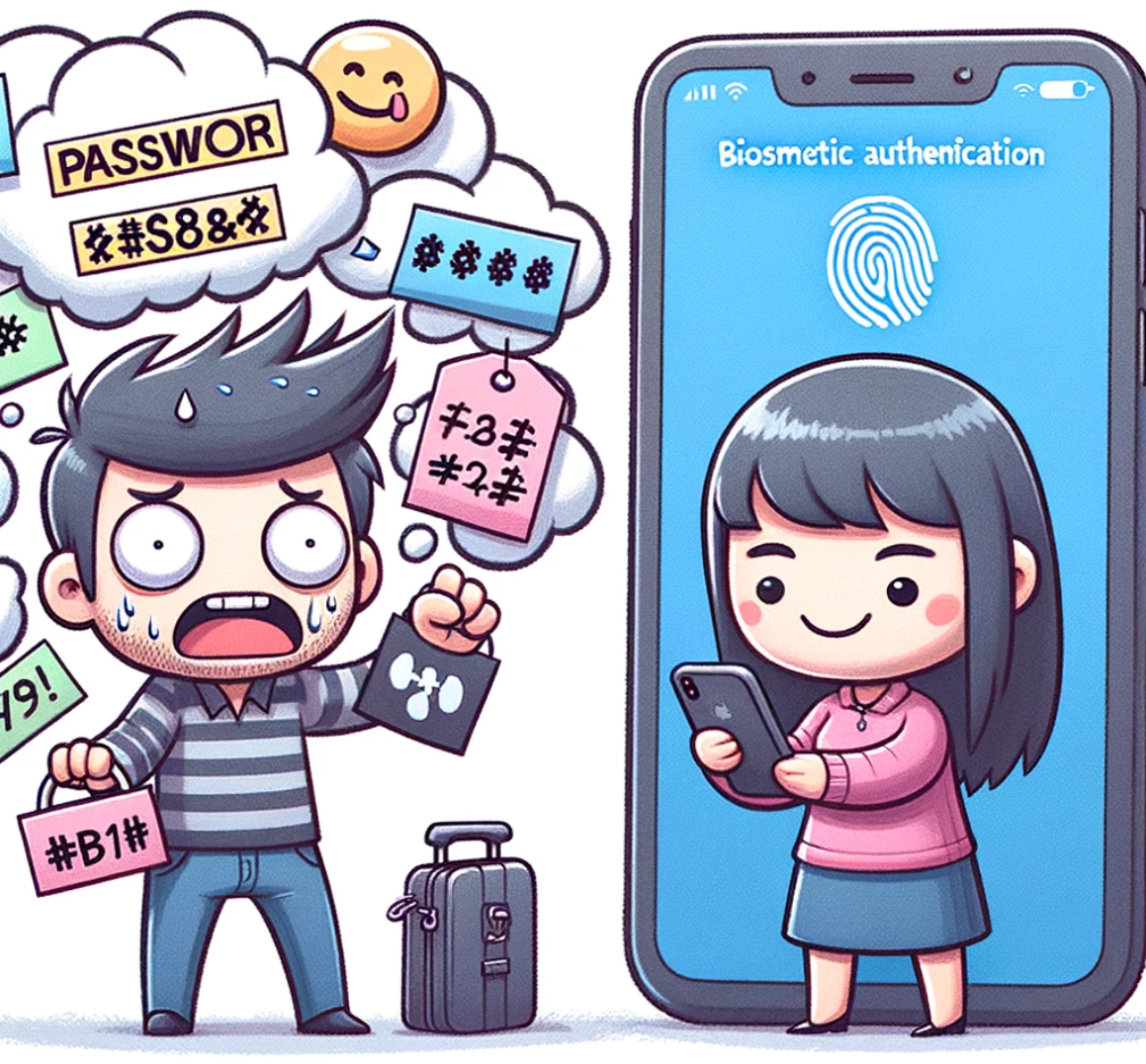
Don’t we all know the hassle of managing loads of passwords, trying to come up with secure and unique ones only to try afterwards to remember them? Or always staying on high alert whether the URL is definitely the valid one for the website we are trying to visit?
What if all this could be over soon?

Welcome to Passkeys!

Based on FIDO standards, passkeys are a replacement for passwords that provide faster, easier, and more secure sign-ins to websites and apps across a user’s devices. Unlike passwords, passkeys cannot be guessed by attackers and are phishing-resistant. Passkeys simplify account registration for apps and websites, are easy to use, work across most of a user’s devices, and can even be used on other devices within physical proximity, according to the FIDO Alliance.

But who is this FIDO Alliance you ask? The FIDO Alliance is an open industry association with a focused mission: reduce the world’s reliance on passwords. To accomplish this, the FIDO Alliance promotes the development of, use of, and compliance with standards for authentication and device attestation.

OK now we know they don’t like passwords. But let’s take a step back and try to understand why that is.

Passwords and Their Problems

The most prevalent issue around passwords roots in the fact that users will have to remember them. Consequently, users tend to choose passwords based on things that are familiar to them – like the name of a relative or pet, their favorite holiday locations, movies or books. As required by most password policies, throw in some special characters and numbers et voilà, you’ve got your password. However, while “Hemingway61!” or “$Mallorca89$” might look hard to guess, that’s not really the case. Attackers can simply follow along the same thought process to try and come up with potential password candidates – oftentimes with alarmingly high rates of success.

The most obvious solution to this might be to resort to randomly generated passwords that don’t follow any specific patterns or logic and are therefore hard to guess by attackers.

But now they are hard to remember, so one idea is to just use the same strong password for multiple services. This creates another problem. If one of those services is affected by a security breach and all used passwords are disclosed, whoever gets access to them can try the same passwords on other services. The next logical step would now be to create secure and random passwords that are unique for each service. At this point – unless you possess an eidetic memory – you might require some technical assistance to help you manage and remember all those passwords, something like a password manager. While this is generally considered a good practice, there are still some caveats to consider. Regardless of the password manager solution, now the access to it is very important, because if the password manager is compromised, so are all your passwords. This opens up other topics like securing your password manager with two-factor-authentication, enabling or disabling synchronization between devices etc.

No matter what approach is used to choose passwords, another big security problem are phishing attacks. In a phishing attack, an adversary usually recreates a login website for any popular service and publishes it on a URL that is very similar to the original login page. Instead of URL google.com the same login page can be published on something like gooqle.com with the second G replaced with a Q. Attackers will then try to trick unsuspecting users into visiting this phishing page to enter their password. If they do so, the attackers can use the password to login to the legitimate service in our name (and also try the same credentials on other services).

To avoid such attacks, users are often told to closely look at the domain displayed in the browser address bar before signing in. However, in today’s interconnected and interwoven Internet landscape with identity providers scattered all over the place, new fancy top level domains popping up constantly and websites being visited from all kinds of devices, this proves to be highly unreliable and even security-aware IT professionals are prone to fall victim to phishing attacks.

At this point, we are faced with quite a list of problems associated with password-based logins, and only some half-baked solutions to address them. Time to introduce passkeys!

What is a Passkey?

A passkey is basically a passwordless login mechanism. If you’re wondering now if that means you don’t need to remember anything, you’re correct. But what do you need to prove its you? For example, one way is to use what you have and what you are to prove that. More specifically you can use your mobile phone to store a passkey, and during the login process to a website you must provide your fingerprint or face recognition to your phone in order to complete the login. As a result, without possessing your mobile phone and your fingerprint, no one else can log into your account on this website.

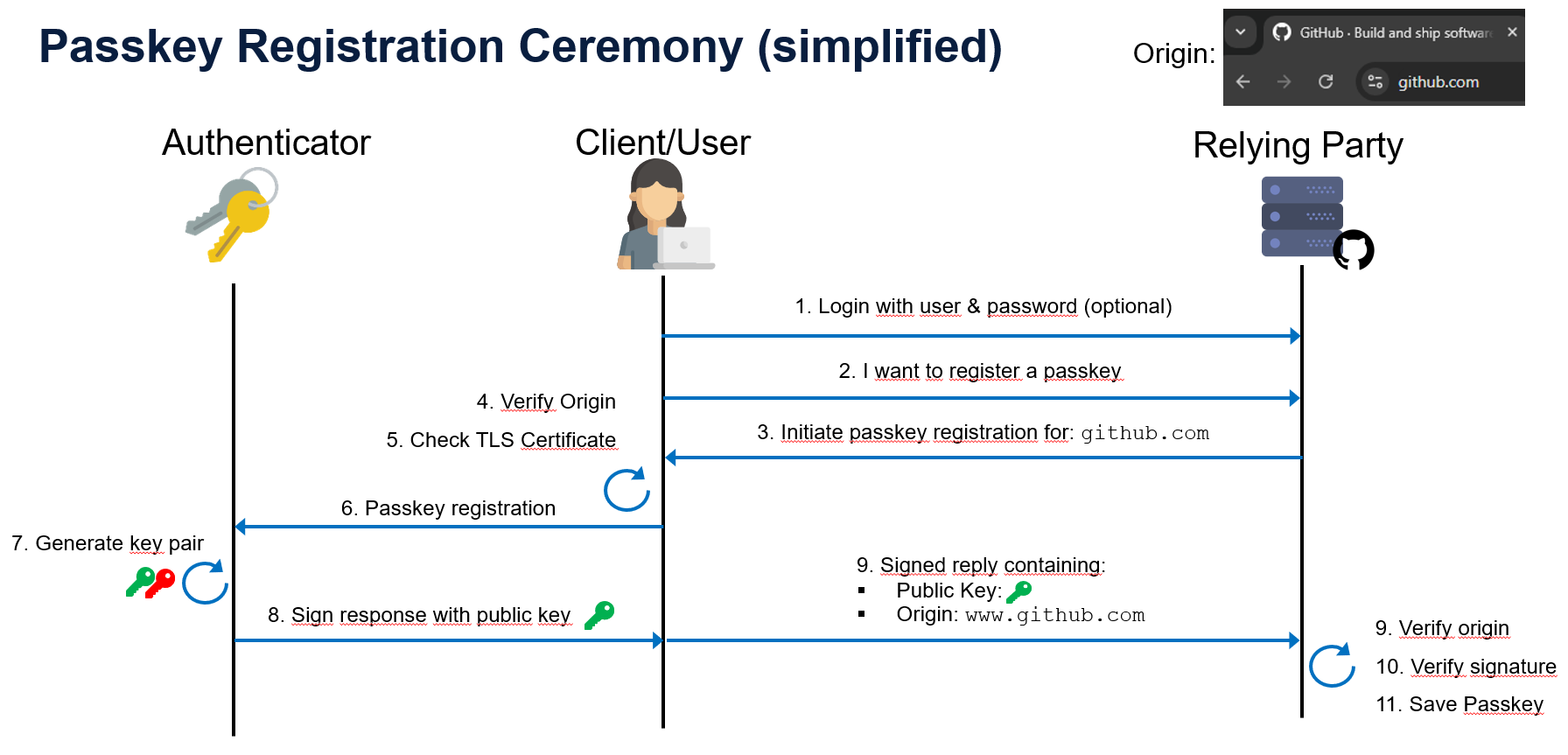
Passkeys make use of public key cryptography. So, if you’re browsing with your Client (this can be a browser on your computer or phone etc.) and you want to register with a new service (we will call that Relying Party or RP for short) using a passkey, your client and the RP will automatically agree on a cryptographic key pair that is later on used to log in. Each key pair is associated with a specific RP, denoted by a so-called Relying Party ID. This ID corresponds to the domain you want to register with.

Let’s say you want to set up an account with Github. In this case, the ID of Github would be “github.com”. Behind the scenes, a few additional checks are performed to ensure the registration can be completed securely. For example, your browser will verify whether the RP web site uses encrypted communication with a properly configured and valid certificate. Secondly, your client will also compare the domain of the website you are currently visiting with the Relying Party ID that it advertised. If any of these checks fail, the registration process will be cancelled. Otherwise, the registration continues and both parties verify that the cryptographic keys have been set up correctly through a challenge-response protocol based on a digital signatures. After this, the process is completed and you have now successfully registered your authenticator with the Relying Party, along with a cryptographic key pair and a few additional pieces of information such as the ID of the Relying Party.

The following diagram shows a simplified sequence of the registration ceremony (please note that some technical details & aspects are omitted here for simplicity):

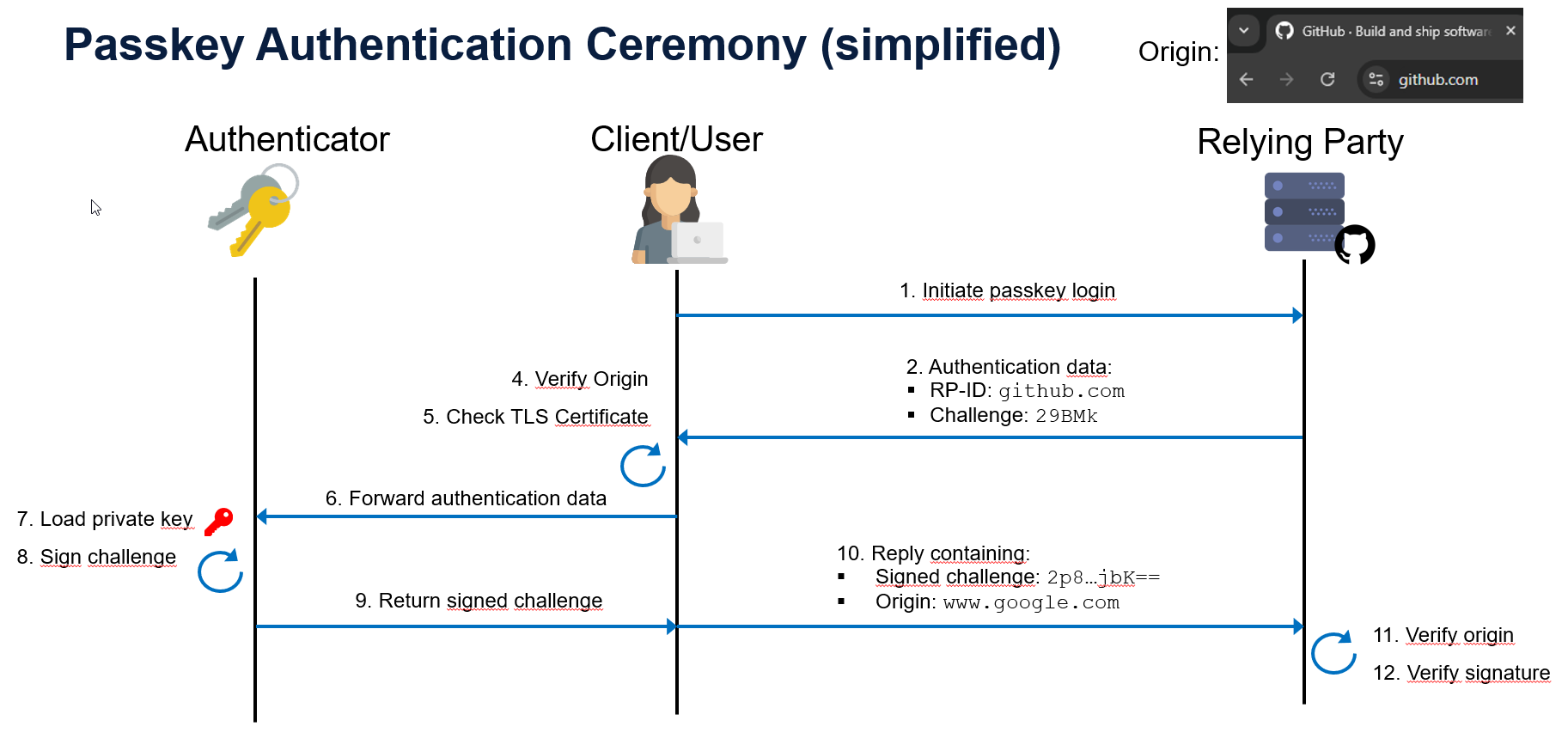
Later, if you want to authenticate to the Relying Party, you will have the option to do so using your passkey instead of (or in addition to) a password. The Relying Party (let’s assume Github again) will send its ID (e.g. “github.com”) to your authenticator, along with some additional information, such as a challenge.

If your authenticator has a passkey associated with the respective ID (remember this was stored along with the key pair during registration), the process continues, and your authenticator will again perform some security checks for you. Specifically, it will verify that the ID of the Relying Party matches the domain you are trying to sign into and that the communication is protected by encryption and a valid certificate. If all checks are passed, the authenticator signs the challenge received in the first step with the private key and returns this response back to the RP for verification. After validating the digital signature, the RP completes the sign-in process by authenticating the user.

Note that the process described above takes place without requiring the user to provide any form of secret or password (there are authenticators that can be protected with a PIN or fingerprint however). This means that a user generally does not have to remember or safely store any information associated with a login.

The following diagram shows a simplified sequence of the authentication ceremony (please note that some technical details & aspects are omitted here for simplicity):

Do Passkeys Really Fix the Password Problems?

In the beginning of this article, we discussed a few common problems with passwords. Let’s quickly recap them. Passwords are:

  • often easy to guess
  • hard to remember if chosen securely
  • reusable across different services and accounts
  • susceptible to be leaked by third parties
  • susceptible to phishing attacks

If one now decides to use passkeys instead of passwords, how are these concerns addressed?

First, let’s talk about guessing passwords. As explained previously, passkeys are based on cryptographic key pairs automatically generated by the authenticator. This means that we can already eliminate the problem of users choosing insecure, easy-to-guess secrets. Of course, the actual resistance against guessing attacks (i.e. the entropy of the keys) depends on the underlying cryptographic algorithms. Which algorithm is used in a given instance is agreed upon by the authenticator and the Relying Party during registration. Given a properly hardened setup (i.e. up-to-date authenticator, and restrictive set of supported algorithms) the risk of an attacker guessing a passkey is negligible.

The fact that passkeys are automatically generated and stored on the authenticator also addresses the second problem of hard to remember credentials. When using passkeys, users effectively don’t have to remember anything at all.

In order to tackle the problem of password reuse, a new passkey is generated for every registration procedure and associated with the respective Relying Party ID. This means that every key pair can only be used for one service. So even if a specific passkey would be compromised, an attacker would not be able to authenticate to other Relying Parties with it.

While on the topic of compromised keys, let’s discuss what would happen if – instead of your authenticator – the server of a Relying Party gets compromised. With regular passwords, this usually means that some secured representation of your password (ideally a salted hash) is leaked to the attacker. In the worst case, the attacker may even be able to recover your cleartext password, which could then be used to log into other services. With passkeys, the RP only stores the public key on their side, while the private key remains protected on your authenticator. So even if the Relying Party gets compromised, this only discloses your public key, which can not be used to authenticate. Yet another problem solved!

This leaves us with maybe the most important concern. Can we really browse the internet without worrying about phishing attacks?
As we saw earlier, with every sign-in the Relying Party specifies its ID as part of the authentication protocol. The browser then verifies whether the RP ID matches the website you are visiting, and whether the website uses encryption and has a valid TLS certificate before the authentication continues. As a user, you don’t have to do anything in this process. In fact, you can’t do anything, even if you wanted to. The passkey mechanism has no option to allow a user to bypass these checks (as compared to when your browser warns you about an invalid certificate for a website).

Let’s look at a specific example of a phishing attack:
If an attacker tries to impersonate a legitimate website like  github.com, using for example a Machine-in-the-Middle attack, the connection will typically either be unencrypted or show an invalid TLS certificate. In both cases, our browser will fail the previously mentioned checks and the authentication will not complete. So far so good.

But what if the attacker lures us to a cloned version of the Github login page, hosted on qithub.com for example? Then the Relying Party ID check will kick in. The browser compares the domain of the page we are visiting (qithub.com) with the Relying Party ID announced by the phishing web server (github.com). As these values do not match, the authentication process is stopped again. But wait a minute – why can’t the phishing web server simply announce an ID that aligns with its domain, so “qithub.com”? In theory, the phishing web server can of course do this, but then our authenticator would not be able to locate the correct passkey to sign-in, as our passkey for Github is associated with the ID “github.com”. As you can see, if we use passkeys to authenticate, we can browse any website, but if it is not the correct one (where we initially registered) the passkey will not authenticate to it. Or in phishing terms, we are off the hook.

About Authenticators

We already learned that we need an authenticator to create, store and manage key pairs. Authenticators come in all shapes and sizes, but they can be categorized into two groups. On one hand there are platform authenticators where the credentials are stored on the same device (or ecosystem) that uses them to authenticate. They are embedded in the hardware and because of this tied to a specific device. Examples include the secure Windows Hello where the authenticator is embedded in the hardware of the Trusted Platform Module (TPM). Apples iCloud Keychain or Google Password Manager are also considered platform authenticators, since they can only be used on systems within the same ecosystem (even though the authenticators are implemented in software).

On the other hand we have cross-platform authenticators. As the name tells us they can be used across different platforms or systems. Colloquially, these devices are called security keys and adhere to the FIDO2 and WebAuthn standards. Among the most famous one are YubiKeys. They can be connected via means like USB, Bluetooth or NFC to any other platform and be used to create and use passkeys.

Attestation

With all these different types of authenticators available, along also come some differences in terms of security features. And of course, there also exist malicious or rogue authenticators that do not (fully) adhere to the proposed standards and are therefore not trustworthy.

To provide verifiable information to a Relying Party about the type of authenticator used to create a passkey, a so-called attestation mechanism is available. The way this works is during the registration of a passkey, the authenticator sends an attestation statement to the server, which includes metadata about the authenticator (manufacturer, type, security level). The attestation itself is signed with a certificate pre-installed on the authenticator by the manufacturer. The RP can then verify the attestation statement by checking the signature against the attestation certificate provided by the manufacturer. Based on this verification the Relying Party can either accept or deny the registration request, depending on its own security requirements. For example, the operator of a website might limit the accepted authenticators to a very specific make and model.

Implementation

Now if you want your websites users to be able to profit from these security benefits and support passkeys, there are a few things to consider.
Since the security of passkeys is reliant on how cryptographic functions are performed, it is important that they are implemented correctly. Exactly for this the FIDO Alliance in collaboration with the World Wide Web Consortium (W3C) has developed a web standard called WebAuthn (short for Web Authentication) which defines an API enabling the creation and use of strong, attested, public key-based credentials by web applications, for the purpose of strongly authenticating users. At the moment the latest version 3 of the WebAuthn standard is still a working draft. They are continuously working on in to improve the standard and integrate new functionality.

Since there is a standard you are probably not the first person trying to implement this for your web application and that’s exactly why webauthn.io
does not only provide a demo of the WebAuthn specifications but also references multiple libraries implementing WebAuthn for different programming languages.
Regarding security configurations, it highly depends on your use case. For example if you have a corporate website and all your employees already own a security key, it is possible to only trust these corporate issued ones to register for the website. On the other hand if you have a public website with a wide range of users you probably don’t want to restrict the usage of certain authenticators, to make the use of passkeys available to as many users as possible. If you are interested which operating systems, browsers etc. support passkeys, or their specific features like for example attestation support, the website passkey.dev gives you more information about that and keeps things up to date.

Now with all that said, there is nothing more stopping you from leading us into a new passwordless future.

Compass Security Blog – ​Read More

FatalRAT Phishing Attacks Target APAC Industries Using Chinese Cloud Services

Various industrial organizations in the Asia-Pacific (APAC) region have been targeted as part of phishing attacks designed to deliver a known malware called FatalRAT.
“The threat was orchestrated by attackers using legitimate Chinese cloud content delivery network (CDN) myqcloud and the Youdao Cloud Notes service as part of their attack infrastructure,” Kaspersky ICS CERT said in a Monday

The Hacker News – ​Read More

Two Actively Exploited Security Flaws in Adobe and Oracle Products Flagged by CISA

The U.S. Cybersecurity and Infrastructure Security Agency (CISA) has added two security flaws impacting Adobe ColdFusion and Oracle Agile Product Lifecycle Management (PLM) to its Known Exploited Vulnerabilities (KEV) catalog, based on evidence of active exploitation.
The vulnerabilities in question are listed below –

CVE-2017-3066 (CVSS score: 9.8) – A deserialization vulnerability impacting

The Hacker News – ​Read More

$1.5B Hack of Bybit Might Be the Largest Crypto Heist Ever

Get details about how this cryptocurrency heist happened, and what Bybit’s CEO has said about it.

Security | TechRepublic – ​Read More