https://www.backbox.org/wp-content/uploads/2018/09/website_backbox_text_black.png00adminhttps://www.backbox.org/wp-content/uploads/2018/09/website_backbox_text_black.pngadmin2025-03-05 14:06:592025-03-05 14:06:59CIA director says US has paused sharing intelligence with Ukraine
The future of the formerly fearsome cybercriminal group remains uncertain as key members have moved to a new affiliation, in fresh attacks that use novel persistence malware BackConnect.
https://www.backbox.org/wp-content/uploads/2018/09/website_backbox_text_black.png00adminhttps://www.backbox.org/wp-content/uploads/2018/09/website_backbox_text_black.pngadmin2025-03-05 14:06:582025-03-05 14:06:58Black Basta Pivots to Cactus Ransomware Group
https://www.backbox.org/wp-content/uploads/2018/09/website_backbox_text_black.png00adminhttps://www.backbox.org/wp-content/uploads/2018/09/website_backbox_text_black.pngadmin2025-03-05 13:07:412025-03-05 13:07:41Two Venezuelans Arrested in US for ATM Jackpotting
https://www.backbox.org/wp-content/uploads/2018/09/website_backbox_text_black.png00adminhttps://www.backbox.org/wp-content/uploads/2018/09/website_backbox_text_black.pngadmin2025-03-05 13:07:412025-03-05 13:07:41North Korean Fake IT Workers Pose as Blockchain Developers on GitHub
Salesforce’s new Agentforce 2dx enables AI agents to work autonomously across enterprise systems without human prompting, promising significant cost savings and productivity gains for businesses.Read More
https://www.backbox.org/wp-content/uploads/2018/09/website_backbox_text_black.png00adminhttps://www.backbox.org/wp-content/uploads/2018/09/website_backbox_text_black.pngadmin2025-03-05 13:07:402025-03-05 13:07:40Salesforce launches Agentforce 2dx, letting AI run autonomously across enterprise systems
Over the past six months, Windows Packet Divert drivers for intercepting and modifying network traffic on Windows systems have become popular in Russia. From August to January 2024, we noted that detections of these drivers almost doubled. The main reason? These drivers are being used in tools designed to bypass restrictions for accessing foreign resources.
This surge in popularity hasn’t gone unnoticed by cybercriminals. They’re actively distributing malware disguised as bypassing tools — and they’re doing it by blackmailing bloggers. So, every time you watch a video titled something like “How to bypass restrictions…”, be especially cautious — even the most reputable content creators might unknowingly be spreading stealers, miners, and other malware.
How cybercriminals exploit unsuspected users — and where bloggers fit into the picture — is what we’ll explore in this article.
Hackers disguised as honest developers
There are plenty of software solutions designed to bypass restricted access to foreign platforms, but they all have one thing in common — they’re created by small-time developers. Such programs spread organically: an enthusiast writes some code, shares it with friends, makes a video about it, and voilà — yesterday’s unknown programmer becomes a “people’s hero”. His GitHub repository is starred tens of thousands of times, and people thank him for restoring access to their favorite online resources. We recently wrote about one such case where cybercriminals boosted GitHub repositories containing malware.
There may be dozens or even hundreds of such enthusiasts — but who are they, and can they be trusted? These are key questions both current and potential users of these programs should be asking. A major red flag is when these developers recommend disabling antivirus protection. Disabling protection to voluntarily give a potential hacker access to your device? That’s a risky move.
Of course, behind the mask of a people’s hero might be a hacker looking for profit. An unprotected device is vulnerable to malware families like NJRat, XWorm, Phemedrone, and DCRat, which have been commonly spread alongside such bypassing software.
Where do bloggers fit in?
We’ve identified an active miner distribution campaign that has claimed at least two thousand victims in Russia. One of the infection sources was a YouTube channel with 60,000 subscribers. The blogger uploaded several videos on bypassing restrictions, with a link to a malicious archive in the description. These videos accumulated over 400,000 views in total. Later, the channel owner deleted the link, leaving this note: “Download the file here: (program does not work)”. Originally, the link led to the fraudulent site gitrok[.]com, where the infected archive was hosted. According to the site’s counter, at the time of our study the bypassing tool had been downloaded at least 40,000 times.
Don’t rush to put all the blame on the bloggers — in this case, they were simply following the orders of cybercriminals, unaware of what was really going on. Here’s how it works. First, the criminals file a complaint against a video about such a restriction-bypassing tool, pretending to be the software’s developers. Then they contact the video creator and persuade them to upload a new video, this time containing a link to their malicious website — claiming that this is now the only official download page. Of course, the bloggers have no idea the site is distributing malware — specifically, an archive containing a miner. And for those who’ve already uploaded three or more videos on the topic, refusal is not an option. The hackers threaten to file multiple complaints, and if there are three or more, the channel would be deleted.
In addition, the criminals spread their malware and installation guides through other Telegram and YouTube channels. Most of these have been deleted — but there’s nothing to stop them from creating new ones.
What about the miner?
The malware in question was a sample of SilentCryptoMiner, which we covered in October 2024. It’s a stealthy miner based on XMRig, another open-source mining tool. SilentCryptoMiner supports mining of multiple popular cryptocurrencies, including ETH, ETC, XMR, RTM, and others. The malware stops mining upon detecting certain processes, the list of which the criminals can provide remotely to evade detection. That makes it nearly impossible to detect without reliable protection.
For more about the malicious archive and how it persists in the system, check our post on Securelist.
How to protect yourself from miners
Ensure that all personal devices have trusted protection to safeguard against miners and other malware.
Avoid downloading programs from obscure or little-known sources. Stick to official platforms, but remember — malware can creep into them too.
Keep in mind that even the most reputable bloggers can unknowingly spread malware, including miners and stealers.
Here are some relevant articles you can read to learn more about miners and their dangers:
https://www.backbox.org/wp-content/uploads/2018/09/website_backbox_text_black.png00adminhttps://www.backbox.org/wp-content/uploads/2018/09/website_backbox_text_black.pngadmin2025-03-05 13:07:312025-03-05 13:07:31Cybercriminals are distributing a miner disguised as a restriction-bypassing toolCybercriminals are distributing a miner disguised as a restriction-bypassing tool | Kaspersky official blog
https://www.backbox.org/wp-content/uploads/2018/09/website_backbox_text_black.png00adminhttps://www.backbox.org/wp-content/uploads/2018/09/website_backbox_text_black.pngadmin2025-03-05 12:07:142025-03-05 12:07:14Ransomware Group Claims Attack on Tata Technologies
How can security teams effectively monitor evolving attacks and stay ahead of constantly shifting attacker infrastructure? We spoke with a chief information security officer at a transport company about how they use subscriptions to Search Updates in Threat Intelligence Lookup to tackle this challenge.
Here’s what we learned.
Company Info
Without getting into any specifics, our company operates in the transportation sector, managing logistics across North America, Latin America, and Europe. Right now, the IT security team is at 30 professionals and as the CISO I’m responsible for overseeing strategic planning, risk management, and operations. Speaking of our use of ANY.RUN’s products, currently we have licenses for both the Interactive Sandbox and TI Lookup.
What is Threat Intelligence Lookup
TI Lookup from ANY.RUN provides a searchable database of over 40 types of indicators of compromise, attack, and behavior. The new data is extracted from thousands of public malware and phishing samples analyzed in ANY.RUN’s Interactive Sandbox every day.
Since all threats are executed in virtual machines, ANY.RUN takes a comprehensive snapshot of activities recorded during analysis, from network traffic file and paths to registry modifications and mutexes.
I’d say the entire transportation industry rests on email correspondence. Our company, despite being no match to giants like DHL, still has thousands of clients, contractors, and suppliers that we need to communicate with daily. Naturally, even a small email security slip-up, like exposing a few messages, could create major problems across the board. And attackers know this, too.
That’s why we pour a good chunk of the team’s resources into threat hunting and ensuring we have a grasp of the current threat landscape. We’re constantly monitoring for the recent attacks, phishing scams, malware campaigns, new CVEs, anything that may somehow be of concern to us. Of course, we can’t gobble up intel on every single threat out there, so we narrow it down to what’s relevant for our industry, and some of the core clients’ industries.
Where TI Lookup Fits in the Threat Hunting Strategy
Like any good security setup, we break ours down into areas. TI Lookup adds value pretty much evenly across all of them, from checking indicators as part of triage to discovering threat context in incident response.
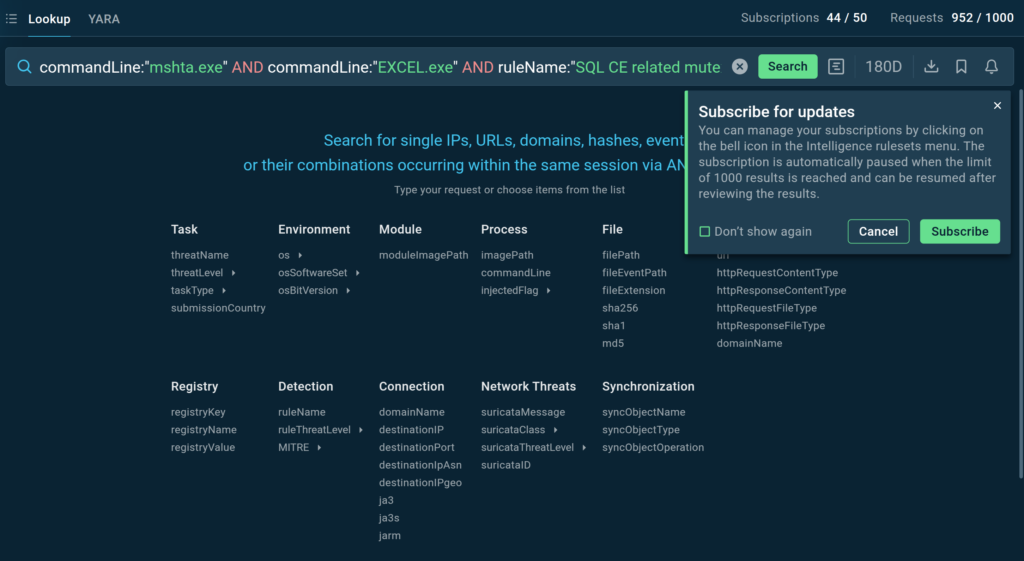
Yet, if we’re talking about threat hunting, we subscribe to Search Updates in TI Lookup to keep up with the changes in ongoing cyber attacks and automate the collection of new indicators of compromise (IOCs) and threat samples. Let me explain how it works.
Search Updates in TI Lookup
TI Lookup users can subscribe to custom search queries to receive timely updates on relevant Indicators of Compromise (IOCs), Indicators of Attack (IOAs), and Indicators of Behavior (IOBs) belonging to the threats of their interest.
Gathering data on the threats that are relevant to us
Converting the data into actionable signatures and detection rules
There are several sources for such data, with publicly available research and reports published by other companies being the most common one. The problem here is that attackers constantly shift infrastructure – C2 servers might cycle IPs every 48 hours. So, relying on the indicators we find in public reports can do only so much. And that is precisely the detection gap that Search Updates in TI Lookup help to bridge.
TI Lookup lets users receive result updates on queries of their interest
Subscribing to Search Updates in TI Lookup allows us to use more stable indicators of behavior (IOBs)to track all the latest changes in specific attacks and see if they are still ongoing. IOBs are things like the tools used by attackers, the kill chain techniques, and infection traces on the system such as created directories, file names and types, etc. The things that do not tend to expire as fast as short-lived network infrastructure of attackers or hashes.
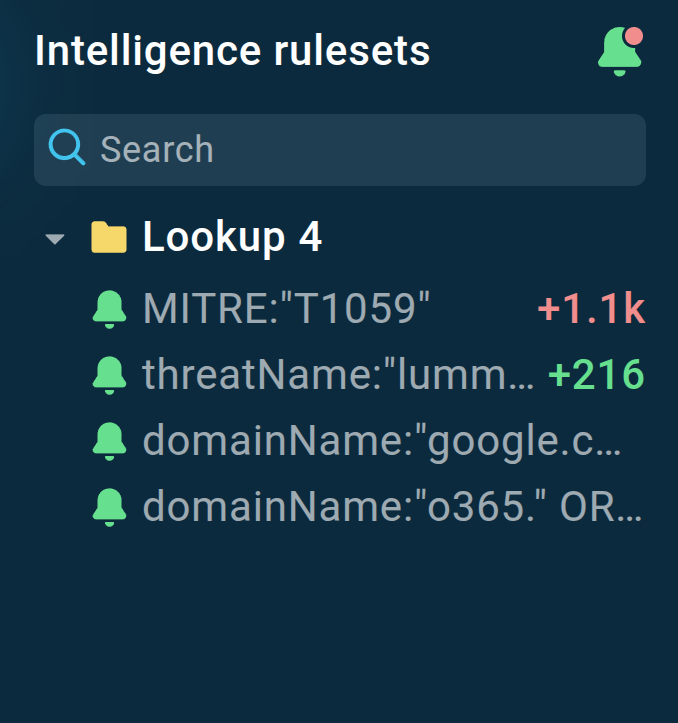
Query subscriptions are displayed in the left-side menu with the number of new results next to them
Essentially, with TI Lookup, we can put several IOBs related to a single attack together and use them in a search query to get notified about the latest samples and IOCs, which the threat hunting team can process and turn into detection rules.
The result is that we can follow active threats that may potentially target our company almost in real time because TI Lookup is updated every few hours with fresh data.
Collect intelligence on the latest cyber attacks with ANY.RUN’s TI Lookup
Our current collection of query subscriptions is well beyond a hundred entries. I will try to give you a few general types of threats that we tend to add to it and some of the examples.
At the moment we subscribe to well over a hundred search queries. To give you an idea of what we monitor, I’ll give you a couple of common threats we tend to follow.
Geo-Targeted Threats
While our HQ is in the United States, we have several local offices, which also become extensively targeted with cyber attacks. Search Updates make it easier for us to track several types of threats occurring in a specific country.
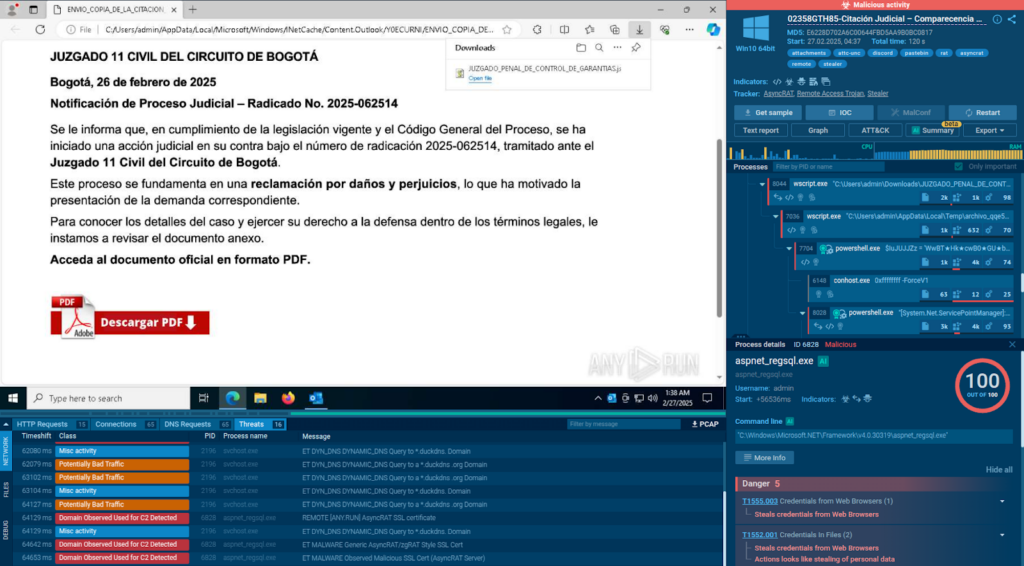
For example, we make sure to check for new samples of email-distributed infostealers in Colombia:
TI Lookup displays the latest public sandbox analyses featuring infostealers together with .msg and .eml files
For this query, we get several updates almost every week.
One of the samples returned by TI Lookup involved AsyncRAT sample
We check the new samples and see if they have anything of value and if so, use the indicators extracted by the sandbox to make signatures to scan the company’s infrastructure for any matching threats.
Common Vulnerabilities and Exposures (CVEs)
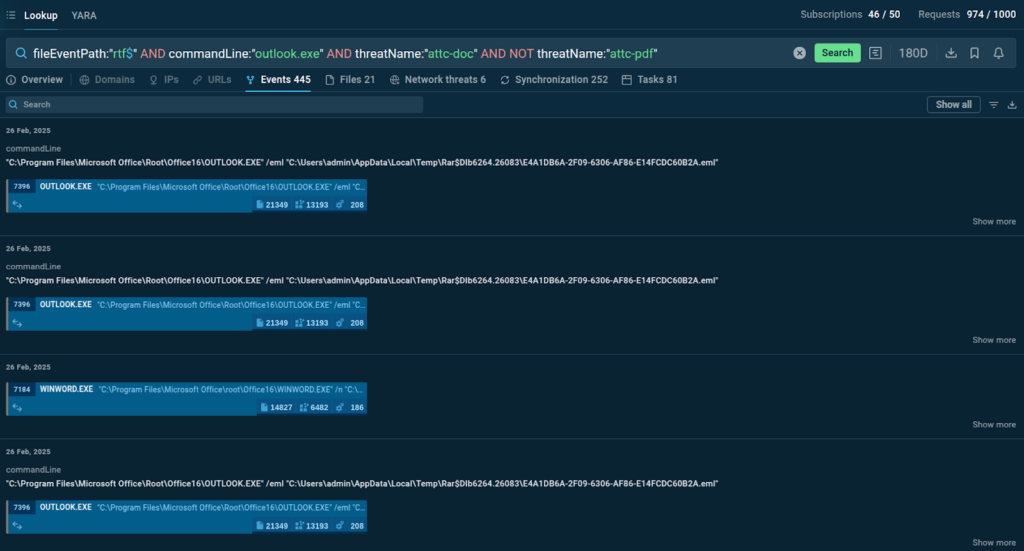
Another top concern on any threat hunters’ list is CVEs, both old and new. One of the recent examples is CVE-2025-21298, the vulnerability where simply previewing a malicious .rtf document in Outlook leads to remote code execution and system compromise.
As soon as we learned about it, we made sure to go to TI Lookup and sign up for a query that would provide us with relevant samples in case any attackers decided to abuse this vulnerability.
In the query, we combined the file type (rtf) with Outlook, used the attc-doc (document attachment) tag, and excluded pdfs:
The Events tab in TI Lookup provides a list of command line logs recorded across relevant sandbox sessions
As a result, we now can minimize the manual research on this threat and in case an actual attack with this CVE is uploaded to TI Lookup, we’ll be notified about it.
Another thing that I think is worth mentioning here is that this CVE is a great example of how flexible TI Lookup can be. Despite not having a specific tag for this threat, we were able to make up for that by using the big selection of search parameters.
Credential-Theft Attacks
Given phishing is by far the top threat our company faces, one of the most common types of it is fake credential-stealing forms.
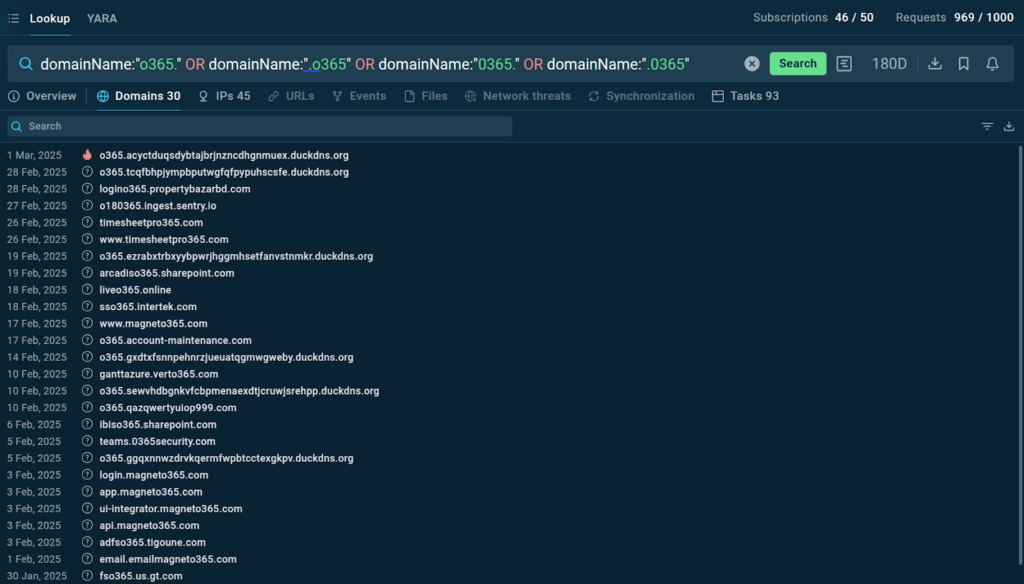
There is a campaign that has been going for a while, where attackers send emails that contain links to fake Microsoft 365 pages. The catch is that the malicious domain names are designed to masquerade as legit Microsoft ones. One of the standout things here is the use of “0” and “o” before “365”. Needless to say, the Search Updates feature does a great job letting us know about the new domains and actual examples of these attacks.
TI Lookup lists all the matching domains found across relevant sandbox sessions
The team collects new domains and email samples and improves detection of any possible phishing attempts against our own infrastructure.
Enrich your threat knowledge with TI Lookup
Learn about TI Lookup and its capabilities to see how it can contribute to your company’s security
Explore more
Search Updates Hacks
The thing that’s not related to Query Subscriptions per se but is still of huge help is the wildcards. It really adds flexibility to the searches, so we potentially set up queries to be more specific and general, depending on the indicators we use for a threat.
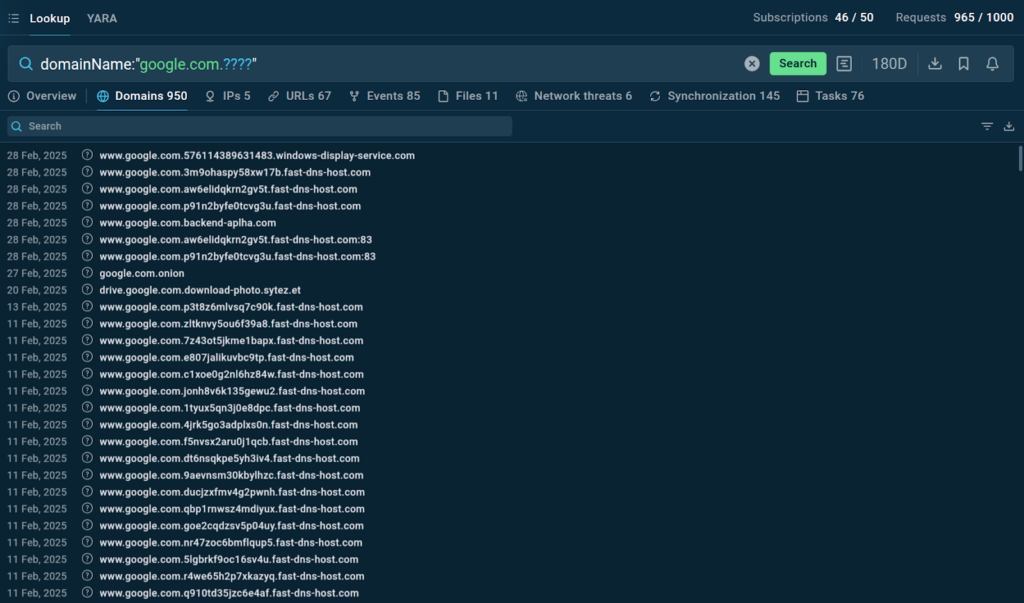
Just last week, we subscribed to a query for a new campaign where attackers use website addresses that start with “google.com” but then have random strings of characters afterwards.
To get the newest variants of these domains, we added the “?” wildcard to the query – which stands for any single character. We used four question marks to account for the random part of the domain.
Each of the domains can be explored further in the sandbox sessions where they were logged
Search Updates let us know every time a matching fake domain is added to TI Lookup’s database.
Impact on Security
In terms of company’s security, TI Lookup provides us with some of the latest threat intelligence we can get. We can apply it immediately while indicators are still active to identify threats and protect the organization’s infrastructure in advance.
It also improves our awareness of the threat landscape, letting us track a wider array of attacks. We now have more data on a broader pool of threats than ever before and can identify the ones that are still ongoing and those that are no longer active.
Impact on Operations
If we’re talking about the team’s performance, the productivity definitely went up after we began using Query Subscriptions. Back in the day, we had to allocate a lot of time and staff to follow up on attacks that were relevant to us. This was a lot of manual work. I’m not saying that we no longer do it, but receiving Search Updates definitely made the process much easier.
We now get automated updates and can actually focus on more threats than before, because we no longer need to rely on guesswork in deciding which attacks will be more likely to affect us.
Now we simply create a query and hit subscribe. The more new results we see arriving for a particular threat in TI Lookup the higher priority it gets.
Team Feedback
Most of the team are well-familiar with the ANY.RUN sandbox, so adopting TI Lookup felt natural for them. It is with some of the new folks on the team we had to work a little harder to get them to a place where they could comfortably use the service. They mostly struggled with the query parameters and their meanings, as well as tags in the sandbox, which are the same in TI Lookup. But most of them managed to become fairly proficient in a week or two.
Conclusion
We want to thank the guest for taking the time to share their story and real-world examples of using TI Lookup. The behind-the-scenes view of a threat hunting team’s work is always a rare privilege and we really appreciate it. Our hope is that this article will help other users considering integrating the service in their organization with laying the groundwork for successful implementation.
As always, if you are open to letting others know how your team uses ANY.RUN’s products, we’ll be happy to hear from you at support@any.run.
About ANY.RUN
ANY.RUN helps more than 500,000 cybersecurity professionals worldwide. Our interactive sandbox simplifies malware analysis of threats that target both Windows and Linux systems. Our threat intelligence products, TI Lookup, YARA Search, and Feeds, help you find IOCs or files to learn more about the threats and respond to incidents faster.
https://www.backbox.org/wp-content/uploads/2018/09/website_backbox_text_black.png00adminhttps://www.backbox.org/wp-content/uploads/2018/09/website_backbox_text_black.pngadmin2025-03-05 12:07:042025-03-05 12:07:04How Transport Company Gets Real-Time IOC and IOB Updates on Active Cyber Attacks
New research shows at least a million inexpensive Android devices—from TV streaming boxes to car infotainment systems—are compromised to allow bad actors to commit ad fraud and other cybercrime.
https://www.backbox.org/wp-content/uploads/2018/09/website_backbox_text_black.png00adminhttps://www.backbox.org/wp-content/uploads/2018/09/website_backbox_text_black.pngadmin2025-03-05 11:07:172025-03-05 11:07:171 Million Third-Party Android Devices Have a Secret Backdoor for Scammers