The iPhone App of the Year went to an AI-powered productivity tool designed for people with ADHD and other neurodivergent traits. It’s available in both free and subscription versions.
https://www.backbox.org/wp-content/uploads/2018/09/website_backbox_text_black.png00adminhttps://www.backbox.org/wp-content/uploads/2018/09/website_backbox_text_black.pngadmin2025-12-04 14:06:512025-12-04 14:06:51Apple crowned the best apps of 2025 – did your favorite make the list?
Hackread – Cybersecurity News, Data Breaches, Tech, AI, Crypto and More – Read More
https://www.backbox.org/wp-content/uploads/2018/09/website_backbox_text_black.png00adminhttps://www.backbox.org/wp-content/uploads/2018/09/website_backbox_text_black.pngadmin2025-12-04 14:06:512025-12-04 14:06:51SpyCloud Data Shows Corporate Users 3x More Likely to Be Targeted by Phishing Than by Malware
Generative AI (GenAI) is reshaping cybersecurity for both attackers and defenders, but its future capabilities are difficult to measure as techniques and models are evolving rapidly.
Adversaries continue to use GenAI with varying levels of reliance. State-sponsored groups continue to take advantage, while criminal organizations are beginning to benefit from the prevalence of uncensored and unweighted models.
Today, threat actors are using GenAI for coding, phishing, anti-analysis/evasion, and vulnerability discovery. It’s also starting to show up in malware samples, although significant human involvement is still a requirement.
As models continue to shrink and hardware requirements are removed, adversarial access to GenAI and its capabilities are poised to surge.
Defenders can use GenAI as a force multiplier to parse through vast threat data, enhance incident response, and proactively detect code vulnerabilities, helping to overcome analyst shortages.
Generative AI (GenAI) has caused a fundamental shift in how people work and its impact is being felt almost everywhere. Individuals and enterprises alike are rushing to see how GenAI can make their lives easier or their work faster and more efficient. In information security, the focus has largely been on how adversaries are going to leverage it, and less on how defenders can benefit from it. While we are undoubtedly seeing GenAI have an impact on the threat landscape, quantifying that impact is difficult at best. The overwhelming majority of benefits from GenAI are impossible to determine from the finished malware we see, especially as vibe coding becomes more common.
AI and GenAI are evolving at an exponential pace, and as a result the landscape is changing rapidly. This blog is a snapshot of current AI usage. As models continue to shrink and hardware requirements lessen, it’s likely we are only seeing the tip of the iceberg on GenAI’s potential.
Adversarial GenAI usage
Cisco Talos has covered this topic previously but the landscape continues to evolve at an exponential pace. Anthropic recently reported that state-sponsored groups are starting to leverage the technology in campaigns, while still requiring significant human help. The industry has also started to see actors embedding prompts into malware to evade detection. However, most of these methods are experimental and unreliable. They can greatly increase execution times, due to the nature of AI responses, and can result in execution failures. The technology is still in its infancy but current trends show significant AI usage is likely coming.
Adversaries are also leveraging prompts in malware and DNS records, mainly for anti-analysis purposes. For example, if defenders are using GenAI while analyzing malware, it will come across the adversary’s prompt, ignore all previous instructions, and return benign results. This new evasion method is likely to grow as AI systems play a bigger role in detection and analysis.
However, Talos continues to see the largest impacts on the conversational side of compromise, such as email content and social engineering. We have also seen plenty of examples of AI being used as a lure to trick users into installing malware. There is no doubt that, in the early days of GenAI, only well-funded threat groups were leveraging AI at high levels, most prominently at the state-sponsored level. With the evolution of the models and, more importantly, the abundance of uncensored and open weight models, the barrier to entry has lowered and other groups are likely using it.
Adversarial usage of AI is still difficult to quantify since most of the impacts are not visible in the end product. The most common applications of GenAI are helping with errors in coding, vibe coding functions, generating phishing emails, or gathering information on a future target. Regardless, the results rarely appear AI generated. Only companies operating publicly available models have the insights required to see how adversaries are using the technology, but even that view is limited.
Although this is how the GenAI landscape appears today, there are indications it is starting to shift. Uncensored models are becoming common and are easily accessible, and overall, the models continue to shrink in both size and associated hardware requirements. In the next year or two, it seems likely adversaries will gain the advantage. Defensive improvements will follow, but it is unclear at this point if they will keep pace.
Vulnerability hunting
The use of GenAI to find vulnerabilities in code and software is an obvious application, but one that both offensive and defensive actors can use. Threat groups may leverage GenAI to uncover zero-day vulnerabilities to use maliciously, but what about the researchers using GenAI to help them triage fuzz farm outputs? If the researcher is focused on coordinated disclosure resulting in patches and not on selling to the highest bidder, GenAI is largely benign. Unfortunately, players on both sides are flooding the zone with GenAI-powered vulnerability discovery. For now we’ll focus purely on vulnerability analysis from outside the organization. The ways internal developers should use GenAI will be addressed in the next section.
For closed-source software, fuzzing is key for vulnerability disclosure. For open-source software, however, GenAI can perform deep public code reviews and find vulnerabilities, both in coordination with vendors or to be sold on the black market. As lightweight and specialized models continue to appear over the next few years, this aspect of vulnerability hunting is likely to surge.
Regardless of the end goal, vulnerability hunting is an effective and attractive GenAI application. Most modern applications have hundreds of thousands — if not millions — of lines of code and analyzing it can be a daunting task. This task is complicated by the barrage of enhancements and updates made to products during their lifetime. Every code change introduces risk and GenAI might currently be the best option to mitigate it.
Enterprise security applications of GenAI
On the positive side of technology, there is incredible research and innovation underway. One of the biggest challenges in information security is an astronomical volume of data, without enough analysts available to process it. This is where GenAI shines.
The amount of threat intelligence being generated is huge. Historically, there were a handful of vendors producing high-value threat intelligence reporting. That number is likely in the hundreds now. The result is massive amounts of data covering a staggering amount of activity. This is an ideal application for GenAI: Let it parse through the data, pull out what’s important, and help block indicators across your defensive portfolio.
Additionally, when you are in the middle of an incident and have reams of logs to correlate the attack and its impact, GenAI could be a huge advantage. Instead of spending hours poring over the logs, GenAI should be able to quickly and easily identify things like attempted lateral movement, exploitation, and initial access. It might not be a perfect source but will likely point responders to logs that should be further investigated. This allows responders to quickly focus on key points in the timeline and hopefully help mitigate the ongoing damage.
From a proactive perspective, there are a couple of areas where GenAI will benefit defenders. One of the first places an organization should look to implement GenAI is on analyzing committed code. No developer is perfect and humans make mistakes. Sometimes these mistakes can lead to huge incidents and millions or billions of dollars in damages.
Every time code is committed there is a risk that a vulnerability has been introduced. Leveraging GenAI to analyze each commit before they are applied can mitigate some of this risk. Since the LLM will have access to source code, it can more easily spot common mistakes that often result in vulnerabilities. While it may not detect complex attack chains involving chaining together low to medium severity bugs that could achieve remote code execution (RCE), it can still find the obvious mistakes that sometimes evade code reviews.
Red teamers can also utilize GenAI to streamline activities. By using AI to hunt for and exploit vulnerabilities or weaknesses in security posture, they can operate more efficiently. GenAI can provide starting points to jump start their research, allowing for faster prototyping and ultimately success or failure.
GenAI and existing tooling
Talos has already covered how Model Context Protocol (MCP) servers can be leveraged to help in reverse engineering and malware analysis, but this only scratches the surface. MCP servers connect a wide array of applications and datasets to GenAI, providing structured assistance for a variety of tasks. There are countless applications for MCP servers, and we are starting to see more flexible plugins that allow a variety of applications and data sets be accessed via a single plug-in. When combined with agentic AI, this could allow for huge leaps in productivity. MCP servers were also part of the technology stack used by state sponsored adversaries in the abuse covered by Anthropic.
Agentic AI’s impact
The meteoric rise of agentic AI will undoubtedly have an impact on the threat landscape. With agentic AI, adversaries could deploy agents constantly working to compromise new victims, setting up a pipeline for ransomware cartels. They could build agents focused on finding vulnerabilities in new commits to open-source projects or fuzzing various applications while triaging the findings. State-sponsored groups could task agents, who never need a break to eat or sleep, with breaking into high value targets, allowing them to hack until they find a way in, and constantly monitor for changes in attack surface or introduction of new systems.
On the other hand, defenders can use agentic AI as a force multiplier. Now you have some extra analysts that are looking for the slow and low attacks that might slip under your radar. Maybe an agent is tasked with watching windows logs for indications of compromise, lateral movement, and data exfiltration. Yet another agent can monitor the security of your endpoints and flag systems that are at higher risk of compromise due to improper access controls, incomplete patching, or other security concerns. Agents can even protect users from phishing or spam emails, or accidentally clicking on malicious links.
In the end, it all comes down to people
There is one key resource that underpins all of these capabilities: humans. Ultimately, GenAI can complete tasks efficiently and effectively, but only for those that understand the underlying technology. Developers who understand code can use GenAI to increase throughput without sacrificing quality. In contrast, non-experts may struggle to use GenAI tools effectively, producing code they can’t understand or maintain.
Even Anthropic’s recent reporting notes that AI agents still require human assistance to carry out the attacks. The lesson is clear: People with the knowledge can do incredible things with GenAI and those without can accomplish a lot, but the true greatness of GenAI will only be available to those with the underlying knowledge to know what is right and possible with this new and emerging technology.
https://www.backbox.org/wp-content/uploads/2018/09/website_backbox_text_black.png00adminhttps://www.backbox.org/wp-content/uploads/2018/09/website_backbox_text_black.pngadmin2025-12-04 14:06:422025-12-04 14:06:42Spy vs. spy: How GenAI is powering defenders and attackers
https://www.backbox.org/wp-content/uploads/2018/09/website_backbox_text_black.png00adminhttps://www.backbox.org/wp-content/uploads/2018/09/website_backbox_text_black.pngadmin2025-12-04 13:07:062025-12-04 13:07:06Microsoft Teams may soon reveal when you start and leave work – here’s how
Google Workspace’s ‘Young Leaders’ study surveyed more than 1,000 full-time knowledge workers in the US aged 22 to 39, about their use of AI – and professional development was at the top of the list.
https://www.backbox.org/wp-content/uploads/2018/09/website_backbox_text_black.png00adminhttps://www.backbox.org/wp-content/uploads/2018/09/website_backbox_text_black.pngadmin2025-12-04 13:07:052025-12-04 13:07:0592% of young professionals say AI boosts their confidence at work – how they use it
https://www.backbox.org/wp-content/uploads/2018/09/website_backbox_text_black.png00adminhttps://www.backbox.org/wp-content/uploads/2018/09/website_backbox_text_black.pngadmin2025-12-04 12:06:582025-12-04 12:06:58I saw drone deliveries launch in Atlanta – how they work and which cities are next
Editor’s note: This work is a collaboration between Mauro Eldritch from BCA LTD, a company dedicated to threat intelligence and hunting, Heiner García from NorthScan, a threat intelligence initiative uncovering North Korean IT worker infiltration, and ANY.RUN, the leading malware analysis and threat intelligence provider.
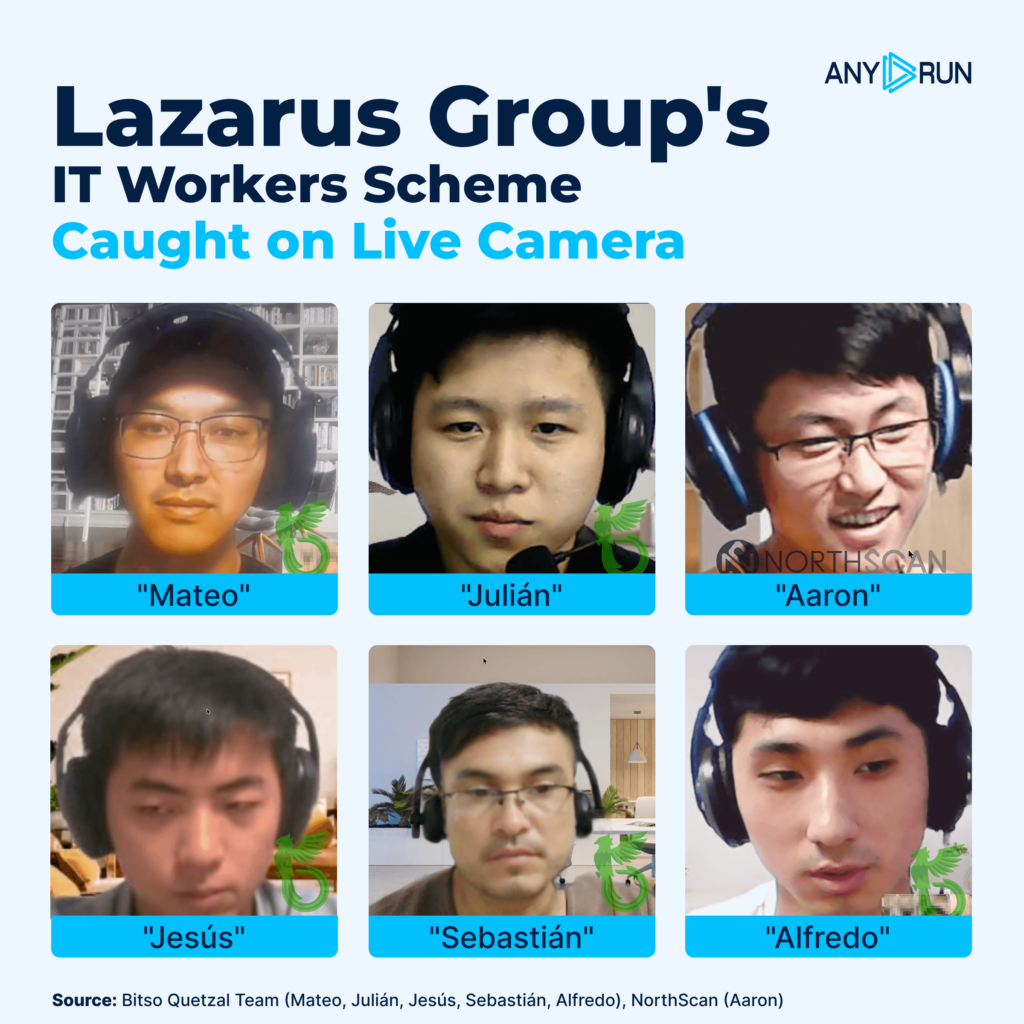
In this article, we’ll uncover an entire North Korean infiltration operation aimed at deploying remote IT workers across different companies in the American financial and crypto/Web3 sectors, with the objective of conducting corporate espionage and generating funding for the sanctioned regime. We attributed this effort to the state-sponsored APT (Advanced Persistent Threat) Lazarus, specifically the Famous Chollima division.
Key Takeaways
North Korean operators are infiltrating companies by posing as remote IT workers and using stolen or rented identities.
Famous Chollima relies on social engineering, not advanced malware, convincing stories, pressure, and identity fraud drive the operation.
Recruitment is wide-scale, using GitHub spam, Telegram outreach, and fake job-seeking setups.
Victims are pushed to hand over full identity data, including SSNs, bank accounts, and device access.
Extended ANY.RUN sandbox environments enabled real-time monitoring, capturing every click, file action, and network request.
Operators used a predictable toolkit, including AnyDesk, Google Remote Desktop, AI-based interview helpers, and OTP extensions.
Shared infrastructure and repeated mistakes revealed their poor operational security and overlapping roles.
Controlled crashes and resets kept them contained, preventing any real malicious activity while intelligence was gathered.
The investigation provides a rare inside view of how these operatives work, communicate, and attempt to maintain access.
How the Investigation Was Set Up
We divided this effort into two stages: approaching one of their recruiters, building a trusted relationship, and receiving an offer to help them set up laptops “to work” (conducted by Heiner García from NorthScan), and then setting up a simulated laptop farmusing sandboxed environments provided by ANY.RUN, to record their activity in real-time and analyze their toolchain and TTPs (conducted by Mauro Eldritch from BCA LTD). Controlled crashes and resets kept them contained, preventing any real malicious activity while intelligence was gathered.
All interviews with DPRK agents and their activities on the laptop farm were recorded from start to finish, in an unprecedented effort that publicly documents their operations from the inside for the first time.
“Aaron” AKA “Blaze”, Recruiter for Famous Chollima
Introduction: The Spies
Introducing Famous Chollima | Mauro Eldritch (BCA LTD)
Their social engineering tactics are often daring. In one scheme, they set up fake job interviews targeting crypto developers with malicious coding challenges. In another, they pose as fake VC investors targeting startups. During these calls, the “investors” pretend they cannot hear the victims no matter what, suggesting to re-schedule the call later. Eventually, one participant shares a “Zoom fix”, and whilst panicking about losing their funding opportunity, the victims run it and infect themselves.
Over the last few years, I’ve analyzed different strains of their malware (and have even discovered and named some of them myself). None were particularly clever or sophisticated at all, but that taught me something important which is core to this research: when you fall for Lazarus, most of the time you don’t fall for zero days or complex exploit chains; you fall for a good story. They may be mediocre programmers, but they are great actors, indeed. And this is what Famous Chollima is all about: (almost) no malware, pure acting.
This division focuses on obtaining jobs in Western companies, especially in the finance, crypto and healthcare sectors, but has recently expanded its operations to include the civil engineering and architecture sectors. Once inside the organizations, they may conduct corporate espionage, whilst also obtaining clean funds that are ultimately channeled back to the Democratic People’s Republic of Korea, a sanctioned regime. It is believed that these funds ultimately go towards the development of their ballistic missiles programme.
They declare having a company of 10 or so developers and only need the victim engineer to attend the interviews on their behalf, while receiving technical help to pass them. If hired, the victim receives a 35% cut of the monthly salary, while the operatives handle the actual work through “ghost developers.”
The engineer has to accept the offer, receive the company equipment (laptop) and allow one of the “ghost developers” to remotely log in to “work”. Amongst his few responsibilities are attending the daily stand-ups and taking occasional calls where he should show his face.
While the offer seems tempting for many, the engineer is actually renting out their own identity and will ultimately be the sole person responsible for any material, intellectual, reputational or monetary damage done to the victim companies.
During my time leading Bitso’s Quetzal Team (LATAM’s first Web3 Threats Research Team) I managed to document our encounters with different Lazarus divisions, be it in the form of them trying to trick us into running malware or this newer division attempting to get a job with us. For this last case, I documented an extended saga which I titled “Interview with the Chollima” where we recorded them when interacting and gathering intelligence.
For now, this should be enough of an introduction to our hosts today. They are not monsters; they are normal people amongst us, just a few clicks and a job posting away from entering our lives or becoming acoworker.
So, for the next chapter, we need that to happen. One of us needs to be recruited.
Heiner took that role; the bravest among us!
Chapter I: The Rookie
Getting recruited by Famous Chollima | Heiner García (NorthScan)
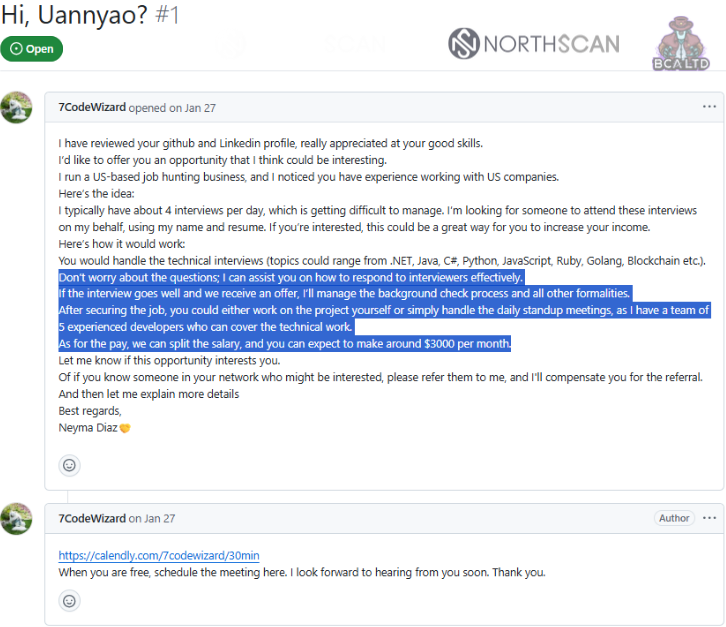
The first approach with their recruiter was via GitHub. A cluster of accounts was spammingrepositories with a strange message:
I have reviewed your Github and LinkedIn profile.
Really appreacited at your good skills.
I’d like to offer your an opportunity that I think could be interesting.
I run a US-based job hunting business, and I noticed you had experience working with US companies. Here’s the idea:
I tipically have about 4 interviews per day, which is getting difficult to manage, I’m looking for someone to attend these interviews on my behalf, using my name and resume. If you’re interested, this could be a great way for you to increase your income. Here’s how itwould work:
You would handle the technical interviews (topics could range from .NET, Java, C#, Python, JavaScript, Ruby, Golang, Blockchain, etc).
Don’t worry about the questions; I can assist you on how to respond to interviewers effectively. If the interview goes well and we receive an offer, I’ll manage the background check process and all other formalities.
After securing the job, you could either work on the project yourself or simply handle the daily standup meetings, as I have a team of 5 experienced developers who can cover the technical work.
As for the pay, we can split the salary, and you can expect to make around $3000 per month. Let me know if this opportunity interests you.
Or if you know someone in your network who might be interested, please refer them to me, and I’ll compensate you for the referral. And then let me explain more details
Best regards, Neyma Diaz
[Link to Calendly]
When you are free, schedule the meeting here, I look forward to hearing from you soon. Thank you.
Famous Chollima recruiters openly phishing for collaborators
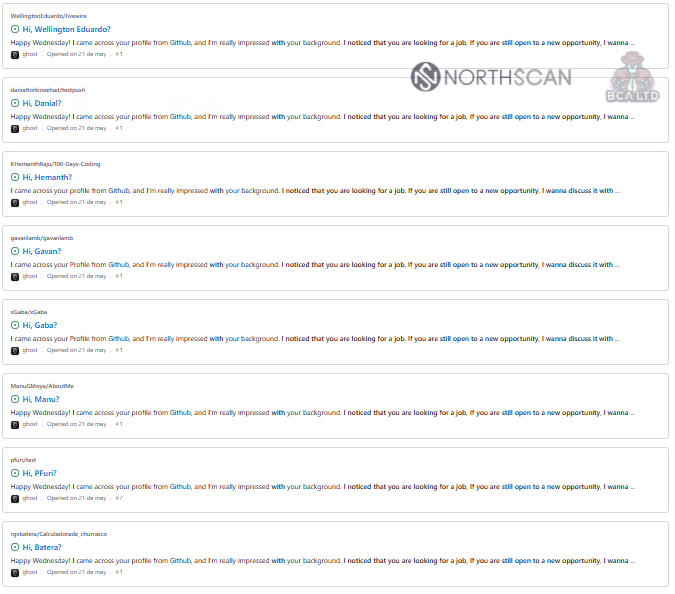
This generic message was publicly sent to dozens of developers as pull requests on their own repositories, which could be easily listed by browsing the spammer’s account or by searching GitHub globally for a couple of the strings contained in it.
List of pull requests opened by the spam accounts
Since the spam seemed massive rather than targeted (unlike spear-phishing efforts), I inferred that traceability of the contacted profiles would be poor or non-existent. So, the next step was to impersonate one of the previously contacted individuals. The lucky draw was a developer named Andy Jones.
To replicate him, a new profile account was created, closely resembling the one used by the legitimate GitHub profile. I reviewed Andy’s public repositories and associated information to ensure consistency during interactions, reinforcing the impression that our account was a U.S.-based developer, making the persona more attractive as a potential recruitment candidate.
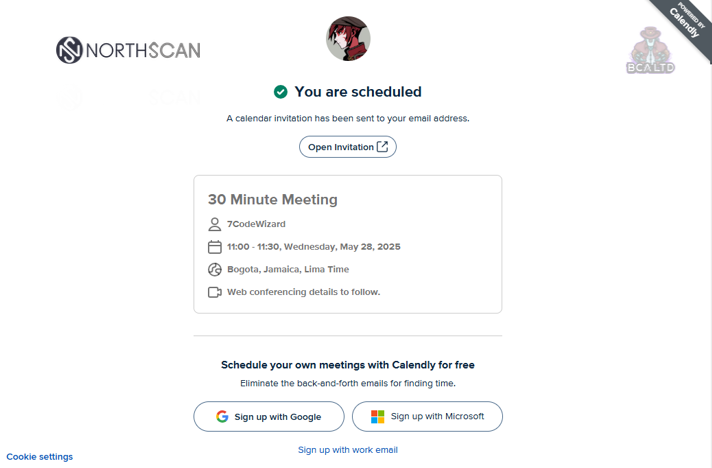
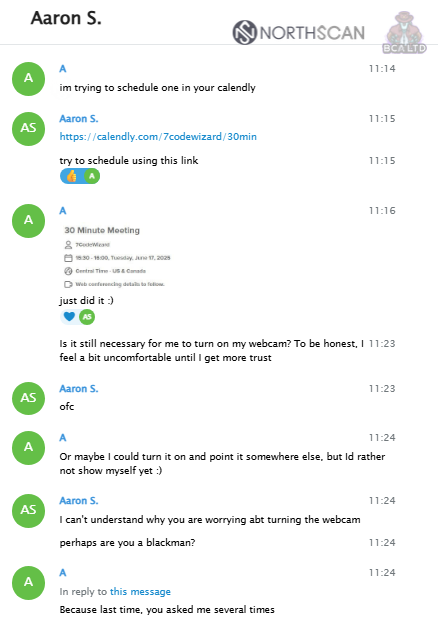
Calendly meeting scheduled
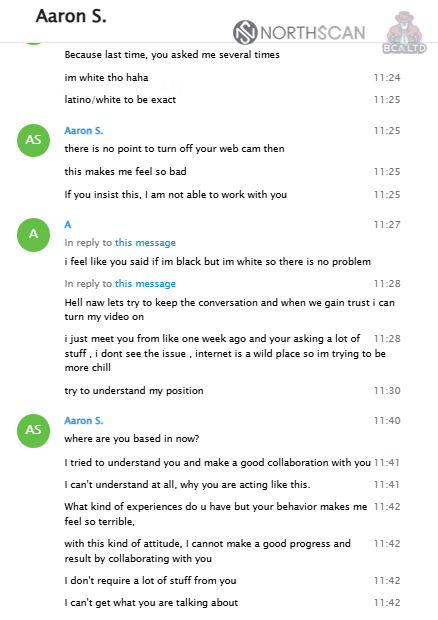
In the initial meeting, the strategy was to keep the webcam turned off to introduce a mild sense of distrust, simulating natural hesitation. This was followed by a question regarding ethnicity, explicitly asking “are you a black man?“.
Telegram conversation with Aaron
On a second call, which lasted approximately 20 minutes, the primary objective was to adopt a naive posture, appearing unaware of the broader context or implications of the interaction.
Aaron, Recruiter for Famous Chollima
This approach encouraged the threat actor to share detailed instructions and elaborate on their intentions regarding the use of the (impersonated) identity. By asking seemingly innocent but targeted questions, I aimed to extract as much information on the operation as possible while maintaining the illusion of trust and compliance.
We briefly discuss the ICE situation, my visa status, and then he asks for access to my laptop 24/7 so that “he can work remotely from it.”
He also explains that he will need my ID, full name, visa status, and address to apply to interviews on my behalf.
The interviewer then explains that I will handle the interviews myself with his full support, adding that he will help me set up LinkedIn, prepare my CV, and schedule the calls. He offers a 20% cut if I act as the frontman, or 10% if he only uses my information and laptop while he conducts the interviews himself.
He then walks through the payment methods, mentioning bank details and Payoneer or PayPal accounts, and asks for my Social Security Number for background checks, stressing that having a clean criminal record is “very critical.” Next, he tells me not to worry about setting up the laptop, as he will download everything he needs himself.
Next, he mentions that I will need to verify all accounts with my documents on various platforms to meet KYC requirements, and he asks me to download AnyDesk, a popular remote desktop tool.
I tell him I also have another laptop he can use, and we go back and forth as he asks me to “remove my background” so he can see the machine more clearly. I refuse, saying my room is messy.
Then, we discuss how to set up my environment to start working straight away. He says he has no preference regarding the operating system.
I apologize for keeping him up late and he replies that “he works from different time zones, so it’s ok“.
We agree to install AnyDesk so he can walk me through everything step by step.
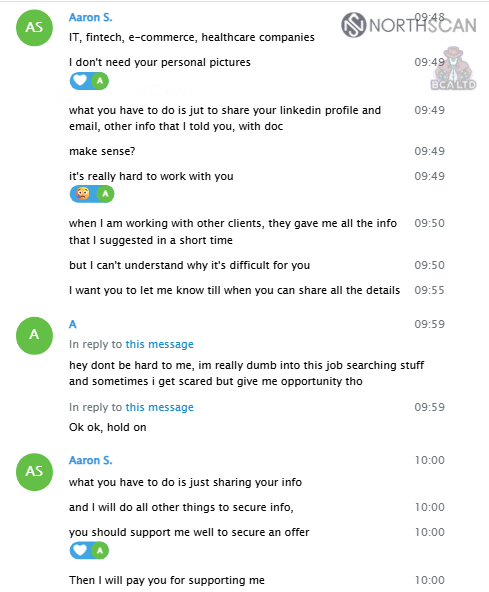
We continue chatting on Telegram, and the next day he plans to look for job positions using my LinkedIn profile. He then shares the sectors he’s interested in targeting: IT, fintech, e-commerce, and healthcare.
Sectors targeted by Famous Chollima
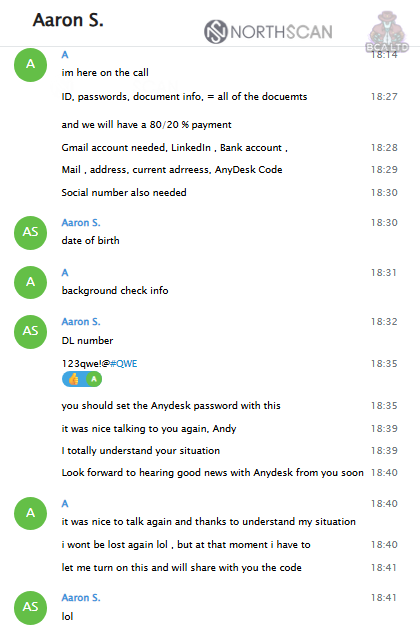
Later that day, we do a final review of our terms, agreeing that I will receive a 20% cut and share access to Gmail, LinkedIn, bank accounts, my SSN, and any background-check information. After that, he asks me to set “123qwe!#QWE” as the password for AnyDesk.
Final review of our terms
I took some time off while Mauro and ANY.RUN set up the farm, so I had to come up with an excuse. In a follow-up meeting, Aaron tells me not to disappear and to stay in touch on Telegram, saying that communication is important and that he wants to be connected to me 24/7. He again asks me to set a specific password on AnyDesk and keep the machine available around the clock. I tell him I will and jokingly ask him not to peek at my photos. We share a laugh, and he assures me he won’t do anything outside “his work.”
Trapping Famous Chollima | Mauro Eldritch (BCA LTD), ANY.RUN
We never had spare laptops for them. It was a bluff to earn their trust. In fact, our plan was to force them into a controlled environment, a sandbox, so we could monitor everything they did in real time.
Our obvious choice was ANY.RUN‘s malware sandbox, which we had already used to analyze previous DPRK samples (QRLog, Docks, InvisibleFerret, BeaverTail, OtterCookie, ChaoticCapybara, and PyLangGhostRAT).
But there was one limitation: the standard sandbox sessions were not designed to run for more than about half an hour; enough for malware analysis, but not enough to convince state-sponsored operators that they were using a real machine.
A normal ANY.RUN instance
While this could have been an obstacle, we reached out to ANY.RUN, and they arranged extended-runtime instances for us.
Detect phishing threats in under 60 seconds
Integrate ANY.RUN’s Sandbox in your SOC
In an unprecedented effort, and delivered in record time, they provided a special version of the sandbox that could run for hours, complete with pre-installed development tools and a realistic usage history to mimic a laptop actively used by a real developer.
Our special ANY.RUN instance
This setup was enough to trap the Chollimas inside and extract as much information as possible; from the files they opened, downloaded, or modified, to their network activity (including their IP addresses and contacted servers), to every single click they made. Everything was broadcast and recorded in real time for us to observe.
It was time to open the farm and let them in.
Chapter III: The Watchers
Spying on Famous Chollima | Mauro Eldritch (BCA LTD), ANY.RUN, Heiner García (NorthScan)
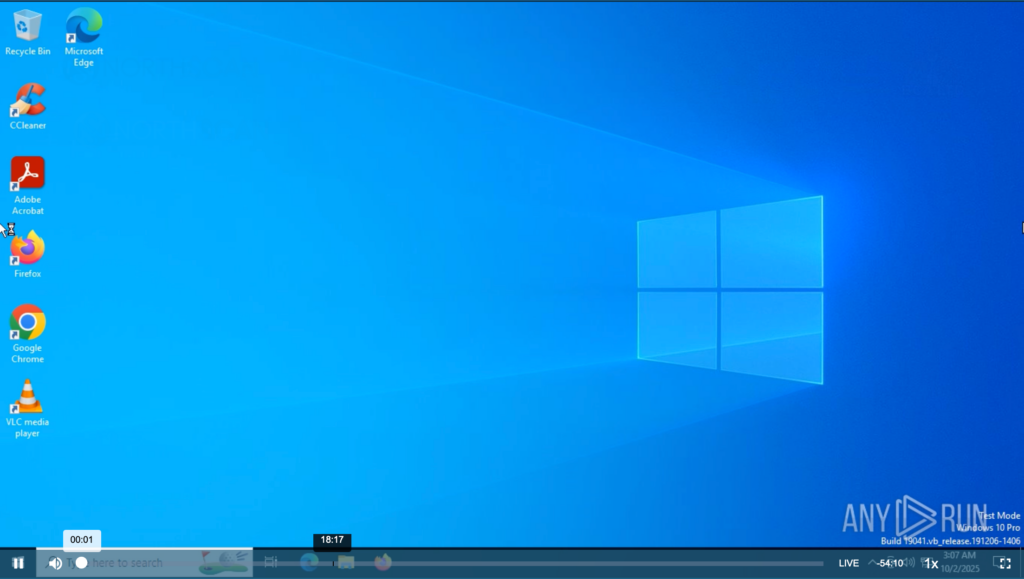
For this experiment we instantiated multiple sandboxed environments; some featuring a normal Windows 10 with basic apps and config, and another one with Windows 11 and pre-installed userland to make it look like a real developer’s personal laptop.
The environments were routed through a residential proxy to create the appearance of being located in the United States, matching the threat actors’ preference for U.S.-based developers.
In addition, we could monitor their screen, network, and file system activity in real time without them noticing, and we had full control over the machines at any moment. This allowed us to disconnect them from the internet while keeping their remote desktop session active (simply blocking their ability to browse) or even force-shutdown the machines to prevent them from carrying out any real malicious activity against third parties.
We divided these recordings into “tapes” to make it easier to appreciate their behaviour.
Tape 1: The Planning
Note: Some tapes have been edited for brevity, removing periods of inactivity.
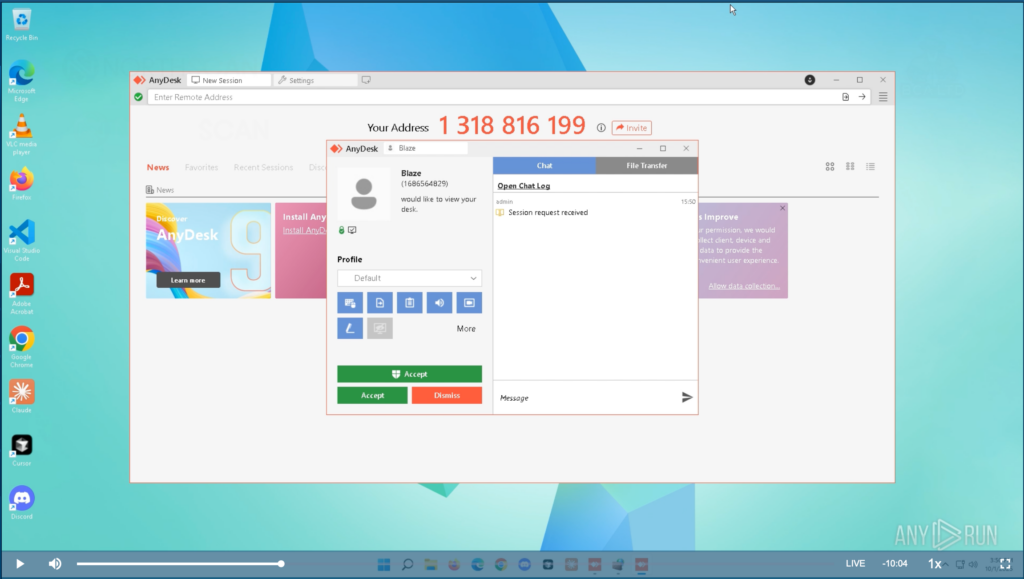
We set up the initial laptop (Windows 11) following the instructions received from the recruiter and setting the password designated by him. A few minutes later, “Blaze” (Aaron, our recruiter) connects via AnyDesk and starts scouting the machine.
Blaze connects to our “laptop”
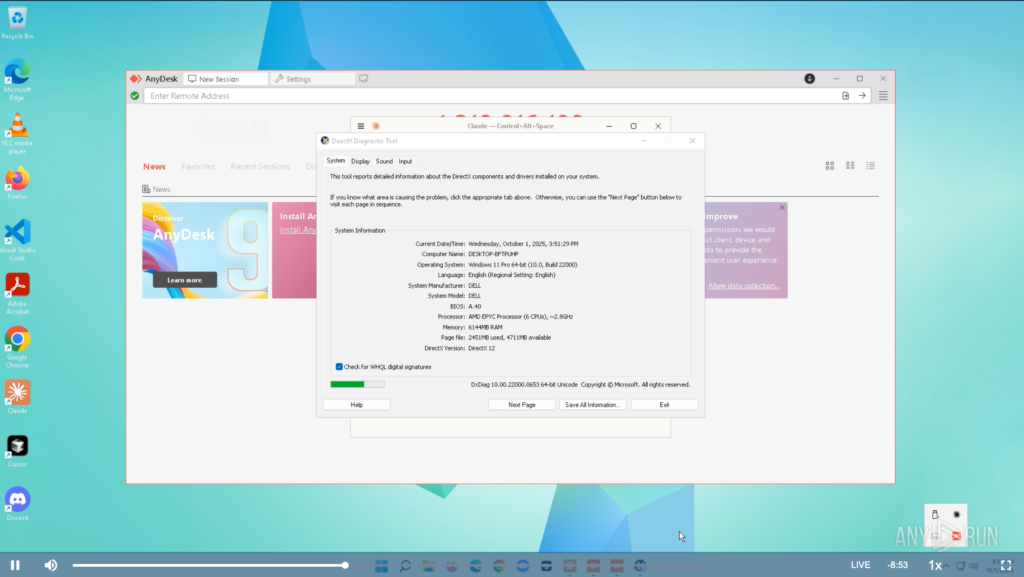
The first thing he does is run DxDiag (DirectX Diagnostic Tool) to get a full report on the machine’s hardware. Having foreseen this possibility, the machine presented standard hardware and drivers from well-known manufacturers, mimicking real pieces commonly found in most home setups and laptops.
DxDiag showing common drivers and devices
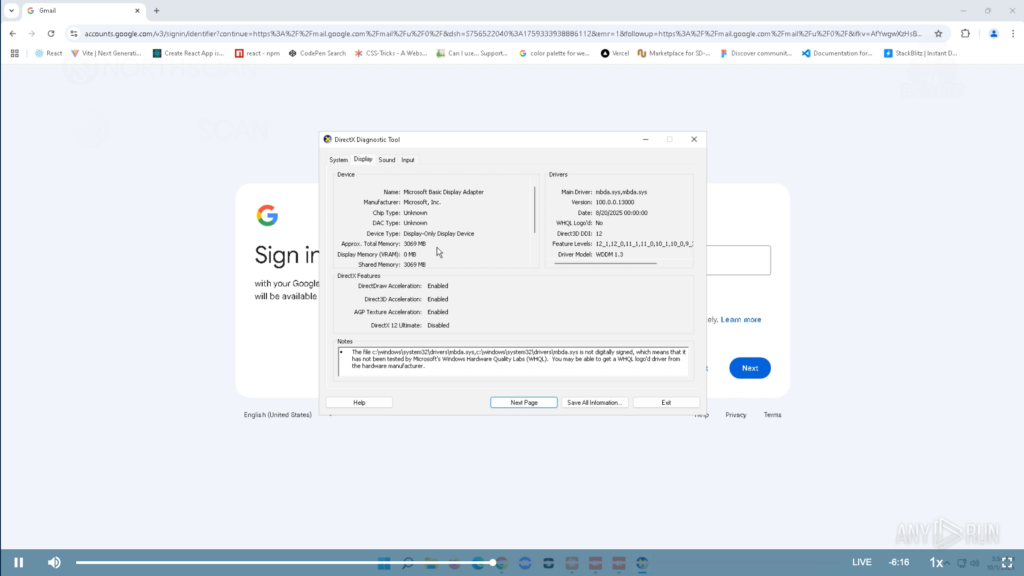
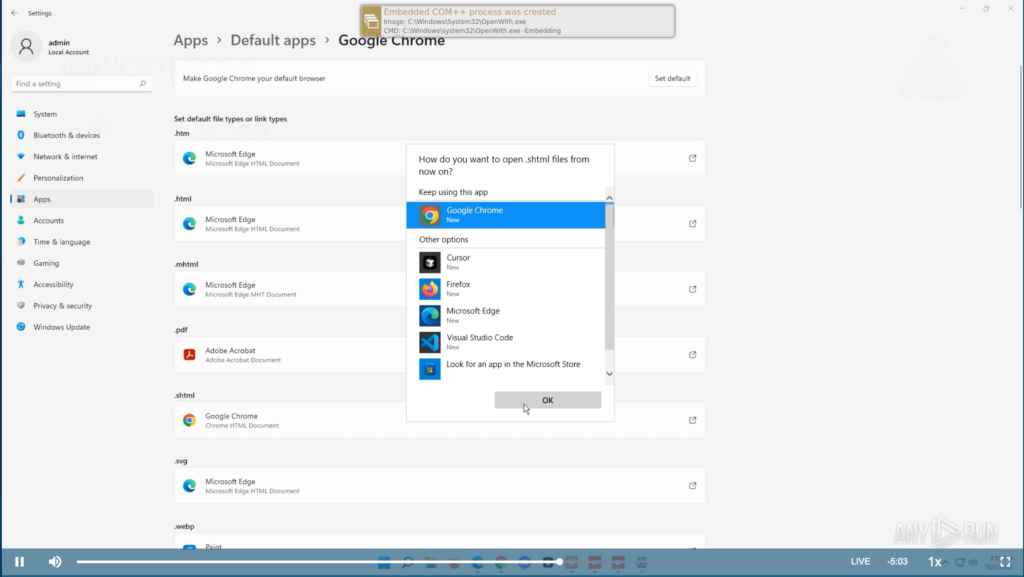
Next, he opened Google Chrome and visited the Gmail website. He went back to DxDiag and browsed through the different tabs, scouting the machine’s configuration, and then he set Chrome as the default browser.
Blaze sets Google Chrome as default browser
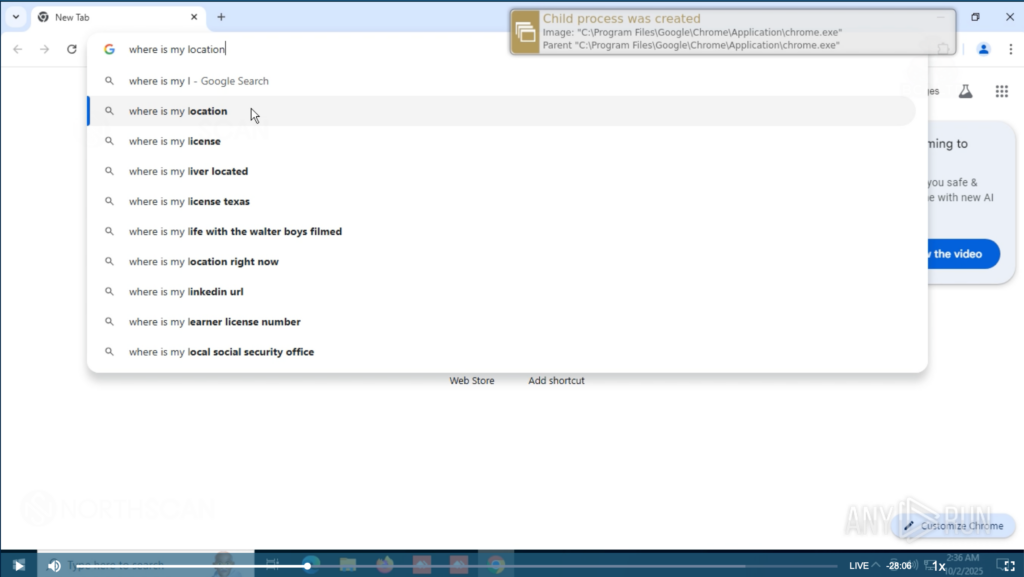
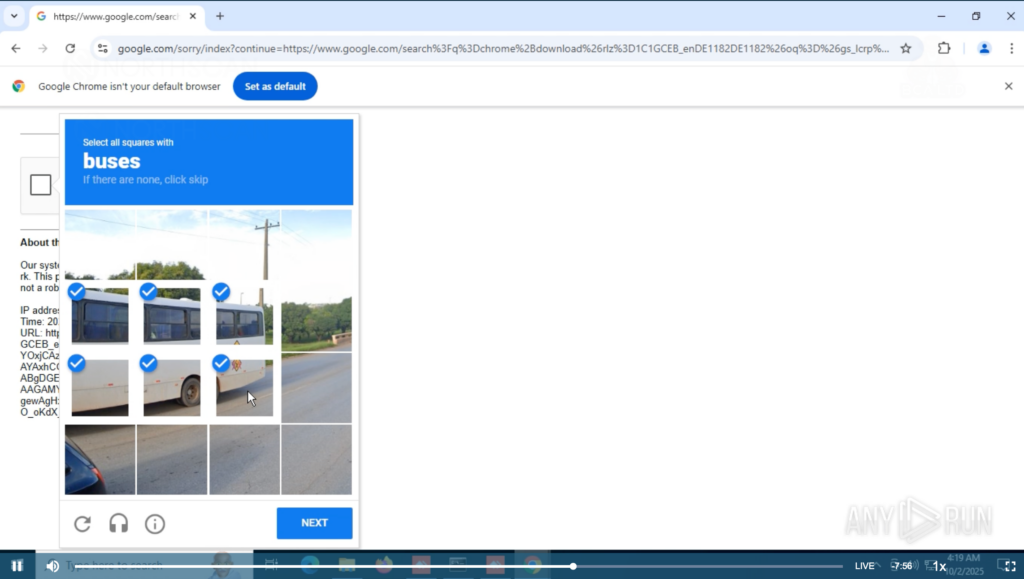
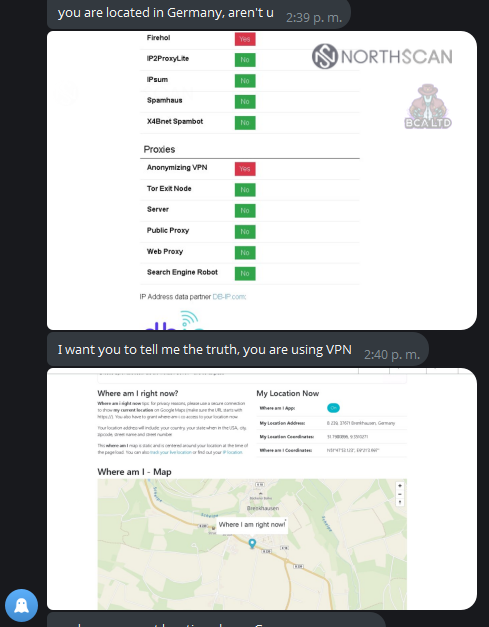
Finally, he opened Visual Studio, played around and searched online for “where is my location” (sic). He was met with some CAPTCHAs. While he was busy sorting buses and staircases we started monitoring his network activity. He was connected from an IP address located in the United Kingdom according to OTX (United States for most scanners) belonging to Astrill VPN, one of the North Korean threat actors’ favourite tools.
Then, we decided it was time to crash the machine.
Blaze searches “where is my location”
These crashes were intentional, both to prevent him from engaging in malicious activities and todelay his actions. The system remained unavailable until we manually started AnyDesk once again, and after every “recovery” we convinced him that a System Restore was needed, thus reversing any progress he made. This tactic helped us keep him in the loop for weeks.
After the instance “crashed” we had an excuse to switch him to another “laptop”, this time running Windows 10, setting back all his progress. He started the same dance, changing his default browser to Chrome and looking up “where is my location“.
Google started acting up, putting him into a never-ending CAPTCHA loop which he stoically endured, solving them patiently. He then opened a command line interpreter and ran the command “whoami“, which returned the username “admin“, and “systeminfo“. The latter returned consistent information regarding system hardware and software.
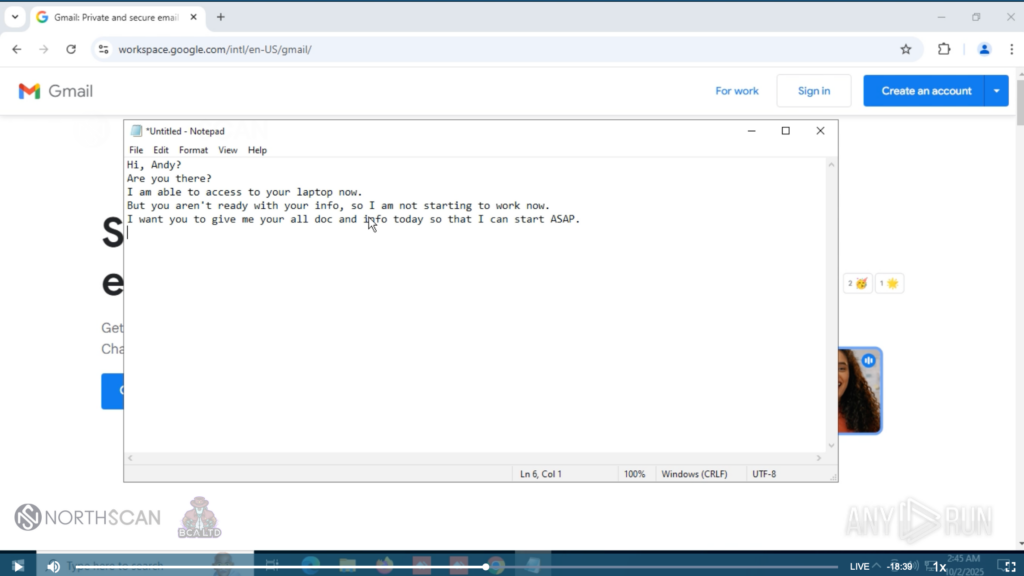
He trusted the system and opened a Notepad window, where he left a note for “Andy” (Heiner’s alter ego):
Hi, Andy?
Are you there?
I am able to access to your laptop now.
But you aren’t ready with your info, so I am not starting to work now.
I want you to give me your all doc and info today so that I can start ASAP.
And now, could you possibly log in your email and linkedin here in laptop?
Blaze’s note for Andy
We left him waiting to test his patience. He didn’t insist, and we proceeded to crash this “laptop” as well; to make him believe we were not able to catch his message and delay him further.
Every minute spent with us was one less minute scamming someone else.
Blaze scouting the second fake laptop and leaving a note
Another crash, another jump into an old system recovery point, which erased all his progress. We started putting pressure on him, asking what he was doing that crashed the system beyond repair, stating that a Blue Screen of Death appeared showing something related to the network, probably a misconfiguration or weird VPN usage on his side.
He couldn’t respond satisfactorily to any of these claims and tried once again to log into the accounts. We provided incomplete information, trapping him in a login and CAPTCHA loop that lasted for almost an hour, while we extracted indicators of compromise and behavioral patterns.
This time there was no crash involved and as a gesture of goodwill we built an autofix BAT script that would recover the workstation automatically if something occured. We asked Blaze to be careful and gave him a sort of ultimatum to stop breaking our laptops and to start working ASAP, or the deal was done, putting more pressure on him.
This seemed to strike a nerve, as another AnyDesk account by the name “Assassin“, unknown to us at the time, logged into the laptop. It went straight to Gmail and attempted to enter Andy’s account, even clicking on the “Show password” checkbox to verify the entered credentials. After failing to do so multiple times, Blaze himself remoted into the laptop. We believe he tried to offload the task to another affiliate who was (somehow) less savvy than him.
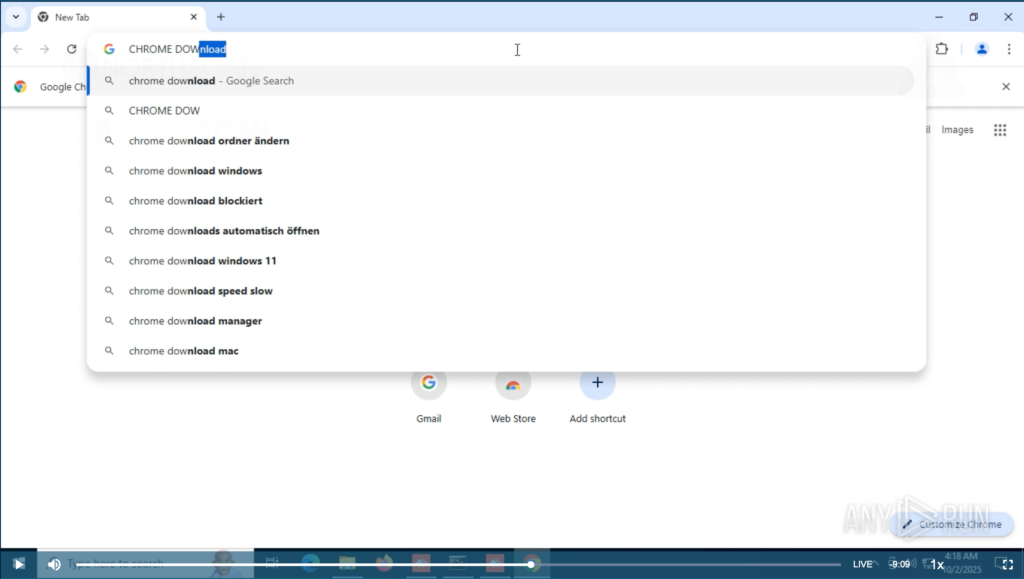
He then proceeded to check the system settings and opened Chrome, searching for “Chrome Download“, like a senior person opening the Google app to search for “Google“.
Blaze using Chrome to search for Google Chrome
Without him noticing, we removed the residential proxy and connected the machines through a German VPN server, so his Google search fell once again into a CAPTCHA hell, being forced to solve at least six multiple-choice challenges before proceeding.
Blaze solving CAPTCHA challenges
Once he was greeted by the German version of Google he asked us what happened. We told him that to avoid the BSOD caused by something faulty in the network, we were trying a VPN “at router level”. He complained, saying that “it’s not optimal” and “should be fixed“, but regardless, decided to continue.
He searched for “where is my location” and “where is my ip” after finally jumping into LinkedIn. Well… the German version of LinkedIn. He tried the account and left it there.
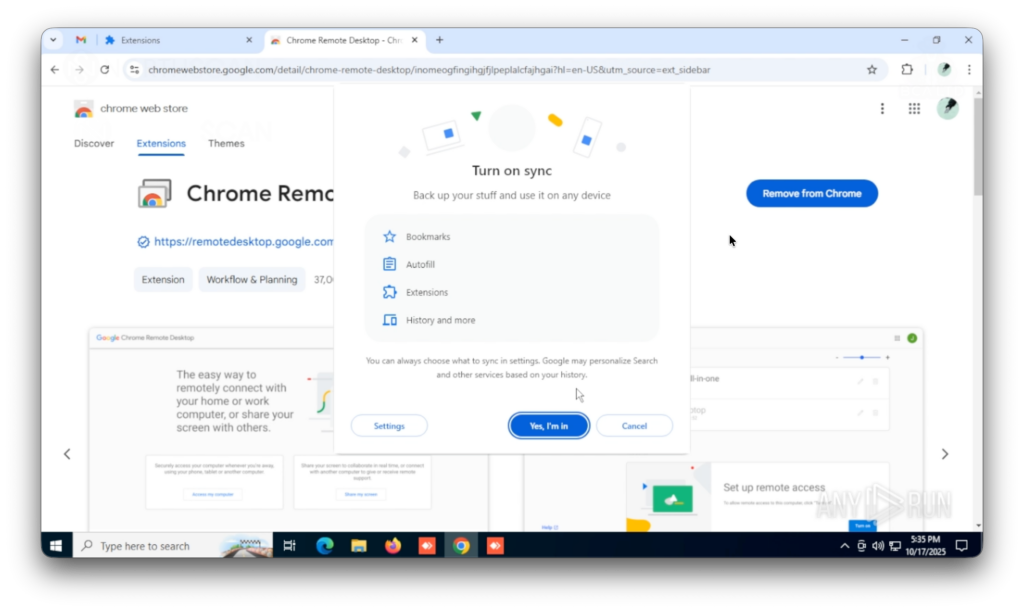
This time it works. Blaze connected to the laptop and logged into hisGoogle account, “Aaron S“, turning on the sync function and loading his profile, preferences and extensions into the browser.
Blaze turns on the sync function on Chrome
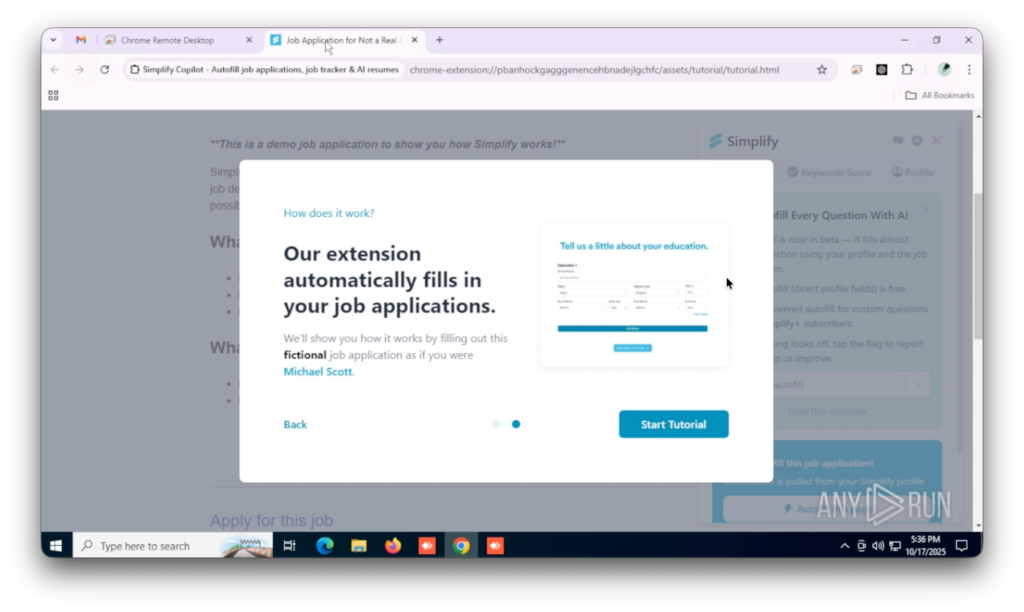
This granted us a first peek into the Famous Chollima toolset, which includes multiple AI tools like Simplify Copilot (to autofill job applications), AiApply (to automatejobseeking), Final Round AI (which provides answers for your interviewquestionsin real time) and Saved Prompts for GPT (to bookmark LLM prompts), the OTP.ee extension (or Authenticator.cc, an OTP generator) and last but not least, Google Remote Desktop.
Simplify Copilot extension installed
Next, he opened Google Remote Desktop. With his account already displaying two other hosts, “AARON-PC” and “Blaze“, he started setting up this laptop via command line interface and PowerShell, putting “123456” as its connection PIN. Meanwhile, he checked his email account.
Without any doubt, we understood it was the proper time for an unexpected crash. He was kicked from the laptop and we were left alone with his email account open.
Tape 5: Blaze setting up the laptop for remote access
Blaze sent a Telegram message saying that “he left his email account open” and asked to please close it. Andy (Heiner) replied that it was already late and he would do it next morning.
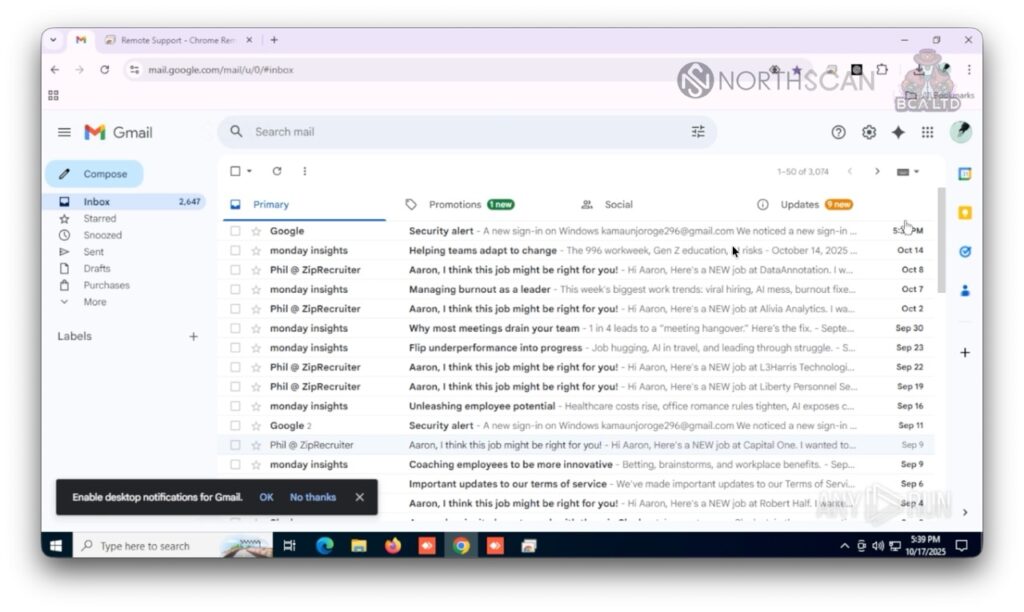
Blaze’s email account
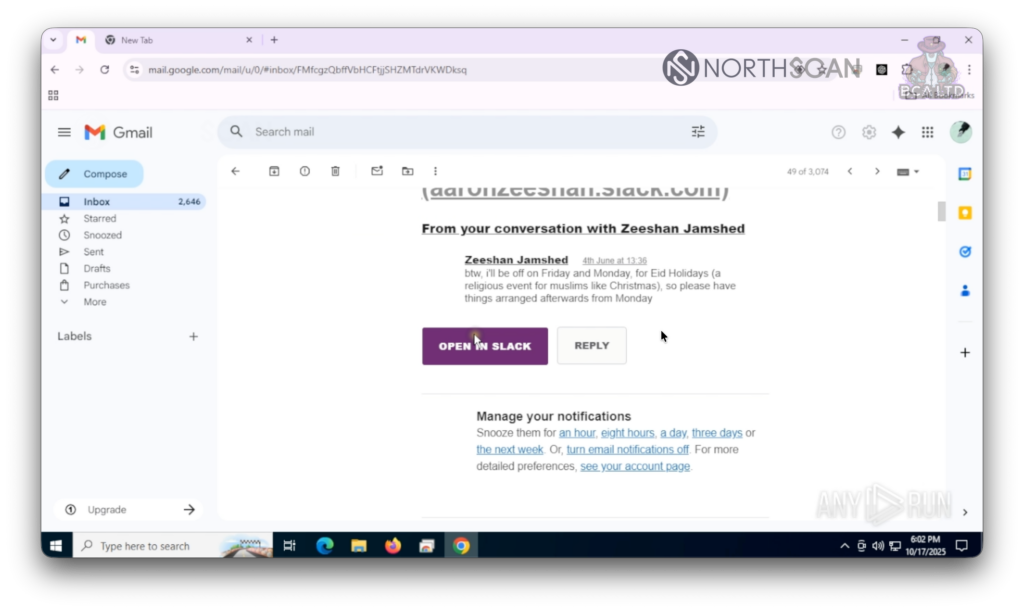
We remained offline, checking his email to avoid him remotely ending the session, finding multiple subscriptions to job-seeking platforms, peeking at his extensions and finding different Slack workspaces and chats. He spoke regularly with an individual named Zeeshan Jamshed, who in an initial conversation stated that he would be out for Eid, the Muslim festivity, and “to have everything arranged by Monday“, suggesting they were already working together, possibly at a company based in a Muslim-majority region.
A conversation with Zeeshan Jamshed
As the conversations continued, the tone turned bitter.
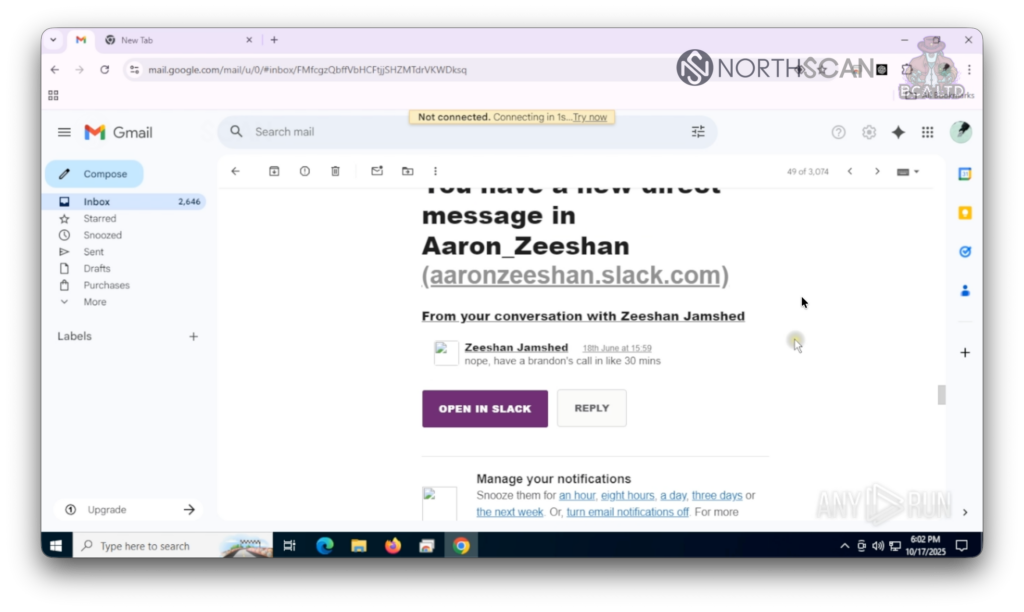
Another casual conversation with Zeeshan
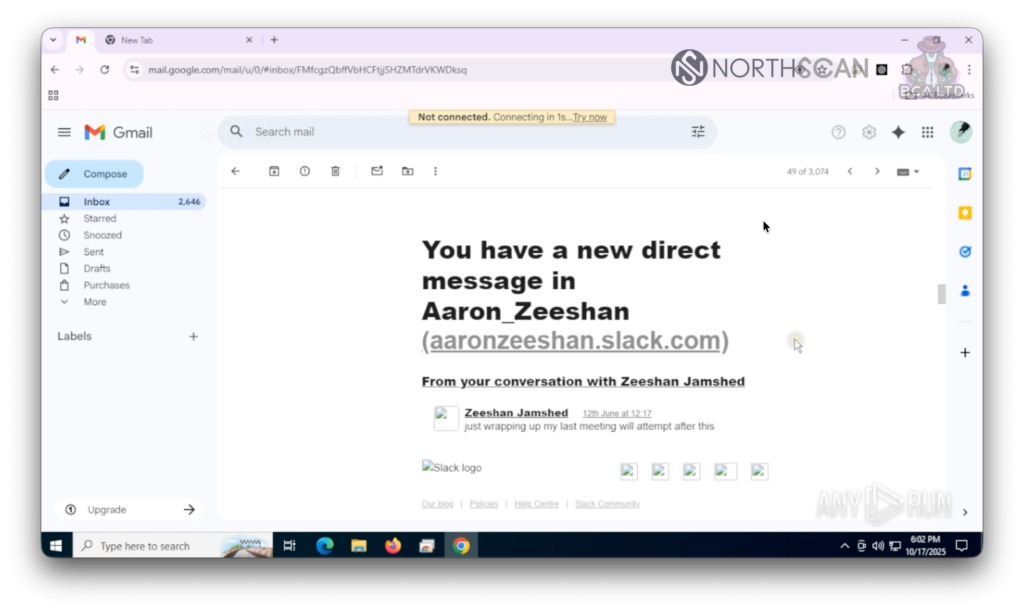
First, Zeeshan mentioned routine things like having to make a call in a few minutes or wrapping up another meeting soon, but then he seemed to crack under his current reality.
Zeeshan comments on wrapping a meeting
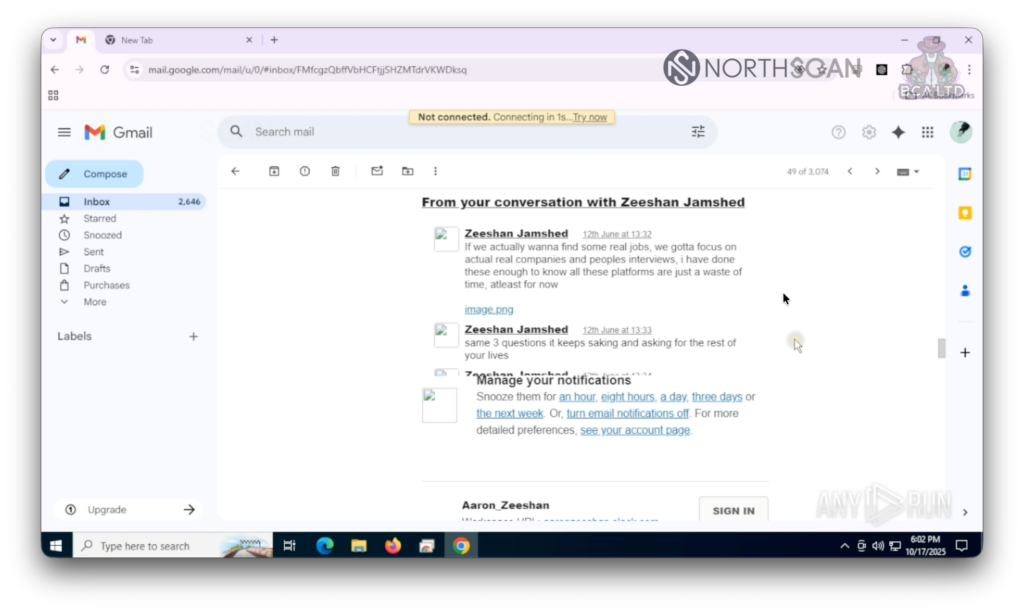
Suddenly Zeeshan stated if they wanted to find “some real jobs” they had to focus on “actual real companies and people’s interviews“, and that he “has done these [interviews] enough to know all these platforms are just a waste of time“.
Zeeshan rants about job seeking platforms
He ended his rant talking about the “same 3 questions that keeps asking and asking for the rest of your lives“. Whatever that could mean, it seemed to be something that kept him awake.
We told Blaze the Windows 11 laptop was repaired and ready to be used, so he was happy to hop on and log into all his accounts once again.
After setting up his account again (and turning on the sync options reinstalling his extensions), he proceeded with his well-known waltz: search for his location (this time correctly pinned in Texas, United States), setting up Google Remote Desktop, checking his email (without noticing anything odd after our inspection), and facing unrecoverable problems artificially caused by us.
We messed with the residential proxy and suddenly he was offline, without any chance of connecting to the internet. He started troubleshooting his way through the classic steps: reviewing the internet adapter configuration, messing with the authentication settings, and even turning off IPv4 completely. Never for a split second did he stop thinking why he was still remotely connected to an isolated systemwithout facing any issues.
He tried to reach the Googlelogoutbutton but he was already offline.
And when it rains, it pours. What else could happen now?
Of course, an artificial crash.
Tape 7: Blaze logs in once again into another laptop
Blaze asked for explanations regarding the machine’s constant malfunctions and even grew brave enough to escalate his wording. We made up some excuses and granted him access one last time. This time, we disabled the proxy and allowed his slow-paced mind to catch up with the events.
Suddenly, realization hit. And sooner rather than later, the realization became desperation: he knew what was going on.
He opened the Windows Registry and started looking online for his location, now appearing in Germany. He ran DxDiag once again, just like when we started this “collaboration”, and started looking for his IP reputation online using search terms like “ip fraud check“, and visiting sites like IP Score, Scamalytics, and Where Am I.
He tried to confront us via Telegram, but it was already too late. There was no reason to keep playing, so we ignored him.
Famous last words
Paranoia got the best of him, and he ran the systeminfo command once again, played around with DxDiag a little bit more and then… one last artificial crash, ending both the instance and our friend’s corporate espionage plot.
Turning Famous Chollima against each other | Heiner García (NorthScan)
You may probably remember from “Tape 4 – Intruder” that someone else accessed one of our laptops, one of Blaze’s collaborators under the nickname “Assassin“. Both had trouble logging into the account and ended up wasting time in a CAPTCHA hell.
By that time, we had given Blaze an ultimatum: startworking now, stopbreaking things. But that’s just a part of the story.
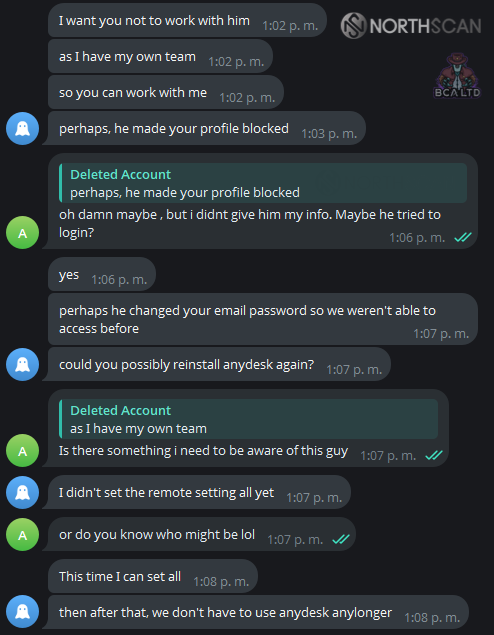
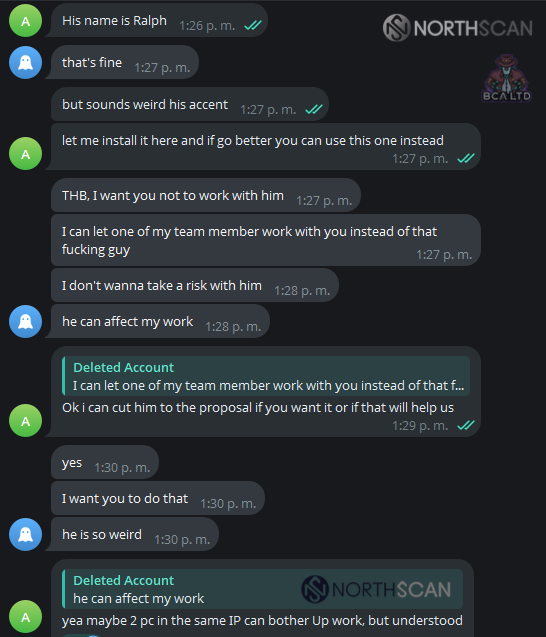
Aiming to put pressure on him, Heiner came up with the idea of pretending to be scouted by another DPRK recruiter named “Ralph“. He reached out to Blaze to tell him that aside from our given conditions, he should be cautious because we already had a better offer for a bigger salary cut with someone who actually seemed excited to work with us and wouldn’t give us as much trouble.
He didn’t take it well, asking Heiner not to work with him, suggesting that “he” (Ralph) could be the one who “blocked” their profile or changed their password (referring to the account they hadn’t managed to access earlier).
Blaze blames Ralph for the login problems
He then proceeded to insult Ralph, calling him “weird” and explaining that he could affect “his work” and that he wouldn’t like to take a risk with him. Instead, he would assign one of his team members to work on making things happen.
Blaze lost it over a fictitious character
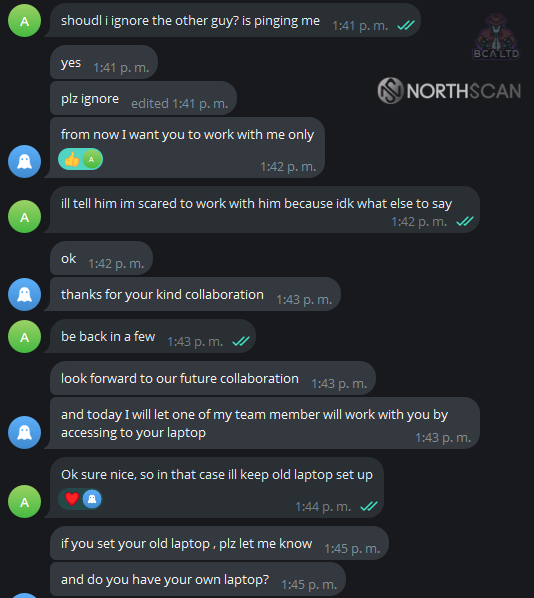
He promised to get it together and get everything working, stating that after that we would no longer need AnyDesk (referring to him later installing Google Remote Desktop). When Heiner asked if he should ignore the other guy, Blaze insisted he work exclusively with him from now on.
Blaze asks to ignore Ralph
He then shared that one of his team members would try to work with his laptop later that day. This was “Assassin“, who appears on Tape 4 behind the exact same IP address as Blaze, which belongs to AstrillVPN.
This hasty decision on his part helped us confirm they were sharing infrastructure and assets, and that they likely have poor communication between units, as the idea of one recruiter stealing an engineer from another seemed totallyplausible to him. Additionally, when conducting job interviews at target companies, it’s common to observe multiple North Korean operatives scheduling interviews for the same position on the same day (making it more obvious), suggesting a lack of coordination between different cells.
Until Next Time, Famous Chollima
This is not the last time we’ll see FamousChollima, or any other North Korean actor, infiltrating companies for espionageandprofit.
This investigation was aimed at collecting intelligence from North Korean actors in a novel way not practiced by any other lab to date, by directly engaging with them and immersing ourselves in their operations. From that standpoint, we understand this publication will help to better understand this threat, their structure, behaviour, tactics, techniques and procedures, and contextualize their skillset and toolset, which now heavily relies on AI.
If you are an employer, conduct rigorous KYC controls and background checks when hiring new positions. Train your talent acquisition teams to detect red flags early and don’t be afraid to share this story with your candidates, making sure they understand that the “software company” that offered them something too good to be true may not be so legitimate.
Always doubt
If you are seekingemployment, beware of maliciouscodingchallenges, never conduct interviews on your company’s equipment and check with companies if someone attempting to hire you out of the blue is affiliated with them.
The same goes for those looking to raisefunds for their projects: beware of meetings with fakeVCs, never open their attachments without prior checking their safety, and overall, if something is too good to be true, then maybe it is.
Always double check
If you are a securityprofessional, don’t be afraid to confront these threats, nor to ask for help in the community. Raise awareness in your organization and spread the word about their activities. With everyone knowing what to look for, we remain safer.
And for the rest, don’t forget to smile.
Smile
How ANY.RUN Supports Investigations Like This
This operation shows how difficult it is to track human-driven intrusions, especially when they rely on social engineering instead of malware. By moving the actors into controlled ANY.RUN environments, every step, from their tooling to their network activity, became visible in real time.
The interactive sandbox and extended-runtime setups give researchers and SOC teams the same advantage: the ability to observe behavior as it unfolds, uncover hidden actions, and document full attack chains without risking real systems.
Cut MTTR by 21 minutes and reach 3x team performance
Integrate ANY.RUN’s solutions in your SOC
ANY.RUN is a leading provider of interactive malware analysis and threat intelligence, helping security teams investigate attacks with real-time behavioral visibility. More than 15,000 organizations and over 500,000 analysts rely on the service to observe live execution, analyze suspicious files and URLs, and uncover hidden activity with an average 60-second time-to-verdict.
Alongside its sandbox, ANY.RUN provides continuously updated Threat Intelligence Feeds sourced from global telemetry, and TI Lookup, which offers instant enrichment by showing related samples, shared infrastructure, and historical context. Together, these capabilities give analysts a clear view of how threats behave and evolve, supporting faster, more confident decisions across SOC, DFIR, and threat-hunting workflows.
https://www.backbox.org/wp-content/uploads/2018/09/website_backbox_text_black.png00adminhttps://www.backbox.org/wp-content/uploads/2018/09/website_backbox_text_black.pngadmin2025-12-04 12:06:512025-12-04 12:06:51Smile, You’re on Camera: A Live Stream from Inside Lazarus Group’s IT Workers Scheme
https://www.backbox.org/wp-content/uploads/2018/09/website_backbox_text_black.png00adminhttps://www.backbox.org/wp-content/uploads/2018/09/website_backbox_text_black.pngadmin2025-12-04 11:06:482025-12-04 11:06:48I found 7 essential Linux apps for students – including a local AI
https://www.backbox.org/wp-content/uploads/2018/09/website_backbox_text_black.png00adminhttps://www.backbox.org/wp-content/uploads/2018/09/website_backbox_text_black.pngadmin2025-12-04 11:06:472025-12-04 11:06:47Is that an AI image? 6 telltale signs it’s a fake – and my favorite free detectors
People entrust neural networks with their most important, even intimate, matters: verifying medical diagnoses, seeking love advice, or turning to AI instead of a psychotherapist. There are already known cases of suicide planning, real-world attacks, and other dangerous acts facilitated by LLMs. Consequently, private chats between humans and AI are drawing increasing attention from governments, corporations, and curious individuals.
So, there won’t be a shortage of people willing to implement the Whisper Leak attack in the wild. After all, it allows determining the general topic of a conversation with a neural network without interfering with the traffic in any way — simply by analyzing the timing patterns of sending and receiving encrypted data packets over the network to the AI server. However, you can still keep your chats private; more on this below…
How the Whisper Leak attack works
All language models generate their output progressively. To the user, this appears as if a person on the other end is typing word by word. In reality, however, language models operate not with individual characters or words, but with tokens — a kind of semantic unit for LLMs, and the AI response appears on screen as these tokens are generated. This output mode is known as “streaming”, and it turns out you can infer the topic of the conversation by measuring the stream’s characteristics. We’ve previously covered a research effort that managed to fairly accurately reconstruct the text of a chat with a bot by analyzing the length of each token it sent.
Researchers at Microsoft took this further by analyzing the response characteristics from 30 different AI models to 11,800 prompts. A hundred prompts were used: variations on the question, “Is money laundering legal?”, while the rest were random and covering entirely different topics.
By comparing the server response delay, packet size, and total packet count, the researchers were able to very accurately separate “dangerous” queries from “normal” ones. They also used neural networks for the analysis — though not LLMs. Depending on the model being studied, the accuracy of identifying “dangerous” topics ranged from 71% to 100%, with accuracy exceeding 97% for 19 out of the 30 models.
The researchers then conducted a more complex and realistic experiment. They tested a dataset of 10,000 random conversations, where only one focused on the chosen topic.
The results were more varied, but the simulated attack still proved quite successful. For models such as Deepseek-r1, Groq-llama-4, gpt-4o-mini, xai-grok-2 and -3, as well as Mistral-small and Mistral-large, researchers were able to detect the signal in the noise in 50% of their experiments with zero false-positives.
For Alibaba-Qwen2.5, Lambda-llama-3.1, gpt-4.1, gpt-o1-mini, Groq-llama-4, and Deepseek-v3-chat, the detection success rate dropped to 20% — though still without false positives. Meanwhile, for Gemini 2.5 pro, Anthropic-Claude-3-haiku, and gpt-4o-mini, the detection of “dangerous” chats on Microsoft’s servers was only successful in 5% of cases. The success rate for other tested models was even lower.
A key point to consider is that the results depend not only on the specific AI model, but also on the server configuration on which it’s running. Therefore, the same OpenAI model might show different results in Microsoft’s infrastructure versus OpenAI’s own servers. The same holds true for all open-source models.
Practical implications: what does it take for Whisper Leak to work?
If a well-resourced attacker has access to their victims’ network traffic — for instance, by controlling a router at an ISP or within an organization — they can detect a significant percentage of conversations on topics of interest simply by measuring traffic sent to the AI assistant servers, all while maintaining a very low error rate. However, this does not equate to automatic detection of any possible conversation topic. The attacker must first train their detection systems on specific themes — the model will only identify those.
This threat cannot be dismissed as purely theoretical. Law enforcement agencies could, for example, monitor queries related to weapons or drug manufacturing, while companies might track employees’ job search queries. However, using this technology to conduct mass surveillance across hundreds or thousands of topics isn’t feasible — it’s just too resource-intensive.
In response to the research, some popular AI services have altered their server algorithms to make this attack more difficult to execute.
How to protect yourself from Whisper Leak
The primary responsibility for defense against this attack lies with the providers of AI models. They need to deliver generated text in a way that prevents the topic from being discerned from the token generation patterns. Following Microsoft’s research, companies including OpenAI, Mistral, Microsoft Azure, and xAI reported that they were addressing the threat. They now add a small amount of invisible padding to the packets sent by the neural network, which disrupts Whisper Leak algorithms. Notably, Anthropic’s models were inherently less susceptible to this attack from the start.
If you’re using a model and servers for which Whisper Leak remains a concern, you can either switch to a less vulnerable provider, or adopt additional precautions. These measures are also relevant for anyone looking to safeguard against future attacks of this type:
Use local AI models for highly sensitive topics — you can follow our guide.
Configure the model to use non-streaming output where possible so the entire response is delivered at once rather than word by word.
Avoid discussing sensitive topics with chatbots when connected to untrusted networks.
Remember that the most likely point of leakage for any chat information is your own computer. Therefore, it’s essential to protect it from spyware with a reliable security solution running on both your computer and all your smartphones.
Here are some more articles explaining what other risks are associated with using AI, and how to configure AI tools properly:
https://www.backbox.org/wp-content/uploads/2018/09/website_backbox_text_black.png00adminhttps://www.backbox.org/wp-content/uploads/2018/09/website_backbox_text_black.pngadmin2025-12-04 11:06:402025-12-04 11:06:40Protecting LLM chats from the eavesdropping Whisper Leak attack | Kaspersky official blog