

Orca Security Gets AI-Powered Remediation From Opus Deal
The acquisition will enhance Orca’s CNAPP offering with autonomous vulnerability remediation and prevention technologies from Opus.
darkreading – Read More
How Malware Analysis Training Powers Up SOC and MSSP Teams
Security Operations Centers (SOCs) and Managed Security Service Providers (MSSPs) serve as the frontline defenders for organizations worldwide. The teams operate in high-pressure environments, analyzing security incidents, monitoring threats, and responding to attacks in real time. Continuous learning — especially through hands-on malware analysis training — is not just beneficial, but essential for their performance.
Educational programs from experienced industry players, such as ANY.RUN’s Security Training Lab, significantly enhance the capabilities of these teams, driving efficiency, expertise, and business value.
How SOCs and MSSPs Operate
SOCs and MSSPs are structured around continuous threat detection and incident response. SOCs are in-house teams that monitor an organization’s networks, systems, and endpoints 24/7. MSSPs offer similar services to multiple clients on a contractual basis. Both rely on skilled analysts and threat hunters to interpret complex data, prioritize alerts, and mitigate attacks before they cause damage.
Efficiency in these teams depends on collaboration between tiers of analysts, threat intelligence integration, and the ability to act fast on accurate, contextual information. But to be truly effective, teams must go beyond automated alerts and develop a deep understanding of threats — including the malware behind them.
Why Continuous Learning Matters
Attackers constantly adapt their techniques, whether through obfuscation, living-off-the-land tactics, or leveraging zero-day vulnerabilities. Without ongoing training, even the most experienced analysts can fall behind.
Continuous learning keeps cybersecurity professionals current on new attack vectors, IOCs, and detection methods. It also builds confidence and readiness in handling new threats. For organizations, this promises faster response times, fewer false positives, and more resilient defenses.
| SOCs and MSSPs: different workflows, same need for practical training | |
|---|---|
 SOC Tasks Requiring Malware Analysis Training SOC Tasks Requiring Malware Analysis Training
(Internal, organization-focused operations) |
 MSSP Tasks Requiring Malware Analysis Training MSSP Tasks Requiring Malware Analysis Training(Multi-client, service-driven operations) |
|
|
| What They Have in Common | |
 Require hands-on training with real-world malware Need visibility into malware behavior (e.g., process trees, network activity) Require hands-on training with real-world malware Need visibility into malware behavior (e.g., process trees, network activity)
|
|
The Role of Real-World Malware Analysis
Among the most impactful forms of learning is hands-on malware analysis. Unlike sanitized textbook examples, real malware samples expose actual tools, behaviors, and evasion techniques used by threat actors.
This kind of analysis helps SOC and MSSP teams:
- Understand TTPs (tactics, techniques, and procedures) used by adversaries.
- Recognize patterns and signatures of advanced persistent threats (APTs).
- Improve detection rules and response playbooks.
- Develop a proactive rather than reactive security posture.
Training on real malware helps analysts not only recognize threats but also understand their mechanics and impact, which is crucial for effective countermeasures. Moreover, exposure to community-submitted malware, as facilitated by services like ANY.RUN, illustrates current challenges faced by organizations worldwide and ensures that training remains relevant, aligned with the latest attack trends.
This practical focus empowers SOC and MSSP teams to respond effectively to incidents, reducing the risk of operational disruption or data breaches.
Continuous learning also fosters a culture of adaptability, critical for teams operating in high-pressure environments. Mastering advanced analysis techniques, such as debugging or reverse engineering, equips analysts to dissect complex malware, reducing the time needed to understand and neutralize threats. This efficiency translates to lower mean time to detect (MTTD) and mean time to respond (MTTR), key metrics for SOC and MSSP performance.
Ongoing education supports career progression, boosting morale and retention among analysts, which is vital given the industry’s talent shortage. By investing in continuous learning, SOCs and MSSPs ensure their teams remain agile, competent, and prepared for the next wave of cyber threats.
How ANY.RUN’s Security Training Lab Supports Practical Learning
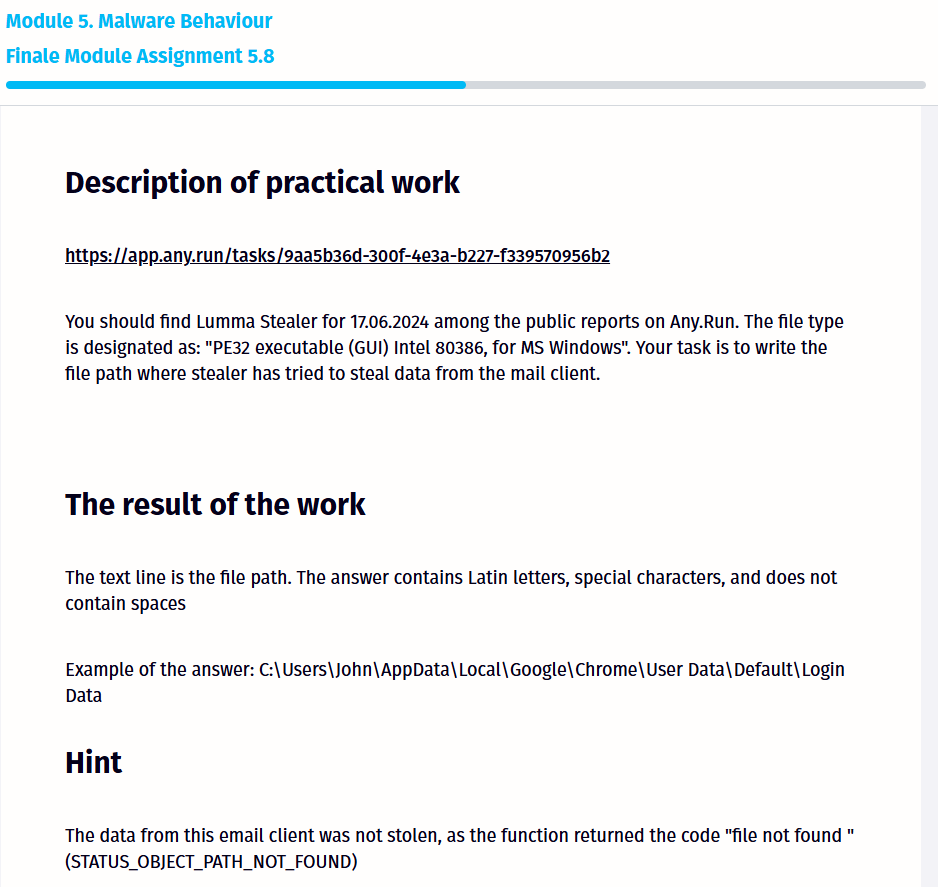
ANY.RUN’s Security Training Lab is built to bridge the gap between theory and practice. It offers an isolated, interactive environment where users can safely analyze live malware samples without risk to their infrastructure. Users can observe how malware behaves in real time, test detection strategies, and simulate incident response scenarios.
Key benefits include:
- 30-hour interactive digital course comprising written materials, video lectures, tasks, and tests, structured into ten modules that cover critical aspects of malware analysis.
- A realistic training ground using actual malware strains
- Tools that mirror real-world SOC environments.
- The support of inter-industry collaboration.
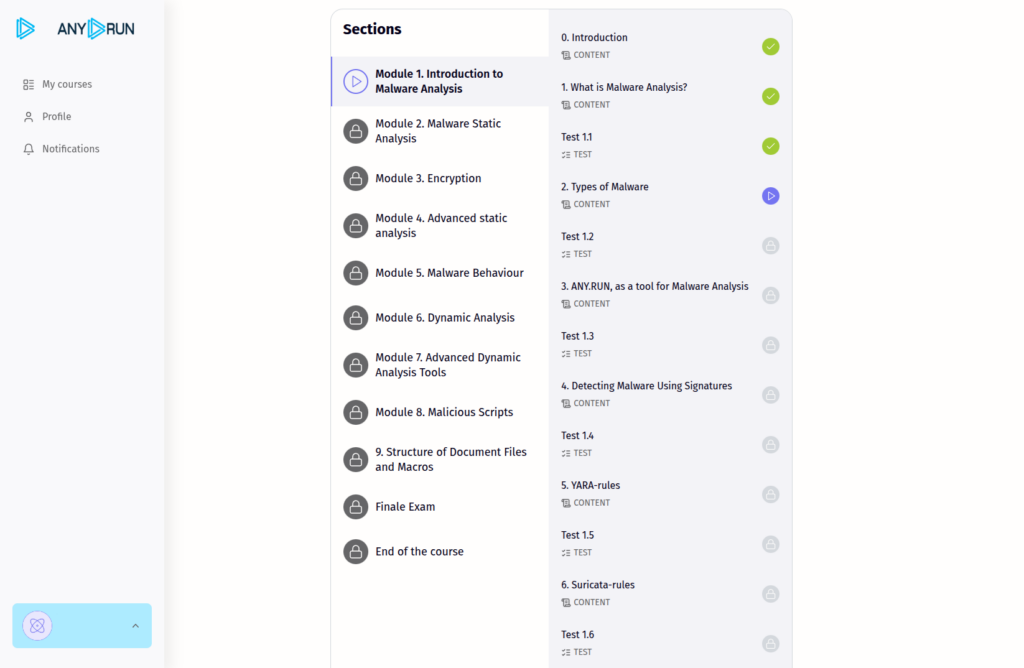
The Security Training Lab is scalable and flexible, supports self-paced, instructor-led, and hybrid learning formats. Instructors can track the progress of their students and assess practical skills, ensuring that training outcomes are measurable and aligned with organizational goals.
Learners also gain unlimited access to the sandbox and a repository of fresh malware samples submitted by ANY.RUN’s global user community, including 15,000 corporate security teams.
Raising Cybersecurity Expertise — and Business Value
When SOC and MSSP analysts become more adept through real-world training, the entire organization benefits. Skilled teams:
- Reduce mean time to detect and respond (MTTD/MTTR);
- Lower the risk of breaches and data loss;
- Enhance client trust (especially for MSSPs);
- Optimize ROI through improved service levels.
Investing in continuous, practical training is not just an HR initiative — it’s a business decision. It strengthens operational security, reduces incident costs, and builds a reputation for reliability and resilience.
Conclusion
In the arms race between defenders and attackers, the best defense is a well-trained team. For SOCs and MSSPs, regular exposure to real-world malware and hands-on analysis tools is a powerful way to sharpen skills, improve performance, and protect what matters. ANY.RUN’s Security Training Lab offers practical training that elevates team expertise and delivers measurable business outcomes.
About ANY.RUN
ANY.RUN supports over 15,000 organizations across numerous industries, including banking, manufacturing, and healthcare. Our interactive malware analysis and threat intelligence tools allow companies and SOC teams to speed up their threat investigations, ensure proactive security, and build stronger and more resilient operations.
The post How Malware Analysis Training Powers Up SOC and MSSP Teams appeared first on ANY.RUN’s Cybersecurity Blog.
ANY.RUN’s Cybersecurity Blog – Read More

How to implement zero trust: first steps and success factors
This year marks the 15th anniversary of the first guide to implementing the zero trust security concept, which, according to a Gartner survey, almost two-thirds of surveyed organizations have adopted to some extent. Admittedly (in the same Gartner survey), for 58% of them this transition is far from complete, with zero trust covering less than half of infrastructure. Most organizations are still at the stage of piloting solutions and building the necessary infrastructure. To join the vanguard, you need to plan the transition to zero trust with eyes wide open to the obstacles that lie ahead, and to understand how to overcome them.
Zero trust best practices
Zero trust is a security architecture that views all connections, devices, and applications as untrusted and potentially compromised — even if they’re part of the organization’s internal infrastructure. Zero trust solutions deliver continuous adaptive protection by re-verifying every connection and transaction based on a potentially changed security context. This way, companies can mold their information security to the real-world conditions of hybrid cloud infrastructures and remote working.
In addition to the oldest and best-known guidelines, such as Forrester’s first report and Google’s BeyondCorp, the components of zero trust are detailed in NIST SP 800-207 (Zero Trust Architecture), while the separate NIST SP 1800-35B offers implementation recommendations. There are also guidelines that map specific infosec measures and tools to the zero trust methodology, such as CIS Controls v8. CISA offers a handy maturity model, though it’s primarily optimized for government agencies.
In practice, zero trust implementation rarely follows the rule book, and many CISOs end up having to mix and match recommendations from these guidance documents with the guidelines of their key IT suppliers (for example, Microsoft), prioritizing and selecting measures based on their specific situation.
What’s more, all these guides are less than forthcoming in describing the complexities of implementation.
Executive buy-in
Zero trust migration isn’t purely a technical project, and therefore requires substantial support on the administrative and executive levels. In addition to investing in software, hardware, and user training, it demands significant effort from various departments, including HR. Company leadership needs to understand why the changes are needed and what they’ll bring to the business.
To get across the value and importance of a project, the “incident cost” or “value at risk” needs to be clearly communicated on the one hand, as do the new business opportunities on the other. For example, zero trust protection can enable broader use of SaaS services, employee-owned devices, and cost-effective network organization solutions.
Alongside on-topic meetings, this idea should be reinforced through specialized cybersecurity training for executives. Not only does such training instill specific infosec skills, it also allows your company to run through crisis management and other scenarios in a cyberattack situation — often using specially designed business games.
Defining priorities
To understand where and what zero trust measures to apply in your infrastructure, you’ll need a detailed analysis of the network, applications, accounts, identities, and workloads. It’s also crucial to identify critical IT assets. Typically making up just a tiny part of the overall IT fleet, these “crown jewels” either contain sensitive and highly valuable information, or support critical business processes. Consolidating information about IT assets and their value will make it easier to decide which components are most in need of zero trust migration, and which infosec measures will facilitate it. This inventory will also unearth outdated segments of the infrastructure for which migration to zero trust would be impractical or technically infeasible.
You need to plan in advance for the interaction of diverse infrastructure elements, and the coexistence of different infosec measures to protect them. A typical problem goes as follows: a company has already implemented some zero trust components (for example, MFA and network segmentation), but these operate completely independently, and no processes and technologies are planned to enable these components to work together within a unified security scenario.
Phased implementation
Although planning for zero trust architecture is done holistically, its practical implementation should begin with small, specific steps. To win managerial support and to test processes and technologies in a controlled environment, start with measures and processes that are easier to implement and monitor. For example, introduce multi-factor authentication and conditional access just for office computers and the office Wi-Fi. Roll out tools starting with specific departments and their unique IT systems, testing both user scenarios and the performance of infosec tools, all while adjusting settings and policies accordingly.
Which zero trust architecture components are easier to implement, and what will help you achieve the first quick wins depends on your specific organization. But each of these quick wins should be scalable to new departments and infrastructure segments; and where zero trust has already been implemented, additional elements of the zero trust architecture can be piloted.
While a phased implementation may seem to increase the risk of getting stuck at the migration stage and never completing the transition, experience shows that a “big bang” approach — a simultaneous shift of the entire infrastructure and all processes to zero trust — fails in most cases. It creates too many points of failure in IT processes, snowballs the load on IT, alienates users, and makes it impossible to correct any planning and implementation errors in a timely and minimally disruptive manner.
Phased implementation isn’t limited to first steps and pilots. Many companies align the transition to zero trust with adopting new IT projects and opening new offices; they divide the migration of infrastructure into stages — essentially implementing zero trust in short sprints while constantly monitoring performance and process complexity.
Managing identities… and personnel
The cornerstone of zero trust is a mature Identity Access Management (IAM) system, which needs to be not only technically sound but also supported administratively at all times. Data on employees, their positions, roles, and resources available to them must be kept constantly up-to-date, requiring significant support from HR, IT, and the leadership of other key departments. It’s imperative to involve them in building formal processes around identity management, taking care to ensure that they feel personally responsible for these processes. It must be stressed that this isn’t a one-off job — the data needs to be checked and updated frequently to prevent situations such as access creep (when permissions issued to an employee for a one-time project are never revoked).
To improve information security and make zero trust implementation a truly team effort, sometimes it’s even necessary to change the organizational structure and areas of responsibility of employees — breaking down silos that confine people within narrow job descriptions. For example, one large construction company shifted from job titles such as “Network Engineer” and “Server Administrator” to the more generic “Process Engineer” to underscore the interconnectivity of the roles.
Training and feedback
Zero trust migration doesn’t pass unnoticed by employees. They have to adapt to new authentication procedures and MFA tools, learn how to request access to systems that don’t grant it by default be aware that they might occasionally need to re-authenticate to a system they logged in to just an hour ago, and that previously unseen tools like ZTNA, MDM, or EDR (often bundled in a single agent, but sometimes separate), may suddenly appear on their computers. All this requires training and practice.
For each phase of implementation, it’s worth forming a “focus group” of business users. These users will be the first to undergo training and can help refine training materials in terms of language and content, as well as provide feedback on how the new processes and tools are working. Communication with users should be a two-way street: it’s important to convey the value of the new approach, while actively listening to complaints and recommendations to adjust policies (both technical and administrative), address shortcomings, and improve the user experience.
Kaspersky official blog – Read More
EU Cybersecurity Agency ENISA Launches European Vulnerability Database
Experts say the European Vulnerability Database, or EUVD, should be a good resource, but only if ENISA manages to maintain it properly.
The post EU Cybersecurity Agency ENISA Launches European Vulnerability Database appeared first on SecurityWeek.
SecurityWeek – Read More
Patch Tuesday, May 2025 Edition
Microsoft on Tuesday released software updates to fix at least 70 vulnerabilities in Windows and related products, including five zero-day flaws that are already seeing active exploitation. Adding to the sense of urgency with this month’s patch batch from Redmond are fixes for two other weaknesses that now have public proof-of-concept exploits available.
Microsoft and several security firms have disclosed that attackers are exploiting a pair of bugs in the Windows Common Log File System (CLFS) driver that allow attackers to elevate their privileges on a vulnerable device. The Windows CLFS is a critical Windows component responsible for logging services, and is widely used by Windows system services and third-party applications for logging. Tracked as CVE-2025-32701 & CVE-2025-32706, these flaws are present in all supported versions of Windows 10 and 11, as well as their server versions.
Kev Breen, senior director of threat research at Immersive Labs, said privilege escalation bugs assume an attacker already has initial access to a compromised host, typically through a phishing attack or by using stolen credentials. But if that access already exists, Breen said, attackers can gain access to the much more powerful Windows SYSTEM account, which can disable security tooling or even gain domain administration level permissions using credential harvesting tools.
“The patch notes don’t provide technical details on how this is being exploited, and no Indicators of Compromise (IOCs) are shared, meaning the only mitigation security teams have is to apply these patches immediately,” he said. “The average time from public disclosure to exploitation at scale is less than five days, with threat actors, ransomware groups, and affiliates quick to leverage these vulnerabilities.”
Two other zero-days patched by Microsoft today also were elevation of privilege flaws: CVE-2025-32709, which concerns afd.sys, the Windows Ancillary Function Driver that enables Windows applications to connect to the Internet; and CVE-2025-30400, a weakness in the Desktop Window Manager (DWM) library for Windows. As Adam Barnett at Rapid7 notes, tomorrow marks the one-year anniversary of CVE-2024-30051, a previous zero-day elevation of privilege vulnerability in this same DWM component.
The fifth zero-day patched today is CVE-2025-30397, a flaw in the Microsoft Scripting Engine, a key component used by Internet Explorer and Internet Explorer mode in Microsoft Edge.
Chris Goettl at Ivanti points out that the Windows 11 and Server 2025 updates include some new AI features that carry a lot of baggage and weigh in at around 4 gigabytes. Said baggage includes new artificial intelligence (AI) capabilities, including the controversial Recall feature, which constantly takes screenshots of what users are doing on Windows CoPilot-enabled computers.
Microsoft went back to the drawing board on Recall after a fountain of negative feedback from security experts, who warned it would present an attractive target and a potential gold mine for attackers. Microsoft appears to have made some efforts to prevent Recall from scooping up sensitive financial information, but privacy and security concerns still linger. Former Microsoftie Kevin Beaumont has a good teardown on Microsoft’s updates to Recall.
In any case, windowslatest.com reports that Windows 11 version 24H2 shows up ready for downloads, even if you don’t want it.
“It will now show up for ‘download and install’ automatically if you go to Settings > Windows Update and click Check for updates, but only when your device does not have a compatibility hold,” the publication reported. “Even if you don’t check for updates, Windows 11 24H2 will automatically download at some point.”
Apple users likely have their own patching to do. On May 12 Apple released security updates to fix at least 30 vulnerabilities in iOS and iPadOS (the updated version is 18.5). TechCrunch writes that iOS 18.5 also expands emergency satellite capabilities to iPhone 13 owners for the first time (previously it was only available on iPhone 14 or later).
Apple also released updates for macOS Sequoia, macOS Sonoma, macOS Ventura, WatchOS, tvOS and visionOS. Apple said there is no indication of active exploitation for any of the vulnerabilities fixed this month.
As always, please back up your device and/or important data before attempting any updates. And please feel free to sound off in the comments if you run into any problems applying any of these fixes.
Krebs on Security – Read More
Kosovar Administrator of Cybercrime Marketplace Extradited to US
Kosovo citizen Liridon Masurica has appeared in a US court, facing charges for his role in operating the cybercrime marketplace BlackDB.cc.
The post Kosovar Administrator of Cybercrime Marketplace Extradited to US appeared first on SecurityWeek.
SecurityWeek – Read More
Vulnerabilities Patched by Juniper, VMware and Zoom
Juniper Networks, VMware, and Zoom have announced patches for dozens of vulnerabilities across their products.
The post Vulnerabilities Patched by Juniper, VMware and Zoom appeared first on SecurityWeek.
SecurityWeek – Read More
Fortinet Patches Zero-Day Exploited Against FortiVoice Appliances
Fortinet has patched a dozen vulnerabilities, including a critical flaw exploited in the wild against FortiVoice instances.
The post Fortinet Patches Zero-Day Exploited Against FortiVoice Appliances appeared first on SecurityWeek.
SecurityWeek – Read More