When Microsoft first announced its “photographic memory” Recall feature for Copilot+ PCs a year ago, cybersecurity experts were swift in sounding the alarm. Recall’s many flaws posed a serious threat to privacy, prompting Microsoft to postpone its release for further refinement. The updated Recall came to Windows Insider Preview builds in April 2025, and was rolled out widely in May on devices equipped with the necessary hardware. The essence remains the same: Recall memorizes all your actions by continuously taking screenshots and using OCR to analyze their content. However, with the latest update, the security of this data has been significantly enhanced. How much difference does this actually make? And is the convenience of Recall really worth the potential loss of control over your personal data?
What’s new in Recall’s second coming
Since the initial announcement, which we covered in detail, Microsoft has addressed several key criticisms raised by cybersecurity professionals.
First, Recall now only activates with user permission during the initial system setup. The interface doesn’t manipulate users into agreeing with visual tricks like highlighting the “Yes” button.
Second, Recall’s database files are now encrypted, with key storage and cryptographic operations handled by the hardware-based TPM (Trusted Platform Module), making their extraction significantly more difficult.
Third, a special filter attempts to prevent saving screenshots or text when the screen contains potentially sensitive information — a private browser window, a payment data input form, password manager cards, and so on. Note it only “attempts”: testers have already reported numerous instances where confidential data slipped through the filter and ended up in the OCR database.
Ars Technica highlights several other positive changes:
- Recall is enabled for each PC user individually, rather than everyone at once.
- Recall can be uninstalled completely.
- A Microsoft account isn’t required.
- No internet connection is needed — all data is processed locally.
- To initially launch Recall, BitLocker disk encryption and Windows Hello biometric authentication (face or fingerprint recognition) must be enabled.
- Windows Hello authentication is required every time the Recall search is used.
Why Recall still poses risks
Microsoft has indeed put some effort into responding to the criticism. However, the current version of Recall still has a number of issues.
First, biometric authentication is only required during the initial setup of Recall. For subsequent launches, the AI assistant will also ask to confirm your identity, but presenting your face or fingerprint is no longer necessary. A regular Windows PIN will suffice, and it’s relatively easy for someone to take a peek at, or guess, your PIN, no matter whether you’re at home or at work. One reviewer admits to asking his girlfriend to find a screenshot of a specific Signal chat on his computer — she guessed the password and found the screenshot in just five minutes.
Second, Recall can also be re-activated without biometrics. If the account owner tried Recall but then disabled it, anyone who knows the PIN can re-enable screenshot capture and smart search. All that’s left is to wait a little while, log back in, and browse the results.
Third, as mentioned, automatic filtering of sensitive data is unreliable. In theory, Recall doesn’t take screenshots in many high-risk scenarios: when a browser window is opened in private mode, when remote access to another desktop is active, when entering payment info or passwords, and also on additional inactive displays and desktops. In practice, these situations aren’t always recognized — for example, the filter fails to detect the private mode in not-so-common browsers (such as Vivaldi) and remote desktops, including those accessed with the hugely popular AnyDesk.
Finally — and this deserves a whole category of its own — Recall meticulously logs the computer owner’s interactions with other users, potentially violating both their privacy rights and the data retention policies of messaging and collaboration tools. For example, if the computer owner is in a Zoom or Teams call with automatic transcription enabled, Recall will save a full recording of the call with a transcript of who said what. If a self-destructing WhatsApp or Signal chat is open on screen, Recall will save it anyway, despite the chat’s privacy policies. Photos and videos intended for one-time viewing will also be stored if just one person in the conversation uses Recall.
All of this matters in two dangerous scenarios: (i) when someone who knows (or can guess) the PIN gains unauthorized physical access to the computer; and (ii) when an attacker exploiting Windows vulnerabilities gains remote access to it. Year after year, despite the tightening of security measures, hackers keep finding ways to elevate privileges on compromised machines and exfiltrate information — even encrypted data.
Impact on performance and battery life
Although Recall was originally designed for high-performance PCs equipped with a dedicated chip for AI computing (NPU) — only found in models released over the past 12 months — the capture and processing of screenshots can still sometimes interfere with the user experience in such powerful PCs. This is particularly noticeable when playing games, as Recall diligently takes screenshots and records in-game dialogue, consuming significant memory and computing resources, thus loading the NPU by up to 80%! Even when the device isn’t plugged in (but the battery is almost fully charged), Recall continues working, draining the battery much faster than usual.
Who should disable or remove Recall?
Microsoft is now offering users a fair choice: enable Recall, ignore it, or completely remove it from the computer. This is a much better approach than previous campaigns to push Edge, Cortana, or Windows Media Player. If you see a screen prompting enabling Recall, consider whether you fall into one of these categories:
- Anyone working with trade secrets, other people’s confidential data, or personal data in general (e.g., lawyers, doctors, and other professionals).
- Active users of video conferencing, remote tech-support services, or other tech involving the handling of others’ information.
- People engaged in particularly private correspondence — especially using secure messengers and disappearing chats/messages.
- Individuals living with jealous or nosy family members, or working in an office with overly curious colleagues.
For all these users, we recommend steering clear of Recall — or, better yet, removing it entirely.
How to disable or remove Recall
To disable Recall:
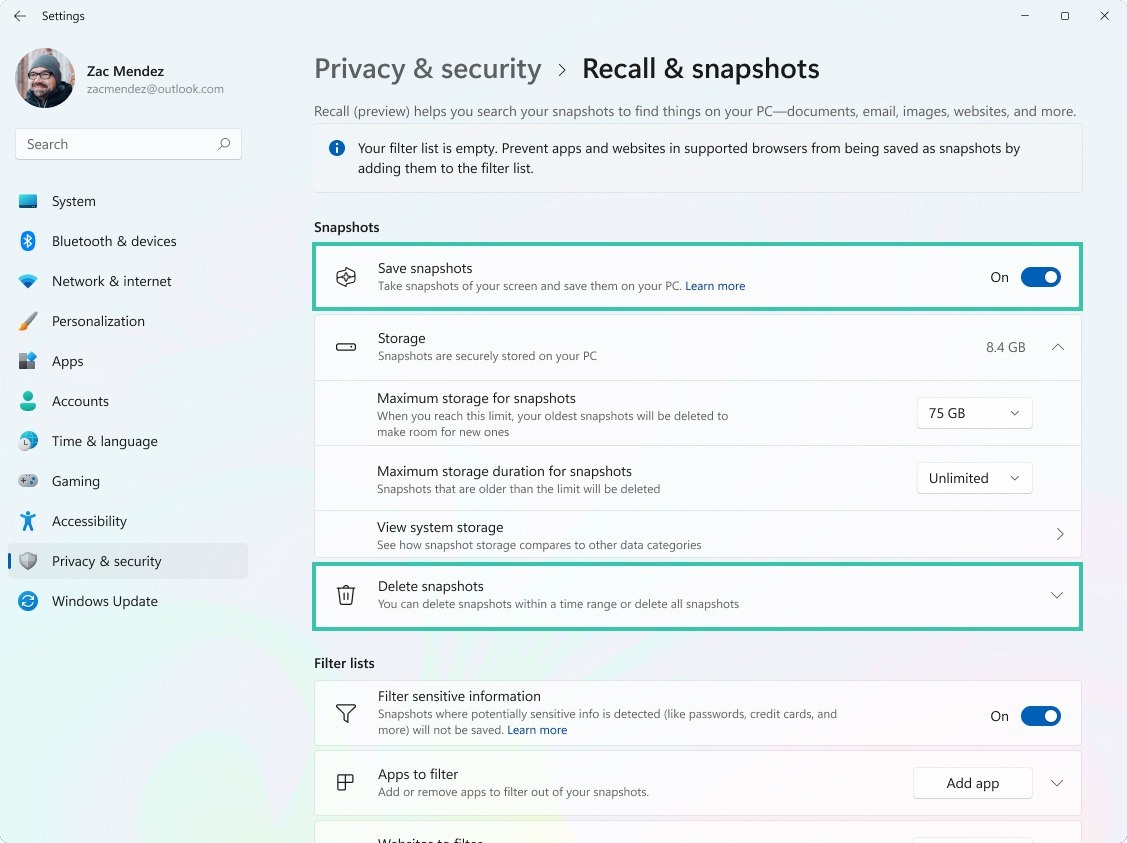
- Open Settings in the Windows Start menu and select Privacy & security.
- Within Privacy & security, find the Recall & snapshots subsection.
- In this subsection, toggle off Save snapshots, and click Delete snapshots to erase any data already collected.
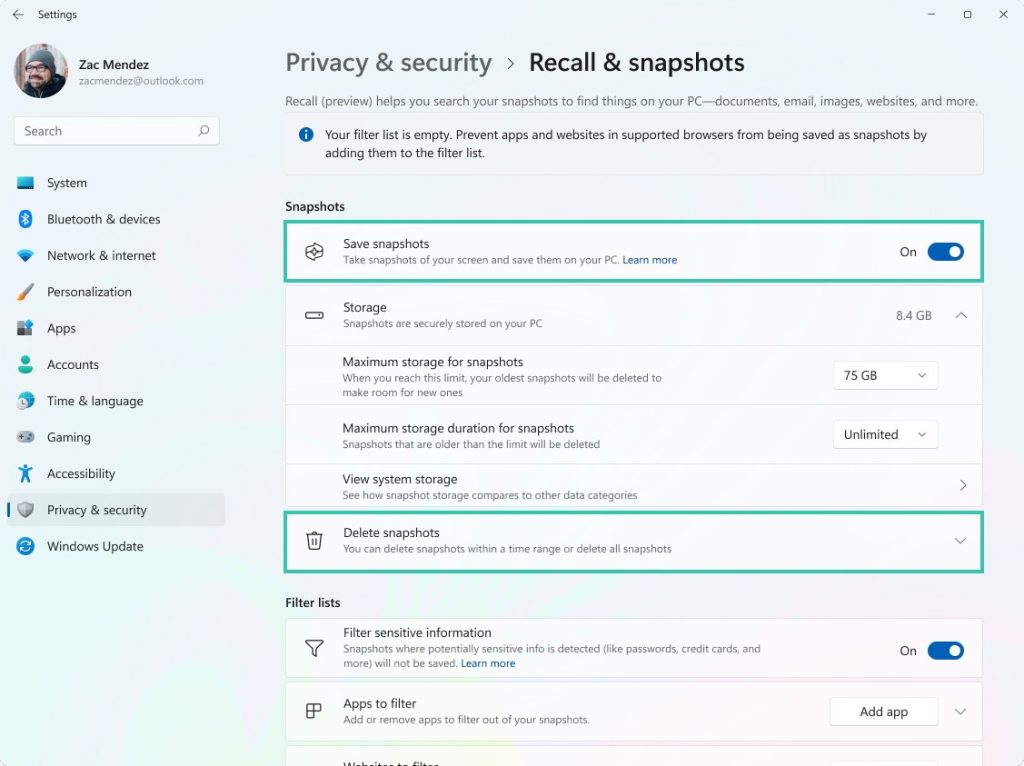
How to disable Microsoft Copilot+ Recall and delete any stored data. Source
To remove Recall completely:
- In the Windows Start menu search bar, type Turn Windows features on or off.
- In the retro-looking window that opens, locate the Recall entry.
- Uncheck the box next to this item and click OK.
After this, Recall will be removed from your PC, and its settings will no longer appear under Privacy & security.
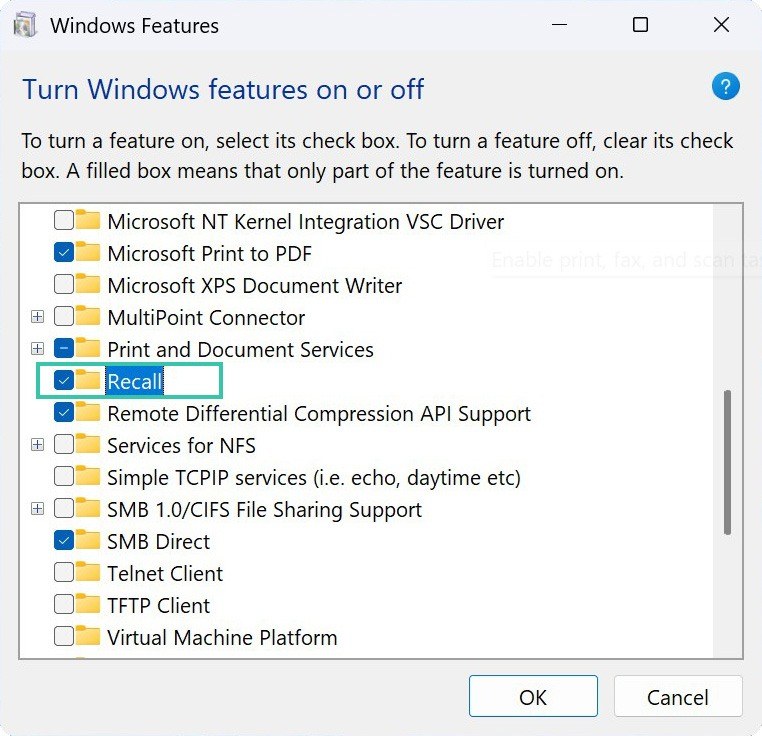
How to remove Microsoft Copilot+ Recall from your computer completely. Source
How to configure Recall if you decide to try it anyway
If you don’t fall into any of the categories above and really want to Recall something like “the photo where Jane’s cat is lying on the blue sofa”, we recommend taking a few precautions and adjusting your settings for better security:
- Disable less secure sign-in methods in Windows, such as pattern locks and PINs. Use only a strong password and biometric authentication.
- Manually add to Recall’s exclusion list all messengers you use for confidential correspondence, password managers, finance apps and websites, and any other apps or websites that may contain private information. For ethical reasons, it’s a good idea to exclude all video conferencing apps. For performance reasons, exclude all games.
- Set a screenshot retention period that suits your needs, keeping it to a minimum. Possible options range from 30 to 180 days.
- Periodically — ideally a few times a week — check Recall to see which apps and sites were recently captured. This will help you identify and manually delete or filter out any sources of sensitive information you may have missed earlier.
Regardless of your Recall settings or whether it’s installed at all, the two most common data leak scenarios are direct theft from your device by infostealer malware, and entering your credentials on a phishing site. To guard against these risks, be sure to use a comprehensive cybersecurity solution, such as Kaspersky Premium.
Under the pretense of user convenience — and sometimes without any pretense at all — various organizations collect information about you that you may not even be aware of. How? Read here:
Kaspersky official blog –