A Chinese-speaking threat actor tracked as UAT-6382 has been linked to the exploitation of a now-patched remote-code-execution vulnerability in Trimble Cityworks to deliver Cobalt Strike and VShell.
“UAT-6382 successfully exploited CVE-2025-0944, conducted reconnaissance, and rapidly deployed a variety of web shells and custom-made malware to maintain long-term access,” Cisco Talos researchers
https://www.backbox.org/wp-content/uploads/2018/09/website_backbox_text_black.png00adminhttps://www.backbox.org/wp-content/uploads/2018/09/website_backbox_text_black.pngadmin2025-05-22 16:06:492025-05-22 16:06:49Chinese Hackers Exploit Trimble Cityworks Flaw to Infiltrate U.S. Government Networks
These days, we’re hardly ever separated from our devices. According to a 2024 study conducted in the U.S. by analytics firm Reviews.org, the average user spends around 2.5 months of a year on their smartphone! That’s a staggering figure — showing just how deeply mobile devices have become ingrained into our daily lives.
A digital detox — a trendy term for taking a break from our screens and notifications — can benefit anyone with a smartphone and/or laptop. According to a review of 10 studies conducted between 2013 and 2023, digital detoxes help improve sleep quality, life satisfaction, and overall wellbeing. They also reduce anxiety, stress, depression, and phone addiction. What’s more, regular digital breaks can restore the brain’s ability to focus for long periods and process information deeply.
However, completely unplugging from the internet can pose certain cybersecurity risks to your digital life. So today, we’ll look at how to give your mind a rest while ensuring the security of your accounts, devices, data, and even smart home.
What could go wrong during a digital detox?
Of course, it’s impossible to completely eliminate all risks, but you can make some preparations to minimize their impact. But what kinds of risks are we talking about?
Account theft — both of regular, single-service accounts, and ecosystem accounts (like Google, Apple, Facebook, Instagram, Samsung, etc.) via password guessing or SIM swapping.
Unauthorized subscriptions and charges.
Leak of personal data from password dumps or due to a lack of two-factor authentication.
Account hijacking in messengers and social networks.
Use of your devices or accounts to send spam.
Loss or theft of your gadgets.
Household issues — break-ins while you’re away, flooding, gas leaks, or fires.
How to stay in control during a digital detox?
Start with a digital spring-clean, and strengthen your digital perimeter across a few key areas.
Accounts, data, and finances
Review your subscriptions. More than half of users worldwide pay for subscriptions they don’t use. According to one study, only 38% of respondents had used all of their subscriptions in the past six months. The majority had unused ones: 15% hadn’t used two, 11% three, and 3% more than five. Moreover, we tend to underestimate our total subscription costs by two to three times — even though we spend, on average, around a thousand dollars a year on them! So reviewing your subscriptions is a great place to start your digital detox, and dedicated subscription managers can help make this easier.
Make a list of subscriptions to pause or cancel completely while you’re away. And conversely, make sure the services that require ongoing payments are linked to an account with enough funds to cover them during your detox. This might include services like website hosting autopayments, VPS rental for a project, or a paid cloud storage or mail server. Also check how long your data is retained after suspending a subscription — and when it might be permanently deleted.
Beef up your passwords. Review your critically important accounts: online banking, government service portals, crypto wallets, and so on. If you’re already using a password manager, take advantage of the built-in password leak check If you store passwords in your browser, or your password manager can’t check for compromised passwords, switch to Kaspersky Password Manager. Replace weak passwords with unique and strong ones — our password manager can generate and remember them for you.
Enabletwo-factor authentication (2FA) wherever possible so that logging in requires a one-time code. Keep in mind that codes sent via SMS aren’t secure — so for critical accounts (banks, email, social networks, ecosystem accounts like Google and Apple), switch to an authenticator app wherever you can. By the way, our password manager can help here too.
Make backups. Create up-to-date backups of important files stored both locally and online — because the internet remembers not quite everything. Keep multiple copies — for example, on NAS at home as well as in a reliable cloud with encryption features. Don’t forget to make fresh backups of your smartphone and any other devices you’re taking with you, and store them in a safe place.
Give backup access to people you trust. If you’re a blogger, run Telegram channels or video-hosting platforms, or have popular social media accounts, be sure to set them up so you’re not the only one with access. In case attackers do manage to compromise your account — for example, through SIM swapping or hijacking session cookies — a prompt response is essential, even if you’re away. Kaspersky Password Managercan help here too: install it on multiple devices and sync your passwords and two-factor authentication tokens across them.
Notify your bank of your travel plans so they don’t block your card due to a “suspicious transaction” abroad. Depending on your bank, this can be done via in-app chat, a hotline, or in person.
Gadgets and connectivity
Install security updates. Update the operating systems, apps, and firmware on all your gadgets to the latest versions. Patches fix known vulnerabilities and lower the chances of a successful attack on you. If you’re using Android, check out our pain-free guide to installing Android updates.
Protect your devices. Make sure your both your computer and smartphone are protected with reliable security software. Enable disk encryption, and set a strong password for unlocking your device — whether you’re taking it with you or leaving it behind. On smartphones, disable biometric access, use strong passcodes, and enable automatic data-wipe after several failed unlock attempts.
To be able to locate lost Apple devices, turn on Find My. Kaspersky for Android has a similar feature for Android devices.
Protect your SIM cards from being swapped. Your cellphone number provides access to many services. It can be used to access social media, banking, government services, and — most critically — ecosystem accounts that store important personal data like your calendar, cloud documents, and payment card data saved in your browser. Criminals may try to get a duplicate of your SIM card at a mobile store to bypass SMS or call verification. Of course, this can happen at any time, but if you’re away, you won’t be able to respond as quickly.
Some mobile carriers let you set a password without which all SIM reissue requests are denied. Some providers let you prohibit them from providing you with services remotely and preventing anyone from replacing your SIM card, even if they have а power of attorney – real or fake. Check what options your provider offers, and for more tips on SIM swapping protection, see our article on the topic.
Set a good old PIN code on your primary SIM card before your trip — especially if you plan to remove it from your phone to leave at home, or swap it for a travel SIM while abroad. That way, even if your SIM falls into the wrong hands, they won’t be able to access your accounts: once inserted into a phone, the SIM won’t work without the PIN code. If you have an eSIM, keep the multi-use eSIM activation QR code stored in a secure place — or opt for single-use codes instead.
Make sure you have a backup communication channel. If you’re heading somewhere where mobile signal is unreliable or nonexistent — like in mountainous regions — satellite SMS services (like Garmin’s inReach) or Apple’s Emergency SOS via satellite feature can be useful. Be sure to check the subscription details in advance and confirm the service is available in the country you’re visiting.
Personal safety
Check yourdigital legacy settings and designate who gets access to your accounts if something happens to you. In Apple’s ecosystem, you can assign an account recovery contact in case you completely lose access to your Apple ID. With a code they receive according to your instructions, the trusted person can help you regain access to your account and data — such as a smartphone backup. However, they won’t get direct access to your data. In addition to a recovery contact, Apple also lets you designate a Legacy Contact. Google offers a similar feature called Inactive Account Manager, which is especially worth setting up if you plan not to use Google services for a long time. This option sends your selected contacts a backup of chosen data after a set period of inactivity — the default is three months. If that’s not enough for your full-on digital detox, be sure to increase the inactivity period in the settings so you don’t alarm your trusted contacts.
Decide which smart-home and IoT devices should remain active while you’re away. Surveillance cameras and alarms should ideally not just stay on, but be connected to an uninterruptible power supply. That way, the alarm can still send a signal to the monitoring center even if burglars cut the power before breaking in. On the other hand, smart sockets, speakers, or appliances you don’t plan to use should be unplugged and disconnected from the internet. Learn more about smart-home protection here.
Change the default passwords on all IoT devices to your own, strong ones, and don’t forget your router. Many devices come with standard login/password combos out of the box, making them vulnerable to botnet attacks. Also, if an attacker gains access to your IP camera, they can monitor your home and plan a break-in while you’re away.
Make sure you (or a trusted person) can receive critical alerts — for example, from smoke, gas, or flood detectors — and that a relative, trusted neighbor, or friend can quickly deal with any issues. Leave your trusted contact with spare keys and a way to reach you. If you’re going fully offline for your digital detox, this could be your hotel’s phone number or the contact details of your travel companion.
How to minimize gadget use on vacation
A full digital detox might feel too extreme for many people. But if you want to truly relax without worrying about your online life or offline property, we recommend at least sticking to the following rules:
Forget about the news, social media, and email — or at least stop checking them all the time. Special modes on Apple and Android devices can help limit your access to the most distracting apps. If these built-in tools aren’t enough, you could “become your own child” — install Kaspersky Safe Kids (included in your Kaspersky Premium subscription) and customize it by setting filters for apps, websites, and social media — adding daily time limits for each.
Minimize your digital footprint. Avoid posting vacation photos or updates in public in real time — better is to share the memories once you’re back. That way, you’re not telling the world: “Hey, I’m not home and won’t be for two more weeks!” If you really can’t resist, at least limit the audience to close friends only.
Let colleagues and family know in advance that you’ll be away, so they won’t worry or — most importantly — send you anything sensitive or urgent via email or messaging apps. Also, review your messaging account settings to prevent hijacking while you’re gone. Scammers love to strike when account owners are absent — so a quick reminder to your contacts not to fall for messages like “Hey! Can you lend me $100 till tomorrow?” can save you a lot of trouble.
Set up an out-of-office message for your email and voicemail stating that you’re temporarily offline — without giving too many details about your destination or reasons for your trip.
Take just one, essential device. If you’re traveling, don’t bring every gadget you own. Choose just one — whether a laptop, tablet, or smartphone — and keep it in your carry-on luggage. At your accommodation, store your device in a safe and never leave it unattended — even if you don’t plan to use it. If someone gets physical access to your device, they could compromise your data — and in the case of a smartphone, even steal your SIM card.
Use a backup phone for SMS messages. If you’re swapping your main SIM for a local or tourist one, insert your home SIM into an old backup phone — ideally a basic button phone with a long battery life — and turn off mobile data. This way, you’ll still receive calls and texts to your main number and can react promptly if something suspicious happens — like getting a two-factor authentication code you didn’t request, or a bank alert about a strange transaction or loan approval. To avoid roaming charges, simply do not answer the calls from this device and contact the caller on another channel. Keep this phone in a hotel safe or other secure spot and check it at least once a day.
Avoid risky connections. If possible, avoid connecting to unknown Wi-Fi networks or using someone else’s computer — especially if your goal is to unplug from the internet and screens. If you do need to get online (say, to check an important email), use your own device and stick to trusted Wi-Fi networks — or, better yet, mobile internet. Tourist SIM cards with cheap data plans are available pretty much everywhere in today’s world. With public Wi-Fi, use a secure connection to encrypt your traffic. And never enter passwords when using internet café networks or shared computers.
How to avoid missing anything important when you return
After your digital vacation, it’s important to return online wisely — checking what happened while you were away.
Power on your devices and check for updates. Turn on all the gadgets you’d switched off. Security updates may have been released while you were away; install them as soon as possible before actively using your devices again. Make sure your antivirus databases are also up to date. If you had any IoT devices unplugged, turn them back on and ensure they’re working properly and reconnected to your home network (and double-check that no passwords have been reset).
Review notifications and logs. Go through the backlog of notifications in your email, banking apps, and social media accounts. Pay close attention to login attempt alerts, two-factor authentication codes, and bank messages about transactions. If you notice any attempts to access your accounts that occurred during your digital detox, your first step should be to change the passwords for those services, terminate suspicious sessions if possible, and contact support. An SMS or push notification with a login code you didn’t request is a strong sign of a potential hack or SIM-swap attempt; in that case, immediately reach out to your mobile provider and the service in question.
Check your SIM card and phone. After a long time offline, make sure your phone number is still active and functioning, and that your balance hasn’t been drained by any suspicious activity. A pre-set PIN code and a restriction on reissuing SIM cards should reliably protect your number. However, it’s still worth double-checking your mobile account and, at the slightest suspicion, requesting a detailed expenses log from your mobile provider.
Assess your resilience and make notes and amendments for the future. Reflect on how well your digital ecosystem held up during your time away. The ideal outcome: nothing went wrong, your data is intact, your accounts are secure, and your home is fine. If that’s the case, congratulations — not only did you enjoy your break, but you also confirmed that your security measures work even without constant supervision. If any issues did arise — say, a backup failed or an IP camera went offline — treat them not as disasters but as lessons to learn, and take measures to improve your setup going forward.
We hope these tips help you enjoy a smooth and secure digital-detox vacation. Make the most of your time offline — and remember, it’s better to be safe than sorry. And to be even safer, follow our Telegram channel.
https://www.backbox.org/wp-content/uploads/2018/09/website_backbox_text_black.png00adminhttps://www.backbox.org/wp-content/uploads/2018/09/website_backbox_text_black.pngadmin2025-05-22 16:06:402025-05-22 16:06:40A Kaspersky checklist for a safe vacation | Kaspersky official blog
https://www.backbox.org/wp-content/uploads/2018/09/website_backbox_text_black.png00adminhttps://www.backbox.org/wp-content/uploads/2018/09/website_backbox_text_black.pngadmin2025-05-22 15:07:092025-05-22 15:07:09How to safeguard your small business in the hybrid work era: 5 top cybersecurity solutions
Ever tried resizing an image only to end up with a blurry, pixelated mess? Whether you’re adjusting a…
Hackread – Latest Cybersecurity, Hacking News, Tech, AI & Crypto – Read More
https://www.backbox.org/wp-content/uploads/2018/09/website_backbox_text_black.png00adminhttps://www.backbox.org/wp-content/uploads/2018/09/website_backbox_text_black.pngadmin2025-05-22 15:07:092025-05-22 15:07:09Why Image Quality Drops When Resizing a JPEG (and How to Fix It)
A recently patched pair of security flaws affecting Ivanti Endpoint Manager Mobile (EPMM) software has been exploited by a China-nexus threat actor to target a wide range of sectors across Europe, North America, and the Asia-Pacific region.
The vulnerabilities, tracked as CVE-2025-4427 (CVSS score: 5.3) and CVE-2025-4428 (CVSS score: 7.2), could be chained to execute arbitrary code on a
A privilege escalation flaw has been demonstrated in Windows Server 2025 that makes it possible for attackers to compromise any user in Active Directory (AD).
“The attack exploits the delegated Managed Service Account (dMSA) feature that was introduced in Windows Server 2025, works with the default configuration, and is trivial to implement,” Akamai security researcher Yuval Gordon said in a
https://www.backbox.org/wp-content/uploads/2018/09/website_backbox_text_black.png00adminhttps://www.backbox.org/wp-content/uploads/2018/09/website_backbox_text_black.pngadmin2025-05-22 14:07:032025-05-22 14:07:03Critical Windows Server 2025 dMSA Vulnerability Enables Active Directory Compromise
https://www.backbox.org/wp-content/uploads/2018/09/website_backbox_text_black.png00adminhttps://www.backbox.org/wp-content/uploads/2018/09/website_backbox_text_black.pngadmin2025-05-22 13:06:482025-05-22 13:06:48Experts Chart Path to Creating Safer Online Spaces for Women
Despite adding alignment training, guardrails, and filters, large language models continue to jump their imposed rails and give up secrets, make unfiltered statements, and provide dangerous information.
A new phishing campaign is spreading the Remcos Remote Access Trojan (RAT) through DBatLoader. It employs User Account Control (UAC) bypass, obfuscated scripts, Living Off the Land Binaries (LOLBAS) abuse, and persistence mechanisms.
Here’s an analysis of the infection chain, key techniques, and detection tips.
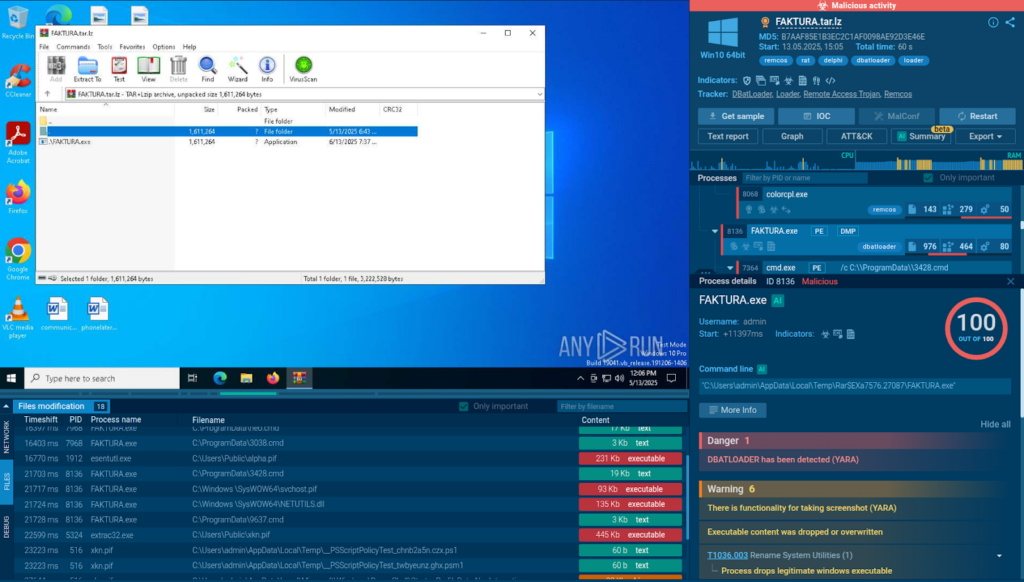
The attack likely starts with a phishing email containing an archive.
Analysis of the malicious sample inside ANY.RUN’s Interactive Sandbox
Inside it, there is a malicious executable named “FAKTURA”, which deploys DBatLoader on the system.
Use of .pif Files for Disguise and UAC Bypass
DBatLoader uses .pif (Program Information File) files as a method of disguise and execution.
Originally intended for configuring how DOS-based programs should run in early Windows systems, .pif files have become obsolete for legitimate use. However, they are still executable on modern Windows versions, making them useful for attackers.
Windows treats .pif files similarly to .exe files. When executed, they can run without triggering warning dialogs, depending on system configuration.
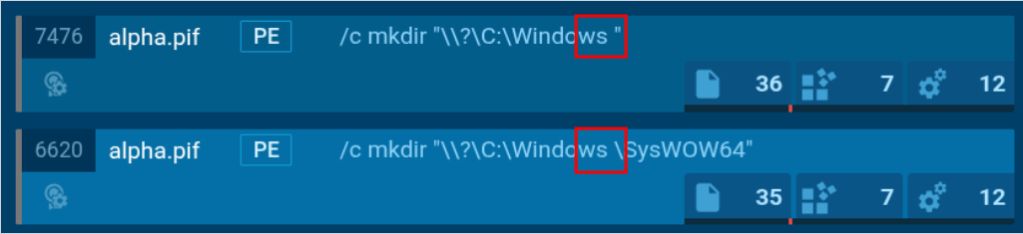
Trailing spaces allow attackers to abuse Windows’s folder name handling
In the analysis, the malicious alpha.pif (a Portable Executable file) bypassed UAC by creating fake directories like “C:Windows “ (note the empty space), exploiting Windows’s folder name handling to gain elevated privileges.
Get extra sandbox licenses for your team as a gift Take advantage of ANY.RUN’s special offers before May 31
Evasion and Persistence: Ping Command and Scheduled Task
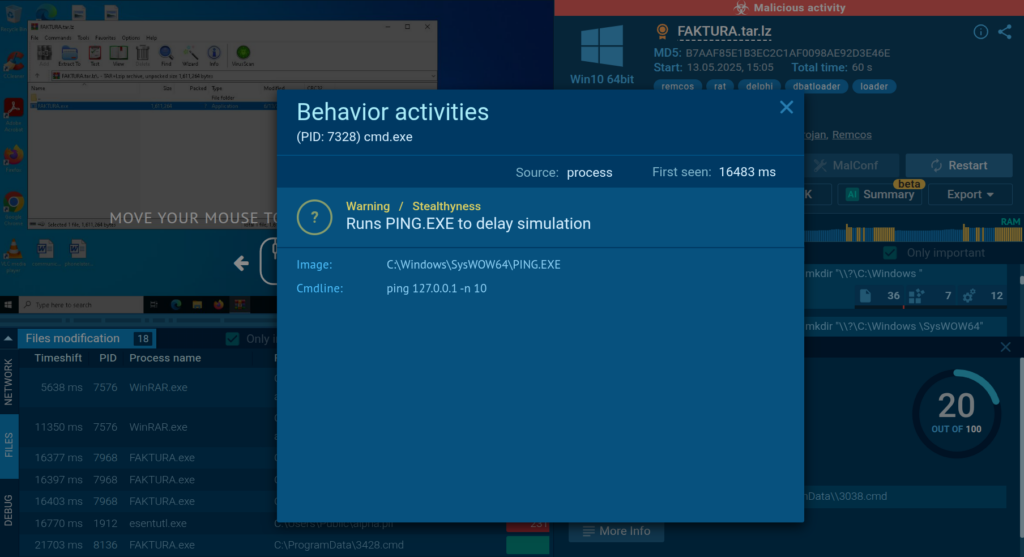
One observed command line uses PING.EXE to ping the local loopback address (127.0.0.1) ten times. While legitimate programs may use this to test network connectivity by sending ICMP echo requests, malware like DBatLoader uses it to introduce artificial delays for time-based evasion.
ANY.RUN flags PING.EXE activity and identifies it as a delay simulation
In some cases, this technique can also be repurposed for remote system discovery.
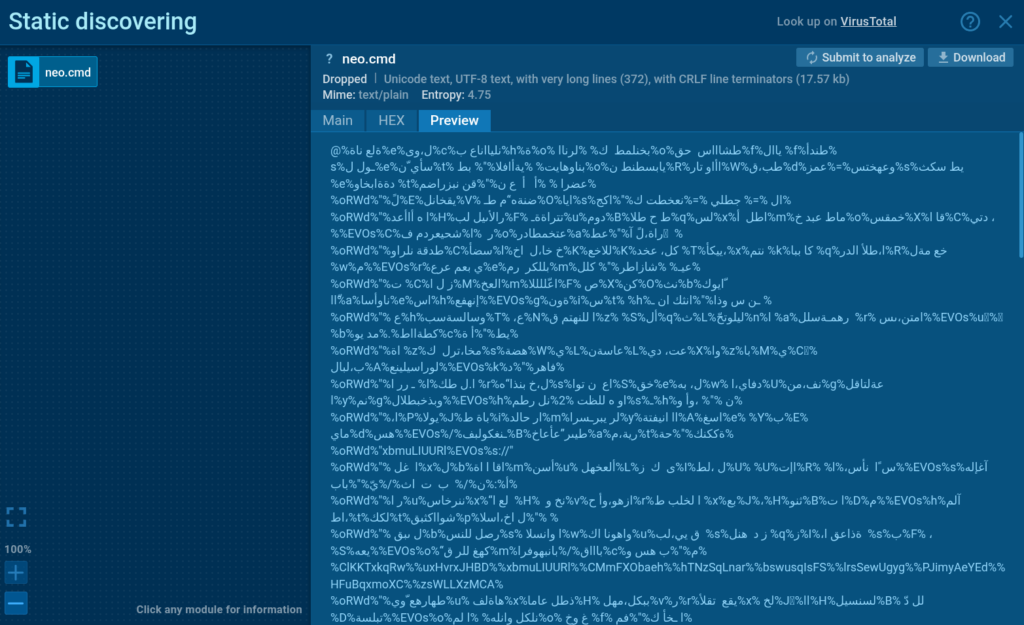
The malicious svchost.pif file launched NEO.cmd through CMD, which then executed extrac32.exe to add a specific path to Windows Defender’s exclusion list, allowing it to evade further detection.
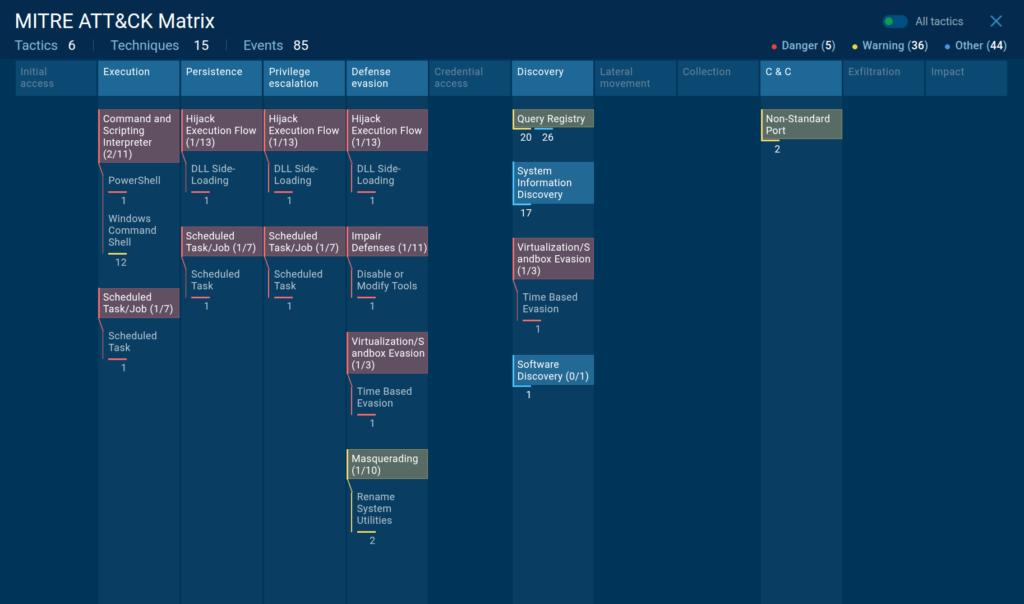
The sandbox highlights evasion and persistence activities in the MITRE ATT&CK Matrix
To maintain persistence and survive following reboots, DBatLoader abuses a scheduled task to trigger a Cmwdnsyn.url file, which launches a .pif dropper.
Obfuscation and Remcos Deployment
Obfuscation complicates the analysis for security professionals
The loader used .cmd files obfuscated with BatCloak to download and run Remcos.
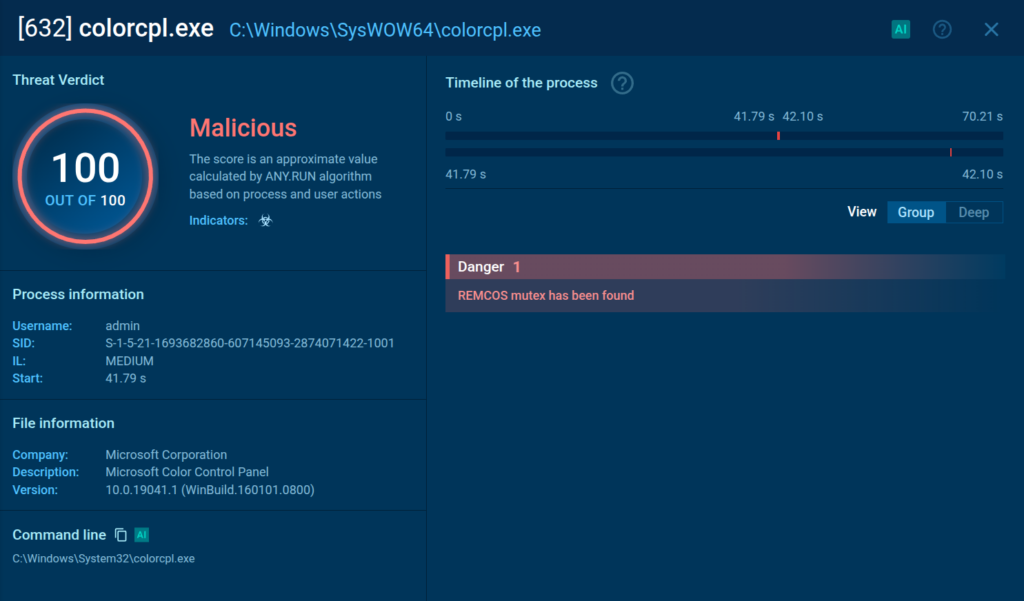
The sandbox flags the injected process and detects Remcos
Remcos injects into trusted system processes SndVol.exe, colorcpl.exe or others, varying on each new instance, blending in with the rest of the processes.
Spot Similar Attacks with Proactive Sandbox Analysis
Multi-stage attacks that utilize different means of staying hidden on the system are hard to identify with standard signature-based solutions. The most effective way to ensure detection is to proactively detonate the suspicious files inside the safe, virtual environment of a malware sandbox.
ANY.RUN’s Interactive Sandbox allows security teams to conduct fast and in-depth analysis of malware and phishing attacks to maximize the detection rate. The service offers fully interactive cloud-based VMs supporting Windows, Android, and Linux systems.
Accelerate Threat Analysis: The sandbox detects malware strains in under 40 seconds, reducing incident investigation time and boosting SOC productivity.
Keep Your Infrastructure Safe: Analyze suspicious files and URLs in a cloud-based, isolated environment to eliminate the risk of compromising corporate infrastructure.
Boost Team Collaboration: Configure access levels, track productivity, and coordinate the team’s work on threat analysis.
Improve Cost-Effectiveness: Minimize financial losses with faster threat analysis and detection that supercharges response and containment.
See all ANY.RUN’s 9th Birthday special offers and get yours before May 31
Analysts can monitor unusual file paths, track processes for unexpected activity, analyze network connections, and, most importantly, manually engage with the system and threats.
The sandbox flags all the malicious behaviors and generates a detailed report with IOCs that can be adapted for detection rules and endpoint security improvement.
About ANY.RUN
Over 500,000 cybersecurity professionals and 15,000+ companies in finance, manufacturing, healthcare, and other sectors rely on ANY.RUN. Our services streamline malware and phishing investigations for organizations worldwide.
Speed up triage and response: Detonate suspicious files using ANY.RUN’s Interactive Sandbox to observe malicious behavior in real time and collect insights for faster and more confident security decisions.
Improve threat detection: ANY.RUN’s Threat Intelligence Lookup and TI Feeds provide actionable insights into cyber attacks, improving detection and deepening understanding of evolving threats.
https://www.backbox.org/wp-content/uploads/2018/09/website_backbox_text_black.png00adminhttps://www.backbox.org/wp-content/uploads/2018/09/website_backbox_text_black.pngadmin2025-05-22 13:06:392025-05-22 13:06:39DBatLoader Delivers Remcos via .pif Files and UAC Bypass in New Phishing Campaign
A 19-year-old college student faces charges after pleading guilty to cyber extortion targeting PowerSchool, exposing data of 60…
Hackread – Latest Cybersecurity, Hacking News, Tech, AI & Crypto – Read More
https://www.backbox.org/wp-content/uploads/2018/09/website_backbox_text_black.png00adminhttps://www.backbox.org/wp-content/uploads/2018/09/website_backbox_text_black.pngadmin2025-05-22 12:07:052025-05-22 12:07:0519-Year-Old Admits to PowerSchool Data Breach Extortion