

Google Exposes Vishing Group UNC6040 Targeting Salesforce with Fake Data Loader App
Google has disclosed details of a financially motivated threat cluster that it said “specialises” in voice phishing (aka vishing) campaigns designed to breach organizations’ Salesforce instances for large-scale data theft and subsequent extortion.
The tech giant’s threat intelligence team is tracking the activity under the moniker UNC6040, which it said exhibits characteristics that align with
The Hacker News – Read More
Data breach at newspaper giant Lee Enterprises affects 40,000 people
The ransomware attack paralyzed newspaper printing and disrupted operations at media outlets across the country for weeks.
Security News | TechCrunch – Read More
Beware of Device Code Phishing
Hackers are exploiting trusted authentication flows — like Microsoft Teams and IoT logins — to trick users into handing over access tokens, bypassing MFA and slipping undetected into corporate networks.
darkreading – Read More
Nearly 3,000 North Face website customer accounts breached as retail incidents continue
The parent company of apparel brand The North Face sent data breach notification letters to about 3,000 customer accounts, saying attackers used the technique known as credential stuffing.
The Record from Recorded Future News – Read More
Google Warns of Vishing, Extortion Campaign Targeting Salesforce Customers
A financially motivated threat actor employing vishing to compromise Salesforce customers, and extort them.
The post Google Warns of Vishing, Extortion Campaign Targeting Salesforce Customers appeared first on SecurityWeek.
SecurityWeek – Read More

Release Notes: TAXII Support for TI Feeds, New Sandbox Onboarding, and 900+ Detection Rules
We’ve packed May with updates to make your experience smoother and your threat detection even sharper. Whether you’re just getting started or knee-deep in malware every day, these changes are here to save you time and give you better insights.
In this update:
- A brand-new onboarding tutorial in the sandbox to guide you step by step
- TAXII support for TI Feeds, so you can plug threat intel right into your tools
- A big boost in threat coverage, with new signatures, YARA rules, and standout samples
Take a look below to see how these updates can help you work faster, stay ahead of threats, and get more out of ANY.RUN!
Product Updates
New Sandbox Onboarding Tutorial
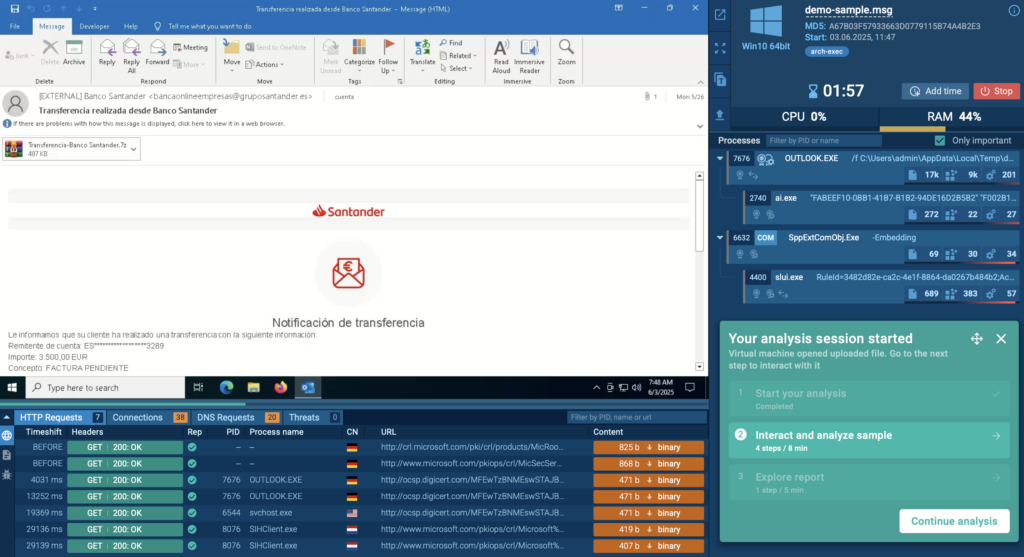
Whether you’re brand new to ANY.RUN or just want a quick refresher, the new onboarding tutorial in the sandbox has you covered. It walks you through each step of the analysis process, from uploading a sample to making sense of the process tree, network activity, and IOCs.
It’s a great starting point for new analysts or anyone looking to get more comfortable with the platform.
You can find it in the FAQ section under the Tutorials tab; just click on Quick Sandbox Tutorial and you’re good to go.
TAXII Protocol Now Supported for TI Feeds
TAXII (Trusted Automated eXchange of Indicator Information) is a widely used protocol for sharing threat intelligence in a fast, secure, and standardized way. It’s designed to make integrating threat data with your existing tools, like SIEMs, EDRs, or TIPs, smooth and efficient.
Now, ANY.RUN’s Threat Intelligence Feeds fully support TAXII, making it even easier to bring high-quality threat data directly into your security stack.
Here’s what you get with ANY.RUN’s TI Feeds + TAXII integration:
- Actionable, real-world threat indicators: The feeds pull data from threats seen across 15,000+ companies worldwide. You’ll get fresh, high-confidence IOCs sourced from dynamic malware analysis and enriched with context from ANY.RUN’s sandbox.
- Minimal false positives: Every indicator is pre-processed and vetted before it reaches your system, so you get clean, reliable data that won’t overload your analysts or flood your alerts.
- Boosted detection and response automation: Use TI Feeds to automatically block malicious IPs, flag risky logs, enrich alerts, or trigger playbooks, saving your team time and cutting response delays.
How It Works
If you’re on a paid plan, you can now set up ANY.RUN’s TI Feeds as a TAXII endpoint in your existing system, whether it’s a SIEM, EDR/XDR, NGFW, or TIP platform.
Once connected to our TAXII server, your tools will start receiving fresh threat intel automatically. Want to see what the feeds look like? You can preview a sample in STIX or MISP format.
For full access to the latest indicators, reach out to us for 14-day trial of TI Feeds.
Threat Coverage Updates
In May, we expanded our detection coverage across Windows, Linux, and Android environments with 900+ new behavior signatures, YARA rules, Suricata rules, and attribution-based detections. These updates help defenders spot emerging malware families and reduce analysis time with better context and accuracy.
New Behavior Signatures
162 new behavior-based signatures were added to improve detection across commodity malware, ransomware, loaders, and remote tools.
Highlighted additions include:
- BPFDoor – A stealthy Linux backdoor that receives TCP/UDP/ICMP packets directly via BPF filters. Linked to the Red Menshen group, this malware hides without opening network ports and persists on servers for months.
- Sakura RAT – A rare APT-26 (Deep Panda) tool used in major data breaches. It hides C2 traffic in normal HTTP requests and uses stolen certificates to avoid detection.
- RoamingMOUSE – An Excel dropper used by MirrorFace (APT10) to side-load the Anel backdoor. Targets Japanese and Taiwanese government entities.
- FinalDraft – A cross-platform backdoor that uses Microsoft Graph API and Outlook drafts as C2 channels. It can proxy traffic and inject malicious code.
- PayDay Loader – Delivered via fake VPN/AI websites, this tool silently downloads stealers like Lumma and Poseidon across Windows, macOS, and Android.
- TerraStealer v2 – A stealer from the Golden Chickens toolkit. It grabs browser credentials and crypto wallets and exfiltrates data via Telegram or cloud services. Often paired with TerraLogger.
Other behavior-based detections added for the following threats:
New Tool and Utility Detections
We also added detections for commonly abused remote access tools and packers:
YARA Rule Updates
In May, we released 19 new and updated YARA rules to strengthen static detection and improve malware classification during analysis. These rules help identify emerging threats, improve attribution, and support faster triage, especially when working with evasive samples or reviewing files pre-execution.
Here are the latest additions:
- Packit Stealer – Rule added to detect this custom packer-based stealer known for targeting credentials and crypto assets.
- Lobshot – Detection rule to catch a Windows-based stealer that uses legitimate processes for stealth.
- GoFing – Rule added for this lesser-known info-stealer that focuses on browser and session data.
- Anel Backdoor – Part of the RoamingMOUSE dropper chain; used in targeted attacks.
- Teapot Stealer – New rule to detect this Python-based stealer active in commodity malware campaigns.
- Ralord Ransomware – Detection rule for this rapidly spreading ransomware targeting personal files and enterprise systems.
We also added YARA rules tied to the following threats:
Suricata Rule Updates
To improve detection of network-based threats, we added 756 new Suricata rules in May. These updates expand visibility into malicious domains, phishing infrastructure, and command-and-control traffic seen across live malware samples.
Some highlights include new detections for infrastructure observed in:
- WikiKit Campaign – Detects domain chains used in phishing and payload delivery.
- EvilProxy Campaign – Tracks malicious proxies abusing login flows and multi-factor authentication bypasses.
These rules are automatically applied during analysis and contribute to network-layer IOCs in your reports, making it easier to detect lateral movement, data exfiltration, and malware beaconing early in the infection chain.
About ANY.RUN
ANY.RUN supports over 15,000 organizations across industries such as banking, manufacturing, telecommunications, healthcare, retail, and technology, helping them build stronger and more resilient cybersecurity operations.
With our cloud-based Interactive Sandbox, security teams can safely analyze and understand threats targeting Windows, Linux, and Android environments in less than 40 seconds and without the need for complex on-premise systems. Combined with TI Lookup, YARA Search, and Feeds, we equip businesses to speed up investigations, reduce security risks, and improve team’s efficiency.
The post Release Notes: TAXII Support for TI Feeds, New Sandbox Onboarding, and 900+ Detection Rules appeared first on ANY.RUN’s Cybersecurity Blog.
ANY.RUN’s Cybersecurity Blog – Read More
Scammers are promising compensation from a bank | Kaspersky official blog
Scammers just can’t stop playing Santa: one day it’s free Telegram subscriptions; another it’s cryptocurrency. This new scam keeps things simple: they’re offering money right off the bat — or, more accurately, sharing a supposedly legal way for you to cash in.
The scammers created a two-minute video in which journ-AI-lists and a celebrity spin tall tales: “Everyone can get compensation. You just need to…” Read on to find out what the scammers are instructing their victims to do, and about the bait they’re using to lure unsuspecting folks into their trap.
The scammers’ modus operandi
This campaign saw scammers create phishing websites to host the video. You won’t find it on YouTube or any other video hosting site (for your safety, we won’t share it here either), because this kind of AI-generated content tends to be taken down in short order. It’s much harder to deal with scam websites — especially when links are distributed via email and messaging apps.
Now for the most interesting part: the video. It looks just like a brand-new Brazilian news segment, but there’s a twist. The news is completely fake — and was “shot” without the journalists’ permission. The scammers used a real news broadcast as the base, overlaying it with AI-generated voiceover and syncing the lip movements to match the new script. In it, AI-generated clones of real journalists weigh in on “violations” by one of the country’s leading banks.
- “Clients see their balances shrink for no reason — or even get wiped out entirely”
- “Accounts are being unjustly frozen”
- “Interest rates on loans are being inflated”

Part of the fake article created by AI for this scam
Once the stage is set, another AI clone takes over. Here, the scammers use the same approach as with the journalists: real video footage, AI-generated voiceover, and lip-syncing to match the new script. An AI-generated copy of a celebrity in Brazil delivers a fiery speech: “For months on end, the bank has repeatedly violated regulations, and now we’re taking decisive, uncompromising action. From this point forward, the bank will be allowed to operate in Brazil only if it pays compensation to every citizen, in the amounts specified.” And — what do you know? — bingo! Suddenly, every Brazilian is entitled to a one-time payout ranging from 1518 to 10 626 Brazilian reals (approximately US$250–2000).

Scam says court ruling guarantees compensation of up to R$10 000
Then the journalist clones return to the screen, supposedly showing a social media post from the bank that “confirms” the statement. But how do you actually cash in? Well, an AI-generated voiceover, set against a video tutorial, explains that all Brazilians need to visit a website “created by the tax authority and the bank”, enter their CPF (the Brazilian taxpayer ID), and calculate their personal compensation amount.
The setup is clear: as soon as the victim finishes watching the video, they’re funneled straight to a specially crafted phishing website, where a quick identity check awaits.
- “What’s your mother’s name?”
- “What’s your date of birth?”
- “You have an overdue insurance payment in the amount of…”
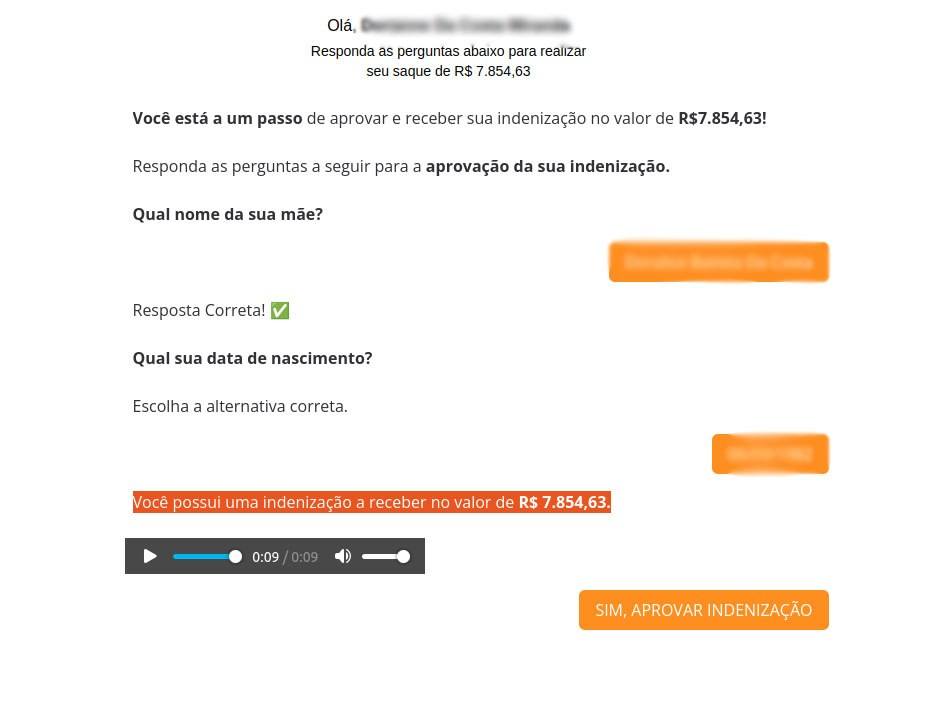
A barrage of questions, and even a voice message generated by AI — now that’s technology at work!
Answer all the questions correctly (not that it really matters — you can type whatever you like), and you’re through to the final stage. You’re told the transaction is practically on its way and the money is about to hit your account, but there’s a snag. You’re required to pay three taxes: a road tax, a transfer tax, and a receipt tax, totaling just 55 Brazilian reals (around $10) — a mere pittance compared to the promised windfall of 7854 reals (roughly $1400). Next, the site asks you to enter your bank card details, confirm your CPF once again, and provide your name, email, and phone number before making the payment. And when those “taxes” are paid… absolutely nothing happens! The money and personal information will go straight to the scammers — and, of course, no one will ever see a payout.
Protecting yourself against payout scams
This scam targets Brazilian residents, but it could easily be adapted to other languages, themes, and continents. By tomorrow, you can bet the scammers will have cooked up a brand-new pretext: government fitness reimbursements, free food, a gas-bill refund, or something else entirely. That’s why it’s crucial to recognize the pattern: there’s always enticing bait (think free giveaways of something valuable), a phishing website, and a fake news report to seal the deal. But how can you spot the catch in videos like these?
- Watch the lips. Then you can spot the AI-generated journalist clones not always opening their mouths correctly. AI still struggles to perfectly sync lip movements with the audio track.
- Watch the facial expressions. Sure, these “news” videos might look convincing in a still frame, but if you look closely at AI-generated footage, you’ll notice how the speaker’s face can suddenly shift or change in unnatural ways.
- Inspect the background and lighting. If the “journalist” is standing in the middle of a field or some other empty space with blurry edges, or the lighting just looks off, chances are you’re looking at an AI creation.
But there’s more!…
Be sure to read Watch the (verified) birdie, or new ways to recognize fakes. In that post, we provide detailed guidance on telling real photos from fakes. If you’re worried that you or your loved ones might accidentally end up on a scam website, install Kaspersky Premium. It automatically blocks access to suspicious links from chat apps and email to keep you safe from phishing. That way, if there’s ever a threat, you won’t even have to worry about spotting fake news yourself.
Remember: following basic safety tips is one of the best ways to steer clear of scammers:
- Avoid entering personal and payment details on suspicious websites. If they’re asking for your date of birth, email, bank details, taxpayer ID, and… which doormat you keep your spare key under, chances are you’re dealing with scammers.
- Just a reminder: there’s no such thing as a free lunch. Be suspicious if someone promises you the world for nothing — even if it seems to be coming from a government official in a video. In fact, be even more cautious if it’s a government official speaking on camera!
- If you have to pay to claim your prize, it’s probably a scam. That’s a classic scammer’s trick: they promise you a huge payout, but only if you pay “a fee”, “tax”, or “shipping” first.
- Avoid clicking suspicious links. As a rule of thumb, consider any link sent to you by strangers to be suspicious by default. But remember, even friends can end up sending scam links — sometimes without even realizing it.
What else are scammers up to?
- SIMulated giveaway on Instagram: the prize is your account!
- You’ve been sent a “gift” — a Telegram Premium subscription
- It’s a gas: how online scammers dupe “investors”
- You found a seed phrase from someone else’s cryptowallet: what could go wrong?
- How to sell your TV without losing your shirt (and banking data)
Kaspersky official blog – Read More
Your SaaS Data Isn’t Safe: Why Traditional DLP Solutions Fail in the Browser Era
Traditional data leakage prevention (DLP) tools aren’t keeping pace with the realities of how modern businesses use SaaS applications.
Companies today rely heavily on SaaS platforms like Google Workspace, Salesforce, Slack, and generative AI tools, significantly altering the way sensitive information is handled. In these environments, data rarely appears as traditional files or crosses networks
The Hacker News – Read More