Paragon Commercial Spyware Infects Prominent Journalists
An unnamed customer of Paragon’s Graphite product used the commercial spyware to target at least two prominent European journalists in recent months.
darkreading – Read More

An unnamed customer of Paragon’s Graphite product used the commercial spyware to target at least two prominent European journalists in recent months.
darkreading – Read More
North Korean hackers deploy PylangGhost malware through fake crypto job interviews targeting blockchain professionals with phishing and remote access tools.
Hackread – Latest Cybersecurity, Hacking News, Tech, AI & Crypto – Read More
Threat analysis is a complex task that demands full attention, especially during active incidents, when every second counts. ANY.RUN’s Interactive Sandbox is designed to ease that pressure with an intuitive interface and fast threat detection.
Our new feature, Detonation Actions, takes this further by highlighting detonation steps during analysis. When a specific action is needed to trigger the sample, like launching a file or clicking a link, it appears as a suggestion, so you know exactly what to do.
Detonation Actions work in both manual mode and with Automated Interactivity. Whether you’re investigating manually or running automated sessions, this guided mode reduces the time it takes to respond to threats and helps you catch the full scope of malicious behavior with minimal effort.
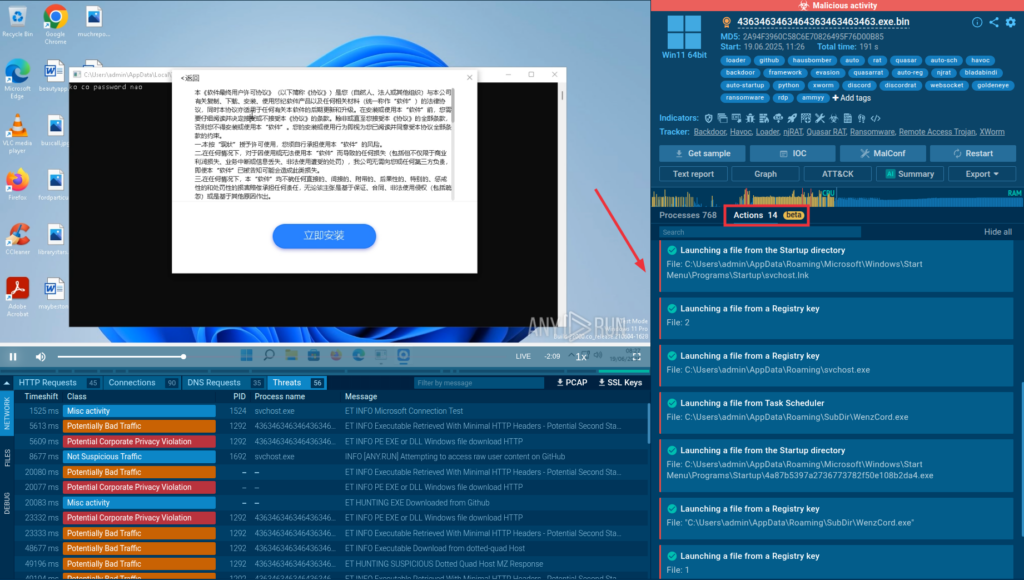
Detonation Actions are built-in hints in ANY.RUN’s Interactive Sandbox that guide users step-by-step through the threat analysis process. They are available in every sandbox session, for all users, and help make both manual and automated investigations clearer and more efficient.
Here’s how it works depending on your plan:
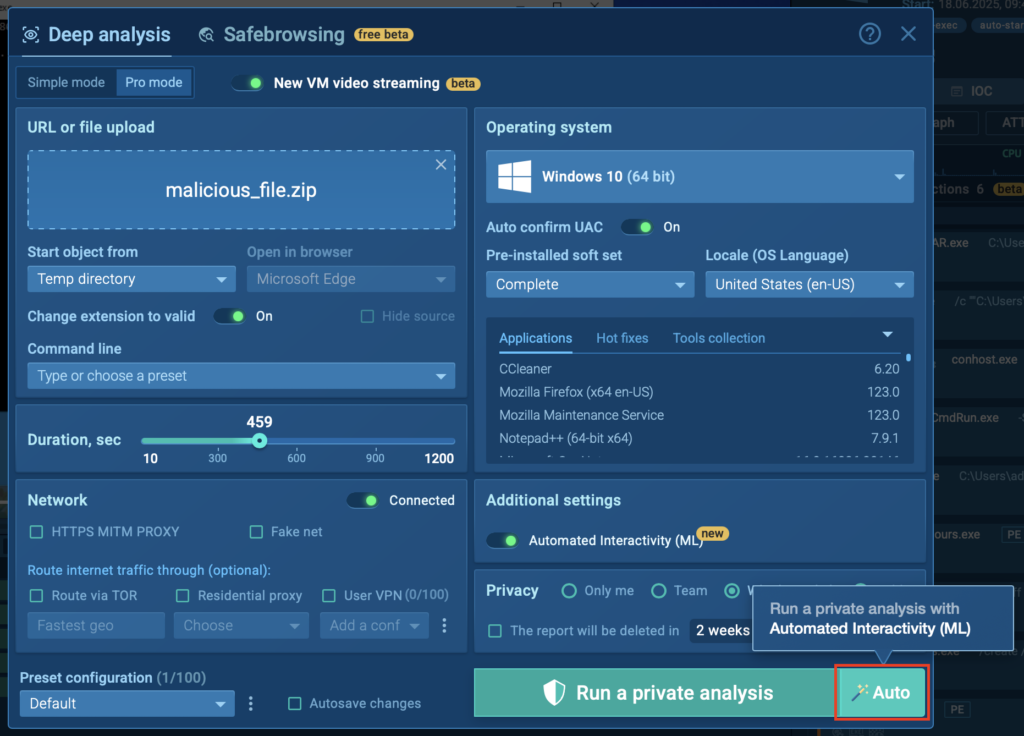
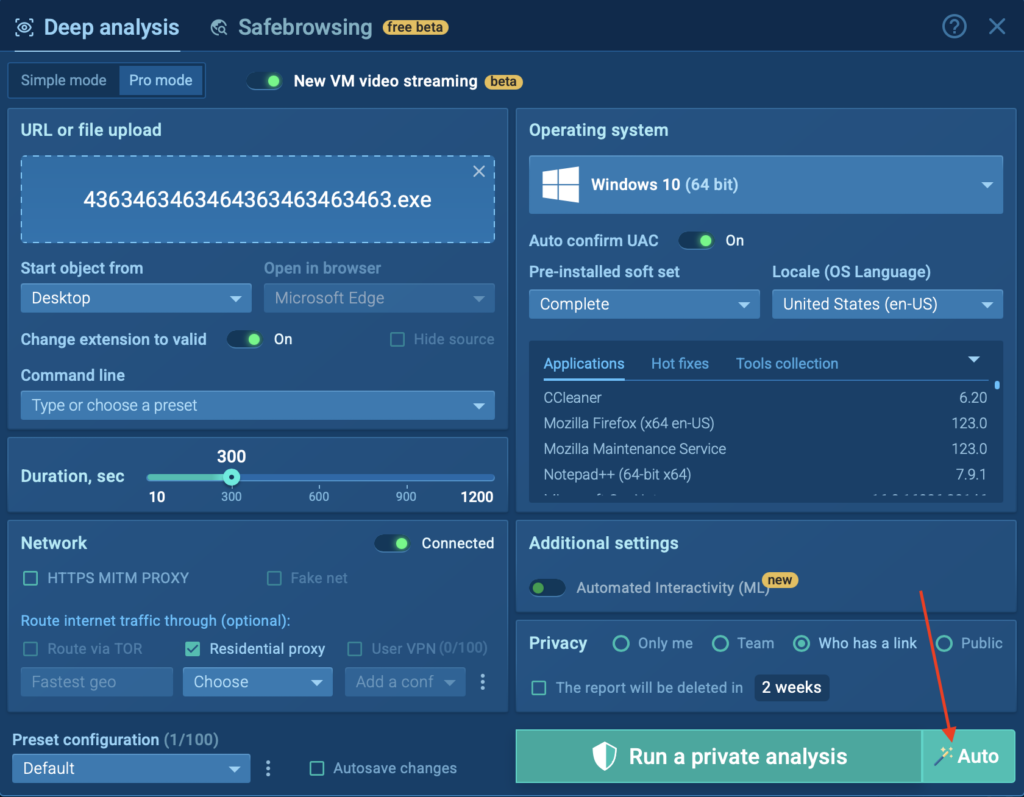
Before launching your analysis, you’ll now see a new “Auto” button during the VM setup phase. Clicking this button starts your session with Automated Interactivity enabled, which in turn activates the guided mode, powered by Detonation Actions.
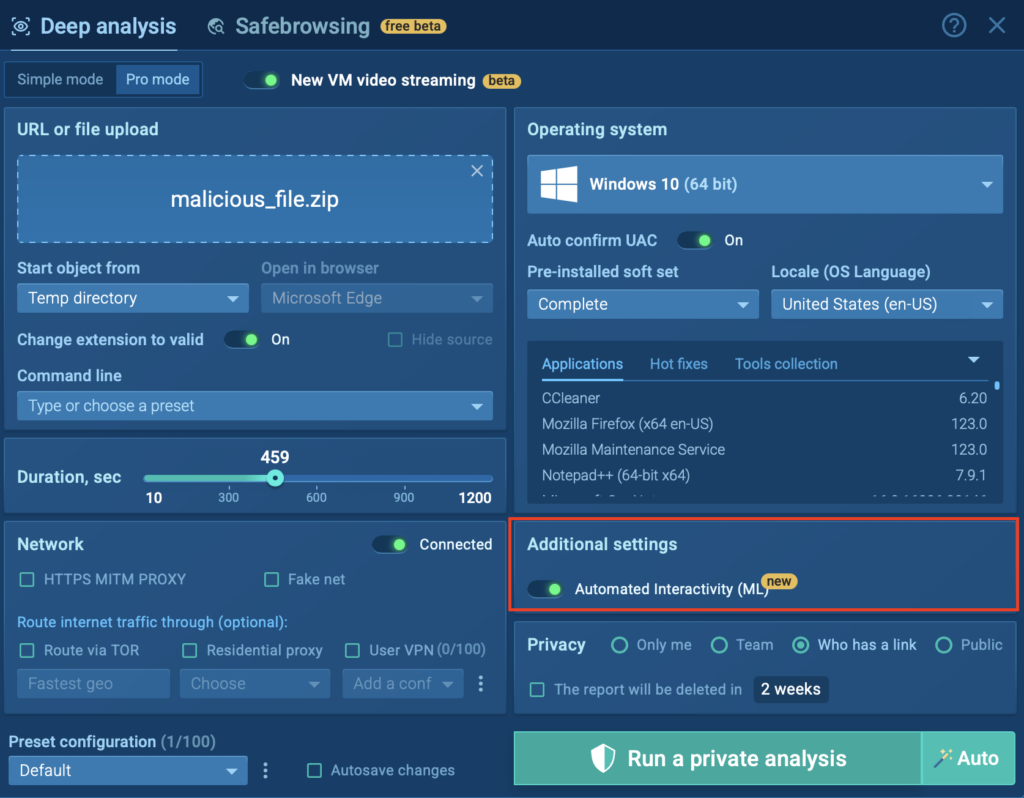
For your convenience, you can also enable the same feature manually by toggling “Automated Interactivity (ML)” in the “Additional settings” section above.
Once the session begins, you’ll notice Detonation Actions appear on the right side of the screen, next to the process tree. These hints show you exactly what steps have been or should be taken to trigger malicious behavior.
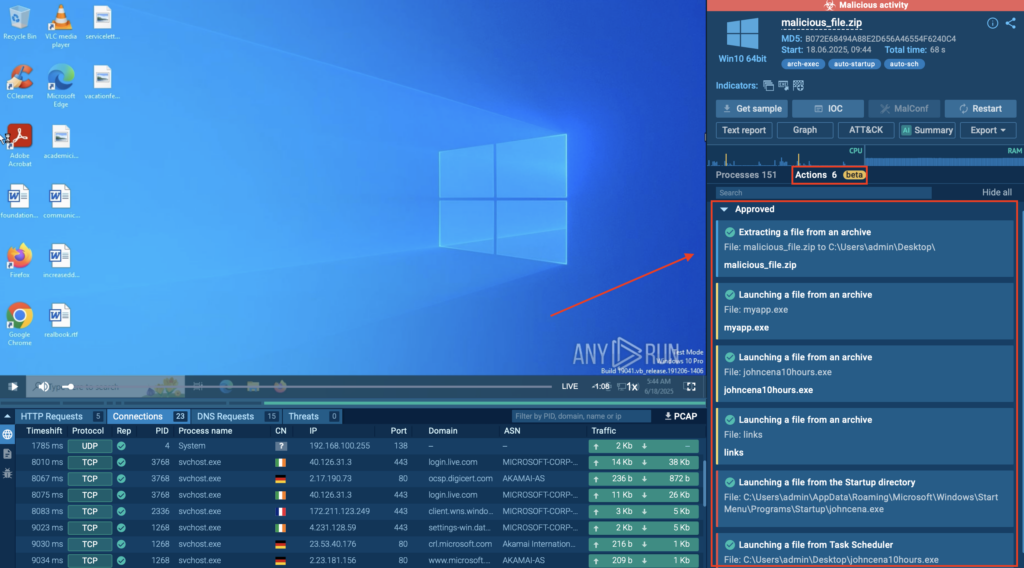
This gives you a clear picture of what was done, what triggered the threat, and how it unfolded, helping you detect malicious activity faster and respond more confidently.
In the manual mode, you can manually approve actions (by clicking the “Approve” button) or reject them (by clicking the “X” icon) for each suggested step.
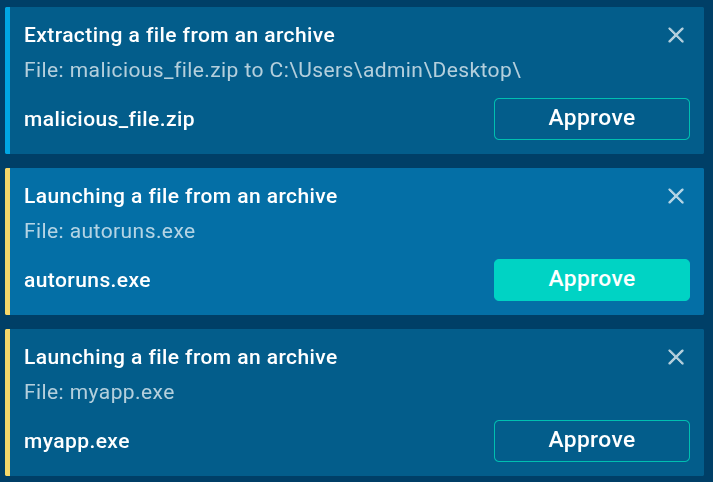
Automated Interactivity handles the actions for you; no manual approval needed.
Thanks to Detonation Actions, you get a guided analysis flow that improves detection and drastically cuts down your time to respond.
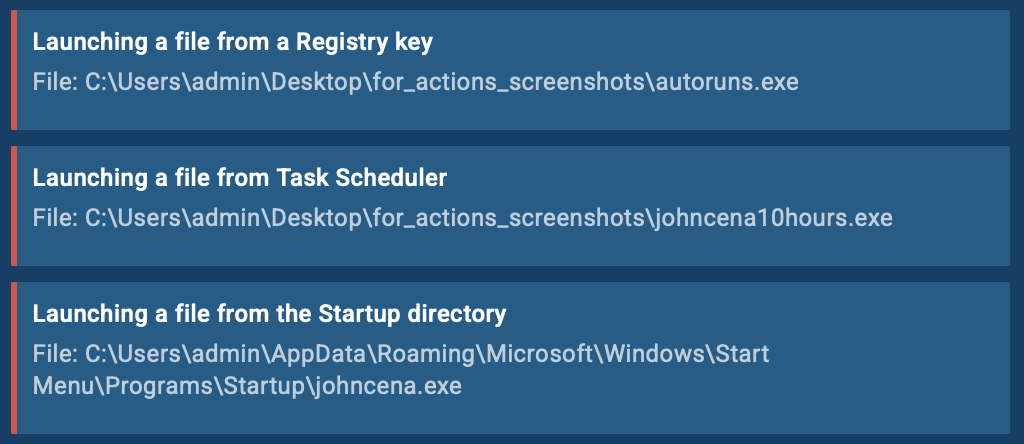
Let’s walk through how Detonation Actions work in a real scenario using an .exe file and Automated Interactivity.
To start, we upload the .exe file and simply click the “Auto” button during the VM setup phase. This launches the sandbox session immediately with Automated Interactivity and Detonation Actions.
As the session begins, we can see Detonation Actions popping up quickly in the right corner of the screen. These actions, such as “Launching a file from Task Scheduler” or “Extracting a file from an archive”, are automatically executed, moving the analysis forward without any manual intervention.
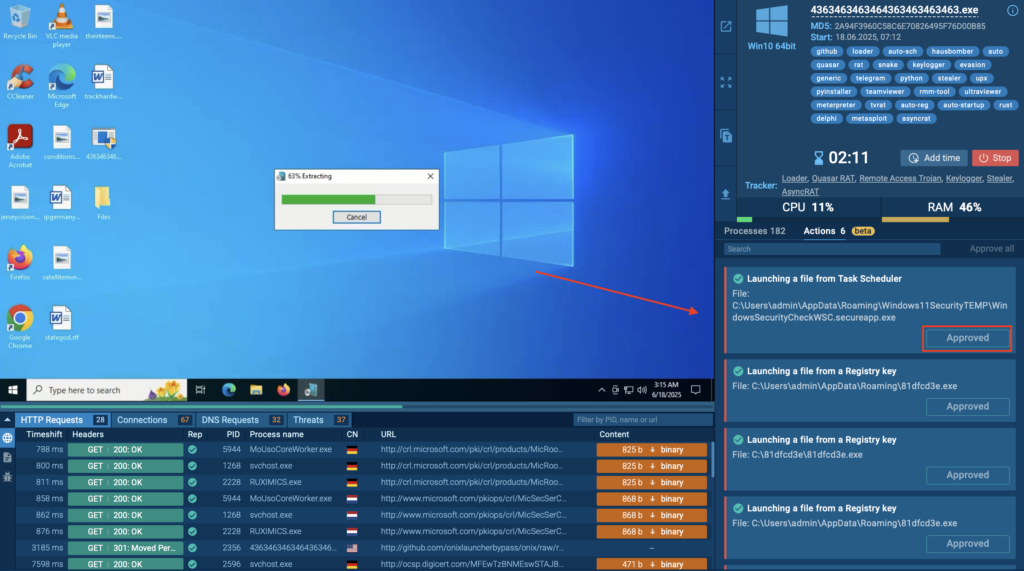
At the same time, the Processes section started populating with detailed insights, showing each spawned process along with associated tactics, techniques, and indicators.
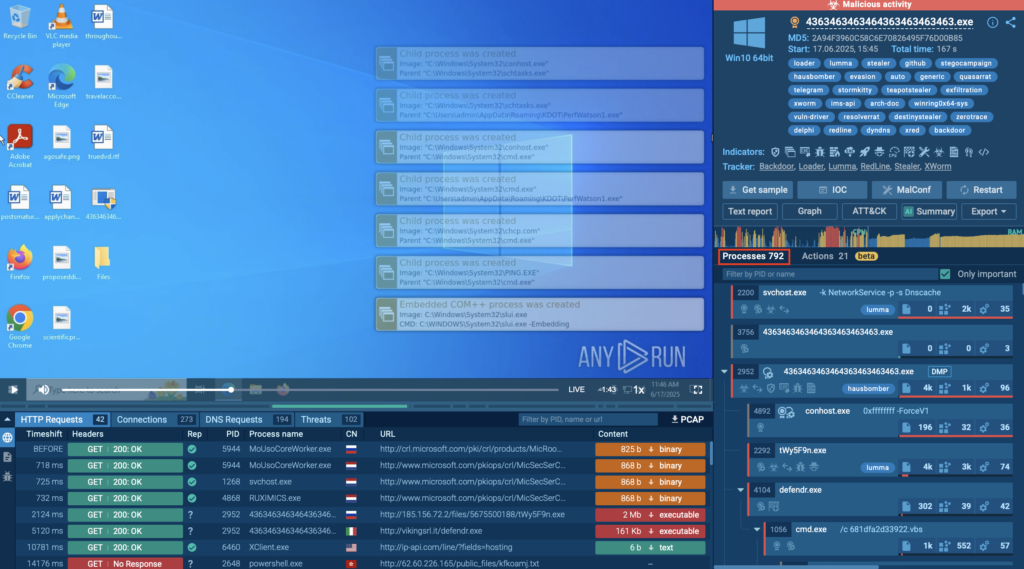
This combination, automated execution + guided visibility, gives analysts a powerful advantage: a complete behavioral picture of the malware, without delays or missed steps. It’s fast, structured, and built for clarity.
The introduction of Detonation Actions brings clear, measurable value to security teams and businesses by improving both the speed and quality of threat analysis.
Detonation Actions are built to make your job easier, whether you’re triaging a live threat or onboarding a new team member. You get expert guidance, faster detection, and a clearer view of what malware is really doing.
Start your next investigation with ANY.RUN’s guided mode and see how much smoother analysis can be.
Launch your ANY.RUN sandbox session now
ANY.RUN helps more than 500,000 cybersecurity professionals worldwide. Our Interactive Sandbox simplifies malware analysis of threats that target both Windows and Linux systems. Our threat intelligence products, Threat Intelligence Lookup and Feeds, help you find IOCs or files to learn more about the threats and respond to incidents faster.
Request trial of ANY.RUN’s services to test them in your organization →
The post Simplify Threat Analysis and Boost Detection Rate with Detonation Actions appeared first on ANY.RUN’s Cybersecurity Blog.
ANY.RUN’s Cybersecurity Blog – Read More
Krispy Kreme is sending notifications to thousands of people impacted by the data breach that came to light at the end of 2024.
The post Krispy Kreme Confirms Data Breach After Ransomware Attack appeared first on SecurityWeek.
SecurityWeek – Read More
After decades of failed attempts to access encrypted communications, governments are shifting from persuasion to coercion—security experts say the risks are too high.
The post Encryption Backdoors: The Security Practitioners’ View appeared first on SecurityWeek.
SecurityWeek – Read More
A ransomware group has claimed the theft of millions of files from procurement service provider Chain IQ and 19 other companies.
The post Chain IQ, UBS Data Stolen in Ransomware Attack appeared first on SecurityWeek.
SecurityWeek – Read More
In a rapidly changing AI environment, CISOs are worried about investing in the wrong solution or simply not investing because they can’t decide what the best option is.
The post Choosing a Clear Direction in the Face of Growing Cybersecurity Demands appeared first on SecurityWeek.
SecurityWeek – Read More
Threat actors with suspected ties to Russia have been observed taking advantage of a Google account feature called application specific passwords (or app passwords) as part of a novel social engineering tactic designed to gain access to victims’ emails.
Details of the highly targeted campaign were disclosed by Google Threat Intelligence Group (GTIG) and the Citizen Lab, stating the activity
The Hacker News – Read More
Cisco has resolved a high-severity vulnerability in Meraki MX and Meraki Z devices. Atlassian pushed patches for multiple third-party dependencies.
The post High-Severity Vulnerabilities Patched by Cisco, Atlassian appeared first on SecurityWeek.
SecurityWeek – Read More
You’ll soon be able to protect your Facebook account with a secure and convenient passkey, though only mobile devices will be supported.
Latest stories for ZDNET in Security – Read More