Google Chrome hit by another serious security flaw – update your browser ASAP
You’ll have to update Chrome to the latest version to fix a security hole that’s already been exploited in the wild.
Latest stories for ZDNET in Security – Read More

You’ll have to update Chrome to the latest version to fix a security hole that’s already been exploited in the wild.
Latest stories for ZDNET in Security – Read More
The Nuki smart lock comes with an array of features and works with your existing deadbolt, so you can still use a key.
Latest stories for ZDNET in Security – Read More
The spyware operation’s exposed customer email addresses and passwords were shared with data breach notification service Have I Been Pwned.
Security News | TechCrunch – Read More
We’ve packed June with updates designed to make your day-to-day analysis faster, clearer, and easier than before. Whether you’re just getting started or deep into reverse engineering every day, these improvements are here to save you time and help you catch more threats.
In this update:
Scroll down to see what’s new and how these updates can help your team work faster, spot threats earlier, and get more from your ANY.RUN sessions.
In June, we focused on helping analysts work faster and with more clarity, especially during high-pressure investigations. That’s why we introduced Detonation Actions: real-time execution hints that keep your analysis moving forward without guesswork.
Now, when a sample requires interaction to detonate, like opening a file or following a link, Detonation Actions will show exactly what needs to be done.
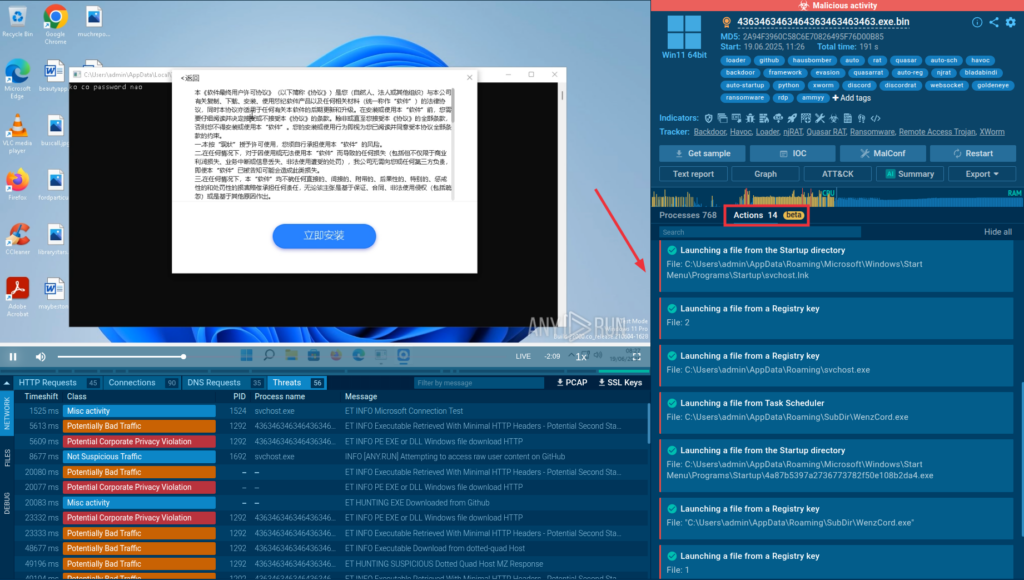
Whether you’re clicking through manually or relying on automation, you’ll see helpful hints to understand how the threat at hand unfolds.
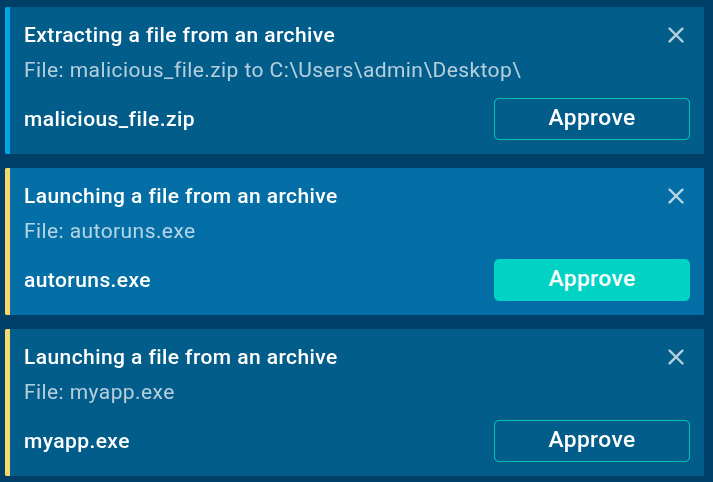
You’ll find Detonation Actions inside the Actions tab, right next to the process tree. They work across all samples and help analysts of any skill level trigger and observe malware behavior with confidence.
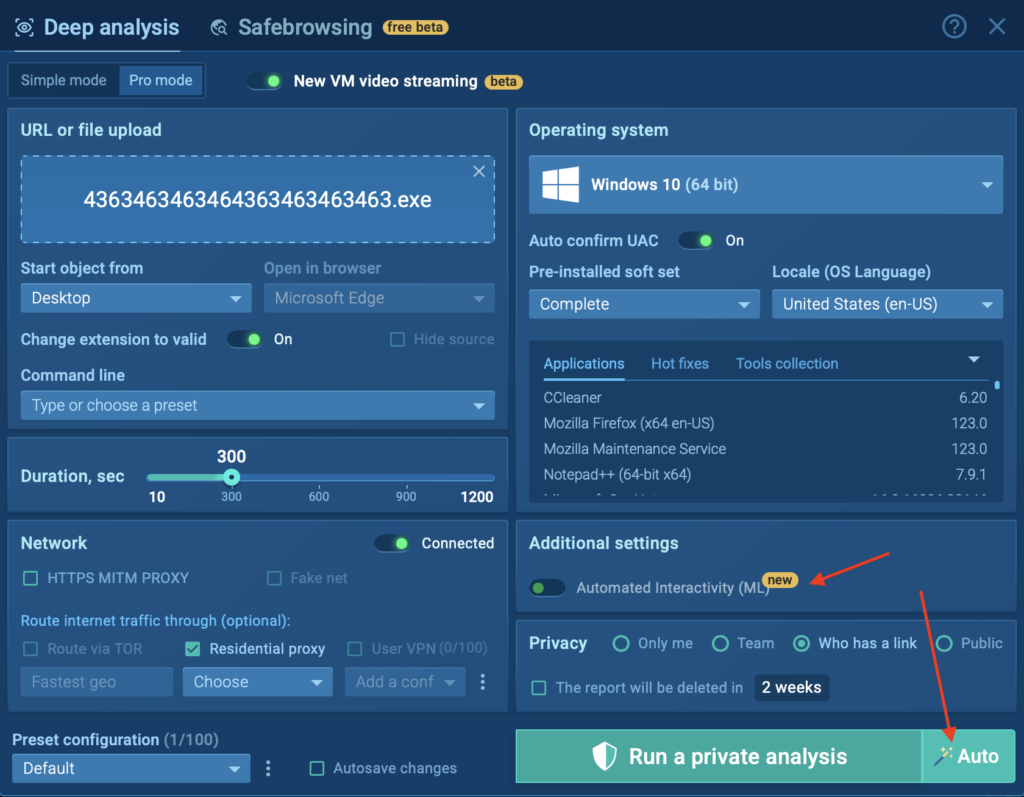
You can activate Detonation Actions by clicking the new Auto button when launching your VM or toggle Automated Interactivity (ML) manually in Advanced Settings.
We’ve improved how the sandbox detects and extracts QR codes, making it easier to investigate threats hidden in documents, images, and archives.
Now, QR code detection works more reliably across a wider range of file types and delivery methods. Whether it’s a malicious link embedded in a PDF or a code inside an SVG file, the sandbox will automatically pick it up and display the decoded URL in the QR tab under Static Discovering.
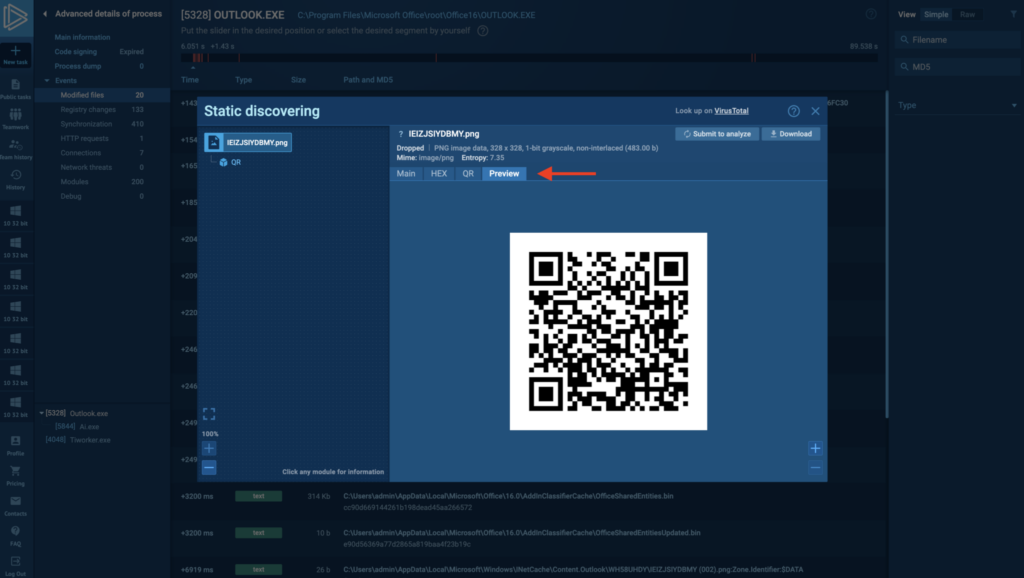
QR-based phishing is still on the rise. This improvement makes it even easier to detect and investigate QR code threats before a user ever scans them.
This month, we expanded threat detection across all supported platforms, Windows, Linux, and Android, with major additions to our rule base and signature library.
These updates improve detection accuracy, shorten triage time, and give analysts better visibility into evasive threats. From commodity malware to nation-state actors, the latest rules reflect real-world samples seen in the wild and analyzed inside ANY.RUN.
We added 120 behavior signatures targeting stealers, ransomware, RATs, loaders, and evasive techniques, many of which were observed in active campaigns.
Some highlights:
Platform-Specific Threats
New behavior detections were also added for threats targeting specific operating systems:
Windows:
Linux:
Android:
We released 12 new and updated YARA rules this month to support faster static detection and classification of threats across all platforms. These rules help flag malicious files before execution and enhance attribution in multi-stage attacks.
Some of the key additions include:
To improve detection of phishing threats at the network layer, we added 1,320 new Suricata rules in June. These rules help security teams identify malicious domains, redirection chains, and phishing infrastructure early in the attack flow.
Here are some of the highlights:
We added behavior-based detection for a tactic used by malware to bypass standard execution monitoring:
This new detection helps analysts flag unusual execution chains earlier in the process tree and trace hidden payload delivery paths more efficiently.
ANY.RUN supports over 15,000 organizations across industries such as banking, manufacturing, telecommunications, healthcare, retail, and technology, helping them build stronger and more resilient cybersecurity operations.
With our cloud-based Interactive Sandbox, security teams can safely analyze and understand threats targeting Windows, Linux, and Android environments in less than 40 seconds and without the need for complex on-premise systems. Combined with TI Lookup, YARA Search, and Feeds, we equip businesses to speed up investigations, reduce security risks, and improve team’s efficiency.
Integrate ANY.RUN’s Threat Intelligence suite in your organization →
The post Release Notes: Detonation Actions, Enhanced QR Extraction, and 1,400+ New Detection Rules appeared first on ANY.RUN’s Cybersecurity Blog.
ANY.RUN’s Cybersecurity Blog – Read More
Cybercriminals are extorting the German humanitarian aid group Welthungerhilfe (WHH) for 20 bitcoin. The charity said it will not pay.
The Record from Recorded Future News – Read More
Australian airline Qantas alerted customers and authorities about a data breach at a contact center. The industry remains on edge after cyberattacks on airlines elsewhere.
The Record from Recorded Future News – Read More
Blind Eagle hackers linked to Russian host Proton66 to target banks in Latin America using phishing and RATs. Trustwave urges stronger security.
Hackread – Latest Cybersecurity, Hacking News, Tech, AI & Crypto – Read More
As Kelly Benefits’s investigation into a recent data breach progressed, the number of impacted individuals continued to grow.
The post Kelly Benefits Data Breach Impacts 550,000 People appeared first on SecurityWeek.
SecurityWeek – Read More
Qantas, the largest airline in Australia, confirmed the theft of 6 million customers’ personal information.
Security News | TechCrunch – Read More
Security-First Culture (SFC) is an organization-wide commitment where security considerations influence decision-making at every level, from strategic planning to daily operational tasks.
It’s not just about having fancy tech or a dedicated IT team; it’s about making security a core part of how the company thinks and acts. A mindset where every decision, from coding a new app to sending an email, considers “How could this go wrong, and how do we protect against it?”.
Leaders set the tone by prioritizing security, allocating resources, and weaving it into the company’s strategy. Every employee, regardless of their role, understands that they play a critical part in the organization’s security posture.
The principles sound sensible but quite challenging to implement. Transferring to SFC might look like an organizational revolution demanding changes on all levels, from the leadership mindset to everyday practices. And of course it must be quite a recourse-consuming adventure. Is the outcome worth it?
The advantages of implementing SFC extend far beyond just preventing cyberattacks. But the straightforward outcome of suffering less breaches must certainly be considered. Verizon’s 2022 Data Breach Report says 82% of breaches involve human error, so a security-minded workforce can slash that risk.
Fewer breaches mean less damage: financial, reputational, operational. Preventing even one incident can save millions: the average cost of a data breach exceeded $4 million back in 2023, according to IBM. Besides, if an attack does happen, a prepared organization bounces back faster, minimizing damage and downtime.
Customers, partners, and stakeholders have greater confidence in organizations that demonstrably prioritize security. This translates to stronger business relationships and competitive advantages.
Less obvious but no less valuable benefits include:

Several organizations have become benchmarks for security-first culture:
Microsoft: Following significant security challenges in the early 2000s, Microsoft implemented their “Security Development Lifecycle” and “Assume Breach” philosophy, fundamentally transforming their approach to security.
Google: Their “BeyondCorp” zero-trust security model and continuous security innovations demonstrate a deep cultural commitment to security.
Apple: Known for privacy-by-design principles and strong encryption standards across all products and services.
Not every company gets it right (providing us with impressive and didactic examples). These high-profile disasters could’ve been mitigated with a stronger SFC:
Equifax (2017): A failure to patch a known vulnerability led to a breach exposing 147 million people’s data. A lack of proactive monitoring and employee awareness was a key factor.
SolarWinds (2020): A supply chain attack compromised multiple organizations. Inadequate security training and siloed responsibilities left gaps that attackers exploited.
AT&T (Multiple breaches 2023-2024): Repeated incidents affecting millions of customers demonstrate ongoing security culture deficiencies despite previous breaches.
Here’s how to understand where you stand:
| Strong Security-First Culture Indicators | Warning Signs of Weak Security Culture |
| Employees proactively report security concerns | Security seen as “someone else’s job” |
| Security is discussed in regular business meetings | Frequent workarounds to security policies |
| New projects include security requirements from the start | Incident response is chaotic or delayed |
| Incident response is swift and coordinated | Security training completion rates below 90% |
| Regular security training has high participation rates | Security budget cuts during tough financial periods |
| Security metrics are tracked and reported to leadership | Repeated similar security incidents |
Cyber Threat Intelligence (CTI) isn’t just a technical capability — it’s the nervous system of a security-first culture. CTI provides the contextual awareness that transforms reactive security measures into proactive, strategic defense.
Like security-first culture permeates and consolidates every organizational unit and structure, state-of-the-art CTI vendors like ANY.RUN offer solutions to cover security-related challenges on all business levels.
Daily security operations rely on CTI to prioritize alerts, contextualize incidents, and guide response efforts. Instead of treating all security events equally, intelligence helps teams focus on genuine threats.
Threat Intelligence Lookup allows employees of any grade to utilize a vast database of fresh Indicators of Compromise (IOCs), Behavior (IOBs), and Attack (IOAs) to instantly collect context for alerts, incidents, and campaigns. The data is continuously updated and derived from the attacks on over 15,000 companies using ANY.RUN’s Interactive Sandbox for hands-on investigations of malware and phishing attacks.
An employee does not have to be a security expert to make a search request like a suspicious IP address and receive an instant verdict that the notorious banking stealer Lumma might have penetrated the perimeter:
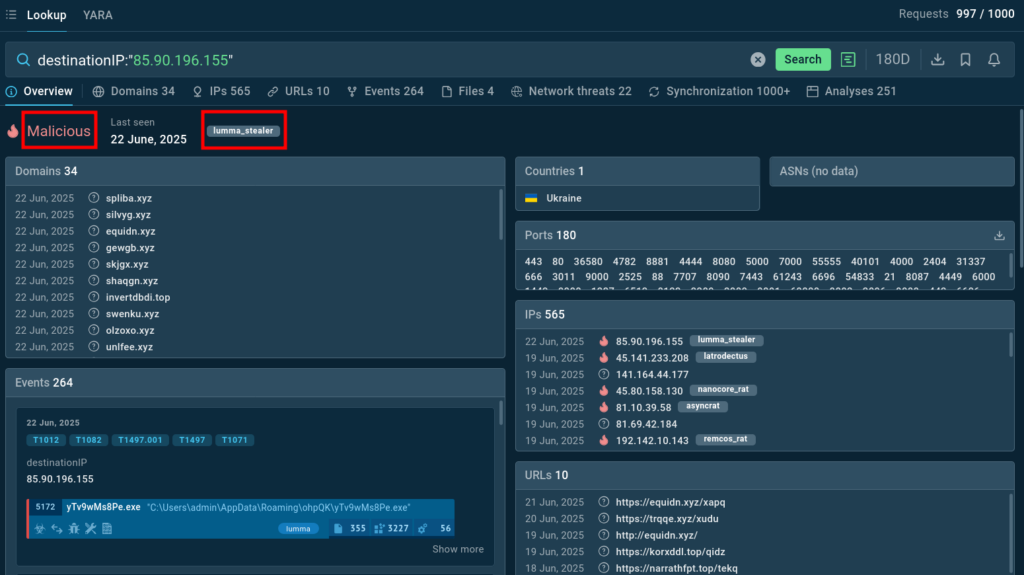
TI Lookup enables teams to quickly gather critical threat context, transforming existing indicators tin actionable insights into the threat to hand to mitigate risks and protect the organization.
When it comes to tactical implementation, security tools and controls are configured based on current threat intelligence, ensuring defenses remain relevant as the threat landscape evolves.
Threat Intelligence Feeds provided by ANY.RUN deliver up-to-date curated indicators of compromise like URLs, domains, and IPs, enriched with threat context, to integrate with detection and monitoring systems and identify threats before they become incidents.
Smart threat intelligence solutions improve employees’ ability to make better security decisions in ambiguous situations. ANY.RUN’s Interactive Sandbox makes it possible to analyze any suspicious link, email, or file, and not just get a malicious/benign verdict, but to understand malware’s behavior as well as its operators’ TTPs.
Thanks to interactivity, the sandbox makes it possible to engage with the environment and the threat just like on a standard desktop, detonating every stage of the attack to reveal the final malicious payload.
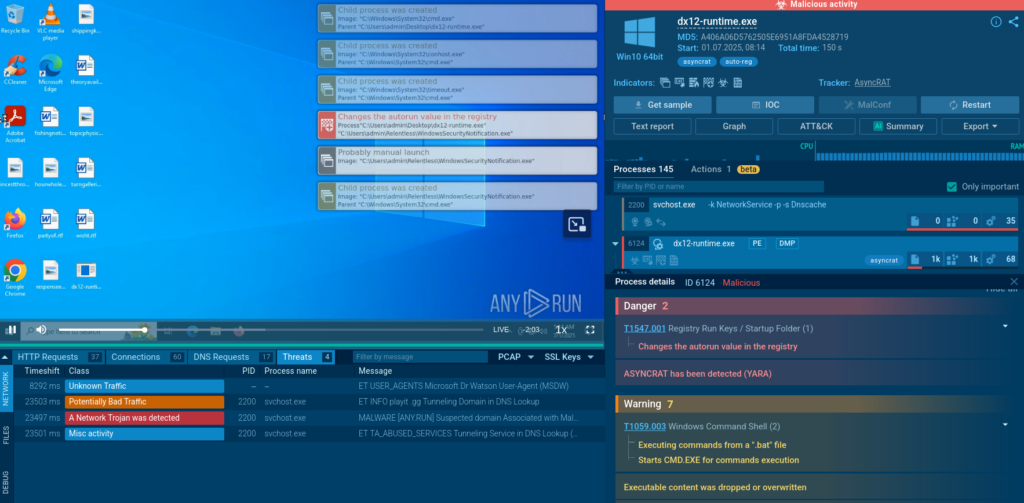
As we can see, the Sandbox file analysis exposes its malicious behavior and labels it as AsyncRAT trojan.
The intuitive interface of the sandbox simplifies malware analysis for junior security professionals and even non-specialists, providing them with a clear understanding of any threat.
Sign up for ANY.RUN’s Interactive Sandbox with a business email
In strategic planning, CTI informs long-term security investments by identifying emerging threats and industry-specific risks. When planning business expansion, drafting a security budget for the next quarter, or gathering information on the key cybersecurity risks, it provides crucial context about the current threat landscape.
ANY.RUN’s TI Reports contain manually collected intel on APTs, as well as malware and phishing campaigns that pose a danger to businesses right now. The reports help security teams gain greater visibility into the threats active at the moment and proactively defend their infrastructure.
A security-first culture isn’t just about tech — it’s about people, processes, and a shared commitment to staying safe. By embedding cyber threat intelligence into every step, from leadership to daily operations, organizations can stay ahead of attackers, protect their data, and build trust with customers.
Organizations that successfully implement security-first culture supported by robust threat intelligence capabilities don’t just survive in today’s threat environment. They thrive, using their security posture as a foundation for innovation, growth, and competitive advantage.
Over 500,000 cybersecurity professionals and 15,000+ companies in finance, manufacturing, healthcare, and other sectors rely on ANY.RUN. Our services streamline malware and phishing investigations for organizations worldwide.
Start 14-day trial of ANY.RUN’s solutions in your SOC today
The post A Guide to Developing Security-First Culture Powered by Threat Intelligence appeared first on ANY.RUN’s Cybersecurity Blog.
ANY.RUN’s Cybersecurity Blog – Read More