Checking for Fraud: Texas Community Bank Nips Check Fraud in the Bud
Within months of implementing anti-fraud measures and automation, Texas National Bank prevented more than $300,000 in check fraud.
darkreading – Read More

Within months of implementing anti-fraud measures and automation, Texas National Bank prevented more than $300,000 in check fraud.
darkreading – Read More
SAP has released patches for multiple insecure deserialization vulnerabilities in NetWeaver that could lead to full system compromise.
The post SAP Patches Critical Flaws That Could Allow Remote Code Execution, Full System Takeover appeared first on SecurityWeek.
SecurityWeek – Read More
Many have probably heard of the modular malware for mobile devices called Triada. Even nine years after its first mention in 2016, it remains one of the most advanced Android trojans out there. Recently, our team at ANY.RUN came across an interesting sample of this malicious software. The sample in question was embedded in a fake Telegram app.
Since the capabilities of this threat have been extensively studied and described by other researchers, we focused on the packer used by the malware that we named Ducex.
Here’s a detailed breakdown of our analysis and key findings.
Our investigation began with the analysis of a Triada sample inside ANY.RUN’s Interactive Sandbox.
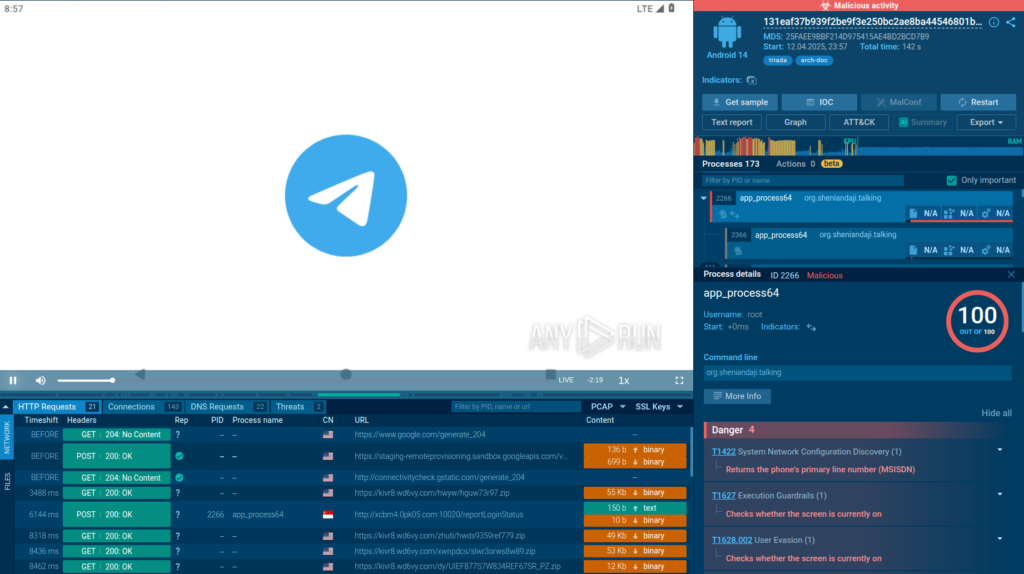
The service quickly identified the malware family, and we were able to confirm this by recognizing the characteristic domains it communicated with.
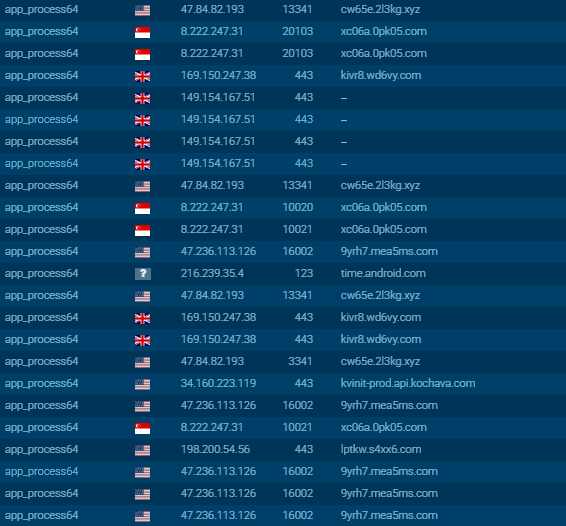
From there, we moved on to inspect the packer.
Not malicious itself, Ducex is still quite interesting. Its developers tried their best to complicate analysis as much as possible and confuse detection of the payload it carries using various techniques that will be discussed below.
We have not obtained the source code of this tool, so we relied exclusively on its reverse engineering. For the same reason, we gave it a name ourselves. Studying the classes in the code, we noticed that its authors used the word “Duce” a lot.

The library they utilize is called “libducex”. Based on this, we called the packer “Ducex”.
Before proceeding to detailed analysis of the tool, let’s look at the general operation scheme of Ducex:
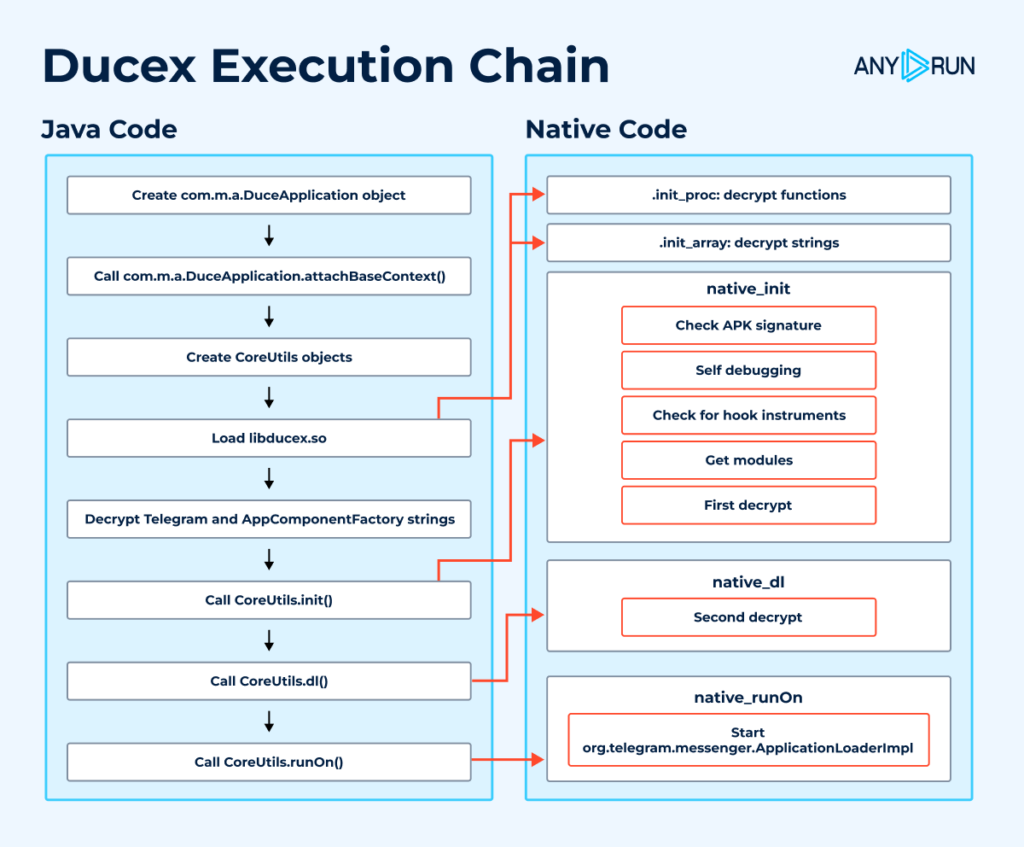
We have outlined all the stages of the tool’s execution; we will demonstrate and discuss them below in their interplay.
When opening the malicious APK in an Android decompiler (e.g., JADX), the AndroidManifest shows the following data under the application tag:
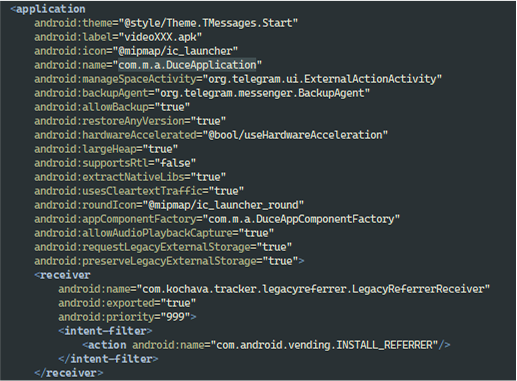
The com.m.a.DuceApplication class immediately catches our attention. It is specified in android:name, which means an instance of this class is created immediately after the application is launched. Going to its code, we see two methods: attachBaseContext() and onCreate().
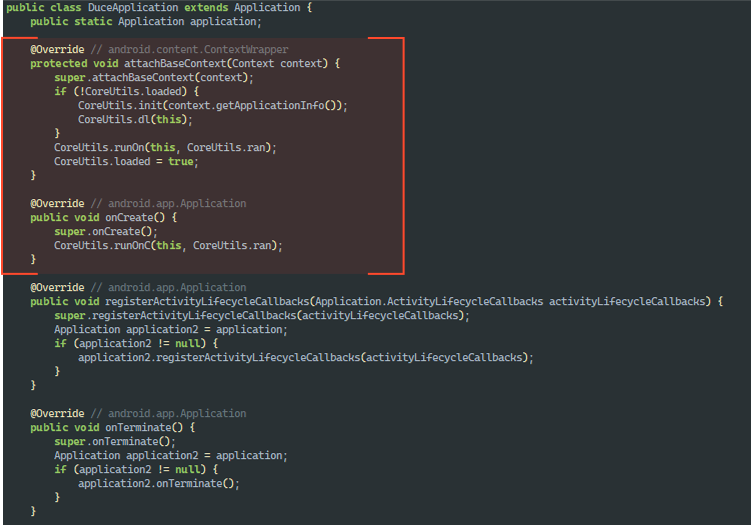
We are interested in these methods specifically, as they will be called when creating an instance of the class, in the specified order. Inside them, we see calls to methods of the CoreUtils class:
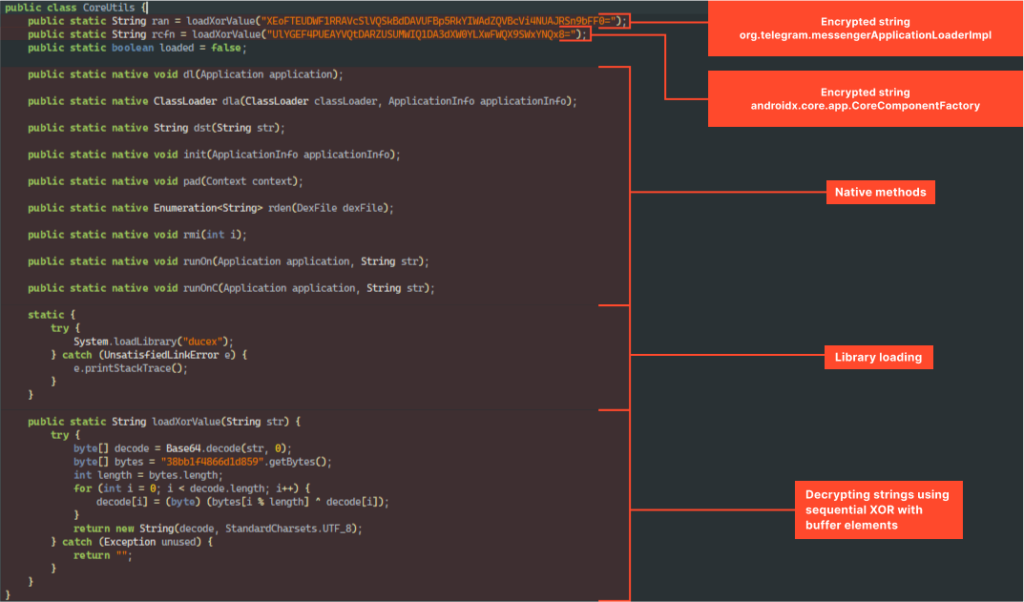
That’s where it gets interesting. As can be seen in the screenshot above, most methods of this class are native, and they are implemented in the “libducex.so” library.
Additionally, if we decrypt the presented strings, we get, respectively, “org.telegram.messenger.ApplicationLoaderImpl” and “androidx.core.app.CoreComponentFactory“.
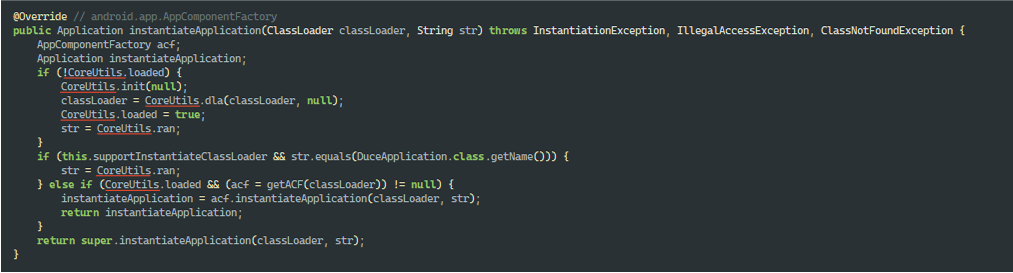
As can be seen in DuceApplication.onCreate() and DuceApplication.attachBaseContext(), it is org.telegram.messenger.ApplicationLoaderImpl that will be called to launch the fake Telegram using the CoreUtils.runOn() and CoreUtils.runOnC() methods, and androidx.core.app.CoreComponentFactory will be used in DuceAppComponentFactory, which overrides the creation of various application components (Application, Activity, etc.) to inject custom logic during their initialization using the same methods from CoreUtils:
Since the most interesting things happen in the libducex.so library, let’s proceed to its analysis.
It turned out, you can’t just start analyzing the library. For example, the program entry point looks like this:
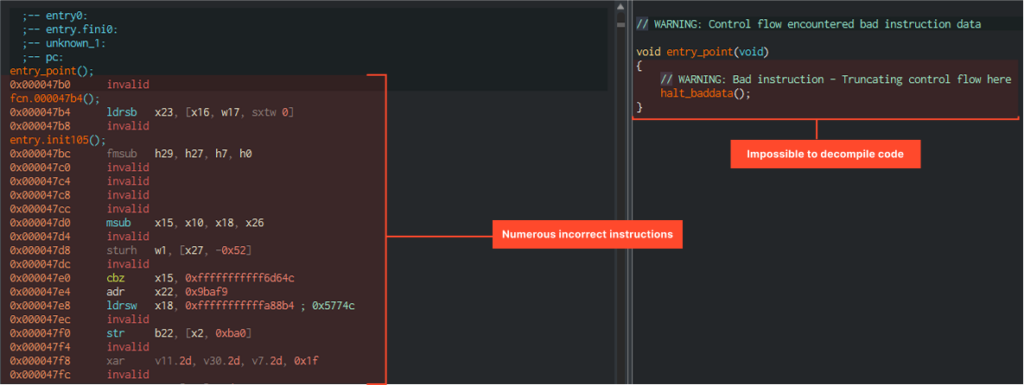
Most instructions are displayed incorrectly. It looks like very serious obfuscation or a completely non-working function. At this point we estimated what would be called even before the program entry point and moved to JNI_OnLoad.
JNI_OnLoad is called after the library is loaded into memory and the control is passed to the JVM.
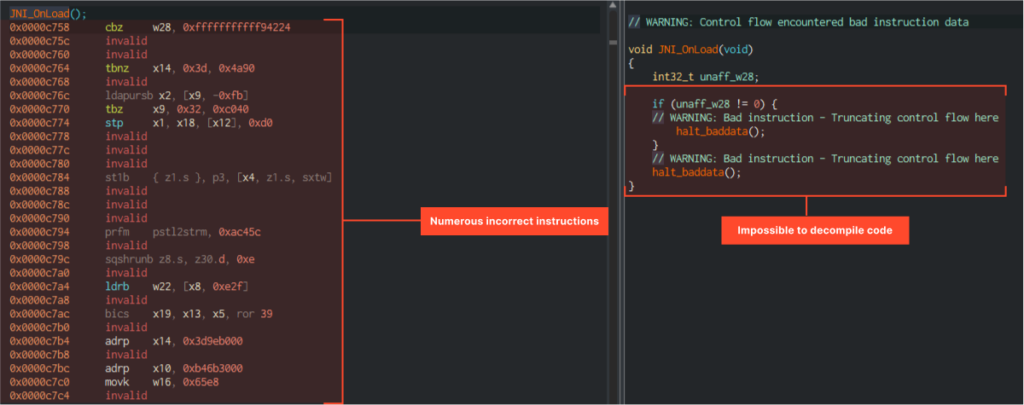
As we can see in the screenshot, the situation is exactly the same. The code looks non-working, which makes you think that it might not even be obfuscated but encrypted. So, if even JNI_OnLoad is encrypted, then we need to turn to functions that execute earlier than both it and Entry Point, which means before control is transferred to the JVM.
This function could be .init_proc, which executes immediately after loading the library into memory. And indeed, it was there that we found correct code capable of being decompiled:
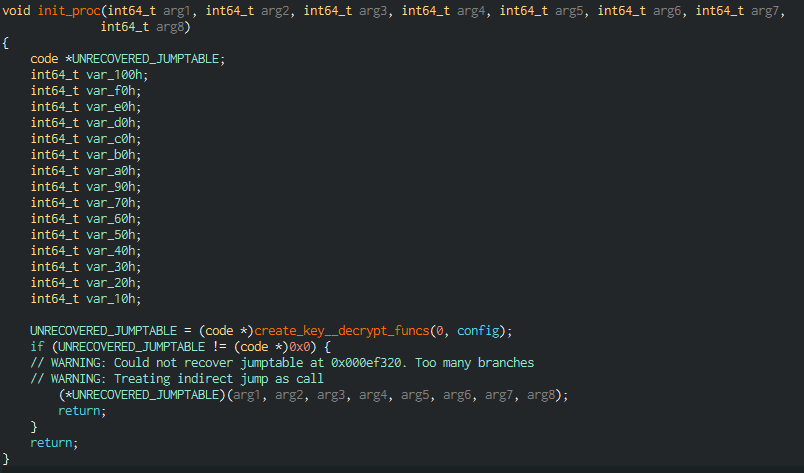
Getting a little ahead of ourselves, we’ll say that the functions were indeed encrypted, and their decryption occurs in .init_proc, in the nested create_key__decrypt_funcs function. Now back to the analysis.
The first thing that interests us is the configuration that is passed as the second argument to the function called in the figure above:
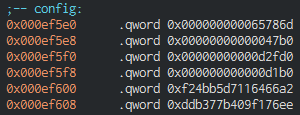
It consists of the following fields, presented in the same order as in the screenshot above:
The decryption itself, occurring in create_key__decrypt_funcs, is carried out according to the configuration data. At first it seemed to us that the code had been encrypted using classic RC4, but this is not quite so. The developers slightly modified the algorithm by adding additional shuffling, so standard RC4 implementations didn’t work; we had to implement it ourselves.
Our decryption script takes a key as input, as well as the part of the file containing encrypted functions. The necessary parameters (the key, the start address of the encrypted part, and its size) are taken from the configuration described above.
def rc4_init(key):

    s = list(range(256))

    s += [0, 0]

    j = 0

    for i in range(256):
        key_byte = key[i & 0xf]
        j = (j + s[i] + key_byte) &0xff
        s[i], s[j] = s[j], s[i]

    return s


def rc4_process(s, encoded_data):

    i = s[256]

    j = s[257]

    output = bytearray(encoded_data)

    for n in range(len(encoded_data)):
        i = (i + 1) & 0xff
        a = s[i]
        j = (j + a) & 0xff
        b = s[j]
        s[i], s[j] = b, a
        output[n] ^= s[(a + b) & 0xff]

        for _ in range(2):
            i = (i + 1) & 0xff
            a = s[i]
            j = (j + a) & 0xff
            b = s[j]
            s[i], s[j] = b, a

    return bytearray(output)


def decrypt(key, func_buf):

    s = rc4_init(key)
	decoded_funcs = rc4_process(s, func_buf)
	return decoded_funcs
Applying the script to our library, we got the correct code. Entry Point, for example, now looks as follows:
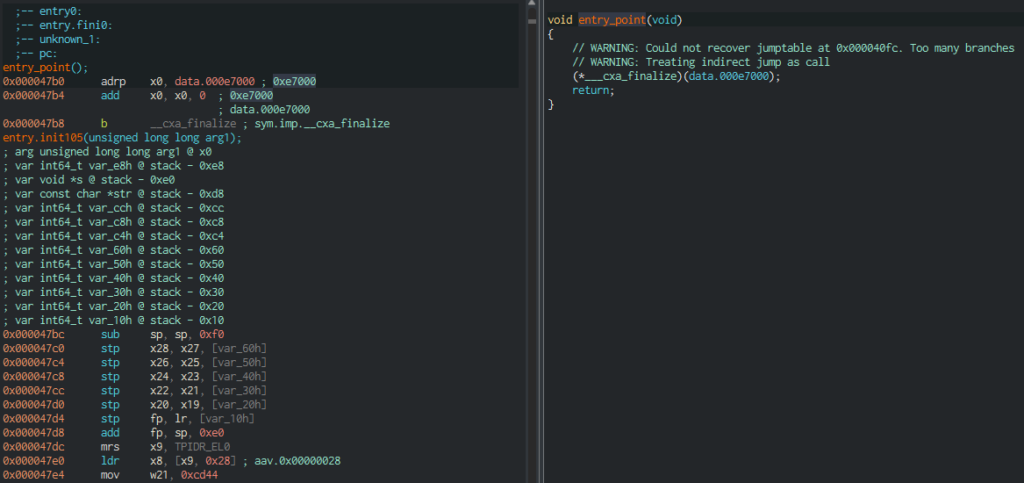
Now all instructions are correct, and there are no problems with code decompilation.
The encrypted functions, as it turned out, are not the only thing that developers decided to hide from the researcher’s eyes. All strings used by the packer are also encrypted. The algorithm is quite simple: it’s sequential XOR with a given key consisting of 16 bytes. The algorithm is unchanged throughout the entire sample, only the key changes. Example script with a given key:
def xor_data(data, key):

result = bytearray()

for i in range(len(data)):

result.append(data[i] ^ key[i % len(key)]) return result

key = b"GeGrE0tX`:0^6qLS"

encoded_buf = bytearray([0x1d, 0x0c, 0x37, 0x52, 0x2c, 0x5e, 0x12, 0x34, 0x01, 0x4e, 0x55, 0x5e])

decrypted = xor_data(encoded_buf, key)

print(decrypted)
In the output after running this simple script, you can see: bytearray(b’Zip inflatex00′).
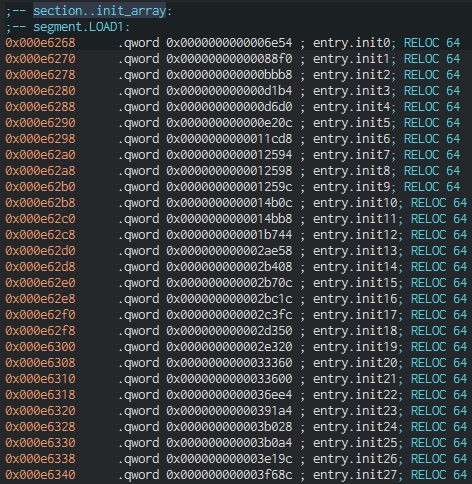
What’s interesting here is that all the functions used for decryption are called immediately upon initialization, not when required in the code. And the reference to the array with pointers to these functions is located, respectively, in .init_array, there are a huge number of them there:
In case the researcher breaks through the encryption, the developers have further obfuscated the code. For example, this is how the structure of the function in which native method names are decrypted looks:
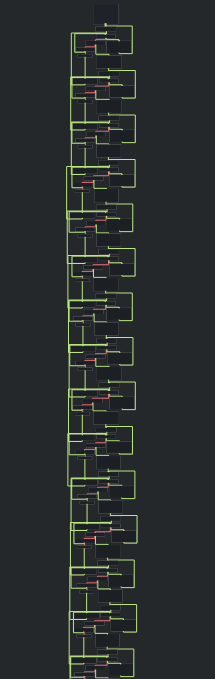
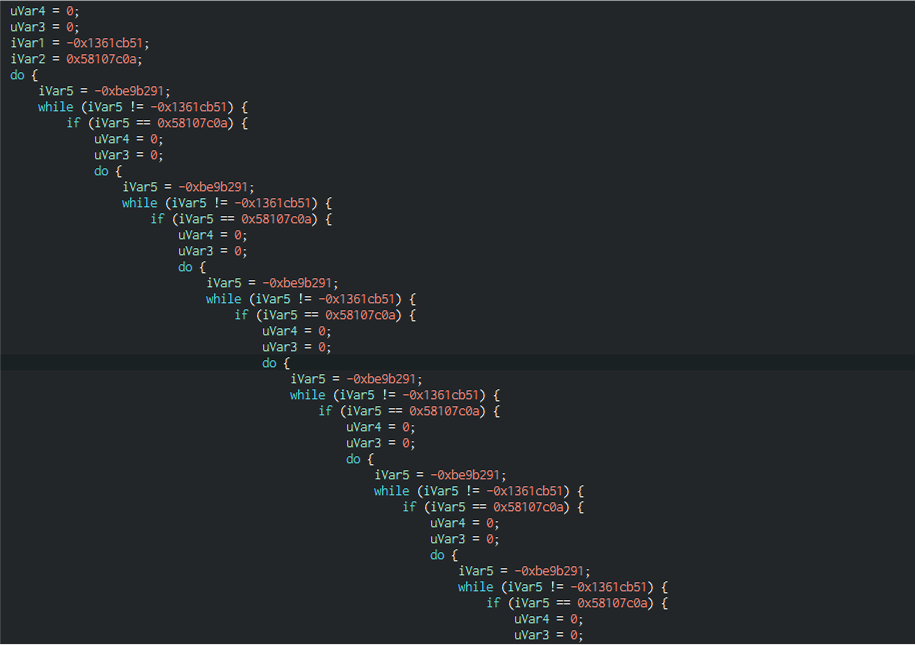
And this is not even half of the function’s code, which could have been about 20 lines long. And all because of such constructions of cycles and conditions, which do not serve any purpose except to complicate the code:
At this point you might think that it would be enough to run the sample under a debugger and go through all these conditional jumps, see the decrypted functions and strings, but if only it were that simple.
The first thing we attempted was to parse the APK using Apktool utility and insert the line android:debuggable=”true” under the application tag in AndroidManifest, then rebuild and sign the APK again.
Upon doing this in the smartphone settings, it’s possible to set up the application to wait for a debugger to connect. It also makes it possible to utilize the following command for adb: adb shell am set-debug-app -w –persistent <package>. On the next launch, a window “Waiting For Debugger” should appear and disappear after the debugger is connected.
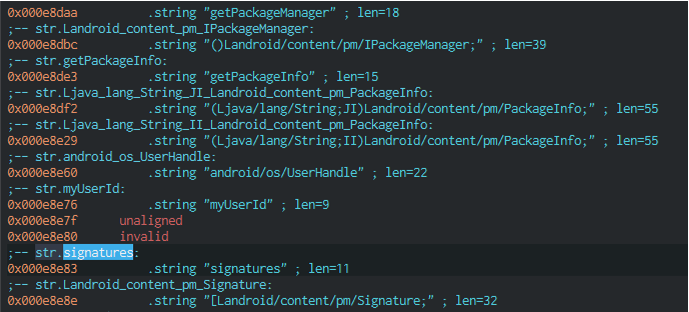
But in our case this didn’t work. After rebuilding the application, it began to “crash” immediately after loading libducex. The app checks the APK signature and terminates if it doesn’t match the expected one. Below you can see decrypted strings used when obtaining APK signatures:
Thus, debugging the application by changing the APK didn’t work. Fortunately, there is a way to debug Android applications without setting the debuggable flag and, accordingly, without the need to rebuild and re-sign the file.
This method is more laborious, as it involves building your own Android image and then using it in the emulator. Its description can be found here.
Thus, we built the image, used the debug command given above, and tried to run the application under the debugger. However, the packer held another surprise: after launching the application, the “Waiting For Debugger” window appears only for a fraction of a second, after which normal launch occurs, without waiting for the debugger. This may indicate that the application “debugs itself” so that no one else can debug it.
We found the corresponding functions: a process sets handlers using the rt_sigaction system call, for example, for the SIGCHLD event. This handler checks what happened to the child process, after which it can either terminate or continue its execution.

And then another interesting thing occurs: the parent process uses the fork system call to create a child process, which, in turn, will work to monitor the state of the parent process. It uses the ptrace system call with the PTRACE_ATTACH parameter to attach to the parent process, after which it waits for events from it and, depending on what happened, resumes the process or terminates it and its own execution.
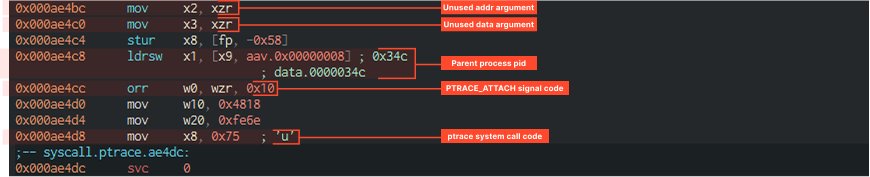
So, parent and child processes monitor each other’s state and react in case of certain events. Additionally, considering that a process can have only one tracer, connecting an external debugger becomes impossible in this case.
At this point, two options remain: either static code analysis, at most using tools capable of emulating instructions (e.g., emulators on the Unicorn engine), or installing Frida hooks to change application behavior without actual APK modification and still be able to dynamically analyze the unpacking process.
But Frida wouldn’t work either, because the packer has built-in checks for the presence of frida_server, as well as Xposed, Substrate, etc.
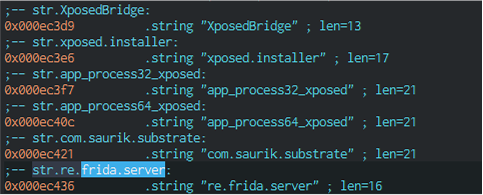
If any of these strings are found in memory, the process terminates execution. This can be patched, but it’ll take time to find the implementations in the code. And we shouldn’t forget about the signature verification used in the library. So we continue with static code analysis.
Ducex doesn’t create a separate encrypted file with a payload, instead it stores this code inside its own classes.dex, in a special additional section that goes after the main application code, thus avoiding detection of additional files:
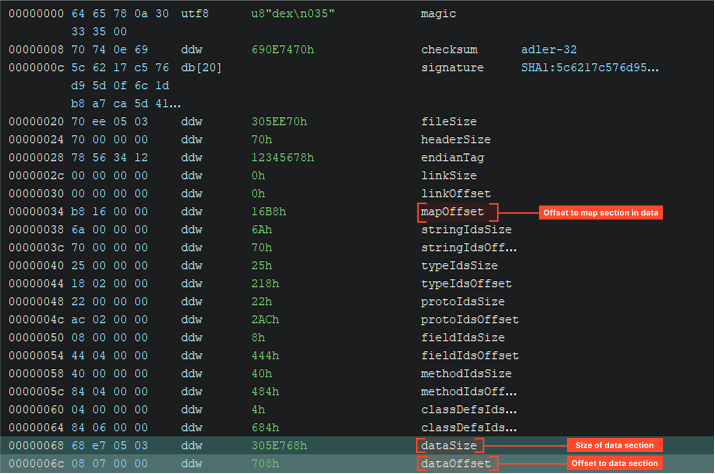
The screenshot shows that after the map section, where everything should have ended, there is an additional section, and a very large one in size. That’s where the payload is located.
The payload, i.e., Triada, is stored as additional dex modules. It’s noteworthy that despite all its complexity, this tool doesn’t fully compress and encrypt the dex files that it later runs. Instead only 2048 == 0x800 bytes from the beginning of each module are encrypted, while the rest remains untouched. Thus, at least the dex module header will always be completely encrypted, as it has a fixed size of 0x70 bytes, further sections do not have a fixed size. There are 5 modules in the file.
There is also a configuration shared by all modules:
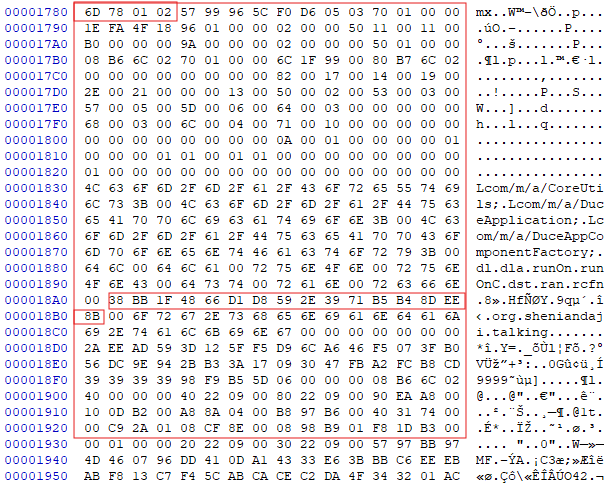
Here there is a certain magic value starting with “mx”, but now with additional bytes x01x02. The most useful thing here is the 16-byte key. It is highlighted in red in the screenshot above.
Additionally, there are configurations for each of the modules storing information for decrypting them:
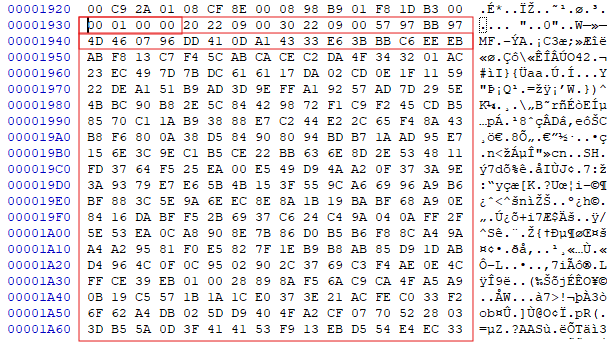
The first 4 bytes of this structure are very important, here we have the value 0x100==256, which means that the first 0x800 bytes of this dex are encrypted. If there was, for example, the number 258, this would mean that part of the dex is compressed using zlib. Then come the highlighted fields with module sizes and another 16-bit decryption key, immediately after which the encrypted module block begins.
File structure can be represented like this:
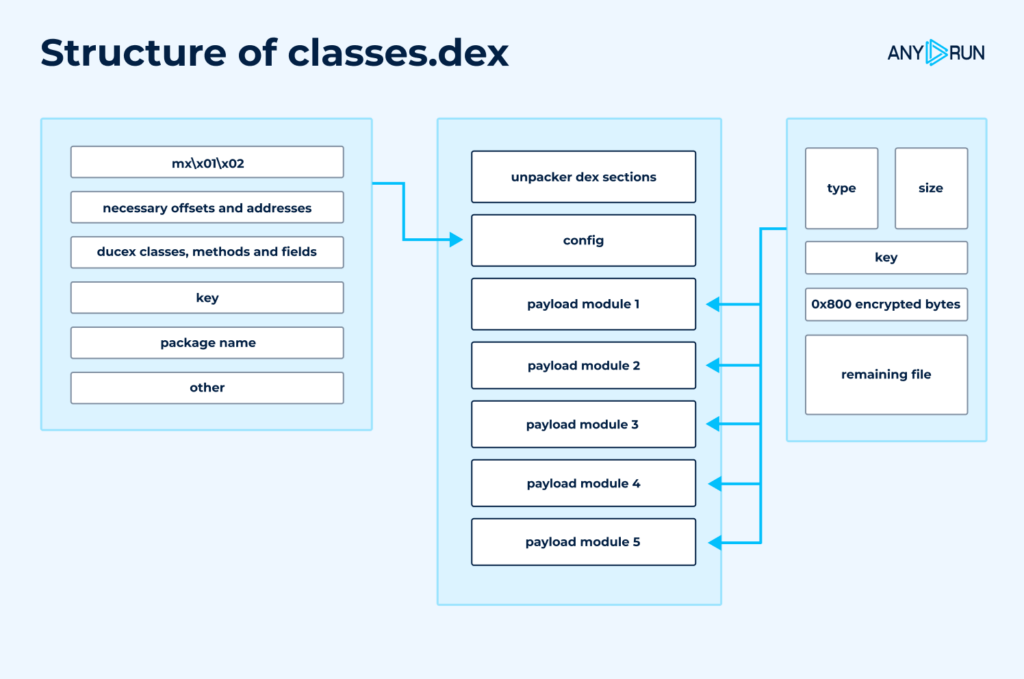
This scheme doesn’t depict all fields in the configurations, but those that were required for our analysis.
Decryption here is quite complex. Two algorithms are used for it: a modified RC4 and SM4.
The first one is well known, but not the second. SM4 is a Chinese block encryption standard. It is not as popular as, for example, AES, and we managed to identify it by the substitution table:
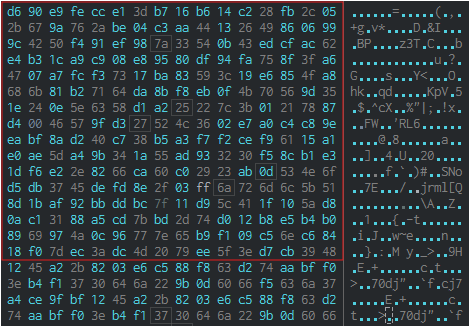
It’s important to note that even the table was encrypted, as well as all the strings used by the tool.
As we know, the unpacker’s dex file contains one main configuration and configurations for each of the 5 modules. All of them require a key. Tracking the execution flow, we can draw the following conclusions:
Let’s turn back to our Java code and remember what happens in the attachBaseContext method:
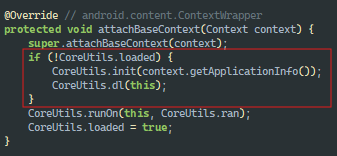
The native init() and dl() methods are called, and there the main decryptions occur. Immediately after this the CoreUtils.runOn() method is called with the method name org.telegram.messenger.ApplicationLoaderImpl as an argument by the decrypted string CoreUtils.ran. Here no decryptions are observed, only the method launch. Now Triada begins its work.
Ducex is indeed a very complex and interesting Chinese tool, worthy of the malware that it carries as payload. Its developers tried to foresee as much as possible to confuse Triada detection and complicate analyst research.
IOCs
| Title | Description |
| Name | 131eaf37b939f2be9f3e250bc2ae8ba44546801b5ca6268f3a2514e6a9cb8b5c.apk |
| MD5 | 25faee9bbf214d975415ae4bd2bcd7b9 |
| SHA1 | 06f8ca016b2bf006702501263818b7606851f106 |
| SHA256 | 131eaf37b939f2be9f3e250bc2ae8ba44546801b5ca6268f3a2514e6a9cb8b5c |
The post Technical Analysis of Ducex: Packer of Triada Android Malware appeared first on ANY.RUN’s Cybersecurity Blog.
ANY.RUN’s Cybersecurity Blog – Read More
The Australian airline says a cybercriminal attempted to extort it after customer data was stolen from a contact center.
The post Qantas Hit with Extortion Demand After Data Breach appeared first on SecurityWeek.
SecurityWeek – Read More
Identity-based cyberattacks soar 156%, driven by cheap Phishing-as-a-Service & infostealer malware. Learn how criminals bypass MFA to steal credentials, access bank accounts, and compromise business emails.
Hackread – Latest Cybersecurity, Hacking News, Tech, AI & Crypto – Read More
Researchers released technical information and exploit code targeting a critical vulnerability (CVE-2025-5777) in Citrix NetScaler.
The post Exploits, Technical Details Released for CitrixBleed2 Vulnerability appeared first on SecurityWeek.
SecurityWeek – Read More
In today’s world, having an online presence is practically unavoidable. More and more of our daily lives happen online, and unless you’re a sailor out at sea or a forest ranger, living completely offline is a rare luxury. It’s estimated that each of us generates roughly two to three gigabytes of data every hour through our smartphones, IoT devices, and online services. So, it’s no wonder that, for example, around 70% of Americans are concerned about the government collecting their data, and a staggering ~80% worry about corporations doing the same. Today, we explore where and how our everyday actions leave digital trails, and what we can do about it.
You wake up, check the weather, maybe scroll through some reels, like a few posts, and check your commute to see the possible traffic jams. When it comes to social media privacy settings, it’s pretty straightforward: you tweak them so your parents and colleagues don’t get a heart attack from your edgy humor. Our Privacy Checker website can help with that. But it gets trickier with geolocation data, which seemingly everyone wants to collect. We’ve already dived deep into how smartphones build detailed profiles on you, and explained what geolocation data brokers are and what happens when their data leaks.
Just imagine: about half of popular Android apps ask for your geolocation even though they don’t need it. And by default, Chrome and Safari allow cross-domain cookie tracking. This lets advertising networks build detailed user profiles for personalized ads. Pretty much all of your smartphone’s telemetry is used to create a thorough consumer portrait — no need for customer interviews or focus groups. The best marketer is in your pocket, but it’s not working for you. What should you do?
You’re ready for your commute, hop into your car, hit the ignition… The system automatically plays your favorite playlist and has your loved ones on speed dial. Convenient, right? Absolutely, but there’s a caveat. Modern vehicles can transmit a staggering 25 GB of (your!) data per hour!
This creates two categories of problems. First, connected cars are often easier to hack because automotive manufacturers generally have a less-than-stellar approach to cybersecurity. While compromising a car’s onboard systems doesn’t always lead to theft, many vulnerabilities allow attackers to track you, or even remotely control your vehicle. For instance, in November 2024, a vulnerability was discovered in the Mazda Connect onboard system that allowed attackers to execute arbitrary code with root privileges. Before that, significant vulnerabilities were found in vehicles from Kia, Tesla, Jeep, and dozens of other carmakers.
Second, car makers themselves often enthusiastically monitor owners of the vehicles they sell and resell that collected data to data brokers and insurance companies.
What to do?
That much-anticipated lunch break is the perfect time to unwind… and leave a few more digital footprints. Whether you’re ordering coffee through an app or checking in to your favorite bakery on social media, you’re constantly adding to your online profile. This includes your location, payment details, and even your order history from delivery apps.
Food delivery apps, in particular, are incredibly data hungry. On average, they collect 21 categories of personal data, and a staggering 95% of this information is directly linked to your identity. Much of this data doesn’t stay with the delivery service; it gets sent elsewhere. Uber Eats, for instance, shares 12 out of 21 collected data points with partner companies, including your phone number, address, and search and order histories.
What’s more, food delivery services can experience data breaches. When that happens, your personal information — everything from your name, phone number and address to your shopping list and order costs — can end up exposed.
So, it’s clear: we need to do something about this too.
There’s nothing quite like relaxing at home after a long day. You ask your voice assistant to turn on the lights or recommend a movie. Smart speakers, TVs, robot vacuums, and other gadgets certainly make life easier. However, they also create a host of vulnerabilities for your home network, and often have questionable privacy practices. For instance, in 2023, Amazon faced a $25 million fine for retaining children’s voice recordings and other privacy violations related to Alexa.
And it’s not just corporations misusing voice assistant capabilities. Surveillance cameras, smart plugs, and even smart kettles are frequently hacked — often being roped into botnets for DDoS attacks. There have even been unsettling cases where malicious actors gained access to home cameras, using them for surveillance or pranks like speaking through a compromised baby monitor.
In today’s digital world, your data is a valuable commodity. While it’s impossible to completely erase your digital footprint, that doesn’t mean you should give up doing what you can. By staying aware and implementing smart security measures, you can control a significant portion of your data exposure. The extra protection services found in Kaspersky Premium can further enhance your privacy and payment protection. And our Privacy Checker website offers a wealth of comprehensive guides: these cover privacy settings for smartphones, computers, social networks, apps, and even entire operating systems. Whether you’re looking for simple adjustments or more thorough security measures — we’ve got you covered.
While achieving absolute anonymity often requires an extreme, almost paranoid level of effort, while most people don’t need anonymity, adopting even the “normal” measures from our recommendations will significantly limit the ability of both cybercriminals and corporations to track you.
What other steps should you take to stay safe? Below are some examples:
Kaspersky official blog – Read More
Pakistan’s APT36 Transparent Tribe uses phishing and Linux malware to target Indian defence systems running BOSS Linux says Cyfirma.
Hackread – Latest Cybersecurity, Hacking News, Tech, AI & Crypto – Read More
Russian organizations have been targeted as part of an ongoing campaign that delivers a previously undocumented Windows spyware called Batavia.
The activity, per cybersecurity vendor Kaspersky, has been active since July 2024.
“The targeted attack begins with bait emails containing malicious links, sent under the pretext of signing a contract,” the Russian company said. “The main goal of the
The Hacker News – Read More
In 2024 we looked at the possibility of leveraging open weights LLMs for source code analysis.
The answer was clearly negative, as a small code base could easily take 200K tokens, more than any context window offered by open weights models.
The table below summarizes the top LLMs by context window as of today. Context windows significantly increased, compared to an average of 32.000 tokens last year. However, we are still a few orders of magnitude away from being able to feed entire code bases to LLMs.
| Model | Tokens | Open Weight |
| Gemini 1.5 Pro (Google) | 2.000.000 | No |
| GPT 4.1 | 1.000.000 | No |
| Claude (Anthropic) | 200.000 | No |
| DeepSeek | 128.000 | Yes |
| LLAMA 3.1 | 128.000 | Yes |
Later in the year a tool named vulnhuntr was published (https://github.com/protectai/vulnhuntr). The tool approached limited context windows by performing source code analysis from source to sink and providing code blocks of the call chains iteratively in a multi-step process. Initially the LLM is fed code blocks for a set of files (e.g. sources where API entry points are defined). Then it literally asks for code blocks of functions and classes which are required for the analysis.
In addition to the clever approach, a track record of discovered vulnerabilities was published, making the tool even more appealing.
There is one relevant limitation though: only python code bases are supported. It is in fact very difficult to statically determine the call chain from source to sink for non-typed languages.
We decided that it was worth extending the tool to support additional languages. Therefore we created xvulnhuntr (https://github.com/CompassSecurity/xvulnhuntr), a fork of the original project where the ‘x’ stands for extended.

Xvulnuhntr also supports C#, Java and Go. For each language, there is a dedicated tool developed in the corresponding language. Given a repository path and a class or function name in input, the tool returns a json with the file name for the match and the source code of the code block matching the function/class name. This modular approach allows to easily extend support to other typed languages.
In addition, we intentionally put additional effort into making xvulnhuntr easier for developers to contribute to. Compared to the original project, it is possible to run xvulnhuntr against a local test suite, mocking API responses. This provides multiple advantages:
We primarily focused on the development of the tool. We expect refinements and bugs to come up as the tool is used against a variety of code bases. We are also interested in evaluating how analysis from different LLM providers compare to each other. Finally, we welcome and encourage contributions. Until then, happy LLM-powered hacking!
Compass Security Blog – Read More