The measure aims to prevent compromise of U.S. telecommunications through strengthening network security by establishing “baseline cybersecurity requirements for vendors of telecommunications services” to the country’s 18 intelligence agencies, according to a summary of the bill released by the panel.
https://www.backbox.org/wp-content/uploads/2018/09/website_backbox_text_black.png00adminhttps://www.backbox.org/wp-content/uploads/2018/09/website_backbox_text_black.pngadmin2025-07-16 14:06:502025-07-16 14:06:50SonicWall SMA Appliances Targeted With New ‘Overstep’ Malware
A recently disclosed breach of thousands of ASUS home routers goes to show that your home Wi-Fi access point isn’t just useful to you (and possibly your neighbors) — it’s also coveted by cybercriminals and even state-sponsored hackers carrying out targeted espionage attacks. This new attack, presumably linked to the infamous APT31 group, is still ongoing. What makes it especially dangerous is its stealthy nature and the unconventional approach required to defend against it. That’s why it’s crucial to understand why malicious actors target routers — and how to protect yourself from these hacker tricks.
How compromised routers are exploited
Residential proxy. When hackers target large companies or government agencies, the attacks are often detected by unusual IP addresses attempting to access the secured network. It’s highly suspicious when a company operates in one country, but an employee suddenly logs in to the corporate network from another. Logins from known VPN-server addresses are equally suspect. To mask their activities, cybercriminals use compromised routers located in the country — and sometimes even in the specific city — close to their intended target. They funnel all their requests through your router, which then forwards the data to the target computer. To monitoring systems, this looks just like a regular employee accessing work resources from home — nothing to raise any eyebrows.
Command-and-control server. Attackers can host malware on the compromised device for target computers to download. Or, conversely, they can exfiltrate data from the network directly to your router.
Honeypot for competitors. A router can be used as bait (a honeypot) to study the techniques used by other hacker groups.
Mining rig. Any computing device can be used for crypto mining. Using a router for mining isn’t particularly efficient, but when a cybercriminal isn’t paying for electricity or equipment, it still pays off for them.
Traffic manipulation tool. A compromised router can intercept and alter the contents of internet connections. This allows attackers to target any device connected to the home network. The range of applications for this technique is broad: from stealing passwords to injecting ads into web pages.
DDoS bot. Any home device, including routers, baby monitors, smart speakers, and even smart kettles, can be linked together into a botnet and used to overwhelm any online service with millions of simultaneous requests from those devices.
These options appeal to various groups of attackers. While mining, ad injection, and DDoS attacks are typically of interest to financially motivated cybercriminals, targeted attacks launched from behind a residential IP address are usually carried out either by ransomware gangs or by groups engaged in genuine espionage. This sounds like something out of a spy novel, but it’s so widespread that the U.S. Cybersecurity and Infrastructure Security Agency (CISA) and FBI have issued multiple warnings about it at various times. True to form, spies operate with utmost stealth, so router owners rarely ever notice that their device is being used for more than its intended purpose.
How routers get hacked
The two most common ways to hack a router are by brute-forcing the password to its administration interface and by exploiting software vulnerabilities in its firmware. In the first scenario, attackers take advantage of owners leaving the router with its factory settings and the default password admin, or have changed the password to something simple to remember — and easy to guess, like 123456. Once they crack the password, attackers can log in to the control panel just like the owner would.
In the second scenario, attackers remotely probe the router to identify its manufacturer and model, then try known vulnerabilities one by one to seize control of the device.
Typically, after a successful hack, they install hidden malware on the router to perform their desired functions. You may spot that something’s wrong when your internet slows down, your router’s CPU is working overtime, or the router itself even starts overheating. A factory reset or firmware update usually eliminates the threat. However, the recent attacks on ASUS routers were a different story.
What makes the ASUS attacks different, and how to spot them
The main thing about this attack is that you can’t fix it with a simple firmware update. Attackers set up a hidden backdoor with administrative access that persists through regular reboots and firmware updates.
To start the attack, the malicious actor employs both of the techniques described above. If brute-forcing the admin password fails, attackers exploit two vulnerabilities to bypass authentication entirely.
From this point on, the attack becomes more sophisticated. The attackers use yet another vulnerability to activate the router’s built-in SSH remote management feature. They then add their own cryptographic key to the settings, which allows them to connect to the device and control it.
Few home users ever manage their router using SSH or check the settings section where administrative keys are listed, so this access technique can go unnoticed for years.
All three vulnerabilities exploited in this attack have since been patched by the vendor. However, if your router was previously compromised, updating its firmware won’t remove the backdoor. You need to open your router’s settings and check if an SSH server is enabled — listening on port 53282. If so, disable the SSH server and delete the administrative SSH key, which starts with the characters
AAAAB3NzaC1yc2EA
If you’re not sure how to do all that, there’s a more drastic solution: a full factory reset.
It’s not just ASUS
The researchers who discovered the ASUS attack believe it’s part of a broader campaign that has hit around 60 types of home and office devices, including video surveillance systems, NAS boxes, and office VPN servers. Affected devices include D-Link DIR-850L S, Cisco RV042, Araknis Networks AN-300-RT-4L2W, Linksys LRT224, and some QNAP devices. The attacks on these unfold a bit differently, but share the same general features: exploiting vulnerabilities, using built-in device functions to gain control, and maintaining stealth. According to the researchers’ assessments, compromised devices are being exploited to reroute traffic and monitor the attack techniques employed by rival threat actors. These attacks are attributed to a “well-resourced and highly capable” hacking group. However, similar techniques have been adopted by targeted attack groups around the world — which is why home routers in any moderately large country are now an enticing target for them.
Takeaways and tips
The attack on ASUS home routers displays classic signs of targeted intrusions: stealth, compromise without using malware, and the creation of persistent access channels that remain open even after the vulnerability is patched and the firmware is updated. So, what can a home user do to defend against such attackers?
Your choice of router matters. Don’t settle for the standard-issue router your provider rents out to you, and don’t just shop for the cheapest option. Browse the selection at electronics retailers, and choose a model released within the last year or two so you can be sure to receive firmware updates for years to come. Try to pick a manufacturer that takes security seriously. This is tricky, as there are no perfect options out there. You can generally use the frequency of firmware updates and the manufacturer’s stated period of support as a guide. You can find the latest router security news on sites like Router Security, but don’t expect to find any “good tales” there — it’s more useful for finding “anti-heroes”.
Update your device’s firmware regularly. If your router offers an automatic update feature, it’s best to enable it so you don’t have to worry about manual updates or falling behind. Still, it’s a good idea to check your router’s status, settings, and firmware version a few times a year. If you haven’t received a firmware update in 12-18 months, it may be time to consider replacing your router with a newer model.
Disable all unnecessary services on your router. Go through all the settings and turn off any features or extras you don’t use.
Disable administrative access to your router from the internet (WAN) through all management channels (SSH, HTTPS, Telnet, and whatever else).
Disable mobile router management apps. Although convenient, these apps introduce a range of new risks — in addition to your smartphone and router, a proprietary cloud service will likely be involved. For this reason, it’s best to disable this management method and avoid using it.
Change the default passwords for both router administration and Wi-Fi access. These passwords shouldn’t match. Each should be long and not consist of obvious words or numbers. If your router allows it, change the admin username to something unique.
Use comprehensive protection for your home network. For example, Kaspersky Premium comes with a smart-home protection module that monitors for common problems like vulnerable devices and weak passwords. If your smart home monitoring detects weak spots or a new device on your network that you haven’t previously identified as known, it will alert you and provide recommendations for securing your network.
Check every page of your router’s configuration. Look for the following suspicious signs: (1) port forwarding to unknown devices on your home network or the internet, (2) new user accounts you didn’t create, and (3) unfamiliar SSH keys or any other login credentials. If you find anything like this, search online for your router model combined with the suspicious information you’ve discovered, such as a username or port address. If you can’t find any mention of the issue you discovered as a documented system feature of your router, remove that data.
Subscribe to ourTelegram channel, and stay up to date on all cybersecurity news.
For more tips on choosing, setting up, and protecting your smart home devices — along with information on other hacker threats targeting your household electronics — check out these posts:
https://www.backbox.org/wp-content/uploads/2018/09/website_backbox_text_black.png00adminhttps://www.backbox.org/wp-content/uploads/2018/09/website_backbox_text_black.pngadmin2025-07-16 14:06:412025-07-16 14:06:41How to protect your router from being hacked and becoming a residential proxy | Kaspersky official blog
https://www.backbox.org/wp-content/uploads/2018/09/website_backbox_text_black.png00adminhttps://www.backbox.org/wp-content/uploads/2018/09/website_backbox_text_black.pngadmin2025-07-16 13:06:522025-07-16 13:06:52Compumedics Ransomware Attack Led to Data Breach Impacting 318,000
Former US Army soldier Cameron Wagenius pleads guilty to hacking telecom companies and extorting $1 million+ using cybercrime forums like BreachForums and XSS.
Hackread – Latest Cybersecurity, Hacking News, Tech, AI & Crypto – Read More
https://www.backbox.org/wp-content/uploads/2018/09/website_backbox_text_black.png00adminhttps://www.backbox.org/wp-content/uploads/2018/09/website_backbox_text_black.pngadmin2025-07-16 12:06:412025-07-16 12:06:41Ex US Soldier Cameron Wagenius Guilty in Telecom Hacking and Extortion
Cameron John Wagenius faces up to 27 years in prison after pleading guilty to wire fraud, extortion and aggravated identity theft in data breaches involving major corporations.
https://www.backbox.org/wp-content/uploads/2018/09/website_backbox_text_black.png00adminhttps://www.backbox.org/wp-content/uploads/2018/09/website_backbox_text_black.pngadmin2025-07-16 12:06:412025-07-16 12:06:4121-year-old former US soldier pleads guilty to hacking, extorting telecoms
With it, you can enrich your threat investigations with data on attacks targeting 15,000 companies all over the world. All you need to do to strengthen your defense against them is to register, browse our unique database, and gain actionable insights.
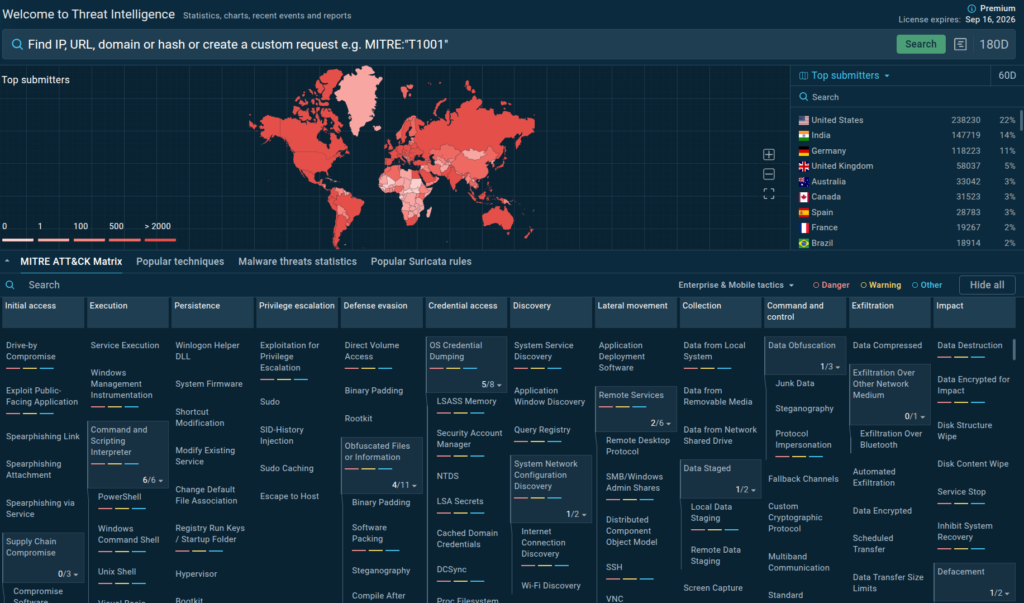
Threat Intelligence in ANY.RUN continues to evolve — not only by adding more features, but by making the right ones easier to use. We’ve simplified access to ANY.RUN Threat Intelligence with a free version of TI Lookup.
You now can explore Public Samples, TTPs, Suricata rules, and malware trends inside our Threat Intelligence product in a cleaner, faster way.
It’s about putting existing value in the right place, for the right audience. For analysts and teams starting with ANY.RUN in a Threat Intelligence context, this is a much better entry point.
It’s a step to help you do less — so you can focus on more.
Aleksey Lapshin, ANY.RUN CEO
TI Lookup—Essential Solution for SOC Teams
TI Lookup provides access to an extensive database of the latest IOCs, IOBs, and IOAs
TI Lookup is ANY.RUN’s key solution for working with threat intelligence. It simplifies and accelerates different stages of malware investigations, from proactive monitoring to gaining insights for incident response. As a result, you get to ensure a better defense against cyber threats for your company.
In practice, this means that TI Lookup provides you with Indicators of Compromise (IOCs), Attack (IOAs), and Behavior (IOBs). It not only links each indicator to an attack or sample but also showcases its behavior inside the sandbox.
The source of indicators is unique: all data comes from millions of public malware analysis sessions done in ANY.RUN’s Interactive Sandbox. TI Lookup allows you to tap into it to gain invaluable insights into real threats targeting 15,000 companies in finance, manufacturing, transportation, government, and other industries right now.
Start your threat investigation in TI Lookup right away Triage alerts and handle incidents faster with rich context
Unlike other solutions relying on public reports or databases published days or weeks after an incident, TI Lookup provides fresh, actionable data available to you hours or even minutes after the attack happened.
And now you get to access the benefit of our service at no cost. See how even its free version with limited functionality can become a game-changer for your security operations.
Results You Can Achieve Using Free Plan
Essential features of TI Lookup are available at no cost. With the free plan, you can view up to 20 recent sandbox sessions per query, conduct unlimited searches using basic search fields (file hashes, URLs, domains, IPs, MITRE ATT&CK techniques, Suricata IDs, etc.) and an operator for combination search (AND).
With free access to TI Lookup, you can gain a powerful solution to common challenges of SOC teams:
Enrich threat investigations: Get extensive threat context by linking existing artifacts to actual attacks.
Reduce response time(MTTR): Explore identified threats’ behavior, purpose, and targets through sandbox analyses for fast, informed security decisions.
Strengthen proactive defense: Collect data on emerging threats to act before they cause harm.
Grow expertise of your team: Let your SOC specialists explore real-world attacks and see examples of TTPs in actual malware via the interactive MITRE ATT&CK matrix.
Develop SIEM, IDS/IPS, or EDR rules: Intelligence collected via TI Lookup can be used to improve proactive defense of your business.
See how TI Lookup can give you a hand in solving common SOC challenges in a couple of examples. They involve threats active today and demonstrate how ANY.RUN’s solution will speed up and simplify their breakdown.
Fast Triage and Data-Fueled Response
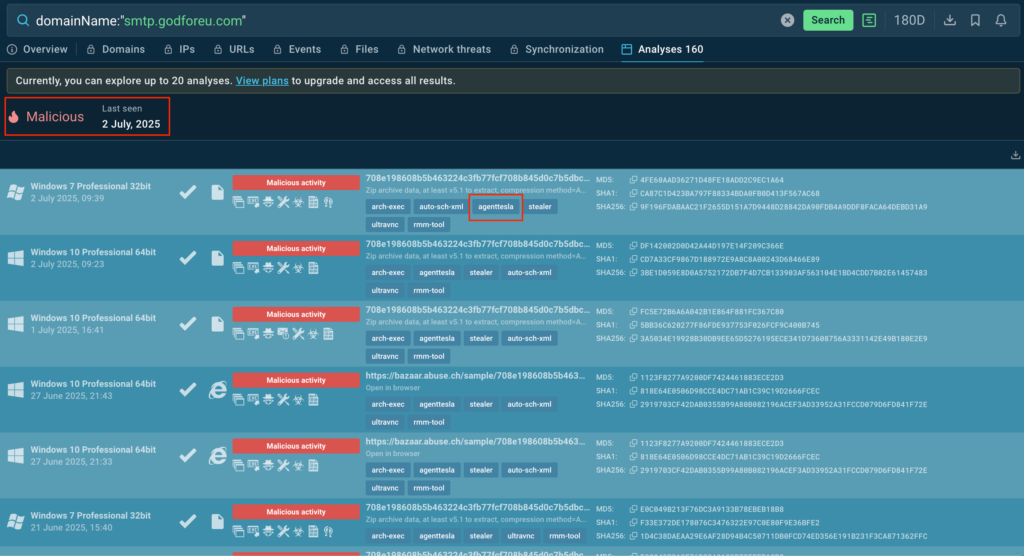
If you receive an alert related to a suspicious domain, you can check it in TI Lookup to get the verdict in seconds. E.g., enter this simple query:
And almost instantly you’ll see the verdict—it is indeed malicious.
TI Lookup provides fresh sandbox sessions for in-depth threat context
This info is enough to escalate the incident, but that’s not all TI Lookup is capable of. Take a look at the tags in analysis sessions that involve the domain in question. From them, you can also determine the name of the threat it’s related to—Agent Tesla.
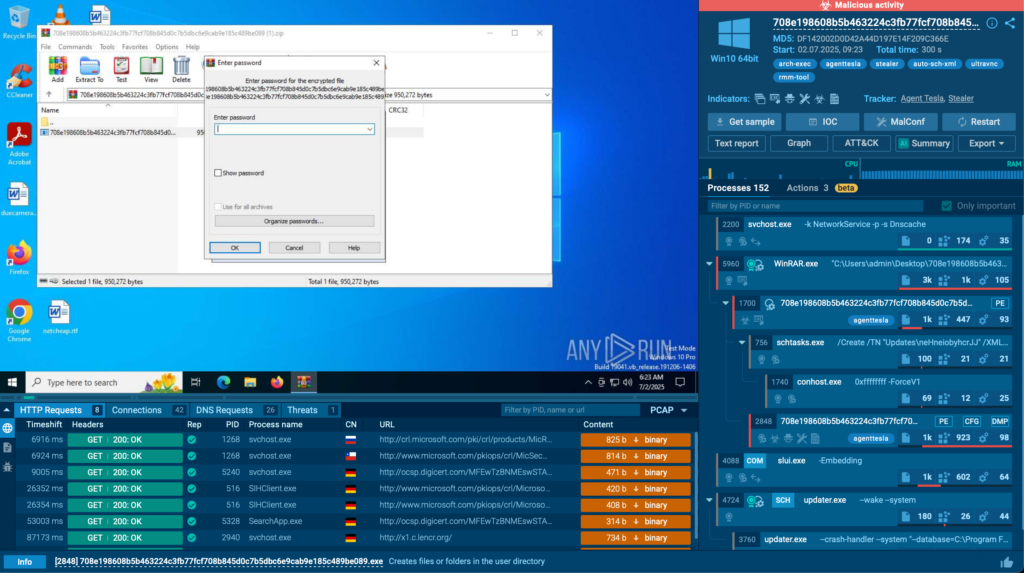
And by clicking any of the sessions, you’ll be transferred to ANY.RUN sandbox for further investigation. You can observe how malware behaves and collect extra IOCs and TTPs. For example, follow this link to see the analysis of a threat sample from TI Lookup search results:
One of the sandbox reports showing Agent Tesla analysis
That’s how you get to enrich your threat research to follow through with an informed incident response.
Threat Hunting for Proactive Defense
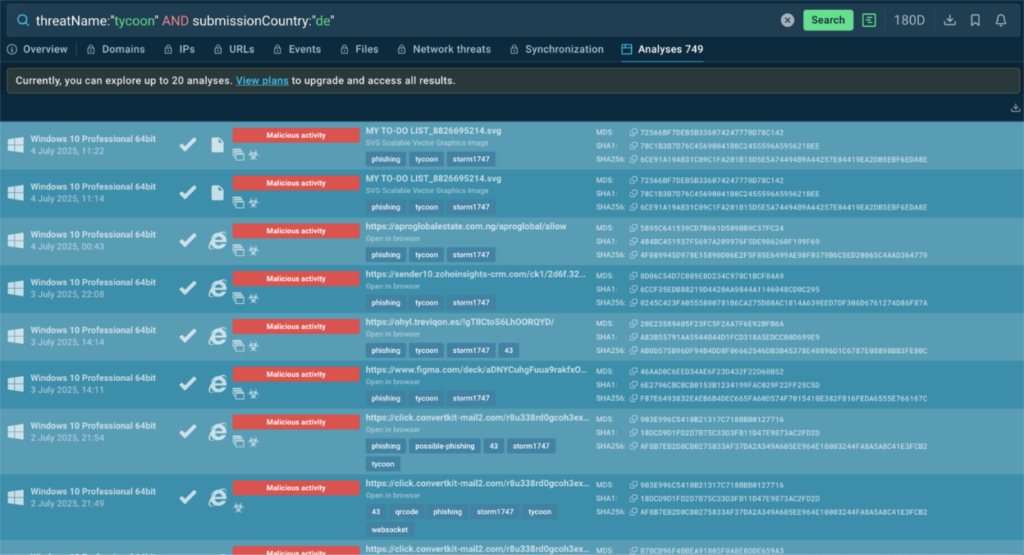
Another way to apply TI Lookup’s free functions is to use it for threat hunting. For instance, if you would like to research the phishing kit Tycoon2FA’s activity in a particular region, you can create a compound query like this:
It combines the name of the threat we’re interested in with the id of a country—in this case, de – Germany. By entering this query, you’ll see the most recent analysis samples involving Tycoon2FA that were uploaded by users from there:
TI Lookup results with latest Tycoon2FA phishing attacks on companies from Germany
Now you get to collect IOCs and use this data to proactively defend your infrastructure.
With a Premium plan, you would also be able to subscribe to your query. This feature is called Search Updates and allows you to stay on the lookout for emerging threats that fit your previous search:
You can subscribe to queries to track relevant threats’ evolution
Maximize Benefits and Unlock Premium Features
The free version of TI Lookup grants you the functionality needed to achieve tangible results. To gain full access to its features and expand your ability to conduct investigations, opt for the Premium plan. With it, you can access three times more data, automate alert triage, and receive notifications on attacks as soon as they emerge.
Free
Premium
Requests
Unlimited number of basic requests
Advanced requests (100/500/5K/25K)
Search operators
AND
AND, OR, NOT
Search parameters
11
44
Links to analysis sessions
Up to 20 most recent
All available
Interface
Limited (only analyses)
Full (all threat data + analyses)
Integration
–
API and SDK (Python package)
YARA Search
–
+
Private search
–
+
TI Reports
–
+
Search Updates
–
+
It’s designed for SOC teams from businesses and organizations, as it allows for private searches that can’t be seen by other users and other exclusive features:
Speed up alert triage: Quickly correlate alerts against a vast database of the latest IOCs, IOBs, and IOAs.
Automate workflow for real-time monitoring: Integrate TI Lookup with your security tools (e.g., SIEM, TIP, or SOAR systems).
Threat hunt with precision: Create and browse custom YARA rules in ANY.RUN’s database to identify malware patterns with YARA Search.
Investigate in detail: Fine-tune your searchwith over 40 search parameters, as well as extra operators.
Stay proactive: Set up automated alerts for specific IOCs or threat patterns for continuous updates.
Follow malware trends: With TI Reports by our expert analysts, you can raise awareness about the latest attacks targeting different industries.
Request trial access to TI Lookup Premium Cut MTTR, stop incidents early, and reduce business risks
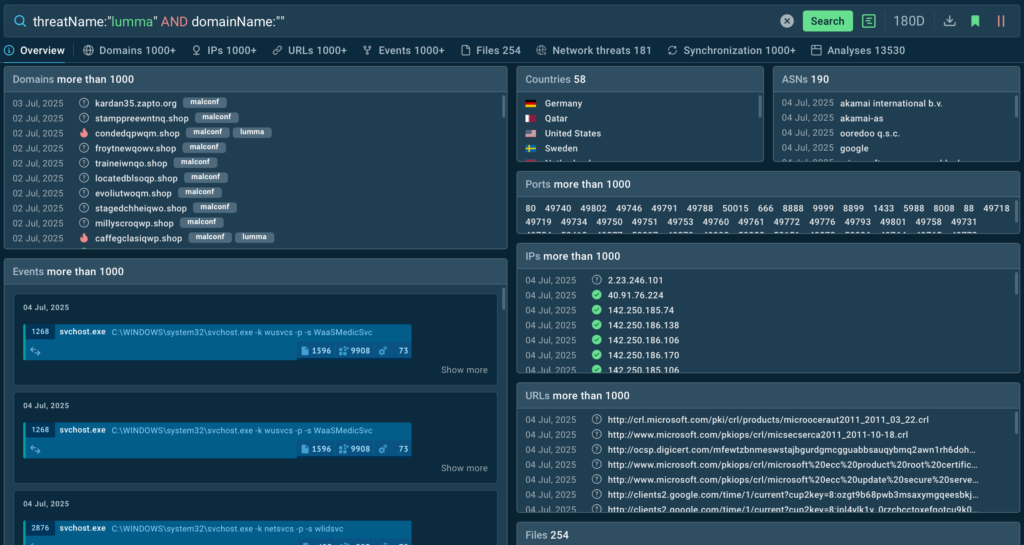
Let’s see how TI Lookup’s interface looks like with all features unlocked. For that, we’ll use a query to look for the Lumma family threats. Additionally, we’ll browse for all domains related to it:
With Premium plan, you get three times more data about threats, including network IOCs
As you can see, the Premium plan grants you more data: it includes domains, countries, ports, IPs, and more. In this case, it’s especially important that we got to collect many malicious domains.
Conclusion
TI Lookup is a must-have tool if you want to maintain a simpler and faster way to conduct threat investigations. SOC teams can benefit from it immensely thanks to relevant, real-world data it provides. Accelerate your decision-making and take proactive action against malware with TI Lookup—available with Free and Premium plans.
About ANY.RUN
Over 500,000 cybersecurity professionals and 15,000+ companies in finance, manufacturing, healthcare, and other sectors rely on ANY.RUN. Our services streamline malware and phishing investigations for organizations worldwide.
Speed up triage and response: Detonate suspicious files using ANY.RUN’s Interactive Sandbox to observe malicious behavior in real time and collect insights for faster and more confident security decisions.
Improve threat detection: ANY.RUN’s Threat Intelligence Lookup and TI Feeds provide actionable insights into cyber attacks, improving detection and deepening understanding of evolving threats.
https://www.backbox.org/wp-content/uploads/2018/09/website_backbox_text_black.png00adminhttps://www.backbox.org/wp-content/uploads/2018/09/website_backbox_text_black.pngadmin2025-07-16 12:06:332025-07-16 12:06:33Free. Powerful. Actionable. Make Smarter Security Decisions with Live Attack Data
Cybersecurity researchers have discovered a new, sophisticated variant of a known Android malware referred to as Konfety that leverages the evil twin technique to enable ad fraud.
The sneaky approach essentially involves a scenario wherein two variants of an application share the same package name: A benign “decoy” app that’s hosted on the Google Play Store and its evil twin, which is