Wi-Fi can be used to track people’s (and pets’) movements in the home — from the tiniest gestures, such as hand waves. This application of Wi-Fi is nothing new in theory, but only recently has it been put on a commercial footing. The technology is now being offered by home internet providers and equipment vendors. It may even be incorporated in the new Wi-Fi standard, so it’s important to understand the associated pros and cons. Let’s see how the technology works, whether it poses any privacy risks, and how to disable it if necessary.
How Wi-Fi sensing works
Wi-Fi sensing came about as a side effect of the quest to speed up Wi-Fi. Modern routers have the ability to focus the signal on devices they exchange data with, making the connection faster and more reliable. Known as Wi-Fi beamforming, this technique involves the router measuring the radio signal with sufficient accuracy to determine not only its strength but also its propagation in space. Based on these parameters, the router beams the signal in the direction of the device, and uses channel state information (CSI) to continuously monitor and adjust the communication link.
During the data exchange, if interference of some kind appears between the device and the router, say, a person or a dog passes by, the shape of the radio signal will change slightly. The router is sensitive enough to detect this, effectively making it a motion sensor.
Then there’s just the small matter of developing mathematical algorithms that can detect movement in the home based on changes in CSI, and implementing them in the router firmware. And to receive analytics and signals about motion events, the router communicates with a mobile app on the user’s smartphone, for which a proprietary cloud service is used. Smart doorbells or video baby monitors work in exactly the same way.
Wi-Fi sensing requirements and limitations
There are some important technical nuances that must be considered for Wi-Fi sensing to do its job:
The router itself must have multiple antennas and be at least Wi-Fi 5 (802.11ac) compatible.
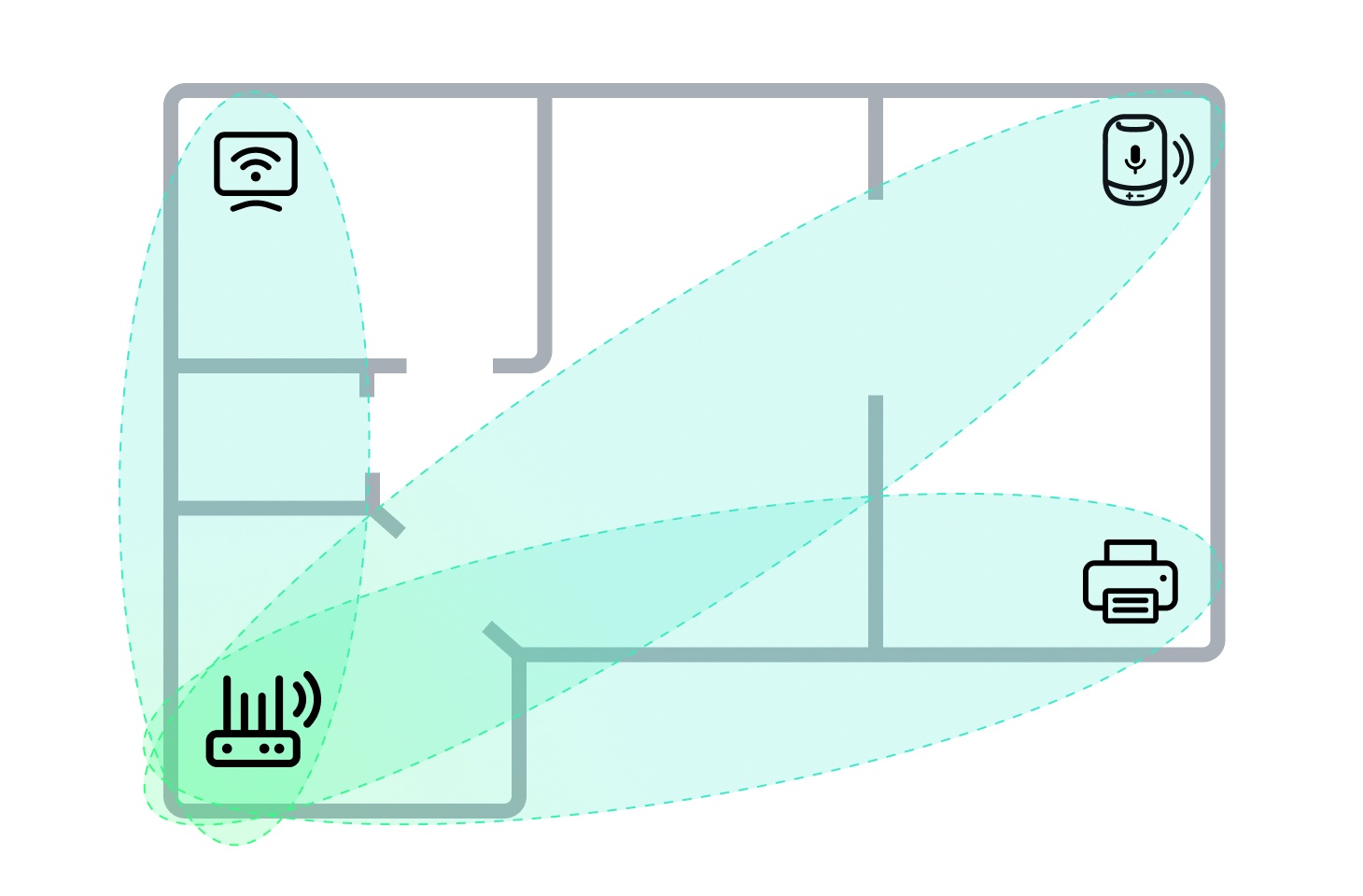
In the home there must be stationary or rarely moved devices (usually one to three) connected to this router via Wi-Fi — for example, a printer, a smart speaker and/or a smart TV. Sometimes Wi-Fi extenders and mesh Wi-Fi devices can perform the role of a “sensor”.
Motion detection will occur only in the oval zone between the router and the “sensor”, and post-setup testing is required.
When motion is detected, it’s not possible to determine what moved or where exactly it took place between the router and the “sensor”. In this respect, the technology is not unlike the infrared motion sensors of conventional security systems. However, with advances in computing power and machine learning, this limitation may disappear — witness a new study in which researchers harnessed Wi-Fi for human pose estimation.
Wi-Fi sensing can be used to detect motion in the oval zone between the router and a stationary device connected to the router via Wi-Fi
The past, present and future of Wi-Fi sensing
The first known commercial application of Wi-Fi sensing technology was the Aware feature in Linksys routers. Back in 2019, Linksys positioned Aware as a subscription-based feature. But in mid-2024, the service was discontinued, and now, according to the vendor itself, Linksys routers have no proprietary application and don’t collect data.
However, since 2025, the feature has been available to customers of Xfinity — Comcast’s home internet brand. It’s called Wi-Fi Motion. Deutsche Telekom has also announced such a feature, but not yet named it. In any case, Wi-Fi sensing will likely cease to be a rarity in the coming years: work has been underway since 2020 to standardize the feature under the technical name 802.11bf. Once motion recognition enters the 802.11 family of standards, almost all vendors will support it.
The pros and cons of Wi-Fi sensing
If the service is provided for free, some will jump at the chance of getting a home security system without having to buy additional hardware. At the very least, it will appeal to home owners who want to keep their property under surveillance for a short period of time — for example, when away on vacation. But bear in mind that Wi-Fi sensing is no replacement for a full-fledged security system, and you need an action plan in place should the alarm go off. Note also that the oval zone between your printer or smart TV and router is by no means the only area that thieves can penetrate, so you need to secure other parts of your home too.
Another relatively harmless use of Wi-Fi sensing is monitoring routine activity in the home: whether the kids are back from school, whether grandma is okay, etc.
Wi-Fi sensing also has potential in the home automation niche; for example, motion tracking can be used to turn the lights on and, after a set period of inactivity, off again.
The potential harm from the technology lies in the fact that not only owners can track movements in their homes. Xfinity documentation already states that motion event data may be transferred to the police and other “third parties” in legal proceedings. And if the provider collects and stores data from motion sensors, it’s a short step to selling this data to advertisers.
Another potential threat is router hacking. Hackers already break into home routers to spy on users or make money in various ways. Another monetization route for malicious actors is to analyze motion-in-the-home data and sell this information on to burglars.
How to guard against Wi-Fi sensing abuse
So far, the feature is available only on a few router models leased out by certain internet providers. And in Xfinity devices, it’s disabled by default.
If you’re one of those who decide that the benefits outweigh the risks, you’ll need to activate the feature yourself, set up and test it, and also make sure that the router is configured according to our smart-home protection tips. To recap them in brief: the Wi-Fi network and the router control panel must be protected by unique, strong passwords, and all computers and smartphones must have a full-fledged security solution installed that delivers smart-home security analysis (vulnerability search in the home Wi-Fi network, and notifications about attempts to connect new devices to it).
But what if you don’t want anything to do with Wi-Fi sensing? As the number of compatible devices increases and the risk of forced activation rises, your first line of defense against Wi-Fi sensing will be to buy your own router instead of leasing one from a provider. You can then set up the router yourself and disable unnecessary features; just be sure to choose a model that allows control without mobile apps and doesn’t require connection to the vendor’s cloud service. After buying a router, remember to apply our home network setup tips.
A more complex method is to connect all stationary devices to a computer network using an Ethernet cable. For printers, TVs and game consoles, this is not only safe, but also provides the fastest and most stable connection.
What other hidden risks and opportunities does Wi-Fi technology harbor? Essential reading:
https://www.backbox.org/wp-content/uploads/2018/09/website_backbox_text_black.png00adminhttps://www.backbox.org/wp-content/uploads/2018/09/website_backbox_text_black.pngadmin2025-07-17 12:06:502025-07-17 12:06:50What is Wi-Fi sensing, and how does it detect human motion in the home? | Kaspersky official blog
An $8 billion class action investors’ lawsuit against Meta stemming from the 2018 privacy scandal involving the Cambridge Analytica political consulting firm.
https://www.backbox.org/wp-content/uploads/2018/09/website_backbox_text_black.png00adminhttps://www.backbox.org/wp-content/uploads/2018/09/website_backbox_text_black.pngadmin2025-07-17 11:06:562025-07-17 11:06:56Trial Opens Against Meta CEO Mark Zuckerberg and Other Leaders Over Facebook Privacy Violations
A Department of Homeland Security memo confirms Chinese group Salt Typhoon, extensively compromised a US National Guard network for nearly a year, stealing sensitive military and law enforcement data.
Hackread – Latest Cybersecurity, Hacking News, Tech, AI & Crypto – Read More
https://www.backbox.org/wp-content/uploads/2018/09/website_backbox_text_black.png00adminhttps://www.backbox.org/wp-content/uploads/2018/09/website_backbox_text_black.pngadmin2025-07-17 11:06:562025-07-17 11:06:56Chinese Salt Typhoon Infiltrated US National Guard Network for Months
https://www.backbox.org/wp-content/uploads/2018/09/website_backbox_text_black.png00adminhttps://www.backbox.org/wp-content/uploads/2018/09/website_backbox_text_black.pngadmin2025-07-17 11:06:552025-07-17 11:06:55The password manager I recommend most has its own VPN and long list of features
Managed Security Service Providers (MSSPs) are tasked with protecting multiple clients simultaneously while maintaining cost efficiency, rapid response times, and customer trust. The key to success lies in early threat detection, which requires access to high-quality, actionable threat intelligence that can be immediately applied across diverse client environments.
Main MSSP Challenges
MSSPs operate in a complex environment where they must deliver consistent security outcomes across varied client infrastructures.
Resource constraints create additional pressure. False positives consume valuable analyst time, while missed threats can damage client relationships and business reputation.
The heterogeneous nature of client environments means MSSPs must work with different security tools, network architectures, and threat landscapes. Additionally, MSSPs must demonstrate clear value to clients while competing on both service quality and cost.
Threat intelligence turns raw data into actionable insights, helping MSSPs prioritize threats, streamline workflows, and respond quickly. Real-time, high-quality intelligence reduces false positives, improves detection accuracy, and optimizes resource use, enhancing client outcomes.
High-quality threat intelligence feeds are crucial for MSSPs to stay ahead of threats. They provide:
Timely Data: Fresh indicators of compromise (IOCs) enable rapid action before threats spread.
Contextual Insights: Detailed threat behavior data supports informed decision-making.
Scalable Integration: Feeds must work seamlessly across varied client systems.
Automation Support: Automated integration speeds up responses and reduces manual effort.
How ANY.RUN’s Threat Intelligence Feeds Help MSSPs Keep Ahead
ANY.RUN‘s Threat Intelligence Feeds empower Managed Security Service Providers (MSSPs) to detect threats early across diverse client infrastructures, delivering real-time, context-enriched indicators of active threat campaigns.
By integrating these feeds, MSSPs can optimize their workflows and directly support their clients’ business objectives. The key benefits of ANY.RUN’s feeds are designed to enhance operational efficiency and drive measurable business outcomes for MSSPs and their clients.
Expanding Threat Monitoring and Detection Across All Clients
ANY.RUN’s TI Feeds draw from a vast, reliable data source, collecting threat indicators from live sandbox investigations of the latest threats by security teams at 15,000 organizations worldwide. Updated every two hours, these feeds provide fresh malicious IPs, domains, and URLs that have been used by threat actors for only a short time.
This near-instant delivery ensures MSSPs can spot threats that are still active right now across all client systems, whether they’re cloud-based or traditional setups. By catching threats early, MSSPs protect clients’ operations, prevent disruptions, and maintain trust across their customer base.
Improve threat visibility across all clients with TI Feeds
Informing Response to Stop Incidents Before Major Impact
Each threat indicator includes links to detailed sandbox reports that explain how attacks work, including their methods and behaviors (e.g., how malware communicates or spreads). This clear insight helps MSSPs build stronger defenses and respond quickly to specific threats.
For example, knowing an attack’s pattern allows security teams to block it before it causes harm, improving accuracy and reducing risks. The proactive approach prevents business interruptions, protects sensitive data, and reassures clients that their operations are secure.
Reducing Costs, Easing Team Workloads, and Scaling Services
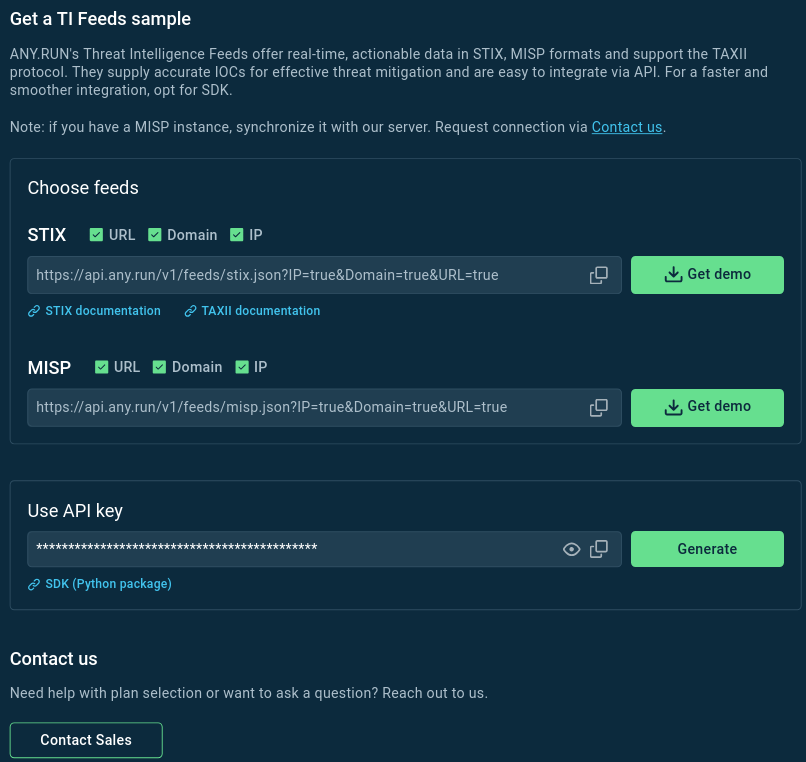
ANY.RUN’s feeds are built for automation, working smoothly with common security tools like SIEM, XDR, threat intelligence platforms, and firewalls. They support standard formats (STIX, MISP, TAXII) and offer easy API and SDK integration for quick, automated setup.
Automation means less manual work for analysts, as threat data is automatically fed into systems to flag or block risks. By cutting down on repetitive tasks, MSSPs can manage more clients with less effort, lowering costs while maintaining top-notch protection.
Get a demo sample of ANY.RUN’s Threat Intelligence Feeds with custom parameters.
TI Feeds Performance: Turning IOC Data into Business Value
ANY.RUN’s Threat Intelligence Feeds enable MSSPs to optimize their operations and deliver tangible business value to clients, including minimized downtime, enhanced competitiveness, cost efficiency, and stronger client retention through proactive threat prevention.
All these features and benefits transform into a number of business advantages for MSSPs. Threat Intelligence Feeds enable them to:
Minimize client downtime and operational disruption: Early detection of threats protects against widespread incidents that could affect multiple clients. Real-time indicators of active threat campaigns enable identification of threats regardless of which client environment they target first, preventing cascading failures across the MSSP’s customer base.
Optimize operational efficiency and reduce costs: Reduce analyst workload by supplying ready-to-use IOCs and comprehensive context data that eliminates time-consuming threat research and validation activities. Pre-processed, actionable intelligence allows analysts to manage more clients with existing resources, improving profit margins while maintaining service quality.
Strengthen client retention and satisfaction: Block malware proactively before it strikes: the proactive approach prevents incidents rather than merely detecting them after they occur, reducing client impact and demonstrating measurable security value.
Integrate ANY.RUN’s Threat Intelligence Feeds
You can download a free sample of ANY.RUN’s TI Feeds data and integration
Spot and block attacks quickly to prevent disruptions and damage.
Keep your detection systems updated with fresh data to proactively detect emerging threats.
Handle incidents faster to lower financial and brand damage.
ANY.RUN also runs a dedicated MISP instance that you
Conclusion
ANY.RUN’s Threat Intelligence Feeds enable MSSPs to tackle their toughest challenges. With fresh, actionable, and context-rich IOCs, these feeds support early threat detection, streamline operations, and enhance client protection. MSSPs using ANY.RUN’s solution can strengthen their security posture, differentiate in a competitive market, and deliver exceptional value to clients.
About ANY.RUN
ANY.RUN helps more than 500,000 cybersecurity professionals and 15,000 corporate security teams worldwide. Our interactive sandbox simplifies malware analysis of threats that target both Windows and Linux systems. Our threat intelligence products, TI Lookup, YARA Search, and Feeds, help you find IOCs or files to learn more about the threats and respond to incidents faster.
https://www.backbox.org/wp-content/uploads/2018/09/website_backbox_text_black.png00adminhttps://www.backbox.org/wp-content/uploads/2018/09/website_backbox_text_black.pngadmin2025-07-17 10:06:322025-07-17 10:06:32How MSSPs Detect Incidents Early with Threat Intelligence Feeds from ANY.RUN
In April 2025 Cisco Talos identified a Malware-as-a-Service (MaaS) operation that utilized Amadey to deliver payloads.
The MaaS operators used fake GitHub accounts to host payloads, tools and Amadey plug-ins, likely as an attempt to bypass web filtering and for ease of use.
Several operator tactics, techniques and procedures (TTPs) overlap with a SmokeLoader phishing campaign, identified in early 2025, that targeted Ukrainian entities.
The same variant of Emmenhtal identified in the SmokeLoader campaign was used by the MaaS operation to download Amadey payloads and other tooling.
In early February 2025, Talos observed a cluster of invoice payment and billing-themed phishing emails that appeared to target Ukrainian entities. These emails included compressed archive attachments (e.g., ZIP, 7Zip or RAR) containing at least one JavaScript file that used several layers of obfuscation to disguise a PowerShell downloader. The execution of the JavaScript and PowerShell script resulted in the download and execution of SmokeLoader on the victim system. Talos assessed the JavaScript downloaders to be the Emmenthal loader, based on notable similarities between the obfuscation methods observed in the collected samples and those described by Orange Cyberdefense.
During analysis of the Emmenhtal loaders collected from this phishing campaign, Talos identified additional samples on VirusTotal that were highly similar in structure, but did not appear to be part of the original activity cluster. Most notably, these samples were not delivered via email but were instead found in several public GitHub repositories. They also did not deliver SmokeLoader as a next-stage payload. Instead, the Emmenhtal samples were being used to deliver Amadey, which in turn downloaded a variety of custom payloads from certain public GitHub repositories.
Further review of the associated GitHub accounts and the files hosted within related repositories showed that they may be part of a larger MaaS operation that uses public GitHub repositories as open directories for staging custom payloads.
MaaS operation leverages GitHub public repositories
MaaS is a business model in which the operators of the service sell access to malware or pre-existing infrastructure. In the operation Talos identified, the operators utilized Amadey to download a variety of malware families from fake GitHub repositories onto infected hosts. Initial activity appeared in February 2025, around the same time as the SmokeLoader campaign.
This distribution of several disparate malware families from a single infrastructure suggests that the threat actors behind the instances of Amadey are distributing payloads for other individuals or groups. In addition, the command and control (C2) infrastructures for the secondary payloads do not overlap with that of Amadey.
Emmenhtal and Amadey
The Emmenhtal loader is a multistage downloader that has been reported by Kroll and Orange Cyberdefense. It was given the name “Emmenhtal” by Orange Cyberdefense in August 2024, though it is sometimes referred to as “PEAKLIGHT”, which is how Mandiant refers to the final stage PowerShell downloader. Orange and Talos have observed activity that appears to involve elements of the Emmenhtal loader dating back to April 2024.
Emmenhtal variants have been found embedded in other files and deployed in a standalone format. Each loader typically includes four layers — three that act as obfuscation and the final PowerShell downloader script. These layers are described in the “Emmenhtal similarities between activity clusters” section below.
Amadey (or Amadey bot) originally appeared in late 2018 on Russian-speaking hacking forums with a $500 price tag. It was initially used by various threat actors to establish botnets. Amadey has also been observed dropping other malware including Redline, Lumma, StealC and SmokeLoader.
Amadey’s primary functions are to collect system information and download secondary payloads on an infected host. However, Amadey is modular and its functionality can be expanded with an assortment of plugins. These plugins come in the form of dynamic link libraries (DLLs) that can be selected based on desired functionality, such as screenshot capabilities or credential harvesting. Despite its common use as a downloader, Amadey can pose a serious threat.
GitHub as an open directory
During Talos’ research into the MaaS operation, we uncovered three GitHub accounts being used as open directories for hosting tools, secondary payloads and Amadey plugins:
Legendary99999
DFfe9ewf
Milidmdds
In addition to being an easy means of file hosting, downloading files from a GitHub repository may bypass web filtering that is not configured to block the GitHub domain. While some organizations can block GitHub in their environment to curb the use of open-source offensive tooling and other malware, many organizations with software development teams require GitHub access in some capacity. In these environments, a malicious GitHub download may be difficult to differentiate from regular web traffic.
Talos reported the accounts listed above to GitHub, who quickly took them down. Talos would like to thank the GitHub team for their cooperation and quick response time.
Legendary999999
“Legendary99999” appears to have been the most utilized account, containing over 160 repositories with randomized names. Each of these repositories contained a single file in the “Releases” section:
Figure 1. Legendary99999 GitHub account overview.
The files hosted on “Legendary99999” are a collection of payloads from numerous different malware families. By hosting these files in a GitHub repository, they can easily be downloaded via a URL to the “Releases” section of the repository:
Once a host was infected with Amadey, the operators of this service could choose the payload to be delivered by simply downloading the file from the URL above.
Talos also discovered other GitHub accounts that may be linked to this operator by commonality of account name, file name, repository structure and type of hosted malware (i.e., information stealers delivered via Amadey). The earliest “first seen” date on VirusTotal for files related to these repositories was Jan. 3, 2025. None of the accounts were active at the time of Talos’ review.
Account
Malware Types Hosted in Repositories
legend1234561111
Rhadamanthys, Lumma
legendary69696911
Lumma
legendary6911331
Redline, Lumma
legendarik1111
Unknown
DFfe9ewf
“DFfe9ewf” appears to have been a test account. The repositories all contained “test” within the names and no new commits have been made since February 2025, the same month as the first commit to “Legendary99999”.
Figure 2. DFfe9ewf GitHub account overview.
While this GitHub account does not bear similarities to the other two accounts detailed in this section, files associated with the MaaS operation interacted with at least one repository associated with this account.
“DFfe9ewf” only contained six repositories, one of which was a fork of DInvoke, a tool used to invoke arbitrary unmanaged code from managed code. Attackers frequently use DInvoke to perform process injection and avoid Windows API hooks to evade detection.
The repository “test3” contains a legitimate Selenium WebDriver file, as well as versions for Microsoft Edge and Google Chrome (ChromeDriver). A WebDriver is a powerful development tool that is intended for automating the testing of web-based applications by remotely and programmatically controlling the target browser. However, they can be used in a malicious context on a victim’s machine to remotely perform a variety of tasks, such as retrieving payloads from malicious URLs or accessing local browser data.
While WebDrivers are helpful for many developers, they can pose a serious security risk when abused. Security considerations for using WebDriver can be found here, in the documentation for ChromeDriver.
Milidmdds
The third repository, named “Milidmdds”, contained 10 repositories with similar random names to those in “Legendary99999”. This account contained several malicious scripts that ultimately download a payload to the infected host.
Figure 3. Milidmdds GitHub account overview.
Emmenhtal similarities between activity clusters
Our research revealed similarities in TTPs and indicators between the SmokeLoader campaign and the Amadey MaaS activity. Three of the JavaScript files hosted by the “Milidmdds” GitHub account are nearly identical to the Emmenthal scripts used in the SmokeLoader campaign. Aside from randomized variable and function names, and different download targets in the final PowerShell script, much of the code is the same between all samples. These loader files found in the various “Milidmdds” repositories were called:
Work.js
Workhmv.js
Putikatest.js
Although we did not observe the use of these scripts in the wild, it is likely they were intended for delivery through phishing emails or for embedding in malicious files in a manner similar to the SmokeLoader activity.
The similarities between the Emmenhtal loaders used in the phishing campaign targeting Ukrainian entities (noted as Sample 1) and those in the “Milidmdds” repositories (noted as Sample 2, Sample 3 and Sample 4) are shown below.
The first obfuscation layer used by the Emmenhtal samples defines a series of two-letter variables mapped to a two- or three-digit numeric value. These variables apply to a long string of comma-separated values defined in a variable with a random name, such as “qiXSF”.
Figure 4. First layer of obfuscation, Sample 1 (left) vs, Sample 2 (right).
Once this initial script has been executed, a second script is revealed that uses the ActiveXObject function to execute an encoded PowerShell command with WScript.Shell:
Figure 5. Second layer of obfuscation, Sample 1 (left) vs. Sample 2 (right).
The third layer is a PowerShell command that contains an AES-encrypted binary large object (blob).
The blob contains an additional AES-encrypted PowerShell script that is decrypted and executed by the initial script. This final script initiates the download of the next stage from a hard-coded IP address. In the phishing campaign targeting Ukrainian entities, this final payload would be SmokeLoader and a decoy PDF. The Emmenhtal loader files found in the public GitHub repositories noted previously were found to download a variety of files, including:
Amadey
A legitimate copy of PuTTY.exe
AsyncRAT
The presence of a legitimate copy of PuTTY in the list of files delivered by the Emmenhtal loaders found in the public GitHub repositories demonstrates the adaptability of the MaaS operation to deliver whatever tooling is required by its customers.
Examples of the final decrypted PowerShell downloader are shown below.
Figure 7. Final PowerShell script, Sample 1 (left, SmokeLoader download) vs. Sample 2 (right, Amadey download).
Figure 8. Final PowerShell script, PuTTY download (left) vs. AsyncRAT download (right).
Related Emmenhtal variants
MP4 file variants
During research of both activity clusters noted in this article, Talos identified Emmenhtal samples masquerading as MP4 files. Two URLs link to .mp4 files hosted on pivqmane[.]com:
pivqmane[.]com/testonload[.]mp4/
pivqmane[.]com/doc/fb[.]mp4
Although the two .mp4 files hosted here had been removed, the abuse of this file format highlights another similarity between the MaaS operation and the SmokeLoader campaign. This observation also aligns with a statement made by Orange Cyberdefense that certain Emmenhtal variants masquerade as MP3 or MP4 files.
Purpose-built variant: “Checkbalance.py”
Talos discovered another unique file on the “Milidmdds” GitHub account during this research — a malicious Python script named “checkbalance.py”. While this sample did not use initial obfuscation layers like the samples previously discussed, the later PowerShell stages were nearly identical to those shown above. This variant could represent an evolution of the Emmenhtal loader or, more likely, was a purpose-built variant developed for a specific campaign.
In its initial state, the script masquerades as a simple tool that enumerates the contents of Zerion cryptocurrency accounts. However, the script also includes a large lambda function containing a Base64-encoded and compressed blob that executes at runtime. The user is then presented with an error message in Cyrillic, “Аккаунт кончились”. Curiously, this message isn’t grammatically correct since “Аккаунт” is singular and “кончились” is plural. However, given the context of the message, the author may have meant “no more accounts” or “end of accounts,” approximately.
Figure 9. Checkbalance.py.
The lambda function then runs a second Python script, which uses the subprocess.run method to execute an encoded PowerShell command. The resulting PowerShell is nearly identical to the JavaScript variants discussed previously.
The final PowerShell command downloads the Amadey payload from the IP address “185[.]215[.]113[.]16” as a file labeled “amnew.exe”. The resulting PowerShell script found in “checkbalance.py” is identical to the one derived from the Sample 2 (“work.js”) file, which was also found in the “Milidmdds” repository.
After execution, this payload contacts “hxxp://185[.]215[.]113[.]43/Zu7JuNko/index.php”, a known Amadey C2 address.
Figure 11. Final PowerShell script, Checkbalance.py.
Coverage
Ways our customers can detect and block this threat are listed below.
Indicators of compromise (IOCs)
IOCs for this threat can be found on our GitHub repository here.
Cisco Secure Endpoint (formerly AMP for Endpoints) is ideally suited to prevent the execution of the malware detailed in this post. Try Secure Endpoint for free here.
Cisco Secure Email (formerly Cisco Email Security) can block malicious emails sent by threat actors as part of their campaign. You can try Secure Email for free here.
Cisco Secure Network/Cloud Analytics (Stealthwatch/Stealthwatch Cloud) analyzes network traffic automatically and alerts users of potentially unwanted activity on every connected device.
Cisco Secure Malware Analytics (Threat Grid) identifies malicious binaries and builds protection into all Cisco Secure products.
Cisco Secure Access is a modern cloud-delivered Security Service Edge (SSE) built on Zero Trust principles. Secure Access provides seamless transparent and secure access to the internet, cloud services or private applications no matter where your users work. Please contact your Cisco account representative or authorized partner if you are interested in a free trial of Cisco Secure Access.
Umbrella, Cisco’s secure internet gateway (SIG), blocks users from connecting to malicious domains, IPs and URLs, whether users are on or off the corporate network.
Cisco Secure Web Appliance (formerly Web Security Appliance) automatically blocks potentially dangerous sites and tests suspicious sites before users access them.
Additional protection measures with context to your specific environment and threat data are available from the Firewall Management Center.
Cisco Duo provides multi-factor authentication for users to ensure only those authorized are accessing your network.
Open-source Snort Subscriber Rule Set customers can stay up to date by downloading the latest rule pack available for purchase on Snort.org.
https://www.backbox.org/wp-content/uploads/2018/09/website_backbox_text_black.png00adminhttps://www.backbox.org/wp-content/uploads/2018/09/website_backbox_text_black.pngadmin2025-07-17 10:06:312025-07-17 10:06:31MaaS operation using Emmenhtal and Amadey linked to threats against Ukrainian entities
The H20 Tri headphones are perfect for outdoor activities – and they deliver actual bass! You can also leave your phone at home and still listen to your music on the go.
https://www.backbox.org/wp-content/uploads/2018/09/website_backbox_text_black.png00adminhttps://www.backbox.org/wp-content/uploads/2018/09/website_backbox_text_black.pngadmin2025-07-17 09:06:492025-07-17 09:06:49I swapped my Shokz with these bass-heavy bone conduction headphones
https://www.backbox.org/wp-content/uploads/2018/09/website_backbox_text_black.png00adminhttps://www.backbox.org/wp-content/uploads/2018/09/website_backbox_text_black.pngadmin2025-07-17 09:06:492025-07-17 09:06:49I recommend this OnePlus phone over other budget Androids – and it’s $100 off
https://www.backbox.org/wp-content/uploads/2018/09/website_backbox_text_black.png00adminhttps://www.backbox.org/wp-content/uploads/2018/09/website_backbox_text_black.pngadmin2025-07-17 09:06:482025-07-17 09:06:48This 9-inch tablet singlehandedly changed my mind about gaming on Android