Experts unpack the risks of trusting agentic AI, arguing that fallibility, hype, and a lack of transparency demand caution—before automation outpaces our understanding.
https://www.backbox.org/wp-content/uploads/2018/09/website_backbox_text_black.png00adminhttps://www.backbox.org/wp-content/uploads/2018/09/website_backbox_text_black.pngadmin2025-07-23 13:06:422025-07-23 13:06:42Should We Trust AI? Three Approaches to AI Fallibility
Suspected admin of XSS.IS, a major Russian-language cybercrime forum, arrested in Ukraine after years of running malware and data trade operations.
Hackread – Latest Cybersecurity, Hacking News, Tech, AI & Crypto – Read More
https://www.backbox.org/wp-content/uploads/2018/09/website_backbox_text_black.png00adminhttps://www.backbox.org/wp-content/uploads/2018/09/website_backbox_text_black.pngadmin2025-07-23 13:06:422025-07-23 13:06:42Suspected Admin of XSS.IS Cybercrime Forum Arrested in Ukraine
Sports smartwatches continue to be a prime target for cybercriminals, offering a wealth of sensitive information about potential victims. We’ve previously discussed how fitness tracking apps collect and share user data: most of them publicly display your workout logs, including precise geolocation, by default.
It turns out that smartwatches continue that lax approach to protecting their owners’ personal data. In late June 2025, all COROS smartwatches were found to have serious vulnerabilities that exposed not only the watches themselves but also user accounts. By exploiting them, malicious actors can gain full access to the data in the victim’s account, intercept sensitive information like notifications, change or factory-reset device settings, and even interrupt workout tracking leading to the loss of all data.
What’s particularly frustrating is that COROS was notified of these issues back in March 2025, yet fixes aren’t expected until the end of the year.
Similar vulnerabilities were discovered in 2022 in devices from arguably one of the most popular manufacturers of sports smartwatches and fitness gadgets, Garmin, although these issues were promptly patched.
In light of these kinds of threats, it’s natural to want to maximize your privacy by properly configuring the security settings in your sports apps. Today, we’ll break down how to protect your data within Garmin Connect and the Connect IQ Store — two online services in one of the most widely used sports gadget ecosystems.
How to find privacy settings in Garmin Connect
The privacy settings are located in different sections of the menu depending on whether you’re using the mobile app or the web version.
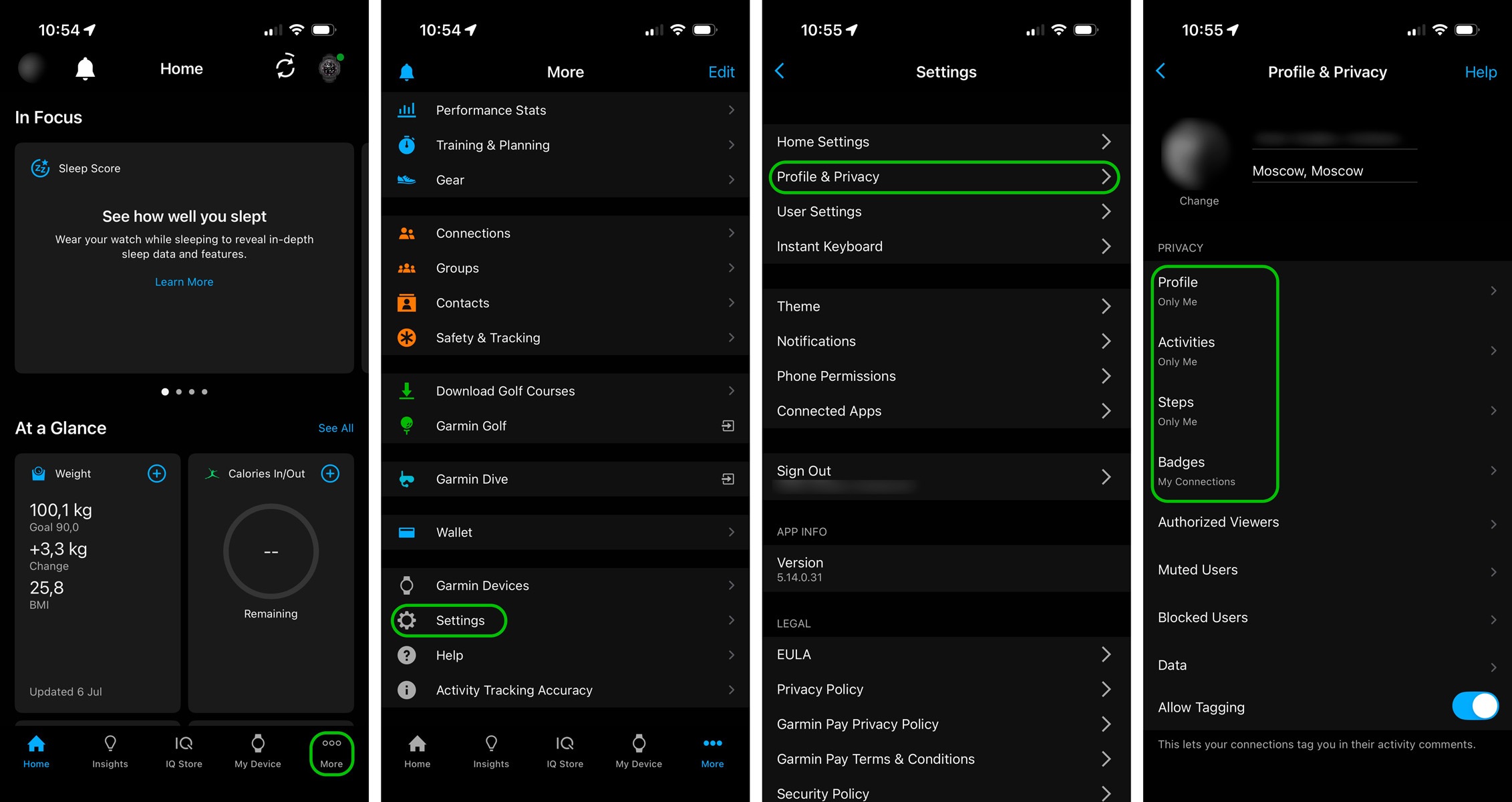
In the Garmin Connect mobile app:
Open Garmin Connect on your smartphone.
Tap the three dots (More section) in the bottom right corner.
Select Settings.
Locate Profile & Privacy.
How to find the privacy settings in Garmin Connect for iOS — the process is essentially the same in the Android version of the app
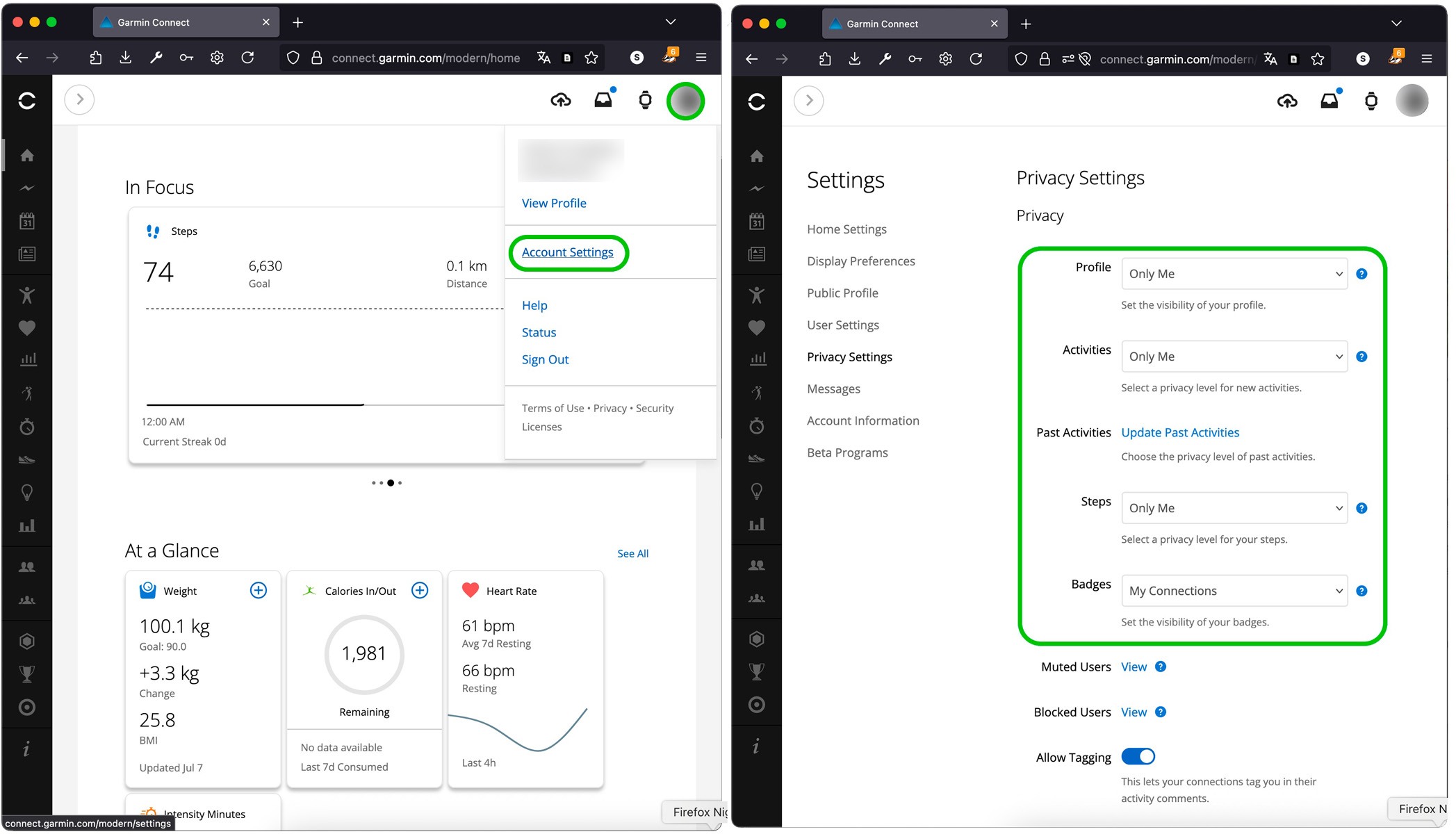
How to find the privacy settings in the web version of Garmin Connect
There, you can adjust the visibility of your profile, activities, and steps, and even decide who can see your badges. For the highest level of privacy, we recommend selecting Only me. This ensures that your personal information, workout stats, and other data are visible only to you.
How to hide your workout locations in Garmin Connect
Revealing your routes is one of the most significant privacy risks. This could allow malicious actors to track you in near real-time.
Analysis of publicly available geodata has repeatedly revealed leaks of highly confidential information — from the locations of secret U.S. military bases exposed by anonymized heatmaps of service members’ activity, to the routes of head-of-state motorcades, pieced together from their bodyguards’ smartwatch tracking data. All this data ended up publicly accessible, not because of a hack, but due to incorrect privacy settings within the app itself, which broadcasts all of the owner’s movements online by default.
These leaks clearly showed that data from wearable sensors can cause a lot of problems for their wearers. Even if you’re not guarding top government officials, training maps can reveal your home address, workplace, and other frequently visited locations.
Garmin’s tactical watch models include a Stealth mode feature, designed specifically for military personnel. In their line of work, a lack of privacy can be a matter of life and death. However, with Garmin Connect, you can set up your own privacy zones for almost every Garmin gadget.
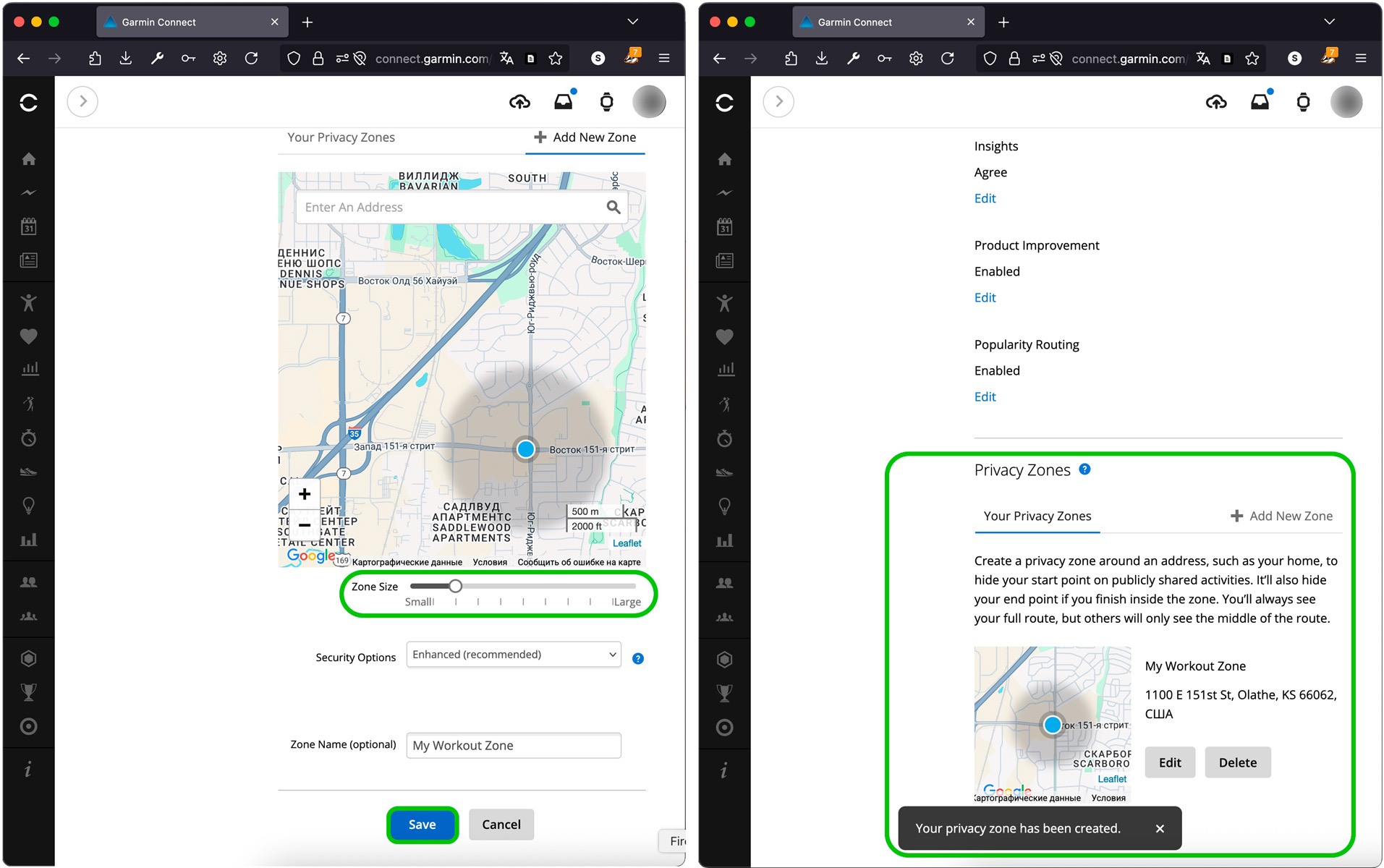
Setting up privacy zones:
Open your Garmin Connect profile in a browser (the feature isn’t available in the mobile app).
Enter your home address or some other place you want to hide.
Set a zone radius — we recommend at least 500 meters.
How to set up privacy zones in Garmin Connect
Garmin’s Privacy Zones are quite similar to a feature Strava introduced back in 2013. They automatically hide the start and end points of your workouts if these fall within a designated area. And even if you share your workout with the whole world, it’ll be impossible to see your exact location — for example, your home.
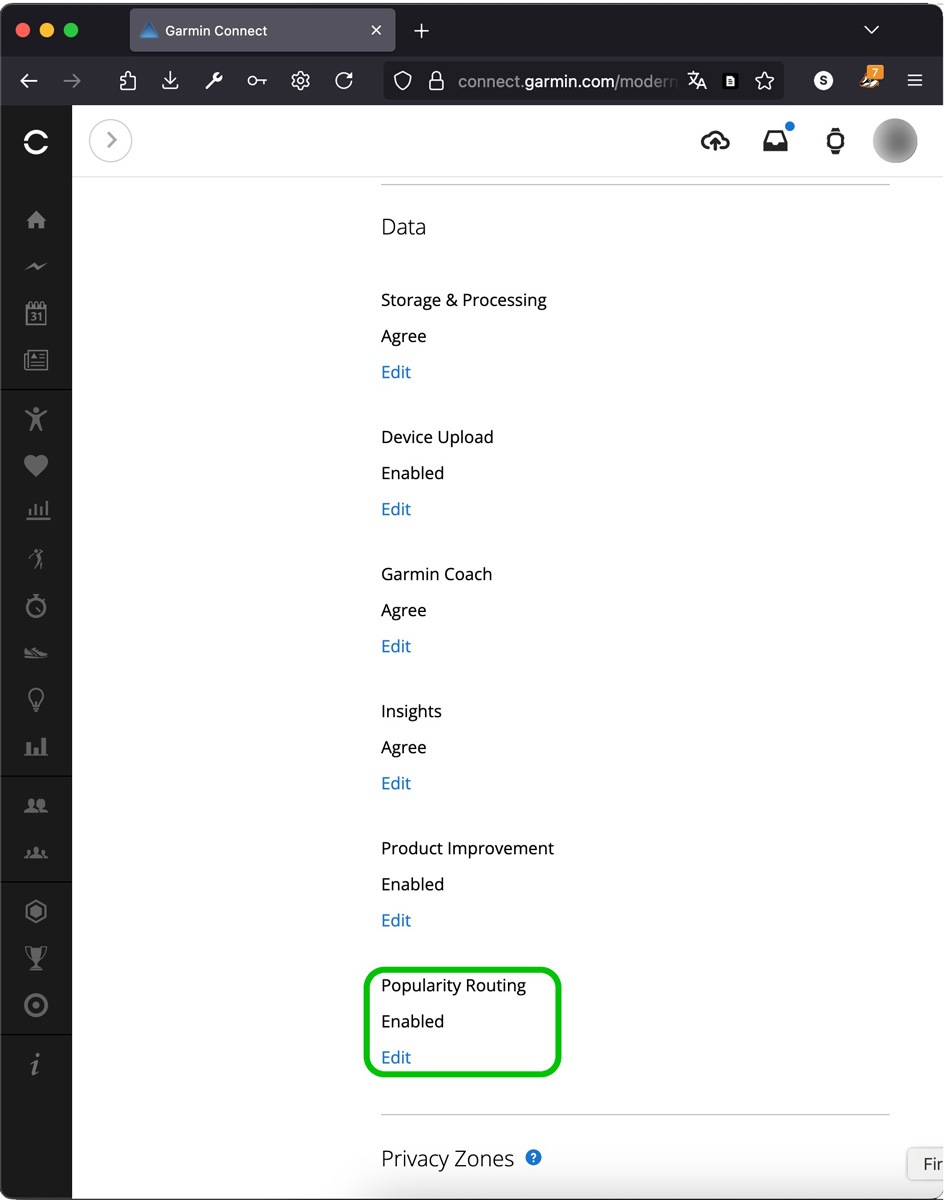
Just a bit further up in that same section, it’s worth checking out other ways your movement data might be used: for instance, to create heatmaps based on user routes. You can opt out of sharing this kind of data. To understand what each function does and how to adjust it, simply tap Edit directly below it. A description will pop up, explaining what data is collected and how it’s used.
How to adjust advanced data collection and sharing settings in Garmin Connect
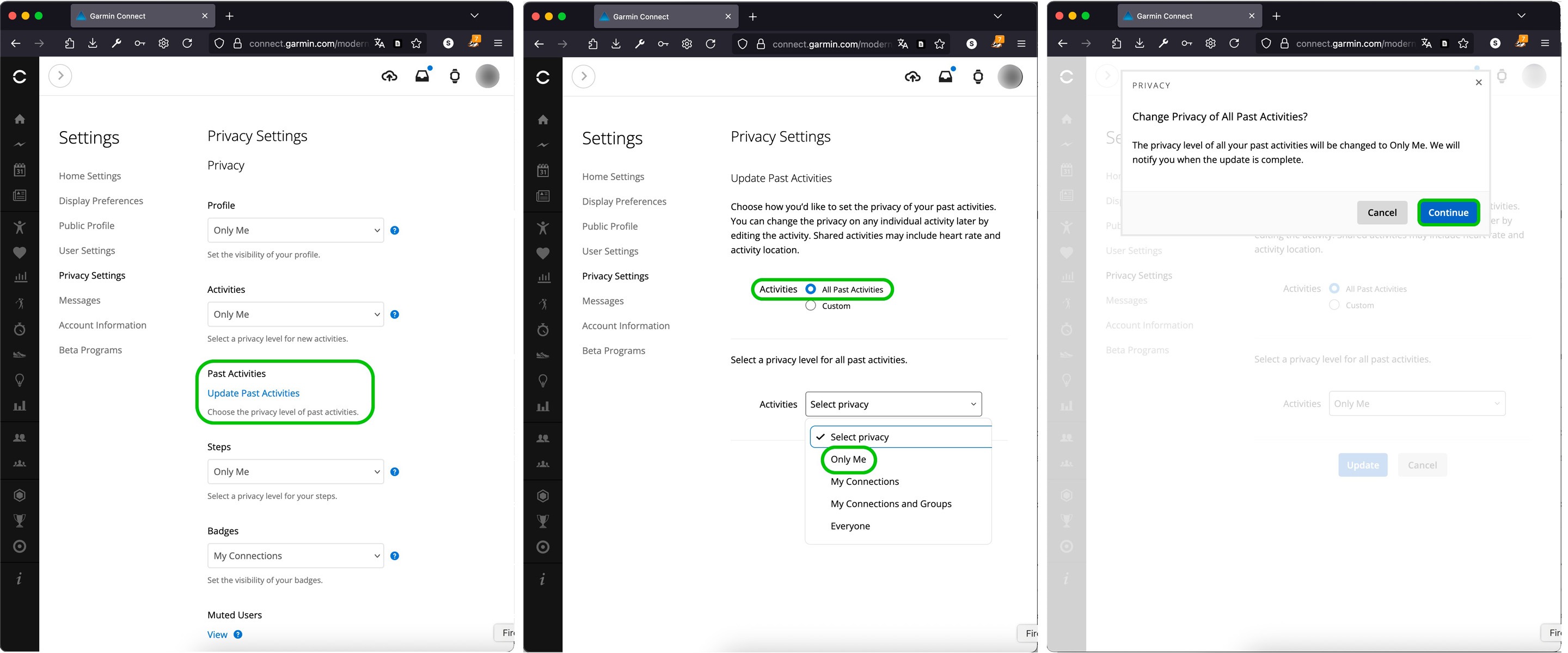
How to change the visibility of past activities in Garmin Connect
Changing your privacy settings won’t retroactively apply to activities you’ve already saved in Garmin Connect. Even if you crank up your privacy to the max right now, all your past recordings will still show up with the visibility settings they had when you first created them. So if you’ve been using Garmin for a while and you’re just now getting around to tweaking your privacy, you’ll want to update your previously saved activities as well.
Locate Update Past Activities, select a new level of privacy for all past workouts, and confirm your changes.
You can only change the privacy settings for your previously saved activities in the web version of Garmin Connect.
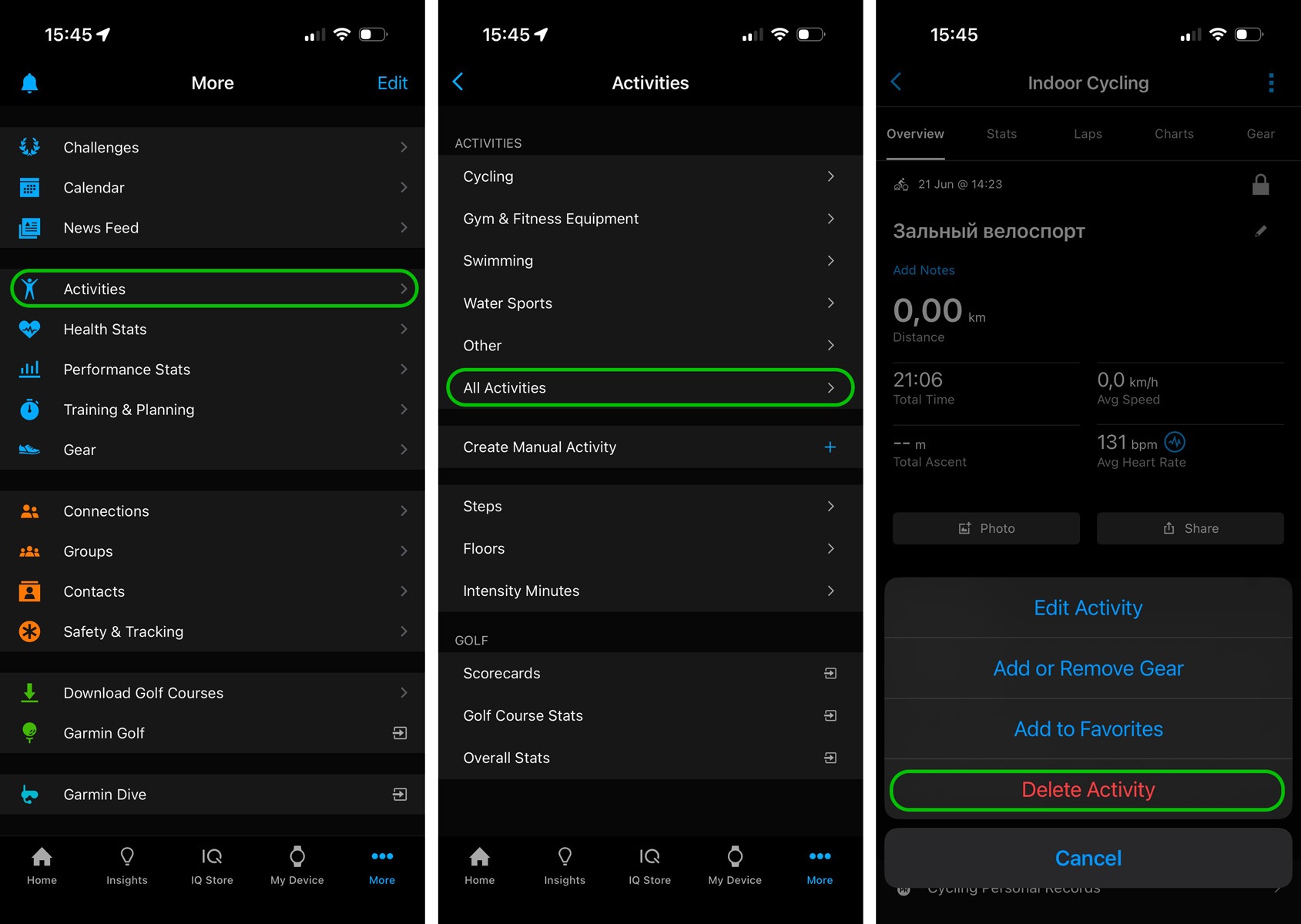
How to delete individual activities in Garmin Connect
You can remove specific saved activities so no one can see them.
Open the Garmin Connect mobile app.
Navigate to More → Activities → All Activities.
Select the workout you want to delete.
Tap the three dots in the top right corner.
Tap Delete Activity.
How to remove individual workout records from Garmin Connect
If you need to wipe all your previously saved activities, and you have a lot of them, it might be easier to delete your old account and create a new one. However, keep in mind that deleting your account will result in the loss of all your workout data and health metrics.
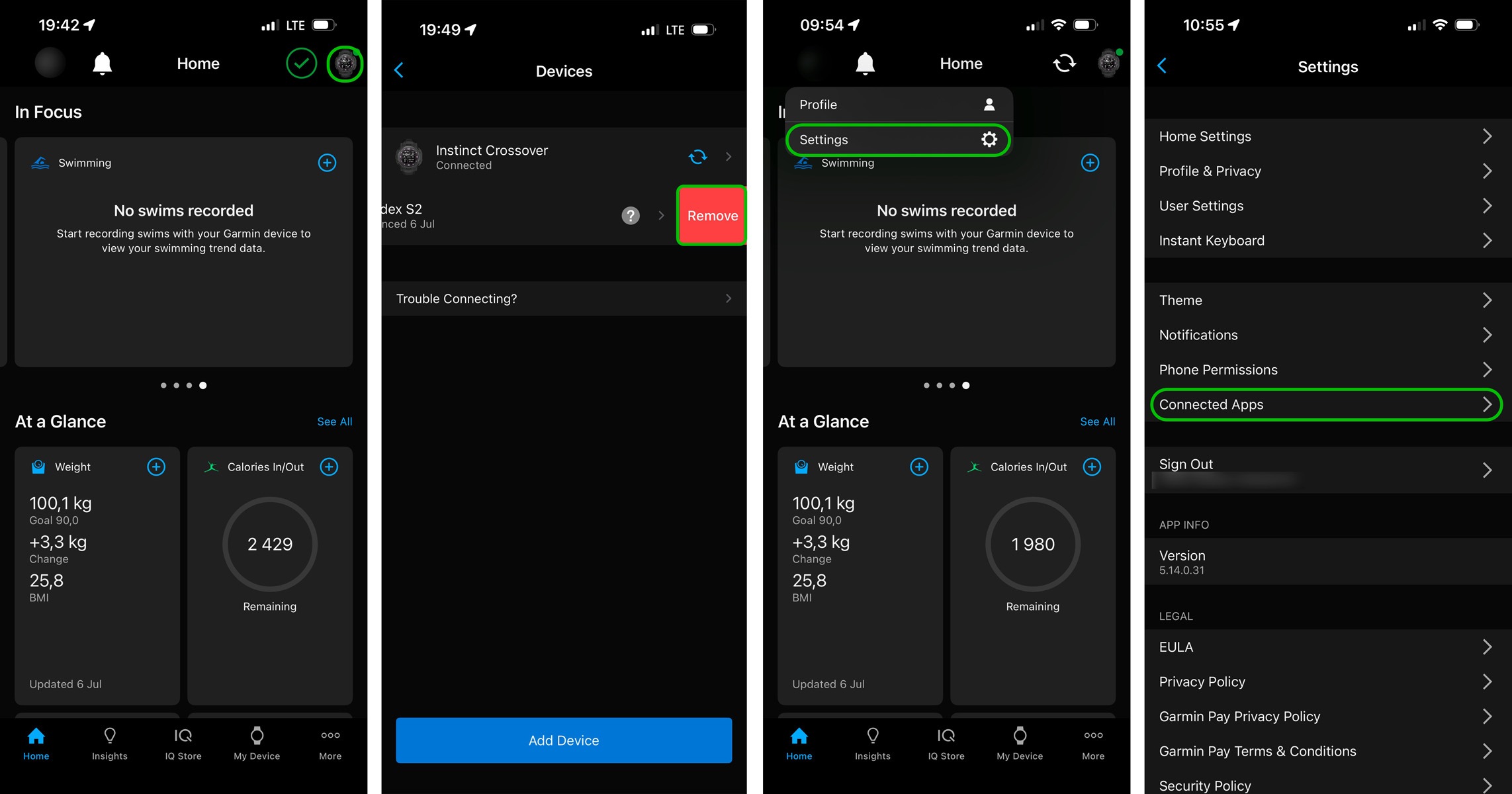
How to monitor connected devices and services in Garmin Connect
Another potential source of personal data leaks comes from devices and services that have access to your Garmin Connect account. If you frequently switch out your sports gadgets, make sure you remove them from your account.
Tap the device icon in the top right corner of Garmin Connect.
The Devices section will open.
Remove any unfamiliar or unused devices by swiping left on them.
Next, check the list of third-party apps that have access to your account:
Open Settings.
Navigate to Connected Apps, and remove those you no longer use.
How to remove old devices and connected apps from Garmin Connect
How to protect yourself from vulnerabilities in Connect IQ
It’s not just incorrect privacy settings in Garmin Connect that can expose your data. Vulnerabilities in apps and watch faces available through the Connect IQ Store marketplace can also lead to data leaks. In 2022, security researcher Tao Sauvage found that the Connect IQ API developer platform contained 13 vulnerabilities. These could potentially be exploited to bypass permissions and compromise your watch.
Some of these vulnerabilities have been lurking in the Connect IQ API since its very first release back in 2015. Over a hundred models of Garmin devices were at risk, including fitness watches, outdoor navigators, and cycling computers. Fortunately, these vulnerabilities were patched in 2023, but if you haven’t updated your device since before then (or you purchased a used gadget), it’s crucial to update its firmware to the latest version.
Even though these specific vulnerabilities have been fixed, the Connect IQ Store remains a potential entry point for future threats. Because of this, we recommend the following:
Avoid installing third-party watch faces and apps from unknown developers in the Connect IQ Store.
Stick to official Garmin watch faces built into your device.
Make sure to regularly update your Garmin devices. You can do this through Garmin Express on your desktop, or by using Garmin Connect on your smartphone.
Turn off automatic app downloads from the Connect IQ Store in the settings.
General recommendations
In an era of increasing cyberthreats to IoT devices, properly configuring the privacy settings on your wearables is crucial. Your digital security doesn’t just depend on device vendors; it also relies on the steps you take to protect your personal data.
Curb your connections on the Garmin Connect social network.
Ignore connection requests from strangers.
To manage privacy for popular apps and gadgets, be sure to use our free service, Privacy Checker. And to stay on top of the latest cyberthreats and respond quickly, subscribe to our Telegram channel. Finally, the specialized privacy protection modes in Kaspersky Premium ensure maximum security for your personal information and help prevent data theft across all your devices.
Below are detailed instructions on how to configure security and privacy for the most popular running trackers.
https://www.backbox.org/wp-content/uploads/2018/09/website_backbox_text_black.png00adminhttps://www.backbox.org/wp-content/uploads/2018/09/website_backbox_text_black.pngadmin2025-07-23 13:06:342025-07-23 13:06:34How to set up security and privacy in Garmin apps | Kaspersky official blog
https://www.backbox.org/wp-content/uploads/2018/09/website_backbox_text_black.png00adminhttps://www.backbox.org/wp-content/uploads/2018/09/website_backbox_text_black.pngadmin2025-07-23 12:06:462025-07-23 12:06:46Apple just launched a new device coverage plan. Here’s how it works (and if you should get it)
https://www.backbox.org/wp-content/uploads/2018/09/website_backbox_text_black.png00adminhttps://www.backbox.org/wp-content/uploads/2018/09/website_backbox_text_black.pngadmin2025-07-23 12:06:462025-07-23 12:06:46Coyote Banking Trojan First to Abuse Microsoft UIA
ANY.RUN’s services processes data on current threats daily, including attacks affecting supply chains. In this case study, we analyze examples of DHL brand abuse. The company is a leading global logistic operator, and attackers exploit its recognition to send phishing emails, potentially targeting its partners.
We will demonstrate how ANY.RUN’s solutions can be used to identify such threats, collect technical indicators, and enhance security. Here are the key findings.
Key Takeaways
Supply chain attacks are on the rise: adversaries actively exploitthird-party relationships.
Real-world example: attackers impersonated DHL in phishing emails targeting partner organizations, like Meralco, using fake domains and deceptive attachments to collect credentials.
HTML attachment bypasses filters: lesser-known file extensions are used.
Credential theft via third-party form service: analysis with HTTPS MITM revealed a POST request containing plaintext credentials sent to a unique endpoint.
Shared visual lures identified by image hash: the DHL-themed image in the phishing email was reverse-searched via its SHA256 hash, revealing five other phishing campaigns using the same lure.
DHL-imitating domains and filenames as indicators: analysts identified 39 phishing domains (e.g., dhlshipment*, -dhl.) and over 300 malware samples with DHL-themed filenames (e.g., dhlreceipt*.pdf) — exposing common obfuscation patterns and phishing themes used to trick users.
Supply Chain Attack Growing Dynamics
A supply chain attack is a type of cyberattack where adversaries gain access to a target organization by compromising a less protected external participant in the interaction chain: a contractor, a supplier, a technology partner, or another link.
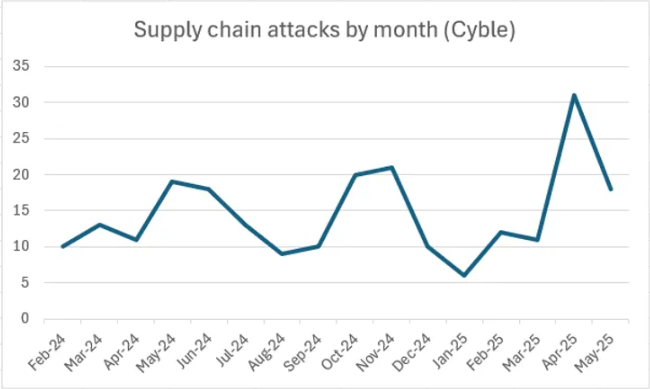
The data from Cyble reveals supply chain attacks steady growth. From October 2024 to May 2025, an average of more than 16 incidents per month has been recorded, a 25% increase from the previous eight-month period. A sharp spike in activity was observed in April and May 2025. This dynamic indicates growing attacker interest in this attack model and its increasingly widespread use in real campaigns.
Real-world examples include the Scattered Spider group’s attack on Australian airline Qantas. The attackers penetrated through a third party (contact center), which is typical for such attacks.
DHL Brand Abuse in Phishing Campaigns
Suppose we are information security specialists at a company that collaborates with DHL and could be used by attackers as an intermediate link in the attack chain.
Our task is to detect timely phishing emails disguised as official correspondence from DHL. Such messages may target company employees, contractors, or other DHL partners.
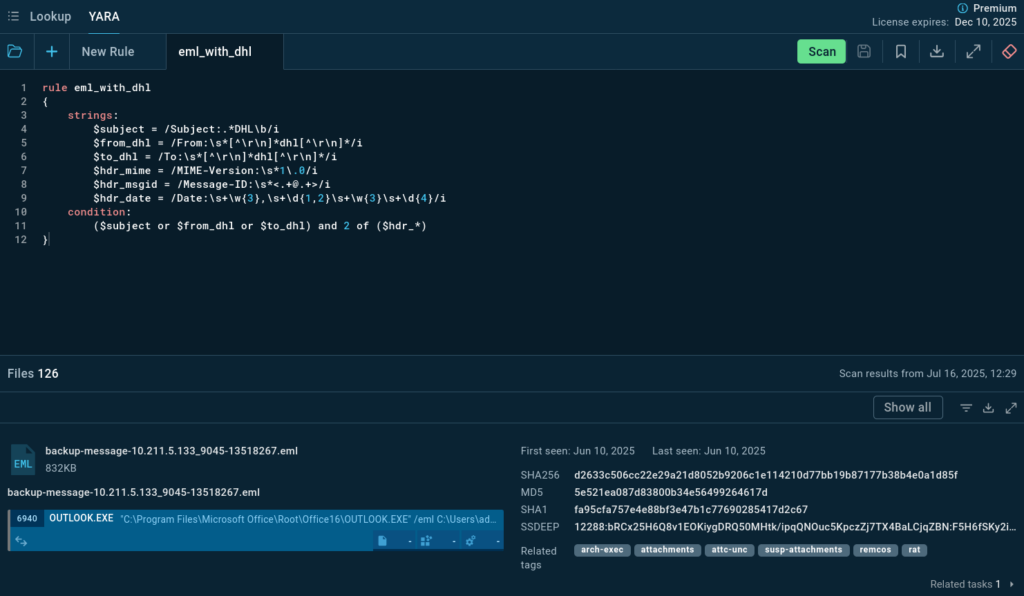
To identify such activity, we use ANY.RUN’s YARA Search — we’ll create a rule that allows us to find .eml files mentioning DHL in the From, To, and Subject headers. This will help collect indicators, identify malicious attachments, and assess potential risks to our infrastructure.
YARA rule search in Threat Intelligence Lookup
The search delivered over 110 files and associated analysis sessions (tasks) from the ANY.RUN’s Interactive Sandbox. This data allows us to:
Identify malicious campaigns that exploit the DHL brand, including cases of possible compromise of official email accounts and infrastructure of the company or its contractors.
Identify applied tactics, techniques, and procedures (TTPs).
Classify the malware involved.
Not all found objects contain malicious payloads, but many are interesting from an analytical perspective, as examples of malicious brand abuse.
How to Detect DHL-themed Phishing in Your Infrastructure
To effectively detect and analyze DHL-themed phishing attempts within your infrastructure, consider the following practices:
Scan Your Endpoints with YARA Rule
Utilize a YARA rule to scan your email endpoints for any emails related to DHL. Here’s an example of a YARA rule you can use:
This rule helps identify emails that mention DHL in the subject line, sender, or recipient fields.
Analyze Suspicious Emails, Files, and URLs in ANY.RUN’s Interactive Sandbox
ANY.RUN’s Interactive Sandbox allows you to safely open and interact with suspicious files and URLs.
You can safely open emails and click through any attachments or links within a controlled environment. This helps in understanding the full attack chain from the initial phishing email to the execution of any malicious payloads.
Use TI Lookup to Gather Context on Alerts
Leverage ANY.RUN’s Threat Intelligence Lookup to quickly verify whether an artifact (URLs, file hashes, or even command line activities) involved in an alert within your company is associated with a specific attack.
Gather context on the alerts by identifying related campaigns and understanding the broader context of the attacks. This helps in recognizing common tactics, techniques, and procedures (TTPs) used by attackers, allowing for faster and more accurate responses to potential threats.
Case Study: Analyzing a Phishing Email targeting DHL counterparties
We shall analyze in ANY.RUN’s Sandbox one of the emails found by YARA scanning.
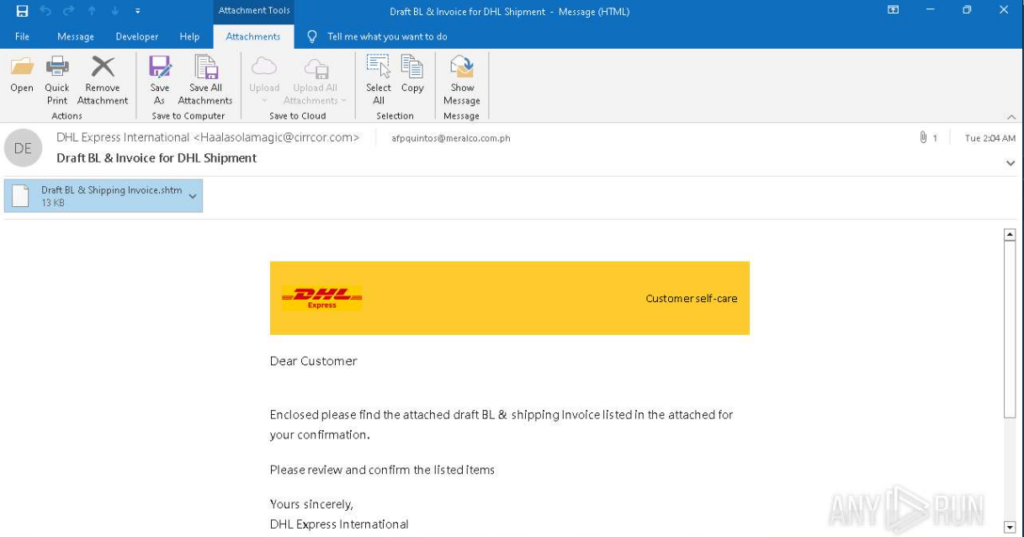
The email sender masquerades as DHL Express International. The “From” field displays the corresponding display name, but the actual sender address Haalasolamagic@cirrcor[.]com belongs to a third-party organization not affiliated with DHL.
The email is directed to an address in the meralco[.]com[.]ph domain, belonging to Meralco, the largest energy company in the Philippines. Previously, DHL objects were mentioned in Meralco’s planned power outage notifications, and in May 2025, Meralco’s subsidiary MSpectrum announced a joint project with DHL Supply Chain Philippines.
Based on this, we can assume that the cooperation between DHL and Meralco does exist, and the attackers’ use of such an addressee may not be coincidental.
The email looks like a part of an attempt at a supply chain attack. The email is not directed to DHL, but to an organization affiliated with it. The use of corporate identity and business context may be part of a scenario where attackers try to gain access to the main target through its partners or contractors — a typical technique in targeted campaigns.
The email body uses DHL’s corporate identity and phrasing typical for business correspondence. The recipient is asked to open an attachment — a file named “Draft BL & Shipping Invoice.shtm,” allegedly containing a preliminary invoice and waybill for confirmation. The .shtm (a variant of .html) extension is likely used for masking and bypassing email filters.
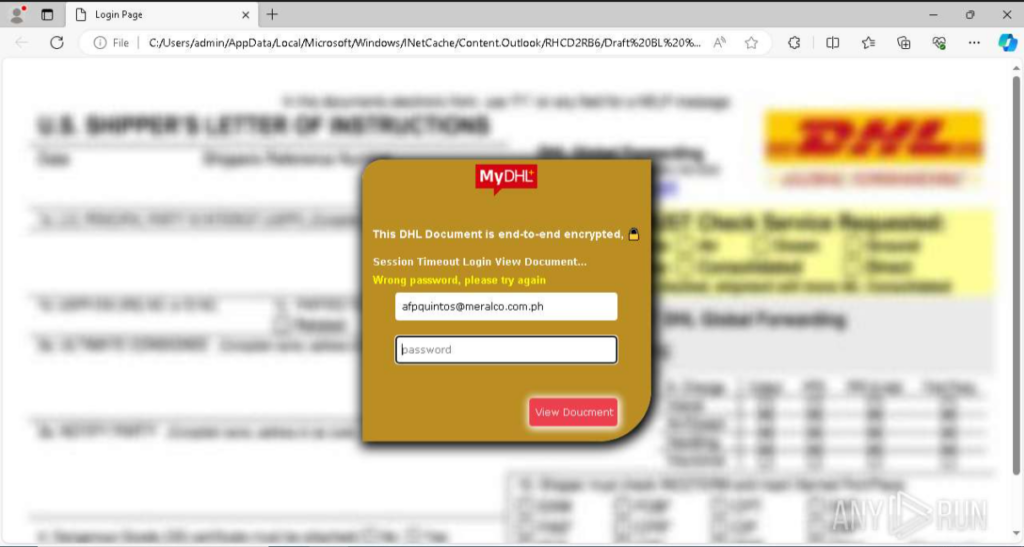
When the attached file is opened in a browser, a DHL-styled web page is displayed with a password submission form. The user is asked to authenticate to view an allegedly encrypted document supposedly sent from DHL. This is typical for phishing pages imitating official delivery services and used to collect credentials.
Web page with fake credential-stealing authentication form
Network Activity Analysis
The network activity generated while interacting with this form contains a request to submit-form[.]com.
submit-form.com in the Connections section of the Sandbox analysis
This service is used to collect data entered in HTML forms and allows redirecting it directly to a specified email address.
If we try to analyze the network request sent when entering data into the form, we’ll only see a connection through port 443. The connection is encrypted, and its content, including the entered password, is not available for viewing without applying MITM methods.
MITM Analysis
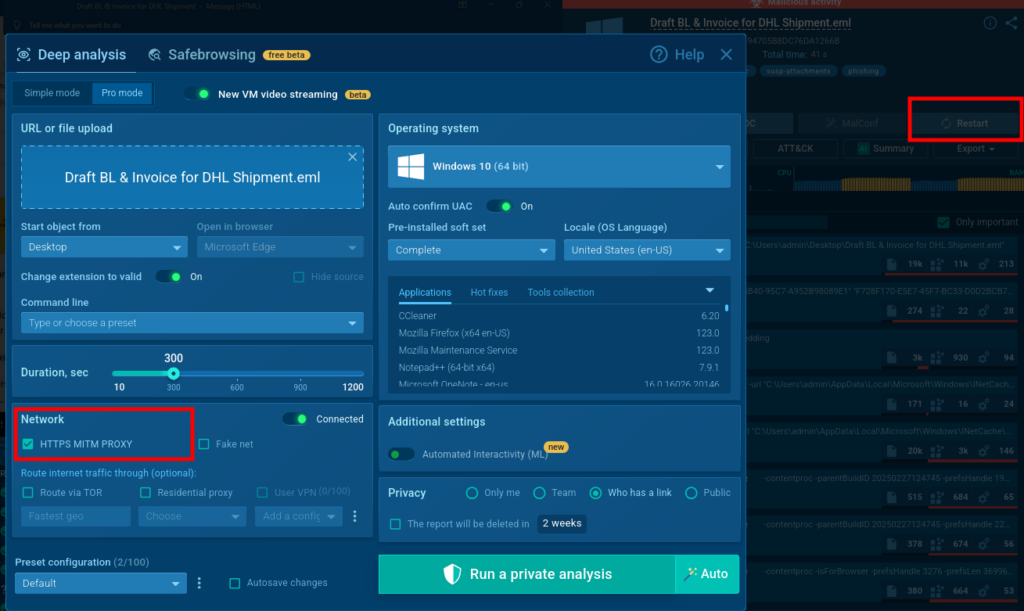
To get more information, we restart the analysis of this email in ANY.RUN’s Sandbox with the HTTPS-MITM-PROXY (MITM) function enabled to get access to the network packet contents.
Click Restart in a sandbox session to run the analysis with different parameters
In the new analysis with MITM enabled, we open the attached .shtm file and enter a password in the form, for example “password999,” then click “View Document”.
Going to the HTTP Requests tab, we find a POST request sent to https://submit-form[.]com/7zFSu099A.
submit-form.com request in the HTTP Requests section of the Sandbox analysis
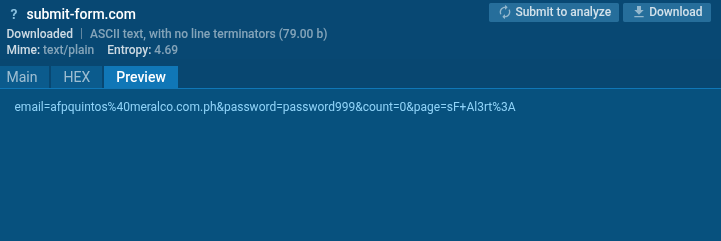
The request contents confirm the transfer of entered data: the request body contains form field values, including the entered password. This proves that the attacker uses the third-party service submit-form[.]com to collect authentication data entered by the victim on the phishing page.
Request forwarding user’s password
Submit-form dot com Usage Analysis
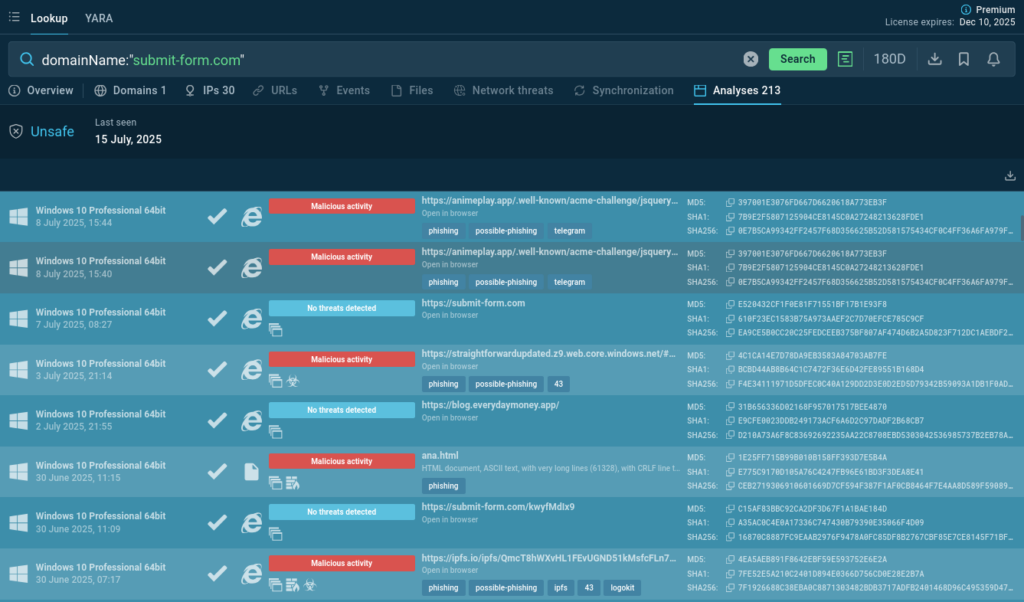
Using ANY.RUN Threat Intelligence Lookup to check the submit-form[.]com domain and related campaigns, we find more than 200 public analyses featuring the website. Most are marked as malicious: attackers actively use submit-form[.]com to intercept data entered on phishing pages, including passwords and email addresses.
Sandbox analyses featuring the website for exfiltrated user data
Now we can estimate the relevance and scale of such threats and make decisions about blocking/monitoring of this domain.
Image-Based Search for Similar Attacks
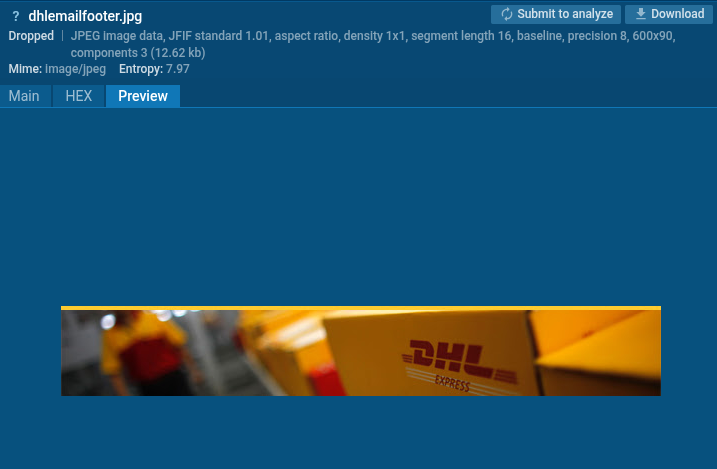
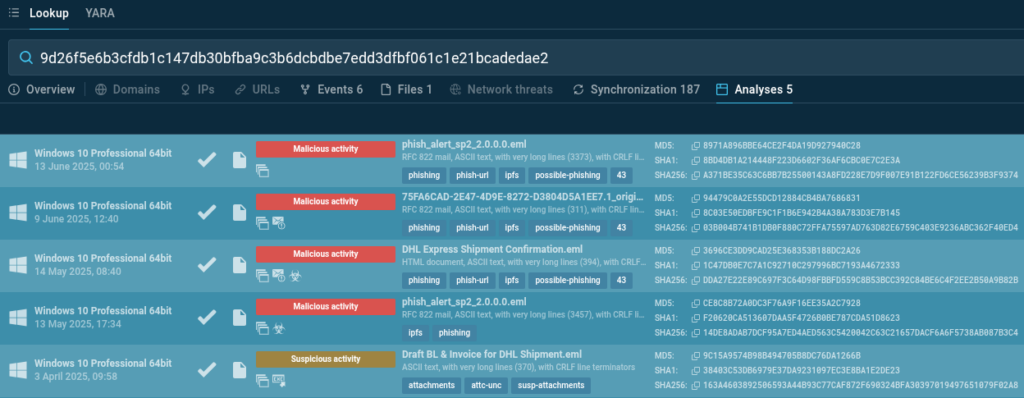
To find additional indicators of similar attacks, we have analyzed the image imitating DHL design used in the email above. Using this image, we can find other phishing campaigns using the same file, thus expanding our set of indicators and understanding of brand abuse scale.
Image from the phishing email searchable by hash in TI Lookup
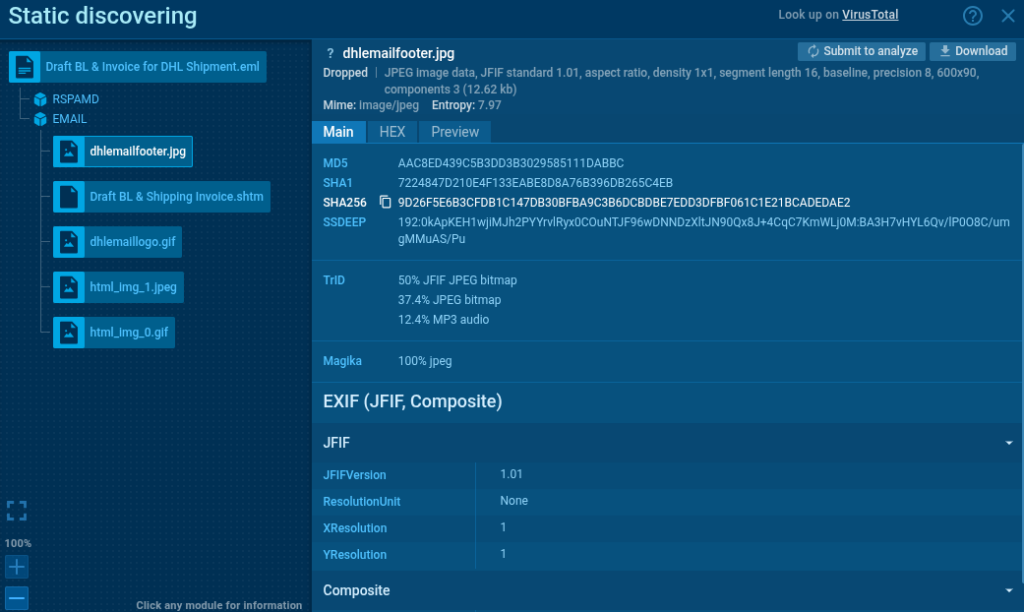
We extract the image’s SHA256 hash from the static analysis and perform a search for the image through ANY.RUN’s TI Lookup.
The image’s hash in the file analysis
The search returns 5 analyses featuring identical images. They were used in campaigns targeting various addresses that may belong to potential contractors, clients, or company employees.
Hash search results: sandbox analyses of similar attacks
These analyses allow us to study additional social engineering techniques and various phishing strategies and to collect threat indicators: email subjects, sender IP addresses, malicious domains.
Identifying Malicious Domains Imitating DHL
Now we search for domains that imitate official DHL resources to understand what phishing domains might be used to masquerade as partner organizations. This helps us understand:
What tactics and methods attackers use.
How such resources are designed (appearance, structure, content copying).
What payload they may distribute.
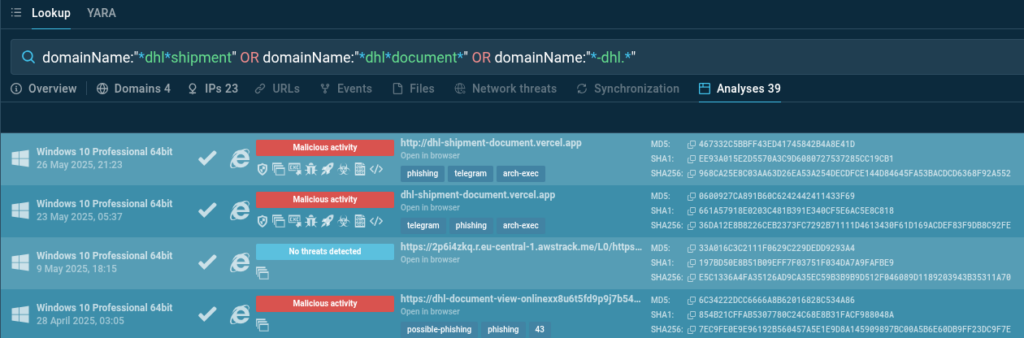
A simple query in ANY.RUN’s TI Lookup allows us to find phishing domains imitating DHL, focusing on typical patterns used in the logistics industry, including campaigns masquerading as delivery notifications, documents, or cargo movements.
Domains imitating DHL notifications in malware samples
The query results provide access to 39 public analyses containing the specified patterns. This data can be used to enrich IOC collection and improve phishing detection and filtering by security systems.
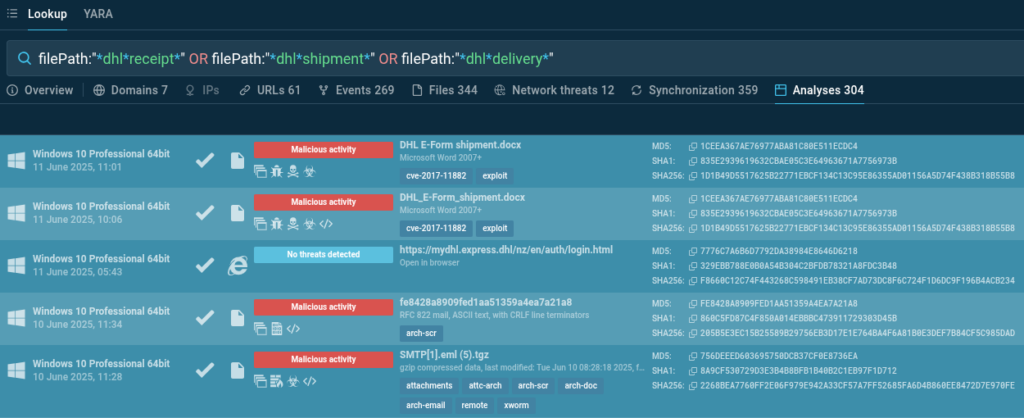
Malware samples containing files with DHL-related names
We have found over 300 analyses containing the requested patterns in file names. Not all of them are malicious, but a significant portion is worth analyzing for updating filters, detection rules, and raising awareness about DHL masquerading techniques in recent attacks.
Conclusion
In this case study, we demonstrated how ANY.RUN’s Interactive Sandbox and Threat Intelligence Lookup can be used to identify threats related to potential supply chain attacks. Using DHL as an example, we analyzed activity targeting its partners and contractors — from phishing emails to impersonating domains.
Such activity may be part of preparation for supply chain attacks. The presented methods allow timely identification of such risks and adaptation of approaches to the specifics of a particular organization.
About ANY.RUN
Over 500,000 cybersecurity professionals and 15,000+ companies in finance, manufacturing, healthcare, and other sectors rely on ANY.RUN. Our services streamline malware and phishing investigations for organizations worldwide.
Speed up triage and response: Detonate suspicious files using ANY.RUN’s Interactive Sandbox to observe malicious behavior in real time and collect insights for faster and more confident security decisions.
Improve threat detection: ANY.RUN’s Threat Intelligence Lookup and TI Feeds provide actionable insights into cyber attacks, improving detection and deepening understanding of evolving threats.
https://www.backbox.org/wp-content/uploads/2018/09/website_backbox_text_black.png00adminhttps://www.backbox.org/wp-content/uploads/2018/09/website_backbox_text_black.pngadmin2025-07-23 12:06:362025-07-23 12:06:36Beating Supply Chain Attacks: DHL Impersonation Case Study
Microsoft was the most impersonated brand in phishing attacks during Q2 2025, accounting for 25% of all attempts, according to Check Point Research.
Hackread – Latest Cybersecurity, Hacking News, Tech, AI & Crypto – Read More
https://www.backbox.org/wp-content/uploads/2018/09/website_backbox_text_black.png00adminhttps://www.backbox.org/wp-content/uploads/2018/09/website_backbox_text_black.pngadmin2025-07-23 11:06:472025-07-23 11:06:47Microsoft Most Phished Brand in Q2 2025, Check Point Research
https://www.backbox.org/wp-content/uploads/2018/09/website_backbox_text_black.png00adminhttps://www.backbox.org/wp-content/uploads/2018/09/website_backbox_text_black.pngadmin2025-07-23 11:06:472025-07-23 11:06:47The best Roku VPNs in 2025: Expert tested