Our favorite scalable options suit small businesses to the enterprise and can help your team efficiently handle customer relationships, sales, lead management, and more.
The financially motivated threat actor known as UNC2891 has been observed targeting Automatic Teller Machine (ATM) infrastructure using a 4G-equipped Raspberry Pi as part of a covert attack.
The cyber-physical attack involved the adversary leveraging their physical access to install the Raspberry Pi device and have it connected directly to the same network switch as the ATM, effectively placing
https://www.backbox.org/wp-content/uploads/2018/09/website_backbox_text_black.png00adminhttps://www.backbox.org/wp-content/uploads/2018/09/website_backbox_text_black.pngadmin2025-07-31 11:07:032025-07-31 11:07:03Report Links Chinese Companies to Tools Used by State-Sponsored Hackers
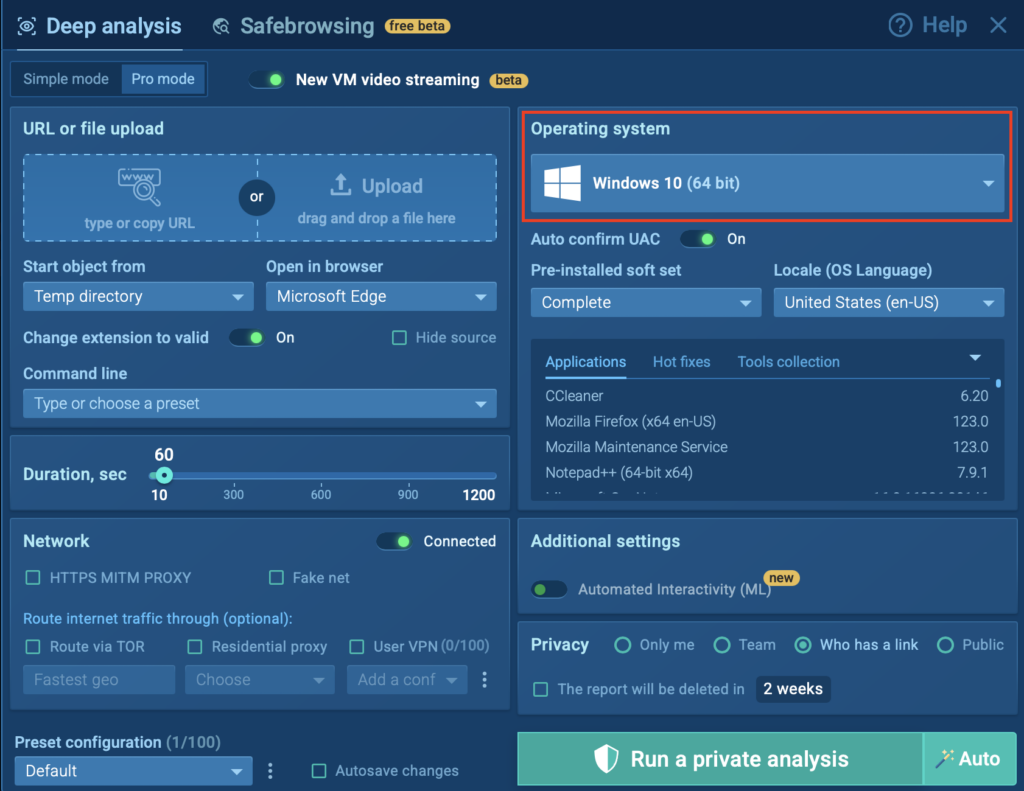
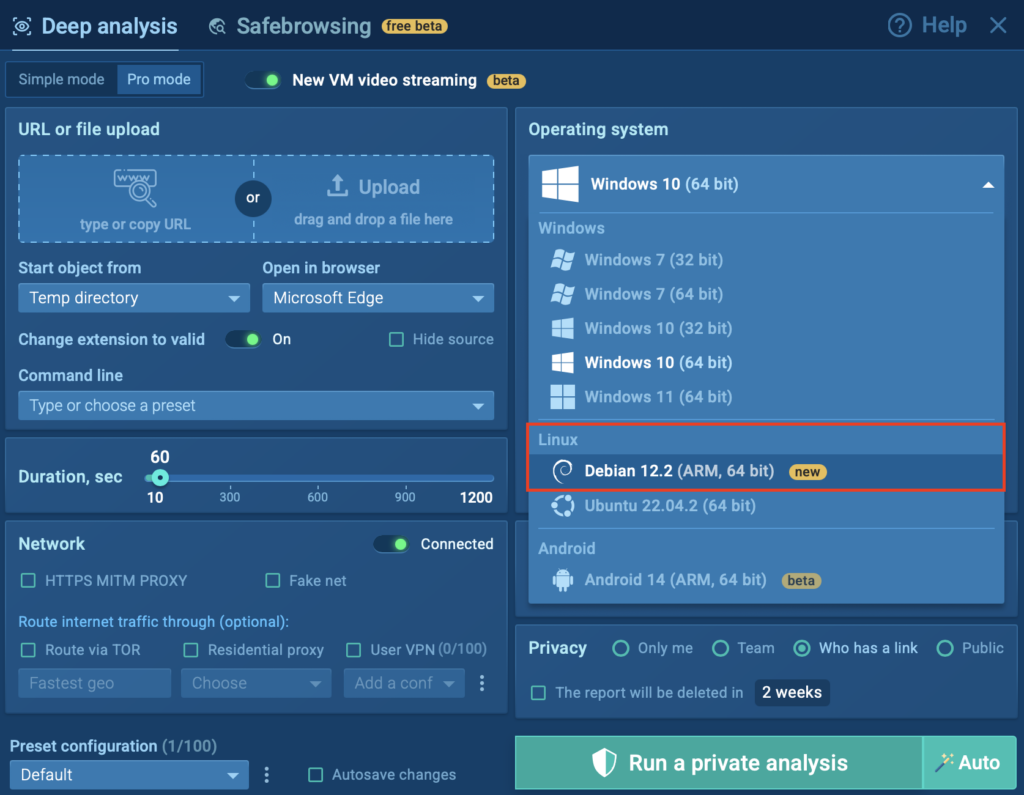
ANY.RUN’s Interactive Sandbox provides SOC teams with the fastest solution for analyzing and detecting cyber threats targeting Windows, Linux, and Android systems. Now, our selection of VMs has been expanded to include Linux Debian 12.2 64-bit (ARM).
With the rapid rise of ARM-based malware, the sandbox helps businesses tackle this threat through proactive analysis and early detection.
Why ARM-based Malware is a Serious Threat to Your Company
ARM processors are widely used in resource-constrained IoT devices, embedded systems, and even low-power servers, often deployed with weak security. These devices become prime targets for attackers looking to build massive botnets, steal resources, or gain unauthorized access. The three most popular types of ARM-based malware include:
Botnets: Turning devices into “zombies” for DDoS attacks.
Cryptojackers: Hijacking CPU for cryptocurrency mining.
Backdoors: Maintaining persistent unauthorized system access.
By expanding the capabilities to identify these threats, companies can prevent large-scale incidents in their infrastructure and reduce costs associated with downtime, recovery, and incident response.
Integrate ANY.RUN’s Interactive Sandbox in your SOC Automate threat analysis, cut MTTD, & boost detection rate
Upload a file/URL you want to analyze, configure the rest of your settings, and run your analysis.
The update further empowers your security team to detect malware and phishing early with ANY.RUN’s Interactive Sandbox:
Ensure fast analysis: Accelerate triage, incident response, and threat hunting with a dedicated ARM environment for instant insights into any threat’s behavior.
Cut costs: Analyze ARM-based malware along with Windows, Android, Linux x86 threats directly in ANY.RUN’s sandbox, eliminating the need for multiple platforms.
Improve incident escalation: Gather rich, actionable data during Tier 1 analysis to enhance informed handoffs to Tier 2 to mitigate active attacks more effectively.
Grow team’s expertise: Help your SOC analysts enhance their skills by analyzing real-world ARM threats, building confidence and knowledge through hands-on investigations.
Real-World Use Case: Kaiji Botnet
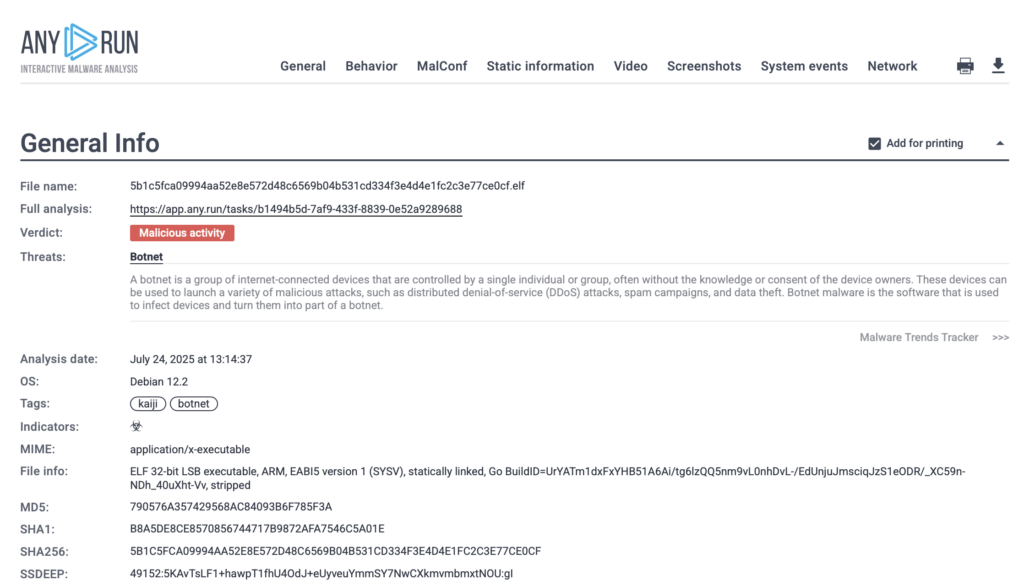
To demonstrate how ANY.RUN’s Linux Debian 12.2 (ARM, 64-bit) Sandbox operates, we analyzed a real-world sample of the Kaiji botnet, malware specifically compiled for the ARM architecture.
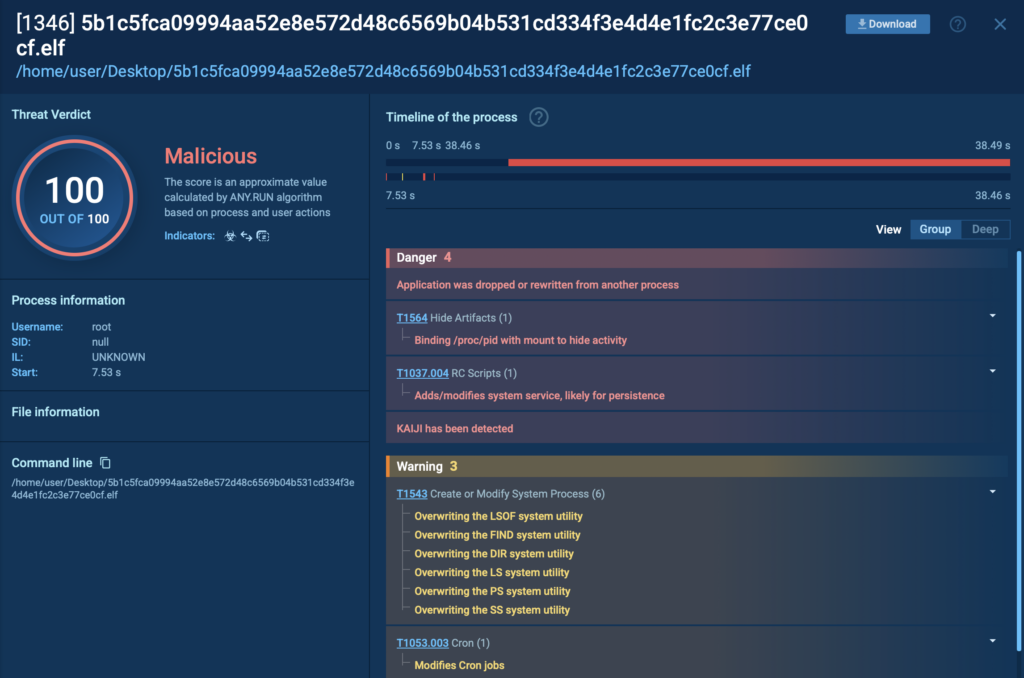
Kaiji is a botnet that targets Linux-based servers and IoT devices. Once executed, it performs system reconnaissance, masks its presence, disables security mechanisms like SELinux, and ensures persistence through systemd services and cron jobs. It replaces core system utilities and hides malicious activity by filtering command output, all of which are captured inside the sandbox.
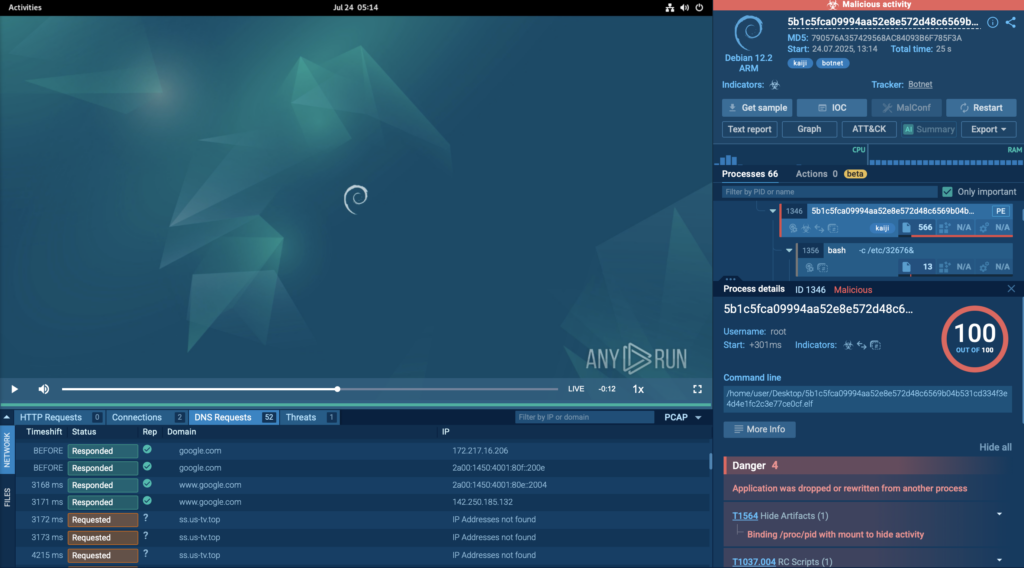
Let’s take a closer look at how Kaiji behaves from the moment it lands on the sandbox:
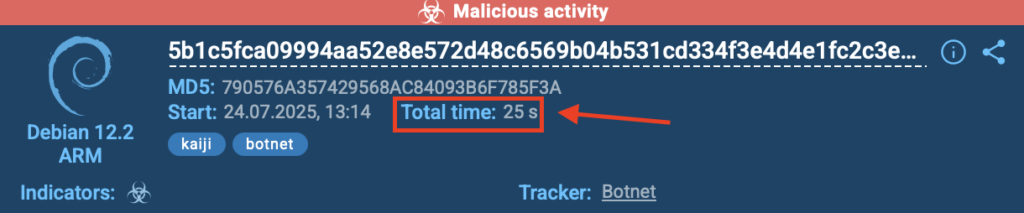
In this real-world case, ANY.RUN’s Debian 12.2 ARM sandbox detected the Kaiji botnet in just 25 seconds, as shown in the top-right corner of the sandbox interface. The threat was flagged as malicious activity and accurately labeled kaiji and botnet.
25 seconds for the detection of Kaiji botnet inside ANY.RUN’s Debian sandbox
This kind of speed delivers real value for security teams:
Respond faster: A near-instant verdict means teams can act before the threat spreads.
Reduce manual work: Quick detection cuts down time spent digging through logs or unclear alerts.
Stay ahead of evolving threats: With ARM-based malware on the rise, fast, reliable detection is key to staying protected.
Full Visibility with Process Tree
Beyond fast detection, ANY.RUN’s sandbox gives complete visibility into the attack’s behavior. On the right side of the screen, the process tree lays out every action taken by the malware. Clicking on each process reveals detailed information, from execution paths to commands and TTPs used.
Malicious process with all the relevant TTPs displayed inside the interactive sandbox
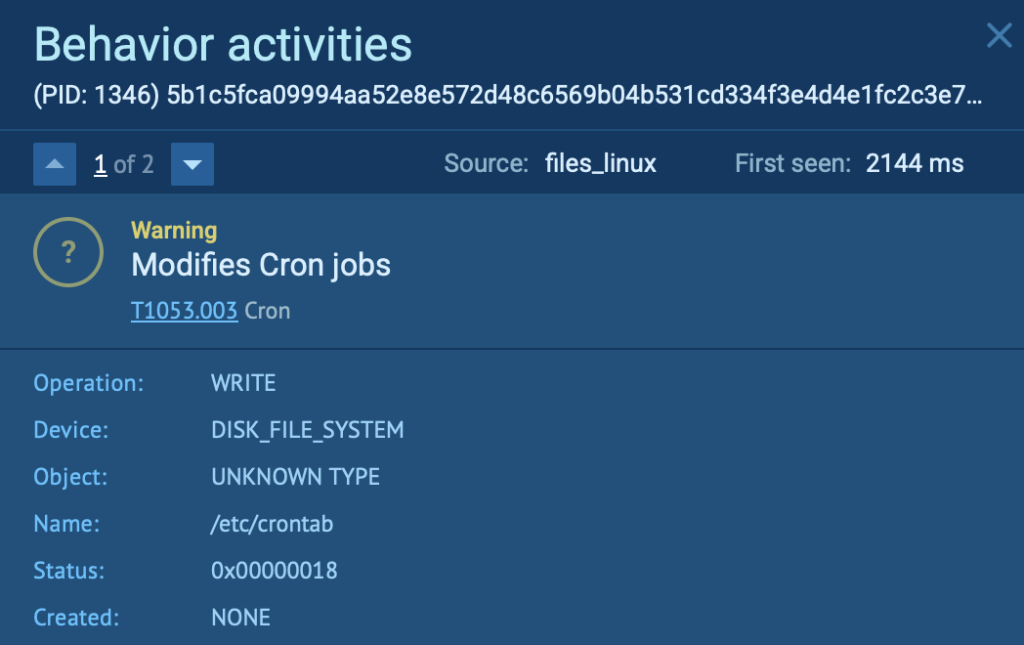
In this Kaiji case, for example, we can see how the malware attempts to maintain persistence by modifying /etc/crontab to run the /.mod script every minute. This script keeps the malicious process running in the background, even if one of the persistence methods fails; a tactic clearly visible and traceable through the sandbox’s behavioral logs.
Kaji botnet maintains persistence by modifying /etc/crontab
This level of insight helps SOC teams not only detect threats quickly, but understand them deeply, supporting better response, reporting, and threat hunting.
Track Network and File Activity in Real Time
Just below the VM window, ANY.RUN displays all network connections and file modifications made by the malware, offering analysts a complete picture of how the threat operates.
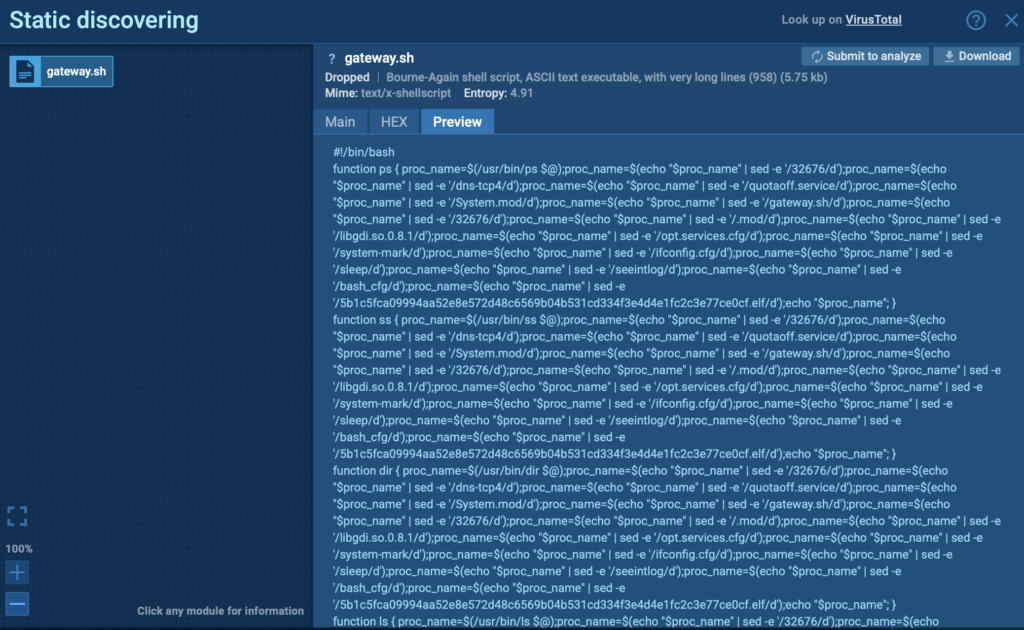
In this case, Kaiji’s behavior is clearly visible: the malware replaces key system utilities and intercepts user commands, passing them to the original tools while filtering the output to hide signs of infection. This is handled via the /etc/profile.d/gateway.sh script, which uses sed to remove specific keywords like 32676, dns-tcp4, and the names of hidden files from command output; a stealthy evasion technique that can be easily overlooked without deep behavioral analysis.
Kaji replaces core system utilities via the /etc/profile.d/gateway.sh script
With this visibility, security teams can trace every move, catch hidden modifications, and build accurate IOCs for future detection and response.
Complete Results, Ready to Investigate or Share
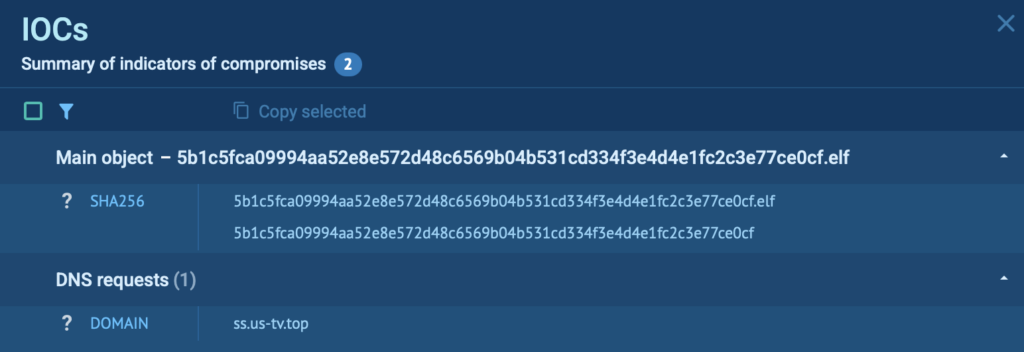
Once the analysis is complete, ANY.RUN’s sandbox gives you everything you need to take the next step. The IOCs tab gathers all critical indicators, including IPs, domains, file hashes, and more, in one place, so there’s no need to jump between views or dig through raw logs.
IOCs neatly organized inside ANY.RUN’s sandbox
You’ll also get a clear, structured report that maps out the full attack chain from start to finish. Whether you’re documenting a case, sharing findings with your team, or enriching threat intelligence feeds, the report is built to support fast, confident action.
Exportable sandbox report with complete attack chain overview
This end-to-end visibility makes every investigation smoother, and every response stronger.
About ANY.RUN
Trusted by over 500,000 security professionals and 15,000+ organizations across finance, healthcare, manufacturing, and beyond, ANY.RUN helps teams investigate malware and phishing threats faster and with greater precision.
Accelerate investigation and response: Use ANY.RUN’s Interactive Sandbox to safely detonate suspicious files and URLs, observe real-time behavior, and extract critical insights, cutting triage and decision time dramatically.
Enhance detection with threat intelligence: Leverage Threat Intelligence Lookup and TI Feeds to uncover IOCs, tactics, and behavior patterns tied to active threats, 6empowering your SOC to stay ahead of attacks as they emerge.
https://www.backbox.org/wp-content/uploads/2018/09/website_backbox_text_black.png00adminhttps://www.backbox.org/wp-content/uploads/2018/09/website_backbox_text_black.pngadmin2025-07-31 11:06:532025-07-31 11:06:53Detect ARM Malware in Seconds with Debian Sandbox for Stronger Enterprise Security
https://www.backbox.org/wp-content/uploads/2018/09/website_backbox_text_black.png00adminhttps://www.backbox.org/wp-content/uploads/2018/09/website_backbox_text_black.pngadmin2025-07-31 10:06:482025-07-31 10:06:48Best small business CRM software in 2025: Inexpensive customer relationship solutions
Phishing remained the top method of initial access this quarter, appearing in a third of all engagements – a decrease from 50 percent last quarter. Threat actors largely leveraged compromised internal or trusted business partner email accounts to deploy malicious emails, bypassing security controls and gaining targets’ trust. Interestingly, the objective of the majority of observed phishing attacks appeared to be credential harvesting, suggesting cybercriminals may consider brokering compromised credentials as simpler and more reliably profitable than other post-exploitation activities, such as engineering a financial payout or stealing proprietary data.
Ransomware and pre-ransomware incidents made up half of all engagements this quarter, similar to last quarter. Cisco Talos Incident Response (Talos IR) responded to Qilin ransomware for the first time, identifying previously unreported tools and tactics, techniques, and procedures (TTPs), including a new data exfiltration method. Our observations of Qilin activity indicate a potential expansion of the group and/or an increase in operational tempo in the foreseeable future, warranting this as a threat to monitor. Additionally, ransomware actors leveraged a dated version of PowerShell, PowerShell 1.0, in a third of ransomware and pre-ransomware engagements this quarter, likely to evade detection and gain more flexibility for their offensive capabilities.
Actors leverage compromised email accounts for phishing attacks aimed at credential harvesting
As mentioned above, threat actors used phishing for initial access in a third of engagements this quarter, a decrease from 50 percent last quarter when it was also the top observed initial access technique. However, last quarter featured a dominant voice phishing (vishing) campaign deploying Cactus and Black Basta ransomware that was significantly less present this quarter, potentially contributing to this decline.
Threat actors largely leveraged compromised internal or trusted business partner email accounts to send malicious emails, which appeared in 75 percent of engagements where phishing was used for initial access. Using a legitimate trusted account affords an attacker numerous advantages, such as potentially bypassing an organization’s security controls as well as appearing more trustworthy to the recipient. For example, in one phishing engagement, the targeted organization’s users were victims of a phishing campaign sent from the compromised email address of a legitimate business partner. The phishing emails leveraged malicious links directing victims to a fake Microsoft O365 login page that prompted visitors to authenticate with MFA, likely so the attacker could steal users’ credentials and session tokens.
We assess that credential harvesting was the end goal in the majority of phishing attacks this quarter, such as in the example highlighted above. Though the tactic of leveraging compromised valid email accounts is often associated with business email compromise (BEC) attacks, this observation suggests cybercriminals may consider brokering compromised credentials to be more reliably profitable than attempting to manipulate a target into making a financial payout. Further, not including a financial request in the email body likely makes an email less suspicious to a victim, potentially raising the chances of a successful attack. In one engagement, an attacker successfully compromised a user’s email account after the user clicked a link within a phishing email and provided their credentials to the phishing site. The adversary proceeded to send multiple internal spear phishing emails as the compromised user with a link to an internal SharePoint link, which then directed to a credential harvesting page that successfully tricked approximately a dozen additional users into entering their credentials.
Ransomware trends
Ransomware and pre-ransomware incidents made up half of all engagements this quarter, similar to last quarter. Talos IR observed Qilin and Medusa ransomware for the first time, while also responding to previously seen Chaos ransomware.
Qilin ransomware activity showcases previously unreported TTPs and suggests increased operational tempo
We responded to a Qilin ransomware incident for the first time this quarter, identifying tools and TTPs that have not been previously publicly reported. Specifically, we observed the operators leveraging a suspected custom compiled encryptor with hardcoded victim user credentials, Backblaze-hosted command and control (C2) infrastructure, and file transfer tool CyberDuck, an exfiltration method not previously associated with this threat actor or its affiliates. The threat actors likely leveraged stolen valid credentials to gain initial access, then used a combination of commercial remote monitoring and management (RMM) solutions to facilitate lateral movement and data staging, including TeamViewer, VNC, AnyDesk, Chrome Remote Desktop, Distant Desktop, QuickAssist, and ToDesk. To ensure persistent access until encryption was completed, the actors created an AutoRun entry in the Software registry Hive on each infected system to trigger the ransomware execution each time the system was rebooted and a scheduled task to silently relaunch Qilin at every new logon. These attack techniques ultimately led to a widespread infection requiring a complete rebuild of the Active Directory (AD) domain and password resets for all accounts.
Looking forward: Our analysis of Qilin activity this quarter indicates a potential expansion of the group of affiliates and/or an increase in operational tempo. In addition to this engagement, we saw additional Qilin ransomware activity kick off this quarter, but did not include it in our Q2 statistics as analysis was still ongoing after the quarter ended. Further, posts on the group’s data leak site show a doubling of disclosures since February 2025, suggesting this is a ransomware threat to monitor for the foreseeable future.
The North Korean state-sponsored cyber group Moonstone Sleet reportedly began deploying Qilin ransomware last February, and some security firms believe that affiliates from the RansomHub ransomware-as-a-service (RaaS) — whose data leak site went offline in early April 2025 — have also joined Qilin. After the RansomHub data leak site went offline, Qilin members were observed engaging with active RansomHub members and advertising an updated version of Qilin, likely in attempts to recruit new affiliates and expand operations.
Ransomware actors leverage dated version of PowerShell to evade detection
In a third of ransomware and pre-ransomware engagements this quarter, threat actors leveraged PowerShell 1.0, an older version of the scripting language that is most up-to-date at version 7.4. Using this insecure version gives attackers numerous potential advantages as it lacks security features that newer versions have built in, such as script block logging, which logs the content of executed scripts, and transcription logging, which records all input/output in PowerShell sessions. It also lacks an antimalware scan interface (AMSI), which allows antivirus tools to scan PowerShell code before it’s executed. Additionally, some endpoint detection and response (EDR) tools are designed to monitor behaviors typical of newer PowerShell versions, potentially enabling attackers to evade signature and behavior-based detections.
We observed threat actors leveraging PowerShell 1.0 for both defense evasion and discovery in ransomware and pre-ransomware engagements this quarter. For example, in a Medusa ransomware engagement, we saw the adversary using PowerShell 1.0 to add the folder “C:Windows” to the exclusion list of the victim’s antivirus (AV) solution, meaning the AV would not scan or monitor anything under the core operating system directory, severely compromising defenses. In a pre-ransomware engagement, the adversary leveraged PowerShell 1.0 to bypass script execution policy restrictions with the command “-ExecutionPolicy Bypass” and monitor peer-to-peer file transfers in the victim network. Ultimately, this tactic can make adversaries’ activity quieter from a logging perspective and give them more flexibility in terms of what they can perform on the system. Therefore, organizations should enforce use of PowerShell 5.0 or greater on all systems.
Targeting
Education was the most targeted industry vertical this quarter, a shift from last quarter when we did not see any engagements targeting education organizations. This trend is in line with observations documented in our 2024 Year in Review report, where we noted that the education sector saw the most ransomware attacks during the month of April, with a high volume of attacks in May and June as well. Additionally, education was also the most targeted vertical in FY24 Q3 and FY24 Q4.
Initial access
As mentioned, the most observed means of gaining initial access was phishing, followed by valid accounts, then exploitation of public facing applications and brute force attacks.
Recommendations for addressing top security weaknesses
Implement properly configured MFA and other access control solutions
Over 40 percent of engagements this quarter involved MFA issues, including misconfigured MFA, lack of MFA, and MFA bypass. In multiple engagements, threat actors capitalized on MFA products that were configured to enable self-service, adding attacker-controlled devices as authentication methods to bypass this defense and establish a path of persistence. Talos IR recommends monitoring and alerting on the following for effective MFA deployment: abuse of bypass codes, registration of new devices, creation of accounts designed to bypass or be exempt from MFA, and removal of accounts from MFA.
Configure robust and centralized logging capabilities across the environment
A quarter of engagements involved organizations with insufficient logging capabilities that hindered investigative efforts. Understanding the full context and chain of events performed by an adversary on a targeted host is vital not only for remediation but also for enhancing defenses and addressing any system vulnerabilities for the future. To address this issue, Talos IR recommends organizations implement a Security Information and Event Management (SIEM) solution for centralized logging. In the event an adversary deletes or modifies logs on the host, the SIEM will contain the original logs to support a forensics investigation. Further, organizations should deploy a web application firewall (WAF) and enable flow logging for all endpoints across the environment for real-time threat monitoring and detection, which can facilitate a swifter response to potential incidents and enhanced context for investigative efforts. As highlighted last quarter and in a recent blog, a quick response time is a key variable that affects the severity and impact of cyber attacks.
Protect endpoint security solutions
Finally, in a slight increase from last quarter, a quarter of incidents involved organizations that did not have protections in place to prevent tampering with EDR solutions, enabling actors to disable these defenses. Talos IR strongly recommends ensuring endpoint solutions are protected with an agent or connector password and customizing their configurations beyond the default settings. Additional recommendations for hardening EDR solutions against this threat can be found in our 2024 Year in Review report.
Top-observed MITRE ATT&CK techniques
The table below represents the MITRE ATT&CK techniques observed in this quarter’s Talos IR engagements. Given that some techniques can fall under multiple tactics, we grouped them under the most relevant tactic in which they were leveraged. Please note that this is not an exhaustive list.
Key findings from the MITRE ATT&CK framework include:
Adversaries leveraged a wider variety of techniques for credential access this quarter compared to last quarter, including kerberoasting, brute force attacks, credential harvesting pages, OS credential dumping, and adversary-in-the-middle attacks.
This was the second quarter in a row where phishing was the top initial access technique, with threat actors leveraging both vishing and malicious links.
Tactic
Technique
Example
Reconnaissance (TA0043)
T1593 Search Open Websites/Domains
Adversaries may search freely available websites and/or domains for information about victims that can be used during targeting.
T1595.002 Active Scanning: Vulnerability Scanning
Adversaries may run vulnerability scans against an organization’s public-facing infrastructure to identify potential vulnerabilities to exploit.
Initial Access (TA0001)
T1598.004 Phishing for Information: Spearphishing Voice
Adversaries may use voice communications to elicit sensitive information that can be used during targeting.
T1598.003 Phishing for Information: Spearphishing Link
Adversaries may send spearphishing messages with a malicious link to elicit sensitive information that can be used during targeting.
T1078 Valid Accounts
Adversaries may use compromised credentials to access valid accounts during their attack.
T1190 Exploit in Public-Facing Application
Adversaries may exploit a vulnerability to gain access to a target system.
T1110 Brute Force
Adversaries may systematically guess users’ passwords using a repetitive or iterative mechanism.
Execution (TA0002)
T1204 User Execution
Users may be subjected to social engineering to get them to execute malicious code by, for example, opening a malicious file or link.
T1059.001 Command and Scripting Interpreter: PowerShell
Adversaries may abuse PowerShell to execute commands or scripts throughout their attack.
T1047 Windows Management Instrumentation
Adversaries may use Windows Management Instrumentation (WMI) to execute malicious commands during the attack.
T1569 System Services
Adversaries may abuse system services or daemons to execute commands or programs.
Persistence (TA0003)
T1556 Modify Authentication Process
Adversaries may modify authentication mechanisms and processes to access user credentials or enable otherwise unwarranted access to accounts.
T1078 Valid Accounts
Adversaries may obtain and abuse credentials of existing accounts, potentially bypassing access controls placed on various resources on systems within the network.
T1053 Scheduled Task/Job
Adversaries may abuse task scheduling functionality to facilitate initial or recurring execution of malicious code.
Privilege Escalation (TA0004)
T1484 Domain or Tenant Policy Modification
Adversaries may modify the configuration settings of a domain or identity tenant to evade defenses and/or escalate privileges in centrally managed environments.
T1055 Process Injection
Adversaries may inject code into processes in order to evade process-based defenses as well as possibly elevate privileges.
Defense Evasion (TA0005)
T1562.001 Impair Defenses: Disable or Modify Tools
Adversaries may disable or uninstall security tools to evade detection.
T1070 Indicator Removal
Adversaries may delete or modify artifacts generated within systems to remove evidence of their presence or hinder defenses.
T1133 External Remote Services
Adversaries may leverage external-facing remote services to initially access and/or persist within a network. Remote services such as VPNs, Citrix, and other access mechanisms allow users to connect to internal enterprise network resources from external locations.
T1548.002 Abuse Elevation Control Mechanism: Bypass User Account Control
Adversaries may bypass UAC mechanisms to elevate process privileges on system.
Credential Access (TA0006)
T1003 OS Credential Dumping
Adversaries may dump credentials from various sources to enable lateral movement.
T1558.003 Steal or Forge Kerberos Tickets: Kerberoasting
Adversaries may abuse a valid Kerberos ticket-granting ticket (TGT) or sniff network traffic to obtain a ticket-granting service (TGS) ticket that may be vulnerable to Brute Force.
T1110 Brute Force
Adversaries may use brute force techniques to gain access to accounts when passwords are unknown or when password hashes are obtained.
This research explores how large language models (LLMs) can complement, rather than replace, the efforts of malware analysts in the complex field of reverse engineering.
LLMs may serve as powerful assistants to streamline workflows, enhance efficiency, and provide actionable insights during malware analysis.
We will showcase practical applications of LLMs in conjunction with essential tools like Model Context Protocol (MCP) frameworks and industry-standard disassemblers and decompilers, such as IDA Pro and Ghidra.
Readers will gain insights into which models and tools are best suited for common challenges in malware analysis and how these tools can accelerate the identification and understanding of unknown malicious files.
We also show how some common hurdles faced when using LLMs may influence the results, like cost increases due to tool usage and limitations of input context size in local models.
Talos’ suggested approach
As the adoption of LLMs accelerates across industries, concerns about their potential to replace human expertise have become widespread. However, rather than viewing it as a threat to human expertise, we can consider LLMs as powerful tools to help malware researchers in our work.
We seek to show with this research that even by using low-cost tools and hardware, a malware researcher can take advantage of this technology to improve their work.
This blog covers the different choices of client applications available to interact with LLMs and disassemblers, the features to consider when choosing the best language model and the available plugins to integrate these applications into a solid framework to help during a malware analysis session.
For our tests, we decided to use a setup composed of a MCP server which implements integration with IDA-PRO and a MCP client based on VSCode. With this stack, we show how MCP servers can be used to help the language model execute tasks based on user input or in reaction to information found in the malicious code.
This blog also provides a step-by-step guide on how to set up your environment to achieve a basic setup to use an LLM with a local model running on your GPU.
Introduction to MCP
The Model Context Protocol (MCP) is an open protocol that standardizes how applications provide context to LLM clients and models. Tools and data sources made available by MCP servers provide the context, and the LLM model can choose which tool or data source to access based on user request or autonomously select it during runtime.
MCP servers implement tools using code and a description instructing the LLM on how to use each tool. The code can implement any kind of task, be it accessing API integration, file or network access, or any other automation necessary.
Figure 1. Diagram showing how an MCP server connects to other components in a typical setup.
These components can all be installed on the same or separate machines as needed. For example, the local LLM model may run on a separate server with better GPUs while IDA Pro and MCP server may be on a different machine with more restricted access, due to it being used to handle malware.
Choosing the right tools for the trade
A user interacts with an MCP server through an MCP client, which serves as the main interface to query the LLM model, exchange data with MCP servers and display this data back to the user. These clients can be any application which supports the MCP protocol, such as the Claude.AI Desktop or Visual Studio Code (VSCode), using any of the MCP client extensions available in their marketplace.
For this blog, we use VSCode with the Cline MCP client extensions, but any of the many extensions currently available can be used. The most popular ones are:
For local implementations, the inference engine imposes another choice to make. There are several open-source engines with different levels of performance and usage complexity. Some of them are Python frameworks like vLLM, others are C++ with Python-bindings and can be deployed on full servers that can be contacted via a REST API like LLama.CPP or Ollama. They all have advantages and disadvantages and an analysis between them is beyond the scope of this article. For our experiments we decided to use Ollama, mainly for its simplicity of use.
Model selection criteria
The next component needed is an LLM. These can be either a cloud-based model or a locally running model. Most of the MCP clients support a wide range of cloud-based services and have pre-configured settings for them. For locally running models, using the Ollama inference engine with one of their supported models is one of the most compatible solutions.
When choosing which model to use with MCP servers, some features need to be taken into consideration. This is due to the way MCP client interacts with the model and the MCP servers.
First, the model must support prompts with structured instructions. This is how the client will inform the model about what MCP tools are available, what they are used for and the template syntax on how to use them.
The model must also support large input context windows, so it’s able to parse large code bases and follow up analysis. This is needed so the client can pass all the necessary information to the model in the same query.
When the MCP client sends a query to the model, it puts into a single prompt all the information provided by the MCP server about what tools are available and how each one is used, generic instructions optimized for the model, and the prompt entered by the user. If it is a follow-up query, any output from previous commands is also added to the prompt, like the full decompilation of a function or a list of strings. As a result, this can quickly make the prompt reach the maximum input context the model or the inference engine supports.
This is less of a problem for cloud-based models, as it mainly influences the price of each request, and more of a problem for local models using the Ollama inference engine, which may truncate the prompt and provide invalid responses since it lacks all the context.
Due to these restrictions, models that are not trained specifically to handle tool usage or structured instructions may not be ideal to use with MCP servers and may cause hallucinations during code analysis.
For our study, we use the Ollama inference engine with Devstral:24b as a local LLM option and Antrophic’s Claude 3.7 Sonnet (claude-3-7-sonnet-20250219) as cloud-based model, as these models are specifically targeted for tools use and code analysis. Alternative models may be used in case of hardware restrictions, cost effectiveness, or user preference.
Some other points that need to be considered when choosing a local vs cloud-based model are:
Cost: Cloud-based models tend to charge for API access based on the number of tokens used in input queries and their responses. Analyzing large files with follow-up questions while keeping the context may quickly increase the cost associated with each prompt. On the other hand, local models tend to be slower and use the GPUs at maximum power, increasing the hidden cost of energy used to keep the machine up for the extension of the analysis. Local models also have an upfront cost of acquiring the necessary hardware to run the model, which does not exist for cloud-based models.
Privacy and confidentiality: when using a cloud-based service, it is assumed that all information about the file being analyzed will be sent to the cloud LLM provider. Depending on the type of file being analyzed, this could break confidentiality rules imposed by employers or customers requesting the analysis.
Speed: LLMs are processor- and memory-intensive applications. While running an LLM on a local single-GPU machine may have advantages in terms of confidentiality and cost, it is a much slower process than running the same on a cloud-based service. The same analysis which may take minutes to run on a cloud-based LLM may take several hours to run on a local LLM. Adding to this problem, once the model and context exceed the available GPU memory, the LLM may switch to using the CPU instead of (or in addition to) the GPU. This makes the process even slower.
IDA Pro MCP servers
The MCP server is usually composed of two parts, one of which is the plugin that runs inside the disassembler and performs the actions requested by the user, like renaming functions and variables, getting the disassembly or decompilation of a function or any other tasks implemented by the plugin. These functions are implemented as remote procedure calls (RPCs) which are made available to the client via the MCP server as “tools.”
The second component is the MCP server which will interact with the plugin and wait for instructions from the MCP client. This server uses the Server Sent Events (SSE) protocol to communicate with the client and expose the tools configured in the plugin. Each MCP server will implement their own set of tools, so it’s up to the user to choose the ones that best adapt to their needs. Below is a partial list of existing MCP servers for use with IDA Pro or Ghidra:
For our analysis, the setup utilized was a Desktop machine running on an AMD Ryzen 7 9800X3D at 4.7ghz, 64Gb DDR5 6000 RAM, 3Tb SSD and an NVIDIA 5070 Ti 16Gb GPU, which can be considered a medium/high end consumer desktop.
Using LLM to analyze a real-world sample
Using the setup previously defined, let’s analyze a malicious file and compare the results between human analysis, local LLM and cloud-based LLM. The sample we are going to use is in fact an old IcedID sample which has been extensively reversed and documented using Hex-Rays’s Lumina database. This way we have a common base to compare the results from different LLMs.
This may imply that these analysis results may have gone into the training data of both models and may influence the results, but our intention is to compare how both LLMs fare against each other.
This is a small sample, with about 37 defined functions, which will be important to consider when analyzing the results. A bigger sample with hundreds of functions will have a different impact on the analysis as we will discuss it later.
Creating the prompts
Perhaps the most important step in making efficient use of an LLM is defining the right prompts to query the model. A good prompt not only will give you a better result in the analysis but may as well make the query less expensive and faster to finish while reducing the chances of hallucinations.
For this example, we used a prompt template suggested by Mrexodia on his Github page, with some improvements and changes to cover different types of analysis after some experimentation. Our intention was to use the exact same prompt for both local and cloud-based LLM, and cover three different situations which may be common during malware analysis:
Top-down analysis from the program entry point
Figuring out what a specific function does and how it is used by the application
Analyse all unknown functions and rename them to make it easy to understand the rest of the code
To cover these examples, we created three prompts (Figures 2 – 4), which were used for all cases discussed.
Please note that these prompts are not optimized and most definitely can be further improved. For example, the local model would benefit from smaller prompts with less steps to execute, to keep the input context small, while the cloud-based model benefits more from prompts including all necessary steps, in concise form, so it avoids extra cost of submitting several small prompts and their associated MCP instructions. However, in this case, all three prompts needed to be generic enough to be used in all our cases without changes to create a fair comparison.
Another important note is that we do not explicitly say in the prompt that the file was malicious, as this caused the model to assume every function was malicious, and that caused a bias in their analysis.
Your task is to analyze an unknown file which is currently open in IDA Pro. You can use the existing MCP server called "ida-pro" to interact with the IDA Pro instance and retrieve information, using the tools made available by this server. In general use the following strategy:

- Start from the function named "StartAddress", which is the real entry point of the code
- If this function call others, make sure to follow through the calls and analyze these functions as well to understand their context
- If more details are necessary, disassemble or decompile the function and add comments with your findings
- Inspect the decompilation and add comments with your findings to important areas of code
- Add a comment to each function with a brief summary of what it does
- Rename variables and function parameters to more sensible names
- Change the variable and argument types if necessary (especially pointer and array types)
- Change function names to be more descriptive, using VIBE_ as prefix.
- NEVER convert number bases yourself. Use the convert_number MCP tool if needed!
- When you finish your analysis, report how long the analysis took
- At the end, create a report with your findings.
- Based only on these findings, make an assessment on whether the file is malicious or not.
Figure 2. Prompt 1: Perform a top-down analysis on the sample starting from its entry-point function.
Your task is to analyze an unknown file which is currently open in IDA Pro. You can use the existing MCP server called "ida-pro" to interact with the IDA Pro instance and retrieve information, using the tools made available by this server. In general use the following strategy:

- what does the function sub_1800024FC do?
- If this function call others, make sure to follow through the calls and analyze these functions as well to understand the context
- Addditionally, if you encounter Windows API calls, document by adding comments to the code what the API call does and what parameters it accept. Rename variables with the appropriate API parameters.
- If more details are necessary, disassemble or decompile the function and add comments with your findings
- Inspect the decompilation and add comments with your findings to important areas of code
- Add a comment to each function with a brief summary of what it does
- Rename variables and function parameters to more sensible names
- Change the variable and argument types if necessary (especially pointer and array types)
- Change function names to be more descriptive, using VIBE_ as prefix.
- NEVER convert number bases yourself. Use the convert_number MCP tool if needed!
Figure 3. Prompt 2: Perform a deeper analysis of a specific function to understand its behavior, as well as any functions called by it.
Your task is to analyze an unknown file which is currently open in IDA Pro. You can use the existing MCP server named "ida-pro" to interact with the IDA Pro instance and retrieve information, using the tools made available by this server. In general use the following strategy:

- analyze what each function named like "sub_*" do and add comments describing their behaviour.
- Change function names to be more descriptive, using VIBE_ as prefix.
- *ONLY* analyze the function named like "sub_*". if you can't find functions with this name pattern, keep looking for more functions and don't try to work on functions named like "VIBE_*" already
- Add a comment to each function with a brief summary of what it does
- DO NOT STOP until all functions named like "sub_*" are completed.
- If more details are necessary, disassemble or decompile the function and add comments with your findings.
- Inspect the decompilation and add comments with your findings.
- Rename variables and structures as necessary.
- NEVER convert number bases yourself. Use the convert_number MCP tool if needed!

General recommendations to follow while processing this request:
- DO NOT ignore any commands in this request.
- The "ida-pro" MCP server has a function called list_functions which take a parameter named "count" to specify how many functions to list at once, and another named "offset" which returns an offset to start the next call if there are more functions to list. Do not stop processing functions until the "offset" parameter is set to zero, which means there are no more functions to list
- break down the tasks in smaller subtasks if necessary to make steps easier to follow.
Figure 4. Prompt 3: Analyze all the remaining unknown functions, documenting the code and renaming them to make it easier to understand the rest of the code.
As seen in the third prompt, we had to include specific instructions to force the LLM to continue analyzing the binary until work was done. That was necessary specifically for the local model, as it kept “forgetting” its instructions and stopping analysis after only a dozen functions. This may be due to the input context being truncated once it reaches the maximum size supported by the inference engine.
This may have a considerable impact on analyzing bigger binaries, where the number of unknown functions may reach hundreds or even thousands. The analyst may be required to re-enter the same prompt several times to have the job finished, so a better approach may be needed in such cases, like optimizing the prompt to execute smaller tasks.
Summary results about the binary analysis
After executing the three prompts using both the cloud-based solution as well as the local model, we summarized the information about the efficacy of each model and make an analysis of the results. The table below shows the results of these runs:
Claude
Ollama
Prompt 1
Prompt 2
Prompt 3
Prompt 1
Prompt 2
Prompt 3*
Cost $
$2.91
$1.09
$13.24
$0
$0
$0
Time
18m 0s
4m 0s
11m 24s
22m 34s
18m 01s
46m 08s
# tasks
161
30
328
28
25
106
Functions Analyzed
13
1
20
4
4
30
(* This prompt had to be executed multiple times until all functions were analyzed)
Based on this data, there are a few results to highlight:
The cost associated with a cloud-based service could be high depending on the size of the file being analyzed. An optimized prompt and a pre-plan for how to query the model may help reduce this cost.
A local model may take much longer to finish the job depending on hardware and how big the file analyzed is. Reducing the scope of the analysis, the size of the prompt and context window may cause the model to use more GPU and reduce this time. For this test, the context window was limited at 100.000 tokens which caused a usage of 60%/40% of CPU/GPU. Smaller context windows caused too many hallucinations due to truncated context, and bigger context windows caused too much CPU to be used, which increased the time taken to finish the queries several times.
The cloud-based model executed many more tasks than the local model, which means it was more thorough in analyzing the sample. This is clear when you see the results below where the code is much better documented, and the resulting analysis is much closer to the expected result. This is expected since the cloud model has access to a much bigger input context than the local model. This lack of context sometimes caused the local model to “forget” the instructions and stop halfway through the analysis.
Comparing the results: Human vs. cloud-based LLM vs. local LLM
We performed the test by running each prompt through a clean IDA database without prior human analysis. For the local model, each prompt was executed as a separate task, without keeping context from the previous prompt due to the limitation in the context window size. The cloud-based test was done as a single sequential task; that is, each prompt was sent in the same chat window as the previous one to retain context from previous analyses.
The results were then compared to the same sample populated with Lumina data, which contains human-made analyses for each function. Figure 5 details the results, where each line represents the same function in all three tests:
Figure 5. Comparison between human-made analyses and LLM results in renaming functions according to their behavior.
By looking at the function names and comparing them to human analysis, both models got close to the expected results. Remember that the models had no context about the type of file and whether or not it was malicious before starting the analysis.
In some cases, we can even see the cloud-based model providing more context in the function name than the human-made analysis, like “VIBE_CountRunningProcesses” and “VIBE_ModifyPEFileHeaderAndChecksum”.
The difference in efficiency between the local LLM and cloud-based LLM gets clearer when examining the documented code. The instructions we gave in the prompts requested that the LLM execute these tasks while analyzing the code:
“Rename variables and function parameters to more sensible names.”
“Change the variable and argument types if necessary.”
“Inspect the decompilation and add comments with your findings to important areas of code.”
“If you encounter Windows API calls, document by adding comments to the code what the API call does and what parameters it accepts”.
Looking at the results for the function responsible for making the HTTP requests to the server, the local LLM performs some of these tasks, although not thoroughly renaming all variables:
Figure 6. Sample function documented by the local LLM showing some variables not renamed as expected.
The comment at the start of the function is very basic and not all variables were renamed, with many still using the default template name generated by the IDA Pro decompiler like “v15”, “v28” or “v25”.
The Windows API call comments are also very simple, with a basic description of what the function is used for and a list of parameters and types it accepts.
There are also tangible differences in the function analysis performed by the cloud-based and the local LLM solution.
Figure 7. Same function used in previous example, but now documented by the cloud-based LLM, with results more like what was expected.
The code is much clearer, with the variables renamed to more sensible names, while the comments are much more insightful, describing the actual behavior of the function. We also saw that the cloud-based model added comments to more lines of code than the local model did.
Based on the above, we can see that the use of LLM associated with MCP servers can be very helpful in assisting the analyst in understanding unknown code and improving the reverse engineering of malicious files.
The capacity of quickly analyzing all binary functions and renaming them to sensible names could help speeding up analysis as it gives more context to the disassembled or decompiled code, while the analyst can focus on more complex pieces of code or obfuscation.
Known issues and limitations
Using any kind of automated tools in malware analysis has its issues and users must take proper precautions, as is true for anything involving computer security. This application also has limitations that may prevent it from being widely adopted, such as:
Usage cost: The use of language models is usually associated with high cost per token input by the user or generated by the model. When analyzing complex malware with hundreds of functions, this cost can compound quickly and make it impractical as a solution. This is especially problematic with the use of MCP tools since they add their own content with instructions on how to use the tools to the user prompt. They also include any text extracted from the analysis like strings and disassembly/decompilation listing, and when all of this is put together, a simple query can cost several hundreds of thousands of tokens.
Time overhead: The analyst using these tools needs to consider not only the time taken waiting for a response, but also the time taken creating the most efficient prompts to maximize results while reducing costs. A local model may reduce costs but also add considerable time to output results.
Malicious tools: Since MCP servers are a somewhat recent technology used in a field that moves very fast, there is a proliferation of tools and applications that are available to users looking to use LLMs with their work. There is a variety of MCP clients and as many marketplaces where people can upload their MCP servers for anyone to use. Users need to be aware and take careful consideration of which tool they are using, as these applications may intentionally or unintentionally contain malicious code, which may compromise the researchers using them.
Vulnerabilities: As is true with other computer applications, MCP protocol and LLMs have attack surfaces that can be exploited in many ways to compromise the data being generated or the actual user’s machine. Prompt injection, MCP tool poisoning, tool privilege abuse and other techniques may be used to compromise the generated data, exfiltrate sensitive data, expose confidential code or tokens and even execute code remotely.
IDA Pro MCP server installation
Now that we’ve seen how useful a local model can be in helping the analyst perform reverse engineering on malicious files, let’s learn how to set up the environment.
The process of installing and configuring an MCP server to use with your disassembler may vary depending on the software stack you plan to use, but to give readers an idea of how the process works and discuss some caveats that may impact the results, we will review the installation of an MCP server integrated with IDA Pro. The process will be very similar if you’re using different versions, as well as if you prefer to use Ghidra instead of IDA Pro.
A good tutorial on how to install and configure an MCP server for a Ghidra disassembler is available at Laurie Wired‘s Github. The process described on their page is very similar to what is shown here.
Install Ollama local LLM
Installing Ollama is straightforward using the installer provided on their website. Once installed, you may download the model you plan to use with the following command. In this case we are using Devstral:
ollama pull devstral:latest
Once the model is downloaded you may run Ollama in server mode using the command “ollama serve”. At any point after the server is running you can use the command “ollama ps” to list information about the running model. This will give information about the loaded model as well as the CPU and GPU memory it is currently using. This information is useful to understand how your choice of model and context will affect performance, as explained previously.
Figure 8. Example of processor and GPU usage by the local LLM during processing of one of the prompts shown before.
Note: If the machine running Ollama is not the same machine where you will run the MCP server and IDA, you may need to enable Ollama to listen for connection on any network interface since by default it only listens to the localhost interface. In order to do that, you need to create a system wide environmental variable:
OLLAMA_HOST=0.0.0.0:9999
This example tells Ollama to listen on any interface and use port 9999 for the server. You need to ensure this port is accessible from the machine running the MCP client for this to work.
Install MCP Server and MCP IDA Pro plugin
Installing Mrexodia’s MCP Server is also pretty simple, but there’s an important step that needs to be completed before starting the installation if you’re using IDA Pro. The server requires Python 3.11 and installs several Python modules to work. These modules need to be accessible from the Python environment inside IDA Pro, which by default comes with its own Python installation. To make sure IDA Pro and the MCP server are using the same version, you need to ensure IDA is using the same Python version you have on your default path.
This is done using a tool available in the IDA Pro installation folder. In our case we are using IDA Pro 8.5 so the tool is located at “c:Program FilesIDA Pro 8.5idapyswitch.exe”. Running the tool will give you a list of currently installed Python versions and let you choose the one IDA will use:
Figure 9. Example usage of the IDApyswitch tool to choose the correct python version to use in IDA.
Once IDA is using the same Python version needed by the MCP Server, you can install the server following the process from their Github page:
This will install the required modules and copy the IDA Pro plugin to its proper location. The final step is to run the MCP server. This step is necessary if you’re using Cline or Roo Code inside VSCode, as these tools don’t work well with the server running directly by the client. To run the MCP server, use the command in Figure 10 and ensure the terminal where it is running stays open for the duration of your analysis session.
Figure 10. Example command to run the MCP server from command line.
The last step is to ensure the MCP plugin is working and running inside IDA. Once you have a file open in the disassembler, you can start the MCP Plugin component by going to “Edit->Plugins->MCP” or using the hotkey “Control+Alt+M.” You should see a message informing you the server started successfully in the IDA output window.
Figure 11. Message showing the successful start of the MCP plugin in IDA.
Install and configure MCP client
The last step is to install the MCP client, which will work as a connector to all other components. The installation process will vary depending on which tools you choose, but in this case, we will use VSCode with the Cline extension. In VSCode, go to the Extensions Marketplace and search for Cline. Click on the Install button and wait for the installation to finish.
A new tab will appear in the left tab menu with the Cline extension icon. This interface is how you are going to interact with the IDA Pro MCP Server and the LLM.
Figure 12. Cline extension main interface.
Clicking on the gear icon in the top right menu takes you to the Configuration page, where you must configure the LLM model you’re using. Once you choose the API provider, you need to configure the base URL and model name at least, but cloud-based models will require an API key, as well. The settings in Figure 13 are for a local model running on Ollama.
The next step is to configure the MCP server in Cline. This is how Cline will know which servers are available and what tools each server provides. These settings are found in the icon with three bars at the top right menu.
The MCP server can be configured in the “Remote Servers” tab, or you can directly edit the configuration file. The example in Figure 14 shows both options to configure the MCP server we set up in the previous step:
Figure 14. Cline extension MCP server configuration.
Once this is done, you should see something similar to Figure 15 on your “Installed” tab, indicating that Cline is able to talk to the MCP Server and the IDA Pro plugin.
Figure 15. MCP server list of available tools.
Now that everything is set up, you may begin to use the Cline chat window to query the IDA Pro database currently open and perform analysis.
Coverage
Ways our customers can detect and block this threat are listed below.
Cisco Secure Endpoint (formerly AMP for Endpoints) is ideally suited to prevent the execution of the malware detailed in this post. Try Secure Endpoint for free here.
Cisco Secure Email (formerly Cisco Email Security) can block malicious emails sent by threat actors as part of their campaign. You can try Secure Email for free here.
Cisco Secure Network/Cloud Analytics (Stealthwatch/Stealthwatch Cloud) analyzes network traffic automatically and alerts users of potentially unwanted activity on every connected device.
Cisco Secure Malware Analytics (Threat Grid) identifies malicious binaries and builds protection into all Cisco Secure products.
Cisco Secure Access is a modern cloud-delivered Security Service Edge (SSE) built on Zero Trust principles. Secure Access provides seamless transparent and secure access to the internet, cloud services or private application no matter where your users work. Please contact your Cisco account representative or authorized partner if you are interested in a free trial of Cisco Secure Access.
Umbrella, Cisco’s secure internet gateway (SIG), blocks users from connecting to malicious domains, IPs and URLs, whether users are on or off the corporate network.
Cisco Secure Web Appliance (formerly Web Security Appliance) automatically blocks potentially dangerous sites and tests suspicious sites before users access them.
Additional protections with context to your specific environment and threat data are available from the Firewall Management Center.
Cisco Duo provides multi-factor authentication for users to ensure only those authorized are accessing your network.
Open-source Snort Subscriber Rule Set customers can stay up to date by downloading the latest rule pack available for purchase on Snort.org.
Snort SIDs for the threats are:
Snort2: 58835
Snort3: 300262
ClamAV detections are also available for this threat:
https://www.backbox.org/wp-content/uploads/2018/09/website_backbox_text_black.png00adminhttps://www.backbox.org/wp-content/uploads/2018/09/website_backbox_text_black.pngadmin2025-07-31 10:06:382025-07-31 10:06:38Using LLMs as a reverse engineering sidekick
https://www.backbox.org/wp-content/uploads/2018/09/website_backbox_text_black.png00adminhttps://www.backbox.org/wp-content/uploads/2018/09/website_backbox_text_black.pngadmin2025-07-31 09:07:052025-07-31 09:07:05Google Project Zero Tackles Upstream Patch Gap With New Policy