Bridging the Threat Intelligence Gap in Your SOC: A Guide for Security Leaders 

As we highlighted in our article on building threat resilience in enterprises, one of the key challenges that stand before CISOs is ensuring proactive security. Reacting to incidents is no longer enough; you need to anticipate upcoming threats. 

To achieve this, your team needs powerful solutions that meet your criteria and deliver fast results. Explore our step-by-step guide on integrating threat intelligence into your workflow with ANY.RUN’s TI Lookup and TI Feeds, solutions trusted by 15,000+ organizations across diverse industries. 

Find a Source for Intel That Fits Your SOC  
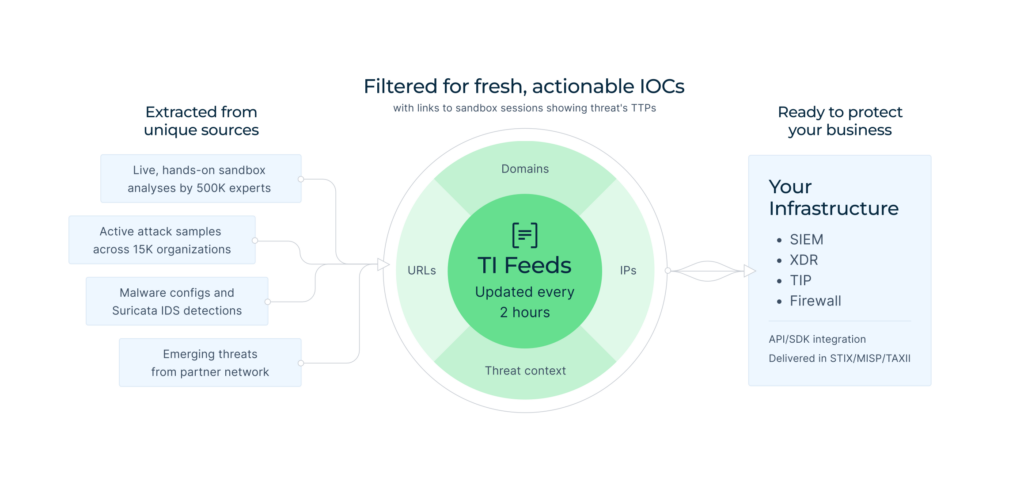
TI Feeds are filtered to remove false positives and updated every two hours, ensuring fresh, extensive, and trustworthy data 

Threat intelligence is a crucial component of modern SOC operations. Implementing it increases threat detection rates, speeds up incident response, and strengthens overall defense against emerging threats. 

When choosing a threat intel solution, prioritize reliability of data, rich context that comes with indicators, and constant updates that will keep you on top of things. 

Being an enterprise-grade service, Threat Intelligence Feeds meets these standards. It delivers fast, fresh intelligence gained from threat investigations by 15,000 SOC teams. Each indicator, be that IP, domain, or URL, is linked to ANY.RUN’s Interactive Sandbox analysis of malware, enabling you to observe its impact, activities, and overall context in one click. 
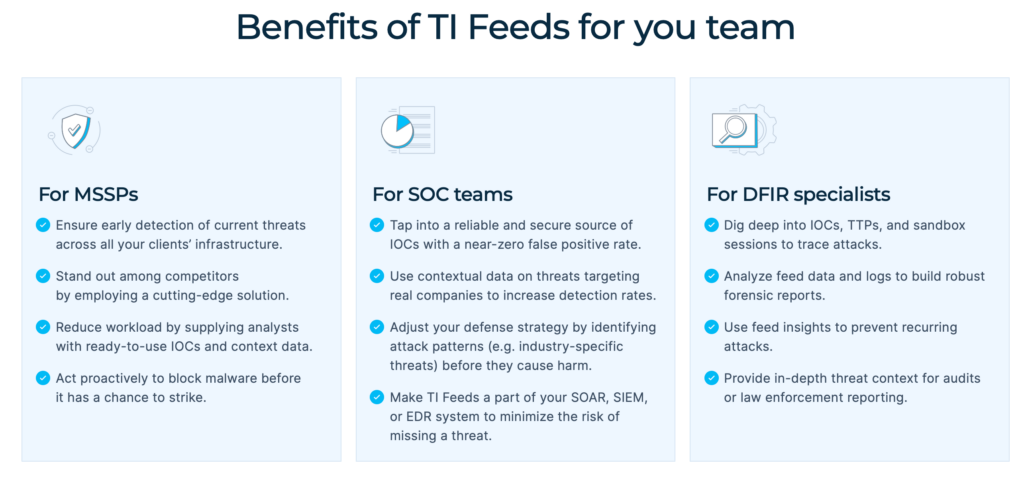
Not only SOC teams, but also MSSPs and DFIR specialists can use TI Feeds to improve their workflow 

Enrich your SIEM, TIP, or XDR system with TI Feeds for: 

  • Expanded Coverage: ANY.RUN’s exclusive IOCs come from Memory Dumps, Suricata IDS, in-browser data, and internal threat categorization systems, increasing the chance of detection of the most evasive threats.  
  • Reduced Workload: The indicators are pre-processed to avoid false positives and ready to be used for malware analysis or incident investigation.  
  • Informed Response: Rich metadata provided for IOCs gives you the context for in-depth threat investigations and faster response.   

Broaden your threat coverage with TI Feeds 


Request full version


Bridge the Gap Between Analysts and Threat Data 
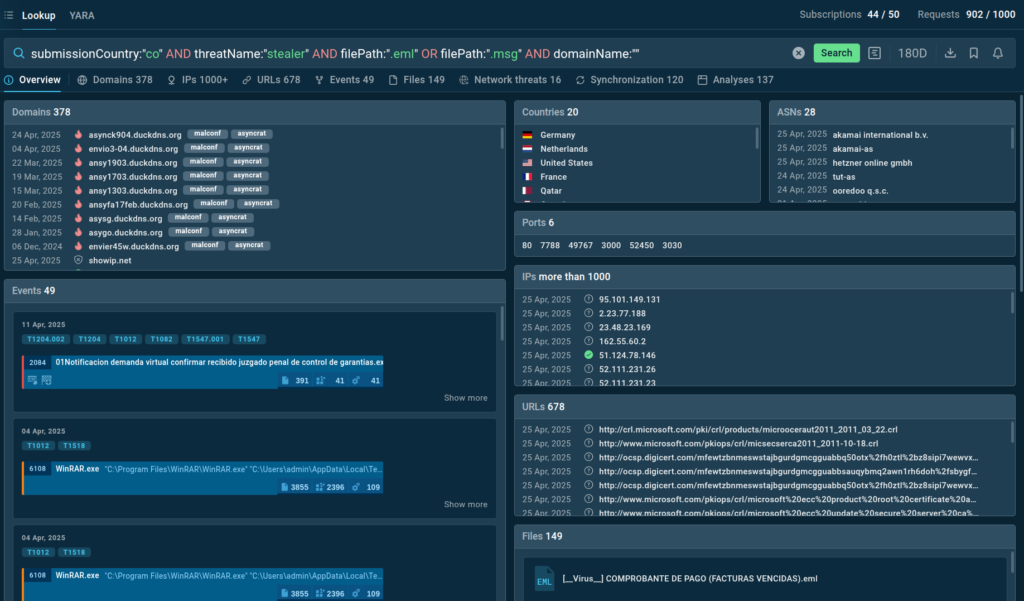
Create compound queries to retrieve data you need in ANY.RUN’s TI Lookup  

Steady monitoring and expanded threat coverage provided by solutions like TI Feeds are important for maintaining a robust defense system. The next challenge is finding a way to browse, identify, and enrich indicators quickly. 

In other words, you need targeted, fast access to threat intelligence, for both proactive threat hunting and swift incident response. That’s just what Threat Intelligence Lookup provides. For analysts, it’s like a fishing rod with which they can catch exactly what they’re looking for in the sea of extensive data on threats: for example, quick verdicts on suspicious IPs or additional info on malicious indicators. 

Equipping your team with TI Lookup means that your SOC will reach: 

  • Faster Triage and Data-Fueled Response: Check any indicator in seconds, identify malicious activity, and enriched it with more info. 
  • Higher Expertise Levels: Your team members can explore actual attacks, see how they unfold and what TTPs are in use, gaining insights into modern malware. 
  • Improved Proactive Defense: Use intel to develop new develop SIEM, IDS/IPS, or EDR rules for acting in advance. 

Even the free version of TI Lookup makes it possible to achieve these results. 

Enrich IOCs with live attack data
from threat analyses across 15K SOCs 


Try TI Lookup Premium


To conduct private analyses, gain three times more info on threats, and integrate TI Lookup into your system, choose Premium plan and: 

  • Hunt Threats with Precision: Create and explore custom YARA rules in ANY.RUN’s database to detect malware patterns. 
  • Reduce Risks of Breaches: Fast and accurate access to intelligence is a game-changer for alert triage and incident response, minimizing the likelihood of successful attacks. 
  • Track Malware Trends: See Threat Intelligence Reports written by expert analysts and stay informed on latest industry-wide attacks. 

As result, every stage of SOC operations will become sharper, faster, and more strategic. 

Make Threat Intelligence a Part of Your Infrastructure 
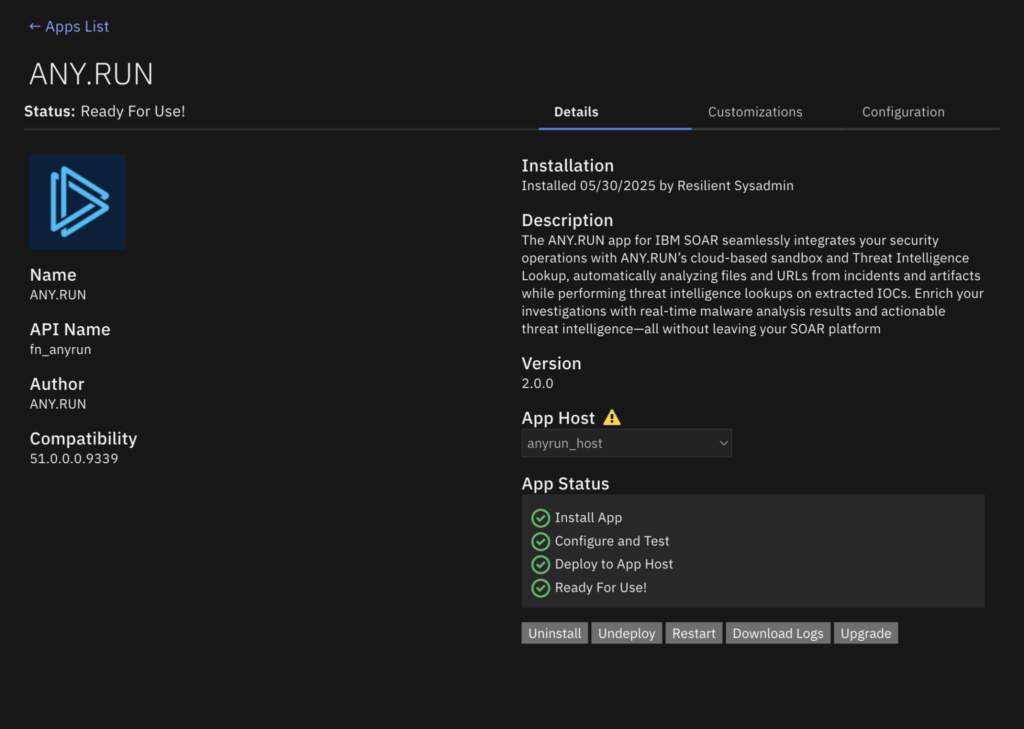
ANY.RUN app for IBM QRadar SOAR 

For teams, it’s more effective to use flexible services available for integration, rather than standalone solutions. That’s how you create a coordinated, resource-efficient defense system. 

ANY.RUN offers wide opportunities for integration, including API and SDK, as well compatibility with a majority of vendors, such as IBM QRadar, ThreatConnect, OpenCTI. 

  • Automate Threat Monitoring: Connecting TI solutions to your SIEM, TIP, or SOAR system results in accelerated, more efficient workflow. 
  • Expand Threat Coverage: For centralized protection, TI Feeds offer continuously updated stream of fresh intel available in STIX/TAXII and MISP
  • Improved Detection Rate: Turn to TI Lookup to increase your detection capabilities, correlate indicators from over 15,000 global attacks for early detection, and enrich your threat investigations. 
  • No Alert Overload: Reduce workload of Tier 2 and 3 specialists, empowering Tier 1 analytics to make informed decisions based on actionable and reliable threat intelligence. 

Use Cases: Applying This Strategy In Real Life 

Implementing threat intelligence into your security operations doesn’t mean increasing workload. It’s actually the opposite. Here are three real-world use cases explaining how quality TI solutions can address common SOC challenges. 

Improving Speed and Confidence for Incident Response 

The right solution can make a huge impact for your SOC team. It enables analysts to handle incidents faster and with more confidence, boosting overall efficiency. 

For example, analysts can use TI Lookup for a quick check of an indicator. Enter this simple query like: 

domainName:”smtp.godforeu.com”  
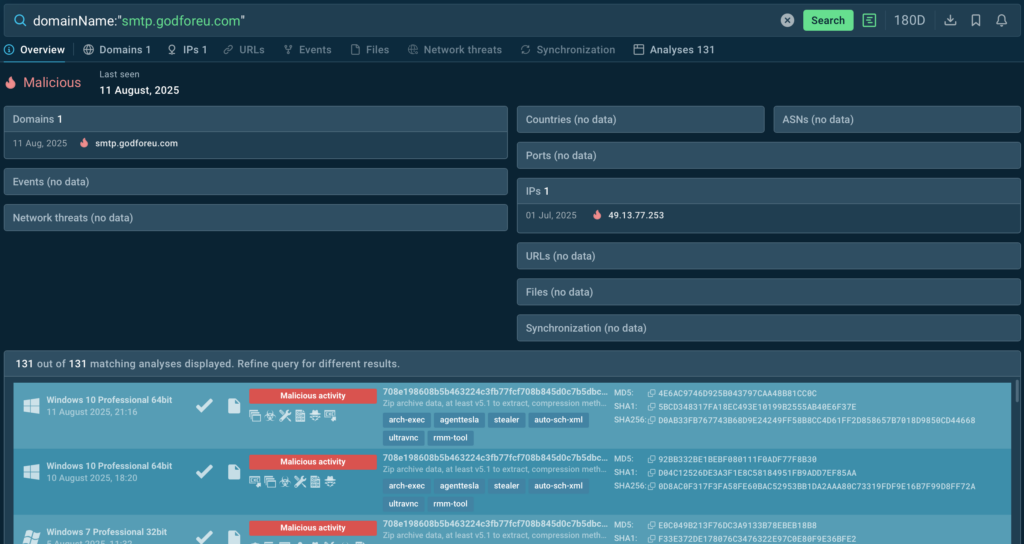
Overview of the query results in TI Lookup, indicating malicious activity 

And within seconds, you’ll know that that this domain is malicious. Next step doesn’t take much either: click one of the linked analyses and you’ll see how exactly malware behaves and which processes it affects. 
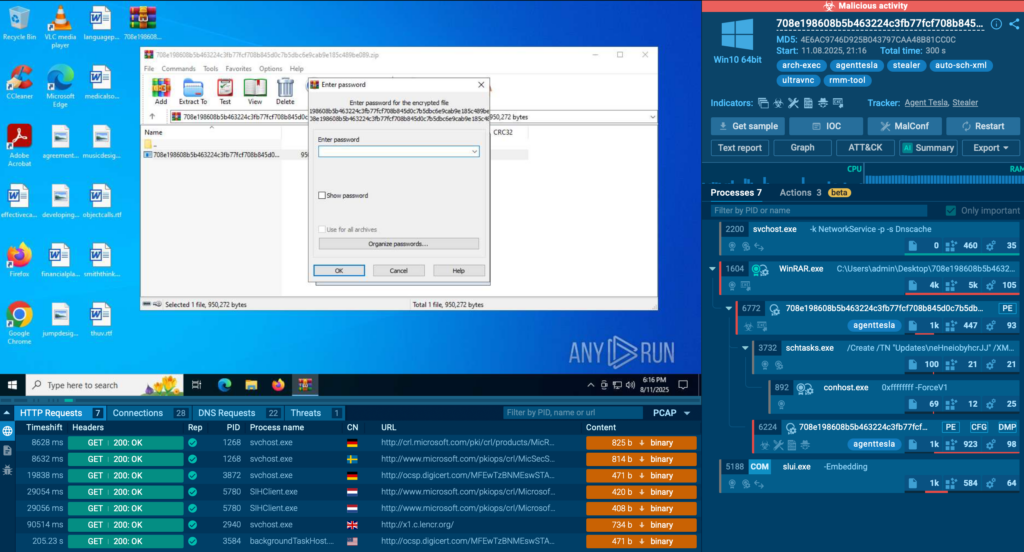
You can see analyses of samples that match your TI Lookup query within ANY.RUN Sandbox 

And finally, block this threat—and the incident is solved. That’s how you make informed decisions effortlessly and quickly: you just need to know where to find data. 

Increase Detection Rate 

Another use case for TI Lookup is reviewing alert backlog data, where evasive threats might be hidden. Instead of spending time on manual research, you quickly check any suspicious fragment, such as a command line: 

commandLine:”$codigo”  

And you’ll find out whether it was a false alarm. In this case, it wasn’t. The command line is actually related to steganography attacks spread by AsyncRAT:
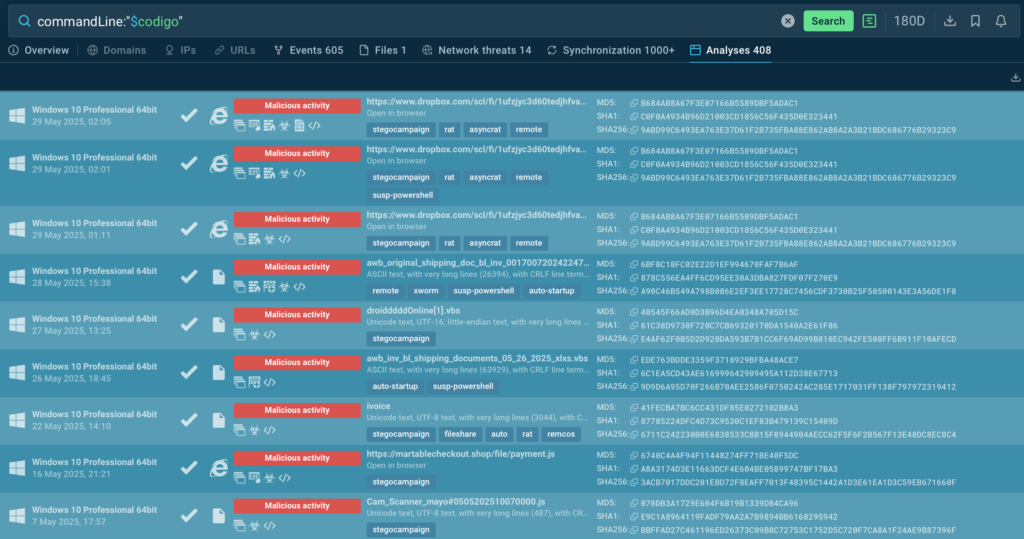
TI Lookup returns over 400 analyses of malicious samples associated with this command line 

From here, go to sandbox analysis sessions to see how malware detonates, and collect data to take further informed action. As a result, an attack that could’ve remained in your systems for months is prevented. 

Ensure Proactive Defense to Prevent Breaches  

A key aspect of proactive defense is staying alert and continuously monitoring the threat landscape. One you know what’s going on in your industry or other sectors, you should keep an eye on malware in question, track how it evolves and what new data on it appears. 

For that, use Query Updates feature in TI Lookup. Click the bell icon when doing a search to subscribe to your query. For example, if you need to access domains related to Lumma specifically, use this line: 

threatName:”lumma” AND domainName:”” 
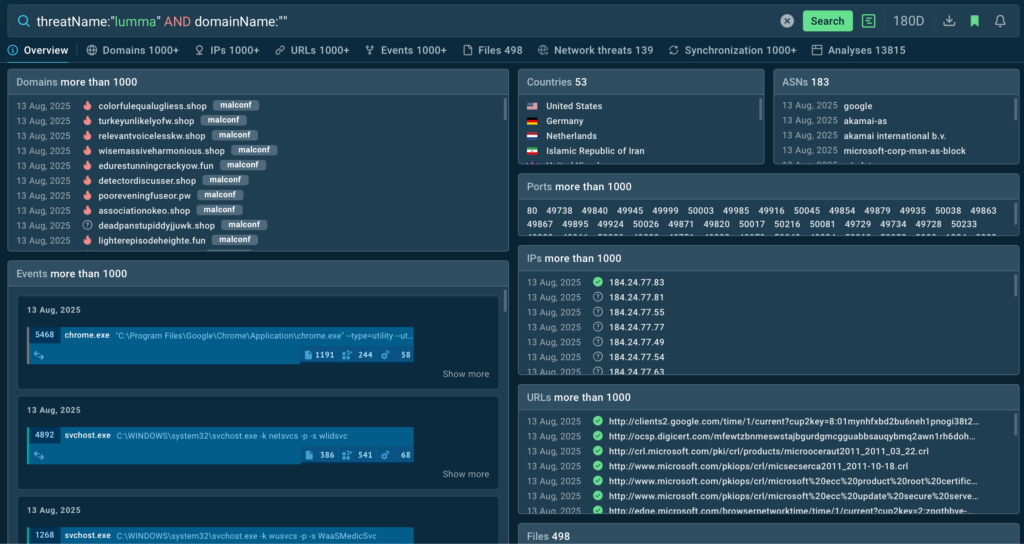
Overview of TI Lookup results for Lumma-associated domains 

Activate Query Updates: 

Click Subscribe to stay alert for new results that match your query 

And from now on, you’ll be notified on all new instances for proactive blocking of evolving threats. 

About ANY.RUN 

Over 500,000 cybersecurity professionals and 15,000+ companies in finance, manufacturing, healthcare, and other sectors rely on ANY.RUN to streamline malware investigations worldwide. 

Speed up triage and response by detonating suspicious files in ANY.RUN’s Interactive Sandbox, observing malicious behavior in real time, and gathering insights for faster, more confident security decisions. Paired with Threat Intelligence Lookup and Threat Intelligence Feeds, it provides actionable data on cyberattacks to improve detection and deepen your understanding of evolving threats. 

Explore more ANY.RUN’s capabilities during 14-day trial 

The post Bridging the Threat Intelligence Gap in Your SOC: A Guide for Security Leaders  appeared first on ANY.RUN’s Cybersecurity Blog.

ANY.RUN’s Cybersecurity Blog – ​Read More

Telegram scams in 2025 | Kaspersky official blog

Remember the early days of the internet and 419 (aka “Nigerian prince”) scams promising mountains of gold just for you? That era is thankfully over, but today a new curse is all the rage: messenger phishing. Due to its vast user base, the openness of its API, and support for crypto payments, one particular messenger — Telegram — has become a very popular choice for phishing cybercriminals. So what new tricks do Telegram scammers employ, and how can you spot them in time?

Telegram bots in the service of cybercriminals

Telegram is home to a huge array of bot-related scams. And sometimes attackers offer their bots to other bad guys to create new ones. If you’re feeling a bit overwhelmed, don’t worry: our Securelist blogpost takes a detailed look at this phenomenon — known as phishing-as-a-service.

Attackers often use Telegram bots instead of websites. It’s much easier to lure potential victims this way; it’s far harder to create and maintain a full-fledged phishing site and get victims to swallow the bait. With bots, everything’s simpler since users don’t need to leave Telegram, which many mistakenly think is a safe environment by default.

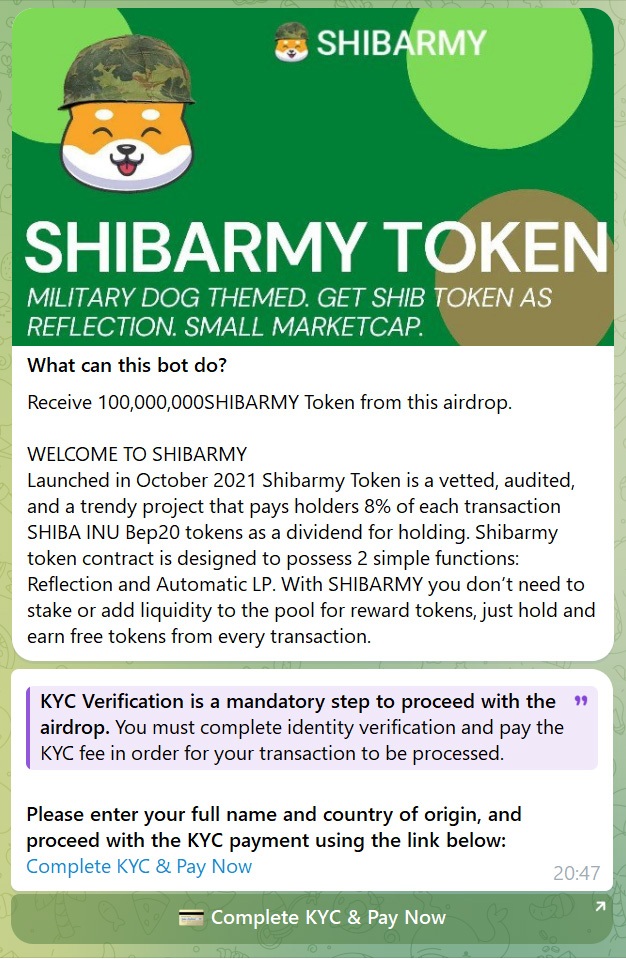
So what does it look like in practice? One example is a new scam involving cryptocurrency investments: “We’re handing out a new token to everyone — just enter the bot and go through KYC verification”. Of course, “KYC verification” for scammers doesn’t mean a passport photo or a video call to confirm your identity, but depositing a sum of cryptocurrency. And, yes, this crypto goes straight into the attackers’ account, while you get zilch.

Telegram bot offers fake KYC verification

Telegram bot offers fake KYC verification

Sure, Telegram bots aren’t limited to extracting crypto. For instance, we uncovered a scam inviting victims to get paid for watching short videos. Where? In a Telegram bot, of course.

Victims "earn" two euros per video view

Victims “earn” two euros per video view

Telegram bots are highly intrusive — if you don’t block them, they’ll keep knocking on your door. Most phishing sites don’t do this; user interaction with them plays out differently: visit the site, browse, leave. But chat with a Telegram bot just once, and it’ll bombard you with suspicious links or pester you for access to manage your channels and groups. If you grow tired of an intrusive bot, just block it: open a dialog with the bot, tap its name, then select Block. That done, the pesky bot will message you no more.

In another nasty bot-related scam, attackers persuade victims to start bot chats, then share their data or send money. Once the victim is hooked, the scammers rename the bot Telegram Wallet or Support Bot (mimicking supposedly official channels), transfer ownership of the bot to the victim’s account without their knowledge, and report it to Telegram support. Thinking it was the victim who created the bot, Telegram support deletes not only the bot, but also the victim’s account. The scammers do this to cover their tracks and muddy the waters for a possible police investigation.

Fake gifts and account theft

Attackers employ a variety of tricks to gain access to victims’ accounts. One of the most common scams is a “gift” subscription to Telegram Premium. Check out our post You’ve been sent a “gift” — a Telegram Premium subscription for details. In brief: scammers message victims from the hacked account of a friend, prompting them to go to a phishing site to “finalize the subscription”. There’s no subscription, of course. Instead, victims have their own accounts stolen.

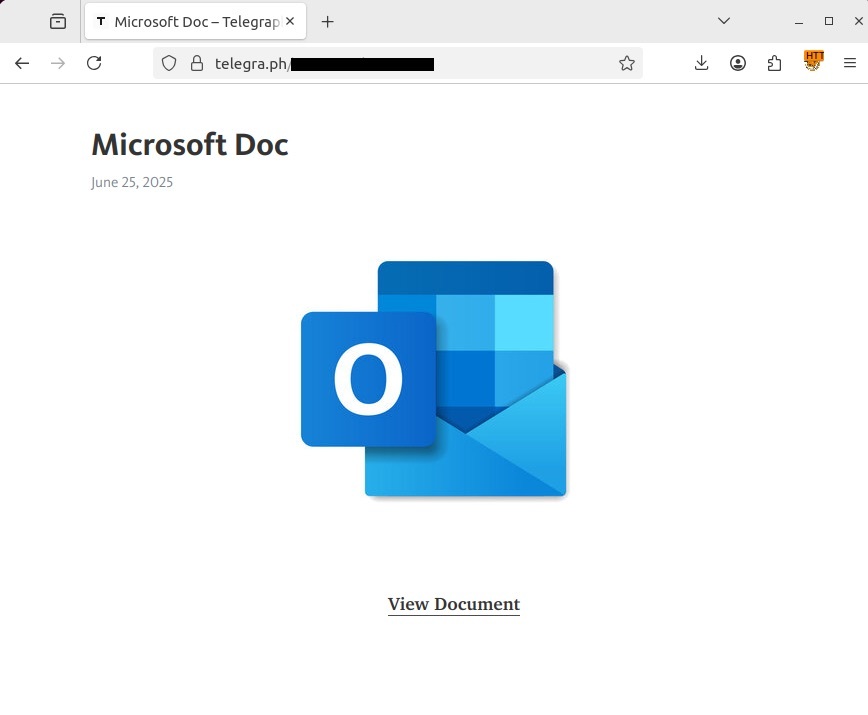
Another new vector of fraud involves Telegraph, Telegram’s tool for posting longer texts. Anyone can publish content there, and no prior registration is required, which is what attackers exploit since it’s easy to redirect users to phishing pages. The result, as a rule, is one more hijacked account.

The user is lured into following the link to view the full version of the document

The user is lured into following the link to view the full version of the document

What else have scammers and phishers come up with? Threat actors are actively using AI to create deepfakes, steal biometric data, hide phishing attacks under temporary Blob URLs, and even spoof Google Translate subdomains. Read about these and other trends in our Securelist report.

How to guard against Telegram scams and phishing

The best tip is to apply critical thinking at all times. But even the smartest of us can sometimes act rashly, so try to read up on scams as much as possible so that your muscle memory automatically triggers the right response.

  • Don’t follow links sent by people you barely know. Don’t follow such links even if they promise a juicy gift, and never enter personal data on sites they point to.
  • Configure privacy and security in your Telegram account. See our in-depth how-to on two-factor authentication and secret chats.
  • Don’t share one-time codes or passwords with anyone. And don’t enter them anywhere except in the official Telegram app. Scammers know how to trick users into revealing their OTPs.
  • Use reliable protection that knows phishing when it sees it and warns you about it.
  • Block intrusive bots. As we said, they’ll keep on knocking, so if after one chat with a Telegram bot you’re sure that’s enough, feel free to block it.
  • Set up automatic termination of all inactive Telegram sessions every week. In Telegram, go to Settings, then select Devices → Automatically terminate sessions → If inactive for → 1 week.

If your Telegram account is already hacked, read our post What to do if your Telegram account is hacked. Time is of the essence — it’s easier to restore access in the first 24 hours after an attack. And subscribe to our Telegram channel for the inside track on new cybersecurity trends.

Other Telegram swindles:

Kaspersky official blog – ​Read More

Changing these 4 Android phone settings made the system feel like new again

A few taps and swipes are all it takes to turn your old phone into feeling like a new one.

Latest news – ​Read More

Tips for Transcribing Video with Technical Jargon

When it comes to transcribing videos, technical jargon can pose several challenges. However, with the right approach, you…

Hackread – Latest Cybersecurity, Hacking News, Tech, AI & Crypto – ​Read More

Fortinet, Ivanti Release August 2025 Security Patches

Fortinet and Ivanti have published new security advisories for their August 2025 Patch Tuesday updates. 

The post Fortinet, Ivanti Release August 2025 Security Patches appeared first on SecurityWeek.

SecurityWeek – ​Read More

I’ve used Rakuten for a year and earned nearly $500 – here’s how

Have you added something to an online cart recently? Don’t check out until you read this.

Latest news – ​Read More

Microsoft August 2025 Patch Tuesday Fixes Kerberos Zero-Day Among 111 Total New Flaws

Microsoft on Tuesday rolled out fixes for a massive set of 111 security flaws across its software portfolio, including one flaw that has been disclosed as publicly known at the time of the release.
Of the 111 vulnerabilities, 16 are rated Critical, 92 are rated Important, two are rated Moderate, and one is rated Low in severity. Forty-four of the vulnerabilities relate to privilege

The Hacker News – ​Read More

Why I recommend this Garmin watch over competing Apple, Samsung, and Google models

With its sleek, compact build, vibrant AMOLED display, and seamless integration into Garmin’s powerful ecosystem, the Vivoactive 6 hits all the right marks.

Latest news – ​Read More

This new Wyze security camera promises to eliminate blind spots for $70

The new Wyze Duo Cam Pan is a motion-tracking, pan-tilt camera that can surveil your home inside and out.

Latest news – ​Read More