https://www.backbox.org/wp-content/uploads/2018/09/website_backbox_text_black.png00adminhttps://www.backbox.org/wp-content/uploads/2018/09/website_backbox_text_black.pngadmin2025-09-02 12:07:382025-09-02 12:07:38WhatsApp Zero-Day Exploited in Attacks Targeting Apple Users
https://www.backbox.org/wp-content/uploads/2018/09/website_backbox_text_black.png00adminhttps://www.backbox.org/wp-content/uploads/2018/09/website_backbox_text_black.pngadmin2025-09-02 12:07:372025-09-02 12:07:37JBL’s newest speaker ushers in a new price category, appealing to broader consumer needs
Open any website, and the first thing you’ll likely see is a pop-up notification about the use of cookies. You’re usually given the option to accept all cookies, accept only necessary ones, or flatly reject them. Regardless of your choice, you probably won’t notice a difference, and the notification disappears from the screen anyway.
Today, we dive a little deeper into the cookie jar: what cookies are for, what types exist, how attackers can intercept them, what the risks are, and how to stay safe.
What are cookies?
When you visit a website, it sends a cookie to your browser. This is a small text file that contains data about you, your system, and the actions you’ve taken on the site. Your browser stores this data on your device and sends it back to the server every time you return to that site. This simplifies your interaction with the site: you don’t have to log in on every single page; sites remember your display settings; online stores keep items in your cart; streaming services know at which episode you stopped watching — the benefits are limitless.
Cookies can store your login, password, security tokens, phone number, residential address, bank details, and session ID. Let’s take a closer look at the session identifier.
A session ID is a unique code assigned to each user when they sign in to a website. If a third party manages to intercept this code, the web server will see them as a legitimate user. Here’s a simple analogy: imagine you can enter your office by means of an electronic pass with a unique code. If your pass is stolen, the thief — whether they look like you or not — can open any door you have access to without any trouble. Meanwhile, the security system will believe that it’s you entering. Sounds like a scene from a crime TV show, doesn’t it? The same thing happens online: if a hacker steals a cookie with your session ID, they can sign in to a website you were already signed in to, under your name, without needing to enter a username and password; sometimes they can even bypass two-factor authentication. In 2023, hackers stole all three of the YouTube channels of the famous tech blogger Linus Sebastian – “Linus Tech Tips” and two other Linus Media Group YouTube channels with tens of millions of subscribers — and this is exactly how they did it. We’ve already covered that case in detail.
What types of cookies are there?
Now let’s sort through the different cookie varieties. All cookies can be classified according to a number of characteristics.
By storage time
Temporary, or session cookies. These are only used while you’re on the website. They’re deleted as soon as you leave. They’re required for things like keeping you signed in as you navigate from page to page, or remembering your selected language and region.
Persistent cookies. These remain on your device after you leave the site. They spare you the need to accept or decline cookie policies every time you visit. They typically last for about a year.
It’s possible for session cookies to become persistent. For example, if you check a box like “Remember me”, “Save settings”, or some such on a website, the data will be saved in a persistent cookie.
By source
First-party cookies. These are generated by the website itself. They allow the website to function properly and visitors to get a proper experience. They may also be used for analytics and marketing purposes.
Third-party cookies. These are collected by external services. They’re used to display ads and collect advertising statistics, among other things. This category also includes cookies from analytics services like Google Analytics and social media platforms. These cookies store your sign-in credentials, allowing you to like a page or share content on social media with a single click.
By importance
Required, or essential cookies. These support core website features, such as selling products on an e-commerce platform. In this case, each user has a personal account, and essential cookies store their login, password, and session ID.
Optional cookies. These are used to track user behavior and help tailor ads more precisely. Most optional cookies belong to external parties and don’t affect your ability to use all of the site’s features.
By storage technology
These cookies are stored in text files in the browser’s standard storage. When you clear your browser data, they’re deleted, and after that, the websites that sent them will no longer recognize you.
There are two special subtypes: supercookies and evercookies, which store data in a non-standard way. Supercookies are embedded in website headers and stored in non-standard locations, which allows them to avoid being deleted by the browser’s cleanup function. Evercookies can be restored using JavaScript even after being deleted. This means they can be used for persistent and difficult-to-control user tracking.
The same cookie can fall into multiple categories: for example, most optional cookies are third-party, while required cookies include temporary ones responsible for the security of a specific browsing session. For more details on how and when all these types of cookies are used, read the full report on Securelist.
How session IDs are stolen through session hijacking
Cookies that contain a session ID are the most tempting targets for hackers. Theft of a session ID is also known as session hijacking. Let’s examine some of the most interesting and widespread methods.
Session sniffing
Session hijacking is possible by monitoring or “sniffing” the internet traffic between the user and the website. This type of attack happens on websites that use the less secure HTTP protocol instead of HTTPS. With HTTP, cookie files are transmitted in plain text within the headers of HTTP requests, meaning they’re not encrypted. A malicious actor can easily intercept the traffic between you and the website you’re on, and extract cookies.
These attacks often occur on public Wi-Fi networks, especially if not protected by either the WPA2 or WPA3 protocols. For this reason, we recommend exercising extreme caution with public hotspots. It’s much safer to use mobile data. If you’re traveling abroad, it’s a good idea to use an Kaspersky eSIM Store.
Cross-site scripting (XSS)
Cross-site scripting consistently ranks among the top web-security vulnerabilities, and with good reason. This type of attack allows malicious actors to gain access to a site’s data — including the cookie files that contain the coveted session IDs.
Here’s how it works: the attacker finds a vulnerability in the website’s source code and injects a malicious script; that done, all that remains is for you to visit the infected page and you can kiss your cookies goodbye. The script gains full access to your cookies and sends them to the attacker.
Cross-site request forgery (CSRF/XSRF)
Unlike other types of attacks, cross-site request forgery exploits the trust relationship between a website and your browser. An attacker tricks an authenticated user’s browser into performing an unintended action without their knowledge, such as changing a password or deleting data like uploaded videos.
For this type of attack, the threat actor creates a web page or email containing a malicious link, HTML code, or a script with a request to the vulnerable website. Simply opening the page or email, or clicking the link, is enough for the browser to automatically send the malicious request to the target site. All of your cookies for that site will be attached to the request. Believing that it was you who requested, say, the password change or channel deletion, the site will carry out the attackers’ request on your behalf.
That’s why we recommend not opening links received from strangers, and installing a Kaspersky Password Manager that can alert you to malicious links or scripts.
Predictable session IDs
Sometimes, attackers don’t need to use complex schemes — they can simply guess the session ID. On some websites, session IDs are generated by predictable algorithms, and might contain information like your IP address plus an easily reproducible sequence of characters.
To pull off this kind of attack, hackers need to collect enough sample IDs, analyze them, and then figure out the generating algorithm to predict session IDs on their own.
A large part of the responsibility for cookie security lies with website developers. We provide tips for them in our full report on Securelist.
But there are some things we can all do to stay safe online.
Only enter personal data on websites that use the HTTPS protocol. If you see “HTTP” in the address bar, don’t accept cookies or submit any sensitive information like logins, passwords, or credit card details.
Pay attention to browser alerts. If you see a warning about an invalid or suspicious security certificate when you visit a site, close the page immediately.
Update your browsers regularly or enable automatic updates. This helps protect you from known vulnerabilities.
Regularly clear browser cookies and cache. This prevents old, potentially leaked cookie files and session IDs from being exploited. Most browsers have a setting to automatically delete this data when you close them.
Don’t follow suspicious links. This is especially true of links received from strangers in a messaging app or by email. If you have a hard time telling the difference between a legitimate link and a phishing one, install a Kaspersky Premium that can alert you before you visit a malicious site.
Enabletwo-factor authentication(2FA) wherever possible.[placeholder KPM] is a convenient way to store 2FA tokens and generate one-time codes. It syncs them across all your devices, which makes it much harder for an attacker to access your account after a session has ended — even if they steal your session ID.
Refuse to accept all cookies on all websites. Accepting every cookie from every site isn’t the best strategy. Many websites now offer a choice between accepting all and accepting only essential cookies. Whenever possible, choose the “required/essential cookies only” option, as these are the ones the site needs to function properly.
Connect topublic Wi-Fi networksonly as a last resort. They are often poorly secured, which attackers take advantage of. If you have to connect, avoid signing in to social media or messaging accounts, using online banking, or accessing any other services that require authentication.
Want to know even more about cookies? Read these articles:
https://www.backbox.org/wp-content/uploads/2018/09/website_backbox_text_black.png00adminhttps://www.backbox.org/wp-content/uploads/2018/09/website_backbox_text_black.pngadmin2025-09-02 12:07:292025-09-02 12:07:29How to protect your cookies and session ID | Kaspersky official blog
Check Point reports Silver Fox APT using a signed WatchDog driver flaw to disable Windows security and deliver…
Hackread – Latest Cybersecurity, Hacking News, Tech, AI & Crypto – Read More
https://www.backbox.org/wp-content/uploads/2018/09/website_backbox_text_black.png00adminhttps://www.backbox.org/wp-content/uploads/2018/09/website_backbox_text_black.pngadmin2025-09-02 11:06:522025-09-02 11:06:52Silver Fox APT Exploits Signed Windows Driver to Deliver ValleyRAT
Cybersecurity researchers have flagged a Ukrainian IP network for engaging in massive brute-force and password spraying campaigns targeting SSL VPN and RDP devices between June and July 2025.
The activity originated from a Ukraine-based autonomous system FDN3 (AS211736), per French cybersecurity company Intrinsec.
“We believe with a high level of confidence that FDN3 is part of a wider abusive
Running a SOC means living in a world of alerts. Every day, thousands of signals pour in; some urgent, many irrelevant. Analysts need to separate noise from real threats, investigate quickly, and keep the organization safe without letting cases pile up.
The challenge isn’t only about detecting threats but doing it fast enough to reduce escalations, avoid burnout, and keep operations efficient.
That’s where an all-in-one detection workflow changes everything. ANY.RUN brings together the tools analysts rely on most; live threat feeds, interactive sandboxing, and instant lookups, into a single, streamlined process. The result: faster answers, fewer escalations, and more confidence in every decision.
Why Fragmented Workflows Slow SOCs Down
It’s not the flood of alerts alone that puts SOCs under pressure but the fractured way they’re handled. One tool for threat feeds, another for detonation, a third for enrichment. Every time an analyst switches context, minutes are lost. Multiply that across hundreds of alerts, and the delays add up fast.
The bigger problem is what those delays cause: escalations that didn’t need to happen, senior staff tied up with routine checks, and threats that linger longer than they should. Instead of building momentum, investigations stall.
This is the hidden cost of disconnected tools. They don’t only slow analysts down but also create more work for everyone and open the door to mistakes.
From Chaos to Clarity: The Power of Unified Workflow
When detection runs as one continuous workflow, every step strengthens the next. Instead of losing time hopping between tools, analysts work with a steady flow:
Noise gets filtered early: Live feeds rule out known threats, reducing case load by up to 20% and cutting unnecessary escalations by 30%.
Investigations move faster: The sandbox reveals hidden behavior in real time, lowering MTTR by as much as 21 minutes per case.
Decisions are backed by context: Lookups provide history from millions of past analyses contributed by 15,000+ organizations, giving analysts 24× more IOCs to work with and ensuring every case is backed by evidence.
The result is measurable:
+62.7% more threats detected overall
94% of surveyed users report faster triage
63% year-over-year user growth, driven by analyst efficiency
30% fewer alerts require escalation to senior analysts
The outcome of this unified workflow is speed, clarity and confidence. Analysts know what to act on, what to ignore, and when a case can be closed without doubt.
Threat Feed: Cut Through the Noise
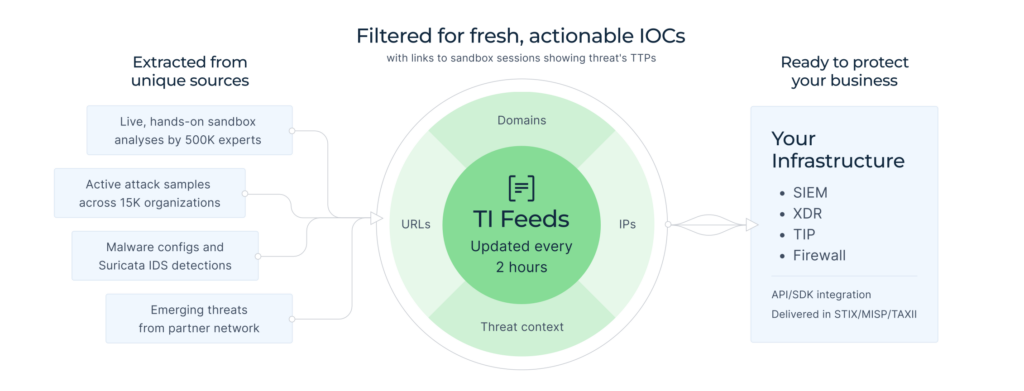
The first challenge in any SOC is deciding which alerts deserve attention. With live IOC streams collected from thousands of users worldwide, ANY.RUN’s TI Feeds works as your early filter. Analysts see instantly whether an IP, domain, or hash has already been confirmed as malicious and can rule out duplicates on the spot. That means less time wasted on “non-issues” and more focus on real threats that matter.
ANY.RUN’s TI Feed providing actionable IOCs to SOC teams
Every IOC in the feed is actionable and connected to sandbox analyses, giving analysts not just a red flag but the full context behind it. This means faster triage, more confident decisions, and the ability to trace threats back to their behavior in real-world samples.
The numbers speak for themselves: with Threat Feed and Lookup combined, analysts gain access to 24× more IOCs than from typical isolated sources. And because the feed captures real-world attacks, from targeted phishing campaigns to large-scale malware hitting banks and enterprises, your SOC works with threat data that reflects the real distribution of risks.
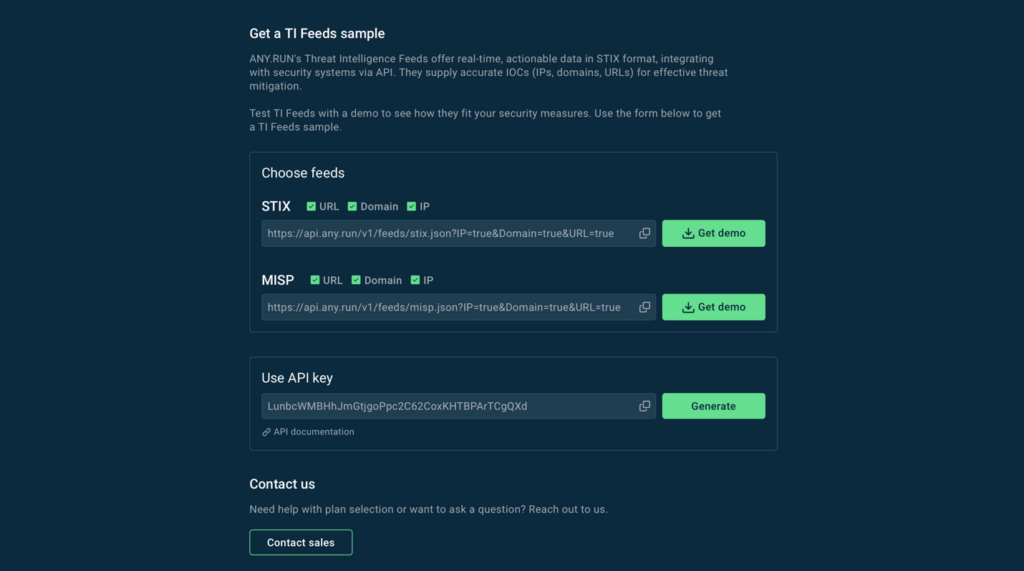
ANY.RUN’s Threat Intelligence Feeds with variety of format options and easy way of integration
ANY.RUN’s Threat Intelligence Feeds come in multiple formats with simple integration options, making it easy to plug into your existing SIEM, TIP, or SOAR setup.
When an alert passes the filter, it needs proof. This is where ANY.RUN’s interactive sandbox becomes the proving ground, turning suspicious files, scripts, and URLs into full investigations in real time. Instead of waiting for static reports or snapshots, analysts can detonate samples and watch the behavior unfold step by step, just like a real user would.
This approach uncovers what traditional sandboxes often miss:
Hidden payloads that require clicks or triggers to activate.
Staged downloads that reveal themselves only over time.
Evasive tactics designed to bypass automated detection.
But visibility doesn’t depend solely on manual clicks. With automated interactivity, ANY.RUN simulates user actions to expose threats faster, reducing the need for analysts to intervene at every step. Junior analysts gain confidence because the system highlights behaviors for them, while senior staff can focus on advanced investigations instead of routine triage.
The user-friendly interface and AI assistance add another layer of efficiency. Complex behaviors are explained clearly, reports are well-structured, and the entire attack chain is mapped from start to finish.
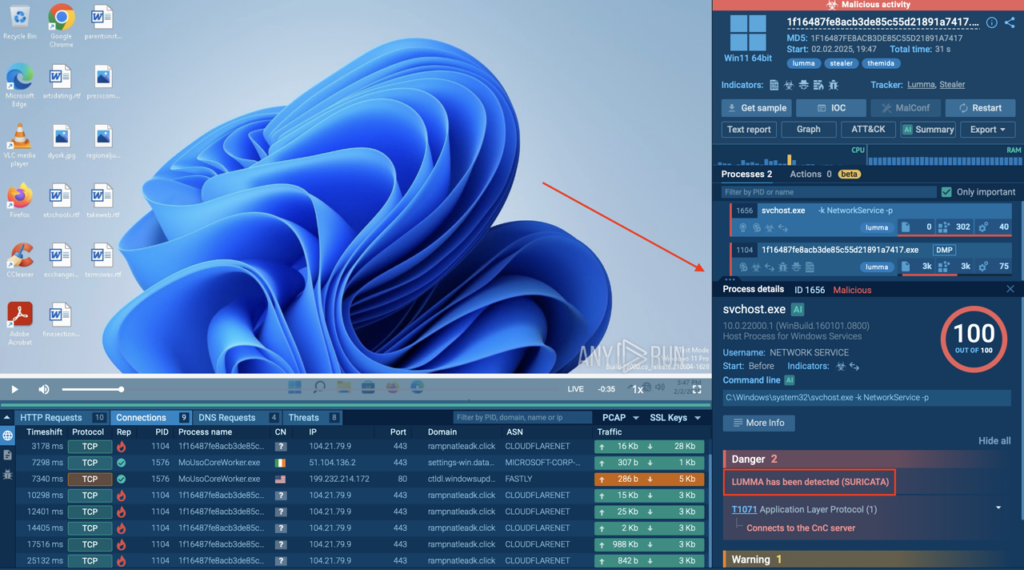
For example, in the case of Lumma Stealer, ANY.RUN captured the full infection chain, from initial dropper to persistence mechanisms, all preserved in a detailed report ready for escalation, rule writing, or sharing.
Lumma Stealer’s full attack chain detected inside ANY.RUN sandbox in 30 seconds
The outcome is a process where analysts of all skill levels can act faster, escalate less, and make decisions with confidence, while SOC leaders gain time back from their most experienced staff.
Threat Lookup: Context at Your Fingertips
Even with full sandbox results, one question always remains: Has this threat been seen before? Knowing whether an IOC belongs to a fresh campaign or something already circulating across industries changes how analysts respond.
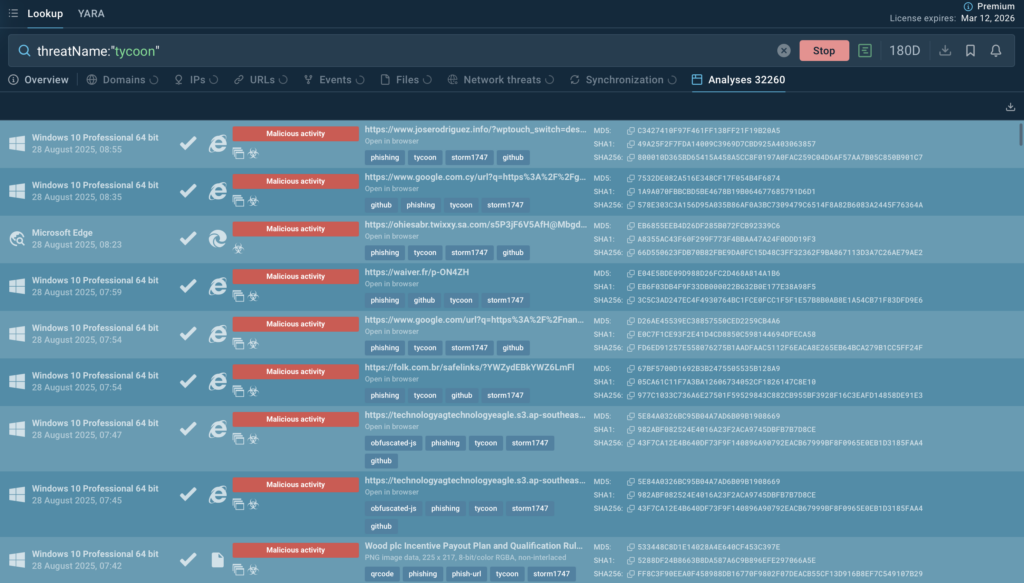
Sandbox analyses of recent Tycoon attacks for faster decision making
ANY.RUN’s Threat Lookup delivers that answer in seconds. With access to millions of past analyses contributed by more than 15,000 organizations worldwide, analysts can instantly check whether an IP, domain, or hash has been observed elsewhere. This turns isolated alerts into patterns, helping teams connect the dots and react with confidence.
Early warning from others’ incidents: What hits one enterprise today could reach yours tomorrow. Lookup lets you learn from global telemetry before the threat arrives at your doorstep.
Deeper reporting without heavy lifting: Instead of manually searching across multiple feeds and databases, analysts enrich findings with one query.
Reduced unnecessary escalations: Confirmation from millions of past cases means analysts can validate faster and close tickets sooner.
The result is a smoother close to every investigation: sandbox analysis provides the behavior, Threat Lookup adds the history, and reports go out with stronger evidence. Analysts save time, senior experts get fewer escalations, and the SOC becomes more resilient with every case resolved.
Detect threats faster with ANY.RUN’s Interactive Sandbox
See full attack chain in seconds for immediate response
The real power of ANY.RUN is in how the solutions work together, seamlessly feeding into one another to create a single, continuous process.
Instead of bouncing between disconnected tools, analysts move through one streamlined workflow: alerts are filtered at the start, suspicious activity is detonated, the entire attack chain is exposed in real time, and findings are instantly validated against global threat history.
The outcome is faster resolutions, fewer unnecessary escalations, and reports enriched with both behavioral detail and historical context; the kind of evidence leaders and clients can trust.
Sign up today to see how ANY.RUN’s all-in-one suite can turn your SOC into a faster, more confident detection machine.
https://www.backbox.org/wp-content/uploads/2018/09/website_backbox_text_black.png00adminhttps://www.backbox.org/wp-content/uploads/2018/09/website_backbox_text_black.pngadmin2025-09-02 11:06:432025-09-02 11:06:43Streamline Your SOC: All-in-One Threat Detection with ANY.RUN
From emailing vendors to communicating with team members, serious business happens in the inbox. That’s why it’s critical to secure it. These TechRepublic Premium resources can help.
https://www.backbox.org/wp-content/uploads/2018/09/website_backbox_text_black.png00adminhttps://www.backbox.org/wp-content/uploads/2018/09/website_backbox_text_black.pngadmin2025-09-02 10:06:352025-09-02 10:06:35How to Secure Your Email Via Encryption and Password Management
https://www.backbox.org/wp-content/uploads/2018/09/website_backbox_text_black.png00adminhttps://www.backbox.org/wp-content/uploads/2018/09/website_backbox_text_black.pngadmin2025-09-02 10:06:342025-09-02 10:06:34This new Linux desktop is almost a dead ringer for OS X