What is security hardening? | Kaspersky official blog

The past several years have seen a number of positive developments in global cybersecurity, with organizations worldwide making significant investments to bolster their defenses against cyberthreats. More sophisticated solutions, more guidelines available, and a more collaborative cybersecurity environment have all contributed toward a digital landscape enhancement. Yet, against the backdrop of these encouraging developments, a disparity in cyber-resilience between small and large organizations has been widening.

According to a recent World Economic Forum report, larger organizations are showing steady progress in improving their cyber-defenses, but their smaller counterparts are struggling to keep up. While many larger enterprises are equipped with cutting-edge security solutions and dedicated personnel, SMBs often lack the necessary resources, resulting in a yawning gap in their cyber-resilience. Given the context, small businesses have to use every opportunity to mitigate potential cybersecurity risks without extra resources, and that’s where security hardening can turn the tide and help avert potential threats by basically configuring organizations’ systems and networks in the right way.

So what is security hardening? Security hardening is shorthand for a range of techniques and procedures that help protect digital infrastructure by reducing an attack surface — essentially turning the security of existing systems up to the maximum without necessarily resorting to extra protection solutions. In this article, we explore some of the must-have strategies that can help organizations — especially those with limited or no dedicated cybersecurity resources — to reduce exposure to potential attacks.

Implementing strong authentication and authorization

The first fundamental is taking steps to reduce the risk of unauthorized access to a company’s systems and data. This requires the enforcement of a strict password policy that defines password length requirements, allowed characters, prohibited combinations, password expiration interval, etc. It should also include recommendations on the password storage method to rule out unsafe practices.

Another indispensable practice is the use of two-factor authentication, meaning that to access specific resources or data an employee has to verify their identity in two different ways. With two-factor authentication in place, even if attackers learn an employee’s password somehow, they still need to bypass the second factor, which gives an extra layer of protection.

And finally, organizations need to implement network access control measures to control users that enter the corporate network and also the level of access of these users. Configuring permissions within a corporate network following the least-privilege principle is a best practice, ensuring that users only have access to the systems needed to perform their tasks, and don’t have access to the entire environment. In an environment where employees have access only to the systems that they strictly need, in case of a potential breach attackers would have limited options for lateral movement within the network, which would minimize potential damage. Another useful tip is to regularly audit all accounts and their permissions, and revoking unnecessary ones – in case an employee is dismissed or moves to a different department.

Regularly updating software and timely patching vulnerabilities

Regular and prompt updates of operating systems, applications, and other software can help eliminate known vulnerabilities that can be used by attackers to compromise organizations’ networks. Software development is continually advancing, leading to two main challenges: a system can rapidly become outdated or even obsolete, and, more critically, it may become vulnerable to cyberattacks. Software developers address these issues by implementing new code distributed as part of updates. Software updates not only fix bugs or improve performance, but also might include patches of vulnerabilities detected during software operation. Сybercriminals never fail to grab the opportunity to exploit known vulnerabilities, with some of them exploited for years, which exposes the fact that years after the release of patches some organizations fail to install them.

Encrypting data

Encryption of data at rest (when data is stored, for example, on drives) as well as in transit (when data is moving between devices, such as within private networks or over the internet), protects the data from interception and unauthorized access. The two most effective data protection technologies are File and Folder Level Encryption (FLE) and Full Disk Encryption (FDE), which are used for tackling different tasks. The former protects critical data and restricts access to it, while the latter rules out the possibility of any data falling into the hands of third parties — even if a data storage device holding valuable information is lost or stolen.

Both FLE and FDE can be implemented on corporate computers with the help of built-in tools:

  • BitLocker (Windows) or FileVault (macOS) for FDE.
  • Encrypting File System (EFS) (Windows) or Disk Utility and FileVault (macOS) for FLE.

With data encryption in place, organizations can minimize the risk of confidential data being intercepted.

Implementation of backups and data backups

Backing up data is essential to ensure its integrity in case of a potential cyberattack, including with the use of ransomware or wipers. To guarantee a continuous backup process, one can schedule automatic backups to avoid time-wasting, with manual backups nevertheless still being an option.

When the process itself is set up, it’s necessary to check the integrity of backups regularly and perform practice runs resurrecting the server in a staging environment, and generally to make sure that if it becomes necessary, recovery will be possible. It should be noted that if a backup server is located inside the network perimeter, then in case of a potential attack, the backup will also be at risk of being destroyed by attackers. Therefore, it’s recommended to create several backups of critical data and diversify its storage, not neglecting data storage on physical devices. With data encryption in place, the risks of critical data loss and subsequent disruption of business processes are reduced.

Employee training

Last but not least, organizations have to adopt a systematic approach to cyber-education, carrying out regular assessments of the level of the cyber-literacy among staff, and implementing training to fill gaps in employees’ knowledge — making cybersecurity training a continual effort. Such training should include the basics of information security, best practices for data management, as well as typical attack scenarios used by cybercriminals — in particular social engineering techniques. Additionally, organizations can incorporate simulated phishing exercises to assess and reinforce both learning and monitoring employees’ proficiency from time to time to identify gaps in cyber-knowledge.

With nearly two-thirds of cyber-incidents caused by a human error, ongoing work to raise staff’s awareness of existing threats can help minimize the risks of attacks that exploit the human factor.

Altogether, the hardening techniques described above represent a strategy for reducing an organization’s attack surface. By implementing these security measures — ideally, together with the deployment of intrusion detection and prevention systems and installation of endpoint protection solutions — organizations can significantly minimize potential vulnerabilities. With this proactive approach, organizations can strengthen defenses against cyberthreats and also minimize risks of unauthorized access to their networks and systems.

Kaspersky official blog – ​Read More

⚡ Weekly Recap: Cisco 0-Day, Record DDoS, LockBit 5.0, BMC Bugs, ShadowV2 Botnet & More

Cybersecurity never stops—and neither do hackers. While you wrapped up last week, new attacks were already underway.
From hidden software bugs to massive DDoS attacks and new ransomware tricks, this week’s roundup gives you the biggest security moves to know. Whether you’re protecting key systems or locking down cloud apps, these are the updates you need before making your next security

The Hacker News – ​Read More

How to set up anti-phishing security in Kaspersky for Android | Kaspersky official blog

Phishing links are no longer a rare sight. They’re increasingly common in messaging apps, and often come seemingly from people you know well, who, of course, are completely unaware. Scammers hijack accounts and cleverly impersonate friends and family — abusing trust to get closer to your wallet or your secrets.

To help you fight off this growing wave of threats, we’ve added some new features to Kaspersky for Android. In this post, we explain the new layer of defense against phishing and malicious links brought to you in the latest Kaspersky for Android update.

Phishing links and where to find them

By default, we consider any link designed to deceive to be a phishing link. These links often lead to fraudulent websites that mimic legitimate ones using typosquatting and other tricks. For example, this link — https://www.kaspersky.com/blog/, seemingly to our blog, will redirect you to our Telegram channel instead. This is a safe example, but scammers aren’t so harmless.

You can encounter phishing links just about anywhere: in emails, text messages, but especially in messaging apps. A common scam we’ve covered involves attackers using hacked accounts of friends and family to send fake gift subscriptions for apps like Telegram. But instead of a free Premium subscription, victims end up with their personal account hijacked.

Phishing scams can also lurk in job offers, Google Forms surveys, or crypto giveaways. Sometimes you don’t even have to do anything on a phishing site to get infected. This is called a zero-click attack. The victim doesn’t need to fill out any forms, click on buttons, or submit anything. All that’s required is to follow a link to the malicious page that exploits a vulnerability. Once you reach that page, your device is compromised.

Phishers have a plethora of ways to reach their victims. It’s often difficult to spot a fake URL with the naked eye — one mistake can get you trapped. That’s where an automated solution comes in handy, recognizing and neutralizing the suspicious link.

How anti-phishing security works in Kaspersky for Android

The updated Kaspersky for Android protects your devices from phishing with three distinct layers:

  • Notification Protection detects and blocks malicious links in notifications from any apps, whether they be well-known like WhatsApp or Telegram, new apps, or even ones that don’t exist yet.
  • Safe Messaging blocks dangerous links in text messages and the WhatsApp, Viber, and Telegram messaging apps.
  • Safe Browsing checks links before opening them and blocks malicious and phishing websites in Google Chrome, Yandex Browser, Firefox, and some other pre-installed browsers like Samsung Internet and Huawei Browser.

Why do we call these features “layers”? Think of it as a medieval fortress with multiple defenses: the castle’s tall walls, archers atop the walls, and a moat. You might wonder, why bother building tall walls and employing archers if there’s a moat? Attackers wouldn’t be able to get across the moat anyway. The thing is, attacking archers could still fire on those inside if there were no tall fortress walls, and catapults could lob stones (or something more deadly) over both the moat and walls. So, a good fortress needs all three defenses.

Similarly, a smartphone needs security on every level. The Kaspersky for Android app has long blocked phishing links in browsers with Safe Browsing and in SMS messages, WhatsApp, Viber and Telegram with Safe Messaging.

The update adds a new layer. Now Kaspersky for Android locates and blocks malicious links in all notifications, from any apps. The new features are available to all Kaspersky Standard, Kaspersky Plus, and Kaspersky Premium subscribers.

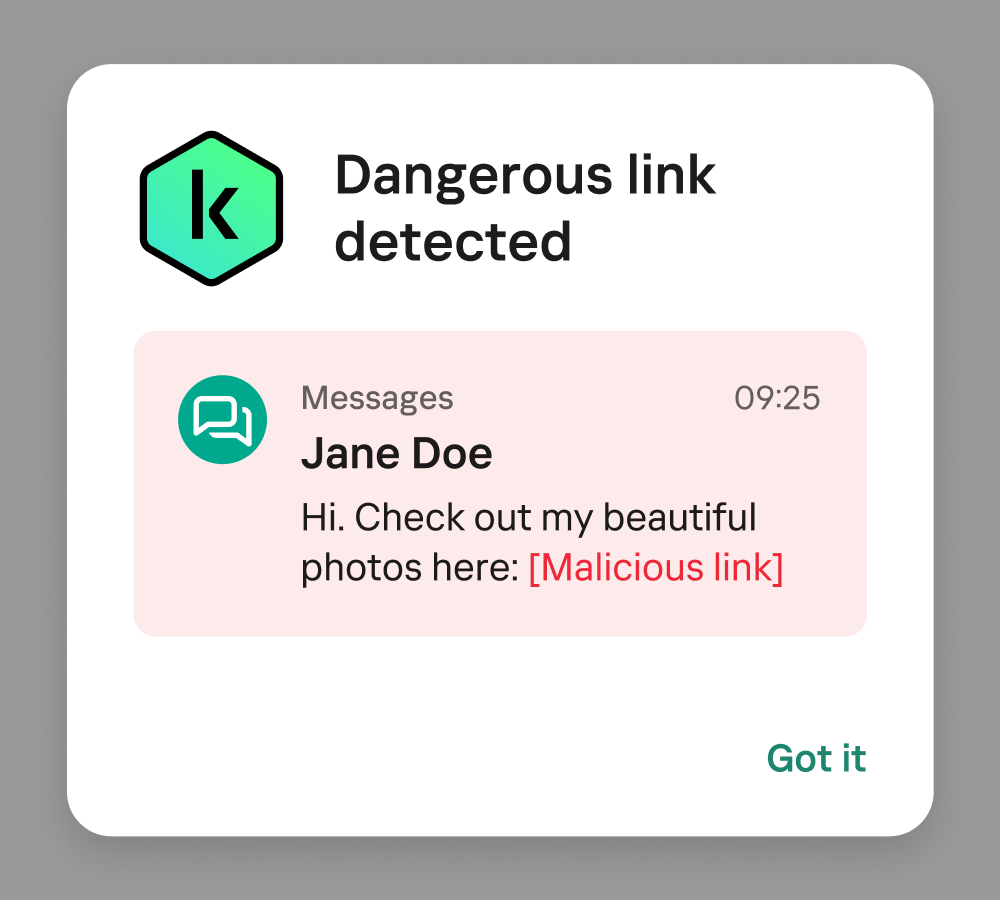
Here’s how it works. If any app — say, a messaging app — tries to show you a phishing link in a pop-up notification, our security solution hides the malicious notification and replaces it with its own. This new notification will have the title Dangerous link detected and the text of the original message, but with the malicious link removed.

This is what a Kaspersky for Android notification looks like when it detects a malicious link

This is what a Kaspersky for Android notification looks like when it detects a malicious link

Important: no Kaspersky employee can read your private messages. This security mechanism is fully automated and only scans for standard links within notification text. For this reason, it won’t be able to check links that are concealed with special formatting like hidden text in a messaging app or those disguised as a hyperlink with anchor text like “click here”.

How to enable maximum anti-phishing security

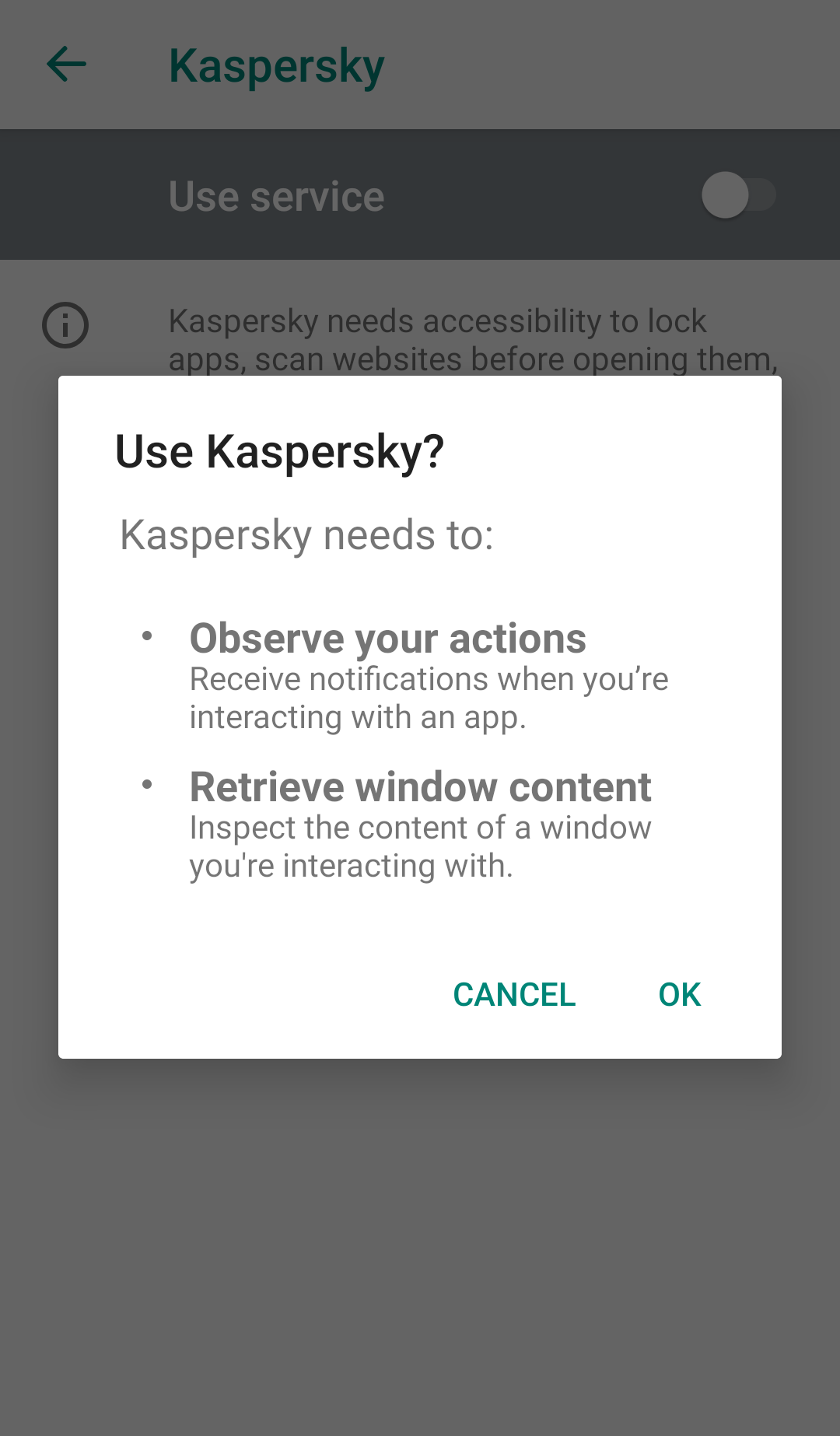
To give Kaspersky for Android the permissions it needs to find and repel threats, you need to enable certain settings in the Android OS. The first step is to turn on access to Accessibility features, which is required for all layers of security. If you don’t grant this permission, the app will warn you and provide instructions. You can also enable it manually: SettingsAccessibilityKaspersky → Use Service → OK.

Next, you need to enable the first layer of security: Notification Protection. This allows the app to detect phishing links directly in your notifications.

  • Open Kaspersky for Android.
  • Go to All featuresSafe MessagingCheck notifications.
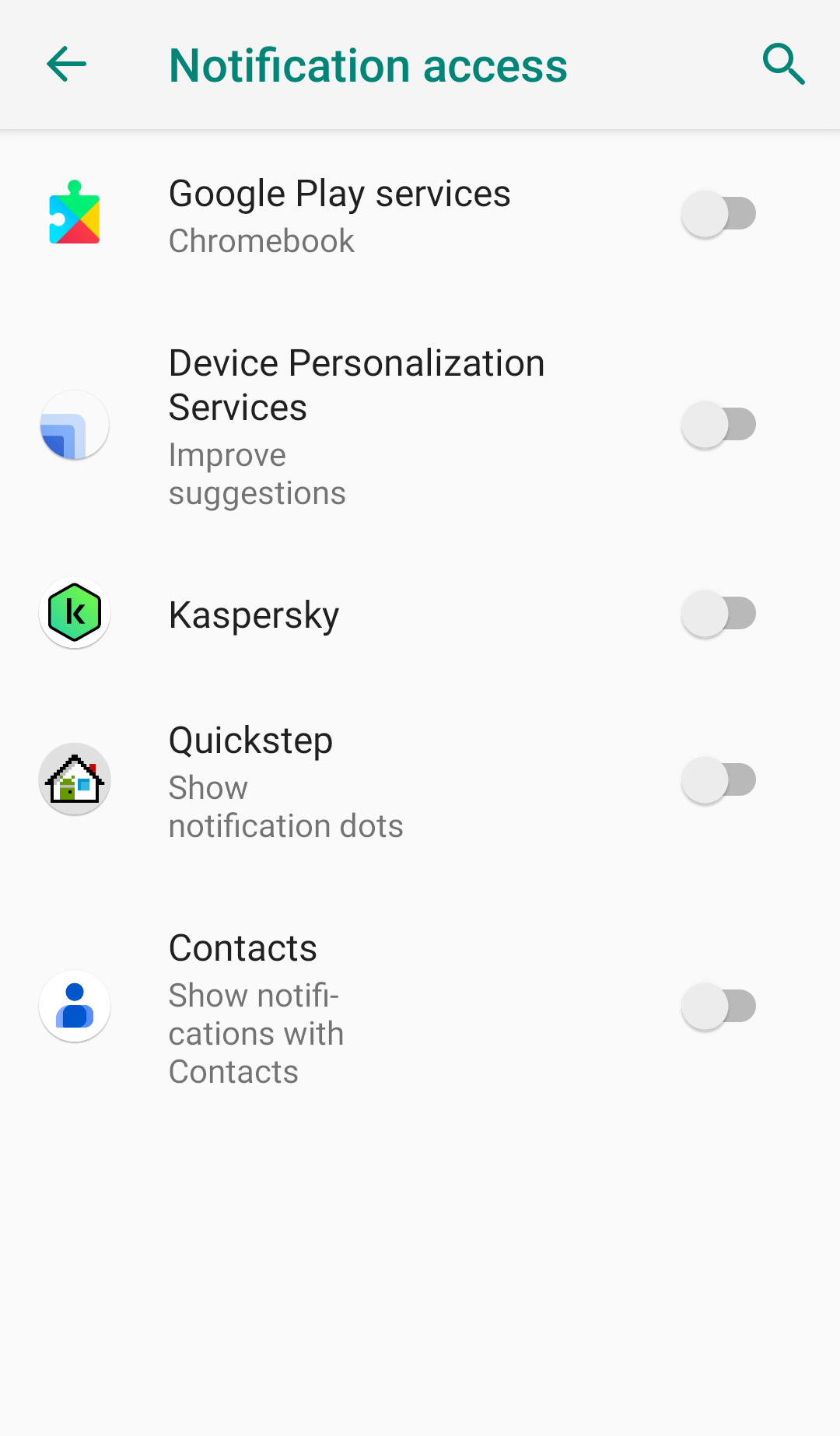
  • Grant notification access: SettingsApps & notifications → Special app access → Notification access → Kaspersky → Allow.

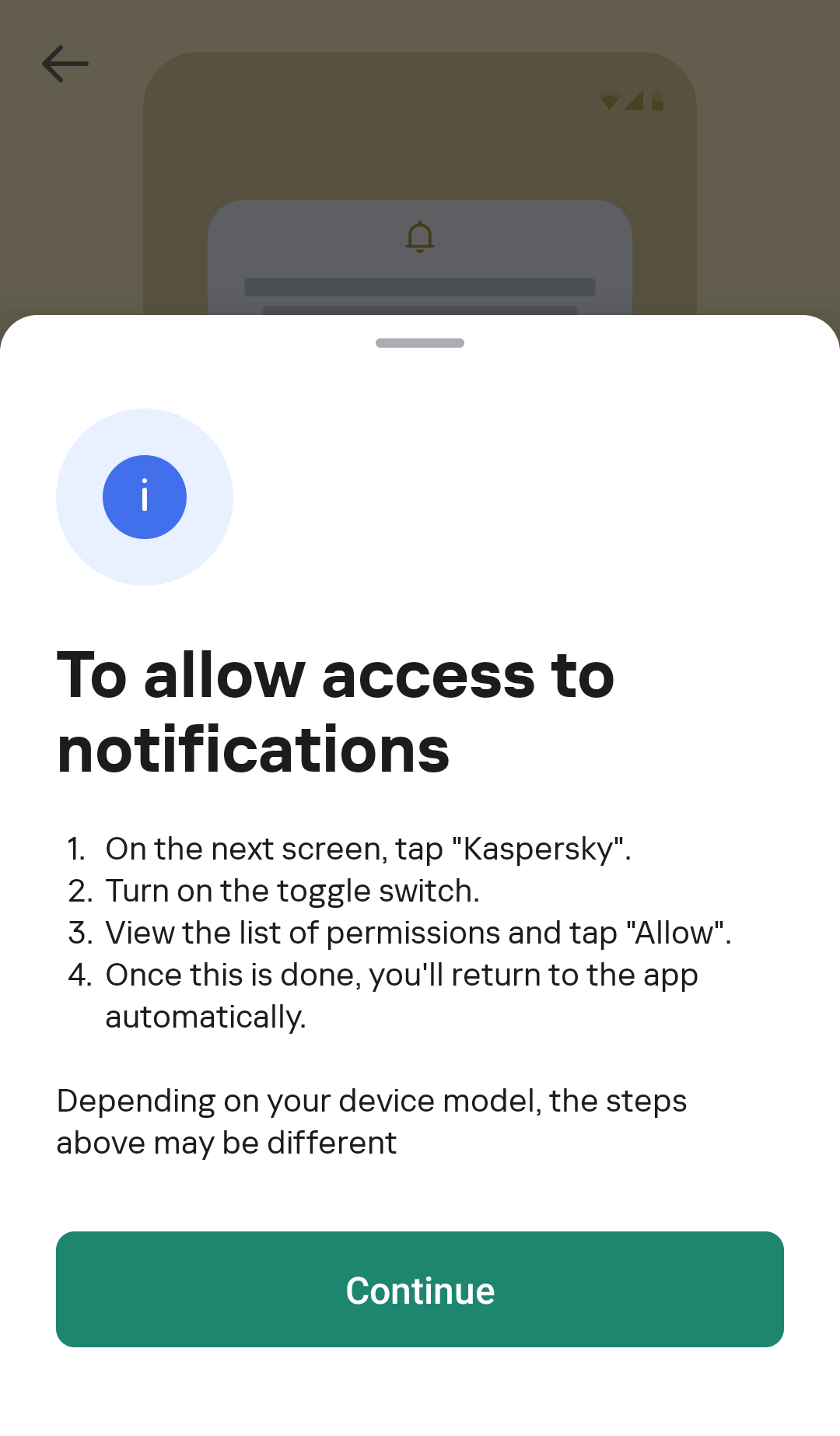
The exact steps may vary slightly depending on your smartphone model. For this reason, all Kaspersky for Android users can access a quick link from the app itself to the correct settings section. Simply tap Check Notifications in the app, and in the window that opens, tap Show instructions → Continue.

The first layer of security is on. Now, Kaspersky for Android will alert you when it detects malicious links in notifications.

Now for the second layer, Safe Messaging, which blocks dangerous links in SMS messages and WhatsApp, Viber, and Telegram.

  • Open Kaspersky for Android.
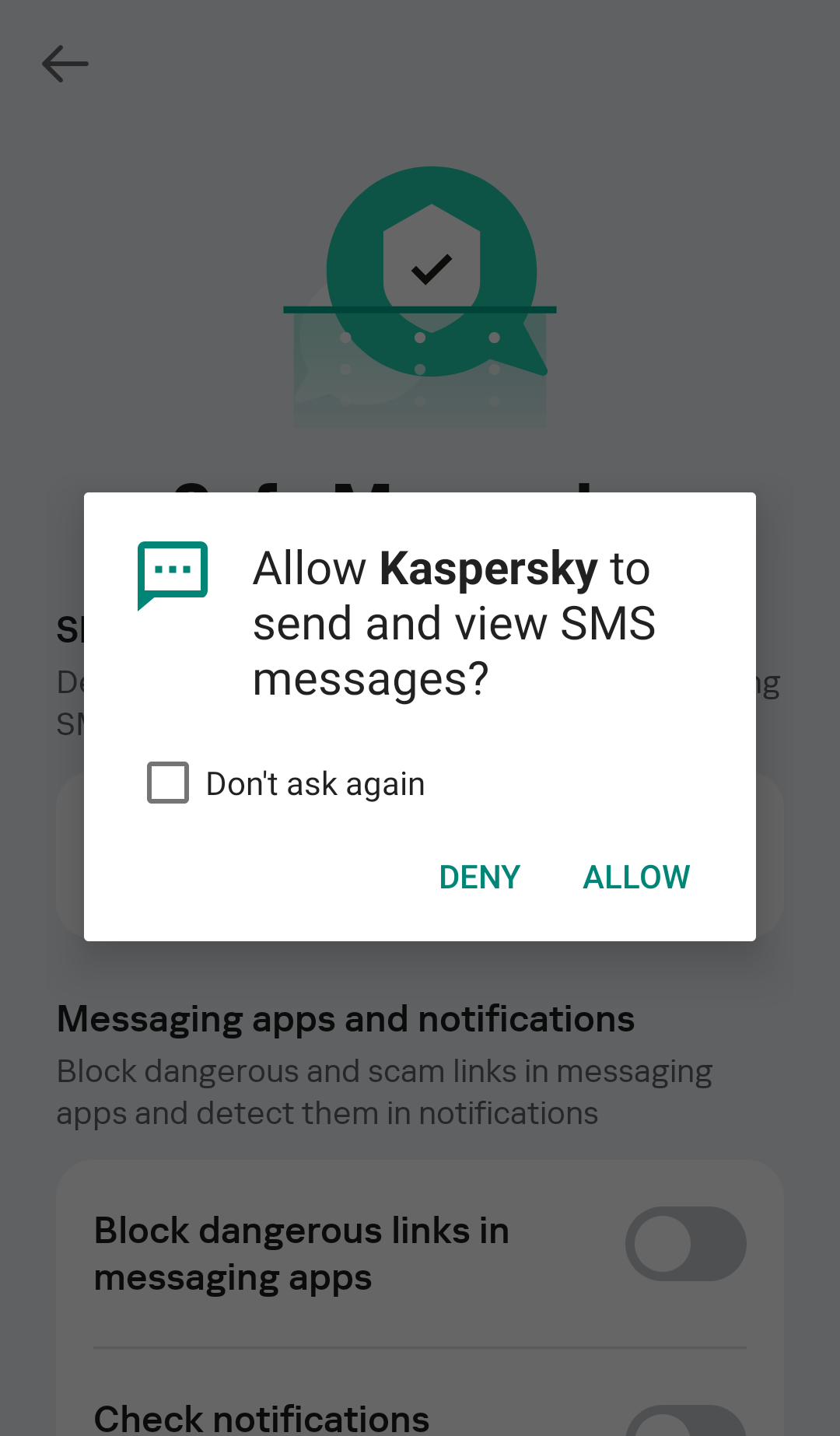
  • Go to All featuresSafe MessagingCheck SMS messagesAllow.
  • Go to All featuresSafe MessagingBlock dangerous links in messaging apps.
To check links in SMS messages, you need to grant Kaspersky for Android permission to send and view SMSs. Of course, we don't intend to send anything

To check links in SMS messages, you need to grant Kaspersky for Android permission to send and view SMSs. Of course, we don’t intend to send anything

Now, the second layer of security, Safe Messaging, is also enabled.

Next, we turn on the third layer of anti-phishing security: Safe Browsing. This feature blocks you from visiting malicious websites in browsers.

  • Open Kaspersky for Android.
  • Go to All featuresSafe Browsing.
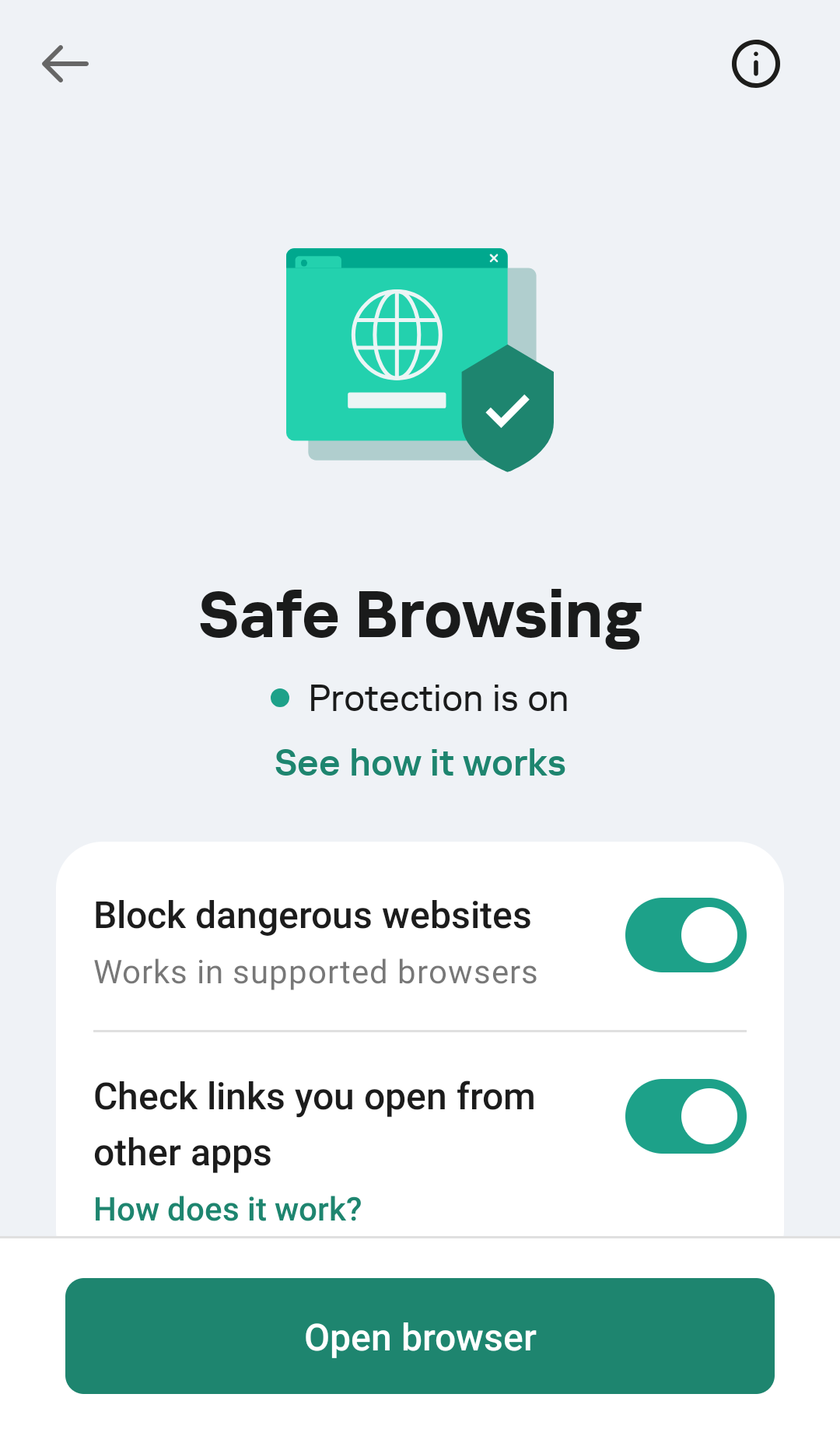
  • Activate the toggles next to Block dangerous websites and Check links you open from other apps.
How to enable Safe Browsing in Kaspersky for Android

How to enable Safe Browsing in Kaspersky for Android

Don’t forget to check the settings in the messaging apps you use, and make sure you allow new message notifications. We recommend paying attention not only to the general app settings, but also to individual chat settings. Remember that phishing links can even come from hacked accounts of people you know.

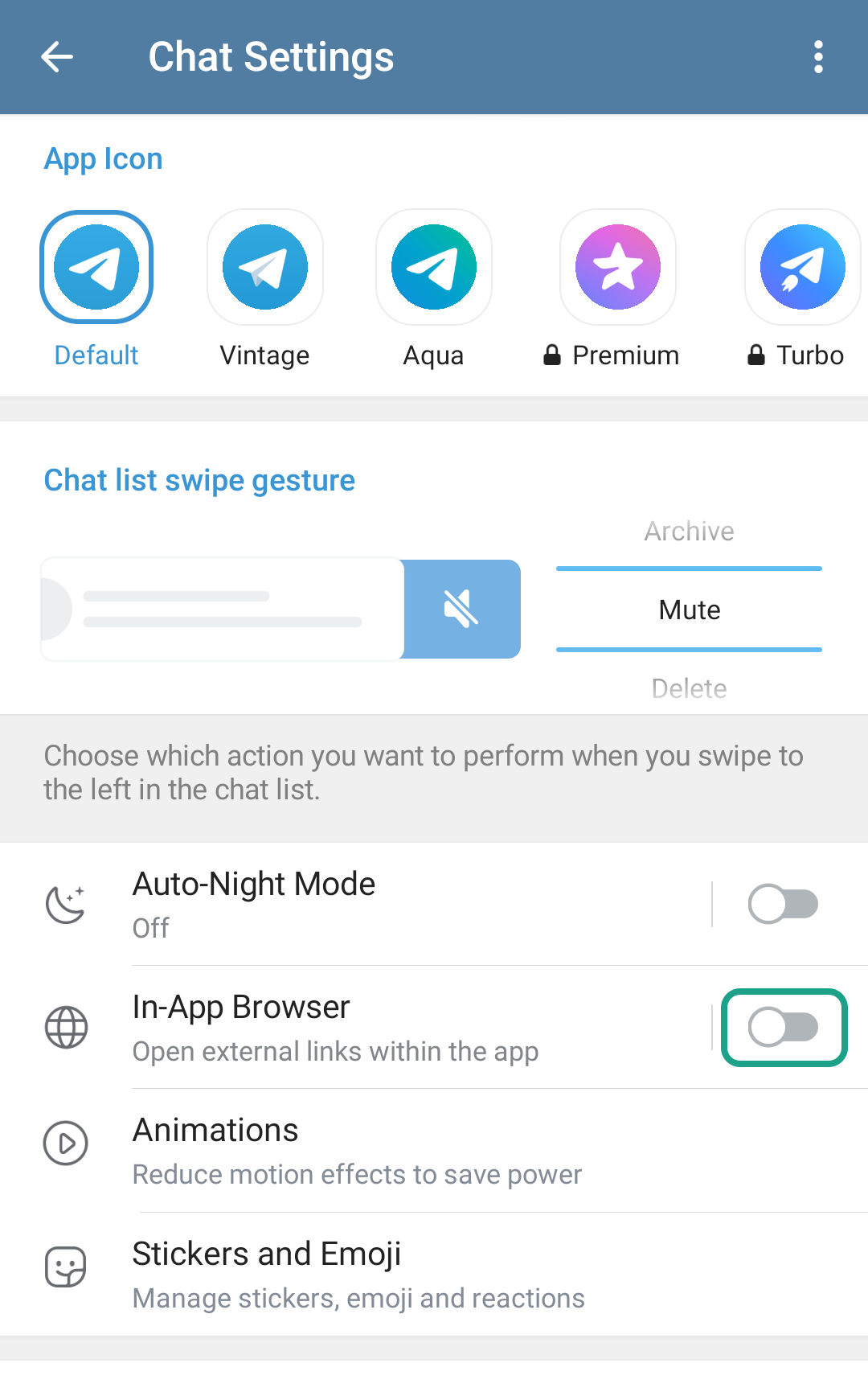
Here’s another important detail for Telegram users. This messaging app opens all links by default in its built-in browser, and scammers take advantage of this. Our Safe Browsing feature doesn’t work in Telegram’s built-in browser. For increased device security, you should change the default Telegram settings to open links in a third-party browser instead. To do this, in Telegram go to SettingsChat Settings and turn off the switch for In-App Browser.

How to configure Telegram so that links are opened in a third-party browser and checked by Kaspersky for Android

How to configure Telegram so that links are opened in a third-party browser and checked by Kaspersky for Android

Install the best anti-phishing security on your devices, treat every unexpected link received in a messaging app or via SMS with due suspicion, and follow our Telegram channel to stay up to date on the latest cybersecurity trends.

Protect yourself from scams in messaging apps and SMS:

Kaspersky official blog – ​Read More

Best Walmart deals to compete with Prime Day 2025: All-time-low prices from Microsoft, Samsung, and more

Amazon Prime Day is just over a week away, but you can already find tech at Walmart for less. Here are my favorite deals, including laptops, smartwatches, TVs, and smart home gadgets.

Latest news – ​Read More

DarkCloud Infostealer Relaunched to Grab Credentials, Crypto and Contacts

eSentire TRU analyses the new DarkCloud V4.2 infostealer, rewritten in VB6. Find out how the malware steals browser data, crypto, and contacts via targeted phishing.

Hackread – Latest Cybersecurity, Hacking News, Tech, AI & Crypto – ​Read More

How to Use a Password Manager to Share Your Logins After You Die (2025)

Your logins will live on after you pass on. Make sure they end up in the right hands.

Security Latest – ​Read More

I teamed up two AI tools to solve a major bug – but they couldn’t do it without me

When Codex failed to debug my plugin, Deep Research delivered – with my careful guidance. Here’s how combining AI tools can solve problems faster and supercharge developer workflows.

Latest news – ​Read More

Dutch Teens Arrested for Allegedly Helping Russian Hackers

One of the two 17-year-old boys allegedly walked by law enforcement and embassy offices carrying a Wi-Fi sniffer.

The post Dutch Teens Arrested for Allegedly Helping Russian Hackers appeared first on SecurityWeek.

SecurityWeek – ​Read More

ThreatBook Launches Best-of-Breed Advanced Threat Intelligence Solution

Singapore, Singapore, 29th September 2025, CyberNewsWire

Hackread – Latest Cybersecurity, Hacking News, Tech, AI & Crypto – ​Read More

Medusa Ransomware Claims Comcast Data Breach, Demands $1.2M

Medusa ransomware group claims 834 GB data theft from Comcast, demanding $1.2M ransom while sharing screenshots and file listings.

Hackread – Latest Cybersecurity, Hacking News, Tech, AI & Crypto – ​Read More