Four critical zero-day flaws found in the $20 YoLink Smart Hub allow remote physical access, threatening your home security. See the urgent steps you must take now.
Hackread – Latest Cybersecurity, Hacking News, Tech, AI & Crypto – Read More
https://www.backbox.org/wp-content/uploads/2018/09/website_backbox_text_black.png00adminhttps://www.backbox.org/wp-content/uploads/2018/09/website_backbox_text_black.pngadmin2025-10-02 14:06:472025-10-02 14:06:47$20 YoLink IoT Gateway Vulnerabilities Put Home Security at Risk
https://www.backbox.org/wp-content/uploads/2018/09/website_backbox_text_black.png00adminhttps://www.backbox.org/wp-content/uploads/2018/09/website_backbox_text_black.pngadmin2025-10-02 13:06:542025-10-02 13:06:54Snowflake adds MCP support, new AI suite for financial services
Cybersecurity firm Tenable found three critical flaws allowing prompt injection and data exfiltration from Google’s Gemini AI. Learn why AI assistants are the new weak link.
Hackread – Latest Cybersecurity, Hacking News, Tech, AI & Crypto – Read More
https://www.backbox.org/wp-content/uploads/2018/09/website_backbox_text_black.png00adminhttps://www.backbox.org/wp-content/uploads/2018/09/website_backbox_text_black.pngadmin2025-10-02 13:06:532025-10-02 13:06:53Google Patches “Gemini Trifecta” Vulnerabilities in Gemini AI Suite
https://www.backbox.org/wp-content/uploads/2018/09/website_backbox_text_black.png00adminhttps://www.backbox.org/wp-content/uploads/2018/09/website_backbox_text_black.pngadmin2025-10-02 12:06:462025-10-02 12:06:46766,000 Impacted by Data Breach at Dealership Software Provider Motility
Founder Bryan Onel says too many companies are doing the bare minimum to meet their security compliance obligations, and raised $33 million to help his customers get both compliant and secure.
https://www.backbox.org/wp-content/uploads/2018/09/website_backbox_text_black.png00adminhttps://www.backbox.org/wp-content/uploads/2018/09/website_backbox_text_black.pngadmin2025-10-02 12:06:462025-10-02 12:06:46Oneleet raises $33M to shake up the world of security compliance
September brought big updates to ANY.RUN. From four new connectors that plug our sandbox and threat intelligence straight into the world’s top SIEM and SOAR platforms, to a redesigned Threat Intelligence Lookup home screen built for speed and simplicity, your SOC now works smarter and faster than ever.
Add in 99 fresh signatures, 11 new YARA rules, and 2,322 Suricata rules, and you’ve got sharper coverage against the latest ransomware, stealers, and phishing campaigns.
Product Updates
Expanding the Ecosystem: New Connectors for Top SIEMs & SOARs
We continue to grow the ANY.RUN ecosystem so security teams can work inside familiar platforms while gaining richer, faster visibility into threats. The new integrations with IBM QRadar SIEM, Palo Alto Networks Cortex XSOAR, Microsoft Sentinel, and Microsoft Defender bring sandboxing and real-time IOCs directly into your daily workflows.
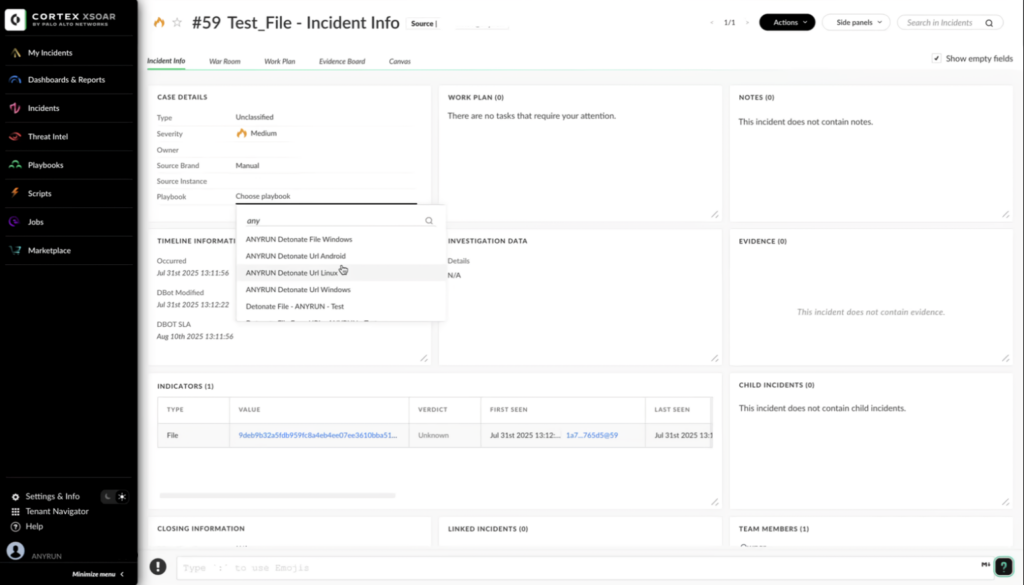
File analysis with ANY.RUN’s Interactive Sandbox inside Cortex XSOAR
Instead of switching platforms or manually enriching alerts, analysts can now automate malware analysis, correlate logs with high-fidelity IOCs, and prioritize incidents faster; all without disrupting existing workflows.
Microsoft Sentinel: Detonate suspicious files and links directly from Sentinel alerts and get enriched verdicts and IOCs fed back automatically.
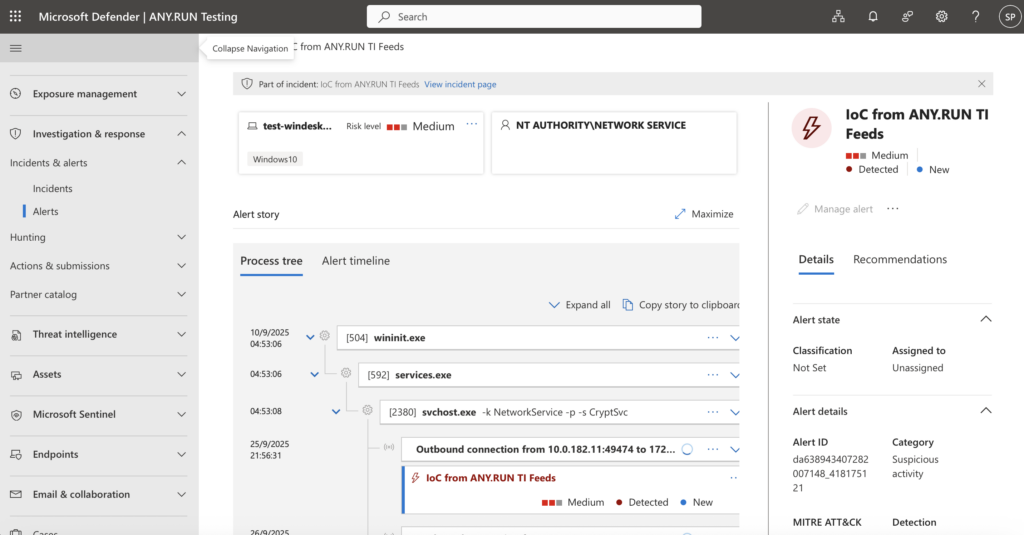
An alert generated in MS Defender based on an indicator from TI Feeds
Microsoft Defender: Enhance endpoint alerts with Interactive Sandbox insights and live Threat Intelligence Feeds, reducing manual enrichment and improving accuracy.
Integrate ANY.RUN’s products for stronger proactive security Request a quote or demo for your SOC
What Security Teams Achieve with ANY.RUN Connectors
Early Detection: Spot threats earlier in the kill chain with live IOCs from sandbox detonations, reducing breach risk by up to 42% compared to static feeds.
Reduced MTTR: Automating enrichment and triage cuts investigation time by up to 21 minutes per incident, accelerating containment and remediation.
Lower Alert Fatigue: With nearly 100% malicious IOCs, analysts waste less time chasing false positives, freeing focus for true high-risk alerts.
Higher Productivity: SOC efficiency improves by up to 3x as routine checks and manual correlation are eliminated.
Connectors use API and STIX/TAXII standards, ensuring smooth deployment with no need for workflow redesign or extra infrastructure. By leveraging existing SIEM and SOAR platforms, teams avoid duplicate tools and infrastructure, reducing total cost of ownership (TCO).
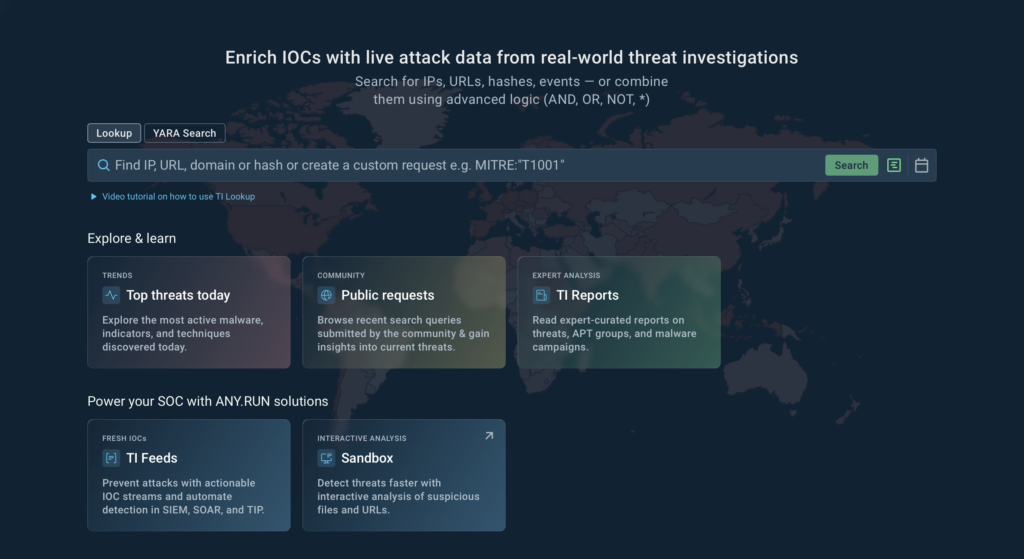
Explore & Learn section: Quick access to daily top threats, public requests from the community, and expert-curated TI reports.
Beginner-friendly video tutorial: A short guide to help new users start searching, enriching, and analyzing IOCs right away.
Streamlined navigation: Cleaner interface for running lookups, YARA searches, or custom requests with advanced logic.
With these improvements, both new and experienced analysts can get to actionable threat intelligence faster, learn from the community, and explore the latest attack trends all in one place.
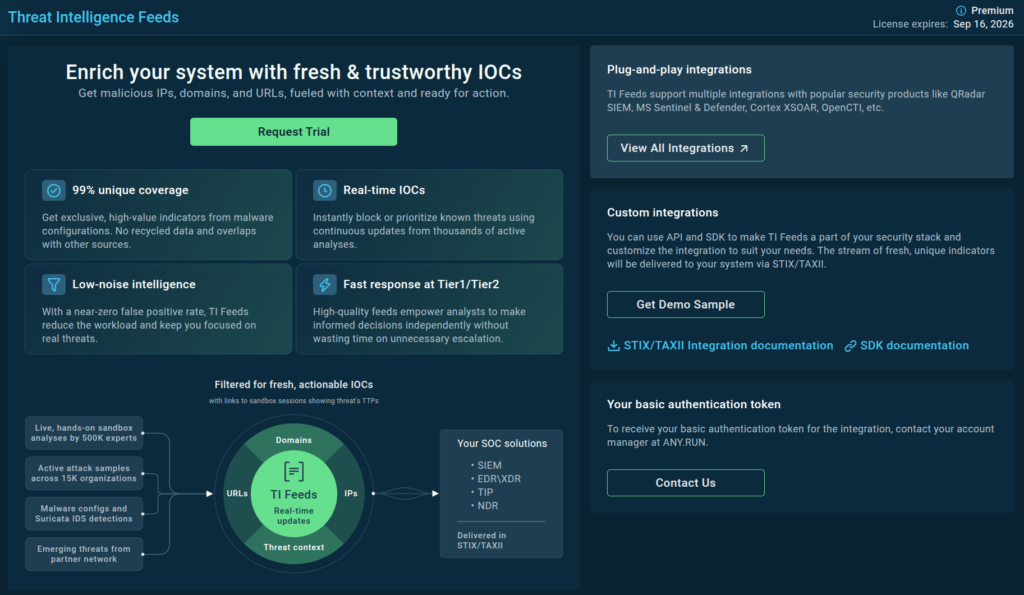
The new UI of the TI Feeds page simplifies navigation
Along with the TI home screen, we’ve also updated the Threat Intelligence Feeds page. Now you can easily request a trial, download a sample, or set up an integration with your security systems in just a couple of clicks.
Threat Coverage Update
In September, our team continued to strengthen detection capabilities so SOCs can stay ahead of new and evolving threats:
99 new signatures were added to improve coverage across malware families and techniques.
11 new YARA rules went live in production, enhancing accuracy and hunting capabilities.
2,322 new Suricata rules were deployed, expanding detection for network-based attacks.
These updates mean analysts gain faster, more confident verdicts in the sandbox and can enrich SIEM, SOAR, and IDS workflows with fresh, actionable IOCs.
New Behavior Signatures
This month’s signatures help analysts detect obfuscation, destructive activity, and persistence earlier in the attack chain. The new coverage spans ransomware, loaders, stealers, and RATs, alongside mutex detections of legitimate tools abused by attackers.
In September, we introduced 11 new YARA rules into production to help SOC teams detect emerging malware families, improve hunting accuracy, and broaden coverage across RATs, stealers, loaders, and C2 infrastructure. These rules give analysts faster verdicts and deeper visibility during investigations.
In September, we added 2,322 new Suricata rules to strengthen network-based detections against phishing, exfiltration, and evasive malware activity. These rules help SOCs identify threats earlier at the network layer and reduce investigation blind spots.
Key highlights include:
Google Auth Phishing Activity (sid:85003912): Detects phishing attempts based on mismatched domains and authorization URLs.
Tycoon 2FA Domain Generation Algorithms (sids: 85004041–85004047): Identifies DGA patterns across multiple TLD zones used by Tycoon 2FA infrastructure.
About ANY.RUN
ANY.RUN supports more than 15,000 organizations worldwide across industries like banking, manufacturing, telecom, healthcare, retail, and technology, helping them build faster, smarter, and more resilient cybersecurity operations.
Our cloud-based Interactive Sandbox enables teams to safely analyze threats targeting Windows, Linux, and Android systems in under 40 seconds, with no complex infrastructure required.
Combined with Threat Intelligence Lookup and Threat Intelligence Feeds, ANY.RUN empowers SOC teams to accelerate investigations, cut risks, and improve efficiency at every stage of the threat detection workflow.
“Hi! My niece is in a contest! Can you vote for her? It means the world to her”. Messages like this are common on WhatsApp — both in groups and private chats. Many people who aren’t security-savvy will, without a second thought, click to help someone they don’t actually know — and end up losing their account. In a recent investigation we found a new phishing campaign that has already hit WhatsApp users worldwide.
Today we’ll explain how the attack works, the potential consequences for victims, and how to avoid falling for it.
How the attack works
Cybercriminals first prepare for the attack by creating convincing phishing pages purportedly hosting legitimate voting polls — in the example below for young gymnasts, though the scenario can be easily changed. The pages look genuine: they include photos of real participants, Vote buttons and counters showing how many people have voted. Likely using AI and phishing-kits, the attackers easily produce multiple language versions of the same site — we found the identical poll in English, Spanish, German, Turkish, Danish, Bulgarian, and other languages.
Stage One: The Hook. On social networks, in messengers, or by email, the scammers use social engineering to direct you to a fake voting site. The pretext can be very believable, and the message may come from a friend or relative whose account has already been compromised. The request is usually personalized — in the first message the fraudster posing as your acquaintance asks you to vote for a certain contestant because they’re their charge, friend or relative.
First you’re lured to a fake voting page
Stage Two: The Trap. When you click Vote, you’re taken to a page that asks you to quickly authenticate via WhatsApp. All you need do is enter the phone number linked to your messenger.
Next they ask for your phone number associated with WhatsApp. The scammers even pretend to care about your data and “your valuable time”
Stage Three: The Heist. The attackers exploit the one-time code login feature in WhatsApp Web. They enter the phone number you provided, and WhatsApp generates an eight-character single-use verification code. The attackers immediately display that code on the fake site with instructions: open WhatsApp, go to “Connected devices” (never mind that it’s actually “Linked devices” in WhatsApp), and enter the code. For convenience, there’s even a button to copy the code to the clipboard.
For “fast and easy authorization” (read: WhatsApp account takeover) you only need enter the code shown on the site
At the same time, WhatsApp on your phone shows a prompt to link a new device by entering the code. Clicking that opens a warning that someone is trying to connect to your account, and a field to enter the code.
Unfortunately, in their uncontrollable desire to help a complete stranger in the contest, many users don’t carefully read WhatsApp’s warning. They think, “Someone wants to link to my account? That’s so I can vote — looks fine to me” When the careless victim types the code into the app on their phone, the web session initiated by the attackers is activated.
WhatsApp warns you that someone is trying to link to your account, but many users don’t read the warning, and enter the verification code anyway
If you enter that code, the attackers gain full access to your WhatsApp, as if you had logged in yourself — for example, from a computer alongside your phone. The attackers can view all your contacts, read conversations, send and delete messages in your name, and even take full control of the account. That opens up further possibilities for fraud: somehow extracting money from your contacts using your identity, or using your account to spread the same phishing link that trapped you.
What to do if you think you’ve been hacked
If you suspect you’ve fallen for the scam and given attackers access to your WhatsApp account, the first thing to do is open the WhatsApp settings on your smartphone and go to Linked devices. There you’ll see all devices currently logged into your account. If you notice any unfamiliar devices or browsers, click on them to disconnect them from your account. Do this quickly — before the criminals can fully take over your account.
We’ve prepared a detailed guide for such cases: it explains eight signs your WhatsApp account may be hacked, and provides step-by-step instructions on how to regain access even in difficult situations. We also have a similar guide for Telegram users.
How to prevent your WhatsApp account from being hacked
Never take part in dubious contests or votes — especially if they require messenger authentication. Legitimate polls don’t ask for access to your personal accounts.
Don’t click suspicious links in messages — even if they seem to come from friends or relatives. Their accounts may have been hacked.
Never enter personal data on unfamiliar websites — especially those reached via messages or social media links. Always check the URL carefully.
Don’t ignore browser warnings about unsafe sites, and use Kaspersky Premium on all your devices (both smartphones and computers). Our protection scans links and webpages, blocks phishing and malicious resources, and works in all popular mobile and desktop browsers.
Enable two-factor verification in your WhatsApp settings. This makes a six-digit PIN code necessary to log in on a new device, making attackers’ job harder even if your number is compromised. However, this doesn’t protect against the attack described above — the one-time code shown to you is, in WhatsApp’s view, already the “second factor”. That’s why the PIN isn’t requested during this login method.
Use passkeys instead of traditional passwords wherever possible. WhatsApp already supports passkeys for account verification.
Protect mobile devices from phishing — these are the main targets of messenger attacks. Three-level protection technology detects malicious links and blocks dangerous websites. At the first level, Notification Protection detects and automatically removes malicious links from app notifications, leaving only safe text. Next, Safe Messaging blocks harmful links in SMSs and messenger messages (WhatsApp, Viber, Telegram) before the user clicks them. Finally, Safe Browsing blocks malicious URLs in popular mobile browsers.
Configure privacy and security on both your smartphone and computer with Privacy Checker — Kaspersky’s free service that gives detailed guides for privacy settings in many popular apps, services, and operating systems.
Regularly check the list of connected devices in messengers’ settings. Both WhatsApp and Telegram have sections showing all active sessions, and you can disconnect suspicious ones. In Telegram, you can even enable automatic termination of inactive sessions.
Only use official versions of messengers downloaded from official app stores (such as Google Play, App Store, or Galaxy Store). Modified versions can contain malware.
https://www.backbox.org/wp-content/uploads/2018/09/website_backbox_text_black.png00adminhttps://www.backbox.org/wp-content/uploads/2018/09/website_backbox_text_black.pngadmin2025-10-02 12:06:362025-10-02 12:06:36How to protect yourself from “voting” phishing scams, and avoid losing your WhatsApp account | Kaspersky official blog
Running a SOC often feels like drowning in alerts. Every morning, dashboards light up with thousands of signals; some urgent, many irrelevant. The job is to find the real threats fast enough to keep cases from piling up, prevent analyst burnout, and maintain client or leadership confidence.
The toughest challenges, however, aren’t the alerts that can be dismissed quickly, but the ones that hide
https://www.backbox.org/wp-content/uploads/2018/09/website_backbox_text_black.png00adminhttps://www.backbox.org/wp-content/uploads/2018/09/website_backbox_text_black.pngadmin2025-10-02 11:07:002025-10-02 11:07:00How to Close Threat Detection Gaps: Your SOC’s Action Plan
Cybersecurity researchers have discovered two Android spyware campaigns dubbed ProSpy and ToSpy that impersonate apps like Signal and ToTok to target users in the United Arab Emirates (U.A.E.).
Slovak cybersecurity company ESET said the malicious apps are distributed via fake websites and social engineering to trick unsuspecting users into downloading them. Once installed, both the spyware
https://www.backbox.org/wp-content/uploads/2018/09/website_backbox_text_black.png00adminhttps://www.backbox.org/wp-content/uploads/2018/09/website_backbox_text_black.pngadmin2025-10-02 10:06:372025-10-02 10:06:37Warning: Beware of Android Spyware Disguised as Signal Encryption Plugin and ToTok Pro
https://www.backbox.org/wp-content/uploads/2018/09/website_backbox_text_black.png00adminhttps://www.backbox.org/wp-content/uploads/2018/09/website_backbox_text_black.pngadmin2025-10-02 10:06:372025-10-02 10:06:37Zania Raises $18 Million for AI-Powered GRC Platform