London’s Metropolitan Police announced the arrests of two 17-year-old boys who are under questioning in relation to the hack and extortion of the Kido chain.
https://www.backbox.org/wp-content/uploads/2018/09/website_backbox_text_black.png00adminhttps://www.backbox.org/wp-content/uploads/2018/09/website_backbox_text_black.pngadmin2025-10-08 12:06:562025-10-08 12:06:56Teenagers arrested in England over cyberattack on nursery chain Kido
Our experts have detected a fraudulent email campaign on behalf of well-known airlines and airports. Since the beginning of September, our solutions have detected and blocked thousands of similar emails in which scammers posed as employees of Amsterdam Schiphol, Emirates Airlines, Etihad Airways, Lufthansa, Qatar Airways, and other well-known large aviation-related companies. Our experts then started discovering similar mailings exploiting the names of companies in the oil and gas sector. The attackers are imitating normal business correspondence, pretending to be looking for new partners and targeting companies of various sizes and from various industries. The essence of the scheme boils down to convincing the recipients of emails to transfer money to the fraudsters’ accounts.
How the fraudulent scheme works
Attackers try to draw the victim into a correspondence exchange. At the first stage, they send the victim a rather innocuous email on behalf of the procurement department of a major airline or airport, in which they announce the start of a partnership program for 2025/2026, and offer them mutually beneficial cooperation. If the recipient responds, the second stage begins: they send several documents to divert attention — registration forms for a new partner, non-disclosure agreements, and so on.
These emails don’t contain malicious attachments or links, and there are no hidden scripts in the documents, so basic defense mechanisms don’t always block such correspondence. Attackers use only social engineering techniques. In the next letter they ask to pay a certain “mandatory refundable deposit as an expression of interest” of around several thousand dollars. The purpose of this payment is supposedly to secure a priority place on the schedule for consideration of partnership proposals. And the authors of the email give assurances that once the partnership agreement is finalized the money will be returned.
How to realize there’s something wrong with the email
The letters used in this campaign look very plausible, but some inconsistencies can still be detected with the naked eye. The first thing to look closely at is the sender’s e-mail address. It often contains the name of the organization whose employees the scammers are imitating. But if you search for the company’s real website and examine addresses listed at the contact section, you’ll see that the legitimate address of the airport or airline employees have a different domain name. Sometimes attackers don’t bother to keep the From field plausible at all, and simply write the name of the imitated organization in the displayed name field, so you can see a completely unrelated domain in the email address field.
The general rule for business correspondence that for some reason raises suspicion: if there are any doubts, you can write a letter to the address specified on the official website of the company and clarify whether an affiliate program mentioned in the emails really exists, whether the sender works for this company, and whether the address used in a suspicious email is their real email.
But the main red flag is the offer to make a deposit to “express interest”. Respectable companies don’t work that way. They choose partners, suppliers, and contractors after a serious and comprehensive business reputation check — not based on the ability to transfer a small (by their standards) amount of money.
How to protect your company from fraudsters
Ideally, you should implement solutions that prevent fraudulent, phishing and malicious emails from reaching employee inboxes in the first place. We recommend installing strong protection at the corporate email gateway level.
Another important aspect of protecting your company from cyberthreats is to increase employee awareness of scammers’ tricks and other cyberthreats. Particular attention should be paid to training for finance, sales and procurement staff. Comprehensive training sessions can be conducted, for example, via our online Kaspersky Automated Security Awareness Platform.
https://www.backbox.org/wp-content/uploads/2018/09/website_backbox_text_black.png00adminhttps://www.backbox.org/wp-content/uploads/2018/09/website_backbox_text_black.pngadmin2025-10-08 11:06:412025-10-08 11:06:41Airline-mimicking fraud | Kaspersky official blog
Researchers warn of Shuyal Stealer, malware that gathers browser logins, system details, and Discord tokens, then erases evidence via Telegram.
Hackread – Latest Cybersecurity, Hacking News, Tech, AI & Crypto – Read More
https://www.backbox.org/wp-content/uploads/2018/09/website_backbox_text_black.png00adminhttps://www.backbox.org/wp-content/uploads/2018/09/website_backbox_text_black.pngadmin2025-10-08 10:07:192025-10-08 10:07:19New Shuyal Stealer Targets 17 Web Browsers for Login Data and Discord Tokens
https://www.backbox.org/wp-content/uploads/2018/09/website_backbox_text_black.png00adminhttps://www.backbox.org/wp-content/uploads/2018/09/website_backbox_text_black.pngadmin2025-10-08 10:07:182025-10-08 10:07:18Radiflow Unveils New OT Security Platform
October is Cybersecurity Awareness Month, and as the tech-savvy friend or family member, people probably come to you for advice. One of the most common questions is: “I clicked a suspicious link. What do I do now?”
Don’t worry — panic won’t help, but a calm, step-by-step response will. Share this guide with your loved ones so everyone knows exactly how to respond and stay safe.
If you clicked the link on a work device, immediately contact IT support and follow their instructions. Companies often have specific policies and tools to investigate and remediate security incidents. Quick reporting helps protect both you and your organization.
If it’s a personal device, here’s what to do next.
Scenario 1: You only clicked the link, and did not enter any information
Clicking a malicious link can trigger automatic downloads, attempt to exploit browser vulnerabilities, or install malware without your knowledge.
Exit the browser immediately.
Make sure no files downloaded to your device; if so, delete them without opening.
Monitor your device for unusual behavior, which can be a sign of malware.
Examples: Higher-than normal battery drainage, apps crashing, unknown apps/profiles, and persistent pop-ups
Stay alert for suspicious emails, texts, or calls.
Together, these steps help you catch and remove any threats before they cause harm, and keep you aware of follow-up attacks.
Scenario 2: You entered your username and password
Entering credentials on a phishing site can give attackers access to your account, leading to unauthorized activity, identity theft or further phishing.
Change your password immediately for that account, and force a logout of all devices logged in. This locks out any unauthorized users who may have gained access.
If you have multifactor authentication (MFA) enabled, watch for any push notifications that you did not initiate. Do not approve them. This could mean someone is actively trying to log in with your stolen credentials.
Enable two-factor authentication (2FA) if available.
Create new, unique passwords for any other accounts that used the same credentials. Attackers often try your compromised password on multiple sites (aka called credential stuffing).
Tip: Instead of storing your credentials in your browser, use a password manager such as 1Password.
Watch for suspicious account activity.
By following these steps, you limit the attacker’s access and protect your other accounts from being compromised.
Scenario 3: You entered credit card or banking information
Financial data can be quickly exploited for fraudulent transactions, identity theft, or even sold on the dark web.
Contact your bank or card issuer right away.
If possible, freeze your card and get a replacement.
Monitor your statements and report any unauthorized charges.
Enable fraud alerts if your bank offers them.
These actions help you contain the risk, minimize financial losses, and alert your bank to potential fraud on your account.
Scenario 4: You downloaded or opened a file
Downloaded files from suspicious links can contain malware, ransomware, spyware or other harmful software that may steal your data or harm your device.
Disconnect your device from the internet until you have completed all of these steps. Isolating your device can prevent malware from communicating with attackers or spreading to other devices.
Run a full antivirus and malware scan if on a desktop or laptop.
Check to ensure no new apps were installed if on a phone.
Delete any suspicious files.
In a worst-case scenario, if you have conducted periodic backups it might be best to restore your device to a clean version, from before the file was downloaded.
Remember to:
Always verify links before you click on them.
Tip: Hover over the link to make sure it leads to an official website. If you’re not sure, it’s safer to type in the URL manually.
Enable multifactor authentication for your accounts whenever it’s available.
Keep your software and antivirus updated.
Report all phishing attempts to your email provider and IT/security team.
Phishing attacks are getting more sophisticated, but a little knowledge goes a long way. Share this guide with your friends and family so they’ll know what to do if they ever click a suspicious link.
Happy Cybersecurity Awareness Month from Cisco Talos!
https://www.backbox.org/wp-content/uploads/2018/09/website_backbox_text_black.png00adminhttps://www.backbox.org/wp-content/uploads/2018/09/website_backbox_text_black.pngadmin2025-10-08 10:07:112025-10-08 10:07:11What to do when you click on a suspicious link
https://www.backbox.org/wp-content/uploads/2018/09/website_backbox_text_black.png00adminhttps://www.backbox.org/wp-content/uploads/2018/09/website_backbox_text_black.pngadmin2025-10-08 09:07:562025-10-08 09:07:56This solid midrange HP laptop is now nearly 50% off at Walmart
OpenAI on Tuesday said it disrupted three activity clusters for misusing its ChatGPT artificial intelligence (AI) tool to facilitate malware development.
This includes a Russian‑language threat actor, who is said to have used the chatbot to help develop and refine a remote access trojan (RAT), a credential stealer with an aim to evade detection. The operator also used several ChatGPT accounts to
https://www.backbox.org/wp-content/uploads/2018/09/website_backbox_text_black.png00adminhttps://www.backbox.org/wp-content/uploads/2018/09/website_backbox_text_black.pngadmin2025-10-08 08:07:272025-10-08 08:07:27OpenAI Disrupts Russian, North Korean, and Chinese Hackers Misusing ChatGPT for Cyberattacks
https://www.backbox.org/wp-content/uploads/2018/09/website_backbox_text_black.png00adminhttps://www.backbox.org/wp-content/uploads/2018/09/website_backbox_text_black.pngadmin2025-10-08 08:07:272025-10-08 08:07:27Exploitation of Oracle EBS Zero-Day Started 2 Months Before Patching
Building analyst expertise takes time, often too much… Most new hires need over six months before they can handle complex incidents with confidence, leaving senior analysts to pick up the slack and slowing the entire SOC down.
Traditional training programs can’t keep pace with real attacks. Theories and simulations don’t prepare teams for fast, messy, real-world threats. To grow expertise faster, learning needs to happen in daily investigations, not in classrooms.
Turning Operations into a Continuous Learning Environment
To build lasting expertise, SOC leaders need to design workflows that teach as they protect. This means giving analysts room to explore, experiment, and learn from real data, without slowing operations or risking security.
A few principles make it work:
Expose analysts to diverse cases: Rotating tasks between triage, malware analysis, and threat hunting helps them understand the full incident lifecycle.
Encourage safe experimentation: Allowing analysts to test hypotheses and trace attacker behavior builds critical thinking, not just reaction skills.
Share knowledge across levels: Post-incident reviews, shared notes, and team retros create a culture where insights circulate freely, not just among seniors.
Integrate learning metrics: Tracking how fast analysts identify patterns or make confident decisions is just as valuable as measuring mean time to detect.
When continuous safe learning becomes part of SOC design, expertise doesn’t depend on a few individuals, it scales across the entire team.
That’s where ANY.RUN’s Interactive Sandbox brings these principles to life. It provides a safe, collaborative space where analysts, regardless of experience level, can analyze real threats, test detection ideas, and learn directly from live behavior.
Analyzing a real threat inside ANY.RUN’s safe interactive sandbox
Instead of separating learning from daily operations, teams strengthen their skills through real investigations, turning each analysis into both a defensive action and a learning opportunity.
1. Fast Onboarding for Seamless Adoption
Getting new analysts up to speed is often one of the most time-consuming parts of SOC management. You can make it faster with the help of an intuitive, user-friendly interface that even junior specialists can start using right away.
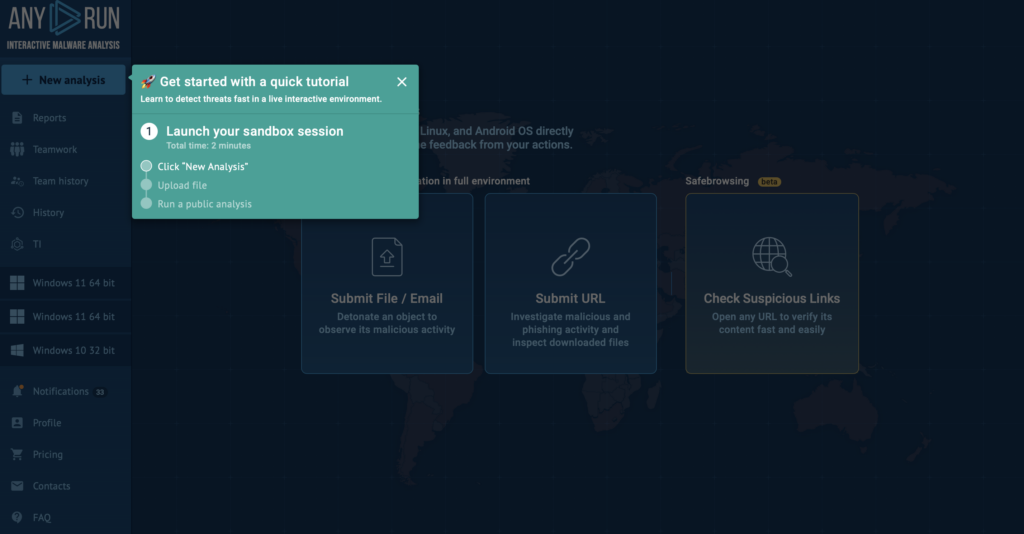
ANY.RUN sandbox tutorial for quick start
Besides, the built-in guides and quick tutorials available help new team members understand how to navigate the sandbox, launch analyses, and interpret results in just a few steps. Try it yourself by navigating to the Tutorials tab on the FAQ page.
After completing the short onboarding flow, analysts can begin investigating real samples safely, without the risk of compromising systems or making critical mistakes.
This hands-on, accessible approach saves weeks of training time and allows teams to start real analysis work much sooner.
2. Real-World Skill Development on the Job
Analysts learn best when they can interact with live attacks instead of static examples. With ANY.RUN, they can launch, observe, and engage with threats safely and without complex setup. This helps them not only perform their job tasks but also grow skills with every new analysis.
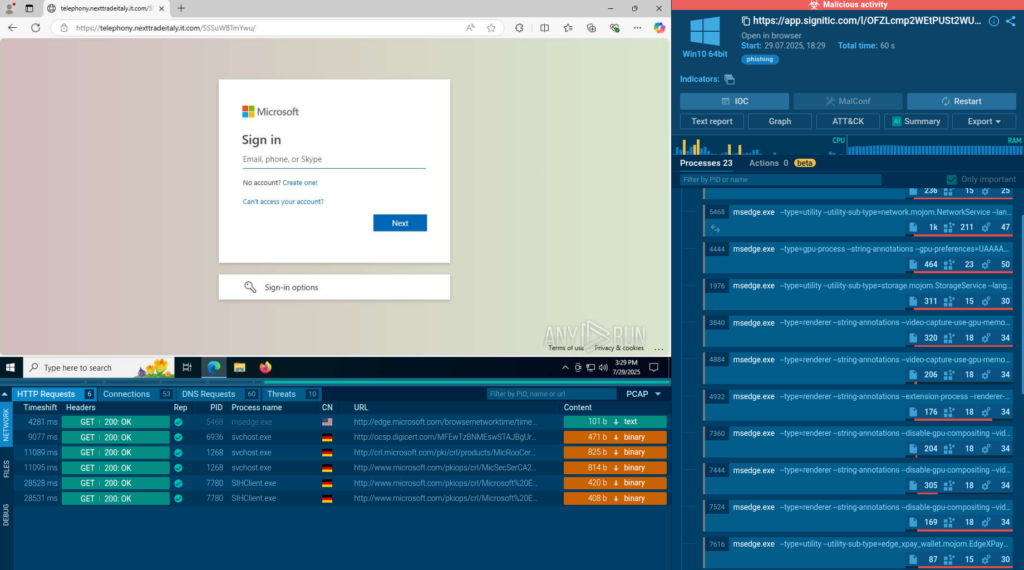
The sandbox lets analysts manually explore phishing attacks
The solution’s interactivity helps analysts perform steps like solving CAPTCHAs or launching payloads from email attachments to better understand multi-stage attacks, trace malware’s activities, and uncover hidden techniques such as malicious links behind QR codes.
This direct, hands-on experience helps them recognize attack patterns faster, make confident decisions, and strengthen their investigative instincts, turning everyday analysis into a learning opportunity.
To simplify analysis, the sandbox also shows all the malicious activities in real time, which can help junior staff understand better how different attacks are carried out.
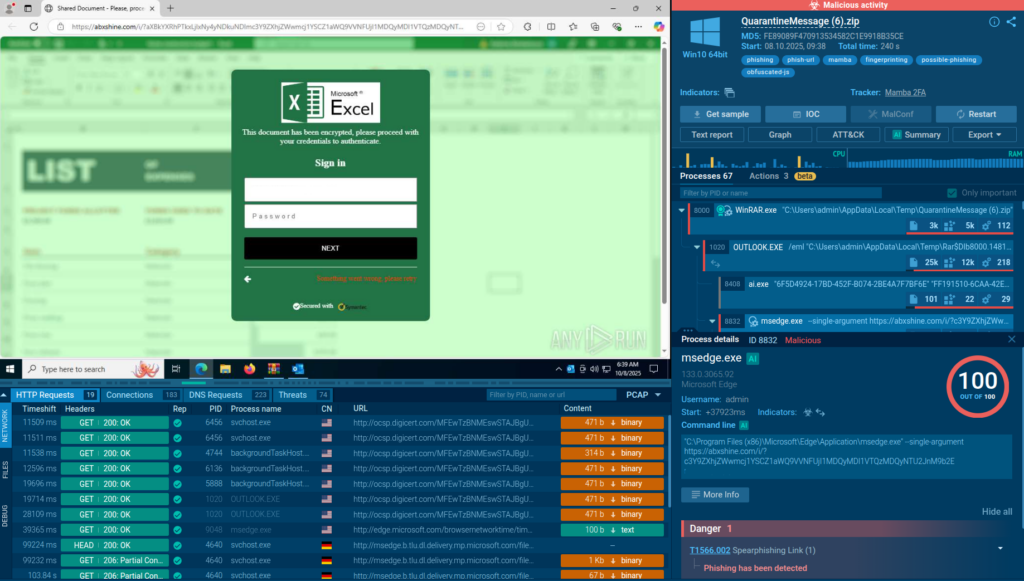
The sandbox lists all the malicious activities to help analysts see the threat in seconds
ANY.RUN flags all the important events like data exfiltration and command and control connections as they happen. It also maps these activities to the MITRE ATT&CK matrix, giving you the actionable insights you need to contain the threat.
As a result, analysts can observe the full scope of the attack and its impact in seconds.
3. AI-powered Insights for Faster, Easier Understanding of Threats
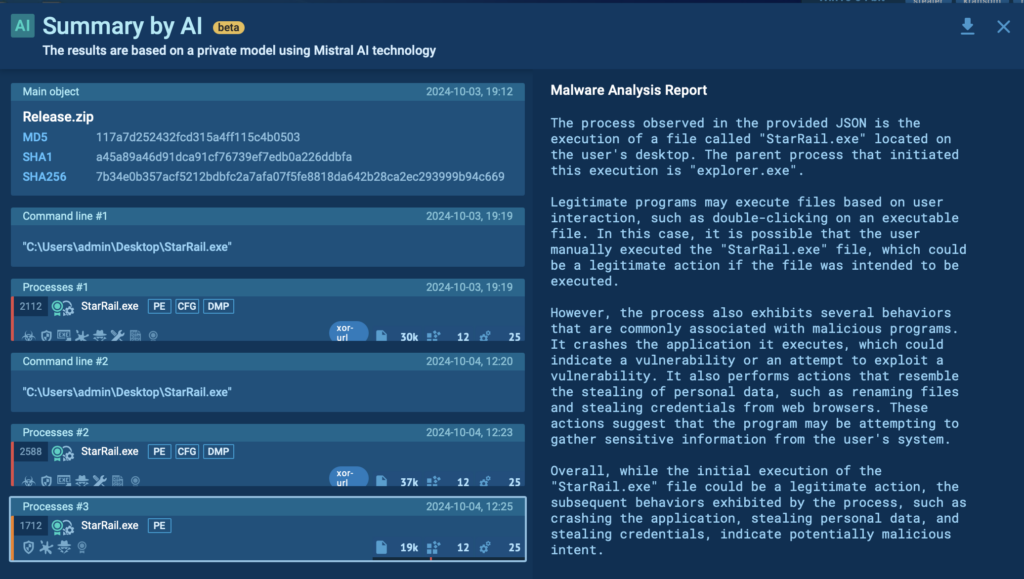
ANY.RUN’s sandbox also provides AI summaries to help analysts better understand malicious processes and improve decision-making under pressure.
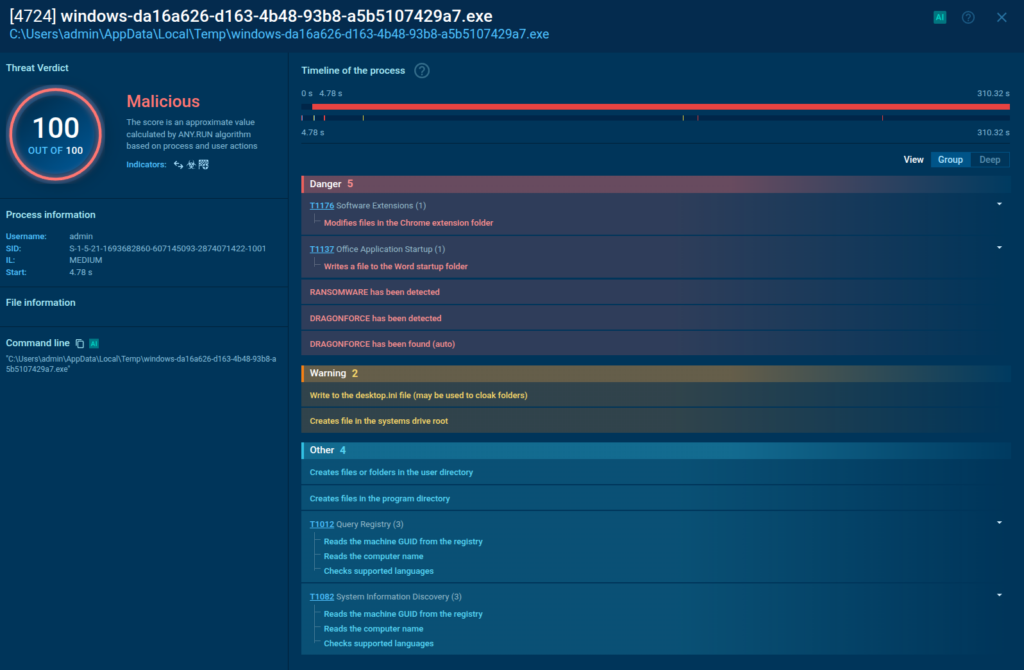
AI reviews inside ANY.RUN’s sandbox analysis session
Real-time explanations of malware’s behavior enhance threat analysis skills and turns investigations into opportunities for professional growth. By embedding insights into routine analysis, the AI creates a dynamic learning environment. It bridges theory and practice and reduces the learning curve for complex concepts.
4. Community Knowledge Base of Current Threats
Important insights often stay locked in personal notes or isolated investigations. ANY.RUN helps turn that scattered knowledge into a structured, shareable resource.
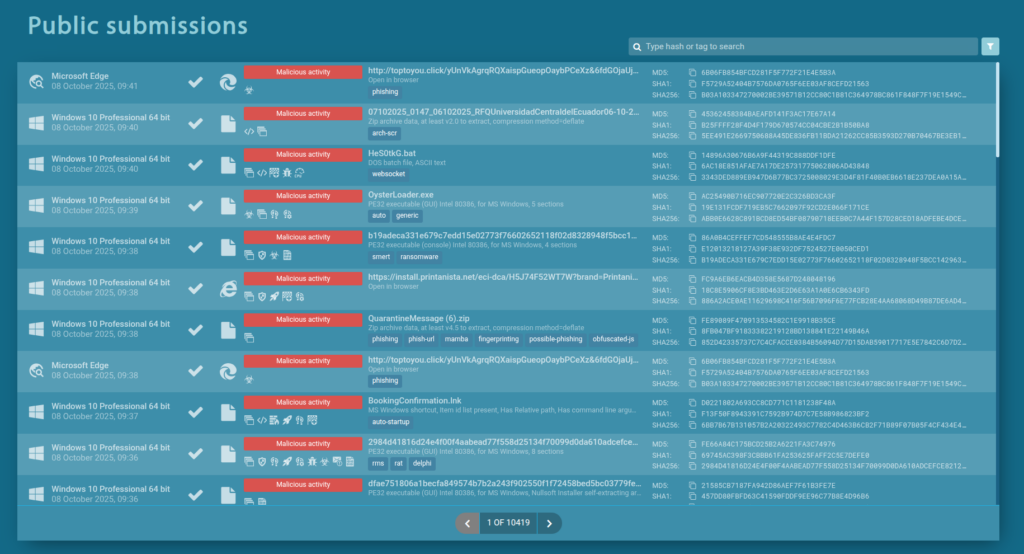
ANY.RUN’s public submissions feature fresh sandbox analyses of malware and phishing threats
Analysts can access thousands of public analysis sessions performed daily by professionals worldwide, learn from real cases, and apply those insights to their own work.
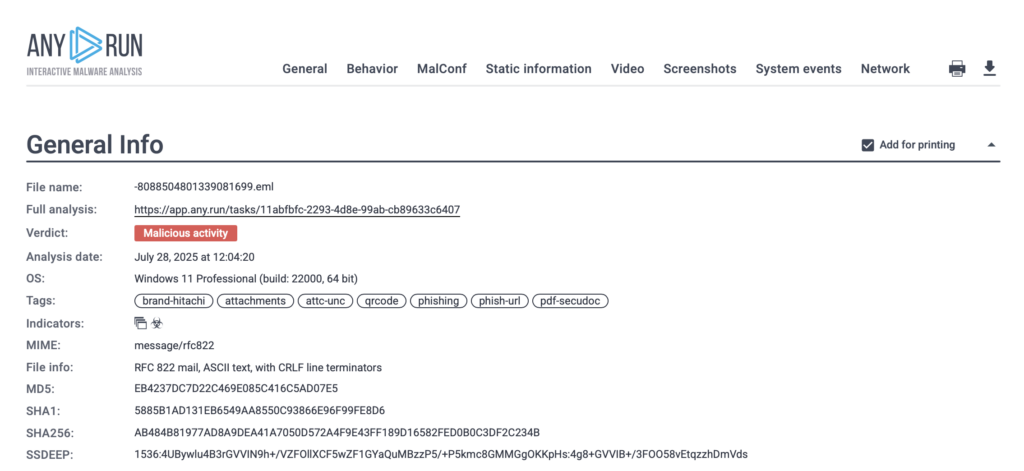
Each public session is saved and can be studied to observe IOCs, behaviors, and MITRE ATT&CK mappings for the latest threats around the world, creating ready-to-use references for future investigations and onboarding.
Easily shareable report generated from real-world analysis by ANY.RUN sandbox
Analysts can dive into this live library of real-world attacks to further their expertise. What one analyst discovers today becomes a learning resource for many others tomorrow.
5. Collaborative Growth
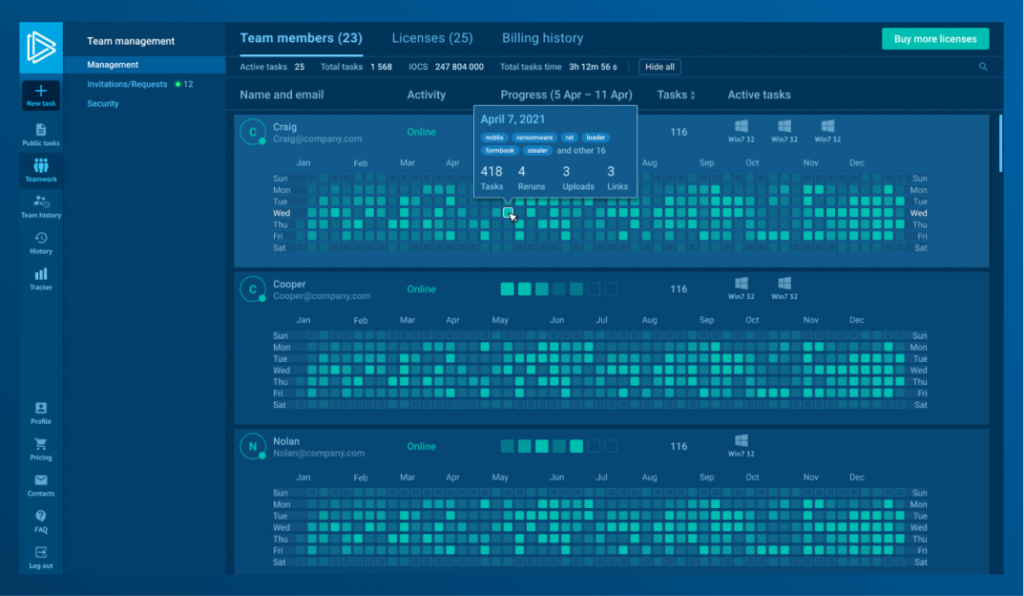
Track team members’ productivity
Expertise grows faster when analysts learn together. ANY.RUN’s teamwork features allow analysts to share sessions, add comments, and review investigations side by side. Junior specialists learn directly from senior peers in real cases, while leaders can track progress and assign tasks that match each analyst’s skill level.
How Practical, Hands-On Learning Transforms SOC Performance
When analysts learn through real investigations, observing, testing, and reacting to live threats, the results reach far beyond individual growth. SOCs that apply this approach with ANY.RUN’s Interactive Sandbox build stronger teams, faster workflows, and measurable returns on every training hour.
Here’s what organizations are achieving in practice:
Faster onboarding: New analysts reach operational readiness in weeks, not months, easing pressure on senior staff.
Up to 94% faster investigations: Real-time interaction and automation reveal malicious activity almost instantly.
3× higher SOC efficiency: Less manual work, more focus on validation, correlation, and proactive defense.
Up to 20% lower Tier 1 workload: Streamlined processes reduce alert volume and repetitive tasks, freeing junior analysts for higher-value work.
30% fewer Tier 1 → Tier 2 escalations: Intuitive tools and better visibility empower Tier 1 analysts to resolve more incidents independently.
Eliminated hardware setup costs: Cloud-based infrastructure removes the need for local environments and maintenance expenses.
Lower training costs: On-the-job learning replaces expensive external programs and downtime.
Higher engagement and retention: Analysts grow through real challenges, stay motivated, and continuously refine their skills.
This hands-on approach turns each analysis into both a defense and a growth opportunity. With ANY.RUN, organizations develop in-house expertise that compounds over time, creating SOCs that not only respond faster but continuously get better with every threat they face.
ANY.RUN is built to help security teams detect threats faster and respond with greater confidence. Our Interactive Sandbox delivers real-time malware analysis and threat intelligence, giving analysts the clarity they need when it matters most.
With support for Windows, Linux, and Android environments, our cloud-based sandbox enables deep behavioral analysis without the need for complex setup. Paired with Threat Intelligence Lookup and TI Feeds, ANY.RUN provides rich context, actionable IOCs, and automation-ready outputs, all with zero infrastructure burden.
https://www.backbox.org/wp-content/uploads/2018/09/website_backbox_text_black.png00adminhttps://www.backbox.org/wp-content/uploads/2018/09/website_backbox_text_black.pngadmin2025-10-08 08:07:192025-10-08 08:07:19How to Grow SOC Team Expertise for Ultimate Triage & Response Speed