Cybersecurity on a budget: Strategies for an economic downturn

  • During economic uncertainty, businesses face the challenge of maintaining strong cybersecurity while managing tightened budgets.  
  • Cyber threats can become more numerous, motivated, and persistent during economic downturns, making the need for resilient, cost-effective security measures critical.  
  • This blog shares practical strategies to help absorb budget cuts while minimizing the damage to an organization’s cybersecurity posture. 

Learning from history 

Cybersecurity on a budget: Strategies for an economic downturn

As many seasoned industry professionals remember, 2008 – 2010 was a tough time for the tech industry as well as the larger U.S. economy. During the Great Recession, unemployment rose as high as 10%, and IT and cybersecurity budgets were certainly not spared. During the 2020 COVID-19 crisis, the need for tech workers and larger IT budgets to support remote work was so strong that it outweighed the global economic slowdown. As a result, many new IT professionals never experienced what a real recession feels like. 

The FBI noted a 22.3% increase in cybercrime complaint submissions from 2008 – 2009, which some attributed in part to unemployed, financially desperate tech workers turning their skillsets to crime. At that time, threat actors mostly targeted individuals in the form of scams, fraud, and other crimes. In today’s environment, a similar economic downturn could easily lead to a surge in the number and talent of ransomware operators. 

Why? Unlike in the Great Recession, most corporate networks are now remote- or hybrid-enabled by default. While nothing about a network’s attack surface would inherently change due to an economic downturn, any increase in the number and skill level of attackers, decrease in the number and skill of defenders, or decrease in the quality of security measures could have devastating consequences for the IT environment owner.

Defend legacy hardware/software 

As was painfully highlighted in recent years by Salt Typhoon incursions into telecommunications networks, working with legacy hardware and software is a risk many businesses take. As belts tighten during an economic downturn, cybersecurity budgets will decrease, and many businesses will inevitably need to postpone technology upgrades beyond end of life. While this introduces risk, there are a few solid strategies to mitigate that risk. 

Defense in depth and zero trust 

While these terms were both solid contenders for the No. 1 Sales Buzzword of 2023, they reflect a valuable underlying principle: Assume the adversary is going to gain a foothold and architect accordingly.  

If a business must continue to use 40% legacy firewalls and only has budget to replace 60%, those legacy firewalls should be positioned in the interior of the network versus on the perimeter and logically separated so an adversary cannot “island-hop” from one to the next using the same vulnerability. If a legacy server must be positioned in a public-facing location, it should be placed in a tightly-controlled DMZ where compromise of that server would not lead to further network intrusion. 

No breach is desirable, but you can minimize the potential for lateral movement. 

Lock down unnecessary functionality 

Many vulnerable applications and systems are targeted via plugins or extra features that an organization isn’t even using. The classic example is a webserver with an abandoned WordPress plugin that later is discovered to be vulnerable. Another example is the SSH login method on a VMWare ESXi hypervisor — an organization may accidentally leave this enabled and allow an adversary to log in as root.  

For vulnerable systems and software, it is critical to review what is strictly necessary for it to operate and disable all other functionalities. This is an important part of attack surface reduction.

Optimize open- and closed-source software 

While closed-source commercial security tools usually offer the easiest setup and best overall experience, transitioning a budget-constrained organization to a blend of commercial and open-source software may be the right answer for maximum efficacy. Here are some rules of thumb for selection. 

Open source 

Open-source software excels when the product does not depend on frequent updates or detailed technical support. Initial setup may be involved and challenging, but financial savings can be significant. A good current example is the Zeek network security monitor, which is not a standalone security product but significantly enhances network-based detection capabilities. An open-source SIEM solution that may be suitable for smaller businesses is Security Onion. 

Closed source/commercial 

For solutions that depend on frequent updates, particularly time-sensitive signature/definition updates, commercial security solutions are the only answer. This primarily includes endpoint detection and response (EDR)/antivirus (AV), firewall, and DNS security solutions. Recognizing that this is a mandatory expenditure will help solidify planning for other areas of cost savings.

Configure what you already have 

For organizations that don’t have the budget for new security systems, making the most of what you already have can go a long way to ensure that basic level of security and hardening is applied. For further information beyond what is reflected below, consider reading this paper on practical security measures for small and/or budget-constrained organizations. 

EDR and antivirus tuning 

Review configuration and policy settings for your existing security investments like AV or EDR solutions. Optimizing them is an easy way to increase security for free. Revisit any policies that were not recently reviewed. Simple configuration changes like turning on heuristic scanning in the AV software can help to catch threats that haven’t been seen before or use more advanced methods of compromise. During the AV/EDR review, checking the exclusions list is always a good idea. As an extreme example that Talos IR has unfortunately seen during incident response, having the whole C: drive excluded prevents any detections at all. Exclusions should be targeted and precise.

Windows domain and cloud policies 

Another powerful, albeit time-consuming, security measure is to optimize Windows domain policies and configurations to help protect the organization. Windows Security baselines, published by Microsoft, are a great starting point. Policy settings like enforcing strong passwords, limiting admin access, and disabling unnecessary features can help tighten security without spending extra money. The CIS also recently published an extensive guide on Active Directory and GPM configuration best practices. For cloud environments, CISA’s SCuBA program offers excellent configuration security guidance.  

PowerShell hardening  

Locking down PowerShell so only trusted users can run it, or setting it to a restricted mode, makes it much harder for attackers to use it against you. The newest versions of PowerShell provide excellent controls, allowing your team to restrict access, limit which scripts can be executed, and configure other granular restrictions, which will help ensure that even if a malicious PowerShell script lands somewhere in the environment, the hardened configuration of PowerShell will limit its functionality.  

Executable neutering 

Various tricks to prevent executables from running by default can be surprisingly effective. For example, changing the default program for opening .js files to Notepad stops these scripts from running. These small changes may seem simple, but together they can create strong layers of defense. For organizations with limited resources, these tweaks can make a big difference in reducing risk without breaking the bank. The following is a very simple PowerShell script which will ensure that malware on unsuspecting user systems is treated as a text file. Of course, these suggestions should be tested and modified to ensure that they do not impair valid enterprise functions.

# List of dangerous file extensions to associate with Notepad 
$extensions = @(".js", ".jse", ".vbs", ".vbe", ".wsf", ".wsh", ".ps1", ".cmd", ".bat", ".hta", ".scr") 
foreach ($ext in $extensions) { 
    try { 
        $assoc = New-Object -ComObject WScript.Shell 
        $assoc.RegWrite("HKCUSoftwareMicrosoftWindowsCurrentVersionExplorerFileExts$extUserChoiceProgid", "Applicationsnotepad.exe", "REG_SZ") 
        Write-Host "Set $ext to open with Notepad" 
    } 
    catch { 
        Write-Warning "Failed to set $ext: $_" 
    } 
} 

Figure 1: Sample script to neuter executables.

Logging and alerting optimization 

Assuming you have the storage space, optimizing logging and alerting is a cheap way to improve network security when a breach is likely. A good understanding of which systems are legacy and therefore vulnerable is an excellent starting point — prioritizing visibility on those systems is key.  

Canaries and decoys 

Thoughtful placement of canary tokens, decoy/honey accounts, and other creative countermeasures on vulnerable systems are other mechanisms to quickly detect and shut down an adversary in the network. This is especially important when you start with the assumption that you will be breached at some point due to vulnerable systems or software. 

Firewalls and network filtering 

The majority of organizations have firewalls and network boundary devices deployed across their infrastructure. Tuning these devices to filter high ports and allow for common ports like 80/443 outbound while restricting access to unnecessary services results in the disruption of many command-and-control malware channels, which often try to evade detection by using high ports for communication.

Doing more with less staffing 

An ISC2 survey showed that 24% of cybersecurity departments faced layoffs in 2024, a trend which seems to be continuing into 2025. This was not due to a surplus of cybersecurity staffing. 67% of respondents also agreed that they no longer had the staff to meet their goals. In an economic downturn, this situation would only worsen. It is therefore important to consider how to use the remaining personnel budget as effectively as possible. 

Attract and retain high-quality people 

Recent developments have virtually guaranteed a future shortage of skilled mid-career cybersecurity professionals. First, the glut of cybersecurity talent on the market due to recent layoffs have led to many mid-career professionals taking entry-level jobs. Second, the advent of generative AI has led many organizations to reduce their hiring of entry-level professionals. These two factors have created an extremely hostile environment for recent graduates from cybersecurity educational programs. The authors of this post have personally observed several promising students graduate with cybersecurity degrees and ultimately pivot to unrelated fields due to the lack of opportunity. Unless gen AI advancements truly replace cybersecurity professionals, the current entry-level pipeline collapse may well lead to a shortage of skilled mid-career professionals in the next 5 – 10 years as the replacement rate drops below the rate of retirement and general attrition. 

With that in mind, forward-thinking organizations should take care to attract above-average, early-to-mid career talent and make every effort to train and retain them. It is currently a strong employers’ market, and forward investment now may result in relatively cheap, seasoned employees in the future when the pendulum swings back. 

Quality specialist partners 

In a budget-constrained environment, having a strong relationship with on-demand cybersecurity consultants can be a form of leverage, providing tremendous benefit at a relatively cheap cost. If an organization is large enough to experience a significant cybersecurity incident every week, it would make sense to fully staff an in-house incident response team. However, for most organizations that only experience a few incidents per year, it makes good financial sense to employ a team of cybersecurity generalists and have an incident response provider on retainer for extreme circumstances.  

Using Cisco Talos as an example, not only is an annual retainer with Cisco Talos Incident Response cheaper than employing a single full-time incident responder, but the retaining organization also gets the benefit of a highly-experienced incident response team that deals with major incidents around the globe on a weekly basis. 

Hard decisions are inevitable when the security budget decreases. However, exploring new options to add efficiency can not only protect the organization in the short term, but also provide long-term efficiency gains when budgetary restrictions eventually ease. 

Cisco Talos Blog – ​Read More

Major Cyber Attacks in October 2025: Phishing via Google Careers & ClickUp, Figma Abuse, LockBit 5.0, and TyKit 

Phishing campaigns and ransomware families evolved rapidly this October, from fake Google Careers pages and ClickUp redirect chains to Figma-hosted credential theft and LockBit’s move into ESXi and Linux systems. ANY.RUN analysts also uncovered TyKit, a reusable phishing kit hiding JavaScript inside SVG files to steal Microsoft 365 credentials across multiple sectors. 

Each of these threats shows how attackers are increasingly abusing legitimate cloud platforms, layering CAPTCHA checks and redirects to bypass detection. All cases were analyzed inside ANY.RUN’s Interactive Sandbox, revealing execution flows and behavioral indicators missed by static tools; insights SOC teams can turn into actionable detection logic. 

Let’s break down how these attacks unfolded, who they targeted, and what security teams can learn to strengthen their defenses before the next wave hits. 

1. Google Careers Phishing Campaign: Legitimate Platforms Used to Steal Corporate Credentials 

Post on X 

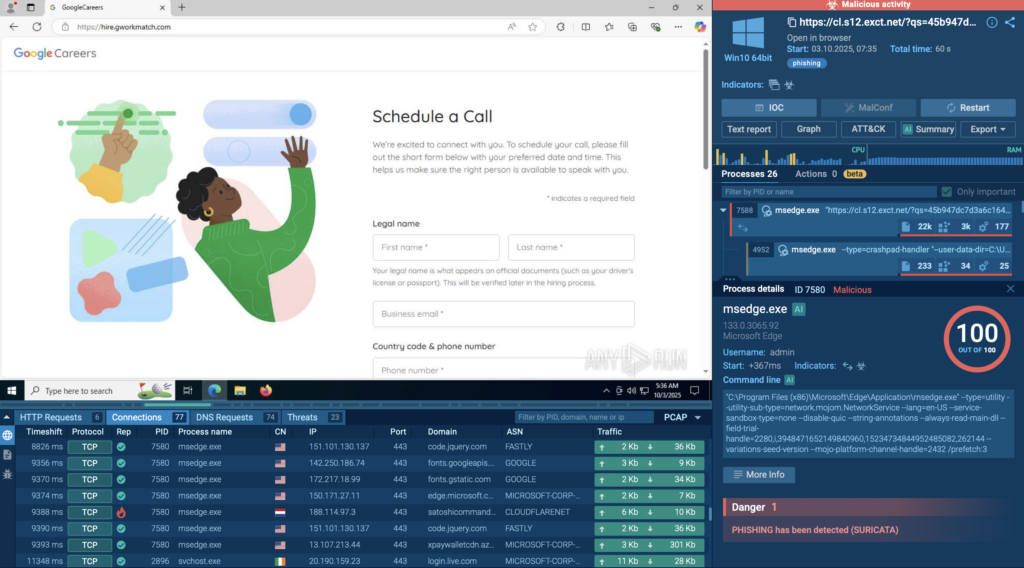
ANY.RUN analysts uncovered a phishing campaign posing as Google Careers, where attackers combined a Salesforce redirect, Cloudflare Turnstile CAPTCHA, and a fake job application page to steal corporate credentials. The campaign primarily targets employees in technology, consulting, and enterprise service sectors, exploiting the trust people place in well-known brands and cloud services. 

Unlike typical phishing kits, this campaign weaves together multiple legitimate platforms to make the flow appear authentic, slipping through filters and reputation-based security tools. Once credentials are entered on the fake Google Careers portal, they’re exfiltrated to the command-and-control (C2) server, such as satoshicommands[.]com, enabling further compromise of work accounts, client data, and internal collaboration tools. 

For organizations, this attack creates a chain reaction: compromised mailboxes, lateral movement across SaaS ecosystems, and potential exposure of customer or partner data; all while evading detection from traditional tools that trust the Salesforce and Cloudflare domains in the redirect path. 

See full execution chain exposed in 60 seconds 

Fake Google Careers page displayed inside ANY.RUN sandbox 

Adversaries in this campaign misuse legitimate platforms to host phishing flows that evade automated detection. The combination of trusted domains and multi-step redirection makes these attacks particularly hard to catch without behavioral visibility. 

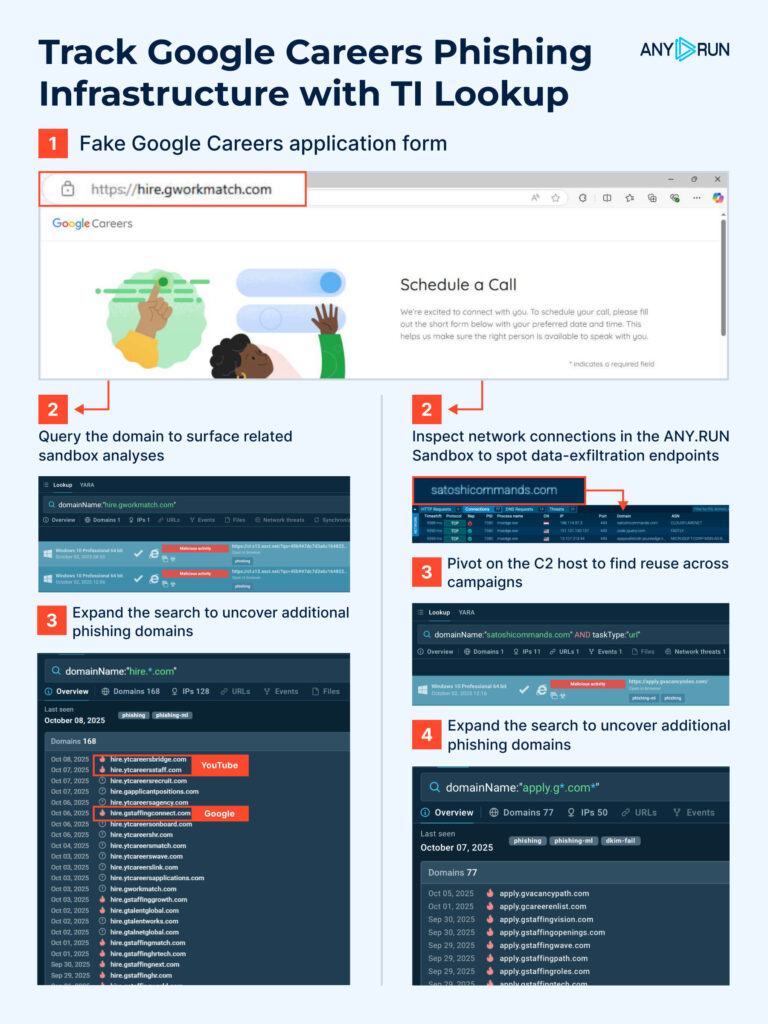
Below are ready-to-use Threat Intelligence Lookup queries to expand visibility, uncover infrastructure overlaps, and convert findings into detection rules, not just IOCs: 

Google-like application domains: domainName:”apply.g*.com” OR domainName:”hire.g*.com” 

Vercel deployment patterns: domainName:”puma-*.vercel.app” OR domainName:”hiring*.vercel.app” 

YouTube TLD impersonation: domainName:”hire.yt” 

C2 domain: domainName:”satoshicommands.com” 

Google Careers phishing infrastructure tracking with TI Lookup 

Gathered IOCs: 

  • 188[.]114[.]97[.]3  
  • 104[.]21[.]62[.]195  
  • hire[.]gworkmatch[.]com  
  • satoshicommands[.]com 

2. Figma Abuse Leads to Microsoft-Themed Phishing Campaigns 

    Post on X 

    ANY.RUN analysts identified a growing wave of phishing attacks abusing Figma, where public design prototypes are used to host and deliver Microsoft-themed credential theft campaigns. This trend highlights a serious blind spot in corporate defenses; the exploitation of trusted cloud platforms that security systems often whitelist by default. 

    Attackers are turning to Figma because it offers everything they need for a convincing delivery: it’s a widely trusted domain, allows anyone to publish and share prototypes publicly without authentication, and renders interactive content directly in the browser. That makes it perfect for embedding phishing elements, buttons, links, and visuals that look completely legitimate, while bypassing traditional email filters and URL reputation checks. 

    Across multiple samples analyzed last month, 49% of these attacks were linked to Storm-1747, followed by Mamba (25%), Gabagool (2%), and several smaller operators. Each uses Figma as the initial hosting vector, sending victims “document” invitations that appear genuine and trigger the phishing flow upon interaction. 

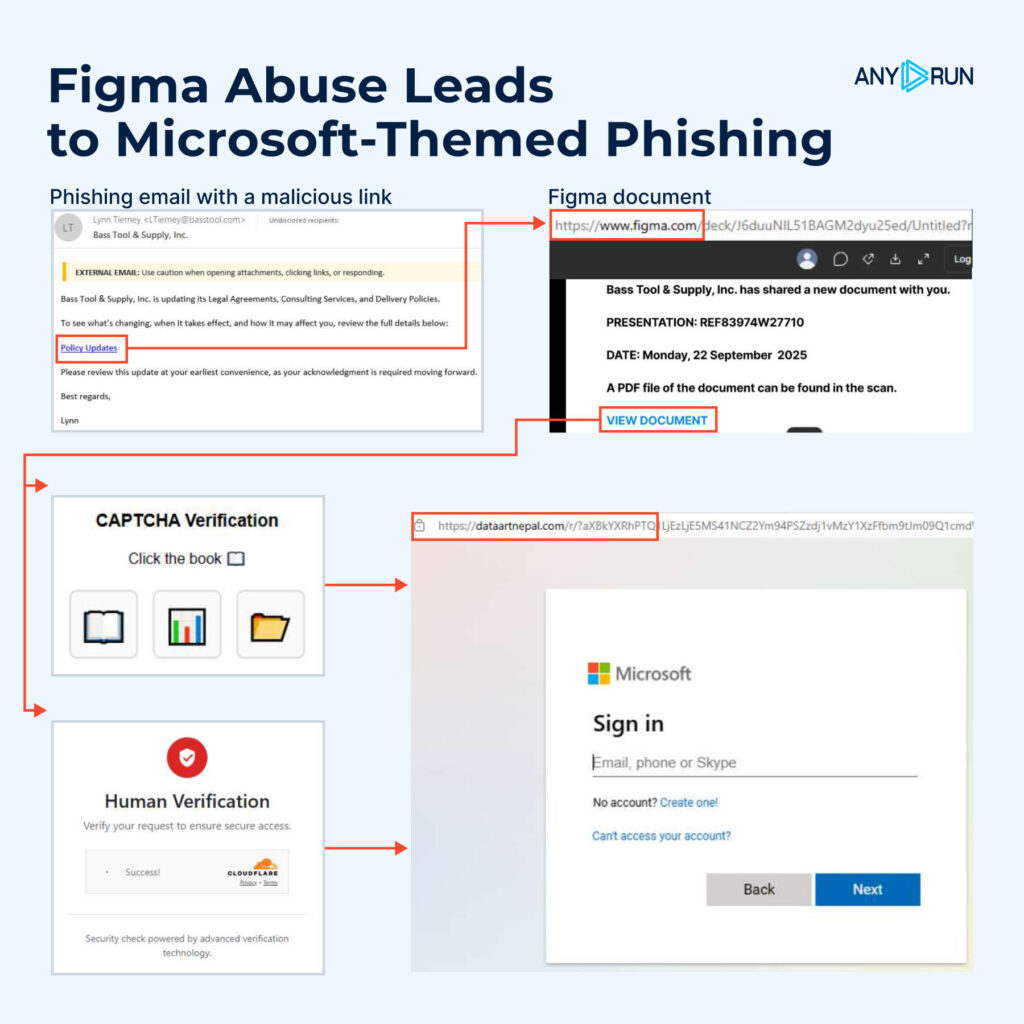
    Check real case: Figma abuse leading to fake Microsoft login page 

    Full execution chain of Microsoft-themed phishing attack with Figma abuse 
    1. Phishing email invites the victim to view a “shared document.” 
    1. Figma prototype hosts a fake collaboration page within the figma.com domain. 
    1. Embedded link triggers a fake CAPTCHA or Cloudflare Turnstile widget. 
    1. Redirection leads to a Microsoft-themed login page that collects credentials. 

    Inside ANY.RUN’s Interactive Sandbox, analysts can safely detonate these links, visualize the full redirection flow, and expose the hidden credential capture mechanism; something static filters miss entirely. This interactive approach gives SOC teams real behavioral context for tuning detections and reduces investigation time when facing similar cloud-hosted phishing chains. 

    Detect evasive threats in a live, interactive sandbox VM 
    Simplify investigations, reduce workload, and cut MTTR


    Sign up with business email 


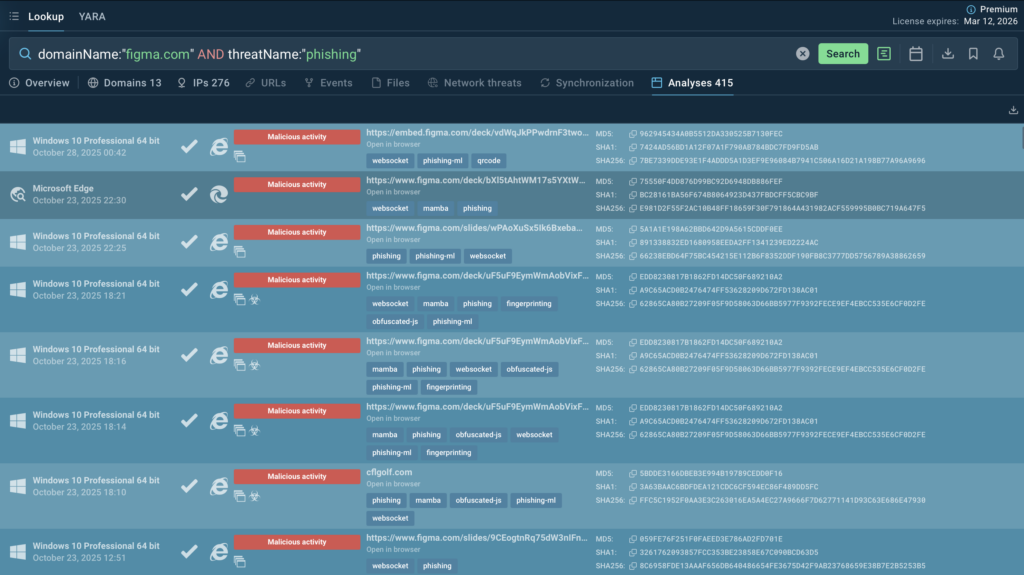
    To uncover additional campaigns abusing Figma and connected infrastructure, use the following TI Lookup query

    domainName:”figma.com” AND threatName:”phishing” 

    ANY.RUN Sandbox analyses of phishing attacks with Figma abuse 

    This search surfaces recent submissions that share behavioral traits, letting SOC teams expand visibility and transform isolated IOCs into behavioral detection rules

    Gathered IOCs: 

    • 9a4c7dcf25e9590654694063bc4958d58bcbe57e5e95d9469189db6873c4bb2c 
    • Dataartnepal[.]com 

    3. LockBit 5.0: New Variant Targets ESXi and Linux, Putting Critical Infrastructure at Risk 

      Post on X 

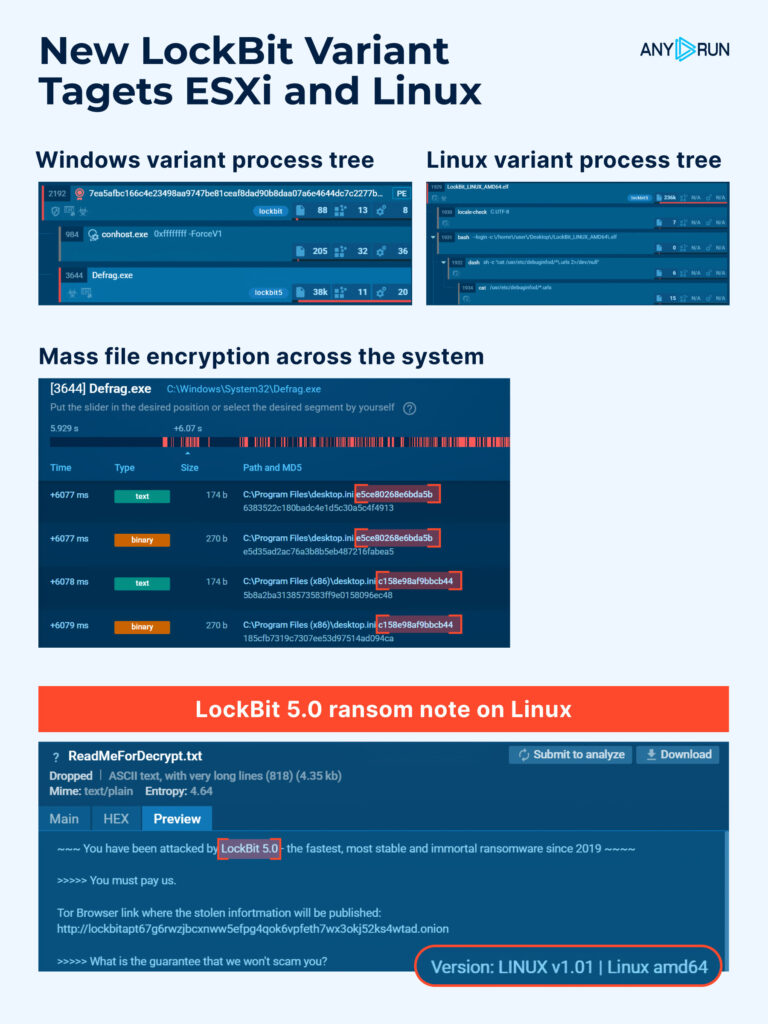
      Researchers spotted a major update from the LockBit group on its sixth anniversary: LockBit 5.0. Unlike earlier releases, this version targets not only Windows but also Linux and VMware ESXi, meaning attackers are now going after core infrastructure. A single successful intrusion can take down many virtual machines at once and knock whole systems offline. 

      LockBit 5.0 introduces stronger obfuscation, flexible configuration files, and enhanced anti-analysis techniques, making it significantly harder to detect and dissect. The campaign primarily targets enterprise networks, managed service providers, and government systems across Europe, North America, and Asia, where virtualized environments form the backbone of daily operations. 

      A single LockBit 5.0 intrusion can shut down dozens of servers simultaneously, halting production systems, paralyzing data centers, and causing prolonged outages with severe financial and reputational consequences. 

      New LockBit variant targeting not only Windows, but also ESXi and Linux 

      Technical Overview of LockBit 5.0 Variants 

      1. VMware ESXi 

      View real-world analysis of VMware ESXi variant 

      The most critical of the three builds. A dedicated encryptor for hypervisors capable of disabling multiple virtual machines at once. Its CLI closely mirrors the Windows version but adds datastore and VM config targeting, enabling it to halt operations across entire host environments in seconds. 

      1. Windows 

      View real-world analysis of Windows variant 

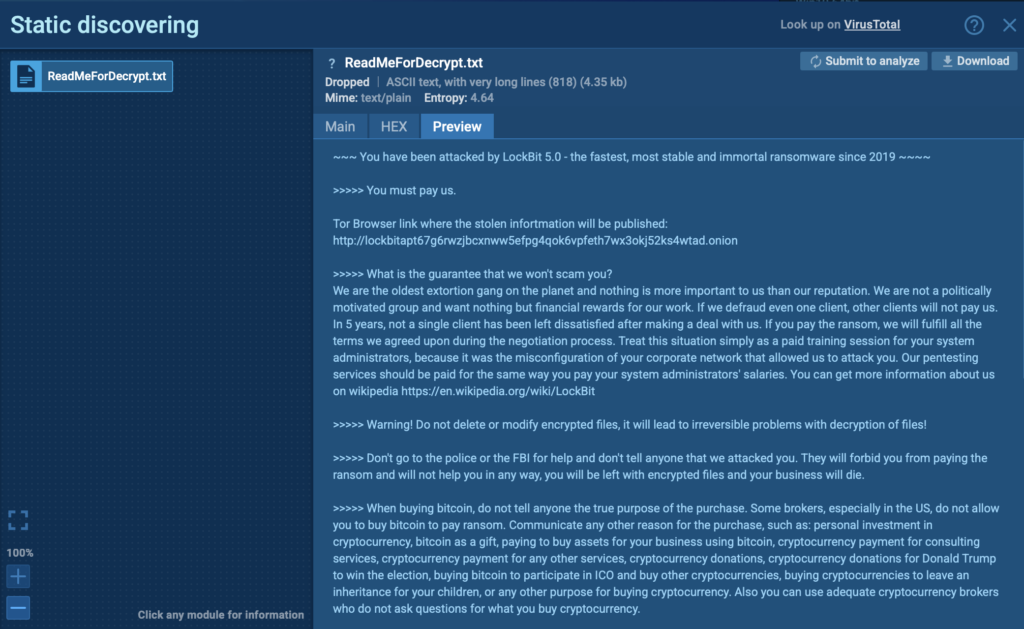
      LockBit 5.0 ransom note exposed inside ANY.RUN sandbox 

      The mainline variant runs with DLL reflection, supports both GUI and console modes, encrypts local and network drives, and performs cleanup actions like deleting shadow copies, stopping critical services, and clearing event logs. It drops a ransom note linking to LockBit’s live negotiation portal. 

      1. Linux 

      View real-world analysis of Linux variant 

      A lightweight console-based encryptor that replicates Windows behavior with added mount point filters, disk wiping, anti-analysis routines, and region-based execution restrictions to evade detection and avoid unwanted publicity in certain locales. 

      Inside ANY.RUN’s Interactive Sandbox, analysts can trace how the new encryptors behave across each operating system, from memory injection and service termination to encryption logic and ransom note delivery, helping SOC teams identify new TTPs early and enrich detection logic with behavioral indicators, not just static IOCs. 

      Use the following Threat Intelligence Lookup queries to identify LockBit 5.0 activity and enrich your SOC’s detection coverage with live sandbox data: 

      ESXi Lockbit 5.0: commandLine:”vmware -v” 

      Linux Lockbit 5.0: filePath:”^/home/user/.local/share/evolution/tasks/ReadMeForDecrypt.txt$” 

      Windows Lockbit 5.0: filePath:”^C:\ReadMeForDecrypt.txt$” 

      These queries help analysts pivot from OS-specific artifacts to global attack patterns, connecting infrastructure and payload updates across submissions. 

      Catch attacks early with instant IOC enrichment in TI Lookup
      Power your proactive defense with data from 15K SOCs 


      Start Investigation 


      What Security Teams Should Do Now: 

      • Boost visibility: Combine endpoint and network telemetry with behavior-based monitoring. Use ANY.RUN’s sandbox and TI Lookup to detect evolving LockBit builds earlier, enrich IOC sets, and reduce MTTR by up to 21 minutes. 
      • Harden access: Enforce MFA for vCenter and admin accounts, restrict direct Internet access to ESXi hosts, and route all management connections through a secure VPN. 
      • Ensure resilience: Maintain offline backups, test recovery workflows regularly, and rehearse ransomware playbooks to minimize downtime in case of a breach. 

      4. ClickUp Hosts Used as Phishing Redirectors 

        Post on X 

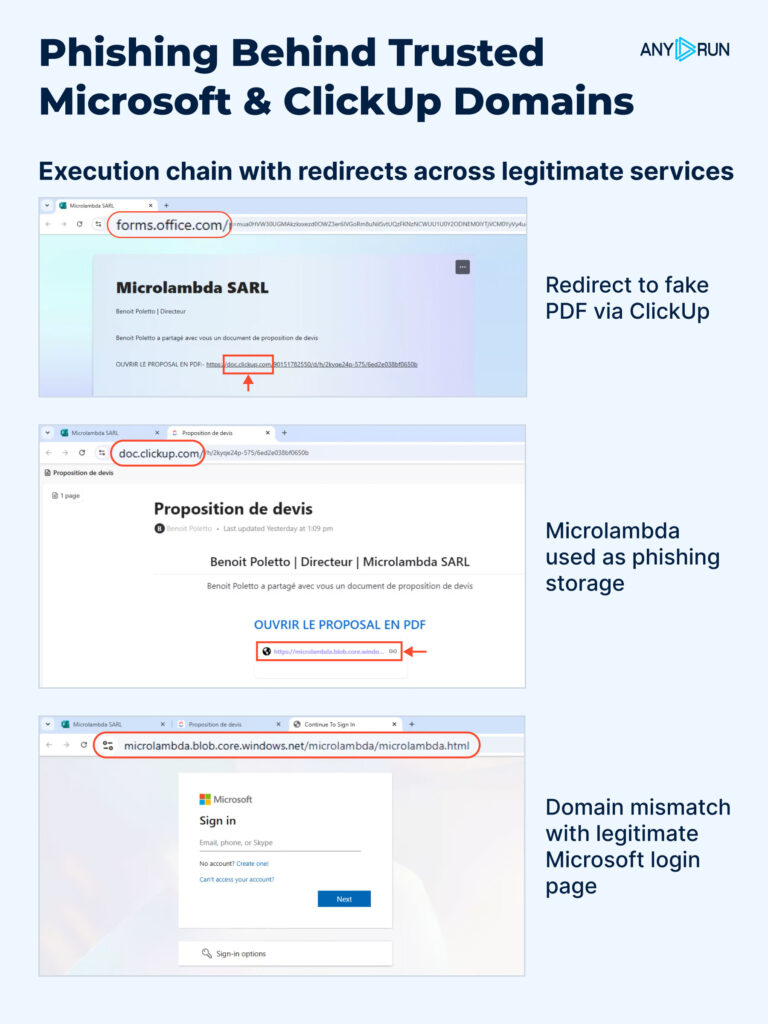
        ANY.RUN analysts found attackers abusing ClickUp to host redirect pages and hide phishing flows. In many cases ClickUp is the visible domain the victim clicks, then the chain moves through other trusted services (like Microsoft’s microdomains and Azure Blob Storage) before landing on a credential-harvesting page. 

        Attack execution chain using legitimate services 

        Attackers use ClickUp because public docs and prototypes are quick to create, look legitimate in inboxes, and come from a domain most organizations don’t block. Besides ClickUp, they also exploit microdot-style Microsoft endpoints and Azure Blob Storage to host the final phishing page, making the whole flow look like normal collaboration traffic. 

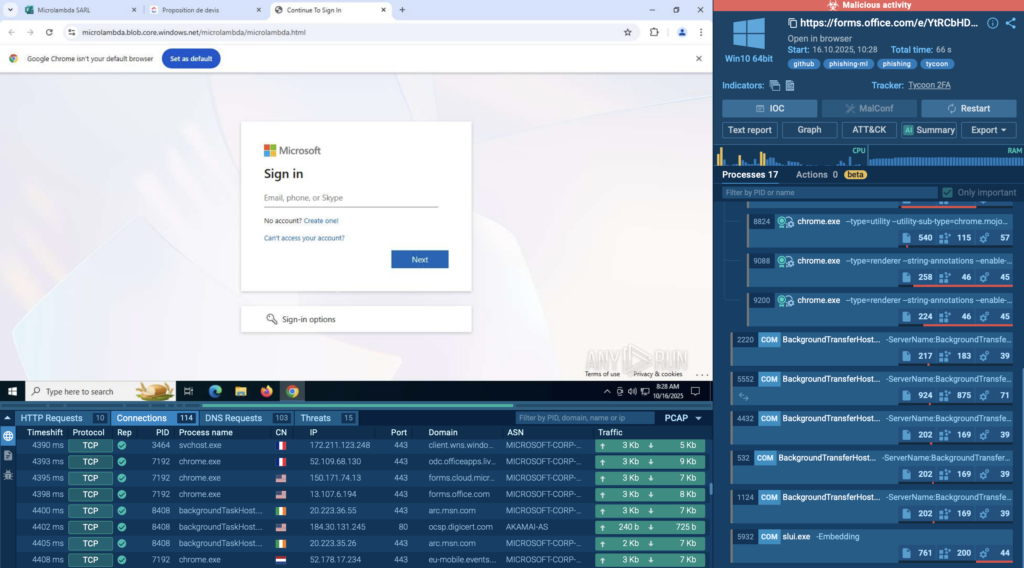
        Check a real-world case that exposes the full attack chain in ~1 minute 

        Fake Microsoft login page displayed inside ANY.RUN sandbox 
        1. Phishing email: Invites victim to view a shared ClickUp “document.” 
        1. ClickUp redirect page: Host or shortener on doc[.]clickup[.]com forwards the user. 
        1. Microsoft microdomain hop: A forms or doc endpoint (e.g., forms.office.com or other msft microdomains) is used to add legitimacy. 
        1. Azure Blob Storage: Final hosting for the fake Microsoft login page. 
        1. Credential exfiltration: Captured credentials POST to attacker-controlled collector. 

        Because every domain in the chain belongs to a legitimate provider, these campaigns are hard to detect. Filters and whitelists that trust SaaS vendors often let the traffic pass, and users are less likely to be suspicious when the URL looks familiar. 

        Inside ANY.RUN’s Interactive Sandbox, analysts can observe how each redirect unfolds across real Microsoft and ClickUp domains, see the credential-harvesting page render inside Azure Blob Storage, and extract live indicators for immediate defense updates. This visibility helps SOC teams shorten investigation time and enrich detection logic with behavioral context, not just URLs. 

        Ready-to-Use Threat Intelligence Lookup Queries 

        Use the following TI Lookup queries to uncover related infrastructure and track recurring phishing activity across trusted cloud providers: 

        Azure Blob Storage: domainName:”*.blob.core.windows.net$” AND threatName:”phishing 

        Microsoft Forms: domainName:”forms.office.com$” AND threatName:”phishing 

        ClickUp: domainName:”clickup.com$” AND threatName:”phishing” 

        Gathered IOCs: 

        • https[:]//forms[.]office[.]com/e/YtRCbHDk14 
        • microlambda[.]blob[.]core[.]windows[.]net 

        5. TyKit: New Phishkit Stealing Hundreds of Microsoft Accounts in Orgs 

        Detailed breakdown of TyKit attack 

        ANY.RUN analysts identified Tykit, a reusable phishing kit that hides JavaScript inside SVG files to push victims through a multi-stage flow and steal Microsoft 365 logins.  

        First seen in May 2025 with activity peaking in September–October 2025, it hits organizations across the US, Canada, LATAM, EMEA, SE Asia, and the Middle East, with notable impact on finance, government, telecom, IT, real estate, construction, professional services, education, and more. 

        Tykit blends redirects, basic anti-debugging, and staged C2 checks to outlast simple filters. A successful phish can lead to account takeover, data theft from mailboxes and cloud drives, lateral movement, and MFA bypass via AitM logic. 

        View analysis session with TyKit 

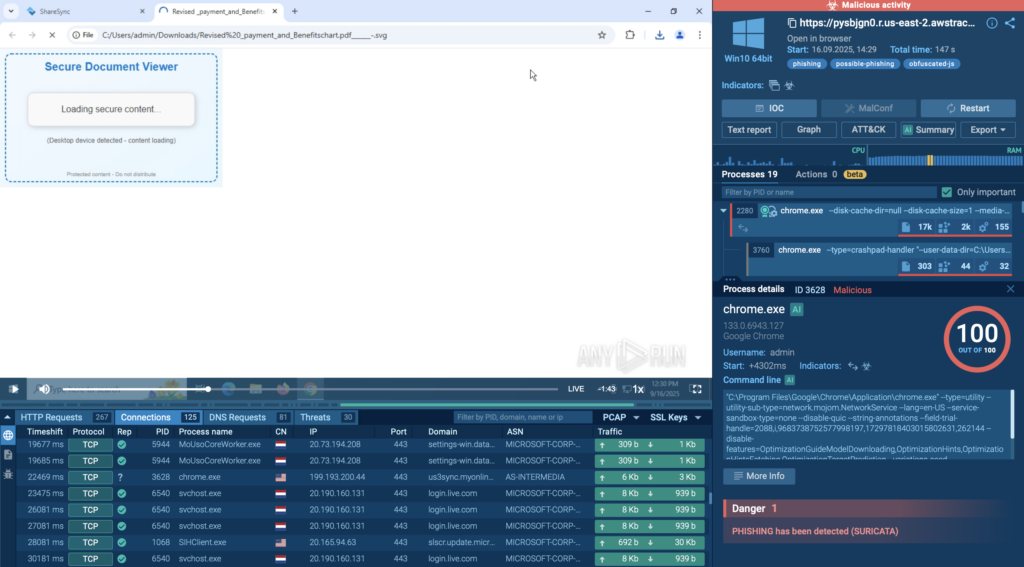
        Redirecting SVG file analyzed inside ANY.RUN sandbox 

        How the attack unfolds: 

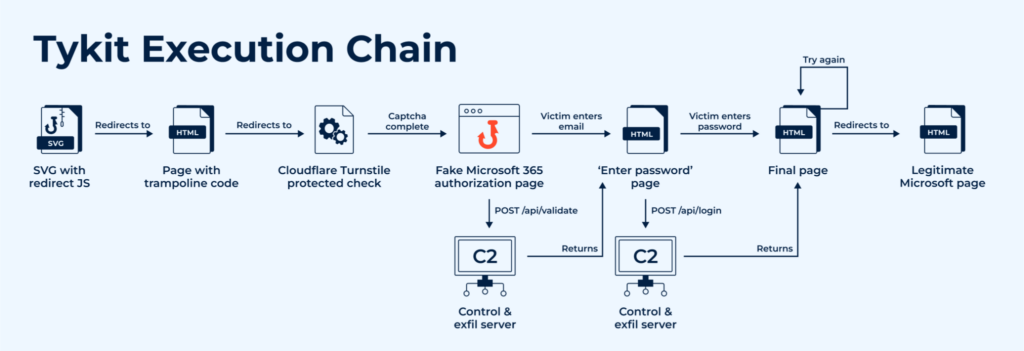
        Execution chain of TyKit attack   
        1. SVG delivery → Obfuscated JS rebuilds payload and triggers redirect (eval, atob, charCodeAt patterns). 
        1. Trampoline + CAPTCHA → Cloudflare Turnstile; blocks DevTools/context menu. 
        1. Fake M365 sign-in → Background POST /api/validate to C2; server returns next HTML stage. 
        1. ExfiltrationPOST /api/login sends {key, redierct [sic], token, server, email, password}. 
        1. Optional log hookPOST /x.php when server replies with status:”info”. 

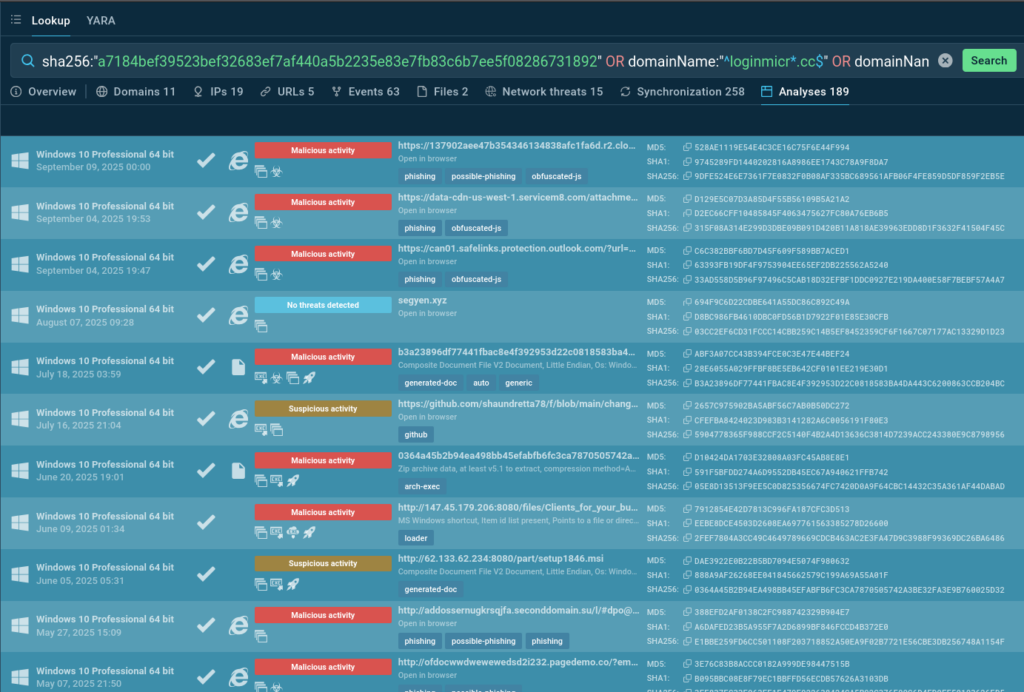
        To collect all IOCs and perform a detailed case analysis, see the following TI Lookup  query: 

        SVG/C2 pattern: domainName:”^segy.*” 

        Combined query: sha256:”a7184bef39523bef32683ef7af440a5b2235e83e7fb83c6b7ee5f08286731892″ OR domainName:”^loginmicr*.cc$” OR domainName:”^segy*” 

        Search results using TI Query 

        How to Prevent Tykit Attacks 

        • Inspect SVGs: Treat SVGs as potential attack vectors; detonate them in a sandbox to reveal hidden scripts and redirects. 
        • Enable phishing-resistant MFA: Use FIDO2 or certificate-based methods and disable legacy authentication. 
        • Monitor key indicators: Watch for domains like segy*, loginmicr(o|0)s.*.cc, and POSTs to /api/validate or /api/login. 
        • Train and respond fast. Teach users that even image files can trigger phishing. If compromised, revoke sessions and reset credentials. 

        Using ANY.RUN’s Interactive Sandbox during incident response accelerates this process: analysts can safely replay the infection chain, confirm what data was exfiltrated, and extract accurate IOCs within minutes. This shortens MTTR and helps strengthen detections for the next wave of similar campaigns. 

        Gathered IOCs: 

        SHA256 (SVGs): 

        • ECD3C834148D12AF878FD1DECD27BBBE2B532B5B48787BAD1BDE7497F98C2CC8 
        • A7184BEF39523BEF32683EF7AF440A5B2235E83E7FB83C6B7EE5F08286731892 

        Domains & patterns: 

        • segy[.]zip, segy[.]xyz, segy[.]cc, segy[.]shop, segy2[.]cc 
        • ^loginmicr(o|0)s.*?.([a-z]+)?d+.cc$ 

        URLs & requests: 

        • GET /?s=<b64_victim_email> 
        • POST /api/validate 
        • POST /api/login 
        • POST /x.php 

        View august’s top threats analysis to spot recurring tactics and compare how attacker trends evolved month to month 

        Empower Your SOC with Live Visibility and Actionable Intelligence 

        From phishing kits and stealers to ransomware and zero-day exploits, today’s attacks evolve faster than static defenses can keep up. Investigating them manually can take hours, while attackers move in minutes. ANY.RUN helps SOC teams close that gap with real-time, interactive analysis. 

        Here’s how teams stay ahead: 

        • Expose the full attack chain instantly: Detonate suspicious files, links, or scripts in real time and see every process, redirect, and payload as it happens. 
        • Accelerate investigations: Live network mapping, script deobfuscation, and automatic IOC extraction cut analysis time from hours to minutes. 
        • Reduce MTTR by over 21 minutes per case: Clear visibility into system behavior and exfiltration flows enables faster triage and confident containment. 
        • Enrich detection logic automatically: Pivot from a single domain or hash in Threat Intelligence Lookup to hundreds of related submissions, revealing shared infrastructure and TTP patterns. 

        For SOCs, MSSPs, and threat researchers, ANY.RUN delivers the speed, depth, and live visibility needed to turn reactive defense into proactive threat hunting and stay ahead of every new campaign. 

        Explore ANY.RUN’s capabilities during 14-day trial→ 

        About ANY.RUN 

        ANY.RUN supports more than 15,000 organizations worldwide, including leaders in finance, healthcare, telecom, retail, and tech, helping them strengthen security operations and respond to threats with greater confidence. 

        Designed for speed and visibility, the solution blends interactive malware analysis with live threat intelligence, giving SOC teams instant insight into attack behavior and the context needed to act faster. 

        By integrating ANY.RUN’s Threat Intelligence suite into your existing workflows, you can accelerate investigations, minimize breach impact, and build lasting resilience against evolving threats. 

        The post Major Cyber Attacks in October 2025: Phishing via Google Careers & ClickUp, Figma Abuse, LockBit 5.0, and TyKit  appeared first on ANY.RUN’s Cybersecurity Blog.

        ANY.RUN’s Cybersecurity Blog – ​Read More

        CISA Warns of Exploited DELMIA Factory Software Vulnerabilities

        Two DELMIA Apriso flaws can be chained together to gain privileged access to the application and execute arbitrary code remotely.

        The post CISA Warns of Exploited DELMIA Factory Software Vulnerabilities appeared first on SecurityWeek.

        SecurityWeek – ​Read More

        I tested HP’s latest OmniBook, and it feels more premium than its price would suggest

        HP’s OmniBook X Flip 14 delivers a premium experience for the everyday user, but different configurations are more optimal than others.

        Latest news – ​Read More

        I’ve tested dozens of budget earbuds, these are the best you can get for $99

        Earfun’s Air Pro 4+ earbuds outshine many other devices costing considerably more.

        Latest news – ​Read More

        New Attack Targets DDR5 Memory to Steal Keys From Intel and AMD TEEs 

        Intel and AMD have published advisories after academics disclosed details of the new TEE.fail attack method.

        The post New Attack Targets DDR5 Memory to Steal Keys From Intel and AMD TEEs  appeared first on SecurityWeek.

        SecurityWeek – ​Read More

        Cybersecurity Firms See Surge in AI-Powered Attacks Across Africa

        Africa becomes a proving ground for AI-driven phishing, deepfakes, and impersonation, with attackers testing techniques against governments and enterprises.

        darkreading – ​Read More

        CEO of spyware maker Memento Labs confirms one of its government customers was caught using its malware

        Security researchers found a government hacking campaign that relies on Windows spyware developed by surveillance tech maker Memento Labs. When reached by TechCrunch, the spyware maker’s chief executive blamed a government customer for getting caught.

        Security News | TechCrunch – ​Read More

        LG Uplus is latest South Korean telco to confirm cybersecurity incident

        Korean telecom giant LG Uplus is the third major phone provider in the past six months to report a cybersecurity incident.

        Security News | TechCrunch – ​Read More

        The next frontier of health tracking is happening in your toilet

        Learn about your nutrient intake or potential for kidney stones through Withings’ new U-Scan.

        Latest news – ​Read More