Best Black Friday smartwatch and fitness tracker deals 2025: Top sales out early
Shop these top deals on fitness trackers, smartwatches, and more from Apple, Samsung, Garmin, and others ahead of Black Friday.
Latest news – Read More

Shop these top deals on fitness trackers, smartwatches, and more from Apple, Samsung, Garmin, and others ahead of Black Friday.
Latest news – Read More
There doesn’t seem to be a limit to how much money you can earn.
Latest news – Read More
The X-59 successfully completed its inaugural flight—a step toward developing quieter supersonic jets that could one day fly customers more than twice as fast as commercial airliners.
Security Latest – Read More
Spektrum Labs has raised $10 million in seed funding for its cyber resilience platform.
The post Spektrum Labs Emerges From Stealth to Help Companies Prove Resilience appeared first on SecurityWeek.
SecurityWeek – Read More
The company will expand its product offering, establish global headquarters in Boston, and fuel growth and go-to-market efforts.
The post Reflectiz Raises $22 Million for Website Security Solution appeared first on SecurityWeek.
SecurityWeek – Read More
U.K. clothing retailer Next reported that “competitor disruption” was partly responsible for an an increase in profits earlier this year, after rival M&S faced a cyber incident.
The Record from Recorded Future News – Read More
Ribbon Communications provides technology for communications networks and its customers include the US government and major telecom firms.
The post Major US Telecom Backbone Firm Hacked by Nation-State Actors appeared first on SecurityWeek.
SecurityWeek – Read More
The hackers stole names, addresses, dates of birth, Social Security numbers, and health and insurance information.
The post Millions Impacted by Conduent Data Breach appeared first on SecurityWeek.
SecurityWeek – Read More
Managed Extended Detection and Response (MXDR) solutions have long been a staple for large corporations. They provide 24/7 monitoring, continuous threat handling, and rapid incident response — all without the need to deploy and maintain in-house infrastructure. Crucially, they also make cybersecurity costs predictable. It sounds like an ideal option for small and medium-sized businesses (SMBs) as well. In practice, however, this isn’t always the case. For an SMB, a standard MXDR solution may end up complicating matters for the internal IT security team instead of simplifying them, overloading the team members with a barrage of confusing alerts and an abundance of tools.
This post discusses the differences between an MXDR service suitable for a large enterprise, and one that would fit perfectly into the security framework of a growing SMB. We’ll also outline the qualities that we believe the ideal MXDR solution for SMBs should possess.
Large companies typically already have a dedicated cybersecurity team with relatively mature processes and qualified experts on board who are capable of smoothly integrating and competently managing the service. Therefore, large businesses often use MXDR solutions as part of a hybrid SOC model: an external provider’s team handles some tasks, but a significant portion of the work remains with the in-house team.
Most SMBs lack the necessary arsenal of solutions and, most importantly, a dedicated in-house cybersecurity team — at least one with a sufficient understanding of attacker tactics, techniques, and procedures (TTPs), along with the skills to counteract them. They often don’t have enough time or expertise to integrate multiple telemetry sources, set up correlation rules, or analyze a flood of alerts. More often than not, security in SMBs falls to IT team members who simply don’t even have the bandwidth for continuous communication with external analysts.
The result of trying to integrate an enterprise-level solution in SMB infrastructure is often an overload rather than a simplification of processes: a deluge of incident alerts with no one to analyze them, and complex interfaces and processes that the team simply gets lost in. Under these conditions, it’s extremely difficult to develop in-house expertise: the team is simply too busy just trying to maintain an adequate level of company security. This is precisely why SMBs need a different MXDR format: one that is clearer, built on partnership, and focused on developing the internal team rather than replacing it.
When the internal team needs to not only ensure security, but also develop its own expertise, the MXDR service should provide support from experienced and qualified experts rather than simply replace the cybersecurity function. This should be a partnership where the provider doesn’t just take on some of the responsibilities and helps neutralize threats, but also:
In other words, the ideal MXDR service for an SMB works with the team — not instead of it. Below, we look at the specific qualities this solution should have.
SMBs can vary not only in their needs, but also in their degree of cybersecurity maturity. Therefore, an MXDR service shouldn’t be limited to basic automation or one-size-fits-all scenarios. The solution provider must be able to adapt to the specifics of each client.
This means that detection and alert triage rules must be configured based on the characteristics of the infrastructure, the software and security tools in use, and the behavior of various user groups. This makes it possible to distinguish a real threat from normal activity and, as a result, reduce the number of false positives.
This level of customization helps reduce the number of clarifying requests that MXDR experts have to address to the client’s team — for example, whether a certain user running PowerShell is standard or anomalous behavior. It speeds up threat detection and incident response, and reduces the workload on the client’s internal cybersecurity team, allowing them to focus on strategic tasks.
For the team responsible for cybersecurity at an SMB, it’s critical not to get drowned in hundreds of notifications. It needs to quickly understand what is truly a threat, what actions were already taken, and what steps need to be taken next. Therefore, a high-quality MXDR service team must analyze not only obviously malicious events, but also suspicious activity from legitimate software. From there, out of thousands of alerts, only those related to adversarial activity should be selected. The client should be presented not with a multitude of hypotheses, but a clear, ready-made picture of what happened, consolidated into a single incident and accompanied by context. This includes the identified root cause, related events, and affected assets.
To make it easier for the business to navigate, the provider should offer an overview of all protected company assets and their current status so the client can open a dashboard at any time and see what’s under control and what needs attention. If the internal team still has questions, it should always be able to reach out directly to the service’s experts to work together — for example, go over the details of an incident.
Another element of transparency is reporting. There should be an option to customize the reports to meet the client’s needs and requests; for instance, by providing a convenient bi-weekly overview with key takeaways and, if required, a detailed description of incidents. Flexibility in communication methods is also vital; for example, the client should be able to choose the most convenient channel — whether a messaging app, email, or something else — to ensure the internal team can be reached in a timely manner when an incident requires a decision. This helps company management keep a close eye on things, while technical experts can monitor events at a reasonable pace and dive deeper when needed.
Thanks to this approach, MXDR alleviates one of the biggest challenges for SMBs: the need to independently parse and prioritize hundreds of notifications.
In case the in-house team prefers to handle hypothesis testing and root cause analysis internally, it’s essential for the MXDR solution to enable proactive threat hunting and artifact analysis using the available XDR tools. Therefore, the MXDR provider needs to grant the client access to knowledge bases on current attacker techniques and tactics (threat intelligence), information on new campaigns, and relevant analytics. However, if needed — such as when the client’s team realizes its expertise is insufficient despite having the TTP data — it still needs to have the option to escalate the alert to the MXDR team for analysis.
A large portion of incidents begins with employee error. Therefore, a good MXDR provider should help the client foster a healthy cybersecurity culture within the organization. This is largely done by raising the awareness of rank-and-file employees about the modern tricks used by attackers.
The most effective approach doesn’t entail abstract lectures, but training based on real-life incidents that have actually occurred within the company. For example, if an attack began with employees in a certain team opening a phishing email, that team should undergo training that focuses on that exact scenario. Ideally, its progress should be tested with a simulated phishing campaign. Such proactive measures help mitigate risks associated with the human factor, thereby reducing potential financial losses — a critical concern for growing organizations.
For instance, our Kaspersky Next MXDR Optimum allows you to assign employee training directly from the alert card in just a few clicks. Furthermore, to enhance the skills and knowledge of “frontline defenders”, our solution offers response training programs tailored for IT and cybersecurity teams. These programs allow specialists to engage deeply with advanced tools in environments that replicate real-world scenarios, enabling them to solve incidents quickly and effectively. For example, they can learn how to safely check password hashes, search for discrepancies between recommended and actual domain policies, and assess the security of Active Directory parameters.
For SMBs, a good MXDR solution is far from a “black box” service. It’s an ecosystem of partnership that combines:
It is with this philosophy in mind that we created our Kaspersky Next MXDR Optimum: as a service that works in concert with XDR tools and supports the SMB growth strategy. You can learn more about this solution on the Kaspersky Next Optimum page.
Kaspersky official blog – Read More
Each cyberattack leaves behavioral evidence. A malware sandbox provides the secure environment analysts need to study that activity and uncover hidden tactics.
Teams using sandbox analysis report measurable gains:
Behavior-based visibility gives SOCs the upper hand against stealthy attacks. Let’s see how sandbox security works, and why it has become essential for modern threat detection.
A malware sandbox is a controlled, isolated environment designed to safely run and observe suspicious files, links, or applications. It allows analysts to see exactly how a threat behaves without risking real systems or networks.
Instead of relying on signatures or predefined rules, a sandbox focuses on dynamic malware analysis, monitoring how code acts in motion. This approach helps detect new, unknown, or obfuscated malware that traditional antivirus tools often miss.
Watch the full video on how ANY.RUN’s malware sandbox works
Inside the sandbox environment, analysts can observe file system changes, registry modifications, network requests, and command execution in real time. Every action is recorded, creating a detailed behavioral profile that reveals the malware’s purpose, persistence methods, and communication patterns.
In short, a malware analysis sandbox turns hidden threats into visible data, giving cybersecurity teams the clarity they need to understand, detect, and stop complex attacks before they spread.
A malware sandbox operates by executing suspicious files, links, or processes in a virtual and fully isolated environment that imitates a real operating system. This lets analysts safely observe every action the sample performs, without exposing actual devices or networks to risk.
Modern sandboxes can be built on virtual machines, containers, or emulation frameworks. Each architecture recreates realistic conditions, including file systems, system registries, network connections, and even user interactions, so malware behaves as it would in the wild.
Here’s how sandbox analysis typically unfolds:
This approach, known as dynamic malware analysis, focuses on behavior instead of static code. It allows analysts to detect zero-day threats, hidden payloads, and polymorphic variants that traditional antivirus tools often miss.
Advanced malware detection sandboxes also counter evasion tactics by simulating real user activity, extending runtime to catch delayed triggers, and randomizing system identifiers to appear like genuine machines.
By sandboxing malware, security teams gain deep behavioral visibility, understanding not just what the file is, but what it tries to do.
To see how this process works in practice, let’s look at a real-world example. Inside the ANY.RUN sandbox, a phishing sample pretending to be a Google Careers page was analyzed.
The sandbox reveals the entire attack chain in just 60 seconds, from the Salesforce redirect and Cloudflare CAPTCHA to the fake login page that stole credentials and sent them to its command server.
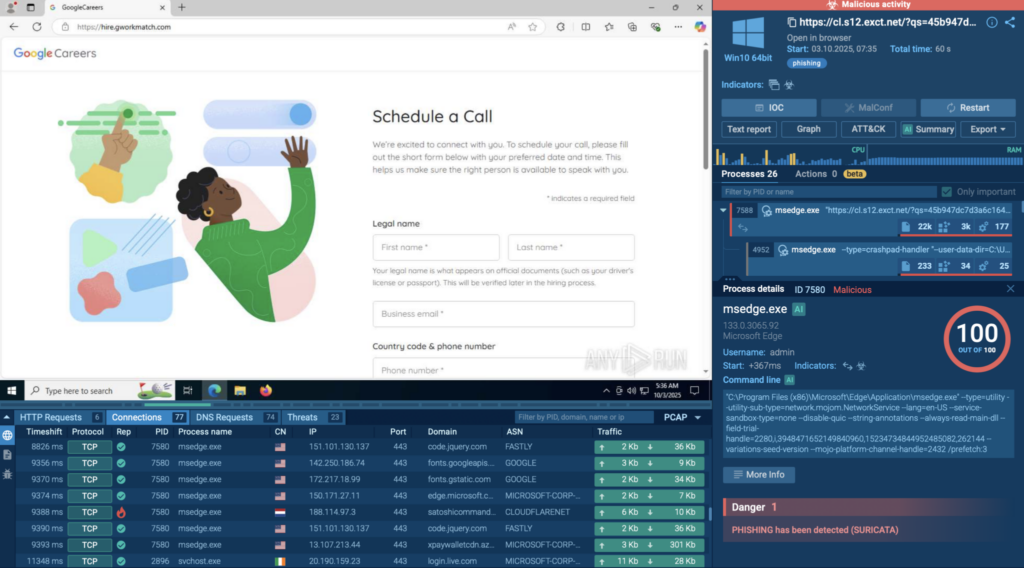
All stages were captured in real time: every request, redirection, and data theft attempt. The sandbox also generated a full picture of the attack: key indicators like file hashes and domains, the techniques the malware used, its network activity, and a clear process timeline. Everything an analyst would need to investigate or build detection rules was right there in one report.
A malware sandbox gives analysts a clear view of what really happens when a threat runs. Instead of guessing based on static scans or file signatures, teams can watch the malware in action; safely, and in real time.
Here’s why that matters:
In short, a malware sandbox helps teams move from guessing to knowing, turning hidden behavior into clear, actionable insights that speed up detection and response.
Not all sandboxes work the same way. Depending on how they’re deployed and what they’re used for, organizations can choose between several types, each offering a different balance of control, scalability, and performance.
1. On-Premise Sandboxes
These sandboxes run inside an organization’s own infrastructure. They’re ideal for teams that handle sensitive data and need full control over their analysis environment. On-premise setups can be customized to mimic internal systems closely, from OS configurations to network settings, but they often require more maintenance and hardware resources.
2. Cloud Sandboxes
A cloud sandbox runs remotely, making it easier to scale and share results across distributed teams. It’s especially useful for SOCs that need to analyze large volumes of samples daily or for companies that want access without complex local setup. Cloud solutions also stay up to date automatically, ensuring faster adaptation to new threats.
3. Open-Source Sandboxes
These types of sandboxes allow researchers and security teams to build their own sandbox environments from scratch. They’re highly customizable and great for experimentation or research, though they usually require more technical know-how to maintain.
Each of these types of malware sandboxes serves a different need; from enterprise-grade automation to hands-on analysis. Choosing the right one depends on how much control, customization, and scale your security operations require.
| Feature | On-Premise | Cloud | Open-Source |
|---|---|---|---|
| Easy setup & deployment |
 |
 |
 Manual Manual |
| Automatic updates |
|
|
|
| Scalable for multiple analyses |
Limited |
|
Limited |
| Customizable environment |
|
Partial |
|
| Real-time collaboration |
|
|
|
| No maintenance required |
|
|
|
| Integration with other tools (SIEM, SOAR, etc.) |
Possible |
|
Manual |
| Cost efficiency |
Medium |
|
(Free) |
| Data privacy & local control |
|
Depends on provider |
|
| Ideal for large SOCs & MSSPs |
Sometimes |
|
|
— Yes — Partial / depends on setup — No
A malware sandbox is a daily necessity across different areas of cybersecurity. From SOC teams to threat intelligence analysts, everyone benefits from being able to see how malware behaves in a safe environment.
Here’s how different professionals rely on sandbox analysis:
Antivirus software protects against threats that are already known. It scans files, compares them to a database of malware signatures, and blocks anything that matches. This method works well for common, well-documented attacks, but it struggles with new or changing ones.
Modern malware often hides its code, changes its structure, or uses encryption to stay invisible to signature-based tools. That’s where a malware sandbox makes all the difference.
Instead of checking what a file looks like, a sandbox watches what it does. It runs the file in a safe, isolated environment and tracks every move; the processes it starts, the files it creates, and the connections it tries to make. This approach, called behavior-based detection, exposes even the newest or most complex threats.
Simply put, antivirus tools stop what’s already known. A malware sandbox uncovers what’s new and unknown.
Used together, they give teams both quick protection and deeper visibility; a strong mix for modern cyber defense.
As malware sandboxes become more advanced, attackers are learning to adapt. Some modern malware doesn’t simply run its code right away; it first checks where it’s running. If it senses it’s inside a sandbox, it may stay quiet, hoping to slip through undetected.
These are some of the most common tricks attackers use:
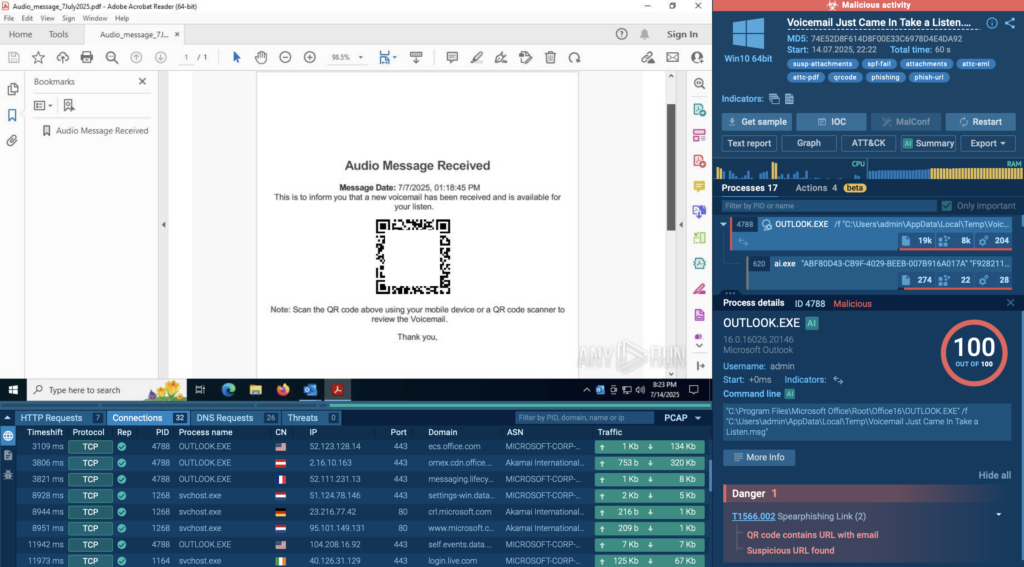
To keep up, modern malware analysis sandboxes have grown much smarter. They simulate human actions like typing and clicking, randomize virtual hardware details, and even extend analysis time to catch delayed behavior. Some advanced platforms also run the same sample across multiple environments to expose hidden logic or secondary payloads.
So yes, attackers keep trying to fool sandboxes. But as sandbox technology evolves, those tricks are becoming less effective. Each new generation of sandbox security makes it harder for malware to hide, ensuring analysts still see the full picture before damage is done.
With so many sandbox solutions available, choosing the right one can be tricky. Some focus on quick verdicts, others on deep behavioral insights. The best choice depends on your goals; whether you’re running a SOC, enriching threat intelligence, or conducting malware research.
When evaluating options, start with what matters most: visibility. A good sandbox doesn’t just tell you that a file is malicious, it shows why. It should capture every action the sample performs: file system changes, registry edits, process trees, and network traffic. These behavioral details are what make sandbox analysis so powerful.
Realism is equally important. The closer the sandbox mimics a real system, the more accurate the results. Platforms that support multiple operating systems and simulate user activity (like mouse clicks or typing) are better at exposing evasive malware that would otherwise stay hidden.
Speed, scalability, and integration also matter. Cloud-based sandboxes process hundreds of samples in parallel, deliver reports within minutes, and connect easily to SIEM, SOAR, or threat intelligence systems. Structured exports in formats like JSON or STIX/TAXII make automation effortless.
Finally, consider privacy. If you work with sensitive or client data, make sure your sandbox offers private or isolated analysis modes.

When choosing your sandbox, think beyond detection. Look for visibility, speed, flexibility, and control; the qualities that help you understand how malware behaves and stop it before it spreads.
If you take those same criteria and apply them to ANY.RUN, you’ll see how closely the platform aligns with what modern security teams need.
| Factor | How ANY.RUN Delivers It |
|---|---|
| Behavioral visibility | Displays every system and network action in real time, with visualized process trees and detailed logs. |
| Realistic environment | Simulates genuine user behavior, forcing evasive malware to reveal its payloads. |
| Multiple OS environments | Supports Windows, Linux, Android analysis, with new profiles added regularly. |
| Interactivity | Analysts can click, type, and interact with running samples — exposing behavior that static tools miss. |
| Speed and scalability | Cloud infrastructure processes multiple samples in parallel, generating full reports in minutes. |
| Automation and integrations | Connects with SIEM, SOAR, and TI tools via API or webhook for seamless workflow automation. |
| Threat intelligence enrichment | Extracts IOCs, maps MITRE ATT&CK techniques, and links to related CVEs automatically. |
| Clear, exportable reports | Offers human-readable summaries and structured outputs (JSON, STIX/TAXII). |
| Privacy options | Private analysis mode ensures sensitive data stays isolated and secure. |
| Ease of use | Intuitive interface and quick setup make analysis accessible to any skill level. |
| Anti-evasion features | Randomized environments, user simulation, and adjustable runtime defeat stealthy malware tactics. |
| Managed lookups & history | Analysts can search past public or private sessions and track recurring threats. |
ANY.RUN combines what most teams need from a sandbox: visibility, control, and speed; all in a secure, interactive cloud environment. It helps analysts move faster, collaborate better, and uncover behaviors that traditional tools simply can’t see.
Teams Using ANY.RUN’s Interactive Sandbox Report Measurable Results:
For businesses, that means lower risk exposure, more productive analysts, and faster containment of incidents, all without expanding headcount or infrastructure.
Yes. Antivirus tools catch known threats using signatures, while a sandbox helps detect unknown or evolving malware by observing real behavior. Together, they form a stronger defense.
It’s extremely rare with modern platforms. Reputable sandboxes, especially cloud-based ones, use strict isolation layers to ensure any malicious code stays fully contained.
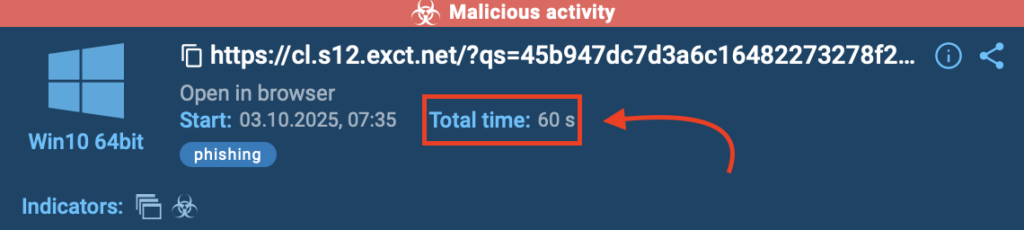
Most analyses complete in a few minutes. Cloud sandboxes are faster because they can run multiple sessions at once and generate reports almost instantly. For instance, 90% of sandbox analysis carried out inside ANY.RUN sandbox last around 60 seconds.
Static analysis examines code without executing it. Dynamic analysis, what a sandbox performs, actually runs the file to observe its real behavior and system impact.
Look for detailed behavioral reports, IOCs extraction, and options for interactivity or automation. If it helps you understand why a file is malicious, not just that it is, it’s doing its job well.
Yes, when privacy features are enabled. Some solutions, like the ANY.RUN sandbox, let users run fully private sessions where samples and results stay completely isolated.
Dynamic environments are especially useful for ransomware, downloaders, stealers, and phishing payloads; malware that changes behavior based on context or timing.
Many modern sandboxes like ANY.RUN’s Interactive Sandbox support API connections, STIX/TAXII feeds, and SIEM/SOAR integrations. This allows automatic data sharing and faster incident response.
ANY.RUN, a leading provider of interactive malware analysis and threat intelligence solutions, makes this kind of investigation fast and accessible. The service processes millions of analysis sessions and is trusted by 15,000+ organizations and over 500,000 professionals worldwide.
Teams using ANY.RUN report measurable results; up to 3× higher SOC efficiency, 90% faster detection of unknown threats, and a 60% drop in false positives thanks to real-time interaction and behavior-based analysis.
Explore ANY.RUN’s capabilities during 14-day trial→
Discover how ANY.RUN can help your team detect faster, analyze deeper, and respond smarter.
The post What is a Malware Sandbox? Everything SOC Analysts and CISOs Need to Know appeared first on ANY.RUN’s Cybersecurity Blog.
ANY.RUN’s Cybersecurity Blog – Read More