Akira Ransomware Drops 30 Victims on Leak Site in One Day

Cyberint has observed the Akira ransomware group leaking in a single day the information allegedly stolen from 32 victims.

The post Akira Ransomware Drops 30 Victims on Leak Site in One Day appeared first on SecurityWeek.

SecurityWeek – ​Read More

Hackers Redirect $250,000 Payment in iLearningEngines Cyberattack

AI-powered learning automation firm iLearningEngines has been targeted in a cyberattack that resulted in the theft of $250,000.

The post Hackers Redirect $250,000 Payment in iLearningEngines Cyberattack appeared first on SecurityWeek.

SecurityWeek – ​Read More

Ford Investigating Potential Breach After Hackers Claim Data Theft

Ford has launched an investigation after hackers claimed to have stolen 44,000 customer data records.

The post Ford Investigating Potential Breach After Hackers Claim Data Theft appeared first on SecurityWeek.

SecurityWeek – ​Read More

Cybersecurity Aphorisms: A Humorous and Insightful Look at Industry’s Truths

The aphorism is a valuable cultural phenomenon for spreading the wisdom of experience — and cybersecurity, with its complexities, nuances, contradictions, and perpetual stress, is a fertile field.

The post Cybersecurity Aphorisms: A Humorous and Insightful Look at Industry’s Truths appeared first on SecurityWeek.

SecurityWeek – ​Read More

Palo Alto Patches Firewall Zero-Day Exploited in Operation Lunar Peek

Palo Alto Networks has released patches and CVEs for the firewall zero-days exploited in what the company calls Operation Lunar Peek.

The post Palo Alto Patches Firewall Zero-Day Exploited in Operation Lunar Peek appeared first on SecurityWeek.

SecurityWeek – ​Read More

ICE Can Already Sidestep Sanctuary City Laws Through Data-Sharing Fusion Centers

Built to combat terrorism, fusion centers give US Immigration and Customs Enforcement a way to gain access to data that’s meant to be protected under city laws limiting local police cooperation with ICE.

Security Latest – ​Read More

Kaspersky Password Manager Update | Kaspersky official blog

We’re always working to ensure our products and solutions remain top-tier — both in our own view and in the eyes of independent researchers. We take a comprehensive approach to this, adding new features, combating emerging malware, simplifying migration, and continually enhancing user experience.

Today, we’re excited to introduce a major update to Kaspersky Password Manager for mobile devices. This update will be available in all app stores during November 2024. We’re confident this refresh will make storing and managing passwords, two-factor authentication codes, and encrypted documents even easier. In this article, we’ll cover advanced filtering, search functionality, synchronization, and more.

Highlights

The mobile version of our password manager is celebrating its 10th  anniversary this year (while the desktop version turns 15), and in those 10 years we’ve managed to consolidate all the best features into a single app. In recent years, we’ve been conducting extensive Kaspersky Password Manager user-behavior research and, based on the findings, we’ve completely revamped the navigation in our mobile app.

What’s new:

  • The side menu has been replaced with a navigation bar at the bottom of the screen. The product’s core features are now organized into sections.
  • We’ve created a dedicated section for the in-app search, and improved the search scenarios.
  • Managing favorite entries is now more convenient; they’re now pinned at the top of the list.
  • We’ve added a “Sync” button and placed it in a prominent location.
  • The password generator, import, and security-check features have been grouped into a separate “Tools” section.

These changes are available to all Kaspersky Password Manager users on both Android (app version 9.2.106 and later) and iOS (app version 9.2.92 and later).

Navigation bar

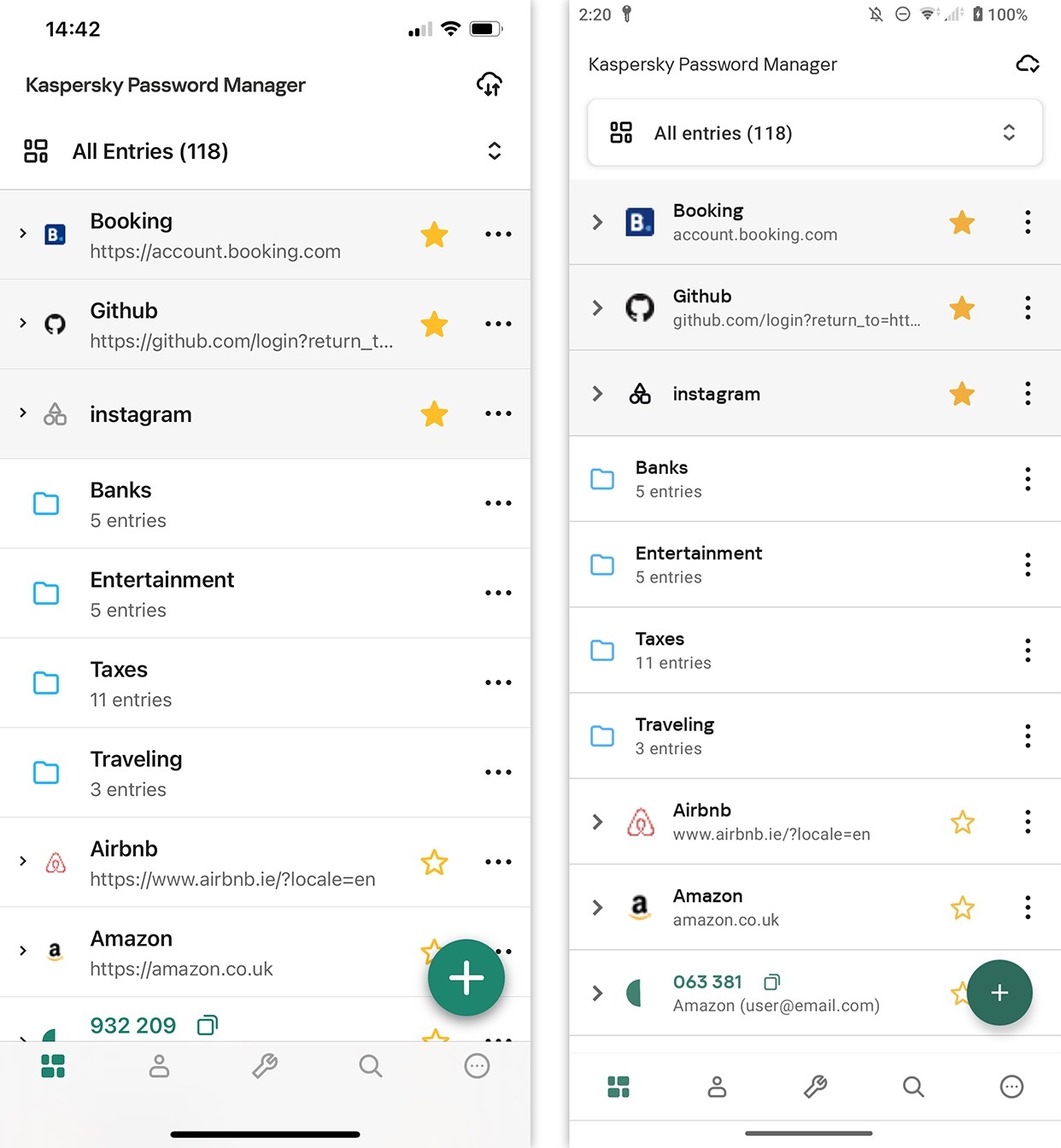
All core Kaspersky Password Manager functions are now accessible through the navigation bar at the bottom of the screen.

Updated home screen of Kaspersky Password Manager for iOS (left) and Android (right)

Updated home screen of Kaspersky Password Manager for iOS (left) and Android (right)

Let’s look at each element of the new bar from left to right.

  1. All Entries. This is the main menu – the heart of our password manager.
  2.  Subscription. Here, you can view your current subscription, including the expiry date and provider. If you don’t have a subscription, you can create or log in to a My Kaspersky account to activate or purchase one.
  3. Tools. Here, you’ll find the “Password Generator”, “Password Check”, and “Import Passwords” tools. The names speak for themselves. With a single click, you can create strong, unique passwords, check your existing passwords for uniqueness, strength, security, and compromise in data breaches, and import passwords from built-in browser password managers and similar products into our secure vault.
  4. Search. If you’re an active internet user and have dozens or even hundreds of unique passwords for different accounts saved in Kaspersky Password Manager, simply click on the magnifying glass icon and type just a few characters to quickly find the entry you need.
  5. Settings. This is where you can enable notifications, change your primary password, configure auto-lock and login methods, choose sorting options, access help resources, check the app version, and log out of your account.

New filtering

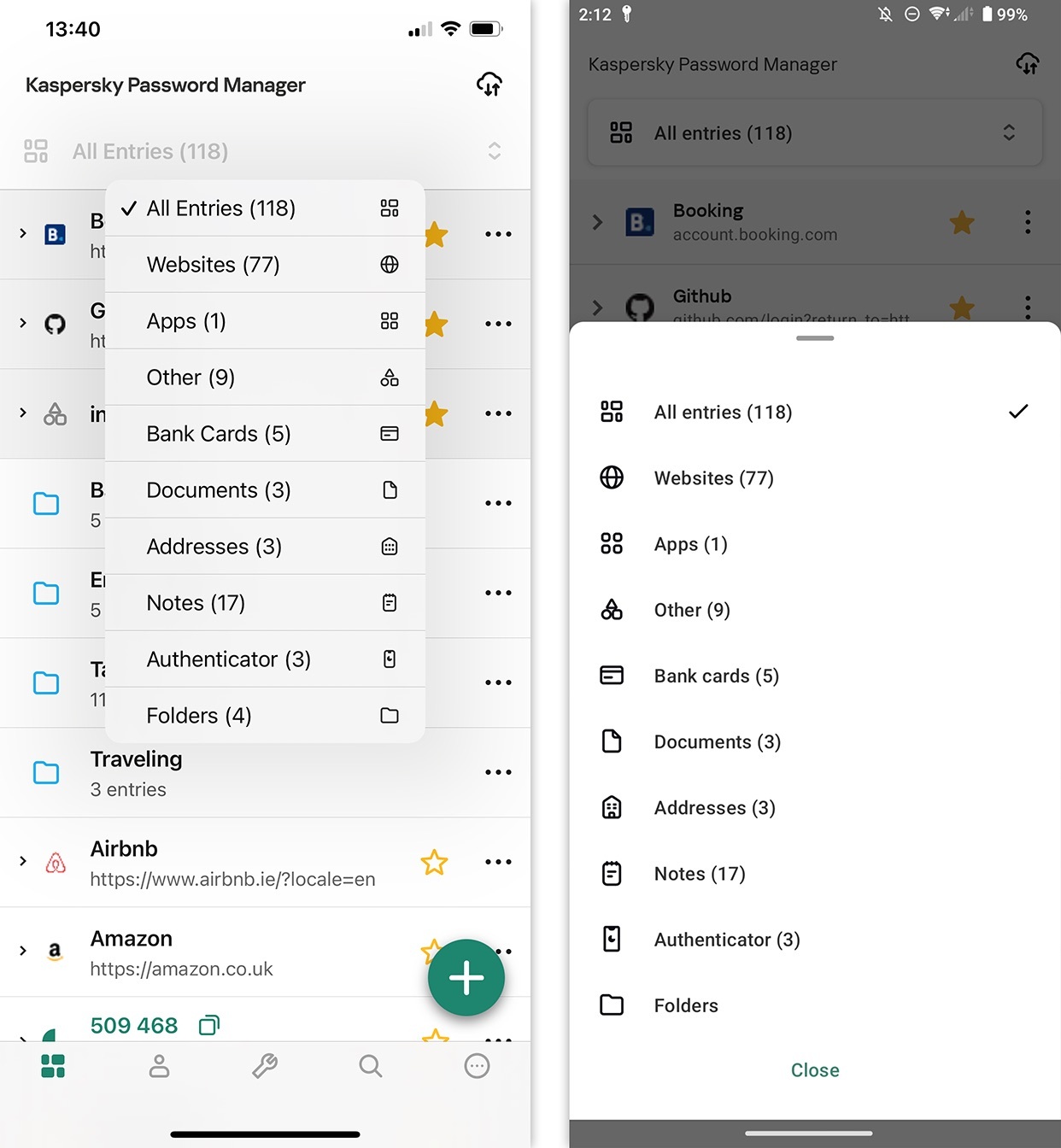
Let’s dive a little deeper. Another additional feature is the option to select entry categories within a section. Now, clicking “All Entries” opens a dropdown menu with these categories: websites, apps, other, bank cards, documents, addresses, notes, authenticator, and folders (you can create new folders as needed).

New entry category display in Kaspersky Password Manager for iOS (left) and Android (right)

New entry category display in Kaspersky Password Manager for iOS (left) and Android (right)

Other additions

In the top right corner, you’ll notice a new “Sync” icon – replacing the “Search” button, which now resides in the navigation bar. Clicking this new icon displays the current synchronization status of your entries between your cloud storage and devices. If everything is in order, and your smartphone is connected to the internet and operating normally, you’ll see “All data is synced” with the date and time of the last sync. To refresh the data manually, click “Sync”.

The Search function has not only gotten its own tab in the navigation bar, but now also remembers your last search within the current session. For example, let’s say you were searching for your virtual card details while shopping, then switched to the “All Entries” menu, checked the settings and sync status, and then returned to “Search”. Your query and results will remain, despite your little wander through Kaspersky Password Manager. However, if you restart the app or clear the search, you’ll have to enter the query again.

Important note for Kaspersky Password Manager users on iOS 18. Due to Apple’s policies, the default source for auto-filling passwords and logins in iOS 18 is Apple’s built-in “Passwords” app, not Kaspersky Password Manager. This is easy to fix:

  1. After updating to iOS 18, you need to launch Apple’s “Passwords” app at least once. This will activate the “AutoFill & Passwords” section in your device settings.
  2. Go to “AutoFill & Passwords” in the device settings.
  3. Select Kaspersky Password Manager as the preferred password auto-filling source.
  4. In the “Set Up Codes In” section, select Kaspersky Password Manager.

Everything is now set for secure password management. On Android devices, when you first launch the password manager, enable autofill permissions. Simply follow the in-app instructions to do so.

Kaspersky official blog – ​Read More

CISA Adds Three Critical Vulnerabilities to the Known Exploited Vulnerabilities Catalog

CISA

Overview

The Cybersecurity and Infrastructure Security Agency (CISA) has recently added three significant vulnerabilities to its Known Exploited Vulnerabilities Catalog (KEV), based on evidence of active exploitation. These vulnerabilities, identified in popular networking and security products, represent a considerable risk to both private and government networks.

The recently added vulnerabilities to the CISA’s Known Exploited Vulnerabilities Catalog include CVE-2024-1212, a critical OS command injection flaw in the Progress Kemp LoadMaster; CVE-2024-0012, an authentication bypass vulnerability affecting Palo Alto Networks PAN-OS; and CVE-2024-9474, a privilege escalation issue within PAN-OS that enables attackers to escalate privileges via OS command injection.

These vulnerabilities have been categorized with varying levels of urgency and severity, but all share a common characteristic—they pose substantial risks when left unaddressed, particularly for federal enterprises. The vulnerabilities were identified through active threat research and exploitation monitoring, underlining the need for immediate mitigation and patching.

CVE-2024-1212: Progress Kemp LoadMaster OS Command Injection Vulnerability

Progress Kemp LoadMaster, a widely-used application delivery controller and load balancer, has been found to contain a severe OS command injection vulnerability. This issue, designated CVE-2024-1212, allows an attacker with access to the administrator web user interface (WUI) to execute arbitrary commands on the affected system. The vulnerability stems from a flaw in the LoadMaster’s handling of API requests via the administrator interface.

The vulnerability in Progress Kemp LoadMaster (CVE-2024-1212) is triggered when an attacker sends specially crafted input to the system’s “/access” endpoint, which bypasses existing restrictions. This input is improperly handled by a vulnerable Bash script, leading to unchecked user input being passed into a system() call.

As a result, attackers can inject malicious commands that could potentially escalate privileges to root, providing full control over the device. The affected version is 7.2.59.0.22007, while the issue has been addressed in the patched version 7.2.59.2.22338. For further details, users are encouraged to review the Kemp LoadMaster CVE-2024-1212 advisory.

The vulnerability was rapidly patched after its discovery, but administrators are urged to upgrade to the latest version to mitigate potential exploitation risks. If left unpatched, the vulnerability allows attackers to completely compromise the affected system, making it a prime target for cybercriminals.

CVE-2024-0012: PAN-OS Authentication Bypass Vulnerability

CVE-2024-0012 is a critical vulnerability in Palo Alto Networks PAN-OS, the software that powers their next-generation firewalls. This vulnerability allows unauthenticated attackers to bypass authentication mechanisms on the management web interface, granting them administrator-level privileges.

The vulnerability in PAN-OS software (CVE-2024-0012) affects the management interface, allowing attackers to bypass authentication controls and gain unauthorized access to administrative functions. This could lead to a full compromise of the firewall, enabling attackers to modify configurations, exfiltrate sensitive data, or exploit other vulnerabilities, such as CVE-2024-9474, which facilitates privilege escalation.

Reports indicate that this flaw is actively being exploited, with cybercriminals targeting management interfaces exposed to the internet. The vulnerability has been assigned a critical severity score of 9.3, highlighting its potential impact. Affected versions include PAN-OS 10.2, PAN-OS 11.0, PAN-OS 11.1, and PAN-OS 11.2.

Palo Alto Networks published an advisory (PAN-SA-2024-0015) on November 18, 2024, and has released patches for PAN-OS versions 10.2.12-h2, 11.0.6-h1, 11.1.5-h1, 11.2.4-h1, and later versions. To mitigate risks, the company strongly recommends restricting access to the management interface to trusted internal IP addresses.

CVE-2024-9474: PAN-OS Privilege Escalation Vulnerability

Another vulnerability, CVE-2024-9474, found in the same PAN-OS software, allows attackers to escalate privileges once they have compromised a device through the previously mentioned CVE-2024-0012 vulnerability. This privilege escalation (PE) vulnerability is especially dangerous for organizations that have already been compromised, as it allows attackers to gain root-level access to the device, providing them with full control over the firewall system.

The vulnerability (CVE-2024-9474) allows attackers who have already bypassed authentication (via CVE-2024-0012) to escalate their privileges through a flaw in the web management interface of PAN-OS. Once they gain elevated privileges, attackers can perform administrative actions that are normally restricted, such as modifying critical system files or configurations, potentially leading to a complete system compromise.

This vulnerability has been assigned a medium severity rating of 6.9 and is actively being exploited. Affected versions include PAN-OS 10.2, PAN-OS 11.0, PAN-OS 11.1, and PAN-OS 11.2. To address the issue, Palo Alto Networks has released patches for PAN-OS versions 10.2.12-h2, 11.0.6-h1, 11.1.5-h1, 11.2.4-h1, and later versions. In addition to applying these patches, it is recommended to restrict access to management interfaces to trusted internal IP addresses.

Recommendations and Mitigations

To mitigate the risks posed by these vulnerabilities, the following actions are strongly recommended for affected organizations:

  1. Ensure all affected systems are patched to the latest versions as listed in the vendor advisories. This will address the vulnerabilities at their core.
  2. Limiting access to management interfaces to trusted internal IP addresses is the best defense against exploitation, particularly for vulnerabilities like CVE-2024-0012.
  3. Regularly monitor for any unusual activity or configuration changes within your firewalls or load balancers. This includes reviewing logs for signs of exploitation or attempts to exploit the listed vulnerabilities.
  4. Organizations using Palo Alto Networks’ firewalls with a Threat Prevention subscription should configure the system to block known attacks associated with these vulnerabilities using Threat IDs 95746, 95747, and others.

Conclusion

The addition of CVE-2024-1212, CVE-2024-0012, and CVE-2024-9474 to the Known Exploited Vulnerabilities Catalog highlights the active and ongoing nature of threats targeting critical infrastructure. Cybercriminals are increasingly targeting vulnerabilities in widely used enterprise tools like load balancers and firewalls, aiming to exploit weak points that could lead to full system compromises or privilege escalation.

Organizations that use affected products, such as Progress Kemp LoadMaster or Palo Alto Networks’ PAN-OS, are strongly encouraged to apply the necessary patches and follow best practices for securing management interfaces. By taking these steps, they can mitigate the risk of exploitation and protect their systems.

Sources:

The post CISA Adds Three Critical Vulnerabilities to the Known Exploited Vulnerabilities Catalog appeared first on Cyble.

Blog – Cyble – ​Read More

Chinese Hackers Exploit T-Mobile and Other U.S. Telecoms in Broader Espionage Campaign

U.S. telecoms giant T-Mobile has confirmed that it was also among the companies that were targeted by Chinese threat actors to gain access to valuable information.
The adversaries, tracked as Salt Typhoon, breached the company as part of a “monthslong campaign” designed to harvest cellphone communications of “high-value intelligence targets.” It’s not clear what information was taken, if any,

The Hacker News – ​Read More

CISA Alert: Active Exploitation of VMware vCenter and Kemp LoadMaster Flaws

Now-patched security flaws impacting Progress Kemp LoadMaster and VMware vCenter Server have come under active exploitation in the wild, it has emerged.
The U.S. Cybersecurity and Infrastructure Security Agency (CISA) on Monday added CVE-2024-1212 (CVSS score: 10.0), a maximum-severity security vulnerability in Progress Kemp LoadMaster to its Known Exploited Vulnerabilities (KEV) catalog. It was

The Hacker News – ​Read More