https://www.backbox.org/wp-content/uploads/2018/09/website_backbox_text_black.png00https://www.backbox.org/wp-content/uploads/2018/09/website_backbox_text_black.png2024-11-26 12:06:452024-11-26 12:06:45New York Fines Geico and Travelers $11 Million Over Data Breaches
Protect your social media presence with tools like privacy checkups, monitoring services, and digital footprint scanners. Stay secure by avoiding oversharing, limiting third-party app permissions, and using strong passwords.
https://www.backbox.org/wp-content/uploads/2018/09/website_backbox_text_black.png00https://www.backbox.org/wp-content/uploads/2018/09/website_backbox_text_black.png2024-11-26 12:06:452024-11-26 12:06:45Tips and Tools for Social Media Safety
Newly published research finds that the flashing lights on police cruisers and ambulances can cause “digital epileptic seizures” in image-based automated driving systems, potentially risking wrecks.
https://www.backbox.org/wp-content/uploads/2018/09/website_backbox_text_black.png00https://www.backbox.org/wp-content/uploads/2018/09/website_backbox_text_black.png2024-11-26 12:06:442024-11-26 12:06:44Emergency Vehicle Lights Can Screw Up a Car’s Automated Driving System
https://www.backbox.org/wp-content/uploads/2018/09/website_backbox_text_black.png00https://www.backbox.org/wp-content/uploads/2018/09/website_backbox_text_black.png2024-11-26 11:07:122024-11-26 11:07:12Critical Vulnerabilities Found in Anti-Spam Plugin Used by 200,000 WordPress Sites
The Cybersecurity and Infrastructure Security Agency (CISA) published seven detailed security advisories to address critical vulnerabilities in various Industrial Control Systems (ICS).
These advisories cover a range of products, from web-based control servers to automated management systems, and highlight security risks that could compromise the integrity and functionality of ICS used across various sectors.
The released advisories focus on several key products, with each alert providing specific technical details about the vulnerabilities, their risk ratings, and the corresponding mitigations. The advisories include:
ICSA-24-326-01 – Automated Logic WebCTRL Premium Server
ICSA-24-326-02 – OSCAT Basic Library
ICSA-24-326-03 and ICSA-24-326-04 – Schneider Electric Modicon M340, MC80, and Momentum Unity M1E
ICSA-24-326-05 – Schneider Electric EcoStruxure IT Gateway
ICSA-24-326-06 – Schneider Electric PowerLogic PM5300 Series
ICSA-24-326-07 – mySCADA myPRO Manager
Each security advisory provides critical information on vulnerabilities that could be exploited remotely or locally and highlights potential consequences such as unauthorized access, service disruptions, and the compromise of sensitive data.
Key Vulnerabilities and Mitigations
Automated Logic WebCTRL Server Vulnerabilities
The Automated Logic WebCTRL Premium Server has been found to contain two serious vulnerabilities: CVE-2024-8525 (unrestricted file upload) and CVE-2024-8526 (URL redirection). These vulnerabilities affect WebCTRL, Carrier i-Vu, and SiteScan Web servers, allowing unauthenticated users to upload potentially malicious files or redirect users to harmful sites. These issues could lead to remote code execution or data exposure. CISA recommends updating to the latest version of WebCTRL and using firewalls and VPNs to limit system exposure.
OSCAT Basic Library
The OSCAT Basic Library vulnerability (CVE-2024-6876) is related to an out-of-bounds read issue, which can be exploited by local attackers to read internal PLC data, possibly causing system crashes. The advisory emphasizes updating to OSCAT Basic Library version 3.3.5 to resolve this issue and ensuring proper validation of inputs in PLC programs to mitigate the risk of exploitation.
Schneider Electric Modicon M340, MC80, and Momentum Unity M1E
A series of vulnerabilities in Schneider Electric’s Modicon M340, MC80, and Momentum Unity M1E controllers (CVE-2024-8933 and others) expose the systems to various attacks. These include message integrity issues, authentication bypass, and improper memory buffer handling, which could lead to service disruptions, password hash exposure, or even a complete system compromise.
The advisories strongly recommend network segmentation, firewall application, and ensuring the activation of memory protection on M340 CPUs to prevent unauthorized access.
Schneider Electric EcoStruxure IT Gateway
The EcoStruxure IT Gateway is vulnerable to a missing authorization issue, which could allow unauthorized access to connected systems. This flaw, present in versions 1.21.0.6 through 1.23.0.4, is rated with a CVSS score of 10.0. CISA urges users to update to version 1.23.1.10 and to secure systems by isolating networks and implementing firewalls for access control.
Schneider Electric PowerLogic PM5300 Series
The PowerLogic PM5300 Series from Schneider Electric suffers from an uncontrolled resource consumption issue caused by IGMP packet overload. This vulnerability, found in versions prior to 2.4.0 for PM5320 and 2.6.6 for PM5341, can result in communication losses and device unresponsiveness.
To mitigate this, CISA recommends updating the devices or enabling IGMP snooping, configuring VLAN interfaces, and employing multicast filtering. Additionally, applying best practices such as isolating control systems behind firewalls and using secure remote access methods is essential.
mySCADA myPRO Manager
The myPRO Manager from mySCADA has been found to contain multiple vulnerabilities, including OS command injection, improper authentication, and path traversal. These flaws, present in versions before 1.3 of the Manager and 9.2.1 of the Runtime, are extremely critical, with CVSS scores as high as 10.0 for OS command injection.
Attackers exploiting these vulnerabilities could gain remote access, execute arbitrary commands, and disrupt system operations. Users are advised to update to the latest versions (1.3 and 9.2.1) and secure their systems by implementing network isolation and VPNs for remote access.
Recommendations and Mitigations
In addition to addressing specific vulnerabilities, CISA’s advisories emphasize a set of best practices to protect ICS from potential threats:
Firewalls and Virtual Private Networks (VPNs) are crucial for controlling access to ICS networks and limiting exposure to remote threats.
Isolating ICS networks from general IT networks is key to minimizing risks from external attacks.
Keeping systems up to date with the latest security patches is critical to defending against known vulnerabilities.
CISA encourages organizations to conduct impact assessments and apply appropriate cybersecurity strategies before patching systems.
Conclusion
As cyberattacks on industrial control systems continue to rise, CISA’s release of these ICS advisories highlights the critical need for proactive security measures.
To protect their assets and ensure operational continuity, organizations must stay informed about the latest security vulnerabilities, follow best practices, and promptly implement CISA’s recommended solutions.
With cyber threats‘ growing sophistication and interconnectivity, staying up to date on security advisories has never been more important for protecting critical infrastructure.
https://www.backbox.org/wp-content/uploads/2018/09/website_backbox_text_black.png00https://www.backbox.org/wp-content/uploads/2018/09/website_backbox_text_black.png2024-11-26 11:07:002024-11-26 11:07:00CISA Releases Seven Critical ICS Advisories to Address Vulnerabilities in Industrial Control Systems
https://www.backbox.org/wp-content/uploads/2018/09/website_backbox_text_black.png00https://www.backbox.org/wp-content/uploads/2018/09/website_backbox_text_black.png2024-11-26 10:07:312024-11-26 10:07:31Starbucks, Grocery Stores Hit by Blue Yonder Ransomware Attack
Among the vulnerabilities highlighted by Microsoft on the latest patch Tuesday on November 12 was CVE-2024-49040 in Exchange. Its exploitation allows an attacker to create emails that are displayed in the victim’s interface with a completely legitimate sender address. It would seem that the vulnerability was fixed, but, as it turned out, on November 14, Microsoft temporarily suspended distribution of the updates for Exchange Server. In the meantime, we’ve already observed attempts to exploit this vulnerability. So far the cases have been isolated: it looks like someone is testing the proof of concept. That’s why we at Kaspersky’s Content Filtering Methods Research Department have added to all our email security solutions a method for detection of attempts to use CVE-2024-49040 for spoofing.
What’s the problem with the CVE-2024-49040 vulnerability?
CVE-2024-49040 is a vulnerability with a CVSS rating of 7.5 that’s relevant for Exchange Server 2019 and Exchange Server 2016 and classified as “important”. Its essence lies in an incorrectly formulated P2 FROM header processing policy. An attacker can use it to have this header contain two email addresses: the real one – which is hidden from the victim, and the legitimate one – which is shown to the victim. As a result, Microsoft Exchange correctly checks the sender’s address, but shows the recipient a completely different one that doesn’t look suspicious to the user (for example, an internal address of an employee of the same company).
With the November 12 patch, Microsoft added a new feature that detects P2 FROM headers that don’t comply with the RFC 5322 internet message format standard, and that should have fixed the situation. However, according to a post on the Microsoft blog, some users began to have problems with the Transport rules, which sometimes stopped working after installing the update. Therefore, distribution of the update was suspended and will be resumed after it’s re-released.
https://www.backbox.org/wp-content/uploads/2018/09/website_backbox_text_black.png00https://www.backbox.org/wp-content/uploads/2018/09/website_backbox_text_black.png2024-11-26 10:07:212024-11-26 10:07:21Spoofing via CVE-2024-49040 | Kaspersky official blog
TI Lookup from ANY.RUN is a versatile tool for gathering up-to-date intelligence on the latest cyber threats. The best way to demonstrate its effectiveness is to hear from actual security professionals about how they use the service in their daily work.
This time, we asked Jane_0sint, an accomplished network traffic analyst and the first ANY.RUN ambassador, for her real-world cases of using TI Lookup. Lucky for us, she agreed to share her insights and sent us a few examples, which include finding intel on phishing kits like Mamba2FA and Tycoon2FA.
About Threat Intelligence Lookup
TI Lookup is a searchable hub for investigating malware and phishing attacks and collecting fresh cyber threat data. Powered by a massive public database of millions of samples analyzed in ANY.RUN’s Interactive Sandbox, it contains various Indicators of Compromise (IOCs), Indicators of Attack (IOAs), and Indicators of Behavior (IOBs), from threats’ network activity to system processes and beyond.
The service provides you with extensive search capabilities, allowing you to create custom requests that feature different data points to home in on specific threats. It offers:
Quick Results: Searches for events and indicators from the past six months take just 5 seconds on average
Unique Data: It contains over 40 types of threat data, including malicious IPs, URLs, command line contents, mutexes, and YARA rules
Large Database: TI Lookup is updated daily with thousands of public samples uploaded to ANY.RUN’s sandbox by a global community of over 500,000 security professionals
Black Friday 2024: Get x2 search requests for your TI Lookup plan
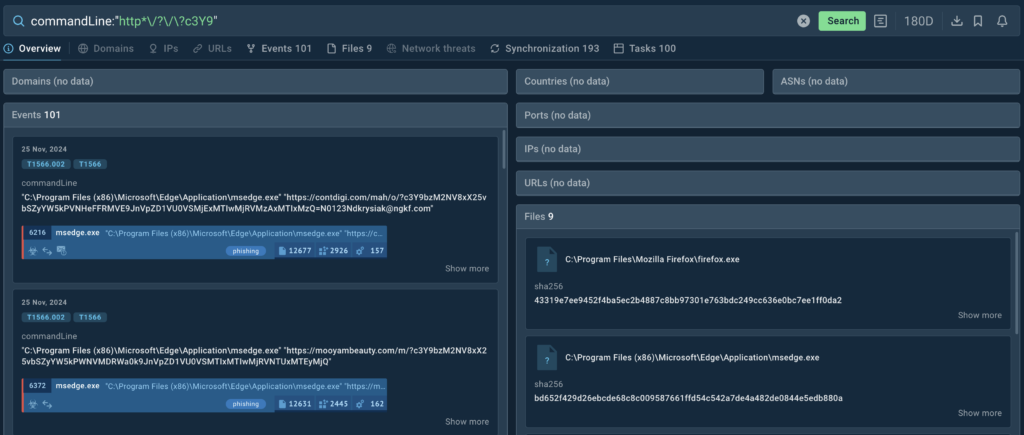
Mamba2FA is a phishing kit that has seen a significant rise over the past several months. To investigate this threat and gather more context, we can utilize a typical URL pattern commonly found in its campaigns. This pattern follows the structure {domain}/{m,n,o}/?{Base64 string}.
When translating this into an actual query for TI Lookup, we can use the following search string:
Asterisk (*): This wildcard character indicates any character string. It helps expand our search to include all domains used in Mamba2FA attacks, ensuring a comprehensive investigation
Question Mark (?): This is another wildcard character that indicates exactly one character or none at all. In our case, there are two question marks in the query. The first one is the wildcard that serves as a stand-in for the characters “m”, “n”, and “o” that are commonly used in Mamba2FA URLs. The second question mark is a part of the address. To escape it, we use the slash symbol
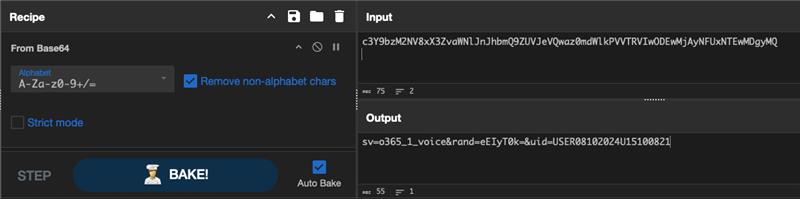
c3Y9: This is a Base64-encoded parameter found across Mamba2FA attacks. When decoded, it translates to sv=, which specifies the appearance of the phishing page
TI Lookup provides threat intel all sandbox sessions with the matching command line strings
Submitting this search query to TI Lookup allows us to access plenty of results that match our string, from command lines with URLs to sandbox sessions where these command lines were logged.
CyberChef recipe used for decoding the URL string
We then can collect the full URLs found and decode the base64-encoded parts to reveal more information on the attack and extract the list of domains from them.
Investigating the Tycoon2FA Phishing Kit
Tycoon2FA is another phishing kit, which is known for faking Microsoft authentication pages to steal victims’ credentials. With the help of TI Lookup, we can collect plenty of intel on its latest samples and wider infrastructure.
A good practice for constructing queries in TI Lookup is to link each condition of the query to specific features of the phishkit:
If the phishkit hides its pages behind Cloudflare Turnstile, we add a condition for this;
If there is content encryption, we add a condition for the encryption library;
If the phishing page stores content on a specific CDN (Content Delivery Network), we add a condition for that as well.
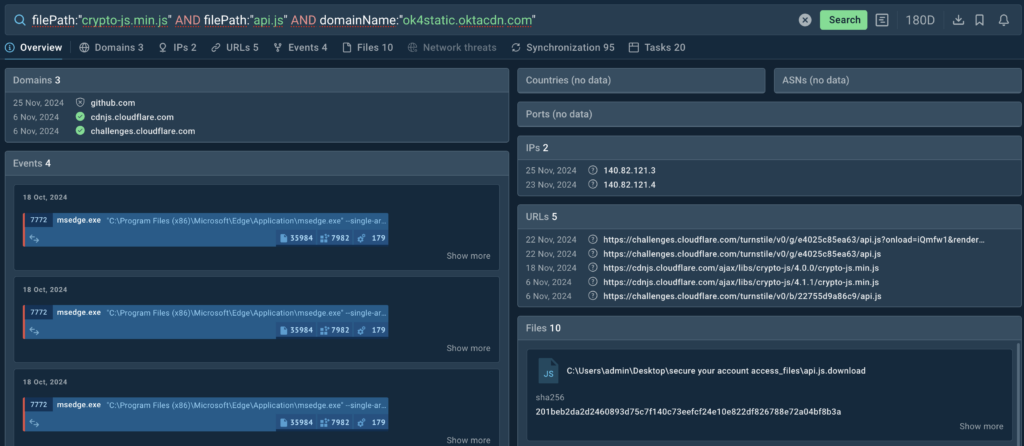
An example of this query construction method for searching Tycoon2FA phishkit attacks can be seen below.
As noted, one of the signature features of this threat is the abuse of Cloudflare’s Turnstile challenges as a barrier for automated security solutions. For the challenge to work, Tycoon2FA loads the library api.js.
During the challenge, Tycoon2FA also loads another library, crypto-js.min.js, which it uses at later stages of the attack to encrypt its communication with the command-and-control center (C2).
The phish kit also accesses elements stored on the legitimate domain ok4static[.]oktacdn[.]com and utilizes them to build phishing pages designed to imitate Microsoft’s login pages.
The two libraries and the domain make solid pieces of intel to pivot on using TI Lookup to find instances of Tycoon2FA attacks.
TI Lookup pulls relevant threat data from sandbox sessions where both libraries were detected
In response to the query, the service provides a list of matching events found in 20 decrypted sandbox sessions over the past 180 days. Search queries created on this principle based on domains bring more results because they work not only on decrypted network sessions but also require a larger number of conditions in the query. We can collect the information and take a closer look at the sessions to observe attacks as they unfolded in real time.
Tracking APT-C-36 Phishing Campaigns
Threat Intelligence Lookup can be helpful in your investigations into campaigns that are attributed to advanced persistent threats (APTs).
Consider the example of Blind Eagle, also known as APT-C-36, which is a group that targets Latin America. You can learn more about their activity in ANY.RUN’s article on the threats discovered in October 2024.
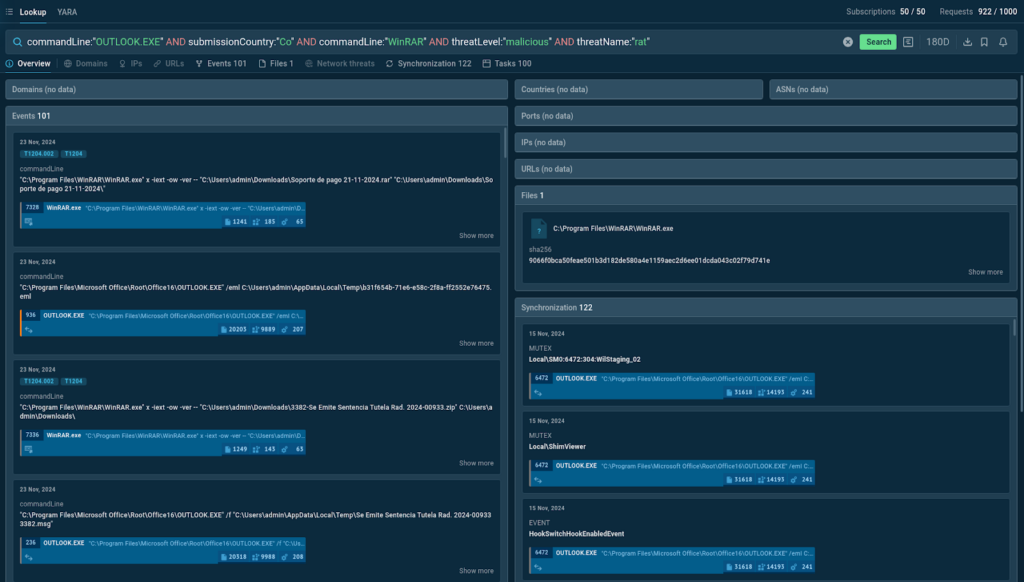
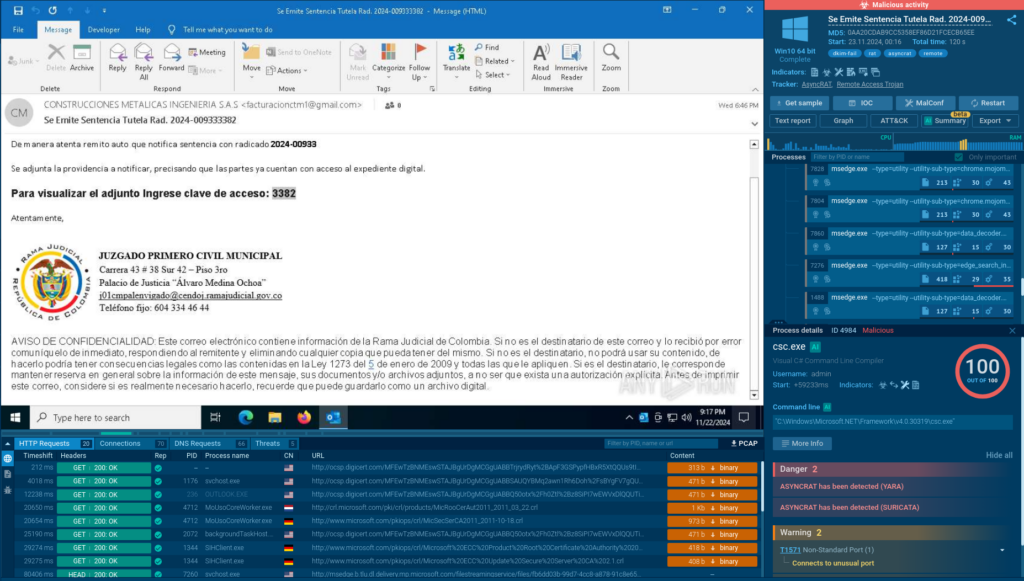
Knowing that APT-C-36 uses phishing emails with attachments that contain malware, such as AsyncRAT and Remcos, and attempts to reach targets in LATAM countries like Colombia, we can put together a TI Lookup query to find more relevant samples related to their attacks:
The service provides 100 sandbox sessions that match our request along with events from those sessions.
One of the phishing emails containing an AsyncRAT payload discovered via TI Lookup
Among them, we can find samples of actual phishing emails belonging to Blind Eagle’s campaigns which were publicly uploaded to ANY.RUN’s sandbox for analysis by users in Colombia.
Another useful way to utilize TI Lookup is to proactively research phishing attacks that use legitimate resources to access content as legitimate account login pages do. For example, attackers often use parts of the Azure Content Delivery Network (CDN), like backgrounds or login forms.
To find these examples with TI Lookup, you can specify the Azure domain. However, it’s important to filter out non-malicious instances. You can do this by excluding Microsoft’s domains from the query using the NOT operator and setting the threat level to “suspicious.” You are free to add exceptions at your discretion if you wish to cleanse your query results of unsolicited submissions.
We can also include parameters with empty values. This signals the system to show all possible results for those parameters.
Adding domainName:”” and suricataMessage:”” will display all domains and Suricata messages found across sandbox sessions that match our query.
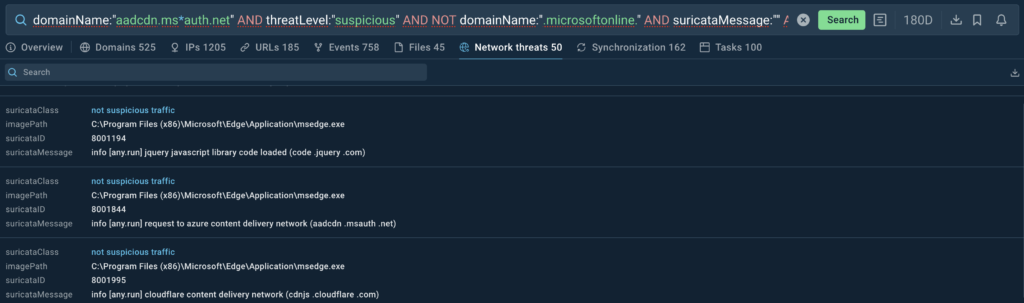
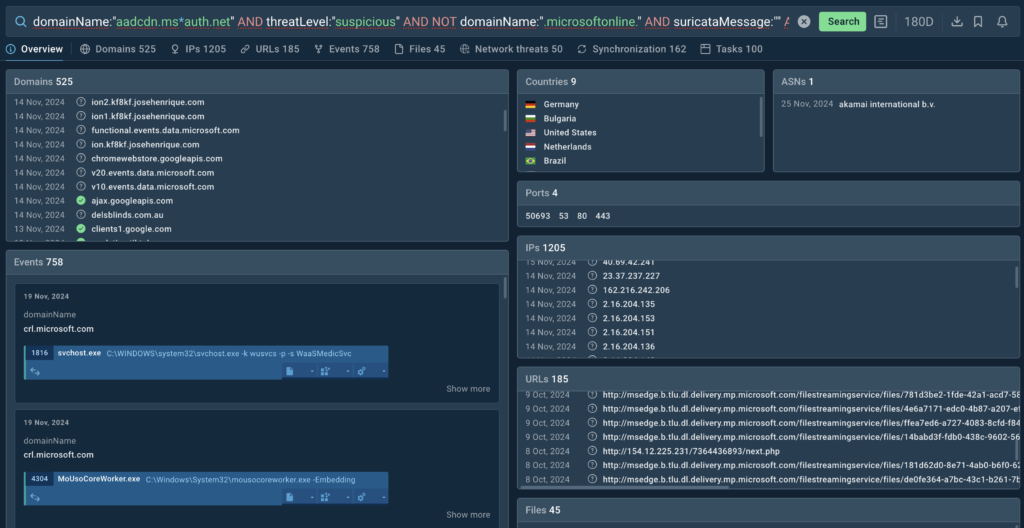
In response to our query, TI Lookup provides extensive threat data, including the Suricata rules that were triggered during analysis.
Suricata rules that match our query
We can also observe all the domains in sessions involving phishing attacks. We can collect them and examine each of them separately to check if they are used as part of attackers’ infrastructure.
Apart from domains, TI Lookup also presents IP addresses and URLs
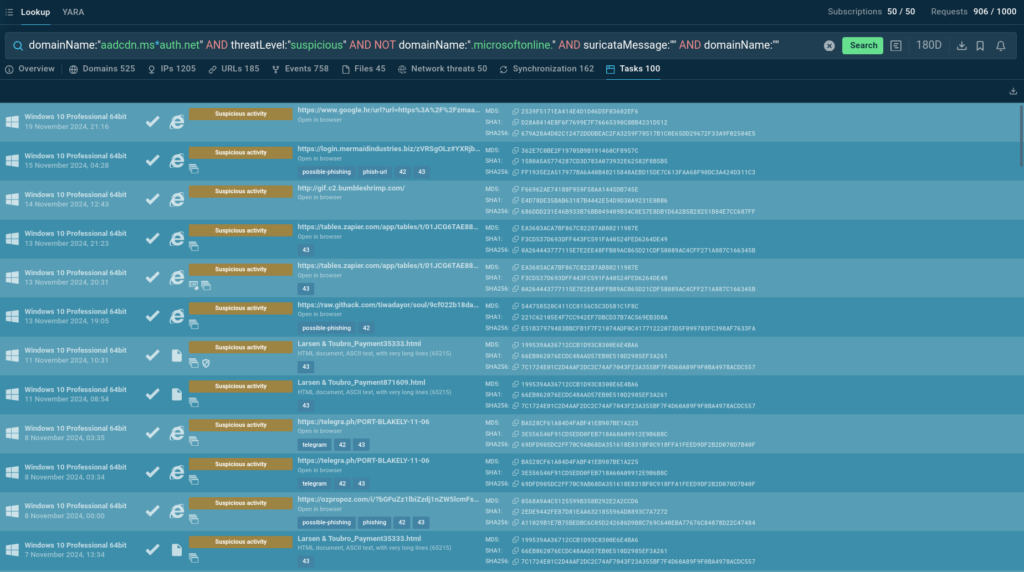
We also get a list of sandbox sessions that feature examples of actual phishing attacks abusing Microsoft’s infrastructure.
Sandbox sessions that match our request
Let’s explore one of them in greater detail.
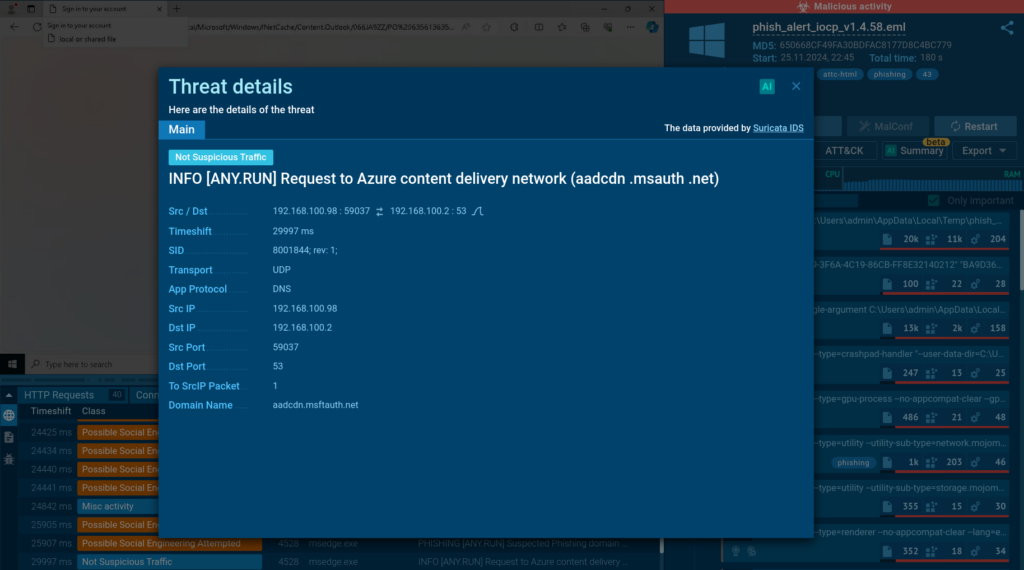
Suricata rule displayed in the ANY.RUN sandbox
In this session we can see a Suricata rule that indicates a request to Azure’s content delivery network.
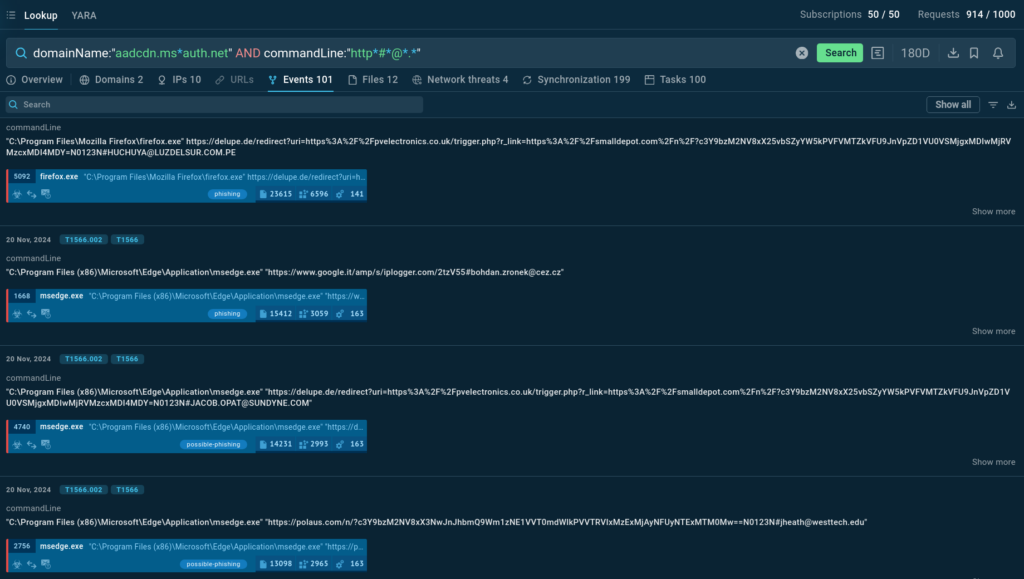
You can build upon this search by adding a commandLine parameter. Specifically, we can tell the service to look for command lines that include URLs with the # anchor, which attackers use to add a victim’s email address.
Learn to Track Emerging Cyber Threats
Check out expert guide to collecting intelligence on emerging threats with TI Lookup
Read full guide
To find results with URLs containing email addresses, include the @ symbol in your query. Use the * wildcard to account for any characters between the anchor and the @ symbol.
Command line data from logged during ANY.RUN sandbox sessions
Apart from relevant sandbox sessions, the service returns a list of command lines extracted from these, allowing us to see the URLs used by attackers that include emails of victims.
About ANY.RUN
ANY.RUN’s Threat Intelligence Lookup and YARA Search services allow for precise threat hunting and the extraction of valuable insights into current cyber threat trends. What’s impressive is how fast these scans are—they significantly speed up the analysis process, allowing for quick detection of threats and malware.
https://www.backbox.org/wp-content/uploads/2018/09/website_backbox_text_black.png00https://www.backbox.org/wp-content/uploads/2018/09/website_backbox_text_black.png2024-11-26 10:07:212024-11-26 10:07:21Investigating Phishing Threats with TI Lookup: Use Cases from an Expert
The U.S. Cybersecurity and Infrastructure Security Agency (CISA) on Monday added a now-patched critical security flaw impacting Array Networks AG and vxAG secure access gateways to its Known Exploited Vulnerabilities (KEV) catalog following reports of active exploitation in the wild.
The vulnerability, tracked as CVE-2023-28461 (CVSS score: 9.8), concerns a case of missing authentication that