https://www.backbox.org/wp-content/uploads/2018/09/website_backbox_text_black.png00https://www.backbox.org/wp-content/uploads/2018/09/website_backbox_text_black.png2024-12-05 11:06:522024-12-05 11:06:52White House Says at Least 8 US Telecom Firms, Dozens of Nations Impacted by China Hacking Campaign
Just a decade ago, people who taped over their webcam were seen as a little eccentric, shall we say. Fast forward to today, and many laptop models feature a built-in privacy shutter that lets you cover the webcam with a single swipe. Useful, yes – but if the mic is still on, the overall benefit is less clear. Is it still worth covering your webcam in 2024, or is such practice a relic of the past?
Spies in the woodwork
Ever heard of spyware? That’s what we call Trojans designed for spying and stalking. And just like they did ten years ago, many members of this family are still spying on victims through their webcam and mic. Back then, however, malware was limited mostly to taking webcam screenshots, while today, besides this, it can steal passwords from the clipboard, intercept keystrokes, remotely control your device, and play cat-and-mouse with security solutions (but not with ours). One example is the SambaSpy Trojan, which was recently discovered by our experts.
As for peeping, attackers’ motives can vary: some are just voyeurs; others might organize commercial surveillance against a CEO; still others might add such functionality to their malware on the off-chance that something interesting crops up.
Tracking can take many forms, and we’ve covered them all many times. But how to defend yourself? There are many protection methods, but they can all be divided into two groups: physical and software. Meanwhile, for those without reliable protection, covering the webcam, turning off the mic, and checking the permissions granted to newly installed programs is a no-brainer.
How to physically guard against webcam and mic surveillance
Physical protection methods are both useful and inconvenient at the same time, and compromises have to be made to ensure your privacy. What to do?…
Buy a device without a webcam or mic
Just think: intruders won’t be able to spy and eavesdrop even if they somehow get malware onto your device. But it’s hard to find such devices these days, and in most cases they’ll be either outdated or very low-performance. That said, some companies are modifying smartphones on the market by removing cameras: how do you like, for example, the non-camera iPhone? Such devices are in high demand at government and military agencies and restricted-access facilities, and even by highly religious people.
Disable the webcam and mic
Owners of desktop computers, nettops, or the above-mentioned laptop models without built-in webcam and mic can use external wired accessories. The most reliable option would be to disconnect them with a physical switch or pull them out of the socket when not in use. But there’s a danger of laziness creeping in: some users won’t bother doing it more than a couple of times, which is when RATs and nasties can appear.
In addition, there are tons of online guides on how to physically disable the laptop webcam or mic yourself. But not all devices make the procedure painless: for example, modern MacBooks use the camera as a sensor, and go into Safe Mode if it’s disabled. And once it is disabled – there’s no way back.
Opt for a “super-private” device
Some companies – such as Purism – make laptops with hardware switches that let you physically turn off the camera, microphone, Wi-Fi, or Bluetooth. However, they’re expensive, and demanding users are often left dissatisfied with the features available.
Cover the webcam
A good and common option – but not foolproof. Sure, it will thwart video surveillance, but the sound from the mic can still be potentially eavesdropped and used against you. Cover the microphone too? Modern laptops often have several mics to enhance sound quality, and taping over them all will be difficult. In some models, however, built-in microphones are disabled when you connect an external one. A life hack for them is to plug a dummy into the microphone jack (or the universal jack for mics and headphones). Your laptop will think that an external mic is connected and turn off all its built-in ones.
Software protection against tracking
In most cases, software protection is more convenient than physical – but not always as reliable.
Disable the built-in webcam and mic in the BIOS/UEFI
On many PC-compatible laptops – especially business models – you can go into the BIOS/UEFI settings at startup (if this sounds Greek to you, just scroll to the next method), find there the lines Integrated camera, Camera, Webcam, CMOS camera, Microphone or similar, and select Disabled mode. This is a good way to restrict laptop-based spying, but there’s a catch: you’ll have to reboot and undo everything should you ever need to video-call someone.
Disable devices in the OS settings
On a Windows PC, you need to do this in Device Manager. In the Start menu, go to Device Manager, find there Cameras or Audio inputs and outputs, right-click the device you need and select Disable device. You can just as easily turn it back on later, if necessary. This is much faster than rebooting the computer every time and poking around in the BIOS – but where’s the guarantee that a Trojan can’t do the same thing and turn the camera back on?
Disabling a built-in webcam and microphone in Windows Device Manager
Control permissions
Android device owners can view information about dangerous and special permissions in the Permissions section in Kaspersky for Android: All functions → My apps → Permissions. This way, only apps authorized by you will have access to the camera and microphone.
Viewing permissions in Kaspersky for Android
iOS devices offer similar functionality. To check permissions, open the Settings and go to Privacy & Security. In the menu that opens, like in Android, you can view app permissions.
Viewing permissions on iPhones
Users of the Windows versions of our Kaspersky Standard, Kaspersky Plus and Kaspersky Premium can protect their devices against webcam and microphone tracking with Webcam and Mic Control, which lets you configure your own access settings: Gear icon at the bottom of the Home window → Privacy Settings → Webcam and Mic Control Settings. There you can ask Kaspersky to:
Notify you when an app uses the camera or microphone.
Deny access for all apps without exception.
Allow only trusted apps to connect to the webcam and microphone.
Webcam and Mic Control Settings on a Windows device
Mac owners too have the option to completely block the webcam with Kaspersky Standard, Kaspersky Plus, and Kaspersky Premium: Home → Block Webcam. Our application completely blocks access to system libraries used by the webcam, so no programs can access it.
Block Webcam on a Mac device
Protect yourself
Physical or software protection — the choice is yours, but we recommend a combination of the two. For example, buy a webcam shutter and configure Kaspersky to disable the mic. The main thing is that your device – whether a smartphone, laptop or desktop – must be properly protected.
https://www.backbox.org/wp-content/uploads/2018/09/website_backbox_text_black.png00https://www.backbox.org/wp-content/uploads/2018/09/website_backbox_text_black.png2024-12-05 11:06:412024-12-05 11:06:41How to guard against webcam and microphone tracking | Kaspersky official blog
Recently, our analyst team shared their research into a zero-day attack involving the use of corrupted malicious files to bypass static detection systems. Now, we present a technical analysis of this method and its mechanics.
In this article, we will:
Demonstrate how attackers corrupt archives, office documents, and other files
Explain how this method successfully evades detection by security systems
Show how corrupted files get recovered by their native applications
Let’s get started.
Sandbox Analysis of a Corrupted File Attack
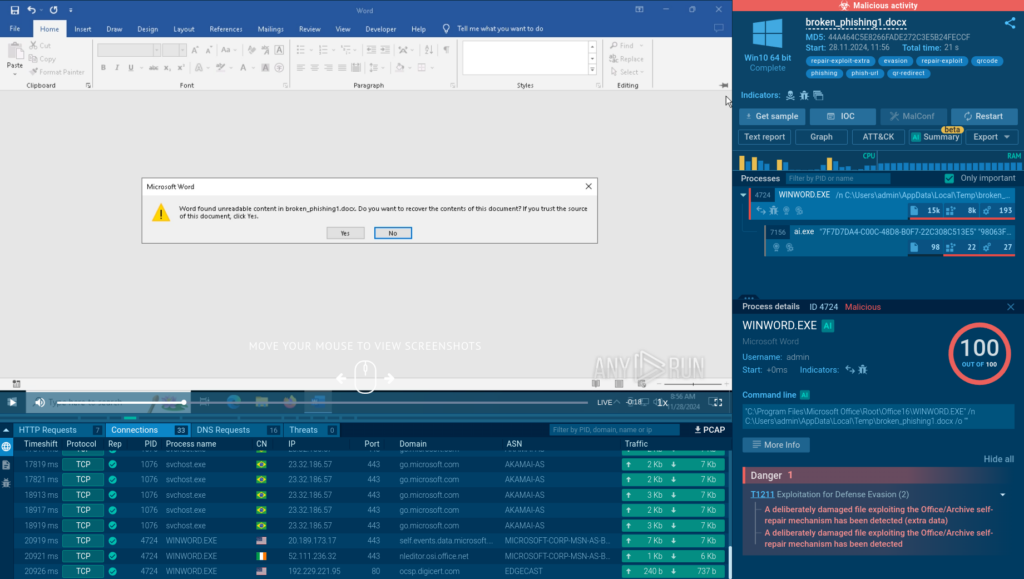
To first see how such attacks unfold, we can upload one of the corrupted filles used by attackers to ANY.RUN’s sandbox.
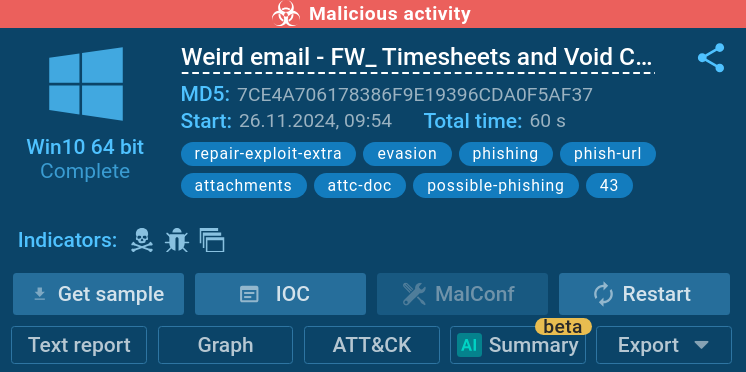
Analysis of a corrupted docx file in the ANY.RUN sandbox
Thanks to its interactivity, the sandbox lets us simulate a real scenario of user opening the broken malicious file inside the file’s corresponding application.
Word asking to restore a corrupted file
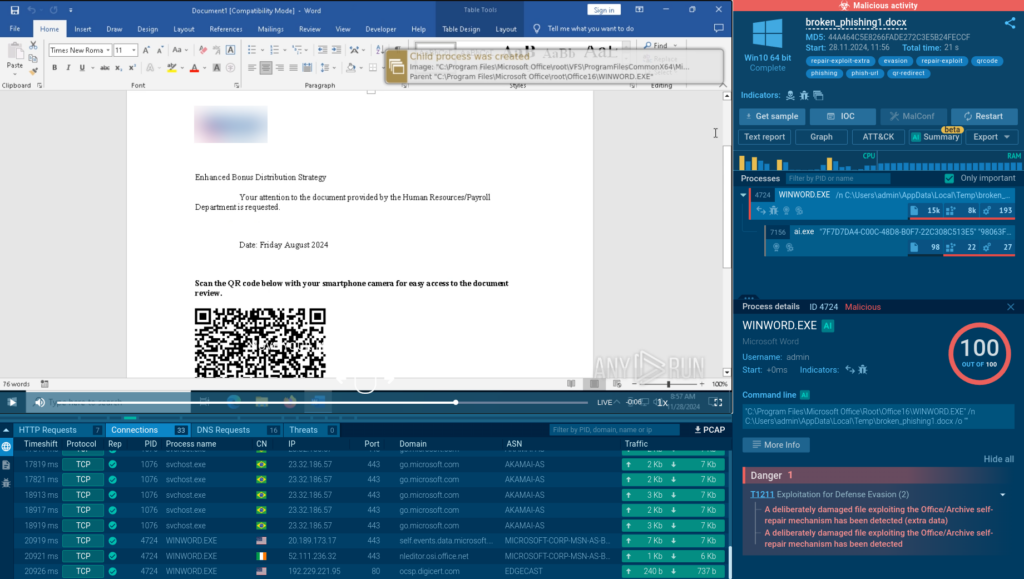
In our case, it’s a docx file. When we open it with Word, the program immediately offers us the option to recover the content of the file and successfully does it.
ANY.RUN allows you to manually open a broken file with Word
Inside, we find a QR code with a phishing link. The sandbox also automatically detects malicious activity and notifies us about this.
Black Friday 2024: Get up to 3 sandbox licenses for free
How Corrupted Files Bypass Antivirus Software and Other Automated Solutions
Analysis inside the ANY.RUN sandbox showed how a corrupted file gets restored thanks to Word’s built-in recovery mechanisms, which allows us to identify its malicious nature.
VirusTotal shows no detections for such corrupted files
The answer is simple: most antivirus software and automated tools arenot equipped with the recovery functionality that is found in applications, such as Word. This prevents them from accurately identifying the type of the corrupted file, resulting in a failure to detect and mitigate the threat.
Docx is not the only file format used by attackers. There are also corrupted archives with malicious files inside, which easily bypass spam filters because security systems cannot view their contents due to corruption.
Once downloaded onto a system, tools like WinRAR easily restore the damaged archive, making its contents available to the victim.
Now, let’s see how exactly it works on a technical level.
Technical Analysis of a Corrupted Word Document
The Structure of a Word Document
Since the mid-2000s, office documents (OpenOffice.org 2.0 — released in 2005) have been structured as archives containing the document’s content.
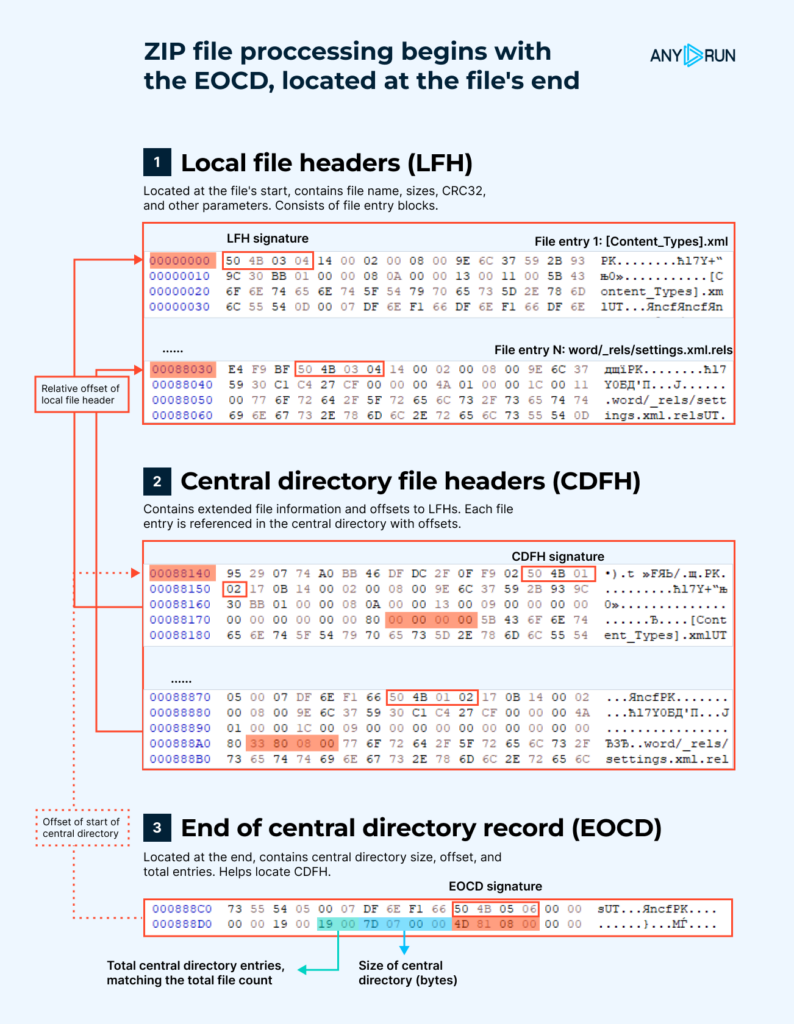
In the image below, you can see the structure of a Word document.
Word document structure (Figure 1)
As we can see, all structures within this archive are interconnected, and this relationship begins from the end.
At the end of the archive, there is a structure called the End of Central Directory Record (EOCD). This structure contains information about the size of the Central Directory File Header (CDFH), its offset, and the total number of entries in the archive. This structure helps locate the CDFH.
The CDFH duplicates the data stored in the Local File Header (LFH) and the offsets to it. Yet, this structure does not contain the compressed data itself but rather represents a hierarchy of files within the archive. This part of the structure allows you to find the LFH of each file in the archive.
The LFH is considered the header for each file in the archive. It contains important data such as the file name, compressed and uncompressed sizes, CRC32 checksum, and other parameters.
The compressed data is located after the header.
How the File Structure Can Be Manipulated by Attackers
As shown in the image above (Figure 1), the archive is structured backward, starting with the end, while all parts are linked together.
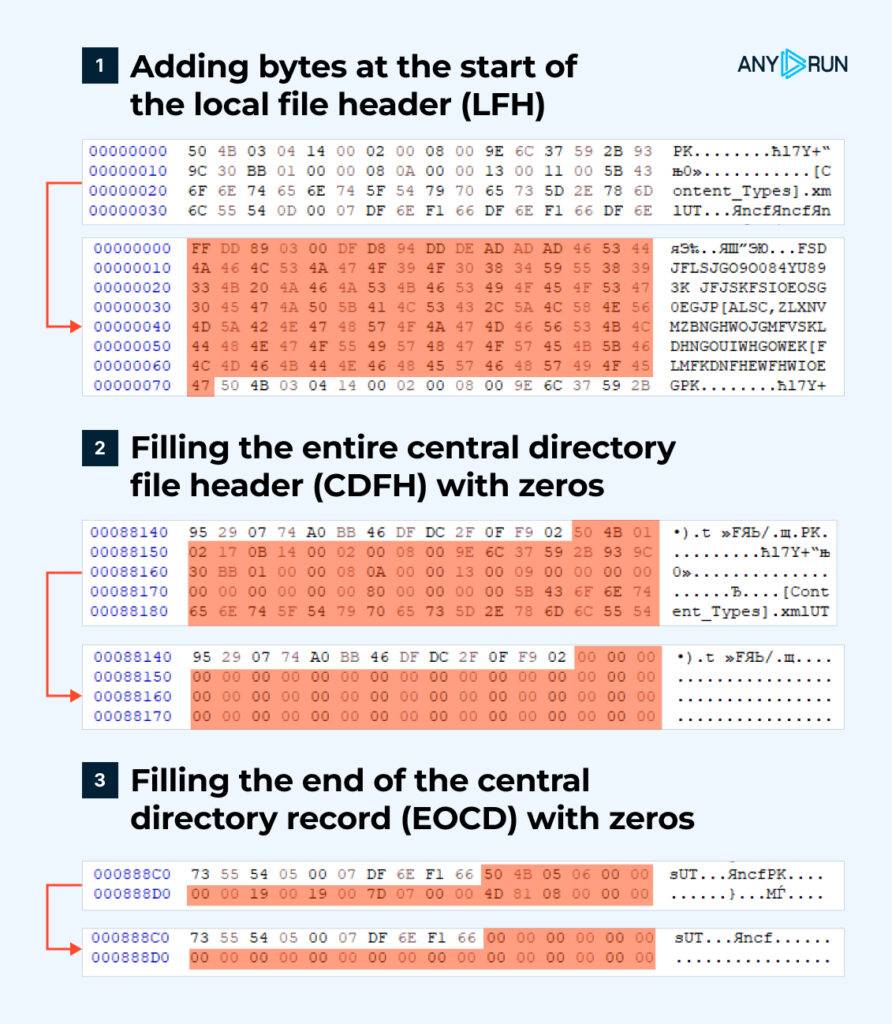
This has led us to test three different hypotheses (Figure 2):
Three hypotheses we tested (Figure 2)
1. Can Word or an archiving program recover and successfully open a file if additional data is added to the beginning of the archive?
2. Can Word or an archiving program recover and successfully open a file if we corrupt the linking between the parts and delete the CDFH, which does not contain the file data itself?
3. Can Word or an archiving program recover and successfully open a file if we corrupt the linking between the parts and erase the EOCD, which is a crucial part of the recovery process?
You can see the results of our hypothesis testing in the table below.
Word
ZIP
Hypothesis 1
Success
Fail (the file is no longer an archive)
Hypothesis 2
Success
Success
Hypothesis 3
Success (thanks to undamaged Local File Headers)
Success (thanks to undamaged Local File Headers)
During our hypothesis testing, we’ve made several noteworthy observations:
1. For minimal recovery of a Word document, the following files are essential:
[Content_Types].xml,
Word/document.xml,
word/_rels/document.xml.rels,
_rels/.rels;
These contain crucial information regarding the relationships between elements and form the standard file hierarchy required for Word to interpret the document.
2. A ZIP archive with corrupted Local File Headers will only show the file structure. The actual file content will be empty.
3. If the end part of the ZIP file is damaged, the archiving software and Word will attempt to use an alternative recovery method: by leveraging intact Local File Headers.
Our findings demonstrate that Word is more resilient to file corruption than ZIP. While Word successfully recovered files with corrupted CDFH, EOCD, and even when random bytes were added to create a non-existent LFH structure, ZIP failed in the first hypothesis, where random bytes were added to the beginning of the file.
Why Security Systems Fail to Read Corrupted Files
Security systems attempt to identify file types, including by using Magic Bytes in File Headers. In the case of office documents and ZIP archives, because the file effectively starts from the end, we can corrupt the archive structure and magic bytes, making it difficult for detection systems to identify the file type.
This leads to the inability to unpack and inspect the contents.
ANY.RUN’s Sandbox identifies malicious activityof the corrupted file
The sandbox once again has no problem detecting the threat, returning a “malicious activity” verdict.
Only one detection in VirusTotal
But, when run in VirusTotal, almost zero threat detections come back for this file.
Learn to analyze cyber threats
See a detailed guide to using ANY.RUN’s Interactive Sandbox for malware and phishing analysis
Read full guide
Conclusion
Our study revealed a vulnerability in document and archive structures. By manipulating specific components like the CDFH and EOCD, attackers can create corrupted files that are successfully repaired by applications but remain undetected by security software. As a result, we face a situation when security systems have not yet developed a clear logic for detecting such attacks, exposing the security of their users.
About ANY.RUN
ANY.RUN helps more than 500,000 cybersecurity professionals worldwide. Our interactive sandbox simplifies malware analysis of threats that target both Windows and Linux systems. Our threat intelligence products, TI Lookup, YARA Search and Feeds, help you find IOCs or files to learn more about the threats and respond to incidents faster.
With ANY.RUN you can:
Detect malware in seconds
Interact with samples in real time
Save time and money on sandbox setup and maintenance
The China-linked threat actor known as MirrorFace has been attributed to a new spear-phishing campaign mainly targeting individuals and organizations in Japan since June 2024.
The aim of the campaign is to deliver backdoors known as NOOPDOOR (aka HiddenFace) and ANEL (aka UPPERCUT), Trend Micro said in a technical analysis.
“An interesting aspect of this campaign is the comeback of a backdoor
https://www.backbox.org/wp-content/uploads/2018/09/website_backbox_text_black.png00https://www.backbox.org/wp-content/uploads/2018/09/website_backbox_text_black.png2024-12-05 09:06:502024-12-05 09:06:50ANEL and NOOPDOOR Backdoors Weaponized in New MirrorFace Campaign Against Japan
The U.S. Cybersecurity and Infrastructure Security Agency (CISA) added multiple security flaws affecting products from Zyxel, North Grid Proself, ProjectSend, and CyberPanel to its Known Exploited Vulnerabilities (KEV) catalog, citing evidence of active exploitation in the wild.
The list of vulnerabilities is as follows –
CVE-2024-51378 (CVSS score: 10.0) – An incorrect default permissions
https://www.backbox.org/wp-content/uploads/2018/09/website_backbox_text_black.png00https://www.backbox.org/wp-content/uploads/2018/09/website_backbox_text_black.png2024-12-05 07:07:122024-12-05 07:07:12CISA Warns of Active Exploitation of Flaws in Zyxel, ProjectSend, and CyberPanel
The U.K. National Crime Agency (NCA) on Wednesday announced that it led an international investigation to disrupt Russian money laundering networks that were found to facilitate serious and organized crime across the U.K., the Middle East, Russia, and South America.
The effort, codenamed Operation Destabilise, has resulted in the arrest of 84 suspects linked to two Russian-speaking networks
Authorities across 19 African countries also dismantled their infrastructure and networks, thanks to cooperation between global law enforcement and private firms.
https://www.backbox.org/wp-content/uploads/2018/09/website_backbox_text_black.png00https://www.backbox.org/wp-content/uploads/2018/09/website_backbox_text_black.png2024-12-05 01:08:382024-12-05 01:08:38How Microsoft defends against 7000 password attackers per second
Individuals concerned about the privacy of their communications should consider using encrypted messaging apps and encrypted voice communications, CISA and FBI officials say.
https://www.backbox.org/wp-content/uploads/2018/09/website_backbox_text_black.png00https://www.backbox.org/wp-content/uploads/2018/09/website_backbox_text_black.png2024-12-04 23:07:122024-12-04 23:07:12CISA Issues Guidance to Telecom Sector on Salt Typhoon Threat
https://www.backbox.org/wp-content/uploads/2018/09/website_backbox_text_black.png00https://www.backbox.org/wp-content/uploads/2018/09/website_backbox_text_black.png2024-12-04 23:07:112024-12-04 23:07:11Wyden and Schmitt Call for Investigation of Pentagon’s Phone Systems